- Benefits of Category-based Content Filtering
- ECS and Content Filtering Application
- Components of Category-based Content Filtering Solution
- Category-based Content Filtering Subsystem
- Content Rating Rules Update Server
- Cisco Datacenter Server
- External Storage System
- RADIUS Server and Policy Manager
- Web Element Manager (WEM)
- Mobility Unified Reporting System
- How Category-based Content Filtering Works
Content Filtering Support Overview
This chapter provides an overview of the Content Filtering In-line Service feature.
This chapter covers the following topics:
- Introduction
- URL Blacklisting Support
- Category-based Content Filtering Support
- How URL Blacklisting and Category-based Content Filtering Work Concurrently
- Content Filtering Server Group Support
- External Storage System
- Bulk Statistics Support
- Minimum System Requirements and Recommendations
Introduction
Content Filtering is an in-line service available for 3GPP and 3GPP2 networks to filter HTTP and WAP requests from mobile subscribers based on the URLs in the requests. This enables operators to filter and control the content that an individual subscriber can access, so that subscribers are inadvertently not exposed to universally unacceptable content and/or content inappropriate as per the subscribers’ preferences.
The CF in-line service works in conjunction with the following products:
The Content Filtering service offers the following solutions:
- URL Blacklisting: In the URL Blacklisting solution, all HTTP/WAP URLs in subscriber requests are matched against a database of “blacklisted” URLs. If there is a match, the flow is discarded, redirected, or terminated as configured. If there is no match, subscribers view the content as they would normally. URL Blacklisting may/may not be a subscriber opt-in service, operators can enable URL Blacklisting either for all subscribers or for a subset of subscribers. Typical cases include applying a blacklisted database of child porn URLs to all subscribers so that they are inadvertently not exposed to such universally unacceptable content.
- Category-based Static Content Filtering: In Category-based Static Content Filtering, all HTTP/WAP URLs in subscriber requests are matched against a static URL categorization database. Action is taken based on a URL’s category, and the action configured for that category in the subscriber’s content filtering policy. Possible actions include permitting, blocking, redirecting, and inserting content.
Typically Category-based Content Filtering is an opt-in service, subscribers self-choose a content-filtering policy or plan, such as Teen, Child, Adult, etc., and are subjected to content filtering as per their chosen plan. Also, the content filtering policies of different subscribers may be different, enabling differential access of content to them. This solution provides maximum flexibility, and is also referred to as the Policy-based Content Filtering.
Both URL Blacklisting and Category-based Content Filtering support can be concurrently enabled on a system.
Content Filtering uses Deep Packet Inspection (DPI) feature of Enhanced Charging Service (ECS) / Active Charging Service (ACS) to discern HTTP and WAP requests.
Qualified Platforms
CF is a StarOS in-line service application that runs on Cisco ASR 5000 platform. For additional platform information, refer to the appropriate System Administration Guide and/or contact your Cisco account representative.
Licenses Requirements
The URL Blacklisting, Category-based Content Filtering and External Content Filtering Server support through Internet Content Adaptation Protocol (ICAP) interface are licensed Cisco features. Separate feature licenses may be required. Contact your Cisco account representative for detailed information on specific licensing requirements. For information on installing and verifying licenses, refer to the Managing License Keys section of the Software Management Operations chapter in the System Administration Guide.
For more information on ICAP feature, see the ICAP Interface Support appendix in the administration guide for the product that you are deploying.
URL Blacklisting Support
In the URL Blacklisting solution, a blacklist is a list of known URLs/URIs, which for some reason are being denied recognition. The blacklist can be obtained from a known source such as the National Center for Missing & Exploited Children (NCMEC, http://www.missingkids.com), Internet Watch Foundation (IWF) or any other IP source. The blacklist file is obtained from various sources in known formats and converted into a non human-readable optimized format (OPTBLDB) and then made available in the system. NCMEC database is provided in plain text whereas IWF database is provided in OPTBLDB format. For more information on the blacklist file, please contact your Cisco account service representative.
Unlike the Category-based Content Filtering solution, which categorizes URLs as per a static database and takes different actions based on the different policies associated with subscribers, URL Blacklisting is applicable to all subscribers associated with a blacklisting-enabled rulebase. The same blacklist database is used for all subscribers, and for a specific URL, the same action is taken for all subscribers.
The blacklist file is downloaded and converted into a non human-readable optimized format (OPTBLDB) and then made available in the system. Once in place, all HTTP and WAP requests from subscribers are inspected in order to determine the requested destination URL/URI. If the URL/URI is not present in the blacklist then the request is passed on as usual. If the URL/URI is present in the blacklist, the request is dropped, or the flow is redirected or terminated as configured. There is no indication/messaging sent to the requesting subscribers that the requested HTTP/WAP URL/URI was rejected due to a blacklist match.
The blacklisting file can contain up to 32K URLs and the expected average size of blacklisting database (DB) is 2.5 to 5K.
The URL Blacklisting match-method can be configured to either be generic or to look for any URL/URI in its exact, literal form.
The system generates usage/event data that can be utilized as the basis for blacklist reporting. The offline reports consist of, at a minimum, a running total of the number of times a match was made against the blacklist without any information regarding the specifics of the request.
The default/configured number of versions of the Blacklist database are maintained on the chassis (both the SPCs). This enables reverting to a particular version if required.
The following figure shows the high-level URL Blacklisting architecture with ECS, and other components in a deployment scenario.
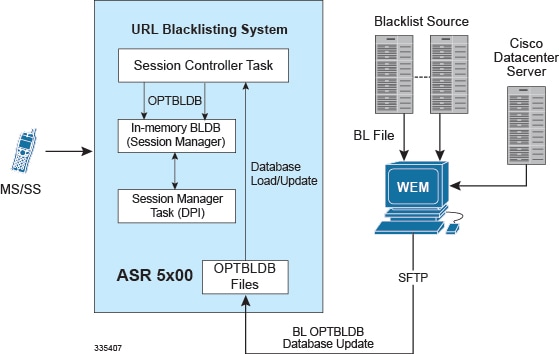
URL Blacklisting Solution Components
The URL Blacklisting solution uses the deep-packet inspection capabilities of ECS for URL/URI extraction.
ECS functionality is managed by the following components:
- Session Controller (SessCtrl): The SessCtrl runs on the primary SPC/SMC and is responsible for managing ECS and URL Blacklisting services.
- Session Manager (SessMgr): A single SessMgr treats ECS charging and URL Blacklisting that is applicable to common subscriber sessions.
Apart from ECS, the URL Blacklisting solution uses the following components:
Web Element Manager (WEM)
The WEM is a server-based application enabling complete element management of the system. The UNIX-based server application works with the network elements within the system using the Common Object Request Broker Architecture (CORBA) standard.
The WEM server must be set up with access to the following networks:
The WEM application includes the following features:
- Single point of management for a large operator deployment
- URL Blacklisting database management functions:
- Distributes OPTBLDB files to the chassis automatically at configured interval.
How URL Blacklisting Works
This section describes how URL Blacklisting works.
Blacklist Updates
The following steps describe how the blacklist is updated in the system:
URL Blacklisting Action
The following steps describe how the URL Blacklisting feature works:
Category-based Content Filtering Support
The Category-based Content Filtering application is a fully integrated, subscriber-aware in-line service provisioned on chassis running HA services. This application is transparently integrated within the ECS, and utilizes a distributed software architecture that scales with the number of active HA sessions on the system.
Content Filtering policy enforcement is the process of deciding if a subscriber should be able to receive some content. Typical options are to allow, block, or replace/redirect the content based on the rating of the content and the policy defined for that content. For the list of content categories, refer to the Category List appendix in this guide.
- Benefits of Category-based Content Filtering
- ECS and Content Filtering Application
- Components of Category-based Content Filtering Solution
- Category-based Content Filtering Subsystem
- Content Rating Rules Update Server
- Cisco Datacenter Server
- External Storage System
- RADIUS Server and Policy Manager
- Web Element Manager (WEM)
- Mobility Unified Reporting System
- How Category-based Content Filtering Works
Benefits of Category-based Content Filtering
The Category-based Content Filtering solution enables operators to ensure a simplified end-to-end traffic flow with a simple network topology. In-line deployment of Content Filtering provides a more attractive solution in contrast to out-of- line solutions where the filtering and policy enforcement is provided at some offload point that is decoupled from the bearer-processing layer.
The out-of-line model forces a session to make multiple hops through a redundant array of equipment which has a negative impact on traffic latency and limits subscriber and network visibility. In addition, the out-of-line model requires all subscriber sessions to be steered to the adjunct Content Filtering platform for policy enforcement regardless of whether this additional processing is needed. This leads to increased bandwidth provisioning requirements on gateway routers.
To facilitate network simplicity, it makes sense to leverage the benefits of deep packet inspection at a single policy enforcement point that is tied to the bearer processing layer. The advantages of this approach implemented in include the following benefits:
- Reduced processing latency: In-line service processing eliminates unnecessary hand-offs and forwarding to external network elements.
- Simplified policy provisioning: Enables all policies like Content Filtering, ECS and QoS to be retrieved from same AAA/Policy Manager signaling interface thus reducing total volume of control transactions and associated delay.
- Simplified provisioning and complete service integration: Provisioning of separate resources like packet processing cards for processing subscriber data sessions and discrete services are eliminated. The same CPU can contain active Session Manager tasks for running Content Filtering and ECS charging.
- Integration with Content Service Steering (CSS) architecture: Enables applicable sessions to be forwarded to the in-line content filtering subsystem while delay and time sensitive voice/multimedia services immediately forwarded to Internet.
- Service control: Precise control over the interaction and service order handling of bearer flows with required applications like Content Filtering, ECS, Subscriber-aware Stateful Firewall, integrated Policy Charging and Rules Function (PCRF) for Service Based Bearer Control.
Apart from the advantages described previously, Category-based Content Filtering service reduces the requirement of over-provisioning of capacity at neighboring gateway routers. It also eliminates requirements of external Server Load Balancers and enhances the accuracy in subscriber charging records.
The Category-based Content Filtering solution has the following logical functions:
- Deep Packet Inspection (DPI) for Content Rating (event detection and content extraction)
- Content Rating Function with Static Rating of URLs
- Content Rating Policy Enforcement; for example, permit, discard, deny, redirect
- Content-ware accounting CF-EDR generation for events of interest
ECS and Content Filtering Application
The Category-based Content Filtering subsystem is integrated within the Enhanced Charging Service (ECS) subsystem. Although it is not necessary to provision content-based charging in conjunction with content filtering, it is highly desirable as it enables a single point of deep-packet inspection for both services. It also enables a single policy decision and enforcement point for both services thereby streamlining the required number of signaling interactions with external AAA/Policy Manager servers. Utilizing both services also increases billing accuracy of charging records by insuring that mobile subscribers are only charged for visited sites content.
The Category-based Content Filtering solution uses Content Filtering Policy to analyze the content requested by subscribers. Content Filtering Policy provides a decision point for analyzed content on the basis of its category and priority.
The Category-based Content Filtering solution also utilizes ECS rulebases in order to determine the correct policy decision and enforcement action such as accept, block, redirect, or replace. Rulebase names are retrieved during initial authentication from the AAA/Policy Manager. Some possible examples of rulebase names include Consumer, Enterprise, Child, Teen, Adult, and Sport. Rulebase names are used by the ECS subsystem to instantiate the particular rule definition that applies for a particular session. Rulebase work in conjunction with a content filtering policy and only one content filtering policy can be associated with a rulebase.
For more information on rulebases and rule definitions, refer to the Enhanced Charging Services Administration Guide.
The CF Policy ID can be enabled depending on the subscriber (Child, Adult, etc.) and not based on the subscriber’s device. This can be configured through PCRF for Gx using the SN-CF-Policy-ID attribute. For more information, refer to the Subscriber Configuration section in the Content Filtering Service Configuration chapter of this guide.
The ECS subsystem includes L3–L7 deep packet inspection capabilities. It correlates all L3 packets with higher layer criteria such as URL detection within an HTTP header, it also provides stateful packet inspection for complex protocols like FTP, RTSP, and SIP that dynamically open ports for the data path.
The Content Filtering subsystem uses the deep-packet inspection capabilities of ECS for URL/URI extraction.
ECS functionality is managed by the following components:
Components of Category-based Content Filtering Solution
The Category-based Content Filtering solution uses the following components:
- Content Filtering Subsystem in ECS
- Cisco Datacenter Server
- ECS Storage System (ESS)
- RADIUS Server/Policy Manager
- Content Rating Rules Update Server
- Web Element Manager (WEM)
- Mobility Unified Reporting (MUR) System
The following figure shows a high-level view of the Category-based Content Filtering architecture with ECS, and other components in a deployment scenario.
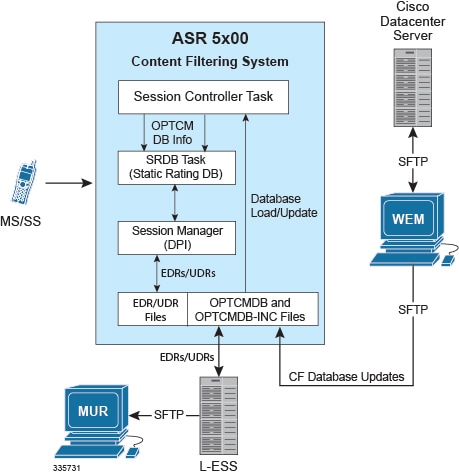
Category-based Content Filtering Subsystem
This is an internal categorization database (periodically synchronized with an external server) that provides ratings for publicly accessible traditional and mobile Web sites. When the SessMgr passes a URL/URI to internal list server, the list server returns a list of matching category ratings.
Static Rating Categorization Database (SRDB)
This is an internal categorization database (periodically synchronized with an external server) that provides ratings for publicly accessible traditional and mobile Web sites. When the SessMgr passes a URL/URI to internal list server, the list server returns a list of matching category ratings.
The list server is used to determine whether a Web site has already been classified. When the list server passes back a category rating to the filtering application, the rating is compared against the Category Policy ID applied for the subscriber to determine the appropriate action like accept, block, redirect, or replace. If the list server returns a clean rating, there is no need to perform a real-time analysis of any content delivered by the site.
The list server is used to determine whether a Web site has already been classified. When the list server passes back a category rating to the filtering application, the rating is compared against the Category Policy ID applied for the subscriber to determine the appropriate action like accept, block, redirect, or replace. If the list server returns a clean rating, there is no need to perform a real-time analysis of any content delivered by the site.
When a blocked or rejected content rating is returned, the SessMgr can insert data such as a redirect server address into the bearer data stream. If no rating is returned this means the site is capable of returning either clean or unacceptable content. In this case, the Content Filtering application uses the real-time dynamic analysis engine to examine additional content served by the site.
Each SRDB contains a replication object consisting of hash tables that map known Web sites and their subdirectories to their respective category ratings. The SessCtrl reads the index of SRDB tables with a data structure that associates keys with URL rating values and loads it onto the SRDB managers.
To boost performance and provide high availability, SRDB Manager provides functionality to load the Optimized Content Rating Master Database (OPTCMDB) volumes from its peer SRDB task. If the peer SRDB task is not in loading state then the OPTCMDB loading is done through SessCtrl to the recovered SRDB task.
DCCA Buffering Support
Static Content Filtering now interworks with DCCA buffering. Earlier, Static CF could buffer multiple packets at the same flow for rating and DCCA could handle buffering of single packet per flow. So, Static CF would not interwork with DCCA when DCCA buffering is enabled.
With the current implementation, CF does not send packets to DCCA after CF's rating, if DCCA has already buffered packets. When DCCA gets response of the buffered packet and has processed that packet, it will check if there are packets pending at CF to be processed, and will handle those packets one at a time. The remaining packets of the flow will be processed normally.
Content Rating Rules Update Server
This is a third-party content rating solution for exporting content filtering rules database information to the Category-based Content Filtering system. In addition, while exporting database updates, it collects reports of URLs processed by ECS and Content Filtering services that are reported as unknown in the deployed static rating database. This server analyzes these URLs and provides the rating in future updates for static rating database.
This server provides the following support to Cisco Datacenter Server for the content rating function:
- Provides full Vendor Format Master Database files (VFMDB) to Cisco Datacenter Server on request from Cisco Datacenter Server.
- Provides incremental Vendor Format Master Static URL Database file (VFMDB-INC) to Cisco Datacenter Server when any incremented VFMDB is available and requested from Cisco Datacenter Server.
- Receives the Unknown URLs file (Vendor Format Unknown Database File (VFUNKDB)) from Cisco Datacenter Server.
Cisco Datacenter Server
The Category-based Content Filtering solution provides a Cisco Datacenter Server to convert the VFMDB to SFMDB. It handles both full and incremental updates and processes them on a configured schedule.
This server is also responsible for distribution of SFMDB data files to WEM servers in the customer support infrastructure on a configured interval.
The server is responsible for following functionality as the Cisco Datacenter Server solution:
- Database fetching: Pulls VFMDB files from third-party Content Rating Server to Cisco Datacenter Server.
- Database conversion: Converts VFMDB files to SFMDB files. It also handles the incremented and unknown database files.
- Database poller: Provides the converted SFMDB database files for WEM in a preconfigured path.
- E-mail notification: Provides alerts and notification to the administrator for alarms.
External Storage System
The local external storage server is a part of ECS Storage System in the ECS solution architecture.
The L-ESS is a storage application running on redundant highly available servers that collect and process EDRs and UDRs from which billing events and reports are generated. Either the system pushes the EDR/UDR files to the L-ESS, or the L-ESS fetches them from the system and processes them into formats suitable for billing mediation servers and MUR server. The L-ESS consolidates the processed EDR/UDR files into a database for report generation through MUR. The database generated on an ESS by processing EDR/UDR records is a superset of the database required by MUR.
RADIUS Server and Policy Manager
The function of the RADIUS Server/Policy Manager in the Content Filtering solution is to provide per-subscriber Content Filtering provisioning information when a subscriber’s session is established. It can also issue a Change-of- Authorization (CoA) to update an in-progress session to modify the Content Filtering policy for a subscriber.
The following are the basic functions provided by a RADIUS Server/Policy Manager in the Content Filtering solution:
- Support for the in/out ACL attributes to direct traffic through ECS for processing of subscriber traffic
- Support for ECS rulebase VSA to select the ECS rulebase to be applied to filtered traffic
- Support for Content Filtering Policy identifier VSA to select the content filtering policy within the selected rulebase for a subscriber
- Support exporting a subscriber provisioning record based on MSID to the customer service interface (Customer Care Interface) so that operator’s customer care executive can see the provisioned content filtering policy for a subscriber
Web Element Manager (WEM)
The WEM is a server-based application providing complete element management of the system. The UNIX-based server application works with the network elements within the system using the Common Object Request Broker Architecture (CORBA) standard.
WEM server must be set up with access to the following networks:
For Category-based Content Filtering, the WEM application includes the following features:
- Single point of management for a large Content Filtering Service operator deployment:
- Configures and manages the operator-defined White/Black static rating database (WBLIST) for the network (WBLIST is maintained in SFMDB format) For information on how to configure WBLIST, refer to the Configuring WBLIST section in this chapter.
-
Content filtering
database management functions:
- Performs database processing in the background
- Imports full and incremental SFMDB and SFMDB-INC files from the Cisco Datacenter Server on a configured schedule
- Processes incremental SFMDB-INC updates from Cisco Datacenter Server maintaining an updated SFMDB file
- Merge the operator’s WBLIST database with the most recent SFMDB creating a SFCMDB
- Computes an incremental update to the OPTCMDB-INC suitable for updating the Content Filtering subsystem that contains a previous version OPTCMDB
- Distributes OPTCMDB/OPTCMDB-INC files to the chassis automatically at configured interval
Configuring WBLIST
Perform the following steps to configure WBLIST by the operator.
- Create a WBLIST source file using the following command in a text editor: vi wblist.txt Enter the URLs to be categorized in the below format (URL category): playboy.com DYNAM colt.com DYNAM dollarsgambling.com DYNAM erowid.org DYNAM sexetc.org DYNAM
-
Build
wblist.pub file.
- WBLIST tool is available at <EMS_Server>/server/tools/.
- Generate the wblist.pub file as given below: [root@pnqaextappsucs210-05 tools]# ./wblist -help --------------------- WHITE BLACK LIST Utility --------------------- -------------------------------------------------------- Usage : -f <path> : path is wblist source file path -o <output path> : WBLIST will be created at <path>/wblist.pub : [default : current path] -v <version> : WBLIST version number : [default 1] -h : Help -------------------------------------------------------- [root@pnqaextappsucs210-05 tools]# For example: [root@pnqaextappsucs210-05 tools]# ./wblist -f wblist.txt -o /export/home/SQA/ems/server/flash/cf/cfdatabases/wblistdb/ -v 2 --------------------- WHITE BLACK LIST Utility --------------------- Setting WBLIST file path : /export/home/SQA/ems/server/flash/cf/cfdatabases/wblistdb//wblist.pub -------------------------------------------------------- Source File : wblist.txt WBLIST file path : /export/home/SQA/ems/server/flash/cf/cfdatabases/wblistdb//wblist.pub -------------------------------------------------------- [root@pnqaextappsucs210-05 tools]#
- This wblist.pub file automatically gets merged with the SFMDB if created at <EMS Server>/ server/flash/cf/cfdatabases/wblistdb/.
Mobility Unified Reporting System
The Mobility Unified Reporting (MUR) application is a Web-based application providing a unified reporting interface for diverse data from the in-line service and storage applications. The MUR application provides comprehensive and consistent set of statistics and customized reports, statistical trending, report scheduling and distribution from chassis / in-line service product. For example, a subscriber's Quality of Experience, top 10 sites visited, top 10 users, and so on. The MUR application facilitates and enhances the operators’ ability to simply and easily determine the health and usage of the network.
The MUR application supports the generation of various reports including CF-EDR reports in PDF and XML formats. The CF-EDR reports provide the summary of traffic over CF categories, CF actions, and CF ratings. It also provides the list of top N subscribers and URLs based on their unique subscriber’s hit count and total usage.
The CF-EDR files are pushed from L-ESS to MUR at a configured time interval and stored in a specified data directory on the MUR server. It can also create the files from CF-EDRs for unrated URLs which can be pulled by WEM.
For more information on the reports, refer to the Mobility Unified Reporting System Online Help documentation.
How Category-based Content Filtering Works
The Content Filtering Subsystem which is integrated into the ECS subsystem consists of an onboard static categorization database. The filtering service uses the Deep Packet Inspection (DPI) capabilities of the ECS subsystem to classify and partition application or protocol specific flows into virtual sessions.
Content analyzers are used to identify various types of flows such as HTTP, MMS/WAP, and POP3 E-mail. A typical HTTP request for a Web page, for example, invokes TCP and HTTP traffic analyzers. Any HTTP field including URLs or URIs can be identified. When a subscriber session is bound by CSS to an ECS running content filtering service, the URL/URI is extracted and compared against the static categorization database.
The following figure and the steps describe how Category-based Content Filtering works during a subscriber call:
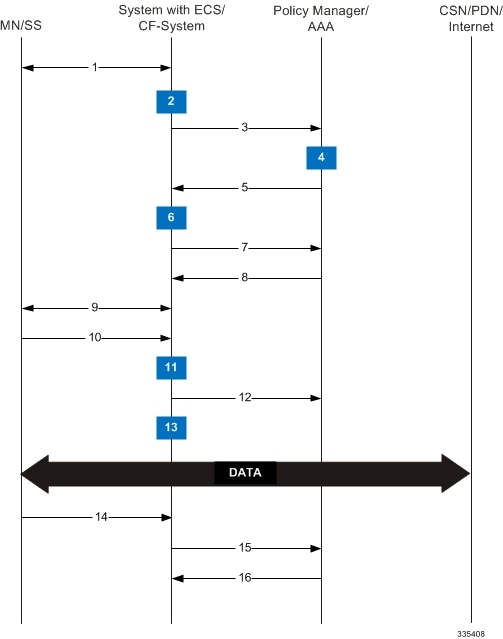
How URL Blacklisting and Category-based Content Filtering Work Concurrently
Both URL Blacklisting and Category-based Content Filtering can be concurrently enabled in a system. The following describes how URL blacklisting and content filtering are performed on HTTP/WAP traffic when concurrently enabled on a system:
Content Filtering Server Group Support
ECS supports the streamlined ICAP interface to leverage Deep Packet Inspection to enable external application servers to provide their services without performing DPI, and without being inserted in the data flow. For example, with an external Active Content Filtering (ACF) platform.
A high-level view of the streamlined ICAP interface support for external ACF is shown in the following figure.

The system with ECS is configured to support DPI and the system uses this capability for content charging as well. WAP and HTTP traffic is content filtered over the ICAP interface. RTSP traffic that contains adult content can also be content filtered on the ICAP interface. Only RTSP Request packets will be considered for content filtering over the ICAP interface.
If a subscriber initiates a WAP (WAP1.x or WAP2.0) or Web session, the subsequent GET/POST request is detected by the DPI function. The URL of the GET/POST request is extracted and passed, along with subscriber identification information and the subscriber request, in an ICAP message to the application server.
In the case of Category-based Content Filtering solution, the application server checks the URL on the basis of its category and other classifications like type, access level and content category and decides if the request should be authorized, blocked, or redirected by answering to the GET/POST with:
- A 200 OK message if the request is accepted.
- A 302 Redirect message in case of redirection. This redirect message includes the URL to which the subscriber should be redirected.
- A 403 Denied message is the request should be blocked.
Depending on the response received, the system with ECS will either pass the request unmodified, or discard the message, and respond to the subscriber with the appropriate redirection or block message.
Content Charging is performed by the ECS only after the request has been controlled by the application server. This guarantees the appropriate interworking between the external application and content-based billing. In particular, this guarantees that charging will be applied to the appropriate request in case of redirection, and that potential charging based redirections (i.e. Advice of Charge, Top Up page, etc.) will not interfere with the decisions taken by the application server.
The ACF performs the following functions:
- Retrieval of subscriber policies based on the subscriber identity passed in the ICAP message.
- Determining the appropriate action (permit, deny, redirect) to take for this type of content based on subscriber profile.
- Communication of the action (permit, deny, or redirect) decision for the URL back to the ECS subsystem.
For information on configuring the ICAP interface functionality for external ACF servers, see the ICAP Interface Support chapter of the System Administration Guide.
External Storage System
ESS supports generation of EDR/UDR/FDR (xDR) files from the chassis. To store generated xDR files, on the Cisco chassis, the system allocates 512 MB of memory on the packet processing card’s RAM. The generated xDRs are stored in CSV format in the /records directory on the packet processing card RAM. These generated xDRs can be used for billing as well as for generation of reports to analyze network usage and subscriber trends. As this temporary storage space (size configurable) reaches its limit, the system deletes older xDRs to make room for new xDRs. Setting gzip file compression extends the storage capacity by approximately 10:1.
Because of the volatile nature of the memory, xDRs can be lost due to overwriting, deletion, or unforeseen events such as power or network failure or unplanned chassis switchover. To avoid loosing charging and network analysis information, configure the CDR subsystem in conjunction with the External Storage System (ESS) to offload the xDRs for storage and analysis.
For more information on the ESS, refer to the ESS Installation and Administration Guide.
Bulk Statistics Support
The system can be configured to collect bulk statistics (performance data) and send them to a collection server (called a receiver). Bulk statistics are statistics that are collected in a group. The individual statistics are grouped by schema. Content Filtering bulk statistics support only System schema.
The system supports the configuration of up to 4 sets (primary/secondary) of receivers. Each set can be configured with to collect specific sets of statistics from the various schemas. Statistics can be pulled manually from the chassis or sent at configured intervals. The bulk statistics are stored on the receiver(s) in files. The format of the bulk statistic data files can be configured by the user. Users can specify the format of the file name, file headers, and/or footers to include information such as the date, host name, chassis uptime, the IP address of the system generating the statistics (available for only for headers and footers), and/or the time that the file was generated.
For more information, see the Configuring and Maintaining Bulk Statistics chapter of the System Administration Guide.
Minimum System Requirements and Recommendations
This section identifies the minimum system requirements for components of the URL Blacklisting / Category-based Content Filtering solutions.
Certain basic server requirements are recommended for WEM and MUR system to exploit the CF solution. For information on these system requirements, refer to Cisco Web Element Manager Installation and Administration Guide and Cisco Mobility Unified Reporting System Installation and Administration Guide.
Cisco Datacenter Server System Requirements
This section provides information on the system requirements for Cisco Datacenter Server.
Hardware Requirements
The hardware required for the various components are given below:
- or -
- Sun Microsystems Netra™ X4270 server
- Operating Environment:
- ZFS is the recommended file system with two ZFS pools.
Additional Requirements on Chassis
The chassis requires the following additional hardware and memory to handle the Content Rating Master Databases; for example, for Category-based Content Filtering OPTCMDB. The memory required may vary with the size of rating databases used for content rating service.
 Feedback