- Cisco Virtualization Experience Media Engine Overview
- Deployment and Installation Workflows
- Set up the Hosted Virtual Desktops
- Set up Users on the Cisco Unified Communications Manager
- Install Cisco Virtualization Experience Media Engine
- Configure the Network
- Provide Links to the Documentation
- Cisco AnyConnect Secure Mobility Client
- Upgrade
- Troubleshooting
- Cisco Virtualization Experience Media Engine Reference Information
Deployment and Installation Guide for Cisco Virtualization Experience Media Engine for SUSE Linux Release 10.6
Bias-Free Language
The documentation set for this product strives to use bias-free language. For the purposes of this documentation set, bias-free is defined as language that does not imply discrimination based on age, disability, gender, racial identity, ethnic identity, sexual orientation, socioeconomic status, and intersectionality. Exceptions may be present in the documentation due to language that is hardcoded in the user interfaces of the product software, language used based on RFP documentation, or language that is used by a referenced third-party product. Learn more about how Cisco is using Inclusive Language.
- Updated:
- March 9, 2015
Chapter: Cisco Virtualization Experience Media Engine Overview
Cisco Virtualization Experience Media Engine Overview
Purpose of This Guide
The Cisco Virtualization Experience Media Engine for SUSE Linux Deployment and Installation Guide includes the following task-based information required to deploy and install Cisco Virtualization Experience Media Engine for SUSE Linux (VXME for SUSE Linux).
Installation and configuration workflows and procedures that outline the processes to install and configure Cisco VXME for SUSE Linux
Installation and configuration information for Cisco AnyConnect Secure Mobility Client in a Cisco VXME for SUSE Linux deployment
Upgrade information for Cisco VXME for SUSE Linux
About Cisco Virtualization Experience Media Engine
Cisco Virtualization Experience Media Engine (VXME) extends the Cisco collaboration experience to virtual deployments. With a supported version of Cisco Jabber for Windows or Cisco UC Integration™ for Microsoft Lync, users can send and receive phone calls on their hosted virtual desktops (HVD). The VXME software detects the virtual environment and routes all audio and video streams directly from one endpoint to another, without going through the HVD.
The applications in the Cisco VXME family of products are:
Cisco Virtualization Experience Media Engine for SUSE Linux
Cisco Virtualization Experience Media Engine for Windows
For more information about Cisco VXME, visit http://www.cisco.com/c/en/us/products/collaboration-endpoints/virtualization-experience-media-engine/index.html.
Virtual Deployments
With Cisco Virtualization Experience Media Engine (VXME), thin client users can place and receive calls with their Cisco Unified Communications application (Cisco Jabber or Cisco UC Integration™ for Microsoft Lync). Cisco Virtualization Experience Media Engine consists of the Cisco VXME Agent and the Cisco VXME Client. To reduce latency and to enhance media quality, VXME streams media between the endpoints without going through the hosted virtual desktops.
Cisco Virtualization Experience Media Engine also supports some accessories. For a complete listing of supported audio and video accessories, see Unified Communications Endpoint and Client Accessories, at http://www.cisco.com/c/en/us/products/unified-communications/uc_endpoints_accessories.html.
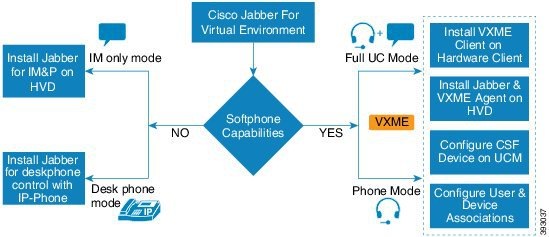
A Cisco VXME virtual deployment consists of the following components:
-
Supported SUSE Linux thin clients
For more information about supported thin clients, see Release Notes for Cisco Virtualization Experience Media Engine for SUSE Linux.
-
Cisco VXME Client installed on the thin client
-
Windows hosted virtual desktops (HVD), in a data center
-
Cisco Jabber or Cisco UC Integration™ for Microsoft Lync installed on the HVD
Cisco VXME Agent installed on the HVD
Cisco Unified Communications Manager
Considerations for Thin Clients
SUSE Linux thin clients must meet all system requirements including a compatible base image version. For more information, see Release Notes for Cisco Virtualization Experience Media Engine for SUSE Linux for your release.
Wyse Device Manager 5.0 is the recommended deployment tool to deploy VXME to Dell Wyse thin clients.
Cisco does not support any management administrative method to deploy VXME to Dell Wyse thin clients. Support for adding and enabling add-ons is provided by Dell Wyse, using Wyse Device Manager or other methods supported by Dell Wyse.
File Names
File Type |
File Name |
|---|---|
Cisco Virtualization Experience Media Engine Client for SUSE Linux SP2 (downloadable .zip file) |
Cisco_VXME_Client-10.6.0_SP2.zip |
SP2 VXME .rpm file (extracted from zip file) |
cisco_vxme_client-10.6.0-221.sletc11sp2.rpm |
SP2 VXME Prerequisites .rpm file (extracted from zip file) |
vxme-pre-reqs-10.6.0-23.sletc11sp2.rpm |
Cisco Virtualization Experience Media Engine for SUSE Linux SP3 (downloadable .zip file) |
Cisco_VXME_Client-10.6.0_SP3.zip |
SP3 VXME .rpm file (extracted from zip file) |
cisco_vxme_client-10.6.0-221.sletc11sp3.rpm |
SP3 VXME Prerequisites .rpm file (extracted from zip file) |
vxme-pre-reqs-10.6.0-23.sletc11sp3.rpm |
Cisco Virtualization Experience Media Engine Agent for SUSE Linux Release 10.6 (downloadable zip file) |
Cisco_VXME_Agent-10.6.0.zip |
VXME Agent installer file (extracted from zip file) |
CiscoVXMEAgentSetup.msi |
Cisco AnyConnect for SUSE Linux SP2 (downloadable zip file) |
Anyconnect_bundle-3.1.06073-69_SP2.zip |
SP2 Cisco AnyConnect .rpm file (extracted from zip file) |
anyconnect_bundle-3.1.06073-69.sletc11sp2sd.rpm |
Cisco AnyConnect for SUSE Linux SP3 (downloadable zip file) |
Anyconnect_bundle-3.1.06073-69_SP3.zip |
SP3 Cisco AnyConnect .rpm file (extracted from zip file) |
anyconnect_bundle-3.1.06073-69.sletc11sp3.rpm |
 Feedback