Licensing Requirements
For a complete explanation of Cisco NX-OS licensing recommendations and how to obtain and apply licenses, see the Cisco NX-OS Licensing Guide.
The documentation set for this product strives to use bias-free language. For the purposes of this documentation set, bias-free is defined as language that does not imply discrimination based on age, disability, gender, racial identity, ethnic identity, sexual orientation, socioeconomic status, and intersectionality. Exceptions may be present in the documentation due to language that is hardcoded in the user interfaces of the product software, language used based on RFP documentation, or language that is used by a referenced third-party product. Learn more about how Cisco is using Inclusive Language.
This chapter contains information on how to configure segment routing.
For a complete explanation of Cisco NX-OS licensing recommendations and how to obtain and apply licenses, see the Cisco NX-OS Licensing Guide.
Segment routing is a technique by which the path followed by a packet is encoded in the packet itself, similar to source routing. A node steers a packet through a controlled set of instructions, called segments, by prepending the packet with a segment routing header. Each segment is identified by a segment ID (SID) consisting of a flat unsigned 32-bit integer.
Border Gateway Protocol (BGP) segments, a subclass of segments, identify a BGP forwarding instruction. There are two groups of BGP segments: prefix segments and adjacency segments. Prefix segments steer packets along the shortest path to the destination, using all available equal-cost multi-path (ECMP) paths.
Border Gateway Protocol - Link State (BGP-LS) is an extension to BGP for distributing the network’s Link-State (LS) topology model to external entities. BGP-LS advertise routing updates only when they occur which uses bandwidth more effectively. They advertise only the incremental change to all routers as a multicast update. They use variable length subnet masks, which are scalable and use addressing more efficiently.
The segment routing architecture is applied directly to the MPLS data plane.
The segment routing global block (SRGB) is the range of local labels reserved for MPLS segment routing. The default label range is from 16000 to 23999.
SRGB is the local property of a segment routing node. Each node can be configured with a different SRGB value, and hence the absolute SID value associated to a prefix segment can change from node to node.
The SRGB must be a proper subset of the dynamic label range and must not overlap the optional MPLS static label range. If dynamic labels in the configured or defaulted SRGB range already have been allocated, the configuration is accepted, and the existing dynamic labels that fall in the SRGB range will remain allocated to the original client. A change to the SRGB range results in the clients deallocating their labels independent of whether the new range can be allocated.
In-service software upgrades (ISSUs) are minimally supported graceful restart. During the graceful restart period, the previously learned route and label state are retained.
Segment routing has the following guidelines and limitations:
MPLS Segment Routing can be enabled on physical ethernet interfaces and port-channel bundles. It is not supported on ethernet sub-interfaces or Switchedx Virtual Interfaces (SVI).
BGP allocates a SRGB label for iBGP route-reflector clients only when next-hop-self is in effect (for example, the prefix is advertised with the next hop being one of the local IP/IPv6 addresses on RR). When you have configured next-hop-self on a RR, the next hop is changed for the routes that are being affected (subject to route-map filtering).
Static MPLS, MPLS segment routing, and MPLS stripping cannot be enabled at the same time.
Because static MPLS, MPLS segment routing, and MPLS stripping are mutually exclusive, the only segment routing underlay for multi-hop BGP is single-hop BGP. iBGP multi-hop topologies with eBGP running as an overlay are not supported.
MPLS pop followed by a forward to a specific interface is not supported. The penultimate hop pop (PHP) is avoided by installing the Explicit NULL label as the out-label in the label FIB (LFIB) even when the control plane installs an IPv4 Implicit NULL label.
BGP labeled unicast and BGP segment routing are not supported for IPv6 prefixes.
BGP labeled unicast and BGP segment routing are not supported over tunnel interfaces (including GRE and VXLAN) or with vPC access interfaces.
MTU path discovery (RFC 2923) is not supported over MPLS label switched paths (LSPs) or segment routed paths.
The BGP configuration commands neighbor-down fib-accelerate and suppress-fib-pending are not supported for MPLS prefixes.
Reconfiguration of the segment routing global block (SRGB) results in an automatic restart of the BGP process to update the existing URIB and ULIB entries. Traffic loss occurs for a few seconds, so you should not reconfigure the SRGB in production.
When the segment routing global block (SRGB) is set to a range but the route-map label-index delta value falls outside the configured range, the allocated label is dynamically generated. For example, if the SRGB is set to a range of 16000-23999 but a route-map label-index is set to 9000, the label is dynamically allocated.
For network scalability, Cisco recommends using a hierarchical routing design with multi-hop BGP for advertising the attached prefixes from a top-of-rack (TOR) or border leaf switch.
BGP sessions are not supported over MPLS LSPs or segment routed paths.
The Layer 3 forwarding consistency checker is not supported for MPLS routes.
In order to support segment routing, BGP requires the ability to advertise a segment identifier (SID) for a BGP prefix. A BGP prefix SID is always global within the segment routing BGP domain and identifies an instruction to forward the packet over the ECMP-aware best path computed by BGP to the related prefix. The BGP prefix SID identifies the BGP prefix segment.
In the simple example below, all three routers are running iBGP and advertising Network Layer Reachability Information (NRLI) to one another. The routers are also advertising their loopback interface as the next hop, which provides the ECMP between routers 2.2.2.2 and 3.3.3.3.
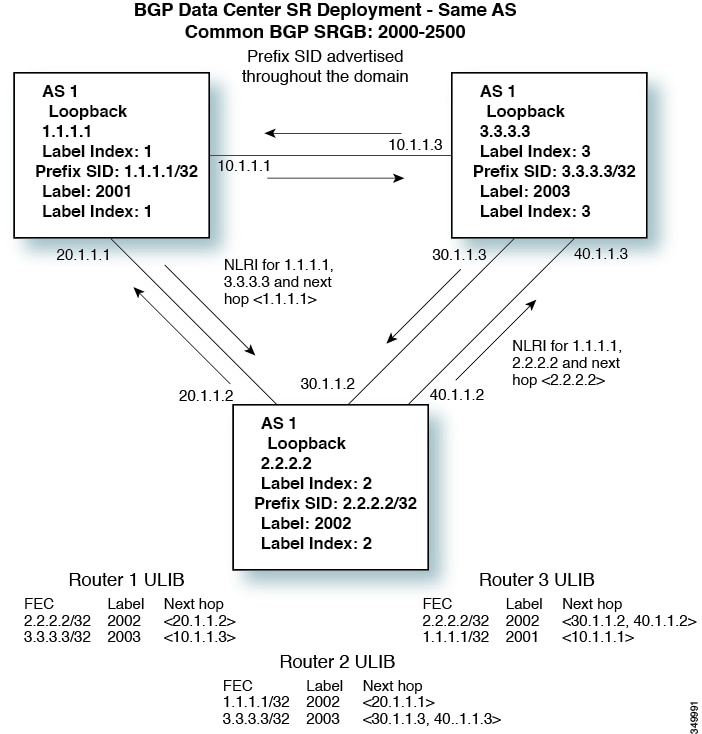
You can enable MPLS segment routing as long as mutually-exclusive MPLS features such as static MPLS are not enabled.
You must install and enable the MPLS feature set using the install feature-set mpls and feature-set mpls commands.
| Command or Action | Purpose | |
|---|---|---|
| Step 1 |
configure terminal Example: |
Enters global configuration mode. |
| Step 2 |
[no] feature mpls segment-routing Example: |
Enables the MPLS segment routing feature. The no form of this command disables the MPLS segment routing feature. |
| Step 3 |
(Optional) show running-config | inc 'feature mpls segment-routing' Example: |
(Optional)
Displays the status of the MPLS segment routing feature. |
| Step 4 |
(Optional) copy running-config startup-config Example: |
(Optional)
Copies the running configuration to the startup configuration. |
You can enable MPLS on an interface for use with segment routing.
You must install and enable the MPLS feature set using the install feature-set mpls and feature-set mpls commands.
| Command or Action | Purpose | |
|---|---|---|
| Step 1 |
configure terminal Example: |
Enters global configuration mode. |
| Step 2 |
interface type slot/port Example: |
Enters the interface configuration mode for the specified interface. |
| Step 3 |
[no] mpls ip forwarding Example: |
Enables MPLS on the specified interface. The no form of this command disables MPLS on the specified interface. |
| Step 4 |
(Optional) copy running-config startup-config Example: |
(Optional)
Copies the running configuration to the startup configuration. |
You can set the label index for routes that match the network command. Doing so causes the BGP prefix SID to be advertised for local prefixes that are configured with a route map that includes the set label-index command, provided the route map is specified in the network command that specifies the local prefix. (For more information on the network command, see the "Configuring Basic BGP" chapter in the Cisco Nexus 3600 Series NX-OS Unicast Routing Configuration Guide.)
 Note |
Route-map label indexes are ignored when the route map is specified in a context other than the network command. Also, labels are allocated for prefixes with a route-map label index independent of whether the prefix has been configured by the allocate-label route-map route-map-name command. |
| Command or Action | Purpose | |
|---|---|---|
| Step 1 |
configure terminal Example: |
Enters global configuration mode. |
| Step 2 |
route-map map-name Example: |
Creates a route map or enters route-map configuration mode for an existing route map. |
| Step 3 |
[no] set label-index index Example: |
Sets the label index for routes that match the network command. The range is from 0 to 471788. By default, a label index is not added to the route. |
| Step 4 |
exit Example: |
Exits route-map configuration mode. |
| Step 5 |
router bgp autonomous-system-number Example: |
Enables BGP and assigns the AS number to the local BGP speaker. The AS number can be a 16-bit integer or a 32-bit integer in the form of a higher 16-bit decimal number and a lower 16-bit decimal number in xx.xx format. |
| Step 6 |
address-family ipv4 unicast Example: |
Enters global address family configuration mode for the IPv4 address family. |
| Step 7 |
network ip-prefix [route-map map-name] Example: |
Specifies a network as local to this autonomous system and adds it to the BGP routing table. |
| Step 8 |
(Optional) show route-map [map-name] Example: |
(Optional)
Displays information about route maps, including the label index. |
| Step 9 |
(Optional) copy running-config startup-config Example: |
(Optional)
Copies the running configuration to the startup configuration. |
You can configure MPLS label allocation for the IPv4 unicast address family.
You must install and enable the MPLS feature set using the install feature-set mpls and feature-set mpls commands.
You must enable the MPLS segment routing feature.
| Command or Action | Purpose | |
|---|---|---|
| Step 1 |
configure terminal Example: |
Enters global configuration mode. |
| Step 2 |
[no] router bgp autonomous-system-number Example: |
Enables BGP and assigns the AS number to the local BGP speaker. The AS number can be a 16-bit integer or a 32-bit integer in the form of a higher 16-bit decimal number and a lower 16-bit decimal number in xx.xx format. Use the no option with this command to remove the BGP process and the associated configuration. |
| Step 3 |
address-family ipv4 unicast Example: |
Enters global address family configuration mode for the IPv4 address family. |
| Step 4 |
[no] allocate-label {all | route-map route-map-name} Example: |
Configures local label allocation for routes matching the specified route map or for all routes advertised in this address family. |
| Step 5 |
exit Example: |
Exits global address family configuration mode. |
| Step 6 |
neighbor ipv4-address remote-as autonomous-system-number Example: |
Configures the IPv4 address and AS number for a remote BGP peer. |
| Step 7 |
address-family ipv4 labeled-unicast Example: |
Advertises the labeled IPv4 unicast routes as specified in RFC 3107. |
| Step 8 |
(Optional) show bgp ipv4 labeled-unicast prefix Example: |
(Optional)
Displays the advertised label index and the selected local label for the specified IPv4 prefix. |
| Step 9 |
(Optional) copy running-config startup-config Example: |
(Optional)
Copies the running configuration to the startup configuration. |
The examples in this section show a common BGP prefix SID configuration between two routers.
This example shows how to advertise a BGP speaker configuration of 10.10.10.10/32 and 20.20.20.20/32 with a label index of 10 and 20, respectively. It uses the default segment routing global block (SRGB) range of 16000 to 23999.
hostname s1
install feature-set mpls
feature-set mpls

feature telnet
feature bash-shell
feature scp-server
feature bgp
feature mpls segment-routing

segment-routing mpls
vlan 1

route-map label-index-10 permit 10
  set label-index 10
route-map label-index-20 permit 10
  set label-index 20

vrf context management
  ip route 0.0.0.0/0 10.30.108.1

interface Ethernet1/1
  no switchport
  ip address 10.1.1.1/24
  no shutdown

interface mgmt0
  ip address dhcp
  vrf member management

interface loopback1
  ip address 10.10.10.10/32

interface loopback2
  ip address 20.20.20.20/32

line console
line vty

router bgp 1
  address-family ipv4 unicast
    network 10.10.10.10/32 route-map label-index-10
    network 20.20.20.20/32 route-map label-index-20
    allocate-label all
  neighbor 10.1.1.2 remote-as 2
    address-family ipv4 labeled-unicast
This example shows how to receive the configuration from a BGP speaker.
hostname s2
install feature-set mpls
feature-set mpls

feature telnet
feature bash-shell
feature scp-server
feature bgp
feature mpls segment-routing

segment-routing mpls
vlan 1

vrf context management
  ip route 0.0.0.0/0 10.30.97.1
  ip route 0.0.0.0/0 10.30.108.1

interface Ethernet1/1
  no switchport
  ip address 10.1.1.2/24
  ipv6 address 10:1:1::2/64
  no shutdown

interface mgmt0
  ip address dhcp
  vrf member management

interface loopback1
  ip address 2.2.2.2/32
line console

line vty

router bgp 2
  address-family ipv4 unicast
    allocate-label all
  neighbor 10.1.1.1 remote-as 1
    address-family ipv4 labeled-unicast
With the introduction of RFC 7752 in Cisco Nexus software, you can configure the BGP link state address family for a neighbour session with a controller to advertise the corresponding SIDs. You can configure this feature in global configuration mode and neighbour address family configuration mode.
You must enable BGP.
| Command or Action | Purpose | |||||
|---|---|---|---|---|---|---|
| Step 1 |
configure terminal Example: |
Enters global configuration mode. |
||||
| Step 2 |
router bgp autonomous-system-number Example: |
|||||
| Step 3 |
[no] address-family link-state Example: |
Configures the BGP router.
Enters address-family interface configuration mode.
|
To display the segment routing configuration, perform one of the following tasks:
| Command | Purpose |
|---|---|
|
show mpls switching |
Displays an overview of learned label to prefix to interface mappings. |
|
show bgp ipv4 labeled-unicast prefix |
Displays the advertised label index and the selected local label for the specified IPv4 prefix. |
|
show bgp link-state prefix |
Displays the link state of one BGP address family NLRI. |
|
show bgp link-state unicast |
Displays all of the BGP address family link-state NLRIs. |
|
show bgp paths |
Displays the BGP path information, including the advertised label index. |
|
show bgp {ipv4 | ipv6} unicast [ip-address | ipv6-prefix] neighbors [vrf vrf-name] |
Displays information for the BGP peers, including whether egress engineering is enabled and any peer adjacency SIDs. |
|
show mpls label range |
Displays the configured SRGB range of labels. |
|
show route-map [map-name] |
Displays information about a route map, including the label index. |
|
show running-config | inc 'feature mpls segment-routing' |
Displays the status of the MPLS segment routing feature. |
|
show {ip route | forwarding }vrf [vrf-name] |
Displays information about routing and forwarding. |
switch# show mpls switching
Legend:
(P)=Protected, (F)=FRR active, (*)=more labels in stack.

IPV4:
In-Label   Out-Label  FEC name           Out-Interface      Next-Hop
VRF default
16010      Pop Label  1.1.1.1/32         Eth1/11            60.0.0.1
16020      16020      2.2.2.2/32         Eth1/11            60.0.0.1
16050      16050      30.0.0.0/24        Eth1/11            60.0.0.1

In-Label   VRF
492287     default
This example shows how to display the configuration from a BGP speaker. The show bgp ipv4 labeled-unicast command in this example displays the prefix 10.10.10.10 with label index 10 mapping to label 16010 in the SRGB range of 16000 to 23999.
switch# show bgp ipv4 labeled-unicast 10.10.10.10/32

BGP routing table information for VRF default, address family IPv4 Label Unicast
BGP routing table entry for 10.10.10.10/32, version 7
Paths: (1 available, best #1)
Flags: (0x20c001a) on xmit-list, is in urib, is best urib route, is in HW, , has label
  label af: version 8, (0x100002) on xmit-list
  local label: 16010

  Advertised path-id 1, Label AF advertised path-id 1
  Path type: external, path is valid, is best path, no labeled nexthop, in rib
  AS-Path: 1 , path sourced external to AS
    10.1.1.1 (metric 0) from 10.1.1.1 (10.10.10.10)
      Origin IGP, MED not set, localpref 100, weight 0
      Received label 0
      Prefix-SID Attribute: Length: 10
        Label Index TLV: Length 7, Flags 0x0 Label Index 10

  Path-id 1 not advertised to any peer
  Label AF advertisement
  Path-id 1 not advertised to any peer
The following is an example of show ip route vrf 2 command.
show ip route vrf 2
IP Route Table for VRF "2"
'*' denotes best ucast next-hop
'**' denotes best mcast next-hop
'[x/y]' denotes [preference/metric]
'%<string>' in via output denotes VRF <string>

41.11.2.0/24, ubest/mbest: 1/0
    *via 1.1.1.9%default, [20/0], 13:26:48, bgp-2, external, tag 11 (mpls-vpn)
42.11.2.0/24, ubest/mbest: 1/0, attached
    *via 42.11.2.1, Vlan2, [0/0], 13:40:52, direct
42.11.2.1/32, ubest/mbest: 1/0, attached
    *via 42.11.2.1, Vlan2, [0/0], 13:40:52, local
The following is an example of show forwarding route vrf 2 command.
slot  1
=======

IPv4 routes for table 2/base

------------------+-----------------------------------------+----------------------+-----------------+-----------------
Prefix            | Next-hop                                | Interface            | Labels          | Partial Install
------------------+-----------------------------------------+----------------------+-----------------+-----------------
0.0.0.0/32           Drop                                      Null0
127.0.0.0/8          Drop                                      Null0
255.255.255.255/32   Receive                                   sup-eth1
*41.11.2.0/24        27.1.31.4                                 Ethernet1/3            PUSH  30002 492529
                     27.1.32.4                                 Ethernet1/21           PUSH  30002 492529
                     27.1.33.4                                 port-channel23         PUSH  30002 492529
                     27.11.31.4                                Ethernet1/3.11         PUSH  30002 492529
                     27.11.33.4                                port-channel23.11      PUSH  30002 492529
                     37.1.53.4                                 Ethernet1/53/1         PUSH  29002 492529
                     37.1.54.4                                 Ethernet1/54/1         PUSH  29002 492529
                     37.2.53.4                                 Ethernet1/53/2         PUSH  29002 492529
                     37.2.54.4                                 Ethernet1/54/2         PUSH  29002 492529
                     80.211.11.1                               Vlan801                PUSH  30002 492529
| Related Topic | Document Title |
|---|---|
|
BGP |
Cisco Nexus 3600 Series Unicast Routing Configuration Guide |
 Feedback