Configuring Layer 3 Virtualization

This chapter describes how to configure Layer 3 virtualization on the Cisco NX-OS device.

This chapter includes the following sections:

About Layer 3 Virtualization

Cisco NX-OS supports multiple virtual routing and forwarding instances (VRFs). Each VRF contains a separate address space with unicast and multicast route tables for IPv4 and IPv6 and makes routing decisions independent of any other VRF.

Each router has a default VRF and a management VRF.

Management VRF
  • The management VRF is for management purposes only.

  • Only the mgmt 0 interface can be in the management VRF.

  • The mgmt 0 interface cannot be assigned to another VRF.

  • No routing protocols can run in the management VRF (static only).

Default VRF
  • All Layer 3 interfaces exist in the default VRF until they are assigned to another VRF.

  • Routing protocols run in the default VRF context unless another VRF context is specified.

  • The default VRF uses the default routing context for all show commands.

  • The default VRF is similar to the global routing table concept in Cisco IOS.

VRF and Routing

All unicast and multicast routing protocols support VRFs. When you configure a routing protocol in a VRF, you set routing parameters for the VRF that are independent of routing parameters in another VRF for the same routing protocol instance.

You can assign interfaces and route protocols to a VRF to create virtual Layer 3 networks. An interface exists in only one VRF. The following figure shows one physical network split into two virtual networks with two VRFs. Routers Z, A, and B exist in VRF Red and form one address domain. These routers share route updates that do not include Router C because Router C is configured in a different VRF.
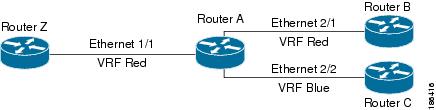
Figure 1. VRFs in a Network


By default, Cisco NX-OS uses the VRF of the incoming interface to select which routing table to use for a route lookup. You can configure a route policy to modify this behavior and set the VRF that Cisco NX-OS uses for incoming packets.

Cisco NX-OS supports route leaking (import or export) between VRFs.

Route Leaking and Importing Routes from the Default VRF

Cisco NX-OS supports route leaking (import or export) between VRFs.

You can import IP prefixes from the global routing table (the default VRF) into any other VRF by using an import policy. The VRF import policy uses a route map to specify the prefixes to be imported into a VRF. The policy can import IPv4 and IPv6 unicast prefixes.


Note


Routes in the BGP default VRF can be imported directly. Any other routes in the default VRF should be redistributed into BGP first.


IP prefixes are defined as match criteria for the import route map through standard route policy filtering mechanisms. For example, you can create an IP prefix list or an as-path filter to define an IP prefix or IP prefix range and use that prefix list or as-path filter in a match clause for the route map. Prefixes that pass through the route map are imported into the specified VRF using the import policy. IP prefixes that are imported into a VRF through this import policy cannot be reimported into another VRF.

VRF-Aware Services

A fundamental feature of the Cisco NX-OS architecture is that every IP-based feature is VRF aware.

The following VRF-aware services can select a particular VRF to reach a remote server or to filter information based on the selected VRF:

  • AAA—See the Cisco Nexus 3400-S NX-OS Security Configuration Guide for more information.

  • Call Home—See the Cisco Nexus 3400-S NX-OS System Management Configuration Guide for more information.

  • DNS—See Configuring DNS for more information.

  • HSRP—See Configuring HSRP for more information.

  • HTTP—See the Cisco Nexus 3400-S NX-OS Fundamentals Configuration Guide for more information.

  • NTP—See the Cisco Nexus 3400-S NX-OS System Management Configuration Guide for more information.

  • Ping and Traceroute—See the Cisco Nexus 3400-S NX-OS Fundamentals Configuration Guide for more information.

  • RADIUS—See the Cisco Nexus 3400-S NX-OS Security Configuration Guide for more information.

  • SNMP—See the Cisco Nexus 3400-S NX-OS System Management Configuration Guide for more information.

  • SSH—See the Cisco Nexus 3400-S NX-OS Security Configuration Guide for more information.

  • Syslog—See the Cisco Nexus 3400-S NX-OS System Management Configuration Guide for more information.

  • TACACS+—See the Cisco Nexus 3400-S NX-OS Security Configuration Guide for more information.

  • TFTP—See the Cisco Nexus 3400-S NX-OS Fundamentals Configuration Guide for more information.

  • VRRP—See Configuring VRRP for more information.

  • XML—See the Cisco Nexus 3400-S NX-OS Programmability Guide for more information.

See the appropriate configuration guide for each service for more information on configuring VRF support in that service.

Reachability

Reachability indicates which VRF contains the routing information necessary to get to the server providing the service. For example, you can configure an SNMP server that is reachable on the management VRF. When you configure that server address on the router, you also configure which VRF Cisco NX-OS must use to reach the server.

The following figure shows an SNMP server that is reachable over the management VRF. You configure Router A to use the management VRF for SNMP server host 192.0.2.1.
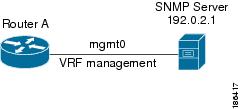
Figure 2. Service VRF Reachability


Filtering

Filtering allows you to limit the type of information that goes to a VRF-aware service based on the VRF. For example, you can configure a syslog server to support a particular VRF. The following figure shows two syslog servers with each server supporting one VRF. Syslog server A is configured in VRF Red, so Cisco NX-OS sends only system messages generated in VRF Red to syslog server A.
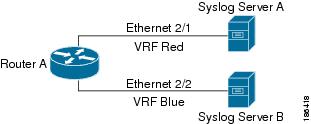
Figure 3. Service VRF Filtering


Combining Reachability and Filtering

You can combine reachability and filtering for VRF-aware services. You can configure the VRF that Cisco NX-OS uses to connect to that service as well as the VRF that the service supports. If you configure a service in the default VRF, you can optionally configure the service to support all VRFs.

The following figure shows an SNMP server that is reachable on the management VRF. You can configure the SNMP server to support only the SNMP notifications from VRF Red, for example.
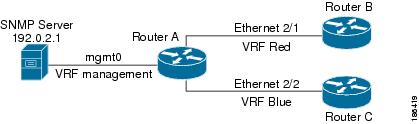
Figure 4. Service VRF Reachability Filtering


Prerequisites for VRF

You must install the Advanced Services license to use VDCs besides the default VDC.

Guidelines and Limitations for VRFs

VRFs have the following configuration guidelines and limitations:

  • By default, when you make an interface a member of an existing VRF, Cisco NX-OS removes all Layer 3 configurations. You can retain the Layer 3 configuration for an interface that is a member of an existing VRF by using either of the following:

    • Issue the system vrf-member-change retain-l3-config command before adding the interface to the VRF

    • Configure all Layer 3 parameters after adding an interface to a VRF.

  • You should add the mgmt0 interface to the management VRF and configure the mgmt0 IP address and other parameters after you add it to the management VRF.

  • If you configure an interface for a VRF before the VRF exists, the interface is operationally down until you create the VRF.

  • Cisco NX-OS creates the default and management VRFs by default. You should make the mgmt0 interface a member of the management VRF.

  • The write erase boot command does not remove the management VRF configurations. You must use the write erase command and then the write erase boot command.

  • The Cisco Nexus 3400-S platform switches support a maximum of 254 VRFs.

Guidelines and Limitations for VRF Route Leaking

VRF route leaking has the following configuration guidelines and limitations:

  • Route leaking is supported between any two non-default VRFs and from the default VRF to a non-default VRF.

  • Route leaking to the default VRF is not allowed because it is the global VRF.

  • Route leaking between VRFs is not supported for SR MPLS.

  • You can restrict route leaking to specific routes using route map filters to match designated IP addresses.

  • By default, the maximum number of IP prefixes that can be imported from the default VRF into a non-default VRF is 1000 routes.

  • There is no limit on the number of routes that can be leaked between two non-default VRFs.

  • VRF route leaking requires an Enterprise license, and BGP must be enabled.

Default Settings

The table lists the default settings for VRF parameters.

Table 1. Default VRF Parameters

Parameters

Default

Configured VRFs

Default, management

Routing context

Default VRF

Configuring VRFs


Note


If you are familiar with the Cisco IOS CLI, be aware that the Cisco NX-OS commands for this feature might differ from the Cisco IOS commands that you would use.


Creating a VRF

You can create a VRF.


Note


Any commands available in global configuration mode are also available in VRF configuration mode.


Procedure

  Command or Action Purpose

Step 1

configure terminal

Example:

switch# configure terminal
switch(config)#

Enters global configuration mode.

Step 2

[no] vrf context name

Example:

switch(config)# vrf context Enterprise
switch(config-vrf)#

Creates a new VRF and enters VRF configuration mode. The name can be any case-sensitive, alphanumeric string up to 32 characters.

Using the no option with this command deletes the VRF and all associated configurations.

Step 3

(Optional) ip route {ip-prefix | ip-addr ip-mask} {[next-hop | nh-prefix] | [interface next-hop | nh-prefix]} [tag tag-value [preference]

Example:

switch(config-vrf)# ip route 192.0.2.0/8
ethernet 1/2 192.0.2.4
(Optional)

Configures a static route and the interface for this static route. You can optionally configure the next-hop address. The preference value sets the administrative distance. The range is from 1 to 255. The default is 1.

Step 4

(Optional) show vrf [vrf-name]

Example:

switch(config-vrf)# show vrf Enterprise
(Optional)

Displays VRF information.

Step 5

(Optional) copy running-config startup-config

Example:

switch(config-vrf)# copy running-config
startup-config
(Optional)

Saves this configuration change.

Example

This example show how to create a VRF and add a static route to the VRF:

switch# configure terminal
switch(config)# vrf context Enterprise
switch(config-vrf)# ip route 192.0.2.0/8 ethernet 1/2
switch(config-vrf)# exit
switch(config)# copy running-config startup-config

Assigning VRF Membership to an Interface

You can make an interface a member of a VRF.

Before you begin

Assign the IP address for an interface after you have configured the interface for a VRF.

Procedure

  Command or Action Purpose

Step 1

configure terminal

Example:

switch# configure terminal
switch(config)#

Enters global configuration mode.

Step 2

interface interface-type slot/port

Example:

switch(config)# interface ethernet 1/2
switch(config-if)#

Enters interface configuration mode.

Step 3

vrf member vrf-name

Example:

switch(config-if)# vrf member
RemoteOfficeVRF

Adds this interface to a VRF.

Step 4

ip address ip-prefix/length

Example:

switch(config-if)# ip address
192.0.2.1/16

Configures an IP address for this interface. You must do this step after you assign this interface to a VRF.

Step 5

(Optional) show vrf vrf-name interface interface-type number

Example:

switch(config-vrf)# show vrf Enterprise
interface ethernet 1/2
(Optional)

Displays VRF information.

Step 6

(Optional) copy running-config startup-config

Example:

switch(config-vrf)# copy running-config
startup-config
(Optional)

Saves this configuration change.

Example

This example shows how to add an interface to the VRF:

switch# configure terminal
switch(config)# interface ethernet 1/2
switch(config-if)# vrf member RemoteOfficeVRF
switch(config-if)# ip address 192.0.2.1/16
switch(config-if)# copy running-config startup-config

Configuring VRF Parameters for a Routing Protocol

You can associate a routing protocol with one or more VRFs. See the appropriate chapter for information on how to configure VRFs for the routing protocol. This section uses OSPFv2 as an example protocol for the detailed configuration steps.

Procedure

  Command or Action Purpose

Step 1

configure terminal

Example:

switch# configure terminal
switch(config)#

Enters global configuration mode.

Step 2

router ospf instance-tag

Example:

switch (config-vrf)# router ospf 201
switch(config-router)#

Creates a new OSFPv2 instance with the configured instance tag.

Step 3

vrf vrf-name

Example:

switch(config-router)# vrf
RemoteOfficeVRF
switch(config-router-vrf)#

Enters VRF configuration mode.

Step 4

(Optional) maximum-paths paths

Example:

switch(config-router-vrf)# maximum-paths
4
(Optional)

Configures the maximum number of equal OSPFv2 paths to a destination in the route table for this VRF. This command is used for load balancing.

Step 5

exit

Example:

switch(config-router-vrf)# exit
switch(config-router)#

Exits VRF configuration mode.

Step 6

exit

Example:

switch(config-router)# exit
switch(config)#

Exits router configuration mode.

Step 7

interface interface-type slot/port

Example:

switch(config)# interface ethernet 1/2
switch(config-if)#

Enters interface configuration mode.

Step 8

vrf member vrf-name

Example:

switch(config-if)# vrf member
RemoteOfficeVRF

Adds this interface to a VRF.

Step 9

ip address ip-prefix/length

Example:

switch(config-if)# ip address
192.0.2.1/16

Configures an IP address for this interface. You must do this step after you assign this interface to a VRF.

Step 10

ip router ospf instance-tag area area-id

Example:

switch(config-if)# ip router ospf 201
area 0

Assigns this interface to the OSPFv2 instance and area configured.

Step 11

(Optional) copy running-config startup-config

Example:

switch(config-if)# copy running-config
startup-config
(Optional)

Copies the running configuration to the startup configuration.

Example

This example shows how to create a VRF and add an interface to the VRF:

switch# configure terminal
switch(config)# vrf context RemoteOfficeVRF
switch(config-vrf)# exit
switch(config)# router ospf 201
switch(config-router)# vrf RemoteOfficeVRF
switch(config-router-vrf)# maximum-paths 4
switch(config-router-vrf)# interface ethernet 1/2
switch(config-if)# vrf member RemoteOfficeVRF
switch(config-if)# ip address 192.0.2.1/16
switch(config-if)# ip router ospf 201 area 0
switch(config-if)# exit
switch(config)# copy running-config startup-config

Configuring a VRF-Aware Service

You can configure a VRF-aware service for reachability and filtering.

This section uses SNMP and IP domain lists as example services for the detailed configuration steps.

Procedure

  Command or Action Purpose

Step 1

configure terminal

Example:

switch# configure terminal
switch(config)#

Enters global configuration mode.

Step 2

snmp-server host ip-address [filter-vrf vrf-name] [use-vrf vrf-name]

Example:

switch(config)# snmp-server host
192.0.2.1 use-vrf Red

Configures a global SNMP server and configures the VRF that Cisco NX-OS uses to reach the service. Use the filter-vrf keyword to filter information from the selected VRF to this server.

Step 3

vrf context vrf-name

Example:

switch(config)# vrf context Blue
switch(config-vrf)#

Creates a new VRF.

Step 4

ip domain-list domain-name [all-vrfs] [use-vrf vrf-name]

Example:

switch(config-vrf)# ip domain-list List
all-vrfs use-vrf Blue

Configures the domain list in the VRF and optionally configures the VRF that Cisco NX-OS uses to reach the domain name listed.

Step 5

(Optional) copy running-config startup-config

Example:

switch(config-vrf)# copy running-config
startup-config
(Optional)

Saves this configuration change.

Example

This example shows how to send SNMP information for all VRFs to SNMP host 192.0.2.1, reachable on VRF Red:

switch# configure terminal
switch(config)# snmp-server host 192.0.2.1 for-all-vrfs use-vrf Red
switch(config)# copy running-config startup-config

This example shows how to filter SNMP information for VRF Blue to SNMP host 192.0.2.12, reachable on VRF Red:

switch# configure terminal
switch(config)# vrf context Blue
switch(config-vrf)# snmp-server host 192.0.2.12 use-vrf Red
switch(config)# copy running-config startup-config

Setting the VRF Scope

You can set the VRF scope for all EXEC commands (for example, show commands). Doing so automatically restricts the scope of the output of EXEC commands to the configured VRF. You can override this scope by using the VRF keywords available for some EXEC commands.

Procedure

Command or Action Purpose

routing-context vrf vrf-name

Example:

switch# routing-context vrf red
switch%red#

Sets the routing context for all EXEC commands. The default routing context is the default VRF.

Note

 
Use the routing-context vrf default command to return to the default VRF scope.

Example

To return to the default VRF scope, use the following command in EXEC mode:

Command

Purpose

routing-context vrf default

Example:

switch%red# routing-context vrf default
switch#

Sets the default routing context.

Verifying the VRF Configuration

To display VRF configuration information, perform one of the following tasks:

Command

Purpose

show bgp process vrf [ vrf-name ]

Displays the information for all or one VRF.

show vrf [vrf-name]

Displays the information for all or one VRF.

show vrf [vrf-name] detail

Displays detailed information for all or one VRF.

show vrf [vrf-name] [interface interface-type slot/port]

Displays the VRF status for an interface.

Configuration Examples for VRFs

This example shows how to configure VRF Red, add an SNMP server to that VRF, and add an instance of OSPF to VRF Red:

configure terminal
vrf context Red
    snmp-server host 192.0.2.12 use-vrf Red
    router ospf 201

vrf Red
    interface ethernet 1/2    
    vrf member Red
    ip address 192.0.2.1/16
    ip router ospf 201 area 0

This example shows how to configure VRF Red and Blue, add an instance of OSPF to each VRF, and create an SNMP context for each OSPF instance in each VRF:


vrf context Red
vrf context Blue
vrf context Green

feature ospf
    router ospf Lab    
    vrf Red

router ospf Production
    vrf Blue
    router-id 1.1.1.1
    vrf Green
    router-id 2.2.2.2

interface ethernet 1/2
    vrf member Red
    ip address 192.0.2.1/16    
    ip router ospf Lab area 0
    no shutdown

interface ethernet 10/2
    vrf member Blue
    ip address 192.0.2.1/16
    ip router ospf Production area 0
    no shutdown

interface ethernet 10/3
    vrf member Green
    ip address 192.0.2.1/16
    ip router ospf Production area 0
    no shutdown

snmp-server user admin network-admin auth md5 nbv-12345
    snmp-server community public ro
    snmp-server context lab instance Lab vrf Red
    snmp-server context production instance Production vrf Blue


Use the SNMP context lab to access the OSPF-MIB values for the OSPF instance Lab in VRF Red in this example.

This example shows how to configure route leaking between two non-default VRFs and from the default VRF to a non-default VRF:

feature bgp 
vrf context Green 
    ip route 33.33.33.33/32 35.35.1.254
    address-family ipv4 unicast
    route-target import 3:3
    route-target export 2:2
    export map test
    import map test
    import vrf default map test

interface Ethernet1/7 
    vrf member Green
    ip address 35.35.1.2/24

vrf context Shared 
    ip route 44.44.44.44/32 45.45.1.254
    address-family ipv4 unicast
    route-target import 1:1
    route-target import 2:2
    route-target export 3:3
    export map test
    import map test
    import vrf default map test

interface Ethernet1/11 
    vrf member Shared
    ip address 45.45.1.2/24

router bgp 100
    address-family ipv4 unicast
    redistribute static route-map test
    vrf Green
    address-family ipv4 unicast
    redistribute static route-map test
    vrf Shared
    address-family ipv4 unicast
    redistribute static route-map test

ip prefix-list test seq 5 permit 0.0.0.0/0 le 32 
    route-map test permit 10
    match ip address prefix-list test

ip route 100.100.100.100/32 55.55.55.1
    switch# show ip route vrf all 
    IP Route Table for VRF "default"
    '*' denotes best ucast next-hop
    '**' denotes best mcast next-hop
    '[x/y]' denotes [preference/metric]
    '%<string>' in via output denotes VRF <string>
    55.55.55.0/24, ubest/mbest: 1/0, attached
    *via 55.55.55.5, Lo0, [0/0], 00:07:59, direct
    55.55.55.5/32, ubest/mbest: 1/0, attached
    *via 55.55.55.5, Lo0, [0/0], 00:07:59, local
    100.100.100.100/32, ubest/mbest: 1/0
    *via 55.55.55.1, [1/0], 00:07:42, static

IP Route Table for VRF "management"
    '*' denotes best ucast next-hop
    '**' denotes best mcast next-hop
    '[x/y]' denotes [preference/metric]
    '%<string>' in via output denotes VRF <string>

0.0.0.0/0, ubest/mbest: 1/0
    *via 10.29.176.1, [1/0], 12:53:54, static
    10.29.176.0/24, ubest/mbest: 1/0, attached
    *via 10.29.176.233, mgmt0, [0/0], 13:11:57, direct
    10.29.176.233/32, ubest/mbest: 1/0, attached
    *via 10.29.176.233, mgmt0, [0/0], 13:11:57, local

IP Route Table for VRF "Green"
    '*' denotes best ucast next-hop
    '**' denotes best mcast next-hop
    '[x/y]' denotes [preference/metric]
    '%<string>' in via output denotes VRF <string>
    33.33.33.33/32, ubest/mbest: 1/0
    *via 35.35.1.254, [1/0], 00:23:44, static
    35.35.1.0/24, ubest/mbest: 1/0, attached
    *via 35.35.1.2, Eth1/7, [0/0], 00:26:46, direct
    35.35.1.2/32, ubest/mbest: 1/0, attached
    *via 35.35.1.2, Eth1/7, [0/0], 00:26:46, local
    44.44.44.44/32, ubest/mbest: 1/0
    *via 45.45.1.254%Shared, [20/0], 00:12:08, bgp-100, external, tag 100
    100.100.100.100/32, ubest/mbest: 1/0
    *via 55.55.55.1%default, [20/0], 00:07:41, bgp-100, external, tag 100

IP Route Table for VRF "Shared" 
    '*' denotes best ucast next-hop
    '**' denotes best mcast next-hop
    '[x/y]' denotes [preference/metric]
    '%<string>' in via output denotes VRF <string>

33.33.33.33/32, ubest/mbest: 1/0
    *via 35.35.1.254%Green, [20/0], 00:12:34, bgp-100, external, tag 100
    44.44.44.44/32, ubest/mbest: 1/0
    *via 45.45.1.254, [1/0], 00:23:16, static
    45.45.1.0/24, ubest/mbest: 1/0, attached
    *via 45.45.1.2, Eth1/11, [0/0], 00:25:53, direct
    45.45.1.2/32, ubest/mbest: 1/0, attached
    *via 45.45.1.2, Eth1/11, [0/0], 00:25:53, local
    100.100.100.100/32, ubest/mbest: 1/0
    *via 55.55.55.1%default, [20/0], 00:07:41, bgp-100, external, tag 100
switch(config)#

The following example shows how to allow re-importation of already imported routes that is introduced in the “export vrf default” command to allow VPN imported routes to be re-imported into the default-VRF.

vrf context vpn1
    address-family ipv4 unicast
        export vrf default [<prefix-limit>] map <route-map> [allow-vpn]
    address-family ipv6 unicast
        export vrf default [<prefix-limit>] map <route-map> [allow-vpn]

The following example shows a border-leaf configuration.

ip prefix-list DEFAULT_ROUTE seq 5 permit 0.0.0.0/0
route-map NO_DEFAULT_ROUTE deny 5
  match ip address prefix-list DEFAULT_ROUTE
route-map NO_DEFAULT_ROUTE permit 10
route-map allow permit 10

vrf context vni100
  vni 100
  ip route 0.0.0.0/0 Null0
  rd auto
  address-family ipv4 unicast
    route-target import 100:200
    route-target import 100:200 evpn
    route-target both auto
    route-target both auto evpn
    import vrf default map allow
    export vrf default map NO_DEFAULT_ROUTE allow-vpn
vrf context vni200
  vni 200
  ip route 0.0.0.0/0 Null0
  rd auto
  address-family ipv4 unicast
    route-target import 100:100
    route-target import 100:100 evpn
    route-target both auto
    route-target both auto evpn
    import vrf default map allow
    export vrf default map NO_DEFAULT_ROUTE

router bgp 100
    address-family ipv4 unicast
    redistribute direct route-map allow
  address-family ipv6 unicast          
    redistribute direct route-map allow
  neighbor 101.101.101.101
    remote-as 100
    update-source loopback0
    address-family l2vpn evpn
      send-community extended
  neighbor 30.0.0.2
    remote-as 300
    address-family ipv4 unicast
  vrf vni100
    address-family ipv4 unicast
      network 0.0.0.0/0
      advertise l2vpn evpn
      redistribute direct route-map allow
  vrf vni200
    address-family ipv4 unicast
      network 0.0.0.0/0
      advertise l2vpn evpn
      redistribute direct route-map allow

The following example shows BGP IPv4 Unicast configuration.

bl1(config-vrf)# show bgp ipv4 unicast 11.11.11.11/32
BGP routing table information for VRF default, address family IPv4 Unicast
BGP routing table entry for 11.11.11.11/32, version 14             
Paths: (1 available, best #1)
Flags: (0x08041a) on xmit-list, is in urib, is best urib route, is in HW

  Advertised path-id 1
  Path type: internal, path is valid, is best path, in rib
             Imported from 3.3.3.3:3:11.11.11.11/32 (VRF vni100)
  AS-Path: 150 , path sourced external to AS
    1.1.1.1 (metric 81) from 101.101.101.101 (101.101.101.101)
      Origin incomplete, MED 0, localpref 100, weight 0
      Received label 100
      Extcommunity:
          RT:100:100
          ENCAP:8
          Router MAC:5254.004e.a437
      Originator: 1.1.1.1 Cluster list: 101.101.101.101

  Path-id 1 advertised to peers:
    30.0.0.2

bl1(config-vrf)# show bgp vrf vni100 ipv4 unicast 11.11.11.11/32
BGP routing table information for VRF vni100, address family IPv4 Unicast
BGP routing table entry for 11.11.11.11/32, version 8                    
Paths: (1 available, best #1)                                            
Flags: (0x08041e) on xmit-list, is in urib, is best urib route, is in HW 
  vpn: version 19, (0x100002) on xmit-list                               

  Advertised path-id 1, VPN AF advertised path-id 1
  Path type: internal, path is valid, is best path, in rib
             Imported from 1.1.1.1:3:[5]:[0]:[0]:[32]:[11.11.11.11]:[0.0.0.0]/224
  AS-Path: 150 , path sourced external to AS
    1.1.1.1 (metric 81) from 101.101.101.101 (101.101.101.101)
      Origin incomplete, MED 0, localpref 100, weight 0
      Received label 100
      Extcommunity:
          RT:100:100
          ENCAP:8
          Router MAC:5254.004e.a437
      Originator: 1.1.1.1 Cluster list: 101.101.101.101

  VRF advertise information:
  Path-id 1 not advertised to any peer

  VPN AF advertise information:
  Path-id 1 not advertised to any peer

The following example shows BGP IPv6 Unicast configuration.

bl1(config-vrf)# show bgp ipv6 unicast 11::11/128
BGP routing table information for VRF default, address family IPv6 Unicast
BGP routing table entry for 11::11/128, version 13               
Paths: (1 available, best #1)
Flags: (0x08041a) on xmit-list, is in u6rib, is best u6rib route, is in HW

  Advertised path-id 1
  Path type: internal, path is valid, is best path
             Imported from 3.3.3.3:3:11::11/128 (VRF vni100)
  AS-Path: 150 , path sourced external to AS
    ::ffff:1.1.1.1 (metric 81) from 101.101.101.101 (101.101.101.101)
      Origin incomplete, MED 0, localpref 100, weight 0
      Received label 100
      Extcommunity:
          RT:100:100
          ENCAP:8
          Router MAC:5254.004e.a437
      Originator: 1.1.1.1 Cluster list: 101.101.101.101

  Path-id 1 advertised to peers:
    30::2

bl1(config-vrf)# show bgp vrf vni100 ipv6 unicast 11::11/128
BGP routing table information for VRF vni100, address family IPv6 Unicast
BGP routing table entry for 11::11/128, version 6                        
Paths: (1 available, best #1)                                            
Flags: (0x08041e) on xmit-list, is in u6rib, is best u6rib route, is in HW
  vpn: version 7, (0x100002) on xmit-list                                 

  Advertised path-id 1, VPN AF advertised path-id 1
  Path type: internal, path is valid, is best path
             Imported from 1.1.1.1:3:[5]:[0]:[0]:[128]:[11::11]:[0::]/416
  AS-Path: 150 , path sourced external to AS
    ::ffff:1.1.1.1 (metric 81) from 101.101.101.101 (101.101.101.101)
      Origin incomplete, MED 0, localpref 100, weight 0
      Received label 100
      Extcommunity:
          RT:100:100
          ENCAP:8
          Router MAC:5254.004e.a437
      Originator: 1.1.1.1 Cluster list: 101.101.101.101

  VRF advertise information:
  Path-id 1 not advertised to any peer

  VPN AF advertise information:
  Path-id 1 not advertised to any peer

The following example shows the output of show ipv4 route command

bl1(config-if)# show ip route
IP Route Table for VRF "default"
'*' denotes best ucast next-hop 
'**' denotes best mcast next-hop              
'[x/y]' denotes [preference/metric] 
'%<string>' in via output denotes VRF <string>                         
   
0.0.0.0/0, ubest/mbest: 1/0
    *via vrf vni100, Null0, [20/0], 1d04h, bgp-100, external, tag 100 
1.1.1.1/32, ubest/mbest: 1/0 
    *via 103.0.0.1, Eth1/1, [110/81], 1d04h, ospf-100, intra
2.2.2.2/32, ubest/mbest: 1/0
    *via 103.0.0.1, Eth1/1, [110/81], 1d04h, ospf-100, intra 
3.3.3.3/32, ubest/mbest: 2/0, attached
    *via 3.3.3.3, Lo0, [0/0], 1d04h, local
    *via 3.3.3.3, Lo0, [0/0], 1d04h, direct
9.9.9.9/32, ubest/mbest: 1/0, attached
    *via 9.9.9.9%vni100, Lo9, [20/0], 1d03h, bgp-100, external, tag 100 
10.0.0.0/24, ubest/mbest: 1/0 
    *via 1.1.1.1, [200/0], 1d04h, bgp-100, internal, tag 100 (evpn) segid: 100 tunnelid: 0x1010101 encap: VXLAN                    
11.11.11.11/32, ubest/mbest: 1/0  
    *via 1.1.1.1, [200/0], 1d04h, bgp-100, internal, tag 150 (evpn) segid: 100 tunnelid: 0x1010101 encap: VXLAN 
20.0.0.0/24, ubest/mbest: 1/0 
    *via 2.2.2.2, [200/0], 1d04h, bgp-100, internal, tag 100 (evpn) segid: 200 tunnelid: 0x2020202 encap: VXLAN 
22.22.22.22/32, ubest/mbest: 1/0 
    *via 2.2.2.2, [200/0], 1d04h, bgp-100, internal, tag 250 (evpn) segid: 200 tunnelid: 0x2020202 encap: VXLAN 
30.0.0.0/24, ubest/mbest: 1/0, attached
    *via 30.0.0.1, Eth1/2, [0/0], 1d04h, direct 
30.0.0.1/32, ubest/mbest: 1/0, attached 
    *via 30.0.0.1, Eth1/2, [0/0], 1d04h, local 
33.33.33.33/32, ubest/mbest: 1/0 
    *via 30.0.0.2, [20/0], 1d04h, bgp-100, external, tag 300 
100.0.0.0/24, ubest/mbest: 1/0, attached 
    *via 100.0.0.3%vni100, Vlan100, [20/0], 1d04h, bgp-100, external, tag 100 
101.0.0.0/24, ubest/mbest: 1/0 
    *via 103.0.0.1, Eth1/1, [110/80], 1d04h, ospf-100, intra 
101.101.101.101/32, ubest/mbest: 1/0  
    *via 103.0.0.1, Eth1/1, [110/41], 1d04h, ospf-100, intra
102.0.0.0/24, ubest/mbest: 1/0
    *via 103.0.0.1, Eth1/1, [110/80], 1d04h, ospf-100, intra
103.0.0.0/24, ubest/mbest: 1/0, attached 
    *via 103.0.0.2, Eth1/1, [0/0], 1d04h, direct 
103.0.0.2/32, ubest/mbest: 1/0, attached


The following example shows the output of show ipv6 route command

bl1(config-vrf)# show bgp ipv6 unicast 11::11/128
BGP routing table information for VRF default, address family IPv6 Unicast
BGP routing table entry for 11::11/128, version 13               
Paths: (1 available, best #1)
Flags: (0x08041a) on xmit-list, is in u6rib, is best u6rib route, is in HW

  Advertised path-id 1
  Path type: internal, path is valid, is best path
             Imported from 3.3.3.3:3:11::11/128 (VRF vni100)
  AS-Path: 150 , path sourced external to AS
    ::ffff:1.1.1.1 (metric 81) from 101.101.101.101 (101.101.101.101)
      Origin incomplete, MED 0, localpref 100, weight 0
      Received label 100
      Extcommunity:
          RT:100:100
          ENCAP:8
          Router MAC:5254.004e.a437
      Originator: 1.1.1.1 Cluster list: 101.101.101.101

  Path-id 1 advertised to peers:
    30::2

bl1(config-vrf)# show bgp vrf vni100 ipv6 unicast 11::11/128
BGP routing table information for VRF vni100, address family IPv6 Unicast
BGP routing table entry for 11::11/128, version 6                        
Paths: (1 available, best #1)                                            
Flags: (0x08041e) on xmit-list, is in u6rib, is best u6rib route, is in HW
  vpn: version 7, (0x100002) on xmit-list                                 

  Advertised path-id 1, VPN AF advertised path-id 1
  Path type: internal, path is valid, is best path
             Imported from 1.1.1.1:3:[5]:[0]:[0]:[128]:[11::11]:[0::]/416
  AS-Path: 150 , path sourced external to AS
    ::ffff:1.1.1.1 (metric 81) from 101.101.101.101 (101.101.101.101)
      Origin incomplete, MED 0, localpref 100, weight 0
      Received label 100
      Extcommunity:
          RT:100:100
          ENCAP:8
          Router MAC:5254.004e.a437
      Originator: 1.1.1.1 Cluster list: 101.101.101.101

  VRF advertise information:
  Path-id 1 not advertised to any peer

  VPN AF advertise information:
  Path-id 1 not advertised to any peer

Additional References

For more information related to implementing virtualization, see the following sections:

Related Documents for VRFs

Related Topic

Document Title

VRFs

Cisco Nexus 3400-S NX-OS Fundamentals Configuration Guide

Cisco Nexus 3400-S NX-OS System Management Configuration Guide

Standards

Standards

Title

No new or modified standards are supported by this feature, and support for existing standards has not been modified by this feature.

—