- Preface
- New and Changed Information
- IP SLAs Overview
- Configuring IP SLAs UDP Jitter Operations
- Configuring IP SLAs UDP Jitter Operations for VoIP
- Configuring IP SLAs UDP Echo Operations
- Configuring IP SLAs TCP Connect Operations
- Configuring a Multioperations Scheduler
- Configuring Proactive Threshold Monitoring for IP SLAs Operations
- Configuring IP SLA PBR Object Tracking
- Configuring IP SLAs DNS Operations
- Configuring IP SLAs ICMP Echo Operations
Cisco Nexus 3000 Series NX-OS IP SLAs Configuration Guide, Release 7.x
Bias-Free Language
The documentation set for this product strives to use bias-free language. For the purposes of this documentation set, bias-free is defined as language that does not imply discrimination based on age, disability, gender, racial identity, ethnic identity, sexual orientation, socioeconomic status, and intersectionality. Exceptions may be present in the documentation due to language that is hardcoded in the user interfaces of the product software, language used based on RFP documentation, or language that is used by a referenced third-party product. Learn more about how Cisco is using Inclusive Language.
- Updated:
- September 2, 2015
Chapter: Configuring IP SLAs TCP Connect Operations
Configuring IP SLAs TCP Connect Operations
This chapter describes how to configure an IP Service Level Agreements (SLAs) TCP Connect operation to measure the response time taken to perform a TCP Connect operation between a Cisco switch and devices using IPv4. TCP Connect accuracy is enhanced by using the IP SLAs Responder at the destination Cisco switch. This chapter also describes how the results of the TCP Connect operation can be displayed and analyzed to determine how the connection times to servers and hosts within your network can affect IP service levels. The TCP Connect operation is useful for measuring response times for a server used for a particular application or connectivity testing for server availability.
This chapter includes these sections.
- Information About the TCP Connect Operation
- Guidelines and Limitations for Configuring IP SLAs TCP Connect Operations
- Configuring the IP SLAs Responder on the Destination Device
- Configuring and Scheduling a TCP Connect Operation on the Source Device
- Configuration Example for a TCP Connect Operation
Information About the TCP Connect Operation
The IP SLAs TCP Connect operation measures the response time taken to perform a TCP Connect operation between a Cisco switch and devices using IP. TCP is a transport layer (Layer 4) Internet protocol that provides reliable full-duplex data transmission. The destination device can be any device using IP or an IP SLAs Responder.
In the following figure, Switch B is configured as the source IP SLAs device and a TCP Connect operation is configured with the destination device as IP Host 1.
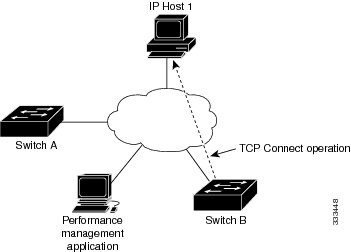
The connection response time is computed by measuring the time taken between sending a TCP request message from Switch B to IP Host 1 and receiving a reply from IP Host 1.
TCP Connect accuracy is enhanced by using the IP SLAs Responder at the destination Cisco device. If the destination switch is a Cisco switch, the IP SLAs Responder makes a TCP connection to any port number that you specified. If the destination is not a Cisco IP host, then you must specify a known destination port number such as 21 for FTP, 23 for Telnet, or 80 for an HTTP server.
Using the IP SLAs Responder is optional for a TCP Connect operation when using Cisco devices. The IP SLAs Responder cannot be configured on non-Cisco devices.
TCP Connect is used to test virtual circuit availability or application availability. Server and application connection performance can be tested by simulating Telnet, SQL, and other types of connections to help you verify your IP service levels.
Guidelines and Limitations for Configuring IP SLAs TCP Connect Operations
Configuring CoPP for IP SLA Packets
When using IP SLA operations on a large scale, a specific CoPP configuration to allow the IP SLA packets to pass through might be needed. Since IP SLA uses user defined UDP ports, there is no way to allow all IP SLA packets to the control plane. However, you can specify each destination/source port that IP SLA can use.
For more information about the verified scalability of the number of IP SLA probes, see the Cisco Nexus 3000 Series NX-OS Verified Scalability Guide.
The following shows an example of a CoPP configuration that allows IP SLA packets to pass through. It assumes destination ports and source ports in the range of 6500-7000.
ip access-list copp-system-sla-allow
  10 remark ### ALLOW SLA control packets from 1.1.1.0/24
  20 permit udp 1.1.1.0/24 any eq 1967
  30 remark ### ALLOW SLA data packets from 1.1.1.0/24 using ports 6500-7000
  40 permit udp 1.1.1.0/24 any range 6500 7000
  statistics per-entry
ip access-list copp-system-sla-deny
  10 remark ### this is a catch-all to match any other traffic
  20 permit ip any any
  statistics  per-entry
class-map type control-plane match-any copp-system-class-management-allow
  match access-group name copp-system-sla-allow
class-map type control-plane match-any copp-system-class-management-deny
  match access-group name copp-system-sla-deny
policy-map type control-plane copp-system-policy
    class copp-system-class-management-allow
    set cos 7
    police cir 4500 kbps bc 250 ms conform transmit violate drop
    class copp-system-class-management-deny
    police cir 4500 kbps bc 250 ms conform drop violate drop
control-plane
  service-policy input copp-system-policy
Matching the Netstack Port Range
IP SLA only accepts ports within the local netstack port range. The source and destination ports used in the probe's configuration must match the supported netstack ports on the SLA sender and the SLA responder.
You can use the show sockets local-port-range command to view the port range on the sender/responder.
The following is an example of viewing the netstack port range:
switch# show sockets local-port-range

Kstack local port range (15001 - 22002)
Netstack local port range (22003 – 65535)
Configuring the IP SLAs Responder on the Destination Device
This section describes how to configure the IP SLAs Responder on the destination device.
If you are using the IP SLAs Responder, ensure that the networking device to be used as the responder is a Cisco device and that you have connectivity to that device through the network.
Configuring and Scheduling a TCP Connect Operation on the Source Device
This section describes how to configure and schedule a TCP connect operation on the source device.
Perform only one of the following tasks to configure and schedule a TCP connect operation on the source device:
- Configuring and Scheduling a Basic TCP Connect Operation on the Source Device
- Configuring and Scheduling a TCP Connect Operation with Optional Parameters on the Source Device
Configuring and Scheduling a Basic TCP Connect Operation on the Source Device
This section describes how to configure and schedule a basic TCP connect operation on a source device.
 Note | If an IP SLAs Responder is permanently enabled on the destination IP address and port, use the control disable keywords with the tcp-connect command to disable control messages. |

This example shows how to configure an IP SLAs operation type of TCP Connect that will start immediately and run indefinitely:
feature sla sender
ip sla 9
 tcp-connect 172.29.139.132 5000
 frequency 10
!
ip sla schedule 9 life forever start-time now
To add proactive threshold conditions and reactive triggering for generating traps or for starting another operation, see the "Configuring Proactive Threshold Monitoring" section.
To view and interpret the results of an IP SLAs operation, use the show ip sla statistics command. Checking the output for fields that correspond to criteria in your service level agreement helps you to determine whether the service metrics are acceptable.
Configuring and Scheduling a TCP Connect Operation with Optional Parameters on the Source Device
This section describes how to configure and schedule a TCP connect operation with optional parameters on a source device.
Note | If an IP SLAs Responder is permanently enabled on the destination IP address and port, use the control disable keywords with the tcp-connect command to disable control messages. |
This example shows how to configure all the IP SLAs parameters (including defaults) for the TCP Connect operation number 10:
switch# show ip sla configuration 10
IP SLAs Infrastructure Engine-III
Entry number: 10
Owner: admin
Tag: TelnetPollServer1
Operation timeout (milliseconds): 10000
Type of operation to perform: tcp-connect
Target address/Source address: 101.101.101.1/0.0.0.0
Target port/Source port: 5000/0
Type Of Service parameter: 0xa0
Vrf Name: default
Control Packets: enabled
Schedule:
   Operation frequency (seconds): 60  (not considered if randomly scheduled)
   Next Scheduled Start Time: Start Time already passed
   Group Scheduled : FALSE
   Randomly Scheduled : FALSE
   Life (seconds): Forever
   Entry Ageout (seconds): never
   Recurring (Starting Everyday): FALSE
   Status of entry (SNMP RowStatus): Active
Threshold (milliseconds): 10000
Distribution Statistics:
   Number of statistic hours kept: 4
   Number of statistic distribution buckets kept: 5
   Statistic distribution interval (milliseconds): 10
Enhanced History:
   Aggregation Interval:900 Buckets: 100
History Statistics:
   Number of history Lives kept: 0
   Number of history Buckets kept: 25
   History Filter Type: Failures
To add proactive threshold conditions and reactive triggering for generating traps or for starting another operation, see the "Configuring Proactive Threshold Monitoring" section.
To view and interpret the results of an IP SLAs operation, use the show ip sla statistics command. Checking the output for fields that correspond to criteria in your service level agreement helps you to determine whether the service metrics are acceptable.
Configuration Example for a TCP Connect Operation
This example shows how to configure a TCP Connect operation from Switch B to the Telnet port (TCP port 23) of IP Host 1 (IP address 10.0.0.1), as shown in the "TCP Connect Operation" figure in the "Information About the IP SLAs TCP Connect Operation" section. The operation is scheduled to start immediately. In this example, the control protocol is disabled on the source (Switch B). IP SLAs use the control protocol to notify the IP SLAs Responder to enable the target port temporarily. This action allows the Responder to reply to the TCP Connect operation. In this example, because the target is not a switch and a well-known TCP port is used, there is no need to send the control message.
Switch A Configuration
configure terminal
 feature sla responder
 ip sla responder tcp-connect ipaddress 10.0.0.1 port 23
Switch B Configuration
configure terminal
 feature sla sender
 ip sla 9
  tcp-connect 10.0.0.1 23 control disable
  frequency 30
  tos 128
  timeout 1000
  tag FLL-RO
 ip sla schedule 9 start-time now
This example shows how to configure a TCP Connect operation with a specific port, port 21, and without an IP SLAs Responder. The operation is scheduled to start immediately and run indefinitely.
configure terminal
 feature sla sender
 ip sla 9
  tcp-connect 173.29.139.132 21 control disable
  frequency 30
 ip sla schedule 9 life forever start-time now
 Feedback