Using the Device Management API
In your IoT FND NB API client application, use this IoT FND server URL to access the Device API WSDL:
http://<server_address> /nbapi/device?wsdl
The documentation set for this product strives to use bias-free language. For the purposes of this documentation set, bias-free is defined as language that does not imply discrimination based on age, disability, gender, racial identity, ethnic identity, sexual orientation, socioeconomic status, and intersectionality. Exceptions may be present in the documentation due to language that is hardcoded in the user interfaces of the product software, language used based on RFP documentation, or language that is used by a referenced third-party product. Learn more about how Cisco is using Inclusive Language.
This chapter describes the Device Management API.
In your IoT FND NB API client application, use this IoT FND server URL to access the Device API WSDL:
http://<server_address> /nbapi/device?wsdl
The IoT FND distribution provides a Device Management API client (device-client script) in the cgms-tools-version .x86_64.rpm package. The client is wrapped by a shell script (/opt/cgms-tools/bin/device-client) to directly communicate with the IoT FND API.
[root@localhost bin]# ./device-client
usage:
./bin/device-client add <endpoint URL> <filename>
./bin/device-client remove <endpoint URL> <filename>
./bin/device-client set <endpoint URL> <filename> <status>
./bin/device-client update <endpoint URL> <filename>
./bin/device-client export <endpoint URL> <query>
./bin/device-client job <endpoint URL> <job id>
./bin/device-client exportRoutingTree <endpoint URL> <eid> <file_download_path> Note |
For dual WPAN supported routers, use the following script: |
Example script call for export routing tree information:
./device-client exportRoutingTree https://10.104.188.242:443/nbapi/device?wsdl CGR1240/K9+FTX2133G01Z /root/Desktop
Enter username: xxx
Enter password:
Mar 5, 2024 3:52:59 PM org.apache.cxf.wsdl.service.factory.ReflectionServiceFactoryBean buildServiceFromWSDL
INFO: Creating Service {http://devicemgmt.nbapi.cgms.cisco.com/}DeviceWebService from WSDL: https://10.104.188.242:443/nbapi/device?wsdl
Mar 20, 2024 3:52:59 PM org.apache.cxf.wsdl.service.factory.ReflectionServiceFactoryBean buildServiceFromWSDL
INFO: Creating Service {http://devicemgmt.nbapi.cgms.cisco.com/}DeviceWebService from WSDL: https://10.104.188.242:443/nbapi/device?wsdl
Excle File for export routing tree is successfully created and saved in /root/Desktop/export-routingtree-1710930180090.xlsx
Elapsed Time: [2182] ms
The following table lists device-client script commands:
|
Command |
Description |
|---|---|
|
add |
Calls the addDevices API. |
|
remove |
Calls the removeDevices API. |
|
set |
Calls the setDevices API to change the status. |
|
update |
Calls the updateDevices API to change device properties. |
|
export |
Calls the exportDevices API. |
|
job |
Calls the getJob API to get the status of the job for one of the commands above. |
|
exportRoutingTree |
Calls the exportRoutingTree API. |
Except for export, exportRoutingTree, and job, all other commands return a job ID used to query the job execution status.
This section contains the following topics:
This call lets the client add the devices specified in a CSV file to a managed device list in the IoT FND database. It is an asynchronous call that returns a job ID used to query the status of the add device job using the getJob call (see getJob).
	<dev:addDevices
>
		<file
>
		<data
>eid:564620131674</data>
		<filename
>H:\SGBU\csv_loading\test_for_device_api_2.csv</filename>
		<username
>root</username>
		</file>
</dev:addDevices>The following table describes the parameters in the interface.
|
Parameter |
Options |
Description |
|---|---|---|
|
file |
data filename username |
A structure describing the CSV file to import. This file contains the list and details of devices to add. The data type is base 64 binary. This example CSV file specifies new values for the mapLevel, latitude, and longitude properties of the specified devices: |
The following table describes the parameters in the response.
|
Parameter |
Type |
Description |
|---|---|---|
|
jobId |
int |
Use the job ID to get more information about the status of this call. For more information, see getJob. |
<soapenv:Envelope xmlns:soapenv="http://schemas.xmlsoap.org/soap/envelope/" xmlns:dev="http://devicemgmt.nbapi.cgms.cisco.com/">
   <soapenv:Header/>
   <soapenv:Body>
      <dev:addDevices>
         <!--Optional:-->
         <file>
            <!--Optional:-->
            <data>eid:564620131674</data>
            <!--Optional:-->
            <filename>H:\SGBU\csv_loading\test_for_device_api_2.csv</filename>
            <!--Optional:-->
            <username>root</username>
         </file>
      </dev:addDevices>
   </soapenv:Body>
</soapenv:Envelope>This call lets the client remove the devices specified in a CSV file from a managed devices list stored in the IoT FND database. It is an asynchronous call that returns a job ID used to query the status of this job using the getJob call (see getJob).
	<dev:removeDevices
>
		<file
>
		<data
>eid:136162421901</data>
		<filename
>h:\SGBU|csv_loading\remove_device_Notepad_format.csv</filename>
		<
username
>root</username>
		</file>
</dev:removeDevices>The following table describes the parameters in the interface.
|
Parameter |
Options |
Description |
|---|---|---|
|
file |
data filename username |
A structure describing the CSV file to import. This file contains the list of devices to remove. The data type is base 64 binary. This example CSV file specifies new values for the mapLevel, latitude, and longitude properties of the specified devices: |
The following table describes the parameters in the response.
|
Parameter |
Type |
Description |
|---|---|---|
|
jobId |
int |
The job ID used to get more information about the status of this call. For more information, see getJob. |
<soapenv:Envelope xmlns:soapenv="http://schemas.xmlsoap.org/soap/envelope/"
xmlns:dev="http://devicemgmt.nbapi.cgms.cisco.com/">
   <soapenv:Header/>
   <soapenv:Body>
      <dev:removeDevices>
         <!--Optional:-->
         <file>
            <!--Optional:-->
            <data>eid:136162421901</data>
            <!--Optional:-->
            <filename>h:\SGBU|csv_loading\remove_device_Notepad_format.csv</filename>
            <!--Optional:-->
            <username>root</username>
         </file>
      </dev:removeDevices>
   </soapenv:Body>
</soapenv:Envelope>This call sets the properties of the specified devices as defined in a CSV file.
The following table describes the parameters in the interface.
|
Parameter |
Options |
Description |
|---|---|---|
|
file |
data filename username |
A structure describing the CSV file to import. This file contains the list of devices and corresponding properties to set. The data type is base 64 binary. This example CSV file specifies new values for the mapLevel, latitude, and longitude properties of the specified devices: |
The following table describes the parameters in the response.
|
Parameter |
Type |
Description |
|---|---|---|
|
jobId |
int |
The job ID used to get more information about the status of this call. For more information, see getJob. |
This call updates the properties of the specified devices with new values provided in CSV file.
	<dev:updateDevices
>
		<file
>
		<data
>eid:568127286335</data>
		<filename
>?</filename>
		<username
>?</username>
		</file>
</dev:updateDevices>The following table describes the parameters in the interface.
|
Parameter |
Type |
Description |
|---|---|---|
|
file |
data filename username |
This structure describes the CSV file to import. This file contains the list of devices and corresponding properties to update. The data type is base 64 binary. This example CSV file specifies new values for the mapLevel, latitude, and longitude properties of the specified devices: |
The following table describes the parameters in the response.
|
Parameter |
Type |
Description |
|---|---|---|
|
jobId |
int |
The job ID used to get more information about the status of this call. For more information, see getJob. |
<soapenv:Envelope xmlns:soapenv="http://schemas.xmlsoap.org/soap/envelope/" xmlns:dev="http://devicemgmt.nbapi.cgms.cisco.com/">
   <soapenv:Header/>
   <soapenv:Body>
      <dev:updateDevices>
         <!--Optional:-->
         <file>
            <!--Optional:-->
            <data>eid:568127286335</data>
            <!--Optional:-->
            <filename>?</filename>
            <!--Optional:-->
            <username>?</username>
         </file>
      </dev:updateDevices>
   </soapenv:Body>
</soapenv:Envelope>This call returns a list of devices found by the query. This is an asynchronous call. Unlike other device management APIs, this call is blocking until all results are consumed by the caller.
	<dev:exportDevices
>
		<username
>root</username>
		<query
>cgr1000</query>
</dev:exportDevices>The following table describes the parameters in the interface.
|
Parameter |
Type |
Description |
|---|---|---|
|
username |
string |
IoT FND username used as part of the job creation. |
|
query |
string |
The query that determines the criteria of the devices to export. |
The following table describes the parameters in the response.
|
Parameter |
Type |
Description |
|---|---|---|
|
data |
base64Binary |
The job ID used to get more information about the status of this call. For more information, see getJob. |
|
date |
dateTime |
The date of the query (UTC time). |
|
query |
string |
The query used to find the devices to export. |
|
status |
string |
Status of the job. |
<soapenv:Envelope xmlns:soapenv="http://schemas.xmlsoap.org/soap/envelope/" xmlns:dev="http://devicemgmt.nbapi.cgms.cisco.com/">
   <soapenv:Header/>
   <soapenv:Body>
      <dev:exportDevices>
         <!--Optional:-->
         <username>root</username>
         <!--Optional:-->
         <query>cgr1000</query>
      </dev:exportDevices>
   </soapenv:Body>
</soapenv:Envelope>This call returns a job report describing the detailed execution status of the specified job.
	<dev:getJob
>
         <jobId
>110</jobId>
</dev:getJob>The following table describes the parameters in the interface.
|
Parameter |
Type |
Description |
|---|---|---|
|
jobId |
int |
The job ID to return information about. |
The following table describes the parameters in the response.
|
Parameter |
Type |
Description |
|---|---|---|
|
id |
integer |
Job ID. |
|
username |
string |
The username of the job submitter. |
|
filename |
string |
The filename of the job. |
|
type |
string |
The job type. |
|
totalCount |
integer |
Total count includes successes and failures. |
|
successCount |
integer |
Success count represents the number of devices successfully updated. |
|
failureCount |
integer |
Failure count summarizes the number of devices not successfully updated. |
|
status |
string |
The job execution status. |
|
submittedAt |
date |
The job submission date (UTC time). |
|
updatedAt |
date |
The job updating date (UTC time). |
|
logs |
string |
The logged messages of the job execution. |
<soapenv:Envelope xmlns:soapenv="http://schemas.xmlsoap.org/soap/envelope/" xmlns:dev="http://devicemgmt.nbapi.cgms.cisco.com/">
   <soapenv:Header/>
   <soapenv:Body>
      <dev:getJob>
         <jobId>110</jobId>
      </dev:getJob>
   </soapenv:Body>
</soapenv:Envelope>This API call allows you to export the routing tree data into an xlsx file format. The exported file contains the routing information of the parent (router) and its associated child nodes (meters), and this file is available as an attachment in the SOAP response. This is an asynchronous call. Unlike other device management APIs, this call is blocking until all results are consumed by the caller.
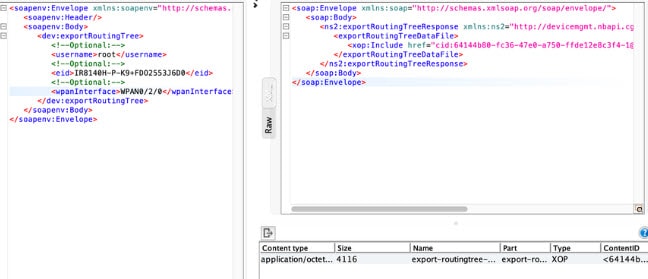
In case of dual WPAN supported routers, such as IR8100, the wpanInterface parameter is configured in the SOAP request. Based on the WPAN interface configured, the routing data is fetched.
For IOS devices, specify the EID of the router.
<dev:exportRoutingTree>
    <username>root</username>
     <eid> CGR1240/K9+FTX2133G01Z</eid>
</dev:exportRoutingTree>
For IOS-XE devices that support dual WPAN, specify the EID of the router and the WPAN interface.
<dev:exportRoutingTree>
     <username>root</username>
     <eid> IR8140H-P-K9+FDO2553J46Z</eid>
     <wpanInterface>WPAN0/1/0</wpanInterface>
</dev:exportRoutingTree>
The following table describes the parameters in the interface.
|
Parameter |
Type |
Description |
|---|---|---|
|
username |
string |
IoT FND username used as part of the job creation. |
|
eid |
string |
EIement identity (EID) of the router. |
|
wpanInterface |
string |
Configured WPAN interface of the router. |
The following table describes the parameters in the response.
|
Parameter |
Type |
Description |
|---|---|---|
|
exportRoutingTreeDataFile |
data handler |
Data handler object of the exported file. |
<soapenv:Envelope xmlns:soapenv="http://schemas.xmlsoap.org/soap/envelope/" xmlns:dev="http://devicemgmt.nbapi.cgms.cisco.com/">
   soapenv:Header/
   soapenv:Body
      dev:exportRoutingTree
         <!--Optional:-->
         <username>root</username>
         <!--Optional:-->
         <eid>	IR8140H-P-K9+FDO2553J46Z</eid>
         <!--Optional:-->
         <wpanInterface>?</wpanInterface>
      </dev:exportRoutingTree>
   </soapenv:Body>
</soapenv:Envelope>SOAP XML Response Format:
<soap:Envelope xmlns:soap="http://schemas.xmlsoap.org/soap/envelope/">
soap:Body
<ns2:exportRoutingTreeResponse xmlns:ns2="http://devicemgmt.nbapi.cgms.cisco.com/">
<exportRoutingTreeDataFile>
<xop:Include href="cid:64144b80-fc36-47e0-a750-ffde12e8c3f4-1@cxf.apache.org" xmlns:xop="http://www.w3.org/2004/08/xop/include"/>
</exportRoutingTreeDataFile>
</ns2:exportRoutingTreeResponse>
</soap:Body>
</soap:Envelope>The exported routing tree data is stored in the xlsx file format and is available as an attachment in the SOAP response. You can save the file from the response attachment.
The exported data captures the relationships between the root node and its associated child nodes in various sheets of the Excel file. The first sheet of the file is named Root and the subsequent sheets are named Hop-level-<hop number> (example: Hop-level-1, Hop-level-2, and so on).
The first Root sheet provides information of the parent node (router) and its associated child nodes (first hop-level child node).
The consecutive Hop-level-<hop number> sheets provide information of the child nodes that are associated with the subsequent parent node.
 Feedback