High Availability and CP Reconciliation

Feature Summary and Revision History

Summary Data

Table 1. Summary Data

Applicable Product(s) or Functional Area

cnBNG

Applicable Platform(s)

SMI

Feature Default Setting

Disabled - Configuration Required

Related Documentation

Not Applicable

Revision History

Table 2. Revision History
Revision Details Release

First introduced.

2021.04.0

Feature Description

The High Availability (HA) and Control Plane (CP) Reconciliation feature support is available for all cnBNG specific service pods. HA has the following impact on pod services:

  • CPU or memory spike can occur if there is a churn of sessions during pod restart. For example, if SM has two replicas, instance 1 and instance 2 and if instance 1 restarts, there will be spike in the CPU or memory in instance 2.

  • Service pod IPCs can timeout if the destination service pod restarts before respondng to the ongoing IPCs.

  • CDL updates of ongoing sessions can fail and may result in desynchronization of the sessions between the pods.

  • Subscriber sessions can desynchronize across all the pods in the CP due to mismatch of session count or session data. The solution is to run reconciliation (that is, CP audit) for sessions across pods.

    • Reconciliation between SM and DHCP for IPoE sessions

    • Reconciliation between SM, DHCP, and PPP for PTA and LNS sessions

    • Reconciliation between SM and PPP for LAC sessions.

    • Reconciliation between Node Manager (NM) and FSOLs for all session types


    Note

    High availability and CP reconciliation is available only for IPOE and PTA session types. LAC and LNS sesison types are not supported.
  • Subscriber sessions can desynchronize between the CP and UP. The solution for this is to run CP to UP reconciliation for sessions between the CP and UP.

  • IP address leaks can occur in IPAM. To address this, run the IPAM reconciliation CLI command, reconcile ipam .

  • ID leaks (CP SubcriberID and PPPoE Session ID) can occur in the NM.

  • Grafana metrics can reset for the restarted pods.

How it Works

This section provides a brief about the High Availability and CP Reconciliation feature works.

Subscriber sessions desynchronize across pods in the CP during HA and similar churn scenarios. The solution for these is to manually run the CLI command to synchronize sessions across pods.


Note

CP reconciliation is also referred to as CP audit in this document.

Reconciliation Process

This section describes the reconciliation scenarios and processes:

On issuing the manual CP Audit CLI command, FSOL services (DHCP and PPPoE) start reconciling their respective sessions with the SM service to check if the session exists and if the Audit-ID matches. When this check is passed, it proceeds to the next step, else, FSOL disconnects the session.

In the next step, FSOLs tries to audit the session with the Node Manager (NM) to check if the IP address and ID resources are matching. This is to ensure the IP and ID resource consistency across the session database and NM.

After this reconciliation from FSOLs, SM triggers the final reconcile to remove any extra sessions. At the end of this step, all services are expected to have consistent session database.

  • The CP reconciliation deletes the session in the following scenarios:

    • Extra sessions in DHCP or PPP compared to the SM

    • Extra sessions in SM compared to DHCP or PPP

    • Mismatch in session data between DHCP, PPP, and SM

    • Mismatch between IP and ID resources between FSOLs and NM

  • When a session is deleted in the CP or UP because of a mismatch, the same deleted session could be present in the CPE. This causes traffic loss for the deleted subscriber until subscriber is recreated after lease expiry for an IPoE session.

  • A maximum of 5 CP reconciliations in parallel for different UPs are supported.

  • Configure the mandatory cdl datastore session slot notification max-concurrent-bulk-notifications CLI command to run CDL bulk notifications in parallel for multiple bulk notification requests. Without this configuration, the CP reconciliation process can be slow.

    For information, see the Configuring CDL Bulk Notifications.

    New bulk notification requests are put in queue and these requests are dequeued one at a time when the ongoing request is complete.

    Each CP reconciliation request invokes 3 bulk notification requests to the CDL Hence, 5 CP reconciliation requests invoke a maximum 15 bulk notifications. With this configuration, the clear subscriber CLI command is executed in parallel.

    Each clear subscriber CLI command invokes one CDL bulk notification request to the CDL. Executing more than 5 clear subscriber and show subscriber CLI commands slows down the CP reconciliation process. Therefore, it is recommended to avoid these commands while CP reconciliation is in progress.


Note

  • If any pod (SM, DHCP, or PPP) restarts while CP reconciliation is in progress, there may still be a session mismatch across pods even after completing the CP reconciliation.

  • CP reconciliation without churn or HA events in CP or UP:

    If CP reconciliation is executed within the supported TPS limits, sessions across pods in the CP synchronize after completing CP reconciliation.

  • CP audit with churn (session bring-up or bring-down, CoA) but no HA events in CP and UP.

    • If CP audit is executed within TPS limits, sessions across pods in CP synchronize after completing CP audit.

    • CP audit should reconcile sessions that are created before starting CP reconciliation and should not reconcile sessions that are created after starting CP reconciliation.

    • CP audit should not reconcile sessions that are updated 60 seconds before Audit start time. For example, session update time is T1 and audit start time is T2, if T2 - T1 is less than or equal to 60 seconds, then that session is not audited.


Automatic Session Mismatch Detection

An existing Audit ID is incremented and sent to the SM for every new transaction initiated from the DHCP or PPP to the SM. This Audit ID is stored in DHCP or PPP and in the SM CDL records if the transaction is successful.

The SM validates the Audit ID received in every request from the DHCP or PPP. When a received Audit ID is not incremental to the Audit ID present in the SM, the SM discards the transaction and responds to the DHCP or PPP with an Audit ID mismatch error. The SM then initiates a new transaction to disconnect the session in the CP and UP.

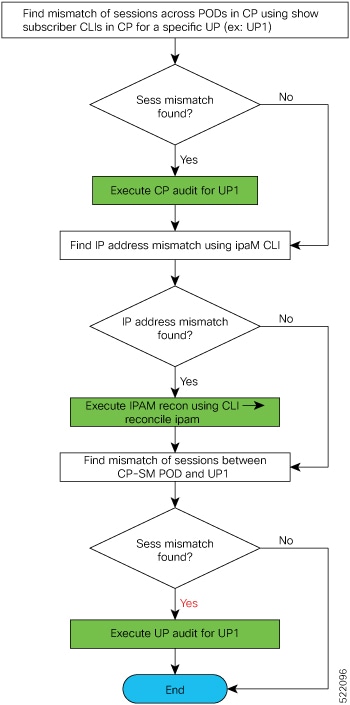
Synchronizing Sessions Across CP Pods and UP

CP reconciliation or UP reconciliation (that is, reconciliation between CP-SM pod and UP) is executed for a specific UP.

The following figure depicts the procedure to synchronize sessions across CP pods and UP, for a specific UP.

Figure 1. Synchronizing Sessions Across CP Pods and UP


Limitations and Restrictions

The High Availability and CP Reconciliation feature has the following limitations and restrictions in this release:

  • Only IPoE and PPPoE sessions are supported for High Availability and CP reconciliation.

  • Only one BNG specific service pod restart with a gap of minimum 10 minutes between pod restarts, is supported .

  • Double fault is not supported for Infrastrucutre pods (cache, CDL, and Node Manager). System goes to "bad" state with double faults.

  • One VM restart with a gap of minimum 30 minutes between VM restarts, is supported.

Configuring High Availability and CP Reconciliation

This section describes how to configure the High Availability and CP Reconciliation feature.

Configuring the High Availability and CP Reconciliation feature involves the following steps:

Reconciling Sessions Across CP Pods and UP

Use the following commands to reconcile subscriber sessions across PPP, DHCP, and SM pods in the CP with the specified UP.

subscriber session-synchronize-cp upf upf_name  { abort |  
      timeout timeout_value | tps tps_value } 

NOTES:

  • upf upf_name : Configures CP reconciliaton for this UPF.


    Note

    The maximum number of CP reconciliations supported is 5.
  • { abort | timeout timeout_value| tps tps_value } : Specifies the following parameters for subscriber session reconciliation:

    abort : Aborts the ongoing CP reconciliation for only the specified UPF.

    timeout timeout_in_seconds : Specifies the number of seconds the reconciliation can run. If it runs longer than the specified timeout, the reconciliation process is aborted. The valid values range from 2 to 100 minutes. The default value is 60 minutes.

    tps tps_value : Specifies the number of notifications sent from the CDL to Node Manager per second. The valid values range from 40 to 1000. The default is 40.


    Note

    Set this value based on the scale and churn of sessions during the CP reconciliation.

Verifying High Availability and CP Reconciliation

Use the following show command to verify ongoing or completed CP audit details for the specified UPF.


Note

Only one CP audit detail is stored per UPF.

show subscriber synchronize-cp upf upf_name

Example

The following is a configuration example.

[cnbng-smi-40g-tb03/bng] bng# show subscriber synchronize-cp upf lps_asr9k-1
subscriber-details
{
"Audit ID": 1634722199,
"Session Audit Statistics": {
"DHCP": {
"Audit State": "Completed",
"Session Count": 430,
"Notifications Received": 430
},
"LNS": {
"Audit State": "N/A",
"Session Count": 0,
"Notifications Received": 0
},
"PTA & LAC": {
"Audit State": "N/A",
"Session Count": 0,
"Notifications Received": 0
},
"Session Manager": {
"Audit State": "Completed",
"Session Count": 404,
"Notifications Received": 404
}
},
"Audit State": "Completed",
"Notifications/Sec": 40,
"Timeout": 6000,
"Audit Started": "2021-10-20 09:29:59 +0000 UTC",
"Fsol Audit Started": "2021-10-20 09:29:59 +0000 UTC",
"SM Audit Started": "2021-10-20 09:30:10 +0000 UTC",
"Audit Ended": "2021-10-20 09:30:22 +0000 UTC",
"Total Time Taken": "23 Seconds"
} 

Configuring CDL Bulk Notifications

Use the following commands to run CDL bulk notifications in parallel for multiple bulk notification requests.


Note

This is a mandatory configuration for CP reconciliation.
config 
   cdl datastore session slot notification max-concurrent-bulk-notifications value 

NOTES:

  • max-concurrent-bulk-notifications value : Specifies the maximum number of bulk task notifications that CDL can process concurrently. The valid values range from 1 to 20.

    Configure this value to 20 for CP reconciliation.

Sample Configuration

The following is a sample configuration of the CDL bulk notification where a maximum of 20 bulk notifications are executed in parallel for multiple bulk notification requests.

configure 
cdl datastore session slot notification max-concurrent-bulk-notifications 20