- Preparing for Broadband Access Aggregation
- Providing Protocol Support for Broadband Access Aggregation of PPPoE Sessions
- Providing Protocol Support for Broadband Access Aggregation of PPP over ATM Sessions
- Providing Connectivity Using ATM Routed Bridge Encapsulation over PVCs
- PPPoE Circuit-Id Tag Processing
- Providing Session Limit Support
- PPPoE Session Limit Local Override
- PPPoE - QinQ Support
- PPP-Max-Payload and IWF PPPoE Tag Support
- PPPoE Session Limiting on Inner QinQ VLAN
- PPPoE Agent Remote-ID and DSL Line Characteristics Enhancement
- Enabling PPPoE Relay Discovery and Service Selection Functionality
- Configuring Cisco Subscriber Service Switch Policies
- Per Session Queuing and Shaping for PPPoEoVLAN Using RADIUS
- 802.1P CoS Bit Set for PPP and PPPoE Control Frames
- PPPoE Smart Server Selection
- Monitoring PPPoE Sessions with SNMP
- PPPoE on ATM
- PPPoE on Ethernet
- PPP IP Unique Address and Prefix Detection
- Remote Access MPLS-VPNs
- Broadband High Availability Stateful Switchover
- Broadband High Availability In Service Software Upgrade
- Controlling Subscriber Bandwidth
- Offering PPPoE Clients a Selection of Services During Call Setup
Broadband Access Aggregation and DSL Configuration Guide, Cisco IOS XE Release 3S
Bias-Free Language
The documentation set for this product strives to use bias-free language. For the purposes of this documentation set, bias-free is defined as language that does not imply discrimination based on age, disability, gender, racial identity, ethnic identity, sexual orientation, socioeconomic status, and intersectionality. Exceptions may be present in the documentation due to language that is hardcoded in the user interfaces of the product software, language used based on RFP documentation, or language that is used by a referenced third-party product. Learn more about how Cisco is using Inclusive Language.
- Updated:
- November 1, 2008
Chapter: PPPoE - QinQ Support
PPPoE—QinQ Support
The PPPoE—QinQ Support feature installed at a subinterface level preserves VLAN IDs and segregates the traffic in different customer VLANs. Encapsulating IEEE 802.1Q VLAN tags within 802.1Q enables service providers to use a single VLAN to support customers who have multiple VLANs.
Finding Feature Information
For the latest feature information and caveats, see the release notes for your platform and software release. To find information about the features documented in this module, and to see a list of the releases in which each feature is supported, see the "Feature Information for PPPoE—QinQ Support" section.
Use Cisco Feature Navigator to find information about platform support and Cisco IOS XE software image support. To access Cisco Feature Navigator, go to http://www.cisco.com/go/cfn. An account on Cisco.com is not required.
Contents
• Prerequisites for PPPoE—QinQ Support
•Information About PPPoE—QinQ Support
•How to Configure PPPoE—QinQ Support
•Configuration Examples for PPPoE—QinQ Support
•Feature Information for PPPoE—QinQ Support
Prerequisites for PPPoE—QinQ Support
•You have checked Cisco Feature Navigator at http://www.cisco.com/go/cfn to verify that your Cisco device and Cisco IOS XE release support this feature.
•You must be connected to an Ethernet device that supports double VLAN tag imposition/disposition or switching.
Information About PPPoE—QinQ Support
To configure the PPPoE—QinQ Support Feature, you should understand the following concepts:
•PPPoE—QinQ Support on Subinterfaces
•Broadband Ethernet-Based DSLAM Model of QinQ VLANs
•Unambiguous and Ambiguous Subinterfaces
PPPoE—QinQ Support on Subinterfaces
The PPPoE—QinQ Support feature adds another layer of IEEE 802.1Q tag (called "metro tag" or "PE-VLAN") to the 802.1Q tagged packets that enter the network. The purpose is to expand the VLAN space by tagging the tagged packets, thus producing a "double-tagged" frame. The expanded VLAN space allows service providers to offer assorted services on different VLANs. For example, certain customers can be provided Internet access on specific VLANs while other customers receive different services on other VLANs.
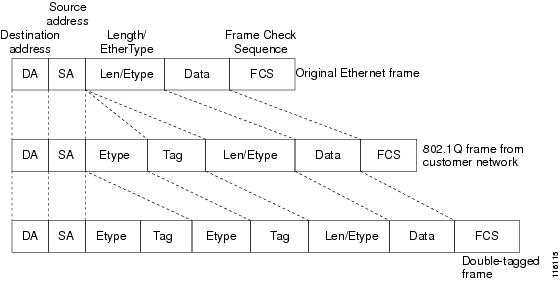
Generally the service provider's customers require a range of VLANs to handle multiple applications. Service providers can allow their customers to use this feature to safely assign their own VLAN IDs on subinterfaces because these subinterface VLAN IDs are encapsulated within a service provider-designated VLAN ID for that customer. Therefore there is no overlap of VLAN IDs among customers, nor does traffic from different customers become mixed. The double-tagged frame is "terminated" or assigned on a subinterface through use of an expanded encapsulation dot1q command that specifies the two VLAN ID tags (outer VLAN ID and inner VLAN ID) terminated on the subinterface. See Figure 1.
The PPPoE—QinQ Support feature is generally supported on whichever Cisco IOS XE features or protocols are supported on the subinterface. For example, if you can run PPPoE on the subinterface, you can configure a double-tagged frame for PPPoE. IPoQinQ supports IP packets that are double-tagged for QinQ VLAN tag termination by forwarding IP traffic with the double-tagged (also known as stacked) 802.1Q headers.
A primary consideration is whether you assign ambiguous or unambiguous subinterfaces for the inner VLAN ID. See the "Unambiguous and Ambiguous Subinterfaces" section.
The primary benefit for the service provider is a reduced number of VLANs supported for the same number of customers. Other benefits of this feature are as follows:
•PPPoE scalability. Expanding the available VLAN space from 4096 to about 16.8 million (4096 times 4096) allows the number of PPPoE sessions that can be terminated on a given interface to be multiplied.
•When deploying Gigabyte Ethernet DSL access multiplexer (DSLAM) in a wholesale model, you can assign the inner VLAN ID to represent the end-customer virtual circuit (VC) and assign the outer VLAN ID to represent the service provider ID.
The QinQ VLAN tag termination feature is simpler than the IEEE 802.1Q tunneling feature deployed for switches. Whereas switches require IEEE 802.1Q tunnels on interfaces to carry double-tagged traffic, routers need only encapsulate QinQ VLAN tags within another level of 802.1Q tags in order for the packets to arrive at the correct destination.
Figure 1 Untagged, 802.1Q-Tagged, and Double-Tagged Ethernet Frames
Broadband Ethernet-Based DSLAM Model of QinQ VLANs
For the emerging broadband Ethernet-based DSLAM market, the Cisco ASR 1000 Series Routers support QinQ encapsulation. With the Ethernet-based DSLAM model shown in Figure 2, customers typically get their own VLAN; all these VLANs are aggregated on a DSLAM.
Figure 2 Broadband Ethernet-Based DSLAM Model of QinQ VLANs
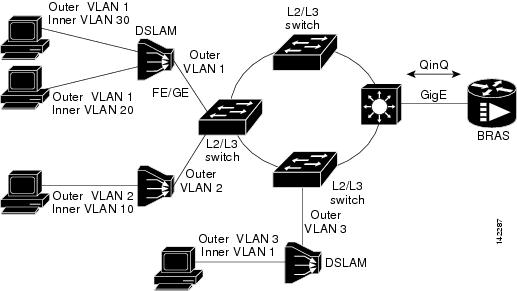
VLAN aggregation on a DSLAM will result in many aggregate VLANs that at some point need to be terminated on the broadband remote access servers (BRASs). Although the model could connect the DSLAMs directly to the BRAS, a more common model uses the existing Ethernet-switched network where each DSLAM VLAN ID is tagged with a second tag (QinQ) as it connects into the Ethernet-switched network.
Both PPPoE sessions and IP can be enabled on a subinterface. The PPPoEoQinQ model is a PPP-terminated session.
PPPoEQinQ and IPoQinQ encapsulation processing is an extension to 802.1Q encapsulation processing. A QinQ frame looks like a VLAN 802.1Q frame; the only difference is that it has two 802.1Q tags instead of one. See Figure 1.
QinQ encapsulation supports configurable outer tag Ethertype. The configurable Ethertype field values are 0x8100 (default), 0x9100, 0x9200, and 0x8848. See Figure 3.
Figure 3 Supported Configurable Ethertype Field Values

Unambiguous and Ambiguous Subinterfaces

Note Only PPPoE is supported on ambiguous subinterfaces. Standard IP routing is not supported on ambiguous subinterfaces.
The encapsulation dot1q command is used to configure QinQ termination on a subinterface. The command accepts an outer VLAN ID and one or more inner VLAN IDs. The outer VLAN ID always has a specific value, and the inner VLAN ID can either be a specific value or a range of values.
A subinterface that is configured with a single inner VLAN ID is called an unambiguous QinQ subinterface. In the following example, QinQ traffic with an outer VLAN ID of 101 and an inner VLAN ID of 1001 is mapped to the Gigabit Ethernet 1/1/0.100 subinterface:
Router(config)# interface gigabitethernet1/1/0.100
Router(config-subif)# encapsulation dot1q 101 second-dot1q 1001
A subinterface that is configured with multiple inner VLAN IDs is called an ambiguous QinQ subinterface. By allowing multiple inner VLAN IDs to be grouped, ambiguous QinQ subinterfaces allow for a smaller configuration, improved memory usage, and better scalability.
In the following example, QinQ traffic with an outer VLAN ID of 101 and inner VLAN IDs anywhere in the 2001-2100 and 3001-3100 range is mapped to the Gigabit Ethernet 1/1/0.101 subinterface:
Router(config)# interface gigabitethernet1/1/0.101
Router(config-subif)# encapsulation dot1q 101 second-dot1q 2001-2100,3001-3100
Ambiguous subinterfaces can also use the any keyword to specify the inner VLAN ID.
See the "Configuration Examples for PPPoE—QinQ Support" section for an example of how VLAN IDs are assigned to subinterfaces, and for a detailed example of how the any keyword is used on ambiguous subinterfaces.
Note The any keyword in the second-dot1q keyword is not supported on a subinterface configured for IPoQinQ because IP routing is not supported on ambiguous subinterfaces. Therefore, multiple values and ranges for the inner VLAN ID are not supported on IPoQinQ.
How to Configure PPPoE—QinQ Support
This section contains the following tasks:
•Configuring the Interfaces for PPPoE—QinQ Support (required)
•Verifying the PPPoE—QinQ Support (optional)
Configuring the Interfaces for PPPoE—QinQ Support
Perform this task to configure the main interface used for the QinQ double tagging and to configure the subinterfaces. An optional step in this task shows you how to configure the Ethertype field to be 0x9100 for the outer VLAN tag, if that is required. After the subinterface is defined, the 802.1Q encapsulation is configured to use the double tagging.
Prerequisites
•PPPoE or IP is already configured.
SUMMARY STEPS
1. enable
2. configure terminal
3. interface type slot/subslot/port
4. dot1q tunneling ethertype ethertype
5. exit
6. interface type slot/subslot/port[.subinterface]
7. encapsulation dot1q vlan-id second-dot1q {any | vlan-id | vlan-id-vlan-id[,vlan-id-vlan-id]}
8. pppoe enable [group group-name]
9. ip address ip-address mask [secondary]
10. exit
11. Repeat Step 6 to configure another subinterface.
12. Repeat Step 7, Step 8, and Step 9, as required, to specify the VLAN tags to be terminated on the subinterface, to enable PPPoE sessions or IP on the subinterface.
13. end
DETAILED STEPS
|
|
|
|
|---|---|---|
Step 1 |
enable Router> enable |
Enables privileged EXEC mode. • |
Step 2 |
configure terminal Router# configure terminal |
Enters global configuration mode. |
Step 3 |
interface type slot/subslot/port Router(config)# interface gigabitethernet 1/0/0 |
Configures an interface and enters interface configuration mode. |
Step 4 |
dot1q tunneling ethertype ethertype Router(config-if)# dot1q tunneling ethertype 0x9100 |
(Optional) Defines the Ethertype field type used by peer devices when implementing QinQ VLAN tagging. • |
Step 5 |
exit Router(config-if)# exit |
Exits the interface configuration mode. |
Step 6 |
interface type slot/subslot/port[.subinterface] Router(config-if)# interface gigabitethernet 1/0/0.1 |
Configures a subinterface and enters subinterface configuration mode. |
Step 7 |
encapsulation dot1q vlan-id second-dot1q {any | vlan-id | vlan-id-vlan-id[,vlan-id-vlan-id]} Router(config-subif)# encapsulation dot1q 100 second-dot1q 200 |
(Required) Enables the 802.1Q encapsulation of traffic on a specified subinterface in a VLAN. • • • |
Step 8 |
pppoe enable [group group-name] Router(config-subif)# pppoe enable group vpn1 |
(Optional) Enables PPPoE sessions on a subinterface. •
Note |
Step 9 |
ip address ip-address mask [secondary] Router(config-subif)# ip address 192.168.1.2 255.255.255.0 |
(Optional) Sets a primary or secondary IP address for a subinterface. •
Note |
Step 10 |
exit Router(config-subif)# exit |
Exits subinterface configuration mode. |
Step 11 |
Repeat Step 6 to configure another subinterface. Router(config-if)# interface gigabitethernet 1/0/0.2 |
(Optional) Configures a subinterface and enters subinterface configuration mode. |
Step 12 |
Repeat Step 7, Step 8, and Step 9, as required, to specify the VLAN tags to be terminated on the subinterface. Router(config-subif)# encapsulation dot1q 100 second-dot1q 100-199,201-600 Router(config-subif)# pppoe enable group vpn1 Router(config-subif)# ip address 192.168.1.2 255.255.255.0 |
Specifies the VLAN tags to be terminated on the subinterface, to enable PPPoE sessions or IP on the subinterface. • • • • • • Note |
Step 13 |
end Router(config-subif)# end |
Exits subinterface configuration mode and returns to privileged EXEC mode. |
Verifying the PPPoE—QinQ Support
Perform this optional task to verify the configuration of the PPPoE—QinQ Support feature.
SUMMARY STEPS
1. enable
2. show running-config
3. show vlans dot1q [internal | interface-type interface-number.subinterface-number [detail] | outer-id [interface-type interface-number | second-dot1q [inner-id | any]] [detail]]
DETAILED STEPS
Step 1 enable
Enables privileged EXEC mode. Enter your password if prompted.
Router> enable
Step 2 show running-config
Use this command to show the currently running configuration on the device. You can use delimiting characters to display only the relevant parts of the configuration.
The following output shows the currently running PPPoEoQinQ and IPoQinQ configurations:
Router# show running-config
interface GigabitEthernet0/0/0.201
encapsulation dot1Q 201
ip address 10.7.7.5 255.255.255.252
!
interface GigabitEthernet0/0/0.401
encapsulation dot1Q 401
ip address 10.7.7.13 255.255.255.252
!
interface GigabitEthernet0/0/0.201999
encapsulation dot1Q 201 second-dot1q any
pppoe enable
!
interface GigabitEthernet0/0/0.2012001
encapsulation dot1Q 201 second-dot1q 2001
ip address 10.8.8.9 255.255.255.252
!
interface GigabitEthernet0/0/0.2012002
encapsulation dot1Q 201 second-dot1q 2002
ip address 10.8.8.13 255.255.255.252
pppoe enable
!
interface GigabitEthernet0/0/0.4019999
encapsulation dot1Q 401 second-dot1q 100-900,1001-2000
pppoe enable
!
interface GigabitEthernet1/0/0.101
encapsulation dot1Q 101
ip address 10.7.7.1 255.255.255.252
!
interface GigabitEthernet1/0/0.301
encapsulation dot1Q 301
ip address 10.7.7.9 255.255.255.252
!
interface GigabitEthernet1/0/0.301999
encapsulation dot1Q 301 second-dot1q any
pppoe enable
!
interface GigabitEthernet1/0/0.1011001
encapsulation dot1Q 101 second-dot1q 1001
ip address 10.8.8.1 255.255.255.252
!
interface GigabitEthernet1/0/0.1011002
encapsulation dot1Q 101 second-dot1q 1002
ip address 10.8.8.5 255.255.255.252
!
interface GigabitEthernet1/0/0.1019999
encapsulation dot1Q 101 second-dot1q 1-1000,1003-2000
pppoe enable
Step 3 show vlans dot1q [internal | interface-type interface-number.subinterface-number [detail] | outer-id [interface-type interface-number | second-dot1q [inner-id | any]] [detail]]
Use this command to show the statistics for all the 802.1Q VLAN IDs. In the following example, only the outer VLAN ID is displayed:
Note The any keyword is not supported on a subinterface configured for IPoQinQ because IP routing is not supported on ambiguous subinterfaces.
Router# show vlans dot1q
Total statistics for 802.1Q VLAN 1:
441 packets, 85825 bytes input
1028 packets, 69082 bytes output
Total statistics for 802.1Q VLAN 101:
5173 packets, 510384 bytes input
3042 packets, 369567 bytes output
Total statistics for 802.1Q VLAN 201:
1012 packets, 119254 bytes input
1018 packets, 120393 bytes output
Total statistics for 802.1Q VLAN 301:
3163 packets, 265272 bytes input
1011 packets, 120750 bytes output
Total statistics for 802.1Q VLAN 401:
1012 packets, 119254 bytes input
1010 packets, 119108 bytes output
Configuration Examples for PPPoE—QinQ Support
This section provides the following example:
•Configuring the any Keyword on Subinterfaces for PPPoE—QinQ Support: Example
Configuring the any Keyword on Subinterfaces for PPPoE—QinQ Support: Example
Some ambiguous subinterfaces can use the any keyword for the inner VLAN ID specification. The any keyword represents any inner VLAN ID that is not explicitly configured on any other interface. In the following example, seven subinterfaces are configured with various outer and inner VLAN IDs.
Note The any keyword can be configured on only one subinterface of a specified physical interface and outer VLAN ID.
Note The any keyword in the second-dot1q keyword is not supported on a subinterface configured for IPoQinQ because IP routing is not supported on ambiguous subinterfaces. Therefore, multiple values and ranges for the inner VLAN ID are not supported on IPoQinQ.
interface GigabitEthernet1/0/0.1
encapsulation dot1q 100 second-dot1q 100
interface GigabitEthernet1/0/0.2
encapsulation dot1q 100 second-dot1q 200
interface GigabitEthernet1/0/0.3
encapsulation dot1q 100 second-dot1q 300-400,500-600
interface GigabitEthernet1/0/0.4
encapsulation dot1q 100 second-dot1q any
interface GigabitEthernet1/0/0.5
encapsulation dot1q 200 second-dot1q 50
interface GigabitEthernet1/0/0.6
encapsulation dot1q 200 second-dot1q 1000-2000,3000-4000
interface GigabitEthernet1/0/0.7
encapsulation dot1q 200 second-dot1q any
Table 1 shows which subinterfaces are mapped to different values of the outer and inner VLAN IDs on QinQ frames that come in on Gigabit Ethernet (GE) interface 1/0/0.
A new subinterface is now configured:
interface GigabitEthernet 1/0/0.8
encapsulation dot1q 200 second-dot1q 200-600,900-999
Table 2 shows the changes made to the table for the outer VLAN ID of 200. Notice that subinterface 1/0/0.7 configured with the any keyword now has new inner VLAN ID mappings.
Additional References
The following sections provide references related to the PPPoE—QinQ Support feature.
Related Documents
|
|
|
|---|---|
Additional information about commands used in this document |
• |
Standards
|
|
|
|---|---|
IEEE 802.1Q |
IEEE Standard for Local and Metropolitan Area Networks |
MIBs
RFCs
|
|
|
|---|---|
No new or modified RFCs are supported by this feature, and support for existing RFCs has not been modified by this feature. |
— |
Technical Assistance
Feature Information for PPPoE—QinQ Support
Table 3 lists the features in this module and provides links to specific configuration information.
Use Cisco Feature Navigator to find information about platform support and software image support. Cisco Feature Navigator enables you to determine which Cisco IOS XE software images support a specific software release, feature set, or platform. To access Cisco Feature Navigator, go to http://www.cisco.com/go/cfn. An account on Cisco.com is not required.
Note Table 3 lists only the Cisco IOS XE software release that introduced support for a given feature in a given Cisco IOS XE software release train. Unless noted otherwise, subsequent releases of that Cisco IOS XE software release train also support that feature.
|
|
|
|
|---|---|---|
IEEE 802.1Q-in-Q VLAN Tag Termination |
Cisco IOS XE Release 2.1 |
This feature was introduced on Cisco ASR 1000 Series Routers. Encapsulating IEEE 802.1Q VLAN tags within 802.1Q enables service providers to use a single VLAN to support customers who have multiple VLANs. The following section provides information about this feature: |
PPPoE—QinQ Support |
Cisco IOS XE Release 2.2 |
This feature was introduced on Cisco ASR 1000 Series Routers. This feature on the subinterface level preserves VLAN IDs and keeps traffic in different customer VLANs segregated. The following section provides information about this feature: • The following commands were introduced or modified: dot1q tunneling ethertype, encapsulation dot1q, show vlans dot1q. |
 Feedback