- Cisco Unified Border Element Enterprise Protocol-Independent Features and Setup
- SIP-to-SIP Extended Feature Functionality for Session Border Controllers
- Bandwidth-Based Call Admission Control
- Interworking Between RSVP Capable and RSVP Incapable Networks
- Cisco Resource Reservation Protocol Agent
- SIP INFO Method for DTMF Tone Generation
- DTMF Events through SIP Signaling
- Call Progress Analysis Over IP-to-IP Media Session
- Negotiation of an Audio Codec from a List of Codecs
- Multicast Music-on-Hold Support on Cisco UBE
- Network-Based Recording Using Cisco UBE
- Network-Based Recording of Video Calls Using Cisco Unified Border Element
- TDoS Attack Mitigation
- Cisco Unified Communications Gateway Services
- Dynamic Payload Type Interworking for DTMF and Codec Packets for SIP-to-SIP Calls
- iLBC Support for SIP and H.323
- DSP-Based Functionality on the Cisco UBE Enterprise Including Transcoding and Transrating
- Acoustic Shock Protection
- Noise Reduction
- SIP Ability to Send a SIP Registration Message on a Border Element
- SIP Parameter Modification
- Session Refresh with Reinvites
- SIP Stack Portability
- VoIP for IPv6
- Interworking of Secure RTP calls for SIP and H.323
- Cisco UBE Support for SRTP-RTP Internetworking
- WebEx Telepresence Media Support Over Single SIP Session
- SIP SRTP Fallback to Nonsecure RTP
- Support for Software Media Termination Point
- Cisco Unified Communication Trusted Firewall Control
- Cisco Unified Communication Trusted Firewall Control-Version II
- Finding Feature Information
- Additional References
- Glossary
Cisco Unified Border Element (Enterprise) Protocol-Independent Features and Setup Configuration Guide, Cisco IOS XE Release 3S (Cisco ASR 1000)
Bias-Free Language
The documentation set for this product strives to use bias-free language. For the purposes of this documentation set, bias-free is defined as language that does not imply discrimination based on age, disability, gender, racial identity, ethnic identity, sexual orientation, socioeconomic status, and intersectionality. Exceptions may be present in the documentation due to language that is hardcoded in the user interfaces of the product software, language used based on RFP documentation, or language that is used by a referenced third-party product. Learn more about how Cisco is using Inclusive Language.
- Updated:
- August 19, 2013
Chapter: Network-Based Recording Using Cisco UBE
- Prerequisites for Network-Based Recording Using Cisco UBE
- Restrictions for Network-Based Recording Using Cisco UBE
- Information About Network-Based Recording Using Cisco UBE
Network-Based Recording Using Cisco UBE
First Published: July 22, 2011
Last Updated: July 22, 2011
The Network-Based Recording Using Cisco UBE feature supports software-based forking for Real-time Transport Protocol (RTP) streams. Media forking provides the ability to create midcall multiple streams (or branches) of audio associated with a single call and then send the streams of data to different destinations. You can enable Network-Based Recording using Cisco Unified Border Element (Cisco UBE) by configuring specific CLI commands on Cisco UBE or through a call agent. Cisco UBE acts as a recording client and MediaSense Session Initiation Protocol (SIP) recorder acts a recording server.
Functionalities of the recording client, Cisco UBE that is present in signaling and media path of the communication session, are as follows:
- Acts as a SIP user agent and sets up a recording session (SIP dialog) with the recording server.
- Acts as the source of the recorded media and forwards the recorded media to the recording server.
- Sends information periodically to a server that helps the recording server associate the call with media streams and identifies the participants of the call. This information sent to the recording server is called metadata.
MediaSense SIP recorder acts as the recording server. A recording server is a SIP user agent that archives media for extended durations. It provides search and retrieval of the archived media. The recording server is a storage place of the recorded session metadata.
The metadata carried in the SIP session between the recording client and the recording server is to:
- Carry the communication session data that describes the call.
- Send the metadata to the recording server. The recording server uses the metadata to associate communication sessions involving two or more participants with media streams.
The call leg that is created between the recording client and the recording server is known as the recording session.
- Prerequisites for Network-Based Recording Using Cisco UBE
- Restrictions for Network-Based Recording Using Cisco UBE
- Information About Network-Based Recording Using Cisco UBE
- How to Configure Network-Based Recording using Cisco UBE
- Configuration Examples for Network-Based Recording using Cisco UBE
- Feature Information for Network-Based Recording using Cisco UBE
Prerequisites for Network-Based Recording Using Cisco UBE
You must have an ISR G2 router equipped with the unified communication technology package configured as a Cisco UBE in flow-through mode for the Network-Based Recording Using Cisco UBE feature to function.
Cisco Unified Border Element
Cisco Unified Border Element (Enterprise)
Restrictions for Network-Based Recording Using Cisco UBE
Information About Network-Based Recording Using Cisco UBE
Open Recording Architecture
The Open Recording Architecture (ORA) comprises of elements, such as application management server and SIP bridge, to support IP-based recording. The ORA IP enables recording by solving topology issues, which accelerates the adoption of Cisco unified communication solutions.
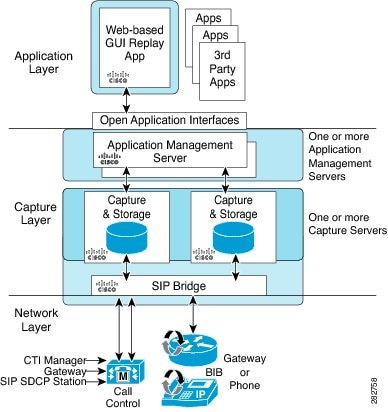
Following are the three layers of the ORA architecture:
Network Layer
The ORA network layer is comprises call control systems, media sources, and IP foundation components, such as routers and switches.
Capture and Media Processing Layer
The ORA capture and media processing layer includes core functions of ORA--terminating media streams, storage of media and metadata, and speech analytics that can provide real-time events for applications.
Application Layer
The ORA application layer supports in-call and post-call applications through open programming interfaces. In-call applications include applications that make real-time business decisions like whether to record a particular call or not, controls pause and resume from Interactive Voice Response (IVR) or agent desktop systems, and performs metadata tagging and encryption key exchange at the call setup.
Post-call applications include the following:
Media Forking Topologies
The following topologies support media forking:
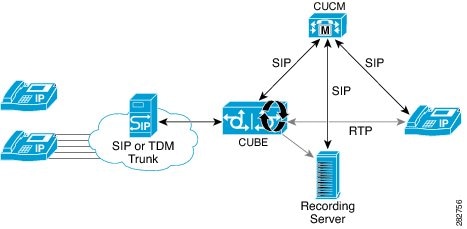
ORA SBC-Based Media Forking with Cisco UCM
Figure 2 shows the ORA SBC-based media forking with Cisco Unified CallManager (Cisco UCM) topology for media forking. This topology supports replication of media packets to allow recording the caller agent. It also enables Cisco UBE to establish full-duplex communication with the recording server. In this topology, SIP recording trunk is enhanced to have additional call metadata.
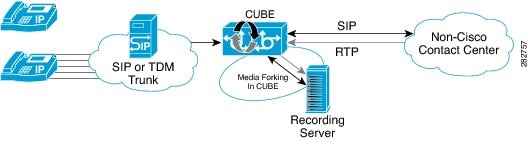
ORA SBC-Based Media Forking without Cisco UCM
Figure 3 shows the ORA SBC-based media forking without the Cisco UCM topology. This topology supports static configuration on Cisco UBE and the replication of media packets to allow recording caller-agent and full-duplex interactions at an IP call recording server.
SIP Recorder Interface
SIP is used as a protocol between Cisco UBE and the MediaSense SIP server. Extensions are made to SIP to carry the recording session information needed for the recording server. This information carried in SIP sessions between the recording client and the recording server is called metadata.
Metadata
Metadata is the information that is passed by the recording client to the recording server in a SIP session. Metadata describes the communication session and its media streams.
Metadata is used by the recording server to:
- Identify participants of the call.
- Associate media streams with the participant information. Each participant can have one or more media streams, such as audio, and video.
- Identify the participant change due to transfers during the call.
The recording server uses the metadata information along with other SIP message information, such as dialog ID and time and date header, to derive a unique key. The recording server uses this key to store media streams and associate the participant information with the media streams.
How to Configure Network-Based Recording using Cisco UBE
You can configure and verify the Network-Based Recording using Cisco UBE feature by using one of the following methods:
- Configuring the Media Profile Recorder
- Configuring the Media Class Globally
- Configuring the Media Class for a Dial Peer
- Verifying the Network-Based Recording Using Cisco UBE Configuration
Configuring the Media Profile Recorder
1. enable
2. configure terminal
3. media profile recorder profile-tag
4. media-recording dial-peer-tag [dial-peer-tag2...dial-peer-tag5]
5. end
DETAILED STEPS
Configuring the Media Class Globally
You can configure a media class globally by performing one of the following tasks:
- Configuring a Media Class Using the Media Profile Recorder
- Configuring Media Class Using the Recorder Parameter
Configuring a Media Class Using the Media Profile Recorder
1. enable
2. configure terminal
3. media class tag
4. recorder profile tag
5. end
DETAILED STEPS
| Command or Action | Purpose | |
|---|---|---|
| Step 1 | enable Example: Device> enable |
Enables privileged EXEC mode. |
| Step 2 | configure terminal Example: Device# configure terminal |
Enters global configuration mode. |
| Step 3 | media class tag Example: Device(config)# media class 100 |
Configures a media class and enters media class configuration mode. |
| Step 4 | recorder profile tag Example: Device(cfg-mediaclass)# recorder profile 100 |
Configures the media profile recorder. |
| Step 5 | end Example: Device(cfg-mediaclass)# end |
Exits media class configuration mode. |
Configuring Media Class Using the Recorder Parameter
1. enable
2. configure terminal
3. media class tag
4. recorder parameter
5. media-recording dial-peer-tag
6. end
DETAILED STEPS
| Command or Action | Purpose | |||
|---|---|---|---|---|
| Step 1 | enable Example: Device> enable |
Enables privileged EXEC mode. |
||
| Step 2 | configure terminal Example: Device# configure terminal |
Enters global configuration mode. |
||
| Step 3 | media class tag Example: Device(config)# media class 100 |
Configures the media class and enters media class configuration mode. |
||
| Step 4 | recorder parameter Example: Device(cfg-mediaclass)# recorder parameter |
Enters media class recorder parameter configuration mode to enable you to configure recorder-specific parameters. |
||
| Step 5 | media-recording dial-peer-tag Example: Device(cfg-mediaclass-recorder)# media-recording 28 |
Configures voice-class recording parameters.
|
||
| Step 6 | end Example: Device(cfg-mediaclass-recorder)# end |
Exits media class recorder parameter configuration mode. |
Configuring the Media Class for a Dial Peer
You must configure a dial peer to connect to Cisco MediaSense. This dial peer is matched with Cisco Unified Border Element and a call is set up to Cisco MediaSense.
1. enable
2. configure terminal
3. dial-peer voice tag voip
4. session protocol sipv2
5. incoming called-number string
6. media-class tag
7. codec codec [bytes payload-size] [fixed-bytes] [mode {independent | adaptive} [bit-rate value] [framesize {30 | 60} [fixed]]]
8. end
DETAILED STEPS
| Command or Action | Purpose | |
|---|---|---|
| Step 1 | enable Example: Device> enable |
Enables privileged EXEC mode. |
| Step 2 | configure terminal Example: Device# configure terminal |
Enters global configuration mode. |
| Step 3 | dial-peer voice tag voip Example: Device(config)# dial-peer voice 24 voip |
Defines a particular dial peer and enters dial peer voice configuration mode. |
| Step 4 | session protocol sipv2 Example: Device(config-dial-peer)# session protocol sipv2 |
Specifies SIP version 2 for calls between local and remote routers using the packet network. |
| Step 5 | incoming called-number string Example: Device(config-dial-peer)# incoming called-number 9845 |
Specifies a digit string that can be matched with an incoming call to associate the call with a dial peer. |
| Step 6 | media-class tag Example: Device(config-dial-peer)# media-class 100 |
Configures media class on a dial peer. |
| Step 7 | codec codec [bytes payload-size] [fixed-bytes] [mode {independent | adaptive} [bit-rate value] [framesize {30 | 60} [fixed]]] Example: Device(config-dial-peer)# codec g711ulaw |
Specifies the voice coder rate of speech for a dial peer. |
| Step 8 | end Example: Device(config-dial-peer)# end |
Exits dial peer configuration mode and returns to privileged EXEC mode. |
Verifying the Network-Based Recording Using Cisco UBE Configuration
Perform this task to verify the configuration of the Network-Based Recording Using Cisco UBE Configuration feature. The show commands can be entered in any order.
1. enable
2. show voip rtp connections
3. show voip recmsp session
4. show voip recmsp session detail call-id call-id
5. show voip rtp forking
6. show call active voice compact
7. show sip-ua calls
DETAILED STEPS
| Step 1 |
enable Enables privileged EXEC mode. Example: Device> enable |
| Step 2 |
show voip rtp connections Real-Time Transport Protocol (RTP)-named. Example: Device# show voip rtp connections VoIP RTP active connections : No. CallId dstCallId LocalRTP RmtRTP LocalIP RemoteIP 1 140 141 18792 18638 9.42.30.10 9.42.30.32 2 141 140 19256 26184 9.42.30.10 9.42.30.189 3 145 143 18648 38526 9.42.30.10 9.42.29.7 4 146 143 17780 50482 9.42.30.10 9.42.29.7 |
| Step 3 |
show voip recmsp session Displays active recording Media Service Provider (MSP) session information. Example: Device# show voip recmsp session RECMSP active sessions: MSP Call-ID AnchorLeg Call-ID ForkedLeg Call-ID 143 141 145 Found 1 active sessions |
| Step 4 |
show voip recmsp session detail call-id call-id Displays detailed information about the recording MSP Call ID. Example: Device# show voip recmsp session detail call-id 145 RECMSP active sessions: Detailed Information ========================= Recording MSP Leg Details: Call ID: 143 GUID : 7C5946D38ECD AnchorLeg Details: Call ID: 141 Forking Stream type: voice-nearend Participant: 708090 Non-anchor Leg Details: Call ID: 140 Forking Stream type: voice-farend Participant: 10000 Forked Leg Details: Call ID: 145 Near End Stream CallID 145 Stream State ACTIVE Far End stream CallID 146 Stream State ACTIVE Found 1 active sessions |
| Step 5 |
show voip rtp forking Displays RTP media-forking connections. Example:
Device# show voip rtp forking
VoIP RTP active forks :
 Fork 1
   stream type voice-only (0): count 0
   stream type voice+dtmf (1): count 0
   stream type dtmf-only (2): count 0
   stream type voice-nearend (3): count 1
     remote ip 9.42.29.7,  remote port 38526,  local port 18648
       codec g711ulaw,  logical ssrc 0x53
       packets sent 29687,  packets received 0
   stream type voice+dtmf-nearend (4): count 0
   stream type voice-farend (5): count 1
     remote ip 9.42.29.7,  remote port 50482,  local port 17780
       codec g711ulaw,  logical ssrc 0x55
       packets sent 29686,  packets received 0
   stream type voice+dtmf-farend (6): count 0
   stream type video (7): count
|
| Step 6 |
show call active voice compact Displays a compact version of voice calls in progress. Example:
Device# show call active voice compact
<callID>  A/O FAX T<sec> Codec       type        Peer Address       IP R<ip>:<udp>
Total call-legs: 3
       140 ANS     T644   g711ulaw    VOIP        P10000       9.42.30.32:18638
       141 ORG     T644   g711ulaw    VOIP        P708090      9.42.30.189:26184
       145 ORG     T643   g711ulaw    VOIP        P595959        9.42.29.7:38526
|
| Step 7 |
show sip-ua calls Displays active user agent client (UAC) and user agent server (UAS) information on SIP calls. Example:
Device# show sip-ua calls
Total SIP call legs:3, User Agent Client:2, User Agent Server:1
SIP UAC CALL INFO
Call 1
SIP Call ID                : 99EA5118-506211E0-80C6E01B-4C27AA62@9.42.30.10
   State of the call       : STATE_ACTIVE (7)
   Substate of the call    : SUBSTATE_NONE (0)
   Calling Number          : 10000
   Called Number           : 708090
   Bit Flags               : 0xC04018 0x10000100 0x80
   CC Call ID              : 141
   Source IP Address (Sig ): 9.42.30.10
   Destn SIP Req Addr:Port : [9.42.30.5]:5060
   Destn SIP Resp Addr:Port: [9.42.30.5]:5060
   Destination Name        : 9.42.30.5
   Number of Media Streams : 1
   Number of Active Streams: 1
   RTP Fork Object         : 0x0
   Media Mode              : flow-through
   Media Stream 1
     State of the stream      : STREAM_ACTIVE
     Stream Call ID           : 141
     Stream Type              : voice+dtmf (1)
     Stream Media Addr Type   : 1
     Negotiated Codec         : g711ulaw (160 bytes)
     Codec Payload Type       : 0
     Negotiated Dtmf-relay    : rtp-nte
     Dtmf-relay Payload Type  : 101
     QoS ID                   : -1
     Local QoS Strength       : BestEffort
     Negotiated QoS Strength  : BestEffort
     Negotiated QoS Direction : None
     Local QoS Status         : None
     Media Source IP Addr:Port: [9.42.30.10]:19256
     Media Dest IP Addr:Port  : [9.42.30.189]:26184
Options-Ping    ENABLED:NO    ACTIVE:NO
Call 2
SIP Call ID                : 9A6D8922-506211E0-80CEE01B-4C27AA62@9.42.30.10
   State of the call       : STATE_ACTIVE (7)
   Substate of the call    : SUBSTATE_NONE (0)
   Calling Number          :
   Called Number           : 595959                                Recoding server number
   Bit Flags               : 0xC04018 0x10800100 0x80
   CC Call ID              : 145
   Source IP Address (Sig ): 9.42.30.10
   Destn SIP Req Addr:Port : [9.42.29.7]:5060
   Destn SIP Resp Addr:Port: [9.42.29.7]:5060
   Destination Name        : 9.42.29.7
   Number of Media Streams : 2
   Number of Active Streams: 2
   RTP Fork Object         : 0x0
   Media Mode              : flow-through
   Media Stream 1
     State of the stream      : STREAM_ACTIVE
     Stream Call ID           : 145
     Stream Type              : voice-nearend (3)
     Stream Media Addr Type   : 1
     Negotiated Codec         : g711ulaw (160 bytes)
     Codec Payload Type       : 0
     Negotiated Dtmf-relay    : inband-voice
     Dtmf-relay Payload Type  : 0
     QoS ID                   : -1
     Local QoS Strength       : BestEffort
     Negotiated QoS Strength  : BestEffort
     Negotiated QoS Direction : None
     Local QoS Status         : None
     Media Source IP Addr:Port: [9.42.30.10]:18648
     Media Dest IP Addr:Port  : [9.42.29.7]:38526
   Media Stream 2
     State of the stream      : STREAM_ACTIVE
     Stream Call ID           : 146
     Stream Type              : voice-farend (5)
     Stream Media Addr Type   : 1
     Negotiated Codec         : g711ulaw (160 bytes)
     Codec Payload Type       : 0
     Negotiated Dtmf-relay    : inband-voice
     Dtmf-relay Payload Type  : 0
     QoS ID                   : -1
     Local QoS Strength       : BestEffort
     Negotiated QoS Strength  : BestEffort
     Negotiated QoS Direction : None
     Local QoS Status         : None
     Media Source IP Addr:Port: [9.42.30.10]:17780
     Media Dest IP Addr:Port  : [9.42.29.7]:50482
Options-Ping    ENABLED:NO    ACTIVE:NO
   Number of SIP User Agent Client(UAC) calls: 2
SIP UAS CALL INFO
Call 1
SIP Call ID                : 7CF44DF3-506611E0-8ED2B9D4-CA68C314@9.42.30.32
   State of the call       : STATE_ACTIVE (7)
   Substate of the call    : SUBSTATE_NONE (0)
   Calling Number          : 10000
   Called Number           : 708090
   Bit Flags               : 0x8C4401C 0x10000100 0x4
   CC Call ID              : 140
   Source IP Address (Sig ): 9.42.30.10
   Destn SIP Req Addr:Port : [9.42.30.32]:5060
   Destn SIP Resp Addr:Port: [9.42.30.32]:52757
   Destination Name        : 9.42.30.32
   Number of Media Streams : 1
   Number of Active Streams: 1
   RTP Fork Object         : 0x0
   Media Mode              : flow-through
   Media Stream 1
     State of the stream      : STREAM_ACTIVE
     Stream Call ID           : 140
     Stream Type              : voice+dtmf (0)
     Stream Media Addr Type   : 1
     Negotiated Codec         : g711ulaw (160 bytes)
     Codec Payload Type       : 0
     Negotiated Dtmf-relay    : rtp-nte
     Dtmf-relay Payload Type  : 101
     QoS ID                   : -1
     Local QoS Strength       : BestEffort
     Negotiated QoS Strength  : BestEffort
     Negotiated QoS Direction : None
     Local QoS Status         : None
     Media Source IP Addr:Port: [9.42.30.10]:18792
     Media Dest IP Addr:Port  : [9.42.30.32]:18638
Options-Ping    ENABLED:NO    ACTIVE:NO
   Number of SIP User Agent Server(UAS) calls: 1
|
Configuration Examples for Network-Based Recording using Cisco UBE
- Example: Configuring the Media Profile Recorder
- Example: Configuring the Media Class Recorder Globally
- Example: Configuring the Media Class for a Dial Peer
- Example: Configuring the Dial Peer to Connect to MediaSense
Example: Configuring the Media Profile Recorder
Device> enable
Device# configure terminal
Device(config)# media profile recorder 100
Device(cfg-mediaprofile)# media-recording 2000
Device(cfg-mediaprofile)# end
Example: Configuring the Media Class Recorder Globally
- Example: Configuring Media Class Using the Media Profile Recorder
- Example: Configuring Media Class Using the Recorder Parameter
Example: Configuring Media Class Using the Media Profile Recorder
Device> enable
Device# configure terminal
Device(config)# media class 100
Device(cfg-mediaclass)# recorder profile 100
Device(cfg-mediaclass)# end
Example: Configuring Media Class Using the Recorder Parameter
Device> enable
Device# configure terminal
Device(config)# media class 100
Device(cfg-mediaclass)# recorder parameter
Device(cfg-mediaclass-recorder)# media-recording 28
Device(cfg-mediaclass-recorder)# end
Example: Configuring the Media Class for a Dial Peer
Device> enable
Device# configure terminal
Device(config)# dial-peer voice 24 voip
Device(config-dial-peer)# session protocol sipv2
Device(config-dial-peer)# incoming called-number 9845
Device(config-dial-peer)# media-class 100
Device(config-dial-peer)# codec g711ulaw
Device(config-dial-peer)# end
Example: Configuring the Dial Peer to Connect to MediaSense
Device> enable
Device# configure terminal
Device(config)# dial-peer voice 24 voip
Device(config-dial-peer)# destination-pattern 595959
Device(config-dial-peer)# session protocol sipv2
Device(config-dial-peer)# session target ipv4:10.42.29.7
Device(config-dial-peer)# session transport tcp
Feature Information for Network-Based Recording using Cisco UBE
The following table provides release information about the feature or features described in this module. This table lists only the software release that introduced support for a given feature in a given software release train. Unless noted otherwise, subsequent releases of that software release train also support that feature.
Use Cisco Feature Navigator to find information about platform support and software image support. Cisco Feature Navigator enables you to determine which software images support a specific software release, feature set, or platform. To access Cisco Feature Navigator, go to http://www.cisco.com/go/cfn. An account on Cisco.com is not required.
| Feature Name |
Releases |
Feature Information |
|---|---|---|
| Network-Based Recording Using Cisco UBE |
15.2(1)T |
The Network-Based Recording Using Cisco UBE feature supports software-based forking for RTP streams. The following commands were introduced or modified: media class, media profile recorder, media-recording, recorder parameter, recorder profile, show voip recmsp session. |
| Network-Based Recording Using Cisco UBE |
Cisco IOS XE Release 3.8S |
The Network-Based Recording Using Cisco UBE feature supports software-based forking for RTP streams. The following commands were introduced or modified: media class, media profile recorder, media-recording, recorder parameter, recorder profile, show voip recmsp session. |
 Feedback