Post Installation

Confirm That the Installation is Complete

Post Installation Checklist

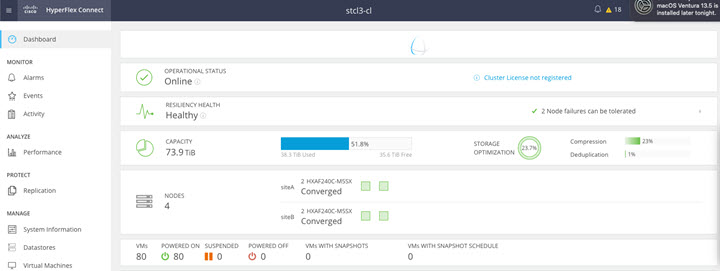
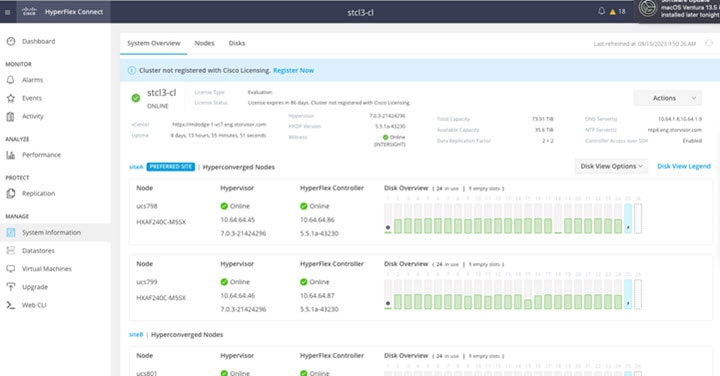
After a successful installation. It is recommended that you validate the following in HX Connect:

  • Dashboard Panel

    • Operational Status Online

    • Resiliency Health: Healthy

    • Nodes: Correct number of nodes, site names, and nodes per site

  • System Information Panel

    • Cluster name displayed is correct

    • Cluster status is shown as Online

    • Witness: Online (INTERSIGHT) or (WItness VM IP)

    • Preferred Site badge on configured site.

    • Nodes are shown in expected sites

    • Hypervisor and Hyperflex Controllers are Online

Verifying the AuxZK IP

To verify the AuxZK IP, run the command stcli cluster info command.

clusterAccessPolicy: lenient
    auxZkIp: 10.64.72.99
    zoneType: physical
    size: 4
    clusterType: stretch_cluster

Running Post Install Script

After the installation of a Stretch Cluster using the HX Data Platform Installer, run the post installation script to finalize the configuration and set the vMotion network up. You can also run this script at a future time if needed.

  1. Log into a Cluster IP (CIP) through an SSH server using admin login.

  2. Run the hx_post_install script.

  3. Follow the prompts and enter the required information.

Verifying Which Site a Node Belongs To

Use the command, stcli cluster get-zone, to check which node belongs to which site.

Example:
admin@ucs-stctlvm-230-1:~# stcli cluster get-zonezones: 
----------------------------------------    
pNodes:        
----------------------------------------
state: ready
name: 10.104.49.115
----------------------------------------
state: ready
name: 10.104.49.116
----------------------------------------
zoneId: 7f2bf7811475cacc:44dd22fa3eadfd4d
numNodes: 2
----------------------------------------
pNodes:
----------------------------------------
state: ready
name: 10.104.49.113
----------------------------------------
state: ready
name: 10.104.49.114
----------------------------------------
zoneId: 422fe637cab59ec5:4b49875b5641bf8a
numNodes: 2
----------------------------------------
isClusterZoneCompliant: True
zoneType: 2
isZoneEnabled: True
numZones: 2