أستكشاف أخطاء NetFlow وإصلاحها على IOS XE

المحتويات
المقدمة
يوضح هذا المستند كيفية أستكشاف أخطاء NetFlow وإصلاحها على تقنيات Cisco IOS® XE.
المتطلبات الأساسية
المتطلبات
توصي Cisco بأن تكون لديك معرفة بالمواضيع التالية:
- Netflow
- IOS XE من Cisco
لمزيد من المعلومات حول هذه الموضوعات، راجع:
نظرة عامة على Flexible NetFlow
تكوين NetFlow المرن (محولات Catalyst 9300)
تكوين NetFlow المرن (محولات Catalyst 9400)
تكوين NetFlow المرن (محولات Catalyst 9500)
تكوين NetFlow المرن (محولات Catalyst 9600 Switches)
المكونات المستخدمة
تستند المعلومات الواردة في هذا المستند إلى برنامج Cisco IOS XE.
تم إنشاء المعلومات الواردة في هذا المستند من الأجهزة الموجودة في بيئة معملية خاصة. بدأت جميع الأجهزة المُستخدمة في هذا المستند بتكوين ممسوح (افتراضي). إذا كانت شبكتك قيد التشغيل، فتأكد من فهمك للتأثير المحتمل لأي أمر.
أستكشاف أخطاء NetFlow وإصلاحها على موجهات Cisco
الرسم التخطيطي للشبكة
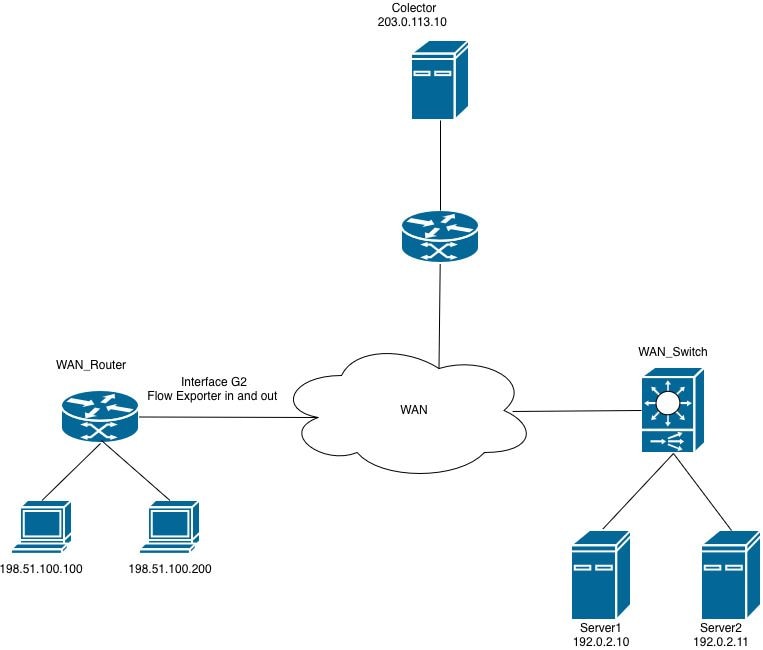 NetFlow على الموجهات
لا يستقبل مجمع حزم تصدير NetFlow (CFLOW) من الموجه
لا يستقبل المجمع المعلومات من الموجه على الواجهة GigabitEthernet2.
الخطوة 1. التحقق من تكوين المصدر.
- عنوان IP للمجمع
- واجهة المصدر
- منفذ UDP
- بروتوكول التصدير (NetFlow v9/IPFIX)
WAN_Router#show running-config | section flow exporter
flow exporter Netflow_Exporter
destination 203.0.113.10
source Loopback0
transport udp 9996
template data timeout 60
الخطوة 2. تحقق من حالة الواجهة.
تأكد من أن GigabitEthernet2 قيد التشغيل:
- الواجهة up/up
- تم تكوين عنوان IP الصحيح
- لا توجد أخطاء أو حالات سقوط مفرطة
WAN_Router#show interface gigabitEthernet 2 | include up|error|drop
GigabitEthernet2 is up, line protocol is up
Full Duplex, 1000Mbps, link type is auto, media type is Virtual
output flow-control is unsupported, input flow-control is unsupported
Input queue: 0/375/0/0 (size/max/drops/flushes); Total output drops: 0
0 input errors, 0 CRC, 0 frame, 0 overrun, 0 ignored
0 output errors, 0 collisions, 0 interface resets
0 unknown protocol drops
الخطوة 3. تحقق من إمكانية الوصول إلى المجمع.
إختبار الاتصال من الواجهة المصدر:
WAN_Router#ping 203.0.113.10 source Loopback 0
Type escape sequence to abort.
Sending 5, 100-byte ICMP Echos to 203.0.113.10, timeout is 2 seconds:
Packet sent with a source address of 198.51.100.10
!!!!!
Success rate is 100 percent (5/5), round-trip min/avg/max = 1/2/5 ms
WAN_Router#

WAN_Router#traceroute 203.0.113.10 source Loopback 0 numeric
Type escape sequence to abort.
Tracing the route to 203.0.113.10
VRF info: (vrf in name/id, vrf out name/id)
1 X.X.X.X 2 msec 1 msec 1 msec
2 Y.Y.Y.Y 2 msec 2 msec 1 msec
3 Z.Z.Z.Z 2 msec * 2 msec
WAN_Router#
الخطوة 4. التحقق من إحصائيات المصدرين.
تحقق من أن الموجه يقوم بإنشاء حزم تصدير NetFlow وإرسالها إلى عنوان مجمع البيانات الذي تم تكوينه.
التحقق من الصحة:
- تم إرسال الحزم بنجاح
- تم إرسال القوالب بنجاح
- لا توجد حالات فشل في الإرسال
- لا توجد أخطاء في المقبس
WAN_Router#show flow exporter statistics
Flow Exporter Netflow_Exporter:
Packet send statistics:
Successfully sent: 41 (3780 bytes)

Client send statistics:
Client: Flow Monitor MONITOR_INGRESS
Records added: 35
- sent: 35
Bytes added: 1750
- sent: 1750

Client: Flow Monitor MONITOR_EGRESS
Records added: 35
- sent: 35
Bytes added: 1750
- sent: 1750
الخطوة 5. التحقق من إنشاء التدفق.
تحقق من تعبئة إدخالات التدفق وصيانتها في ذاكرة التخزين المؤقت لمراقبة التدفق.
التحقق من الصحة:
- التدفقات النشطة موجودة في ذاكرة التخزين المؤقت لمراقبة التدفق.
- تزداد إدخالات التخزين المؤقت، وهو ما يشير إلى أنه يتم تسجيل حركة المرور.
- تنتهي صلاحية إدخالات التدفق (انتهاء مدة الصلاحية) ضمن الفواصل الزمنية المتوقعة للمهلة.

ملاحظة: إذا لم يتم ملاحظة أي تدفقات في ذاكرة التخزين المؤقت، فتحقق من مراقبة التدفق وتكوين السجل، حيث من المحتمل أن تكون المشكلة غير مرتبطة بوظيفة التصدير.
WAN_Router#show flow monitor MONITOR_EGRESS cache
Cache type: Normal (Platform cache)
Cache size: 200000
Current entries: 14
High Watermark: 27

Flows added: 3032
Flows aged: 3018
- Active timeout ( 60 secs) 200
- Inactive timeout ( 30 secs) 2818

IPV4 SOURCE ADDRESS: 198.51.100.200
IPV4 DESTINATION ADDRESS: 192.0.2.11
TRNS SOURCE PORT: 57188
TRNS DESTINATION PORT: 1967
INTERFACE OUTPUT: Gi2
IP TOS: 0x00
IP PROTOCOL: 17
counter bytes long: 80
counter packets long: 1
timestamp abs first: 22:09:34.067
timestamp abs last: 22:09:34.067
استنادا إلى المخرجات، يمكن تحديد:
- يكون Flow Monitor_egress قيد التشغيل ومشغلا بشكل نشط لذاكرة التخزين المؤقت بإدخالات التدفق.
- تم تأكيد حماية ذاكرة التخزين المؤقت - تتم إضافة الإدخالات وإزالتها (متقادمة) بالمعدلات المتوقعة.
- ينتهي جزء كبير من التدفقات (2818 من 3018 سنة) بسبب المهلة غير النشطة، وهو سلوك متوقع لحركة المرور القصيرة الأجل أو ذات الترددات المنخفضة.
- يمثل إدخال ذاكرة التخزين المؤقت المعروضة تدفق UDP أحادي الحزمة (البروتوكول 17) من المصدر 198.51.100.200، المنفذ 57188، إلى الوجهة 192.0.2.11، المنفذ 1967، يتم الخروج عبر واجهة GigabitEthernet2.
الخطوة 6. التحقق من مرفق جهاز العرض.
تأكد من تطبيق مراقبة التدفق على الواجهة الصحيحة.
WAN_Router#show running-config interface gigabitEthernet 2
Building configuration...

Current configuration : 217 bytes
!
interface GigabitEthernet2
ip flow monitor MONITOR_EGRESS output
ip address x.x.x.x 255.255.255.252
ip ospf network point-to-point
ip ospf 1 area 0
negotiation auto
end
الخطوة 7. تحقق من قوائم التحكم في الوصول (ACL) أو سياسات الأمان.
تحقق من أنه لا توجد قوائم تحكم في الوصول (ACL) أو سياسات أمان تم تكوينها تقوم بتصفية حزم تصدير NetFlow الموجهة إلى مجمع البيانات أو إسقاط هذه الحزم.:
WAN_Router#show running-config | include access-group
WAN_Router#
الخطوة 8. التقاط حركة مرور البيانات على الموجه.
- تحقق من مسار التوجيه إلى مجمع البيانات من خلال إصدار الأمر show ip route <collector_ip>. حدد واجهة المخرج التي يقوم الموجه من خلالها بإعادة توجيه حركة مرور تصدير NetFlow.
- قم بإنشاء قائمة تحكم في الوصول (ACL) التي تسمح لحزم UDP بعنوان IP للمصدر الذي يطابق واجهة مصدر NetFlow التي تم تكوينها وعنوان IP للوجهة التي تطابق مجمع البيانات. تطبيق قائمة التحكم في الوصول (ACL) هذه على التقاط الحزمة لتصفية حركة المرور ذات الصلة.
WAN_Router#show running-config | sec flow exporter
flow exporter Netflow_Exporter
destination 203.0.113.10
source Loopback0
transport udp 9996
template data timeout 60
WAN_Router#show ip route 203.0.113.10
Routing entry for 203.0.113.10/32
Known via "ospf 1", distance 110, metric 22, type intra area
Last update from x.x.x.x on GigabitEthernet2, 02:12:27 ago
Routing Descriptor Blocks:
* x.x.x.x, from 203.0.113.10, 02:12:27 ago, via GigabitEthernet2
Route metric is 22, traffic share count is 1

WAN_Router#show running-config interface Loopback0
Building configuration...

Current configuration : 87 bytes
!
interface Loopback0
ip address 198.51.100.10 255.255.255.255
ip ospf 1 area 0
end

WAN_Router(config)#ip access-list extended netflow
WAN_Router(config-ext-nacl)#permit udp host 198.51.100.10 host 203.0.113.10
WAN_Router(config-ext-nacl)#end
!
WAN_Router#monitor capture netflow interface gigabitEthernet 2 out access-list netflow buffer size 10
WAN_Router#monitor capture netflow start
Started capture point : netflow

WAN_Router#show monitor capture netflow buffer brief
-------------------------------------------------------------------------------------
#    size     timestamp      source                destination     dscp   protocol
-------------------------------------------------------------------------------------
0    166      0.000000      198.51.100.10      -> 203.0.113.10      0 BE   UDP
1    166      0.055997      198.51.100.10      -> 203.0.113.10      0 BE   UDP
2    166      7.562019      198.51.100.10      -> 203.0.113.10      0 BE   UDP
3    166      7.617024      198.51.100.10      -> 203.0.113.10      0 BE   UDP
4    166      9.719009      198.51.100.10      -> 203.0.113.10      0 BE   UDP
5    166      9.776013      198.51.100.10      -> 203.0.113.10      0 BE   UDP
ملاحظة: يمكن تخزين البيانات الملتقطة على bootflash على هيئة ملف .pcap أو استخرجت على هيئة تفريغ سداسي عشر في ملف نص، والذي يمكن عندئذ إدراجه في أداة تحليل الحزمة مثل Wireshark للتحليل التفصيلي.
تكوين الحزمة المضمَّنة والتقاطها في البرنامج
WAN_Router#show monitor capture netflow buffer dump
0
0000: AABBCC00 18005254 00B62209 08004500 ......RT.."...E.
0010: 009863EA 0000FF11 F121C633 640ACB00 ..c......!.3d...
0020: 710AC027 270C0084 F2E70009 0002086E q..''..........n
0030: 9B7A6A2F 2ED40000 07CE0000 01000102 .zj/............
0040: 0068C000 020BC633 64C80011 07AFDCA1 .h.....3d.......
0050: 00000002 00000000 00000034 00000000 ...........4....
0060: 00000001 0000019E C84E6CDC 0000019E .........Nl.....
0070: C84E6CDC C000020B C63364C8 0011007B .Nl......3d....{
0080: DCA10000 00020000 00000000 002C0000 .............,..
0090: 00000000 00010000 019EC84E 6CF00000 ...........Nl...
00A0: 019EC84E 6CF0 ...Nl.
استنادا إلى تحليل التقاط الحزمة، يتم إرسال حزم تصدير NetFlow (cflow) من الموجه إلى مجمع البيانات الذي تم تكوينه. Packet Capture NetFlow
إذا كانت إحصائيات المصدر تشير إلى عمليات إرسال ناجحة ولكن لم يتم إستلام حزم في مجمع البيانات، فمن المحتمل أن تكون المشكلة موجودة في مسار الشبكة بين الموجه والمجمع بدلا من وجودها في تكوين مصدر NetFlow نفسه.
لعزل المشكلة، قم بتنفيذ عمليات التحقق التالية:
- تحقق من صحة مسار الشبكة - راجع جميع قوائم التحكم في الوصول (ACL) التي تم تطبيقها على المسار لضمان عدم رفض منفذ NetFlow UDP الذي تم تكوينه أو تصفيته.
- تحقق من سياسات جدار الحماية - إذا كان هناك جدار حماية في المسار بين المصدر والمجمع، فأكد أن سياسة الأمان السارية تسمح بحركة مرور بيانات UDP الخاصة بتصدير NetFlow على المنفذ المخصص.
- تأكيد حالة تطبيق مجمع البيانات - تحقق من تشغيل خدمة أو عملية مجمع البيانات والاستماع بشكل نشط على منفذ UDP المتوقع.
يفشل مصدر NetFlow في إرسال بيانات التدفق إلى مجمع في مخطط متوافق مع VRF
لا يستلم المجمع بيانات تصدير التدفق من الواجهة GigabitEthernet2. على الرغم من التحقق من إمكانية الوصول إلى المجمع، إلا أنه لا يتم تسليم سجلات التدفق بنجاح.
الخطوة 1. تحقق من حركة المرور التي يتم التعرف عليها.
تحقق من أن جهاز العرض يستقبل حركة مرور البيانات وينشئ إدخالات تدفق البيانات.
WAN_Router#show flow monitor MONITOR_INGRESS cache
Cache type: Normal (Platform cache)
Cache size: 200000
Current entries: 7
High Watermark: 9

Flows added: 65
Flows aged: 58
- Active timeout ( 60 secs) 4
- Inactive timeout ( 30 secs) 54

IPV4 SOURCE ADDRESS: x.x.x.x
IPV4 DESTINATION ADDRESS: 224.0.0.5
TRNS SOURCE PORT: 0
TRNS DESTINATION PORT: 0
INTERFACE INPUT: Gi2
IP TOS: 0xC0
IP PROTOCOL: 89
counter bytes long: 100
counter packets long: 1
timestamp abs first: 01:54:53.144
timestamp abs last: 01:54:53.144
الخطوة 2. التحقق من إحصائيات التصدير.
فحص عملية المصدر.
WAN_Router#show flow exporter statistics
Flow Exporter Netflow_Exporter:
Packet send statistics :
Successfully sent: 0 (0 bytes)

Client send statistics:
Client: Flow Monitor MONITOR_INGRESS
Records added: 0
Bytes added: 0
يشير الإخراج إلى أن Flow Monitor_ingress يقوم بتجميع بيانات التدفق وتخزينها مؤقتا بنجاح؛ ومع ذلك، لا يقوم مصدر التدفق NetFlow_Source بإرسال أي سجلات إلى مجمع السجلات.
الخطوة 3. تحقق من قابلية الوصول إلى مجمع في جدول التوجيه.
تحقق من وجود مسار إلى عنوان IP لمجمع البيانات في جدول التوجيه المناسب. يمكن أن يكون هذا جدول التوجيه العام أو جدول توجيه خاص ب VRF، حسب مخطط الشبكة.
WAN_Router#show ip route 203.0.113.10
% Network not in table

WAN_Router#show ip cef 203.0.113.10
0.0.0.0/0
no route
WAN_Router#show ip vrf
Name           Default RD         Interfaces
A             <not set>           Lo0
                                  Gi1
                                  Gi2

WAN_Router#show ip route vrf A 203.0.113.10

Routing Table: A
Routing entry for 203.0.113.10/32
Known via "ospf 1", distance 110, metric 22, type intra area
Last update from x.x.x.x on GigabitEthernet2, 00:37:34 ago
Routing Descriptor Blocks:
* x.x.x.x, from 203.0.113.10, 00:37:34 ago, via GigabitEthernet2
Route metric is 22, traffic share count is 1

WAN_Router#ping vrf A 203.0.113.10 source loopback0
Type escape sequence to abort.
Sending 5, 100-byte ICMP Echos to 203.0.113.10, timeout is 2 seconds:
Packet sent with a source address of 198.51.100.10
!!!!!
Success rate is 100 percent (5/5), round-trip min/avg/max = 1/1/3 ms
WAN_Router
الخطوة 4. تحقق من تكوين مصدر التدفق.
راجع تكوين المصدر للتأكد من تحديد التردد اللاسلكي المناسب، مما يضمن أن المصدر على دراية بالترددات اللاسلكية الظاهرية (VRF).
WAN_Router#show running-config | sec flow exporter
flow exporter Netflow_Exporter
destination 203.0.113.10
source Loopback0
transport udp 9996
template data timeout 60
WAN_Router#
السبب الجذري لفشل التصدير هو غياب تعريف VRF في تكوين مصدر التدفق. في شبكة واعية لبروتوكول VRF، يجب تكوين مصدر التدفق بشكل صريح باستخدام بروتوكول VRF المناسب لضمان إعادة توجيه حزم التصدير إلى مجمع البيانات من خلال جدول التوجيه الصحيح.
كما تظهر هنا خطوات التكوين المصحح والتحقق للتأكد من أن المصدر يعمل كما هو متوقع.
WAN_Router#show running-config | section flow exporter
flow exporter Netflow_Exporter
destination 203.0.113.10 vrf A
source Loopback0
transport udp 9996
template data timeout 60
الخطوة 5. تحقق من أن حزم التصدير تجهز الموجه.
قم بتمكين التقاط الحزم على واجهة الخروج واستخدم أوامر show ذات الصلة لتأكيد إرسال حزم تصدير NetFlow إلى مجمع البيانات.
WAN_Router#show monitor capture netflow parameter
monitor capture netflow interface GigabitEthernet2 OUT
monitor capture netflow access-list netflow
monitor capture netflow buffer size 10
monitor capture netflow limit pps 1000
WAN_Router#show flow exporter statistics
Flow Exporter Netflow_Exporter:
Packet send statistics :
Successfully sent: 7 (576 bytes)

Client send statistics:
Client: Flow Monitor MONITOR_INGRESS
Records added: 9
- sent: 9
Bytes added: 450
- sent: 450

WAN_Router#show monitor capture netflow buffer brief
--------------------------------------------------------------------------------
#   size   timestamp      source               destination      dscp    protocol
--------------------------------------------------------------------------------
0    114    0.000000     198.51.100.10     -> 203.0.113.10         0 BE UDP
1    118    31.873947    198.51.100.10     -> 203.0.113.10         0 BE UDP
2    166    32.955004    198.51.100.10     -> 203.0.113.10         0 BE UDP
3    166    43.580963    198.51.100.10     -> 203.0.113.10         0 BE UDP
4    166    53.061993    198.51.100.10     -> 203.0.113.10         0 BE UDP
5    114    62.480978    198.51.100.10     -> 203.0.113.10         0 BE UDP
أستكشاف أخطاء NetFlow وإصلاحها على محولات Cisco
الرسم التخطيطي للشبكة
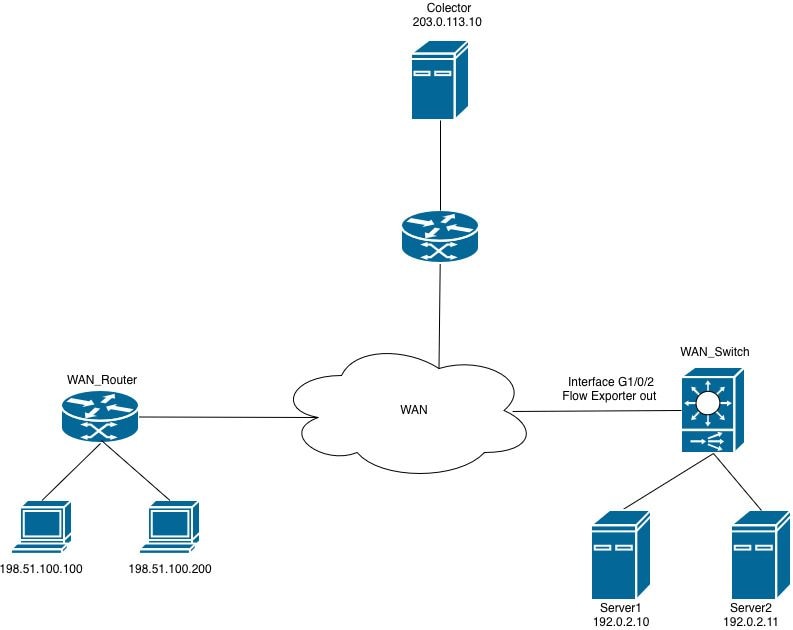 NetFlow على المحولات
لا يمكن تطبيق مراقبة التدفق على الواجهة
عند محاولة إرفاق مراقبة تدفق NetFlow (FNF) المرنة إلى الواجهة في إتجاه المخرج، يرفض الموجه التكوين ويولد رسالة خطأ.
WAN_Switch(config-if)#interface TwentyFiveGigE1/0/1
WAN_Switch(config-if)#ip flow monitor MONITOR_INGRESS input
% Flow Monitor: Failed to add monitor to interface: Invalid set of fields in monitor record for wired interface
خطوة 1. دققت المدرب تشكيل.
WAN_Switch#show running-config | section flow monitor
flow monitor MONITOR_INGRESS
exporter Netflow_Exporter
cache timeout inactive 30
cache timeout active 60
record INGRESS
الخطوة 2. راجع تكوين سجل التدفق للحقول الخاصة بالاتجاه. الحقل الأكثر شيوعا الذي يسبب هذه المشكلة هو: اسم التطبيق المطابق.
WAN_Switch#show running-config | section flow record
flow record INGRESS
match ipv4 version
match ipv4 protocol
match application name
match ipv4 destination address
match ipv4 source address
match transport destination-port
match transport source-port
match interface input
match flow direction
collect timestamp absolute first
collect timestamp absolute last
collect counter bytes long
collect counter packets long
يتم إستخدام حقل اسم التطبيق المطابق في سجل تدفق NetFlow المرن (FNF) داخل عمليات نشر إمكانية رؤية التطبيق والتحكم (AVC) لتحديد حركة مرور البيانات وتصنيفها استنادا إلى التطبيق الذي يقوم بإنشاء التدفق.
يستغل هذا الحقل محرك التعرف على التطبيقات (NBAR) المستند إلى الشبكة لإجراء فحص متعمق للحزم (DPI) والتعرف على التطبيق المرتبط بكل تدفق. بدلا من الاعتماد فقط على أرقام المنافذ أو عناوين IP، يتيح هذا الحقل للموجه إمكانية تصنيف حركة مرور البيانات في طبقة التطبيقات (الطبقة 7).
في عملية نشر لا تستخدم إلا Flexible NetFlow (FNF) بدون تمكين ميزة AVC، يكون هذا الحقل غير متوافق مع تكوين الواجهة ويمنع اتصال مراقبة التدفق بواجهة المراقبة.
ملاحظة: على المادة حفازة 9500H ومادة حفازة 9600 منصة، ال AVC سمة لا يتوفر. لمراقبة التدفق المستندة إلى AVC، تكون سلسلة Catalyst 9300 هي النظام الأساسي المدعوم.
3. قم بإزالة الحقل غير المعتمد من تكوين سجل التدفق، ثم أعد تطبيق مراقبة التدفق على الواجهة.
WAN_Switch(config)#interface twentyFiveGigE 1/0/1
WAN_Switch(config-if)#no ip flow monitor MONITOR_INGRESS in
WAN_Switch(config)#no flow monitor MONITOR_INGRESS
WAN_Switch(config)#flow record INGRESS
WAN_Switch(config-flow-record)#no match flow direction
<snip>
ملاحظة: بعد تعديل سجل التدفق، أعد تطبيق تكوين مراقبة التدفق وأرفق مراقبة التدفق بالواجهة لإكمال تغيير التكوين.
الخطوة 4. تأكد من أن مراقبة التدفق قيد التشغيل بعد تطبيق تغييرات التكوين.
WAN_Switch#show flow monitor MONITOR_INGRESS statistics
Cache type: Normal (Platform cache)
Cache size: 10000
Current entries: 1

Flows added: 1
Flows aged: 0

WAN_Switch#show flow monitor MONITOR_INGRESS cache
Cache type: Normal (Platform cache)
Cache size: 10000
Current entries: 1

Flows added: 1
Flows aged: 0

IPV4 SOURCE ADDRESS: x.x.x.x
IPV4 DESTINATION ADDRESS: y.y.y.y
TRNS SOURCE PORT: 0
TRNS DESTINATION PORT: 0
INTERFACE INPUT: Twe1/0/1
FLOW DIRECTION: Input
IP VERSION: 4
IP PROTOCOL: 89
counter bytes long: 708
counter packets long: 7
timestamp abs first: 20:38:23.408
timestamp abs last: 20:39:12.408
محفوظات المراجعة
| المراجعة | تاريخ النشر | التعليقات |
|---|---|---|
1.0 |
18-Jun-2026
|
الإصدار الأولي |
 التعليقات