- Title
- Preface
- Product Overview
- Before You Begin
- Installing the 1552 Series Access Points in Hazardous Locations
- Troubleshooting
- Translated Safety Warnings
- Declarations of Conformity and Regulatory Information
- Channels and Power Levels
- Access Point Specifications
- Access Point Pinouts
- Configuring DHCP Option 43
- Objectives
- Audience
- Organization
- Conventions
- Related Documents
- Finding the Product Serial Number
- Obtaining Documentation, Support, and Security Guidelines for the ISA100 Wireless and WirelessHART Multiprotocol Radio
- Obtaining Documentation, Support, and Security Guidelines for the WirelessHART Gateway
Preface
This section describes the objectives, audience, organization, and conventions of the Cisco Aironet 1552 Series for Hazardous Locations Installation Guide.
Objectives
This publication explains the steps for installing the Cisco Aironet 1552 Series Outdoor Mesh Access Point for Hazardous Locations (called the access point in this document).
The 1552 model is a dual-radio platform that supports dual-band (2.4 GHz and 5 GHz) operation.
Audience
This publication is for the person installing and configuring an access point for the first time. The installer should be familiar with network structures, terms, and concepts.

Warning Only trained and qualified personnel should be allowed to install, replace, or service this equipment. Statement 1030
Warning For Nordic countries (Norway, Finland, Sweden and Denmark) this system must be installed in a Restricted Access Location, where the voltage of the main ground connection of all equipment is the same (equipotential earth) and the system is connected to a grounded electrical outlet. Statement 328
Organization
This guide contains the following sections:
|
|
|
|
|---|---|---|
Describes the major components and features of the access point. |
||
Provides warnings, safety information, and mounting information you need to install your access point. The chapter contains a new section that provides information and procedures for mounting the access point in Class I, Division 2/Zone 2 hazardous locations. |
||
Installing the 1552 Series Access Points in Hazardous Locations |
Describes the procedures for installing the different models of the access point. |
|
Provides basic troubleshooting procedures for the access point. |
||
Indicates how to access the document that provides translations of the safety warnings that appear in this publication. |
||
Describes the regulatory conventions to which the access point conforms and provides guidelines for operating access points in Japan. |
||
Indicates how to access the document that lists the access point radio channels and the maximum power levels supported by the world regulatory domains. |
||
Conventions
This publication uses the following conventions:
Notes use the following conventions:

Note Means reader take note. Notes contain helpful suggestions or references to materials not contained in this manual.
Cautions use the following conventions:
 Means
reader be careful. In this situation, you might do something that could result in equipment damage or loss of data.
Means
reader be careful. In this situation, you might do something that could result in equipment damage or loss of data.
Warnings use the following conventions:
|
|
This warning symbol means danger. You are in a situation that could cause bodily injury. Before you work on any equipment, be aware of the hazards involved with electrical circuitry and be familiar with standard practices for preventing accidents. Use the statement number provided at the end of each warning to locate its translation in the translated safety warnings that accompanied this device. Statement 1071 SAVE THESE INSTRUCTIONS |
Related Documents
These documents provide complete information about the access point:
- Release Notes for Cisco Wireless LAN Controllers and Lightweight Access Points
- Cisco Wireless LAN Controller Configuration Guide
- Cisco Aironet 1550 Series Outdoor Mesh Access Point Power Injector Installation Instructions
Click this link to browse to the Cisco Wireless documentation home page:
http://www.cisco.com/en/US/products/hw/wireless/index.html
To browse to the access point documentation, click Cisco Aironet 1550 Series listed under “Outdoor and Industrial Wireless.” The documentation can be accessed from the Support box.
To browse to the Cisco Wireless LAN Controller documentation, click Standalone Controllers listed under “Wireless LAN Controllers.” The documentation can be accessed from the Support box.
Finding the Product Serial Number
The access point serial number is on the bottom of the access point (refer to Figure 1).
Figure 1 Location of Serial Number Label
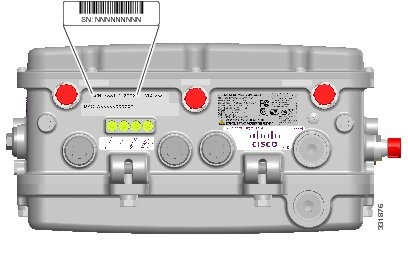
The access point serial number label contains the following information:
- Model number, such as AIR-CAP1552SA/SD-x-K9.
- Serial number, such as WCN0636279B (11 alphanumeric digits).
- Access point MAC address, for example 68BDABF54600 (12 hexadecimal digits). It is located under the serial number.
You will need your product serial number when requesting support.
Obtaining Documentation, Support, and Security Guidelines for the ISA100 Wireless and WirelessHART Multiprotocol Radio
The ISA100 Wireless and WirelessHART Multiprotocol Radio is supported by the Honeywell Process Solutions group. For support for this module, please contact Honeywell as per the information in the following link:
https://www.honeywellprocess.com/en-US/contact-us/customer-support-contacts/Pages/default.aspx
For information on obtaining documentation and support, providing documentation feedback, security guidelines, and recommended aliases and general Cisco documents, see the monthly What’s New in Cisco Product Documentation, which also lists all new and revised Cisco technical documentation, at:
http://www.cisco.com/en/US/docs/general/whatsnew/whatsnew.html
Obtaining Documentation, Support, and Security Guidelines for the WirelessHART Gateway
The WirelessHART Gateway is supported by Emerson Process Management.
Software and Integration Support
1-800-833-8314 (United States)
+63-2-702-1111 (International)
Technical support, quoting, and order-related questions.
United States 1-800-999-9307 (7:00 am to 7:00 pm CST)
Europe/Middle East/ Africa +49-8153-9390
Outside of the United States, contact your local Emerson Process Management representative.
For information on obtaining documentation and support, providing documentation feedback, security guidelines, and recommended aliases and general Cisco documents, see the monthly What’s New in Cisco Product Documentation, which also lists all new and revised Cisco technical documentation, at:
http://www.cisco.com/en/US/docs/general/whatsnew/whatsnew.html
 Feedback