Table Of Contents
Cisco Unified Border Element for Contact Center Solutions
Cisco Unified Communications Manager
Cisco Unified Customer Voice Portal Call Server
Cisco Unified Intelligent Contact Management Enterprise
Cisco Unified Customer Voice Portal VoiceXML Server
Nuance Automatic Speech Recognition/Text-To-Speech Server
Cisco Unified Communications Manager-Originated Calls
Cisco Unified Border Element for Contact Center Solutions
First Published: December 17, 2007, OL-14676-02
Last Updated: April 21, 2010Contents
Introduction
This document provides a sample configuration for contact center solutions using Cisco Unified Border Element (formerly Cisco Multiservice IP-to-IP Gateway software). Cisco Unified Border Element facilitates connectivity among independent Cisco Unified Communications, VoIP, and video networks. Cisco Unified Border Element also provides session border controller (SBC) functions, such as services demarcation, call admission control (CAC), protocol translation, and security.
This document describes the components used in the network, and provides sample device configurations that have been tested for the described features. Use this document for deploying a Cisco Unified Border Element contact center solution.
Prerequisites
Requirements
Ensure that you are using the Cisco IOS Release 15.1(1)T software before you attempt this configuration. The contact center solution using Cisco Unified Border Element described in this document was tested using the Cisco IOS Release 15.1(1)T software. See the "Caveats" section for more information.
Components Used
The information in this guide is based on the software and hardware versions identified and described in the following sections:
•
Cisco Unified Communications Manager
•
•
•
•
The information in this document was created through the use of the devices in a specific lab environment. All of the devices used in this document started with a cleared (default) configuration. If your network is live, make sure that you understand the potential impact of any command.
Cisco IOS VoiceXML Browser
The Cisco Integrated Services Router G2 (3945 and 3945E) are used in this solution for Cisco IOS VoiceXML browser services.
Cisco Unified SIP Proxy
Cisco Unified Session Initiation Protocol (SIP) Proxy was used in this solution as an alternative to Cisco Unified Presence Server. Cisco Unified SIP Proxy runs on a network module that deploys on the Cisco 3800 Series ISR platform. Cisco Unified SIP Proxy eliminates the need for a standalone SIP proxy server. It is highly configurable, has flexible routing and normalization policies, is highly scalable, and also supports features like percentage routing and time-of-day routing. This solution uses Cisco Unified SIP Proxy version 1.1.4. The Cisco 3845 Series ISR router hosting Cisco Unified SIP Proxy was running Cisco IOS Release 12.4(22)T.
Cisco Unified Communications Manager
Cisco Unified Communications Manager is an integral part of IP-based contact centers where agents use Cisco Unified IP Phones. Cisco Unified Communications Manager is not required if the contact center is time-division multiplexing (TDM) based. The solution discussed in this document uses SIP trunks and Cisco Unified Communications Manager version 7.1(3b).
Cisco Unified Border Element
The Cisco Unified Border Element serves as a feature-rich demarcation point for connecting enterprises to service providers over Unified Communications trunks, including SIP trunks. Cisco Unified Border Element is fully interoperable with the Cisco Unified Communications Manager and the Cisco Unified Communications Manager Express. When interoperating with the Cisco Unified Customer Voice Portal, the Cisco Unified Border Element plays the principal role of receiving calls through provisioned SIP trunks and routing the calls to agent phones. For interactive voice response (IVR) treatment, the Cisco Unified Border Element can also provide a Voice Extensible Markup Language (VoiceXML) gateway. The Cisco Unified Communications Manager-originated calls are routed through Cisco Unified Border Element in SIP-to-SIP deployments. The Cisco IOS Release 15.1(1)T software was used on Cisco Unified Border Element. More features are supported by later Cisco IOS Releases.
Cisco Unified Customer Voice Portal Call Server
The Cisco Unified Customer Voice Portal Call Server uses a SIP back-to-back user agent (B2BUA) and IVR service. It is located logically between the Cisco IOS gateway and Cisco Unified Intelligent Contact Management Enterprise Voice Response Unit (VRU) Peripheral Gateway (PG). The Cisco Unified Customer Voice Portal Call Server is not a required component for Standalone deployment models where call routing is not a desired. Cisco Unified CVP Server 7.0(2) was used.
Cisco Unified Intelligent Contact Management Enterprise
Cisco Unified Intelligent Contact Management Enterprise is a mandatory component for advanced call control mechanism, such as, IP switching and transfer to agents. Cisco Unified Intelligent Contact Management Enterprise provides call center agent management capabilities and call switching capabilities. This solution uses Cisco Unified Intelligent Contact Management Enterprise version 7.5(1).
Cisco Unified Customer Voice Portal VoiceXML Server
The Cisco Unified Customer Voice Portal VoiceXML Server (VXML Server) delivers external VoiceXML documents to the Cisco IOS gateway. Voice applications are written using the VXML Server Studio and then deployed to the VXML Server.
When calls invoke external VoiceXML, the VXML Server builds VoiceXML pages dynamically according to the contents of the deployed application. The VXML Server interacts only with the Cisco IOS gateway. The gateway requests the VoiceXML document from the VXML Server upon command from the Cisco Unified Customer Voice Portal Call Server.
This solution uses the VXML Server version 7.0(2).
Nuance Automatic Speech Recognition/Text-To-Speech Server
The Nuance Automatic Speech Recognition/Text-To-Speech (ASR)/(TTS) Server provides speech recognition services and text-to-speech services for the Cisco IOS VoiceXML gateway. Communication between the ASR/TTS server(s) and the Cisco IOS VoiceXML gateway uses Media Resource Control Protocol (MRCP). The Cisco Unified Border Element-Cisco Unified Customer Voice Portal interoperability scenarios used MRCP version 1 and the following Nuance versions:
•
•
•
Conventions
Refer to Cisco Technical Tips Conventions for information on document conventions.
Background Information
This document describes two models of contact center solutions that include Cisco Unified Border Element: centralized and distributed. In the centralized model, VoiceXML runs on a separate Cisco Integrated Services Router G2 (3945, 3945E) independent of Cisco Unified Border Element. In the distributed model, VoiceXML runs on the same Cisco IOS gateway on which Cisco Unified Border Element runs.
To configure a contact center solution with Cisco Unified Border Element, you should understand the following concepts:
Call Flows
This section describes the call flow for calls originated by Cisco Unified Communications Manager.
•
Cisco Unified Communications Manager-Originated Calls
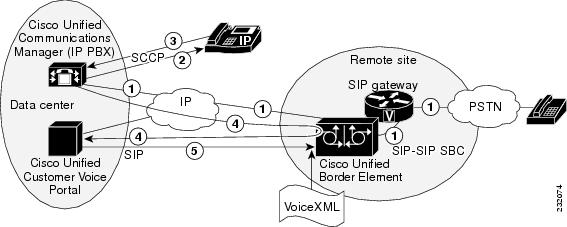
Figure 1 shows the call flow for calls originated by Cisco Unified Communications Manager:
1.
2.
3.
4.
5.
Figure 1 Cisco Unified Communications Manager-Originated Calls: SIP-to-SIP
Note these points about the call flow in Figure 1:
•
•
•
•
–
–
–
Feature Summary
The features described in this section were tested as part of the solution configuration.
Cisco IOS VoiceXML Browser
Applications written in VoiceXML provide access through a voice browser to content and services over the telephone, just as HTML provides access through a web browser running on a PC. The universal accessibility of the telephone and its ease of use make VoiceXML applications a powerful alternative to HTML for accessing the information and services of the World Wide Web.
The Cisco IOS VoiceXML feature provides a platform for interpreting VoiceXML documents. When a telephone call is made to a Cisco IOS VoiceXML-enabled gateway, VoiceXML documents are downloaded from the Cisco Unified Customer Voice Portal servers, providing content and services to the caller, typically in the form of prerecorded audio in an IVR application. You can access online business applications over the telephone that provide, for example, stock quotes, sports scores, or bank account balances.
VoiceXML brings the advantages of web-based development and content delivery to voice applications. VoiceXML is similar to HTML in its simplicity and in its presentation of information. The Cisco IOS VoiceXML feature is based on the VoiceXML 2.1 W3C Candidate Recommendation (June 13, 2005) and is designed to provide web developers great flexibility and ease in implementing VoiceXML applications.
The Cisco IOS VoiceXML browser is central to this solution. Depending on the model being used, the VoiceXML content is interpreted by the Cisco IOS VoiceXML browser on the Cisco Unified Border Element, in the distributed model, or on a separate Cisco IOS VoiceXML gateway, in the centralized model. Both models were tested.
DTMF Interworking
Dual tone multifrequency (DTMF) is important in the contact center because many interactions require the caller to enter DTMF input using the phone keypad. DTMF can be carried out-of-band in the signaling path or in-band in the bearer path. Various DTMF methods exist, and it is important for any solution to interwork reliably among these methods.
The following DTMF relay methods were tested:
•
•
Transcoding
The transcoding feature enables the Cisco Unified Border Element to link two networks using dissimilar codecs. Transcoding may be required to conserve bandwidth across a WAN link. For example, G.711 u-law packets consume more bandwidth than G.729r8 packets, and you may need to perform this conversion before traversing a bandwidth-limited WAN link. Transcoding may be required also in cases in which certain applications support only a certain codec type.
In the contact center space, the agents are typically G.711 u-law or G.729r8 based. However, calls that are inbound via the SIP trunk may be using a different codec. The G.711 u-law, G.729r8, and internet Low Bitrate Codec (iLBC) are the common types. Calls using different codecs than the agents use would necessitate transcoding on the Cisco Unified Border Element.
Transcoding of G.711 u-law to G.729r8 codecs has been tested and is supported. Transcoding of inbound iLBC calls over SIP Trunk to G711 and G729 calls to the agent is supported and has been tested.
GTD Pass-Through
Generic Transparency Descriptor (GTD) is a mechanism for representing telephony signaling messages and parameters in a generic fashion, in particular ISDN User Part (ISUP) messages and parameters. Mapping of every individual ISUP message and parameter to an equivalent SIP message is not viable. The GTD offers a solution in which the ISUP messages and parameters can be represented in a generic fashion and transported by the underlying call signaling messages to each node transited by the call. GTD is supported only across SIP networks that support Multipurpose Internet Mail Extension (MIME) header encapsulation.
In the contact center space, the ISDN user-to-user information (UUI) element has special significance and needs to be passed to the Intelligent Contact Manager (ICM) Enterprise script. The UUI data is passed via the Cisco IOS gateway in the SIP INVITE when signaling forwarding is configured. The INVITE contains the extra section of GTD ISDN variables, and the Cisco Unified Customer Voice Portal SIP subsystem parses the inbound body to send these across the GED-125 API in the NEW CALL message in the "UserToUser" field.
The testing described in this guide focused only on ensuring that the GTD information received on the inbound leg on the Cisco Unified Border Element was passed to the outbound leg via the Session Description Protocol (SDP) of the outbound INVITE. No attempt was made to verify that the UUI data actually reached the ICM script, and no attempt was made to determine how it was used by the script.
HTTPS
With the Secure HTTP (HTTPS) feature, you can use a secure socket interface to load VoiceXML application documents and scripts and play audio prompt files from the HTTP server. In data exchanges between the HTTP server and the client, data is encrypted by one party before it is sent over the network and then decrypted by the other party when it is received. The encryption protection makes eavesdropping much more difficult to decipher, if not impossible.
HTTPS does affect the gateway performance because of the additional overhead involved in processing secure transactions.
HTTPS was tested for two standard models:
•
•
Both the Cisco Unified Customer Voice Portal VoiceXML Server and the Cisco Unified Customer Voice Portal Call Server support HTTPS connections.
Standalone Model
The Cisco Unified Customer Voice Portal standalone deployment model provides IVR services only. Intelligent contact center integration is not included, although it is possible to transfer the call to an arbitrary destination, without call context and without queuing. The standalone model requires Cisco Unified Customer Voice Portal VoiceXML servers and Cisco IOS gateways, but does not include the Cisco Unified Customer Voice Portal Call Server or any Cisco Unified ICM Enterprise components. IVR applications support either DTMF only or a combination of DTMF and ASR and TTS.
Caveats
The tested configuration has the following caveats:
•
•
•
Configure
This section provides the information you need to configure the features described in this document.
Note
Network Diagram
Figure 2 shows the network setup for the contact center solution with the Cisco Unified Border Element network topology.
Figure 2 Contact Center Solution with Cisco Unified Border Element Network Topology
Configurations
This document uses these configurations:
Distributed Model
The following sections provide configurations of the key devices in the contact center solution using Cisco Unified Border Element distributed model in which VoiceXML runs on the same Cisco IOS gateway as Cisco Unified Border Element.
•
Cisco Unified Border Element
The following example shows the configuration of the Cisco Unified Border Element in the distributed model. Significant sections of this output are shown in bold type for emphasis.
version 15.1service timestamps debug datetime msecservice timestamps log datetime msecno service password-encryption!hostname Router!boot-start-markerboot-end-marker!card type e1 0 0card type e1 0 1card type e1 0 2card type e1 0 3card type e1 1 0card type e1 1 1card type e1 2 0card type e1 2 1card type e1 3 0card type e1 3 1card type e1 4 0card type e1 4 1logging buffered 1000000no logging console!no aaa new-model!clock timezone PDT -7clock summer-time PDT recurringnetwork-clock-participate slot 1network-clock-participate slot 2network-clock-participate slot 3network-clock-participate slot 4network-clock-participate wic 0network-clock-participate wic 1network-clock-participate wic 2network-clock-participate wic 3!!crypto pki trustpoint myCAenrollment terminalrevocation-check crl none!crypto pki trustpoint myCallServerenrollment terminalrevocation-check crl none!!crypto pki certificate chain myCAcertificate ca 264FF556F87B84BD45DE6B44E5C346D73082036A 30820252 A0030201 02021026 4FF556F8 7B84BD45 DE6B44E5 C346D730...E77E202F E7DCA228 AB3C4C2B 9FBE2315 E3C19030 EED039A3 918ACE7B 3F9B11DF0098FC98 AFB8B3AF BFD1B06C CD44B346 CCEF9E57 D6F829B0 2AA91091 6845F3D47697E31D 58F0A313 511483E5 A927quitcrypto pki certificate chain myCallServercertificate ca 23B9BF010000000000123082043F 30820327 A0030201 02020A23 B9BF0100 00000000 12300D06 092A864886F70D01 01050500 30133111 300F0603 55040313 08506572 664F5344 4D301E170D303831 30303631 37313031 315A170D 30393130 30363137 32303131 5A3066314F0583A5 69BA9F19 82ED576D 22E02BFD 0570F3D8 7BB7F784 D0B1A175 62731D116311340D 2B77BEC8 852B14EC 46848B30 9862FA7A C61D2338 117734C0 D24D975DAE83901D 8EC7F6E0 0F1F1AE2 4B62EDDA 754B3A39 DCD6B1C2 2E240068 CB62A52E 8846AAquitno ipv6 cefip source-routeip cef!!!!no ip domain lookupip domain name cisco.comip host asr-en-us 10.1.174.51ip host asr-en-tts 10.1.174.53ip host tts-en-us 10.1.174.53!multilink bundle-name authenticated!!!!isdn switch-type primary-5essisdn voice-call-failure 0!voice-card 0!voice-card 1!voice-card 2dspfarmdsp services dspfarm!voice-card 3!voice-card 4!!!voice service voipallow-connections h323 to h323allow-connections h323 to sipallow-connections sip to h323! This command enables the Cisco Unified Border Element! to proces calls between SIP end pointsallow-connections sip to sip! This command is required if GTD parameters are to be passed between in and out logssignaling forward unconditionalh323emptycapabilityh245 passthru tcsnonstd-passthrusiprel1xx disableheader-passingmidcall-signaling passthru!!voice class uri PerfTTS1 sippattern PerfTTS1@10.1.174.53!voice class uri PerfASR1 sippattern PerfASR1@10.1.174.51!!!voice translation-rule 71083rule 1 /671083/ /71083/!!voice translation-profile CMOtranslate called 71083!!http client cache memory file 10000ivr asr-server rtsp://10.1.174.51/recognizerivr tts-server rtsp://10.1.174.53/synthesizer!applicationservice new-call flash0:bootstrap.vxmlparamspace english language enparamspace english index 0paramspace english location flash0:paramspace english prefix en!service ASRTTS-Transfer flash0:CVPSelfService.tclparam CVPPrimaryVXMLServer 10.1.174.58paramspace english index 0paramspace english language enparamspace english location flash0:paramspace english prefix enparam CVPSelfService-app AudAsrTTS-Transferparam CVPSelfService-port 7000!service CVPSelfService flash0:CVPSelfServiceBootstrap.vxmlparamspace english language enparamspace english index 0paramspace english location flash0:paramspace english prefix en!service ringtone flash0:ringtone.tclparamspace english language enparamspace english index 0paramspace english location flash0:paramspace english prefix en!service cvperror flash0:cvperror.tclparamspace english index 0paramspace english language enparamspace english location flash0:paramspace english prefix en!service bootstrapssl flash0:bootstrap.tclparamspace english index 0paramspace english language enparam cvpserverssl 1paramspace english location flash0:paramspace english prefix enparam cvpserverport 8443!service handoff flash0:handoff.tclparamspace english language enparamspace english index 0paramspace english location flash0:paramspace english prefix en!service bootstrap flash0:bootstrap.tclparamspace english index 0paramspace english language enparamspace english location flash0:paramspace english prefix enparam cvpserverssl 0!monitorinterface statsinterface event-loginterface event-log aaainterface event-log asrinterface event-log ttsinterface event-log httpinterface event-log tftpinterface event-log rtspinterface event-log raminterface event-log flashinterface event-log smtpinterface max-server-records 100statsevent-logevent-log max-buffer-size 40history session max-records 500history session retain-timer 3660!!mrcp client rtpsetup enablevxml version 2.0license udi pid C3900-SPE150/K9 sn FHH123000HUhw-module pvdm 0/0!hw-module pvdm 0/1!hw-module pvdm 0/2!hw-module pvdm 0/3!!!archivelog confighidekeys!redundancy!!!!controller E1 0/0/0!controller E1 0/0/1!controller E1 0/1/0!controller E1 0/1/1!controller E1 0/2/0!controller E1 0/2/1!controller E1 0/3/0!controller E1 0/3/1!controller E1 1/0!controller E1 1/1!controller E1 1/0/0!controller E1 1/0/1!controller E1 2/0!controller E1 2/1!controller E1 2/0/0!controller E1 2/0/1!controller E1 3/0!controller E1 3/1!controller E1 3/0/0!controller E1 3/0/1!!!!!!!!interface GigabitEthernet0/0ip address 10.1.175.6 255.255.0.0duplex autospeed auto!interface GigabitEthernet0/1no ip addressshutdownduplex autospeed automedia-type rj45!interface GigabitEthernet0/2no ip addressshutdownduplex autospeed automedia-type rj45!!ip forward-protocol nd!no ip http serverno ip http secure-serverip http client secure-trustpoint PerfOSDM-CA!ip route 1.1.0.0 255.255.0.0 10.1.0.1ip route 223.255.254.0 255.255.255.0 10.1.0.1!!!!!nls resp-timeout 1cpd cr-id 1!!control-plane!call treatment oncall threshold global cpu-5sec low 100 high 100call threshold global cpu-avg low 100 high 100!!!sccp local GigabitEthernet0/0sccp ccm 10.1.175.6 identifier 1 version 6.0sccp!sccp ccm group 1associate ccm 1 priority 1associate profile 2 register MTP000bbecadcf2associate profile 1 register MTP001b547ef9b0keepalive retries 5switchover method immediateswitchback method immediate!dspfarm profile 1 transcodecodec g711ulawcodec g711alawcodec g729ar8codec g729abr8codec g729r8codec g729br8codec ilbcmaximum sessions 1associate application SCCPshutdown!dspfarm profile 2 transcode universalcodec g711ulawcodec g711alawcodec g729ar8codec g729abr8codec ilbcmaximum sessions 6associate application SCCP!dial-peer voice 4 voipdescription Incoming dial-peer for all callsincoming called-number 710..dtmf-relay rtp-ntecodec g711ulawno vad!dial-peer voice 5 voipdescription Send Call to Cisco Unified SIP Proxydestination-pattern 710..session protocol sipv2session target ipv4:10.1.174.221dtmf-relay rtp-ntecodec g711ulawno vad!dial-peer voice 6 voipservice bootstrapincoming called-number 888999T! The dial-peer tag "888999" corresponds to the LABEL configured on the ICM. This! label is known as the "VRU transfer label" and is returned to the CUCVP call server! (and eventually to the CUBE via the CUPS) by the ICM for VRU treatment. codec g711ulawno vad!dial-peer voice 9191 voipservice ringtoneincoming called-number 91Tcodec g711ulaw!dial-peer voice 9292 voipservice cvperrorincoming called-number 92Tcodec g711ulaw!dial-peer voice 9 voiptranslation-profile incoming CMOincoming called-number 671083dtmf-relay rtp-ntecodec g711ulawno vad!dial-peer voice 50 voipdestination-pattern 333....session protocol sipv2session target ipv4:10.1.174.125dtmf-relay rtp-ntecodec g711ulawno vad!dial-peer voice 40 voipincoming called-number 333....dtmf-relay rtp-ntecodec g711ulawno vad!dial-peer voice 1800888 voipservice asrtts-transferincoming called-number 1800888dtmf-relay rtp-ntecodec g711ulawno vad!!gatewaytimer receive-rtp 1200!!!gatekeepershutdown!!telephony-servicesdspfarm units 5sdspfarm transcode sessions 128sdspfarm tag 1 MTP001b547ef9b0sdspfarm tag 2 MTP000bbecadcf2max-ephones 6max-dn 1ip source-address 10.1.175.6 port 2000max-conferences 4 gain -6call-forward system redirecting-expandedtransfer-system full-consultcreate cnf-files version-stamp Jan 01 2002 00:00:00!alias exec log show loggalias exec rtp show voip rtp connections!line con 0exec-timeout 0 0line aux 0line vty 0 4exec-timeout 0 0password lablogintransport input all!scheduler allocate 20000 1000endCisco Unified Communications Manager Configuration
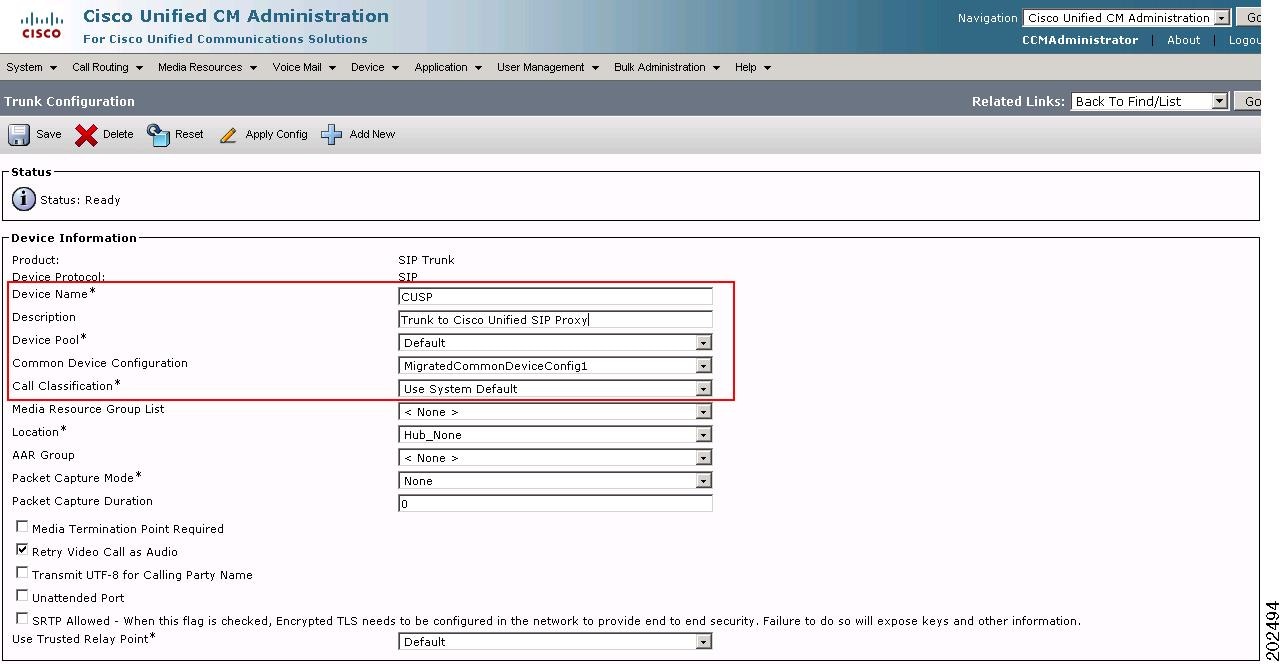
On Cisco Unified Communications Manager, configure the SIP trunks to the Cisco Unified SIP ProxyServer, as shown in Figure 3. The agent phones should be associated with the appropriate configured application user.
Figure 3 Cisco Unified Communications Manager Express Configuration
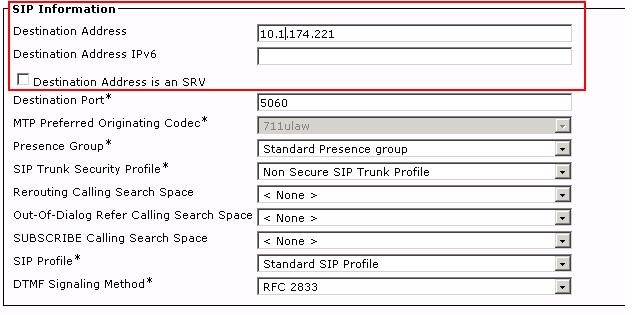
Figure 4 shows the SIP information configuration on Cisco Unified Communications Manager.
Figure 4 Cisco Unified Communications Manager Express Configuration
Centralized Model
The following are the configurations of the key devices in the contact center solution using the Cisco Unified Border Element centralized model in which VoiceXML runs on a separate Cisco IOS gateway that is independent of Cisco Unified Border Element.
•
•
Cisco Unified Border Element
The following example shows the configuration of the Cisco Unified Border Element in the centralized model. Significant sections of this output are shown in bold type for emphasis.
version 15.1service timestamps debug datetime msec localtime show-timezoneservice timestamps log datetime msec localtime show-timezoneno service password-encryption!hostname VoiceXMLGateway!boot-start-markerboot-end-marker!card type e1 0 0card type e1 0 1card type e1 0 2card type e1 0 3card type e1 1 0card type e1 1 1card type e1 2 0card type e1 2 1card type e1 3 0card type e1 3 1card type e1 4 0card type e1 4 1logging buffered 500000no logging consoleenable password lab!no aaa new-model!clock timezone PST -8clock summer-time PDT recurringnetwork-clock-participate slot 1network-clock-participate slot 2network-clock-participate slot 3network-clock-participate slot 4network-clock-participate wic 0network-clock-participate wic 1network-clock-participate wic 2network-clock-participate wic 3!!crypto pki trustpoint CallServerenrollment terminalrevocation-check none!crypto pki trustpoint MediaServerenrollment terminalrevocation-check none!!crypto pki certificate chain CallServercertificate ca 272DAA830000000000173082041E 30820306 A0030201 02020A27 2DAA8300 00000000 17300D06 092A864886F70D01 01050500 30133111 300F0603 55040313 08506572 664F5344 4D301E170D313030 33333131 37353230 375A170D 31313033 33313138 30323037 5A304531<snip>083FAE6A C12647B2 82CB7DFD 600EDFE0 42F29D45 E44E9EAE E546A381 154A7879C904B986 E93D876A C4A139CD F1ED6EB4 F0609941 89844C29 796BACDF 515DAEDAD91BA2AC 85C81104 BA6D48B2 B05D6551 A7AA0FAC 131BF8D2 7B2B97AD 7A07D2E8 40AFquitcrypto pki certificate chain MediaServercertificate ca 272882B00000000000163082043F 30820327 A0030201 02020A27 2882B000 00000000 16300D06 092A864886F70D01 01050500 30133111 300F0603 55040313 08506572 664F5344 4D301E170D313030 33333131 37343632 395A170D 31313033 33313137 35363239 5A306631<snip>69E5690F 654B692E 6D31943C 9DE87E14 C57CC72E 91A1A309 DA131201 CE60DF42CAC778BD D2EA7AE9 9E83933B 403ECBFD 77767E67 A8CC7F32 DA4A41E1 06B4011BD88553D0 54EB7349 FC33CA2C 272283A5 16BE4FE7 61355383 E05AB0FC 008787D7 780063quitno ipv6 cefip source-routeip cef!!!!no ip domain lookupip domain name cisco.comip host asr-en-us 10.1.174.51ip host asr-en-tts 10.1.174.53ip host tts-en-us 10.1.174.53!multilink bundle-name authenticated!!!!isdn switch-type primary-5essisdn voice-call-failure 0!voice-card 0dspfarmdsp services dspfarm!voice-card 1dspfarmdsp services dspfarm!voice-card 2dspfarmdsp services dspfarm!voice-card 3dspfarmdsp services dspfarm!voice-card 4dspfarmdsp services dspfarm!!!voice service voipallow-connections h323 to h323allow-connections h323 to sipallow-connections sip to h323allow-connections sip to sipsignaling forward unconditionalsiprel1xx disableheader-passing!!voice class uri PerfTTS1 sippattern PerfTTS1@10.1.174.53!voice class uri PerfASR1 sippattern PerfASR1@10.1.174.51!!!!http client cache memory file 10000http client secure-trustpoint CallServerivr asr-server rtsp://10.1.174.51/recognizerivr tts-server rtsp://10.1.174.53/synthesizer!applicationservice new-call flash0:bootstrap.vxmlparamspace english language enparamspace english index 0paramspace english location flash0:paramspace english prefix en!service ASRTTS-Transfer flash0:CVPSelfService.tclparam CVPPrimaryVXMLServer 10.1.174.58paramspace english index 0paramspace english language enparamspace english location flash0:paramspace english prefix enparam CVPSelfService-app AudAsrTTS-Transferparam CVPSelfService-port 7000!service CVPSelfService flash0:CVPSelfServiceBootstrap.vxmlparamspace english language enparamspace english index 0paramspace english location flash0:paramspace english prefix en!service ringtone flash0:ringtone.tclparamspace english language enparamspace english index 0paramspace english location flash0:paramspace english prefix en!service cvperror flash0:cvperror.tclparamspace english index 0paramspace english language enparamspace english location flash0:paramspace english prefix en!service bootstrapssl flash0:bootstrap.tclparam cvpserverssl 1paramspace english language enparamspace english index 0paramspace english location flash0:paramspace english prefix enparam cvpserverport 8443!service handoff flash0:handoff.tclparamspace english language enparamspace english index 0paramspace english location flash0:paramspace english prefix en!service bootstrap flash0:bootstrap.tclparamspace english index 0paramspace english language enparamspace english location flash0:paramspace english prefix enparam cvpserverssl 0!monitorinterface statsinterface event-loginterface event-log aaainterface event-log asrinterface event-log ttsinterface event-log httpinterface event-log tftpinterface event-log rtspinterface event-log ram!!mrcp client rtpsetup enablevxml version 2.0license udi pid C3900-SPE150/K9 sn FHH123000HUhw-module pvdm 0/0!hw-module pvdm 0/1!hw-module pvdm 0/2!hw-module pvdm 0/3!!!archivelog confighidekeys!redundancy!!!!controller E1 0/0/0!controller E1 0/0/1!controller E1 0/1/0!controller E1 0/1/1!controller E1 0/2/0!controller E1 0/2/1!controller E1 0/3/0!controller E1 0/3/1!controller E1 1/0!controller E1 1/1!controller E1 1/0/0!controller E1 1/0/1!controller E1 2/0!controller E1 2/1!controller E1 2/0/0!controller E1 2/0/1!controller E1 3/0!controller E1 3/1!controller E1 3/0/0!controller E1 3/0/1!controller E1 4/0!controller E1 4/1!controller E1 4/0/0!controller E1 4/0/1!ip ftp username administratorip ftp password roZesip ssh version 1!!!!!!!interface GigabitEthernet0/0ip address 10.1.175.6 255.255.0.0no ip redirectsip route-cache same-interfaceduplex autospeed autono keepalive!interface GigabitEthernet0/1no ip addressshutdownduplex autospeed automedia-type rj45no keepalive!interface GigabitEthernet0/2no ip addressshutdownduplex autospeed auto!!ip forward-protocol nd!ip http serverno ip http secure-server!ip route 1.1.0.0 255.255.0.0 10.1.0.1ip route 223.255.254.254 255.255.255.255 10.1.0.1!!!!!nls resp-timeout 1cpd cr-id 1!!control-plane!call treatment oncall threshold global cpu-5sec low 100 high 100call threshold global cpu-avg low 100 high 100!!!!dial-peer voice 6 voipservice bootstrapincoming called-number 888999Tdtmf-relay rtp-ntecodec g711ulawno vad!dial-peer voice 9191 voipservice ringtoneincoming called-number 91Tdtmf-relay rtp-ntecodec g711ulaw!dial-peer voice 9292 voipservice cvperrorincoming called-number 92Tdtmf-relay rtp-ntecodec g711ulaw!!!!!gatekeepershutdown!!line con 0exec-timeout 0 0line aux 0line vty 0 4exec-timeout 0 0password lablogintransport input all!scheduler allocate 20000 1000endStatic Routes on Cisco Unified SIP Proxy
The following is the configuration of the Cisco Unified SIP Proxy. Significant sections of this output are shown in bold type for emphasis.
tover-cusp-module(cusp)> sh config activeBuilding CUSP configuration...!server-group sip global-load-balance call-idserver-group sip retry-after 0server-group sip element-retries udp 2server-group sip element-retries tls 1server-group sip element-retries tcp 1sip dns-srvenableno naptrend dns!no sip header-compactionno sip logging!sip max-forwards 70sip network netDEST standardno non-invite-provisionalallow-connectionsretransmit-count invite-client-transaction 5retransmit-count invite-server-transaction 9retransmit-count non-invite-client-transaction 9retransmit-timer T1 500retransmit-timer T2 4000retransmit-timer T4 5000retransmit-timer TU1 5000retransmit-timer TU2 32000retransmit-timer clientTn 64000retransmit-timer serverTn 64000udp max-datagram-size 1500end network!sip overload reject retry-after 0!no sip peg-counting!sip privacy servicesip queue messagedrop-policy headlow-threshold 80size 2000thread-count 20end queue!sip queue radiusdrop-policy headlow-threshold 80size 2000thread-count 20end queue!sip queue requestdrop-policy headlow-threshold 80size 2000thread-count 20end queue!sip queue responsedrop-policy headlow-threshold 80size 2000thread-count 20end queue!sip queue st-callbackdrop-policy headlow-threshold 80size 2000thread-count 10end queue!sip queue timerdrop-policy nonelow-threshold 80size 2500thread-count 8end queue!sip queue xcldrop-policy headlow-threshold 80size 2000thread-count 2end queue!route recursion!sip tcp connection-timeout 30sip tcp max-connections 256!no sip tls!trigger condition in-netDESTsequence 1in-network netDESTend sequenceend trigger condition!trigger condition mid-dialogsequence 1mid-dialogend sequenceend trigger condition!accountingno enableno client-sideno server-sideend accounting!route table CVPtoCUCMkey 1 target-destination 10.1.174.125 netDESTkey 2 target-destination 10.1.174.125 netDESTkey 3 target-destination 10.1.174.125 netDESTkey 5 target-destination 10.1.174.125 netDESTkey 65 target-destination 10.1.175.7 netDESTkey 71 target-destination 10.1.174.210 netDESTkey 888999 target-destination 10.1.175.6 netDESTkey 91 target-destination 10.1.175.6 netDESTkey 92 target-destination 10.1.175.6 netDESTend route table!policy lookup CVPtoCUCMsequence 1 CVPtoCUCM request-uri uri-component userrule prefixend sequenceend policy!trigger routing sequence 1 by-pass condition mid-dialogtrigger routing sequence 2 policy CVPtoCUCM condition in-netDEST!no server-group sip global-ping!sip record-route netDEST udp 10.1.174.221sip listen netDEST udp 10.1.174.221 5060!endThe 888999* entry points to the VoiceXML gateway whose IP address is 10.1.175.6 and not to the Cisco Unified Border Element. The VRU leg is established with the Cisco IOS VoiceXML gateway, that is, VoiceXML runs on a separate Cisco IOS gateway.
Cisco Unified Communications Manager Configuration
The Cisco Unified Communications Manager configuration for the centralized model is the same as that described for the distributed model in the "Cisco Unified Communications Manager Configuration" section.
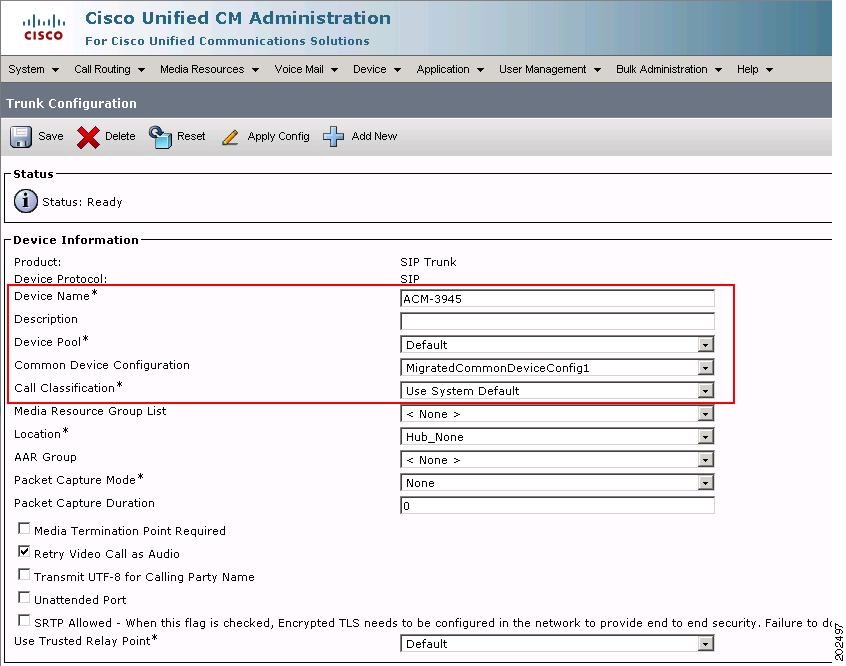
Calls originated by Cisco Unified Communications Manager can use Cisco Unified Border Element and needs the configuration on Cisco Unified Communications Manager shown in Figure 5, Figure 6, and Figure 7.
In Figure 5, Cisco Unified Border Element is added as a SIP Trunk to the Cisco Unified Communications Manager for SIP-to-SIP calls.
Figure 5 Cisco Unified Communications Manager
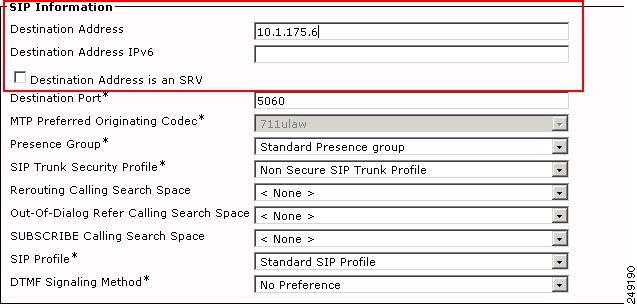
Figure 6 shows the SIP information configuration on the Cisco Unified Communications Manager.
Figure 6 Cisco Unified Communications Manager
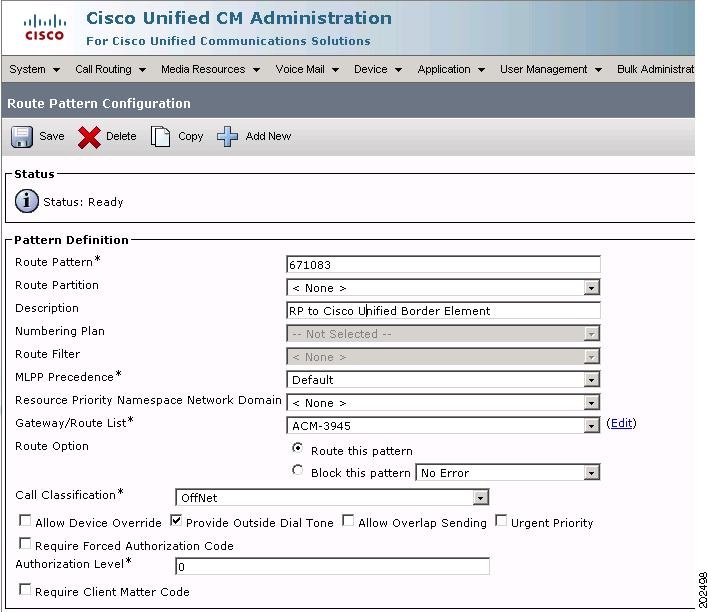
Figure 7 shows the route that is required on the Cisco Unified Communications Manager to route the calls through Cisco Unified Border Element.
Figure 7 Cisco Unified Communications Manager
Verify
Use this section to confirm that your configuration works properly. To display and verify your configuration, use the following show commands:
•
•
•
•
See Cisco IOS Voice Command Reference for more information.
Troubleshoot
Use this section to troubleshoot your configuration.
Note
Use the following debug commands to troubleshoot your configuration:
•
•
•
•
•
•
Related Information
The following information is referenced in this guide:
•
•
•
CCDE, CCENT, CCSI, Cisco Eos, Cisco Explorer, Cisco HealthPresence, Cisco IronPort, the Cisco logo, Cisco Nurse Connect, Cisco Pulse, Cisco SensorBase, Cisco StackPower, Cisco StadiumVision, Cisco TelePresence, Cisco TrustSec, Cisco Unified Computing System, Cisco WebEx, DCE, Flip Channels, Flip for Good, Flip Mino, Flipshare (Design), Flip Ultra, Flip Video, Flip Video (Design), Instant Broadband, and Welcome to the Human Network are trademarks; Changing the Way We Work, Live, Play, and Learn, Cisco Capital, Cisco Capital (Design), Cisco:Financed (Stylized), Cisco Store, Flip Gift Card, and One Million Acts of Green are service marks; and Access Registrar, Aironet, AllTouch, AsyncOS, Bringing the Meeting To You, Catalyst, CCDA, CCDP, CCIE, CCIP, CCNA, CCNP, CCSP, CCVP, Cisco, the Cisco Certified Internetwork Expert logo, Cisco IOS, Cisco Lumin, Cisco Nexus, Cisco Press, Cisco Systems, Cisco Systems Capital, the Cisco Systems logo, Cisco Unity, Collaboration Without Limitation, Continuum, EtherFast, EtherSwitch, Event Center, Explorer, Follow Me Browsing, GainMaker, iLYNX, IOS, iPhone, IronPort, the IronPort logo, Laser Link, LightStream, Linksys, MeetingPlace, MeetingPlace Chime Sound, MGX, Networkers, Networking Academy, PCNow, PIX, PowerKEY, PowerPanels, PowerTV, PowerTV (Design), PowerVu, Prisma, ProConnect, ROSA, SenderBase, SMARTnet, Spectrum Expert, StackWise, WebEx, and the WebEx logo are registered trademarks of Cisco and/or its affiliates in the United States and certain other countries.
All other trademarks mentioned in this document or website are the property of their respective owners. The use of the word partner does not imply a partnership relationship between Cisco and any other company. (1002R)
Any Internet Protocol (IP) addresses and phone numbers used in this document are not intended to be actual addresses and phone numbers. Any examples, command display output, network topology diagrams, and other figures included in the document are shown for illustrative purposes only. Any use of actual IP addresses or phone numbers in illustrative content is unintentional and coincidental.
© 2007-2010 Cisco Systems, Inc. All rights reserved.