Cisco Nexus 7000 Series NX-OS Release Notes, Release 5.2
Available Languages
Table of Contents
Cisco Nexus 7000 Series NX-OS Release Notes, Release 5.2
General Upgrade/Downgrade Caveats
Specific Upgrade/Downgrade Caveats for Cisco NX-OS Release 5.2(x)
Caveats for a Traditional Upgrade or Downgrade (Switch Reload)
FCoE (Fiber Channel over Ethernet)
BGP Prefix Independent Convergence Core
Configurable Reserved VLAN Range
Graceful vPC Type-1 Check Handling
HTTP Proxy Server for Smart Call Home
Parallel Upgrade of EPLD Images
Parallel Upgrade of I/O Modules
Subnet Broadcast Support for the DHCP Relay Agent
XML Infrastructure Enhancements
Standby Supervisor Can Reset With Feature-Set Operation
NTP Servers Created with Cisco DCNM-SAN Are Not Listed for the Storage VDC
GOLD Snake Loopback Test Disabled on F1 Series Modules
Open Caveats—Cisco NX-OS Release 5.2
Resolved Caveats—Cisco NX-OS Release 5.2(9a)
Resolved Caveats—Cisco NX-OS Release 5.2(9)
Resolved Caveats—Cisco NX-OS Release 5.2(7)
Resolved Caveats—Cisco NX-OS Release 5.2(5)
Resolved Caveats—Cisco NX-OS Release 5.2(4)
Resolved Caveats—Cisco NX-OS Release 5.2(3a)
Resolved Caveats—Cisco NX-OS Release 5.2(1)
Obtaining Documentation and Submitting a Service Request
Cisco Nexus 7000 Series NX-OS Release Notes, Release 5.2
Part Number: OL-25091-07 D0
Current Release: 5.2(9a)
This document describes the features, caveats, and limitations for Cisco NX-OS software for use on the Cisco Nexus 7000 Series switches. Use this document in combination with documents listed in the “Related Documentation” section.

Note Release notes are sometimes updated with new information about restrictions and caveats. See the following website for the most recent version of the Cisco Nexus 7000 Series NX-OS Release Notes, Release 5.x Release Notes:
http://www.cisco.com/en/US/products/ps9402/prod_release_notes_list.html
Table 1 shows the online change history for this document.
Revised the description of the Precision Time Protocol (PTP) feature to indicate that it does not require a license. |
|||
|
|||
Added Cisco NX-OS Release 4.2(8) to Table 4 . |
|||
|
|||
Added a Note to the “General Upgrade/Downgrade Caveats” section. |
|||
Added SFP-10G-ER to N7K-F132XP-15 in Table 3 . |
|||
Removed NTP update-calendar and NTP clock-period from the “NTP Enhancements” section. |
|||
Moved the ISSU limitation to the “Upgrade/Downgrade Caveats” section and expanded the description. |
|||
Updated the transceiver information for the 8-port 10-Gigabit Ethernet I/O module XL (N7K-M108X2-12L) in Table 3 . |
|||
|
|||
Added caveat CSCts11774 to the “Resolved Caveats—Cisco NX-OS Release 5.2(3a)”section. |
|||
Modified the description of a caveat for QoS MIB and MPLS QoS defaults in the “Specific Upgrade/Downgrade Caveats for Cisco NX-OS Release 5.2(x)” section. |
|||
Corrected the bug ID of CSCua48852 in the “Open Caveats—Cisco NX-OS Release 5.2” section. |
|||
Added the “Slow SNMP Responses” limitation. |
|||
Added a caveat about removing IP ARP synchronization prior to an ISSU to the “Upgrade/Downgrade Caveats” section. |
|||
Added a footnote to Table 4 related to an IPFIB Errors caveat in the “Specific Upgrade/Downgrade Caveats for Cisco NX-OS Release 5.2(x)” section. |
|||
Corrected the bug ID of CSCus42812 to CSCua42812 in the “Resolved Caveats—Cisco NX-OS Release 5.2(7)” section. |
|||
|
|||
Updated Table 4 . |
|||
Updated the Aggressive Failure Detection Timers caveat in the “Upgrade/Downgrade Caveats” section. |
|||
Added the Increased TCAM Usage for Handling Fragmented Packets in QoS ACL Entries caveat to the “Upgrade/Downgrade Caveats” section. |
|||
Added LISP caveat to the “Upgrade/Downgrade Caveats” section. |
|||
Introduction
The Cisco NX-OS software for the Cisco Nexus 7000 Series switches fulfills the routing, switching, and storage networking requirements of data centers and provides an Extensible Markup Language (XML) interface and a command-line interface (CLI) similar to Cisco IOS software.
System Requirements
This section includes the following topics:
Hardware Supported
The Cisco NX-OS software supports the Cisco Nexus 7000 Series chassis. You can find detailed information about supported hardware in the Cisco Nexus 7000 Series Hardware Installation and Reference Guide .
Memory Requirements
The Cisco NX-OS software requires 4 GB of memory or 8 GB of memory, depending on the software version you use and the software features you enable.
Note The information in this section applies only if you have a Cisco Nexus 7000 Series system with a Supervisor 1 module with 4 GB of memory. If your system has a Supervisor 1 with 8 GB of memory, you do not need the information in this section because a memory upgrade is not needed.
An 8 GB supervisor memory upgrade kit, N7K-SUP1-8GBUPG=, allows for growth in the features and capabilities that can be delivered in existing Cisco Nexus 7000 Series supervisor modules. The memory upgrade kit is supported on Cisco Nexus 7000 Series systems running Cisco NX-OS Release 5.1 or later releases. Instructions for upgrading to the new memory are available in the “Upgrading Memory for Supervisor Modules” section of the Cisco Nexus 7000 Series Hardware Installation and Reference Guide.
The following guidelines can help you determine whether or not to upgrade an existing supervisor module:
- When the system memory usage exceeds 3 GB (75 percent of total memory), we recommend that you upgrade the memory to 8 GB. Use the show system resources command from any VDC context to check the system memory usage:
- If you create more than one VDC with XL mode enabled, or if you have more than two VDCs, 8 GB of memory is required.
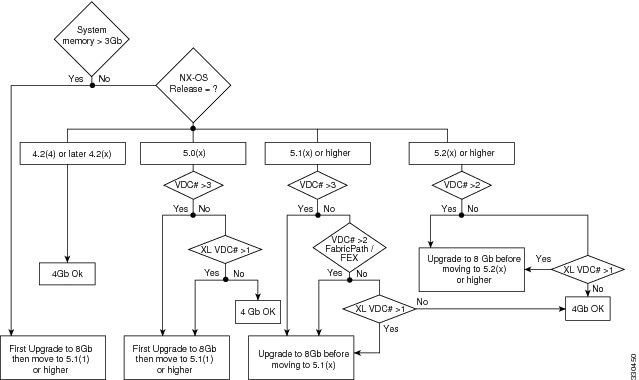
For additional guidance about whether or not to upgrade a supervisor module to 8 GB of memory, see Figure 1.
Figure 1 Supervisor Memory Upgrade Decision Flowchart
When you insert a supervisor module into a Cisco Nexus 7000 Series switch running Cisco NX-OS Release 5.1(x) or a later release, be aware that one of the following syslog messages will display, depending on the software version and the amount of memory for the supervisor module:
- If you are running Cisco NX-OS Release 5.1(1) or a later release and you have an 8-GB supervisor as the active supervisor and you insert a 4-GB supervisor module as the standby, it will be powered down. A severity 2 syslog message indicates that the memory amounts should be equivalent between the active and the standby supervisor:
- If you are running Cisco NX-OS Release 5.1(2) or a later release and you insert a 8-GB supervisor module as the standby, a severity 4 syslog message appears.
In this situation, you have the option to remove the extra memory or do a switchover and upgrade the memory in the 4-GB supervisor.
Supported Device Hardware
Table 2 shows the hardware supported by Cisco NX-OS Release 5.x and Cisco NX-OS Release 4.x software.
Table 3 shows the transceiver devices supported by each release.
For a list of minimum recommended Cisco NX-OS software releases for use with Cisco Nexus 7000 Series switches, see the document Minimum Recommended Cisco NX-OS Releases for Cisco Nexus 7000 Series Switches.
6.0-kW DC power supply unit (cable included) |
||
8-port 10-Gigabit Ethernet I/O module XL1 |
||
32-port 10-Gigabit Ethernet SFP+ I/O module XL 1 |
||
48-port 1-Gigabit Ethernet I/O module XL 1 |
||
48-port 10/100/1000 Ethernet I/O module XL 1 |
||
Cisco Nexus 2248TP Fabric Extender2 |
||
Cisco Nexus 2224TP Fabric Extender 2 |
||
Cisco Nexus 2232PP Fabric Extender 2 |
SFP-10G-LR3 |
|||
SFP-10G-LR4 |
|||
SFP-10G-LRM 2 |
|||
SFP-10G-SR2 2 |
|||
SFP-H10GB-CUxM 2 |
|||
SFP-H10GB-ACUxM 1 |
|||
SFP-H10GB-CUxM 1 |
5.1(2)5 |
Upgrade/Downgrade Caveats
This section includes caveats that relate to upgrading or downgrading Cisco NX-OS software on Cisco Nexus 7000 Series devices.
Note Before you upgrade or downgrade your Cisco NX-OS software, we recommend that you read the complete list of caveats in this section to understand how an upgrade or downgrade might affect your network, depending on the features that you have configured.
This section includes the following topics:
General Upgrade/Downgrade Caveats
Do not change any configuration settings or network settings during a software upgrade. Any changes in the network settings may cause a disruptive upgrade.
See Table 4 for the nondisruptive upgrade (ISSU) path to and nondisruptive downgrade (ISSD) path from Cisco NX-OS Release 5.2(9a). Releases that are not listed for a particular release train do not support a direct ISSU or ISSD to the current release.
|
6.Before performing an ISSU to Cisco NX-OS Release 5.2(7) or a later release, see the IPFIB Errors caveat in this section. |
Unless otherwise noted, releases within the same release train that are ISSU and ISSD compatible to current release are also ISSU and ISSD compatible between each other.
Cisco NX-OS Release 5.2(1) or later releases are not ISSU-compatible with NX-OS Release 5.1(2), which is a deferred release.
Cisco NX-OS Release 5.2(1) or later releases are not ISSU-compatible with Release 4.1(x) and Release 4.0(x). Similarly a downgrade to Release 4.1(x) or Release 4.0(x) is disruptive.
Note If you are running an unsupported Cisco NX-OS release, you can perform an ISSU or ISSD in two steps:
1. Upgrade (or downgrade) to an ISSU-compatible or ISSD-compatible release.
2. Perform a second nondisruptive upgrade (or downgrade) to the current release.
For example, to upgrade from Release 4.2(3) to Release 5.2(x), you can perform an ISSU from Release 4.2(3) to Release 4.2(6), and then perform and ISSU from Release 4.2(6) to Release 5.2(x).
Note During a disruptive upgrade, configuration loss is possible on the Cisco Nexus 7000 system and on any attached Fabric Extender Modules when the reason “incompatible image” is displayed.
Specific Upgrade/Downgrade Caveats for Cisco NX-OS Release 5.2(x)
If you have LISP configured on a Cisco Nexus 7000 Series device, you must remove the configuration before an ISSU. Enter the no lisp feature command to individually unconfigure the LISP commands. Then enter the no feature lisp command. After the ISSU completes, enter the feature lisp command to reenable LISP and then reconfigure it
When you upgrade Cisco NX-OS software by changing boot variables and reloading the device, make sure to save the FEX HIF configuration to the startup configuration, as well as another location (such as bootflash or an external server). Once the upgrade to a new release is complete, and the FEX is fully online and associated, reapply the FEX HIF configuration.
- Cisco NX-OS Release 5.2(1) includes new mandatory configuration parameters for OTV. An ISSU to Release 5.2(1) will result in interruptions of the OTV service. In addition, be aware of the following points related to ISSU:
– If any overlay interface is in the no-shutdown state (up), the ISSU pre-upgrade stage cannot complete. All overlay interfaces must be in the shutdown state before the ISSU can successfully complete.
– Following the ISSU, it is mandatory to configure the OTV site identifier to bring up the overlays.
– Following the ISSU, apply the default CoPP policy to ensure that OTV functions properly. To apply the default CoPP policy, enter the copp profile strict command.
Recommendations on the best procedure to minimize the impact of ISSU on the OTV service can be found in the Cisco Nexus 7000 Series NX-OS OTV Configuration Guide. Closely follow this procedure when upgrading an existing OTV deployment.
- When you downgrade from Cisco NX-OS Release 5.2(x) to an earlier release such as Cisco NX-OS Release 4.2(1), you might see messages like the following:
Jul 9 14:50:30 sysmgr: <<%PSS-1-PSS_VERSION_MISMATCH>> sysmgr: found version mismatch in /var/sysmgr/startup-cfg/bin/sysmgr_config
Jul 9 14:50:30 %PSS-1-PSS_VERSION_MISMATCH sysmgr: found version mismatch in /var/sysmgr/startup-cfg/bin/sysmgr_config
Jul 9 14:50:30 sysmgr: <<%PSS-1-PSS_VERSION_MISMATCH>> sysmgr: found version mismatch in /var/sysmgr/startup-cfg/debug/sysmgr_debug_config
These messages are harmless and the downgrade should succeed.
- Before you attempt a downgrade from Cisco NX-OS Release 5.2(x) to any release prior to Release 5.2(1), you should clear the QoS MIB and MPLS QoS defaults using the clear qos mpls-snmp command. Enter these commands after the switch configuration has been erased and it has been reloaded. The downgrade might result in a continuous failure if the defaults are not cleared.
- Before you downgrade from Cisco NX-OS Release 5.2(x) or 5.1(x) to Cisco NX-OS Release 5.0(x) or an earlier release, remove all system QoS and QoS policies configured on F1-series modules. Use the clear qos policies command to remove the defaults for F1-series modules. An internal process failure can result if the QoS policies are not removed prior to the downgrade.
- ISSU, stateful switchover (SSO), and graceful restart are not supported when aggressive failure detection timers are used for any Layer 3 protocols. Starting in Cisco NX-OS Release 5.2(3a), the First Hop Redundancy Protocol (FHRP) with aggressive timers has been validated for SSO or ISSU using the extended hold timer feature. Other protocols such as OSPF have been validated with aggressive timers without SSO or ISSU support starting in Cisco NX-OS Release 5.2(1). For additional information on aggressive timer support and extended hold timers for FHRP, see the Cisco Nexus 7000 Series NX-OS Unicast Routing Configuration Guide and the Cisco Nexus 7000 Series NX-OS Verified Scalability Guide.
- Cisco NX-OS Release 5.2(1) extends the reserved VLAN range from 3968 to 4095 and makes it configurable. Previously, in releases prior to Cisco NX-OS Release 5.2(1), the reserved VLAN range was 3968 to 4048, and 4094, and it was not configurable. See the “Configurable Reserved VLAN Range” section for more information about this new feature.
Once you upgrade to Cisco NX-OS Release 5.2(1), user-defined VLANs might fall within the new reserved range. If that occurs, then the new reserved range will not take effect and the features that need the additional reserved VLANs will be impacted.
To address this situation, you can either migrate the affected user-defined VLAN before or after the upgrade, or you can modify the new VLAN range after the upgrade. See the Cisco Nexus 7000 Series NX-OS Interfaces Configuration Guide.

If you perform an ISSU to Cisco NX-OS Release 5.2(1) and you modify the new configurable reserved VLAN range, an ISSD to a lower version requires a reboot to restore the previous reserved VLAN range of 3968 to 4048, and 4094.
If you perform an ISSU to Cisco NX-OS Release 5.2(1) and you do not modify the new configurable reserved VLAN range of 3968 to 4095, then you can perform an ISSD to a lower version and your configuration is preserved.
- BFD for static routes does not support a stateful switchover (SSO) or an ISSU. When you perform an ISSU or an SSO, a small amount of packet loss can result in flows that follow static routes that are protected by BFD.
- The ACL resource allocation scheme was changed in Cisco NX-OS Release 5.1(x) to provide BFD improved interoperability with other features that use ACLs. Because of this change, you should disable BFD prior to a software upgrade from any Cisco NX-OS Release 5.0(x) to any Cisco NX-OS Release 5.1(x) or Release 5.2(x). Likewise, you should disable BFD before a downgrade from any Cisco NX-OS Release 5.2(x) or Release 5.1(x) to any Cisco NX-OS Release 5.0(x).
- Before you perform an ISSU from a Cisco NX-OS Release 5.2(x) earlier than Release 5.2(7) to Release 6.x or perform an ISSU or ISSD between any two Cisco NX-OS 6.x releases, you must first remove QoS policies and ACLs from interfaces that are in the down state. If this action is not performed, the installer process will abort the upgrade or downgrade process, and a message similar to the following will be displayed:
Note The automatic clear inactive-config qos command that clears an inactive configuration will delete the port channel policies even if one of the ports in a port channel has inactive policies.
Guidelines for manual policy removal: during a manual removal, when the interface is part of a port channel, remove the policy map or access list from the port channel or remove the interface from the port channel before performing the ISSU or ISSD. For all other interface types, remove the policy map or access list from the interface.
- If you downgrade a Cisco Nexus 7000 Series device from Cisco NX-OS Release 5.2(x) or Release 5.1(x) to Cisco NX-OS Release 5.0(x) or Release 4.2(x), AAA configuration commands might fail. The workaround is to write-erase the startup configuration and reboot the device.
- A nondisruptive software upgrade or downgrade is not supported when vPC peers are on a single physical switch, but they run across VDCs.
- If you have IP ARP synchronization configured in a vPC, you should remove the configuration prior to a nondisruptive software upgrade from Cisco NX-OS Release 4.2(6) or Release 4.2(8) to Cisco NX-OS Release 5.2(x). You can reapply the configuration after the ISSU completes. Follow these steps:
– Enter the no ip arp synchronize command to remove IP ARP synchronization from the configuration.
– After the ISSU completes successfully, enter the ip arp synchronize command to configure IP ARP synchronization.
During an upgrade to Cisco NX-OS Release 5.2(7) or a later release, the following error messages might appear:
In addition, the ipfib process might fail.
This issue can be triggered when the following sequence of events occur:
– You perform an ISSU to Cisco NX-OS Release 5.2(1), Release 5.2(3a), Release 5.2(4), or Release 5.2(5) release from an earlier 5.0(x) or 5.1(x) release and you have not reloaded the switch.
– You make configuration changes in the 5.2(x) release running on the Cisco Nexus 7000 Series system.
– You perform an ISSU to NX-OS Release 5.2(7) or a later release.
To work around this issue, follow these steps:
1. Prior to the upgrade, execute the following commands to avoid the issue:
a. Enter the feature lisp command.
b. Enter the ip lisp etr command for all VRFs, followed by the no ip lisp etr command.
c. Enter the no feature lisp command.
2. If you experience this issue, reload the affected modules on your Cisco Nexus 7000 Series system.
Note The Transport Services Package license is required to enable LISP. If you do not have this license, you can enable the grace period for it. If you cannot enable the grace period, perform an ISSU and reload the affected modules.
You should perform these steps even if you are not using LISP because the issue can occur even if LISP is not running.
- When you perform an ISSU from Cisco NX-OS Release 4.2(x) to Release 5.2(4) or an earlier 5.2(x) release, you might see the symptom described in CSCud84750, which is listed in the “Resolved Caveats—Cisco NX-OS Release 5.2(5)” section section.
- Due to an optimization in handling of fragmented packets in QoS ACL entries in Cisco NX-OS Release 5.2(9), Release 6.1(3), and later releases, TCAM usage might increase once the system is reloaded with the new software release. Once the new version boots, any ACL entry that references Layer 4 information will use an extra TCAM entry so that it can match on fragmented packets and that will cause TCAM usage to increase. This increase is not seen during an ISSU upgrade, until the system or module is reloaded at some point after the ISSU upgrade is complete.
Caveats for a Traditional Upgrade or Downgrade (Switch Reload)
When a Cisco Nexus 7000 Series switch is reloaded and the version of the image on the switch changes, the binary configuration is always removed and the ASCII configuration is applied. When this occurs, VLAN Trunking Protocol (VTP) restores the default configuration to the switch.
CMP Images
Cisco NX-OS Release 5.2(9) uses the same CMP image as Cisco NX-OS Release 5.2(1).
Cisco NX-OS Release 5.2(1) includes a new image for the connectivity management processor (CMP). The CMP is upgraded to Release 5.2(1) on successful ISSU of Cisco NX-OS to Release 5.2(1). When the ISSU completes, you should reload the CMP image on the active and standby supervisor modules. For additional information, see the Cisco Nexus 7000 Series NX-OS Software Upgrade and Downgrade Guide, Release 5.x.
For additional information about the CMP, see the Cisco Nexus 7000 Series Connectivity Management Processor Configuration Guide.
EPLD Images
In conjunction with Cisco NX-OS Release 5.2(1), a new EPLD package is introduced. Certain features in Cisco NX-OS Release 5.2(1) may require an upgrade to the new EPLD images. LISP, for example, requires a specific EPLD version on the 32-port 10-Gigabit Ethernet SFP+ I/O module (N7K-M132XP-12) and the 32-port 10-Gigabit Ethernet SFP+ I/O module XL (N7K-M132XP-12L). MPLS does not require an EPLD upgrade.
Cisco NX-OS Release 5.2(9), Release 5.2(7), Release 5.2(5), Release 5.2(4), and Release 5.2(3a) do not include new EPLD images.
To determine if you need to upgrade the EPLD images on your Cisco Nexus 7000 Series switch, see the Cisco Nexus 7000 Series FPGA/EPLD Upgrade Release Notes, Release 5.2.
Cisco DCNM
Cisco Data Center Network Manager (DCNM) Release 5.2(2e) supports Cisco NX-OS Release 5.2(9).
Cisco Data Center Network Manager (DCNM) Release 5.2(1) supports Cisco NX-OS 5 Release 5.2(1) and Release 5.2(3a). See the Cisco DCNM Release Compatibility Matrix for specific information about the Cisco Nexus platforms and software release versions that Cisco DCNM supports.
New Hardware Features
Cisco NX-OS Release 5.2 supports the new Cisco Nexus 7009 chassis (N7K-7009) and new fabric module (N7K-7009-FAB-2) for the Cisco Nexus 7009 system. The Cisco Nexus 7009 chassis has 9 slots that allow for two supervisor modules and up to seven I/O modules. The chassis also holds up to five fabric modules, one fan tray, up to two power supply units, and a cable management system. For additional information about the Cisco Nexus 7009 system, see the Cisco Nexus 7000 Series Hardware Installation and Reference Guide.
New Software Features
This section briefly describes the new features introduced in Cisco NX-OS Release 5.2 for the Cisco Nexus 7000 Series switches. For detailed information about the features listed, see the documents listed in the “Related Documentation” section. The “New and Changed Information” section in each of these books provides a detailed list of all new features and includes links to the feature description or new command.
Some new features require a new license. See the “Licensing” section for additional information. For complete information about the licenses required for Cisco NX-OS features, see the Cisco NX-OS Licensing Guide.
This section includes the following topics:
- Cisco NX-OS Release 5.2(9)
- Cisco NX-OS Release 5.2(7)
- Cisco NX-OS Release 5.2(5)
- Cisco NX-OS Release 5.2(4)
- Cisco NX-OS Release 5.2(3a)
- Cisco NX-OS Release 5.2(1)
Cisco NX-OS Release 5.2(9)
Cisco NX-OS Release 5.2(9) is a maintenance release that includes bug fixes. It does not include new software features.
Cisco NX-OS Release 5.2(7)
Cisco NX-OS Release 5.2(7) is a maintenance release that includes bug fixes and the following minor software enhancement:
Cisco NX-OS Release 5.2(5)
Cisco NX-OS Release 5.2(5) is a maintenance release that includes bug fixes. It does not include new software features.
Cisco NX-OS Release 5.2(4)
Cisco NX-OS Release 5.2(4) is a maintenance release that includes bug fixes and the following minor software enhancements:
Cisco NX-OS Release 5.2(3a)
Cisco NX-OS Release 5.2(3a) is a maintenance release that includes bug fixes. It does not include new software features.
Cisco NX-OS Release 5.2(1)
This section briefly describes the new features introduced in Cisco NX-OS Release 5.2(1) for the Cisco Nexus 7000 Series switches and includes the following topics:
- LISP
- MPLS
- FCoE (Fiber Channel over Ethernet)
- OTV Features
- FEX Features
- IEEE 1588v2 PTP Support
- PONG
- ACL Capture
- ACLs Enhancements
- BFD SHA-1 Authentication
- BFD Support for VRRP
- BGP Local-AS
- BGP Prefix Independent Convergence Core
- CFS Enhancement
- Cisco TrustSec Enhancement
- Configurable Reserved VLAN Range
- CoPP Enhancements
- EEM Correlation
- EIGRP Wide Metrics
- Graceful vPC Type-1 Check Handling
- HTTP Proxy Server for Smart Call Home
- Multicast over GRE
- NetFlow Enhancement
- NTP Enhancements
- Parallel Upgrade of EPLD Images
- Parallel Upgrade of I/O Modules
- Password Encryption
- Smart DHCP Relay
- SPAN and ERSPAN Enhancements
- Static Multicast MAC
- System Message Logging
- Subnet Broadcast Support for the DHCP Relay Agent
- Unique MAC Address per VDC
- vPC Autorecovery
- XML Infrastructure Enhancements
LISP
The Locator/ID Separation Protocol (LISP) is a new routing architecture designed for Internet scale and global reach across organizations. Cisco NX-OS Release 5.2(1) introduces LISP VM mobility which is designed to enable global IP endpoint mobility across private networks and the Internet.
LISP functionality requires the use of the 32-port 10-Gigabit Ethernet SFP+ I/O module (N7K-M132XP-12) or the 32-port 10-Gigabit Ethernet SFP+ I/O module XL (N7K-M132XP-12L). These modules can be used independently or combined with F1 series modules in proxy mode to deliver LISP functionality in a Cisco Nexus 7000 Series switch. Traffic received on other M-series modules will not be processed by LISP because they cannot operate in proxy mode.
LISP does not require a new license. It can be enabled with the Transport Services Package license (N7K-TRS1K9).
For additional information about LISP, see the Cisco Nexus 7000 Series NX-OS LISP Configuration Guide.
MPLS
Cisco NX-OS Release 5.2(1) adds support for MultiProtocol Label Switching (MPLS) on Cisco Nexus 7000 Series devices, and includes the features briefly described in this section.
MPLS requires a new license as described in the “Licensing” section.
For additional information about MPLS, see the Cisco Nexus 7000 Series MPLS Configuration Guide.
MPLS Label Switching Router
MPLS forwarding is based on label switching. Labels are allocated based on per-prefix or per-VRF. LDP enables the exchange of labels and IGP prefix bindings. Per-Prefix and Per-VRF bindings are supported.
MPLS Layer-3 VPNs for IPv4
Layer-3 VPNs for IPv4 provide secure segmentation of customer traffic, and allow common services to be shared among customers.
MPLS Layer-3 VPNs for IPv6
Layer-3 VPNs for IPv6 allows communication between IPv6 domains over an MPLS enabled network. The 6VPE technique allows carrying IPv6 in a VPN fashion over a non-IPv6 aware MPLS core.
MPLS Traffic Engineering
MPLS traffic engineering allows you to create paths in the network to efficiently use the network fabric and bandwidth. MPLS TE FRR supports restoration of a TE path in 50 ms or less. Link, node, path and bandwidth protection mechanisms are supported. Cisco Nexus 7000 Series XL linecards are required to achieve 50 ms convergence for MPLS TE FRR.
MPLS QoS
QoS mechanisms such as policing, marking and matching are available for MPLS labeled packets. Differentiated services models such as pipe, short-pipe, and uniform modes allow control of classification and remarking of traffic, which can be applied to applications that require tight service-level agreement (SLA) controls.
MPLS OAM (LSP Ping and Trace)
LSP ping and traceroute provide data path verification in MPLS networks. Tunnel ping and traceroute for path verification are available over TE tunnels.
Multicast VPN for IPv4
A multicast VPN is an IP VPN service that supports the transmission of IP multicast packets between sites. Cisco NX-OS Release 5.2(1) implements the Internet Draft, draft-rosen-vpn-mcast-10.txt, “Multicast in MPLS/BGP IP VPNs.” This multicast VPN service is an overlay to BGP or MPLS IP VPNs. The signaling specified is Protocol Independent Multicast (PIM) and the traffic encapsulation is Generic Routing Encapsulation (GRE).
Export and Import of Routes Between VRFs
The ability to export or import routes between VPNs, based on VPN route target communities as part of BGP extended communities, is available in Cisco NX-OS Release 5.2(1) for VRF-lite and MPLS Layer 3 VPNs. Both AS and IP address route targets are supported. An MPLS license is not required to export or import routes between VPNs with VRF-lite.
FCoE (Fiber Channel over Ethernet)
FCoE support is added for the 32-port 1/10 Gigabit Ethernet module (F1-Series) module (N7K-F132XP-15) in the Cisco Nexus 7000 Series chassis. FCoE can now be deployed in director class, highly available, modular platforms for the access and core of converged networks. To support FCoE hosts and targets, VE port support allows for FCoE ISLs, which help create scalable, multihop FCoE topologies. FCoE traffic within a Cisco Nexus 7000 Series switch can be segmented using a dedicated storage VDC.
FCoE includes the features briefly described in this section.
Storage VDC
To run FCoE on a Cisco Nexus 7000 Series device, you must create a separate storage VDC. Only one of the VDCs can be a storage VDC, and the default VDC cannot be configured as a storage VDC. The storage VDC enables isolation, security, and ease of management of FCoE traffic. An FCoE license (N7K-FCOEF132XP) is required to create the storage VDC. See the “Licensing” section.t
For additional information about the storage VDC, see the Cisco Nexus 7000 Series NX-OS Virtual Device Context Configuration Guide.
Shared Interfaces
You can configure shared interfaces that carry both Ethernet and Fibre Channel traffic. In this specific case, the same interface belongs to more than one VDC. The shared interface is allocated to both an Ethernet VDC and a storage VDC. For additional information about FCoE and shared interfaces, see the Cisco NX-OS FCoE Configuration Guide.
Cisco Nexus 7000 Series FCoE converged networks can be seamlessly bridged to Cisco MDS 9500 switches with the introduction of the Cisco MDS 9000 8-port 10-Gbps Fibre Channel over Ethernet (FCoE) Module (DS-X9708-K9). For additional information about the FCoE module, see the Cisco MDS 9500 Series Hardware Installation Guide.
FCoE requires a new license as described in the “Licensing” section.
OTV Features
There are several new OTV features in Cisco NX-OS Release 5.2(1) which are briefly described in this section. For additional information, see the Cisco Nexus 7000 Series NX-OS OTV Configuration Guide.
OTV Adjacency Server
The OTV adjacency server feature enables unicast based OTV deployment in environments in which the IP core does not support IP multicast. In an OTV environment, the edge devices build a relationship with each other from a control-plane perspective. The neighbor relationship can be built over both multicast-enabled and unicast-only transport infrastructure.
OTV Support for IPv6 Clients
Cisco NX-OS Release 5.2(1) introduces support for IPv6 ND packets over OTV.
OTV Site Hardening
Additional checks have been added to OTV to prevent accidental misconfiguration that might lead to problems. This functionality introduces a new mandatory command in OTV. Since this command is introduced in NX-OS Release 5.2(1), an ISSU from previous versions of NX-OS will result in a disruption of the OTV service. Refer to the“Upgrade/Downgrade Caveats” section for more information.
FEX Features
Cisco NX-OS Release 5.2(1) adds support for new features to Cisco Nexus Fabric Extender (FEX) modules.
Routed FEX port
This functionality enables a FEX port to be configured as a routed port. However, no routing protocols can be tied to this routed interface.
Host vPC with FEX
The host vPC with FEX feature provides the ability to have a vPC from a host connected to two independent Cisco Nexus 2000 Series Fabric Extenders with a Cisco Nexus 7000 Series switch that acts as a parent switch to the FEX. The two Cisco Nexus 7000 Series switches that act as the parent switch form the vPC peers. The connectivity between the FEX and Cisco Nexus 7000 Series switch cannot be a vPC. It can be a link or a port channel.
IEEE 1588v2 PTP Support
Precision Time Protocol (PTP) is based on IEEE 1588v2, and it is implemented on F1-series modules. The implementation supports Boundary Clock for network synchronization, and includes support for multiple slaves. The precision provided by the implementation is approximately less than 50 ns.
PONG
PONG is the ability to do a traceroute based on the MAC addresses of the destination endpoint, and to provide a latency and connectivity check, using IEEE1588v2 for latency measurement. PONG can be enable with the Enhanced Layer 2 Package (N7K-EL21K9) license.
ACL Capture
ACL capture provides a mechanism to selectively monitor traffic on all types of interfaces per VLAN. It allows the user to enable capture for a specific ACL rule. Packets that match an ACL rule with a capture option, are either forwarded or dropped based on a permit or deny action and also copied to an alternate destination port for further analysis.
BFD Support for VRRP
BFD support for VRRP is added. This feature allows aggressive router failure detection when VRRP is enabled.
BGP Local-AS
This feature provides the capability to add to or change the values prepended onto the AS_PATH attribute on routes to or from the configured eBGP neighbor. Having this capability simplifies the process of AS migration by not disrupting existing peering arrangements by allowing the router to appear to external peers as a member of another autonomous system.
BGP Prefix Independent Convergence Core
Cisco Release NX-OS 5.2(1) introduces BGP Prefix Independent Convergence (PIC) Core. This feature allows for faster convergence for traffic destined to BGP prefixes that share the same remote next hop in case of a failure in the core of the network. Both MPLS and pure IP traffic can benefit from BGP PIC Core. It is enabled by default and can not be disabled.
CFS Enhancement
Cisco NX-OS Release 5.2(1) adds CFS over Fibre Channel (CFSoFC) distribution support for device alias, DPVM, FC domain, FC port security, FC timer, IVR, and RSCN.
Cisco TrustSec Enhancement
Added support for pause frame encryption and decryption on interfaces. Pause frames are MAC control frames used for Ethernet flow control. The ports on some line cards encrypt and decrypt pause frames while the ports on other line cards do not have this ability. This disparity causes interoperability issues and causes the ports to discard or ignore the pause frames. Beginning with Cisco NX-OS Release 5.2, you can configure if the pause frames are to be encrypted or clear on individual interfaces. If two ports are connected to form a CTS link and one is clear pause capable and the other is secure (encryption/decryption) pause capable, the pause frames must be sent in the clear across the link in order for them to be correctly sent and received.
F1 Series modules and the N7K-M132XP-12(L) module support only clear pause frames. All other M1 Series modules support both secure (encrypted and decrypted) and clear pause frames.
Configurable Reserved VLAN Range
On Cisco Nexus 7000 Series switches, certain VLANs are reserved for internal use. These VLAN numbers occasionally conflict with the network VLANs that customers assign. In Cisco NX-OS Release 5.2(1), the new system vlan start-vlan range command allows you to reassign the internal VLANs to a different value. In addition, the range of reserved VLANs is extended to 128.
Note Before upgrading to Cisco NX-OS 5.2(1), review the“Upgrade/Downgrade Caveats” section to understand the impact of the configurable reserved VLAN feature on a non-disruptive downgrade.
CoPP Enhancements
- Added the ability to change or reapply the default CoPP policy without rerunning the setup utility.
- Changed the CoPP best practice policy to read-only and added the ability to copy the policy in order to modify it.
- Added the show copp profile and show copp diff profile commands to display the details of the CoPP best practice policy and the differences between policies, respectively.
- Changed the show copp status command to display which flavor of the CoPP best practice policy is attached to the control plane.
- Changed the name of the none option for the best practices CoPP profile in the setup utility to skip.
- Updated the default class maps with support for MPLS LDP, MPLS OAM, MPLS RSVP, DHCP relay, and OTV-AS.
EEM Correlation
Multiple event correlation support allows users to trigger an EEM policy based on combinations of event triggers.
EIGRP Wide Metrics
EIGRP wide metrics can accommodate interfaces faster than 1 Gigabit Ethernet, while computing the metric to be installed in the RIB or FIB. This feature allows EIGRP to perform meaningful path selection when high-speed links are involved.
Graceful vPC Type-1 Check Handling
Changing a type-1 parameter such as STP mode or MTU on one of the vPC port channels can cause a consistency check failure. As a result, the vPC is set to a down state, as is the associated vPC on the other peer device, and traffic for this particular vPC is blackholed. The graceful vPC type-1 check can avert a failure and preserve the network redundancy by keeping up the vPC member ports on a primary peer device. The graceful vPC type-1 check is applicable for the global type-1 parameter and the vPC level type-1 parameter.
HTTP Proxy Server for Smart Call Home
You can now configure Smart Call Home to send HTTP messages through an HTTP proxy server.
Multicast over GRE
In Cisco NX-OS Release 5.2(1), you can configure multicast on generic routing encapsulation (GRE) tunnel interfaces including as an OIF.
Parallel Upgrade of EPLD Images
This feature allows you to upgrade EPLD images in parallel on all I/O modules or a range of I/O modules.
Parallel Upgrade of I/O Modules
This features allows you to upgrade Cisco NX-OS on I/O modules in parallel, instead of sequentially, which is the current model. Parallel upgrades allows control of how many modules can be upgraded at one time. This feature can greatly reduce the time to upgrade the I/O modules and help reduce the maintenance window at customer sites.
Password Encryption
The Advanced Encryption Standard (AES) password encryption feature stores all existing and newly created clear-text passwords for supported applications (currently RADIUS and TACACS+) in the strong and reversible type-6 encrypted format. A master encryption key is used to encrypt and decrypt the passwords. You can also use this feature to convert all existing weakly encrypted passwords to type-6 encrypted passwords.
Smart DHCP Relay
As of today when DHCP relay agent receives broadcast DHCP request packet from a host, it fills the primary address of the inbound interface and forwards to the server, which allocates IP addresses from the subnet pool until the pool is exhausted and ignores further requests. This may not work if the number of hosts is more than the number of IP addresses in the pool or if there are multiple subnets configured on an interface using secondary addresses. The relay functionality is enhanced so that the relay agent fills relay agent address of DHCP request packet with one of the secondary address and forward to the server in case IP addresses are exhausted in primary address subnet pool. The server allocates IP address in the secondary IP address subnet pool.
SPAN and ERSPAN Enhancements
- Added SPAN and ERSPAN source support for Cisco Nexus 2000 Series Fabric Extender interfaces.
- MTU Truncation (Applies only to SPAN, not to ERSPAN) – To reduce the SPAN traffic bandwidth, you can configure the maximum bytes allowed for each replicated packet in a SPAN session.
- Source Rate Limit (Applies only to SPAN, not to ERSPAN) - When a SPAN session is configured with multiple interfaces or VLANs as the sources in a high-traffic environment, the destination port can be overloaded, causing the normal data traffic to be disrupted at the source port. You can alleviate this problem as well as traffic overload on the source forwarding instance by configuring a source rate limit for each SPAN session.
- Multicast Best Effort Mode - You can configure the multicast best effort mode for any SPAN or ERSPAN session. By default, SPAN/ERSPAN replication occurs on both the ingress and egress line card. When you enable the multicast best effort mode, SPAN/ERSPAN replication occurs only on the ingress line card for multicast traffic or on the egress line card for packets egressing out of Layer 3 interfaces (that is, on the egress line card, packets egressing out of Layer 2 interfaces are not replicated for SPAN/ERSPAN).
Static Multicast MAC
Currently on the Cisco Nexus 7000 Series platform, Layer 2 multicast table lookup is performed on the destination IP address instead of the destination MAC address. This type of lookup does not work for all network applications. Some applications share a single unicast cluster IP address and multicast cluster MAC address. Traffic destined for the unicast cluster IP address is forwarded by the last-hop router with the shared multicast MAC address. Forwarding is accomplished by assigning a static Multicast MAC address for the destination IP address of the end host or cluster.
System Message Logging
Added the ability to add the description for physical Ethernet interfaces and subinterfaces in the system message log.
Subnet Broadcast Support for the DHCP Relay Agent
You can configure the device to support the relaying of DHCP packets from clients to a subnet broadcast IP address. When this feature is enabled, the VLAN ACLs (VACLs) accept IP broadcast packets and all subnet broadcast (primary subnet broadcast as well as secondary subnet broadcast) packets.
Unique MAC Address per VDC
VDCs currently point to a common MAC address that is shared as the source from a management perspective. With the new unique MAC address per VDC feature, customers can now manage or view a VDC as a unique device because each VDC will have a unique MAC address as an identifier.
vPC Autorecovery
Currently when a vPC peer-link goes down, a secondary switch takes down all its vPCs if it finds a peer-keep alive is working. If the peer-link does not recover, and the primary switch goes down and is unable to forward any traffic, then the access switches are disconnected.
Autorecovery is the ability to recover from this kind of failure scenario. Autorecovery enables the secondary vPC peer device to set its vPC member ports to an up state in that particular case.
Licensing
Cisco NX-OS Release 5.2(1) includes the new licenses that are described in the following sections:
For additional information about the licenses mentioned is this section, see the Cisco NX-OS Licensing Guide.
MIBS
Starting with Cisco NX-OS Release 5.2(1), support is added for the following MIBs:
- BFD MIB
- LDPMIB
- LSR MIB
- TE MIB
- L3VPN
- PIM MIB
- MIB for TCP (RFC 4022)
- IP-MIB (RFC2011)
- Etherlike MIB (RFC1650)
- CISCO-ENTITY-ASSET-MIB
- CISCO-ENTITY-DISPLAY-MIB
- CISCO-ENTITY-EXT-MIB
- CISCO-ENTITY-FRU-CONTROL-MIB
- CISCO-ENTITY-SENSOR-MIB
- CISCO-ENTITY-VENDORTYPE-OID-MIB
- CISCO-PKI-PARTICIPATION MIB Enhancements
- Q-BRIDGE-MIB
- CBQoS-MIB
Limitations
This section describes the limitations in Cisco NX-OS Release 5.2 for the Cisco Nexus 7000 Series switches. It includes the following sections:
- Role-Based Access Control
- EIGRP Routes
- Standby Supervisor Can Reset With Feature-Set Operation
- NTP Servers Created with Cisco DCNM-SAN Are Not Listed for the Storage VDC
- GOLD Snake Loopback Test Disabled on F1 Series Modules
- Slow SNMP Responses
Role-Based Access Control
- Beginning with Cisco NX-OS Release 5.2, you can configure role-based access control (RBAC) in the Cisco Nexus 7000 storage VDC using Cisco NX-OS CLI commands. You cannot configure RBAC in the Cisco Nexus 7000 storage VDC using Cisco DCNM. Note that RBAC in the storage VDC is RBAC for the Cisco Nexus 7000 Series switches, which is different from that for the Cisco MDS 9500 Series switches.
- RBAC CLI scripts used in Cisco MDS 9500 Series switches cannot be applied to the storage VDC configured for a Cisco Nexus 7000 Series switch.
- You cannot distribute the RBAC configuration between a Cisco MDS 9500 Series switch and the storage VDC configured for a Cisco Nexus 7000 Series switch. To prevent this distribution, make sure to assign RBAC in Cisco MDS and the Cisco Nexus 7000 storage VDC to different CFS regions.
EIGRP Routes
Due to a semantic difference between Cisco NX-OS and Cisco IOS software, EIGRP routes that are installed in the routing information base (RIB) are marked with the incorrect process number. When the EIGRP process tag is a number and an AS number is defined under that EIGRP process, the routes in RIB are installed with the process tag and not the AS number.
Standby Supervisor Can Reset With Feature-Set Operation
The standby supervisor might reload when a feature-set operation (install, uninstall, enable, or disable) is performed, if the HA state of the standby supervisor is not “HA standby” at the time of the feature-set operation. To prevent the reload, ensure that the state of the standby supervisor is “HA standby.” To check the HA state for the specific VDC where the feature-set operation is performed, enter the show system redundancy ha status command on the active supervisor.
A reload of the standby supervisor has no operational impact because the active supervisor is not affected.
In addition, if you perform a feature-set operation while modules are in the process of coming up, then those modules will be power cycled. Modules that are up and in the “ok” state are not power cycled when you perform a feature set operation.
NTP Servers Created with Cisco DCNM-SAN Are Not Listed for the Storage VDC
If you use Cisco DCNM-SAN to create NTP servers for the Storage VDC, they are not listed for the Storage VDC. The reason is that the Storage VDC is not configured to control the clock and the clock manager cannot provide that information through SNMP.
Caveats
This section includes the following topics:
- Open Caveats—Cisco NX-OS Release 5.2
- Resolved Caveats—Cisco NX-OS Release 5.2(9a)
- Resolved Caveats—Cisco NX-OS Release 5.2(9)
- Resolved Caveats—Cisco NX-OS Release 5.2(7)
- Resolved Caveats—Cisco NX-OS Release 5.2(5)
- Resolved Caveats—Cisco NX-OS Release 5.2(4)
- Resolved Caveats—Cisco NX-OS Release 5.2(3a)
- Resolved Caveats—Cisco NX-OS Release 5.2(1)
Note Release note information is sometimes updated after the product Release Notes document is published. Use the Cisco Bug Toolkit to see the most up-to-date release note information for any caveat listed in this document.
Open Caveats—Cisco NX-OS Release 5.2
This section includes the following open caveats:
Symptom : A Web Cache Control Protocol (WCCP) redirect configuration on an interface is not removed when TCAM programming fails due to an unsupported combination of features.
Conditions : This symptom might be seen when Bank Chaining (Hardware Resource Pooling) is enabled and a WCCP configuration is applied after a RACL configuration. This issue might result in a SBADDFAIL syslog that indicates an unsupported feature combination. The WCCP configuration on the interface is not removed when the error occurs and the WCCP redirect is not programmed in the TCAM.
Workaround : Remove the WCCP redirect from the interface. When this operation is done, the SBDELFAIL syslog will appear. Ignore the syslog message and remove the RACL configuration from the interface and reapply the WCCP redirect on the interface. TCAM programming should go through.
Symptom : The Cisco Nexus 7000 Series switch generic online diagnostics (GOLD) do not report the exact failed module in some failure scenarios as part of the syslog.
Conditions : This symptom might be seen if a failure is encountered with one of the crossbar ASICs. GOLD can incorrectly report the failed module or might be unable to isolate the exact module. For example, the Cisco Nexus 7000 Series switch active supervisor engine might report RewriteEngineLoopback or PortLoopback (or some other) test failed for all (or several) ports in all (or several) modules present in the switch.
Workaround : None. The fix requires manual isolation of the failed module by running the GOLD test on demand.
Symptom : Applying a large egress ACL to an interface might cause BFD flaps.
Conditions : This symptom might be seen when a large egress ACL is applied to, or removed from an unrelated Layer 3 physical interface or SVI.
Symptom : The linkUp trap is not generated for the management interface.
Conditions : This symptom might be seen if the trap is sent out from the management interface.
Symptom : The subswitch ID for a vPC on the secondary switch is incorrectly programmed in the hardware as 1 (reserved) even though it has the correct SSID, as can be seen in the output of the show vpc brief command.
Conditions : This symptom might be seen in the following situation:
– Configure a vPC port channel on a secondary switch (for example, vPC 1 and port channel 1) and make sure that from the access switch's perspective (that is, port channel 1), only the links going to the secondary switch are up. (If the port channel 1 links from the access switch to primary switch are also up, then this problem will not occur.)
– Configure the corresponding vPC on the primary switch.
Workaround : If the roles are established, configure the vPC on primary switch before configuring it on secondary switch.
Symptom : Slow STP convergence occurs after the shut and no shut commands are entered on a range of interfaces.
Conditions : When you enter the shut command followed by the no shut command on a large range of interfaces, bringing up the interfaces is delayed due to the pacing of the interfaces.
Workaround : Specify a smaller range of interfaces when you enter the shut and no shut commands.
Symptom : SNMP fails when cfcRequestEntryStatus is set to active.
Condition : This symptom might be seen when the cfcRequestEntryStatus field in a table in the CISCO-FTP-CLIENT-MIB is set to a value of one.
Symptom : Reloading a switch with many BFD sessions can leave a few port-channel member ports in an error-disabled state on the connected switches.
Conditions : This symptom might be seen when there is a heavy BFD and ACL Manager interaction, with many sessions going up or down, and the ACL manager process on the supervisor module can get busy processing BFD-related ACL requests. At the same time, if one or more port-channel members are trying to come up, they fail to be part of that port channel and potentially leave them in a suspended state on the local and remote end.
Workaround : Enter the shut and no shut commands on the member ports of the suspended port-channel members to bring them back up.
Symptom : On the 32-port 1/10 Gigabit Ethernet module (N7K-F132XP-15), an ACL policy might be rejected with an atomic failure.
Conditions : This symptom might be seen on the 32-port 1/10 Gigabit Ethernet module when an atomic update is configured and policies which need slightly less than 512 TCAM entries are rejected with an atomic failure.
Workaround : Configure a nonatomic update if needed.
Symptom : OSPFv3 advertises the local prefix even though the address is a duplicate in the network.
Conditions : This symptom might be seen when OSPFv3 forms an IPv6 neighbor, even though the local address is a duplicate in the network. This can result in a black hole of traffic to the local IPv6 address.
Workaround : Reconfigure the local address with a unique IPv6 address.
Symptom : A traffic loss of a few 100 ms occurs when an alternative MPLS path with better cost is found.
Conditions : This symptom might be seen in an MPLS environment when an alternative IGP path is available and traffic might switch from the old path to a new path if the newer path’s cost is better. During this switchover, there can be a traffic outage of a few 100 ms.
Symptom : When a dynamic Endpoint Identifier (EID) moves away and is discovered by a remote XTR, the old XTR will receive an SMR that indicates that the dynamic EID has moved away. In response, the old XTR installs a /32 (host) Null0 route for the dynamic EID. Installing /32 (host) Null0 makes sense in case of asm, but it should not be installed in the esm.
Conditions : This symptom might be seen every time the dynamic EID moves from one XTR to the other XTR. The only negative side is that the old XTR cannot reach the dynamic EID even though it is on the same (extended) subnet. All other hosts on the subnet are able to reach the dynamic EID, and the XTR will rarely need to reach the dynamic EID.
Symptom : GRE tunnel counters do not increment even though there is valid traffic using the GRE tunnel. Because OTV overlay counters rely on GRE tunnel counters, they also do not increment.
Conditions : This symptom might be seen when the adjacency used by the tunnel adjacency comes from a nonstatistics region, which breaks the tunnel statistics.
Symptom : The FEX state is stuck in the Registered state.
Conditions : This symptom might be seen in rare situations when a port is being flapped with the shut and no shut commands.
Workaround : Enter the shut command on the port, reload the FEX, and then enter the no shut command on the port.
– The Adjmgr process fails when an ARP packet is received.
– The adjacency manager can have a stale entry that cause packet drops.
Conditions : This symptom might be seen when continuous ARP packets are received for a long period of time from various hosts in the subnet destined to a Cisco Nexus 7000 Series switch IP address.
Workaround : There is no workaround for this problem
PSIRT Evaluation: The Cisco PSIRT has assigned this bug the following CVSS version 2 score. The Base and Temporal CVSS scores as of the time of evaluation are 6.1/5.8:
https://intellishield.cisco.com/security/alertmanager/cvssCalculator.do?dispatch=1&version=2&vector=AV:A/AC:L/Au:N/C:N/I:N/A:C/E:F/RL:U/RC:C
CVE ID CVE-2012-3051 has been assigned to document this issue.
Additional information on Cisco's security vulnerability policy can be found at the following URL:
http://www.cisco.com/en/US/products/products_security_vulnerability_policy.html
Symptom : The FEX fabric port is error-disabled with the message “fex: Port is not a port-channel member.”
Conditions : This symptom might be seen when a port that is not a port-channel member is brought up or a port is changed to “switchport mode fex-fabric” while it is up.
Workaround : Enter the shut and no shut commands on the port after adding the port to a port channel.
Symptom : The CLI process fails when you enter confederation peers for BGP and the character string is larger than 1024.
Conditions : This symptom might be seen when the character string for BGP confederation peers is larger than 1024.
Symptom : The pixm service displays a critical syslog message that the ltl programming fails for the standby supervisor.
Conditions : This symptom might be seen when an EPLD upgrade is performed on the standby supervisor. As part of the EPLD upgrade, the standby supervisor is reloaded. The syslog message from the pixm service is a side-effect of the standby supervisor reload.
Workaround : None. There is no operational impact caused by this issue.
Symptom : The aclqos process occasionally fails after a successful ISSD from Cisco NX-OS Release 5.2(1) to Cisco NX-OS Release 5.1(x).
Conditions : This symptom might be seen if the COPP policy that is in use in Cisco NX-OS Release 5.2(1) has a class map that refers to “match protocol mpls router-alert.”
Workaround : Before performing an ISSD from Cisco NX-OS Release 5.2(1) to Cisco NX-OS Release 5.1(x), remove “match protocol mpls router-alert” from the referring class map and add it back to the same class map after the ISSD completes.
Symptom : Traffic loss occurs after a BGP restart in a 1 DPS scale setup.
Conditions : This symptom might be seen when you do the following:
– Configure 1000 VRFs and pump 300,000 routes in per-prefix label mode in a specific topology.
– Send traffic from remote to local devices.
The issue occurs in the following configurations:
– 1000 VRFs and 300,000 routes in per-prefix mode
– 1000 VRFs and 500,000 routes in per-vrf mode
– 1000 VRFs and 300,000 routes in per-prefix mode
– 1000 VRFs and 500,000 routes in per-vrf mode
Symptom : When bundled CTS links into a Layer 3 port channel with a Catalyst 3000 switch, the interface(s) are reauthenticated every 30 seconds which causes the port channel to go up and down and eventually go into a suspended state. If the port channel is removed from the configuration, the CTS links stay up.
Condition : The exact conditions under which this symptom might be seen have not been determined.
Symptom : Some conditional features such as OSPF and BGP register a MIB with SNMP and receive an error message due to a timeout issue. Because of the timeout, the response received later might be treated as an unknown MTS message by such conditional features.
Conditions : This symptom might be seen when a switchover occurs.
Workaround : Disable the conditional feature and reenable the feature once the system becomes stable.
Symptom : When you change an MTU on a main interface, the subinterface inherits this MTU as per the show interface ethernet command even though internally, the MTU for the subinterface is still set to default.
Conditions : This symptom might be seen when you change a subinterface configuration.
Workaround : Explicitly configure the nondefault MTU on both the main interface and the subinterface.
Symptom : Remote MAC addresses might disappear from the MAC address table after a Layer 2 topology change that involves merging two OTV sites into one.
Conditions : This symptom might be seen following an ISSU from Cisco NX-OS Release 5.1(3) to Cisco NX-OS Release 5.2(3a).
Workaround : Unextend and re-extend the OTV VLAN.
Symptom : When an OTV configuration is applied on a Cisco Nexus 7000 Series switch where a large number of VLANs are to be extended, local MAC addresses might end up missing on some VLANs.
Conditions : This symptom might be seen on a Cisco Nexus 7000 Series switch where the startup configuration has been erased and Cisco NX-OS Release 5.2(3a) has been installed.
Workaround : Enter the clear mac address-table vlan vlan-id command.
Symptom : Flooded traffic might not reach all FabricPath switches in a network where FabricPath is deployed.
Conditions : This symptom might be seen if FabricPath is included in the flood outgoing interfaces list and it is moved to a port channel.
Workaround : Enter the shut command on the FabricPath member port and ensure that it is not a member of an outgoing flood list before adding it to a port channel. Enter the show l2 mroute flood vlan vlan-id command to verify that the member port is not a part of the flood outgoing interface list.
Symptom : WCCP policy programming fails with the following message:
Conditions : This symptom might be seen when 50 percent of the TCAM is exhausted.
Workaround : Write erase and reload the switch to refresh the TCAM entry.
Symptom : Following a switchover, the Web Cache Control Protocol (WCCP) fails if the name of the redirect list is changed.
Conditions : This symptom might be seen if the access list is large enough to occupy 40 percent of the TCAM space.
Workaround : Reduce the access control entry (ACE) under the access list.
Symptom : Adding the ACE caused the WCCP to fail.
Conditions : This symptom might be seen if the TCAM is about 50 percent full and you try to add the ACE.
Workaround : Disable the atomic update and enable resource pooling.
Symptom : A Cisco Nexus 7000 Series switch might not respond to SNMP polling after an upgrade to NX-OS Release 5.2(3a). The following errors appear in the logs:
Conditions : This symptom might be seen under normal operating conditions for a Cisco Nexus 7000 Series switch.
Symptom : When brief is part of the show interface ethernet command, XML validation fails. The token ID of brief is not passed back.
Conditions : This symptom might be seen because of a problem in the XML infrastructure.
Workaround : None, but there is no impact to functionality.
Symptom : Traffic is seen on a WAAS device that is not part of the WCCP redirect ACL.
Conditions : This symptom might be seen under normal operating conditions for a Cisco Nexus 7000 Series switch.
Workaround : Use static-bypass in the WAAS device or put a policy in place to bypass this traffic.
Symptom : TCAM programming is incorrect after removing PBR and enabling multiple WCCP services.
Conditions : This symptom might be seen when a route-map on a WCCP interface is removed and another WCCP service is enabled. TCAM programming only has the entry for the newly enabled WCCP service. The existing WCCP service does not have the corresponding TCAM entry.
Workaround : Disable the WCCP feature and then reconfigure WCCP.
Symptom : A peer MAC address loses the G flag following an MST configuration change.
Conditions : This symptom might be seen in a vPC configuration with peer-gateway enabled, and there are MST configuration changes.
Workaround : Reconfigure the peer gateway under the vPC domain.
Symptom : VLANs are suspended on a vPC peer link.
Conditions : This symptom might be seen in very rare circumstances if the system encounters multiple stress conditions including prolonged high CPU utilization and a down vPC peer link. If at that point a supervisor switchover is initiated, VLANs would incorrectly be suspended on the vPC peer link.
Workaround : Bounce the vPC peer link if VLANs get suspended.
Symptom : In a host vPC configuration where the server is dual-attached to FEXes, LACP port bundling might fail with the links in a suspended state as the server stops sending PDUs.
Conditions : This symptom might be seen when the host vPC is configured across two FEXes with the same number, using the same port on each FEX.
Workaround : Use an asymmetric configuration, such as port 101/1/1 on one FEX, 101/1/2 on the other FEX; or port 101/1/1 on one FEX, and 102/1/1 on the other.
Symptom : When an Overlay Transport Virtualization (OTV) VDC is directly connected to a FabricPath VDC by VPC+, you may see occasional traffic flooding and traffic blackholing after MAC move.
Condition : This symptom might be seen when an OTV VDC is back-to-back connected to a FabricPath VDC by VPC+ channels. Both VDCs must reside on the same device. This only happens in case of VPC+ channels. This issue affects all releases prior Cisco NX-OS Release 6.1(4a).
Workaround : Connect OTV VDCs by non VPC channels
Symptom : RBACL policies appear in the output of the show cts role-based policy command, but they are not programmed in the hardware so they do not get traffic.
Conditions : This symptom occurs after a system reload when there are a large number of IP-SGT mappings in the startup configuration.
Workaround : Once the CTS process shows low CPU utilization after the programming, issue the appropriate CLI commands for static policies. Enter the cts refresh role-based-policy command for dynamic policies.
Symptom : This enhancement bug addresses two issues:
– Add IPv6 ACL support for NTP ACL.
– Currently ACLs are evaluated in order of peer, server, serve-only, query-only and all others are denied. If a packet does not match one category, such as peer, it is not forwarded further to see if it may match server, serve-only, or query-only mode and it is dropped.
Conditions : This symptom might be seen under normal operating conditions of a Cisco Nexus 7000 Series switch.
Symptom : Some streams receive duplicate traffic.
Conditions : This symptom might be seen when you do the following steps:
– Shut the keep-alive link and shut the vPC peer link. Both peers become primary and all vPC ports are up.
– Bring up the keep-alive link. Both peers continue to be in the primary state.
– Bring up the vPC peer link. One device is primary and other becomes secondary.
Workaround : Enter the shut command followed by the no shut command on the vPC peer link.
Symptom : A port becomes error disabled during an ISSU, but is not reinitialized after the ISSU.
Conditions : This symptom might be seen when a port tries to come up at about the same time as the module is completing the upgrade.
Workaround : Enter the shut command followed by the no shut command on the port.
Symptom : A host of a VLAN does not get an IP address from DHCP.
Conditions : This symptom might be seen in a Cisco Nexus 7000 Series switch with both M1 and F1 Series modules, and a FabricPath VLAN with atomic update enabled. If SVI with DHCP is configured on the system and if the SVI is shut down and then brought back up, a DHCP relay issue can result.
Workaround : Disable the atomic update and shut down the VLAN and then bring it back up. Disabling the atomic update might cause packet drops.
Symptom : Following a system switchover, the MAC address table can get out of sync between the supervisor and module.
Conditions : This symptom might be seen when there are continuous new learning or MAC address moves occurring in the system at the time of the system switchover. The following MTM debug messages appear on the module:
Workaround : Enter the clear mac address-table dynamic command to clear the dynamic MAC addresses.
Symptom : An orphan port is up or a nonorphan port is down when the vPC role is not determined.
Conditions : This symptom might be seen under the following conditions:
– After a VDC or switch reload occurs and the MCT does not come up and there is no role selection.
– The orphan-port suspend command was removed from the configuration after the port was suspended.
Workaround : Manually shut down the orphan port or enter the no shutdown command for the orphan port.
Symptom : The show running-config command shows the password in clear text for the tacacs-server host command.
Conditions : This symptom might be seen because the this command does not give an option to encrypt the password.
Symptom : After an ISSU or supervisor switchover, the following error might appear:
Conditions : This symptom might be seen following an ISSU or supervisor switchover.
Workaround : Perform another switchover.
Symptom : An entry cannot be added to an existing route map. The following error appears:
In the log, there is this message:
Conditions : This symptom might be seen on a Cisco Nexus 7000 Series switch running Cisco NX-OS Release 5.2(3a).
Symptom : There is a programming failure on a port channel and the following error message appears:
Conditions : This symptom might be seen when the redirect-list is attached to WCCP groups, when a policy is attached to a port-channel interface, or when a VLAN has a WCCP policy attached to a port-channel interface.
Workaround : To work around this issue, restart the feature by entering the no feature wccp command and the feature wccp command.
Symptom : A Cisco Nexus 7000 Series switch does not send syslog messages to the server for messages that are logged continually.
Conditions : This symptom might be seen when the logging server is configured for messages that are logged continually. When logging is stopped, the Cisco Nexus 7000 Series switch sends the syslog messages to the server.
Workaround : Check the cause of logging continually and stop logging continually. If you change the logging level, change it to the default level or to level 0.
Symptom : MAC addresses on F1 Series modules (F1 only VDC) are synchronized across all ASICs (even those that have no active ports) for VLANs that are active only on one of them when the destination MAC address is multicast.
Condition: In a FabricPath network, the source MAC address is always learned on egress from multicast traffic. For FabricPath VLANs in optimal mode, the MAC address is learned on egress on all FE ports, without considering if VLANs are active on that FE port or not.
Symptom : On two Cisco Nexus 7000 Series switches in a vPC with two FEXes in a FEX Straight-Through topology, a vPC host or server that connects to two FEXes might lose its MAC address entry on one of the switches. The output from the show mac address-table address command shows the correct entry on one switch, but it will be missing on the other.
Conditions : This symptom might be seen in a topology setup as described, and the affected host has to be in a vPC toward two separate FEXes.
Workaround : Clear the affected MAC entry on the device with the correct entry. This action clears the issue for some time.
Symptom : The ipfib process might fail during TCAM grooming on a Cisco Nexus 7000 Series switch.
Conditions: This symptom might be seen in a scaled configuration when grooming is done constantly to improve utilization.
Symptom : The output of the show logging server command shows the following text for a logging server:
However a ping to the same server IP address or hostname is successful.
Conditions : This symptom might be seen under normal operating conditions of a Cisco Nexus 7000 Series switch.
Workaround : To work around this issue, enter the following commands:
Configuring the logging source-interface will open UDP/syslog socket (514).
switch(config)# logging server 172.28.92.10 7 use-vrf management facility local6
switch(config)# no logging source-interface loopback 0
The UDP/syslog socket (514) is closed.
Symptom : Enhanced Interior Gateway Routing Protocol (EIGRP) neighbor flapping occurs due to EIGRP stuck-in-active.
Conditions : This symptom might be seen in a topology of three triangles that share the same link between Cisco Nexus 7000 Series devices that are running Cisco NS-OS Release 6.1(2).
Workaround : Limit the range of EIGRP queries through manual summarization, autonomous system borders, or distribution lists.
Symptom : Core files generated on a Cisco Nexus 2000 FEX cannot be decoded.
Conditions : This symptom might be seen when /var/sysmgr/ usage on the FEX is high.
Symptom : Following an ISSU from Cisco NX-OS Release 4.x to Release 5.x, if there is an ISSU failure in any module, the L2FM process can have the disable flush filter flag set to TRUE in the global configuration. As a result, MAC addresses go out of sync between vPC peers because the flush can happen in a peer-link interface.
Conditions : This symptom might be seen when there is an ISSU failure from Cisco NX-OS Release 4.x to Release 5.x.
Workaround : Enter the test l2fm dis_flush_opt 0 command to reset the flag to zero.
Symptom : ARP broadcast requests that are sourced from downstream access switches with the FTAG 2 might get dropped when they reach either Cisco Nexus 7000 Series switch in a vPC+ pair when the fabricpath multicast load-balance command is enabled.
In a VPC+ environment when the fabricpath multicast load-balance command is enabled, one Cisco Nexus 7000 Series switch should be active (have affinity) for a FabricPath tree (FTAG1) for multicast or broadcast traffic and the other Cisco Nexus 7000 Series switch should be active for the other FabricPath tree (FTAG 2). In this case however, both Cisco Nexus 7000 Series switches show that they have affinity to FTAG 1 and neither of them shows as active for FTAG 2. As a result, incoming FTAG 2 traffic from downstream devices is silently dropped when it reaches either Cisco Nexus 7000 Series switch.
In a VPC+ environment when the fabricpath multicast load-balance command is enabled, the show system internal m2rib ftag 1 command and the show system internal m2rib ftag 2 command can be used to detect the problem. In this configuration, the problem is present if the command outputs on both Cisco Nexus 7000 Series switches in the vPC+ pair show ACTIVE for the FTAG 1 only.
A similar issue can occur without having the fabricpath multicast load-balance command configured. In this scenario, traffic from the CE ports is sent by one Cisco Nexus 7000 Series switch using the wrong FTAG, which results in the next FabricPath dropping the packet.
Conditions : This symptom might be seen in a vPC+ environment with auto-recovery enabled and functioning.
Workaround : To work around this issue, follow these steps:
2. If applicable, remove the fabricpath multicast load-balance command from the configuration. Removing the command causes one of the two Cisco Nexus 7000 Series switches in the vPC+ to be active for both FTAG 1 and FTAG 2.
Resolved Caveats—Cisco NX-OS Release 5.2(9a)
Symptom : SpineControlBus diagnostic test fails on active and/or standby supervisors.
Conditions : Occurs when active and standby supervisors run the spine test simultaneously.
Workaround : This issue is resolved.
Symptom : Cisco NX-OS contains a version of Bash that is affected by vulnerabilities.
Common Vulnerability and Exposures (CVE) IDs:
Conditions : Occurs when the user triggers this vulnerability via specific use of environmental variables while logging into the switch via SSH. The condition requires the user to log in successfully and authenticate via SSH to trigger this vulnerability
Resolved Caveats—Cisco NX-OS Release 5.2(9)
Symptom : When DHCP is configured on the switch and there are too many DHCP requests, DHCP sends a get MAC address request to Layer 2 FM as part of the response. If there are too many requests, MTM/L2FM will run out of MTS buffer space, which can result in a supervisor reset or line card reset.
Conditions : This symptom might be seen when too many clients send DHCP requests.
Workaround : This issue is resolved.
Symptom : The WCCP cores after changing from a Layer 3 interface to a switch virtual interface (SVI) on a WAAS-facing interface.
Conditions : This symptom might be seen when the WCCP policy is removed on an interface by making it as a switchport and then configuring the same interface as an access port with the WCCP policy attached to it.
Workaround : This issue is resolved.
Symptom : The Vsh process on a Cisco Nexus 7000 Series switch might unexpectedly restart when you enter the commit command. This issue occurs even when a partial command such as “comm” is entered and it is interpreted as the commit command.
Conditions : This symptom might be seen when the commit command runs from within the Call Home subcommand mode.
Workaround : This issue is resolved.
Symptom : When you enter the install all command and you are running the same Cisco NX-OS release on your switch the modules, the upgrade starts to occur, and a supervisor switchover occurs, but then the installation stops. This situation can leave some components without the proper signals that indicate that the upgrade has completed.
Conditions : This symptom might seen on the Cisco MDS 9000 32-port 8-Gbps Advanced Fibre Channel switching module (DS-X9232-256K9) and the Cisco MDS 9000 48-port 8-Gbps Advanced Fibre Channel Switching Module (DS-X9248-256K9).
Workaround : This issue is resolved.
Symptom : A Cisco Nexus 7000 Series switch that is running Cisco NX-OS Release 6.0(4) might experience a connected FEX going offline when one of two redundant links are shut down. In some instances, a FEX might fail to come online when it is connected to an F2 Series module.
Conditions : This symptom might be seen when a Cisco Nexus 2000 Series N2K-C2232PP-10GE FEX that has redundant links is connected to two separate F2 Series modules. The following debug messages are logged when you enter the debug fex error command:
Workaround : This issue is resolved.
Symptom : An 802.1X authentication failure causes a FEX port to become error disabled.
Conditions : This symptom might be seen after 802.1X is disabled.
Workaround : This issue is resolved.
Symptom : Cisco Nexus 7000 Series switches configured for a vPC send bridge protocol data units (BPDUs) with a source MAC address of a non-Cisco Organizational Unit Identifier (OUI) on vPC interfaces.
Conditions : This issue might be seen when a vPC is configured
Workaround : This issue is resolved.
Symptom : An overlay flap immediately after a switchover can result in an OTV adjacency down.
Conditions : This symptom might be seen during a supervisor switchover if a low memory situation occurs because of considerable changes in network. A loss of messages can lead to this situation.
Workaround : This issue is resolved.
Symptom : The default-information originate configuration in the OSPF process is inconsistent with the actual OSPF behavior.
Conditions : This symptom might be seen under normal operating conditions for a Cisco Nexus 7000 Series switch.
Workaround : This issue is resolved.
Symptom : The Cisco Discovery Protocol (CDP) show commands, such as the show cdp neighbors detail command, cause the CDP module to fail.
Conditions : This symptom might be seen on a switch with more than 500 ports. The CDP show commands fail because of buffer overflow.
Workaround : This issue is resolved.
Symptom : When the no lacp suspend-individual command is configured on a port-channel vPC+ and the port channel is down on both vPC+ peers and one interface is up as an individual on one peer, the MAC address might flap between the port channel and the vPC peer link.
Conditions : This symptom might be seen when a port channel is configured with the no lacp suspend-individual command on a vPC+. FabricPath is configured on the peer link, the port channel is down on both peers, and one interface is up as an individual.
Workaround : This issue is resolved.
Symptom : After a module is removed and then inserted, all port-channel members might no longer have a BFD session.
Conditions : This symptom might be seen when a Layer 3 port channel is configured with a BFD peer link.
Workaround : This issue is resolved.
Symptom : Configuration information is missing after a software upgrade.
Conditions : This symptom might be seen following a Cisco NX-OS software upgrade, either nondisruptive (ISSU) or disruptive.
Workaround : This issue is resolved.
Symptom : A CoPP service has a memory leak that relates to the drop threshold logs. When the leak occurs, the following output is observed:
The numbers keep rising every 5 minutes and also every time a show running-config command is entered, but not every time a syslog message is generated.
Conditions : This symptom might be seen on a Cisco Nexus 7000 Series switch that is running Cisco NX-OS Release 5.2(3a) where the CoPP policy has been modified by adding drop threshold logs.
Workaround : This issue is resolved.
Symptom : A memory leak in the TACACS+ process occurs because of the test command. The TACACS+ process might reload and recover automatically once the memory for the process is exhausted.
Conditions : This symptom might be seen on a Cisco Nexus 7000 Series switch with the TACACS+ authentication polling server enabled by the tacacs-server test command. The consistent memory leak can be viewed in the output of the show system internal tacacs+ mem-stat details command in the Grand total section.
Workaround : This issue is resolved.
Symptom : An LACP port channel on a Cisco Nexus 7000 Series switch is down. Member interfaces are in I state, as shown in the following example:
switch# show port-channel summary
Flags: D - Down P - Up in port-channel (members)
I - Individual H - Hot-standby (LACP only)
s - Suspended r - Module-removed
M - Not in use. Min-links not met
--------------------------------------------------------------------------------
Group Port- Type Protocol Member Ports
--------------------------------------------------------------------------------
10 Po10(SD) Eth LACP Eth7/6(I) <<<<<<
Conditions : This symptom might be seen when the other side is sending LACP PDUs, but the Cisco Nexus 7000 Series switch is not seeing them in the output of the show lacp counters command, as shown in the following example:
LACPDUs Marker Marker Response LACPDUs
Port Sent Recv Sent Recv Sent Recv Pkts Err
---------------------------------------------------------------------
Ethernet3/4 157041 1 0 0 0 0 0
LACPDUs Marker Marker Response LACPDUs
Port Sent Recv Sent Recv Sent Recv Pkts Err
---------------------------------------------------------------------
Ethernet3/4 157044 1 0 0 0 0 0
From the Cisco Nexus 7000 Series switch:
LACPDUs Marker Marker Response LACPDUs
Port Sent Recv Sent Recv Sent Recv Pkts Err
---------------------------------------------------------------------
Ethernet7/6 5710 290 0 0 0 0 0
LACPDUs Marker Marker Response LACPDUs
Port Sent Recv Sent Recv Sent Recv Pkts Err
---------------------------------------------------------------------
Ethernet7/6 5710 290 0 0 0 0 0
Workaround : This issue is resolved.
Symptom : When the redistribute static route-map command is used for the routing information protocol (RIP) to redistribute specific prefixes, it leaks the default route in RIP. The command should only redistribute prefixes matched in the prefix-list RIP; however, it does redistribute the default route which should not occur.
Conditions : This symptom might be seen when the default route and a route map are configured to redistribute specific static routes in RIP.
Workaround : This issue is resolved.
Symptom : The ipqosmgr service fails and the following message appears:
Conditions : This symptom might be seen because of a memory leak in the ipqosmgr service.
Workaround : This issue is resolved.
Symptom : A hap-reset occurs on a module and an ACLQOS core is generated:
Conditions : This symptom might seen when the WCCP feature or put redirects are configured on interfaces and bank chaining is enabled, as in the following example:
Workaround : This issue is resolved.
Symptom : The Cisco Nexus 7000 Series switch cannot redirect traffic if a new VLAN is added to the WCCP policy specifically on an XL version of an I/O module.
Conditions : This symptom might be seen when new ports for a VLAN or a port channel are added to the existing running WCCP policy on the interface. New VLANs or ports do not get the WCCP policy applied for new members that are added. As a result, partial traffic does not get redirected to the WCCP client.
Workaround : This issue is resolved.
Symptom : On a Cisco Nexus 7000 Series switch with dual supervisor modules, if one supervisor exhibits a fatal error due to an inband driver link failure, the supervisor can take up to 60 seconds to fail over and might cause an interruption to service and a disruption to the network or links to fail. After the supervisor recovers, the following message appears in the onboard logs:
switch(standby)# show logging onboard module 5 internal reset-reason
---------------------------- Module: 5----------------------------
Last log in OBFL was written at time Sat Sep 22 21:50:57 2012 Reset Reason for this card:
Reset Reason (LCM): Unknown (0) at time Sat Sep 22 14:50:48 2012
Reset Reason (SW): Reset triggered due to Hardware Error (21) at time Sat Sep 22 14:44:56 2012
Service (Additional Info): InbandFPGA SGMII RX link down
Reset Reason (HW): Watchdog Timeout (2) at time Sat Sep 22 14:50:48 2012
Conditions : This symptom is a hardware failure where the interrupt handler doe not correctly reset the supervisor after the fatal error is detected.
Workaround : This issue is resolved.
Symptom : A BGP keepalive packet is not generated at the configured interval once it starts retransmission.
Conditions : This symptom might be seen when the packet starts retransmission.
Workaround : This issue is resolved.
Symptom : During an ACL add or modify configuration operation with an object group, either verify or commit session will not be completed and the following message appears:
Current operation: CLI configuration
Current operation stage: Verify in progress
Condition : This symptom might be seen when the ACL with the object group is applied to an interface, or an already applied ACL is modified with the object group, the memory allocated for internal processing of the ACL is not freed. This situation leads to a memory leak of the size of the object group for each operation. If the modify operation for the ACL that has the object group is done periodically, then the memory leak is accumulated with the size of the object group for each operation.
Workaround : This issue is resolved.
Symptom : Packets that fail the MTU check are dropped, even if the MTU fail-rate limiter is enabled.
Conditions : VDC creation has the potential to cause the MTU fail-rate limiter to be disabled even if it is configured to be enabled.
Workaround : This issue is resolved.
Symptom : A memory leak occurs in an EIGRP process.
Conditions : This symptom might be seen with a Layer 3 VPN configuration and sight of origin (SoO) is configured on the PE-CE interface.
Workaround : This issue is resolved.
Symptom : On a Cisco Nexus7000 Series switch running Cisco NX-OS Release 6.1(2) you might see the following error message:
%ELTM-2-INTERFACE_INTERNAL_ERROR: Internal error: port-channel2:LIF not allocated to add or delete member port, collect output of show tech-support eltm
%ETHPORT-5-IF_SEQ_ERROR: Error ("invalid argument to function call") communicating with MTS_SAP_ELTM for opcode MTS_OPC_ETHPM_PORT_PRE_CFG (RID_PORT: Ethernet [your port])
%ETHPORT-5-IF_DOWN_ERROR_DISABLED: Interface Ethernet[your port] is down (Error disabled. Reason:invalid argument to function call)
Conditions : This symptom might be seen when you create a new port channel.
Workaround : This issue is resolved.
Symptom : A route which is added in the VRF shut state does not get resolved when the vrf no shut command is entered.
Conditions : This symptom might be seen when a route is added in the VRF shut state.
Workaround : This issue is resolved.
Symptom : Traffic loss occurs for OSPFv3 installed routes when there is an online insertion and removal (OIR) of a supervisor module.
Conditions: This symptom might be seen when an OIR occurs for the active supervisor module.
Workaround : This issue is resolved.
Symptom : A Cisco Nexus 7000 Series switch with a vPC might experience long unicast convergence times.
Conditions : This symptom might be seen when the system recovers from a failure.
Workaround : This issue is resolved.
Symptom : If a line card reloads following an ISSU from Cisco NX-OS Release 6.0(x) or 6.1(1) to Release 6.1(2), tunnel interfaces do not forward packets as expected on the reloaded line card.
Conditions : This symptom might be seen under these conditions:
– There is an ISSU from Cisco NX-OS Release 6.0(x) or 6.1(1) to Release 6.1(2).
– A supervisor switchover occurs in Release 6.0(x) or 6.1(1).
Workaround : This issue is resolved.
Symptom : When several peer templates have a common peer session, and the peer session is modified, the BGP adjacencies using the peer templates will shut down and remain in this state.
Conditions : This symptom might be seen when BGP neighbors are configured with peer templates that have a common peer session. When the peer session is deleted, all BGP adjacencies that use peer templates with the common peer session go to a shutdown (Admin) state. Once a peer template is modified to remove the peer session, the BGP adjacency remains in an idle state.
Workaround : This issue is resolved.
Symptom : OSPF routes are withdrawn from the RIB following an online insertion and removal (OIR) of the supervisor module.
Conditions : This symptom might be seen because of timing issues and might occur in supervisor OIR situations where OSPF recovers using a graceful restart. The problem should not be seen in a normal stateful supervisor switchover.
Workaround : This issue is resolved.
Symptom : The N7K-SUP1-BUN process fails and the following error messages appear:
%SYSMGR-3-HEARTBEAT_FAILURE: Service "m6rib" sent SIGABRT for not setting heartbeat for last 4 periods. Last heartbeat 124.00 secs ago.
%SYSMGR-2-SERVICE_CRASHED: Service "m6rib" (PID 3723) hasn't caught signal 6 (core will be saved).
Conditions : This symptom might be seen under normal operating conditions for a Cisco Nexus 7000 Series switch.
Workaround : This issue is resolved.
Symptom : The 32-port, 10-Gigabit Ethernet SFP+ I/O module XL (N7K-M132XP-12L) needs two entries for each ACE if the ACL is used for a route map.
Conditions : This symptom might be seen when a route-map configuration is used on XL I/O modules.
Workaround : This issue is resolved.
Symptom : In a mixed ASM (PIM Sparse Mode) and PIM-Bidir environment, ASM (S,G) entries fail to be created.
Conditions : This symptom is seen only when a static BiDir RP mapping is a supernet of the ASM RP configuration, as in the following example:
ip pim rp-address 192.168.1.1 group-list 239.1.1.0/24
ip pim rp-address 192.168.2.2 group-list 239.1.0.0/8 bidir
If the ASM group is not a subnet of the BiDir group, this issue cannot occur.
Workaround : This issue is resolved.
Symptom : Following a MAC address flap, the hardware MAC address table on an F1 Series or F2 Series module does not have the same consistent entry for all the forwarding engines (FEs).
Conditions : This symptom might be seen on F1 Series modules that are running Cisco NX-OS Release 5.2(5), when there is a rapid MAC address move between two FEs.
Workaround : This issue is resolved.
Symptom : TACACS+ services can hang when a child process hangs.
Conditions : This symptom might be seen with TACACS+ authentication when internal DNS requests are done. The default limit for these processes is 13. If the child process hangs, no more child processes can be created and TACACS+ authentication failures occur.
Workaround : This issue is resolved.
Symptom : A Cisco Nexus 7000 Series switch might unexpectedly reload. The logs on the switch show several cores for the res_mgr process prior to the hap reset:
Conditions : This symptom might be seen if you have a large number of VLAN or VRF ranges and their representation in a string takes more than 512 characters.
Workaround : This issue is resolved.
Symptom : An MTS queue is stuck.
switch# sh system internal mts buffer detail
Node/Sap/queue Age(ms) SrcNode SrcSAP DstNode DstSAP OPC MsgId MsgSize RRToken Offset
sup/6360/recv 5 0x501 284 0x501 6360 0 0xa32db08 106 0xa32db08 0x28bd604
sup/2325/recv 6256980379 0x501 284 0x501 2325 0 0x43ffadc 45 0x43ffadc 0x28ba304
sup/2325/recv 6152360122 0x501 284 0x501 2325 0 0x9539461 45 0x9539461 0x28b8804
sup/2325/recv 6055610086 0x501 284 0x501 2325 0 0xe39252c 45
Conditions : This symptom might be seen when a Cisco Nexus 7000 Series switch is running Cisco NX-OS Release 5.2(3a).
Workaround : This issue is resolved.
Symptom : An IP address is seen in multiple VRFs or in a different VRF than the one in which it is configured. This symptom occurs only on dual-supervisor systems. It cannot occur on a single-supervisor system.
Conditions : This symptom might be seen when a race condition occurs between the Netstack/IP and L3VM components. As part of a PSS synchronization between the active and the standby supervisor, the address synchronization occurs, and the VRF information on the standby supervisor is retrieved by querying L3VM from Netstack. It is possible for the L3VM database on the standby supervisor not to be in sync at the time query occurs, which can result in an interface on which the IP address is configured to be part of different VRF. As a result, the IP address that is configured on that interface will be seen in a different VRF other than the one on which it is configured.
Workaround : This issue is resolved.
Symptom : On a Cisco Nexus 7000 Series switch, if an interface index is queried that is higher than the number of ports on the specific line card, there is a chance that MTS memory can be held indefinitely by SNMPD and eventually exhaust MTS resources. In a dual supervisor environment, SNMPD cores and a HAP reset occurs. In a single supervisor environment, a core should be saved and the system fails or reboots.
Conditions : This symptom might be seen if a high-density line card is replaced in the same slot with a lower-density line card, and the management station continues to try and poll the nonexistent higher ports.
Workaround : This issue is resolved.
Symptom : The ipqosmgr process might fail and cause a supervisor switchover. In a switch with a single supervisor, the switch might reload if the network QoS template is applied and the Link Layer Discovery Protocol (LLDP) service is used.
Conditions : This symptom might be seen on a switch that is running Cisco NX-OS Release 6.1(1) or Release 6.1(2), if the user template includes "match protocol iscsi" in the no-drop class and it is used with the LLDP service and at least one interface is up. This problem activates the LLDP service.
Workaround : This issue is resolved.
Symptom : The MAC address that is learned from a vPC peer’s orphan port is not added back to the ORIB when an OTV overlay interface flaps.
Conditions : This symptom might be seen when an OTV overlay interface flap occurred because a core-facing interface flapped.
Workaround : This issue is resolved.
Symptom : An Intra-Area summary route is not readvertised if a summary route exists.
Conditions : This symptom might be seen for the following reason. A Cisco Nexus 7000 Series switch has an OSPF Intra-Area for prefix X/24 and receives an Inter-Area prefix for X/16. When the switch loses the Intra-Area for subnet X/24, it returns to service, but it does not send an LSA update for the X/24 prefix. As a result, the rest of the network never reinstalls the X/24 prefix.
Workaround : This issue is resolved.
Symptom : A Cisco Nexus 7000 Series switch might incorrectly increment its DBD sequence number by 2 instead of 1 when it receives duplicate DBD packets. This behavior causes the neighboring device to detect a bad sequence number and reset the neighbor relationship to an exstart state.
Conditions : This symptom might be seen when a Cisco Nexus 7000 Series switch is a master in the neighbor relationship. The Cisco Nexus 7000 Series switch sends a DBD with a relative sequence number of 1:
The Cisco Nexus 7000 Series switch should discard the duplicate packets but in some instances it might incorrectly increment the relative sequence number buy 2 instead of 1:
This situation causes the neighbor to detect a bad sequence number and send a DBD with the I bit set which will move the state machine from exchange to exstart:
Workaround : This issue is resolved.
Symptom : The syslogd process in a Cisco Nexus 7000 Series supervisor engine might fail when the size of the logfile is decreased to a smaller size, as shown in the following example:
Conditions : This symptom might be seen when the logfile is decreased in size.
Workaround : This issue is resolved.
Symptom : In an LACP port channel, hot standby link does not come up when the active link goes down.
Conditions : This symptom might be seen when an active link is unplugged. The issue is intermittent.
Workaround : This issue is resolved.
Symptom : AAA accounting does not send a stop record and the external AAA server does not reflect a stop record when a TELNET or SSH session times out due to inactivity. If the session is manually closed by the user, the stop record is correctly displayed.
Conditions : This symptom might be seen when the Cisco Nexus 7000 Series switch is configured for AAA accounting.
Workaround : This issue is resolved.
Symptom : When a malformed Link Layer Discovery Protocol (LLDP) packet (such as an invalid chassis ID of port ID, or wrong type, length, or value (TLV)) is inserted by a Fuzzer tool, the LLDP process fails.
Conditions : This symptom might be seen when the LLDP receives a malformed packet such as one of the following:
– The TLVs contain a length that is greater than the total packet length.
– The chassis ID or port ID TLVs have a length greater than 32 bytes (which results from the server syslog buffers being 32 characters in length, and the TLV values are copied to these buffers without length checks).
Workaround : This issue is resolved.
Symptom : The Cisco Nexus 7000 Series switch changes the source address recorded in the IGMPv3 join message and reports an invalid group record message.
2012 Dec 26 18:34:51.525640 igmp [5651]: [15302]: SN: <0> Invalid group record, rec-type:"mode-is-include", IP_MULTICAST, src:234.135.27.172
2012 Dec 26 18:34:51.525635 igmp [5651]: [15302]: SN: <165> Record type: "mode-is-include" for group 239.171.79.96, sources count: 1
Condition : This symptom might be seen when a Cisco Nexus 7000 Series switch is running in source specific mode and receiving IGMPv3 join messages. In addition, the last octet of the source address must be higher than 222. The issue is not seen if the multicast source is 172.27.135.[1....223], but the issue does occur if the source is 172.27.135.[224....255]. This issue applies to a Layer 3 VLAN interface and a port that faces towards receivers as a Layer 2 switchport.
Workaround : This issue is resolved.
Symptom : On a Cisco Nexus 7000 Series switch, the scheduler might stop running at the configured interval.
Conditions : This symptom might be seen with remote authentication when the AAA server becomes unreachable. The following error message appears in the logs:
Workaround : This issue is resolved.
Symptom : There are three symptoms associated with this issue:
1. The following error message appears:
2. The output of the show logging onboard mod 2 exception-log command shows the following information:
Alternatively, the output of the show logging onboard mod 2 exception-log command shows the following information:
3. After attaching to the line card and entering the show logging onboard internal lamira command, the output is similar to either of the following messages:
Conditions : This issue might be seen when all three of the conditions occur because of a software reset on the line card due to an error in handling parity interrupt.
Workaround : This issue is resolved.
Symptom : MAC address flapping and a high Layer 2 FM CPU hog occur.
Conditions : This issue might be seen when a port-channel member port goes from individual mode back to being a member port, and the programming of the SWID and SSWID by the Ethernet port manager (EthPM) process does not occur.
Workaround : This issue is resolved.
Symptom : A failure of all line cards to synchronize with a single fabric module causes the line cards to reset instead of the fabric module powering down.
Conditions : This symptom might be seen when all line cards fail to synchronize with a single fabric module.
Workaround : This issue is resolved.
Symptom : The Cisco NX-OS VSH process fails and the following message appears:
Conditions : The failure occurs after a password is entered at the enable prompt.
Workaround : This issue is resolved.
Symptom : When a switchport is configured for FabricPath but also has a legacy switchport trunk allowed vlan none command in the configuration, the port does not forward FabricPath traffic as expected. The following example shows the configuration:
Conditions : This symptom might be seen when a legacy switchport trunk allowed vlan none command is in the configuration for a switchport that is configured for FabricPath.
Workaround : This issue is resolved.
Symptom : The aclqos process might fail when the input tac-pac command is entered.
Conditions : This symptom might be seen in rare situations when some session variables become corrupted.
Workaround : This issue is resolved.
Symptom : The netstack process fails on a Cisco Nexus 7000 Series switch.
Conditions : This symptom might be seen when the netstack process reloads, typically with a core file, and other services might be affected. After the event, the following errors might be seen:
This issue occurs when MPLS is configured and operational on the switch.
Workaround : This issue is resolved.
Symptom : The Cisco NX-OS software ignores the routing information protocol (RIP) updates during the hold-down period when there is no RIP route from any other peer.
Conditions : This symptom might be seen when a RIP neighbor advertises a new prefix through RIP. The Cisco Nexus 7000 Series switch receives the RIP updates, but it does not install the prefix in its routing table right away.
Workaround : This issue is resolved.
Symptom : A Cisco Nexus 7000 Series switch in a vPC with devices connected through orphan ports (devices that are single homed to one Cisco Nexus 7000 switch) might experience unicast flooding. MAC address entries can get out of sync between the MAC address table and the hardware MAC address table in M1 Series modules after a MAC address move and STP TCN.
Conditions : This symptom might be seen in a vPC setup, and is triggered by a MAC address flap and STP TCN.
Workaround : This issue is resolved.
Symptom : A Cisco Nexus 7000 Series switch might not use the statically configured MAC address as the source MAC address when routing traffic.
Conditions : This symptom might be seen after an ISSU upgrade.
Workaround : This issue is resolved.
Symptom : After an import map with a deny clause is added to a configuration with mutual imports between two VRFs, the CPU usage spikes 50 to 60 percent. If the import map is removed, the CPU usage goes back to normal.
Conditions : This symptom might be seen when an import map with a deny clause is added to a configuration.
Workaround : This issue is resolved.
Symptom : The SNMP process might fail and the following syslog messages appear:
Conditions : This symptom might be seen when a monitoring device is using snmp-bulk-get requests on the entity-MIB for multiple FEXes at one time. In addition, this symptom might be seen if there is continuous polling from multiple polling stations on slow MIBs.
Workaround : This issue is resolved.
Symptom : An ISSU in a vPC+ with an F1 Series module causes LDB misallocation. This issue can occur during an ISSU from Cisco NX-OS Release 5.1(x) and all later releases where vPC+ support was introduced.
Once the ISSU completes, the LDB is not allocated properly. If there are subsequent interface flaps, it is possible for the interfaces to take LIF in the LDB range that is associated with the Replicator Interface that is used in mixed chassis setups. This situation can cause incorrect index programming in hardware.
Conditions : This symptom might be seen on a Cisco Nexus 7000 Series switch with a vPC+ and an F1 Series module.
Workaround : This issue is resolved.
Symptom : The netstack process fails.
Conditions : This symptom might be seen during an ISSU, but it is rare.
Resolved Caveats—Cisco NX-OS Release 5.2(7)
Symptom : Configuring a Cisco IOS device connected to a Cisco Nexus 7000 Series device using unsupported ISL encapsulation causes the ISL frames to flood to a VLAN.
Conditions : This symptom might be seen when this misconfiguration occurs.
Workaround : This issue is resolved.
Symptom : An error occurs when applying a service policy with F-series module queuing policies to an empty port channel or during cfg-replay failing for a port channel.
Conditions : This symptom might be seen only when the port channel is empty.
Workaround : This issue is resolved.
Symptom : The dcos_sshd process causes high CPU usage on a Cisco Nexus 7000 Series switch and the switch stays in high CPU even after the SSH client has closed the connection.
Conditions : This symptom might be seen on a switch running Cisco NX-OS Release 5.1(4).
Workaround : This issue is resolved.
Symptom : A syslog message is not generated when a VLAN interface goes to an up state.
Conditions : This symptom might be seen when a VLAN interface comes up. No syslog messages are generated from the device. When the interface goes down, syslog messages are generated.
Workaround : This issue is resolved.
Symptom : A TCP session for an MPLS neighbor relationship is flapped between two nondirectly connected neighbors.
Conditions : This symptom might be seen when path-mtu is enabled.
Workaround : This issue is resolved.
Symptom : FabricPath does not come up across the vPC peer link on a Cisco Nexus 7000 Series switch. The vPC FabricPath status displayed with the show vpc command is “peer is not reachable through fabricpath.”
The debug fabricpath isis all command displays the following output:
The problem occurs because the vPC peer link is incorrectly programmed as medium type broadcast, instead of P2P. The FabricPath ISIS adjacency cannot form over a port channel that is medium type broadcast. The show run all | section interface port-channel command displays the following:
Conditions : This symptom might be seen when the keyword force is used when creating the port channel.
Workaround : This issue is resolved.
Symptom : A memory leak in an internal process affects Cisco Trusted Security (CTS) and a memory leak warning message like the following appears:
Conditions : This symptom might be seen when CTS runs for a long time for authorization.
Workaround : This issue is resolved.
Symptom : Occasionally, users are unable to authenticate and logs report that all servers are unreachable:
Conditions : This symptom might be seen on a Cisco Nexus 7000 Series switch running Cisco NX-OS Release 5.2(3a). The servers can be pinged, but the switch is unable to authenticate with the AAA servers. This is not a connectivity issue with the AAA servers.
Workaround : This issue is resolved.
Symptom : The Web Cache Communication Protocol (WCCP) process fails and creates a core file running on the Cisco Nexus 7000 Series switch.
Conditions : WCCP must be configured with HTTP or HTTPS traffic.
Workaround : This issue is resolved.
Symptom : The show policy-map type control-plane expand command does not show additional class-map information.
Conditions : This symptom might be seen when CoPP is configured.
Workaround : This issue is resolved.
Symptom : Following an ISSU from Cisco NX-OS Release 5.1(4) where the transceiver trap configuration is enabled to Cisco NX-OS Release 5.2(3a), the configuration is not enabled.
Conditions : This symptom might be seen after an ISSU from Cisco NX-OS Release 5.1(4) to Cisco NX-OS Release 5.2(3a).
Workaround : This issue is resolved.
Symptom : OSPF neighbors are not brought down even when there is a mismatch of hello intervals.
Conditions : This symptom might be seen when an OSPF neighbor sends hello packets with a mismatched hello interval.
Workaround : This issue is resolved.
Symptom : Ports on the 48-port 8 G Advanced Fibre Channel module (DS-X9248-256K9) fail to return values when interface port-monitor polling is set to every 2 seconds.
Conditions : This symptom might be seen in Cisco DCNM and Cisco NX-OS Release 5.2(2).
Workaround : This issue is resolved.
Symptom : A switch might stop responding to the session when a block of VLANs is added. The output of the show process cpu command indicates that the Ethpm process varies from 19% to 42% and is stuck in that range.
Conditions : This symptom might seen when you add a block of VLANs.
Workaround : This issue is resolved.
Symptom : An access port can become error disabled.
Conditions : This symptom might be seen if the no lacp-suspend individual command is configured on the port channel.
Workaround : This issue is resolved.
Symptom : The decapsulation of a LISP packet with an IPv6 payload is not occurring.
Conditions : This symptom might be seen when the ipv6 lisp etr command and the ipv6 lisp database-mapping command are configured.
Workaround : This issue is resolved.
Symptom : The Cisco NX-OS Enhanced Interior Gateway Routing Protocol (EIGRP) fails when modifying a prefix list.
Conditions : This symptom might be seen when the following events occur:
– Enable EIGRP on an interface and apply a prefix list.
– Disable EIGRP or disable it and enable it again on the same interface.
– Modify the prefix list or route map that was originally applied.
Workaround : This issue is resolved.
Symptom : Leaf FabricPath switches do not clear the MAC address table for a vPC+ software ID when a Layer 2 Gateway Spanning Tree Protocol (GSTP) receives a topology change notification (TCN).
Conditions : This symptom is seen only if the Layer 2 GSTP has vPC+ configured and an STP network is connected over vPC channels.
Workaround : This issue is resolved.
Symptom : Removing an ACL policy from an interface fails with a syslog message like the following:
Conditions : This symptom might be seen when an ACL policy is applied on an XL I/O module (which use SPANSlogic TCAMs). The SPANSlogic TCAM segment usage is high, that is, the free segment count is low:
Workaround : This issue is resolved.
Symptom : Following a switch reload, discovery of new hosts no longer works correctly for LISP extended-subnet-mode. A null0 route is not present for the dynamic-eid configured for extended-subnet-mode after the reload.
Conditions : This symptom might be seen when an interface configured for extended-subnet-mode is also attached (that is, the interface configured for extended-subnet-mode has the same subnet prefix as the dynamic-eid).
Workaround : This issue is resolved.
Symptom : The SNMPv3 number reboots the incorrect engine time that is not within the time window of the SNMP agent.
Conditions : This symptom might be seen on a Cisco Nexus 7000 Series switch running Cisco NX-OS Release 6.0(1).
Workaround : This issue is resolved.
Symptom : An ISSU from Cisco NX-OS Release 5.2(3a) to Release 5.2(5) might fail with the following error:
Conditions : This symptom might be seen on a Cisco Nexus 7000 switch that is running NX-OS Release 5.2(3a). An ISSU from Release 5.2(3a) to Release 5.2(5) was attempted soon after the switch was reloaded with Release 5.2(3a).
Workaround : This issue is resolved.
Symptom : A Cisco Nexus 7000 Series switch that is running NX-OS Release 5.2(5) might fail because of the TACACS+ process.
Conditions : This symptom might be seen when TACACS+ is used for AAA.
Workaround : This issue is resolved.
Symptom : A Cisco Nexus 7000 Series switch experiences a service failure on the Netstack process:
Conditions : This symptom might be seen when a VLAN was previously deleted and the Netstack process was trying to look up its virtual IP address.
Workaround : This issue is resolved.
Symptom : A Cisco Nexus 2000 Series FEX might fail when it receives a PDU larger than it expects.
Conditions : This symptom might be seen when a Cisco Nexus 2000 Series FEX is connected to a Cisco Nexus 7000 Series switch. It is not seen when a Cisco Nexus 2000 Series FEX is connected to a Cisco Nexus 5000 Series switch.
Workaround : This issue is resolved.
Symptom : OTV fails to advertise the MAC address after that particular MAC address has been moved to another site.
Conditions : This symptom might be seen in the following situation. A MAC address was local to site A. Now the MAC address has been moved to site B. The OTV VDC at site B correctly learns the MAC address on a local port channel or local interface; however, it again points to the overlay interface. Site A never learns this MAC address on the overlay interface.
Workaround : This issue is resolved.
Symptom : The EIGRP cEigrpPeerIfIndex MIB returns the Interface Ordinal (IOD) instead of the ifIndex.
Conditions : The symptom might be seen when the SNMPwalk of the cEigrpPeerTable (1.3.6.1.4.1.9.9.449.1.4.1) does not return the correct cEigrpPeerIfIndex (1.3.6.1.4.1.9.9.449.1.4.1.4). The ifIndex device that is returned does not correspond to any interface on the device.
Workaround : This issue is resolved.
Symptom : While configuring a jumbo MTU, the following error message displays:
Conditions : This symptom might be seen under the following conditions:
– The chassis does not have any F-series module installed.
– There is an empty port channel in a random sequence of configurations that include adding or removing members of the port channel, and various commands such as the software monito r command or software mode access command are entered.
– Configuring a system jumbo MTU is in progress.
Workaround : This issue is resolved.
Symptom : A Cisco Nexus 7000 Series switch might report memory allocation failure errors like the following:
Conditions : This symptom might be seen on a Cisco Nexus 7000 Series switch running Cisco NX-OS Release 5.2(x) or Release 6.0(x) software, and the Cisco Nexus 7000 Series switch is the PIM RP device.
Workaround : This issue is resolved.
Symptom : Stale static route information might remain in the RIB when BFD to the static route goes into a down state.
Conditions : This symptom might be seen after a Cisco Nexus 7000 Series switch reloads. BFD does not work correctly.
Workaround : This issue is resolved.
Symptom : If all VLANs are assigned to one instance and a new VLAN is created on a pair of Cisco Nexus 7000 Series switches in a vPC, they send topology change notifications (TCNs) for this instance.
Conditions : This symptom might be seen when there are two Cisco Nexus 7000 Series switches in a vPC, and MSTP is the spanning tree protocol in use. All VLANs are assigned to one instance, but only several are created in the network. The root is a Catalyst 6500 switch or some other upstream switch. The symptom occurs only if the switch is in a vPC.
Workaround : This issue is resolved.
Symptom : When using VRF other than the management VRF to send SNMP traps, if the management port is down but not administratively down, all trap packets will be queued forever if the alarm for turning the management port on failed to run.
Conditions : This symptom might be seen an SNMP trap uses a nonmanagement port or VRF.
Workaround : This issue is resolved.
Symptom : Cisco NX-OS Release 5.1, Release 5.2, and Release 6.0 run a version of the Linux Kernel that has a known Linux Kernel caveat, which is discussed in the public forum at http://serverfault.com/questions/403732/anyone-else-experiencing-high-rates-of-linux-server-crashes-today?answertab=active#tab-top
Conditions : A Cisco Nexus 7000 Series switch might experience this issue in the Kernel livelock under the following conditions:
– When the NTP server pushes the update to the Cisco Nexus 7000 Series switch NTPd client, which in turn schedules the update to the Kernel. This push should have happened 24 hours before June 30th, by most NTP servers.
– When the NTP server actually updates the clock.
The last leap second update happened on June 30th @ 23:59:60 UTC.
The next leap second update is not due until next several years, and six-months notice will be given before the update. See the following URL for leap second update details.
http://www.timeanddate.com/time/leapseconds.html
Now that June 30th 23:59:60 UTC has passed, if your Cisco Nexus 7000 Series supervisor modules have not reset or switched over, you are not affected by this caveat until the next leap second update mentioned previously.
Symptoms : To confirm that you have experienced this issue, you should see all of the following symptoms. Seeing symptoms 1 and 2 is not sufficient to confirm that you have this issue. Seeing symptoms 3 and 4 provides the best confirmation.
1. The are no core files for the reset supervisor or the supervisor that switched over.
2. Onboard Failure Logging (OBFL) has a message stating: system reset sw reason unknown, hw reason reset by platform or hw watchdog. For example, you might see output like the following from the show logging onboard mod reset-sup-slot-number internal reset-reason command:
3. Attach to the CMP using the attach cmp command, and look for a “CP on this SUP has reset” message like the following:
4. On the CMP, the show capture all command might display the following problem:
Note If the switch has been rebooted or power cycled, there is no way to confirm if you have experienced this issue, because symptoms 3 and 4 might not be in the log. You might have to assume based on symptoms 1 and 2 and circumstantial evidence that the reset happened right around or before the UTC leap second update on June 30th.
Workaround : This issue is resolved.
Symptom : Traffic to a U-RPF enabled prefix gets dropped even after the Reverse Path Forwarding (RPF) failure condition is cleared.
Conditions : This symptom might be seen when a U-RPF check on a prefix fails if the next hop is reachable via null 0 and it falls back to the existing valid next hop.
Workaround : This issue is resolved.
Symptom : On a Cisco Nexus 7000 Series switch (PE), a VRF route that points to a next hop is on a remote PE under VRF blue, loopback 10. When it is pinged from a Cisco Nexus 7000 Series switch, it works, but when the traffic goes through the Cisco Nexus 7000 Series switch, it fails. On the packet capture, the Cisco Nexus 7000 Series switch puts two labels, 3 and 18 (VPN), for the failing one. But when pinged from a Cisco Nexus 7000 Series switch, 18 (VPN) is the only label that is correct because both PEs are directly connected.
Conditions : This symptom might be seen in the following setup:
Workaround : This issue is resolved.
Symptom : The Port Loopback test fails after a monitor port is reset to the default configuration.
Conditions : This symptom might be seen after a port is configured as a monitor port and uses the default interface to reset.
Workaround : This issue is resolved.
Symptom : The PIM process might fail if a Layer 2 loop exists.
Conditions : This symptom might be seen if a Layer 2 loop is introduced.
Workaround : This issue is resolved.
Symptom : After a PIM process failure, an mroute is stuck in a pending state with traffic loss.
Conditions : This symptom might be seen after a PIM process failure.
Workaround : This issue is resolved.
Symptom : A MAC address is moved between a physical vPC+ port channel and a virtual vPC+ FabricPath SWID.
Conditions : This symptom might be seen on Layer 2 switches with FabricPath and GSTP only when an IGMP report is received over a vPC+ channel.
Workaround : This issue is resolved.
Symptom : An error occurs while unconfiguring FEX101 using the no fex 101 command.
Conditions : This symptom might be seen after moving a fabric port from fpc1 of FEX 101 to fpc2 of FEX 102 and then reverting it back.
Workaround : This issue is resolved.
Symptom : While upgrading from Cisco NX-OS Release 5.2(1) to Release 5.2(5), the modules started failing when the switch was being upgraded.
Conditions : This symptom might be seen during a Cisco NX-OS software upgrade when a LISP configuration is present.
Workaround : This issue is resolved.
Symptom : Multiple ACLMGR cores and an ACLMGR hap reset were seen while correcting the allowed VLAN list on a port channel after the issue CSCto47349 occurred.
Conditions : This symptom might be seen following an occurrence of the issue CSCto47349.
Workaround : This issue is resolved.
Symptom : A Cisco Nexus 7000 Series switch might log the following messages:
Conditions : This log message might be seen when the shut command followed by the no shut command is entered on a SVI on a Cisco Nexus 7000 Series switch running Cisco NX-OS Release 6.0(2).
Workaround : This issue is resolved.
Symptom : Under rare conditions, the SNMPD process might cause high CPU utilization even without SNMP polling.
Conditions : This symptom might be seen when the SNMPD process consumes the maximum allowed amount of memory and no more memory can be allocated for received packet processing.
Workaround : This issue is resolved.
Symptom : A Cisco Nexus 7000 Series switch might fail with the SNMPD process.
Conditions : This symptom might be seen when the following error messages display before the failure:
Workaround : This issue is resolved.
Symptom : A memory leak occurs when an SNMP query is made on a nonexisting tunnel
Conditions : This symptom might be seen when the interface index being queried should be using the tunnel interface space and the tunnel should not exist.
Workaround : This issue is resolved.
Symptom : During an ISSU or ISSD, due to potential differences in the SAPs used by services in either release of Cisco NX-OS, the System Manager might fail in rare circumstances due to a broken pipe. The behavior should be to ignore any SAPs on the active supervisor that are not valid in the release of Cisco NX-OS running on the standby supervisor.
Conditions : This symptom might be seen when an ISSU or ISSD is performed between releases that have differences in SAP mappings used by MTS to allow intercommunication between services.
Workaround : This issue is resolved.
Symptom : The following message appears:
Conditions : This symptom might be seen when the overlay created as a multicast overlay is deleted and recreated as a unicast overlay.
Workaround : This issue is resolved.
Symptom : High CPU usage on a Layer 2 FM process can occur on a supervisor module for 30 to 90 minutes.
Conditions : This issue might be seen when a module with multiple forwarding engines and port channels are configured across multiple modules and forwarding engines.
This issue might appear only in rare conditions when a MAC address is learned on one channel member but after the traffic is sent over other port channel members.
Workaround : This issue is resolved.
Symptom : The link state shows down in the Microsoft Windows OS.
Conditions : This symptom might be seen when LLDP is enabled on a Cisco Nexus 7000 Series switch, and the FCoE Initialization Protocol (FIP) is enabled on the Cisco UCS P81E Virtual Interface.
Workaround : This issue is resolved.
Symptom : This SA message with encapsulated data is sent with a wrong checksum, which causes the receiver MSDP peer to drop it. This packet will never be processed (decapsulated) and sent across to the downstream neighbors by the receiving MSDP peer.
Conditions : This symptom might be seen in Cisco NX-OS Release 6.0(2).
Workaround : This issue is resolved.
Symptom : A CPU spike occurs due to a Layer 2 FM process.
Conditions : This symptom might be seen when SPAN is configured on a VDC on a F1-Series module. Moving a port to the VDC and making it a SPAN destination while it is administratively down can trigger this issue.
Workaround : This issue is resolved.
Symptom : Traffic ingress to FabricPath core ports and the peer-link silently disappears.
Conditions : This symptom might be seen following a reboot of a switch that is part of a vPC pair in a setup with M1-Series and F1-Series modules.
Workaround : This issue is resolved.
Symptom : A configured pinned static route remains in the routing table even though the pinned interface is down.
Conditions : This symptom might be seen in a scenario like the following:
– Suppose there is a pinned static route to x.x.x.x/y via a pinned interface and the next hop z.z.z.z The pinned interface be up. This route will be there in URIB.
ip route x.x.x.x/y <pinned-interface1> z.z.z.z
– If the user configures another pinned static route to the same x.x.x.x/y via another pinned interface and next hop a.a.a.a, but with a tag value of 100, and if the pinned interface in this case is down, then the route is not installed in URIB as is the expected behavior.
ip route x.x.x.x/y <pinned-interface2> a.a.a.a tag 100
– If the user now configures the same pinned static route as in the preceding bullet, but without a tag value this time, then the route gets added to URIB even though the pinned interface is down.
ip route x.x.x.x/y <pinned-interface2> a.a.a.a
Workaround : This issue is resolved.
Symptom : After an ISSU or a supervisor switchover, a Cisco Nexus 7000 Series switch might send back a VTP packet on the same vPC from which it ingressed. In a Data Center Interconnect (DCI) topology, this packet return can cause a storm of VTP packets between the Cisco Nexus 7000 Series switches.
Conditions : This symptom might be seen when Cisco Nexus 7000 Series switches are configured in VTP transparent mode.
Workaround : This issue is resolved.
Symptom : When a virtual port-channel plus (vPC+) is configured with the no lacp suspend-individual command, if the port is down on both vPC+ peers and one interface is up as individual on one peer, the MAC address might flap between the port and the vPC peer link.
Conditions : This symptom might be seen when a port is configured with the no lacp suspend-individual command, there is a vPC+ (FabricPath is configured on the peer link), the port is down on both peers, and one interface is up as an individual interface.
Workaround : This issue is resolved.
Symptom : A Cisco Nexus 7000 Series switch fails when a Cisco Nexus 2000 FEX is connected to it.
Conditions : This symptom might be seen when the switch is running Cisco NX-OS Release 5.2(5) and a community VLAN is present in the configuration.
Workaround : This issue is resolved.
Symptom : Multiple SNMPD failures cause a system hap reset during RMON event configuration.
Conditions : This symptom might be seen when configuring RMON events with a description string greater than 50 characters.
Workaround : This issue is resolved.
Symptom : Remote SPAN traffic might not be forwarded correctly to the destination port on a Cisco Nexus 7000 Series switch (with a trunk port that allows RSPAN VLAN) when traffic ingresses on an F-Series module and egresses on an M1-Series module.
Conditions : This symptom might be seen when you create RSPAN and put the M1 port as the destination and the source as the F1 port. In this case, RSPAN learns the MAC address on the M1 port. RSPAN capture on the M1-Series module does not work for the F1-Series module ports.
Workaround : This issue is resolved.
Symptom : In a rare situation, a BGP best-path run might stall due to an issue in the BGP-ULIB flow control logic. To confirm the problem, examine the output of the show tech bgp command or the show tech l3vpn command for the following information:
Conditions : This issue might be seen because of an integer wraparound issue in the BGP-ULIB flow control logic. If during the wraparound period, ULIB is busy and slow to respond, the BGP best-path run is blocked indefinitely. This problem is very time sensitive and rare.
Workaround : This issue is resolved.
Symptom : A device stops responding to SNMP polling when use-acl is configured.
Conditions : This symptom might be seen under a very specific set of conditions. Assume the following two communities and ACLs are in the configuration:
If a user incorrectly tries to remove acl-95 from community savbu, this issue is triggered:
Workaround : This issue is resolved.
Symptom : A MAC address move occurs between a physical vPC+ port channel and non-vPC port channel.
Conditions : This symptom might be seen when there is an IGMP report received on a vPC+ port channel.
Workaround : This issue is resolved.
Symptom : ACLQOS fails on an F1-Series module when a QoS policy is applied.
Conditions : This symptom might be seen when the QoS policy has MPLS related attributes in either matching or as part of the action for a class map. For example match/set mpls experimental as part of a QoS policy would lead to an ACLQOS failure on an F1-Series module.
Resolved Caveats—Cisco NX-OS Release 5.2(5)
Symptom : The Ethanalyzer leaves a capture log file in the /tmp directory.
Conditions : This symptom might be seen whenever the Ethanalyzer is invoked with the display filter.
Workaround : This issue is resolved.
Symptom : On a Cisco Nexus 7000 Series switch, bridge assurance can block or unblock some VLANs on some ports when the spanning-tree internal event-history all brief command completes. The tac-pac and show tech stp commands can have the same effect. STP is also seen to core on a few occasions.
Conditions : This symptom might be seen on a device having a large number of port or VLAN spanning-tree instances.
Workaround : This issue is resolved.
Symptom : Policies such ACL, QoS, and PBR for FEX interfaces are not cleaned from connecting modules when the FEX fabric ports are moved to another VDC. If those ports are moved back later to the same VDC and configured as a fabric port, or some other ports in same module are configured to be fabric ports, the FEX might not come online (using those ports), or the relevant policies might not be enforced.
Conditions : This symptom might be seen when FEX fabric ports are moved to any other VDC.
Workaround : This issue is resolved.
Symptom : Applying an ASCII configuration to a running configuration takes a long time and some components can time out.
Conditions : This symptom might be seen when applying an ASCII configuration file in which every VLAN has a unique attribute, such as “name,” and one VLAN at a time is created. The sudden load on the system can cause a timeout.
Workaround : This issue is resolved.
Symptom : The copy running-config startup-config command should display an error if a VDC global configuration change is pending.
Conditions : This symptom might be seen under normal operating conditions for a Cisco Nexus 7000 Series switch.
Workaround : This issue is resolved.
Symptom : OTV overlay adjacencies might flap when there is a node switchover.
Conditions : This symptom might be seen when the physical node has a large number of VDCs or a large configuration. In such a case, it takes time during the switchover for the OTV-IS-IS process to get its configuration. During that time, neighbors can time out the node that is undergoing the switchover.
Workaround : This issue is resolved.
Symptom : Packets destined to the physical MAC address of a Cisco Nexus 7000 Series peer switch can be incorrectly redirected to the CPU instead of switched across a Layer 2 connecting port channel.
The software MAC address table will not have a MAC address entry, and the hardware MAC address table might point to a CPU index (0x400):
Conditions : This symptom might be seen in NX-OS Release 5.1(3) after the vPC feature is removed or the vpc peer-link configuration with peer-gateway enabled is removed from the peer link.
Workaround : This issue is resolved.
Symptom : On a Cisco Nexus7000 Series switch, the vsh process might experience a failure or an exception and generate core files when the following commands execute:
– show tech-support aclqos compressed tftp:
The following message might be seen after the commands execute:
Conditions : This issue might be seen on a Cisco Nexus7000 Series switch running a Cisco NX-OS 5.x release.
Workaround : This issue is resolved.
Symptom : A RADIUS configuration is missing after a supervisor switchover. The output of the show running-configuration radius command shows that the RADIUS configuration is missing following the supervisor switchover.
Conditions : This symptom might be seen whenever a supervisor switchover occurs.
Workaround : This issue is resolved.
Symptom : VRRP is stuck in INIT state. VMAC is not allocated
Conditions : This symptom might be seen after a switch reload.
Workaround : This issue is resolved.
Symptom : The snmpd process terminates with the following message:
Conditions : This symptom might be seen after the following events:
– There is an ISSU to NX-OS Release 5.2 from an earlier release.
– The modules are reloaded or the switch is power cycled.
Workaround : This issue is resolved.
Symptom : When a peer link is brought up, VLANs 2047-4094 are suspended because they are not allowed in the vPC peer, even those VLANs are allowed and correctly configured on the vPC peer device. As a result, 6 to10 second packet drops can occur in VLANs 2047 to 4094.
Conditions : This symptom might be seen if there are more than 2049 VLANs created and allowed on the vPC peer link. It is not necessary to have those VLANs in one range or started from number one. This symptom can occur when the total count of VLANs is more than 2049.
Workaround : This issue is resolved.
Symptom : A FEX port-channel member port goes down during 802.1X reauthentication.
Conditions : This symptom might be seen when 802.1X reauthentication is configured on a FEX port-channel member port.
Workaround : This issue is resolved.
Symptom : OSPF does not automatically recalculate redistributed routes for database selection when route changes occur manually (such as removing static routes), or when routes are removed on neighboring devices into dynamic routing protocols (such as EIGRP). As a result, an outage could occur due to lack of a route.
Conditions : This symptom might be seen when identical routes exist.
OSPF requires unique link state IDs when inserting routes into the OSPF database. When OSPF chooses between two routes with different masks (such as 192.168.1.0/24 and 192.168.1.0/32) with identical link state IDs (that is,192.168.1.0) before inserting the routes into the database with identical parameters (such as. Advertising Router), the NX-OS software selects the route with the longest match (/32). In this scenario when the /32 route is removed, OSPF will not automatically recalculate the routes and insert the /24 into the OSPF database and advertise it to neighboring routers.
Workaround : This issue is resolved.
Symptom : A Cisco Nexus 7000 Series switch that is running NX-OS Release 4.2(6) with an access-list deny setting with the log option might report the egress interface in the log entry instead of the ingress interface.
Conditions : This symptom might be seen under normal operating conditions for a Cisco Nexus 7000 Series switch.
Workaround : This issue is resolved.
Symptom : When a large number of Layer 3 interfaces (1000 or more) with DHCP relay are configured, the interfaces might fail to come up at switch startup or a switch reload or vDC reload.
When performing operations on large number of interfaces having DHCP config, DHCP process uses lots of CPU cycles.
Conditions: This symptom might be seen when the following events occur:
– A large number of interfaces are deleted at once.
– The switch or a VDC has a large number of up interfaces during bringup.
– The show system internal mts buffers summary command shows a large number of MTS messages for SAP 360 (the DHCP snooping process).
Workaround : This issue is resolved.
Symptom : The NTP process fails on a Cisco Nexus 7000 Series switch that is running a release earlier than NX-OS Release 5.2(5).
Conditions : This symptom occurs very rarely. It is a memory corruption issue that occurs when there is a change in system clock.
Workaround : This issue is resolved.
Symptom : The LDP process might fail on a device running NX-OS.
Conditions : This symptom might be seen when the MPLS feature is enabled, and hold time is configured in the MPLS LDP configuration.
Workaround : This issue is resolved.
Symptom : VTP packet duplication or a possible storm occurs between a Cisco Nexus 7000 Series switch and other switches connected over vPC link in trunk mode.
– The VTP packet duplication is in a single (non-DCI) vPC configuration.
– The VTP packet storm is in a back-to-back (DCI) vPC configuration.
Conditions : This symptom might be seen when the following conditions exist:
– The Cisco Nexus 7000 Series switch is configured for VTP transparent mode.
– The Cisco Nexus 7000 Series switch has a vPC consisting of ports on F1 Series modules.
– VTP is configured for transparent mode on the Cisco Nexus 7000 Series switches.
Workaround : This issue is resolved.
Symptom : When applying a QoS policy map, the following error occurs:
Conditions : This symptom might be seen whenever a limit of 14 table maps is reached.
Workaround : This issue is resolved.
Symptom : The subject line of a Call Home message shows GMT time rather than the configured time zone. The correct GMT time is shown.
Conditions : This symptom might be seen a switch that has the Call Home feature configured.
Workaround : This issue is resolved.
Symptom : A static route configured with a NH 0.0.0.0 could not be deleted.
Conditions : This symptom might be seen on a Cisco Nexus 7000 Series switch that is running NX-OS Release 5.2(1).
Workaround : This issue is resolved.
Symptom : Some (or almost all) LDB entries of FEX satellite ports are incorrectly programmed which leads to traffic loss on the module where the FEX is local.
Conditions : This symptom might be seen when a FEX is connected to a non-XL module and the scale is nearing approximately 199,000 LDB entries.
Workaround : This issue is resolved.
Symptom : Executing a rollback operation to a checkpoint file that has the feature-set fabricpath command results in a failure.
Conditions : This symptom might be seen on a Cisco Nexus 7000 Series switch running Cisco NX-OS Release 5.2(4) if a rollback is initiated after the no feature-set fabricpath command executes.
Workaround : This issue is resolved.
Conditions : This symptom might be seen if the ACE of the access list is changed.
Workaround : This issue is resolved.
Symptom : After BGP best path runs, some BGP IPv4 or Unicast learned routes in the default VRF might remain in an invalid state and are downloaded into the URIB or advertised to peers. The show ip bgp command on the route shows that the path is invalid. Correspondingly, a show bgp ipv4 unicast nexthop-database command on the route’s next hop shows that the RNH is resolved and reachable.
Conditions : This symptom might be seen within a couple of minutes of a BGP process restart.
Workaround : This issue is resolved.
Symptom : CLI commands fail after an ISSD from Cisco NX-OS Release 6.0(2) to Release 5.2(4).
Conditions : This symptom might be seen when the feature-set mpls command is removed.
Workaround : This issue is resolved.
Symptom : EEM policies that override the system default policies do not take effect after an ISSU.
Conditions : This symptom might be seen when EEM overriding policies are configured and an ISSU is performed. The policies do not get triggered after the ISSU.
Workaround : This issue is resolved.
Symptom : The Layer 2 gateway might stop flushing remote MAC addresses (those MAC addresses that are learned on a FabricPath network) when it receives a spanning-tree topology change notification.
Conditions : This symptom might be seen under certain race conditions when all FabricPath links are flapped together.
Workaround : This issue is resolved.
Symptom : All control packets are not being processed with one of the vPC peers. As a result, the following symptoms occur:
– STP became root on both of the vPC switches and the peer-link went to *BA, vPC_PL_Inc state.
– ARP cannot be solved with routed ports and the mgmt 0 port.
– Routing protocol neighbors went down.
Conditions : This symptom might be seen in a vPC setup that consists of nondefault VDCs.
Workaround : This issue is resolved.
Symptom : The show tech detail command never completes and has to be terminated by entering CTRL-C.
Conditions : This symptom might be seen when a VRRP configuration is present and active when the show tech detail command is entered.
Workaround : This issue is resolved.
Symptom : The following error messages are displayed:
Conditions : This symptom might be seen on a Cisco Nexus 7000 Series switch running NX-OS Release 5.2(4). The switch includes an F1 Series module and the errors occur on the first port of the module.
Workaround : This issue is resolved.
Symptom : Queries are sent to the EIGRP stub router when they should not be sent.
Conditions : This symptom might be seen when a router is configured as the stub router, and the partner router is told that the router is now the stub, and should therefore not send queries for failed routes to the router. However, even with the stub configured, the EIGRP neighbor still sends the query.
– One router must be configured as the stub.
– EIGRP must be configured with authentication.
Workaround : This issue is resolved.
Symptom : Following a failover to the standby RP, the configured bgp remote-as for some peers goes bad. (It reverts to a previous configuration.)
Conditions : This symptom might be seen when the remote-as is changed, and the neighbor ip_address remote as_remote command has children.
Workaround ; This issue is resolved.
Symptom : A Cisco Nexus 7000 Series switch might have Mroutes in the Pending state and be in MFDM Congestion Control Mode.
Conditions : This symptom might be seen if MRIB does not get an acknowledgement back from MFDM. This symptom has been seen during high churn in high scale Mroute tables (that is, there is a high frequency of adding or deleting Mroutes or OIFs).
Workaround : This issue is resolved.
Symptom : A vPC with policy-based routing (PBR) breaks the IPv6 neighbor discovery process.
Conditions : This symptom might be seen when peer gateway and PBR are enabled.
Workaround : This issue is resolved.
Symptom : A vPC process fails during a low memory condition.
Conditions : This symptom might be seen when memory is low in the vPC process. This symptom might also be triggered by a show running-configuration command or a similar command in which the vPC process needs to write its configuration but cannot because of the inability to allocate enough memory (which is denoted by the MALLOCFAIL errors).
Workaround : This issue is resolved.
Symptom : MTS buffers fill up and the ETHPM process takes a long time to drain its MTS queue.
Conditions : This symptom might be seen when VLANs are created one at a time.
Workaround : This issue is resolved.
Symptom : The netstack process fails and the following message appears:
Enter the show cores vdc-all command from the default VDC or from the VDC with the failure to see the core file.
Conditions : This symptom might be seen on a Cisco Nexus 7000 Series switch that is running NX-OS Release 5.2(1).
Workaround : This issue is resolved.
Symptom : On a Cisco Nexus 7000 Series switch running NX-OS Release 5.2(3a) interfaces might stop responding to ICMPv6 requests.
Conditions : This symptom might be seen when pings destined to FF02::1 and sourced from a global address are received on an interface on the Cisco Nexus 7000 Series switch that has no global address assigned to it.
Workaround : This issue is resolved.
Symptom : On a Cisco Nexus 7000 Series switch that is running NX-OS Release 5.2(3a), a FEX port might stop learning MAC addresses after port-security with static secure MAC address configurations is removed.
Conditions : This symptom might be seen on a FEX managed by a Cisco Nexus 7000 Series switch with port security enabled and static secure MAC addresses are configured.
Workaround : This issue is resolved.
Symptom : AS path prepending does not work with IPv6. AS path Prepend works when there is one statement in a route-map. As soon as a second statement is added, prepending stop working.
Conditions : This symptom might be seen on a Cisco Nexus 7000 Series switch that is running NX-OS Release 5.2(3a).
Workaround : This issue is resolved.
Symptom : An MST boundary port that previously was in Altn BLK state moves to Desg FWD sate after a supervisor switchover that results in a spanning-tree loop.
Conditions : This symptom might be seen on a Cisco Nexus 7000 Series switch that is running Cisco NX-OS Release 6.0(2).
Workaround : This issue is resolved.
Symptom : Connected routes are incorrectly installed in a topology table.
Conditions : This symptom might be seen following this sequence of steps:
– Configure a passive interface.
– Enter the shut command on the interface
– Enter the no default-metric command.
At this point, the topology table will have the connected route even though it is not in the RIB.
Workaround : This issue is resolved.
Symptom : When a Cisco Nexus 7000 Series switch is a rendezvous point (RP) and a Cisco IOS device such as a Catalyst 4900M is a first-hop and last-hop router, the Cisco Nexus 7000 Series device does not return a registration stop when it receives a multicast source registration and PIM (S,G,R) prune message back-to-back. As a result, the S,G route gets stuck in registration mode on the IOS router and it has to software switch the multicast packets, which causes high CPU utilization.
Conditions : This symptom might be seen in a topology where a Cisco Nexus 7000 Series switch is a rendezvous point (RP) and a Cisco IOS device such as a Catalyst 4900M is a first hop and last hop router.
Workaround : This issue is resolved.
Symptom : The diag_port_lb service fails during an ISSU or system switchover.
Conditions : This symptom might be seen in rare situations during a switchover or ISSU.
Workaround : This issue is resolved.
Symptom : A memory leak occurs in the VHS library.
Conditions : This symptom might be seen when you open multiple SSH sessions and log in to the device through TACACS.
Workaround : This issue is resolved.
Symptom : A Cisco Nexus 5000 or Cisco Nexus 7000 switch might reload with a kernel panic.
Conditions : This symptom might be seen on a Cisco Nexus 7000 Series switch or a Cisco Nexus 5000 Series switch.
Workaround : This issue is resolved.
Symptom : IDS check counters increment for Layer 2 forwarded frames. Though the counters increment, those frames actually get forwarded and transmitted out from the egress port.
Conditions : This symptom might be seen with Layer 2 forwarded frames that hit one of the IDS checks. For example, a Layer 2 forwarded frame with an IP address that is all zeroes is forwarded but is counted as if it was dropped by the IDS check.
Workaround : This issue is resolved.
Symptom : On a Cisco Nexus 7000 Series switch running NX-OS Release 6.0(2), where DNS servers are configured and name lookup is enabled, the following error appears if the NTP server is configured using a host name such as ntp server hostname :
Conditions : This symptom might be seen on a Cisco Nexus 7000 Series switch running NX-OS Release 6.0(2), when the ip host configuration is present and ping hostname works fine.
Workaround : This issue is resolved.
Symptom : During bootup, the following messages might appear:
The show ip msdp internal event-history event command shows “Peer-RPF lookup for x.x.x.x failed, BGP is not running.”
Conditions : This symptom might be when MSDP initialization fails at bootup.
Workaround : This issue is resolved.
Symptom : Following a switch reload with a 32-port 1/10 Gigabit Ethernet module (N7K-F132XP-15) in the chassis, the 48-port 10/100/1000 Ethernet I/O module XL (N7K-M148GT-11L) came online as OK, but all of the interfaces on the module are missing.
Conditions : This symptom might be seen when the 32-port 1/10 Gigabit Ethernet module (N7K-F132XP-15) is installed in a Cisco Nexus 7000 Series switch chassis.
Workaround : This issue is resolved.
Symptom : A vPC fails due to a memory leak in the vPC process.
Conditions : This symptom might be seen when a vPC is configured, VTP is enabled, and VTP configuration changes are made.
Workaround : This issue is resolved.
Symptom : A device that is running NX-OS Release 5.2(3) might experience a reset in the ipqosmgr process.
Conditions : This symptom might be seen when the ipqosmgr process resets on its own.
Workaround : This issue is resolved.
Symptom : During a message storm, the MTS buffer memory is depleted which can lead to process failures on a Cisco Nexus 7000 Series switch.
Conditions : This symptom might be seen when an MTS process is unable to keep up with the amount of messages required to sync between modules in the switch. The buffer queue fills up which depletes the memory.
Workaround : This issue is resolved.
Symptom : The ISSU from NX-OS Release 4.2(4) to NX-OS Release 4.2(8) failed. As a result, some modules ended up running Release 4.2(4) and others were running Release 4.2(8), which caused packets to be software switched.
Conditions : This symptom was seen because an interface configured for CTS did not have a valid neighbor at the other end which caused the ISSU to fail.
Prior to starting the ISSU upgrade one of the interfaces had the following configuration:
Because the other CTS peer was not configured properly, CTS was not working, which caused ISSU to abort the upgrade.
Workaround : This issue is resolved.
Before starting an ISSU, confirm that CTS is configured properly. The show install all impact command will not report any problems with ISSU and CTS.
Symptom : After an F1 Series module is powered down and replaced by a different module and a port channel is brought down, the following message displays:
Conditions : This symptom might be seen when there are port-channel sharing members between modules, and the target set is not cleaned up when the module is powered off and then replaced.
Workaround : This issue is resolved.
Symptom : Packets are destined for the router MAC address of one node of two Cisco Nexus 7000 Series switches that are set up for vPC. The peer link is on a F1 module. M1 modules are in the system. The peer-gateway that arrives on the peer can be policed heavily by control-plane policing after it is received from the peer link. This situation might lead to random connectivity being issued to any number of hosts when an ARP refresh occurs, which causes some replies to be dropped and the ARP entry to be flushed.
Conditions : This symptom might be seen in the following scenario. There are two Cisco Nexus 7000 Series switches: switch1 and switch2 are configured for vPC and the peer link is on the F1 Series module and there are M1 Series modules present in both switches and peer-gateway configured.
When switch2 sends an ARP request for a host and the reply packet hashes to switch1 on a vPC port channel, the destination MAC address of switch2 on switch1 has a gateway bit set because of the peer-gateway. The gateway bit is sent to software for encapsulation and forwarded across the peer link to switch2. Because the encapsulated packet uses the same destination MAC address as the original destination, when the packet arrives at switch2, it is sent to an M1 Series module because the MAC address has the gateway bit set and is subject to CoPP. These packets are classified under the Layer 2 default class and might be dropped if there is other unwanted Layer 2 traffic in the network.
Workaround : This issue is resolved.
Symptoms : A redistributed static default route is stuck in the EIGRP topology table after removal.
Condition : This symptom was seen when a static default route was misconfigured as follows:
Workaround : This issue is resolved.
Symptom : The test cable-diagnostics tdr interface command on an interface might cause a failure. An error message like the following might appear:
The output of the show cores command might have a vsh process-name core file.
Conditions : This symptom might be seen under normal operating conditions for a Cisco Nexus 7000 Series switch.
Workaround : This issue is resolved.
Symptom : If any routes are received with an AS4 path attribute and that path has a loop, all feasible updates are dropped until another update is received that has an AS4 path attribute without a loop.
Conditions : This symptom might be seen when there are two peers and one advertises a single route with AS4 path and the other peer advertises multiple routes without an AS4 path. Once the update for the first peer with the loop is received, all updates from the other peer are dropped. The first peer without the loop can then advertise its update which clears the condition. This causes the DUT to accept the updates from the other peer.
Workaround : This issue is resolved.
Symptom : The syslog message resulting from a MAC address full condition did not appear in the syslog logfile.
Conditions : This symptom might be seen when a lot of group entries are inserted in the MAC address table. There might be MAC address table collisions, at which point the insertion fails. In such a condition, a syslog message is expected to be recorded in the logfile, but it was not because the severity level of the syslog message was previously set at two.
Workaround : This issue is resolved.
Symptom : If a Layer 2 Gateway Spanning Tree Protocol (GSTP) receives a technical change notice (TCN) from a legacy STP network, the MAC address table is not cleared.
Conditions : This symptom might be seen only when there is a square topology with two FabricPath Layer 2 GSTP switches on one side and two legacy STP switches and the blocking port is between the STP devices. This issue is not present in a triangular topology.
Workaround : This issue is resolved.
Symptom : Following an ISSU to NX-OS Release 5.2(1), the following error messages appeared:
Conditions : This symptom might be seen following an ISSU from Release 5.1(x) to Release 5.2(1) on a switch where OTV was configured.
Workaround : This issue is resolved.
Symptom : A Cisco Nexus 7000 Series switch stops including IP TLVs in an ISIS LSP after an upgrade and switchover.
Conditions : This symptom might be seen after an upgrade and switchover on the switch. The redistribute direct route-map command for IPV4 or IPV6 AFs or both is added and removed. There are no match statements with match interface conditions.
Workaround : This issue is resolved.
Symptom : The values for the INPUT_SNMP and OUTPUT_SNMP fields are incorrect.
Conditions : This might be seen when Netflow version 5 is configured for Netflow data export.
Workaround : This issue is resolved.
Symptom : The TACACS service fails.
Conditions : This symptom might be seen on a Cisco Nexus 7009 switch that is running NX-OS Release 6.0.2
Workaround : This issue is resolved.
Symptom : If you change the logging level of the ELTM component, it does not appear in the output of the show running-configuration command and the configuration is not saved after a switch reload.
Conditions : This symptom might be seen under normal operating conditions for a Cisco Nexus 7000 Series switch.
Workaround : This issue is resolved.
Symptom : Static routes that are redistributed on the Cisco Nexus 7000 Series switch into OSPF might not appear in the routing tables of OSPF neighbors because the forwarding address is not updated after route changes have occurred within the network.
Conditions : This symptom might be seen if the source Cisco Nexus 7000 Series switch is redistributing static routes that have available paths through SVI interfaces and other Layer 3 interfaces. There is a timing issue where OSPF learns of the reachability through the Layer 3 interfaces, however the preferred path to the network destination is through an SVI interface. After a reload of the source Cisco Nexus 7000 Series device, OSPF installs the forwarding address of valid Layer 3 interfaces while the SVI is still initializing. After the SVI is fully operational, OSPF is not be updated of this change in state.
Workaround : This issue is resolved.
Symptom : In a PIM register-policy configuration, the following error message appears:
Conditions : This symptom might be seen when a switch reloads.
The switch is configured for VRF and under VRF for PIM, the ip pim register-policy command points to a route map.
Workaround : This issue is resolved.
Symptom : A vPC process fails.
Conditions : This symptom might be seen when a module is not reachable (either due to a module reload or the module not being online).
Workaround : This issue is resolved.
Symptom : Traffic that is routed between two subnets within the same XTR where LISP saves both subnets might cause the netstack process to fail.
Conditions : This symptom might be seen when there are two extended subnets that are LISP EIDs in the same XTR, and traffic is flowing across these subnets.
Workaround : This issue is resolved.
Symptom : The output of the udld command is incorrect in EXEC mode.
Conditions : This symptom might be seen under normal operating conditions for a Cisco Nexus 7000 Series switch.
Workaround : This issue is resolved.
Symptom : A Cisco Nexus 7000 Series switch might not copy *,G outgoing interfaces to S,G. As a result, traffic can be silently dropped for the affected routes.
Conditions : This symptom might be seen under normal operating conditions for a Cisco Nexus 7000 Series switch.
Workaround : This issue is resolved.
Symptom : A Cisco Nexus 7000 Series switch might not copy *,G outgoing interfaces to S,G. As a result, traffic can be silently dropped for the affected routes.
Conditions : This symptom might be seen under normal operating conditions for a Cisco Nexus 7000 Series switch.
Workaround : This issue is resolved.
Symptom : A local interface is missing from the port-channel member list in eltmc, such as in this example:
Conditions : This symptom might be seen following an ISSU from Cisco NX-OS Release 4.2(6) to Release 5.2(4), but it might not have an impact on traffic until a port-channel member is shut down.
Workaround : This issue is resolved in Cisco NX-OS Release 5.2(5). In releases earlier than Release 5.2(5), enter the shut command followed by the no shut command on the member interface or the port channel to resolve the issue.
Resolved Caveats—Cisco NX-OS Release 5.2(4)
Symptom : Too many MAC address moves over a vPC peer link can cause the l2fm process to fail or the chassis to reload. The output of the show system reset-reason command indicates that the reload reason is caused by a l2fm hap reset.
Conditions : This symptom might be seen under normal operating conditions of a Cisco Nexus 7000 Series switch.
Workaround : This issue is resolved.
Symptom : CDP discovery is not happening when ports are Layer 2 connected to Layer 3 with a native VLAN on a Layer 2 VLAN 1.
Conditions : This symptom might be seen when a Layer 2 trunk port (on a Catalyst 6000 switch) with a native VLAN other than 1 is connected to a Layer 3 port (on a Cisco Nexus 7000 Series switch) that does not have a subinterface with VLAN 1. CDP neighbors are not seen. This problem does not happen if the Layer 2 trunk port is configured with native VLAN 1.
Workaround : This issue is resolved.
Symptom : Local MDT routes are not present in the BRIB.
Conditions : This symptom might be seen in the router bgp mode, if the following events occurred:
– address-family ipv4 mdt was not configured under router bgp mode.
– address-family ipv4 mdt was configured and then it was removed if BGP is restarted, or if the device is reloaded with this configuration (where there is no MDT AF in the router bgp mode).
The local MDT routes gets removed from BRIB.
Workaround : This issue is resolved.
Symptom : A module might get reloaded more than once before it comes up. In rare cases, the ports in the module might be up before the module is reloaded once. When the module is reloaded slightly after the ports are brought up, an adjacent switch might see a port flop.
Conditions : This symptom might be seen if the FCoE feature set is installed on a storage VDC upon a cold boot of the switch, but this is an extremely rare occurrence.
Workaround : This issue is resolved.
Symptom : Memory usage of the system manager goes up by approximately 100 KB upon a VDC reload.
Conditions : The symptom is not seen with every VDC reload and the triggers for it are unknown.
Workaround : This issue is resolved.
Symptom : A VLAN specific configuration can fail when you try to roll back to the previous checkpoint after configuring a new reserved VLAN range.
Conditions : This symptom might be seen once you configure the system reserved VLAN range. All the VLAN configurations for the new range get deleted from the running configuration and any checkpoint that has a VLAN configuration in the new range also become obsolete.
At this point in tim, if you rollback to an earlier checkpoint, the rollback fails for the VLAN configuration in the new reserved range.
Workaround : This issue is resolved.
Symptom : If a port-channel member is removed and re-added back to a dce-core port-channel, in some cases it is possible that traffic might not flow on that member.
Conditions : This symptom might be seen because the CBL is set to blocked.
Workaround : This issue is resolved.
Symptom : The snmpd process dumps core if you set the managementDomainName with zero-length string in the CISCO-VTP-MIB.
Conditions : This symptom might be seen because the value in the SNMP SET operation is set to a zero-length string. If you set the managementDomainName to a non-zero-length value, that works correctly.
Workaround : This issue is resolved.
Symptom : BGP might fail with a fast back-to-back context deletion and recreation.
Conditions : This symptom might be seen when a table (address family of a VRF) in BGP is deleted and while the deletion is still in progress, a new table with the same table ID is created. BGP then fails with a “Table not found” error.
Workaround : This issue is resolved.
Symptom : The PPM process fails on command updates or other port-profile operations.
Conditions : This symptom might be seen when there is a startup configuration of port-profiles where the interfaces have some override commands in the database.
Workaround : This issue is resolved.
Symptom : An internal index related to IGMP snooping is not updated correctly when IGMP snooping or OMF are disabled. Once this situation occurs, OMF-related information remains incorrect even after IGMP snooping or OMF are enabled, which results in multicast flooding.
Conditions : This symptom might be seen when IGMP snooping or OMF are disabled with the no ip igmp snooping command or the ip igmp snooping optimise-multicast-flood command.
Workaround : This issue is resolved.
Symptom : QoS gets stuck and does not process any set operations.
Conditions : This symptom might be seen if an attempt to apply a network-qos policy fails validation. When this occurs, QoS gets stuck and does not process any commands after that.
Workaround : This issue is resolved.
Symptom : The output of the show fex fex transceiver command or the show Interface Ethernet transceiver fex-fabric command has incorrect information. It shows an SFP is present but not supported.
Conditions : This symptom might be seen in Cisco NX-OS Release 5.2(3a) and Release 6.0(1)
Workaround : This issue is resolved.
Symptom : All vPC channels are in the suspended state after a reload and when a vPC delay restore expires.
Conditions : This symptom might be seen only when there is fast continuous flapping of some interfaces and only after a reload of the vPC or when the vPC is configured for the first time.
Workaround : This issue is resolved.
Symptom : MAC addresses get out of sync on modules and the supervisor.
Condition : This symptom might be seen following a module reload. You can verify the issue by entering the show system internal mtm info all | grep ack_pending command. You might see the following output:
If sup_ack_pending is set to 1, then you have encountered the issue. The pending ack causes future Nls not to be reported from the modules to the supervisor which causes MAC addresses to be out of sync between the modules and the supervisor.
Workaround : This issue is resolved.
Symptom : When implementing vPC+, MAC addresses might move between the local switch ID and the port channel where the host is known.
Conditions : This symptom might be seen when hosts whose MAC addresses are moving send IGMP reports for groups in the range 224.0.0.0/24.
Workaround : This issue is resolved.
Symptom : A manual upgrade with the copy running-config startup-config command followed by a reload can result in the loss of an ACL configuration.
Conditions : This symptom might be seen when there is a large access list configuration on a Cisco Nexus 7000 Series switch and the ACL manager fails to respond to an ASCII configuration request in time. As a result, an incomplete ASCII startup configuration is saved.
Workaround : This issue is resolved.
Symptom : In certain rare situations, a Layer 2 MAC address forwarding table might become inconsistent between modules on a Cisco Nexus 7000 Series switch. This inconsistency causes traffic that is destined to the affected MAC address to be blackholed.
Conditions : This symptom might be seen following a brief mac-flap event caused by an external trigger.
Workaround : This issue is resolved.
Symptom : On a vPC+ setup with asymmetric traffic flows across two vPC+ pair switches, traffic might drop if it is directed towards a peer switch where the host is singly connected. This condition could happen for orphan hosts and east-west traffic that also has vPC+ enabled.
There are two additional issues that are related to vPC+ with orphan entries that impact traffic across vPC+ peers:
– CSCtt29422 Interaction between FabricPath and vPC features
– CSCtu03756 Failure flooding is observed due to MAC deletion
There is one issue related to a vPC+ setup with a F1-Series module:
– CSCtw66415 vPC+ ARP resolution fails for vMAC on the standby HSRP peer for F1 LC
Conditions : This symptom might be seen on a Cisco Nexus 7000 Series switch with vPC+ and FabricPath enabled.
Workaround : This issue is resolved.
Symptom : The pfstat process does not run.
Condition : This symptom might be seen when communication between the supervisor and a linecard fails and the system has a critical error. The pfstat process does not handle the error condition gracefully; it exits and fails.
Workaround : This issue is resolved.
Symptom : During an ISSU, a module with a FEX connected to it fails to upgrade from Cisco NX-OS Release 5.1(3) to Release 5.2(3a), or from Release 5.1(3) to Release 5.2(1) to Release 6.0.
The following output might be seen:
Conditions : This symptom might be seen on a 32-port 10-Gigabit Ethernet SFP+ I/O module (N7K-M132XP-12) with a FEX connected to it, and an ISSU from Cisco NX-OS Release 5.1(3) to Release 5.2(3a) is performed.
Workaround : This issue is resolved.
Symptom : A Cisco Nexus 7000 Series switch with a FEX connected to an 32-port 10-Gigabit Ethernet SFP+ I/O module (N7K-M132XP-12) in slot 1 can incorrectly experience LIF exhaustion. The switch log shows a failure to allocate LIF entries:
Conditions : This symptom might be seen when the Cisco FEXes are connected to a 32-port 10-Gigabit Ethernet SFP+ I/O module in slot 1 on a Cisco Nexus 7000 Series switch.
Workaround : This issue is resolved.
Symptom : When polling at a sustained rate on a Cisco Nexus 7000 Series switch, certain objects from the BRIDGE-MIB might cause a relatively high CPU usage for SNMPD for some time after polling and might cause new requests to time out. On releases earlier than Cisco NX-OS Release 5.2, this polling might cause internal messages for interprocess communications to be queued and might affect other services.
Conditions : This symptom might be seen when there is a large amount of SNMP access to the device against the BRIDGE-MIB.
Workaround : This issue is resolved.
Symptom : MAC addresses are not learned on the peer link of M1 series modules.
Conditions : This symptom might be seen on a switch with multiple VDCs where a vPC is configured on one VDC and a vPC+ is configured on another VDC. The peer link is not learned and is not set in the port ASIC of the M1 series modules. As a result, the hardware learns the MAC address of packets coming in from the peer link.
Workaround : This issue is resolved.
Symptom : The SNMP process leaks memory when an SNMP get operation occurs.
Conditions : This symptom might be seen when a getone or getnext operation is performed on LLDP MIB objects.
Workaround : This issue is resolved.
Symptom : An ARP reply from a Cisco Nexus 7000 Series switch does not get sent.
Conditions : This symptom might be seen in a FabricPath and VPC+ environment with port channels to a Cisco Nexus 5000 Series switch with FabricPath configured.
Workaround : This issue is resolved.
Symptom : After a supervisor switchover, OSPF neighbors are down on the Cisco Nexus 7000 Series switch.
Conditions : This symptom might be seen if the OSPF neighbor uses an MD5 password with 16 characters. (The length for an unencrypted password is 16 characters.)
Workaround : This issue is resolved.
Symptom : The ELTMC process has a memory leak which results in a process failure.
Conditions : This symptom might be seen if the system has a VLAN translation or PVLAN configuration.
Workaround : This issue is resolved.
Symptom : If an SVI for a VLAN is up, and you configure the corresponding VLAN as private-vlan non-primary, the SVI manager is unable to respond to the PVLAN. The CLI configuration might hang and not complete. SVI resources might stay locked and a subsequent SVI configuration on the affected SVI might fail.
Conditions : This symptom might be seen when an SVI for a VLAN is up, and you configure the corresponding VLAN as private-vlan non-primary.
Workaround : This issue is resolved.
Symptom : FCoE frames are incorrectly forwarded out of the F1 Series module port where they were received.
Conditions : This symptom might be seen when FCoE traffic is looped at line rate between two Cisco Nexus 7000 Series switches, a Cisco Nexus 5000 Series switch, and a Cisco Nexus 7000 Series switch in a double-sided vPC topology.
Workaround : This issue is resolved.
Symptom : STP BPDUs on vPC peer-link interfaces (where the peer link is an interface on an F1 Series module) get dropped when the packets ingress on a switch due to a rate limiter.
Conditions : This symptom might be seen when vPCs are single-homed to the vPC secondary switch. All STP BPDUs for the mcec are generated by the primary switch and tunneled over the peer-link. These packets are subjected to a different rate limiter that is more aggressive.
Workaround : This issue is resolved.
Symptom : When a switch is booted and the ip multicast multipath none command present in the configuration, the configuration does not work as expected in the non-default VRF.
Conditions : This symptom might be seen only for non-default VRFs if the switch is booted with this configuration.
Workaround : This issue is resolved.
Symptom : There is an extra workload for Layer 3 control-plane components in Layer 2 only in environments with F1 Series modules.
Conditions : This symptom might be seen under normal operating conditions. F1 Series modules will leak broadcast ARP and link-local multicast traffic to the in-band CPU, regardless of whether an SVI exists for the VLAN. This traffic is rate limited, however in aggregate can cause unnecessary traffic to be processed.
Workaround : This issue is resolved.
Symptom : A MAC address points to the wrong interface.
Conditions : This symptom might be seen when a vPC is deleted with the no vpc x command.
Workaround : This issue is resolved.
Symptom : An M1 series module with an aclqos process might fail after the module comes online.
Conditions : The symptom might be seen when there is a Layer 3 interface configured with Netflow and policy-based routing, and one of the ACLs that is referenced in the policy does not have any access-control entries installed.
Workaround : This issue is resolved.
Symptom : On a Cisco Nexus 7000 Series switch, broadcast and flooded traffic might be dropped on the fabric modules after a module repeatedly fails to come online.
Conditions : This symptom might be seen when a module is reseated while almost coming online. If the module comes online, the misprogramming does not occur.
Workaround : This issue is resolved.
Symptom : Forwarding for VLANs stops in the system when there is a FEX Host Port-Channel (HIFPC) down or a CBL is blocking for some or all the VLANs in the allowed VLAN list for the FEX Host Port-Channel.
Conditions : This symptom might be seen when an HIFPC has either a CBL blocking on some VLANs or the HIFPC itself is down.
Workaround : This issue is resolved.
Symptom : Multicast router ports are missing from IGMP snooping.
Conditions : This symptom might be seen following an ISSU to Cisco NX-OS Release 5.2(4) or an ISSD from Cisco NX-OS Release5.2(4).
Workaround : This issue is resolved.
Symptom : During an ISSU from Cisco NX-OS Release 5.0(2a) to Release 5.1(4), multiple ELTM failures occurred.
Conditions : This symptom might be seen when a memory leak occurs on the supervisor module during an ISSU from Cisco NX-OS Release 5.0(2a) to Release 5.1(4).
Workaround : This issue is resolved.
Symptom : When a peer-link port channel is deleted, the vPC gets error disabled by Unidirectional Link Detection (UDLD).
Conditions : This symptom might be seen when a peer-link port channel is deleted and the vPC is brought down through a laser cut. In some cases, especially when there are a lot of VACLs, the ACL manager might take some time to clean up the VACLs which delays any notification to UDLD to stop listening for packets. As a result, UDLD continues to run and then it error disables the port after it time outs.
Resolved Caveats—Cisco NX-OS Release 5.2(3a)
Symptom : The ipv6_next_hop value is missing in the captured Netflow packets.
Conditions : This symptom might be seen when exporting packets at a high rate.
Workaround : This issue is resolved.
Symptom : A service failure occurred during an ISSU on a Cisco Nexus 7000 Series switch. The following message appeared:
1 [N7K-M108X2-12L]: %IPFIB-SLOT2-4-FIB_TCAM_PF_INSERT_FAIL: FIB TCAM prefix
Conditions : This symptom was seen during an ISSU upgrade.
Workaround : This issue is resolved.
Symptom : A Cisco Nexus 7000 Series switch might redirect traffic to the CPU so that the traffic might experience random delays or drops. ARP is learned and FIB adjacency is in the FIB adjacency table.
Conditions : This issue might be seen because of race conditions. Some hosts do not respond to the ARP refresh sent by the Cisco Nexus 7000 Series switch which in turn triggers a deletion of the ARP entry due to expiry. Because of this, the route delete notification is sent to URIB from the process. However, traffic still arrives at the given IP address. As a result, the next packet triggers ARP and ARP is learned from the host.
Workaround : This issue is resolved.
Symptom : Following a system switchover, some (*,G) entries became corrupted and were missing the RPF interface. As a result, when the traffic was stopped, some of the entries failed to come up.
Conditions : This symptom might be seen after a system switchover.
Workaround : This issue is resolved.
Symptom : After the copy running-config startup-config command was entered, the following messages displayed:
2010 Nov 16 22:01:14.864 sh-iad-b %SYSMGR-3-CFGWRITE_SRVFAILED: Service "Tacacs Daemon" failed to store its configuration (error-id 0x80480018).
2010 Nov 16 22:01:15.157 sh-iad-b %SYSMGR-2-CFGWRITE_ABORTED: Configuration copy aborted.
2010 Nov 16 22:01:21.907 sh-iad-b %SYSMGR-3-CFGWRITE_FAILED: Configuration copy failed (error-id 0x401E0000).
In addition, following an ISSU or ISSD, the following messages are displayed:
<Mon Nov 1 13:41:37 2010> cfg_action_rsp_process: service: Tacacs Daemon failed to save its config: (null) (0x18004880)
<Mon Nov 1 13:41:38 2010> is_cfg_action_succeded: service: Tacacs Daemon has state SRV_STATE_CFG_ACTION_FAILED- returning FALSE since cfg action did not succeed
<Mon Nov 1 13:41:38 2010> write_config: cfg write failed- exiting
<Mon Nov 1 13:41:38 2010> restore_ramfs_cfg: calling startcfg_mount_flash_startup_cfg_partitions() to mount /mnt/cfg/0 and /mnt/cfg/1
Conditions : This symptom might be seen when DNS resolution is disabled and you enter the no ip domain-lookup command.
Workaround : This issue is resolved.
Symptom : When you downgrade from Cisco NX-OS Release 5.1(1) to NX-OS Release 4.2(4) on the Cisco Nexus 7018 switch, the modules reload if all five crossbar modules are not online.
Conditions : You might see this symptom on the Cisco Nexus 7018 switch. The symptom is not seen on the Cisco Nexus 7010 switch
Workaround : This issue is resolved.
Symptom : An NPACL process might fail when you add more entries in SNMP or a VTY access list.
Conditions : This symptom might be seen while adding more ACEs with SNMP ACL.
Workaround : This issue is resolved.
Symptom : In a Cisco Nexus 7000 Series switch, the SNMP process stops responding after reporting KERNEL-2-SYS-MSG messages.
Conditions : This symptom might be seen in Cisco Nexus 7000 Series switches that are running Cisco NX-OS Release 5.x software.
Workaround : This issue is resolved.
Symptom : The otv extend-vlan command (and possibly other commands) might not be saved from the running configuration to the startup configuration. As a result, the commands do not appear after a reload. Other affected commands include the following:
– otv-isis configuration command
Conditions : This symptom might be seen if you have more than 255 characters in the otv extend-vlan command. The large number of characters can occur in these situations:
– You have more than 255 characters in your command as a result of spaces that are added in between multiple VLANs. The spaces count towards the 255 characters.
– You copy and paste the command text or enter it through a script, which can sometimes include extra characters.
– You experience CSCtk63052 which can cause the otv extend-vlan command to add extra characters in the show run output command whenever there are greater than approximately 175 characters.
Workaround : This issue is resolved.
Symptom : HSRP groups remain in the initial state.
Conditions : This symptom might be seen following a system reload or supervisor switchover.
Workaround : This issue is resolved.
Symptom : Rollback verification fails because the running configuration fails to roll back to the previous checkpoint.
Conditions : This symptom might be seen when the switchport trunk vlan add command is in the configuration.
Workaround : This issue is resolved.
Symptom : Following an ISSU, certain traffic for a VLAN that was flowing correctly before the upgrade starts to drop. This situation can be caused by incorrect hardware ACL identifiers being programmed on the affected VLANs, even though there might not be any ACLs present.
Conditions : This symptom might be seen following an ISSU from Cisco NX-OS Release 5.0(3) to Release 5.1(1a).
Workaround : This issue is resolved.
Symptom : A policy-based routing (PBR) policy on Layer 3 interfaces does not redirect traffic. As a result, the traffic takes the normal route.
Conditions : This symptom might be seen if the same PBR policy is applied on multiple interfaces before the next hop adjacencies are resolved. It does not redirect the traffic correctly on some interfaces.
Workaround : This issue is resolved.
Symptom : When you attempt to change the layer of a Layer 3 port that has subinterfaces, the switch hangs and the following output displays:
The command does not execute successfully, which can be confirmed with the following show commands:
Conditions : This symptom might be seen on a Cisco Nexus 7000 Series switch that runs Cisco NX-OS Release 5.x software and the switchport command is executed on an Layer 3 port containing subinterfaces.
Workaround : This issue is resolved.
Symptom : When you try to apply a configuration in the default VDC, the switch hangs for approximately 60 seconds and displays the following output:
The command does not execute successfully, which you can verify with the following show commands:
Conditions : This symptom might be seen on a Cisco Nexus 7000 Series switch running Cisco NX-OS Release 4.2(6) software when a no shut command is executed on a port-channel member.
Workaround : This issue is resolved.
Symptom : Connectivity through a second Cisco Nexus 7000 Series peer switch is completely lost following a switch reload or a device in the vPC that is not a switch is disconnected.
Conditions : This symptom might be triggered by a Multiple Spanning Tree (MST) protocol root flap between two peer switches. The following conditions exist:
– The device that is not a switch establishes a vPC with two Cisco Nexus 7000 switches.
– Multiple Spanning Tree (MST) protocol is running and the first Cisco Nexus 7000 Series switch is the root.
– A switch reload occurs or the third device becomes disconnected.
– Spanning Tree Protocol (STP) shows all vPCs as forwarding, but PIXM shows that the vPC is blocking.
Workaround : This issue is resolved.
Symptom : The ELTM process fails when you add FabricPath VLANs on a Cisco Nexus 7000 Series switch, as shown:
switch(config-vlan)# mode fabricpath
switch(config-vlan)# 2011 Sep 14 18:36:53.990 s74050prd
%SYSMGR-2-SERVICE_CRASHED: Service "eltm" (PID 15098) hasn't caught signal 11 (core will be saved).
2011 Sep 14 18:36:54.579 s74050prd %SYSMGR-2-SERVICE_CRASHED: Service "eltm" (PID 22489) hasn't caught signal 11 (core will be saved).
2011 Sep 14 18:36:55.119 s74050prd %SYSMGR-2-SERVICE_CRASHED: Service "eltm" (PID 22491) hasn't caught signal 11 (core will be saved).
2011 Sep 14 18:36:55.720 s74050prd %SYSMGR-2-SERVICE_CRASHED: Service "eltm" (PID 22493) hasn't caught signal 11 (core will be saved).
Conditions : This symptom might be seen when you add FabricPath VlANs on a Cisco Nexus 7000 Series switch that is running Cisco NX-OS Release 5.1(3) or Release 5.2(x).
Workaround : This issue is resolved.
Symptom : An STP frame that should have been sent over a vPC reaches the peer switch on the vPC peer link.
Conditions : This issue is seen only when the access switch reloads and the port-channel interfaces are split across the two vPC switches. This issue also requires a significant amount of STP traffic that originates from one of the vPC switches that goes to the access switch.
Workaround : This issue is resolved.
Symptom : When a module reloads or the weighted random early detection (WRED) configuration changes on a Cisco Nexus 7000 Series switch, continuous partial traffic loss that is independent of the traffic rate and WRED thresholds can occur.
Conditions : This symptom might be seen on a 32-port 10-Gigabit Ethernet SFP+ I/O module (N7K-M132XP-12) with egress queuing policies.
Workaround : This issue is resolved.
Symptom : ERSPAN destination ports do not receive the copied traffic from ERSPAN sources. ERSPAN GRE encapsulated traffic is sent to the destination VDC or switch but it is not mapped to the ERSPAN destination port.
Conditions : This symptom might be seen on a Cisco Nexus 7000 Series switch configured with ERSPAN and running Cisco NX-OS Release 5.1 or a later release.
Workaround : This issue is resolved.
Symptom : Following a supervisor switchover on a Cisco Nexus 7000 series switch, some MAC addresses will fail to be advertised through IS-IS across the Layer 2 extension through OTV.
Conditions : This symptom might be seen after a supervisor switchover.
Workaround : This issue is resolved.
Symptom : Following a supervisor switchover on a Cisco Nexus 7000 series switch, some MAC addresses will fail to be advertised through IS-IS across the Layer 2 extension through OTV.
Conditions : This symptom might be seen after a supervisor switchover.
Workaround : Clear the MAC address table for those MAC addresses on the OTV edge device where the host is located locally and IS-IS will start advertising it again.
Symptom : When you enter the show tech brief command the following error appears:
Another show tech is running, please try again later
Conditions : This symptom might be seen after you enter and then interrupt the show tech command.
Workaround : This issue is resolved.
Symptom : After a link failure or network reconvergence following a link flap, some of the local hosts will not be able to connect to some of the remote hosts.
Conditions : This symptom might be seen when the following conditions are true:
– The OTV VDC has redundant links to local site aggregation switches. One link will be in spanning tree forwarding and the other link will be in Spanning tree blocking state.
– A link failure or link flap occurred.
– The OTV ARP-ND cache is not disabled on the OTV VDC.
– The ARP entry for the remote host is on the ARP ND cache of the OTV VDC.
– The local host does not have ARP entry for the remote host(s).
Workaround : This issue is resolved.
Symptom : A nondisruptive software upgrade (ISSU) from NX-OS Release 5.1(1) or Release 5.1(2) to Release 5.1(3) causes spanning tree bridge protocol data unit (BPDU) timeouts, Unidirectional Link Detection (UDLD) timeouts, and Enhanced Interior Gateway Routing Protocol (EIGRP) timeouts on adjacent devices which results in network disruptions.
Conditions : This issue might be seen during a supervisor switchover or an ISSU.
Workaround : This issue is resolved.
Symptom : The incorrect weighted round-robin (WRR) configuration is applied to an interface.
Conditions : This symptom might be seen when the WRR configuration on an interface is modified. The existing priority queue configuration is not considered which results in bandwidth being taken from the existing queue to be allocated to the priority queue.
Workaround : This issue is resolved.
Symptom : The snmpd process randomly stops responding to SNMP requests on a Cisco Nexus 7000 Series switch.
Conditions : This symptom might be seen on the default VDC.
Workaround : This issue is resolved.
Symptom : SNMP polling for OSPF MIBs on the Cisco Nexus 7000 Series switch causes the SNMP process to fail and a system switchover to occur.
Conditions : This symptom might be seen when there is polling through SNMP for OSPF MIBs.
Workaround : This issue is resolved.
Symptom : A gratuitous ARP (GARP) storm can cause the MTS buffers to lock up which can cause connectivity issues on the network and eventually lead to a supervisor failover. The following syslog messages might be seen:
%KERN-2-SYSTEM_MSG: mts_acquire_q_space() failing
%SYSMGR-SLOT4-2-TMP_DIR_FULL: System temporary directory usage is unexpectedly high at 100%.
You might also see the adjmg, l2fm, and arp processes running at a high utilization level.
Conditions : This symptom is specific to a storm of GARPs from multiple hosts that claim the same IP address. This symptom causes the Cisco Nexus 7000 series switch to constantly update its ARP and adjacency tables which might result in an MTS buffer lockup.
For a typical ARP storm caused by a bridging loop, this issue is not seen.
Workaround : This issue is resolved.
Symptom : Traffic drops for CoS 4 traffic.
Conditions : This symptom might be seen when the following conditions are met:
– There is an ingress F1 series module and an egress M1 series module.
– You are using the nondefault system QoS policy. (The default-nq-8e-policy is the default policy and it would have to be manually changed for this issue to be seen.)
Workaround : This issue is resolved.
Symptom : Gateway MAC addresses are missing after a port move from one VDC to another VDC on an F1 series module.
Conditions : There are two issues with port moves on F1 modules:
– Moving ports from one VDC to another does not delete old gateway MAC addresses.
– After HSRP is up, moving new ports to a VDC causes some gateway MAC addresses to fail insertion due to an issue with the if_index.
This symptom might be seen because of the second condition.
Workaround : This issue is resolved.
Symptom : A security violation occurs for a MAC address that is configured as a secure MAC in the interface configuration.
Conditions : This symptom might be seen if port security is used when secure MAC is configured on interfaces.
Workaround : This issue is resolved.
Symptom : Some configured and connected FEXes do not come online after a Cisco Nexus 7000 Series switch that is running Cisco NX-OS Release 5.1(3) reloads.
Conditions : This symptom might be seen when the following sequence of steps occur:
– Configure and bring up FEXes.
– Do a system switchover to the standby supervisor.
– Reload the entire Cisco Nexus 7000 Series system and bring it up in less than 15 minutes following the switchover event.
– Make the pre-switchover active supervisor the active supervisor again.
Workaround : This issue is resolved.
Symptom : There are multiple symptoms:
– A FEX access port learns the MAC address of a server (host) on the wrong VLAN.
– A FEX access port learns the MAC address of a server (host) on two VLANs.
– Traffic from a FEX access port is dropped even though the port is in forwarding state.
Conditions : This symptom can be seen whenever a nondisruptive software upgrade from NX-OS Release 5.1(1) or Release 5.1(2) to Release 5.1(3) is performed with FEX access ports in the setup.
Workaround : This issue is resolved.
Symptom : The supervisor fails and reloads due to kernel panic.
Conditions : This symptom might be seen when the system is running low on memory.
Workaround : This issue is resolved.
Symptom : The DTFM services fails four times and the 32-port 1/10 Gigabit Ethernet module (F1-Series) goes into failure mode.
Conditions : This symptom might be seen when more than 4000 VLANs are created on the 32-port 1/10 Gigabit Ethernet module. Internally the failure occurs because of the corresponding SVI creation for those VLANs. The failure happens when the module is supporting more than 1 VDC and the total VLAN count across all VDCs is greater than 4000. Such VLAN scale numbers are not currently supported taking into account the total Layer 2 group features supported on Cisco Nexus 7000 Series switches.
Workaround : This issue is resolved.
Symptom : CoS to queue mappings in queuing class-maps does not take effect when there are no interfaces in the default VDC.
Conditions : This symptom might be seen when there are no interfaces in the default VDC.
Workaround : This issue is resolved.
Symptom : GLBP AVG continues to redirect hosts to an old vMAC address even after the redirect timer expires.
Conditions : This symptom might be seen when GLBP is configured.
Workaround : This issue is resolved.
Symptom : SSO routes might be deleted on a EIGRP peer in a scale setup.
Conditions : When there are a large number of routes that are redistributed into EIGRP and the source protocol takes longer to converge than EIGRP does, routes are deleted from the EIGRP peer on SSO.
Workaround : This issue is resolved.
Symptom : In a dual-sided vPC setup, when one member link of each vPC pair is down or shut, there can be a software loop of IGMP Global Leave packets if there is a topology change. If this happens, it will lead to high CPU usage.
Conditions : This issue might be seen only in dual-sided vPC setups when one member link of each vPC pair is down.
Workaround : This issue is resolved.
Symptom : DHCP clients fails to get an IP address when they are connected to a FEX Layer 3 port where a DHCP relay is configured.
Conditions : This issue might be seen when feature dhcp is enabled after the FEX is online.
Workaround : This issue is resolved.
Symptom : In a network where FabricPath is deployed, packets can loop until the Time to Live (TTL) on the packet expires.
Condition : This symptom might be seen in a FabricPath topology with M1 series modules on the edge for ingress flows and two or more non-port-channel parallel links between the FabricPath core switches.
Workaround : This issue is resolved.
Symptom : New VLANs cannot be added to an existing vPC with VLANs. The new VLANs are suspended:
2011 Oct 28 12:02:01 UUT %ETHPORT-3-IF_ERROR_VLANS_SUSPENDED: VLANs 700 on
Interface port-channel104 are being suspended. (Reason: Vlan is not allowed on
Conditions : This symptom might be seen following an ISSU to Cisco NX-OS Release 4.2(8) from an earlier release.
Workaround : This issue is resolved.
Symptom : Following a reload, all ports that have configured one static port-security address are shown as dynamic and they learn any MAC address that is received.
Condition : This symptom might be seen in a Cisco Nexus 7000 Series switch that is running Cisco NX-OS Release 5.1(4).
Workaround : This issue is resolved.
Symptom : When a parent interface goes down, allocated VLANs are created in the owner VDC.
Workaround : This issue is resolved.
Symptom : Packets might get dropped or treated unfairly in contrast with the applied QoS policies.
Conditions : This symptom might be seen when the queuing parameters applied in hardware are different from the one that is programmed in the policy.
Workaround : This issue is resolved.
Symptom : In some scalability setups, where there are a lot of FEXes and lot of HIF vPCs, a reload of all the fabric modules (which in turn causes a reload of all the FEXes), can cause some satellite interfaces (FEX ports) to become error-disabled after the reload. Syslog messages are also generated with more details on specific ports that are error-disabled.
Conditions: This symptom might be seen in scale setups when all the fabric modules that are connected to all the FEXes are reloaded.
Workaround : This issue is resolved.
Symptom : The copy running-config startup-config command aborts.
Conditions : This symptom might be seen when there are repeated copy running-config startup-config commands.
Workaround : This issue is resolved.
Symptom : On a Cisco Nexus 7000 Series switch, any change to the summer-time configuration (daylight saving time) is not correctly updated in the RPM.
Conditions : This symptom might be seen if you enter the clock summer-time command and attempt to make changes to the summer-time configuration. Even though the output of the show clock detail command will show the correct summer-time settings, the changes are not updated in the RPM which can affect other components, such as key chains, that rely on timing.
Workaround : This issue is resolved.
Symptom : The output of the show running config command shows type-7 secrets with encryption services enabled instead of type-6.
Conditions : This issue might be seen only in a dual-supervisor system following a supervisor switchover. The issue occurs in the following situation:
– Applications such as RADIUS or TACACS have type-7 secrets configured.
– Encryption service is enabled.
– The encryption reencrypt command is entered.
– A supervisor switchover is performed.
The show running config command displays type-7 secrets instead of the expected type-6 secrets. The same issue can occur with the encryption delete command and the encryption decrypt command.
Workaround : This issue is resolved.
Symptom : Cisco Nexus OS contains a vulnerability that could allow an authenticated, local attacker to execute arbitrary commands on a targeted device. The vulnerability is due to improper sanitization of user-supplied values to command line interface commands.
An authenticated, local attacker could exploit the vulnerability by issuing commands that contain malicious options on the device command line interface. If successful, the attacker could gain elevated privileges on the targeted device.
Conditions : This symptom might be seen when injection is done with either the less or the section subcommand.
Workaround : This issue is resolved.
Symptom : The no default val command on table maps does not remove the default table map value.
Conditions : This symptom might be seen when the no default val command is executed for user-defined table map names. System default table maps do not exhibit this behavior.
Workaround : This issue is resolved.
Symptom : The running configuration contains lines of a configuration that is no longer valid because they pertain to a feature that was active at some point but has since been disabled. If you try to execute the configuration, you receive syntax errors for those lines. The lines of the configuration in question are these:
[no] snmp-server enable traps bfd session-up
[no] snmp-server enable traps bfd session-down
Conditions : This symptom might be seen anytime the feature BFD is disabled after being enabled.
Workaround : This issue is resolved.
Symptom : Two protocols add the same route: OSPF and RIP. The admin distance of RIP is configured to be the same as OSPF. If the metric for the RIP route is better than the OSPF route, the RIP route is selected (which is incorrect behavior).
Conditions : This symptom might be seen when two protocols are configured to have the same admin distance. If RIP and OSPF are configured to have the same admin distance, the software chooses the route with the lower metric. Because metrics do not have any meaning across protocols and only within a protocol, this selection does not make sense. The route found by the protocol with the lower default admin distance should be selected.
Workaround : This issue is resolved.
Symptom : Some of the wccp show commands do not display the output completely. The following show commands are affected:
– show ip wccp service_group number mask
– show ip wccp service_group number detail
– show ip wccp service_group number internal
– show system internal wccp config-dump
Conditions : This symptom might be seen when the mask value is 64 or greater or when there are many service groups (roughly greater than 20). The output is not displayed completely because the TLVs used to send the information to the frontend are not big enough to store all the necessary information.
Workaround : This issue is resolved.
Symptom : The RESOURCE_UNAVAILABLE_ERROR was received when walking mplsLabelStackTable.
Conditions : This symptom might be seen when walking the LSR MIB on a scaled topology with 75,000 or more local labels in use.
Workaround : This issue is resolved.
Symptom : If an ISSU to Cisco NX-OS Release 5.1(x) on a Cisco Nexus 7000 Series switch is followed by a switchover, HSRP groups get stuck in the initializing state.
Conditions : This symptom might be seen when a system switchover occurs following an ISSU to Cisco NX-OS Release 5.1(x) from Cisco NX-OS Release 4.x or 5.0(x).
Workaround : This issue is resolved.
Symptom : VRRP groups become master-master, with text authentication enabled. The following syslog messages are displayed:
Jul 26 23:01:06.870 IST: %VRRP-4-BADAUTH: Bad authentication from 100.100.199.2, group 3, type 1
Conditions : This issue might be seen if VRRP groups form peers with devices other than Cisco NX-OS 7000 Series switches, authentication is enabled, and the password configured is less than eight characters.
Workaround : This issue is resolved.
Symptom : The aclqos process fails, which causes the linecard to reload.
Conditions : This symptom might be seen when an existing access list is being updated and all of the following conditions are true:
– Statistics is enabled on the policy.
– The policy is active on interfaces.
– The ACEs containing object groups are updated.
Workaround : This issue is resolved.
Symptom : After an ISSU, the following error messages can be seen when the vPC peer link flaps:
%ETH_PORT_CHANNEL-3-PCM_HWCFG_FAIL_ERROR: Port-channel:port-channel1
mbr:Ethernet1/5 SAP 176 returned error Unknown error 1088421890 for opc
MTS_OPC_PIXM_MOD_MEMB_LTL; if lacp port-channel please collect <show
tech-support lacp all> or please collect <show tech-suppor
Conditions : This symptom might be seen when the following conditions are met:
–Only the peer link is affected (not the vPC members).
–A vPC needs to be configured and removed again before the ISSU.
–The peer link need to be flapped (it can go down for any reason).
Workaround : This issue is resolved.
Symptom : CBL VLAN programming is incorrect.
Conditions : This symptom might be seen when you enter the shut, suspend, no suspend, and no shut commands in that sequence.
Workaround : This issue is resolved.
Symptom : Interface related configurations are not processed and cause an syslog error message to be printed. Configurations cannot be properly applied using SNMPSET.
Conditions : This symptom might be seen when configurations cannot be applied using SNMPSET.
Workaround : This issue is resolved.
Symptom : Reloading an OTV VDC causes an OTV adjacency to immediately come up, but the show otv isis adjacency command shows that the neighbor name is not resolved and no IS-IS LSP is received from the neighbor until 8 to10 minutes later.
Conditions : This symptom might be seen when you reload the OTV VDC.
Workaround : This issue is resolved.
Symptom : Following a reload of a Cisco Nexus 7000 Series switch that has a core VDC and an OTV VDC, the other site ED cannot establish an OTV adjacency with the VDC on the reloaded switch. The other site ED has *,G for the OTV core multicast group and s,g for the other ED, but no s,g for the reloaded ED.
Conditions : This symptom might be seen when you reload a Cisco Nexus 7000 Series switch.
Workaround : This issue is resolved.
Symptom : When the ACL manager stops responding, access-group commands cannot be removed from a bound interface.
Conditions : This symptom might be seen in very rare cases under continuous test cycles when a large ACL (40,000+ lines) is added to a running configuration.
Workaround : This issue is resolved.
Symptom : When you enable LDP, the following message appears:
TRANSPORT_SERVICES_PKG license not installed. ldp feature will be shut down after grace period of approximately x day(s).
Conditions : This symptom might be seen when you enable LDP.
Workaround : This issue is resolved.
Symptom : SNMP can fail when the config-copy MIB is used.
Conditions : This symptom might be seen when there are missed heartbeats.
Workaround : This issue is resolved.
Symptom : A type-3 default gateway summary route is sent to Area 0 from an Area Border Router (ABR).
Conditions : This symptom can be seen only if stub areas are configured and there is a type-5 default route in the database. If both of these conditions are not met, the symptom cannot occur.
This issue can be triggered by an interface flap of OSPF neighbors, a module reload, or the clear ip ospf neighbor command. The probability of this issue occurring is higher if many neighbors flap at the same time, but it does not occur at each flap.
Workaround : This issue is resolved.
Symptom : After supervisors fail over in a Cisco Nexus 7000 Series switch, a VDC might show as failed in the output of the show vdc command:
------ -------- ----- ---------- ------
2 VDC2 failed <mac-address> m1 f1 m1xl
Conditions : This symptom might be seen immediately after a forced switchover between supervisors.
Workaround : This issue is resolved.
Symptom : Shutting down the SVI caused the ipfib process to fail.
Conditions : This symptom might be seen on a Cisco Nexus 7000 Series switch that is running NX-OS Release 5.1(3).
Workaround : This issue is resolved.
Symptom : You cannot enter the system startup-config unlock x command when x is greater than 65536.
Conditions : This symptom might be seen under normal operating conditions for a Cisco Nexus 7000 Series switch.
Workaround : This issue is resolved.
Symptom : A memory leak occurs during a MIB walk of the CISCO-STP-EXTENSIONS-MIB.
Conditions : This symptom might be seen on a switch running Cisco NX-OS Release 5.2(1) when there is a MIB walk of the CISCO-STP-EXTENSIONS-MIB.
Workaround : This issue is resolved.
Symptom : A supervisor failover occurs on a Cisco Nexus 7000 Series switch when the show diff rollback-patch running-config startup-config command is entered while a module is booting up.
2011 Aug 23 04:06:09 Nexus7K %$ VDC-1 %$ %SYSMGR-2-SERVICE_CRASHED: Service
"ethpm" (PID 5223) hasn't caught signal 11 (core will be saved).
2011 Aug 23 04:06:09 Nexus7K %$ VDC-1 %$ %SYSMGR-2-SERVICE_CRASHED: Service
"ethpm" (PID 30011) hasn't caught signal 11 (core will be saved).
2011 Aug 23 04:06:10 Nexus7K %$ VDC-1 %$ %SYSMGR-2-SERVICE_CRASHED: Service
"ethpm" (PID 30013) hasn't caught signal 11 (core will be saved).
VDC Module Instance Process-name PID Date(Year-Month-Day Time)
--- ------ -------- --------------- -------- -------------------------
1 6 1 ethpm 30013 2011-08-23 04:23:33
1 6 1 ethpm 5223 2011-08-23 04:23:35
Conditions : This symptom might be seen on a Cisco Nexus 7000 Series switch running Cisco NX-OS Release 5.1(1) that has modules booting up while a CLI command is executing.
Workaround : This issue is resolved
Symptom : When an ISSU from Cisco NX-OS Release 5.1(3) to Release 5.2(1) is performed on a Cisco Nexus 7000 Series switch, the MTU on the Layer 3 port channel interfaces that have a jumbo MTU configured will be misprogrammed in hardware which will result in traffic being switched incorrectly in software and will cause poor performance.
Conditions : This symptom might seen when you perform an ISSU upgrade to Cisco NX-OS Release 5.2(1) on a Cisco Nexus 7000 Series switch that is running Cisco NX-OS Release 5.1(3).
Workaround : This issue is resolved.
Symptom : A Protocol Independent Multicast (PIM) neighbor does not come up through MTI interface when the ip redirect feature is enabled on a loopback interface.
Conditions : This symptom might be seen when ip redirect is enabled on a loopback interface after the loopback interface is up and the PIM neighbor relationship is lost.
Workaround : This issue is resolved.
Symptom : On a Cisco Nexus 7000 Series switch that is running Cisco NX-OS Release 5.1(2), DHCP offers with a client MAC address of 0000.0000.0000 are dropped and are not forwarded to the client.
Conditions : This symptom might be seen specifically with devices that use a client MAC address of all zeroes in the Bootp portion of the packet.
Workaround : This issue is resolved.
Symptom : A Cisco Nexus 7000 Series switch that is running Cisco NX-OS Release 5.2(1) is not serving NTP to NTP clients that are not directly connected.
Conditions: This symptom might be seen when the NTP server for a Cisco Nexus 7000 Series switch responds only to directly-connected NTP clients.
Workaround : This issue is resolved.
Symptom : A MAC address shows up in VLAN 4042 instead of in another VLAN, which also prevents the static MAC from being added to that VLAN.
Conditions : This symptom might be seen following an ISSU from Cisco NX-OS Release 5.1(x) to Release 5.2(1).
Workaround : This issue is resolved.
Symptom : The VRRP group goes into the initializing state when VRRP configuration changes are made.
Conditions : This symptom might be seen when configuration changes are made to a VRRP group in large range of VLANs.
Workaround : This issue is resolved.
Symptom : A connectivity issue occurs on an existing port channel when a new port channel is brought up or an existing port channel is flapped.
Conditions : This symptom might be seen in a port channel with more than one member that goes from a FEX to the end hosts
Workaround ; This issue is resolved.
Symptom : The eth_port_channel service might fail and display the following syslog message:
"SYSMGR-2-SERVICE_CRASHED: Service "eth_port_channel" (PID 28252) hasn't caught signal 6 (core will be saved)."
Conditions : This symptom might be seen if you enter the show running command or the s how startup command many times. A memory leak occurs in the service eth_port_channel when handling this operation.
Workaround : This issue is resolved.
Symptom : An ISSU from Cisco NX-OS Release 4.2(4) to Release 5.1(3) can cause an internal process to fail. In addition, the ISSU might be incomplete which can cause a few modules to remain on Release 4.2(4).
Conditions : This symptom might be seen when an ISSU from Cisco NX-OS Release 4.2(4) is performed.
Workaround : This issue is resolved.
Symptom : The summary route is missing from the RIB, but the LSA that corresponds to the prefix is present in the OSPF database.
Conditions : This symptom might be seen under the following conditions:
– A summary-address command is configured on a router.
– The summary address has no component routes to advertise that fall in that summary.
– The router receives a LSA from another router for a component route that falls in that summary.
Under these conditions, when an incremental summary SPF runs, the route might be missing from the RIB.
Workaround : This issue is resolved.
Symptom : Autonegotiation cannot be turned off on a Cisco Nexus 7000 Series switch.
Conditions : This symptom might be seen when a user tries to manually disable autonegotiation by configuring a non-auto speed on a Cisco Nexus 7000 Series switch that is running Cisco NX-OS Release 5.2(1).
Workaround : This issue is resolved.
Symptom : The MAC address for a FEX port can be learned on a wrong VLAN or BD, if there are FEX Layer 2 trunk ports present in the VDC.
Conditions : This symptom might be seen when either dot1x or CTS is enabled, or both are enabled along with the FEX configuration in the same VDC. Dot1x or CTS do not be enabled on the FEX ports for this symptom to occur.
Workaround : This issue is resolved.
Symptom : When you enter the show vlan command, the following error message appears:
ERROR: Get port-channel database failed
Conditions : This symptom might be seen on a Cisco Nexus 7000 Series switch that is running Cisco NX-Os Release 5.2(1).
Workaround : This issue is resolved.
Symptom : A module resets because the ori_fwd process fails.
Conditions : This issue can occur at approximately 150 days OR when the number of interrupts in the system (due to topology, traffic flow, and so on) is very high.
Workaround : This issue is resolved.
Symptom : In previous Cisco NX-OS releases, the NTP authentication key limit was 8 characters. As a result, following a downgrade, the ASCII replay might fail for the authentication key configuration. Also following a downgrade, deleting a longer key might fail.
Conditions : This symptom might be seen following an ISSD.
Workaround : This issue is resolved. The NTP authentication key limit has been increased to 15 characters.
Symptom : MAC addresses that point towards the peer-link (for hosts through orphan ports on the vPC peer) are removed from the linecard forwarding hardware.
Conditions : This symptom might be seen when a remote MAC address has been incorrectly programmed, which allows it to be aged out which in turn causes the problem.
This issue affects all M1, F1, and F2 series modules in Cisco NX-OS Release 5.1(x), Release 5.2(x), and Release 6.0(x).
Workaround : This issue is resolved.
Symptom : A DCHP relay on a Cisco Nexus 7000 Series switch does not flood the DHCP offer received from the server where the client set the broadcast bit. The destination MAC address is ffff.ffff.ffff, but the CPU sends the packet out the interface where the corresponding DHCP discover packet was received from the client.
Conditions : This symptom might be seen when the broadcast bit is set to client. The result should be flood to VLAN. In this case, the DHCP offer is not flooded, and if the client is now known through a different interface, or circumstances prevent that broadcast packet from reaching the client through the original path, DHCP times out.
Workaround : This issue is resolved.
Symptom : A very large ACL that is used for a PBR policy-map corrupts the TCAM memory on an XL module once it is applied to an interface.
Conditions : This symptom might be seen on an XL line card with a very large ACL that is used for PBR.
Workaround : This issue is resolved.
Symptoms : An M-1 Series module resets following the configuration of a new VLAN. The following errors appear:
%MODULE-2-MOD_DIAG_FAIL: Module X (serial: <serial#>) reported failure on ports
X/1-X/48 (Ethernet) due to Octopus internal error in device 78 (device error
Conditions : This symptom might be seen when a Cisco Nexus 7000 Series switch is a mixed chassis, with both M-1 and F1- Series modules, and there is a TX SPAN session configured with the destination port as a trunk port. The SPAN destination port can be in either the M-1 or F1- Series module. The switch is running Cisco NX-OS Release 5.2(1).
Workaround : This issue is resolved.
Symptom : While creating a dual adjacency on a pair of Cisco Nexus 7010 switches, the following error message appeared:
%SYSMGR-2-SERVICE_CRASHED: Service "mrib" (PID 6164) hasn't caught signal 11 (core will be saved).
Conditions : This symptom might be seen when OTV is enabled.
Workaround : This issue is resolved.
Symptom : After entering the copy running-config startup command on an Cisco MDS 9513 switch that is running Cisco NX-OS Release 5.2(1), the following message appears:
[########################################] 98%
startup-config failed to complete.....
Conditions : This symptom might be seen following a system switchover when the standby supervisor does not come up, but remains in a powered up state.
Workaround : This issue is resolved.
Symptom : The aclqos process might fail when you modify the IPv6 route map on an interface.
Conditions : This symptom might be seen under the following conditions:
– An IPv6 route map is configured with an ACL for matching.
– Policy routing is enabled for the route map and is applied to IPv6 enabled interface.
You modify the ACL attached to the route map. For example, you add an entry. The addition fails and the following messages appear:
2011 Oct 13 12:53:10 NDC1P03DSTSR05 %SYSMGR-SLOT1-2-SERVICE_CRASHED: Service "aclqos" (PID 1706) hasn't caught signal 11 (core will
2011 Oct 13 12:53:13 NDC1P03DSTSR05 %ACLMGR-3-ACLMGR_VERIFY_FAIL: Verify failed: client 8300016E, Linecard aclqos client crash
Workaround : This issue is resolved.
Symptom : Creation of new multicast groups with FEX interfaces as members fails with this error:
"Multicast resource (DVIF) unavailable"
Conditions : This symptom might be seen if there are any topology changes during an ISSU, such as multicast join or leave, or link flaps of the FEX ports. The issue can cause some resource leaks and an MTS buffer leak in the vntag_mgr process. The issue might appear a long time after the ISSU.
Workaround : This issue is resolved.
Symptom : A Cisco Nexus 7000 Series switch that is running Cisco NX-OS Release5.1(5) might unexpectedly fail due to an eth_pcm error.
Conditions : This symptom might be seen under normal operating conditions for a Cisco Nexus 7000 Series switch.
Workaround : This issue is resolved.
Symptom : When a failover occurs, the LTL index might not get programmed.
Conditions : This symptom might be seen under these conditions.
There are two messages sent from the supervisor module to all linecards in the switch:
– The first message is used to clear the supervisor specific LTL table entries that correspond to supervisor DIs.
– The second message is used to restore the supervisor specific LTL table entries that correspond to supervisor DIs.
If the first message is not received by one particular linecard, after two supervisor switchovers, the supervisor bound credited traffic will not go through because LTL entries that correspond to supervisor DIs are zeroed.
Workaround : This issue is resolved.
Symptom : Broadcast traffic fails to pass on a VLAN that is converted from a private VLAN to normal VLAN on the 32-port 10-Gigabit Ethernet SFP+ I/O module in a Cisco Nexus 7000 Series switch that is running Cisco NX-OS Release 5.2(1).
Conditions : This symptom might be seen when you configure a private VLAN and convert it to a normal VLAN on a switch that is running Cisco NX-OS Release 5.2(1).
Workaround : This issue is resolved.
Symptom : A SPAN destination port can be misprogrammed and forward traffic that is not supposed to be SPAN if two or more source ports that are forwarding multicast traffic are removed.
Conditions : This issue might be seen with multicast traffic when two or more source multicast ports are removed from the SPAN source or when the source of the VLAN is removed that has multicast traffic running.
Workaround : This issue is resolved.
Symptom : Packets that are sourced from and destined to certain MAC addresses are not transported across OTV.
Conditions : This symptom might be seen when the MAC addresses of the traffic meet both of the following conditions:
– The destination MAC address starts with 6 (6xxx.xxxx.xxxx).
– The second byte of the source MAC address is 0 or 1 (xx00.xxxx.xxxx or xx01.xxxx.xxxx).
Workaround : This issue is resolved.
Symptom : Under certain circumstances, traffic that enters an F1 series module with a HSRP MAC address might get dropped.
Conditions : This symptom might be seen when both an F1 series module and a M1 series module are present in the system.
Workaround : This issue is resolved.
Symptom : The supervisor module failed when the L2FM process failed.
Conditions : This symptom might be seen on a Cisco Nexus 7000 Series switch that is running Cisco NX-OS Release 5.2(1).
Workaround : This issue is resolved.
Symptom : The mpls ldp sync command is removed from the OSPF configuration after a reload. The command is present in the startup configuration, but does not appear in running configuration. The feature is also not active after the reload.
Conditions : This symptom might be seen on the non-default VDC only after a reload. The symptom is not seen following a supervisor switchover.
Workaround : This issue is resolved.
Symptom : The PPM process failed at bootup because of a missed heartbeat caused by high CPU usage during bootup. The following message was written to the log:
SRV_OPTION_RESTART_STATEFUL (24)
Death reason: SYSMGR_DEATH_REASON_FAILURE_HEARTBEAT (9)>
Conditions : This symptom might be seen when there is high CPU usage during bootup.
Workaround : This issue is resolved.
Symptom : After a Layer 2 multicast lookup MAC address is configured, the Cisco Nexus 7000 Series switch still floods unicast traffic with the destination MAC address as a multicast address, if the Cisco Nexus 7000 Series switch routes the traffic. The switch should forward the traffic to ports in the mac address-table multicast 01xx.xxxx.xxxx vlan vlan-id interface interface-name command.
This issue only covers the case where the destination multicast address does not start with 01005e. For the case where the destination multicast address does start with 01005e, see CSCtw73595.
Conditions : This symptom might be seen in Cisco NX-OS Release 5.2(1) and Release 6.0(1) when the Cisco Nexus 7000 Series switch has to route the traffic between two SVI interfaces.
Workaround : This issue is resolved.
Symptom : A label distribution protocol (LDP) graceful restart might not complete successfully following a supervisor switchover, and can result in packet loss.
Conditions : This symptom might be seen in the following situations:
– MD5 password authentication is configured for LDP sessions.
– For an LDP session, the router with the highest LDP router ID has one of the following events: a supervisor switchover, a supervisor OIR, or an ISSU.
Workaround : This issue is resolved.
Symptom : MAC addresses are learned on the peer_link of an M1 series module.
Conditions : This symptom might be seen when a switch has multiple VDCs. If a vPC is configured on one VDC and a vPC+ (emulated vPC) is configured on another VDC, then do not learn on peer_link is not set in the port ASIC for the M1 modules. This configuration causes packets coming in from the peer link to be learned by the hardware.
Workaround : This issue is resolved.
Symptom : When upgrading a Cisco Nexus 7000 Series switch to Cisco NX-OS Release 5.2(3), the vlan_mgr process might fail once the upgrade is complete if the show vlan command is executed manually or using a script.
Conditions : This symptom might be seen when the device is upgraded through the ISSU process to Cisco NX-OS Release 5.2(3).
Resolved Caveats—Cisco NX-OS Release 5.2(1)
Symptom : QoS statistics require a policing action to allow marking actions to produce statistics.
Conditions : When you define a QoS service policy with only marking actions, the statistics do not work. The statistics feature works only when the service policy has a policing action defined also.
Workaround : This issue is resolved.
Symptom : If the netstack process fails, existing BGP sessions might flap and routes might be relearned, which could cause traffic loss.
Conditions : This symptom might be seen only when the netstack process fails or terminates ungracefully.
Workaround : This issue is resolved.
Symptom : Cisco NX-OS software images contain the GDB debugger, which is the GNU Program Debugger.
Conditions : This symptom might be seen in Cisco NX-OS Release 4.2(3) and earlier releases.
Workaround : This issue is resolved.
Symptom : Peer-link ports might become error disabled on the primary switch.
Conditions : This symptom might be seen if you enter the shut command followed by the no shut command on the peer-link port when there are a large number of vPCs (250 or more).
Workaround : This issue is resolved.
Symptom : IP switched flows in a VLAN are not reported.
Conditions : This symptom might be seen under the following conditions:
– If a VLAN has been disabled by the no vlan command and is reenabled later.
– If VLAN Trunking Protocol (VTP) is enabled and configured for client mode, this issue might occur if the VLAN is deleted and re-added at the VTP server node.
Workaround : This issue is resolved.
Symptom : The supervisor module fails due to an snmpd process:
swtich# show system reset-reason
----- reset reason for Supervisor-module 5 (from Supervisor in slot 5) ---
1) At 683491 usecs after Thu Feb 10 08:41:28 2011
Reason: Reset triggered due to HA policy of Reset
Conditions : This symptom might be seen when the Cisco Nexus 7000 Series switch is running Cisco NX-OS Release 5.1(3) or an earlier release.
Workaround : This issue is resolved.
Symptom : When you enter the encapsulation dot1q vlan-id command, the Cisco Nexus 7000 Series switch fails and displays the following message:
switch# %SYSMGR-2-SERVICE_CRASHED: Service "icmpv6" (PID 3915) hasn't caught
signal 11 (core will be saved).
Additional output includes the following:
#0 0x414cefb6 in strlen () from
/tmp/fas_20110210111928/x86-wrl/lib/libc.so.6
Conditions : This symptom might be seen on a Cisco Nexus 7000 Series switch running NX-OS Release 5.1(1).
Workaround : This issue is resolved.
Symptom : A Cisco Nexus 7000 Series switch might reset due to a HAP policy of Reset in Cisco Discovery Protocol (CDP).
Conditions : This symptom might be seen under normal operating conditions of a Cisco Nexus 7000 Series switch.
Workaround : This issue is resolved.
Symptom : SNMP stops responding after the following message started appearing on the console:
Conditions : This symptom might be seen when there is a long-lived TCP connection from NMS to the Cisco Nexus 7000 Series switch. The netstack TCP buffer gets full and the following send() call gets stuck if it is a BLOCKING call. As a result, SNMP fails due to a missing heartbeat.
Workaround : This issue is resolved.
Symptom : After MAC addresses are moved multiple times, the MAC addresses do not appear when you enter the show mac address-table command on the supervisor module.
Conditions : This symptom might be seen when a MAC address move is initiated due to a topology change by STP. The MAC addresses that are missing in the output of the show mac address-table command do not have active traffic coming from them.
Workaround : This issue is resolved.
Symptom : Upon extending multiple ranges of VLANs, the output of the show running-config command displays an inconsistent and distorted output.
Conditions : This symptom might be seen in Cisco NX-OS Release 5.1(2) and Release 5.1(3).
Workaround : This issue is resolved.
Symptom : Occasionally you might see the following error message in the syslog file:
Conditions : This message is seen when the port-channel interface comes online or goes offline with a Web Cache Control Protocol (WCCP) policy applied to it. The message is seen only in Cisco NX-OS Release 5.1(1) and Cisco NX-OS Release 5.1(2).
Workaround : This issue is resolved.
Symptoms : A Cisco Nexus 7000 Series switch might erroneously send packets out of the incorrect interface which can cause the other link to become error-disabled.
Conditions : This symptom might be seen during a hardware failure of the module on which the packets would normally be sent out.
Workaround : This issue is resolved.
Symptom : The MAC address is not synchronized between the supervisor module and the other modules after a reload of the secondary vPC switch.
Conditions : This issue might be seen in Cisco NX-OS Release 4.2(4) and Release 4.2(6) in the following conditions:
– A peer gateway is configured.
– There is not only a peer link between the peer but an additional trunk link.
– The secondary vPC peer switch is reloaded.
This issue is not seen in Cisco NX-OS Release 5.0(2a), 5.0(5), and 5.1(1a).
Workaround : This issue is resolved.
Symptom : When a large number (more than 12,000) ACLs are configured, disabling resource pooling might not work as expected.
Conditions : This symptom might be seen under these conditions:
– There are a large number of ACLs configured.
– Resource pooling is disabled.
Workaround : This issue is resolved.
Symptom : When you try to remove a configuration from an interface on a Cisco Nexus 7000 Series switch, the attempt might be rejected and the following message displays:
Interface config wipeout failed for 0x1
This symptom can also occur when you use the default interface int command.
Conditions : The specific trigger for this symptom is not known.
Workaround : This issue is resolved.
Symptom : When trying to extend the VLANs for the overlay interface, you might see the following error message:
Switch(config-if-overlay)# otv extend-vlan add 2020
Processing currently extended vlans, please wait for some time and retry
Conditions : This symptom might be seen in Cisco NX-OS Release 5.1(2) and can be verified by entering the show system internal orib cleanup command:
switch# show system internal orib cleanup
VLAN message_id r-uroutes r-mroutes
---- ---------- --------- ---------
Workaround : This issue is resolved.
Symptom : When the supervisor fails over to the standby supervisor, the NFM process on the newly active supervisor fails with the following message:
%SYSMGR-2-SERVICE_CRASHED:Service "nfm" (PID 6705) hasn't caught signal 6 (core will be saved).
Conditions : This symptom might be seen when Netflow Exporter is configured and the switch has a large volume NF exports.
Workaround : This issue is resolved.
Symptom : In Cisco NX-OS Release 5.1(2), IPv6 fails in a vPC or vPC+ setup when a peer gateway is configured.
Conditions : This symptom might be seen when ND packets are routed on a remote vPC peer switch and as a result, the TTL/hop-limit in the IPv6 header is decremented. When the packet reaches the vPC switch to which the ND packet is destined, the TTL will not be 255 and will be dropped in the software.
Workaround : This issue is resolved.
Symptom : A Cisco Nexus 7000 Series switch might be unreachable (through ping, HSRP, or Telnet), and stop routing all ingress traffic on an impacted module for a specific VLAN. Further analysis shows the RMAC of the impacted VLAN is not programmed in the hardware on the impacted module.
Conditions : The specific trigger for this symptom is not known.
Workaround : This issue is resolved.
Symptom : When there is a vPC with one route going from a F1 series module, there is a possibility that traffic might be denied on the egress side of the F1 series module.
Condition : This symptom might be seen when there is one vPC connected out of the downstream switch and the vPC on the peer Cisco Nexus switch to the downstream switch is down.
Workaround : This issue is resolved.
Symptom : When RBAC is disabled on a Cisco Nexus 7000 Series switch, all commands are forwarded for authorization to the TACACS server. For example, when you create a new user by entering the username test5 password cisco role network-operator command, the TACACS server passes this command, but the switch rejects the command with the message: “cannot make changes for other user.”
Conditions : This symptom might be seen when RBAC is disabled on the switch.
Workaround : This issue is resolved.
Symptom : Once UDLD is disabled, it cannot be enabled.
Conditions : This symptom might be seen under normal operating conditions for a Cisco Nexus 7000 Series switch.
Workaround : This issue is resolved.
Symptom : A Cisco Nexus 7000 Series switch with root guard enabled on a VPC to a secondary switch will not automatically recover, once the inconsistency is cleared.
Conditions : This symptom might be seen when two Cisco Nexus 7000 Series switches that are running Cisco NX-OS Release 5.1(2) are connected through a vPC to a secondary switch. Root guard is enabled on the vPC and Spanning Tree Protocol priority is lower on the secondary switch, which disables the vPC. Root primary should be enabled on the Cisco Nexus 7000 switches to clear the root guard condition, however, the port does not recover.
Workaround ; This issue is resolved.
Symptom : A policy-based routing (PBR) policy on Layer 3 interfaces does not redirect traffic. As a result, the traffic takes the normal route.
Conditions : This symptom might be seen if the same PBR policy is applied on multiple interfaces before the next hop adjacencies are resolved. It does not redirect the traffic correctly on some interfaces.
Workaround : This issue is resolved.
Symptom : After a DWDM-X2 SFP is inserted, a port or link does not come up.
Conditions : This symptom might be seen when a DWDM-X2 SFP is repeatedly inserted and removed. The issue is not specific to any particular DWDM-X2 SFP.
Workaround : This issue is resolved.
Symptom : ISSU will not work properly if there is a single supervisor in the second supervisor slot, which is slot 6 on the Cisco Nexus 7010 switch chassis.
Conditions : This symptom might be seen if there is single supervisor that is marked in the chassis as Supervisor-2.
Workaround : This issue is resolved.
Symptom : If you move a vPC peer link from one port-channel interface to another port-channel interface, and the peer link is composed of members that are on an F1-series module, then broadcast packets can loop from one vPC member, across the peer link, and out of the other vPC member.
Conditions : This symptom might be seen on a Cisco Nexus 7000 Series switch running NX-OS Release 5.1(2).
Workaround : This issue is resolved.
Symptom : A failure occurs during a HA switchover.
Conditions : This symptom might be seen when the following steps occur in this order:
– Perform an ISSU from a release earlier than Cisco NX-OS Release 5.1(2) to Release 5.1(2) and from a release earlier than Cisco NX-OS Release 5.1(3) to Release 5.1(3).
– Perform a switchover after the ISSU completes.
– Create the switch virtual interface (SVI).
Workaround : This issue is resolved.
Symptom : An 802.1X port that is in an unauthorized state might pass traffic after multiple port flaps on the port.
Conditions : This symptom might be seen under the following conditions:
– The RADIUS server is unreachable or is not configured on the switch.
– The wrong credentials are provided.
Workaround : This issue is resolved.
Symptom : A faulty fabric module could cause a reset of the supervisor module and possibly other modules due to an ASIC fatal error. In the output of the show module internal exception log mod module-number command, the error description shows the following:
Error Description : OC_RO0_INT_TDB_START_ERR
All modules would also fail the diagnostics Rewrite Engine test.
Conditions : This symptom is a very rare failure mode of the fabric module.
Workaround : This issue is resolved.
Symptom : FabricPath forwarding engines (FEs) do not populate remote MAC addresses according to port-channel membership in a chassis with both M1 series modules and F1 series modules.
Conditions : This symptom might be seen when two members of the same FE (x and y) belong to the same FabricPath port channel (that contains any number of port-channel members) and one of the members (x or y) is brought down. This symptom occurs only on switches where FabricPath is enabled.
Workaround : This issue is resolved.
Symptom : When you enter the default interface interface command, a trunk-allowed list for that interface does not go back to the default state. The trunk allowed list becomes “none” (empty).
Conditions : This symptom might be seen when the port is in trunk mode with some allowed VLANs.
Workaround : This issue is resolved.
Symptom : When a peer link comes up on an F1 series module, the following level 2 syslog message displays, even when the peer-gateway is not configured:
Conditions : This symptom might be seen on an F1 series module when a peer link comes up, but the peer gateway is not configured.
Workaround : This issue is resolved.
Symptom : On a Cisco Nexus 7000 Series switch that is not performing DHCP relay functionality or DHCP snooping, any DHCP discover or offer packet, or boot packet that has a source IP address of 0.0.0.0 and destination IP address of 255.255.255.255, and that is sourced or destined for UDP port 68 or 67, the forwarding engine will classify this packet and count it toward the control-plane policing statistics in the class where DHCP is defined.
Conditions : This symptom might be seen because by default, control-plane policing counts DHCP packets in copp-system-class-normal, which is where ARP is also classified. If there is enough constant DHCP traffic flowing through the switch, this CoPP policer might also discard valid ARP packets, possibly causing intermittent packet loss.
Workaround : This issue is resolved.
Symptom : The hardware rate limiter “vpc-peer-gw” is disabled by default on all modules.
Conditions : This symptom might be seen following an ISSU from Cisco NX-OS Release 5.1(3) to Release 5.1(4).
Workaround : This issue is resolved.
Symptom : When GRE tunnel(s) are configured between a Cisco Nexus 7000 Series switch and another device, the switch fails when ping is initiated to the Cisco Nexus 7000 Series switch tunnel interface IP address from the remote side of the GRE tunnel.
Conditions : This symptom might be seen when the ping for the GRE tunnel is received on a F series module. The GRE tunnel should use a source and destination loopback interface. The issue can be triggered by traffic that is destined to in-band over the GRE tunnel and switched from an F series module; however, the issue can also be triggered from an M series module.
Workaround : This issue is resolved.
Symptom : The 10-Gbps fiber links flap between Cisco Nexus 7000 Series switches.
Conditions : The issue might be seen when the following conditions apply:
– The Cisco Nexus 7000 Series switch is running Cisco NX-OS Release 5.1(2).
– The link connected between N7K-F132XP-15 modules.
– Modules are connected over certain DWDM systems.
Workaround : This issue is resolved.
Symptom : After adding a default static mroute on the Cisco Nexus 7000 Series switch, the route shows as hidden in the output of the show ip route rpf command. This route is not used to do RPF checks.
Conditions : This symptom might be seen regardless of whether or not there are any unicast default routes in the table. If there are no unicast default routes, the output says no route found.
Workaround : This issue is resolved.
Symptom : High CPU utilization is seen on a Cisco Nexus 7000 Series module.
Condition : This symptom might be seen when a configured session timeout triggers Layer 3 flows to be aggressively exported.
Workaround : This issue is resolved.
Symptom : By default in Cisco NX-OS, IBGP routes are redistributed into the IGP when redistribution is configured. In Cisco IOS software, the bgp redistribute-internal router bgp command is needed to redistribute the routes.
Conditions : Consistent behavior is need between Cisco NX-OS and Cisco IOS software.
Workaround : This issue is resolved.
Symptom : When a fabric module is reloaded during an ISSU, the ISSU stops for all the modules because the fabric module reload is not handled gracefully.
Conditions : This symptom might be seen when a fabric module reloads during an ISSU.
Workaround : This issue is resolved.
Symptom : A static port-security MAC address is lost in the MAC address table. As a result, the MAC address loses connectivity to other devices.
Conditions : This symptom might be seen in Cisco NX-OS Release 4.2(6).
Workaround : This issue is resolved.
Symptom : An snmpget command for the fex-cable displays the following error:
No Such Instance currently exists at this
Conditions : This symptom might be seen only with snmpget for the fex-cable. The getnext command does not have this problem. The snmpget command does not have this problem for any other OID.
Workaround : This issue is resolved.
Symptom : A service policy with a police action cannot be applied to a VLAN interface. A message similar to the following is displayed:
ERROR: Unable to perform the action due to incompatiblity: Module 3 returned status "policing action not supported "
Conditions : This symptom might be seen when an F1series module is in the chassis.
Workaround : This issue is resolved.
Symptom : A VDC fails when WCCP is enabled.
Conditions : This symptom might be seen under normal operating conditions for a Cisco Nexus 7000 Series switch.
Workaround : This issue is resolved.
Symptom : The NetFlow service stops responding after NetFlow configuration changes are made.
Conditions : This symptom might be seen on a Cisco Nexus 7000 Series switch running Cisco NX-OS Release 4.2(6).
Workaround : This issue is resolved.
Symptom : The vntag_mgr process continuously fails and displays the message:
%SYSMGR-2-SERVICE_CRASHED: Service "vntag_mgr" (PID 15232) hasn't caught signal 11 (core will be saved).
Conditions : The issue might be seen when a large number of VLANs is allowed on the FEX trunks, combined with a large amount of discontiguous VLANs that are defined.
Workaround : This issue is resolved.
Symptom : Kernel panic and a supervisor reload can occur.
Conditions: This symptom might be seen in an extremely rare situation where the underlying hardware (either a module, a supervisor module, or the switch transmitting packets) has malfunctioned and causes timeout drops. A race condition occurs that uses a freed section of memory.
Workaround : This issue is resolved.
Symptom : In specific situations during bringup, a member port of a port channel with a min-link configuration can get error-disabled with the reason “undefined.” The following syslog indicates this condition:
2011 Jun 8 21:21:34 n7k-1 %$ VDC-1 %$ %ETHPORT-2-IF_SEQ_ERROR: Error ("undefined") communicating with MTS_SAP_ETH_PORT_CHANNEL_MGR for opcode MTS_OPC_ETHPM_PORT_BRINGUP (RID_PORT: Ethernet9/13) Follow PM FAQ #6 at: http://zed.cisco.com/confluence/display/KGP/Port+Manager+FAQ
Conditions : This symptom might be seen when a port (such as port-1) is in a transitory bringup state and at the same instant another member port (such as port-2) goes down in the port channel. If port-2 going down triggers a min-link condition, port-1 will also be suspended. Without this fix, the port will be error-disabled with the reason “undefined” instead of being suspended.
Workaround : This issue is resolved.
Symptom : LTL programming does not take place on certain modules because of PIXM deregistering the modules from the active-lc-mask.
Conditions : This symptom might be seen when there is congestion in the communications link between the modules.
Workaround : This issue is resolved.
Symptom : When a PIM neighbor flaps, both devices consider themselves to be the DF. The new DF winner does not send or announce others, which causes two DF winners in the network.
Conditions : This symptom might be seen when PIM flaps due to the port-channel link flaps, and then elects two DF winners on the same link.
Workaround : This issue is resolved.
Symptom : On a Cisco Nexus 7000 Series switch, a PIM neighbor relationship might be formed on an SVI with a neighbor on the wrong subnet or VLAN.
Conditions : This symptom might be seen under these conditions:
– The SVI forming the incorrect PIM neighbor adjacency must be the native VLAN of a trunk.
– The switch must not have the SVI of the VLANs it is forming a neighbor relationship with.
Workaround : This issue is resolved.
Symptom : Link up or link down traps are sent from FEX ports even though the FEX is disabled.
Conditions : This symptom might seen after you enter the no snmp-server trap link-status command.
Workaround : This issue is resolved.
Symptom : High memory utilization might occur for the sysmgr process.
Conditions : This issue might be seen when there have been many VDC reloads on the standby supervisor prior to a switchover.
Workaround : This issue is resolved.
Symptom : Once a broadcast packet from an extended VLAN is encapsulated in an OTV control-group IP multicast packet, then the Layer 2 multicast header is malformed.
Conditions : This symptom might be seen under the following conditions:
– If the packets with the malformed destination address are received by an F series module, then the packet is dropped.
– If the packets with the malformed destination address is received by an M series module, then the packet is forwarded.
Workaround : This issue is resolved.
Symptom : A Cisco Nexus 7000 Series switch might not forward multicast streams because of a hardware issue where multicast entries are not installed in the hardware. Lack of a hardware entry can be verified with the following commands:
This output should be correct.
show forwarding multicast route source source group group
This output does not show the entry, as the entry is not created in hardware properly.
Conditions : The symptom can be verified with the following command:
sh system internal mfdm info statistics | egrep -i "delay|failed"
Number of index in delayed free <x> <<<< # around 65k
Number of L3 index alloc failed <x> <<<< continuously
This queue is not expected to always be non zero. It is normal for it to be non zero. However, an indication of an issue is if the queue continues to steadily increase without decreasing. If the multicast environment is very dynamic, there is greater fluctuation in the number of entries in the queue.
Workaround : This issue is resolved.
Symptom : Once you enter the advertise-labels for pfx_acl to tsr_acl MPLS LDP configuration command, you cannot remove it.
Conditions : This symptom might be seen when you are configuring labels to be advertised to peers.
Workaround : This issue is resolved.
Symptom : A Cisco Nexus 7000 Series switch repeatedly has ACLQOS service failures followed by module resets:
%SYSMGR-SLOT3-2-SERVICE_CRASHED: Service "aclqos" (PID 27249) hasn't caught signal 6 (core will be saved).
%SYSMGR-SLOT3-2-SERVICE_CRASHED: Service "aclqos" (PID 18426) hasn't caught signal 11 (core will be saved).
%IPQOSMGR-4-QOSMGR_LC_SESSION_ERROR_MSG: Linecard 2 returned the following error for statistics session: Operation timed out.
%IPQOSMGR-4-QOSMGR_LC_SESSION_ERROR_MSG: Linecard 3 returned the following error for statistics session: Operation timed out.
%IPQOSMGR-4-QOSMGR_LC_SESSION_ERROR_MSG: Linecard 1 returned the following error for statistics session: Operation timed out.
%SYSMGR-SLOT3-2-SERVICE_CRASHED: Service "aclqos" (PID 18605) hasn't caught signal 11 (core will be saved).
%ETHPORT-5-IF_SEQ_ERROR: Error ("sequence timeout") communicating with MTS_SAP_SPM for opcode MTS_OPC_ETHPM_PORT_LOGICAL_CLEANUP (RID_PORT: Ethernet<mod/port>)
%MODULE-2-MOD_DIAG_FAIL: Module 3 (serial: JXXXXXXXX) reported failure due to Service on linecard had a hap-reset in device 134 (device error 0x16e)
Conditions : This issue might be seen on a Cisco Nexus 7000 Series switch that is running Cisco NX-OS Release 5.1(3). The issue persists after a switch reload
Workaround : This issue is resolved.
Symptom : The show hardware internal forwarding l2 asic register 1465 2 2 command causes the 32-port 10-Gigabit Ethernet SFP+ I/O module to fail.
Conditions : This symptom might be seen when you enter the command and specify a specific instance in the argument.
Workaround : This issue is resolved.
Symptom : After an ISSU and EPLD upgrade on a Cisco Nexus 7000 Series switch, the first switchover performed results in a failure of the UDLD process with multiple core files.
Conditions : This issue might be seen at the first switchover after the upgrade. Further switchovers do not cause the problem.
Workaround : This issue is resolved.
Symptom : Port channels exhibit unexpected behavior in Cisco NX-OS Release 4.2 when any configuration is applied. If the configuration succeeds, there might be traffic discrepancies.
Conditions : This issue might be seen when an ISSD is performed from any release later than Cisco NX-OS Release 4.x(x) to any Release 4.x.
Workaround : This issue is resolved.
Symptom : The CLI process fails when a large number of BGP confederation peers are configured.
Conditions : This symptom might be seen if you configure a large number of BGP confederation peers because more than 200 confederation peers is not supported.
Related Documentation
Cisco NX-OS documentation is available at the following URL:
http://www.cisco.com/en/US/products/ps9372/tsd_products_support_series_home.html
The Release Notes for upgrading the FPGA/EPLD is available at the following URL:
http://www.cisco.com/en/US/docs/switches/datacenter/sw/4_1/epld/epld_rn.html
Cisco NX-OS includes the following documents:
NX-OS Configuration Guides
Cisco Nexus 7000 Series NX-OS Virtual Device Context Quick Start
Cisco Nexus 7000 Series OTV Quick Start Guide
Cisco Nexus 7000 Series NX-OS Fundamentals Configuration Guide, Release 5.x
Cisco Nexus 7000 Series NX-OS Interfaces Configuration Guide, Release 5.x
Cisco Nexus 7000 Series NX-OS Layer 2 Switching Configuration Guide, Release 5.x
Cisco Nexus 7000 Series NX-OS Quality of Service Configuration Guide, Release 5.x
Cisco Nexus 7000 Series NX-OS Unicast Routing Configuration Guide, Release 5.x
Cisco Nexus 7000 Series NX-OS Multicast Routing Configuration Guide, Release 5.x
Cisco Nexus 7000 Series NX-OS MPLS Configuration Guide, Release 5.x
Cisco Nexus 7000 Series NX-OS Security Configuration Guide, Release 5.x
Cisco Nexus 7000 Series NX-OS OTV Configuration Guide
Cisco Nexus 7000 Series NX-OS Virtual Device Context Configuration Guide, Release 5.x
Cisco Nexus 7000 Series NX-OS FabricPath Configuration Guide
Cisco Nexus 7000 Series NX-OS Software Upgrade and Downgrade Guide, Release 5.x
Cisco Nexus 7000 Series NX-OS LISP Configuration Guide
Cisco Nexus 7000 Series NX-OS High Availability and Redundancy Guide
Cisco Nexus 7000 Series NX-OS System Management Configuration Guide, Release 5.x
Cisco NX-OS FCoE Configuration Guide
Configuring the Cisco Nexus 2000 Series Fabric Extender
Cisco NX-OS XML Management Interface User Guide
NX-OS Command References
Cisco Nexus 7000 Series NX-OS Command Reference Master Index
Cisco Nexus 7000 Series NX-OS Fundamentals Command Reference
Cisco Nexus 7000 Series NX-OS Interfaces Command Reference
Cisco Nexus 7000 Series NX-OS Layer 2 Switching Command Reference
Cisco Nexus 7000 Series NX-OS Quality of Service Command Reference
Cisco Nexus 7000 Series NX-OS Unicast Routing Command Reference
Cisco Nexus 7000 Series NX-OS Multicast Routing Command Reference
Cisco Nexus 7000 Series NX-OS MPLS Command Reference
Cisco Nexus 7000 Series NX-OS Security Command Reference
Cisco Nexus 7000 Series NX-OS OTV Command Reference
Cisco Nexus 7000 Series NX-OS Virtual Device Context Command Reference
Cisco Nexus 7000 Series NX-OS FabricPath Command Reference
Cisco Nexus 7000 Series NX-OS System Management Command Reference
Obtaining Documentation and Submitting a Service Request
For information on obtaining documentation, submitting a service request, and gathering additional information, see the monthly What’s New in Cisco Product Documentation, which also lists all new and revised Cisco technical documentation, at:
http://www.cisco.com/en/US/docs/general/whatsnew/whatsnew.html
Subscribe to the What’s New in Cisco Product Documentation as a Really Simple Syndication (RSS) feed and set content to be delivered directly to your desktop using a reader application. The RSS feeds are a free service and Cisco currently supports RSS version 2.0.
Cisco and the Cisco logo are trademarks or registered trademarks of Cisco and/or its affiliates in the U.S. and other countries. To view a list of Cisco trademarks, go to this URL: www.cisco.com/go/trademarks. Third-party trademarks mentioned are the property of their respective owners. The use of the word partner does not imply a partnership relationship between Cisco and any other company. (1110R)
 Feedback
Contact Cisco
- Open a Support Case

- (Requires a Cisco Service Contract)