- Cisco Nexus 3548 Series NX-OS Unicast Routing Configuration Guide, Release 5.0(3)A1(1)
- Contents
- Preface
- New and Changed Information
- Overview
- Part 1: IP
- Configuring IPv4
- Part 2: Routing
- Configuring OSPFv2
- Configuring EIGRP
- Configuring Basic BGP
- Configuring Advanced BGP
- Configuring RIP
- Configuring Static Routing
- Configuring Layer 3 Virtualization
- Configuring the Unicast RIB and FIB
- Configuring Route Policy Manager
- Part 3: First-Hop Redundancy Protocol
- Configuring HSRP
- Configuring VRRP
- Configuring Object Tracking
- IETF RFCs
- Glossary
- Index
Managing the Unicast RIB and FIB
This chapter describes how to manage routes in the unicast Routing Information Base (RIB) and the Forwarding Information Base (FIB) on Cisco NX-OS switches.
This chapter includes the following sections:
• Information About the Unicast RIB and FIB
•Licensing Requirements for the Unicast RIB and FIB
•Managing the Unicast RIB and FIB
•Verifying the Unicast RIB and FIB Configuration
•Feature History for Unicast RIB and FIB
Information About the Unicast RIB and FIB
The unicast RIB (IPv4 RIB) and FIB are part of the Cisco NX-OS forwarding architecture, as shown in Figure 10-1.
Figure 10-1 Cisco NX-OS Forwarding Architecture
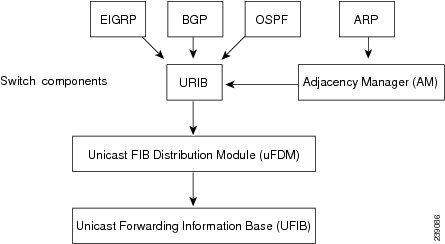
The unicast RIB maintains the routing table with directly connected routes, static routes, and routes learned from dynamic unicast routing protocols. The unicast RIB also collects adjacency information from sources such as the Address Resolution Protocol (ARP). The unicast RIB determines the best next hop for a given route and populates the unicast forwarding information base (FIBs) by using the services of the unicast FIB distribution module (FDM).
Each dynamic routing protocol must update the unicast RIB for any route that has timed out. The unicast RIB then deletes that route and recalculates the best next hop for that route (if an alternate path is available).
This section includes the following topics:
Layer 3 Consistency Checker
In rare instances, an inconsistency can occur between the unicast RIB and the FIB on each module. Cisco NX-OS supports the Layer 3 consistency checker. This feature detects inconsistencies between the unicast IPv4 RIB and the FIB on each interface module. Inconsistencies include the following:
•Missing prefix
•Extra prefix
•Wrong next-hop address
•Incorrect Layer 2 rewrite string in the ARP or neighbor discovery (ND) cache
The Layer 3 consistency checker compares the FIB entries to the latest adjacency information from the Adjacency Manager (AM) and logs any inconsistencies. The consistency checker then compares the unicast RIB prefixes to the module FIB and logs any inconsistencies. See the "Triggering the Layer 3 Consistency Checker" section.
You can then manually clear any inconsistencies. See the "Clearing Forwarding Information in the FIB" section.
FIB Tables
The following are the unicast routing table capacities for the Cisco Nexus 3548 switch when the switch is configured in the normal forwarding mode:
•Unicast Routing Host table = 64,000 hash table entries
•Unicast Routing LPM table = 16,000 TCAM entries
•ECMP members Table size: 16,000 entries
The following are the unicast routing table capacities for the Cisco Nexus 3548 switch when the switch is configured inthe warp mode:
•L3 Unicast Host table = 8000 TCAM entries
•L3 Unicast LPM table = 4000 TCAM entries

Note ECMP is not supported on warp mode.
Note In warp mode, when two equal cost paths are received in RIB, one of the paths is installed in the hardware. It is recommended to configure the maximum-path to one under the routing protocol configuration.
Virtualization Support
The Unicast RIB and FIB support Virtual Routing and Forwarding instances (VRFs). For more information, see Chapter 9 "Configuring Layer 3 Virtualization."
Licensing Requirements for the Unicast RIB and FIB
The following table shows the licensing requirements for this feature:
Managing the Unicast RIB and FIB
This section includes the following topics:
•Displaying Module FIB Information
•Configuring Load Sharing in the Unicast FIB
•Displaying Routing and Adjacency Information
•Triggering the Layer 3 Consistency Checker
•Clearing Forwarding Information in the FIB
•Estimating Memory Requirements for Routes
•Clearing Routes in the Unicast RIB
Note If you are familiar with the Cisco IOS CLI, be aware that the Cisco NX-OS commands for this feature might differ from the Cisco IOS commands that you would use.
Displaying Module FIB Information
You can display the FIB information on a switch.
DETAILED STEPS
To display the FIB information on a switch, use the following commands in any mode:
This example shows the FIB contents on a switch:
switch# show ip fib route
IPv4 routes for table default/base
------------------+------------------+---------------------
Prefix | Next-hop | Interface
------------------+------------------+---------------------
0.0.0.0/32 Drop Null0
255.255.255.255/32 Receive sup-eth1
Configuring Load Sharing in the Unicast FIB
Dynamic routing protocols, such as Open Shortest Path First (OSPF), support load balancing with equal-cost multipath (ECMP). The routing protocol determines its best routes based on the metrics configured for the protocol and installs up to the protocol-configured maximum paths in the unicast RIB. The unicast RIB compares the administrative distances of all routing protocol paths in the RIB and selects a best path set from all of the path sets installed by the routing protocols. The unicast RIB installs this best path set into the FIB for use by the forwarding plane.
The forwarding plane uses a load-sharing algorithm to select one of the installed paths in the FIB to use for a given data packet.
You can globally configure the following load-sharing settings:
•load-share mode—Selects the best path based on the destination address and port or the source and the destination address and port.
•Universal ID—Sets the random seed for the hash algorithm. You do not need to configure the Universal ID. Cisco NX-OS chooses the Universal ID if you do not configure it.
Note Load sharing uses the same path for all packets in a given flow. A flow is defined by the load-sharing method that you configure. For example, if you configure source-destination load sharing, then all packets with the same source IP address and destination IP address pair follow the same path.
To configure the unicast FIB load-sharing algorithm, use the following command in global configuration mode:
To display the unicast FIB load-sharing algorithm, use the following command in any mode:
|
|
|
|---|---|
show ip load-sharing Example: switch(config)# show ip load-sharing |
Displays the unicast FIB load-sharing algorithm for data traffic. |
To display the route that the unicast RIB and FIB use for a particular source address and destination address, use the following command in any mode:
This example shows the route selected for a source/destination pair:
switch# show routing hash 10.0.0.5 30.0.0.2
Load-share parameters used for software forwarding:
load-share mode: address source-destination port source-destination
Universal-id seed: 0xe05e2e85
Hash for VRF "default"
Hashing to path *20.0.0.2 (hash: 0x0e), for route:
Displaying Routing and Adjacency Information
You can display the routing and adjacency information.
To display the routing and adjacency information, use the following commands in any mode:
This example displays the unicast route table:
switch# show ip route
IP Route Table for VRF "default"
'*' denotes best ucast next-hop
'**' denotes best mcast next-hop
'[x/y]' denotes [preference/metric]
192.168.0.2/24, ubest/mbest: 1/0, attached
*via 192.168.0.32, Eth1/5, [0/0], 22:34:09, direct
192.168.0.32/32, ubest/mbest: 1/0, attached
*via 192.168.0.32, Eth1/5, [0/0], 22:34:09, local
This example shows the adjacency information:
switch# show ip adjacency
IP Adjacency Table for VRF default
Total number of entries: 2
Address Age MAC Address Pref Source Interface Best
10.1.1.1 02:20:54 00e0.b06a.71eb 50 arp mgmt0 Yes
10.1.1.253 00:06:27 0014.5e0b.81d1 50 arp mgmt0 Yes
Triggering the Layer 3 Consistency Checker
You can manually trigger the Layer 3 consistency checker.
To manually trigger the Layer 3 consistency checker, use the following commands in global configuration mode:
To stop the Layer 3 consistency checker, use the following commands in global configuration mode:
To display the Layer 3 inconsistencies, use the following commands in any mode:
Clearing Forwarding Information in the FIB
You can clear one or more entries in the FIB.
 The
clear forwarding command disrupts forwarding on the switch.
The
clear forwarding command disrupts forwarding on the switch.
To clear an entry in the FIB, including a Layer 3 inconsistency, use the following command in any mode:
Note Ensure you clear the RIB entry after you clear the FIB entry.
Estimating Memory Requirements for Routes
You can estimate the memory that a number of routes and next-hop addresses will use.
To estimate the memory requirements for routes, use the following command in any mode:
Clearing Routes in the Unicast RIB
You can clear one or more routes from the unicast RIB.
The
* keyword is severely disruptive to routing.
To clear one or more entries in the unicast RIB, use the following commands in any mode:
Verifying the Unicast RIB and FIB Configuration
To display the unicast RIB and FIB configuration information, perform one of the following tasks:
Additional References
For additional information related to managing unicast RIB and FIB, see the following sections:
•Feature History for Unicast RIB and FIB
Related Documents
|
|
|
|---|---|
Unicast RIB and FIB CLI commands |
Cisco Nexus 3000 Series Command Reference, |
Feature History for Unicast RIB and FIB
Table 10-1 lists the release history for this feature.
|
|
|
|
|---|---|---|
Unicast RIB and FIB |
5.0(3)A1(1) |
This feature was introduced. |
 Feedback