- Information About IGMP Snooping
- Licensing Requirements for IGMP Snooping
- Prerequisites for IGMP Snooping
- Default Settings
- Configuring IGMP Snooping Parameters
- Verifying the IGMP Snooping Configuration
- Displaying IGMP Snooping Statistics
- Configuration Examples for IGMP Snooping
- Where to Go Next
- Additional References
- Feature History for IGMP Snooping
Configuring IGMP Snooping
This chapter describes how to configure Internet Group Management Protocol (IGMP) snooping on a Cisco NX-OS switch.
This chapter includes the following sections:
• Information About IGMP Snooping
•Licensing Requirements for IGMP Snooping
•Configuring IGMP Snooping Parameters
•Verifying the IGMP Snooping Configuration
•Displaying IGMP Snooping Statistics
•Configuration Examples for IGMP Snooping
•Feature History for IGMP Snooping
Information About IGMP Snooping

Note We recommend that you do not disable IGMP snooping on the switch. If you disable IGMP snooping, you may see reduced multicast performance because of excessive false flooding within the switch.
The Internet Group Management Protocol (IGMP) snooping software examines Layer 2 IP multicast traffic within a VLAN to discover the ports where interested receivers reside. Using the port information, IGMP snooping can reduce bandwidth consumption in a multi-access LAN environment to avoid flooding the entire VLAN. The IGMP snooping feature tracks which ports are attached to multicast-capable routers to help the routers forward IGMP membership reports. The IGMP snooping software responds to topology change notifications. By default, IGMP snooping is enabled on the switch.
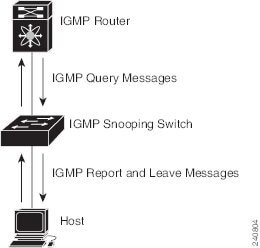
Figure 4-1 shows an IGMP snooping switch that sits between the host and the IGMP router. The IGMP snooping switch snoops the IGMP membership reports and Leave messages and forwards them only when necessary to the connected IGMP routers.
Figure 4-1 IGMP Snooping Switch
The IGMP snooping software operates upon IGMPv1, IGMPv2, and IGMPv3 control plane packets where Layer 3 control plane packets are intercepted and influence the Layer 2 forwarding behavior.
For more information about IGMP, see Chapter 2 "Configuring IGMP."
The Cisco NX-OS IGMP snooping software has the following proprietary features:
•Source filtering that allows forwarding of multicast packets based on destination and source IP.
•Multicast forwarding based on IP address rather than MAC address.
•Optimized multicast flooding (OMF) that forwards unknown traffic to routers only and performs no data driven state creation.
For more information about IGMP snooping, see RFC 4541.
This section includes the following topics:
•IGMP Filtering on Router Ports
IGMPv1 and IGMPv2
Both IGMPv1 and IGMPv2 support membership report suppression, which means that if two hosts on the same subnet want to receive multicast data for the same group, then the host that receives a member report from the other host suppresses sending its report. Membership report suppression occurs for hosts that share a port.
If no more than one host is attached to each VLAN switch port, then you can configure the fast leave feature in IGMPv2. The fast leave feature does not send last member query messages to hosts. As soon as the software receives an IGMP leave message, the software stops forwarding multicast data to that port.
IGMPv1 does not provide an explicit IGMP leave message, so the software must rely on the membership message timeout to indicate that no hosts remain that want to receive multicast data for a particular group.
Note The software ignores the configuration of the last member query interval when you enable the fast leave feature because it does not check for remaining hosts.
IGMPv3
The IGMPv3 snooping implementation on Cisco NX-OS supports full IGMPv3 snooping, which provides constrained flooding based on the (S, G) information in the IGMPv3 reports. This source-based filtering enables the switch to constrain multicast traffic to a set of ports based on the source that sends traffic to the multicast group.
By default, the software tracks hosts on each VLAN port. The explicit tracking feature provides a fast leave mechanism. Because every IGMPv3 host sends membership reports, report suppression limits the amount of traffic that the switch sends to other multicast-capable routers. When report suppression is enabled, and no IGMPv1 or IGMPv2 hosts requested the same group, the software provides proxy reporting. The proxy feature builds the group state from membership reports from the downstream hosts and generates membership reports in response to queries from upstream queriers.
Even though the IGMPv3 membership reports provide a full accounting of group members on a LAN segment, when the last host leaves, the software sends a membership query. You can configure the parameter last member query interval. If no host responds before the timeout, the software removes the group state.
IGMP Snooping Querier
When PIM is not enabled on an interface because the multicast traffic does not need to be routed, you must configure an IGMP snooping querier to send membership queries. You define the querier in a VLAN that contains multicast sources and receivers but no other active querier.
When an IGMP snooping querier is enabled, it sends out periodic IGMP queries that trigger IGMP report messages from hosts that want to receive IP multicast traffic. IGMP snooping listens to these IGMP reports to establish appropriate forwarding.
IGMP Filtering on Router Ports
IGMP filtering allows users to configure a router port on the switch that leads the switch to a Layer 3 multicast switch. The switch stores all manually configured static router ports in its router port list.
When an IGMP packet is received, the switch forwards the traffic through the router port in the VLAN. The switch recognizes a port as a router port through the PIM hello message or the IGMP query received by the switch.
IGMP Snooping with VRFs
You can define multiple virtual routing and forwarding (VRF) instances. An IGMP process supports all VRFs.
You can use the show commands with a VRF argument to provide a context for the information displayed. The default VRF is used if no VRF argument is supplied.
For information about configuring VRFs, see the Cisco Nexus 3000 Series NX-OS Unicast Routing Configuration Guide.
Licensing Requirements for IGMP Snooping
The following table shows the licensing requirements for this feature:
Prerequisites for IGMP Snooping
IGMP snooping has the following prerequisites:
•You are logged onto the switch.
•For global commands, you are in the correct virtual routing and forwarding (VRF) mode. The default configuration mode shown in the examples in this chapter applies to the default VRF.
Default Settings
Table 4-1 lists the default settings for IGMP snooping parameters.
Configuring IGMP Snooping Parameters
To affect the operation of the IGMP snooping process, you can configure the optional IGMP snooping parameters described in Table 4-2.
SUMMARY STEPS
1. configure terminal
2. ip igmp snooping
3. vlan vlan-id
4. ip igmp snooping
ip igmp snooping explicit-tracking
ip igmp snooping fast-leave
ip igmp snooping last-member-query-interval seconds
ip igmp snooping querier ip-address
ip igmp snooping report-suppression
ip igmp snooping mrouter interface interface
ip igmp snooping static-group group-ip-addr [source source-ip-addr] interface interface
ip igmp snooping link-local-groups-suppression
ip igmp snooping v3-report-suppression
(Optional) copy running-config startup-config
DETAILED STEPS
Verifying the IGMP Snooping Configuration
To display the IGMP snooping configuration information, perform one of the following tasks:
For detailed information about the fields in the output from these commands, see the Cisco Nexus 3000 Series Command Reference,.
Displaying IGMP Snooping Statistics
Use the show ip igmp snooping statistics vlan command to display IGMP snooping statistics.
Use the clear ip igmp snooping statistics vlan command to clear IGMP snooping statistics.
For detailed information about using these commands, see the Cisco Nexus 3000 Series Command Reference,.
Configuration Examples for IGMP Snooping
This example shows how to configure the IGMP snooping parameters:
configure terminal
ip igmp snooping
vlan 2
ip igmp snooping
ip igmp snooping explicit-tracking
ip igmp snooping fast-leave
ip igmp snooping last-member-query-interval 3
ip igmp snooping querier 172.20.52.106
ip igmp snooping report-suppression
ip igmp snooping mrouter interface ethernet 2/1
ip igmp snooping static-group 230.0.0.1 interface ethernet 2/1
ip igmp snooping link-local-groups-suppression
ip igmp snooping v3-report-suppression
Where to Go Next
You can enable the following features that work with PIM:
Additional References
For additional information related to implementing IGMP snooping, see the following sections:
•Feature History for IGMP Snooping
Related Documents
|
|
|
|---|---|
CLI commands |
Cisco Nexus 3000 Series Command Reference, |
Standards
|
|
|
|---|---|
No new or modified standards are supported by this feature, and support for existing standards has not been modified by this feature. |
— |
Feature History for IGMP Snooping
Table 4-3 lists the release history for this feature.
|
|
|
|
|---|---|---|
IGMP Snooping |
5.0(3)U1(1) |
This feature was introduced. |
 Feedback