Cisco PCI Solution for Retail Design and Implementation Guide
Implementing and Configuring the Solution

Table Of Contents

Implementing and Configuring the Solution

Implementation

Overview

Network Topology

What was Implemented

What Was Not Implemented

Audit Findings

Testing

Functional Testing

PCI Audit Testing

Configuration Tasks

Routing and Switching

Unified Wireless

Adaptive Security Appliance

Storage Area Networks

Management

CiscoWorks LAN Management System (C-LMS)

Cisco Security Manager (CS-M)

Cisco Security Agent (CSA)

Data Center Services

CiscoSecure CS-MARS Event Monitoring and Alerting

CiscoSecure Access Control Server (CS-ACS) Authentication

CiscoWorks Network Compliance Manager (C-NCM)

Internet Edge

Cisco Firewall Service Module (FWSM)

Cisco Intrusion Detection System Services Module (IDSM2)

Cisco ACE XML Gateway

Additional Elements

Application Servers Point-of-Sale (POS)

NCR

MS-RMS

Wincor-Nixdorf

Microsoft Windows Servers

Payment Devices

Mx Series

Vx Series

Encryption and Key Management

RSA Key Manager

RSA Access Manager

RSA File Security Manager

Remote Access

Troubleshooting Configuration

Results and Conclusions


Implementing and Configuring the Solution


Implementation

Overview

The Cisco PCI Solution for Retail was validated in Cisco's Retail lab in San Jose, California. The store, data center, Internet service provider, WAN and Internet edge network infrastructures and security management were installed first. Next, partner point-of sale (POS), payment, encryption, mobile computing devices, and POS application servers were installed to create a simulated enterprise retail environment. Cisco subject matter experts from product business units, Customer Advocacy Advanced Services, Enterprise Solution Engineering, Field Systems Engineering all contributed to the best practices contained in this implementation. Subject matter experts from our partners RSA, EMC, NCR, VeriFone, Wincor-Nixdorf, IBM and NCR also assisted in creating a realistic set of retail POS and payment applications, and creating the secure configurations based on PCI requirements. Finally, Verizon Business provided their on-site and remote auditors who reviewed the designs and configurations, provided input on how to make things more secure, and finally produced the detailed report of compliance found in Appendix F, "Report on Compliance (ROC)."

To validate the Retail Store of the PCI Solution for Retail, three retail store used from the Cisco Connected Retail reference architecture were based. The reference designs include wireless hand-held devices as well as POS systems to ensure functionality of common retail applications and services. The data center design is based on best practices from the Cisco Data Center Assurance Program 2.5 architecture. The Internet edge is a collapsed architecture based on the Internet edge reference designs and incorporates new technologies in the area of Web application security. The corresponding network, data, and security management systems are documented to demonstrate how to manage and monitor all aspects of the solution.

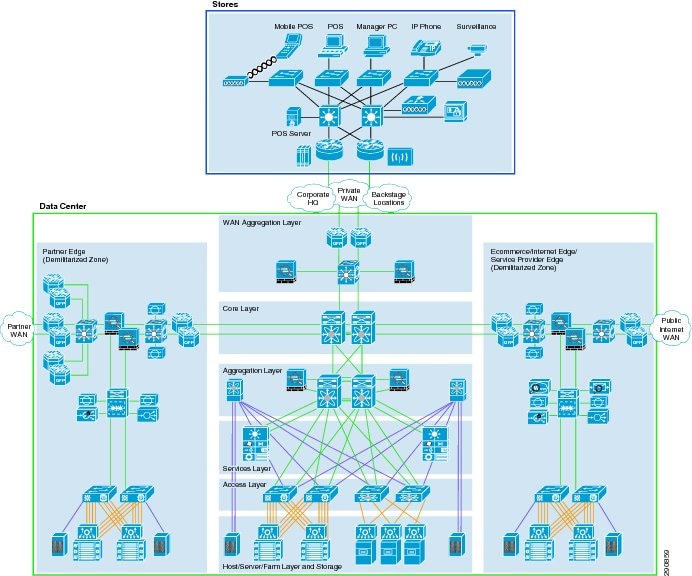
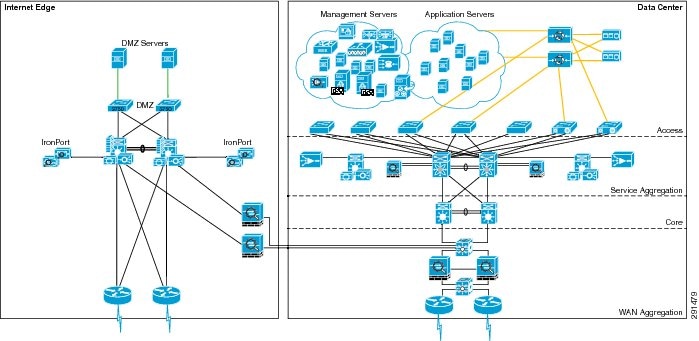
Figure 4-1 illustrates a high-level architecture showing the connections between the retail stores, data center, and Internet edge.

Figure 4-1 End-to-End Physical Solution Architecture

Network Topology

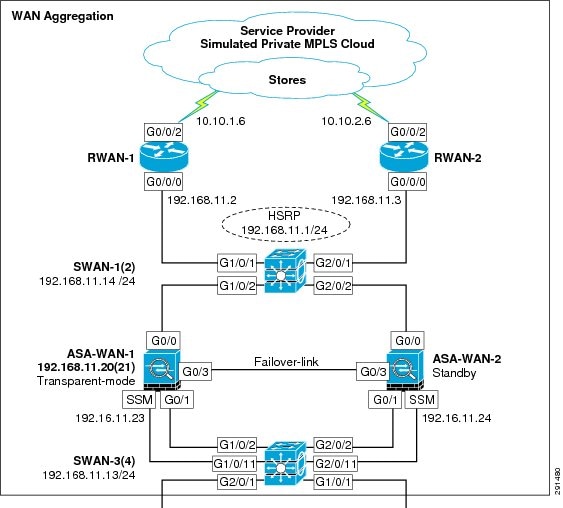
The network topology shown in Figure 4-2 is a private routed network representative of an MPLS WAN with dual service providers connecting the three branch networks to a single data center. The WAN is implemented as active on service provider 1 (RSP-1) and standby for service provider 2 (RSP-2). Deployments of services in the data center are assumed to be appropriately segregated and secured.

Figure 4-2 Lab Network Overview

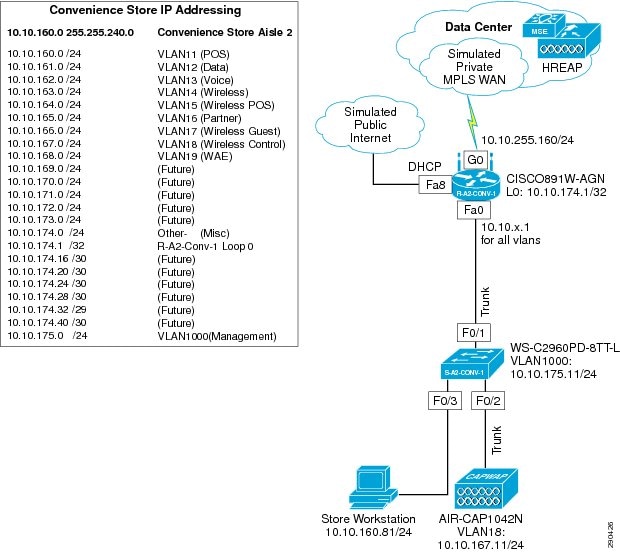
All three locations use T-1 circuits for WAN connectivity to the service providers and Ethernet for the LAN segments:

The small store location consists of a single router with integrated switching module for network devices that have a single wireless access point.

The medium store uses a dual router infrastructure and redundant LAN switching design, with a single wireless access point, although typical implementation might include up to six.

The large store uses a redundant router WAN, a redundant switching distribution layer with high capacity fiber, fiber-connected access layer switches distributed throughout the location as needed (typical for a large store big box retailer), and a single wireless access point, although typical implementation might include up to 25.

What was Implemented

Key features and services implemented include:

Cisco IOS Firewall stateful inspection

Cisco IOS Firewall IPS intrusion detection

Cisco IOS access lists

Network segmentation using VLANs

Secure management communications for SSH, HTTPS, and SNMPv3

AAA to a central authority (CS-ACS and Active Directory)

Wireless security (WPA with 802.1x)

Centralized logging and audit tracking

Redundant NTP time synchronization

High encryption for server Remote Desktop Protocol (RDP) access

CSA for client/server desktop security

Anti-virus for infestation mitigation and removal

Update services for clients and servers for patch management

E-mail services for alerts and notifications of real-time events

Cash registers provided by NCR, IBM, Wincor-Nixdorf

Mobile Retail Manager (MRM) software from NCR

Wireless handhelds provided by Intermec and Verifone

Payment devices provided by VeriFone

Single thread of WAN aggregation layer and core, service aggregation, and access layer of the data center

Validated single thread of Internet edge

Detailed listings of all products are available in Appendix A, "Bill Of Materials of Devices for Branch Stores."

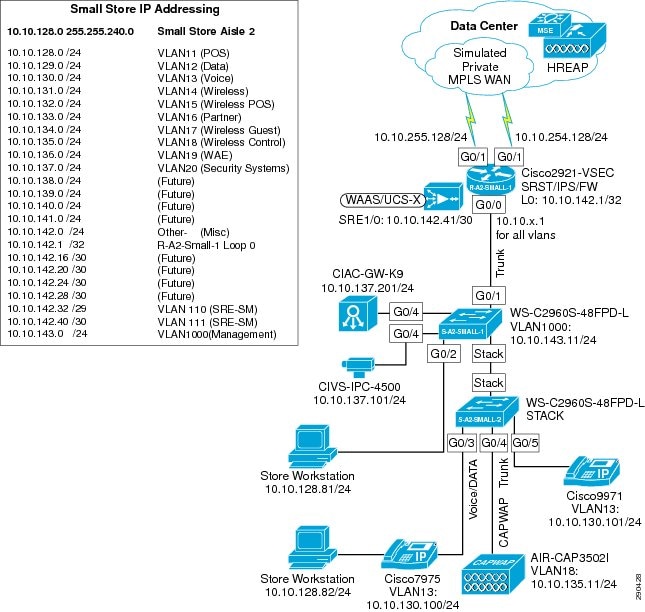
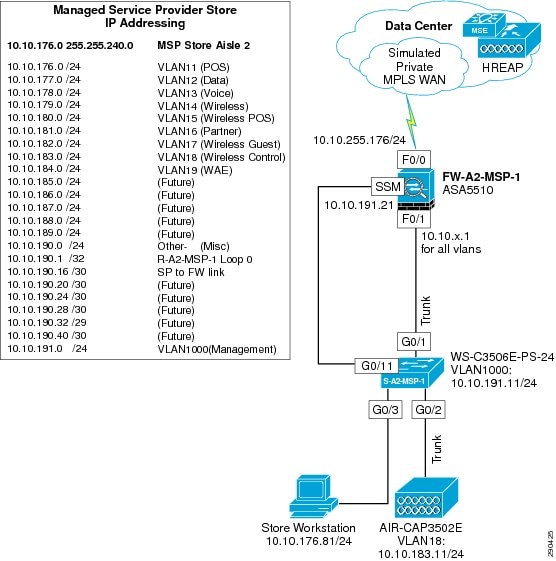
Figure 4-3 shows the small store Cisco Connected Retail solution.

Figure 4-3 Small Store Cisco Connected Retail Solution

The small store implementation includes the following:

Cisco 2821 ISR router with integrated switch

1131 AG LWAPP access point

Wincor-Nixdorf Beetle MII register

IBM 4851 register

Windows server running Wincor TP.Net software and Cisco CSA software

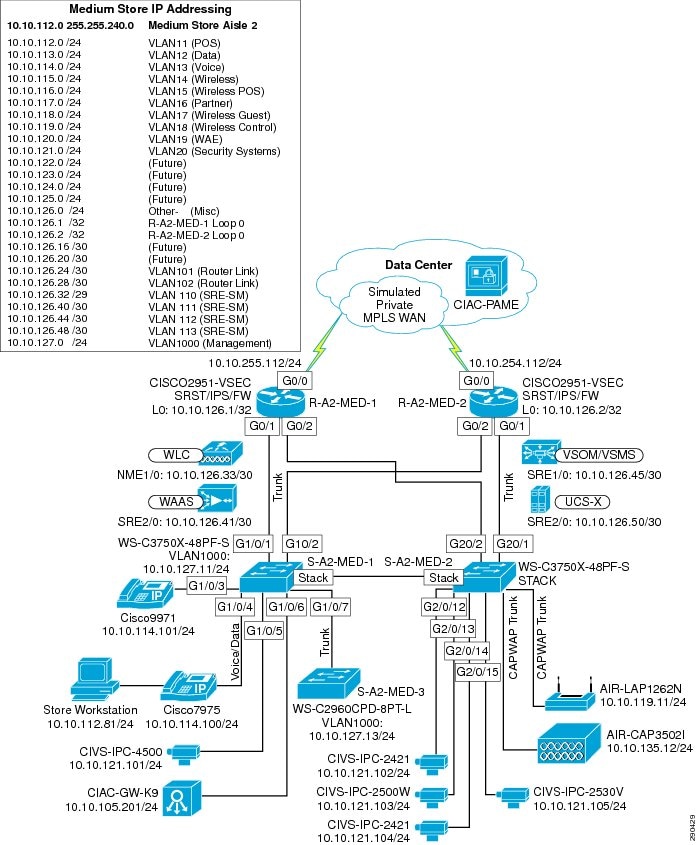
Figure 4-4 shows the medium store Cisco Connected Retail solution.

Figure 4-4 Medium Store Cisco Connected Retail

The medium store implementation includes the following:

Cisco 3845 ISR routers

Catalyst 3560 Switches

Wireless NM Controller module

Cisco 1131 AG LWAPP access point

Wincor-Nixdorf Beetle S II register

IBM 4810 Register

Windows server running Wincor POS and Cisco CSA software

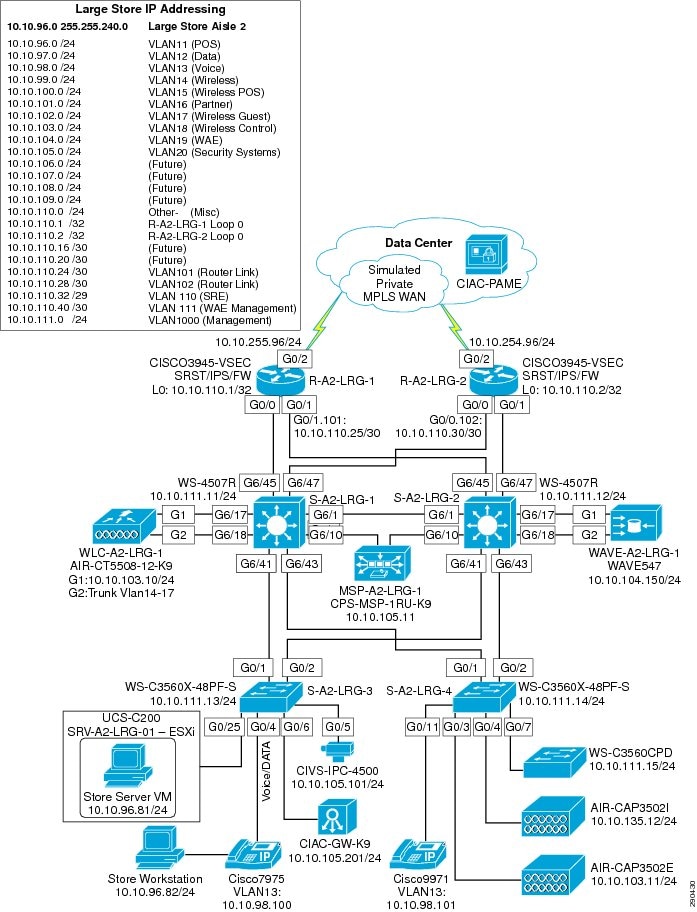
Figure 4-5 shows the large store Cisco Connected Retail solution.

Figure 4-5 Large Store Cisco Connected Retail Solution

The large store implementation includes the following:

Cisco 3845 ISR routers

Cisco Catalyst 3750 and 4500 switches

Cisco 1131 AG and AP1242 AG LWAPP access point

Cisco 4402 Wireless Controller

NCR RealPOS 80c Electronic Cash Register with Advanced Checkout System software and Cisco CSA software

NCR server running NCR-ACS software, RSA File Security agent and Cisco CSA

IPSec VPN to data center via ASA in the WAN aggregation layer.

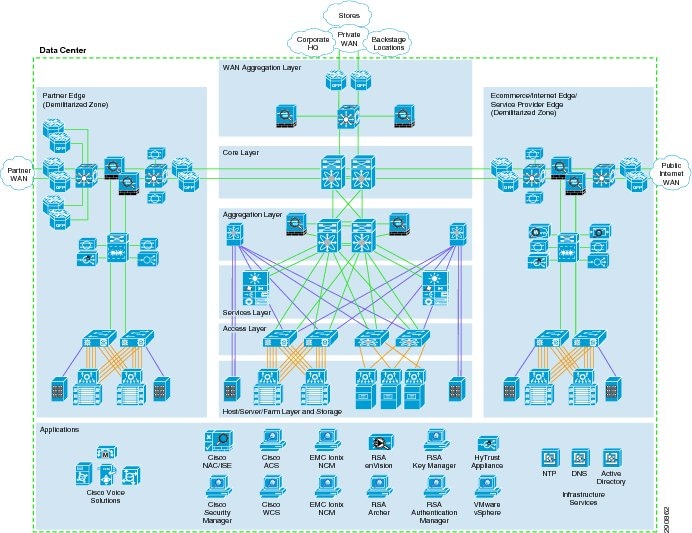
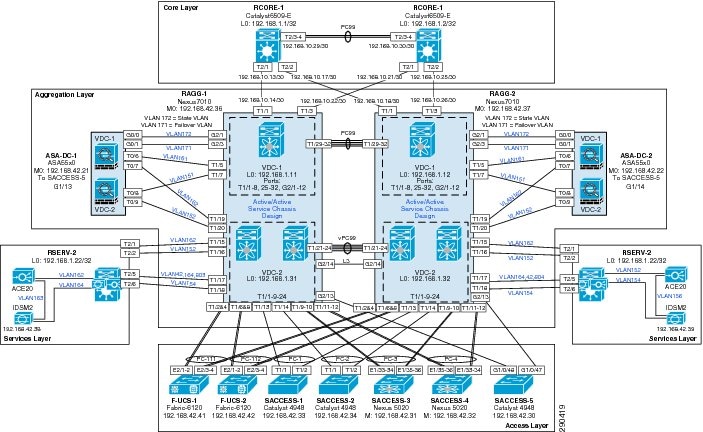
Figure 4-6 shows the data center location.

Figure 4-6 Data Center Location

The products implemented in the data center include the following:

Cisco Secure Access Control Server (CS-ACS)

Cisco Security Agent Management Center (CSA-MC)

Cisco Security Manager (CS-M)

CiscoWorks LMS (C-LMS) and Resource Manager Essentials modules

Wireless Control Server Manager (WCS)

Wireless controller for small store locations (Type 2000 for this lab)

Cisco Security Monitoring, Analysis and Response System (CS-MARS)

Microsoft Active Directory Services on Windows 2003 R2 Server

Microsoft Exchange Server 2003

Microsoft Windows Server Update Services (WSUS)

NTP (Network Time Protocol) Appliance (vmWware appliance)

Windows 2003 R2 Server with NFS file services for UNIX

Wincor-Nixdorf TP.Net Point of Sale v3.1

Microsoft Retail Management System Store Operations

RSA Key Manager

RSA File Security Manager

RSA Access Manager

RSA enVision

RSA Authentication Manager/RSA SecureID

Figure 4-7 Internet Edge Cisco Connected Retail PCI Solution

Figure 4-8 Internet Edge Cisco Connected Retail PCI Solution —Catalyst Switch Module Details

The Internet edge implementation includes the following:

Cisco 7200VXR

Cisco Catalyst 3750 and 6500 switches

Cisco Intrusion Detection System Service Module (IDSM2)

Cisco Firewall Services Module (FWSM)

Cisco Application Control Engine (ACE)

Cisco ACE XML Gateway

Cisco Adaptive Security Appliances (ASA)

RSA SecureID

Foundstone's Hacme Bank application

What Was Not Implemented

E-commerce

Other locations in a typical enterprise network (headquarter campus, distribution center, etc)

Redundancy and high availability in WAN aggregation and data center

Audit Findings

The audit process with the QSA from Verizon Business revealed important points that determined the scope of the solution, and what was and was not implemented. In addition, as of the publication of this design guide, the findings are useful for enterprises that need to understand what may be expected of them during the audit process so that they may be able to streamline the process with their QSA.

PCI auditors currently do not examine the Storage Area Network when conducting a PCI audit. The findings in this solution are based on the QSA's best estimation of what the PCI requirements may evolve to address storage networking sometime in the future.

Given that a dual-threaded data center has fully redundant devices, the QSA applies the same checks and requirements to both devices. The existence of high availability or redundancy does not change the audit process. As a result, this solution limited implementation to a single thread to save on time and resources. In production data center environments, redundancy and high availability are highly recommended and referenced in other Cisco design guides.

Some of the PCI requirements can only be met by deploying a specific feature set or product on the network. As an example, Requirement 1 requires that a firewall be deployed on the enterprise edge. A product with the firewall features set, such as the Cisco ISR 3845 with the Cisco IOS Firewall feature set, could be deployed to meet this requirement. It is critical to note that in addition to Requirement 1 being applied to the ISR 3845, an additional set of requirements will be applied. These requirements pertain to any network device that is deployed and they are as follows:

Requirement 2—Always change vendor-supplied defaults before installing a system on the network (for example, include passwords, simple network management protocol (SNMP) community strings, and elimination of unnecessary accounts).

Requirement 7—Restrict access to cardholder data by business need-to-know.

Requirement 8—Assign a Unique ID to each Person with Computer Access

Requirements 7 and 8 pertain to implementing external Authentication, Authorization, and Accounting (AAA) on the network device so that different levels of privileged access can be given to different user accounts based on business roles and policies. In addition, each user account is mapped to a specific individual so that any actions can be traced back to a specific individual and not to a group or generic user.

Requirement 10—Track and monitor all access to network resources and cardholder data. This set of requirements pertains to audit trails and logging of events on the network device such that configuration changes and network activity involving the network device can be logged and used at a later date for network forensics.

QSA recommended the use of secure automated or manual process (e.g., secure FTP) for moving the Tlogs (payment card data) from store to data center headquarter (HQ) even though the Tlogs files were encrypted and transferred over a Cisco secure VPN solution.

The QSA recommended that security vulnerabilities for network devices should be checked against the national vulnerabilities database in preparation for an audit. For more information, refer to http://nvd.nist.gov/nvd.cfm.

Testing

These architectures were not tested to meet any specific traffic throughput or capacity levels. Scaling considerations for hosts in the store reference designs are based on typical retail store best practices. The use of these designs for other types of locations outside of the specific design objectives, could result in less than desired performance levels. The goal of the testing was to determine best practice security recommendations based on PCI DSS requirements.

Functional Testing

Functionality of the designs were tested by performing remote management and configuration tasks, client transactions for POS, e-mail messaging and alerting, Windows update services, and NTP time synchronization.

ICMP tools such as Ping and Traceroute commands were used to validate that network devices and system hosts were reachable between the various locations.

WildPackets OmniPeek Personal network analyzer was used to capture network traffic for both wired and wireless troubleshooting.

PCI Audit Testing

Appendix F, "Report on Compliance (ROC)," details the steps performed by Cybertrust as the QSA auditors of the Cisco PCI Solution for Retail.

In addition to reviewing device configurations and network diagrams, Cybertrust performed extensive interviews over several weeks with each of the technology experts that built and configured the devices and management platforms. Cybertrust also performed a vulnerability assessment scan on the network while connected in the data center location. This scan used nCircle software and evaluated all servers, clients and devices in the network. The results of this initial scan are available in Appendix C, "Application Protocols." The scan identified several items that were later corrected. No follow-up scan was performed.

Configuration Tasks

Routing and Switching

The routers and switches were configured using common best practices and router hardening techniques.

The only network protocol implemented was IPv4, with each location being assigned a summarizable block of hierarchal defined RFC 1918 addresses. Each store LAN was divided into several VLAN segments to appropriately segregate traffic for data, voice, POS, management and wireless needs.

Unnecessary and insecure services were disabled such as PAD, TCP and UDP small servers and finger. Depending on your version of Cisco IOS, these settings may not be visible in the configuration; they may already be off by default.

Service password-encryption was enabled, and service password recovery was disabled to prevent configurations from being disclosed if hardware was removed from the site.

AAA Authentication was configured and pointed to the CS-ACS, a local user name and password were configured to authorize access in the event CS-ACS was not reachable. This local account password should be changed quarterly.

NTP was configured to synchronize time and log events. The time zone was configured to PST, and Service timestamps set.

The local security certificates were created using the crypto key generate rsa command; the key length set to 1024 bits.

The secure HTTPS server was enabled and the non-secure HTTP server disabled. Additionally, the VTY interfaces were set to allow only SSH connections.

Logging was configured to send Syslog events to both CiscoWorks and CS-MARS.

SNMP was configured using V3 user and password. This account should also be changed quarterly.

The auxiliary and unused line interfaces were disabled by setting no exec.

Loopback interfaces were created on the routers and used for sourcing logs, traps, authentication and time requests.

All interface IP addresses were defined in DNS.

Router interfaces under the OSPF process were set to passive as a default, then explicitly permitted on desired interfaces such as serial WAN links and LAN interconnects. This was necessary to control the flow of traffic through appropriate interfaces, because all contained ACLs.

Complete configurations of the routers and switches are available in Appendix E, "Device Configurations."

For more information, see the following references:

Enterprise Branch Security Design Guide: http://www.cisco.com/univercd/cc/td/doc/solution/e_b_sdc1.pdf  

Business Ready Branch Solutions for Enterprise and Small Offices—Reference Design Guide: http://www.cisco.com/application/pdf/en/us/guest/netsol/ns656/c649/cdccont_0900aecd80488134.pdf

Enterprise Architecture Solutions: http://www.cisco.com/en/US/netsol/ns477/networking_solutions_packages_list.html

Unified Wireless

Wireless was implemented using Lightweight Access Point Protocol (LWAPP) controllers. The medium and large store locations each had their own local controllers. The small store operated from a centralized LWAPP controller in the data center. The AP in the small store was configured to operate in hybrid REAP mode in the event of a WAN failure. Each of these controllers were centrally managed and configured via WCS Manager. The controllers sent Syslog messages to CS-MARS.

To best meet the PCI requirements regarding wireless security, WPA was deployed using 802.1x requiring user authentication for wireless access. Several wireless segments were configured using different SSIDs mapped back to separate VLANs. This provided segregation of POS traffic from other wireless traffic. Each user needing access the wireless network was assigned a unique user ID and password. This authentication occurred against the Active Directory user database via the CS-ACS server using the RADIUS protocol. The Intermec wireless handheld used a Funk client to access and authenticate. A Cisco wireless laptop with Odyssey client was also used to access the wireless network. Both of these clients support saving of the user ID and password locally, though saving of the password is not permitted under PCI guidelines.

When authenticated onto the network, IP address and DNS options were provided via DHCP for each wireless segment.

For more information, see the Installation Guide for Cisco WCS Manager at the following URL: http://www.cisco.com/en/US/products/ps6305/products_configuration_guide_book09186a00806b57ec.html

Adaptive Security Appliance

The Adaptive Security Appliance (ASA) was used as a firewall at the WAN aggregation layer and Internet-edge Extranet segment. ASA was configured with access control lists, stateful packet inspection, and security levels at the interfaces.

All traffic that goes through the ASA is by default inspected using the Adaptive Security Algorithm and either allowed through or dropped.

If the ASA sees a new connection, it has to check the packet against access lists and perform other tasks to determine if the packet is allowed or denied. To perform this check, the first packet of the session goes through the session management path, and depending on the type of traffic, it might also pass through the control plane path.

The session management path is responsible for the following tasks:

Performing the access list checks

Performing route lookups

Allocating NAT translations (xlates)

Establishing sessions in the fast path


Note The session management path and the fast path make up the accelerated security path.


Some packets that require Layer 7 inspection (the packet payload must be inspected or altered) are passed on to the control plane path. Layer 7 inspection engines are required for protocols that have two or more channels:

A data channel, which uses well-known port numbers.

A control channel, which uses different port numbers for each session.

These protocols include FTP, H.323, and SNMP.

Q. Is this an established connection?

A. If the connection is already established, the security appliance does not need to recheck packets; most matching packets can go through the fast path in both directions. The fast path is responsible for the following tasks:

IP checksum verification

Session lookup

TCP sequence number check

NAT translations based on existing sessions

Layer 3 and Layer 4 header adjustments

For UDP or other connectionless protocols, the security appliance creates connection state information so that it can also use the fast path. Data packets for protocols that require Layer 7 inspection can also go through the fast path.

Some established session packets must continue to go through the session management path or the control plane path. Packets that go through the session management path include HTTP packets that require inspection or content filtering. Packets that go through the control plane path include the control packets for protocols that require Layer 7 inspection.

The interface security levels affect different ASA functions as described below. The level controls the following behavior:

Network access—By default, there is an implicit permit from a higher security interface to a lower security interface (outbound). Hosts on the higher security interface can access any host on a lower security interface. You can limit access by applying an access list to the interface. For same security interfaces, there is an implicit permit for interfaces to access other interfaces on the same security level or lower.

Inspection engines—Some application inspection engines are dependent on the security level. For same security interfaces, inspection engines apply to traffic in either direction.

NetBIOS inspection engine—Applied only for outbound connections.

SQL*Net inspection engine—If a control connection for the SQL*Net (formerly OraServ) port exists between a pair of hosts, then only an inbound data connection is permitted through the security appliance.

Filtering—HTTP(S) and FTP filtering applies only for outbound connections (from a higher level to a lower level). For same security interfaces, you can filter traffic in either direction.

Network address translation control—When you enable NAT control, you must configure NAT for hosts on a higher security interface (inside) when they access hosts on a lower security interface (outside). Without NAT control, or for same security interfaces, you can choose to use NAT between any interface, or you can choose not to use NAT. Keep in mind that configuring NAT for an outside interface might require a special keyword.

Established command—This command allows return connections from a lower security host to a higher security host if there is already an established connection from the higher level host to the lower level host.

For the same security interfaces, you can configure established commands for both directions. For more information on configuring the ASA, refer to the following documents:

Cisco ASA 5500 Configuration Examples and Tech Notes

http://www.cisco.com/en/US/products/ps6120/prod_configuration_examples_list.html

Configuring the ASA 5500 Command Line Reference Guide 8.0

http://www.cisco.com/en/US/docs/security/asa/asa80/configuration/guide/conf_gd.html

Storage Area Networks

The solution involved connecting the data center's storage access layer to a VSAN environment that included EMC DMX 1000 storage arrays and Cisco MDS 9509 switches.

The EMC storage arrays (DMX 9000) were not audited by the QSA. Per the QSA, PCI auditors currently do not examine the SAN when conducting a PCI audit. The findings in this solution are based on the QSA's best estimation of what the PCI requirements may evolve to address storage networking sometime in the future.

The MDS 9500s were audited as far as the zoning and LUN masking configured on them to secure the logical partitioning of disk used for storing cardholder data. Only host machines in the data center that require access to that logical disk partition were allowed access. Restriction of user access to that set of host machines were outside the scope of this solution.

In order to pass an audit, the MDS switches must minimally meet the 2.x set of requirements for non-default passwords and system parameters, the 7.x requirements for strong access control, and the 8.x requirements for strong password configurations.

Below is a snapshot of the zoning configuration. PCI-Retail-HBA1 zone was created to allow a specific file server in the data center, installed with a fiber host bus adapter and connected directly to this MDS switch, to access VSAN 900, LUN 0090, which were created specifically on the EMC storage array for the cardholder data file server.


MDS9509-2# sh zoneset act
zoneset name VSAN900 vsan 900
  zone name ECC2-local vsan 900
  * fcid 0xe20000 [pwwn 50:06:04:82:ca:fe:66:03] [DMX1320-FA4AA]
  * fcid 0xe20100 [pwwn 21:00:00:e0:8b:01:c3:e5]
  zone name Cluster2-local vsan 900
  * fcid 0xe20000 [pwwn 50:06:04:82:ca:fe:66:03] [DMX1320-FA4AA]
    pwwn 10:00:00:00:c9:2c:13:71
  zone name Z_PCI-RETAIL-HBA1 vsan 900
  * fcid 0xe20000 [pwwn 50:06:04:82:ca:fe:66:03] [DMX1320-FA4AA]
  * fcid 0x960001 [pwwn 10:00:00:00:c9:5d:28:d9]
MDS9509-2# sh ver
Cisco Storage Area Networking Operating System (SAN-OS) Software
TAC support: http://www.cisco.com/tac
Copyright (c) 2002-2007, Cisco Systems, Inc. All rights reserved.
The copyrights to certain works contained herein are owned by
other third parties and are used and distributed under license.
Some parts of this software may be covered under the GNU Public
License or the GNU Lesser General Public License. A copy of
each such license is available at
http://www.gnu.org/licenses/gpl.html and
http://www.gnu.org/licenses/lgpl.html
Software
  BIOS:      version 1.1.0
  loader:    version 1.2(2)
  kickstart: version 3.1(3a)
  system:    version 3.1(3a)
  BIOS compile time:       10/24/03
  kickstart image file is: bootflash:/m9500-sf1ek9-kickstart-mz.3.1.3a.bin
  kickstart compile time:  5/22/2007 17:00:00 [06/16/2007 15:36:31]
  system image file is:    bootflash:/m9500-sf1ek9-mz.3.1.3a.bin
  system compile time:     5/22/2007 17:00:00 [06/16/2007 15:54:18]


Symmetrix ID            : 000187431320
Database Type           : Type5
Last updated at         : 05:33:37 PM on Tue Nov 20,2007
Director Identification : FA-3A
Director Port           : 0
                               User-generated    
Identifier        Type   Node Name        Port Name         Devices 
----------------  -----  ---------------------------------  ---------
210000e08b01c3e5  Fibre  210000e08b01c3e5 210000e08b01c3e5  010B
                                                            0142:0143
10000000c92c10d4  Fibre  targethost1      10000000c92c10d4  None
10000000c92c13de  Fibre  10000000c92c13de 10000000c92c13de  None
210000e08b01bfe5  Fibre  ecc              210000e08b01bfe5  0184
10000000c92c0f2e  Fibre  10000000c92c0f2e 10000000c92c0f2e  0029:002A
                                                            014A:014F
                                                            015D:0161
                                                            0164
10000000c92c142e  Fibre  10000000c92c142e 10000000c92c142e  None
10000000c92c1371  Fibre  node3            10000000c92c1371  00B9:00BA
Director Identification : FA-4A
Director Port           : 0
                               User-generated    
Identifier        Type   Node Name        Port Name         Devices 
----------------  -----  ---------------------------------  ---------
210000e08b01bfe5  Fibre  ecc              210000e08b01bfe5  0162:0163
210000e08b01c3e5  Fibre  210000e08b01c3e5 210000e08b01c3e5  None
10000000c95d28d9  Fibre  PCI-RETAIL       HBA1              0090


For more information zoning and Logical Unit (LUN) masking, see the following:

Using VSANs and Zoning with the Cisco MDS 9000 Family whitepaper:

http://www.cisco.com/go/storagenetworking

Cisco MDS 9000 Family Fabric Manager Configuration Guide, Release 3.x:

http://www.cisco.com/en/US/products/ps5989/products_configuration_guide_chapter09186a0080662d35.html

Management

CiscoWorks LAN Management System (C-LMS)

Each router and switch was configured for SNMPv3 and Syslog, allowing CiscoWorks to track and manage them centrally. Router and switch configurations were polled and archived daily. These configurations were then automatically reviewed for key PCI compliance configuration items (that is, no ip http server, transport input ssh, and so on). If the configuration of an item changes, an alert e-mail is generated and sent to appropriate accounts. RME is used to deploy configuration updates as well as software updates to devices in the network. CiscoWorks provides process management for change design, approval, and deployment. Wireless controller syslogs were not able to be sent to CiscoWorks because of current product limitations.

For more information, see the following:

Installation Guide for CiscoWorks Common Services with LMS Version 2.5.1: http://www.cisco.com/en/US/products/sw/cscowork/ps3996/products_installation_guide_book09186a00805305cb.html

Installation Guide for Cisco RME 4.0.3 with LMS 2.5.1: http://www.cisco.com/en/US/products/sw/cscowork/ps2073/products_installation_guide_book09186a008050faf6.html

Cisco Security Manager (CS-M)

CS-M was configured to deploy access lists and inspect statements to the router interfaces via HTTPS and SNMPv3. Application traffic flows for all devices and applications were mapped out using network traces, logging ACLs, and extensive research in product documentation. These flows were placed in a table (see Appendix C, "Application Protocols.") This information was then used to create the refined ACLs for implementation on all network interfaces inbound to the routers in conjunction with firewall inspect statements. After deployment of these comprehensive access lists, POS and network application functionality were validated.

CS-M automatically adds the command ip verify unicast source reachable-via rx to all interfaces, which verifies inbound traffic is not being spoofed on the interfaces.

IPS was also configured and implemented via CS-M using the standard SDF rules and sending SDEE alerts to CS-MARS.

For more information, see the following:

Cisco Security Manager Installation Guide: http://www.cisco.com/en/US/products/ps6498/products_installation_guide_book09186a008063d58b.html

Guide for IPS Manager: http://www.cisco.com/en/US/products/ps6498/products_user_guide_book09186a008064065d.html

Cisco Security Agent (CSA)

CSA was deployed on all servers and workstations to provide host-based security. CSA provides host-based intrusion prevention, application execution protection, and operating system lockdown. The policy for the clients is centrally managed and deployed from the CSA Manager Center (see Figure 4-9). Alerts and events are sent back to the CSA-MC, which was configured to interoperate with CS-MARS for centralized monitoring and analysis. The CSA client on the NFS backup server provides file integrity monitoring of the archived syslogs and other events in accordance with PCI Requirement 10.5.5.

Authentication of administrators accessing the CSA-MC is performed by defining users locally and forwarding the authentication requests to Active Directory via LDAP. Users need to enter their full user name (not their User ID) when logging in (that is, login using the name "Bart McGlothin" instead of the userid in AD of "bmcgloth"). The locally defined user names can also be configured with a local password for fallback authentication if for some reason Active Directory or other LDAP servers were not available. This local authentication capability should not be used as the primary method of authentication because alone it does not meet the necessary password complexity and history requirements mandated in the PCI specifications. CSA-MC was configured with role-based users for performing the various administrative tasks.

Additionally, a PCI compliance policy can be imported into the CSA-MC and can be used to enforce or monitor PCI compliance.

Figure 4-9 CSA Management

For more information, refer to the following:

Installation Guide for CSA Version 5.1: http://www.cisco.com/en/US/products/sw/secursw/ps5057/products_installation_guide_book09186a008067b78a.html

Data Center Services

CiscoSecure CS-MARS Event Monitoring and Alerting

CS-MARS was deployed as the central monitoring and alerting tool for events received from CSA clients, routers, switches, and authentication events from CS-ACS. To demonstrate event alerting, CS-MARS was configured to send e-mail alerts when it received a specific CSA event (that is, unauthorized writing to a CS-ACS event log). CS-MARS was deployed with role-based management, but supports only local user accounts and passwords. Because these local identities do not sufficiently enforce password complexity and history requirements mandated by PCI specifications, this console should be segregated from other general services in the data center and protected by an additional authentication resource. A compensating control of this type is not yet implemented in this design.

For more information, refer to the following:

http://www.cisco.com/en/US/products/ps6241/products_installation_and_configuration_guide_book09186a00806bbf91.html

CiscoSecure Access Control Server (CS-ACS) Authentication

Individual user accounts were created in Active Directory and placed in groups based on typical enterprise individual roles. These groups were mapped to authentication groups in the CS-ACS, and assigned appropriate rights and permissions per group. This method of authentication was used to ensure appropriate password complexity, history and inactivity requirements. The CS-ACS product alone does not meet these requirements as a standalone authentication product.

For more information, refer to the following:

Cisco Secure ACS Installation Guide version 4.1: http://www.cisco.com/en/US/products/sw/secursw/ps2086/products_installation_guide_book09186a008070a5ff.html

Cisco Secure ACS Configuration Guide version 4.1: http://www.cisco.com/en/US/products/sw/secursw/ps2086/products_configuration_guide_book09186a0080721d25.html

CiscoWorks Network Compliance Manager (C-NCM)

C-NCM was used to enforce compliance policy as established across validated devices. If a device were to have its configuration changed, outside of corporate policy, C-NCM can dynamically restore the configuration of the devices it manages. C-NCM supports a large number of multi-vendor products.

For more information, refer to the following:

CiscoWorks NCM Installation Guides: http://www.cisco.com/en/US/partner/products/ps6923/tsd_products_support_install_and_upgrade.html

CiscoWorks NCM End User Guides:

http://www.cisco.com/en/US/partner/products/ps6923/products_user_guide_list.html

Internet Edge

Cisco Firewall Service Module (FWSM)

Cisco FWSM was configured based on common best practices and recommendations:

Insecure services such as FTP mode passive were disabled from the configuration.

AAA Authentication was configured and pointed to the CS-ACS, a local user name and password were configured to authorize access in the event ACS was not reachable. This local account password should be changed quarterly.

Access-list configured on FWSM were very specific (i.e., allowed only specific protocols and ports) needed for communication.

Allowed management session to FWSM only from specific host using SSH version 2

The local security certificates were created using the crypto key generate rsa command; the key length set to 1024 bits.

Logging was configured to send syslog events to CS-MARS.

The FWSM configurations were backed up using C-NCM.

For more information, refer to the following:

Catalyst 6500 Series Switch and Cisco 7600 Series Router Firewall Services Module Configuration Guide, 3.1

http://www.cisco.com/en/US/docs/security/fwsm/fwsm31/configuration/guide/fwsm_cfg.html

Service Module Design with ACE and FWSM

www.cisco.com/univercd/cc/td/doc/solution/ace_fwsm.pdf

Cisco Intrusion Detection System Services Module (IDSM2)

Cisco IDSM2 was configured based on common best practices and recommendations:

IDSM2 was configured to lock accounts so that users cannot keep trying to log in after a certain number of failed attempts.

Allowed management of IDSM2 only from a very specific host using Cisco IPS Device Manager with SSL connection.

The attack information provided by IPS software was send to CS-MARS for event correlation.

Login banner was configured to notify users about the private system and device they are accessing.

IDSM2 was configured to monitor VLANs in DMZ zone.

For more information, refer to the following:

Configuring the Cisco Intrusion Prevention System Sensor 6.0

http://www.cisco.com/univercd/cc/td/doc/product/iaabu/csids/csids13/cliguide/index.htm

Cisco ACE XML Gateway

The Cisco ACE XML Gateway delivers firewall capabilities and provides the critical protection needed at each service perimeter, between different trust zones. In addition to working with transport and session layers of network traffic, the Cisco ACE XML Gateway differs from network firewalls in that it focuses primarily on the application layer and works with the payload of the XML message. In the perimeter defense role, the Cisco ACE XML Gateway performs a broad range of security services, such as guarding against malicious XML payloads, structurally invalid XML messages, and XML denial-of-service (XDoS) attacks, and performs other security functions such as non-repudiation; message encryption and integrity; and privacy.

In the lab environment, Cisco ACE XML Gateway and Cisco ACE XML Manager were configured on the same appliance. The administration server for Cisco ACE XML Gateway implementation is the Cisco ACE XML Manager. The Cisco ACE XML Manager acts as the development and monitoring point for the system. It serves as a web console, which is the web services interface for configuring and monitoring the system. The web application servers in the Internet edge DMZ are running an online banking application and other web applications. The Cisco ACE XML Gateway tests were primarily focused on mitigating attacks on well know web-application security flaws mentioned in PCI 6.5 requirement.

In the scenario illustrated in Figure 4-10, the clients generate a HTTP request to the NATed virtual IP address (VIP) on the Cisco Application Control Engine (ACE) module. This request is then forwarded to Cisco ACE XML gateway which performs its threat defense against application layer attacks and multiplexes HTTP 1.1 request back to the servers. Here, the Cisco ACE XML Gateway acts as reverse proxy appliance that dispatches the inbound HTTP traffic to a set of servers. Cisco ACE XML Gateway can be configured for server pooling of servers in DMZ. This provides improvement in the scalability and reliability of the services provided by the backend servers that are exposed through the Cisco ACE XML Gateway.

Cisco ACE XML Gateway currently does not support any box-to-box redundancy. Multiple Cisco ACE XML Gateways are added are as part of Cisco ACE system design, thereby providing redundancy. The Cisco ACE makes a load-balancing decision about which Cisco ACE XML Gateway to forward the incoming request to on the basis of configured policies and state of individual Cisco ACE XML Gateways.

Figure 4-10 Clients-to-Server HTTP Traffic Flow

For more information, refer to the following:

Cisco ACE XML Gateway and ACE XML Manager implementation and configuration:

http://www.cisco.com/en/US/products/ps7314/products_installation_and_configuration_guides_list.html

Cisco ACE Module configuration, administration, and security configuration:

http://www.cisco.com/en/US/products/hw/modules/ps2706/products_installation_and_configuration_guides_list.html

Service Module Design with Cisco ACE and FWSM:

www.cisco.com/univercd/cc/td/doc/solution/ace_fwsm.pdf

Additional Elements

Time synchronization plays a critical role in event and audit log correlation. For this reason, the PCI requirement is to deploy redundant NTP servers that are synchronized against several reliable time sources. Two VMware-based NTP appliances were deployed to provide this service. These appliances were based on Mandrivia Linux 2006 and use ntpd 4.2.0@1.1161-r. This appliance pulls random IP addresses from pool.ntp.org (13 + time.nist.gov). It then synchronizes the virtual machine clock and starts the NTP server service. All network devices and servers point to these appliances to maintain time synchronization.

Application Servers Point-of-Sale (POS)

NCR

NCR provided the POS client work station and servers. One of the servers was loaded with NCRs Advanced Checkout Solution (NCR-ACS) and other server was loaded with NCRs Advanced Store Workbench (ASW) software. The client station is NCR RealPOS80c system running Windows embedded XP version 2. NCR-ACS application is used primarily by high-volume retailers.

Advanced Checkout Solution (NCR-ACS)

The NCR-ACS platform is made up of several modules and services including Transaction Management Services (TMS) and Cooperative Services. These software components, combined with industry-standard operating systems, provide the additional functionality and security necessary for retail transactions. The POS server controls data between the POS terminals and server and ASW clients with TMS service. See Figure 4-11.

The TMS layer of NCR-ACS is a key component of the NCR-ACS architecture. These services consist of server and workstation components that support store sales and office applications by providing straightforward access to data files and peripherals. TSM also assists in managing store POS system complexities of redundancy, communications, reaction to error conditions, and recovery. NCR-ACS TMS's are integrated with underlying client-server operating systems, LANs, and WANs.

All transactions are written to the NCR-ACS Transaction Log (TLOG). After a POS application writes a transaction to the TLOG file, the NCR-ACS Asynchronous Update Process (AUP) program on the server reads the file, processes TLOG data, and updates the store accounting files. NCR-ACS also offers the option of outputting in the IXRetail POSLog format.

Dependent Applications

The NCR-ACS application is dependent on the following third-party applications and software development:

Microsoft Visual Studio.Net

Microsoft's Managed Extensions for C++

Database Software

Microsoft SQL Server relational database system is used as data storage for the NCR-ACS application.

Advanced Store Workbench (ASW)

The ASW provides a graphical user interface that runs on a PC with Microsoft Windows Operating System, but presents a simple, easy-to-use, tabular-based back-office user interface to store operations' personnel. The tabular form and tool boxes with standard tools in them provides an easy-to-use navigational tool for accessing store applications.

The ASW takes full advantage of the open nature of NCR-ACS' architecture shown in Figure 4-11. It takes a standard off-the-shelf PC, an industry standard Ethernet card and TCP/IP communications protocol stack, and integrates those pieces with the transaction management services LAN and ODBC driver interface.

ODBC is a Microsoft standard for open database connectivity which gives the user a sequel-like interface into a file system. In this particular instance, the ODBC driver takes SQL commands on one side and translates them into file system commands for the Advanced Checkout Solution file system. This information is then fed into the ASW using the appropriate Microsoft Office application to display the data in a meaningful way.

Figure 4-11 NCR ACS Single Server Architecture

TMS is the primary proprietary interface for file and LAN between clients and server. POS clients do not access SQL Server. The Database applications reside on the ASW client and server and access one store database. When the database has been modified, the SQL server triggers notification to TMS.

Mobile Retail Manager (MRM)

MRMs are applications that run on hand-held devices. Any device that supports Windows customer edge (CE) device can support these applications to do the store inventory. In the lab, MRM was installed on Intermec CN3 wireless handhelds running Windows Mobile version 5.0 for checking store inventory. There are ten base functions supported by MRM:

Store sales summary report

Reset password

PLU maintenance

Item movement report

Department summary report

Change merchandising message

Cash drawer position report

Add operator

Terminal productivity

Operator productivity

MRM can be executed from the Start Menu of Intermec CN3 devices running Window Mobile version 5. The program displays a list of available reports. To run a report, simply select the report's name in the main list, and then select the Run Report button. See Figure 4-12.

Figure 4-12 MRM

When the Run Report button is selected, an NCR-ACS sign-on screen is displayed (see Figure 4-13).

Figure 4-13 MRM Sign-on Screen

The main purpose of MRM is to keep the supervisor/manager on the floor so the manager does not have to go look at reports or do other store related functions. They can look at them on the device and they can be on the floor to interact with customers and address store issues.

NCRs HOME/HOUSE Package

The HOME/HOUSE package is required to access and work with the various types of files created and maintained by NCR-ACS. The file of interest is Transaction Detail Log (TLOG), which is the detail transaction file created and maintained by NCR-ACS. This file is normally kept in a binary type format with headers, leaders, and other special control records used to define the segments and the data elements within them. The HOME/HOUSE package is used to translate this binary file into an ASCII type file. Selectable options include; defining the separation character, the termination character, and whether or not header and/or trailer records are required. This activity can be tailored to run at specific times during the day and "trickle" the data to host, or it can be triggered during end-of-day (EoD) processing. If triggered as an EoD process, a single file for a day's transactions would be created.

The HOME/HOUSE package is usually executed on a host level box (primary in the data center) running either Windows or a version of UNIX. The method of sending the data files to host level is the responsibility of the user. This usually consists of a FTP file to the host machine. This process can be automated both at the store and host levels. The HOME/HOUSE package can be tailored to create data files that are ready to be processed by a database engine.

In the Cisco lab environment, the NCR-ACS Server, ASW client and RealPOS 80c systems were pre-configured by NCR with appropriate software before it was shipped to Cisco. The servers and clients were configured to received DHCP IP address from a Windows DHCP server located in data center. The HOME script installed in NCR-ACS server is executed by store closing using ASW client software. The script converts the binary TLOG file located under ACS\server\data directory into ASCII format. This ASCII file is stored under a directory C:\acs\Server\Data\host\dc\070913, where the last directory is the date (in this case it is September 13, 2007). The directory "070913" is created on the fly when the store closing is initiated using ASW client. If store closing is triggered as EoD processing, a single file (for example, dc.xxx) is created under 070913 directory.

The HOUSE scripts was not used in the Cisco lab environment. The TLOG ASCII file was securely FTPed manually through a secure Cisco IPSEC Virtual Private Network (VPN) from store ACS server to a EMC storage environment.

CSA was used in Cisco lab environment to monitor and log access to use of NCR-ACS application binaries and access to NCR application log files, protect NCR RealPOS80c system, and protect ASW server. Anti-virus was also loaded on the NCR-ACS Server, NCR ASW Server, and RealPOS 80c system.

For more information on NCR RealPOS 80c POS workstation, refer to the following URL:

http://www.ncr.com/products_and_services/point_of_sale/pos_workstations/ncr_realpos_80c_.jsp?lang=EN

For more information on NCRs Advanced Checkout Solution (CS-ACS), refer to the following URL:

http://www.ncr.com/products_and_services/point_of_sale/software/food/advanced_checkout_solution.jsp?lang=EN

MS-RMS

The Microsoft Retail Management Solution (MS-RMS) was a free trial download that was implemented to test modern POS systems within the architecture. This was deployed in a non-standard fashion with the Backstore database installed centrally in the data center site. The handhelds and POS registers connected back to the database using SQL port TCP 1433. If for some reason the WAN connection were not available, the systems used a local database to store the transactions. Microsoft has an additional product called System Headquarters that is intended to manage a distributed architecture such as this, but was not available for use in the Cisco lab.

The MS-RMS POS application was installed on two registers provided by IBM, and a General MCS 7825 server in the data center. The registers were also configured with CSA clients and anti-virus software.

For the mobile Handhelds, MobiSuite 4 was installed. This application supports connectivity to MS-RMS and can perform line busting POS transactions, as well as inventory management using the Intermec devices.

Because no payment system was available at time of the audit, the MS-RMS systems and IBM registers were not included in the PCI audit by the QSA.

Installation of MS-RMS was very straight forward with the included documentation: http://www.microsoft.com/businesssolutions/retailmanagementsystem/default.mspx

Wincor-Nixdorf

Wincor-Nixdorf provided their TP.Net POS product along with three Beetle registers. One register was installed in each location (small, medium, and large) with their back-of-store SQL database, and transaction server installed on an MCS 7825 server in each store. This represents the recommended client/server Type 2 architecture installation that can support 50 terminals per store. Other configurations can support up to 200 terminals per store.

The TP.net POS application interacts with payments applications through a standards-based Open Payment Initiative (OPI.) interface that is the Wincor-Nixdorf standard interface for card payment systems. The interface is based on TCP/IP communication between the sale system and the card payment system. The protocol is XML-based. The TCP/IP communication occurs generally within a company internal network, mostly on one single sale system via local host. The protocol data is not stored on any system, except that the participating systems (sale system, card payment system) are storing that data for logging purposes. The logging should be deactivated in productive environments.

O.P.I. does not store any cardholder information. The O.PI interface is responsible for the interchange of the cardholder information between the TP.net sale system and the card payment system. The storage of the cardholder information is the responsibility of the sales system and the card payment system. In TP.net, the retention time of the transaction data is configurable to set the storage of the cardholder information to a minimum.

As no payment system was available at time of the audit, the Wincor-Nixdorf systems and registers were not included in the PCI audit by the QSA.

For more information, see the following:

http://www.wincor-nixdorf.com/internet/com/Products/Software/Retail/StoreSolutions/TPnet/Main,templateId=blob.jsp,property=DetailPaper.pdf

Microsoft Windows Servers

Each of the Microsoft Windows servers were hardened using published best practices (see http://www.CISecuritycom). Because retailer needs regarding server hardening differ greatly, this aspect of the management platforms was not directly audited by the QSA.

Following are the steps used for server building/hardening:

Image server hardware using OS imaging software and file

Re-name server and change SID

Change administrator password for local account

Join server to domain

Downloaded and installed all critical and security updates

Install anti-virus client and update AV definitions

Install CSA Client and verify registered to CSA manager

Set RDP to high encryption (verify Group Policy)

Install appropriate application(s) for server

Use Microsoft Security configuration wizard to disable all unused services, and tighten windows firewall

Run MBSA tool; remediate any additional items on server

Verify desktop policy to logout/lock desktop after 15 minutes of inactivity

PCI requirements are that servers are hardened per current industry best practice standards. NIS, SANS, CISecurity and ARF are several resources with current guides regarding server hardening.

Microsoft's Active Directory account policies support the configuration of several critical mechanisms regarding user authentications and passwords allowing it to conform to PCI requirements right out of the box. The password policies in AD are defined in the domain security settings policy. These were the default settings from a clean installation of Microsoft Windows 2003 server R2. These default settings exceed PCI requirements, but should be verified in any installation. Figure 4-14 shows the password policy screen.

Figure 4-14 Password Policy

Figure 4-15 shows the Account Lockout Policy screen.

Figure 4-15 Account Lockout Policies

The Remote Desktop Protocol, that is used for remote server management of Microsoft Windows servers, supports various levels of security. To meet PCI requirements, this setting should be set to "High Encryption" for all devices. To achieve this, a change was made to the Domain Group Security Policy, as shown in Figure 4-16.

Figure 4-16 Domain Group Security Policy

This domain group policy was also edited to enforce the requirement of a 15-minute session timeout. This was accomplished by locking the desktops of all servers and workstations after 15 minutes with a password-protected screen saver.

Payment Devices

Mx Series

VeriFone MX870 and MX850 were used as payment devices in the lab, connected to NCR RealPOS80c system. MX800 Series systems support Smart Card and magnetic stripe payments while complying with the latest payment security standards.

.Both Mx870 and Mx850 series PIN pads are Payment Card Industry PIN Entry Device (PCI PED) approved (online and offline) for PIN entry and EMV (European Visa/MasterCard) levels 1 and 2 certified.

For more information on VeriFone MX Series, refer to the following URL:

http://www.verifone.com/products/devices/mx/index.html

Vx Series

The wireless Vx 670 PIN pad was used in the lab, connecting to the Cisco Unified Wireless infrastructure. The Vx670 PIN pad is PCI PED approved. At the time of testing, Vx670 supported only Wi-Fi Protected Access (WPA). There was no WPA2 support.


Note The scope of Vx670 did not include any payment processing as it required a payment processing gateway for testing. The scope was limited to testing Vx670 and it was able to securely connect (using WPA) to Cisco Unified Wireless Infrastructure.


For more information on Verifone Vx 670, refer to the following URL:

http://www.verifone.com/products/devices/vx/vx670.html

Encryption and Key Management

Effective, persistent security for payment card information requires encryption controls that can secure every layer of the IT stack. The section below, covers two RSA encryption and key management products-RSA Key Manager and RSA File Security Manager, which were used in the Cisco PCI Solution for Retail's validation process in the lab.

RSA Key Manager

Figure 4-17 shows the RSA Key Management deployment. RSA Key Manager provides enterprise-wide, centralized encryption management allowing enforcement of policy across various encryption usage points. It provides centralized provisioning and lifecycle management for encryption keys and other security objects to reduce the complexity in deployment and ongoing management of encryption controls.

Key management, especially in large connected and distributed enterprises, is difficult to perform correctly. Keys need to be generated carefully and then securely transferred to multiple client applications with guaranteed integrity. A very secure and reliable storage mechanism is required because the loss of a critical key can result in the loss of the critical data it protects. Any outage of the key management system can prevent the business from functioning. Mechanisms need to be provided to enforce security policies for keys such as key rollover, auditing and revocation. A key management system should also be easy to use by those implementing encryption.

RSA Key Manager is designed to address all of these concerns to help reduce complexity in encryption deployments. RSA Key Manager software provides policy-based, centralized cryptographic key administration for enterprises that implement encryption-based data protection.

RSA Key Manager consists of three main components:

RSA Key Manager Clients distributed within an organization's business applications.

A centralized RSA Key Manager Server.

An administration console that provides administrator access to the RSA Key Manager Server.

The fundamental services provided by a Key Manager deployment include:

Key management

Key generation—Keys are optionally generated automatically as they expire, providing hands off continuity of operation for expired keys.

Key storage—Keys are stored centrally, using standard database technologies.

Key retrieval—Keys are retrieved quickly, easily and securely using client server capabilities.

Key policy definition—Key properties are aligned with corporate data.

Classification policies:

Key expiration—Keys expire automatically based on policies.

Cryptographic services for applications:

Strong authentication for Key Manager Clients. Public Key Infrastructure (PKI)-based authentication required for cryptographic key access.

The Key Manager Client library supports C applications only.

Continuous operations provided by configurable key caching on the client.

Clients can keep local copies of keys in persistent and non-persistent cache, providing standalone operations during network outages.

Figure 4-17 RSA Key Manager Server Deployment

Deployment Components

In the lab, following components were deployed for successful working of RSA Key Manager:

Web Server

The web server accepts requests via HTTPS from Key Manager Clients and administrators and forwards them to the application server. The Web server is the entry point into the secure zone within which all access is secured by user authentication, user authorization and firewalls. In this environment Microsoft Internet Information Services (IIS) 6.0 is used.

Application Server

The application server accepts requests from the Web server to invoke Key Manager Server or Key Manager Administration Console functionality. In this environment Apache Tomcat (5.5.20) is used.

Database Server

The database server stores the RSA Key Manager Server database. In this environment Microsoft SQL Server 2005 is used.

RSA Access Manager Server

The RSA Access Manager Server runs access management software, which performs authentication and authorization services for the Key Manager Server deployment (refer to RSA Access Manager).

In order to provide a reference for this solution in the Cisco lab environment, RSA and Cisco created an environment that demonstrates the solution in action. Keys from the RSA Key Manager are generated via a command-line utility on a PC running windows XP that leverages the RSA Key Manager Client (a sample program) application programming interface (API). This is a valid proof-of-concept, but true use cases would rely on customers or third-party partner products leveraging this API to embed the client code directly into the POS software; thus, creating a truly repeatable solution that is fully supported.

Figure 4-18 Typical Application Leveraging RKM Client

Table 4-1 RSA Key Manager Functionality 

RSA Key Manager Server
RSA Key Manager Client

Secure retrieval and provision of keys to Key Manager Clients.

Provision of an API for operational users.

Secure, centralized cryptographic key storage.

Retrieval of cryptographic keys to perform encryption, decryption, MAC, and MAC verification operations.

Generation of strong cryptographic keys.

Ability to store cryptographic keys on the Key Manager Server.

Management of cryptographic key life cycles.

Configurable local caching of cryptographic keys. Cryptographic operations can proceed when connection to a Key Manager Server is lost.

Centralized key, key policy, and key user administration.

Ability to manually maintain key life cycles.

Application level authentication and authorization of key users.

Ability to retrieve and update key and key policy information.

Storage of external data associated with a collection of keys or an individual key.

Limited access to Key Manager Server administration functions for administrative users.

Logging of all key management operations.

Configurable logging of all key operations.


Configuration

This guide does not include every step to install the server but instead provides an overview of the configured lab environment and comments on best practices for deployments. Complete installation instructions can be found in the RSA Key Manager product documentation or for experienced help contact RSA Professional Services (http://rsa.com/node.aspx?id=1310).

Figure 4-19 High Level Process of Installing a Key Manager Server Deployment


Note In this lab environment a Hardware Security Module (HSM) was not used in the solution validation.


Web Server Installation

The IIS web server requires communication via an SSL session. RKM client certificates presented to the web server must be issued by the same root of the SSL certificate on the web server or be trusted by the IIS web server via the IIS certificate trust list. Details regarding this SSL and certificate trust list configuration can be found in your Microsoft IIS documentation.

Tomcat Application Server and Jakarta Connector Installation

Apache Tomcat is used as the engine for the RKM Server and is deployed by copying the KM S. WAR file to the <Tomcat install folder>\webapps directory or through the use of the Tomcat Web Application Manager.

Once the Jakarta connector is installed and configured it is a good idea to ensure that SSL web requests (typically port 443) are forwarded to the application server. For example, do the following:

1. Create Tomcat install folder>\webapps\test\test.html

2. Then place the URL /test/* in <Tomcat install folder>\conf\workers2.properties file.

3. When you hit https://localhost/test/test.html, the request should be forwarded and display that page.

Instructions for the above are in the installation guide but are commonly overlooked. If you can not forward requests to the application server, do not continue with the installation.

Another common practice is to secure the connection between the web server and the application server, especially if the components reside on different hosts. This is done through the Tomcat and is accomplished by creating or importing a certificate for the Tomcat application server.

Detailed instructions for doing this can be found at the following URL:

http://tomcat.apache.org/tomcat-5.5-doc/ssl-howto.html

Database Installation and SQL ODBC Connector

The out of the box install steps are very clear on these installation items and should be followed exactly. The inability to contact the keystore located in the SQL server will cause your web application deployment to fail.


Note In the lab environment, the solution did not use a native PKI Infrastructure, but instead the RSA Key Manager client certificate, web server SSL certificate, and application server certificates were created using RSA's PKI infrastructure and the certificates were manually imported to RSA Key Manager client and server.


CSA was used to monitor and log access to use of RSA Key Manager's application binaries and access to RSA Key Manager's log files.

RSA Access Manager

The RSA Access Manager, formerly known as RSA ClearTrust, web access management solution enables organizations to cost-effectively provide secure access to web applications within intranets, extranets, portals and exchange infrastructures. See Figure 4-20.

RSA Access Manager software is designed to enable organizations to manage large numbers of users while enforcing a centralized security policy that ensures compliance, protects enterprise resources from unauthorized access and makes it easier for legitimate users to do their jobs.

Figure 4-20 RSA Access Manager Protecting the RSA Key Management Servers Web Interface

RSA File Security Manager

The RSA File Security Manager is a software-based security solution that provides transparent encryption of files/folders in conjunction with role-based access control on heterogeneous platforms.

RSA File Security Manager does not require the user to modify applications and does not have any specialized hardware needs. It offers centralized management of role-based access control to files/folders and helps achieve separation of duties between system and security administration. All activity in the secured folder is logged securely for audit purposes.

In the lab environment, one copy of the RSA File Security Manager Adapter software was installed on the NCR POS server (the NCR-ACS POS system did not encrypt transaction logs) and another copy on a server located in data center connected to SAN-based storage. This represents the recommended architecture. At the store server, RSA File Security Manager secures the folder that contains the transaction logs generated by the POS registers. Access to the transaction log folder is restricted to only authorized users and fingerprinted local applications. The authorized applications that have access to the secured folder are the POS application and the SFTP client that transfers the transaction logs securely to the server in data center. Administrators and other super users are unable to access the transaction log folder unless they are provided access by the File Security Manager security officer.

Further lab activities included aggregating the transaction logs onto a server mapped to a storage drive in the data center. Storage layer. The server aggregates the transaction log files from each store server and stores them locally for reconciliation. RSA File Security Manager is installed on this server in the data center as well. The RSA File Security Manager Adapter software CSA software secures the server repository from both accidental and malicious access. Only the server's executable and specific users and applications authorized by the File Security Manager security officer would be configured for plaintext access to the data in the folders. By default, File Security Manager reduces all file/folder access to a least privileges model.

For more information on RSA File Security Manager, see the following URL:

http://www.rsa.com/node.aspx?id=3228

Remote Access

RSA Authentication Manager/RSA SecureID and RSA enVision

RSA SecurID® solution includes:

RSA Authentication Manager—Used for administration, user authentication, password integration, and auditing.

RSA Authentication Agent—Installed on local computers and servers.

Using RSA Authentication Manager software and RSA Authentication Agent 6.1, RSA SecurID can enable two-factor user authentication. RSA SecurID two-factor authentication is based on something you know (a password or PIN) and something you have (an RSA SecurID authenticator), providing a much more reliable level of user authentication.

On systems protected by RSA SecurID technology, the RSA Authentication Agent prompts users for their logon name and passcode, This passcode is a combination of a one-time 6-digit RSA SecurID token code, which changes every 60 seconds, plus a unique Personal Identification Number (PIN). RSA Authentication Agent then requests authentication services from RSA Authentication Manager, and, based on RSA Authentication Manager responses, enables or prevents logging on to the protected system.

In the lab environment, RSA SecurID technology and RSA Authentication Manager software were used primarily to meet the two-factor authentication requirement stated in PCI DSS document for remote access to networks by employees and third parties. The RSA Authentication agent 6.1 was installed on a Cisco Secure Access Control Server (CS-ACS). To facilitate communication between the CS-ACS and the RSA Authentication Manager/RSA SecurID, an Agent Host record must be added to the RSA Authentication Manager database. The Agent Host record identifies the CS-ACS within its database and contains information about communication and encryption. The communication between Cisco Secure CS-ACS and RSA Authentication Manager uses native RSA SecurID authentication protocol.

The remote user uses Cisco VPN client to establish end-to-end, encrypted VPN tunnels for secure connectivity. The secure VPN connection is terminated on Cisco Adaptive Security Appliance (ASA) Firewall. When the remote user connects to network using Cisco VPN, the remote user is prompted for username and passcode (the combination of the RSA SecurID tokencode and the user PIN). This information is sent to CS-ACS and then forwarded to RSA Authentication Manager for user authentication verification.

To monitor RSA Authentication Manager audit logs, a pre-configured RSA enVision appliance was used in the lab. To securely collect the audit logging information from RSA Authentication Manager, a "NICsftpagent" was installed on RSA Authentication Manager. The audit logs were securely FTPed to RSA enVision every 60 minutes for reporting, alerting, and long-term storage. The logs are stored in a proprietary database in RSA enVision.

For more information refer to the following:

RSA SecureID configuration

http://www.rsa.com/rsasecured/results.asp?product_program=107&page=3

RSA Authentication Manager

http://www.rsa.com/node.aspx?id=1166

RSA enVision

http://www.rsa.com/node.aspx?id=3170

Troubleshooting Configuration

Several common mistakes that were made, including the following:

In the initial deployment of switches, the provided IOS code did not support secure HTTP or SSH management. After the IOS upgrade, non-secure protocols still need to be disabled: no ip http-server, ip http secure-server, and for VTY interfaces, transport input SSH.

With the use of CS-M, access lists in routers should not be modified locally in the routers. This causes potential problems when re-deploying access list updates via CS-M.

With the use of the command ip verify unicast source reachable-via rx on each interface, the local LAN interfaces of the router could not be pinged because this feature would fail authorization because of anti-spoofing. Ping from the data center or a local client.

In the installation of RSA Key Manager software, skipping minute details (e.g., correct Java version software code) documented in RSA Key Manager installation guide could causes issues in proper working of RSA Key Manager server or client

Recommended troubleshooting tips are as follows:

While working on authentication for wireless clients, it was very useful to use a WildPackets OmniPeek Personal network analyzer on the wireless controller VLAN (via a switch span port) to monitor the progress of a user logging into the network.

When diagnosing Syslog events being sent to the C-LMS server, Cisco used a WildPackets OmniPeek Personal network analyzer to verify that the wireless controllers were transmitting the logs even though Cisco works did not report them as the wireless controller device type is not recognized. The OmniPeek Personal analyzer is available as a free download, with the option to pay for support, at the following URL: http://www.omnipeek.com/omnipeek_personal.php

Cisco found that the medium wireless controller would periodically stop responding. To restore proper operation, the router interface was pinged (wireless-controller1/0, ip address 10.10.46.33) from the exec prompt.

Results and Conclusions

This solution passed the QSA audit performed by Verizon Business. The network designs required only a few compensating controls for Device management and file integrity monitoring. Products that Verizon Business found most useful included CSA Manager and the CSA clients on the various management servers and the comprehensive network architecture. The detailed results of the audit can be found in Appendix F, "Report on Compliance (ROC)."