Context Directory Agent Overview
Unlike traditional security mechanisms, Cisco’s security gateways such as ASA-CX, WSA, ASA and the Cloud-based CWS service, provide security to networks based on the context of the entity requiring access. While traditional network and content security gateways used to rely on the entity’s IP Address only to determine if it should pass the security gateway or not, today’s Cisco products allow to take into account much additional information, and make decisions based on the complete context of the network entity, such as the user currently using it, what operating system it uses, what location is it in, and so on. Security administrators write policies using reference to this context, and when network traffic hits the security gateway, it needs to check what is the context of the originating (and sometimes, also the destined) IP Address.
Cisco Context Directory Agent (CDA) is a mechanism that maps IP Addresses to usernames in order to allow security gateways to understand which user is using which IP Address in the network, so those security gateways can now make decisions based on those users (or the groups to which the users belong to).
CDA runs on a Cisco Linux machine; monitors in real time a collection of Active Directory domain controller (DC) machines for authentication-related events that generally indicate user logins; learns, analyzes, and caches mappings of IP Addresses and user identities in its database; and makes the latest mappings available to its consumer devices.
Starting with patch 2, CDA can now receive information from Cisco Identity Services Engine (ISE) and Cisco Secure Access Control Server (ACS) machines about 802.1x network logins, in order to map users that do not directly login into Active Directory. CDA acts as a syslog server, receiving syslog messages from ISE and ACS, and populates the mapping table using network login information derived from ISE and ACS.
Consumer devices, such as the Cisco Adaptive Security Appliance (ASA) and the Cisco IronPort Web Security Appliance (WSA), interact with the CDA using the RADIUS protocol in order to obtain the latest set of IP-to-user-identity mappings, in any one of the following ways:
- On-Demand —CDA can respond to an on-demand query from the consumer device for a specific mapping.
- Full Download —CDA can respond to a request from the consumer device for the entire set of mappings currently in its cache.
For both the on-demand and full-download methods, the request from the consumer device can be specially tagged to indicate that it also includes a registration regarding any subsequent updates.
For example, when a consumer device requests a basic on-demand query, CDA responds with the specific mapping that might have been found in its cache, and does not send any further updates about that mapping. On the other hand, if the on-demand query also includes a registration, the initial response from CDA is the same as before and if, at a later point in time, that specific mapping undergoes a change, then CDA proactively notifies the requesting consumer device (as well as any other consumer devices that have registered for notification) about the change in that specific mapping.
Similarly, when a consumer device requests a basic full download, CDA transfers a snapshot of the session data containing all of the mappings currently found in its cache, and does not send any further updates. On the other hand, if the request is to register for replication, then the initial response from CDA is the same as before. At a later point in time, if the set of mappings undergoes any sort of change (new mappings added or certain mappings changed and so on), then CDA proactively notifies the requesting consumer device (as well as any other consumer devices that have registered for replication) about these changes, relative to the snapshot that was previously sent.
The IP-to-user-identity mappings that are discovered, maintained, and provided by CDA can include not only IPv4 addresses, but also IPv6 addresses.
CDA can send logs to one or more syslog servers.
CDA continues to function if any of the Active Directory domain controllers or the consumer devices have failed. It obtains information from other domain controllers. However, there is no failover for CDA. CDA internally contains a “watchdog” functionality that continuously monitors the Linux processes internal to it, automatically restarting them if it detects that they have crashed. While there is no failover for CDA in itself, the solution as a whole does support failover, controlled by the consumer devices, using their capability to configure a primary and secondary CDA (similar to primary and secondary RADIUS server), and failover to the secondary server in case the primary is unresponsive. It should be noted that primary and secondary CDAs are completely unaware of each other, and do not exchange any state information.
Functional Overview
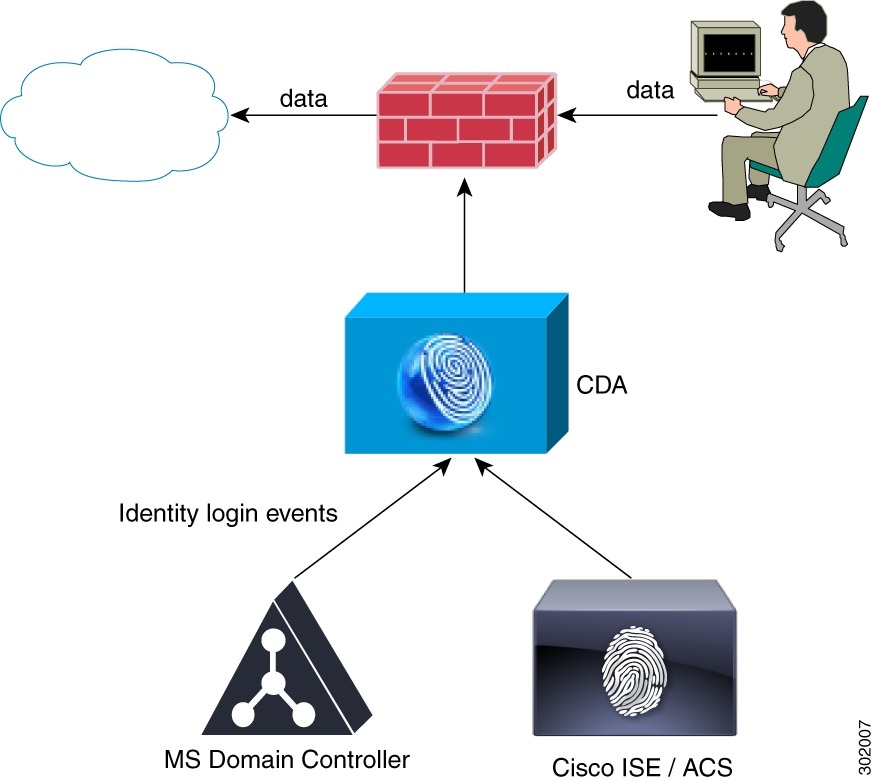
Figure 1-1 represents a simplified view of the CDA solution. In this example, a user logs in from a computer and generates web traffic by requesting access to a server. The consumer device intercepts the web traffic and sends a RADIUS request to CDA asking for the user who logged into the computer. CDA, which has been maintaining the latest set of IP-to-user-identity mappings, sends the user information to the consumer device. The consumer device uses the user identity information to determine whether or not to grant access to the end user.
In this example, CDA learns about the user either from the authentication that occurred in the domain controller, or by the authentication performed by ISE that grants network access to the user. The advantage of integrating CDA with ISE is to allow CDA to provide user information from authentication identity servers, which are different than Active Directory servers.
In case ASA is deployed in the network as a VPN concentrator, CDA accepts mapping update events in addition to the login events received from the Active Directory.
- Providing (push and pull, single and bulk) IP-to-user-identity mappings to the consumer devices.
- Receiving notification on IP-to-user-identity mapping from consumer devices.
- Providing an interface to retrieve the status of various components (CDA and domain controllers).
- Maintaining a session directory of IP-to-user-identity mappings.
- Caching the session information.
- Learning the mappings at real time from Microsoft domain controllers, ISE/ACS or ASA VPN. CDA notifies the consumer devices upon user changes.
- Reading historical log data from domain controller to learn about existing IP-to-user-identity mappings.
- Providing configuration mechanism using the user interface to configure CDA, viewing the concurrent mapping list and log events.
- Cleaning expired mappings periodically. Expiration is defined by user logon TTL.
CDA interacts with the following components in a network:
Consumer Device
Consumer devices are responsible for actively retrieving (and/or passively receiving) the latest IP-to-user-identity mappings from CDA. A consumer device is responsible for:
- Retrieving the IP-to-user-identity mappings from CDA.
- Receiving notifications of IP-to-user-identity mappings from CDA.
- Enforcing identity based firewall policy.
- Basic monitoring of the Active Directory connectivity via CDA.
- Retrieving group information directly from the Active Directory.
- Web-auth fallback for IPs that CDA did not map to identity.
- Forwarding of new mappings revealed by consumer devices via the web-auth to CDA.
- Forwarding IP-to-user-identity mapping for VPN sessions.
- Running NetBIOS probing and forwarding disconnect notification to CDA.
These updates are sent as RADIUS Accounting-Request messages.
Active Directory Domain Controller Machines
CDA monitors the security event log of the Active Directory domain controllers in order to retrieve information about user logins and deliver this data to the consumer devices.
Upon startup CDA reads a time based window (history) of users that are already logged-in. After CDA is up and running it monitors and retrieves user logins in realtime. Connection is required between CDA and the Active Directory domain controller for retrieving the user login events.
To connect to the Active Directory domain controllers, the CDA uses an Active Directory user.
An Active Directory user used by CDA must have the required permissions in order to connect and monitor the Active Directory domain controllers
The Active directory user used by CDA can be a member of the Domain Admin Group; however this is not mandatory if you have installed the latest CDA patch (any future CDA patches would include this functionality as well).
The connection between CDA and the Active Directory domain controller is also authenticated using MS NTLM protocol. CDA patch 2 supports NTLMv1 and NTLMv2.
Receiving Network Login Information from ISE and ACS
Most wireless networks and a large portion of wired network employees today use 802.1x to control who and what can access the network. When a non-AD workstation (such an Apple MacBook or iMac, Android or iOS phone or tablet, or anything that is not running off a domain member) accesses the network, as it does not login to Active Directory, the domain controllers have no trace of its identity. In such cases CDA cannot build an IP to identity map.
Through the interaction with ISE and ACS, CDA can now be aware of the network logins, be it of a domain member or not, and can build an IP Address to identity map of a much larger portion of the network. CDA receives syslog messages from ISE and/or ACS in order to derive which users have logged in to the network, analyzes those messages to extract the username and the IP Address it is using, and inserts this information into the Identity Mapping table.
Figure 1-2 explains how CDA maps both 802.1x login events and non-802.1x AD login events (AD and non-AD.)
Figure 1-2 Mapping Both AD and Non-AD Events
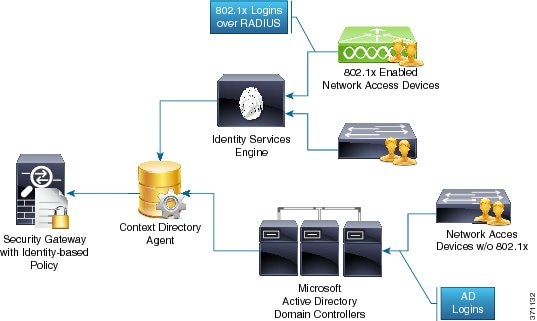
This integration allows consumer devices such as ASA-CX and WSA to make security decisions for a large portion of network endpoints, including those that are not domain members. CDA passes the information to the consumer devices in the same format whether the user/domain information was received from a Windows domain controller event log or through integration with ISE/ACS.
Syslog Servers and Clients
CDA can forward logs containing administrative and troubleshooting information to one or more syslog servers. It also updates the IP-to-user-identity mapping information. The contents of these logs are identical to that of the customer logs that are locally available on the CDA machine. The syslog mechanism allows this information to be distributed remotely, to any target machine running a syslog server and capable of receiving syslog messages.
CDA can also act as a syslog server when one or more syslog clients are added. It can connect to Cisco Identity Services Engine (ISE) and Cisco Secure Access Control System (ACS) and receive syslog messages.
CDA Performance and Scalability
CDA can support up to 80 domain controller machines, and can internally cache up to 64,000 IP-to-user-identity mappings. It supports up to 100 Identity consumer devices. CDA processes 1000 IP-to-user-identity mappings per second (input and output).
CDA is tested to support three Syslog clients (when it acts as a syslog server), twenty administrators, and five concurrent admin user interface sessions.
CDA Deployment Recommendations
It is recommended to consider the following aspects while deploying CDA:
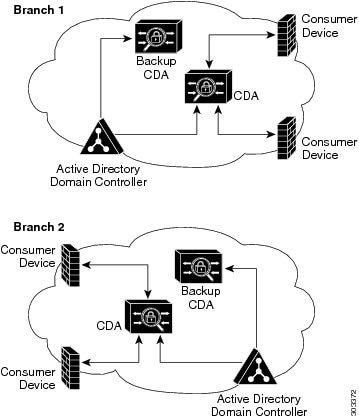
- CDA interoperates with the consumer devices using the UDP protocol. Therefore, it is recommended for CDA to be located geographically near the consumer devices. This is mainly important when CDA sends bulk data to the consumer device, which can be time consuming over the WAN.
- It is recommended that any CDA node in the deployment receive all user login information from the Active Directory domain controllers. This will allow consumer devices to interoperate with the local CDA for all user logins data. Moreover, having the Active Directory Domain Controller geographically near the CDA will increase reliability.
- To achieve high availability you can use two CDAs with the same configuration where both CDAs must retrieve same user login information from the same Active Directory Domain Controllers. It is the role of the consumer device to switch to the second CDA in case the first CDA is non-responding.
Figure 1-3 The Recommended CDA Deployment Type
 Feedback