- Preface
- Overview of Cisco Unified Border Element (SP Edition) Distributed Model
- Configuring Cisco Unified Border Element (SP Edition) Distributed Model
- DTMF Interworking
- Media Address Pools
- Quality of Service and Bandwidth Management
- H.248 Services - Signaling and Control
- H.248 Packages - Signaling and Control
- ETSI Ia Profile on SBC
- Cisco Unified Border Element (SP Edition) Distributed Model Security
- Topology Hiding
- High Availability Support
- Quality Monitoring and Statistics Gathering
- Contents
- DBE Signaling Pinhole Support
- Extension to H.248 Audit Support
- Extension to H.248 Termination Wildcarding Support
- Flexible Address Prefix Provisioning
- Full Support for Wildcard Response
- H.248 ServiceChange Handoff
- In-Service Provisioning of H.248 Controllers
H.248 Services—Signaling and Control
The data border element (DBE) of the Cisco Unified Border Element (SP Edition) distributed model manages media packets, but it also takes part in forwarding signaling packets to the signaling border element (SBE). In this way, the DBE helps in signaling interworking.
The SBE generates controlling packets and, through the H.248 interface, informs the DBE on management of media packets, as well as signaling packets. After the DBE creates media pinholes and defines the policy, the DBE manages the media packets based on that policy. The features in this chapter describe different H.248 services and controlling functions of the DBE.
Cisco Unified Border Element (SP Edition) was formerly known as Integrated Session Border Controller and may be commonly referred to in this document as the session border controller (SBC).
For a complete description of the commands used in this chapter, see Cisco Unified Border Element (SP Edition) Command Reference: Distributed Model at:
http://www.cisco.com/en/US/docs/ios/sbc/command/reference/sbc_book.html
For information about all Cisco IOS commands, use the Command Lookup Tool at:
http://tools.cisco.com/Support/CLILookup or a Cisco IOS master commands list.
Feature History for H.248 Services—Signaling and Control Features
|
|
|
Cisco IOS XE Release 2.1 |
These features were introduced on the Cisco ASR 1000 Series Aggregation Services Routers for the distributed model. See Table 1-1 for a list of supported features by release. |
Cisco IOS XE Release 2.6 |
The following features were introduced on the Cisco ASR 1000 Series Aggregation Services Routers: • • |
Cisco IOS XE Release 2.6.2 |
The H.248 Timers feature was introduced on the Cisco ASR 1000 Series Aggregation Services Routers. |
Contents
This chapter provides information about the following topics:
• DBE Signaling Pinhole Support
•Extension to H.248 Audit Support
•Extension to H.248 Termination Wildcarding Support
•Flexible Address Prefix Provisioning
•Full Support for Wildcard Response
•In-Service Provisioning of H.248 Controllers
•IPsec Pinhole Support—Twice NAT for IPv4 and No NAT for IPv6
•Local Source Properties (Address and Port)
•MGC-Specified Local Addresses or Ports
•Nine-Tier Termination Name Hierarchy
•Optional Local and Remote Descriptors
•Remote Source Address Mask Filtering
•Return Local and Remote Descriptors in H.248 Reply
•RTP-Specific Behavior Support
•ServiceChange Notification for Interface Status Change
DBE Signaling Pinhole Support
DBE Signaling Pinhole Support allows the media gateway controller (MGC) to directly control policing of signaling flows through the SBC interfaces on the DBE. The policing is at a per signaling flow level, via the H.248 association between the MGC and the DBE. The feature removes the need to have a separate firewall device to protect the MGC.
Without this feature, signaling packets are addressed to the SBE, and the DBE acts as a router, forwarding the packets to the SBE. With this feature enabled, the DBE can police signaling packets using the ETSI TS 102 333 Traffic Management (Tman) package. The DBE has application-level pinholes created to allow those packets to be forwarded to the SBE. Normal IP forwarding is disabled on the SBC interfaces of the DBE.
DBE Signaling Pinhole Support includes the following functionality:
•DBE only forwards traffic that is received on a configured pinhole. The packet must be addressed to a VPN, address, or port on an SBC interface on the DBE.
•Signaling pinholes are configured in the same way as media pinholes over H.248. They can be differentiated from media pinholes by session descriptions as defined in the Session Description Protocol (SDP) in the local and remote descriptors. The "m=application" line indicates that the termination is a signaling pinhole.
•Data rate through a signaling pinhole can be unlimited.
•MGC can specify the VPN, address, and port of the pinhole on the DBE when it is created. This must be selected from the address and port range available on the DBE, and must not already have been allocated for another use. This function is intended to be used for signaling pinholes, but it can be used for any pinhole. The address and port range available must be separately configured on both the MGC and the DBE.
•Each endpoint must have a signaling pinhole associated with it for it to communicate with the Session Initiation Protocol (SIP) server.
•Signaling pinholes are forwarded in the same way as media pinholes; that is, packets are forwarded after the policing bandwidth usage is checked and the IP header is re-written. The only exception is that signaling pinholes do not time out if the flow of signaling packets stops.
•Signaling pinholes can be used for traffic other than just SIP, such as for non-RTP media streams of any kind. However, you need to specify a bandwidth limit using the Tman package if you want policing.
Restrictions for DBE Signaling Pinhole Support
The following are DBE restrictions pertaining to the DBE Signaling Pinhole Support feature:
•Endpoint still needs to be sending its signaling to a local address owned by the DBE configured as a media address.
•If a signaling port range is not configured, then by default the range is the same as that for media ports (16384 to 32767). For this reason, it is recommended that a signaling port range is explicitly configured. The configured range must not clash with the address and port used by the media gateway for its connection to the MGC. You need to ensure this configuration is entered consistently.
Extension to H.248 Audit Support
Extension to H.248 Audit Support adds support for DBE auditing of the Signals, ObservedEvents, and EventBuffer descriptors in any of the Add, Modify, Subtract, or AuditValue commands at any time on both sides of a media flow.
Restrictions for the DBE Extension to H.258 Audit Support
The following are restrictions pertaining to the DBE Extension to H.248 Audit Support feature:
•When a termination endpoint has latched, the Signals, ObservedEvents, and EventBuffer descriptors are empty.
For information on latching, see the "IP NAPT Traversal Package and Latch and Relatch Support" section.
•When a termination has not yet latched, the Signals, ObservedEvents, and EventBuffer descriptors contain other descriptors; for example, the Signals descriptor can contain the descriptor for the ipnapt/latch signal.
•DBE only supports the Dual Tone Multifrequency (DTMF) injection and the ipnapt/latch signals. However, the DTMF injection signal is defined as a brief signal and thus is not present in the Signals descriptor.
•DBE does not support the lockstep mode of event reporting. Therefore, the ObservedEvents and EventBuffer descriptors never contain events.
Extension to H.248 Termination Wildcarding Support
Extension to H.248 Termination Wildcarding Support adds support for partially wildcarded termination names, which allows a single command to replace one or more elements of a termination name with the wildcard character "*".
The MGC can issue H.248 commands using wildcarding at any level of the Nine-Tier Termination Name Hierarchy.
For example, any of the following wildcarded termination names would be valid:
operator/sip/*/0/1023/0/*/*/*
operator/sip/*/0/1023/0/4094/*/*
*/*/*/0/1023/0/*/*/*
For more information on the Nine-Tier Termination Name Hierarchy feature, see the "Nine-Tier Termination Name Hierarchy" section.
Restrictions for the DBE H.248 Termination Wildcarding Support
The following are restrictions pertaining to DBE Extension to H.248 Termination Wildcarding Support feature:
•H.248 commands supporting wildcarded termination names are limited to the AuditValue, Modify (of ServiceState), and Subtract commands.
•In the event that both the Termination ID and Context ID are wildcarded, then the Modify and Subtract commands must include an empty Audit descriptor, and must request a wildcarded response.
•Partial wildcards, which omit one or more tiers of the termination name, are not supported. For example, "operator/sip/*" is not supported, but "operator/sip/*/*/*/*/*/*/*" is. The exception is the full wildcard, which is simply "*".
•You can construct transactions with multiple overlapping wildcarded commands, and when a single transaction contains multiple commands referencing the same terminations, the commands operate in order. However, when a termination is subtracted, any other commands affecting it are ignored.
For example, suppose a media gateway (MG) has a single termination a/b/1. The following are examples of overlapping wildcarded commands and their returns:
–"audit value a/*/*, audit value */b/*" returns a/b/1 in the response twice.
–"modify a/*/*, modify */b/*" modifies termination a/b/1, with the second modify overwriting the first, and return success to both commands.
–"subtract a/*/*, subtract */b/*" subtracts a/b/1 as part of the first subtract and ignores the second subtract.
–"subtract a/*/*, modify */b/*" subtracts termination a/b/1 and ignores the modify.
–"modify a/*/*, subtract */b/*" does the same as above.
When a wildcard command is ignored under these circumstances, the response to that command is error 431 "No Termination ID matched a wildcard".
When a non-wildcarded command is ignored, the response is error 430 "Unknown Termination ID".
Flexible Address Prefix Provisioning
When the Remote Source Address Mask (rsam) property of the ETSI TS 102 333 Gate Management (GM) package is not involved in the flow entry hash key construction, there are no limits to the network mask length, because the mask specific to each flow is used to validate the SBC packets after the flow entry is retrieved (that is, the expected gm/rsam information is obtained from the flow entry that is stored during the signaling/call setup process). However, when features such as Local Source Properties (Address and Port) or Remote Source Address Mask Filtering are used, where flows from various source IPs can connect to the same service destination IP address and port, the source IP network mask (gm/rsam network mask) must be used in the hash key construction in addition to the destination IP and port to identify and retrieve a unique flow entry.
Because there is no way to know about the existence of the multiple terminations when the DBE tries to construct the hash key for retrieving the flow entry, support has been added for the Flexible Address Prefix Provisioning feature. This feature creates a dummy entry using the service IP and port to construct a hash key when the first termination with this service IP and port combination is established. This dummy entry is shared among all the terminations sharing the same service IP and port for storing network masks, and supports three different lengths of network masks on a given shared address at one time or different shared addresses. Any length of network masks is allowed.
This feature is applicable to both IPv4 and IPv6 flows.
If there is only one network mask in a dummy entry, the DBE uses this network mask to mask out the source IP of the incoming packet and, together with the destination IP/port, constructs a new hash key to locate the corresponding termination flow entry from the flow table.
If multiple network masks are configured in the dummy entry, the DBE masks the source IP of the incoming packets using the multiple network masks stored in the dummy entry sequentially from longest to shortest. If a flow entry is located, the DBE stops the flow retrieval operation and continues the rest of SBC processing. When a termination is subtracted, its network mask length is removed from the dummy entry if the termination is the last one with that gm/sam network mask length.
Restrictions for DBE Flexible Address Prefix Provisioning
The following are restrictions pertaining to the DBE Flexible Address Prefix Provisioning feature:
•Only three different lengths of network masks can be in use on a given shared address at one time.
•When multiple mask lengths are used on a shared local address, there is extra overhead of hash key construction and flow entry lookup.
Full Support for Wildcard Response
Previously Cisco Unified Border Element (SP Edition) distributed model supported H.248 wildcard operations that were restricted to W-Modify or W-Subtract requests, which yielded summary wildcard responses. This feature introduces support for a complete wildcard response. A wildcard H.248 Subtract or Modify operation now returns a complete response with per-termination statistics.
With this enhancement, the MGC is not required to request a summary wildcard response when sending an H.248 Subtract or Modify command with a wildcard context ID and wildcarded termination ID. However, the MGC can request a summary wildcard response if it chooses. The Subtract or Modify command is not rejected if the MGC does not make a summary wildcard request.
Table 6-1 lists the commands and context IDs for the wildcard response.
|
|
|
|---|---|
subtract |
All |
auditvalue |
All |
modify |
All |
If the resulting responses to these commands get very large, you are advised to turn on the H.248 Segmentation Package Support feature. For more information, see the "H.248 Segmentation Package Support" section. However, if segmentation is not supported and the maximum PDU size is met, the response generates error 533 "Response exceeds maximum transport PDU size".
Restriction for the DBE Full Support for Wildcard Response
Commands that have wildcard (All) context can occur only once in a request.
Complete Wildcard Response Example
The following example shows a sample H.248 wildcard Subtract request that yields per-termination statistics:
T = 63 {
C = * {
S = */*/*/*/*/*/*/*/*
}}
The above wildcard Subtract request produces the following example of a complete wildcard subtract response with segmentation on:
P=63/1{
C=25{
S=xyzcompany/sip4/gn/0/1/0/1/ac/13{
SA{EMP/PD=0,NT/OS=0,NT/OR=0,EMP/OD=0,GM/DP=0,EPSTAT/EPJIT=0,EPSTAT/EPPS=0,
EPSTAT/EPPR=0,EPSTAT/EPOS=0,EPSTAT/EPPL=0,EPSTAT/EPDELAY=0,NT/DUR=1628429},
M{ ST=1{ SA{EMP/PD=0,NT/OS=0,NT/OR=0,EMP/OD=0,GM/DP=0,EPSTAT/EPJIT=0,EPSTAT/EPPS=0,
EPSTAT/EPPR=0,EPSTAT/EPOS=0,EPSTAT/EPPL=0,EPSTAT/EPDELAY=0,NT/DUR=1628429}}}}}}
P=63/2{
C=25{
S=xyzcompany/sip4/gn/0/1/0/1/bb/14{
SA{EMP/PD=0,NT/OS=0,NT/OR=0,EMP/OD=0,GM/DP=0,EPSTAT/EPJIT=0,EPSTAT/EPPS=0,
EPSTAT/EPPR=0,EPSTAT/EPOS=0,EPSTAT/EPPL=0,EPSTAT/EPDELAY=0,NT/DUR=1628429},
M{ ST=1{ SA{EMP/PD=0,NT/OS=0,NT/OR=0,EMP/OD=0,GM/DP=0,EPSTAT/EPJIT=0,EPSTAT/EPPS=0,
EPSTAT/EPPR=0,EPSTAT/EPOS=0,EPSTAT/EPPL=0,EPSTAT/EPDELAY=0,NT/DUR=1628429}}}}}}
H.248 ServiceChange Handoff
The ServiceChange Handoff functionality on Cisco Unified Border Element (SP Edition) distributed model conforms to section 7.2.8, ServiceChange, and section 7.2.8.1.1, ServiceChangeMethod, of the H.248.1v3 Gateway Control Protocol: Version 3. The ServiceChange Handoff functionality allows an MGC to hand over control of an MG to another MGC. The MGC sends a ServiceChange message to the MG with which it is currently associated to request that the MG terminate that association and the MG form a new association with a MGC identified in the ServiceChange message.
The ServiceChangeMethod identifies the type of ServiceChange that occurs. The ServiceChangeMethod used in this functionality is Handoff. A ServiceChange Handoff message is sent from the MGC to the MG to signify that the MGC is being taken out of service, and that the MG needs to establish a new association with another MGC. Then, the next Handoff message is sent from the MG to the MGC to show that the MG is trying to form the new association.
A ServiceChange Handoff is useful when a MGC goes down for maintenance purposes or when a MGC decides to share load with another MGC.
If the MG is not able to connect to the selected MGC because of an access denial or network failure, the MG tries to connect to another MGC by using the ServiceChangeMethod of Failover. The MG sends a ServiceChange Failover message to alternate MGCs that are described in the MGC list and tries to connect with an MGC from the list.
Debugging Example
You can use the show sbc dbe controller command to verify that the ServiceChange Handoff was successful. The command output shows the address of the new MGC and the status of the new MGC association is Attached.
The following is an example showing the H.248 controller address of the new MGC that is now associated with the MG and the status of the association:
Router# show sbc global dbe controller
SBC Service "global"
vDBE in default DBE location (4294967295)
DBE Admin Status: Active
DBE Transaction Long Timer 10500 (ms)
DBE TMAX Timeout 10000 (ms)
Media gateway controller in use:
H.248 controller address <========= Address of new MGC
200.40.1.254:2948
Status: Attached, since 2008/09/09 12:40:37 <====== Status of the association
In-Service Provisioning of H.248 Controllers
Introduced in Cisco IOS XE Release 2.3, the In-Service Provisioning of H.248 Controllers feature allows you to configure a new MGC or make configuration changes to an existing MGC on the DBE while the SBC is active. The SBC is still in service while controller changes are being made. The in-service provisioning capability ensures that existing pinholes and active calls are not lost.
For example, you can add a new controller to your configuration so it can be used later when the active MGC goes down for maintenance. In that event, the active MGC attached to the DBE sends a ServiceChange message to the DBE to request that the DBE detach from the MGC and attach to the new MGC. The in-service provisioning feature ensures the new controller can be configured and added easily without tearing down existing pinholes and losing calls.
Other examples of configuration changes to a controller include changes to the Interim Authentication Header parameters or to the control address.
If you are running Cisco IOS XE Release 2.2 or earlier, see the "Without the In-Service Provisioning Capability" section for information on making configuration changes to a controller.
Restrictions for In-Service Provisioning of H.248 Controllers
You cannot modify the existing controller that is associated with the MGC. You can only modify other controllers in the configuration.
Configuring a New Controller: Examples
The following show run command shows an existing SBC configuration with configured controller 2:
Router# show run | be sbc
sbc global dbe
vdbe global
h248-version 3
h248-napt-package napt
local-port 2974
control-address h248 ipv4 200.50.1.4
controller h248 2
remote-address ipv4 200.50.1.254
remote-port 2974
attach-controllers
deactivation-mode abort
location-id 1
media-address ipv4 202.50.2.1
port-range 10000 60000 any
media-address ipv4 202.50.3.1
port-range 10000 60000 any
media-timeout 1000
activate
The following example shows how to configure a new controller 99 with the controller h248 99 command:
Router# configure terminal
Enter configuration commands, one per line. End with CNTL/Z.
Router(config)# sbc global dbe
Router(config-sbc-dbe)# vdbe global
Router(config-sbc-dbe-vdbe)# controller h248 99
Router(config-sbc-dbe-vdbe-h248)# remote-address ipv4 99.0.0.1
Router(config-sbc-dbe-vdbe-h248)# remote-port
Router(config-sbc-dbe-vdbe-h248)# remote-port 2799
Router(config-sbc-dbe-vdbe-h248)# ^Z
Router#
Error When Configuring an Attached Controller: Examples
If you try to modify the existing controller that is associated with the MGC, you receive an error message because you can only modify other controllers in the configuration. The following example shows an existing SBC configuration with configured controller 2:
Router# show run
*Nov 25 23:53:00.400: %SYS-5-CONFIG_I: Configured from console by console run
| be sbc
sbc global dbe
vdbe global
h248-version 3
h248-napt-package napt
local-port 2974
control-address h248 ipv4 200.50.1.4
controller h248 2
remote-address ipv4 200.50.1.254
remote-port 2974
attach-controllers
deactivation-mode abort
location-id 1
media-address ipv4 202.50.2.1
port-range 10000 60000 any
media-address ipv4 202.50.3.1
port-range 10000 60000 any
media-timeout 1000
activate
The following example shows the error message received when you try to configure the attached controller 2:
Router# configure terminal
Enter configuration commands, one per line. End with CNTL/Z.
Router(config)# sbc global dbe
Router(config-sbc-dbe)# vdbe global
Router(config-sbc-dbe-vdbe)# controller h248 2
SBC: SBC: Specified controller cannot be changed while it is currently attached
Without the In-Service Provisioning Capability
Without the in-service provisioning capability in releases before Cisco IOS XE Release 2.3, any configuration changes to the MGC require deactivating the DBE (with the no activate command), detaching the MGC (with the no attach-controllers command), re-attaching the MGC (with the attach-controllers command) after making the change, and then reactivating the DBE (with the activate command).
If you run a release before Cisco IOS XE Release 2.3, read the following examples for the recommended steps for making global changes to controllers and making changes to individual controller settings.
Making Global Changes to Controllers: Examples
You have configured H.248 controllers for the DBE and want to make a global change that affects all controllers. Global changes are configured on the DBE and consist of changing any one of the following:
•Control address
•Local port
•Use-any-local-port

Note You cannot make global changes to controllers while controllers are configured. You cannot delete a controller while the controller is attached.
To change the control address and local port that globally affect configured controllers, we recommend the following steps:
1. Deactivate the DBE with the no activate command.
2. Enter into VDBE configuration mode with the vdbe command.
3. Detach the controller with the no attach-controllers command.
4. Delete any configured controllers with the no controller h248 command.
5. Make the change to the control address or local port.
6. Add the controllers back with the controller h248 command.
7. Reconfigure the individual settings configured on each controller, such as the remote address, remote port, and transport configuration, that were removed with the no controller h248 command.
8. Exit the Controller H.248 configuration mode with the exit command.
9. Re-attach each controller with the attach-controllers command.
10. Exit the VDBE configuration mode with the exit command.
11. Reactive the DBE with the activate command.
The following example shows the initial SBC configuration:
sbc mySbc dbe
vdbe global
use-any-local-port
control-address h248 ipv4 172.25.2.26
controller h248 1
remote-address ipv4 172.25.2.243
remote-port 2946
transport udp
attach-controllers
activate
location-id 1
media-address ipv4 20.20.20.20
media-address ipv4 21.21.21.21
The following example illustrates a user trying to change the local port number while the controllers are configured and receiving an error message:
Router# configure terminal
Enter configuration commands, one per line. End with CNTL/Z.
Router(config)# sbc mySbc dbe
Router(config-sbc-dbe)# vdbe
Router(config-sbc-dbe-vdbe)# local-port 2946
SBC: local-port cannot be changed while controllers are configured.
The following example illustrates the user following the recommended steps to change the local port:
Router(config-sbc-dbe-vdbe)# exit
Router(config-sbc-dbe)# no activate
Router(config-sbc-dbe)# vdbe
Router(config-sbc-dbe-vdbe)# no attach-controllers
Router(config-sbc-dbe-vdbe)# no controller h248 1
Router(config-sbc-dbe-vdbe)# local-port 2946 <== Make change to local port
Router(config-sbc-dbe-vdbe)# controller h248 1
Router(config-sbc-dbe-vdbe-h248)# remote-address ipv4 172.25.2.243 <== Reconfigure
Router(config-sbc-dbe-vdbe-h248)# remote-port 2946 <== Reconfigure
Router(config-sbc-dbe-vdbe-h248)# transport udp <== Reconfigure
Router(config-sbc-dbe-vdbe-h248)# exit
Router(config-sbc-dbe-vdbe)# attach-controllers <== Re-attach controller
Router(config-sbc-dbe-vdbe)# exit
Router(config-sbc-dbe)# activate <== Reactivate the DBE
Router(config-sbc-dbe)# end
The following example shows the modified running SBC configuration:
sbc mySbc dbe
vdbe global
local-port 2946
control-address h248 ipv4 172.25.2.26
controller h248 1
remote-address ipv4 172.25.2.243
remote-port 2946
transport udp
attach-controllers
activate
location-id 1
media-address ipv4 20.20.20.20
media-address ipv4 21.21.21.21
Making Changes to Individual Controller Settings: Examples
You can change an individual setting on a controller that is already configured. Individual controller-specific settings include any one of the following:
•Remote address
•Remote port
•Transport type
Note You cannot change an individual controller setting (remote address, remote port, or transport type) unless you detach the controller first.
To change the remote address, remote port, or transport type setting on a controller, we recommend the following steps:
1. Deactivate the DBE with the no activate command.
2. Enter into VDBE configuration mode with the vdbe command.
3. Detach the controller with the no attach-controllers command.
4. Enter into Controller H.248 configuration mode with the controller h248 command.
5. Make the change to the remote address, remote port, or transport type.
6. Exit the Controller H.248 configuration mode with the exit command.
7. Re-attach the controller with the attach-controllers command.
8. Exit the VDBE configuration mode with the exit command.
9. Reactivate the DBE with the activate command.
The following example shows the initial configuration:
sbc mySbc dbe
vdbe global
use-any-local-port
control-address h248 ipv4 172.25.2.26
controller h248 1
remote-address ipv4 172.25.2.243
attach-controllers
activate
location-id 1
media-address ipv4 20.20.20.20
media-address ipv4 21.21.21.21
The following example illustrates a user trying to change the remote address and receiving an error message:
Router# configure terminal
Enter configuration commands, one per line. End with CNTL/Z.
Router(config)# sbc mySbc dbe
Router(config-sbc-dbe)# vdbe
Router(config-sbc-dbe-vdbe)# controller h248 1
Router(config-sbc-dbe-vdbe-h248)# remote-address ipv4 210.229.108.253
SBC: remote-address cannot be changed while controllers are attached.
The following example illustrates the user following the recommended steps to change the remote address:
Router(config-sbc-dbe-vdbe-h248)# exit
Router(config-sbc-dbe-vdbe)# exit
Router(config-sbc-dbe)# no activate
Router(config-sbc-dbe)# vdbe
Router(config-sbc-dbe-vdbe)# no attach-controllers
Router(config-sbc-dbe-vdbe)# controller h248 1
Router(config-sbc-dbe-vdbe-h248)# remote-address ipv4 210.229.108.253<= change remote addr
Router(config-sbc-dbe-vdbe-h248)# exit
Router(config-sbc-dbe-vdbe)# attach-controllers
Router(config-sbc-dbe-vdbe)# exit
Router(config-sbc-dbe)# activate
Router(config-sbc-dbe)# end
The following example shows the modified running SBC configuration:
sbc mySbc dbe
vdbe global
use-any-local-port
control-address h248 ipv4 172.25.2.26
controller h248 1
remote-address ipv4 210.229.108.253
attach-controllers
activate
location-id 1
media-address ipv4 20.20.20.20
media-address ipv4 21.21.21.21
IPsec Pinhole Support—Twice NAT for IPv4 and No NAT for IPv6
This enhancement adds support for voice calls over IP Security (IPSec) tunnels and adds support for IPsec address-only pinholes. This support enables the DBE to forward IPsec packets when the port cannot be determined because the port is within the encrypted portion of the frame. Thus, IPsec support handles the IPsec requirement that does not allow use of port numbers for session lookup or translation. Currently, single IPsec pinholes are supported.
IPsec support introduces a new port type of Encapsulating Security Payload (ESP) to indicate IPsec ESP pinholes. The new port type allows ESP address-only pinholes to be configured. ESP pinholes are identified by the transport identifier "ESP" and a port equal to zero.
IPsec support enables the flow of IPsec traffic through an address-only pinhole and supports ESP tunnel mode, where the IP header and payload of the IP packet is encrypted. The ESP data operates directly on top of IP, using IP protocol number 50.
Cisco Unified Border Element (SP Edition) does not encrypt or decrypt any IPsec traffic. Cisco Unified Border Element (SP Edition) merely passes the encrypted packets after applying SBC policies, such as policing and latching. Because packets flowing through the IPsec pinholes are encrypted, the DBE is unable to read the endpoint statistics from a RTP Control Protocol (RTCP) stream or generation and detection of in-band dual-tone multifrequency (DTMF) tones.
The Session Description Protocol (SDP) to create an IPsec NAT mode pinhole using the ESP identifier is as follows:
m=<media> 0 ESP <fmt-list>, where media is audio, video, or application.
Both media and signaling IPsec address-only pinholes are supported. When the media is audio or video, the pinholes are created as media flow pairs. When the media is an application, the pinholes are created as signaling flow pairs.
If the port is not zero when the ESP tag is applied or the <media> tag is not audio, video, or application, the SDP is rejected with error 515, "Unsupported media type".
An Internet Key Exchange (IKE) session can be established for IPsec pinholes. An IKE session is a session in which IPsec endpoints commonly establish the security association between peers using the IKE protocol. An IKE session is typically a UDP session with port number 500. However, when a single pinhole is used for both an IKE session and ESP media, only the ESP pinhole is created and the IKE pinhole is not created.
The following models of IPsec address-only pinholes are supported on the DBE:
•IPv4 single Twice-NAT pinhole
In this model, the IPv4 IKE session and ESP data packets use a single Twice-NAT pinhole. Twice-NAT IPsec pinholes need additional configuration on the DBE. Two addresses are needed on the DBE for every Twice-NAT IPsec pinhole. See the "Related Commands and Command Examples" section for CLI information.
The MGC requests that the DBE choose the local address for both terminations A and B. However, the MGC can also select the local address.
•IPv6 single No-NAT pinhole
In this model, the IPv6 IKE session and ESP data use a single No-NAT pinhole. The MGC allocates the local address.
Related Commands and Command Examples
The nat-mode twice-nat keywords have been added to the media-address ipv4, media-address ipv6, media-address pool ipv4, and media-address pool ipv6 commands to allow the user to configure media addresses in the nat-mode twice-nat mode. The NAT mode allows local addresses to be reserved for Twice-NAT pinholes.
For more information on these commands, see Cisco Unified Border Element (SP Edition) Command Reference: Distributed Model at:
http://www.cisco.com/en/US/docs/ios/sbc/command/reference/sbc_book.html
The following example shows that IPv4 address 10.0.1.1, configured on an SBC interface, is the local address used for media traffic arriving on the DBE, and it is reserved for Twice-NAT IPsec pinholes:
Router(config)# sbc mySbc dbe
Router(config-sbc-dbe)# media-address ipv4 10.0.1.1 managed-by mgc nat-mode twice-nat
Router(config-sbc-dbe)# end
The following example configures IPv6 address 5::1:1 as the local address, and it is reserved for Twice-NAT IPsec pinholes:
Router(config)# sbc mySbc dbe
Router(config-sbc-dbe)# media-address ipv6 5::1:1 managed-by mgc nat-mode twice-nat
Router(cfg-sbc-dbe-media-addr-ipv6)# exit
The following example adds IPv4 addresses from 10.0.2.1 to 10.0.2.10 to the media address pool as local addresses, reserved for Twice-NAT IPsec pinholes:
Router(config)# sbc mySbc dbe
Router(config-sbc-dbe)# media-address pool ipv4 10.0.2.1 10.0.2.10 nat-mode twice-nat
Router(config-sbc-dbe-media-address-pool)# exit
The following example adds IPv6 addresses from 5::1:1 to 5::1:10 to the media address pool as local addresses, reserved for Twice-NAT IPsec pinholes:
Router(config)# sbc mySbc dbe
Router(config-sbc-dbe)# media-address pool ipv6 5::1:1 5::1:10 nat-mode twice-nat
Router(cfg-sbc-dbe-media-addr-pl-ipv6)# exit
Restrictions for DBE IPsec Pinhole Support
The following are restrictions pertaining to the DBE support for this feature:
•Media address pool size is limited to 1024 IPv4 addresses. If more IPv4 addresses are required, we recommend you create multiple SBC interfaces and then configure the address pools from the subnets on those interfaces.
•DBE functionality is only applied to the Layer 3 IP header. RTCP endpoint statistics, DTMF detection and generation, and other media-related query capabilities are lost when IPsec pinholes are created.
•IPsec address-only pinholes do not support sharing of local address and port between multiple pinholes.
•When a specific bandwidth has not been supplied, either through an SDP b line or H.248 Tman properties, the DBE does not rate limit IPsec pinhole traffic.
Restrictions for ISSU Downgrade
The ISSU Downgrade restrictions pertaining to this feature are as follows:
•Pinholes that use IPsec address-only pinholes cannot be supported on software releases earlier than Cisco IOS XE Release 2.2.
•While in a downgrade process during an In-Service Software Upgrade (ISSU), IPsec address-only pinholes are lost.
Debugging Tips
The debugging tips for the ISSU downgrade feature are as follows:
•Debug IPsec pinholes by using the show sbc dbe signaling-flow-stats or show sbc dbe media-flow-stats commands. Note that RTCP statistics are not available because RTCP packets are encrypted.
•If the pinhole creation for IPv4 Twice NAT fails, check whether there are sufficient addresses in the media address pools.
Local Source Properties (Address and Port)
The Local Source Properties (Address and Port) feature is described in the "Local Source Properties (Address and Port)" section.
Locally Hairpinned Sessions
The DBE supports hairpinning of calls between subscribers connected to the same DBE for IPv4 and IPv6 packets. A hairpin consists of two pinholes or two pairs of terminations on the DBE that the MGC has provisioned with local and remote addresses whereby media from one pinhole should travel directly (loops back) to the other pinhole. The MGC (also known as an SBE) does not differentiate whether Add requests are sent to the same or different DBEs for a flow setup.
In a hairpin media call flow setup, two pairs of terminations internally connect the backbone (BB) side to logically merge two separate DBEs into one DBE. The flow resembles a hairpin.
This feature is useful for interoperation with SBEs that provision two pinholes, even in the case in which the SBE does not require media to be sent further into the network.
Note Pinhole is an informal term for a pair of terminations in the same stream and same context.
Twice NAPT Pinhole Hairpinning
The DBE successfully forwards media through Twice Network Address and Port Translation (NAPT) pinholes that form a hairpin. For Twice NAPT hairpinning, the DBE forwards media on demand. The SBE sees no differences between Twice NAPT hairpins and Twice NAPT non-hairpins.
When forwarding media, a hairpin behaves the way two separate pinholes behave, except that a packet going through a coupled pair has its IP Time-to-Live (TTL) counter decremented only once, not twice.
Note Twice NAPT is only supported on IPv4.
No NAPT Pinhole Hairpinning
The No NAPT pinholes can form hairpins only under the following circumstances:
•Both pinholes are No NAPT.
•Each "internal termination" has local and remote addresses that are identical to those of the external termination on the associated pinhole.
Note The two terminations between which media loops back are called the "internal terminations" of their respective pinholes. Only external terminations directly receive packets from the network.
•Any remote source address masks (rsams) are duplicated. For example, if a termination with remote address A in one pinhole has an rsam of 1111:2222:3333:4444::/48, the termination with remote address A in the other pinhole also has an rsam of 1111:2222:3333:4444::/48.
Restrictions for DBE No NAPT Pinhole Hairpinning
The following are DBE restrictions pertaining to the Locally Hairpinned Sessions feature:
•For No NAPT pinholes, the DBE chooses the internal terminations as follows:
–First specified termination is chosen to be internal.
–Other termination is chosen accordingly from the other pinhole. If the termination with remote address A on one pinhole is internal, the termination with local address A on the other pinhole is also internal.
–DBE does not support choosing internal terminations based on termination names.
•For No NAPT hairpins, any Network Address Translation (NAT) latching requests are duplicated. For example, if a termination with remote address A in one pinhole requests NAT latching, the termination with remote address A in the other pinhole must also request NAT latching. The "request NAT latching" can be done using the ipnapt/latch H.248 signal.
•Hairpin in which both external terminations are provisioned with the NAT latching instruction cannot latch and cannot forward media. No NAPT pinholes are not allowed to (re)latch to the remote addresses on both sides.
•IPv6 hairpins are supported on UDP and TCP.
•Single NAPT pinhole hairpins are not supported.
MGC-Specified Local Addresses or Ports
This feature allows an MGC to specify a local address or port for media and signaling flows through the DBE. The MGC specifies a specific address or port for terminations in H.248 Add and Modify requests, instead of using the CHOOSE wildcard.
If either address or port is not specified, it is selected by the DBE from one of the DBE-managed address ranges.
The following error messages describe how the functionality has failed:
•Requested address and port do not belong to a range that has been configured on the DBE with the appropriate class of service for the flow.
Megaco error 421 "Unknown action or illegal combination of actions".
•Media port number requested is an odd number.
Megaco error 500 "Internal Software Failure".
•Request attempted to change the local address and port for an existing flow.
Megaco error 501 "Not Implemented".
•Requested address or port is already in use by another flow, or was in use by a recently deleted flow.
Megaco error 510 "Insufficient Resources".
Restrictions for DBE MGC-Specified Local Addresses or Ports
The following are restrictions pertaining to the DBE support for this feature:
•Addresses and ports specified must fall within a valid address or port range configured on the DBE, and not marked as "MGC-managed".
•Class of service of the port range must match the type of flow being allocated.
•Real-time Transport Protocol (RTP) flows cannot be set up to use odd-numbered ports.
MultiStream Terminations
This enhancement allows a single H.248 termination to contain multiple streams. Previously, only a single stream for each termination was allowed, which meant that multi-stream calls needed to be signaled using multiple pairs of terminations. This enhancement supports the new H.248.1v3 syntax in which several streams can occupy the same termination.
Restrictions for DBE MultiStream Terminations
Auditing of per-stream statistics is only supported when using H.248.1v3. This is a restriction of the H.248 protocol.
Nine-Tier Termination Name Hierarchy
The Nine-Tier Termination Name Hierarchy feature adds support for a nine-tier termination name schema, where the multi-tier prefix is supplied by the MGC, and the final element, the channel ID, is generated by the media gateway (MG). All MGCs that the MG is configured to contact must use the same termination name schema. A termination is the point of entry or exit of media flows relative to the MG. The MG understands how the flows entering and leaving each termination are related to each other.
This feature plays an important role in identifying the company, transaction service (such as voice or video), and termination attributes (such as access and backbone).
Restrictions for Nine-Tier Termination Name Hierarchy
The following are restrictions pertaining to the Nine-Tier Termination Name Hierarchy feature:
•Only the final element may contain the CHOOSE wildcard ($). The DBE will not extract any meaning from any elements of the termination ID, except " * " is reserved for wildcard notation.
•Multitier prefixes can be less than nine tiers, but must have the same depth.
Information About the Nine-Tier Termination Name Hierarchy
The MG assigns a channel ID that is unique across all terminations realized on the DBE. Using a unique channel ID ensures that the termination ID, as a whole, is unique across all terminations on the DBE. If a multi-tier prefix is not desired, the MGC may use a CHOOSE wildcard ($) for the termination ID, in which case the MG allocates a prefix in the form: ip/<flow-id>.
The only element within the hierarchy that may contain the CHOOSE attribute in an ADD request from the MGC is the channel element, which is the final element. The full termination name is stored persistently.
The termination naming hierarchy is extended to include nine tiers and is defined as follows:
<operator> / <service> / <subscriber-class> / <Reserved1> / <physical-interface-id> /
<Reserved2> / <sub-interface-id> / <termination-attribute> / <channel>
<operator> : "yourcompanyname", "com", "others"
<service> : "sip", "voice", "video", "vphone" (video-phone),"mon" (monitor), "others"
<subscriber-class> : "gn" (public), "ur" (priority), "ur1" (emergency)
<Reserved1> : digit (0-15)
<physical-interface-id> : digit (0-1023)
<Reserved2> : digit (0-4095)
<sub-interface-id> : digit (0-4095)
<termination-attribute> : "dc" (d.c.), "ac" (access), "bb" (backbone),"mon" (monitor)
<channel> : digit (0-4294967295)
Displaying the Nine-Tier Termination Name Hierarchy
The show sbc dbe media-flow-stats command is extended to include the full-termination ID in the response.
For a description of this command, see Cisco Unified Border Element (SP Edition) Command Reference: Distributed Model at:
http://www.cisco.com/en/US/docs/ios/sbc/command/reference/sbc_book.html
Displaying the Nine-Tier Termination Name Hierarchy: Example
This section provides an example of the reported fields for the show command displaying the nine-tier termination name hierarchy: abc/voice/gn/0/1/0/1/ac/3
The entry Media flowing = Yes either means that media has been observed flowing on the call within the media-timeout period, or the call has failed over within the last media-timeout period, and Cisco Unified Border Element (SP Edition) distributed model has not yet had a chance to observe whether media is flowing or not.
The statistics starting with RTCP are maintained and collected in real time when the show sbc dbe media-flow-stats detail command is issued.
The following example shows detailed statistics from an IPv4 media flow collected on the DBE:
Router# show sbc mySbc dbe media-flow-stats detail
SBC Service "mySbc"
Media Flow:
Context ID: 1
Stream ID: 2
State of Media Flow: Active
Call Established Time: 23:50:20 UTC Jun 21 2007
Flow Priority: Routine
Side A:
Name abc/voice/gn/0/1/0/1/ac/3
Reserved Bandwidth: 12 (bytes/second)
Status InService
VRF Name: Global
VLAN Tags(Priorities): 0(0), 0(0)
Local Address: 202.50.255.113
Local Port: 20000
Remote Address: 100.50.255.110
Remote Port: 20000
Remote Source Address Mask: 100.50.255.0/24
Packets Received: 2272
Packets Sent: 1784
Packets Discarded: 0
Data Received: 266 (bytes)
Data Sent: 209 (bytes)
Data Discarded: 0 (bytes)
GM Discarded Packets: 0
Time To Recovery: Not known
RTCP Packets Sent: Not known
RTCP Packets Received: Not known
RTCP Packets Lost: Not known
DTMF Interworking: No
Media Flowing: Yes
Unexpected SrcAddr Packets: No
Billing ID: 000000000000000000000000000000000000000000000000
Media directions allowed: sendrecv
Side B:
Name abc/voice/gn/0/1/0/1/bb/4
Reserved Bandwidth: 23 (bytes/second)
Status InService
VRF Name: Global
VLAN Tags(Priorities): 0(0), 0(0)
Local Address: 202.50.255.113
Local Port: 20002
Remote Address: 200.50.255.110
Remote Port: 30000
Packets Received: 2249
Packets Sent: 2272
Packets Discarded: 465
Data Received: 263 (bytes)
Data Sent: 266 (bytes)
Data Discarded: 54 (bytes)
GM Discarded Packets: 0
Time To Recovery: Not known
RTCP Packets Sent: Not known
RTCP Packets Received: Not known
RTCP Packets Lost: Not known
DTMF Interworking: No
Media Flowing: Yes
Unexpected SrcAddr Packets: No
Billing ID: 000000000000000000000000000000000000000000000000
Media directions allowed: sendrecv
Optional Local and Remote Descriptors
The MGC can specify one or more local and remote descriptors in a Modify command because the MGC does not always specify the descriptors in a single Add command. A descriptor might be an address or port allocation or bandwidth reservation.
The DBE process for adding or modifying local and remote descriptors is as follows:
•DBE accepts Add or Modify commands for a termination with zero or one local descriptor and zero or one remote descriptor for each stream.
•DBE reserves resources for a pinhole when the first local descriptor for either side of the pinhole is specified. This includes, but is not necessarily limited to, address and port allocation and bandwidth reservation. If the DBE resource reservation fails, one of the following may occur:
–If the Ginfo package is in use and the Ginfo or gate_state is provisional, then the gate is deleted and the Add or Modify request is returned with error 510 "failure response code of insufficient resources".
–Gate reverts to its previous state and the Add or Modify request is returned with error 510 "failure response code of insufficient resources". MGC deletes the gate if required.
Note If both local SDP and remote SDP are included in an H.248 message, the codec mentioned in both descriptors must be the same. Otherwise, the DBE rejects the message because the DBE does not support codec selection across the local and remote descriptors. You can use the symmetric-payload-types command to disable checking for asymmetric payload types in the local and remote descriptors for a call flow. After you run the symmetric-payload-types command, the local and remote descriptors can contain different codecs. You can use the no form of this command to enable checking for asymmetric payload types.
Restrictions for DBE Optional Local and Remote Descriptors
The following are restrictions pertaining to DBE support for this feature:
•DBE rejects attempts to change the addresses and ports in the local descriptor after they have been selected.
•Partially specified terminations (those without both a local and remote descriptor) must have a termination state of OutOfService. If an attempt is made to place a partially specified termination InService, then the request is rejected with error 421, "Unknown action or illegal combination of actions response."
Remote Source Address Mask Filtering
The Remote Source Address Mask Filtering feature is described in the "Remote Source Address Mask Filtering" section.
Return Local and Remote Descriptors in H.248 Reply
Before Cisco IOS XE Release 2.6, the DBE behavior was to return a local or remote descriptor in an H.248 Reply only if the descriptor was either under-specified or over-specified in the associated request. Under-specified means the SBE includes "$" in the Request. Over-specified means the SBE includes multiple codecs in the Request and allows the DBE to choose one codec from the list.
However, some H.248 interworking cases between the DBE and signaling border element (SBE) required the ability and flexibility of the DBE to always return the local and remote descriptors in an H.248 Reply. In Cisco IOS XE Release 2.6, the Return Local and Remote Descriptors in the H.248 Reply feature provides that capability.
This feature uses the local-remote-desc always command to configure the DBE to always return the local and remote descriptors in an H.248 Reply if the descriptors were present in the H.248 request. This function enhances H.248 interoperability with the SBE.
Configuration Examples
The following example shows how to configure the DBE to always include the local and remote descriptor in an H.248 Reply, if those descriptors were present in the H.248 request:
Router# configure terminal
Router(config)# sbc global dbe
Router(config-sbc-dbe)# vdbe global
Router(config-sbc-dbe-vdbe)# local-remote-desc always
In the following example, use the no form of the command to configure the DBE to not include local and remote descriptor in an H.248 Reply except under the condition that the descriptors are returned only if they were under-specified or over-specified on the H.248 request:
Router# configure terminal
Router(config)# sbc global dbe
Router(config-sbc-dbe)# vdbe global
Router(config-sbc-dbe-vdbe)# no local-remote-desc always
RTP-Specific Behavior Support
This feature adds support for the RTP Specific Behavior (rsb) property of the ETSI TS 102 333 version 1.1.2 Gate Management (GM) package. This support allows the MGC to disable RTP-specific behavior for a given termination. In this case, the MGC overrides the default DBE behavior for RTP flows.
Terminations representing gates for RTP traffic typically require two streams per media (one for RTP packets, one for RTCP packets). Mono media sessions require two bidirectional streams, whereas a multimedia session with voice and video traffic would require four streams.
Setting the property value to OFF overrides the default DBE behavior in the following ways:
•DBE does not open the RTCP port for the given RTP flow. However, the RTCP port is not available for use by other flows.
•DBE does not reserve additional resources (equal to 5 percent of those required for the RTP flow) for processing the RTCP stream.
Restrictions for DBE RTP-Specific Behavior Support
Enabling or disabling the property value is valid only for RTP flows. It is ignored for other types of flows.
ServiceChange Notification for Interface Status Change
This feature enables the media gateway (MG) to generate a ServiceChange H.248 notification to the MGC containing the termination ID of the physical interface on the DBE when the interface experiences status changes. The termination ID is a nine-tier name string associated with a pinhole or pair of terminations and it contains a physical-interface-id supplied by the user. For example, the MG notifies the MGC when a group of terminations is taken out of service (link down) or returned to service (link up).
Although notification of interface status changes can be obtained via SNMP, this feature provides a more reliable transport than SNMP and consolidates the information on the MGC for simpler management.
The MGC is also referred to as SBE.
For the SBE to be informed about status changes on a physical interface on the DBE, you can use the sbc interface-id command to map that physical interface to the physical-interface-id contained in the termination ID. Thus, the SBE is able to associate status changes on the physical interface with a pinhole. The command inserts the termination ID in the ServiceChange H.248 message. Therefore, when the physical interface changes status, the MG is able to report a service change with that particular termination ID to the SBE.
The termination ID rootidname is in the first tier or root of the nine-tier termination ID. You can use the termination-id rootidname command to configure the termination ID rootidname as a name string such as "xyzcompany". In this case, the MG reports "xyzcompany/*/*/*/<interface-id>/*/*/*/*" to the MGC with the ServiceChange notification. The default value of the termination ID rootidname is "Cisco".
Note For more details on the sbc interface-id and termination-id rootidname commands, see Cisco Unified Border Element (SP Edition) Command Reference: Distributed Model at: http://www.cisco.com/en/US/docs/ios/sbc/command/reference/sbc_book.html
The ServiceChange H.248 notification is generated by any of the following events:
•Link up and link down.
For link up—MG Service Restoration event. The ServiceChangeMethod is Restart and the ServiceChangeReason is 900 (Service Restored).
For link down—MG Service Cancellation event. The ServiceChangeMethod is Forced and the ServiceChangeReason is 905 (Term taken Out Of Service).
•Interface shutdown or interface online insertion and removal (OIR).
The ServiceChange Notification for Interface Status Change feature has the following restrictions and conditions:
•It is only supported on EtherChannel (gigabit EtherChannel and fast EtherChannel) and on all Ethernet interfaces. EtherChannel may also be called port channel.
•The sbc interface-id command cannot be configured on VLAN subinterfaces or any subinterfaces.
•When a ServiceChange notification is sent, the termination ID is always reported wildcarded.
•It is generated well before the Media Timeout event, which has a 30-seconds default.
•If an interface configured with the sbc interface-id command goes down, the affected terminations are marked "Out Of Service". If the DBE then receives an H.248 ADD or MODIFY request that moves one of these affected terminations to "in-service," although the interface is marked "down," the ADD or MODIFY request is not rejected. The request can move the termination state to "in-service," even though the interface cannot accept any packets until it goes up. When the interface changes status to either up or down, the MG reports a service change with the affected termination IDs to the SBE.
Note The ServiceChange procedure is described in H.248.1v3 Annex F.
Configuring the ServiceChange Notification for Interface Status Change
This section contains steps to configure the ServiceChange Notification for Interface Status Change feature on the Cisco ASR 1000 Series Routers.
SUMMARY STEPS
1. enable
2. configure terminal
3. interface type number
4. sbc interface-id {value}
5. end
DETAILED STEPS
Example
In the following configuration output example, the sbc interface-id command maps physical-interface-id 1 contained in the termination ID for the pinhole to GigabitEthernet interface 1:
interface gigabitethernet1
sbc interface-id 1
no ip address
negotiation auto
no keepalive
no cdp enable
end
Subsequently, when GigabitEthernet interface 1 changes status, a service change with a wildcarded termination ID is reported to the SBE, where 1 is the physical-interface-id in tier-5 of the nine-tier termination ID and the SBE is able to associate status changes on GigabitEthernet interface 1 with a pinhole:
*/*/*/*/1/*/*/*/*
SBC End-Point Switching
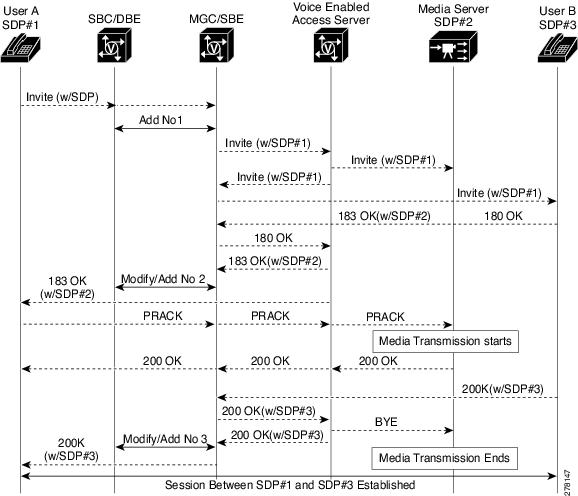
The SBC End-Point Switching feature enhances the user experience for a caller while the call is in setup mode.
Currently, when a call originates, during the call setup mode, there would be a silence at the other end or the caller hear various tones—such as waiting tone. With End-Point Switching, calls are redirected to a media server. Media server then plays a music instead of a tone until the callee picks up the call. As soon as the callee picks up the call, the redirection to the Media Server is removed and the two End-Points are connected.
End-Point switching feature is available for the following types of calls:
•Basic regular Calls (IPv4 - Twice NAPT [Network Address and Port Translation], IPv6 - No NAPT)
•Single and Double Hairpininng Calls (IPv4 - Twice NAPT, IPv6 - No NAPT)
Figure 6-1 shows the message flow between User A and User B in an IPv4 environment:
Figure 6-1 End-Point Switching — Message Flow
T-MAX Timer
The T-MAX timer is a timer that limits the maximum delay of retransmissions by the H.248 stack on a DBE when sending messages to the MGC.
Related Command
The tmax-timer command configures the value of the T-MAX timer.
H.248 Timers
The Version 2 of H.248 BaseRoot package, as defined in H.248.1v3, allows the MGC to indicate the following timers:
•normalMGCExecutionTime—Interval within which the MG expects to receive a transaction response from the MGC (excluding any network delay).
•MGCProvisionalResponseTimerValue—Interval within which the MG expects to receive a pending response from the MGC if the transaction cannot be completed. This interval includes the normalMGCExecutionTime timer and any network delay.
The T-MAX timer has an upper limit on the interval between the initial transmission of a transaction request and the receipt of any response. A device considers a transaction as a failure if no response is received within this interval.
Conditions that lead to H.248 association failures are as follows:
•If a ServiceChange request for the ROOT termination times out, the DBE treats the H.248 association as a failure.
•If an event notification for the Inactivity Timer (IT/ITO) event times out, the maximum retransmission number is hit, or normalMGCExecutionTime or T-MAX timer expires, DBE treats the H.248 association as a failure.
•If other event notifications time out, behavior of the SBC depends on the configuration of the h248-association-timeout command. If the command is configured, time out of any event notifications causes failure of H.248 association.
Note The h248-inactivity-duration command configures the Inactivity timer. The duration of the Inactivity timer is the time the DBE waits to hear from the MGC before generating an IT/ITO event notification request. This timer does not affect how long it takes for an IT/ITO event to time out and fail.
Prior to Cisco IOS Release 2.6.2, the T-MAX timer would use the lower values of the normalMGCExecutionTime and MGCProvisionalResponseTimerValue timers, if specified by the MGC in the baseroot package, replacing the configured T-MAX timer value. From Cisco IOS Release 2.6.2 onwards, the default behavior is to use the locally configured T-MAX timer value. The T-MAX timer value can be configured using the tmax-timer command.
Apart from T-MAX, normalMGCExecutionTime, and MGCProvisionalResponseTimerValue timers, there are following related H.248 timers:
•normalMGExecutionTime—Interval within which the MGC expects to receive a transaction final response from the MG (excluding any network delay).
•MGProvisionalResponseTimerValue—Interval within which the MGC expects to receive a pending response from the MG if the transaction cannot be completed. This interval includes the normalMGExecutionTime timer and any network delay.
•Maximum inactivity timer—This timer specifies the period of H.248 messaging silence that the MG applies to the process of monitoring incoming H.248 messages. Whenever the period of silence is exceeded, the MG generates a Notify Request with the IT/ITO ObservedEvent.
•LONG-TIMER—This timer is the period of time that H.248 responses should be stored by a device before receiving its response acknowledgement. LONG-TIMER duration is defined by the protocol to be equal to the T-MAX timer and the expected network delay.
Configuring an H.248 Timer
This section contains steps to configure a T-MAX timer. By default, the T-MAX timer uses the value configured by the tmax-timer command. However, you can also configure the T-MAX timer to use the MGC specified value, the smaller value of normalMGCExecutionTime or MGCProvisionalResponseTimerValue timer by using the tmax baseroot command.
SUMMARY STEPS
1. enable
2. configure terminal
3. sbc {sbc-name} dbe
4. vdbe [global]
5. tmax-timer {timer-value}
6. tmax baseroot
7. exit
DETAILED STEPS
Examples
The following example shows how to configure the value of the T-MAX timer that is the default behavior of the H.248 Timers feature:
Router# configure terminal
Router# sbc sbc dbe
Router(config-sbc-dbe)# vdbe global
Router(config-sbc-dbe-vdbe)# tmax-timer 20
The following example shows how to configure the T-MAX timer to use the MGC specified value, the smaller value of the normalMGCExecutionTime or MGCProvisionalResponseTimerValue timer:
Router# configure terminal
Router# sbc sbc dbe
Router(config-sbc-dbe)# vdbe global
Router(config-sbc-dbe-vdbe)# tmax baseroot
tsc-Delay Timer
The tsc-delay timer is a timer used to delay entry into the tsc-quiesce state. Delaying entry into the tsc-quiesce state delays closing all the signaling pinholes gracefully and delaying a TerminationState of OutOfService, where the tsc/gtd property is set to ON.
The tsc-delay timer is started when an H.248 Subtract command deletes the final termination from a context that does not have the tsc/gtd property set to ON. This delay provides a window during which closing SIP messages can flow to the endpoints before the signaling pinhole is closed by the media gateway (MG) and the context enters the tsc-quiesce state. After the tsc-delay timer expires, the context enters the tsc-quiesce state, the signaling pinhole is closed, and (if subscribed) the MG generates H.248 event notifications for the tsc/dc event.
The tsc-delay timer is set to a value of 2 seconds.
For more information on the tsc-quiesce state, see the "H.248 Termination State Control Package" section.
Restrictions for DBE tsc-Delay Timer
The following are restrictions pertaining to DBE support for the tsc-delay timer:
•If an H.248 Modify command explicitly changes the tsc/gtd property so that all terminations within the context have the tsc/gtd property set to ON, the tsc-delay timer is not started and the tsc-quiesce state occurs immediately.
•Duration of the tsc-delay timer cannot be modified.
•While the tsc-delay timer is running for a context, the MG can accept further programming for that context. If, because of this interim programming, the context is no longer in the tsc-quiesce state (for example, if new streams are added without the tsc/gtd property set or the tsc/gtd property is changed for existing streams), the tsc-delay timer stops and no further action is taken unless the context re-enters the tsc-quiesce state at a later time.
Video on Demand Support
Cisco Unified Border Element (SP Edition) distributed model supports Video on Demand (VoD) systems, enabling users to select and watch or listen to video and audio content over a network as part of an interactive television system. VoD systems can either stream content through a set-top box that allows the user to view in real time, such as pay-per-view, or download content to a delivery device for future viewing. Delivery devices include computers, digital video recorders, personal video recorders, portable media players, mobile phones, and any system that can receive on-demand audio-visual content over a network.
Cisco Unified Border Element (SP Edition) distributed model supports different methods for delivering VoD packets over the Internet.
One method assumes that all flows of Real-Time Streaming Protocol (RTSP), RTP, RTCP, and Forward Error Correction (FEC) are delivered over one TCP connection that is started by the client side.
This method includes the following features:
•TCP connection is always initiated by the client side.
•Local address and port number on the client or user side are specifically assigned by the SBE.
•Local address and port number on the backbone or server side are "any," based on the media flow being supported by IPv6 No NAPT TCP with latching.
Another method assumes that all flows of RTSP are delivered over TCP connections that are started by the client side. Each flow of RTP for video, RTCP for video, and RTP for FEC is delivered over each corresponding User Datagram Protocol (UDP) connection. In addition, when RTCP for FEC is used, it is delivered over a separate UDP connection.
This method includes the following features:
•RTCP port number is always RTP port + 1. This is done by the SBE instructing the DBE to set the Real-Time Transport Protocol (RTP) Specific Behavior (rsb) property of the Gate Management package to rsb=ON at assignment of the RTCP port number.
•SBE assigns the RTP and FEC port numbers because the media flow support is IPv6 No NAPT.
 Feedback