PDF(1.2 MB) View with Adobe Reader on a variety of devices
Updated:March 13, 2010
Bias-Free Language
The documentation set for this product strives to use bias-free language. For the purposes of this documentation set, bias-free is defined as language that does not imply discrimination based on age, disability, gender, racial identity, ethnic identity, sexual orientation, socioeconomic status, and intersectionality. Exceptions may be present in the documentation due to language that is hardcoded in the user interfaces of the product software, language used based on RFP documentation, or language that is used by a referenced third-party product. Learn more about how Cisco is using Inclusive Language.
Configuring Cisco G.SHDSL EFM HWICs in Cisco Routers
First Published: March 19, 2010 OL-20837-01
This document describes how to configure Cisco G.SHDSL Ethernet first mile (EFM) high-speed WAN interface cards (HWICs). Cisco G.SHDSL EFM HWICs connect Cisco integrated services routers (ISR) with central office digital subscriber line access multiplexers (DSLAMs) and provide as many as four lines of G.SHDSL (ITU-T 991.2) connectivity.
Finding Support Information for Platforms and Cisco IOS Software Images
Use Cisco Feature Navigator to find information about platform support and Cisco IOS software image support. Access Cisco Feature Navigator at http://www.cisco.com/go/fn. You must have an account on Cisco.com. If you do not have an account or have forgotten your username or password, click Cancel at the login dialog box and follow the instructions that appear.
Cisco G.SHDSL EFM HWICs support up to four pairs of digital subscriber lines (DSL). The four DSL pairs are bundled in groups and configured in the Cisco IOS command-line interface (CLI) by using the dsl-group command.
Note The Cisco HWIC-4SHDSL-E provides support for the Dying Gasp feature. The term dying gasp refers to power status as defined in ITU-T standard G.991.2, section 7.1.2.5.3.
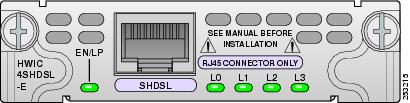
EN/LP
Status of the system:
Green—Operating system is running.
Amber—Loopback mode.
L0, L1, L2, L3
Status of link:
Green on—Link is active.
Off—Link is inactive or not configured.
Amber—Link alarm
Blinking green—Link is training.
Amber and green blinking simultaneously—Loopback mode. EN/LP is also amber.
Connect Cisco G.SHDSL EFM HWICs through a standard RJ-45 straight-through cable to establish connection between the HWIC and a network device.
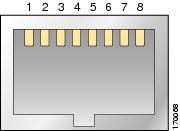
Figure 2 shows the RJ-45 pin assignment. Table 1 identifies the RJ-45 signal assignment by pin.
Caution Inserting an RJ-11 connector into the Cisco HWIC-4SHDSL-E port may deform pins 1 and 8, which may prevent solid contact between the connector and the plug in subsequent connections. If solid contact is prevented, line -1 tip and line -3 ring do not work properly.
Figure 2 RJ-45 Pin Assignment
Table 1 RJ-45 Signal Assignment by Pin
Pin
Signal
1
Line 1 tip
2
Line 1 ring
3
Line 2 tip
4
Line 0 tip
5
Line 0 ring
6
Line 2 ring
7
Line 3 tip
8
Line 3 ring
Note Do not plug in RJ-11 cable into HWIC-SHDSL-E because it may damage the pins on the RJ-45 connector
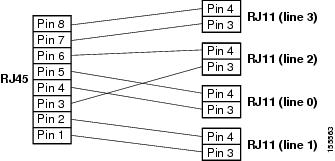
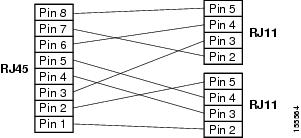
To connect the Cisco HWIC-4SHDSL-E with a DSLAM that supports two or four RJ-11 connections, modify the standard RJ-45 cable, using one of the following diagrams as applicable:
Figure 3 shows how to modify the cable and connect the Cisco HWIC-4SHDSL-E with a DSLAM that supports four RJ-11 cable connections.
Figure 4 shows how to modify the cable and connect the Cisco HWIC-4SHDSL-E with a DSLAM that supports two RJ-11 cable connections.
Figure 3 Standard RJ-45 Connector to Four Standard RJ-11 Connectors
Figure 4 Standard RJ-45 Connector to Two Standard RJ-11 Connectors
Use the Cisco IOS CLI on the router in global configuration mode to configure an EFM-Bonding group on the Cisco HWIC-4SHDSL-E.
Note To ensure a successful efm-bonding group configuration, confirm that the central office (CO) network equipment that is connected with the Cisco HWIC-4SHDSL-E supports efm-bonding.
SUMMARY STEPS
1. controller shdsl slot number / slot number / 0
2. dsl-group number pairs link [efm-bond]
3. shdsl annex {standard}
4. shdsl rate {number | auto}
5. exit
6. exit
DETAILED STEPS
Command
Purpose
Step 1
controller shdsl slot number/subslot number/0
Example:
Router (config)# controller shdsl 0/2/0
Router (config-controller)#
Selects the controller and enters config-controller mode.
To troubleshoot Cisco G.SHDSL EFM HWICs, use the following new and published Cisco IOS commands. All other Cisco IOS software commands used with G.SHDSL EFM HWICs are documented in the Cisco IOS Release 15.1(1)T command reference publication at Cisco.com: http://www.cisco.com/en/US/products/ps6441/tsd_products_support_series_home.html
SUMMARY STEPS
1. show controllers shdsl
2. Show interface ethernet
3. Show controllers ethernet
DETAILED STEPS
Command
Purpose
Step 1
show controllers shdsl slot number/subslot number/0 [detailed | brief]
Example:
Router# show controllers shdsl 0/2/0 detailed
0 output buffer failures, 0 output buffers swapped out
To display link training related events as they are generated, use the debug shdsl-efm training command.
To enable firmware logs, use the debug shdsl-efm firmware command. To display firmware logs, use the show shdsl-efm firmware command.
To dump the chipset memory, follow the steps below.
– debug shdsl-efm firmware
– enable "service internal" in configuration terminal prompt
– show shdsl-efm dspreg
Use the following debug commands for further debugging:
debug shdsl-efm error
debug shdsl-efm driver
debug shdsl-efm eoc
Note For the debug shdsl-efm eoc command, we recommended that the debugs are buffered using the no logging console and logging buffered commands in privileged configuration mode, otherwise the IOS console is flooded with eoc messages.
The efm-grp command is used to perform the necessary link operations (add, delete, and shutdown) of a single link after the creation of efm-bonding group. To perform the link operations in the efm-grp command, enter the config-controller-dsl-group mode. Use the no form of the command to shut down the related command.
efm-grp [ add | delete | shutdown ] link { link number }
no efm-grp [ add | delete | shutdown ] link { link number }
Syntax Description
link number
Designates the pairs link number.
add
Adds a link to the efm-bonding group.
delete
Deletes a link from the efm-bonding group
shutdown
Shuts down a link in the efm-bonding group.
Command Default
No default behavior or values
Command Modes
Config-controller-dsl-group
Command History
Release
Modification
15.1(1)T
This command was introduced.
15.3(2)T
This command was modified. The shutdown keyword is not supported.
Usage Guidelines
This command is used to add, delete, or shutdown a link in the efm-bond. Effective with 15.3(2)T, shutdown command is not supported.
Examples
The following example shows how efm-grp command is used.
Router(config-controller-dsl-group)# efm-grp ? add Add a link to the EFM Bonding group
Router(config-controller-dsl-group)# efm-grp add link ?
<0-3> Link pair number
Related Commands
Command
Description
controller shdsl
Configures a controller for SHDSL mode and enters config-controller mode.
shdsl annex
Defines the SHDSL G.991.2 standard.
shdsl rate
Defines the SHDSL rate.
show controller shdsl
Displays the status of the controller that is configured for SHDSL mode.
termination
To configure the termination mode of the controller, use the termination command in the controller configuration mode.
termination [ co | cpe ]
Syntax Description
co
Set the line termination for the interface as CO (network)
cpe
Termination cpe (customer)
Command Default
The command default termination mode is CPE.
Command Modes
Controller configuration mode
Command History
Release
Modification
15.1(1)T
This command was introduced.
Usage Guidelines
This command is used to configure controller termination.
Examples
The following example shows the line termination set to co:
Router(config-controller)# terminationco
Related Commands
Command
Description
controller shdsl
Configures a controller for single-pair high-bit-rate digital subscriber line (SHDSL) mode.
controller shdsl
To configure a controller for single-pair high-bit-rate digital subscriber line (SHDSL) mode, use the controller shdsl command in global or controller configuration mode.
Cisco HWIC-4SHDSL-E, HWIC-4SHDSL, and HWIC-2SHDSL
controller shdsl slot number/subslot number/port number
Cisco IAD2420 Series
controller shdsl number
Syntax Description
number
Controller number. The valid controller number is 0.
slot number
Slot on the router in which the high-speed WAN interface cards (HWIC) is installed.
subslot number
Subslot on the router in which the HWIC is installed.
port number
Port on the router in which the HWIC is installed. By default, Cisco HWIC-4SHDSL-E, HWIC-4SHDSL, and HWIC-2SHDSL use port number 0.
Command Defaults
Controller number: 0
Cisco HWIC-4SHDSL-E: none
Command Modes
Cisco HWIC-4SHDSL-E, HWIC-4SHDSL, and HWIC-2SHDSL
Global configuration
Controller configuration
Cisco IAD2420 Series
Global configuration
Command History
Release
Modification
11.3(5)AAA
This command was introduced.
12.2(8)T
This command was implemented on Cisco IAD2420 series IADs.
12.4(15)T
This command was introduced for the Cisco HWIC-4SHDSL and HWIC-2SHDSL running on the Cisco 1841 router, and on the Cisco 2800 and 3800 series access routers.
15.1(1)T
This command was modified. Support for the the Cisco HWIC-SHDSL-E is added.
Usage Guidelines
This command is used to configure the controller mode and the controller number.
Examples
Cisco HWIC-4SHDSL-E, HWIC-4SHDSL, and HWIC-2SHDSL
The following example uses the controller shdsl command to configure a Cisco HWIC-4SHDSL-E or Cisco HWIC-4SHDSL installed in a Cisco access router, controller number 0, subslot 2, port number 0); the example enters controller configuration mode:
Router(config)# controller shdsl 0/2/0
Router(config-controller)#
Cisco IAD2420 Series
The following example uses the controller shdsl command to enter SHDSL controller mode on controller number 0; the example also configures ATM mode:
Router# controllershdsl 0
Router# mode atm
Related Commands
Command
Description
show controller shdsl
Displays the controller status and statistics.
dsl-group
To create and configure a digital subscriber line (DSL) group, and enter config-controller-dsl-group mode, or to automatically configure an ATM group, use the dsl-group command in config-controller mode. To disable the DSL group, use the no form of this command.
dsl-group [pairs] [{[number] pairs link number }| auto] [efm-bond]
no dsl-group [pairs] [{[number] pairs link number }| auto] [efm-bond]
Syntax Description
number
Defines the dsl-group number. The dsl-group number can be one of the following numbers:
0
1
pairs
Defines the DSL wire pairs.
EFM-bond
Defines the DSL group as Ethernet First Mile (EFM) group bonding group.
link number
Link number of the pair. Link number options are limited to one of the following choices, based on the hardware interface and the desired DSL group.
HWIC-4SHDSL-E
EFM-bond DSL Group
0
1
2
3
Any combination of the numbers 0,1,2,3
1-Pair DSL Group
0
1
2
3
In the case of 1-pair DSL group (2-wire) only one pair needs to be configured.
HWIC-4SHDSL
IMA DSL Group
0
1
2
3
Any combination of the numbers 0,1,2,3
M-Pair DSL Group
0-1
0-2
0-3
2-Pair DSL Group
0-1
2-3
1-Pair DSL Group
0
1
2
3
HWIC-2SHDSL
DSL Group 0
0
1
0-1
DSL Group 1
1
auto
Automatically assigns the Central Office (CO) configuration to an ATM dsl-group on the Customer Premise Equipment (CPE).
Command Default
No DSL group is defined or automatically configured
Command Modes
Config controller
Config-controller-dsl-group
Command History
Release
Modification
12.4(15)T
This command was introduced for the Cisco HWIC-4SHDSL and HWIC-2SHDSL running on the Cisco 1841 router and the Cisco 2800 and 3800 series access routers.
15.1(1)T
This command was modified to support automatic configuration of Cisco HWIC-4SHDSL and HWIC-2SHDSL running on the Cisco 1841 router and the Cisco 2800 and 3800 series access routers.
15.1(1)T
This command was modified. Added dsl-group pairs link number [efm-bond] for the Cisco HWIC-4SHDSL-E.
Usage Guidelines
From config-controller mode, use the dsl-group command to define the dsl group, and manually configure the DSL group from config-controller-dsl-group mode. Use the dsl-group auto command to automatically adopt the Central Office (CO) configuration on an ATM dsl-group. Use the dsl-group pairs to define the DSL group as Ethernet First Mile (EFM) group bonding group.
Note Automatic configuration is not supported on IMA groups.
Automatic configuration is limited to only one DSL group and ATM interface. Once a group is automatically configured, no other group can be created. All manually created groups must be deleted before creating an automatic configuration group.
When the CO is running more than one configuration, the CPE will select the configuration based on the following priority:
4. M-PAIR
5. 4-WIRE
6. 2-WIRE
When the CO is running more than one configuration of the same type, the CPE selects the configuration with link 0.
Examples
The following example uses the dsl-group command to create an IMA-DSL group and enter config-controller-dsl-group mode:
Router(config-controller)# dsl-group 1 pairs 0-1 ima
Router(config-controller-dsl-group)#
Sep 14 13:15:40.285:%HWIC_SHDSL-5-DSLGROUP_UPDOWN: SHDSL 0/2/0 dsl-group(1) state changed to down.
Sep 14 13:15:42.285:%LINK-3-UPDOWN: Interface ATM0/2/IMA1, changed state to down
Sep 14 13:15:43.285:%LINEPROTO-5-UPDOWN: Line protocol on Interface ATM0/2/IMA1, changed state to down
The following example uses the dsl-group auto command to automatically adopt the Central Office (CO) configuration on an ATM group:
Router(config-controller)#dsl-group auto
Router(config-controller)#
*May 14 18:56:33.136: %HWIC_SHDSL-5-DSLGROUP_UPDOWN: SHDSL 0/0/0 dsl-group(0) state changed to down.
*May 14 18:56:35.136: %LINK-3-UPDOWN: Interface ATM0/0/0, changed state to down
*May 14 18:56:36.136: %LINEPROTO-5-UPDOWN: Line protocol on Interface ATM0/0/0,
changed state to down
The following example configures a single-pair DSL group and enters the config-controller-dsl-group mode:
Router(config-controller)#dsl-group pairs 0
Router(config-controller-dsl-group)#
The following example creates a 4-pair efm-bonding group:
Configures a controller for SHDSL mode and enters config-controller mode.
ima group
Defines physical links as IMA group members.
ima group clock-mode
Sets the clock mode for an IMA group.
ima link
Defines physical links in an IMA group.
shdsl 4-wire mode enhanced
Defines the SHDSL to use enhanced mode in a 2-pair DSL group.
shdsl annex
Defines the SHDSL G.991.2 standard.
shdsl rate
Defines the SHDSL rate.
show controller shdsl
Displays the status of the controller that is configured for SHDSL mode.
shdsl annex
To define the single-pair high-bit-rate digital subscriber line (SHDSL) G.991.2 standard, use the shdsl annex command in config controller DSL group mode.
shdsl annex {annex | standard }
Syntax Description
standard
Defines the standard for the selected type of DSL group. The following annex standards are supported:
A
A-B-F-G
A-F
B (Default annexure)
B-G
F
G
IMA Group
A
A-B
B
M-PAIR Group
A
A-B
B
F {coding 16 | 32}
F-G {coding 16 | 32}
G {coding 16 | 32}
1-PAIR and 2-PAIR Group
A
A-B
B
F {coding 16 | 32}
F-G {coding 16 | 32}
G {coding 16 | 32}
Command Default
SHDSL annex B
Command Modes
Config controller DSL group
Command History
Release
Modification
12.4(15)T
This command was introduced for the Cisco HWIC-4SHDSL and HWIC-2SHDSL running on the Cisco 1841 router and on the Cisco 2800 and 3800 series access routers.
15.1(1)T
This command was modified. The argument annex was introduced for the Cisco HWIC-4SHDSL-E
Usage Guidelines
Use the dsl-group command to create a DSL group, and then use the shdsl annex command to define the G.991.2 standard for the DSL group.
Examples
The following example uses the shdsl annex command to define the annex standard for a 2-Pair DSL group on a Cisco HWIC-4SHDSL:
Router(config-controller-dsl-group)# shdsl annex g ?
coding 16-TCPAM or 32-TCPAM line coding
Router(config-controller-dsl-group)# shdsl annex g coding ?
16-TCPAM 16-TCPAM line coding
32-TCPAM 32-TCPAM line coding
Router(config-controller-dsl-group)# shdsl annex g coding 16 ?
<cr>
Example
Router(config-controller-dsl-group)#shdsl annex ?
A Annex A of G.991.2 standard
A-B-F-G Annex A/B/F/G of G.991.2 standard
A-F Annex A/F of G.991.2 standard
B Annex B of G.991.2 standard
B-G Annex B/G of G.991.2 standard
F Annex F of G.991.2 standard
G Annex G of G.991.2 standard
Router(config-controller-dsl-group)#shdsl annex f ?
coding 16-TCPAM, 32-TCPAM line coding or auto-TCPAM line coding
The above TCPAM configurations are valid only in case the termination is "co". In case the termination is CPE, user will see the following output
Router(config-controller-dsl-group)#shdsl annex f ?
<cr>
Related Commands
Command
Description
dsl-group
Creates a DSL group and enters config controller DSL group mode.
shdsl rate
Defines the SHDSL rate.
shdsl rate
To define the single-pair high-bit-rate digital subscriber line (SHDSL) rate, use the shdsl rate command in config-controller-dsl-group mode.
shdsl rate {number | auto}
Syntax Description
number
SHDSL rate for the digital subscriber line (DSL) group.
DSL Group with 1 Pair
Annex A & B—192-2304 kbps
Annex F & G (32 TC-PAM)—768-5696 kbps
Annex F & G (16 TC-PAM)—2304-3840 kbps
DSL Group with 2 Pairs
Annex A & B—384-4608 kbps
Annex F & G (32 TC-PAM)—1536-11392 kbps
Annex F & G (16 TC-PAM)— 4608-7680 kbps
DSL Group with 3 Pairs
Annex A & B—576-6912 kbps
Annex F & G (32 TC-PAM)—2304-12288 kbps
Annex F & G (16 TC-PAM)— 6912-11520 kbps
DSL Group with 4 Pairs
Annex A & B—768-9216 kbps
Annex F & G (32 TC-PAM)—3072-16384 kbps
Annex F & G (16 TC-PAM)— 9216-15360 kbps
Data rates supported for each Annex and TC-PAM 2-wire configuration. For EFM bonding configuration with multiple links, multiply the data rate ranges by the number of links in the EFM bonding group.
2-wire, 16-TCPAM
Annex A—192 – 2304 kbps
Annex B—192 – 2304 kbps
Annex F—2304 – 3840 kbps
Annex G—2304 – 3840 kbps
Annex A & F—192 – 3840 kbps
Annex B & G—192 – 3840 kbps
A & B & F & G—192 – 3840 kbps
2-wire, 32-TCPAM
Annex F—768 – 5696 kbps
Annex G—768 – 5696 kbps
Annex A & F—768 – 5696 kbps
Annex B & G—768 – 5696 kbps
Annex A & B & F & G—768 – 5696 kbps
2-wire Auto-TCPAM
Annex A—192 – 2304 kbps
Annex B—192 – 2304 kbps
Annex F—768 – 5696 kbps
Annex G—768 – 5696 kbps
Annex A & F—192 – 5696 kbps
Annex B & G—192 – 5696 kbps
Annex A & B & F & G—192 – 5696 kbps
auto
Sets this SHDSL rate to automatic mode.
Command Default
The command default is the maximum annex rate for the selected DSL group.
Command Modes
Config controller DSL group
Command History
Release
Modification
12.4(15)T
This command was introduced for the Cisco HWIC-4SHDSL and HWIC-2SHDSL running on the Cisco 1841 router and on the Cisco 2800 and 3800 series access routers.
15.1(1)T
This command was modified. Support for the for the Cisco HWIC-4SHDSL-E is added.
Usage Guidelines
Use the dsl-group command to create a DSL group, and then use the shdsl annex command to define the G.991.2 standard for the newly created DSL group. Define the SHDSL line rate with the shdsl rate command.
Examples
The following example defines the SHDSL line rate for DSL group 1, pairs 0-1 (2 pairs) on a Cisco HWIC-4SHDSL:
Router(config-controller)# dsl-group 1 pairs 0-1 ima
Router(config-controller-dsl-group)#
Sep 22 14:53:46.481: %HWIC_SHDSL-5-DSLGROUP_UPDOWN: SHDSL 0/2/0 dsl-group(1) state changed to down.
Sep 22 14:53:48.481: %LINK-3-UPDOWN: Interface ATM0/2/IMA1, changed state to down
Sep 22 14:53:49.481: %LINEPROTO-5-UPDOWN: Line protocol on Interface ATM0/2/IMA1, changed state to down
Router(config-controller-dsl-group)#shdsl rate auto ?
current Current SNR Margin
snext Self Near end cross talk
Router(config-controller-dsl-group)#shdsl rate auto current ?
<0 - 10> 0dB to 10dB
Router(config-controller-dsl-group)#shdsl rate auto snext ?
<-10 - 10> -10dB to 10dB
Related Commands
Command
Description
dsl-group
Creates a DSL group and enters config controller DSL group mode.
shdsl annex
Defines the G.991.2 standard for a DSL group.
show controllers shdsl
To display the status of the controller configured for single-pair high-bit-rate digital subscriber line (SHDSL) mode, use the show controllers shdsl command in privileged EXEC mode.
Cisco HWIC-4SHDSL-E, HWIC-4SHDSL, and HWIC-2SHDSL
show controllers shdsl slot number/subslot number/port number {brief | detailed}
Cisco IAD2420
show controller shdsl number
Syntax Description
brief
Provides a summary of the controller’s status.
detailed
Provides a detailed report of the controller’s status.
number
SHDSL controller number. The valid controller number for SHDSL mode is 0.
slot number
Slot on the router in which the HWIC is installed.
subslot number
Subslot on the router in which the HWIC is installed.
port number
Port on the router in which the HWIC is installed. By default, the Cisco HWIC-4SHDSL-E, HWIC-4SHDSL, and HWIC-2SHDSL use port number 0.
Command Defaults
Controller number
Command Modes
Privileged EXEC
Command History
Release
Modification
12.4(15)T
This command was updated for the Cisco HWIC-4SHDSL and HWIC-2SHDSL running on the Cisco 1841 router and on the Cisco 2800 and 3800 series access routers.
12.2(8)T
This command was introduced on Cisco IAD2420 series.
15.1(1)T
This command was modified. Support for the Cisco HWIC-SHDSL-E is added.
Usage Guidelines
This command is used to display the controller mode, the controller number, and associated statistics.
Examples
Cisco HWIC-4SHDSL, and HWIC-2SHDSL
The following example shows the status of a Cisco HWIC-4SHDSL controller in slot 0, subslot 2, port 0 on a Cisco access router:
Router# show controllers shdsl 0/2/0 brief
Controller SHDSL 0/2/0 is UP
Hardware is HWIC-4SHDSL, rev 2 on slot 0, hwic slot 2
Capabilities: IMA, M-pair, 2/4 wire, Annex A, B, F & G, CPE termination
Number of pairs: 4, number of groups configured: 1
Group info:
Type: EFM bond g.shdsl, status: Up
Interface: Ethernet0/0/0, hwidb: 0x6519D6DC
Configured/active num links: 4/4, bit map: 0xF/0xF
Line termination: CO, Annex: B
Line coding: 16-TCPAM group data rate is 9216 kbps
Loopback type: None
Dying Gasp: Present
Mode: Fixed
SHDSL wire-pair (0) is in DSL UP state
LOSW Defect alarm: none
CRC per second alarm: none
SHDSL wire-pair (1) is in DSL UP state
LOSW Defect alarm: none
CRC per second alarm: none
SHDSL wire-pair (2) is in DSL UP state
LOSW Defect alarm: none
CRC per second alarm: none
SHDSL wire-pair (3) is in DSL UP state
LOSW Defect alarm: none
CRC per second alarm: none
Cisco IAD2420 Series
The following example displays the status of the controller that is configured for SHDSL mode on a Cisco IAD2420 series IAD:
Router# show controller shdsl 0
SHDSL 0 controller UP
SLOT 3: Globespan xDSL controller chipset
Frame mode: Serial ATM
Configured Line rate: 1160Kbps
Line Re-activated 0 times after system bootup
LOSW Defect alarm: None
CRC per second alarm: None
Line termination: CPE
FPGA Revision: 9
Related Commands
Command
Description
controller shdsl 0
Configures the controller status and the controller number.
Additional References
The following references provide links to related topics, such as the Cisco IOS software resource center, interface card documentation, and additional hardware documentation.
The Cisco Technical Support & Documentation website contains thousands of pages of searchable technical content, including links to products, technologies, solutions, technical tips, and tools. Registered Cisco.com users can log in from this page to access even more content.
Number of pairs: 4, number of groups configured: 1
Group info:
Type: EFM bond g.shdsl, status: Up
Interface: Ethernet0/0/0, hwidb: 0x45573C30
Configured/active num links: 4/4, bit map: 0xF/0xF
Line termination: CPE, Annex: B
Line coding: 16-TCPAM group data rate is 9216 kbps
EFM bonding group is configured
EFM bonding group stats:
Tx Pkts: 0, Rx Pkts: 0
Frag Loss: 0, Bad Frag: 0, Buffer Overflow: 0
SOP Loss: 0, EOP Loss: 0
Loopback type: None
Dying Gasp: Present
Mode: Fixed
SHDSL wire-pair (0) is in DSL UP state
LOSW Defect alarm: none
CRC per second alarm: none
Termination: CPE, Line mode: EFM bond, Annex: B
Line coding: 16-TCPAM,
Configured data rate/actual data rate: 2304/2304
Modem status: GTI_DATA_OP
Last Failed State: None
Framer Sync Status: 1
Loop Attenuation: 0 dB
Transmit Power: 8.5 dB
SNR margin: 17 dB
Current 15 minute statistics (Time elapased 62 seconds)
ES:1, SES:0, CRC:2, LOSW:0, UAS:32
Previous 15 minute statistics
ES:0, SES:0, CRC:0, LOSW:0, UAS:0
Current 24 hr statistics
ES:1, SES:0, CRC:2, LOSW:0, UAS:32
Previous 24 hr statistics
ES:0, SES:0, CRC:0, LOSW:0, UAS:0
EFM stats:
Receive stats:
Pkts:0
CRC:0
Transmit stats:
Pkts:0
SHDSL wire-pair (1) is in DSL UP state
LOSW Defect alarm: none
CRC per second alarm: none
Termination: CPE, Line mode: EFM bond, Annex: B
Line coding: 16-TCPAM,
Configured data rate/actual data rate: 2304/2304
Modem status: GTI_DATA_OP
Last Failed State: None
Framer Sync Status: 1
Loop Attenuation: 0 dB
Transmit Power: 8.5 dB
SNR margin: 16 dB
Current 15 minute statistics (Time elapased 87 seconds)
ES:1, SES:0, CRC:2, LOSW:0, UAS:32
Previous 15 minute statistics
ES:0, SES:0, CRC:0, LOSW:0, UAS:0
Current 24 hr statistics
ES:1, SES:0, CRC:2, LOSW:0, UAS:32
Previous 24 hr statistics
ES:0, SES:0, CRC:0, LOSW:0, UAS:0
EFM stats:
Receive stats:
Pkts:0
CRC:0
Transmit stats:
Pkts:0
SHDSL wire-pair (2) is in DSL UP state
LOSW Defect alarm: none
CRC per second alarm: none
Termination: CPE, Line mode: EFM bond, Annex: B
Line coding: 16-TCPAM,
Configured data rate/actual data rate: 2304/2304
Modem status: GTI_DATA_OP
Last Failed State: None
Framer Sync Status: 1
Loop Attenuation: 0 dB
Transmit Power: 8.5 dB
SNR margin: 16 dB
Current 15 minute statistics (Time elapased 93 seconds)
ES:1, SES:0, CRC:1, LOSW:0, UAS:32
Previous 15 minute statistics
ES:0, SES:0, CRC:0, LOSW:0, UAS:0
Current 24 hr statistics
ES:1, SES:0, CRC:1, LOSW:0, UAS:32
Previous 24 hr statistics
ES:0, SES:0, CRC:0, LOSW:0, UAS:0
EFM stats:
Receive stats:
Pkts:0
CRC:0
Transmit stats:
Pkts:0
SHDSL wire-pair (3) is in DSL UP state
LOSW Defect alarm: none
CRC per second alarm: none
Termination: CPE, Line mode: EFM bond, Annex: B
Line coding: 16-TCPAM,
Configured data rate/actual data rate: 2304/2304
Modem status: GTI_DATA_OP
Last Failed State: None
Framer Sync Status: 1
Loop Attenuation: 0 dB
Transmit Power: 8.5 dB
SNR margin: 16 dB
Current 15 minute statistics (Time elapased 145 seconds)
ES:1, SES:0, CRC:3, LOSW:0, UAS:32
Previous 15 minute statistics
ES:0, SES:0, CRC:0, LOSW:0, UAS:0
EFM stats:
Receive stats:
Pkts:0
CRC:0
Transmit stats:
Pkts:0
#
To view the status of all links, use the show controllers shdsl command. If the line is down, the following statement appears: “Line is not active”. Some of the values may not be accurate. You can also verify whether the equipment type and operating mode configuration are correct for your application.
Cisco and the Cisco Logo are trademarks of Cisco Systems, Inc. and/or its affiliates in the U.S. and other countries. A listing of Cisco's trademarks can be found at www.cisco.com/go/trademarks. Third party trademarks mentioned are the property of their respective owners. The use of the word partner does not imply a partnership relationship between Cisco and any other company. (1005R)
Any Internet Protocol (IP) addresses used in this document are not intended to be actual addresses. Any examples, command display output, and figures included in the document are shown for illustrative purposes only. Any use of actual IP addresses in illustrative content is unintentional and coincidental.
 Cisco 1841 Integrated Series Routers (ISR)

 Feedback