Product Overview
The Cisco 831 router and Cisco SOHO 91 Ethernet-to-Ethernet routers can connect a corporate telecommuter or small office to an Internet service provider (ISP) over a broadband or Ethernet connection to the following sites:
• Corporate LANs
•The Internet
The Cisco 831 and SOHO 91 routers are switch-capable routers that provide a 4-port Ethernet switch for the LAN. The routers are capable of bridging and multiprotocol routing between LAN and WAN ports.
Cisco 831 and SOHO 91 routers support high-speed encryption, 10/100-Mbps switching, and dial backup functionality via the auxiliary console port. The autosensing function in the routers eliminates the need for a crossover cable and allows the routers to detect the medium dependent interface in normal mode (MDI) or medium dependent interface in crossover mode (MDIX) in any other PC/hub with a straight-through cable or crossover cable.
The dial backup function allows the user to connect an analog modem to the console port as a backup link to the WAN in case the ADSL service goes down. These features give the Cisco 831 and SOHO 91 routers a high level of performance and security.
The Cisco 831 router is designed with hardware-based encryption, while the Cisco SOHO 91 supports software-based encryption. The Cisco 831 router supports the ability to add Flash memory or SDRAM, either as a factory upgrade or a field-installed option. The SOHO 91 router has a fixed memory configuration.
Features
Table 1-1 summarizes the features of these routers.
Table 1-1 Feature Summary for Cisco 831 Router and SOHO 91 Router
|
|
|
10BASE-T/100BASE-T built-in switch ports |
Provides connection to 10/100BASE-T (10/100-Mbps) Ethernet networks. Compatible with 10/100-Mbps devices. |
WAN port |
Provides connection to 10BASE-T. Compatible with 10-Mbps devices. Can be connected to other network devices, such as cable modem, ADSL, and router. |
Flash memory |
8 MB of Flash memory; up to 16 MB of expandable Flash memory on the Flash module. |
Synchronous dynamic RAM (SDRAM) |
32 MB of SDRAM on board. |
Ease of installation |
Color-coded ports and cables reduce the chance of installation error. |
Cisco IOS software |
Supports Cisco IOS software. |
Cisco Router Web Setup application |
Provides a web-based software tool for basic configurations and selected applications. |
Console port |
Provides a connection to the terminal or PC for software configuration or troubleshooting using the command-line interface. |
Wall-mount feature |
Brackets on router bottom provide a means for mounting the router on a wall or vertical surface. |
Table 1-2 describes the ports on the Cisco 831 and SOHO 91 routers.
Table 1-2 Cisco 831 and SOHO 91 Router Ports
|
|
|
|
|
Cisco 831 |
Four 10/100 BASE-T RJ-45 |
One 10BASE-T RJ-45 |
RJ-45 |
SOHO 91 |
Four 10/100 BASE-T RJ-45 |
One 10BASE-T RJ-45 |
RJ-45 |
Router Overview
This section shows the front and back panels of the routers.
Front Panel
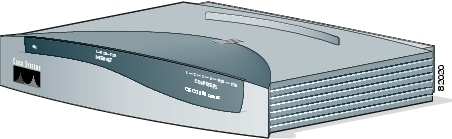
Figure 1-1 shows the front panel of the Cisco 831 router (Figure 1-1 depicts the front panel of a Cisco 831 router, but the front panel of the Cisco SOHO 91 router is the same).
Figure 1-1 Front Panel of Cisco 831 Router
Back Panel
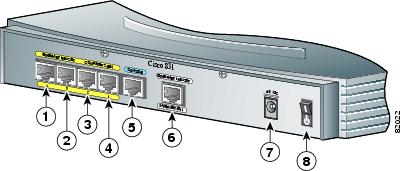
Figure 1-2 shows the back panel of the Cisco 831 router (Figure 1-2 depicts the back panel of a Cisco 831 router, but the back panel of the Cisco SOHO 91 router is nearly identical).
Figure 1-2 Cisco 831 Back Panel
|
|
Ethernet port 4 of the built-in switch connects to Ethernet network devices |
|
Console port connects to PC or terminal |
|
|
Ethernet port 3 of the built-in switch connects to Ethernet network devices |
|
WAN port connects to Internet or switch |
|
|
Ethernet port 2 of the built-in switch connects to Ethernet network devices |
|
Input jack connects to power supply |
|
|
Ethernet port 1 of the built-in switch connects to Ethernet network devices |
|
Power on/off button |
LED Functions
Table 1-3 summarizes the functions of the LEDs on the routers.
Table 1-3 Functions of LEDs on the Cisco 831 Router and SOHO 91 Router
|
|
|
|
|
|
Green |
On when DC power is being supplied to the router. The light blinks if an error occurs during boot-up. |
|
|
Green |
On when WAN Ethernet carrier detects status and connects to the digital subscriber line access multiplexer (DSLAM) successfully. |
|
|
Green |
Blinks when WAN Ethernet receives data. |
|
|
Green |
Blinks when WAN Ethernet transmits data. Off when no data is being uploaded. |
|
E1 (port 1 of built-in switch) Status
|
Green |
On when Ethernet 1 connects to the Ethernet interface successfully. Blinks when Ethernet 1 receives or sends data, or when data passes through Ethernet 1. |
|
E2 (port 1 of built-in switch) Status
|
Green |
On when Ethernet 2 connects to the Ethernet interface successfully. Blinks when Ethernet 2 receives or sends data, or when data passes through Ethernet 2. |
|
E3 (port 1 of built-in switch) Status
|
Green |
On when Ethernet 3 connects to the Ethernet interface successfully. Blinks when Ethernet 3 receives or sends data, or when data passes through Ethernet 3. |
|
E4 (port 1 of built-in switch) Status
|
Green |
On when Ethernet 4 connects to the Ethernet interface successfully. Blinks when Ethernet 4 receives or sends data, or when data passes through Ethernet 4. |
|
|
Green |
Blinks when built-in Ethernet switch receives data from the WAN port. |
|
|
Green |
Blinks when built-in Ethernet switch transmits data to the WAN port. |
 Feedback