Release Notes for Cisco Info Center, 7.3.1
Available Languages
Table Of Contents
Release Notes for IBM Tivoli Netcool for Cisco Prime, 7.3.1
Key System Features and Benefits
Additional IBM Tivoli Netcool for Cisco Prime Products
New Features and Enhancements with Release 7.3.1
Linear Trending Using IBM Tivoli Monitoring
Baselining Using IBM Tivoli Monitoring
Enhancements to the Rules File for the Probe for Tivoli EIF
Search and Replace Functionality in Probe Rules Files
Iterative Looping in Probe Rules Files
Improved Deployment Engine (DE) Installation Procedure
Multiple Connections to the ObjectServer
Enhancement to Migration of Tivoli Enterprise Console® BAROC Data
Default Web GUI Users and Groups
Load Balancing to Improve Performance and Greater Scalability
Infrastructure Improvements to Support Product Deployment and Monitoring
Utility for Exporting and Importing ObjectServer Configurations
Documentation for Key Performance Indicators
Enhanced Logging and Profiling
IBM Tivoli Netcool for Cisco Prime 7.3.1 Products
IBM Tivoli Netcool for Cisco Prime Omnibus and Network Manager
IBM Tivoli Netcool for Cisco Prime Impact
IBM Tivoli Netcool for Cisco Prime Service Quality Management Center
Composite Application Manager Products
Composite Application Manager for SOA
Composite Application Manager for Applications
Composite Application Manager for Transactions
Composite Application Manager for J2EE
Server Compatibility, Performance and Scale
Hardware and Software Requirements for OMNIbus and Network Manager
Release Notes for IBM Tivoli Netcool for Cisco Prime, 7.3.1
December 2011
Contents
This document provides information about the IBM Tivoli Netcool for Cisco Prime 7.3.1 release and contains the following sections:
•
New Features and Enhancements with Release 7.3.1
•
•
Introduction
IBM Tivoli Netcool for Cisco Prime is a Service-Level Management (SLM) system that provides a consolidated view of enterprise-wide events and status information. It collects event streams or messages from many different data sources and presents a single, consistent view of the current state of all IBM Tivoli Netcool for Cisco Prime managed systems. It distributes the event information to the operators and administrators responsible for monitoring service levels.
This information can then be:
•
•
•
•
•
IBM Tivoli Netcool for Cisco Prime allows diverse management platforms, applications, and Internet protocols to be brought together to provide an administrator a single point of monitoring those platforms and applications. Cisco Info Center does not replace the management platforms. It instead complements them by providing an enterprise wide event/fault and status exchange. Cisco Info Center can also tie together domain limited network management platforms in remote locations.
Cisco Info Center tracks the state of events in a high performance distributed database and presents information of interest to specific users through individually configurable filters and views. IBM Tivoli Netcool for Cisco Prime automation functions can be used to perform intelligent processing on the current state of managed objects. Cisco Info Center can build upon existing management systems or applications and, therefore, uses existing management skills and minimizes deployment time.
Key System Features and Benefits
System Definition and Scope
Designed to scale from the smallest to the largest, most-complex multi-vendor environments, IBM Tivoli Netcool for Cisco Prime OMNIbus and Network Manager software helps organizations improve network visibility and drive reliability and performance. The software collects and distributes Layer 1 through Layer 3 network data and thereby builds and maintains knowledge about physical and logical network connectivity. With accurate network visibility, you can efficiently and effectively visualize and manage complex networks and, more importantly, the services delivered across them. IBM Tivoli Netcool for Cisco Prime ONM software easily integrates with operational support systems and other mission-critical workflow applications.
IBM Tivoli Netcool for Cisco Prime software also provides valuable advanced fault correlation and diagnosis capabilities. Real-time root-cause analysis helps operations personnel quickly identify the source of network faults and speed problem resolution.
Features and Benefits
IBM Tivoli Netcool for Cisco Prime OMNIbus and Network Manager provide the following key features and benefits:
•
•
•
Additional IBM Tivoli Netcool for Cisco Prime Products
In addition to the core product, IBM Tivoli Netcool for Cisco Prime includes a number of related products. For information on the products, see IBM Tivoli Netcool for Cisco Prime 7.3.1 Products.
New Features and Enhancements with Release 7.3.1
The previous version of IBM Tivoli Netcool for Cisco Primeis based on OMNIbus 7.3 and will be upgraded to OMNIbus 7.3.1. The principal changes are set out in the following sections:
•
•
•
•
•
•
•
•
•
•
•
•
•
•
Gauges
The Web GUI provides a new functionality to view the state of Tivoli Netcool/OMNIbus. A link to this information can be sent to, and viewed on mobile devices. Information captured by metrics is visualized in the form of gauges. A metric is a type of measurement that is used to determine a quantifiable value from tables or properties in the ObjectServer.
As an administrator, you can create new pages, add the Gauges portlet and add gauges, associating them with the required metrics. You can generate a URL of the page and this URL can be sent to users, for example executives, for viewing in a web browser or a mobile device. You can associate click-actions with gauges, for example, launching URLs (such as the URL of another Gauges page) and scripts (such as to launch an event list). You can also customize the appearance of any gauge from five supplied types, and rearrange gauges on a page using drag and drop facilities.
There are over 20 metrics supplied as standard and an administrator can create new ones using any ObjectServer table. There are two pages of gauges supplied as standard that offer commonly-monitored functions.
Web Widget Portlet
V2.1 introduces a new portlet, the Web widget portlet. You can use this to display discrete web pages or HTML files. For the Web GUI a primary use of the Web widget is to publish maps to user. The Web widget portlet replaces the Inline Frame portlet which is now deprecated.
Globalization Support
The Web GUI now has support for the Hebrew, Hijri, and Hijri Civilian calendars in addition to the Gregorian calendar. The product also has support for Arabic and Hebrew and supports mirroring.
Linear Trending Using IBM Tivoli Monitoring
In an integrated environment that contains Tivoli Netcool/OMNIbus V7.3.1, the Probe for Tivoli EIF, and IBM Tivoli Monitoring V6.2.2 Fix Pack 1, and Tivoli Performance Analyzer V6.2.2 Fix Pack 2, you can use the predictive analytics capabilities of IBM Tivoli Monitoring to determine whether Tivoli Netcool/OMNIbus event rates per device are likely to exceed defined upper thresholds within a specific time frame. This capability builds on the predictive eventing capabilities provided in Tivoli Netcool/OMNIbus V7.3. The event rate data is calculated by the ObjectServer and collected by the IBM Tivoli Monitoring for IBM Tivoli Netcool/OMNIbus Agent and analyzed by Tivoli Performance Analyzer. Tivoli Performance Analyzer produces trends based on the event rate from each device; if the trend indicates that an event rate will exceed the defined threshold within the specified time frame then a predictive event is generated. The Probe for Tivoli EIF can be configured to forward predictive events to the Tivoli Netcool/OMNIbus, and the resulting events can be viewed in the Active Event List or desktop event list. Tools are provided for interacting with these predictive events.
A number of configuration resources are provided for customizing the ObjectServer, Web GUI server, and the Probe for Tivoli EIF. These resources are available in the $NCHOME/omnibus/extensions/itmpredictive directory.
Baselining Using IBM Tivoli Monitoring
In an integrated environment that contains Tivoli Netcool/OMNIbus V7.3.1, the Probe for Tivoli EIF, IBM Tivoli Monitoring V6.2.2 Fix Pack 1, and Tivoli Performance Analyzer V6.2.2 Fix Pack 2. you can now use the baselining capabilities of IBM Tivoli Monitoring to determine a normal level for Tivoli Netcool/OMNIbus events. After sufficient event data has built up, IBM Tivoli Monitoring can compare the current event rate to a baseline average value. If the current event rate exceeds the defined upper or lower event rate thresholds, IBM Tivoli Monitoring generates a situation. IBM Tivoli Monitoring and the Probe for Tivoli EIF converts the situation into a Tivoli Netcool/OMNIbus event and forwards the event to the ObjectServer, and can be viewed in the Active Event List or the desktop event list.
The configuration resources required to set up baselining are provided in the $NCHOME/omnibus/extensions/itmpredictive/baseline directory.
Enhancements to the Rules File for the Probe for Tivoli EIF
For Tivoli Netcool/OMNIbus V7.3.1, the rules file of the Probe for Tivoli EIF is replaced. The tivoli_eif.rules, available in $NCHOME/omnibus/probes/arch, now contains include statements for subordinate rules files that support integrations with other Tivoli products. By default, the include statements are commented out. These rules files must copied into the $NCHOME/omnibus/probes/arch directory and the include statement for the appropriate rules file must be uncommented.
Search and Replace Functionality in Probe Rules Files
The new regreplace function enables you as a probe rules file developer to use regular expressions to search for and replace strings in probe rules files. One of the uses of this function is to remove unwanted characters from strings received by the EIF probe. This function was also supplied in the December 2010 Fix Packs for IBM Tivoli Netcool/OMNIbus.
Iterative Looping in Probe Rules Files
The foreach function enables you to write statements in the probe rules file language that iterate through lists of event elements or table entries. You can construct nested foreach statements. You can use probe rules file functions to change the items in a loop. This function was also supplied in the December 2010 Fix Packs for IBM Tivoli Netcool/OMNIbus.
Improved Deployment Engine (DE) Installation Procedure
On UNIX® operating systems, a single user installation of DE is now copied to $HOME/.acsi_hostname. Previously it was copied to $HOME/.acsi_username. This simplifies the use of single user installations of DE on multiple computers which use network mounted home directories. Several preinstallation checks are now performed which enable a smoother installation of the DE.
In addition, user access security options have been introduced to protect a global instance of the DE from unauthorized modifications.
Tivoli Integrated Portal V2.1
The Web GUI is based on the latest release of Tivoli Integrated Portal. This provides a number of enhancements including the latest application server technology, IBM WebSphere® Application Server V7.0, improved scalability through an increased number of concurrent users, enhanced support for bidirectional text, new export and import facilities for configuration data allowing a move from a test environment to production, the ability to customize logos, login screens, and URLs. In addition, there is the ability to allow multiple logins on the same user ID to give support to network operations centers.
Adhere to a specific setup if you want the Web GUI to coexist with products that on Tivoli Integrated Portal V1.1. The V1.1 and V2.1 components must be each installed into a unique path and run on unique port numbers. If you install V1.1 and V2.1 with the same user (root or non-root), the Deployment Engine (DE) is shared across the versions. However, if you install one version as root, and the other as non-root, each version has its own DE. V1.1 and V2.1 can be installed on the same server as the Tivoli Netcool/OMNIbus server-side components and integrated with these components. V1.1 and V2.1 are compatible with Tivoli Netcool/OMNIbus V7.2.1 or later.
Home Directories
In previous releases, the Web GUI and the Tivoli Integrated Portal used the same home directory. For example /ibm/tivoli/tip on Unix and Linux® systems and C:\IBM\tivoli\tip on Microsoft® Windows® systems. This was designated in the documentation as install_dir.
From this release the products have separate home directories. For example, for the Web GUI:
•
•
For the Tivoli Integrated Portal:
•
•
This separation allows the Web GUI and the Tivoli Integrated Portal to be updated separately from one another in the future.
In the documentation these home directories are designated by the variables webgui_home_dir and tip_home_dir respectively. The user can specify the home directories for the Web GUI and Tivoli Integrated Portal during the installation.
Context Root
During the installation of the Web GUI it is now possible to specify the context root of the product.
Multiple Connections to the ObjectServer
Previously the Web GUI used only one connection to each ObjectServer. Now there can be multiple connections to any ObjectServer, and the administrator can configure the number of connections for each ObjectServer individually.
Enhancement to Migration of Tivoli Enterprise Console® BAROC Data
To facilitate the mapping of Tivoli Enterprise Console ClassName strings to ObjectServer class identifiers, you can now use the nco_baroc2sql tool to generate a probe lookup table file that contains the mapping of ClassName values to ObjectServer classes. This table can be inserted into rules file of a probe, such as the EIF probe, and enables the Class field to be maintained with a number based on a Tivoli Enterprise Console class name.
Default Web GUI Users and Groups
The Web GUI is supplied with two default users and two default groups. These enable you to start using the product immediately after installation and configuration. The default users consist of one administrator and one user. There are groups for administrative users and for regular users. These groups enable you to add new users more quickly by simplifying the allocation of roles.
In addition, the Web GUI is supplied with two pages of gauges that provide commonly monitored metrics.
OpenLDAP Support
The Lightweight Directory Access Protocol (LDAP) capabilities of the Web GUI are extended in V7.3.1 to include directories maintained by OpenLDAP V2.1 or later.
Load Balancing to Improve Performance and Greater Scalability
The Web GUI now includes load balancing capabilities. The administrator can set up a cluster of Web GUI servers that share configuration date stored in a DB2® environment. Replication of configuration data between the nodes in a cluster is automated. There are facilities for configuring the data stored in the database and thus replicated across the cluster. In addition, the administrator can add additional nodes to and remove nodes from the cluster.
Export and Import
There is a new utility that enables the selective transfer of configuration data from one Web GUI server to another. The utility can also be used to create backup copies of Web GUI configuration data. In addition, the utility provides a convenient way of cloning all Web GUI and Tivoli Integrated Portal data from one server to another.
Infrastructure Improvements to Support Product Deployment and Monitoring
Firewall Bridge
A firewall bridge enables probes that are situated outside a secure network to connect to an ObjectServer situated inside a firewall. A firewall bridge is comprised of two servers: a Server Access Bridge and a Client Access Bridge, which run either side of the firewall with the connection being initiated from the more secure side. This allows client connections and data to be sent to the ObjectServer from outside the firewall. You can configure single and multiple firewall bridge servers to enable a connection to an ObjectServer from across single and multiple firewalls.
For more information, see:
•
•
•
Utility for Exporting and Importing ObjectServer Configurations
The nco_osreport utility enables you to export the configuration of an ObjectServer. Three command-line options enable you to export the configuration to an HTML file, XML file, or to a series of SQL files that can be input into a new ObjectServer created by running the nco_dbinit command. You can use the SQL command-line to create copies of an ObjectServer on different operating systems to the source ObjectServer, and to archive ObjectServer contents in a form that is independent of operating systems. The SQL files can be modified before you use them to create a new ObjectServer. All three options are suitable for submitting the content of an ObjectServer to a support team.
Documentation for Key Performance Indicators
The Tivoli Netcool/OMNIbus now contains information about Key Performance Indicators (KPI) that you can use to monitor critical aspects of your system. The description of each KPI describes how to set up the KPI, what information to expect, and what it means if the value of the KPI changes, including what action to take. The KPI information covers the ObjectServer, probes, and gateways.
Enhanced Logging and Profiling
The logging mechanism has been enhanced for this release. In addition there is a new facility for generating profile logs.
IBM Tivoli Netcool for Cisco Prime 7.3.1 Products
This section describes the IBM Tivoli Netcool for Cisco Prime 7.3.1 products.
IBM Tivoli Netcool for Cisco Prime Omnibus and Network Manager
IBM Tivoli Netcool for Cisco Prime OMNIbus is the core IBM Tivoli Netcool for Cisco Prime product. IBM Tivoli Netcool for Cisco Prime Omnibus comprises the following main components:
•
•
•
•
•
•
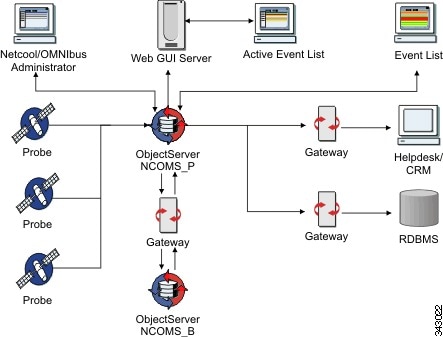
The following figure shows an overview of the Tivoli Netcool/OMNIbus component architecture. Probes send alerts to the local ObjectServer, and a gateway replicates these alerts in an additional ObjectServer in a failover configuration. Alerts that are sent to the ObjectServer can be viewed in the Active Event List in the Web GUI, or in the desktop event list. Additional gateways are also configured to forward alerts to other applications, such as a helpdesk or Customer Relationship Management (CRM) system, and a relational database management system (RDBMS). Netcool/OMNIbus Administrator (and the other administration tools) can also be used to configure and manage the system.
Figure 1 Tivoli Netcool/OMNIbus Component Architecture
•
•
•
•
•
•
IBM Tivoli Netcool for Cisco Prime Impact
Impact is a value-added application that assists network operators in monitoring Service Level Agreements by providing additional event analysis beyond that available with IBM Tivoli Netcool for Cisco Prime. For example, Impact users can determine the consequences of an event, such as what or when services are affected and which users are affected by specific alarm conditions.
Business Service Manager
Tivoli Business Service Manager (TBSM) delivers the real-time information that you need in order to respond to alerts effectively and in line with business requirements, and optionally to meet service-level agreements (SLAs).
The TBSM tools enable you to build a service model that you integrate with IBM Tivoli Netcool/OMNIbus alerts or optionally with data from an SQL data source. TBSM includes optional components that let you access data from other IBM Tivoli applications such as IBM Tivoli Enterprise Console, IBM Tivoli Monitoring, and IBM Tivoli Application Dependency Discovery Manager. TBSM processes the external data based on the service model data you created in the TBSM database and returns a new or updated TBSM service event to Netcool/OMNIbus.
The TBSM console provides a graphical user interface (GUI) that allows you to logically link services and business requirements within the service model. The service model provides an operator with a view of how, second by second, an enterprise is performing at any given moment in time or how the enterprise has performed over a given time period.
IBM Tivoli Netcool for Cisco Prime Service Quality Management Center
Service Quality Management Center is a bundle of three components: Business Service Manager, Service Quality Manager, and Customer Experience Manager. The bundle is priced by the following chargeable components and metrics.
Netcool/Reporter
Netcool/Reporter is a real-time, Web-based client-server application that provides accurate, historical reporting on IBM Tivoli Netcool for Cisco Prime event data forwarded from the Cisco Prime Server.
Webtop
The Netcool/Webtop product, which provides web-based event visualization and management functionality, has been repackaged as a component of Tivoli Netcool/OMNIbus, and renamed Tivoli Netcool/OMNIbus Web GUI. With the convergence of these two products into a single Tivoli Netcool/OMNIbus V7.3 offering, their documentation sets have been merged into a single information center unit.
Composite Application Manager Products
This section describes the Composite Application Manager products.
Composite Application Manager for SOA
Tivoli Composite Application Manager for Service Oriented Architecture (SOA) monitors the SOA life cycle to ensure high availability and performance.
Composite Application Manager for SOA includes integrated management tools that speed and simplify identification and resolution of SOA problems:
•
•
•
•
Composite Application Manager for Applications
Tivoli Composite Application Manager for Applications provides an integrated solution for proactive monitoring, management, capacity planning, and historical analysis for heterogeneous applications and application infrastructure. Tivoli Composite Application Manager for Applications allows you to:
•
•
•
•
•
•
Composite Application Manager for Transactions
IBM Tivoli Composite Application Manager for Transactions allows you to proactively monitor response time and availability of business applications, which helps you to quickly and easily detect and isolate transaction response and availability issues, enabling faster problem resolution. Using Composite Application Manager for Transactions, you can:
•
•
•
•
•
•
•
Composite Application Manager for J2EE
Tivoli Composite Application Manager for J2EE offers integrated management tools for web and enterprise infrastructures. It helps you quickly pinpoint the source of bottlenecks or other defects in application code, server resources and external system dependencies before they affect customers. Tivoli Composite Application Manager for J2EE:
•
•
•
•
•
•
System Requirements
Server Compatibility, Performance and Scale
Server Compatibility
Hardware sizing for IBM Tivoli Netcool for Cisco Prime depends on a number of variables, including event throughput, number of active events, number of users and the complexity of their desktop requirements, etc., as well as integrations with and third-party components installed on the server.
The predominant characteristic of IBM Tivoli Netcool for Cisco Prime is its memory-resident database, so the more memory the better. Another key contributor to the Object Server performance is CPU speed. In general, the faster the CPU the better.
For details on supported operating systems, hardware requirements, and installation prerequisites, please see the Tivoli Netcool/OMNIbus 7.3.1 Installation and Deployment Guide at the following location.
Hardware and Software Requirements for OMNIbus and Network Manager
Before you install Tivoli Netcool/OMNIbus on your chosen supported operating system, ensure that it meets these requirements.
For the most current information about supported operating systems, see the detailed system requirements document at:
http://www.ibm.com/support/docview.wss?rs=203&uid=swg21067036
Licensing Requirements
For information on the licensing requirements for IBM Tivoli Netcool for Cisco Prime, see the License Supplement 7.3.1 at the following location:
http://www.cisco.com/en/US/products/sw/netmgtsw/ps996/products_licensing_information_listing.html
Related Documentation
The main documentation page for IBM Tivoli Netcool for Cisco Prime is located at the following location:
http://www.cisco.com/en/US/products/sw/netmgtsw/ps996/tsd_products_support_series_home.html
For a detailed list of the Cisco and IBM documents for the IBM Tivoli Netcool for Cisco Prime family of products, see the License Supplement 7.3.1 at the following location:
http://www.cisco.com/en/US/products/sw/netmgtsw/ps996/products_licensing_information_listing.html
Obtaining Documentation and Submitting a Service Request
For information on obtaining documentation, submitting a service request, and gathering additional information, see the monthly What's New in Cisco Product Documentation, which also lists all new and revised Cisco technical documentation, at:
http://www.cisco.com/en/US/docs/general/whatsnew/whatsnew.html
Subscribe to the What's New in Cisco Product Documentation as a Really Simple Syndication (RSS) feed and set content to be delivered directly to your desktop using a reader application. The RSS feeds are a free service and Cisco currently supports RSS version 2.0.
This document is to be used in conjunction with the documents listed in the "Related Documentation" section.
Cisco and the Cisco logo are trademarks or registered trademarks of Cisco and/or its affiliates in the U.S. and other countries. To view a list of Cisco trademarks, go to this URL: www.cisco.com/go/trademarks. Third-party trademarks mentioned are the property of their respective owners. The use of the word partner does not imply a partnership relationship between Cisco and any other company. (1110R)
Any Internet Protocol (IP) addresses and phone numbers used in this document are not intended to be actual addresses and phone numbers. Any examples, command display output, network topology diagrams, and other figures included in the document are shown for illustrative purposes only. Any use of actual IP addresses or phone numbers in illustrative content is unintentional and coincidental.
© 2011 Cisco Systems, Inc. All rights reserved.
 Feedback