Use Cases
This chapter describes the most common Cisco Broadband Access Center (BAC) API use cases. These use cases are directly related to device provisioning and device management provisioning.
Many system configuration and management operations, such as managing Class of Service, DHCP Criteria, and licenses, are not addressed here because these operations do not require integration with BSS and OSS. You can also use the Cisco BAC administrator user interface to perform most of these activities. See the Cisco Broadband Access Center 3.7 Administrator Guide, for details.
For more details on related API calls and sample API client code segments explaining individual API calls and features, refer to these resources that are available in the Cisco BAC installation directory:
• API Javadocs, located at BPR_HOME/docs/nb-api/javadoc.
•Sample API client code, located at BPR_HOME/rdu/samples/nb-api.
BPR_HOME is the home directory in which you install Cisco BAC. The default home directory is /opt/CSCObac.
This chapter lists various API constants and their functions. To execute any API, you must follow the steps described in the Getting Started with the BAC API chapter.
This chapter describes:
Provisioning Operations
This section describes the following provisioning operation use cases:

Note The classfiles referenced in these use cases; for example, the AddDeviceExample.java classfile that illustrates how you can add a device record to the RDU, are only samples that are bundled with the Cisco BAC software.
•Adding a device record to the RDU—See Table 7-1.
•Searching device records in the RDU—See Table 7-2.
•Associating a device record with a Class of Service in the RDU—See Table 7-3.
•Associating a device record with an owner ID in the RDU—See Table 7-4.
•Modifying a device record in the RDU—See Table 7-5.
•Retrieving device faults cached in BAC servers—See Table 7-6.
•Retrieving discovered device data from the RDU—See Table 7-7.
•Retrieving device operation history from the RDU—See Table 7-8.
•Deleting device from the RDU— See Table 7-9
|
|
|
|---|---|
|
IPDevice.add() |
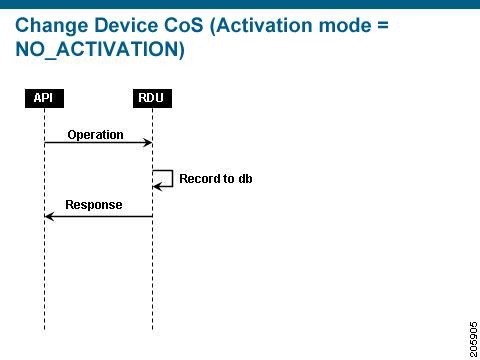
Adds a new device record to the RDU database. Uses the IPDevice.add() API and submits the batch synchronously with the NO_ACTIVATION flag. This operation causes the RDU to generate instructions for the device, which are then cached in the DPE. The Figure 7-1 explains adding/modifying a device record in the RDU with Activation mode = No_ACTIVATION. |
|
Figure 7-1 Change Device Class of Service (Activation mode= NO_ACTIVATION)
Device Management Operations
This section describes the following device management operation use cases:
Note The classfiles referenced in these use cases; for example, the GetDeviceLiveDataExample.java classfile that illustrates how you can retrieve live data from a device, are only samples that are bundled with the Cisco BAC software.
•Retrieving live data, such as statistics, from a device—See Table 7-10.
•Executing diagnostics on a device—See Table 7-11.
•Rebooting a device—See Table 7-12.
•Executing diagnostics on a device on its next connection—See Table 7-13.
|
|
|
|---|---|
|
IPDevice.performOperation() |
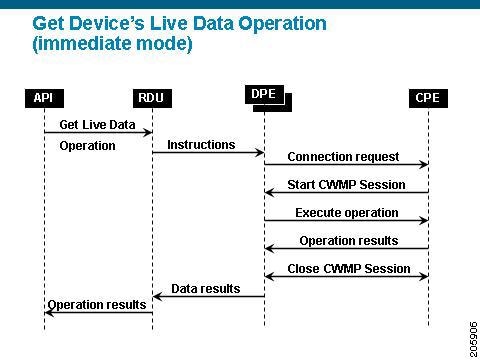
Retrieves live data directly from a device. Uses the IPDevice.performOperation() API to perform the TR-069 RPC GetParameterValues operation on the device and submits the batch synchronously using the immediate operation mode with the AUTOMATIC_ACTIVATION flag (to trigger a session with the device). |
|
Figure 7-2 explains retrieving live data from devices. |
|
Figure 7-2 Retrieving Live Data from a Device
|
|
|
|---|---|
|
IPDevice.performOperation() |
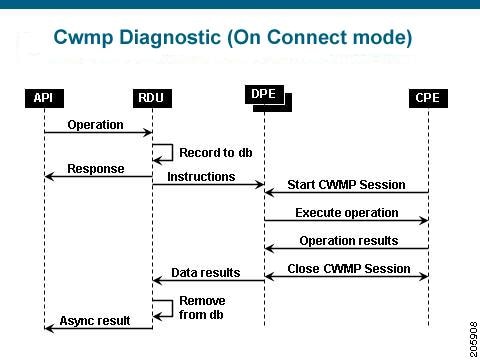
Executes ping diagnostics on a device. Uses the IPDevice.performOperation()API to perform the TR-069 RPC SetParameterValue and then GetParameterValues on the device. Submits the batches in synchronous mode using the on connect mode with the NO_ACTIVATION flag. The Figure 7-3 describes the workflow when submitting a batch to set the ping diagnostic parameters in the on-connect mode. |
|
Figure 7-3 Executing Diagnostics on a Device on its Next Connection
 Feedback