Fax Services
Available Languages
Table Of Contents
Traditional Fax over Circuit-Switched Networks
Store-and-Forward Fax and the T.37 Standard
Real-Time Fax and the T.38 Standard
Cisco T.37 Store-and-Forward Fax
Image Encoding and Image Resolution
Quality of Service and Cisco T.37 Fax
Benefits of Cisco T.37 Store-and-Forward Fax
Restrictions for Cisco T.37 Store-and-Forward Fax
Configuration Guidelines for On-Ramp Store-and-Forward Fax
Configuring On-Ramp Dial Peers
Configuring On-Ramp TCL IVR and Call Application Parameters
Configuring On-Ramp Fax Receive and MTA Send Parameters
Configuring Other On-Ramp Variables
On-Ramp Store-and-Forward Fax Configuration Example
Verifying On-Ramp Fax Operation
Fine-Tuning the Fax Mail Transport Agent
Configuring the SMTP Server to Support Store-and-Forward Fax
Forcing All Mail Through One Mailer
Tuning the Sending Mailer for a Single Recipient
Configuration Guidelines for Off-Ramp Store-and-Forward Fax
Configuring Off-Ramp Dial Peers
Configuring Off-Ramp TCL IVR and Call Application Parameters
Configuring Off-Ramp Fax Send and MTA Receive Parameters
Configuring Other Off-Ramp Variables
Off-Ramp Store-and-Forward Fax Configuration Example
Complete On-Ramp/Off-Ramp Gateway Configuration Example
Cisco T.38 Real-Time Fax and Never-Busy Fax Service
Fax Services
Version History
This document describes in detail how Cisco implements T.37 store-and-forward fax, and presents configuration guidelines and examples for both on-ramp and off-ramp fax gateways. It also describes how Cisco implements T.38 real-time fax and fax rollover, or never-busy fax, and presents configuration guidelines for those applications.
Fax Services contains the following sections:
•
Traditional Fax over Circuit-Switched Networks
•
•
Fax Services Overview
Fax services enable store-and-forward fax gateways to take calls from Group 3 (G3) fax machines, convert the calls into e-mail messages, and then transport them over the Internet as e-mail attachments. At the terminating end of the call, another store-and-forward fax gateway receives the e-mail message, converts it back into a fax message, and delivers it to a G3 fax machine. The receiving store-and-forward fax gateway can also deliver received faxes as e-mail attachments, and can send standard e-mail messages that will be delivered as a fax to a standard G3 fax machine.
The International Telecommunication Union Telecommunication Standardization Sector (ITU-T) developed the T.30 recommendation (for PSTN fax) and adopted the Simple Mail Transfer Protocol (SMTP) for fax called Multipurpose Internet Mail Extensions (MIME) as part of the T.37 recommendation for store-and-forward fax on the Internet.
Fax services also includes support for ITU-T recommendation T.38 for G3 fax relay over IP networks, and real-time fax with spoofing. Using this standard, real-time fax gateways can deliver faxes to remote fax machines while the sending fax machines are still processing fax pages. With fax relay, the gateway receives an analog fax signal and demodulates it into its digital form using a fax modem. The digital, demodulated fax is then packetized and sent over the IP network. At the receiving end, the fax gateway remodulates the digital fax packets into T.30 analog fax signals to be sent to the destination fax machine through a gateway modem.
Traditional Fax over Circuit-Switched Networks
Fax has a long tradition as a telephony application for sending documents between terminal devices. The phrase traditional facsimile or G3 fax is commonly used to denote implementations of ITU-T recommendations T.30 and T.4. The T.30 protocol describes the formatting of nonpage data, such as messages that are used for capabilities negotiation. The T.4 protocol describes the formatting of page data.
The transmission of fax data end to end is accompanied by two actions:
•
•
All fax machines use the V.21 protocol (300 baud) for the negotiation stage (LS fax) of fax transmission. The page transfer stage (HS) is negotiated at higher speeds (V.17, V.27, and so on).
Figure 1 illustrates a typical fax call flow.
Figure 1 PSTN Fax Call Flow
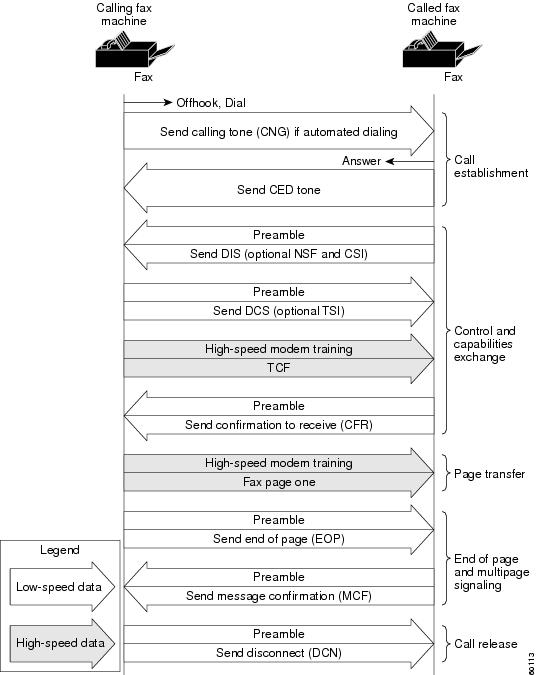
The information conveyed in the transmission consists of both protocol and document content. Protocol comprises identification, control information, and capabilities. Document content consists primarily of the document image plus metadata accompanying the image. The image data representation is the means by which an image of a document is encoded within the fax content.
When the fax has been successfully sent, the sender receives a confirmation: an indication that the fax content was delivered. This confirmation is an internal signal and is not normally visible to the sender. Some error messages are visible, however, to allow a page to be re-sent.
The traditional fax is sent over the Public Switched Telephone Network (PSTN) using a point-to-point switched circuit for each call. At startup, the T.30 engines synchronize, negotiate connection and transmission parameters, send page data, signal success or failure, and then disconnect.
Reducing Fax Costs
The cost of using the PSTN for traditional fax transmissions can be very expensive, especially if the fax communication is international. Heavily used corporate fax machines can generate thousands of dollars of calling charges per month. When these long distance calls are instead sent over the Internet, the savings can be dramatic. Standards are currently being defined for two types of Internet (IP packet-based) fax: store-and-forward fax and real-time fax.
Store-and-Forward Fax and the T.37 Standard
Store-and-forward fax gateways can take calls from G3 fax machines, convert them into e-mail messages, and send them over the Internet. Another store-and-forward fax gateway at the terminating end of the call receives the e-mail message, converts it back into a fax message, and delivers it to a G3 fax machine.
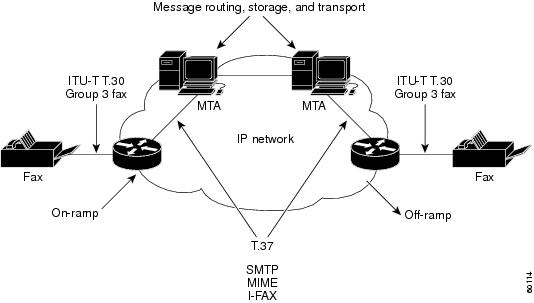
Store-and-forward fax is generally sent as an e-mail attachment. An extension to SMTP called MIME is available for this fax service from the Internet Engineering Task Force (IETF). These standards are covered by RFC 2301 through 2306. Fax images are attached to e-mail headers and are encoded in Tag Image File Format (TIFF). TIFF-F describes the data format for compressed fax images.
The ITU-T developed the T.30 protocol and other fax standards, and has adopted the SMTP MIME protocol for fax as part of a new ITU-T standard called T.37. This standard defines store-and-forward fax by e-mail and has approved simple mode (RFC 2305). Extended, or full mode, is still under study. Simple mode restricts TIFF-F encoding to the s-profile (the minimal black-and-white subset of TIFF for facsimile), limiting fax transmission to only the most popular fax machine formats. These formats use Modified Huffman (MH) image compression with standard or fine resolution. In T.37 terminology, fax gateways can send faxes to a conventional PSTN-connected fax machine or to another fax gateway over an IP network. The originating (sending) gateway is referred to as an on-ramp gateway; the terminating (receiving) gateway is an off-ramp gateway.
Cisco fax gateways support ITU-T standard T.37 as independent on-ramp gateways, independent off-ramp gateways, or on-ramp and off-ramp combinations. Because the mail server first stores the fax message (page by page) and then forwards it, the confirmation that the sender receives is delayed. Although the lack of an immediate confirmation message is a disadvantage, store-and-forward fax has several advantages, including delivery at off-peak hours, sophisticated retry-on-busy algorithms, and the ability to broadcast a single fax to multiple receiving fax machines. Figure 2 illustrates the store-and-forward fax service model.
Figure 2 Store-and-Forward Fax Service Model
Real-Time Fax and the T.38 Standard
Real-time fax gateways can deliver a fax to a remote fax machine while the sending fax machine is still processing fax pages. Delivery confirmation is the processing of the last page without an error message. In the real-time fax model, delivery confirmation is immediate.
The T.38 standard defines the IP network protocol used by Internet-aware T.38 fax devices and T.38 IP fax gateways. T.38 fax gateways provide the following functions:
•
•
•
•
You can deploy the ITU-T T.38 recommendation using two implementations:
•
•
These implementations differ in their ability to deal with IP network delay.
Fax Relay
With fax relay, the gateway receives an analog fax signal and demodulates it into its digital form using a fax modem. The digital, demodulated fax is then packetized and sent over the IP network. At the receiving end, the fax gateway remodulates the digital fax packets into T.30 analog fax signals to be sent to the destination fax machine through a gateway modem. There is no requirement that the gateway provide T.30 signals of its own, just fax modems and the T.38 IP data protocol.
Network delay becomes a factor when real-time fax is deployed. In controlled private data networks and networks that have been tuned for VoIP traffic, delay has been reduced to less than 500 milliseconds (ms) end to end and fax relay can be used effectively. If delays become too long, such as gateways employed over the Internet, where delay is not under direct administrator control, real-time fax with spoofing can be used.
Real-Time Fax with Spoofing
Spoofing techniques are used to extend the delay tolerance of fax machines. These techniques add to the T.30 protocol used by fax machines to communicate, keeping them on line beyond their normal T.30 timeout intervals. Extra line padding techniques, T.30 protocol spoofing, and sending redundant data are used to provide image packet jitter tolerance. Spoofing and jitter compensation allow the fax machines to tolerate network delay without losing communication. These mechanisms are sufficient for faxing over the Internet.
The T.38 standard defines different protocols, depending on the real-time fax transport mechanism used.
UDP/IP Transport
User Datagram Protocol (UDP) is a fast but unreliable transport protocol. The speed of UDP allows it to be employed for real-time fax without the need for spoofing. In addition, the T.38 protocol provides two methods to improve the reliability of the UDP transport mechanism. One method uses redundancy of the image data; the other uses a simple forward error correction (FEC) scheme.
TCP/IP Transport
Although TCP adds reliability through the use of error-checking mechanisms at each router it transits, it also adds delay. T.38 specifies a simple protocol for transport by TCP that includes no error checking.
The T.38 real-time fax-over-IP service model is illustrated in Figure 3.
Figure 3 Real-Time Fax Service Model
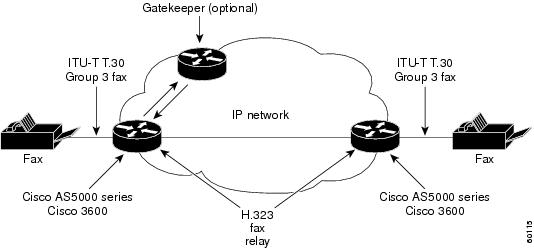
The Cisco AS5300 access server and Cisco 3600 router families of voice gateways support both ITU-T recommendations: T.37 for store-and-forward fax, and T.38 for real-time fax as of Cisco IOS Release 12.1(3)XI. The Cisco MC3810 multiservice concentrator and Cisco 2600 router families support ITU-T recommendation T.38 as of Cisco IOS Release 12.1(3)T. The Cisco AS5300 also requires the recommended VCWare Version 7.16. The proper VCWare is bundled within Cisco IOS software for the Cisco 3600 series. Real-time fax works like a voice over IP (VoIP) call and requires no extra configuration. Store-and-forward fax configuration and testing are the focus of this document.
This document also explains the never-busy fax solution. This solution uses a Toolkit Command Language (TCL) Interactive Voice Response (IVR) script to roll over a T.38 fax that receives a busy signal into a T.37 fax. This feature is documented in a later section of this document.
Cisco T.37 Store-and-Forward Fax
Store-and-forward fax enables Cisco AS5300 voice gateways to send and receive faxes across packet-based networks without the timeout restrictions imposed by real-time fax transport methods. Store-and-forward fax is an implementation of the RFC 2305 and RFC 2532 proposed standards from the IETF. RFC 2305 proposes a standard aligned with the T.37 recommendation from the ITU-T. With this feature, your access server becomes a multiservice platform, providing both data and fax communication. Store-and-forward fax enables you to perform the following tasks:
•
•
•
Store-and-forward fax functionality is facilitated through SMTP. Additional functionality described in RFC 2532, Extended Facsimile Using Internet Mail, confirms delivery using existing SMTP mechanisms. Examples of such mechanisms are delivery status notifications (DSNs) in RFC 1891 and message disposition notifications (MDNs) in RFC 2298.
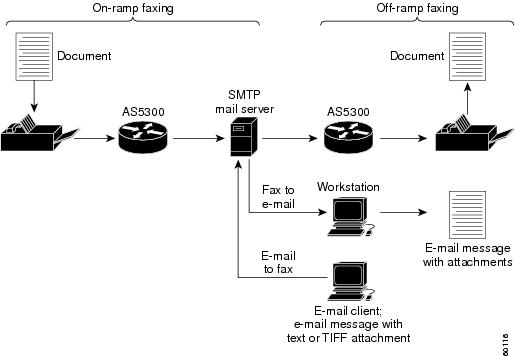
When store-and-forward fax is configured, the on-ramp gateway receives faxes from traditional PSTN-based Group 3 fax devices and converts them into TIFF file attachments. It then creates a standard MIME e-mail message and attaches the TIFF files to it. The on-ramp gateway then forwards this fax mail to the messaging infrastructure of a designated SMTP server, where the fax-mail message is stored. The messaging infrastructure performs message routing, message storage, and transport, and can be either custom store-and-forward SMTP software or a standard Internet mail transport agent (MTA) such as UNIX sendmail or Netscape MailServer.
After the fax mail is stored on the SMTP server, it can be delivered in two ways: as an e-mail message with attachment, or as a fax to a standard PSTN-based Group 3 fax device. In the latter case, the SMTP server mail delivery infrastructure delivers the fax mail to the Cisco off-ramp gateway. The off-ramp gateway router converts the attached TIFF file back into standard fax format and sends the information to a standard PSTN-based Group 3 fax device. The off-ramp gateway is also responsible for generating DSNs and MDNs, as appropriate. This simple topology is illustrated in Figure 4.
Figure 4 Topology of Store-and-Forward Fax Functionality
Store-and-forward fax is used in conjunction with the VoIP software feature for Cisco voice gateways. The supporting digital signal processor (DSP) technology can be either c542 or c549. To understand the voice feature card (VFC) and VoIP technology and architecture, search for these topics on the Cisco website, www.cisco.com. To learn about VCWare and DSP technology in particular, refer to the following link:
http://www.cisco.com/univercd/cc/td/doc/product/access/acs_serv/5300/hw_inst/mod_inst/53mvopv2.htm
Compatibility issues are addressed at the following link:
http://www.cisco.com/univercd/cc/td/doc/product/access/acs_serv/5300/iosrn/vcwrn/vcwrmtrx.htm
Handling of Enclosures
Store-and-forward fax can process e-mail with the following MIME media content types:
•
•
•
The Cisco implementation uses an enriched Profile S media content type that allows modified read (MR) and modified modified read (MMR) image encoding. The important property of the TIFF images supported by Cisco gateways is that the TIFF image file descriptor (IFD) header precedes the actual TIFF data. This header location allows TIFF-to-fax conversion in streaming mode without storage of the TIFF image on the gateway. (Note that Cisco store-and-forward gateways support only the specific TIFF format described previously.)
Store-and-forward fax supports the following MIME content-transfer encodings:
•
•
•
•
These content transfer encodings can be wrapped in any multipart content type. Nesting of multiparts (multipart-in-multipart) is not supported.
When a Cisco off-ramp gateway receives a message with the content type of multipart/alternative, it processes the first part of the multipart/alternative message and records a count of what was and was not successfully sent to the PSTN-based Group 3 fax device. The off-ramp gateway then discards the other parts of the message. For example, if a multipart/alternative message has two parts, a text/plain part and a text/HTML part (and the text/plain part is first), the off-ramp gateway sends only the first part (the text/plain part) to the PSTN-based Group 3 fax device.

Note
Note

Caution
T.37 Fax Connection Protocol
All fax machines use the 300-baud V.21 protocol for the negotiation stage (LS) of fax transmission. The page transfer stage (HS) is negotiated at higher speeds.
Image Encoding and Image Resolution
Depending on your specific needs, you might want to increase or decrease the resolution of the received fax image. As a default, image resolution in store-and-forward fax is set to passthrough, which means that the image is forwarded exactly as it is received. If you want to specify a different resolution for the fax TIFF image, whether greater or lesser, use the image resolution dial-peer configuration command as an attribute of the on-ramp Multimedia Mail over IP (MMoIP) dial peer.
Depending on the capacity of the fax machines in your network, you might want to use a different image encoding (compression) scheme for the fax TIFF image that store-and-forward fax creates. As a default, image encoding in store-and-forward fax is set to passthrough, which means that the image is forwarded exactly as it is received. If you want to specify a specific encoding (compression) scheme for the fax TIFF image, use the image encoding dial-peer configuration command as an attribute of the on-ramp MMoIP dial peer.
Note
Quality of Service and Cisco T.37 Fax
Quality of service (QoS) is an important issue in voice packet networks and is discussed in detail elsewhere in this document. The following QoS mechanisms are employed in Cisco gateway-based T.37 fax to improve fax quality:
•
•
•
•
•
•
Benefits of Cisco T.37 Store-and-Forward Fax
Cost Savings
The worldwide IP fax service market is projected to reach about $2 billion by 2002. Analysts estimate that corporate customers can reduce their annual fax bills by 30 to 50 percent by using converged IP voice, data, and fax networks.
In addition, corporate users can continue to use their existing applications. For example, you can use existing e-mail programs such as Eudora, Netscape, or Outlook to send a fax by inserting a fax number in the To: field (for example, fax=+5551212@off-ramp.cisco.com) and then clicking the Send button. You can also send and receive both fax and e-mail messages from your private e-mail inboxes, and you can use existing standalone fax machines with no user retraining.
Universal Inbox for Fax and E-Mail
The Cisco AS5300 allows configuration of direct-inward-dial (DID) numbers to deliver faxes to a specific electronic mailbox. This feature greatly simplifies receiving faxes while traveling. Receiving e-mail on the road is commonplace, whereas receiving faxes on the road can be problematic. That problem is solved with store-and-forward fax mail.
E-Mail Can Be Sent as a Fax Transmission
The Cisco AS5300 can receive an e-mail message with both TIFF image files and text files attached, and then send that message to a PSTN-based Group 3 fax device. This feature allows you to easily combine e-mail and fax recipients from your existing user agent (Eudora, Netscape, Outlook) and send faxes to multiple recipients by using group e-mail aliases.
Toll Bypass
In an enterprise environment in which offices in different cities are connected by a WAN, you can bypass toll charges by sending faxes over the WAN to the same city as the PSTN-based Group 3 fax recipient and use the off-ramp gateway to deliver the faxes in that city. Because the fax message is stored on the mail server until SMTP forwards messages to the recipient, you can configure SMTP to forward fax e-mail attachments to the Cisco off-ramp gateway during off-peak hours (for example, during evenings and weekends), thereby reducing peak-time bandwidth demands. As another example, some estimates show that as much as 60 percent of all long distance traffic to Japan is faxes. Routing this fax traffic over e-mail data links represents a considerable savings potential.
Broadcast to Multiple Recipients
Because store-and-forward fax uses e-mail messages as the transporting vehicle for the fax, you can send e-mail fax attachments to multiple recipients by addressing the fax mail to an e-mail list alias. The e-mail server will generate multiple e-mails, one for each recipient on the list, and forward them to the off-ramp gateway for faxing.
Restrictions for Cisco T.37 Store-and-Forward Fax
Store-and-forward fax on-ramp faxing has been designed to work by using either the DID feature or a redialer. A redialer is an interface hardware device that interconnects between a fax device and the PSTN. If you choose to not enable DID, you must configure and enable a redialer on the originating fax machine for store-and-forward fax to be operational. And, you must add a TCL IVR script on the incoming dial peer that informs the processing engine to look for the second dialed number.
A third alternative is available that requires user training. This method entails setting up a two-stage dial scenario in which the caller first dials the access number of the on-ramp gateway, waits for a secondary dial tone, and then dials the actual destination fax machine number.
When implementing authentication, authorization, and accounting (AAA) for T.37 fax, you might need to use the H.323 aaa method list to perform authentication for both on-ramp and off-ramp faxes. The aaa method list is configured in the aaa new-model command component as shown in the following example. (The method list is the boldface item in the configuration lines.)
gateway1 (config)# aaa new-modelgateway1 (config)# aaa authentication login fax group radiusgateway1 (config)# aaa authentication login h323 group radiusYou can include the fax method list in your configuration, but if you want authentication to succeed, you must configure the H.323 method list.
Accounting, also, is configured under the aaa new-model command component. For example:
gateway1 (config)# aaa accounting connection fax stop-only group radiusThis configuration item is successful with the fax method list. Unfortunately, some TCL IVR scripts available on the Cisco website do not have the configuration line that supports accounting. When accounting is enabled using one of the faulty scripts, the debug output message received is:
moip_aaa_offramp: NULL acct listThis message is an indication that accounting is not enabled in the TCL IVR script. The solution is to obtain a script in which accounting is enabled. The Cisco Technical Assistance Center (TAC) should be able to provide links to the proper scripts.
Configuration Guidelines for On-Ramp Store-and-Forward Fax
On-ramp store-and-forward fax functionality includes accepting a fax from a PSTN-based Group 3 fax machine, converting the fax to a TIFF file attachment, and then delivering that fax mail to an MTA. In this scenario, the fax mail will be delivered to the recipient e-mail account with the fax portion of the message contained in a TIFF attachment. If the fax portion is more than one page, the recipient is required to use a graphics program that can create a multipage TIFF file.
The on-ramp gateway can also be configured to forward the fax mail to an off-ramp gateway. For now, we will concentrate on the delivery to an MTA and subsequently to a recipient e-mail inbox. Figure 5 shows a model of an on-ramp gateway.
Figure 5 On-Ramp Fax Service Model
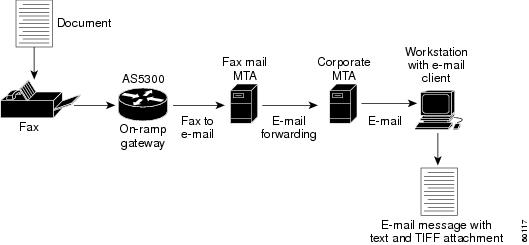
On-ramp gateway configuration is described in the following sections:
•
•
•
•
Configuring On-Ramp Dial Peers
Cisco fax-over IP technology uses the concept of dial peers to identify the properties of a call. Dial peers describe the entities to or from which a call is established. All voice technologies use dial peers to define the characteristics associated with a call leg. A call leg is a discrete segment of a call connection that lies between two points in the connection. An end-to-end call comprises four call legs, two from the perspective of the source route, and two from the perspective of the destination route.
You use dial peers to apply specific attributes (such a fax rate) to call legs and to identify call origin and destination. A dial peer can be incoming (answer) or outgoing (originate), and either from or to the PSTN (telephony) or from or to the IP network (VoIP). A call entering or leaving a voice gateway is identified with a dial peer configured in the gateway. This dial peer contains information about the call, including encoding technique, call properties, and how the call should be handled.
POTS Dial Peers
Plain old telephone service (POTS) dial peers can be thought of as the answering or destination number of the gateway. If a call is coming from the telephony side, the POTS dial peer is an answer telephony dial peer. If the POTS dial peer is sending a call to the PSTN, then it is an originate telephony dial peer. The line coming into the fax gateway is assigned one or more numbers by the service provider. These are the dialed numbers that the fax gateway answers. If the gateway dial-in port answers only one dialed number, then it can have only one POTS dial peer of significance. If the gateway is configured with more than one access number, these numbers can be differentiated by the configuration parameters in the POTS dial peers.
MMoIP Dial Peers
MMoIP dial peers can be thought of as a mapping between a dialed number and a data network location. In the case of on-ramp fax mail, that data network location is an e-mail address. VoIP dial peers are equivalent to MMoIP dial peers. They both serve the same function for different call types. MMoIP dial peers are used for T.37 fax; VoIP dial peers are used for voice and T.38 fax.
On-Ramp Dial Peer Call Routing
When the fax on-ramp gateway receives a call, it decides how to route the call based on the configuration of the gateway. The call-processing engine determines the call type according to the dialed number identification service (DNIS) that was received in the call setup messages. The DNIS is also referred to as the called party number.
After receiving the DNIS, the gateway examines its POTS dial peers and searches for a match between the DNIS (called number) and the incoming called number in a POTS dial peer. For example, consider a DNIS of 9991144 and the following POTS dial peer:
dial-peer voice 999 potsapplication on-rampincoming called-number 99911..direct-inward-dialThe DNIS is matched as the called number in this POTS dial peer because the trailing dots are wildcards (the "." represents one and only one legal digit). Because of the wildcards, all the numbers from 9991100 through 9991199 are matches. Finding a match, the on-ramp gateway next sees that the application named on-ramp and direct-inward-dial are configured on this dial peer.
The application on-ramp command tells the processing engine to look for a tool command language (TCL) interactive voice response (IVR) call application script reference in the call application parameters (to be discussed shortly). The direct-inward-dial command tells the gateway to look for an outbound MMoIP dial peer that matches the dialed number 9991144. In the following configuration example, the gateway finds mmoip dial-peer 990. The destination-pattern command in the MMoIP dial peer matches the dialed number.
dial-peer voice 990 mmoipapplication fax_on_vfc_onramp_app out-bounddestination-pattern 9991144information-type faxsession target mailto:owner@domain.cisco.comdsn successAssuming that there is an exact match, the on-ramp gateway now knows what to do with the call to 9991144: run the C-based application called fax_on_vfc_onramp_app with the argument out-bound. This application is compiled into Cisco IOS software for the purpose of setting up the fax call after all the authentication and other activities are successfully completed. If these activities do not successfully complete, the call is handed to the application with the failure flag set and the call is torn down.
After the preliminary steps are successfully completed, the application sets up the call with the destination specified in the session target command. In this example, it sends an e-mail with the fax content as a TIFF attachment to owner@domain.cisco.com. The session target is hard coded to represent a static address assignment; the hard-coded SMTP address requires an exact match to the dialed number in the dial peer.
Dynamic matching can be achieved with the following session target statement:
session target mailto:$d$@domain.cisco.comThis target statement could be matched to a range of dialed numbers. The $d$ substitution inserts the string fax=<dialed number> into the mailto: statement. After substitution, the session target (IP destination) becomes fax=<dialed number>@domain.cisco.com. An alias must be configured in the MTA that will accept fax=<dialed number>@domain.cisco.com and translate that address to a viable target e-mail address, which might be another off-ramp fax gateway or a normal user mailbox. The MTA alias procedure is covered in the section on mailers, but be aware that many MTAs are on the market, and most of them are configured differently.
Dedicating a mailer to your fax-mail function is an excellent idea. If you dedicate a mailer, you are better positioned to experiment with the properties of your mailer without risking the company e-mail system. Be sure to obtain permission from the postmaster if the e-mail system is the company live e-mail system.
Figure 5 shows how you can deploy a specialized fax-mail MTA to receive fax mail from the on-ramp gateway. This setup allows for configuring aliases and other fax-specific variables on the fax-mail MTA that might conflict with the settings on the corporate mailer. The fax-mail MTA thus can be devoted to fax mail and can simply forward the fax mail-turned-e-mail to the corporate MTA for delivery to the recipient in the regular way.
DID Versus Redialers
When on-ramp functionality is implemented, a telephone number translation is required at the on-ramp gateway so that the sender of the fax needs to dial only one telephone number. The sender dials the telephone number of the destination fax machine, but the fax gateway on-ramp access number is the number actually reached. The on-ramp gateway maps the number dialed by the sender to the desired destination. This mapping is accomplished by use of the direct-inward-dial command in the POTS dial peer.
An alternative to DID in the on-ramp configuration is to use a redialer, or prompt the sender for the destination number after the access number has been dialed. A redialer is a device that is situated between the fax machine and the POTS RJ-11 connector. It is programmed to capture the digits of the destination number that the sender dials in to the fax machine. It then dials the access number of the fax on-ramp gateway (this number is programmed into the redialer) and sends the captured digits to the fax on-ramp gateway when the fax on-ramp gateway requests them. The on-ramp gateway then matches the captured digits to an MMoIP dial peer and performs steps exactly as described previously for the DID method. Many redialers are available; exploring their use and functionality is not covered in this document.
If neither the redialer access method nor DID is configured, then the default access method is to prompt the sender. This access method can also be configured explicitly in the call application options. When prompt user is the access method, after the access gateway is dialed, the on-ramp TCL IVR script plays the prompt, "Please enter the phone number you wish to reach." The sender then dials the destination fax number and sends the fax.
Configuring On-Ramp TCL IVR and Call Application Parameters
When voice feature cards (VFCs) are used, Cisco store-and-forward fax uses TCL IVR scripts for call control. T.37 store-and-forward fax on VFCs requires TCL IVR Version 2.0 and Cisco voice extensions that are available in Cisco IOS Release 12.1(3)XI or a later release.
TCL IVR scripts are loaded dynamically by the voice-fax gateway either at the time they are configured or upon reboot. Configuring a call application script requires a tag and a URL for the script and is accomplished in the following way:
mmoip-b(config)# call application voice on-ramp tftp://topeka/sffax_onramp9.2.0.0.tclLoading sffax_onramp9.2.0.0.tcl from 172.19.49.14 (via FastEthernet0): !!![OK - 11013/21504 bytes]Read script succeeded. size=11013, url=tftp://sffax_onramp9.2.0.0.tclThe tag in the preceding configuration line is on-ramp and is the name that will be referred to by the dial peer to have that script activated. The URL is the machine topeka, the base directory is /tftpboot (understood by the TFTP server), and the actual filename is sffax_onramp9.2.0.0.tcl. The command is entered in global configuration mode. As soon as the command is entered, the gateway attempts to access the TFTP server and download the particular TCL IVR file named in the configuration line.
After the script is successfully loaded, you can enter other parameters to control the behavior of the script. Basic on-ramp faxing requires two other call application parameters: one to tell the script which language to use, the other to tell the gateway where to find the audio files that are required for the prompts, even if the prompts will not be used. The required command lines are as follows:
call application voice on-ramp language 1 encall application voice on-ramp set-location en 0 tftp://topeka/prompts/en/In the first line, English is chosen as the language. Languages are referred to with their International Organization for Standardization (ISO) two-character code. The second line gives the path for the gateway to find the audio file prompts to use. It is important to remember to enter the final slash (/) at the end of the path to the audio prompts. The TCL IVR script prepends the path to the prompt name, and if the slash is not at the end of the path, the language code will be concatenated onto the audio file name and the script will not be able to load the file. The result will be silence and a failed call.
You can download TCL IVR scripts and associated audio file prompts from Cisco.com at:
http://www.cisco.com/cgi-bin/tablebuild.pl/tclware
Note
To display the TCL IVR script in its entirety, enter the show call application voice command with the on-ramp argument. (Note that the on-ramp argument is the tag name that we have assigned to the filename sffax_onramp9.2.0.0.tcl.) At the beginning of the output is an explanation of the call flow decisions made by the script.
Configuring On-Ramp Fax Receive and MTA Send Parameters
Fax receive, MTA send, and MMoIP AAA parameters are configured using a series of global configuration commands. The AAA parameters are considered in a separate section. Table 1 lists the necessary and optional on-ramp parameters.
Fax and MTA Variables
The fax and MTA variables configured in the gateway control the behavior of the faxes and fax mail leaving the gateway. A minimal configuration for on-ramp faxing requires the following fax and MTA variables:
1.
2.
3.
4.
5.
6.
7.
8.
9.
10.
Line 1 substitutes the DNIS for $d$, which is used in the MMoIP dial peer as the username part of the session target.
Line 2 is necessary to define the interface type being used for fax. Although VFCs are used exclusively in the latest Cisco IOS software, the first implementation of T.37 fax in Cisco gateways used modems.
Lines 3 and 4 configure the MTAs to which the fax mail is sent from the on-ramp gateway. Use the mta send server command to provide a backup destination server in case the first configured mail server is unavailable. (This command is not intended to be used for load distribution.)
You can configure up to ten different destination mail servers using the mta send server command. If you configure more than one destination mail server, the Cisco gateway attempts to contact the first mail server configured. If the first mail server is unavailable, the gateway contacts the next configured destination mail server, and so on.
Line 5 configures the message that is inserted into the subject line of the fax mail sent.
Line 6 configures the e-mail address of the postmaster to whom the DSN messages are sent.
Lines 7 and 8 configure the ID of the fax mail sender. The $s$ substitution for the username inserts the automatic number identification (ANI) of the caller. Do not confuse the ANI with the phone number configured in the fax machine. The number configured in the fax machine by the person that maintains the fax machine does not always coincide with the ANI. In our case, the following appears in the From: line of a received fax mail in a Eudora 4.3.2 e-mail client:
From: "4089191827" FAX=408@fresno.Cisco.com
The number in quotes is the number configured in the fax machine itself, while the 408 in FAX=408@... represents the ANI that is delivered from the Cisco Centrex system. Thus, the $s$ variable referenced in Line 8 is the ANI from the PSTN. It is the number in quotes that appears in the subject line of a Eudora e-mail client, not the PSTN ANI. When you actually open the fax mail, you can see both numbers, as shown in the preceding paragraph.
Lines 9 and 10 configure the recipient of return receipts if message disposition notification (MDN) is configured in the MMoIP dial peer. It takes the form of username@hostname.
Configuring Other On-Ramp Variables
The variables that do not fit into any of the preceding categories are discussed in this section.
If you are resolving machine names with DNS, you will need to enter the following commands on the gateway:
ip domain-lookup (this command is ON by default)ip domain-name domain.com (domain name is the domain name of your network)ip name-server 10.10.10.10 (the IP address of your DNS server)These commands attach the gateway to a domain and point it to a DNS server. Six different DNS servers can be configured; the gateway tries each of them in turn.
To perform accurate accounting, make sure that both the gateways and the RADIUS server agree on the time of day. The typical way to ensure agreement among IP-based devices is through the use of Network Time Protocol (NTP). In the following example, the first command sets the gateway in a particular time zone with a certain offset in hours from Greenwich Mean Time (GMT). The default is to use GMT (also referred to as Coordinated Universal Time, or UTC).
clock timezone PST -8 (Pacific Standard Time, minus 8 hours from GMT)If you do not enter a time zone, the gateway assumes that it is GMT. The next command tells the gateway where to go to get the correct time:
ntp server 172.19.49.11A list of freely accessible NTP servers in every time zone can be found on the Internet. Use your browser search engine or try the list at:
http://www.eecis.udel.edu/~mills/ntp/clock2.htm
On-Ramp Store-and-Forward Fax Configuration Example
If we start with a configuration that has IP connectivity and then configure all the items in the preceding sections, the gateway configuration should resemble the following annotated example:
mmoip-b# write terminalBuilding configuration...Current configuration:!version 12.2service timestamps debug uptimeservice timestamps log uptimeno service password-encryptionservice internalservice udp-small-serversservice tcp-small-servers!hostname mmoip-b!enable secret 5 $1$CF2w$GbYL.9.Y5ccJKSdEBh13f0!resource-pool disable!clock timezone PST -8ip subnet-zeroip host topeka 172.19.49.14 This maps topeka to its IP address.ip domain-name cisco.comip name-server 172.18.10.70ip name-server 171.18.10.140!isdn switch-type primary-5essisdn voice-call-failure 0call application voice on-ramp tftp://topeka/ifax/sffax_onramp9.2.0.0.tclcall application voice on-ramp language 1 encall application voice on-ramp set-location en 0 tftp://topeka/prompts/en/!fax receive called-subscriber $d$fax interface-type vfcmta send server fresno.cisco.commta send server 172.29.187.33mta send subject VoIP TME Faxmailmta send origin-prefix "Cisco Powered Fax Mail"mta send postmaster mailman@172.19.149.30mta send mail-from hostname voip-tme.cisco.commta send mail-from username $s$mta send return-receipt-to hostname cisco.commta send return-receipt-to username joeuser!controller T1 0 Only one controller port is active on this router.framing esfclock source line primarylinecode b8zspri-group timeslots 1-24!controller T1 1clock source line secondary 1!controller T1 2clock source line secondary 2!controller T1 3clock source line secondary 3!!interface Ethernet0 Any interface in "shutdown" mode is not in service,no ip address nor is it needed for this operation.shutdown!interface Serial0no ip addressno ip mroute-cacheshutdownno fair-queueclockrate 2015232!interface Serial1no ip addressshutdownno fair-queueclockrate 2015232!interface Serial2no ip addressshutdownno fair-queueclockrate 2015232!interface Serial3no ip addressshutdownno fair-queueclockrate 2015232!interface Serial0:23 This interface relates to the signaling channeldescription 3590576 and 3611460-1479 of Port 0; these are the numbers serviced.no ip addressip mroute-cacheisdn switch-type primary-5essisdn incoming-voice modem This provides voice bearer capability.isdn disconnect-cause 1!interface FastEthernet0ip address 172.19.49.20 255.255.255.128duplex autospeed auto!ip classlessip route 0.0.0.0 0.0.0.0 172.19.49.1no ip http server!!!voice-port 0:D!dial-peer voice 1 pots This POTS port answers incoming calls that beginapplication on-ramp with 361 and have seven digits. It runs theincoming called-number 361.... application "on-ramp" referred to earlier. DIDdirect-inward-dial directs it to look for an MMoIP dial peer! with that destination pattern.port 0:D!dial-peer voice 60 mmoip This MMoIP dial peer will be found if theapplication fax_on_vfc_onramp_app out-bound dialed number is 3611460. It will rundestination-pattern 3611460 the application fax_on_vfc_onramp and willinformation-type fax direct the fax mail to owner@cisco.com.session target mailto:owner@cisco.com The target can be any valid e-mailmdn address; the postmaster will bedsn success informed of successful message delivery.dial-peer voice 73 mmoip This dial peer answers to 3611473 and isapplication fax_on_vfc_onramp_app out the same as dial peer 60 except thatdestination-pattern 3611473 it directs the fax mail toinformation-type fax FAX=3611473@fresno.cisco.com.session target mailto:$d$@fresno.cisco.com There is an MTA at this address that hasmdn an alias configured to translatedsn success FAX=3611473 into a valid username and send! the fax mail on.!line con 0exec-timeout 0 0transport input noneline aux 0line vty 0 4no login!ntp clock-period 17180024ntp server 172.19.49.11endVerifying On-Ramp Fax Operation
With the preceding configuration, on-ramp faxing should now be in service. To ensure that the TCL IVR script is working properly, enter the following debug commands:
mmoip-b# debug voip ivrmmoip-b# show debugivr:ivr errors debugging is onivr state transitions debugging is onivr settlement activities debugging is onivr script debugging is onivr script debugging is onivr app library debugging is onivr tcl commands debugging is onivr digit collect debugging is onivr call setup debugging is onTo examine the different call states of a successful on-ramp call, enter the following debug command:
mmoip-b# debug foip on-rampFOIP On ramp faxmail debugging is onIf there is a problem with the configuration or with the on-ramp fax operation, the debug output will indicate where the problem is occurring. The actual debug output is too lengthy to include in this document. For more information about solving problems with on-ramp fax operations, go to http://www.cisco.com/cpropart/salestools/cc/so/cuso/sp/faxov_in.htm.
As an example of a fax mail application, the PRI line that is terminated in a Cisco Technical Marketing Group on-ramp gateway has 21 numbers mapped to it. (The service provider that manages the phone lines provides this functionality.). Each person in the group has an MMoIP dial peer that corresponds to an individual phone number. The POTS dial peer with that same number maps its DID to the corresponding MMoIP dial peer. That MMoIP dial peer is mapped to the e-mail address of the person having that phone number. Now every person with their own fax-mail number can receive faxes through e-mail wherever they might be. Receiving e-mail on the road is commonplace; receiving a fax on the road is problematic at best. That problem is solved with store-and-forward fax mail.
Fine-Tuning the Fax Mail Transport Agent
The configurations in this document use two different MTAs. For both on-ramp and off-ramp functionality, both MTAs are used. The on-ramp gateway receives the fax mail, converts the pages to a TIFF file, and sends the message to its primary MTA, which is a Netscape Messaging Server V3.6. The Netscape MTA finds an alias for fax=number and sends the mail to the recipient that was configured in its alias file. This second mailer is the Cisco corporate mailer, which is a Solaris UNIX machine running sendmail.
Caution
The off-ramp gateway accepts an e-mail and changes any TIFF or text attachments into T.4 fax format. The gateway then attempts to deliver the T.4 fax format to a PSTN-based Group 3 fax device. The chance of creating problems is more severe with the off-ramp gateway than with the on-ramp gateway.
Many MTAs are on the market that will work without modification with both the on-ramp and off-ramp features of store-and-forward fax. We recommend that you dedicate a mail server to fax mail and avoid the conflicting configuration requirements of traditional e-mail and fax-mail servers. Optimize each mail server for its individual functions—for example, fax messages should usually retry transmissions every 5 minutes versus normal e-mail, which retries every 30 minutes; fax messages should give up after 3 to 4 hours versus normal e-mail, which tries for 4 to 5 days.
To avoid any complications arising from the difference between the SMTP e-mail and fax delivery requirements, modify the following parameters:
•
•
•
•
Note
Note
Note
Configuring the SMTP Server to Support Store-and-Forward Fax
If you choose to configure your SMTP server, edit the SMTP server alias file to include an alias for fax transmissions. For example, suppose you create the following alias: fax=5551212: user@hostname.com.
In this example, if a fax is sent to the telephone number 5551212, the on-ramp gateway will automatically forward it to the mailbox for user@hostname.com. If you create aliases to forward faxes to particular e-mail addresses, you need to configure the on-ramp MMoIP dial peer session target dial peer voice configuration command as follows:
router(config-dial-peer)# session target mailto:$d$@hostname.comThe $d$ keyword specifies that the destination fax machine telephone number is inserted into the Envelope to: field of the fax mail that is sent to the SMTP server.
The Cisco AS5300 off-ramp gateway accepts only one e-mail recipient per SMTP transaction for the following reasons:
•
•
The Cisco AS5300 prevents multiple recipients in one SMTP transaction by responding to the second and subsequent recipient (RCPT) commands with a 450 reply code. Because of the typical mailer configuration, there will be a cumulative 30-minute delay for each recipient (immediate delivery for the first recipient, 30-minute delay for the second recipient, 60-minute delay for the third recipient, and so on).
Forcing All Mail Through One Mailer
To simplify system administration, it is often desirable to have all mail to the Cisco AS5300 go through one mailer. One way to arrange for the use of one mailer is to set up a DNS mail exchange (MX) record for the Cisco AS5300 pointing to the one mailer, and set up that mailer to omit MX record processing when delivering mail to the Cisco AS5300.
For example, the following two records would be added to the DNS:
sj-offramp in mx 10 sj-mailersj-offramp in a 1.2.3.4To help prevent unauthorized use of the fax off-ramp gateway, and to force all mail to go through sj-mailer, we recommend that you configure the Cisco AS5300 with Access Control Lists (ACLs) to block incoming connections to its mail port (TCP Port 25) from any other IP address. For more information about ACLs, refer to the Cisco IOS Security Configuration Guide and the "Security Considerations" section of this document.
Tuning the Sending Mailer for a Single Recipient
The sending mailer can be tuned to work faster with store-and-forward fax off-ramp gateways and to reduce delays caused by attempting to send to multiple recipients. You can achieve this functionality by configuring the mailer to send to each recipient serially, but without delay between each transmission. Configuring the mailer to send messages in parallel would require sending each message back through the mailer again (perhaps on a different port) and running multiple client processes on the system. Such configuration changes are beyond the scope of this document.
Caution
Configuration Guidelines for Off-Ramp Store-and-Forward Fax
Off-ramp faxing requires the off-ramp gateway to communicate with a PSTN-based Group 3 fax device using standard fax protocols. The off-ramp gateway can send a message containing a TIFF image, a text message, or a message containing both.
The off-ramp gateway performs the following functions:
•
•
Configuration guidelines for the off-ramp gateway are described in the following sections. Off-ramp configuration consists of the same four tasks as on-ramp configuration. Figure 6 shows a suggested off-ramp gateway model. Call flow is similar and is handled by the same service modules.
Figure 6 Off-Ramp Fax Service Model
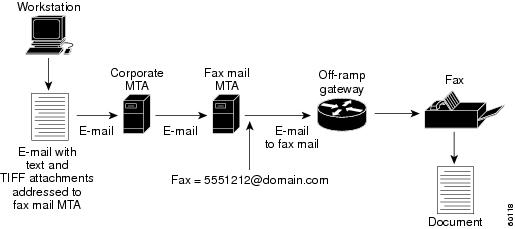
Note
Off-ramp gateway configuration consists of the following tasks:
•
•
•
•
Configuring Off-Ramp Dial Peers
Off-ramp faxing is the second half of the store-and-forward fax topology illustrated in Figure 4. With off-ramp faxing, the package delivered to the voice fax gateway is an SMTP message. The content of the message is encoded by the gateway into a TIFF attachment file and the message headers are transferred to a cover page for the fax.
Because an off-ramp fax is delivered to a terminating gateway, it is delivered using IP, and the dial peer that it finds in the gateway is an MMoIP dial peer. This MMoIP dial peer runs the off-ramp fax TCL IVR script, which hands the call to a matching POTS dial peer. The POTS dial peer sets up a call to a fax machine on the telephony side of the gateway, remodulates the IP packets into a G3 fax, and delivers the fax to a G3 fax machine.
Following is an example of a pair of dial peers configured for off-ramp faxing:
dial-peer voice 100 mmoipapplication offincoming called-number 8......information-type fax!dial-peer voice 101 potsdestination-pattern 8......port 0:Dprefix 8The DNIS of the destination fax machine is a seven-digit number beginning with 8. This number is received by MMoIP dial peer 100 in the off-ramp fax gateway. SMTP directs the call to the IP address of the gateway, while the number configured in the username portion of the SMTP message (fax=8531827@) links the message to a particular dial peer in the gateway.
This dial peer is configured with the TCL IVR application named off. After the off-ramp parameters are collected, the script hands off the call to POTS dial peer 101 for delivery to the destination fax machine.
POTS Dial Peers
To configure the POTS dial peers on the off-ramp gateway, enter the various phone numbers for the fax machines that will be receiving fax mail. An example follows:
dial-peer voice 1 potsdestination-pattern .......port 0:DThe preceding dial peer will initiate a connection to any fax machine within the present area code because the seven dots represent wildcards. This dial peer requires seven digits because there are seven dots. If you wish to enable some long distance fax machines, configure the POTS dial peers as follows:
dial-peer voice 1 potsdestination-pattern 1408.......port 0:Dprefix 1408The preceding dial peer will match an incoming number of 1408 plus seven more digits represented by the seven dots. Because POTS dial peers strip all numbers that are not wildcards, the dial peer will strip the 1408. The prefix command will prepend the 1408 back onto the dial peer, thus allowing any fax machine number in the 408 area code to be reachable. You can enable or restrict dial peers for any or all area codes in this manner.
MMOIP Dial Peers
The primary function of the MMoIP dial peer is to run the TCL IVR application for the off-ramp fax. The incoming IP call setup matches the incoming called-number configured in the MMoIP dial peer to the actual DNIS of the call being established. If that dial peer is configured with an application, then that application is launched.
Configuring Off-Ramp TCL IVR and Call Application Parameters
The TCL IVR script for an off-ramp gateway is very similar to the on-ramp script previously discussed in this document. The primary function of the off-ramp script is to gather authentication, accounting, and calling parameters and, if configured to do so, communicate these parameters to a RADIUS server. After the parameter-gathering is completed, the call is handed off to the internal off-ramp application with the related call-control information. You can display the TCL IVR script name and a short description by entering the show call application voice summary command in privileged EXEC mode.
For a complete discussion of TCL IVR script loading, configuring, and call flow control, see "Configuring On-Ramp TCL IVR and Call Application Parameters" earlier in this document.
Configuring Off-Ramp Fax Send and MTA Receive Parameters
With on-ramp faxing, the fax and MTA parameters are fax receive and MTA send; for off-ramp faxing, the parameters are fax send and MTA receive. Table 2 and Table 3 list the necessary and optional off-ramp parameters.
Configuring Other Off-Ramp Variables
For off-ramp faxing, only one additional variable does not fit into the MTA receive and Fax send categories:
fax interface-type vfcThis global command tells Cisco IOS software to use the voice feature card DSPs for fax processing instead of modems.
Off-Ramp Store-and-Forward Fax Configuration Example
After the preceding commands have been entered, the off-ramp gateway configuration should look similar to the following (IP routing commands and command lines not associated with store-and-forward fax have been removed to save space):
mmoip-b# write terminal!hostname mmoip-b!call rsvp-synccall application voice off tftp://beagle/sffax_offramp5.2.0.0.tclclock timezone PST -8!isdn switch-type primary-5essisdn voice-call-failure 0!!fax send left-header $s$fax send center-header $t$fax send right-header Page: $p$fax send coverpage enablefax send coverpage email-controllablefax send coverpage comment VoIP TME Generated Faxfax interface-type vfcmta receive aliases mmoip-b.cisco.commta receive aliases cisco.commta receive aliases [xx.xxx.xxx.xxx]mta receive maximum-recipients 255mta receive generate-mdn!!controller T1 0framing esfclock source line primarylinecode b8zspri-group timeslots 1-24!controller T1 1clock source line secondary 1!controller T1 2clock source line secondary 2!controller T1 3clock source line secondary 3!interface Serial0:23no ip addressip mroute-cacheisdn switch-type primary-5essisdn incoming-voice modemisdn disconnect-cause 1!interface FastEthernet0ip address 172.19.49.20 255.255.255.128duplex autospeed auto!ip classlessip route 0.0.0.0 0.0.0.0 172.19.49.1!voice-port 0:D!dial-peer voice 100 mmoipapplication offincoming called-number 8......information-type fax!dial-peer voice 101 potsdestination-pattern 8......port 0:Dprefix 8!dial-peer voice 1000 potsdestination-pattern 1831.......port 0:Dprefix 1831!dial-peer voice 1001 mmoipapplication offincoming called-number 1831.......information-type fax!ntp clock-period 17179630ntp server xx.xx.xxx.xxxComplete On-Ramp/Off-Ramp Gateway Configuration Example
Following is an example of a Cisco gateway configured for both on-ramp and off-ramp store-and-forward fax (IP routing commands and command lines not associated with store-and-forward fax have been removed to save space):
mmoip-b# write terminal!hostname mmoip-b!enable secret 5 $1$CF2w$GbYL.9.Y5ccJKSdEBh13f0!username ted password 7 151A1E0A02!resource-pool disable!clock timezone PST -8!isdn switch-type primary-5essisdn voice-call-failure 0call application voice roll tftp://beagle/fax_rollover_on_busy.tclcall application voice off tftp://beagle/t37_offramp.0.0.6.tclcall application voice off accounting enablecall application voice off accounting-list faxcall application voice off language 1 encall application voice off set-location en 0 tftp://beagle/prompts/en/!call application voice onramp tftp://beagle/t37_onramp13.tclcall application voice onramp password 1234call application voice onramp authen-method dniscall application voice onramp authen-list faxcall application voice onramp authentication enablecall application voice onramp accounting enablecall application voice onramp accounting-list faxcall application voice onramp language 1 encall application voice onramp set-location en 0 tftp://topeka/prompts/en/voice hunt user-busy!voice service voip!fax receive called-subscriber $d$fax send max-speed 9600fax send left-header $s$fax send center-header $t$fax send right-header Page: $p$fax send coverpage enablefax send coverpage email-controllablefax send coverpage comment VoIP TME Generated Faxfax interface-type vfcmta send server fresno.cisco.commta send server 171.44.45.7mta send subject VoIP TME Faxmailmta send origin-prefix "Cisco Powered Fax Mail"mta send postmaster mailman@xxx.xxx.xxx.xxxmta send mail-from hostname voip-tme.cisco.commta send mail-from username $s$mta send return-receipt-to hostname cisco.commta send return-receipt-to username joeusermta receive aliases mmoip-b.cisco.commta receive aliases cisco.commta receive aliases [xxx.xxx.xxx.xxx]mta receive aliases [xxx.xxx.xxx.xxx]mta receive maximum-recipients 255mta receive generate-mdn!controller T1 0framing esfclock source line primarylinecode b8zspri-group timeslots 1-24!controller T1 1clock source line secondary 1!controller T1 2clock source line secondary 2!controller T1 3clock source line secondary 3!gw-accounting h323gw-accounting h323 vsagw-accounting voip!interface Serial0:23no ip addressip mroute-cacheisdn switch-type primary-5essisdn incoming-voice modemisdn disconnect-cause 1!interface FastEthernet0ip address xxx.xxx.xxx.xxx 255.255.255.128duplex autospeed auto!voice-port 0:D!dial-peer voice 1 potsapplication sandfincoming called-number xxx....direct-inward-dial!dial-peer voice 2 potsapplication sandfincoming called-number xxx....direct-inward-dial!dial-peer voice 3 potsapplication sandfincoming called-number xxxx.......direct-inward-dial!dial-peer voice 68 mmoipapplication fax_on_vfc_onramp_app out-bounddestination-pattern xxxxxxxinformation-type faxsession target mailto:user1@cisco.commdndsn delayeddsn successdsn failure!dial-peer voice 69 mmoipapplication fax_on_vfc_onramp_app out-bounddestination-pattern xxxxxxxinformation-type faxsession target mailto:user2@cisco.commdndsn delayeddsn successdsn failure!dial-peer voice 1477 potsapplication rollincoming called-number xxxxxxxdirect-inward-dial!dial-peer voice 77 voippreference 1application rolldestination-pattern xxxxxxxsession target ipv4:xxx.xx.xxx.xxfax rate 14400!dial-peer voice 771 mmoippreference 2application fax_on_vfc_onramp_app out-bounddestination-pattern xxxxxxxinformation-type faxsession target mailto:user3@cisco.com!dial-peer voice 79 mmoipapplication fax_on_vfc_onramp_app out-bounddestination-pattern xxxxxxxinformation-type faxsession target mailto:jamesbond@fresno.cisco.commdndsn success!dial-peer voice 853 mmoipapplication offincoming called-number 8......information-type fax!dial-peer voice 1853 potsdestination-pattern 8......port 0:Dprefix 8!dial-peer voice 831 mmoipapplication offincoming called-number 1831.......information-type fax!dial-peer voice 1831 potsdestination-pattern 1831.......port 0:Dprefix 1831!line con 0exec-timeout 0 0transport input noneline aux 0line vty 0 4!ntp clock-period 17179630ntp server xxx.xx.xx.xxxendSending an Off-Ramp Fax
A debug function is built into Cisco IOS software so that you can determine whether off-ramp faxing is working. The application sends an off-ramp fax from the off-ramp gateway to the number that is entered on the command line. Following is an example:
mmoip-b# debug mmoip send fax 8531827mmoip_send_test_fax: phone num=8531827Test succeed!The test command sends a one-page fax with the following short message to the number specified: "This is a test fax sent by Cisco Powered Libretto Faxmail." If the test fax does not succeed, use the debug foip offramp command to try to determine the cause of the problem.
We mentioned earlier that an off-ramp fax can be sent by using an e-mail client such as Netscape or Eudora. Because the off-ramp gateway contains a compliant SMTP engine, off-ramp faxes can also be sent by a direct Telnet connection to the SMTP port (Port 25) of the off-ramp gateway. This method is employed by many bulk fax service providers.
A typical off-ramp fax session using Telnet has the following steps:
1.
2.
3.
4.
5.
6.
7.
8.
From a machine enabled with a Telnet client, start a Telnet session to Port 25 of the off-ramp gateway. Commands entered at the Telnet client are in boldface; responses from the off-ramp gateway are in regular type.
orange% telnet 172.19.49.20 25Trying 172.19.49.20...Connected to 172.19.49.20.Escape character is '^]'.220 mmoip-b.cisco.com Cisco NetWorks ESMTP serverehlo world250-mmoip-b.cisco.com, hello world [172.19.49.14] (really )250-ENHANCEDSTATUSCODES250-8BITMIME250-PIPELINING250-HELP250-DSN250 XACCOUNTINGmail from:sender@cisco.com250 2.5.0 Sender <sender@cisco.com> okrcpt to:fax=8531827@mmoip-b.cisco.com250 2.1.5 Recipient <fax=8531827@mmoip-b.cisco.com> ok, maps to '8531827' (cp=yes)data354 Enter mail, end with a single "."subject: Store and Forward fax maildate: Dec 12, 2000(empty line sent here)Now is the time for all good men to come to the aid of their party..250 2.5.0 Message delivered to remote fax machineThe fax process begins when you enter the data command, but text data is not received until you enter a blank line. The data entered before the blank line is extra cover-page material, such as the date and subject of the fax mail. This is also where you add attachments. After entering cover-page data and attachments, you must enter a blank line.
After entering the blank line, you can enter fax-page text data. Different third-party applications have different ways of generating text and attaching TIFF files. You can create a UNIX script, for example, that will automatically generate an off-ramp fax with an attachment through a Telnet connection.
After all the text and attachments have been entered, signal the end of the transmission by entering a period (.) on a line by itself. If the fax transmission is successful, the remote fax machine will send a successful transfer message to the off-ramp gateway, and the last line in the preceding example will be displayed on your Telnet client.
Cisco T.38 Real-Time Fax and Never-Busy Fax Service
The configuration of T.38 real-time fax on Cisco voice gateways is similar to the configuration of VoIP calls. Telephony dial peers are POTS dial peers; network dial peers are VoIP dial peers. In the following T.38 dial peer configuration example, dial peers 1 and 2 are on the originating gateway; dial peer 3 is on the terminating gateway:
dial-peer 1 potsincoming called-number 555....direct-inward-dialdial-peer voice 2 voipdestination-pattern 5551212session target ipv4:172.19.26.49dial-peer voice 3 potsdestination-pattern.port 0:DThis configuration assumes that the fax machine is plugged directly into the gateway or that a redialer is being used. See the section "Configuration Guidelines for On-Ramp Store-and-Forward Fax" for more details. This section examines the never-busy functionality of T.38 fax.
In the scenario previously described, if the far-end fax machine is busy or unreachable, the near-end fax machine tries to redial for a configurable number of times and then quits without success if the far-end gateway is down. With the addition of some dial peers and call application parameters, a T.38 fax can be configured to roll over to a T.37 fax session when the far end is busy or unreachable.
Add the TCL IVR rollover application to the on-ramp gateway. See the section "Configuring On-Ramp TCL IVR and Call Application Parameters" for details on TCL IVR scripts. The script in the 2.0 TCL IVR bundle is named fax_rollover_on_busy.2.0.0.tcl, and is added to the originating gateway with the following command:
mmoip-b(config)# $call application voice roll tftp://topeka/ifax/fax_rollover_on_busy.tclLoading ifax/fax_rollover_on_busy.tcl from 172.19.49.14 (via FastEthernet0): ![OK - 4803/9216 bytes]Read script succeeded. size=4803,url=tftp://topeka/ifax/fax_rollover_on_busy.tclNotice that the rollover application is given the name roll in the preceding call application voice command. After installing the script in the originating gateway, add the application to the POTS dial peer that will answer T.38 calls and run the rollover application:
dial-peer voice 1 potsapplication rollincoming called-number 325....direct-inward-dialThe POTS dial peer will answer all calls to seven-digit numbers starting with 325. The rollover application will be launched, and because DID is configured, the POTS dial peer will pass the call to a VoIP dial peer that matches the DNIS. The TCL IVR application has a procedure for setting up the call, waiting for success, and, upon receiving a busy or gateway-down message, setting up the same call again with new destination parameters. When the call is returned to the originating gateway, the gateway searches for a new VoIP dial peer with the same destination number, and a preference equal to or greater than the first dial peer that it found. If it finds one, it sets up the call again. The configuration for the VoIP dial peers follows—the first being the T.38 dial peer and the second being the T.37 dial peer:
dial-peer voice 78 voippreference 1destination-pattern 3251478session target ipv4:172.19.49.12fax rate 14400fax protocol t38 ls-redundancy 0 hs-redundancy 0!dial-peer voice 781 mmoippreference 2application fax_on_vfc_onramp_app out-bounddestination-pattern 3251478information-type faxsession target mailto:$d$@cisco.comBecause the dial peers are configured with the same destination pattern and different preferences, the gateway will try the destination with the lowest preference number (meaning the highest preference) first, and then, if required, try the next preferential choice, and so on. If several dial peers are configured with the same preference, then the gateway will choose the first one present in the configuration.
If a T.38 call is initiated to the number 3251478, the first choice will be to send the fax according to the details in dial peer 78. If the destination number is busy or the gateway at 172.19.49.12 is down, the call will be retried with the details contained in dial peer 781, namely a T.37 fax to $d$@cisco.com. This model results in the fax being delivered—regardless of the fact that the far-end fax machine is busy.
Note
Assuming no PBX, or a properly configured PBX, the preceding scenario will provide a never-busy model for faxing.
Security Considerations
Security for connections is supported in Cisco gateways through the use of the AAA protocol. Security on the off-ramp gateway can be further enhanced by using Cisco IOS access lists.
AAA On-Ramp Authentication
AAA is used on the on-ramp gateway to perform authentication and accounting. Authentication is employed to restrict access, and is performed in conjunction with a RADIUS or TACACS+ server. Access can be restricted through authentication of one of the following attributes:
•
•
•
•
•
•
To choose an authentication method, use the call application voice authen-method command in global configuration mode. To authenticate an on-ramp fax using one of the preceding methods, there must be an authentication server configured with the chosen authentication parameters.
AAA authentication for on-ramp gateways uses the fax method list. This method list authenticates the incoming call according to the authen-method configured in the call application parameters. All AAA configuration begins with the aaa new-model command. The AAA and call application command lines for authentication are as follows:
aaa new-modelaaa authentication login fax group radius localaaa authorization exec fax group radiusThe RADIUS protocol does authentication (who) and authorization (what) together. Without the aaa authorization command, authentication will fail. After entering the aaa commands, you may enter the radius-server commands. Trying to enter radius-server commands before enabling AAA with the aaa new-model command will result in the Unrecognized command error message.
The following RADIUS commands are required for authentication:
radius-server host ip-address auth-port 1645 acct-port 1646radius-server key testThe auth-port 1645 and acct-port 1646 values shown in the preceding radius-server host command are the default port assignments from the fax gateway. Other ports may be configured if the RADIUS server in the network requires it. If no port assignments are specified, the default ports will be assigned automatically.
The radius-server key command denotes the password that is exchanged with the RADIUS server through the use of the Challenge Handshake Authentication Protocol (CHAP).
Other RADIUS commands may be entered at this point, but they are not necessary to successful authentication. Other RADIUS commands control the behavior of the RADIUS client in the gateway by controlling parameters such as timeout, retry count, and retry interval. Consult the Cisco security documentation for a complete list.
In addition to enabling authentication and specifying the authentication method and the authentication list, you must configure call application voice commands for the authentication portion of AAA. The TCL IVR script also requires at least one language selection, and its corresponding URL must point to the location of the audio files. Following is an example showing the commands you must use:
call application voice onramp authentication enablecall application voice onramp authen-list faxcall application voice onramp authen-method dniscall application voice onramp password foipcall application voice onramp language 1 encall application voice onramp set location en 0 tftp://topeka/prompts/en/The variables configured are retrieved by the TCL IVR on-ramp application. To observe the actions of the TCL IVR script, use the debug voip ivr command.
Problems with authentication can occur in many different forms. For example, you might need to use the h323 method list instead of the fax method list for authentication to work properly. This h323 method list is configured with the following command:
aaa authentication login h323 group radiusOther problems with on-ramp authentication can be uncovered with the following debug commands:
debug mmoip aaadebug aaa authenticationdebug aaa authorizationIn summary, on-ramp authentication is accomplished by creating a username and password in the RADIUS server that conforms to the method chosen for authentication. This method does not make sense for off-ramp faxing because the connection is coming from an MTA rather than from dual-tone multifrequency (DTMF) or redialer information from the PSTN side.
AAA Off-Ramp Authentication
Off-ramp authentication is the process of allowing or denying other MTAs to connect to the gateway MTA. This authentication can be easily accomplished with ACLs. An ACL is configured on the off-ramp gateway that allows only specified MTAs—identified by their IP addresses—to connect to the gateway and deliver an SMTP message to be sent out as a T.37 fax.
Following is a simple ACL configuration. For more detailed information about ACLs, refer to the Cisco IOS Security Configuration Guide.
Configure the list and specify the allowed hosts:
access-list 1 permit ip-address 0.0.0.0There is an implicit deny all at the end of every access list. The result of the preceding list would be to allow only one host to connect to the gateway. The following command would permit any host in the range of 172.19.49.1 to 172.19.49.126:
access-list 2 permit 172.19.49.0 0.0.0.127To activate an access list, you must apply it to an interface:
gateway (config)# interface FastEthernet 0gateway (config-if)# ip access-group 1 inYou can apply the access list to incoming or outgoing connections. The connection from the MTA is incoming, and therefore is applied with the in keyword.
Note
mmoip aaa receive-id primarymmoip aaa global-passwordmmoip aaa send-accounting enable
Note
Billing and Accounting
Fax over IP (I-fax) accounting records can be obtained through the use of RADIUS, TACACS+, SNMP, and SMTP. The supported SNMP Management Information Bases (MIBs) involved in store-and-forward fax are as follows:
•
•
•
•
•
This section covers RADIUS and SMTP accounting. SNMP accounting is not covered. Implementation of TACACS+ is similar to RADIUS and is also not covered.
RADIUS Accounting and Billing
RADIUS records sent to the RADIUS server include both standard RADIUS attributes and Cisco vendor-specific attributes (VSAs). The RADIUS server must be able to understand VSAs as described in RFC 2138 (Attribute 26). For a description of standard RADIUS attributes, refer to the following documents:
•
•
•
•
VSA call detail record (CDR) variables used in store-and-forward fax billing and accounting are listed in Table 4.
Mmoip Accounting
Store-and-forward fax was designed to use the fax accounting method list. This method list adds the capability to receive accounting records through the mmoip-aaa facility. These CDRs can be displayed in the off-ramp or on-ramp gateway through the use of the debug mmoip aaa command. Following is a configuration extract from the off-ramp gateway and an accounting session from an off-ramp fax, with this debug command turned on:
aaa new-modelaaa authentication login default localaaa authentication login fax group radiusaaa authentication login h323 group radiusaaa authorization exec fax group radiusaaa accounting connection fax stop-only group radiusenable secret 5 $1$4L6w$W0SoUHw2YgkK4IPJ7VtHc1fl---------configuration items deleted ----------------‡call application voice off tftp://topeka/ifax/t37_offramp6.2.0.0.tclcall application voice off accounting enablecall application voice off accounting-list faxcall application voice off authentication enablecall application voice off password foipcall application voice off authen-list faxcall application voice off authen-method gatewaycall application voice off language 1 encall application voice off set-location en 0 tftp://topeka/prompts/en/1w0d: %ISDN-6-DISCONNECT: Interface Serial0:22 disconnected from 8531827 , call lasted 121 seconds1w0d: mmoip_aaa_offramp: Called-Station-Id = fax=8531827@[172.19.49.20]1w0d: mmoip_aaa_offramp: authenID = kansas.cisco.com1w0d: mmoip_aaa_offramp: fax_account_id_origin = GATEWAY_ID1w0d: mmoip_aaa_offramp: fax_msg_id =1w0d: mmoip_aaa_offramp: fax_pages = 51w0d: mmoip_aaa_offramp: fax_modem_time = 121/1231w0d: mmoip_aaa_offramp: fax_connect_speed = 96001w0d: mmoip_aaa_offramp: fax_auth_status = USER AUTHENTICATED1w0d: mmoip_aaa_offramp: email_server_ack_flag = TRUE1w0d: mmoip_aaa_offramp: gateway_id = kansas.cisco.com1w0d: mmoip_aaa_offramp: call_type = Fax Send1w0d: mmoip_aaa_offramp: port_used = 0:D (60)1w0d: mmoip_aaa_offramp: abort_cause = 101w0d: mmoip_aaa_offramp: Called-Station-Id = fax=8531827@[172.19.49.20]1w0d: mmoip_aaa_offramp: authenID = kansas.cisco.com1w0d: mmoip_aaa_offramp: fax_account_id_origin = GATEWAY_ID1w0d: mmoip_aaa_offramp: fax_msg_id =1w0d: mmoip_aaa_offramp: fax_connect_speed = 96001w0d: mmoip_aaa_offramp: fax_auth_status = USER AUTHENTICATED1w0d: mmoip_aaa_offramp: email_server_ack_flag = TRUE1w0d: mmoip_aaa_offramp: gateway_id = kansas.cisco.com1w0d: mmoip_aaa_offramp: call_type = Fax Send1w0d: mmoip_aaa_offramp: abort_cause = 10The debug call details come only at the call termination because stop-only accounting is enabled. They cover some of the same variables as the radius debugs but are more fax-centric. The variable fax_modem_time records the time spent sending fax information and the total time of the connection. In this example, the connection was up for 123 seconds and fax page information was sent for 121 seconds.
SMTP Accounting
The Cisco AS5300 off-ramp gateway can send account records by SMTP. This functionality is activated through use of an intelligent fax client. To send a fax transmission, the fax client initiates a Telnet session to the SMTP port (Port 25) of the off-ramp gateway and then executes a series of commands. In a typical operation, the client executes the following commands:
telnet 10.14.120.2 25ehlo anyserver.commail from: <>rcpt to: <FAX=571-0839@cisco.comxact (<<< this command verb enables the output of esmtp accounting data)dataheader info (info supplied after the data command comprises header details)Testing 1 2 3 (after a carriage return/line feed, the text body of theTesting 1 2 3 transmission is entered)Testing 1 2 3Testing 1 2 3Testing 1 2 3Testing 1 2 3Testing 1 2 3. (<<< a period on a line by itself signals the end of transmission)Following is an actual session in which the accounting application was activated manually. The commands required to activate the application are in boldface; the output from the off-ramp gateway is in italics.
Note
fresno.cisco.com% telnet belmont 25Trying 172.22.42.57...Connected to belmont.cisco.com.Escape character is '^]'.220 fresno.cisco.com Cisco NetWorks ESMTP serverehlo belmont250-fresno.cisco.com, hello belmont [172.22.42.60] (really )250-ENHANCEDSTATUSCODES250-8BITMIME250-PIPELINING250-HELP250-DSN250-XSESSION250 XACCOUNTINGmail from:<joeuser@cisco.com>250 2.5.0 Sender <joeuser@cisco.com> okrcpt to:<fax=5251111@fresno.cisco.com>250 2.1.5 Recipient <fax=5251111@fresno.cisco.com> ok, maps to '5251111' (cp=yes)xact250 2.5.0 XACCOUNTING enableddata354 Enter mail, end with a single "."Subject:Faxmail accounting enabled (Message details will go here, and then a carriageDate:March 2, 2001 return/line feed before the text of the message.This is the time for all good men to come to the aid of their party.. (A period on a line by itself signals the endof a message.)250-2.5.0 Message delivered to remote fax machine250-2.5.0 fax_modem_time = 51/60 (These numbers are actual fax transmissiontime/total connection time.)250-2.5.0 fax_pages = 2250-2.5.0 gateway_id = belmont.cisco.com250-2.5.0 fax_connect_speed = 14400bps250-2.5.0 transmit_bytes = 22585250-2.5.0 port_used = slot:1 port:5250-2.5.0 call_type = Fax Send250-2.5.0 abort_cause = 0250-2.5.0 T30_error_code = 0250-2.5.0 ISDN_disconnect_code = 16250 2.5.0 CSID =5251111quit221 2.3.0 Goodbye from fresno.cisco.com; closing connectionConnection closed by foreign host.fresno.cisco.com%Figure 7 depicts the fax that was received from the preceding transmission.
Figure 7 Received Fax
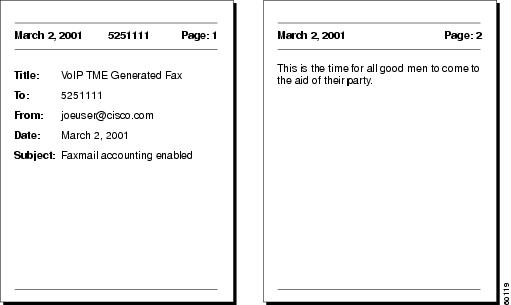
Note that all the accounting fields are preceded by a number string. In the preceding example, the string is 250-2.5.0.
The SMTP server replies to the terminating period (.) following standard SMTP rules, which require that each line of the reply string start with a three-digit number, and that continuation lines have a hyphen (-) in the fourth position. Because the Cisco AS5300 SMTP server also implements enhanced SMTP error codes (RFC 2034), each line will also contain a one- to three-digit number, a period, a one- to three-digit number, a period, a one- to three-digit number, and a space. The following accounting information described is sent after the SMTP response code and the SMTP enhanced error code. Accounting information is always sent one per line.
Some typical responses sent by the SMTP server application after the terminating period (.) are shown in the following paragraph. Note that 250 represents success, 450 is a transient error (meaning that the e-mail client should or will retry); 554 means a permanent error.
250-2.5.0 Message delivered to remote fax machine450 4.3.2 Could not reserve a modem450-4.4.2 A fax protocol delivery error occurred.554-5.1.1 Destination is not a receive FAXFollowing are definitions of the accounting fields:
•
•
•
•
•
•
•
•
•
The following are valid abort codes:
0 NO_ABORT1 FAP_ABORT, (Fax application process)2 ESMTP_ABORT3 TIFF_ABORT4 T2F_ABORT, (Text to Fax process)5 AUTHENTICATION_ABORTThe following are valid T30 error codes:
/* Call Placement */0 NORMAL_CONNECTION1 RING_DETECT_NOCONNECT2 USER_ABORT3 NO_LOOP_CURRENT/* Start proprietary codes */4 AT_TIMEOUT5 AT_ERROR6 AT_NO_DIALTONE7 AT_BUSY8 AT_NO_CARRIER/* End proprietary codes *//* Transmit Phase A & Miscellaneous Errors */10 PHASE_A_ERROR11 NO_ANSWER_T30_TIMEOUT/* Transmit Phase B Hangup Codes */20 TRANSMIT_PHASE_B_ERROR21 REMOTE_CANNOT_RECEIVE_SEND22 COMREC_ERR_TRANSMIT_PHASE_B23 COMREC_INVALID_COMMAND24 RSPEC_ERROR_B25 DCS_NO_RESPONSE26 DIS_DTC_RECEIVED_3_TIMES27 FTT_240028 RSPREC_INVALID_RESPONSE_B/* Transmit Phase C Hangup Codes */40 TRANSMIT_PHASE_C_ERROR43 DTE_DCE_UNDERFLOW/* Transmit Phase D Hangup Codes */50 TRANSMIT_PHASE_D_ERROR51 RSPREC_ERROR_D52 NO_RESPONSE_MPS53 INVALID_RESPONSE_MPS54 NO_RESPONSE_EOP55 INVALID_RESPONSE_EOP56 NO_RESPONSE_EOM57 INVALID_RESPONSE_EOM58 UNABLE_CONTINUE/* Receive Phase B Hangup Codes */70 RECEIVE_PHASE_B_ERROR71 RXSPREC_ERROR72 COMREC_ERROR_RXB73 T30_T2_TIMEOUT_PAGE74 T30_T1_TIMEOUT_EOM/* Receive Phase C Hangup Codes */90 RECEIVE_PHASE_C_ERROR91 MISSING_EOL92 UNUSED_CODE93 DCE_TO_DTE_OVERFLOW/* Receive Phase D Hangup Codes */100 RECEIVE_PHASE_D_ERROR101 RSPREC_INVALID_RESPONSE_RECEIVED_D102 COMREC_INVALID_RESPONSE_RECEIVED_D103 UNABLE_TO_CONTINUE_AFTER_PIN_PIPFollowing are the valid ISDN_disconnect_code values:
CC_CAUSE_UNINITIALIZED = 0, /* un-initialized (0) */CC_CAUSE_UANUM = 1, /* unassigned num */CC_CAUSE_NO_ROUTE_TO_TRANSIT_NETWORK = 2,CC_CAUSE_NO_ROUTE = 3, /* no rt to dest */CC_CAUSE_SEND_INFO_TONE = 4,CC_CAUSE_MISDIALLED_TRUNK_PREFIX = 5,CC_CAUSE_CHANNEL_UNACCEPTABLE = 6,CC_CAUSE_CALL_AWARDED = 7,CC_CAUSE_PREEMPTION = 8,CC_CAUSE_PREEMPTION_RESERVED = 9,CC_CAUSE_NORM = 16,CC_CAUSE_BUS = 17, /* user busy */CC_CAUSE_NORS = 18, /* no user response*/CC_CAUSE_NOAN = 19, /* no user answer. */CC_CAUSE_SUBSCRIBER_ABSENT = 20,CC_CAUSE_REJECT = 21, /* call rejected. */CC_CAUSE_NUMBER_CHANGED = 22,CC_CAUSE_NON_SELECTED_USER_CLEARING = 26,CC_CAUSE_DESTINATION_OUT_OF_ORDER = 27,CC_CAUSE_INVALID_NUMBER = 28,CC_CAUSE_FACILITY_REJECTED = 29,CC_CAUSE_RESPONSE_TO_STATUS_ENQUIRY = 30,CC_CAUSE_UNSP = 31, /* unspecified. */CC_CAUSE_NO_CIRCUIT = 34, /* no circuit. */CC_CAUSE_REQUESTED_VPCI_VCI_NOT_AVAILABLE = 35CC_CAUSE_VPCI_VCI_ASSIGNMENT_FAILURE = 36,CC_CAUSE_CELL_RATE_NOT_AVAILABLE = 37,CC_CAUSE_NETWORK_OUT_OF_ORDER = 38,CC_CAUSE_PERM_FRAME_MODE_OUT_OF_SERVICE = 39,CC_CAUSE_PERM_FRAME_MODE_OPERATIONAL = 40,CC_CAUSE_TEMPORARY_FAILURE = 41,CC_CAUSE_SWITCH_CONGESTION = 42,CC_CAUSE_ACCESS_INFO_DISCARDED = 43,CC_CAUSE_NO_REQ_CIRCUIT = 44,CC_CAUSE_NO_VPCI_VCI_AVAILABLE = 45,CC_CAUSE_PRECEDENCE_CALL_BLOCKED = 46,CC_CAUSE_NO_RESOURCE = 47, /* no resource. */CC_CAUSE_QOS_UNAVAILABLE = 49,CC_CAUSE_FACILITY_NOT_SUBCRIBED = 50,CC_CAUSE_CUG_OUTGOING_CALLS_BARRED = 53,CC_CAUSE_CUG_INCOMING_CALLS_BARRED = 55,CC_CAUSE_BEARER_CAPABILITY_NOT_AUTHORIZED = 57,CC_CAUSE_BEARER_CAPABILITY_NOT_AVAILABLE = 58,CC_CAUSE_INCONSISTENCY_IN_INFO_AND_CLASS = 62,CC_CAUSE_NOSV = 63,/* service or option * not available, * unspecified. */CC_CAUSE_BEARER_CAPABILITY_NOT_IMPLEMENTED = 65,CC_CAUSE_CHAN_TYPE_NOT_IMPLEMENTED = 66,CC_CAUSE_FACILITY_NOT_IMPLEMENTED = 69,CC_CAUSE_RESTRICTED_DIGITAL_INFO_BC_ONLY = 70,CC_CAUSE_SERVICE_NOT_IMPLEMENTED = 79,CC_CAUSE_INVALID_CALL_REF_VALUE = 81,CC_CAUSE_CHANNEL_DOES_NOT_EXIST = 82,CC_CAUSE_CALL_EXISTS_CALL_ID_IN_USE = 83,CC_CAUSE_CALL_ID_IN_USE = 84,CC_CAUSE_NO_CALL_SUSPENDED = 85,CC_CAUSE_CALL_CLEARED = 86,CC_CAUSE_USER_NOT_IN_CUG = 87,CC_CAUSE_INCOMPATIBLE_DESTINATION = 88,CC_CAUSE_NON_EXISTENT_CUG = 90,CC_CAUSE_INVALID_TRANSIT_NETWORK = 91,CC_CAUSE_AAL_PARMS_NOT_SUPPORTED = 93,CC_CAUSE_INVALID_MESSAGE = 95,CC_CAUSE_MANDATORY_IE_MISSING = 96,CC_CAUSE_MESSAGE_TYPE_NOT_IMPLEMENTED = 97,CC_CAUSE_MESSAGE_TYPE_NOT_COMPATIBLE = 98,CC_CAUSE_IE_NOT_IMPLEMENTED = 99,CC_CAUSE_INVALID_IE_CONTENTS = 100,CC_CAUSE_MESSAGE_IN_INCOMP_CALL_STATE = 101,CC_CAUSE_RECOVERY_ON_TIMER_EXPIRY = 102,CC_CAUSE_NON_IMPLEMENTED_PARAM_PASSED_ON = 103,CC_CAUSE_UNRECOGNIZED_PARAM_MSG_DISCARDED = 110,CC_CAUSE_PROTOCOL_ERROR = 111,CC_CAUSE_INTERWORKING = 127,CC_CAUSE_NEXT_NODE_UNREACHABLE = 128,CC_CAUSE_DTL_TRANSIT_NOT_MY_NODE_ID = 160,Using SMTP accounting, vendors implementing proprietary intelligent fax applications can collect accounting and CDR information on fax transmissions without the deployment of a RADIUS server.
Related Documents
•
•
•
•
•
•
•
•
•
•
•
•
•
•
•
•
•
•
•
 Feedback
Contact Cisco
- Open a Support Case

- (Requires a Cisco Service Contract)