- Finding Feature Information
- Contents
- Prerequisites for Firewall Support of HTTPS Authentication Proxy
- Restrictions for Firewall Support of HTTPS Authentication Proxy
- Information About Firewall Support of HTTPS Authentication Proxy
- How to Use HTTPS Authentication Proxy
- Configuration Examples for HTTPS Authentication Proxy
- Additional References
- Feature Information for Firewall Support of HTTPS Authentication Proxy
- Glossary
Firewall Support of HTTPS Authentication Proxy
The Firewall Support of HTTPS Authentication Proxy feature allows a user to encrypt the change of the username and password between the HTTP client and the Cisco IOS router via Secure Socket Layer (SSL) when authentication proxy is enabled on the Cisco IOS firewall, thereby ensuring confidentiality of the data passing between the HTTP client and the Cisco IOS router.
Finding Feature Information
Your software release may not support all the features documented in this module. For the latest feature information and caveats, see the release notes for your platform and software release. To find information about the features documented in this module, and to see a list of the releases in which each feature is supported, see the "Feature Information for Firewall Support of HTTPS Authentication Proxy" section.
Use Cisco Feature Navigator to find information about platform support and Cisco IOS and Catalyst OS software image support. To access Cisco Feature Navigator, go to http://tools.cisco.com/ITDIT/CFN/jsp/index.jsp. An account on Cisco.com is not required.
Contents
• Prerequisites for Firewall Support of HTTPS Authentication Proxy
•Restrictions for Firewall Support of HTTPS Authentication Proxy
•Information About Firewall Support of HTTPS Authentication Proxy
•How to Use HTTPS Authentication Proxy
•Monitoring Firewall Support of HTTPS Authentication Proxy
•Feature Information for Firewall Support of HTTPS Authentication Proxy
Prerequisites for Firewall Support of HTTPS Authentication Proxy
Before enabling this feature, ensure that your router is running a crypto image with k8 and k9 designations and that your Cisco IOS image supports SSL.
Restrictions for Firewall Support of HTTPS Authentication Proxy
•Although Port to Application Mapping (PAM) configuration is allowed in Cisco IOS Firewall processing, authentication proxy is limited to the server ports that are configured by the HTTP subsystem of the router.
•To conform to a proper TCP connection handshake, the authentication proxy login page will be returned from the same port and address as the original request. Only the postrequest, which contains the username and password of the HTTP client, will be forced to use HTTP over SSL (HTTPS).
Information About Firewall Support of HTTPS Authentication Proxy
To configure the Firewall Support of HTTPS Authentication Proxy feature, you must understand the following concepts:
•Feature Design for HTTPS Authentication Proxy
Authentication Proxy
Authentication proxy grants Internet access to an authorized user through the Cisco Secure Integrated Software (also known as a Cisco IOS firewall). Access is granted on a per-user basis after the proper identification process is completed and the user policies are retrieved from a configured authentication, authorization, and accounting (AAA) server.
When authentication proxy is enabled on a Cisco router, users can log into the network or access the Internet via HTTP(S). When a user initiates an HTTP(S) session through the firewall, the authentication proxy is triggered. Authentication proxy first checks to see if the user has been authenticated. If a valid authentication entry exists for the user, the connection is completed with no further intervention by authentication proxy. If no entry exists, the authentication proxy responds to the HTTP(S) connection request by prompting the user for a username and password. When authenticated, the specific access profiles are automatically retrieved and applied from a CiscoSecure Access Control Server (ACS), or other RADIUS or TACACS+ authentication server. The user profiles are active only when there is active traffic from the authenticated users.
Feature Design for HTTPS Authentication Proxy
Authentication proxy support using HTTPS provides encryption between the HTTPS client and the Cisco IOS router during the username and password exchange, ensuring secure communication between trusted entities.
Figure 1 and the corresponding steps explain how the data flows from the time the client issues a HTTP request to the time the client receives a response from the Cisco IOS router.
Figure 1 HTTPS Authentication Proxy Data Flow
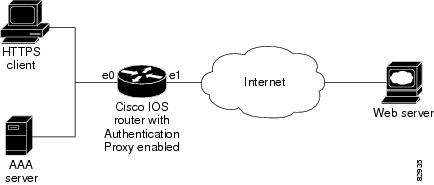
1. The HTTP or HTTPS client requests a web page.
2. The HTTP or HTTPS request is intercepted by the Cisco IOS router with authentication proxy.
3. The router marks the TCP/IP connection and forwards the request (with the client address) to the web server, if authentication is required.
4. The web server builds the authentication request form and sends it to the HTTP or HTTPS client via the original request protocol—HTTP or HTTPS.
5. The HTTP or HTTPS client receives the authentication request form.
6. The user enters his or her username and password in the HTTPS POST form and returns the form to the router. At this point, the authentication username and password form is sent via HTTPS. The web server will negotiate a new SSL connection with the HTTPS client.

Note Your Cisco IOS image must support HTTPS, and HTTPS must be configured; otherwise, an HTTP request form will be generated.
7. The router receives the HTTPS POST form from the HTTPS client and retrieves the username and password.
8. The router sends the username and password to the AAA server for client authentication.
9. If the AAA server validates the username and password, it sends the configured user profile to the router. (If it cannot validate the username and password, an error is generated and sent to the router.)
10. If the router receives a user profile from the AAA server, it updates the access list with the user profile and returns a successful web page to the HTTPS client. (If the router receives an error from the AAA server, it returns an error web page to the HTTPS client.)
11. After the HTTPS client receives the successful web page, it retries the original request. Thereafter, HTTPS traffic will depend on HTTPS client requests; no router intervention will occur.
How to Use HTTPS Authentication Proxy
To enable HTTPS authentication proxy, you must enable AAA service, configure the HTTPS server, and enable authentication proxy. This section contains the following procedures:
•Verifying HTTPS Authentication Proxy
Configuring the HTTPS Server
To use HTTPS authentication proxy, you must enable the HTTPS server on the firewall and set the HTTPS server authentication method to use AAA.
Prerequisites
Before configuring the HTTPS server, the authentication proxy for AAA services must be configured by enabling AAA and configuring a RADIUS or TACACS+ server. The certification authority (CA) certificate must also be obtained. See "Related Documents" section for more informaton on these tasks.
SUMMARY STEPS
1. enable
2. configure terminal
3. ip http server
4. ip http authentication aaa
5. ip http secure-server
6. ip http secure-trustpoint name
DETAILED STEPS
What to Do Next
After you have finished configuring the HTTPS server, you must configure the authentication proxy (globally and per interface). See "Related Documents" section for more information on these tasks.
Verifying HTTPS Authentication Proxy
To verify your HTTPS authentication proxy configuration, perform the following optional steps:
SUMMARY STEPS
1. enable
2. show ip auth-proxy configuration
3. show ip auth-proxy cache
4. show ip http server secure status
DETAILED STEPS
Monitoring Firewall Support of HTTPS Authentication Proxy
Perform the following task to troubleshoot your HTTPS authentication proxy configuration:
SUMMARY STEPS
1. enable
2. debug ip auth-proxy detailed
DETAILED STEPS
Configuration Examples for HTTPS Authentication Proxy
This section provides the following comprehensive configuration examples:
•HTTPS Authentication Proxy Support Example
•HTTPS Authentication Proxy Debug Example
HTTPS Authentication Proxy Support Example
The following example is output from the show running-config command. This example shows how to enable HTTPS authentication proxy on a Cisco IOS router.
Router# show running-config
Building configuration...
Current configuration : 6128 bytes
!
version 12.2
service timestamps debug uptime
service timestamps log uptime
no service password-encryption
!
hostname 7200a
!
boot system disk0:c7200-ik9o3s-mz.emweb
aaa new-model
!
!
aaa authentication login default group tacacs+ group radius
aaa authorization auth-proxy default group tacacs+ group radius
aaa session-id common
!
ip subnet-zero
ip cef
!
!
ip domain name cisco.com
!
ip auth-proxy auth-proxy-banner
ip auth-proxy auth-cache-time 3
ip auth-proxy name authname http
ip audit notify log
ip audit po max-events 100
!
! Obtain a CA certificate.
crypto ca trustpoint netCA
enrollment mode ra
enrollment url http://10.3.10.228:80/certsrv/mscep/mscep.dll
subject-name CN=7200a.cisco.com
crl optional
crypto ca certificate chain netCA
certificate ca 0702EFC30EC4B18D471CD4531FF77E29
308202C5 3082026F A0030201 02021007 02EFC30E C4B18D47 1CD4531F F77E2930
0D06092A 864886F7 0D010105 0500306D 310B3009 06035504 06130255 53310B30
09060355 04081302 434F3110 300E0603 55040713 07426F75 6C646572 31163014
06035504 0A130D43 6973636F 20537973 74656D73 310C300A 06035504 0B130349
54443119 30170603 55040313 10495444 20426F75 6C646572 202D2043 41301E17
0D303230 31323532 33343434 375A170D 31323031 32353233 35343333 5A306D31
0B300906 03550406 13025553 310B3009 06035504 08130243 4F311030 0E060355
04071307 426F756C 64657231 16301406 0355040A 130D4369 73636F20 53797374
656D7331 0C300A06 0355040B 13034954 44311930 17060355 04031310 49544420
426F756C 64657220 2D204341 305C300D 06092A86 4886F70D 01010105 00034B00
30480241 00B896F0 7CE9DCBD 59812309 1793C610 CEC83704 D56C29CA 3E8FAC7A
A113520C E15E3DEF 64909FB9 88CD43BD C7DFBAD6 6D523804 3D958A97 9733EE71
114D8F3F 8B020301 0001A381 EA3081E7 300B0603 551D0F04 04030201 C6300F06
03551D13 0101FF04 05300301 01FF301D 0603551D 0E041604 14479FE0 968DAD8A
46774122 2276C19B 6800FA3C 79308195 0603551D 1F04818D 30818A30 42A040A0
3E863C68 7474703A 2F2F6369 73636F2D 736A7477 77383779 792F4365 7274456E
726F6C6C 2F495444 25323042 6F756C64 65722532 302D2532 3043412E 63726C30
44A042A0 40863E66 696C653A 2F2F5C5C 63697363 6F2D736A 74777738 3779795C
43657274 456E726F 6C6C5C49 54442532 30426F75 6C646572 2532302D 25323043
412E6372 6C301006 092B0601 04018237 15010403 02010030 0D06092A 864886F7
0D010105 05000341 0044DE07 3964E080 09050906 512D40C0 D4D86A0A 6B33E752
6E602D96 3F68BB8E 463E3EF6 D29BE400 615E7226 87DE1DE3 96AE23EF E076EE60
BF789728 5ED0D5FC 2C
quit
certificate 55A4795100000000000D
308203FC 308203A6 A0030201 02020A55 A4795100 00000000 0D300D06 092A8648
86F70D01 01050500 306D310B 30090603 55040613 02555331 0B300906 03550408
1302434F 3110300E 06035504 07130742 6F756C64 65723116 30140603 55040A13
0D436973 636F2053 79737465 6D73310C 300A0603 55040B13 03495444 31193017
06035504 03131049 54442042 6F756C64 6572202D 20434130 1E170D30 32303631
38323030 3035325A 170D3033 30363138 32303130 35325A30 3A311E30 1C06092A
864886F7 0D010902 130F3732 3030612E 63697363 6F2E636F 6D311830 16060355
0403130F 37323030 612E6369 73636F2E 636F6D30 5C300D06 092A8648 86F70D01
01010500 034B0030 48024100 F61D6551 77F9CABD BC3ACAAC D564AE53 541A40AE
B89B6215 6A6D8D88 831F672E 66678331 177AF07A F476CD59 E535DAD2 C145E41D
BF33BEB5 83DF2A39 887A05BF 02030100 01A38202 59308202 55300B06 03551D0F
04040302 05A0301D 0603551D 0E041604 147056C6 ECE3A7A4 E4F9AFF9 20F23970
3F8A7BED 323081A6 0603551D 2304819E 30819B80 14479FE0 968DAD8A 46774122
2276C19B 6800FA3C 79A171A4 6F306D31 0B300906 03550406 13025553 310B3009
06035504 08130243 4F311030 0E060355 04071307 426F756C 64657231 16301406
0355040A 130D4369 73636F20 53797374 656D7331 0C300A06 0355040B 13034954
44311930 17060355 04031310 49544420 426F756C 64657220 2D204341 82100702
EFC30EC4 B18D471C D4531FF7 7E29301D 0603551D 110101FF 04133011 820F3732
3030612E 63697363 6F2E636F 6D308195 0603551D 1F04818D 30818A30 42A040A0
3E863C68 7474703A 2F2F6369 73636F2D 736A7477 77383779 792F4365 7274456E
726F6C6C 2F495444 25323042 6F756C64 65722532 302D2532 3043412E 63726C30
44A042A0 40863E66 696C653A 2F2F5C5C 63697363 6F2D736A 74777738 3779795C
43657274 456E726F 6C6C5C49 54442532 30426F75 6C646572 2532302D 25323043
412E6372 6C3081C6 06082B06 01050507 01010481 B93081B6 30580608 2B060105
05073002 864C6874 74703A2F 2F636973 636F2D73 6A747777 38377979 2F436572
74456E72 6F6C6C2F 63697363 6F2D736A 74777738 3779795F 49544425 3230426F
756C6465 72253230 2D253230 43412E63 7274305A 06082B06 01050507 3002864E
66696C65 3A2F2F5C 5C636973 636F2D73 6A747777 38377979 5C436572 74456E72
6F6C6C5C 63697363 6F2D736A 74777738 3779795F 49544425 3230426F 756C6465
72253230 2D253230 43412E63 7274300D 06092A86 4886F70D 01010505 00034100
9BAE173E 337CAD74 E95D5382 A5DF7D3C 91F69832 761E374C 0E1E4FD6 EBDE59F6
5B8D0745 32C3233F 25CF45FE DEEEB73E 8E5AD908 BF7008F8 BB957163 D63D31AF
quit
!!
!
voice call carrier capacity active
!
!
interface FastEthernet0/0
ip address 192.168.126.33 255.255.255.0
duplex half
no cdp enable
!
interface ATM1/0
no ip address
shutdown
no atm ilmi-keepalive
!
interface FastEthernet2/0
no ip address
shutdown
duplex half
no cdp enable
!
interface FastEthernet3/0
ip address 192.168.26.33 255.255.255.0
! Configure auth-proxy interface.
ip auth-proxy authname
duplex half
no cdp enable
!
interface FastEthernet4/0
ip address 10.3.10.46 255.255.0.0
duplex half
no cdp enable
!
interface FastEthernet4/0.1
!
ip nat inside source static 192.168.26.2 192.168.26.25
ip classless
! Configure the HTTPS server.
ip http server
ip http authentication aaa
ip http secure-trustpoint netCA
ip http secure-server
ip pim bidir-enable
!
!
access-list 101 deny tcp any any
dialer-list 1 protocol ip permit
dialer-list 1 protocol ipx permit
!
! Configure AAA and RADIUS server.
tacacs-server host 192.168.126.3
tacacs-server key letmein
!
radius-server host 192.168.126.2 auth-port 1645 acct-port 1646
radius-server retransmit 3
radius-server key letmein
radius-server authorization permit missing Service-Type
call rsvp-sync
!
!
mgcp profile default
!
dial-peer cor custom
!!
!
gatekeeper
shutdown
!
!
line con 0
line aux 0
line vty 0 4
password letmein
!
!
end
RADIUS User Profile Example
The following example is a sample RADIUS user profile for Livingston RADIUS:
#--------------- Proxy user ---------------------------------
http Password = "test" User-Service-Type=Outbound-User
cisco-avpair = "auth-proxy:priv-lvl=15",
cisco-avpair = "auth-proxy:proxyacl#3=permit tcp any any eq 23"
http_1 Password = "test"
User-Service-Type = Shell-User,
User-Service-Type=Dialout-Framed-User,
cisco-avpair = "shell:priv-lvl=15",
cisco-avpair = "shell:inacl#4=permit tcp any host 192.168.134.216
eq 23
cisco-avpair = "auth-proxy:priv-lvl=15",
cisco-avpair = "auth-proxy:proxyacl#3=permit tcp any any eq 23"
http_fail Password = "test" User-Service-Type=Outbound-User
cisco-avpair = "auth-proxy:priv-lvl=14",
cisco-avpair = "auth-proxy:proxyacl#3=permit tcp any any eq 23"
proxy  Password = "cisco" User-Service-Type=Outbound-User       cisco-avpair =
"auth-proxy:proxyacl#4=permit tcp any any eq 20"
TACACS User Profile Example
The following examples are sample TACACS user profiles:
default authorization = permit
key = cisco
user = http_1 {
default service = permit
login = cleartext test
service = exec
{
priv-lvl = 15
inacl#4="permit tcp any host 192.168.134.216 eq 23"
inacl#5="permit tcp any host 192.168.134.216 eq 20"
inacl#6="permit tcp any host 192.168.134.216 eq 21"
inacl#3="deny -1"
}
service = auth-proxy
{
priv-lvl=15
proxyacl#4="permit tcp any host 192.168.105.216 eq 23"
proxyacl#5="permit tcp any host 192.168.105.216 eq 20"
proxyacl#6="permit tcp any host 192.168.105.216 eq 21"
proxyacl#7="permit tcp any host 192.168.105.216 eq 25"
}
}
user = http {
login = cleartext test
service = auth-proxy
{
priv-lvl=15
proxyacl#4="permit tcp any host 192.168.105.216 eq 23"
proxyacl#5="permit tcp any host 192.168.105.216 eq 20"
proxyacl#6="permit tcp any host 192.168.105.216 eq 21"
}
}
user = proxy_1 {
login = cleartext test
service = auth-proxy
{
priv-lvl=14
}
}
user = proxy_3 {
login = cleartext test
service = auth-proxy
{
priv-lvl=15
HTTPS Authentication Proxy Debug Example
The following is a sample of debug ip auth-proxy detailed command output:
*Mar 1 21:18:18.534: AUTH-PROXY:proto_flag=7, dstport_index=4
*Mar 1 21:18:18.534: SYN SEQ 462612879 LEN 0
*Mar 1 21:18:18.534: dst_addr 172.16.171.219 src_addr 171.69.89.25 dst_port 80
src_port 3061
*Mar 1 21:18:18.538: AUTH-PROXY:auth_proxy_half_open_count++ 1
*Mar 1 21:18:18.542: AUTH-PROXY:proto_flag=7, dstport_index=4
*Mar 1 21:18:18.542: ACK 3715697587 SEQ 462612880 LEN 0
*Mar 1 21:18:18.542: dst_addr 172.16.171.219 src_addr 171.69.89.25 dst_port 80
src_port 3061
*Mar 1 21:18:18.542: clientport 3061 state 0
*Mar 1 21:18:18.542: AUTH-PROXY:proto_flag=7, dstport_index=4
*Mar 1 21:18:18.542: PSH ACK 3715697587 SEQ 462612880 LEN 250
*Mar 1 21:18:18.542: dst_addr 172.16.171.219 src_addr 171.69.89.25 dst_port 80
src_port 3061
*Mar 1 21:18:18.542: clientport 3061 state 0
*Mar 1 21:18:18.554: AUTH-PROXY:proto_flag=7, dstport_index=4
*Mar 1 21:18:18.554: ACK 3715698659 SEQ 462613130 LEN 0
*Mar 1 21:18:18.554: dst_addr 172.16.171.219 src_addr 171.69.89.25 dst_port 80
src_port 3061
*Mar 1 21:18:18.554: clientport 3061 state 0
*Mar 1 21:18:18.610: AUTH-PROXY:proto_flag=7, dstport_index=4
*Mar 1 21:18:18.610: ACK 3715698746 SEQ 462613130 LEN 0
*Mar 1 21:18:18.610: dst_addr 172.16.171.219 src_addr 171.69.89.25 dst_port 80
src_port 3061
*Mar 1 21:18:18.610: clientport 3061 state 0
*Mar 1 21:18:18.766: AUTH-PROXY:proto_flag=7, dstport_index=4
*Mar 1 21:18:18.766: FIN ACK 3715698746 SEQ 462613130 LEN 0
*Mar 1 21:18:18.766: dst_addr 172.16.171.219 src_addr 171.69.89.25 dst_port 80
src_port 3061
*Mar 1 21:18:18.766: clientport 3061 state 0
*Mar 1 21:18:33.070: AUTH-PROXY:proto_flag=7, dstport_index=4
*Mar 1 21:18:33.070: SYN SEQ 466414843 LEN 0
*Mar 1 21:18:33.070: dst_addr 172.16.171.219 src_addr 171.69.89.25 dst_port 80
src_port 3064
*Mar 1 21:18:33.070: clientport 3061 state 0
*Mar 1 21:18:33.074: AUTH-PROXY:proto_flag=7, dstport_index=4
*Mar 1 21:18:33.074: ACK 1606420512 SEQ 466414844 LEN 0
*Mar 1 21:18:33.074: dst_addr 172.16.171.219 src_addr 171.69.89.25 dst_port 80
src_port 3064
*Mar 1 21:18:33.074: clientport 3064 state 0
*Mar 1 21:18:33.078: AUTH-PROXY:proto_flag=7, dstport_index=4
*Mar 1 21:18:33.078: PSH ACK 1606420512 SEQ 466414844 LEN 431
*Mar 1 21:18:33.078: dst_addr 172.16.171.219 src_addr 171.69.89.25 dst_port 80
src_port 3064
*Mar 1 21:18:33.078: clientport 3064 state 0
*Mar 1 21:18:33.090: AUTH-PROXY:proto_flag=7, dstport_index=0
*Mar 1 21:18:33.090: AUTH-PROXY:Protocol not configured on if_input
*Mar 1 21:18:33.226: AUTH-PROXY:proto_flag=7, dstport_index=0
*Mar 1 21:18:33.226: AUTH-PROXY:Protocol not configured on if_input
*Mar 1 21:18:33.546: AUTH-PROXY:proto_flag=7, dstport_index=0
*Mar 1 21:18:33.546: AUTH-PROXY:Protocol not configured on if_input
*Mar 1 21:18:33.550: AUTH-PROXY:proto_flag=7, dstport_index=0
*Mar 1 21:18:33.550: AUTH-PROXY:Protocol not configured on if_input
*Mar 1 21:18:33.594: AUTH-PROXY:proto_flag=7, dstport_index=0
*Mar 1 21:18:33.594: AUTH-PROXY:Protocol not configured on if_input
*Mar 1 21:18:33.594: AUTH-PROXY:proto_flag=7, dstport_index=0
*Mar 1 21:18:33.594: AUTH-PROXY:Protocol not configured on if_input
*Mar 1 21:18:33.598: AUTH-PROXY:proto_flag=7, dstport_index=0
*Mar 1 21:18:33.598: AUTH-PROXY:Protocol not configured on if_input
*Mar 1 21:18:33.706: AUTH-PROXY:proto_flag=7, dstport_index=0
*Mar 1 21:18:33.706: AUTH-PROXY:Protocol not configured on if_input
*Mar 1 21:18:33.810: AUTH-PROXY:proto_flag=7, dstport_index=0
*Mar 1 21:18:33.810: AUTH-PROXY:Protocol not configured on if_input
*Mar 1 21:18:33.810: AUTH-PROXY:proto_flag=7, dstport_index=0
*Mar 1 21:18:33.810: AUTH-PROXY:Protocol not configured on if_input
*Mar 1 21:18:33.810: AUTH-PROXY:proto_flag=7, dstport_index=4
*Mar 1 21:18:33.810: ACK 1606421496 SEQ 466415275 LEN 0
*Mar 1 21:18:33.810: dst_addr 172.16.171.219 src_addr 171.69.89.25 dst_port 80
src_port 3064
*Mar 1 21:18:33.814: clientport 3064 state 6
*Mar 1 21:18:33.814: AUTH-PROXY:Packet in FIN_WAIT state
*Mar 1 21:18:33.838: AUTH-PROXY:proto_flag=7, dstport_index=4
*Mar 1 21:18:33.838: FIN ACK 1606421496 SEQ 466415275 LEN 0
*Mar 1 21:18:33.838: dst_addr 172.16.171.219 src_addr 171.69.89.25 dst_port 80
src_port 3064
*Mar 1 21:18:33.838: clientport 3064 state 6
*Mar 1 21:18:33.838: AUTH-PROXY:Packet in FIN_WAIT state
Additional References
The following sections provide references related to the Firewall Support of HTTPS Authentication Proxy feature.
Related Documents
|
|
|
|---|---|
Authentication proxy configuration tasks |
|
Authentication proxy commands |
|
Information on adding HTTPS support to the Cisco IOS web server |
|
Information on configuring and obtaining a CA certificate. |
"Trustpoint CLI", Cisco IOS Release 12.2(8)T feature module |
Standards
|
|
|
|---|---|
None |
— |
MIBs
|
|
|
|---|---|
None |
To locate and download MIBs for selected platforms, Cisco IOS releases, and feature sets, use Cisco MIB Locator found at the following URL: |
RFCs
|
|
|
|---|---|
RFC 1945 |
Hyptertext Transfer Protocol — HTTP/ 1.0 |
RFC 2616 |
Hyptertext Transfer Protocol — HTTP/ 1.1 |
1 Not all supported RFCs are listed. |
Technical Assistance
Feature Information for Firewall Support of HTTPS Authentication Proxy
Table 1 lists the release history for this feature.
Not all commands may be available in your Cisco IOS software release. For release information about a specific command, see the command reference documentation.
Use Cisco Feature Navigator to find information about platform support and software image support. Cisco Feature Navigator enables you to determine which Cisco IOS and Catalyst OS software images support a specific software release, feature set, or platform. To access Cisco Feature Navigator, go to http://tools.cisco.com/ITDIT/CFN/jsp/index.jsp. An account on Cisco.com is not required.
Note Table 1 lists only the Cisco IOS software release that introduced support for a given feature in a given Cisco IOS software release train. Unless noted otherwise, subsequent releases of that Cisco IOS software release train also support that feature.
Glossary
ACL—access control list. An ACL is a list kept by routers to control access to or from the router for a number of services (for example, to prevent packets with a certain IP address from leaving a particular interface on the router).
Cisco IOS Firewall—The Cisco IOS Firewall is a protocol that provides advanced traffic filtering functionality and can be used as an integral part of your network's firewall.
The Cisco IOS Firewall creates temporary openings in access lists at firewall interfaces. These openings are created when specified traffic exits your internal network through the firewall. The openings allow returning traffic (that would normally be blocked) and additional data channels to enter your internal network back through the firewall. The traffic is allowed back through the firewall only if it is part of the same session as the original traffic that triggered the Cisco IOS Firewall when exiting through the firewall.
firewall—A firewall is a networking device that controls access to the network assets of your organization. Firewalls are positioned at the entrance points into your network. If your network has multiple entrance points, you must position a firewall at each point to provide effective network access control.
The most basic function of a firewall is to monitor and filter traffic. Firewalls can be simple or elaborate, depending on your network requirements. Simple firewalls are usually easier to configure and manage. However, you might require the flexibility of a more elaborate firewall.
HTTPS—HTTP over SSL. HTTPS is client communication with a server by first negotiating an SSL connection and then transmiting the HTTP protocol data over the SSL application data channel.
SSL—Secure Socket Layer. SSL is encryption technology for the web used to provide secure transactions, such as the transmission of credit card numbers for e-commerce.
 Feedback