- Configuring Internet Key Exchange Version 2 (IKEv2)
- Call Admission Control for IKE
- Certificate to ISAKMP Profile Mapping
- Encrypted Preshared Key
- Fragmentation of IKE Packets
- IKE Responder-Only Mode
- Distinguished Name Based Crypto Maps
- IPsec and Quality of Service
- VRF-Aware IPsec
- IKE: Initiate Aggressive Mode (12.2(8)T FM)
- Configuring Internet Key Exchange for IPsec VPNs
- Finding Feature Information
- Contents
- Prerequisites for Configuring Internet Key Exchange Version 2
- Restrictions for Configuring Internet Key Exchange Version 2
- Information About Internet Key Exchange Version 2
- Example: Configuring the Proposal
- Example: Configuring the Policy
- Example: Configuring the IKEv2 Keyring
- Example: IKEv2 Keyring with Multiple Peer Subblocks
- Example: IKEv2 Keyring with Symmetric Preshared Keys Based on an IP Address
- Example: IKEv2 Keyring with Asymmetric Preshared Keys Based on an IP Address
- Example: IKEv2 Keyring with Asymmetric Preshared Keys Based on a Hostname
- Example: IKEv2 Keyring with Symmetric Preshared Keys Based on an Identity
- Example: IKEv2 Keyring with a Wildcard Key
- Example: How a Keyring is Matched
- Example: Configuring the Profile
- Example: Configuring the IKEv2 Remote Access Server
- Example: Configuring Crypto Map-Based IKEv2 Peers Using Certification Authentication Method
- Example: Configuring Crypto-Map-Based IKEv2 Peers Using Preshared Key Authentication Method
- Example: Configuring IPsec Using sVTI-Based IKEv2 Peers
- Example: Configuring Crypto Map- and dVTI-Based IKEv2 Peers
- Example: Configuring IKEv2 on DMVPN Networks
Configuring Internet Key Exchange Version 2 (IKEv2)
This module describes the Internet Key Exchange Version 2 (IKEv2) protocol. IKEv2 is the supporting protocol for IP Security Protocol (IPsec) and is used for performing mutual authentication and establishing and maintaining security associations (SAs).
Finding Feature Information
Your software release may not support all the features documented in this module. For the latest feature information and caveats, see the release notes for your platform and software release. To find information about the features documented in this module, and to see a list of the releases in which each feature is supported, see the "Feature Information for Internet Key Exchange Version 2" section.
Use Cisco Feature Navigator to find information about platform support and Cisco software image support. To access Cisco Feature Navigator, go to http://www.cisco.com/go/cfn. An account on Cisco.com is not required.
Contents
• Prerequisites for Configuring Internet Key Exchange Version 2
•Restrictions for Configuring Internet Key Exchange Version 2
•Information About Internet Key Exchange Version 2
•How to Configure Internet Key Exchange Version 2
•Configuration Examples for Internet Key Exchange Version 2
•Feature Information for Internet Key Exchange Version 2
Prerequisites for Configuring Internet Key Exchange Version 2
You should be familiar with the concepts and tasks explained in the module Configuring Security for VPNs with IPsec.
Restrictions for Configuring Internet Key Exchange Version 2
•You cannot configure an option that is not supported on a specific platform. For example, in a security protocol, the capability of the hardware-crypto engine is important, and you cannot specify the Triple Data Encryption Standard (3DES) or Advanced Encryption Standard (AES) types of encryption transform in a nonexportable image, or specify an encryption algorithm that a crypto engine does not support.
Information About Internet Key Exchange Version 2
IKEv2, a next-generation key management protocol based on RFC 4306, is an enhancement of the IKE protocol.
IKEv2 supports crypto map-and tunnel protection-based crypto interfaces. The crypto map-based applications include static and dynamic crypto maps, and the tunnel protection-based applications pertain to IPsec static VTI (sVTI), dynamic VTI (dVTI), point-point, and multipoint generic routing encapsulation (mGRE) tunnel interfaces. The VPN solutions include site-to-site VPN, DMVPN, and remote access VPN headend.
The following sections describe the constructs of the IKEv2 protocol in Cisco IOS software:
IKEv2 Proposal
An IKEv2 proposal is a collection of transforms used in the negotiation of IKE SAs as part of the IKE_SA_INIT exchange. The transform types used in the negotiation are as follows:
•Encryption algorithm
•Integrity algorithm
•Pseudo-Random Function (PRF) algorithm
•Diffie-Hellman (DH) group
You must configure at least one encryption algorithm, one integrity algorithm, and one DH group for the proposal to be considered incomplete. The PRF algorithm is the same as the integrity algorithm, and hence, it is not configured separately. Multiple transforms can be configured and proposed by the initiator for encryption, integrity, and group, of which one transform is selected by the responder. When multiple transforms are configured for a transform type, the order of priority is from left to right.

Note Unlike IKEv1, the authentication method and SA lifetime are not negotiable in IKEv2, and they cannot be configured in the IKEv2 proposal. Though the crypto ikev2 proposal command looks similar to the IKEv1 crypto isakmp policy command, the IKEv2 proposal configuration supports specifying multiple options for each transform type.
IKEv2 proposals are named and not numbered during the configuration. Manually configured IKEv2 proposals must be linked with an IKEv2 policy; otherwise, the proposals are not used in the negotiation.
Cisco IOS Suite-B Support for IKEv2 Proposal
Suite-B adds support for the SHA-2 family (HMAC variant) hash algorithm used to authenticate packet data and verify the integrity verification mechanisms for the IKEv2 proposal configuration. HMAC is a variant that provides an additional level of hashing.
Suite-B also allows the Elliptic Curve Digital Signature Algorithm (ECDSA) signature (ECDSA-sig), as defined in RFC 4754, to be the authentication method for IKEv2, which is configured in the IKEv2 profile. See "Configuring the IKEv2 Profile" section for more information.
Suite-B requirements comprise four user-interface suites of cryptographic algorithms for use with IKE and IPSec that are described in RFC 4869. Each suite consists of an encryption algorithm, a digital-signature algorithm, a key-agreement algorithm, and a hash- or message-digest algorithm. See the Configuring Security for VPNs with IPsec feature module for more detailed information about Cisco IOS Suite-B support.
IKEv2 Policy
An IKEv2 policy contains proposals that are used to negotiate the encryption, integrity, PRF algorithms, and DH group in SA_INIT exchange. It can have match statements which are used as selection criteria to select a policy during negotiation.
IKEv2 Profile
An IKEv2 profile is a repository of the nonnegotiable parameters of the IKE SA, such as local or remote identities and authentication methods and the services that are available to the authenticated peers that match the profile.An IKEv2 profile must be attached to either crypto map or IPSec profile on both IKEv2 initiator and responder.
IKEv2 Keyring
An IKEv2 keyring is a repository of symmetric and asymmetric preshared keys and is independent of the IKEv1 keyring. The IKEv2 keyring is associated with an IKEv2 profile and hence, caters to a set of peers that match the IKEv2 profile. The IKEv2 keyring gets its VRF context from the associated IKEv2 profile.
IKEv2 Remote Access Server
The IKEv2 Remote Access (RA) server feature implements the IKEv2 RFC compliant remote access server and adds support for the following:
•Peer Authentication Using Extensible Authentication Protocol (EAP)
•IKEv2 RA Server Support for IPv4 Configuration Attributes
•IKEv2 User And Group Authorization
The IKEv2 remote access server interoperates with the Microsoft Windows7 IKEv2 client.
Note•Microsoft Windows 7 IKEv2 client sends IP address as IKE identity that prevents Cisco IOS IKEv2 RA server from segregating remote users based on IKE identity. To allow the Windows 7 IKEv2 client to send email address (user@domain) as IKE identity, apply the hotfix documented in KB675488 http://support.microsoft.com/kb/975488 on Microsoft Windows 7 and specify the email address string in either the user name field when prompted or the CommonName field in the certificate depending on the authentication method.
•Use the Microsoft Certificate Server to obtain certificates for the Cisco IOS IKEv2 RA server and the Microsoft Windows 7 client for certificate-based authentication, because the Windows 7 client requires an Extended Key Usage field in the certificate that is not supported by the Cisco IOS Certificate Server.
•For EAP authentication, Microsoft Windows 7 IKEv2 client expects an EAP identity request before any other EAP requests. Please configure the query-identity argument in IKEv2 profile on IKEv2 RA server to send an EAP identity request to the client.
Peer Authentication Using Extensible Authentication Protocol (EAP)
The IKEv2 RA server supports peer authentication using EAP and acts as a pass-through authenticator relaying EAP messages between the RA client and the backend EAP server. The backend EAP server is typically a RADIUS server that supports EAP authentication.
Note When an RA client authenticates using EAP, the RA server must authenticate using certificates.
The RA server is configured to authenticate RA clients using EAP by configuring the authentication remote eap command in IKEv2 profile configuration mode. The RA clients indicate the intent to authenticate using EAP by skipping AUTH payload in the IKE_AUTH request.
If the query-identity argument is configured, the RA server queries the EAP identity from the RA client; otherwise, the RA client's IKEv2 identity is used as the EAP identity. However, if the query-identity argument is not configured and the RA client's IKEv2 identity is an IPv4 or IPv6 address, the session is terminated because IP addresses cannot be used as the EAP identity.
The RA server starts the EAP authentication by passing the RA client's EAP identity to the EAP server and relays EAP messages between the RA client and the EAP server until the authentication is complete. If the authentication succeeds, the EAP server is expected to return the authenticated EAP identity to the RA server in the EAP success message.
After EAP authentication, the EAP identity, which is used for the configured user or group authorizations, is obtained from the following sources in the given order:
•The EAP identity provided by the EAP server with the EAP success message.
•The EAP identity queried from the client when the query-identity argument is configured.
•The RA client IKEv2 identity used as the EAP identity.
The authorization data received from the EAP server along with the EAP success message is considered as the user authorization data. User authorization if configured is performed only if the EAP server does not provide authorization data along with the EAP success message or provides an invalid framed-ip-address per-user attribute. Attributes received from the EAP server are overridden and merged with the user authorization data.
Figure 1 shows IKEv2 exchange for EAP authentication without the query-identity argument.
Figure 1 IKEv2 Exchange Without Specifying query-identity Argument
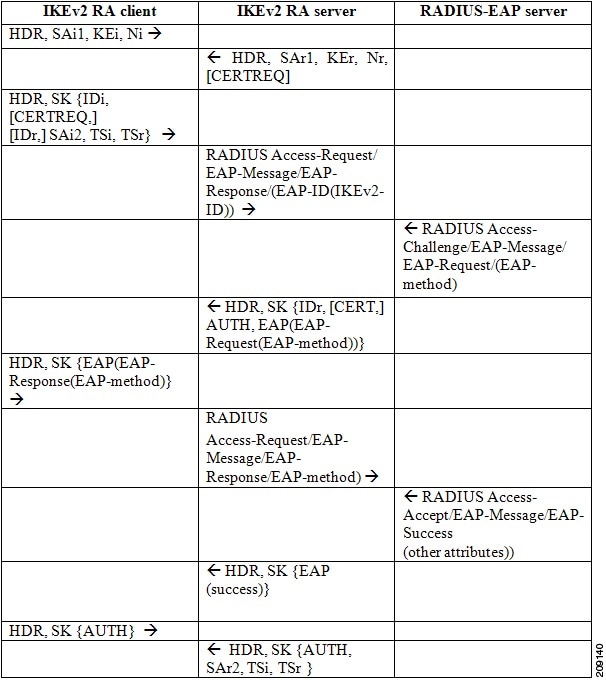
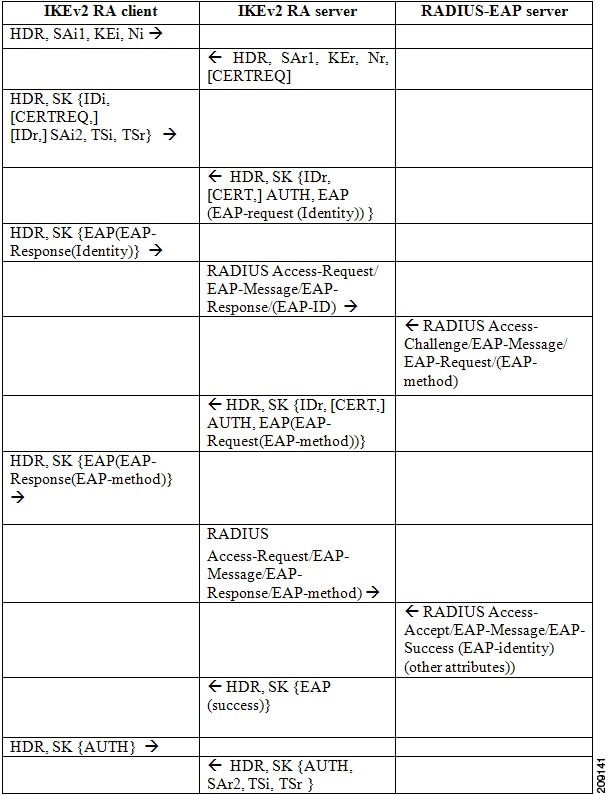
Figure 2 shows IKEv2 exchange for EAP authentication with the query-identity argument.
Figure 2 IKEv2 Exchange With the query-identity Argument
IKEv2 RA Server Support for IPv4 Configuration Attributes
The IKEv2 RA server supports the following IKEv2 configuration attributes:
•INTERNAL_IP4_ADDRESS
•INTERNAL_IP4_NETMASK
•INTERNAL_IP4_DNS
•INTERNAL_IP4_NBNS
•INTERNAL_IP4_SUBNET
The IKEv2 RA server fetches the attribute values from AAA through user and group authorizations. The INTERNAL_IP4_ADDRESS attribute value is derived from the following sources in the given order:
•The framed-ip-address attribute received in AAA user authorization.
•The Local IP address pool.
•The DHCP server.
A lower priority address sources is used for address allocation only if the higher priority address source is not configured. However, if address allocation from the higher priority address source results in an error, the next source is not tried and the session is terminated.
The value for INTERNAL_IP4_NETMASK attribute is derived as follows:
•If the IP address is obtained from the DHCP server, the netmask is also obtained from the DHCP server.
•If the IP address is obtained from framed-ip-address attribute in AAA user authorization or the local IP address pool, the netmask is derived from the IPv4-netmask attribute received in the user or group authorization. If the netmask is not available, the INTERNAL_IP4_NETMASK attribute is not included in the configuration reply. If available, the INTERNAL_IP4_NETMASK attribute is included only if the INTERNAL_IP4_ADDRESS attribute is included in the configuration reply.
If the client requests multiple IPv4 addresses, only one IPv4 address is sent in the reply. An IPv4 address is allocated and included in the reply only if the client requests an address. If available, the remaining attributes are included in the reply even though the client does not request it. If the client requests an IPv4 address and the RA server is unable to assign an address, an INTERNAL_ADDRESS_FAILURE message is returned to the client.
IKEv2 User And Group Authorization
The IKEv2 RA server supports user and group authorizations. You can configure user authorizations, group authorizations, both, or none. The username for the user and group authorizations can be directly specified or derived from the peer IKEv2 identity using a name mangler. Group authorization can be local and external-AAA based, while user authorization can only be external-AAA based. The IKEv2 authorization policy serves as a container of IKEv2 local AAA group authorization parameters.
If AAA user and group authorizations are not configured, it is not considered an error. However, after configuring the user and group authorization, an error encountered during AAA authorization is treated as an error and the connection is terminated. User authorization attributes take a higher priority in constructing a reply when group and user authorization are configured. The framed-ip per-user attribute is always fetched from the user authorization data and ignored if received in the group authorization data. Other attributes are derived from both user and group authorization data with user authorization data taking the higher priority.
IKEv2 Name Mangler
The IKEv2 name mangler derives the username for group and user authorizations from specific portions of the peer IKEv2 identity.
IKEv2 Supported Standards
Cisco implements the IP Security Protocol (IPsec) standard for use in IKEv2.
The component technologies implemented in IKEv2 are as follows:
•AES-CBC—Advanced Encryption Standard-Cipher Block Chaining
•DES—Data Encryption Standard
•Diffie-Hellman—A public-key cryptography protocol
•MD5 (HMAC variant)—Message digest algorithm 5
•SHA (HMAC variant)—Secure Hash Algorithm
For more information on the supported standards and component technologies, see Supported Standards for Use with IKE.
Benefits of IKEv2
The benefits of IKEv2 are described in the following sections:
EAP Support
IKEv2 allows the use of Extensible Authentication Protocol (EAP) for authentication.
Reliability and State Management (Windowing)
IKEv2 uses sequence numbers and acknowledgments to provide reliability, and mandates some error-processing logistics and shared state management.
Denial of Service (DoS) Attack Resilience
IKEv2 does not process a request until it determines the requester. This addresses to some extent the DoS problems in IKEv1, which can be tricked to perform much cryptographic (expensive) processing from false locations (spoofing).
Additional Benefits
IKEv2 provides built-in support for Dead Peer Detection (DPD) and Network Address Translation-Traversal (NAT-T). You can reference the certificates through a URL and hash to avoid fragmentation.
How to Configure Internet Key Exchange Version 2
To enable IKEv2 on a crypto interface, attach an IKEv2 profile to the crypto map or IPsec profile applied to the interface.
Note You need not enable IKEv1 on individual interfaces because IKEv1 is enabled globally on all interfaces in the router.
Perform the following tasks to manually configure IKEv2:
•Configuring Global IKEv2 Options (optional)
•Configuring the IKEv2 Proposal (required)
•Configuring the IKEv2 Policy (required)
•Configuring the IKEv2 Keyring (required)
•Configuring the IKEv2 Profile (required)
•Configuring the IKEv2 Name Mangler (optional)
•Configuring IKEv2 Authorization Policy (optional)
•Configuring IKEv2 Fragmentation (optional)
Configuring Global IKEv2 Options
Note The profile-specific configuration specified in the "Configuring the IKEv2 Profile" section takes precedence over the global IKEv2 options.
Perform this task to configure global IKEv2 options that are independent of peers.
SUMMARY STEPS
1. enable
2. configure terminal
3. crypto ikev2 certificate-cache number-of-certificates
4. crypto ikev2 cookie-challenge number
5. crypto ikev2 diagnose error number
6. crypto ikev2 dpd interval retry-interval {on-demand | periodic}
7. crypto ikev2 http-url cert
8. crypto ikev2 limit {max-in-negotation-sa limit | max-sa limit}
9. crypto ikev2 nat keepalive interval
10. crypto ikev2 window size
11. crypto logging ikev2
12. end
DETAILED STEPS
Configuring the IKEv2 Proposal
Note The default IKEv2 proposal is used in the default IKEv2 policy.
Perform this task to configure the proposals manually if you do not want to use the default proposal. The default IKEv2 proposal requires no configuration and is a collection of commonly used transforms types, which are as follows:
encryption aes-cbc-128 3des
integrity sha md5
group 5 2
The transform types shown below translate to the transform combinations in the following order of priority:
aes-cbc-128, sha, 5
aes-cbc-128, sha, 2
aes-cbc-128, md5, 5
aes-cbc-128, md5, 2
3des, sha, 5
3des, sha, 2
3des, md5, 5
3des, md5, 2
SUMMARY STEPS
1. enable
2. configure terminal
3. crypto ikev2 proposal name
4. encryption {3des} {aes-cbc-128} {aes-cbc-192} {aes-cbc-256}
5. integrity {sha1} {sha256} {sha384} {sha512} {md5}
6. group {1} {2} {5} {14} {15} {16} {19} {20} {24}
7. end
8. show crypto ikev2 proposal [name | default]
DETAILED STEPS
What to Do Next
After you create the IKEv2 proposal, the proposal must be attached to a policy to pick the proposal for negotiation. For information on completing this task, see the "Configuring the IKEv2 Policy" section.
Configuring the IKEv2 Policy
Note Use the show crypto ikev2 policy command to display the IKEv2 default policy.
Perform this task to manually create an IKEv2 policy; otherwise, the default proposal associated with the default policy is used for negotiation. An IKEv2 policy with no proposal is considered incomplete. During the initial exchange, the local address (IPv4 or IPv6) and the FVRF of the negotiating SA is matched with the policy and the proposal is selected.
SUMMARY STEPS
1. enable
2. configure terminal
3. crypto ikev2 policy name
4. proposal name
5. match fvrf {fvrf-name | any}
6. match address local {ipv4-address | ipv6-address}
7. end
8. show crypto ikev2 policy [policy-name]
DETAILED STEPS
Troubleshooting Tips
•Clear (and reinitialize) IPsec SAs by using the clear crypto sa EXEC command.
•Using the clear crypto sa command without parameters will clear out the full SA database, which will clear out active security sessions. For more information, see the clear crypto sa command in the Cisco IOS Security Command Reference.
•Use the debug crypto ikev2 command to enable debug messages.
•To see the default policy and any default values within configured policies, use the show crypto ikev2 policy default and show crypto ikev2 proposal default commands.
What to Do Next
Depending on the match parameters specified in your IKE policies, you must perform certain additional configuration tasks before IKE and IPsec can successfully use the IKE policies. For information on completing these additional tasks, see the "Configuring the IKEv2 Keyring" section.
Configuring the IKEv2 Keyring
Perform this task to configure the IKEv2 keyring if the local or remote authentication method is a preshared key.
IKEv2 keyring keys must be configured in the peer configuration submode that defines a peer subblock. An IKEv2 keyring can have multiple peer subblocks. A peer subblock contains a single symmetric or asymmetric key pair for a peer or peer group identified by any combination of hostname, identity, and IP address.
SUMMARY STEPS
1. enable
2. configure terminal
3. crypto ikev2 keyring keyring-name
4. peer name
5. description line-of-description
6. hostname name
7. address {ipv4-address [mask] | ipv6-address prefix}
8. identity {address {ipv4-address | ipv6-address} | fqdn name | email email-id | key-id key-id}
9. pre-shared-key {local | remote} {0 | 6 | line}
10. end
DETAILED STEPS
What to Do Next
After configuring the IKEv2 keyring, configure the IKEv2 profile. For more information, see the "Configuring the IKEv2 Profile" section.
Configuring the IKEv2 Profile
An IKEv2 profile is a repository of nonnegotiable parameters of the IKE SA (such as local/remote identities and authentication methods) and the services available to the authenticated peers that match the profile. An IKEv2 profile must be configured and must be attached to either a crypto map or an IPSec profile on both the IKEv2 initiator and responder. Use the command set ikev2-profile profile-name to attach the profile.
Perform this task to configure an IKEv2 profile and to implement the IKEv2 remote access server.
Note Similar, to IKEv1, NAT-T is auto detected. To disable NAT-T encapsulation, use the no crypto ipsec nat-transparency udp-encapsulation command.
Use the show crypto ikev2 profile tag command to display the IKEv2 profile.
SUMMARY STEPS
1. enable
2. configure terminal
3. crypto ikev2 profile profile-name
4. description line-of-description
5. aaa accounting [psk | cert | eap] list-name
6. aaa authentication eap list-name
7. authentication {local {rsa-sig | pre-share | ecdsa-sig} | remote {eap [query-identity]| rsa-sig | pre-share | ecdsa-sig}
8. aaa authorization {group | user} [cert | eap | psk] aaa-listname {aaa-username | name-mangler mangler-name}
9. dpd interval retry-interval {on-demand | periodic}
10. identity local {address {ipv4-address | ipv6-address}| dn | email email-string | fqdn fqdn-string | key-id opaque-string}
11. ivrf name
12. keyring [aaa] name
13. lifetime seconds
14. match {address local {ipv4-address | ipv6-address} | interface name} | certificate certificate-map | fvrf {fvrf-name | any} | identity remote {address {ipv4-address [mask] | ipv6-address prefix} | email [domain] string | fqdn [domain] string | key-id opaque-string}
15. nat keepalive seconds
16. pki trustpoint trustpoint-label [sign | verify]
17. virtual-template number
18. end
DETAILED STEPS
Configuring the IKEv2 Name Mangler
Perform this task to specify the IKEv2 name mangler, which is used to derive a name for the authorization requests. The name is derived from specified portions of different forms of remote IKE identities or the EAP identity. The name mangler specified here is referred to in the IKEv2 profile.
SUMMARY STEPS
1. enable
2. configure terminal
3. crypto ikev2 name-mangler mangler-name
4. dn {common-name | country | domain | locality | organization | organization-unit | state}
5. eap {all | dn {common-name | country | domain | locality | organization | organization-unit | state} | {prefix | suffix {delimiter {. | @ | \}}}
6. email {all | domain | username}
7. fqdn {all | domain | hostname}
8. end
DETAILED STEPS
Configuring IKEv2 Authorization Policy
The IKEv2 authorization policy serves as a container of IKEv2 local AAA group authorization parameters. The IKEv2 authorization policy is referred from IKEv2 profile via the aaa authorization group command. Perform this task to configure the IKEv2 authorization policy.
SUMMARY STEPS
1. enable
2. configure terminal
3. crypto ikev2 authorization policy policy-name
4. dhcp {giaddr ip-address | server {ip-address | hostname} | timeout seconds}
5. dns primary-server [secondary-server]
6. netmask mask
7. pool name
8. subnet-acl {acl-number | acl-name}
9. wins primary-server [secondary-server]
10. end
DETAILED STEPS
Configuring IKEv2 Fragmentation
Perform this task to fragment the IKEv2 packets at IKEv2 layer and to avoid fragmentation after encryption. IKEv2 peers negotiate the support for fragmentation and the MTU in the IKE_INIT exchange. Fragmentation of packets exceeding the negotiated MTU starts with IKE_AUTH exchange.
SUMMARY STEPS
1. enable
2. configure terminal
3. crypto ikev2 fragmentation [mtu mtu-size]
4. end
DETAILED STEPS
Configuration Examples for Internet Key Exchange Version 2
This section contains the following configuration examples:
•Example: Configuring the Proposal
•Example: Configuring the Policy
•Example: Configuring the IKEv2 Keyring
•Example: Configuring the Profile
•Example: Configuring the IKEv2 Remote Access Server
•Example: Configuring Crypto Map-Based IKEv2 Peers Using Certification Authentication Method
•Example: Configuring Crypto-Map-Based IKEv2 Peers Using Preshared Key Authentication Method
•Example: Configuring IPsec Using sVTI-Based IKEv2 Peers
•Example: Configuring Crypto Map- and dVTI-Based IKEv2 Peers
•Example: Configuring IKEv2 on DMVPN Networks
Example: Configuring the Proposal
This section contains the following examples:
•Example: IKEv2 Proposal with One Transform for Each Transform Type
•Example: IKEv2 Proposal with Multiple Transforms for Each Transform Type
•Example: IKEv2 Proposals on the Initiator and Responder
Example: IKEv2 Proposal with One Transform for Each Transform Type
This example shows how to configure an IKEv2 proposal with one transform for each transform type:
crypto ikev2 proposal proposal-1
encryption 3des
integrity sha
group 2
Example: IKEv2 Proposal with Multiple Transforms for Each Transform Type
This example shows how to configure an IKEv2 proposal with multiple transforms for each transform type:
crypto ikev2 proposal proposal-2
encryption 3des aes-cbc-128
integrity sha md5
group 2 5
The IKEv2 proposal proposal-2 shown translates to the following prioritized list of transform combinations:
•3des, sha, 2
•3des, sha, 5
•3des, md5, 2
•3des, md5, 5
•aes-cbc-128, sha, 2
•aes-cbc-128, sha, 5
•aes-cbc-128, md5, 2
•aes-cbc-128, md5, 5
Example: IKEv2 Proposals on the Initiator and Responder
The following example shows how to configure IKEv2 proposals on the initiator and the responder. The proposal on the initiator is as follows:
crypto ikev2 proposal proposal-1
encryption 3des aes-cbc-128
integrity sha md5
group 2 5
The proposal on the responder is as follows:
crypto ikev2 proposal proposal-2
encryption aes-cbc-128 3des
peer
integrity md5 sha
group 5 2
The selected proposal will be as follows:
encryption 3des
integrity sha
group 2
In the proposal shown above, the initiator and responder have conflicting preferences. In this case, the initiator is preferred over the responder.
Example: Configuring the Policy
This section contains the following examples:
•Example: IKEv2 Policy Matched on a VRF and Local Address
•Example: IKEv2 Policy with Multiple Proposals That Match All Peers in a Global VRF
•Example: IKEv2 Policy That Matches All Peers in Any VRF
•Example: How a Policy Is Matched
Example: IKEv2 Policy Matched on a VRF and Local Address
This example shows how an IKEv2 policy is matched based on a VRF and local address:
crypto ikev2 policy policy2
match vrf vrf1
match local address 10.0.0.1
proposal proposal-1
Example: IKEv2 Policy with Multiple Proposals That Match All Peers in a Global VRF
This example shows how an IKEv2 policy with multiple proposals matches the peers in a global VRF:
crypto ikev2 policy policy2
proposal proposal-A
proposal proposal-B
proposal proposal-B
Example: IKEv2 Policy That Matches All Peers in Any VRF
This example shows how an IKEv2 policy matches the peers in any VRF:
crypto ikev2 policy policy2
match vrf any
proposal proposal-1
Example: How a Policy Is Matched
Do not configure overlapping policies. If there are multiple possible policy matches, the best match is used, as shown in the following example:
crypto ikev2 policy policy1
match fvrf fvrf1
crypto ikev2 policy policy2
match fvrf fvff1
match local address 10.0.0.1
The proposal with FVRF as fvrf1 and the local-peer as 10.0.0.1 matches policy1 and policy2, but policy2 is selected because it is the best match.
Example: Configuring the IKEv2 Keyring
This section contains the following examples:
•Example: IKEv2 Keyring with Multiple Peer Subblocks
•Example: IKEv2 Keyring with Symmetric Preshared Keys Based on an IP Address
•Example: IKEv2 Keyring with Asymmetric Preshared Keys Based on an IP Address
•Example: IKEv2 Keyring with Asymmetric Preshared Keys Based on a Hostname
•Example: IKEv2 Keyring with Symmetric Preshared Keys Based on an Identity
•Example: IKEv2 Keyring with a Wildcard Key
•Example: How a Keyring is Matched
Example: IKEv2 Keyring with Multiple Peer Subblocks
The following example shows how to configure an IKEv2 keyring with multiple peer subblocks:
crypto ikev2 keyring keyring-1
peer peer1
description peer1
address 209.165.200.225 255.255.255.224
pre-shared-key key-1
peer peer2
description peer2
hostname peer1.example.com
pre-shared-key key-2
peer peer3
description peer3
hostname peer3.example.com
identity key-id abc
address 209.165.200.228 255.255.255.224
pre-shared-key key-3
Example: IKEv2 Keyring with Symmetric Preshared Keys Based on an IP Address
The following example shows how to configure an IKEv2 keyring with symmetric preshared keys based on an IP address. The following is the initiator's keyring:
crypto ikev2 keyring keyring-1
peer peer1
description peer1
address 209.165.200.225 255.255.255.224
pre-shared-key key1
The following is the responder's keyring:
crypto ikev2 keyring keyring-1
peer peer2
description peer2
address 209.165.200.228 255.255.255.224
pre-shared-key key1
Example: IKEv2 Keyring with Asymmetric Preshared Keys Based on an IP Address
The following example shows how to configure an IKEv2 keyring with asymmetric preshared keys based on an IP address. The following is the initiator's keyring:
crypto ikev2 keyring keyring-1
peer peer1
description peer1 with asymmetric keys
address 209.165.200.225 255.255.255.224
pre-shared-key local key1
pre-shared-key remote key2
The following is the responder's keyring:
crypto ikev2 keyring keyring-1
peer peer2
description peer2 with asymmetric keys
address 209.165.200.228 255.255.255.224
pre-shared-key local key2
pre-shared-key remote key1
Example: IKEv2 Keyring with Asymmetric Preshared Keys Based on a Hostname
The following example shows how to configure an IKEv2 keyring with asymmetric preshared keys based on the hostname. The following is the initiator's keyring:
crypto ikev2 keyring keyring-1
peer host1
description host1 in example domain
host host1.example.com
pre-shared-key local key1
pre-shared-key remote key2
The following is the responder's keyring:
crypto ikev2 keyring keyring-1
peer host2
description host2 in abc domain
host host2.example.com
pre-shared-key local key2
pre-shared-key remote key1
Example: IKEv2 Keyring with Symmetric Preshared Keys Based on an Identity
The following example shows how to configure an IKEv2 keyring with symmetric preshared keys based on an identity:
crypto ikev2 keyring keyring-4
peer abc
description example domain
identity fqdn example.com
pre-shared-key abc-key-1
peer user1
description user1 in example domain
identity email user1@example.com
pre-shared-key abc-key-2
peer user1-remote
description user1 example remote users
identity key-id example
pre-shared-key example-key-3
Example: IKEv2 Keyring with a Wildcard Key
The following example shows how to configure an IKEv2 keyring with a wildcard key:
crypto ikev2 keyring keyring-1
peer cisco
description example domain
address 0.0.0.0 0.0.0.0
pre-shared-key example-key
Example: How a Keyring is Matched
The following example shows how a keyring is matched:
crypto ikev2 keyring keyring-1
peer cisco
description example.com
address 0.0.0.0 0.0.0.0
pre-shared-key xyz-key
peer peer1
description abc.example.com
address 10.0.0.0 255.255.0.0
pre-shared-key abc-key
peer host1
description host1@abc.example.com
address 10.0.0.1
pre-shared-key host1-example-key
In the example shown, the key lookup for peer 10.0.0.1 first matches the wildcard key example-key, then the prefix key example-key and finally the host key host1-example-key. The best match host1-example-key is used.
crypto ikev2 keyring keyring-2
peer host1
description host1 in abc.example.com sub-domain
address 10.0.0.1
pre-shared-key host1-example-key
peer host2
description example domain
address 0.0.0.0 0.0.0.0
pre-shared-key example-key
In the example shown, the key lookup for peer 10.0.0.1 would first match the host key host1-abc-key. Because this is a specific match, no further lookup is performed.
Example: Configuring the Profile
This section contains the following:
•Example: IKEv2 Profile Matched on Remote Identity
•Example: IKEv2 Profile Catering to Two Peers
Example: IKEv2 Profile Matched on Remote Identity
The following profile caters to peers that identify themselves using fqdn example.com and authenticate with the RSA-signature using trustpoint-remote. The local node authenticates itself with a preshared key using keyring-1.
crypto ikev2 profile profile2
match identity remote fqdn example.com
identity local email router2@example.com
authentication local pre-share
authentication remote rsa-sig
keyring keyring-1
pki trustpoint trustpoint-remote verify
lifetime 300
dpd 5 10 on-demand
virtual-template 1
Example: IKEv2 Profile Catering to Two Peers
The following example shows how to configure an IKEv2 profile catering to two peers that use different authentication methods:
crypto ikev2 profile profile2
match identity remote email user1@example.com
match identity remote email user2@example.com
identity local email router2@cisco.com
authentication local rsa-sig
authentication remote pre-share
authentication remote rsa-sig
keyring keyring-1
pki trustpoint trustpoint-local sign
pki trustpoint trustpoint-remote verify
lifetime 300
dpd 5 10 on-demand
virtual-template 1
Example: Configuring the IKEv2 Remote Access Server
This section provides the following configuration examples:
•Example: Configuring the IKEv2 RA Server to Authenticate Peers Using EAP
•Example: Configuring IKEv2 RA Server for Group Authorization (External AAA)
•Example: Configuring IKEv2 RA Server for Group Authorization (Local AAA)
•Example: Configuring IKEv2 RA Server for User Authorization
Example: Configuring the IKEv2 RA Server to Authenticate Peers Using EAP
This example shows how to configure the server to authenticate peers using EAP.
aaa new-model
!
aaa group server radius eap-server
server 192.168.2.1
!
aaa authentication login eap-list group eap-server
!
crypto pki trustpoint trustpoint1
enrollment url http://192.168.3.1:80
revocation-check crl
!
crypto ikev2 profile ikev2-profile1
match identity remote address 0.0.0.0
authentication local rsa-sig
authentication remote eap query-identity
pki trustpoint trustpoint1
aaa authentication eap eap-list
virtual-template 1
!
crypto ipsec transform-set transform1 esp-3des esp-sha-hmac
!
crypto ipsec profile ipsec-profile1
set transform-set trans transform1
set ikev2-profile ikev2-profile1
!
interface Ethernet0/0
ip address 192.168.1.1 255.255.255.0
!
interface Virtual-Template1 type tunnel
ip unnumbered Ethernet0/0
tunnel mode ipsec ipv4
tunnel protection ipsec profile ipsec-profile1
!
radius-server host 192.168.2.1 key key1
!
Example: Configuring IKEv2 RA Server for Group Authorization (External AAA)
The following example shows how to configure the RA server for group authentication through an external AAA, which would be the RADIUS or TACACS server.
aaa new-model
!
aaa group server radius cisco-acs
server 192.168.2.2
!
aaa authorization network group-author-list group cisco-acs
!
crypto pki trustpoint trustpoint1
enrollment url http://192.168.3.1:80
revocation-check crl
!
crypto pki certificate map certmap1 1
subject-name co cisco
!
crypto ikev2 name-mangler group-author-mangler
dn domain
!
crypto ikev2 profile ikev2-profile1
match certificate certmap1
authentication local rsa-sig
authentication remote rsa-sig
pki trustpoint trustpoint1
aaa authorization group group-author-list name-mangler group-author-mangler
virtual-template 1
!
crypto ipsec transform-set transform1 esp-3des esp-sha-hmac
!
crypto ipsec profile ipsec-profile1
set transform-set trans transform1
set ikev2-profile ikev2-profile1
!
interface Ethernet0/0
ip address 192.168.1.1 255.255.255.0
!
interface Virtual-Template1 type tunnel
ip unnumbered Ethernet0/0
tunnel mode ipsec ipv4
tunnel protection ipsec profile ipsec-profile1
!
radius-server host 192.168.2.2 key key2
!
Example: Configuring IKEv2 RA Server for Group Authorization (Local AAA)
The following example shows how to configure the RA server for group authentication through local AAA using the AAA authorization policy.
aaa new-model
!
aaa authorization network local-group-author-list local
!
crypto pki trustpoint trustpoint1
enrollment url http://192.168.3.1:80
revocation-check crl
!
crypto pki certificate map certmap1 1
subject-name co cisco
!
crypto ikev2 authorization policy author-policy1
pool pool1
dhcp server 192.168.4.1
dhcp timeout 10
dhcp giaddr 192.168.1.1
dns 10.1.1.1 10.1.1.2
subnet-acl acl1
wins 11.1.1.1 11.1.1.2
netmask 255.0.0.0
!
crypto ikev2 profile ikev2-profile1
match certificate certmap1
authentication local rsa-sig
authentication remote rsa-sig
pki trustpoint trustpoint1
aaa authorization group local-group-author-list author-policy1
virtual-template 1
!
crypto ipsec transform-set transform1 esp-3des esp-sha-hmac
!
crypto ipsec profile ipsec-profile1
set transform-set trans transform1
set ikev2-profile ikev2-profile1
!
interface Ethernet0/0
ip address 192.168.1.1 255.255.255.0
!
interface Virtual-Template1 type tunnel
ip unnumbered Ethernet0/0
tunnel mode ipsec ipv4
tunnel protection ipsec profile ipsec-profile1
!
ip local pool pool11 12.1.1.1 12.1.1.100
!
ip access-list extended acl-1
permit ip 11.12.13.0 0.0.0.255 any
permit ip 15.0.0.0 0.255.255.255 any
!
Example: Configuring IKEv2 RA Server for User Authorization
The following example shows how to configure the RA server for user authentication.
aaa new-model
!
aaa group server radius cisco-acs
server 192.168.2.2
!
aaa authorization network user-author-list group cisco-acs
!
crypto pki trustpoint trustpoint1
enrollment url http:// 192.168.3.1:80
revocation-check crl
!
crypto pki certificate map certmap1 1
subject-name co cisco
!
crypto ikev2 name-mangler user-author-mangler
dn common-name
!
crypto ikev2 profile ikev2-profile1
match certificate certmap1
authentication local rsa-sig
authentication remote rsa-sig
pki trustpoint trustpoint1
aaa authorization user user-author-list name-mangler user-author-mangler
virtual-template 1
!
crypto ipsec transform-set transform1 esp-3des esp-sha-hmac
!
crypto ipsec profile ipsec-profile1
set transform-set trans transform1
set ikev2-profile ikev2-profile1
!
interface Ethernet0/0
ip address 192.168.1.1 255.255.255.0
!
interface Virtual-Template1 type tunnel
ip unnumbered Ethernet0/0
tunnel mode ipsec ipv4
tunnel protection ipsec profile ipsec-profile1
!
radius-server host 192.168.2.2 key key2
!
Example: Configuring Crypto Map-Based IKEv2 Peers Using Certification Authentication Method
The following example shows how to configure crypto-map-based IKEv2 peers using the certificate authentication method between a static crypto-map IKEv2 initiator, a dynamic crypto-map IKEv2 responder, and a CA server. The initiator configuration is as follows:
crypto pki trustpoint ca-server
enrollment url http://10.1.1.3:80
revocation-check none
!
crypto pki certificate map cmap-1 1
subject-name eq hostname = responder
!
!
crypto pki certificate chain ca-server
certificate 02
308201AF 30820118 A0030201 02020102 300D0609 2A864886 F70D0101 04050030
14311230 10060355 04031309 63612D73 65727665 72301E17 0D313030 33313031
32353132 355A170D 31313033 31303132 35313235 5A301A31 18301606 092A8648
86F70D01 09021609 494E4954 4941544F 52305C30 0D06092A 864886F7 0D010101
0500034B 00304802 4100A47E 8C58BA89 8CCDC5A4 5A63BD29 C331A2A5 393F4616
6B43FD2E 5ED4C81A 913E3B13 33A9B2DC CFC30391 24BB0DC8 B28FD6F1 C008D101
34C10062 30F88CF7 9D630203 010001A3 4F304D30 0B060355 1D0F0404 030205A0
301F0603 551D2304 18301680 144871D9 002C66DF D85FACB8 45D1D25F EA357455
91301D06 03551D0E 04160414 E77C74E7 183AB530 83DC531B 1DE3DA1D 914A925D
300D0609 2A864886 F70D0101 04050003 81810042 21934B77 7E485E6F EE717D75
6407B361 45190CEF E1A29CF2 6FA29E9A 5ECC1CEE B273533D 1453F6CE 1FDDA747
7E701B4B 2A2AE53F D67C2345 952325BA 30950435 0706C5EE A7A8B414 CFEEB7A2
9CD46F8F 3F663268 A20C4CCF E75D61EF 03FBA85D EDD6B26E 63653F09 F97DAFA6
6C76E44E C9CA3FDC 6CD85D30 169A1D9E 4E870B
quit
certificate ca 01
30820201 3082016A A0030201 02020101 300D0609 2A864886 F70D0101 04050030
14311230 10060355 04031309 63612D73 65727665 72301E17 0D313030 33313031
32343933 385A170D 31333033 30393132 34393338 5A301431 12301006 03550403
13096361 2D736572 76657230 819F300D 06092A86 4886F70D 01010105 0003818D
00308189 02818100 DA4ECE09 B998F670 598F32C1 7E9FA920 1D217AC4 293B842E
7563CE11 B2F0F822 23077930 636C8293 00F6CFDD F6C9B0F5 8348BE58 6478F631
7D44152F 494AEBCC A507FA6B 408D6BBB FAAB0A7A 2E7546A8 CA70F9A6 0F7F6824
554BD833 060D657D ABDF406C 69EEF449 7A4F9AFE 6F0852E7 05DEDAC1 D433191E
712868C2 A94E642B 02030100 01A36330 61300F06 03551D13 0101FF04 05300301
01FF300E 0603551D 0F0101FF 04040302 0186301F 0603551D 23041830 16801448
71D9002C 66DFD85F ACB845D1 D25FEA35 74559130 1D060355 1D0E0416 04144871
D9002C66 DFD85FAC B845D1D2 5FEA3574 5591300D 06092A86 4886F70D 01010405
00038181 00AFC36B 8A917284 06BD51CB 83BDC4E8 9457A361 6CAAF416 3BBEF691
04215AC5 EDBC5730 C071C2FB 8A6C90CF D6AB39C2 3BC2147F D35553D9 028B2155
802E50DB 48CDE067 B3857447 89A1C733 D81EFEF7 1115480F 70ED2F22 F27E35A1
F3BB597C 7C8F717B FAAD79D3 0F469702 DE9190E4 B1B0808E 46A118EB 887CEAEB
DFE2900E D2
quit
crypto ikev2 proposal prop-1
encryption 3des
integrity md5
group 2
!
crypto ikev2 policy pol-1
match fvrf any
proposal prop-1
!
crypto ikev2 profile prof
match fvrf any
match certificate cmap-1
identity local dn
authentication local rsa-sig
authentication remote pre-share
authentication remote rsa-sig
pki trustpoint ca-server
!
!
crypto ipsec transform-set trans esp-3des esp-sha-hmac
!
crypto map cmap 1 ipsec-isakmp
set peer 209.165.200.225
set transform-set trans
set ikev2-profile prof
match address ikev2list
!
interface Loopback0
ip address 209.165.200.226 255.255.255.224
!
interface Ethernet0/0
ip address 209.165.200.227 255.255.255.224
crypto map cmap
!
interface Ethernet1/0
ip address 209.165.200.228 255.255.255.224
!
ip route 209.165.200.229 255.255.255.224 209.265.200.231
!
ip access-list extended ikev2list
permit ip any any
!
The responder configuration is as follows:
crypto pki trustpoint ca-server
enrollment url http://10.1.1.3:80
revocation-check none
!
!
!
crypto pki certificate map cmap-2 1
subject-name eq hostname = initiator
!
crypto pki certificate chain ca-server
certificate 03
308201AF 30820118 A0030201 02020103 300D0609 2A864886 F70D0101 04050030
14311230 10060355 04031309 63612D73 65727665 72301E17 0D313030 33313031
32353231 325A170D 31313033 31303132 35323132 5A301A31 18301606 092A8648
86F70D01 09021609 52455350 4F4E4445 52305C30 0D06092A 864886F7 0D010101
0500034B 00304802 4100B517 EB8E64E1 B58CB014 07B3A6AF E6B69577 87486367
9471B1DA BC66B847 DFA5073A 82121332 E787EA2D 3C433514 39033074 4095E7C7
67A387A1 EBD24692 A76F0203 010001A3 4F304D30 0B060355 1D0F0404 030205A0
301F0603 551D2304 18301680 144871D9 002C66DF D85FACB8 45D1D25F EA357455
91301D06 03551D0E 04160414 DFF2401C 53276D96 89DE8C0A 786CCA71 C9EA792B
300D0609 2A864886 F70D0101 04050003 8181002C 6E334273 CB832A95 3DDC6293
669E416C A134D543 20952BC3 14A5C0B0 03AE011C 963AF523 C7C5C935 4FE9B2A5
F24B3161 4D0D723A FA428BD1 85ADF172 B4007067 43C27D8A 1F74ED3D DEBE9F73
1F515355 E77E766C AEACC303 39457991 29AB090C 99E21B5B 60DCB2C8 780B4479
3EB3D46B B66C8C26 15311A7A B7A4ED97 32727C
quit
certificate ca 01
30820201 3082016A A0030201 02020101 300D0609 2A864886 F70D0101 04050030
14311230 10060355 04031309 63612D73 65727665 72301E17 0D313030 33313031
32343933 385A170D 31333033 30393132 34393338 5A301431 12301006 03550403
13096361 2D736572 76657230 819F300D 06092A86 4886F70D 01010105 0003818D
00308189 02818100 DA4ECE09 B998F670 598F32C1 7E9FA920 1D217AC4 293B842E
7563CE11 B2F0F822 23077930 636C8293 00F6CFDD F6C9B0F5 8348BE58 6478F631
7D44152F 494AEBCC A507FA6B 408D6BBB FAAB0A7A 2E7546A8 CA70F9A6 0F7F6824
554BD833 060D657D ABDF406C 69EEF449 7A4F9AFE 6F0852E7 05DEDAC1 D433191E
712868C2 A94E642B 02030100 01A36330 61300F06 03551D13 0101FF04 05300301
01FF300E 0603551D 0F0101FF 04040302 0186301F 0603551D 23041830 16801448
71D9002C 66DFD85F ACB845D1 D25FEA35 74559130 1D060355 1D0E0416 04144871
D9002C66 DFD85FAC B845D1D2 5FEA3574 5591300D 06092A86 4886F70D 01010405
00038181 00AFC36B 8A917284 06BD51CB 83BDC4E8 9457A361 6CAAF416 3BBEF691
04215AC5 EDBC5730 C071C2FB 8A6C90CF D6AB39C2 3BC2147F D35553D9 028B2155
802E50DB 48CDE067 B3857447 89A1C733 D81EFEF7 1115480F 70ED2F22 F27E35A1
F3BB597C 7C8F717B FAAD79D3 0F469702 DE9190E4 B1B0808E 46A118EB 887CEAEB
DFE2900E D2
quit
crypto ikev2 proposal prop-1
encryption 3des
integrity md5
group 2
!
crypto ikev2 policy pol-1
match fvrf any
proposal prop-1
!
!
crypto ikev2 profile prof
match fvrf any
match certificate cmap-2
identity local dn
authentication local rsa-sig
authentication remote pre-share
authentication remote rsa-sig
pki trustpoint ca-server
!
!
crypto ipsec transform-set trans esp-3des esp-sha-hmac
!
crypto dynamic-map dmap 1
set transform-set trans
set ikev2-profile prof
!
!
crypto map cmap 1 ipsec-isakmp dynamic dmap
interface Loopback0
ip address 209.165.200.230 255.255.255.224
!
interface Ethernet0/0
ip address 209.165.200.231 255.255.255.224
crypto map cmap
!
interface Ethernet1/0
ip address 209.165.200.232 255.255.255.224
!
ip route 209.165.200.233 255.255.255.224 209.165.200.228
!
ip access-list extended ikev2list
permit ip host 209.165.200.231 host 209.165.200.228
The CA server configuration is as follows:
crypto pki server ca-server
grant auto
!
crypto pki trustpoint ca-server
revocation-check crl
rsakeypair ca-server
!
!
crypto pki certificate chain ca-server
certificate ca 01
30820201 3082016A A0030201 02020101 300D0609 2A864886 F70D0101 04050030
14311230 10060355 04031309 63612D73 65727665 72301E17 0D303930 33303831
36333335 395A170D 31323033 30373136 33333539 5A301431 12301006 03550403
13096361 2D736572 76657230 819F300D 06092A86 4886F70D 01010105 0003818D
00308189 02818100 99750598 EF4AF8B4 823DEF66 2F3BBA31 81C2DC5F D9B4040B
99FB6020 22243CD6 B9F24C84 A543D7DB DD0B3018 2E36208C D0FD4015 EAF0DA69
C1B0302B 87CEC34B 8646593F 0185AF02 0B86A3F3 5E5C3880 A992CD4A 79F13403
411CC61F 07CEB4D9 0E967CB2 FAE0A899 5A3B6C87 73111F06 128465DA A45291F8
F828C5DC 657487E7 02030100 01A36330 61300F06 03551D13 0101FF04 05300301
01FF300E 0603551D 0F0101FF 04040302 0186301F 0603551D 23041830 1680147B
D032BFB7 B3F70F1A 597B7C1E 1B42E472 5CCD6030 1D060355 1D0E0416 04147BD0
32BFB7B3 F70F1A59 7B7C1E1B 42E4725C CD60300D 06092A86 4886F70D 01010405
00038181 003838FA 628804EF E9FF69D9 3D5E299C 29074B2C AE33A563 8AF75976
78FB68D4 5EF1E27B 04936FDF 78A09432 5348849D F79E17F5 70B233C9 2C1535D0
506F0C35 99335012 84BBA3DC 050FD3C9 6E7B1D63 41ACC2B5 2B02432D BA2CC2CF
E379DEA0 A9C208AC 0BEBB2D8 E6488815 EB12F1E0 19072D55 D5D11A49 739144D8
271A842E ED
quit
!
interface Ethernet1/0
ip address 209.165.200.232 255.255.255.224
!
ip http server
To obtain the CA and device certificates, enter the crypto pki authenticate ca-server and crypto pki enroll ca-server commands. To initiate a connection between the initiator and the responder, enter the following command at the initiator's CLI:
ping 209.165.200.230 source 209.165.200.226
The output of the command is as follows:
Type escape sequence to abort.
Sending 5, 100-byte ICMP Echos to 209.165.200.230, timeout is 2 seconds:
Packet sent with a source address of 209.165.200.226
%IKEV2-5-OSAL_INITIATE_TUNNEL: Received request to establish an IPsec tunnel; local
traffic selector = Address Range: 209.165.200.226-209.165.200.226 Protocol: 1 Port Range:
0-65535; remote traffic selector = Address Range: 209.165.200.230-209.165.200.230
Protocol: 1 Port Range: 0-65535
%IKEV2-5-SA_UP: SA UP
.!!!!
Success rate is 80 percent (4/5), round-trip min/avg/max = 8/11/12 ms
Enter the following show commands in the responder's CLI to display the session details:
show crypto session
Crypto session current status
Interface: Ethernet0/0
Session status: UP-ACTIVE
Peer: 1.1.1.1 port 500
IKEv2 SA: local 209.165.200.231/500 remote 209.165.200.227/500 Active
IPSEC FLOW: permit ip 0.0.0.0/0.0.0.0 host 209.165.200.226
Active SAs: 2, origin: dynamic crypto map
show crypto ikev2 sa detailed
Tunnel-id Local Remote fvrf/ivrf Status
1 209.165.200.231/500 209.165.200.227/500 (none)/(none) READY
Encr: 3DES, Hash: MD596, DH Grp:2, Auth sign: RSA, Auth verify: RSA
Life/Active Time: 86400/846 sec
CE id: 1001, Session-id: 1
Status Description: Negotiation done
Local spi: F79756E978ED41C7 Remote spi: 188FB9A119516D34
Local id: hostname=RESPONDER
Remote id: hostname=INITIATOR
Local req msg id: 0 Remote req msg id: 2
Local next msg id: 0 Remote next msg id: 2
Local req queued: 0 Remote req queued: 2
Local window: 5 Remote window: 5
DPD configured for 0 seconds, retry 0
NAT-T is not detected
Example: Configuring Crypto-Map-Based IKEv2 Peers Using Preshared Key Authentication Method
The following example shows how to configure crypto-map-based IKEv2 peers using the preshared key authentication method between a static crypto-map IKEv2 initiator and a dynamic crypto-map IKEv2 responder. The initiator configuration is as follows:
crypto ikev2 proposal prop-1
encryption 3des
integrity md5
group 2
!
crypto ikev2 policy pol-1
match fvrf any
proposal prop-1
!
crypto ikev2 keyring v2-kr1
peer abc
address 209.165.200.231 255.255.255.224
pre-shared-key abc
!
!
!
crypto ikev2 profile prof
match fvrf any
match identity remote fqdn dmap-responder
identity local fqdn smap-initiator
authentication local pre-share
authentication remote pre-share
keyring v2-kr1
!
!
crypto ipsec transform-set trans esp-3des esp-sha-hmac
!
crypto map cmap 1 ipsec-isakmp
set peer 209.165.200.225
set transform-set trans
set ikev2-profile prof
match address ikev2list
!
interface Loopback0
ip address 209.165.200.226 255.255.255.224
!
interface Ethernet0/0
ip address 209.165.200.227 255.255.255.224
crypto map cmap
!
ip route 209.165.200.229 255.255.255.224 209.165.200.225
!
ip access-list extended ikev2list
permit ip any any
!
The responder configuration is as follows:
crypto ikev2 proposal prop-1
encryption 3des
integrity md5
group 2
!
crypto ikev2 policy pol-1
match fvrf any
proposal prop-1
!
crypto ikev2 keyring v2-kr1
peer abc
address 209.165.200.228
pre-shared-key abc
!
!
!
crypto ikev2 profile prof
match fvrf any
match identity remote fqdn smap-initiator
identity local fqdn dmap-responder
authentication local pre-share
authentication remote pre-share
keyring v2-kr1
ivrf global
!
!
crypto ipsec transform-set trans esp-3des esp-sha-hmac
!
crypto dynamic-map dmap 1
set transform-set trans
set reverse-route tag 222
set ikev2-profile prof
match address ikev2list
!
crypto map cmap 1 ipsec-isakmp dynamic dmap
!
interface Loopback0
ip address 209.165.200.230 255.255.255.224
!
interface Ethernet0/0
ip address 209.165.200.231 255.255.255.224
crypto map cmap
!
ip route 209.165.200.233 255.255.255.224 209.165.200.228
!
ip access-list extended ikev2list
permit ip any any
!
To initiate the connection between the initiator and the responder, enter the following command at the initiator's CLI:
ping 209.165.200.230 source 209.165.200.226
Type escape sequence to abort.
Sending 5, 100-byte ICMP Echos to 209.165.200.230, timeout is 2 seconds:
Packet sent with a source address of 209.165.200.226
%IKEV2-5-OSAL_INITIATE_TUNNEL: Received request to establish an IPsec tunnel; local
traffic selector = Address Range: 209.165.200.226-209.165.200.226 Protocol: 1 Port Range:
0-65535; remote traffic selector = Address Range: 209.165.200.230-209.165.200.230
Protocol: 1 Port Range: 0-65535
%IKEV2-5-SA_UP: SA UP
.!!!!
Success rate is 80 percent (4/5), round-trip min/avg/max = 8/11/12 ms
To display the session details, enter the following show commands:
show crypto session
Crypto session current status
Interface: Ethernet0/0
Session status: UP-ACTIVE
Peer: 209.165.200.225 port 500
IKEv2 SA: local 209.165.200.228/500 remote 209.165.200.231/500 Active
IPSEC FLOW: permit ip 0.0.0.0/0.0.0.0 0.0.0.0/0.0.0.0
Active SAs: 2, origin: crypto map
show crypto ikev2 sa detail
Tunnel-id Local Remote fvrf/ivrf Status
1 209.165.200.228/500 209.165.200.231/500 (none)/(none) READY
Encr: 3DES, Hash: MD596, DH Grp:2, Auth sign: PSK, Auth verify: PSK
Life/Active Time: 86400/21 sec
CE id: 1002, Session-id: 2
Status Description: Negotiation done
Local spi: 687752902752A6FD Remote spi: C9DCCFC65493D14F
Local id: smap-initiator
Remote id: dmap-responder
Local req msg id: 2 Remote req msg id: 0
Local next msg id: 2 Remote next msg id: 0
Local req queued: 2 Remote req queued: 0
Local window: 5 Remote window: 5
DPD configured for 0 seconds, retry 0
NAT-T is not detected
Example: Configuring IPsec Using sVTI-Based IKEv2 Peers
The following example shows how to configure IPsec using the preshared key authentication method between an sVTI IKEv2 initiator and an sVTI IKEv2 responder. The initiator configuration is as follows:
crypto ikev2 proposal prop-1
encryption 3des
integrity md5
group 2
!
crypto ikev2 policy pol-1
match fvrf any
proposal prop-1
!
crypto ikev2 keyring v2-kr1
peer abc
address 209.165.200.225
pre-shared-key abc
!
!
!
crypto ikev2 profile prof
match fvrf any
match identity remote address 209.165.200.231 255.255.255.224
authentication local pre-share
authentication remote pre-share
keyring v2-kr1
!
!
crypto ipsec transform-set trans esp-3des esp-sha-hmac
!
crypto ipsec profile ipsecprof
set transform-set trans
set ikev2-profile prof
!
interface Loopback0
ip address 209.165.200.226 255.255.255.224
!
interface Tunnel0
ip address 10.0.0.1 255.255.255.0
tunnel source 209.165.200.231
tunnel mode ipsec ipv4
tunnel destination 209.165.200.225
tunnel protection ipsec profile ipsecprof
!
interface Ethernet0/0
ip address 209.165.200.231 255.255.255.224
!
ip route 209.165.200.229 255.255.255.224 Tunnel0
!
The responder configuration is as follows:
crypto ikev2 proposal prop-1
encryption 3des
integrity md5
group 2
!
crypto ikev2 policy pol-1
match fvrf any
proposal prop-1
!
crypto ikev2 keyring v2-kr1
peer abc
address 209.165.200.231
pre-shared-key abc
!
!
!
crypto ikev2 profile prof
match fvrf any
match identity remote address 209.165.200.231 255.255.255.224
authentication local pre-share
authentication remote pre-share
keyring v2-kr1
!
!
crypto ipsec transform-set trans esp-3des esp-sha-hmac
!
crypto ipsec profile ipsecprof
set transform-set trans
set ikev2-profile prof
!
crypto map cmap 1 ipsec-isakmp dynamic dmap
!
interface Loopback0
ip address 209.165.200.230 255.255.255.224
!
interface Tunnel0
ip address 10.0.0.2 255.255.255.0
tunnel source 209.165.200.225
tunnel mode ipsec ipv4
tunnel destination 209.165.200.231
tunnel protection ipsec profile ipsecprof
!
interface Ethernet0/0
ip address 209.165.200.231 255.255.255.224
!
ip route 209.165.200.233 255.255.255.224 Tunnel0
With sVTI on IKEv2 peers, the session is initiated only when the sVTI interfaces are enabled. In other words, network traffic is not required to initiate the session. To verify the traffic between the initiator and the responder, enter the following command at the initiator's CLI:
ping 209.165.200.230 source 209.165.200.226
Type escape sequence to abort.
Sending 5, 100-byte ICMP Echos to 209.165.200.230, timeout is 2 seconds:
Packet sent with a source address of 209.165.200.226
%IKEV2-5-OSAL_INITIATE_TUNNEL: Received request to establish an IPsec tunnel; local
traffic selector = Address Range: 209.165.200.226-209.165.200.226 Protocol: 1 Port Range:
0-65535; remote traffic selector = Address Range: 209.165.200.230-209.165.200.23 Protocol:
1 Port Range: 0-65535
%IKEV2-5-SA_UP: SA UP
.!!!!
Success rate is 80 percent (4/5), round-trip min/avg/max = 8/11/12 ms
Enter the following show command in the initiator's CLI to display the session details:
show crypto session
Crypto session current status
Interface: Ethernet0/0
Session status: UP-ACTIVE
Peer: 209.165.200.225 port 500
IKEv2 SA: local 209.165.200.231/500 remote 209.165.200.225/500 Active
IPSEC FLOW: permit ip 0.0.0.0/0.0.0.0 0.0.0.0/0.0.0.0
Active SAs: 2, origin: crypto map
show crypto ikev2 sa detailed
Tunnel-id Local Remote fvrf/ivrf Status
1 209.165.200.231/500 209.165.200.225/500 (none)/(none) READY
Encr: 3DES, Hash: MD596, DH Grp:2, Auth sign: PSK, Auth verify: PSK
Life/Active Time: 86400/21 sec
CE id: 1002, Session-id: 2
Status Description: Negotiation done
Local spi: 687752902752A6FD Remote spi: C9DCCFC65493D14F
Local id: smap-initiator
Remote id: dmap-responder
Local req msg id: 2 Remote req msg id: 0
Local next msg id: 2 Remote next msg id: 0
Local req queued: 2 Remote req queued: 0
Local window: 5 Remote window: 5
DPD configured for 0 seconds, retry 0
NAT-T is not detected
Example: Configuring Crypto Map- and dVTI-Based IKEv2 Peers
The following example shows how to configure crypto map-and dVTI-based IKEv2 peers using the preshared key authentication method between a static crypto map IKEv2 initiator and a dVTI-based IKEv2 responder. The initiator configuration is as follows:
crypto ikev2 proposal prop-1
encryption 3des
integrity md5
group 2
!
crypto ikev2 policy pol-1
match fvrf any
proposal prop-1
!
crypto ikev2 keyring v2-kr1
peer abc
address 0.0.0.0 0.0.0.0
pre-shared-key abc
!
!
!
crypto ikev2 profile prof
match fvrf any
match identity remote address 0.0.0.0
authentication local pre-share
authentication remote pre-share
keyring v2-kr1
!
crypto ipsec transform-set trans esp-3des esp-sha-hmac
!
crypto map cmap 1 ipsec-isakmp
set peer 206.165.200.235
set transform-set trans
set ikev2-profile prof
match address ikev2list
!
interface Loopback0
ip address 206.165.200.226 255.255.255.224
!
interface Ethernet0/0
ip address 206.165.200.227 255.255.255.224
crypto map cmap
!
ip route 206.165.200.229 255.255.255.224 206.165.200.235
!
ip access-list extended ikev2list
permit ip host 206.165.200.227 host 206.165.200.235
permit ip 206.165.200.233 255.255.255.224 206.165.200.229 255.255.255.224
The responder configuration is as follows:
crypto ikev2 proposal prop-1
encryption 3des
integrity md5
group 2
!
crypto ikev2 policy pol-1
match fvrf any
proposal prop-1
!
crypto ikev2 keyring v2-kr1
peer cisco
address 0.0.0.0 0.0.0.0
pre-shared-key cisco
!
!
!
crypto ikev2 profile prof
match fvrf any
match identity remote address 0.0.0.0
authentication local pre-share
authentication remote pre-share
keyring v2-kr1
virtual-template 1
!
crypto ipsec transform-set set esp-3des esp-sha-hmac
!
crypto ipsec profile vi
set transform-set set
set ikev2-profile prof
!
interface Loopback0
ip address 206.165.200.230 255.255.255.224
!
interface Ethernet0/0
ip address 206.165.200.235 255.255.255.224
!
interface Virtual-Template1 type tunnel
ip unnumbered Ethernet0/0
ip mtu 1000
tunnel source Ethernet0/0
tunnel mode ipsec ipv4
tunnel protection ipsec profile vi
!
To initiate a connection between the initiator and the responder, enter the following command at the initiator's CLI:
ping 206.165.200.230 source 206.165.200.226
Type escape sequence to abort.
Sending 5, 100-byte ICMP Echos to 206.165.200.230, timeout is 2 seconds:
Packet sent with a source address of 206.165.200.226
%IKEV2-5-OSAL_INITIATE_TUNNEL: Received request to establish an IPsec tunnel; local
traffic selector = Address Range: 206.165.200.226-206.165.200.226 Protocol: 1 Port Range:
0-65535; remote traffic selector = Address Range: 206.165.200.230-206.165.200.230
Protocol: 1 Port Range: 0-65535
%IKEV2-5-SA_UP: SA UP
.!!!!
Success rate is 80 percent (4/5), round-trip min/avg/max = 8/11/12 ms
Enter the following show command in an Easy VPN server to display the session details:
show crypto session
Crypto session current status
Interface: Virtual-Access2
Session status: UP-ACTIVE
Peer: 206.165.200.227 port 500
IKEv2 SA: local 206.165.200.235/500 remote 206.165.200.227/500 Active
IPSEC FLOW: permit ip 206.165.200.229/255.255.255.224 206.165.200.233/255.255.255.224
Active SAs: 2, origin: crypto map
show crypto ikev2 sa detail
Tunnel-id Local Remote fvrf/ivrf Status
1 206.165.200.235/500 206.165.200.227/500 (none)/(none) READY
Encr: 3DES, Hash: MD596, DH Grp:2, Auth sign: PSK, Auth verify: PSK
Life/Active Time: 86400/8 sec
CE id: 1001, Session-id: 1
Status Description: Negotiation done
Local spi: 305F610F57428834 Remote spi: D9D183B5689AEDCD
Local id: 206.165.200.235
Remote id: 206.165.200.227
Local req msg id: 0 Remote req msg id: 2
Local next msg id: 0 Remote next msg id: 2
Local req queued: 0 Remote req queued: 2
Local window: 5 Remote window: 5
DPD configured for 0 seconds, retry 0
NAT-T is not detected
show crypto route
VPN Routing Table: Shows RRI and VTI created routes
Codes: RRI - Reverse-Route, VTI- Virtual Tunnel Interface
S - Static Map ACLs
Routes created in table GLOBAL DEFAULT
206.165.200.233/255.255.255.224 [1/0] via 206.165.200.227 tag 0
on Virtual-Access2 RRI
Example: Configuring IKEv2 on DMVPN Networks
DMVPN uses a tunnel protection CLI that is identical between IKEv1 and IKEv2. The IPsec profile applied on a DMVPN tunnel only refers to an IKEv2 profile. The DMVPN Hub configuration is as follows:
crypto ikev2 keyring cisco-ikev2-keyring
peer dmvpn-node
description symmetric pre-shared key for the hub/spoke
address 0.0.0.0 0.0.0.0
pre-shared-key cisco123
crypto ikev2 profile cisco-ikev2-profile
keyring cisco-ikev2-keyring
authentication pre-shared
match local address 0.0.0.0
crypto ipsec profile cisco-ipsec-ikev2
set transform-set cisco-ts
set ikev2-profile cisco-ikev2-profile
! interface Tunnel 0
description This is the Legacy IKEv1 facing tunnel on the hub
ip address 1.1.1.99 255.255.255.0
no ip redirects
ip nhrp map multicast dynamic
ip nhrp network-id 99
ip nhrp redirect
no ip split-horizon eigrp 1
tunnel source Ethernet0/0
tunnel mode gre multipoint
tunnel protection ipsec profile cisco-ipsec
!
interface Tunnel1
description This would be the new IKEv2 facing tunnel on the hub
ip address 2.2.2.99 255.255.255.0
no ip redirects
ip nhrp map multicast dynamic
ip nhrp network-id 100
no ip split-horizon eigrp 1
tunnel source Ethernet0/1
tunnel mode gre multipoint
tunnel protection ipsec profile cisco-ipsec-ikev2
The IKEv2 configuration is as follows:
crypto ikev2 profile cisco-ikev2-profile
keyring cisco-ikev2-keyring
authentication pre-shared
match local address 0.0.0.0
crypto ipsec profile cisco-ipsec-ikev2
set transform-set cisco-ts
set ikev2-profile cisco-ikev2-profile
interface Tunnel1
ip address 2.2.2.11 255.255.255.0
no ip redirects
ip nhrp map 2.2.2.99 22.22.22.99
ip nhrp map multicast 22.22.22.99
ip nhrp network-id 100 ? Keep this same for all IKEv2 spokes for clarity
ip nhrp nhs 2.2.2.99 ? This points to the hub's IKEv2 facing interface
tunnel source Ethernet0/1
tunnel mode gre multipoint
tunnel protection ipsec profile cisco-ipsec-ikev2
Where to Go Next
After configuring IKEv2, proceed to configure IPsec VPNs. For more information, see the "Configuring Security for VPNs With IPsec" section.
Additional References
Related Documents
Standards
|
|
|
|---|---|
None |
— |
MIBs
|
|
|
|---|---|
None |
To locate and download MIBs for selected platforms, Cisco software releases, and feature sets, use Cisco MIB Locator found at the following URL: |
RFCs
|
|
|
|---|---|
RFC 4306 |
Internet Key Exchange (IKEv2) Protocol |
RFC 5685 |
Redirect Mechanism for the Internet Key Exchange Protocol Version 2 (IKEv2) |
Technical Assistance
Feature Information for Internet Key Exchange Version 2
Table 1 lists the features in this module and provides links to specific configuration information.
Use Cisco Feature Navigator to find information about platform support and software image support. Cisco Feature Navigator enables you to determine which software images support a specific software release, feature set, or platform. To access Cisco Feature Navigator, go to http://www.cisco.com/go/cfn. An account on Cisco.com is not required.
Note Table 1 lists only the software release that introduced support for a given feature in a given software release train. Unless noted otherwise, subsequent releases of that software release train also support that feature.
|
|
|
|
|---|---|---|
IKEv2 Site to Site |
15.1(1)T |
IKEv2 is a component of IP Security (IPsec) and is used for performing mutual authentication and establishing and maintaining security associations (SAs). In Cisco IOS Release 15.1(1)T, this feature was introduced on the Cisco 7200 series routers. The following sections provide information about this feature: • • The following commands were introduced or modified: aaa accounting (IKEv2 profile), address (IKEv2 keyring), authentication (IKEv2 profile), crypto ikev limit, crypto ikev2 certificate-cache, crypto ikev2 cookie-challenge, crypto ikev2 diagnose, crypto ikev2 dpd, crypto ikev2 http-url, crypto ikev2 keyring, crypto ikev2 nat, crypto ikev2 policy, crypto ikev2 profile, crypto ikev2 proposal, crypto ikev2 window, crypto logging ikev2, description (IKEv2 keyring), dpd, encryption (IKEv2 proposal), group (IKEv2 proposal), hostname (IKEv2 keyring), identity (IKEv2 keyring), identity local, integrity, ivrf, keyring, lifetime (IKEv2 profile), match (IKEv2 policy), match (IKEv2 profile), nat, peer, pki trustpoint, pre-shared-key (IKEv2 keyring), proposal, virtual-template (IKEv2 profile), clear crypto ikev2 sa, clear crypto ikev2 stat, clear crypto session, clear crypto ikev2 sa, debug crypto ikev2, show crypto ikev2 diagnose error, show crypto ikev2 policy, show crypto ikev2 profile, show crypto ikev2 proposal, show crypto ikev2 sa, show crypto ikev2 session, show crypto ikev2 stats, show crypto session, show crypto socket. |
Suite-B support in IOS SW crypto |
15.1(2)T |
Suite-B adds support for the SHA-2 family (HMAC variant) hash algorithm used to authenticate packet data and verify the integrity verification mechanisms for the IKEv2 proposal configuration. HMAC is a variant that provides an additional level of hashing. Suite-B also allows the Elliptic Curve Digital Signature Algorithm (ECDSA) signature (ECDSA-sig), as defined in RFC 4754, to be the authentication method for IKEv2. Suite-B requirements comprise of four user interface suites of cryptographic algorithms for use with IKE and IPSec that are described in RFC 4869. Each suite is consists of an encryption algorithm, a digital signature algorithm, a key agreement algorithm, and a hash or message digest algorithm. See the Configuring Security for VPNs with IPsec feature module for more detailed information about Cisco IOS Suite-B support. The following sections provide information about this feature: • • • The following commands were introduced or modified: authentication, group, identity (IKEv2 profile), integrity, match (IKEv2 profile). |
IKEv2 Remote Access Headend |
15.1(3)T |
IKEv2 remote access headend feature implements RFC 5685 in IKEv2. In Cisco IOS Release 15.1(3)T, this feature was introduced. The following sections provide information about this feature: • • • • The following commands were introduced or modified: aaa accounting (IKEv2 profile), aaa authentication (IKEv2 profile), aaa authorization (IKEv2 profile), authentication (IKEv2 profile), crypto ikev2 client configuration group, crypto ikev2 fragmentation, crypto ikev2 name mangler, dhcp, dn, dns, eap, email, fqdn, keyring, netmask, pool, show crypto ikev2 profile, show crypto ikev2 sa, subnet-acl, wins. |
IPv6 support for IPSec and IKEv2 |
15.1(4)M |
This feature allows IPv6 addresses to be added to IPSec and IKEv2 protocols. In Cisco IOS Release 15.1(4)M, this feature was introduced. The following sections provide information about this feature: • • The following commands were introduced or modified: address (IKEv2 keyring), identity (IKEv2 keyring), identity local, match (IKEv2 policy), and match (IKEv2 profile), show crypto ikev2 session, show crypto ikev2 sa, show crypto ikev2 profile, show crypto ikev2 policy, debug crypto condition, clear crypto ikev2 sa. |
 Feedback