- Finding Feature Information
- Contents
- Prerequisites for Configuring WSMA
- Restrictions for Configuring WSMA
- Information about Configuring WSMA
- How to Configure WSMA
- Enabling SSHv2 Using a Hostname and Domain Name
- Enabling the HTTP Server
- Enabling the HTTPS Server
- Enabling Certificate Validation on the TLS Client for WSMA Initiator Mode
- Configuring Certificates on the TLS Server for WSMA Listener Mode
- Verifying the Status of the SSH Connection
- Enabling Service Initiator
- Enabling Service Listener
- Enabling WSMA Services
- Assigning WSMA IDs
- Monitoring and Maintaining WSMA Services
- Monitoring and Maintaining WSMA Profiles
- Enabling WSMA to Receive DHCP Option 43 Message
- Delivering WSMA Payloads
- Configuration Examples for WSMA
- Additional References
- Feature Information for WSMA
- Glossary
Configuring Web Services Management Agent
The Web Services Management Agent (WSMA) defines a mechanism through which a network device can be managed, configuration data information can be retrieved, and new configuration data can be uploaded and manipulated. WSMA uses Extensible Markup Language (XML)-based data encoding, that is transported by the Simple Object Access Protocol (SOAP), for the configuration data and protocol messages.
You can use WSMA over Secure Shell Version 2 (SSHv2), HTTP, HTTPS, or Transport Layer Security (TLS) to access the entire Cisco command-line interface (CLI). Multiple WSMA clients can connect to the WSMA server running on Cisco IOS software.
You can also use WSMA over SSHv2, HTTP, HTTPS, or TLS to initiate secure connections from Cisco IOS software to applications over trusted and un-trusted networks.
Finding Feature Information
Your software release may not support all the features documented in this module. For the latest feature information and caveats, see the release notes for your platform and software release. To find information about the features documented in this module, and to see a list of the releases in which each feature is supported, see the "Feature Information for WSMA" section.
Use Cisco Feature Navigator to find information about platform support and Cisco IOS and Catalyst OS software image support. To access Cisco Feature Navigator, go to http://www.cisco.com/go/cfn. An account on Cisco.com is not required.
Contents
• Prerequisites for Configuring WSMA
•Restrictions for Configuring WSMA
•Information about Configuring WSMA
•Configuration Examples for WSMA
Prerequisites for Configuring WSMA
•Every WSMA agent must be associated with a WSMA profile to perform any operations. If WSMA agents are not properly associated with profiles, the WSMA agents cannot send or receive any messages.
•WSMA over SSHv2 requires that a vty line be available for each WSMA session.
•WSMA over TLS requires a Certificate Authority (CA) server be available on the network.
Restrictions for Configuring WSMA
•SSHv1 is not supported, only SSHv2 is supported.
•You must be running a crypto image in order to configure SSH, TLS, or HTTPS.
•Notification services are not supported for WSMA over HTTP in listener mode.
•WSMA keepalive messages must be configured for Config, Exec and Filesys services for WSMA over HTTP in initiator mode.
Information about Configuring WSMA
Before configuring WSMA, you should understand the following concepts:
•SOAP
WSMA Overview
Web Services Management Agent (WSMA) is a family of embedded agents, used by the point-to-point management application to fully manage a device.
The current set of services provided by the WSMA is as follows:
Configuration WSMA Service
The Configuration WSMA service provides services to change the configuration on Cisco IOS devices and validates and applies a set of configuration commands to Cisco IOS software. Any non-interactive configuration CLI command that can be applied using the Cisco IOS console can also be applied using this WSMA. This service is available for all configuration CLI commands on the Cisco IOS device. It treats a set of commands as a single operation.
There are three types of configuration requests which can occur.
•configTest—Validates the syntax of the configuration data but does not apply the data to the running configuration.
•configApply—modifies the running configuration with the supplied configuration data. Use the action-on-fail attribute to specify the error handling to perform, if an error is encountered when applying the configuration. The level of error information returned in the response can be controlled using the details attribute.
•configPersist—copies the running configuration to the startup configuration so that it persists across reloads.
The service allows you to specify the CLI commands using either the XML Programmatic Interface (XML-PI) mode, or as direct CLI commands. Configuration WSMA service requests use the following modes and attributes:
•block mode—use the <cli-config-data-block> tag to encapsulate a multiline block of CLI commands.
•cmd mode—use the <cli-config-data> to encapsulate a block of configuration settings where each CLI line is individually delimited by <cmd> tags.
•XML-PI mode—use the <xml-config-data> tag to encapsulate processing instructions. This is format compatible with Cisco Enhanced Device Interface (EDI).
•Action-on-fail—use this attribute to specify the action to perform when an error is encountered. You can specify the following action values:
–stop— stops the execution on the first error but preserves the system state. This means the configuration could be partially applied.
–continue—ignores the error(s) and continues implementing instructions.
–rollback—stops processing at the first error and restores configuration to the state before any configuration was applied. This is only enabled if the archive Cisco IOS CLI is configured.
•Details—Use this attribute to control the level of error details. You can specify one of the following values:
–brief—provides minimal detail in error responses
–errors—provides details on all error encountered
–all—provides the maximal level of details on errors
For more information on the request and response messages for this service, see the WSMA configuration schema at ftp://ftp.cisco.com/pub/wsma/schema/wsma_config.xsd.
Exec WSMA Service
The Exec WSMA provides services to retrieve operational data from the Cisco IOS device and handles executive mode command line operations on Cisco IOS devices, such as show commands and other diagnostic commands. Interactive Exec commands have Expect and Response tags to allow you to configure the exchange sequence. The service can also retrieve show command operational data in XML-PI format and it allows remote reloading of the Cisco IOS device.
Exec WSMA service requests consist of a single Exec mode command encapsulated in an <execCLI> tag with the following tags and attributes:
•maxWait—the time interval to accumulate data and wait for the Exec command to complete. Once the interval expires the operation stops and all accumulated data is sent in the response.
•maxResponseSize—the maximum number of bytes to accumulate in the body of the response. The default is 0 (infinity), and the range is 0 to 2^31-1. If the response exceeds the specified size, the operation stops and all accumulated data is sent in the response.
•format—to get the results of Exec commands in XML-PI format specify the path to the spec file on the Cisco IOS file system. To use the global spec file command in the Cisco IOS file system and still get XML-PI format results use the attribute format="".
•xsd—If this value is set to 1 then the XML schema of the Exec command instead of the output of the Exec command.
•cmd—this mandatory tag contains the Exec command to run.
•dialogue—this optional tag is only used for interactive Exec commands. It specifies an expect and reply sequence. It includes a repeat attribute that is used if there are multiple expect and reply sequences which are identical.
•expect—the prompt the system expects. The value does not have to be an exact match to the specified string. The string match has two attributes:
–match—set to leading, trailing, embedded, or exact.
–caseSensitive—set to true to do case sensitive match.
•reply—the answer to the prompt if it matches.
The order and number of the dialogue elements must match the actual prompts seen or the Exec call will fail. All dialogues must be run otherwise an error message is seen.
For more information on the request and response messages for this service, see the WSMA Exec schema at ftp://ftp.cisco.com/pub/wsma/schema/wsma_exec.xsd.
Filesystem WSMA Service
The Filesystem WSMA service provides services to manage files on the Cisco IOS device. It is responsible for copying and validating files between local and remote file systems. This agent can be used to do directory listings, upgrade the IOS image running on the device and delete files. File copies can be validated using a MD5 checksum if available.
There are three types of filesystem requests:
•fileList is the equivalent of asking for a directory listing.
•fileDelete specifies a list of files to be deleted using the deleteFileList attribute.
•fileCopy enables the copying of files to and from the local file system. The file is copied outside of the WSMA transport mechanism, using the protocol specified in the srcURL attribute. This copy process is similar to copying a file using the Exec CLI shell, however this process performs additional validation checks which are not available in the Exec shell.
For more information on the request and response messages for this service, see the WSMA filesystem schema at ftp://ftp.cisco.com/pub/wsma/schema/wsma_filesystem.xsd.
Notification WSMA Service
The Notification WSMA service collects configuration-change events and forwards the details to the management application which has subscribed to get the notifications.
Multiple management applications can receive the notifications by connecting to a listener profile. Each management application must explicitly subscribe to the notifications, and can turn notification on or off on the profile without affecting the operation of other connected management applications. If a connection drops notifications are turned off.
Notifications are not cached or stored. If no management application is connected when an event happens then there is no record of that event.
Notifications requests have three attributes:
•correlator—used to co-ordinate the acknowledgement to the request.
•type—a string representing the types of notifications to enable on the session. Currently, the only supported string is configChange.
•activate—turns notification on or off by sending the value 0 (off) or 1 (on).
For more information on the request and response messages for this service, see the WSMA notification schema at ftp://ftp.cisco.com/pub/wsma/schema/wsma_notify.xsd.
Hello WSMA Service
When a new WSMA session is established, the Cisco IOS device sends a Hello message containing the WSMA ID and a list of WSMA services available on the session.The remote management application can query this information by sending a WSMA Hello Request to the Cisco IOS device.
This service is implicitly enabled on every WSMA profile.
For more information on the request and response messages for this service, see the WSMA hello schema at ftp://ftp.cisco.com/pub/wsma/schema/wsma_hello.xsd.
Keepalive WSMA Service
If a WSMA profile is configured to use keepalive messages, and if no WSMA service request has been received for the configured keepalive interval, the Cisco IOS Device sends a Keepalive request on the WSMA session. If the number of keepalive requests sent exceeds the configured retries, the WSMA session is closed.
A keepalive request has one attribute, correlator. The correlator attribute is a number that starts at 1 and increments each time a keepalive request is sent on a session. The correlator value used in a keepalive response must match the value in a keepalive request.
For more information on the request and response messages for this service, see the WSMA keepalive schema at ftp://ftp.cisco.com/pub/wsma/schema/wsma_keepalive.xsd.
WSMA Profiles
WSMA profiles abstract away the working of the transport layer from the WSMA. The transport protocol and an encapsulation together form a WSMA profile. Any WSMA agent must be associated with a specific WSMA profile to perform valid operations. WSMA profiles demultiplex requests to the appropriate WSMA.
WSMA profiles work as a transport termination point, and allow transport and XML encapsulation parameters to be configured.
•The configurable encapsulations for WSMA are SOAP 1.1 and SOAP 1.2.
•The transportation mechanism for WSMA include SSH, HTTP, HTTPS, and TLS. This mechanism opens listening sockets for listeners on the router or connecting sockets for clients on the router.
Service Listener
The service listener is a type of WSMA profile that listens for incoming connections and accepts devices from allowed addresses or accepted user IDs. The accepted addresses are configured by defining an access list.
Accepted user IDs are configured by defining the transport method that the service listener listens for. The transport method (SSH, HTTP, or TLS) enforces the specific user ID that is accepted.

Note WSMA listener profiles cannot access Cisco IOS devices that are located behind a firewall.
Service Initiator
The service initiator is a type of WSMA profile that initiates secure connections from Cisco IOS devices to management applications over trusted and un-trusted networks.
The service initiator creates a dynamic socket that attempts to stay connected to a configured server address. Each initiator can be configured with retry, keepalive, timeout and reconnect settings. In addition, each initiator can specify a backup connection to use if the primary connection fails.
The service initiator allows WSMA to initiate connections to devices behind a firewall or NAT, and in Zero Touch Deployment (ZTD) networks.
SOAP
SOAP is an industry-standard protocol to exchange XML data between applications. It defines a common mechanism to handle corrupted XML messages. It has a header mechanism to collate metadata associated with a transaction.
SOAP 1.1 and SOAP 1.2 have different schema definitions. They can co-exist with no impact on the other. Cisco IOS software has both SOAP 1.1 and SOAP 1.2 libraries. SOAP has mechanisms to handle XML framing and operational errors in a generic manner allowing greater interoperability of XML-based applications.
WSMA over SSHv2
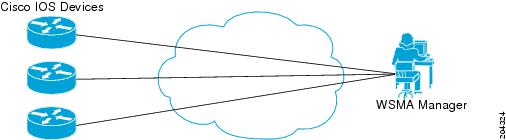
To run the WSMA over SSHv2 feature, the WSMA agent needs to be configured to use a service profile that is using SSH as a transport method. Figure 1 shows a basic WSMA over SSHv2 network configuration. The client and server exchange keys for security and password encryption. The user ID and password of the SSHv2 session running WSMA are used for authorization and authentication purposes. The user privilege level is enforced and the client session may not have full access to the WSMA operations if the privilege level is not high enough. If authentication, authorization, and accounting (AAA) is configured, the AAA service is used as if a user had established an SSH session directly to the device. Using the existing security configuration makes the transition to WSMA almost seamless. Once the client has been successfully authenticated, the client invokes the SSH connection protocol and the SSH session is established. After the SSH session is established, the user or application invokes WSMA as an SSH subsystem. The default name for the subsystem is "wsma."
Figure 1 WSMA over SSHv2
SSHv2
SSHv2 runs on top of a reliable transport layer and provides strong authentication and encryption capabilities. SSHv2 provides a means to securely access and securely execute commands on another computer over a network.
Service listeners do not support SSHv1. The configuration for the SSHv2 server is similar to the configuration for SSHv1. Use the ip ssh version command to specify which version of SSH that you want to configure. If you do not configure this command, SSH by default runs in compatibility mode; that is, both SSHv1 and SSHv2 connections are honored.
Note SSHv1 is a protocol that has never been defined in a standard. If you do not want your router to fall back to the undefined protocol (version 1), you should use the ip ssh version command and specify version 2.
Use the ip ssh rsa keypair-name command to enable an SSH connection using Rivest, Shamir, and Adelman (RSA) keys that you have configured. If you configure the ip ssh rsa keypair-name command with a key-pair name, SSH is enabled if the key pair exists, or SSH will be enabled if the key pair is generated later. If you use this command to enable SSH, you do not need to configure a hostname and a domain name.
WSMA over HTTP
To run the WSMA over HTTP feature, the WSMA agent needs to be configured to use a service profile which is using either HTTP or HTTPS as a transport. For HTTPS, the client and server exchange keys for security and password encryption. The user ID and password of the HTTP or HTTPS session running WSMA are used for authorization and authentication purposes. The user privilege level is enforced and the client session may not have full access to the WSMA operations if the privilege level is not high enough. If AAA is configured, the AAA service is used as if a user had established an SSH session directly to the device. Using the existing security configuration makes the transition to WSMA almost seamless. After the HTTP or HTTPS session is established, the user or application invokes WSMA as a HTTP path. The default name for the path is "/wsma."
When using HTTP as the transport for a initiator profile, the WSMA Notification service is available without additional configuration. However, to use the Config, Exec and Filesys services, you must first configure keepalive messages on the initiator profile. When keepalive messages are configured the Cisco IOS device can periodically send a request to the remote WSMA application, and this allows the remote HTTP server the opportunity to send a WSMA request.
When using HTTP as the transport for a listener profile, the WSMA Notification service is not supported since the Cisco IOS device acting as a HTTP server cannot send HTTP requests, it can only respond to HTTP requests.
HTTP
HTTP is a reliable request/response protocol that runs on top of a reliable transport layer. HTTPS provides strong authentication and encryption capabilities.
HTTP is configured with the ip http server command and HTTPS is configured using the ip http secure-server command.
Access Lists
You can optionally configure access lists for use with a service listener. An access list is a sequential collection of permit and deny conditions that applies to IP addresses. The Cisco IOS software tests addresses against the conditions in an access list one by one. The first match determines whether the software accepts or rejects the address. Because the software stops testing conditions after the first match, the order of the conditions is critical. If no conditions match, the software rejects the address.
The two main tasks involved in using access lists are as follows:
1. Creating an access list by specifying an access list number or name and access conditions.
2. Applying the access list to interfaces or terminal lines.
For more information about configuring access lists, see the Access Control List section of the Cisco IOS Security Configuration Guide: Securing the Data Plane book.
WSMA over TLS
To run the WSMA over TLS feature, the WSMA agent needs to be configured to use a service profile which is using TLS as a transport. The TLS protocol uses endpoint authentication and encryption to provide secure connections over any network. Encryption protects against eavesdropping, and digital certificates (signed by a trusted CA) protect against tampering and message forgery by authenticating the endpoints.
The WSMA listener and initiator profiles use the TLS server and client adapters to create and accept TLS connections. The TLS server uses a default port (13000) to listen for incoming connections, similarly the TLS client uses the same default port to initiate connections. The default port setting can be overridden by changed the profile configuration.
Trusted Certificates
The WSMA over TLS feature requires a CA server to be available on the network. The CA's public key is made known to the client, and the public key must correspond to the private key used to sign the server's certificate. The Cisco IOS Device and the remote WSMA application use the CA server to validate the certificates sent between them.
WSMA ID
The WSMA IDs allow Cisco IOS networking devices to have unique IDs. This is important in a Network Address Translation (NAT) or Dynamic Host Configuration Protocol (DHCP) network where all the device IP addresses are locally significant. In this type of deployment, the WSMA ID can be used to give each device a globally unique ID.
The WSMA ID can be explicitly configured based on other properties of the device such as:
•The hardware serial number
•The hostname
•The IP address of an interface
•The MAC address of an interface
•A user-defined string
Whenever the WSMA ID changes, all WSMA sessions are disconnected. This is to protect the management applications from having to deal with synchronizing the state dynamically.
WSMA Security
WSMA security is integrated with AAA configuration of Cisco IOS software. The AAA associations configured on the transport layer are used by WSMA
WSMA is designed for point-to-point operation and works over an encrypted transport. The security on the transport layer identifies and authenticates the users.
WSSE
Web Services Security Header (WSSE) is the SOAP security extension.
The WSMA profiles can be configured to expect or ignore additional security headers in the SOAP messages depending on the deployment mode. If WSMA is configured to contain a security header, the format of the header is as per the SOAP security extension, WSSE.
SOAP enforces authentication using the WSSE header. If there are any authentication errors, they are reported as SOAP faults. The authenticated message is passed on to the WSMA which checks for the authorization level of the user before applying any operation. Authorization errors are reported as a WSMA error response.
If WSMA profiles are configured not to contain the WSSE, then the security header is ignored and the transport login credentials are used for authentication. If WSSE is expected, then the details of the security header are used to authenticate the user. If the security header is missing, the incoming message is discarded and a SOAP fault is issued.
WSMA over TLS Authentication and Authorization
Unlike SSH or HTTPs connections, TLS connections do not require that a user logs into to CISCO IOS device. In addition, TLS certificates provide host-level authentication but do not always provide user-level authentication. Therefore, the WSSE header (if configured) is used to authenticate and authorize different users from a specified host.
For TLS listener profiles, all WSMA requests are authenticated using the SOAP WSSE header. After the request is authenticated, the user is authorized to perform operations based on the configured privilege level. The user can be configured on the Cisco IOS device or an the AAA server. The identity of the remote host is validated using the TLS client-side certificate.
For TLS initiator profiles, the identity of the remote endpoint is verified using the CA server as part of the TLS connection setup. After a connection is established, all incoming WSMA requests are authenticated using the WSSE header. After the request is authenticated, the user is authorized to perform operations based on the configured privilege level. The user can be configured on the Cisco IOS device or an the AAA server.
If the WSSE SOAP header is disabled for a TLS listener or initiator profile, user-level authentication is not possible, and the following process is used to decide the authorization level to assign to the profile:
•The authorization level set using the no wsse authorization level command is used for all agents associated with the profile.
•If no authorization level is set, the default privilege level is used. The default privilege level is set to 1 (the minimum level).
WSMA Schema
Each WSMA service publishes its XML schema. It describes the XML messages that the specific WSMA service is capable of understanding and executing. The WSMA schema defines the entire data required to execute an operation and ensures operations can be performed identically regardless of the type of transport used to carry the message.
A full list of WSMA schema (XSD) files is available from the ftp://ftp.cisco.com/pub/wsma/schema/ FTP site.
Zero Touch Deployment
The Cisco Zero Touch deployment (ZTD) solution enables the router to retrieve configuration files from the remote DHCP server during the initial router deployment. You need a bootstrap configuration to communicate between the router and the remote server. The bootstrap configuration provides specific information about a device. This bootstrap configuration can be pre-installed on the device or can be retrieved from the DHCP server. Another method of retrieving the bootstrap configuration information, using the DHCP Option 43, is introduced in Cisco IOS Release 15.1(1)T. To accommodate situations where routers cannot have a pre-installed bootstrap configuration, a deployment model which uses DHCP Option 43 messages is used. Cisco recommends the usage of DHCP Option 43 message based on RFC 2132. You can use the DHCP Option 43 message to provide vendor-specific information in the form of ASCII codes to the DHCP server.
The DHCP Option 43 message supplies the necessary information that is normally provided in the bootstrap configuration to the DHCP client. When the DHCP client issues a DHCP IP address request to the DHCP server, the DHCP server sends out the IP address and a DHCP Option 43 message, if the DHCP Option 43 message is pre-configured on the DHCP server. Within this DHCP Option 43 message, pre-defined parameterized WSMA commands are provided to the DHCP client. A timer for three minutes is set. After the timeout , if the file download is successful, the process is complete. If the file download fails, check if the WSMA DHCP Option 43 message generated is correct and fix it if there is problem. Power cycle the router to retry the WSMA DHCP Option 43 message processing.
At router system initiation time, there are following two ways to initiate the DHCP IP address request to enable the DHCP Option 43 message to be sent to the router:
1. If the router is enabled with startup configuration, ZTD can be enabled by using the ip address dhcp and the wsma dhcp configuration commands.
2. If the router is not enabled with startup configuration, the Autoinstall feature automatically initializes the ip address dhcp configuration command, which enables the ZTD. For more information about the Autoinstall feature, see the Overview - Basic Configuration of a Cisco Networking Device module in the Cisco IOS Configuration Fundamentals Configuration Guide.
WSMA Parameterized Commands Defined Within DHCP Option 43 Message to Enable ZTD
The values configured using the wsma id, wsma agent, and wsma profile initiator commands are used as parameters to construct the DHCP Option 43 message to enable ZTD. The DHCP Option 43 message provides these pre-defined parameterized commands to the DHCP client, which enables the client to decode and read the messages sent by the DHCP Server.
Constructing a DHCP Option 43 message
The DHCP Option 43 message is presented in the type/value (TV) format. The DHCP Option 43 is used by clients and servers to exchange vendor- specific information. When you use the vendor-specific option (Option 43), you must specify the data using hexadecimal ASCII values. For more information on the option command refer to Cisco IOS IP Addressing Command Reference Guide.
Note The maximum DHCP Option 43 size is 2500 bytes.
Following are the parameters used by the WSMA to construct the DHCP Option 43 message to enable ZTD:
<DHCP-typecode><feature-opcode><version><debug-option>;<arglist>
Table 1 describes the parameters and their syntax.
Table 1 Parameters of DHCP Option 43 Message
Table 2 lists the arguments for configuring the WSMA ID and the initiator profile parameters used for configuring the WSMA configuration agent.
Table 2 Argument Lists for WSMA Active Template A (WSMA Indicators)
Note Backup servers are not available. Type 6 encryption cannot be provided for zero touch due to additional initial configuration required on the Cisco IOS device. The router tries to reconnect every 60 seconds for 15 minutes. If the server cannot be reached within the specified time, the router accepts reconfiguration via DHCP Option 43 message.
Examples of Letter Code Mappings for Active Template
Example 1
In this example, in response to a DHCP IP address request sent by the DHCP client, the DHCP server sends an Option 43 message such as 4A1N;I10.10.10.1;K1 to the DHCP client. The DHCP client forwards the Option 43 message to the WSMA. The WSMA verifies if the Option 43 message is allowed to process. Option 43 messages are allowed to process by the WSMA if the wsma dhcp command is enabled on the WSMA.
The ASCII data shown in this Option 43 message consists of TV values shown in Table 3:
|
|
|
|---|---|
4 |
A1N;I10.10.10.1;K1 |
This message is decoded into tokens using the arguments list from Table 3. The parameters mapped for the 4A1N;I10.10.10.1;K1 message using the arguments list are as follows:
A—Active template code
1—Version number of the Active template
N—Debug option which is OFF
;—Delimiter before the arglist
I10.10.10.1—IP address of the Management server
K1—Transport protocol for Initiator used in TLS
The WSMA constructs the following commands and sends to the remote management server to request the initial configuration file. A timer is set for five minutes.
Router(config)# wsma agent config profile zero-touch
Router(config)# wsma profile initiator zero-touch
Router(config-wsma-initiator)# transport tls 10.10.10.1
Router(config-wsma-initiator)# no wsse authorization level 15
The initial configuration file that is downloaded is checked. If the file download is successful, the process is complete.
Example 2
In this example, in response to a DHCP IP address request sent by the DHCP client, the DHCP server sends an Option 43 message such as 4A1N;A1881-ap;D10.10.10.1;E11024;K1 to the DHCP client. The DHCP client forwards the Option 43 message to the WSMA. The WSMA verifies if the Option 43 message is allowed to process. Option 43 messages are allowed to process by the WSMA if the wsma dhcp command is enabled on the WSMA.
The ASCII data shown in this Option 43 message consists of TV values shown in Table 4:
|
|
|
|---|---|
4 |
4A1N;A1881-ap;D10.10.10.1;E11024;K1; |
This message is decoded into tokens using the arguments list from Table 4. The parameters mapped for the 4A1N;A1881-ap;D10.10.10.1;E11024;K1 message using the arguments list are as follows:
A—Active template code
1—Version number of the Active template
N—Debug option which is OFF
;—Delimiter before the arglist
881-ap-Active template string values
D10.10.10.1—IP address of the Management server
E11024—
K1—Transport protocol for Initiator used in TLS
The following tokens are generated from the 4A1N;I10.10.10.1;K1 message:
•A1N
•A1881-ap
•10.10.10.1
•E11024
•K1
The WSMA constructs the following commands and sends to the remote management server to request the initial configuration file. A timer is set for five minutes.
Router(config)# wsma agent config profile zero-touch
Router(config)# wsma profile initiator zero-touch
Router(config-wsma-initiator)# transport tls 10.10.10.1
Router(config-wsma-initiator)# no wsse authorization level 15
How to Configure WSMA
This section contains the following tasks:
•Enabling SSHv2 Using a Hostname and Domain Name, (required)
•Enabling the HTTP Server, (required)
•Enabling the HTTPS Server, (required)
•Enabling Certificate Validation on the TLS Client for WSMA Initiator Mode (required)
•Configuring Certificates on the TLS Server for WSMA Listener Mode (required)
•Verifying the Status of the SSH Connection, (optional)
•Enabling Service Initiator (required)
•Enabling Service Listener, (required)
•Enabling WSMA Services, (required)
•Assigning WSMA IDs, (required)
•Monitoring and Maintaining WSMA Services, (optional)
•Monitoring and Maintaining WSMA Profiles, (optional)
•Enabling WSMA to Receive DHCP Option 43 Message (required)
•Delivering WSMA Payloads, (optional)
Enabling SSHv2 Using a Hostname and Domain Name
Perform this task to configure your router for SSHv2 using a hostname and domain name.
SUMMARY STEPS
1. enable
2. configure terminal
3. hostname hostname
4. ip domain-name name
5. crypto key generate rsa
6. ip ssh [timeout seconds | authentication-retries integer]
7. ip ssh version 2
8. end
Enabling the HTTP Server
Perform this task to enable the HTTP server. The HTTP server is disabled by default. Once the HTTP server is enabled, you can configure optional server characteristics. For more information on configuring optional server characteristics for HTTP server, refer to "HTTP 1.1 Web Server and Client" module.
SUMMARY STEPS
1. enable
2. configure terminal
3. ip http server
4. ip http authentication {aaa | local}
DETAILED STEPS
Enabling the HTTPS Server
To disable the standard HTTP server and configure the HTTPS server with SSL 3.0, complete the procedure in this section.
Prerequisites
If a certificate authority is to be used for certification, you should declare the CA trustpoint on the routing device before enabling the secure HTTP server. For more information on declaring CA trustpoints on the routing device, refer to "HTTPS - HTTP Server and Client with SSL 3.0" module.
SUMMARY STEPS
1. enable
2. show ip http server status
3. configure terminal
4. no ip http server
5. ip http secure-server
6. ip http secure-port port-number
7. ip http secure-ciphersuite [3des-ede-cbc-sha] [rc4-128-sha] [rc4-128-md5] [des-cbc-sha]
8. ip http secure-client-auth
9. ip http secure-trustpoint name
10. end
11. show ip http server secure status
DETAILED STEPS
Enabling Certificate Validation on the TLS Client for WSMA Initiator Mode
To use the TLS protocol to connect to the remote host, the Cisco IOS router (acting as the TLS client) must validate the signed certificate of the WSMA application host (acting as the TLS server). To allow the router to validate the certificate and trust all certificates signed by the CA, you must configure a trustpoint for the CA on the router and instruct the router to download a self-signed certificate from the CA which authenticates the CA to the router.
To enable certificate validation on the Cisco IOS router, perform the following tasks:
SUMMARY STEPS
1. enable
2. configure terminal
3. crypto pki trustpoint name
4. enrollment url url
5. exit
6. crypto pki authenticate name
7. end
8. show run
Configuring Certificates on the TLS Server for WSMA Listener Mode
To configure CA certificates for WSMA listener mode using the TLS protocol on the Cisco IOS router, you must configure a trustpoint for the CA on the router and instruct the router to download a self-signed certificate from the CA which authenticates the CA to the router. You must then instruct the router to request it's own certificate signed by the CA.
To enable certificates for WSMA listener mode, perform the following tasks:
SUMMARY STEPS
1. enable
2. configure terminal
3. crypto pki trustpoint name
4. enrollment url url
Or
enrollment terminal
5. exit
6. crypto pki authenticate name
7. crypto pki enroll name
8. crypto pki import name certificate
9. end
10. show run
Verifying the Status of the SSH Connection
To display the status of the SSH connection on your router, use the show ssh and show ip ssh commands.
SUMMARY STEPS
1. enable
2. show ssh
3. show ip ssh
Examples
The following sample output from the show ssh command displays status about SSHv2 connections.
Router# show ssh
Connection Version Mode Encryption Hmac State
Username
1 2.0 IN aes128-cbc hmac-md5 Session started lab
1 2.0 OUT aes128-cbc hmac-md5 Session started lab
%No SSHv1 server connections running.
The following sample output from the show ip ssh command displays the version of SSH that is enabled, the authentication timeout values, and the number of authentication retries.
Router# show ip ssh
SSH Enabled - version 2.0
Authentication timeout: 120 secs; Authentication retries: 3
Troubleshooting Tips
The ip ssh version command can be used for troubleshooting your SSH configuration. By changing versions, you can determine which SSH version has a problem.
What to Do Next
For more information about the ssh command, see the see the Cisco IOS Security Command Reference.
Enabling Service Initiator
To enable a service initiator, perform the following task:
Prerequisites
•If you configure service initiator over HTPP or HTTPs, you must configure keepalive settings so that the Cisco IOS device can periodically send a HTTP Request to the remote WSMA application thus giving the remote WSMA application a chance to send WSMA requests.
•If you configure service initiator over TLS, you must first configure the CA settings on the Cisco IOS device. For more information, see Enabling Certificate Validation on the TLS Client for WSMA Initiator Mode.
SUMMARY STEPS
1. enable
2. configure terminal
3. wsma profile initiator profile-name
4. encap {soap11 | soap12}
5. [backup] transport {http | https | ssh remote-host [initiator-port-number] path path-name [user username [0 | 6] password] } | tls remote-host [initiator-port-number] [localcert trustpoint-name] [remotecert trustpoint-name] [source source-interface]}
6. keepalive interval [retries number]
7. idle-timeout minutes
8. max-message message-size
9. backup hold time
10. backup excluded time
11. reconnect reconnect-time
12. stealth
13. wsse
14. end
Enabling Service Listener
To enable a service listener, perform the following task:
Prerequisites
•If you configure service listener over SSH, you must first configure SSH. For more information, see Enabling SSHv2 Using a Hostname and Domain Name.
•If you configure service listener over HTTP, you must first configure HTTP. For more information, see Enabling the HTTP Server and Enabling the HTTPS Server.
•If you configure service listener over TLS, you must first configure the CA settings on the router. For more information, see Configuring Certificates on the TLS Server for WSMA Listener Mode.
SUMMARY STEPS
1. enable
2. configure terminal
3. wsma profile listener profile-name
4. encap {soap11 | soap12}
5. transport {http | https [path path-name] | ssh [subsys subsys-name] | tls [listener-port-number] [localcert trustpoint-name] [disable-remotecert-validation | remotecert trustpoint-name]}
6. idle-timeout minutes
7. max-message message-size
8. keepalive interval [retries number]
9. acl acl-number
10. stealth
11. wsse
12. end
Enabling WSMA Services
Perform this task to enable a specific WSMA and associate it with a profile.
Prerequisites
A WSMA initiator or listener profile must be configured and enabled.
SUMMARY STEPS
1. enable
2. configure terminal
3. wsma agent {config | exec | filesys | notify} profile profile-name
Assigning WSMA IDs
Perform this task to assign unique WSMA IDs to Cisco IOS networking devices.
SUMMARY STEPS
1. enable
2. configure terminal
3. wsma id {hardware-serial | hostname | ip-address interface-type | mac-address interface-type | string value}
DETAILED STEPS
Monitoring and Maintaining WSMA Services
Perform this task to monitor and maintain WSMA services:
SUMMARY STEPS
1. enable
2. show wsma agent {counters | schema} [config | exec | filesys | notify]
3. debug wsma agent [config | exec | filesys | notify]
4. clear wsma agent [config | exec | filesys | notify] counters
Examples
The counters return the following information:
•messages received—The total number of messages that were passed from the service profile into the WSMA.
•replies sent—The total number of reply messages sent to the services profile.
•faults—The number of faults that prevented a received message producing a reply.
•notifications—The total number of notification messages sent to the services profile.
Router# show wsma agent counters
WSMA Exec Agent Statistics:
messages received 0, replies sent 0, faults 0
WSMA Config Agent Statistics:
messages received 4, replies sent 4, faults 0
WSMA Filesys Agent Statistics:
messages received 1, replies sent 1, faults 0
WSMA Notification Agent Statistics:
config silent
messages received 0, replies sent 0, notifications sent 0, faults 0
Router#show wsma agent config schema
New Name Space 'urn:cisco:wsma-config'
<VirtualRootTag> [0, 1] required
<WSMA-Config> [0, 1] required
<request> 1 required
<config-data> 1 required
<cli-config-data> [0, 1] required
<cmd> 1+ required
<cli-config-data-block> [0, 1] required
<xml-config-data> [0, 1] required
<Device-Configuration> [0, 1] required
<> any subtree is allowed
Monitoring and Maintaining WSMA Profiles
Perform this task to monitor and maintain WSMA profiles for initiators and listeners.
SUMMARY STEPS
1. enable
2. show wsma profile {connections | counters | schema} [name profile-name]
3. debug wsma profile [listener | initiator]
4. clear wsma profile [profile-name] {connections | counters}
DETAILED STEPS
Enabling WSMA to Receive DHCP Option 43 Message
Perform this task to enable a WSMA with permission to process the incoming DHCP Option 43 message.
Prerequisites
Cisco IOS Subsystem
Ensure that the following Cisco IOS subsystems are supported:
•DHCP client
•WSMA TLS support
Software Requirements
•SSH client
•HTTP(S) 1.1 listener
•HTTP(S) 1.1 client
•SOAP
•XML parser
External Devices
•WSMA remote server for WSMA
•DHCP server with Option 43 message supported
SUMMARY STEPS
1. enable
2. configure terminal
3. wsma dhcp
Delivering WSMA Payloads
An XML payload is typically wrapped in a SOAP message for data transportation. Without a correct design of SOAP messages, an XML payload may not be exchanged properly even if the payload follows a common XML schema. The XML payload over all transports is identical. WSMA supports both SOAP1.1 and SOAP1.2. The SOAP header supports two modes of security, no wsse and wsse.
Use the following XML to deliver WSMA payloads:
WSMA EXEC Request : Ping
<?xml version="1.0" encoding="UTF-8"?>
<SOAP:Envelope xmlns:SOAP="http://schemas.xmlsoap.org/soap/envelope/"
xmlns:SOAP-ENC="http://schemas.xmlsoap.org/soap/encoding/"
xmlns:xsd="http://www.w3.org/2001/XMLSchema"
xmlns:xsi="http://www.w3.org/2001/XMLSchema-instance">
<SOAP:Body>
<request xmlns="urn:cisco:wsma-exec" correlator="01">
<execCLI>
<cmd>ping oz-dirt</cmd>
</execCLI>
</request>
</SOAP:Body>
</SOAP:Envelope>]]>]]>
WSMA EXEC Response:Ping
<?xml version="1.0" encoding="UTF-8"?>
<SOAP:Envelope xmlns:SOAP="http://schemas.xmlsoap.org/soap/envelope/"
xmlns:SOAP-ENC="http://schemas.xmlsoap.org/soap/encoding/"
xmlns:xsd="http://www.w3.org/2001/XMLSchema"
xmlns:xsi="http://www.w3.org/2001/XMLSchema-instance">
<SOAP:Body>
<response xmlns="urn:cisco:wsma-exec" correlator="01" success="1">
<execLog>
<dialogueLog>
<sent>ping oz-dirt</sent>
<received>Type escape sequence to abort.
Sending 5, 100-byte ICMP Echos to 10.3.1.4, timeout is 2 seconds:
!!!!!
Success rate is 100 percent (5/5), round-trip min/avg/max = 1/1/4 ms</received>
</dialogueLog>
</execLog>
</response>
</SOAP:Body>
</SOAP:Envelope>]]>]]>
WSMA Config Request: CMD Data Model
<?xml version="1.0" encoding="UTF-8"?>
<SOAP:Envelope xmlns:SOAP="http://schemas.xmlsoap.org/soap/envelope/"
xmlns:SOAP-ENC="http://schemas.xmlsoap.org/soap/encoding/"
xmlns:xsd="http://www.w3.org/2001/XMLSchema"
xmlns:xsi="http://www.w3.org/2001/XMLSchema-instance">
<SOAP:Body>
<request xmlns="urn:cisco:wsma-config" correlator="4.1">
<configApply details="all">
<config-data>
<cli-config-data>
<cmd>no cns config partial mixy</cmd>
<cmd>no stupid</cmd>
<cmd>no cns exec 80 </cmd>
</cli-config-data>
</config-data>
</configApply>
</request>
</SOAP:Body>
</SOAP:Envelope>]]>]]>
WSMA Config Response: CMD Data Model
<?xml version="1.0" encoding="UTF-8"?>
<SOAP:Envelope xmlns:SOAP="http://schemas.xmlsoap.org/soap/envelope/"
xmlns:SOAP-ENC="http://schemas.xmlsoap.org/soap/encoding/"
xmlns:xsd="http://www.w3.org/2001/XMLSchema"
xmlns:xsi="http://www.w3.org/2001/XMLSchema-instance">
<SOAP:Body>
<response xmlns="urn:cisco:wsma-config" correlator="4.1" success="1">
<resultEntry lineNumber="1" cliString="no cns config partial mixy">
<success change="NO_CHANGE" mode="IMMEDIATE" />
				</resultEntry>
                    <resultEntry lineNumber="2" cliString="no stupid">
<failure errorType="TEMPORARY" errorCode="PARSE_ERROR_NOMATCH" />
</resultEntry>
<resultEntry lineNumber="3" cliString="no cns exec 80 ">
<success change="NO_CHANGE" mode="IMMEDIATE" />
</resultEntry>
</response>
</SOAP:Body>
</SOAP:Envelope>]]>]]>
WSMA Config Request: Block Data Model
<?xml version="1.0" encoding="UTF-8"?>
<SOAP:Envelope xmlns:SOAP="http://schemas.xmlsoap.org/soap/envelope/"
xmlns:SOAP-ENC="http://schemas.xmlsoap.org/soap/encoding/"
xmlns:xsd="http://www.w3.org/2001/XMLSchema"
xmlns:xsi="http://www.w3.org/2001/XMLSchema-instance">
<SOAP:Body>
<request xmlns="urn:cisco:wsma-config" correlator="5.1">
<configApply details="all">
<config-data>
<cli-config-data-block>no cns config partial mixy
no stupid
no cns exec 80</cli-config-data-block>
</config-data>
</configApply>
</request>
</SOAP:Body>
</SOAP:Envelope>]]>]]>
WSMA Config Response: Block Data Model
<?xml version="1.0" encoding="UTF-8"?>
<SOAP:Envelope xmlns:SOAP="http://schemas.xmlsoap.org/soap/envelope/"
xmlns:SOAP-ENC="http://schemas.xmlsoap.org/soap/encoding/"
xmlns:xsd="http://www.w3.org/2001/XMLSchema"
xmlns:xsi="http://www.w3.org/2001/XMLSchema-instance">
<SOAP:Body>
<response xmlns="urn:cisco:wsma-config" correlator="5.1" success="1">
<resultEntry lineNumber="1" cliString="no cns config partial mixy">
<success change="NO_CHANGE" mode="IMMEDIATE" />
</resultEntry>
<resultEntry lineNumber="2" cliString="no stupid">
<failure errorType="TEMPORARY" errorCode="PARSE_ERROR_NOMATCH" />
</resultEntry>
<resultEntry lineNumber="3" cliString="no cns exec 80">
<success change="NO_CHANGE" mode="IMMEDIATE" />
</resultEntry>
</response>
</SOAP:Body>
</SOAP:Envelope>]]>]]>
WSMA Config Request: EDI Data Model
<?xml version="1.0" encoding="UTF-8"?>
<SOAP:Envelope xmlns:SOAP="http://schemas.xmlsoap.org/soap/envelope/"
xmlns:SOAP-ENC="http://schemas.xmlsoap.org/soap/encoding/"
xmlns:xsd="http://www.w3.org/2001/XMLSchema"
xmlns:xsi="http://www.w3.org/2001/XMLSchema-instance">
<SOAP:Body>
<request xmlns="urn:cisco:wsma-config" correlator="6.1">
<configApply details="all">
<config-data>
<xml-config-data>
						<Device-Configuration><cns operation="delete" >
<config><partial><HostNameAddressConfigurationServer>mixy</HostNameAddressConfigurationSer
ver><PortNumberConfigServiceDefault80>80</PortNumberConfigServiceDefault80></partial></con
fig></cns><stupid operation="delete" /><cns operation="delete"
><exec><P>80</P></exec></cns> </Device-Configuration>
</xml-config-data>
</config-data>
</configApply>
</request>
</SOAP:Body>
</SOAP:Envelope>]]>]]>
WSMA Config Response: EDI Data Model
<?xml version="1.0" encoding="UTF-8"?>
<SOAP:Envelope xmlns:SOAP="http://schemas.xmlsoap.org/soap/envelope/"
xmlns:SOAP-ENC="http://schemas.xmlsoap.org/soap/encoding/"
xmlns:xsd="http://www.w3.org/2001/XMLSchema"
xmlns:xsi="http://www.w3.org/2001/XMLSchema-instance">
<SOAP:Body>
<response xmlns="urn:cisco:wsma-config" correlator="6.1" success="1">
<resultEntry lineNumber="1" cliString="no cns config partial mixy 80">
<success change="NO_CHANGE" mode="IMMEDIATE" />
</resultEntry>
<resultEntry lineNumber="2" cliString="no stupid">
<failure errorType="TEMPORARY" errorCode="PARSE_ERROR_NOMATCH" />
</resultEntry>
<resultEntry lineNumber="3" cliString="no cns exec 80">
<success change="NO_CHANGE" mode="IMMEDIATE" />
</resultEntry>
</response>
</SOAP:Body>
</SOAP:Envelope>]]>]]>
WSMA File List Request
<?xml version="1.0" encoding="UTF-8"?>
<SOAP:Envelope xmlns:SOAP="http://schemas.xmlsoap.org/soap/envelope/"
xmlns:SOAP-ENC="http://schemas.xmlsoap.org/soap/encoding/"
xmlns:xsd="http://www.w3.org/2001/XMLSchema"
xmlns:xsi="http://www.w3.org/2001/XMLSchema-instance">
<SOAP:Body>
<request xmlns="urn:cisco:wsma-filesystem" correlator="2"><fileList/></request>
</SOAP:Body>
</SOAP:Envelope>]]>]]>
WSMA File List Response
<?xml version="1.0" encoding="UTF-8"?>
<SOAP:Envelope xmlns:SOAP="http://schemas.xmlsoap.org/soap/envelope/"
xmlns:SOAP-ENC="http://schemas.xmlsoap.org/soap/encoding/"
xmlns:xsd="http://www.w3.org/2001/XMLSchema"
xmlns:xsi="http://www.w3.org/2001/XMLSchema-instance">
<SOAP:Body>
<response xmlns="urn:cisco:wsma-filesystem" correlator="2" success="1">
<fileSystemList>
				<fileSystem name="nvram" type="nvram" size="522232" freespace="516471"
readable="true" writeable="true">
					<directory name="/" fullName="nvram:/" readFlag="true"
writeFlag="true">
						<file name="startup-config" fullName="nvram:/startup-config"
size="2134" readFlag="true" writeFlag="true"/>
						<file name="private-config" fullName="nvram:/private-config"
size="1527" readFlag="false" writeFlag="false"/>
						<file name="underlying-config" fullName="nvram:/underlying-config"
size="2134" readFlag="true" writeFlag="true"/>
						<file name="persistent-data" fullName="nvram:/persistent-data"
size="99" readFlag="false" writeFlag="false"/>
						<file name="ifIndex-table" fullName="nvram:/ifIndex-table" size="0"
readFlag="true" writeFlag="true"/>
</directory>
</fileSystem>
				<fileSystem name="disk2" type="disk" size="64229376" freespace="63987712"
readable="true" writeable="true">
					<directory name="/" fullName="disk2:/" readFlag="true" writeFlag="true"
modDate="1979-11-30T00:00:00.000Z">
						<file name="spec.odm" fullName="disk2:/spec.odm" size="131739"
readFlag="true" writeFlag="true" modDate="2007-08-31T05:11:36.000Z"/>
</directory>
</fileSystem>
				<fileSystem name="bootflash" type="flash" size="14942208"
freespace="8455208" readable="true" writeable="true">
					<directory name="/" fullName="bootflash:/" readFlag="true"
writeFlag="true">
						<file name="c7200-kboot-mz.bw"
fullName="bootflash:/c7200-kboot-mz.bw" size="5131872" readFlag="true" writeFlag="true"
modDate="1999-11-30T00:01:47.000Z"/>
						<file name="startup-config.base"
fullName="bootflash:/startup-config.base" size="1808" readFlag="true" writeFlag="true"
modDate="1999-11-30T00:23:26.000Z"/>
						<file name="startup-config.12dec03.balam"
fullName="bootflash:/startup-config.12dec03.balam" size="1598" readFlag="true"
writeFlag="true" modDate="2000-01-05T22:54:50.000Z"/>
</directory>
</fileSystem>
</fileSystemList>
</response>
</SOAP:Body>
</SOAP:Envelope>]]>]]>
WSMA File Copy Request
<?xml version="1.0" encoding="UTF-8"?>
<SOAP:Envelope xmlns:SOAP="http://schemas.xmlsoap.org/soap/envelope/"
xmlns:SOAP-ENC="http://schemas.xmlsoap.org/soap/encoding/"
xmlns:xsd="http://www.w3.org/2001/XMLSchema"
xmlns:xsi="http://www.w3.org/2001/XMLSchema-instance">
<SOAP:Body>
<request xmlns="urn:cisco:wsma-filesystem" correlator="12">
<fileCopy erase="0" overwrite="1" filesize="131739">
<srcURL>tftp://oz-dirt/jbalestr/spec.odm</srcURL>
<dstURL>test</dstURL>
</fileCopy>
</request>
</SOAP:Body>
</SOAP:Envelope>]]>]]>
WSMA File Copy Response
<?xml version="1.0" encoding="UTF-8"?>
<SOAP:Envelope xmlns:SOAP="http://schemas.xmlsoap.org/soap/envelope/"
xmlns:SOAP-ENC="http://schemas.xmlsoap.org/soap/encoding/"
xmlns:xsd="http://www.w3.org/2001/XMLSchema"
xmlns:xsi="http://www.w3.org/2001/XMLSchema-instance">
<SOAP:Body>
<response xmlns="urn:cisco:wsma-filesystem" correlator="12" success="1">
<copyStatus></copyStatus>
</response>
</SOAP:Body>
</SOAP:Envelope>]]>]]>
WSMA File Delete Request
<?xml version="1.0" encoding="UTF-8"?>
<SOAP:Envelope xmlns:SOAP="http://schemas.xmlsoap.org/soap/envelope/"
xmlns:SOAP-ENC="http://schemas.xmlsoap.org/soap/encoding/"
xmlns:xsd="http://www.w3.org/2001/XMLSchema"
xmlns:xsi="http://www.w3.org/2001/XMLSchema-instance">
<SOAP:Body>
<request xmlns="urn:cisco:wsma-filesystem" correlator="6">
<fileDelete>
<deleteFileList>
<filename>brick</filename>
</deleteFileList>
</fileDelete>
</request>
</SOAP:Body>
</SOAP:Envelope>]]>]]>
WSMA File Delete Response
<?xml version="1.0" encoding="UTF-8"?>
<SOAP:Envelope xmlns:SOAP="http://schemas.xmlsoap.org/soap/envelope/"
xmlns:SOAP-ENC="http://schemas.xmlsoap.org/soap/encoding/"
xmlns:xsd="http://www.w3.org/2001/XMLSchema"
xmlns:xsi="http://www.w3.org/2001/XMLSchema-instance">
<SOAP:Body>
<response xmlns="urn:cisco:wsma-filesystem" correlator="6" success="1">
<deleteStatusList>
<deleteStatus>
<fileName>brick</fileName>
<status>DELETED</status>
</deleteStatus>
</deleteStatusList>
</response>
</SOAP:Body>
</SOAP:Envelope>]]>]]>
Configuration Examples for WSMA
This section provides the following configuration examples:
•Enabling SSHv2 Using a Hostname and Domain Name: Example
•Enabling SSHv2 Using RSA Keys: Example
•Configuring WSMA Service: Example
•Configuring the WSMA Initiator Profile: Example
•Configuring the WSMA Listener Profile with Different Parameters: Example
•Displaying WSMA Profile Parameters: Example
Enabling SSHv2 Using a Hostname and Domain Name: Example
The following example shows how to configure SSHv2 using a hostname and a domain name:
configure terminal
hostname host1
ip domain-name domain1.com
crypto key generate rsa
ip ssh timeout 120
ip ssh version 2
Enabling SSHv2 Using RSA Keys: Example
The following example shows how to configure SSHv2 using RSA keys:
configure terminal
ip ssh rsa keypair-name sshkeys
crypto key generate rsa usage-keys label sshkeys modulus 768
ip ssh timeout 120
ip ssh version 2
Configuring WSMA Service: Example
The following example shows how to configure WSMA:
configure terminal
wsma agent config profile prof
Configuring the WSMA Initiator Profile: Example
The following example shows how to configure WSMA initiator profile:
configure terminal
wsma profile initiator ssh-test
transport ssh sshserver path /mypath/bin/mywsma-app.sh user1 6 encrypted-password
Configuring the WSMA Listener Profile with Different Parameters: Example
The following example shows how to configure WSMA over SSHv2:
configure terminal
wsma profile listener mySession
transport ssh subsys wsma
acl 34
encap soap12
exit
Displaying WSMA Profile Parameters: Example
The following example shows how to display information about WSMA profile connections:
Router# show wsma profile connections
Listener Profile http: 0 open connections: 0 closing connections
Encap: soap11
WSSE header is required
Max message (RX) is 50 Kbytes
SOAP Faults are sent
Idle timeout infinite
Keepalive not configured
Listening via http
Listening to path /wsma. Max Idle 0 ms. Accepting post on plaintext connections.
Established at 01:11:04.207 UTC Tue Jan 12 2010
Tx 493475 bytes (90 msg), Tx 0 errors,
Last message sent at 05:18:08.539 UTC Sat Feb 20 2010
Rx 59457 bytes (90 msg), 0 empty msg
Last message received at 05:18:08.295 UTC Sat Feb 20 2010
Listener Profile ssh: 2 open connections: 0 closing connections
Encap: soap11
WSSE header is required
Max message (RX) is 50 Kbytes
SOAP Faults are sent
Idle timeout infinite
Keepalive not configured
Listening via ssh
SSH listener, 10 sessions accepted, 0 sessions rejected
Connected sessions...
Remote connection via SSH by user(cisco) from 172.16.29.134:44457, state connect
Established at 01:14:03.184 UTC Thu Mar 11 2010
Tx 1183 bytes (2 msg), Tx 0 errors,
Last message sent at 01:14:48.565 UTC Thu Mar 11 2010
Rx 10 bytes (1 msg), 0 empty msg
Last message received at 01:14:48.565 UTC Thu Mar 11 2010
Remote connection via SSH by user(cisco) from 172.16.154.90:45404, state connect
Established at 01:14:28.041 UTC Thu Mar 11 2010
Tx 1183 bytes (2 msg), Tx 0 errors,
Last message sent at 01:14:54.437 UTC Thu Mar 11 2010
Rx 7 bytes (1 msg), 1 empty msg
Last message received at 01:14:54.437 UTC Thu Mar 11 2010
Initiator Profile ssh-init: 0 open connections: 0 closing connections
Encap: soap11
WSSE header is required
Max message (RX) is 50 Kbytes
SOAP Faults are sent
Idle timeout infinite
Keepalive not configured
Reconnect time 60 seconds
No transport configured
The following example shows how to display information about WSMA profile counters:
Router# show wsma profile counters
Statistics for profile http
incoming total 90, bad XML 0, authentication errors 0, oversized 0
outgoing total 90, absorbed 0
message internal errors 0
Connection Accepts 90, local hangup 0, remote hangup 90, keepalive hangup 0
session internal errors 0
Statistics for profile ssh
incoming total 9, bad XML 2, authentication errors 0, oversized 0
outgoing total 20, absorbed 0
message internal errors 0
Connection Accepts 8, local hangup 0, remote hangup 8, keepalive hangup 0
session internal errors 0
The following example shows how to display information about WSMA profile schema:
Router# show wsma profile schema
Schema http
New Name Space ''
<VirtualRootTag> [0, 1] required
New Name Space 'http://schemas.xmlsoap.org/soap/envelope/'
<Envelope> 1+ required
<Header> any subtree is allowed
<Body> 1 required
<Fault> [0, 1] required
<faultcode> 1 required
<faultstring> 1 required
<faultactor> [0, 1] required
<detail> any subtree is allowed
New Name Space 'urn:cisco:exec'
<request> [0, 1] required
<execCLI> 1+ required
<cmd> 1 required
<dialogue> 0+ required
<expect> 1 required
<reply> 1 required
New Name Space 'urn:cisco:wsma-config'
<request> [0, 1] required
<config-data> 1 required
<cli-config-data> [0, 1] required
<cmd> 1+ required
<cli-config-data-block> [0, 1] required
<xml-config-data> [0, 1] required
<Device-Configuration> [0, 1] required
<> any subtree is allowed
New Name Space 'urn:cisco:wsma-filesystem'
<request> [0, 1] required
<fileList> [0, 1] required
<fileDelete> [0, 1] required
<deleteFileList> 1 required
<filename> 1+ required
<fileCopy> [0, 1] required
<srcURL> 1 required
<dstURL> 1 required
<validationInfo> [0, 1] required
<md5CheckSum> 1 required
<deleteFileList> [0, 1] required
<filename> 1+ required
New Name Space 'urn:cisco:wsma-notify'
<request> [0, 1] required
Schema example1
New Name Space ''
<VirtualRootTag> [0, 1] required
New Name Space 'http://schemas.xmlsoap.org/soap/envelope/'
<Envelope> 1+ required
<Header> any subtree is allowed
<Body> 1 required
<Fault> [0, 1] required
<faultcode> 1 required
<faultstring> 1 required
<faultactor> [0, 1] required
<detail> any subtree is allowed
Additional References
The following sections provide references related to WSMA.
Related Documents
|
|
|
|---|---|
IP access lists |
IP Access List Roadmap and IP Access List Overview in Cisco IOS Security Configuration Guide: Securing the Data Plane |
IP access lists commands: complete command syntax, command mode, command history, defaults, usage guidelines, and examples |
|
Network Management commands (including EEM commands): complete command syntax, defaults, command mode, command history, usage guidelines, and examples. |
|
Public Key Infrastructure |
Public Key Infrastructure (PKI) in the Cisco IOS Secure Configuration Guide: Secure Connectivity |
Secure Shell and Secure Shell Version 2 |
Configuring Secure Shell and Secure Shell Version 2 Support sections of Cisco IOS Security Configuration Guide: Securing User Services |
Security commands: complete command syntax, command mode, command history, defaults, usage guidelines, and examples |
|
WSMA Schema Files in XSD format |
Standards
|
|
|
|---|---|
None |
— |
MIBs
|
|
|
|---|---|
None |
To locate and download MIBs for selected platforms, Cisco IOS releases, and feature sets, use Cisco MIB Locator found at the following URL: |
RFCs
Technical Assistance
Feature Information for WSMA
Table 5 lists the release history for this feature.
Not all commands may be available in your Cisco IOS software release. For release information about a specific command, see the command reference documentation.
Cisco IOS software images are specific to a Cisco IOS software release, a feature set, and a platform. Use Cisco Feature Navigator to find information about platform support and software image support. Cisco Feature Navigator enables you to determine which Cisco IOS and Catalyst OS software images support a specific software release, feature set, or platform. To access Cisco Feature Navigator, go to http://www.cisco.com/go/cfn. An account on Cisco.com is not required.
Note Table 5 lists only the Cisco IOS software release that introduced support for a given feature in a given Cisco IOS software release train. Unless noted otherwise, subsequent releases of that Cisco IOS software release train also support that feature.
|
|
|
|
|---|---|---|
Web Services Management Agent |
12.4(24)T 15.1(1)T |
The WSMA feature enables you to perform network configurations via the Cisco command-line interface (CLI) over an encrypted transport. The WSMA protocol defines a simple mechanism through which a network device can be managed, configuration data information can be retrieved, and new configuration data can be uploaded and manipulated. WSMA uses an Extensible Markup Language (XML)-based data encoding for the configuration data and protocol messages. In the Cisco IOS 15.1(1)T release this feature was modified to include support for both listener and initiator profiles. The following section provides information about this feature: • The following commands were introduced: acl, clear wsma agent, clear wsma profile, debug wsma agent, debug wsma profile, encap, idle-timeout, max-message, show wsma agent, show wsma id, show wsma profile, stealth, transport, wsma agent, wsma id, wsma profile |
Web Services Management Agent with TLS |
15.1(1)T |
This features enables support for the TLS encryption protocol for WSMA initiator and listener profiles. The following section provides information about this feature: • • The following commands were introduced or modified by this feature: backup excluded, backup hold, debug wsma profile, encap, idle-timeout, keepalive, max-message, reconnect, stealth, transport, wsma profile initiator, wsma profile listener, wsse |
DHCP Zero Touch |
15.1(1)T |
DHCP Option 43 allows you to configure the attributes of a device at initial deployment from a DHCP server. DCHP option 43 allows totally hands-free zero touch deployments for WSMA based deployments. The following section provides information about this feature: • The following command was introduced: wsma dhcp |
Glossary
SSHv2—Secure Shell Version 2. SSH runs on top of a reliable transport layer and provides strong authentication and encryption capabilities. SSHv2 provides a means to securely access and securely execute commands on another computer over a network.
WSMA—Web Services Management Agent. A protocol that defines a simple mechanism through which a network device can be managed, configuration data information can be retrieved, and new configuration data can be uploaded and manipulated.
XML—Extensible Markup Language. A standard maintained by the World Wide Web Consortium (W3C) that defines a syntax that lets you create markup languages to specify information structures. Information structures define the type of information (for example, subscriber name or address), not how the information looks (bold, italic, and so on). External processes can manipulate these information structures and publish them in a variety of formats. XML allows you to define your own customized markup language.
 Feedback