- MPLS Label Distribution Protocol (LDP)
- MPLS LDP - Local Label Allocation Filtering
- MPLS LDP Autoconfiguration
- MPLS LDP-IGP Synchronization
- MPLS LDP Session Protection
- MPLS LDP Inbound Label Binding Filtering
- MPLS LDP - Lossless MD5 Session Authentication
- MPLS�LDP MD5 Global Configuration
- MPLS LDP--VRF-Aware Static Labels
- Contents
- Prerequisites for MPLS LDP—Local Label Allocation Filtering
- Restrictions for MPLS LDP—Local Label Allocation Filtering
- Information About MPLS LDP—Local Label Allocation Filtering
- How to Configure MPLS LDP—Local Label Allocation Filtering
- Configuration Examples for MPLS LDP—Local Label Allocation Filtering
MPLS LDP—Local Label Allocation Filtering
This feature introduces command-line interface (CLI) commands to modify the way in which Multiprotocol Label Switching (MPLS) Label Distribution Protocol (LDP) handles local label allocation. This MPLS LDP feature enhancement enables the configuration of filtering policies for selective local label binding assignments by LDP to improve LDP scalability and convergence.
This document contains information about and instructions on how to configure the MPLS LDP—Local Label Allocation Filtering feature.
Finding Feature Information in This Module
Your Cisco IOS software release may not support all of the features documented in this module. For the latest feature information and caveats, see the release notes for your platform and software release. To reach links to specific feature documentation in this module and to see a list of the releases in which each feature is supported, use the "Feature Information for MPLS LDP—Local Label Allocation Filtering" section.
Finding Support Information for Platforms and Cisco IOS and Catalyst OS Software Images
Use Cisco Feature Navigator to find information about platform support and Cisco IOS and Catalyst OS software image support. To access Cisco Feature Navigator, go to http://www.cisco.com/go/cfn. An account on Cisco.com is not required.
Contents
• Prerequisites for MPLS LDP—Local Label Allocation Filtering
•Restrictions for MPLS LDP—Local Label Allocation Filtering
•Information About MPLS LDP—Local Label Allocation Filtering
•How to Configure MPLS LDP—Local Label Allocation Filtering
•Configuration Examples for MPLS LDP—Local Label Allocation Filtering
•Feature Information for MPLS LDP—Local Label Allocation Filtering
Prerequisites for MPLS LDP—Local Label Allocation Filtering
The MPLS LDP—Local Label Allocation Filtering feature requires the MPLS Forwarding Infrastructure (MFI).
Restrictions for MPLS LDP—Local Label Allocation Filtering
The MPLS LDP—Local Label Allocation Filtering feature does not support access lists. This feature supports prefix lists.
Restrictions for the MPLS LDP—Local Label Allocation Filtering feature in Cisco IOS Releases 12.2(33)SRC and 12.2(33)SB:
•LDP local label allocation configuration for prefix list or host routes is supported only in the global routing table.
•LDP and RIB restart handling supported in Cisco IOX software does not apply.
•Wildcard Forwarding Equalence Class (FEC) requests are not supported.
•Remote bindings are retained for LDP table entries that are filtered.
Information About MPLS LDP—Local Label Allocation Filtering
Before you configure the MPLS LDP—Local Label Allocation Filtering feature, you should understand the following concepts:
•MPLS LDP Local Label Allocation Filtering Overview
•Prefix Lists for MPLS LDP Local Label Allocation Filtering: Benefits and Description
•Local Label Allocation Changes Introduced in Cisco IOS Release 12.2(33)SRC and LDP Actions
•LDP Local Label Filtering and BGP Routes
MPLS LDP Local Label Allocation Filtering Overview
LDP allocates a local label for every route learned from the Interior Gateway Protocol (IGP). In the absence of inbound and outbound label filtering, these local labels are advertised to and learned by all peers.
In most Layer 3 Virtual Private Network (VPN) configurations only the label switched paths (LSPs) created to reach the /32 host routes or Border Gateway Protocol (BGP) next hops between the provider edge (PE) routers carry traffic and are relevant to the Layer 3 VPNs. LSPs between the PE routers that are not members of a VPN use more memory and create additional processing in LDP across the core.
With the load increases in the service provider domain in the last decade (1997-2007), scalability has become more important in the service provider networks. Controlling the local label allocation could off-load LDP processing of non-VPN LSPs in the service provider network core devices.
The MPLS LDP—Local Label Allocation Filtering feature introduces the mpls ldp label and allocate commands that allow you to configure LDP to selectively allocate local labels for a subset of the prefixes learned from the IGP. You can select that LDP allocate local labels for prefixes configured in a prefix list in the global table or for host routes in the global table.
Local label allocation filtering reduces the number of local labels allocated and therefore the number of messages exchanged with peers. This improves LDP scalability and convergence. Figure 1 and Figure 2 show how controlling local label allocation can reduce local label space size and greatly reduce the number of advertisements to peers. Figure 1 shows default LDP label allocation behavior. LDP allocates a local label for every route and advertises a label binding for every route learned from the IGP.
Figure 1 Default LDP Local Label Allocation Behavior
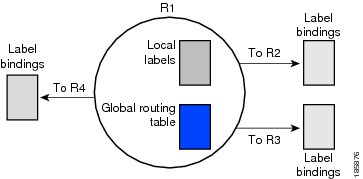
Figure 2 shows LDP behavior with local label allocation control configured. The size of the local label space and the number of label binding advertisements are reduced with local label allocation filtering through the use of a prefix list. The decrease in the number of local labels and label binding advertisement messages reduces the amount of memory use and improves convergence time for LDP. The MPLS LDP—Local Label Allocation Filtering feature also allows for more efficient use of the label space.
Figure 2 LDP Behavior with Local Label Allocation Controls
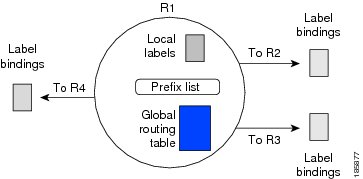
Figure 2 shows that router R1 learns a number of routes from its IGP neighbors on routers R2, R3, and R4. A prefix list defined on router R1 specifies the prefixes for which LDP allocates a local label.

Note In general, the number of Label Information Base (LIB) entries remains the same regardless of the kind of label filtering. This is because the remote label bindings for the prefixes that are filtered are kept in the LIB. Memory use is reduced because local label filtering decreases the number of local labels allocated and the number of label bindings advertised to and stored by the peers of an LSR.
Prefix Lists for MPLS LDP Local Label Allocation Filtering: Benefits and Description
The MPLS LDP—Local Label Allocation Filtering feature allows you to configure LDP to allocate local labels for a subset of the learned prefixes. LDP accepts the prefix and allocates a local label if the prefix is permitted by a prefix list. If the prefix list is not defined, LDP accepts all prefixes and allocates local labels based on its default mode of operation.
The benefits of using prefix lists for LDP local label allocation filtering are as follows:
•Prefix lists provide more flexibility for specifying a subset of prefixes and masks.
•Prefix lists use a tree-based matching technique. This technique is more efficient than evaluating prefixes or host routes sequentially.
•Prefix lists are easy to modify.
You configure a prefix list for the MPLS LDP—Local Label Allocation Filtering feature with the ip prefix-list command. The format of the command is as follows: ip prefix-list {list-name | list-number} [seq number] {deny network/length | permit network/length} [ge ge-length] [le le-length]
Local Label Allocation Changes Introduced in Cisco IOS Release 12.2(33)SRC and LDP Actions
The MPLS LDP—Local Label Allocation Filtering enhancement modifies the LDP's local label allocation handling. The feature supports local label allocation filtering through the specification of a prefix list or host routes.
With the introduction of this feature, LDP needs to determine whether a prefix filter is already configured to control the local label allocation on the local node. If a prefix list exists, the local label allocation is confined to the list of prefixes permitted by the configured prefix list.
LDP also needs to respond to local label allocation configuration changes and to configuration changes that affect the prefix list that LDP is using. Any of the following configuration changes can trigger LDP actions:
•Creating a local label allocation configuration
•Deleting or changing a local label allocation configuration
•Creating a new prefix list for a local label allocation configuration
•Deleting or changing a prefix list for a local label allocation configuration
LDP responds to local label allocation configuration changes by updating the LIB and the forwarding table in the global routing table. To update the LIB after a local label filter configuration change without a session reset, LDP keeps all remote bindings.
If you create a local label allocation configuration without defining a prefix list, no LDP action is required. The local label allocation configuration has no effect because the prefix list is created and permits all prefixes.
If you create or change a prefix list and prefixes that were previously allowed are rejected, LDP goes through a label withdraw and release procedure before the local labels for these prefixes are deallocated.
If you delete a prefix, LDP goes through the label withdraw and release procedure for the LIB local label. If the associated prefix is one for which no LIB entry should be allocated, LDP bypasses this procedure.
The LDP default behavior is to allocate local labels for all non-BGP prefixes. This default behavior does not change with the introduction of this feature and the mpls ldp label and allocate commands.
Note The local label allocation filtering has no impact on inbound label filtering because both provide LDP filtering independently. The LDP Inbound Label Binding Filtering feature controls label bindings that a label switch router (LSR) accepts from its peer LSRs through the use of access control lists (ACLs). The MPLS LDP—Local Label Allocation Filtering feature controls the allocation of local labels through the use of prefix lists or host routes.
LDP Local Label Filtering and BGP Routes
The LDP default behavior is to allocate local labels for all non-BGP prefixes.
LDP does not apply the configured local label filter to redistributed BGP routes in the global table for which BGP allocates local label, but LDP does the advertisements (Inter-AS Option C). LDP neither forwards these entries nor releases the local labels allocated by BGP.
How to Configure MPLS LDP—Local Label Allocation Filtering
Perform the following tasks to configure the MPLS LDP—Local Label Allocation Filtering feature:
•Creating a Prefix List for MPLS LDP Local Label Allocation Filtering (optional)
•Configuring MPLS LDP Local Label Allocation Filtering (required)
•Verifying MPLS LDP—Local Label Allocation Filtering Configuration (optional)
Creating a Prefix List for MPLS LDP Local Label Allocation Filtering
Perform the following task to create a prefix list for LDP local label allocation filtering. A prefix list allows LDP to selectively allocate local labels for a subset of the routes learned from the IGP. The decrease in the number of local labels in the LDP LIB and the number of label mapping advertisements reduces the amount of memory use and improves convergence time for LDP.
SUMMARY STEPS
1. enable
2. configure terminal
3. ip prefix-list {list-name | list-number} [seq number] {deny network/length | permit network/length} [ge ge-length] [le le-length]
4. end
DETAILED STEPS
Configuring MPLS LDP Local Label Allocation Filtering
Perform the following task to configure LDP local allocation filtering. Configuring filtering policies for selective local label binding assignments by LDP improves LDP scalability and convergence. You can configure either a prefix list or host routes as a filter for local label allocation. A maximum of one local label allocation filter is supported for the global table.
Note The host-routes keyword for the allocate command makes it convenient for you to specify a commonly used set of prefixes.
SUMMARY STEPS
1. enable
2. configure terminal
3. mpls ldp label
4. allocate global prefix-list {list-name | list-number}
5. allocate global host-routes
6. no allocate global {prefix-list {list-name | list-number} | host -routes}
7. no mpls ldp label
8. exit
9. exit
DETAILED STEPS
Verifying MPLS LDP—Local Label Allocation Filtering Configuration
Perform the following task to verify the MPLS LDP—Local Label Allocation Filtering configuration.
SUMMARY STEPS
1. enable
2. show mpls ldp bindings detail
3. debug mpls ldp bindings filter
4. exit
DETAILED STEPS
Step 1 enable
Use this command to enable privileged EXEC mode. Enter your password if prompted. For example:
Router> enable
Router#
Step 2 show mpls ldp bindings detail
Use this command to verify that local label allocation filtering is configured as you expect. For example:
Router# show mpls ldp bindings detail
Advertisement spec:
Prefix acl = bar
Local label filtering spec: host routes.
lib entry: 10.1.1.1/32, rev 9
lib entry: 10.10.7.0/24, rev 10
lib entry: 10.10.8.0/24, rev 11
lib entry: 10.10.9.0/24, rev 12
lib entry: 10.41.41.41/32, rev 17
lib entry: 10.50.50.50/32, rev 15
lib entry: 10.60.60.60/32, rev 18
lib entry: 10.70.70.70/32, rev 16
lib entry: 10.80.80.80/32, rev 14
The output of this command verifies that host routes are configured as the local label allocation filter for the router.
Step 3 debug mpls ldp binding filter
Use this command to verify that local label allocation filtering was configured properly and to display how LDP accepts or withdraw labels. For example:
Router# debug mpls ldp binding filter
LDP Local Label Allocation Filtering changes debugging is on
.
.
.
Step 4 exit
Use this command to exit to user EXEC mode. For example:
Router# exit
Router>
Configuration Examples for MPLS LDP—Local Label Allocation Filtering
This section contains the following configuration examples for the MPLS LDP—Local Label Allocation Filtering feature:
•Creating a Prefix List for MPLS LDP Local Label Allocation Filtering: Examples
•Configuring MPLS LDP Local Label Allocation Filtering: Examples
•Sample MPLS LDP Local Label Allocation Filtering Configuration: Example
Creating a Prefix List for MPLS LDP Local Label Allocation Filtering: Examples
The following examples show how to configure a prefix list for MPLS LDP local label allocation filtering.
In this example, prefix list List1 permits only 192.168.0.0/16 prefixes. LDP accepts 192.168.0.0/16 prefixes, but would not assign a local label for the following prefixes: 192.168.0.0/24 and 192.168.2.0/24. For example:
configure terminal
!
ip prefix-list List1 permit 192.168.0.0/16
end
In the following example, prefix list List2 permits a range of prefixes from 192.168.0.0/16 to /20 prefixes. LDP would accept 192.168.0.0/16 prefixes, but would not assign local labels for the following prefixes: 192.168.0.0/24 and 192.168.2.0/24.
configure terminal
!
ip prefix-list List2 permit 192.168.0.0/16 le 20
end
In the following example, prefix list List3 permits a range of prefixes greater than /18. LDP would accept 192.168.17.0/20 and 192.168.2.0/24 prefixes, but would not assign a local label for 192.168.0.0/16.
configure terminal
!
ip prefix-list List3 permit 192.168.0.0/16 ge 18
end
Configuring MPLS LDP Local Label Allocation Filtering: Examples
The following examples show how to configure MPLS LDP local label allocation filtering.
This examples shows how to allocate a prefix list to be used as a local label allocation filter:
configure terminal
!
ip prefix-list List3 permit 192.168.0.0/16 ge 18
!
mpls ldp label
allocate global prefix-list List3
exit
exit
Prefix list List3, which permits a range of prefixes greater than /18, is configured as the local label allocation filter for the router. LDP would allow 192.168.17.0/20 and 192.168.2.0/24 prefixes, but would withdraw labels for prefixes not in the allowed range.
In the following example, host routes are configured as the local label allocation filter:
configure terminal
!
mpls ldp label
allocate global host-routes
exit
exit
LDP allocates local labels for host routes that are in the global routing table.
In the following example, a specific local label allocation filter is removed:
configure terminal
!
mpls ldp label
no allocate global host-routes
exit
exit
In the following example, all local label allocation filters configured in MPLS LDP label configuration mode are removed and the default LDP local label allocation is restored without a session reset:
configure terminal
!
no mpls ldp label
exit
exit
Sample MPLS LDP Local Label Allocation Filtering Configuration: Example
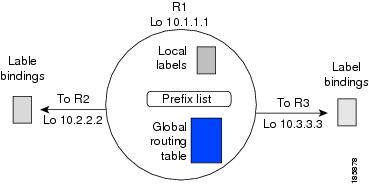
Figure 3 is a sample configuration that is used in this section to show how MPLS LDP local label allocation filtering works:
•Routers R1, R2, and R3 have loopback addresses 10.1.1.1, 10.2.2.2, and 10.3.3.3 defined and advertised by the IGP, respectively.
•10.1.1.1 is the router ID of Router R1, 10.2.2.2 is the router ID of Router R2, and 10.3.3.3 is the router ID of Router R3.
•A prefix list is defined on Router R1 to specify the local labels for which LDP allocates a local label.
Router RI learns a number of routes from its IGP neighbors on Routers R2 and R3.
Figure 3 LDP Local Label Allocation Filtering Example
You can use LDP CLI commands to verify the following:
•Router R1 has allocated a local label for the correct subset of the prefixes.
•Routers R2 and R3 did not receive any remote bindings for the prefixes for which Router R1 did not assign a local label.
Routing Table on Router R1
You can enter the show ip route command to display the current state of the routing table. The following example shows the routing table on Router R1 based on Figure 3:
R1# show ip route
Codes: C - connected, S - static, R - RIP, M - mobile, B - BGP
D - EIGRP, EX - EIGRP external, O - OSPF, IA - OSPF inter area
N1 - OSPF NSSA external type 1, N2 - OSPF NSSA external type 2
E1 - OSPF external type 1, E2 - OSPF external type 2
i - IS-IS, su - IS-IS summary, L1 - IS-IS level-1, L2 - IS-IS level-2
ia - IS-IS inter area, * - candidate default, U - per-user static route
o - ODR, P - periodic downloaded static route
Gateway of last resort is not set
10.0.0.0/32 is subnetted, 1 subnets
C 10.1.1.1 is directly connected, Loopback0
10.2.0.0/32 is subnetted, 1 subnets
O 10.2.2.2 [110/11] via 10.10.7.1, 00:00:36, Ethernet1/0
10.3.0.0/32 is subnetted, 1 subnets
O 10.3.3.3 [110/11] via 10.10.9.1, 00:00:36, Ethernet3/0
10.0.0.0/24 is subnetted, 3 subnets
C 10.10.7.0 is directly connected, Ethernet1/0
O 10.10.8.0 [110/20] via 10.10.9.1, 00:00:36, Ethernet3/0
[110/20] via 10.10.7.1, 00:00:36, Ethernet1/0
C 10.10.9.0 is directly connected, Ethernet3/0
Local Label Bindings on Router R1, Router R 2, and Router R3
You can enter the show mpls ldp bindings command on Routers R1, R2, and R3 to display the contents of the LIB on each router. In the following examples, the default LDP allocation behavior is in operation; that is, LDP allocates a local label for every route and advertises a label binding for every route learned from the IGP.
LIB on Router R
This example shows the contents of the LIB on Router R1 based on the configuration in Figure 3:
R1# show mpls ldp bindings
lib entry: 10.1.1.1/32, rev 7
local binding: label: imp-null
remote binding: lsr: 10.3.3.3:0, label: 16
remote binding: lsr: 10.2.2.2:0, label: 17
lib entry: 10.2.2.2/32, rev 13
local binding: label: 1000
remote binding: lsr: 10.3.3.3:0, label: 18
remote binding: lsr: 10.2.2.2:0, label: imp-null
lib entry: 10.3.3.3/32, rev 15
local binding: label: 1002
remote binding: lsr: 10.3.3.3:0, label: imp-null
remote binding: lsr: 10.2.2.2:0, label: 18
lib entry: 10.10.7.0/24, rev 8
local binding: label: imp-null
remote binding: lsr: 10.3.3.3:0, label: 17
remote binding: lsr: 10.2.2.2:0, label: imp-null
lib entry: 10.10.8.0/24, rev 11
local binding: label: 1001
remote binding: lsr: 10.3.3.3:0, label: imp-null
remote binding: lsr: 10.2.2.2:0, label: imp-null
lib entry: 10.10.9.0/24, rev 9
local binding: label: imp-null
remote binding: lsr: 10.3.3.3:0, label: imp-null
remote binding: lsr: 10.2.2.2:0, label: 16
The local labels assigned to 10.2.2.2 and 10.3.3.3 on Router R1 are advertised to Routers R2 and R3.
LIB on Router R2
This example shows the contents of the LIB on Router R2 based on the configuration in Figure 3:
R2# show mpls ldp bindings
lib entry: 10.1.1.1/32, rev 11
local binding: label: 17
remote binding: lsr: 10.3.3.3:0, label: 16
remote binding: lsr: 10.1.1.1:0, label: imp-null
lib entry: 10.2.2.2/32, rev 7
local binding: label: imp-null
remote binding: lsr: 10.3.3.3:0, label: 18
remote binding: lsr: 10.1.1.1:0, label: 1000
lib entry: 10.3.3.3/32, rev 15
local binding: label: 18
remote binding: lsr: 10.3.3.3:0, label: imp-null
remote binding: lsr: 10.1.1.1:0, label: 1002
lib entry: 10.10.7.0/24, rev 8
local binding: label: imp-null
remote binding: lsr: 10.3.3.3:0, label: 17
remote binding: lsr: 10.1.1.1:0, label: imp-null
lib entry: 10.10.8.0/24, rev 9
local binding: label: imp-null
remote binding: lsr: 10.3.3.3:0, label: imp-null
remote binding: lsr: 10.1.1.1:0, label: 1001
lib entry: 10.10.9.0/24, rev 13
local binding: label: 16
remote binding: lsr: 10.3.3.3:0, label: imp-null
remote binding: lsr: 10.1.1.1:0, label: imp-null
LIB on Router R3
This example shows the contents of the LIB on Router R3 based on the configuration in Figure 3:
R3# show mpls ldp bindings
lib entry: 10.1.1.1/32, rev 13
local binding: label: 16
remote binding: lsr: 10.2.2.2:0, label: 17
remote binding: lsr: 10.1.1.1:0, label: imp-null
lib entry: 10.2.2.2/32, rev 15
local binding: label: 18
remote binding: lsr: 10.2.2.2:0, label: imp-null
remote binding: lsr: 10.1.1.1:0, label: 1000
lib entry: 10.3.3.3/32, rev 7
local binding: label: imp-null
remote binding: lsr: 10.2.2.2:0, label: 18
remote binding: lsr: 10.1.1.1:0, label: 1002
lib entry: 10.10.7.0/24, rev 11
local binding: label: 17
remote binding: lsr: 10.2.2.2:0, label: imp-null
remote binding: lsr: 10.1.1.1:0, label: imp-null
lib entry: 10.10.8.0/24, rev 8
local binding: label: imp-null
remote binding: lsr: 10.2.2.2:0, label: imp-null
remote binding: lsr: 10.1.1.1:0, label: 1001
lib entry: 10.10.9.0/24, rev 9
local binding: label: imp-null
remote binding: lsr: 10.2.2.2:0, label: 16
remote binding: lsr: 10.1.1.1:0, label: imp-null
Local Label Allocation Filtering Configuration on Router R1
You enter the mpls ldp label command to configure a local label allocation filter. The following examples show how to configure a local label allocation filter by host routes only and by a prefix list.
Local Label Allocation Filter—Host Routes Only Configuration
This example shows the selection of host routes as the only filter.
The following local label allocation filtering is defined on Router R1 under MPLS LDP label configuration mode:
configure terminal
!
mpls ldp label
allocate global host-routes
exit
exit
Local Label Allocation Filter—Prefix List Configuration
The following example shows how to configure a local label allocation filter that allows or denies prefixes based on a prefix list:
configure terminal
!
mpls ldp label
allocate global prefix-list ListA
exit
end
ListA is a prefix list defined as:
configure terminal
!
ip prefix-list ListA permit 0.0.0.0/32 ge 32
Local Label Allocation Filtering Changes Label Bindings on Router R1, Router R 2, and Router R3
After configuring a local label allocation filter on Router R1, you can enter the show mpls ldp bindings command again to see the changes in the local label bindings in the LIB on each router. Changes to the output in the LIB entries are highlighted in bold text.
This sample prefix list is used for the examples in the this section:
ip prefix-list ListA permit 0.0.0.0/32 ge 32
LIB on Router R1 After Local Label Allocation Filtering
This example shows how the configuration of a local label allocation prefix-list filter changes the contents of the LIB on Router R1:
R1# show mpls ldp bindings
lib entry: 10.1.1.1/32, rev 7
local binding: label: imp-null
remote binding: lsr: 10.3.3.3:0, label: 16
remote binding: lsr: 10.2.2.2:0, label: 17
lib entry: 10.2.2.2/32, rev 13
local binding: label: 1000
remote binding: lsr: 10.3.3.3:0, label: 18
remote binding: lsr: 10.2.2.2:0, label: imp-null
lib entry: 10.3.3.3/32, rev 15
local binding: label: 1002
remote binding: lsr: 10.3.3.3:0, label: imp-null
remote binding: lsr: 10.2.2.2:0, label: 18
lib entry: 10.10.7.0/24, rev 8
no local binding
remote binding: lsr: 10.3.3.3:0, label: 17
remote binding: lsr: 10.2.2.2:0, label: imp-null
lib entry: 10.10.8.0/24, rev 11
no local binding
remote binding: lsr: 10.3.3.3:0, label: imp-null
remote binding: lsr: 10.2.2.2:0, label: imp-null
lib entry: 10.10.9.0/24, rev 9
no local binding
remote binding: lsr: 10.3.3.3:0, label: imp-null
remote binding: lsr: 10.2.2.2:0, label: 16
Local label bindings for all but 10.2.2.2 and 10.3.3.3 on Router R1 are advertised as withdrawn.
LIB on Router R2 After Local Label Allocation Filtering
This example shows how the configuration of a local label allocation prefix-list filter on Router R1 changes the contents of the LIB on Router R2:
R2# show mpls ldp bindings
lib entry: 10.1.1.1/32, rev 11
local binding: label: 17
remote binding: lsr: 10.3.3.3:0, label: 16
lib entry: 10.2.2.2/32, rev 7
local binding: label: imp-null
remote binding: lsr: 10.3.3.3:0, label: 18
remote binding: lsr: 10.1.1.1:0, label: 1000
lib entry: 10.3.3.3/32, rev 15
local binding: label: 18
remote binding: lsr: 10.3.3.3:0, label: imp-null
remote binding: lsr: 10.1.1.1:0, label: 1002
lib entry: 10.10.7.0/24, rev 8
local binding: label: imp-null
remote binding: lsr: 10.3.3.3:0, label: 17
lib entry: 10.10.8.0/24, rev 9
local binding: label: imp-null
remote binding: lsr: 10.3.3.3:0, label: imp-null
lib entry: 10.10.9.0/24, rev 13
local binding: label: 16
remote binding: lsr: 10.3.3.3:0, label: imp-null
The 10.10.7.0/24, 10.10.8.0/24, and 10.10.9.0/24 prefixes are no longer assigned local labels. Therefore, Router R1 sends no label advertisement for these prefixes.
LIB on Router R3 After Local Label Allocation Filtering
This example shows how the configuration of a local label allocation prefix-list filter on Router R1 changes the contents of the LIB on Router R3:
R3# show mpls ldp bindings
lib entry: 10.1.1.1/32, rev 13
local binding: label: 16
remote binding: lsr: 10.2.2.2:0, label: 17
remote binding: lsr: 10.1.1.1:0, label: imp-null
lib entry: 10.2.2.2/32, rev 15
local binding: label: 18
remote binding: lsr: 10.2.2.2:0, label: imp-null
remote binding: lsr: 10.1.1.1:0, label: 1000
lib entry: 10.3.3.3/32, rev 7
local binding: label: imp-null
remote binding: lsr: 10.2.2.2:0, label: 18
remote binding: lsr: 10.1.1.1:0, label: 1002
lib entry: 10.10.7.0/24, rev 11
local binding: label: 17
remote binding: lsr: 10.2.2.2:0, label: imp-null
lib entry: 10.10.8.0/24, rev 8
local binding: label: imp-null
remote binding: lsr: 10.2.2.2:0, label: imp-null
lib entry: 10.10.9.0/24, rev 9
local binding: label: imp-null
remote binding: lsr: 10.2.2.2:0, label: 16
The 10.10.7.0/24, 10.10.8.0/24, and 10.10.9.0/24 prefixes are no longer assigned local labels. Again, Router R1 sends no label advertisement for these prefixes.
Command to Display the Local Label Allocation Filter
You can enter the show mpls ldp detail command to display the filter used for local label allocation. For example:
Router# show mpls ldp bindings detail
Advertisement spec:
Prefix acl = List1
Local label filtering spec: host routes. ! <--- Local local label filtering spec
lib entry: 10.1.1.1/32, rev 9
lib entry: 10.10.7.0/24, rev 10
lib entry: 10.10.8.0/24, rev 11
lib entry: 10.10.9.0/24, rev 12
lib entry: 10.41.41.41/32, rev 17
lib entry: 10.50.50.50/32, rev 15
lib entry: 10.60.60.60/32, rev 18
lib entry: 10.70.70.70/32, rev 16
lib entry: 10.80.80.80/32, rev 14
Additional References
Related Documents
|
|
|
|---|---|
Configuration tasks for MPLS LDP |
|
MPLS LDP commands |
|
Configuration tasks for inbound label binding filtering for MPLS LDP |
Standards
|
|
|
|---|---|
No new or modified standards are supported by this feature, and support for existing standards has not been modified by this feature. |
— |
MIBs
RFCs
|
|
|
|---|---|
RFC 3037 |
|
RFC 3815 |
Technical Assistance
Feature Information for MPLS LDP—Local Label Allocation Filtering
Table 1 lists the release history for this feature.
Not all commands may be available in your Cisco IOS software release. For release information about a specific command, see the command reference documentation.
Use Cisco Feature Navigator to find information about platform support and software image support. Cisco Feature Navigator enables you to determine which Cisco IOS and Catalyst OS software images support a specific software release, feature set, or platform. To access Cisco Feature Navigator, go to http://www.cisco.com/go/cfn. An account on Cisco.com is not required.
Note Table 1 lists only the Cisco IOS software release that introduced support for a given feature in a given Cisco IOS software release train. Unless noted otherwise, subsequent releases of that Cisco IOS software release train also support that feature.
|
|
|
|
|---|---|---|
MPLS LDP—Local Label Allocation Filtering |
12.2(33)SRC |
This feature introduces command-line interface (CLI) commands to modify the way in which Multiprotocol Label Switching (MPLS) Label Distribution Protocol (LDP) handles local label allocation. This MPLS LDP feature enhancement enables the configuration of filtering policies for selective local label binding assignments by LDP to improve LDP scalability and convergence. This document contains information about and instructions on how to configure the MPLS LDP—Local Label Allocation Filtering feature. In 12.2(33)SRC, the feature was introduced on a Cisco IOS 12.2SR release. In 12.2(33)SB, the feature was integrated into a Cisco IOS 12.2SB release. The following sections provide information about this feature: • • • • • |
• • The following commands were introduced or modified: allocate, debug mpls ldp bindings, mpls ldp label, show mpls ldp bindings. |
Glossary
BGP—Border Gateway Protocol. An interdomain routing protocol that replaces Exterior Gateway Protocol (EGP). A BGP system exchanges reachability information with other BGP systems. It is defined by RFC 1163.
CE router—customer edge router. A router that is part of a customer network and that interfaces to a provider edge (PE) router. CE routers do not have routes to associated Virtual Private Networks (VPNs) in their routing tables.
FEC—Forwarding Equivalency Class. A set of packets that can be handled equivalently for the purpose of forwarding and thus is suitable for binding to a single label. The set of packets destined for an address prefix is one example of an FEC.
IGP—Interior Gateway Protocol. Internet protocol used to exchange routing information within a single autonomous system. Examples of common Internet IGP protocols include Interior Gateway Routing Protocol (IGRP), Open Shortest Path First (OSPF), Intermediate System-to-Intermediate System (IS-IS), and Routing Information protocol (RIP).
label—A short fixed-length label that tells switching nodes how to forward data (packets or cells).
LDP—Label Distribution Protocol. A standard protocol between Multiprotocol Label Switching (MPLS)-enabled routers that is used for the negotiation of the labels (addresses) used to forward packets.
LIB—Label Information Base. A database used by a label switch router (LSR) to store labels learned from other LSRs, and labels assigned by the local LSR.
LSP—label switched path. A sequence of hops in which a packet travels from one router to another router by means of label switching mechanisms. A label switched path can be established dynamically, based on normal routing mechanisms, or through configuration.
LSR—label switch router. A device that forwards Multiprotocol Label Switching (MPLS) packets based on the value of a fixed-length label encapsulated in each packet.
MPLS—Multiprotocol Label Switching. A switching method that forwards IP traffic using a label. This label instructs the routers and the switches in the network where to forward the packets. The forwarding of MPLS packets is based on preestablished IP routing information
PE router—provider edge router. A router that is part of a service provider's network connected to a customer edge (CE) router. All Virtual Private Network (VPN) processing occurs in the PE router.
VPN—Virtual Private Network. A secure IP-based network that shares resources on one or more physical networks. A VPN contains geographically dispersed sites that can communicate securely over a shared backbone.
 Feedback