- Introduction
- aaa accounting through clear ipv6 mobile home-agents
- clear ipv6 mobile traffic through debug bgp vpnv6 unicast
- debug crypto ipv6 ipsec through debug ipv6 pim
- debug ipv6 pim df-election through ip http server
- ip mroute-cache through ipv6 general-prefix
- ipv6 hello-interval eigrp through ipv6 mld static-group
- ipv6 mobile home-agent (global configuration) through ipv6 ospf database-filter all out
- ipv6 ospf dead-interval through ipv6 split-horizon eigrp
- ipv6 summary-address eigrp through mpls ldp router-id
- mpls traffic-eng auto-bw timers through route-map
- router-id (IPv6) through show bgp ipv6 labels
- show bgp ipv6 neighbors through show crypto isakmp peers
- show crypto isakmp policy through show ipv6 eigrp neighbors
- show ipv6 eigrp topology through show ipv6 nat statistics
- show ipv6 nat translations through show ipv6 protocols
- show ipv6 rip through snmp-server host
- snmp-server user through vrf forwarding
- ipv6 mobile home-agent (global configuration)
- ipv6 mobile home-agent (interface configuration)
- ipv6 mobile router
- ipv6 mobile router-service roam
- ipv6 mtu
- ipv6 multicast aaa account receive
- ipv6 multicast boundary scope
- ipv6 multicast group-range
- ipv6 multicast limit
- ipv6 multicast limit cost
- ipv6 multicast limit rate
- ipv6 multicast multipath
- ipv6 multicast pim-passive-enable
- ipv6 multicast-routing
- ipv6 multicast rpf
- ipv6 nat
- ipv6 nat max-entries
- ipv6 nat prefix
- ipv6 nat prefix v4-mapped
- ipv6 nat translation
- ipv6 nat v4v6 pool
- ipv6 nat v4v6 source
- ipv6 nat v6v4 pool
- ipv6 nat v6v4 source
- ipv6 nd advertisement-interval
- ipv6 nd cache expire
- ipv6 nd cache interface-limit (global)
- ipv6 nd cache interface-limit (interface)
- ipv6 nd dad attempts
- ipv6 nd dad time
- ipv6 nd inspection
- ipv6 nd inspection policy
- ipv6 nd managed-config-flag
- ipv6 nd na glean
- ipv6 nd ns-interval
- ipv6 nd nud retry
- ipv6 nd other-config-flag
- ipv6 nd prefix
- ipv6 nd prefix framed-ipv6-prefix
- ipv6 nd prefix-advertisement
- ipv6 nd ra interval
- ipv6 nd ra lifetime
- ipv6 nd ra suppress
- ipv6 nd ra-interval
- ipv6 nd ra-lifetime
- ipv6 nd raguard
- ipv6 nd raguard attach-policy
- ipv6 nd raguard policy
- ipv6 nd reachable-time
- ipv6 nd resolution data limit
- ipv6 nd router-preference
- ipv6 nd secured certificate-db
- ipv6 nd secured full-secure
- ipv6 nd secured full-secure (interface)
- ipv6 nd secured key-length
- ipv6 nd secured sec-level
- ipv6 nd secured timestamp
- ipv6 nd secured timestamp-db
- ipv6 nd secured trustanchor
- ipv6 nd secured trustpoint
- ipv6 nd suppress-ra
- ipv6 neighbor
- ipv6 neighbor binding
- ipv6 neighbor binding down-lifetime
- ipv6 neighbor binding logging
- ipv6 neighbor binding max-entries
- ipv6 neighbor binding stale-lifetime
- ipv6 neighbor binding vlan
- ipv6 neighbor tracking
- ipv6 next-hop-self eigrp
- ipv6 nhrp authentication
- ipv6 nhrp holdtime
- ipv6 nhrp interest
- ipv6 nhrp map
- ipv6 nhrp map multicast
- ipv6 nhrp map multicast dynamic
- ipv6 nhrp max-send
- ipv6 nhrp network-id
- ipv6 nhrp nhs
- ipv6 nhrp record
- ipv6 nhrp redirect
- ipv6 nhrp registration
- ipv6 nhrp responder
- ipv6 nhrp server-only
- ipv6 nhrp shortcut
- ipv6 nhrp trigger-svc
- ipv6 nhrp use
- ipv6 ospf area
- ipv6 ospf authentication
- ipv6 ospf bfd
- ipv6 ospf cost
- ipv6 ospf database-filter all out
ipv6 mobile home-agent (global configuration)
To enter home agent configuration mode, use the ipv6 mobile home-agent command in global configuration mode. To reset to the default settings of the command, use the no form of this command.
ipv6 mobile home-agent
no ipv6 mobile home-agent
Syntax Description
This command has no arguments or keywords.
Command Default
Mobile IPv6 home agent is disabled.
Command Modes
Global configuration
Command History
|
|
|
|---|---|
12.3(14)T |
This command was introduced. |
Usage Guidelines
Use the ipv6 mobile home-agent command to enter home agent configuration mode. Once in home agent configuration mode, you can configure binding parameters using the binding command. Once an interface is configured to provide the home-agent service, the ipv6 mobile home-agent global configuration command automatically appears in the global configuration.
The home agent service needs to be started on each interface using the ipv6 mobile home-agent command in interface configuration mode. The ipv6 mobile home-agent command in global configuration mode does not start home agent service on an interface.
Examples
In the following example, the user enters home agent configuration mode:
Router(config)# ipv6 mobile home-agent
Router(config-ha)#
Related Commands
ipv6 mobile home-agent (interface configuration)
To initialize and start the Mobile IPv6 home agent on a specific interface, use the ipv6 mobile home-agent command in interface configuration mode. To discard bindings and any interface parameter settings, and to terminate home agent operation on a specific interface, use the no form of this command.
ipv6 mobile home-agent [preference preference-value]
no ipv6 mobile home-agent
Syntax Description
Command Default
Mobile IPv6 home agent is disabled.
The default preference value is 0.
Command Modes
Interface configuration
Command History
|
|
|
|---|---|
12.3(14)T |
This command was introduced. |
Usage Guidelines
Before you enable the ipv6 mobile home-agent (interface configuration) command on an interface, you should configure common parameters using the binding command. Once an interface is configured to run the home agent feature, the ipv6 mobile home-agent command in global configuration mode automatically appears in the global configuration.
Once enabled, the ipv6 mobile home-agent (interface configuration) command cannot be disabled if there is a home agent configured on at least one of the interfaces. If there is no home agent service on any interfaces, the no form of the command disables home agent capability from the router.
To configure the home agent preference value, use the optional preference preference-value keyword and argument. A preference value is a 16-bit signed integer used by the home agent sending a router advertisement. The preference value orders the addresses returned to the mobile node in the home agent addresses field of a home agent address discovery reply message. The higher the preference value, the more preferable is the home agent.
If a preference value is not included in a router advertisement, the default value is 0. Values greater than 0 indicate a home agent more preferable than this default value.
Examples
In the following example, the user initializes and starts Mobile IPv6 agent on Ethernet interface 2:
Router(config)# interface Ethernet 2
Router(config-if)# ipv6 mobile home-agent
In the following example, the home agent preference value is set to 10:
Router(config-if)# ipv6 mobile home-agent preference 10
Related Commands
ipv6 mobile router
To enable IPv6 network mobility (NEMO) functionality on a router and place the router in IPv6 mobile router configuration mode, use the ipv6 mobile router command in global configuration mode. To disable NEMO functionality on the router, use the no form of the command.
ipv6 mobile router
no ipv6 mobile router
Syntax Description
This command has no arguments or keywords.
Command Default
NEMO functionality is not enabled.
Command Modes
Global configuration (config)
Command History
|
|
|
|---|---|
12.4(20)T |
This command was introduced. |
Usage Guidelines
The mobile router is a router that operates as a mobile node. The mobile router can roam from its home network and still provide connectivity for devices on its networks. The mobile networks are locally attached to the router.
Examples
In the following example, the mobile router is enabled:
Router(config)# ipv6 mobile router
ipv6 mobile router-service roam
To enable the IPv6 mobile router interface to roam, use the ipv6 mobile router-service roam command in interface configuration mode. To disable roaming, use the no form of this command.
ipv6 mobile router-service roam [bandwidth-efficient | cost-efficient | priority value]
no ipv6 mobile router-service roam
Syntax Description
Command Default
Roaming is not enabled.
Command Modes
Interface configuration (config-if)
Command History
|
|
|
|---|---|
12.4(20)T |
This command was introduced. |
Usage Guidelines
The mobile router discovers home agents and foreign agents by receiving agent advertisements.
The bandwidth-efficient keyword enables the mobile router to use the largest configured lifetime value, even when the home agent recommends a shorter lifetime in a binding refresh advice message. This option can be used when the bandwidth is expensive.
Examples
The following example shows how to enable roaming for the IPv6 mobile router interface:
Router(config-if)# ipv6 mobile router-service roam
Related Commands
|
|
|
|---|---|
show ipv6 mobile router |
Displays configuration information and monitoring statistics about the IPv6 mobile router. |
ipv6 mtu
To set the maximum transmission unit (MTU) size of IPv6 packets sent on an interface, use the ipv6 mtu command in interface configuration mode. To restore the default MTU size, use the no form of this command.
ipv6 mtu bytes
no ipv6 mtu bytes
Syntax Description
bytes |
MTU (in bytes). |
Command Default
The default value depends on the interface medium, but the minimum for any interface is 1280 bytes.
Command Modes
Interface configuration
Command History
Usage Guidelines
If a nondefault value is configured for an interface, an MTU option is included in router advertisements.
IPv6 routers do not fragment forwarded IPv6 packets. Traffic originating from IPv6 routers may be fragmented.
All devices on a physical medium must have the same protocol MTU in order to operate.
In addition to the "IPv6 MTU value" (set by using the ipv6 mtu command), interfaces also have a nonprotocol specific "MTU value," which is set by using the mtu interface configuration command.

Note  The "MTU value" configured by using the mtu interface configuration command must not be less than 1280 bytes.
Examples
The following example sets the maximum IPv6 packet size for serial interface 0/1 to 2000 bytes:
Router(config)# interface serial 0/1
Router(config-if)# ipv6 mtu 2000
Related Commands
|
|
|
|---|---|
show ipv6 interface |
Displays the usability status of interfaces configured for IPv6. |
ipv6 multicast aaa account receive
To enable authentication, authorization, and accounting (AAA) accounting on specified groups or channels, use the ipv6 multicast aaa account receive command in interface configuration mode. To disable AAA accounting, use the no form of this command.
ipv6 multicast aaa account receive access-list-name [throttle throttle-number]
no ipv6 multicast aaa account receive
Syntax Description
Command Default
No AAA accounting is performed on any groups or channels.
Command Modes
Interface configuration
Command History
|
|
|
|---|---|
12.4(4)T |
This command was introduced. |
Usage Guidelines
Note Including information about IPv6 addresses in accounting and authorization records transmitted between the router and the RADIUS or TACACS+ server is supported. However, there is no support for using IPv6 to communicate with that server. The server must have an IPv4 address.
Use the ipv6 multicast aaa account receive command to enable AAA accounting on specific groups or channels and to set throttle interval limits on records sent during channel surfing.
Examples
The following example enables AAA accounting using an access list named list1:
Router(config-if)# ipv6 multicast aaa account receive list1
Related Commands
|
|
|
|---|---|
aaa accounting multicast default |
Enables AAA accounting of IPv6 multicast services for billing or security purposes when you use RADIUS. |
ipv6 multicast boundary scope
To configure a multicast boundary on the interface for a specified scope, use the ipv6 multicast boundary scope command in interface configuration mode. To disable this feature, use the no form of this command.
ipv6 multicast boundary scope scope-value
no ipv6 multicast boundary scope scope-value
Syntax Description
Command Default
Multicast boundary is not configured on the interface.
Command Modes
Interface configuration
Command History
|
|
|
|---|---|
12.3(14)T |
This command was introduced. |
12.2(18)SXE |
This command was integrated into Cisco IOS Release 12.2(18)SXE. |
Usage Guidelines
If the ipv6 multicast boundary scope command is configured for a particular scope on the Reverse Path Forwarding (RPF) interface, then packets are not accepted on that interface for groups that belong to scopes that are less than or equal to the one configured. Protocol Independent Multicast (PIM) join/prune messages for those groups are not sent on the RPF interface. The effect of the scope can be verified by checking the output of the show ipv6 mrib route command. The output will not show the RPF interface with Accept flag.
If the ipv6 multicast boundary scope command is configured for a particular scope on an interface in the outgoing interface list, packets are not forwarded for groups that belong to scopes that are less than or equal to the one configured.
Protocol Independent Multicast (PIM) join/prune (J/P) messages are not processed when received on the interface for groups that belong to scopes that are less than or equal to the one configured. Registers and bootstrap router (BSR) messages are also filtered on the boundary.
Examples
The following example sets the scope value to be a scope number of 6:
ipv6 multicast boundary scope 6
Related Commands
ipv6 multicast group-range
To disable multicast protocol actions and traffic forwarding for unauthorized groups or channels on all the interfaces in a router, use the ipv6 multicast group-range command in global configuration mode. To return to the command's default settings, use the no form of this command.
ipv6 multicast [vrf vrf-name] group-range [access-list-name]
no ipv6 multicast [vrf vrf-name] group-range [access-list-name]
Syntax Description
Command Default
Multicast is enabled for groups and channels permitted by a specified access list and disabled for groups and channels denied by a specified access list.
Command Modes
Global configuration (config)
Command History
Usage Guidelines
The ipv6 multicast group-range command provides an access control mechanism for IPv6 multicast edge routing. The access list specified by the access-list-name argument specifies the multicast groups or channels that are to be permitted or denied. For denied groups or channels, the router ignores protocol traffic and actions (for example, no Multicast Listener Discovery (MLD) states are created, no mroute states are created, no Protocol Independent Multicast (PIM) joins are forwarded), and drops data traffic on all interfaces in the system, thus disabling multicast for denied groups or channels.
Using the ipv6 multicast group-range global configuration command is equivalent to configuring the MLD access control and multicast boundary commands on all interfaces in the system. However, the ipv6 multicast group-range command can be overridden on selected interfaces by using the following interface configuration commands:
•ipv6 mld access-group access-list-name
•ipv6 multicast boundary scope scope-value
Because the no ipv6 multicast group-range command returns the router to its default configuration, existing multicast deployments are not broken.
Examples
The following example ensures that the router disables multicast for groups or channels denied by an access list named list2:
Router(config)# ipv6 multicast group-range list2
The following example shows that the command in the previous example is overridden on an interface specified by int2:
Router(config)# interface int2
Router(config-if)# ipv6 mld access-group int-list2
On int2, MLD states are created for groups or channels permitted by int-list2 but are not created for groups or channels denied by int-list2. On all other interfaces, the access-list named list2 is used for access control.
In this example, list2 can be specified to deny all or most multicast groups or channels, and int-list2 can be specified to permit authorized groups or channels only for interface int2.
Related Commands
|
|
|
|---|---|
ipv6 mld access-group |
Performs IPv6 multicast receiver access control. |
ipv6 multicast boundary scope |
Configures a multicast boundary on the interface for a specified scope. |
ipv6 multicast limit
To configure per-interface multicast route (mroute) state limiters in IPv6, use the ipv6 multicast limit command in interface configuration mode. To remove the limit imposed by a per-interface mroute state limiter, use the no form of this command.
ipv6 multicast limit [connected | rpf | out] limit-acl max [threshold threshold-value]
no ipv6 multicast limit [connected | rpf | out] limit-acl max [threshold threshold-value]
Syntax Description
Command Default
No per-interface mroute state limiters are configured.
Threshold notification is set to 0%; that is, it is disabled.
Command Modes
Interface configuration (config-if)
Command History
|
|
|
|---|---|
12.2(33)SRE |
This command was introduced. |
Cisco IOS XE Release 2.6 |
This command was introduced on Cisco ASR 1000 series routers. |
Usage Guidelines
Use the ipv6 multicast limit command to configure mroute state limiters on an interface.
For the required limit-acl argument, specify the ACL that defines the IPv6 multicast traffic to be limited on an interface. A standard or extended ACL can be specified.
The ipv6 multicast limit cost command complements the per-interface ipv6 multicast limit command. Once the limit-acl argument is matched in the ipv6 multicast limit command, the access-list argument in the ipv6 multicast limit cost command is checked to see which cost to apply to limited groups. If no cost match is found, the default cost is 1.
The threshold notification for mCAC limit feature notifies the user when actual simultaneous multicast channel numbers exceeds or fall below a specified threshold percentage.
Examples
The following example configures the interface limit on the source router's outgoing interface Ethernet 1/3:
interface Ethernet1/3
ipv6 address FE80::40:1:3 link-local
ipv6 address 2001:0DB8:1:1:3/64
ipv6 multicast limit out acl1 10
Related Commands
ipv6 multicast limit cost
To apply a cost to mroutes that match per-interface mroute state limiters in IPv6, use the ipv6 multicast limit cost command in global configuration mode. To restore the default cost for mroutes being limited by per-interface mroute state limiters, use the no form of this command.
ipv6 multicast [vrf vrf-name] limit cost access-list cost-multiplier
no ipv6 multicast [vrf vrf-name] limit cost access-list cost-multiplier
Syntax Description
Command Default
If the ipv6 multicast limit cost command is not configured or if an mroute that is being limited by a per-interface mroute state limiter does not match any of the ACLs applied to ipv6 multicast limit cost command configurations, a cost of 1 is applied to the mroutes being limited.
Command Modes
Global configuration (config)
Command History
Usage Guidelines
Use the ipv6 multicast limit cost command to apply a cost to mroutes that match per-interface mroute state limiters (configured with the ipv6 multicast limit command in interface configuration mode). This command is primarily used to provide bandwidth-based Call Admission Control (CAC) in network environments where multicast flows utilize different amounts of bandwidth. Accordingly, when this command is configured, the configuration is usually referred to as a bandwidth-based multicast CAC policy.
The ipv6 multicast limit cost command complements the per-interface ipv6 multicast limit command. Once the limit-acl argument is matched in the ipv6 multicast limit command, the access-list argument in the ipv6 multicast limit cost command is checked to see which cost to apply to limited groups. If no cost match is found, the default cost is 1.
Examples
The following example configures the global limit on the source router.
Router(config)# ipv6 multicast limit cost costlist1 2
Related Commands
|
|
|
|---|---|
ipv6 multicast limit |
Configures per-interface mroute state limiters in IPv6. |
ipv6 multicast limit rate
To configure the maximum allowed state globally on the source router, use the ipv6 multicast limit rate command in global configuration mode. To remove the rate value, use the no form of this command.
ipv6 multicast limit rate rate-value
no ipv6 multicast limit rate rate-value
Syntax Description
rate-value |
The maximum allowed state on the source router. The range is from 0 through 100. |
Command Default
The maximum state is 1.
Command Modes
Global configuration (config)
Command History
|
|
|
|---|---|
Cisco IOS XE Release 2.6 |
This command was introduced. |
Usage Guidelines
The ipv6 multicast rate limit command is set to a maximum state of 1 message per second. If the default is set to 0, the syslog notification rate limiter is disabled.
Examples
The following example configures the maximum state on the source router:
ipv6 multicast limit rate 2
Related Commands
|
|
|
|---|---|
ipv6 multicast limit |
Configures per-interface mroute state limiters in IPv6. |
ipv6 multicast multipath
To enable load splitting of IPv6 multicast traffic across multiple equal-cost paths, use the ipv6 multicast multipath command in global configuration mode. To disable this function, use the no form of this command.
ipv6 multicast [vrf vrf-name] multipath
no ipv6 multicast [vrf vrf-name] multipath
Syntax Description
vrf vrf-name |
(Optional) Specifies a virtual routing and forwarding (VRF) configuration. |
Command Default
This command is enabled.
Command Modes
Global configuration
Command History
|
|
|
|---|---|
12.3(7)T |
This command was introduced. |
12.2(25)S |
This command was integrated into Cisco IOS Release 12.2(25)S. |
15.1(4)M |
The vrf vrf-name keyword and argument were added. |
Usage Guidelines
The ipv6 multicast multipath command is enabled by default. In the default scenario, the reverse path forwarding (RPF) neighbor is selected randomly from the available equal-cost RPF neighbors, resulting in the load splitting of traffic from different sources among the available equal cost paths. All traffic from a single source is still received from a single neighbor.
When the no ipv6 multicast multipath command is configured, the RPF neighbor with the highest IPv6 address is chosen for all sources with the same prefix, even when there are other available equal-cost paths.
Because the ipv6 multicast multipath command changes the way an RPF neighbor is selected, it must be configured consistently on all routers in a redundant topology to avoid looping.
Examples
The following example enables load splitting of IPv6 traffic:
Router(config)# ipv6 multicast multipath
Related Commands
|
|
|
|---|---|
show ipv6 rpf |
Checks RPF information for a given unicast host address and prefix. |
ipv6 multicast pim-passive-enable
To enable the Protocol Independent Multicast (PIM) passive feature on an IPv6 router, use the ipv6 multicast pim-passive-enable command in global configuration mode. To disable this feature, use the no form of this command.
ipv6 multicast pim-passive-enable
no ipv6 multicast pim-passive-enable
Syntax Description
This command has no arguments or keywords.
Command Default
PIM passive mode is not enabled on the router.
Command Modes
Global configuration (config)
Command History
|
|
|
|---|---|
Cisco IOS XE Release 2.6 |
This command was introduced. |
Usage Guidelines
Use the ipv6 multicast pim-passive-enable command to configure IPv6 PIM passive mode on a router. Once PIM passive mode is configured globally, use the ipv6 pim passive command in interface configuration mode to configure PIM passive mode on a specific interface.
Examples
The following example configures IPv6 PIM passive mode on a router:
Router(config)# ipv6 multicast pim-passive-enable
Related Commands
|
|
|
|---|---|
ipv6 pim passive |
Configures PIM passive mode on a specific interface. |
ipv6 multicast-routing
To enable multicast routing using Protocol Independent Multicast (PIM) and Multicast Listener Discovery (MLD) on all IPv6-enabled interfaces of the router and to enable multicast forwarding, use the ipv6 multicast-routing command in global configuration mode. To stop multicast routing and forwarding, use the no form of this command.
ipv6 multicast-routing [vrf vrf-name]
no ipv6 multicast-routing
Syntax Description
vrf vrf-name |
(Optional) Specifies a virtual routing and forwarding (VRF) configuration. |
Command Default
Multicast routing is not enabled.
Command Modes
Global configuration
Command History
Usage Guidelines
Enabling IPv6 multicast on all interfaces also includes enabling PIM and MLD protocol processing on the interfaces. Users may configure specific interfaces before multicast is enabled, so that they can then disable PIM and MLD protocol processing on interfaces, as needed.
Examples
The following example enables multicast routing and turns on PIM and MLD on all interfaces:
ipv6 multicast-routing
Related Commands
ipv6 multicast rpf
To enable IPv6 multicast reverse path forwarding (RPF) check to use Border Gateway Protocol (BGP) unicast routes in the Routing Information Base (RIB), use the ipv6 multicast rpf command in global configuration mode. To disable this function, use the no form of this command.
ipv6 multicast [vrf vrf-name] rpf {backoff initial-delay max-delay | use-bgp}
no ipv6 multicast [vrf vrf-name] rpf {backoff initial-delay max-delay | use-bgp}
Syntax Description
Command Default
The multicast RPF check does not use BGP unicast routes.
Command Modes
Global configuration (config)
Command History
Usage Guidelines
When the ipv6 multicast rpf command is configured, multicast RPF check uses BGP unicast routes in the RIB. This is not done by default.
Examples
The following example shows how to enable the multicast RPF check function:
Router# configure terminal
Router(config)# ipv6 multicast rpf use-bgp
Related Commands
ipv6 nat
To designate that traffic originating from or destined for the interface is subject to Network Address Translation—Protocol Translation (NAT-PT), use the ipv6 nat command in interface configuration mode. To prevent the interface from being able to translate, use the no form of this command.
ipv6 nat
no ipv6 nat
Syntax Description
This command has no keywords or arguments.
Command Default
Traffic leaving or arriving at this interface is not subject to NAT-PT.
Command Modes
Interface configuration
Command History
|
|
|
|---|---|
12.2(13)T |
This command was introduced. |
Usage Guidelines
The ipv6 nat command is usually specified on at least one IPv4 interface and one IPv6 interface at the networking device where you intend to use NAT-PT.
Examples
The following example assigns the IPv4 address 192.168.30.1 to Fast Ethernet interface 1/0 and the IPv6 address 2001:0DB8:0:1::1 to Fast Ethernet interface 2/0. IPv6 routing is globally enabled and both interfaces are configured to run IPv6 and enable NAT-PT translations.
interface fastethernet 1/0
ip address 192.168.30.1 255.255.255.0
ipv6 nat
!
interface fastethernet 2/0
ipv6 address 2001:0DB8:0:1::1/64
ipv6 nat
Related Commands
ipv6 nat max-entries
To specify the maximum number of Network Address Translation—Protocol Translation (NAT-PT) translation entries stored by the router, use the ipv6 nat max-entries command in global configuration mode. To restore the default number of NAT-PT entries, use the no form of this command.
ipv6 nat max-entries number
no ipv6 nat max-entries
Syntax Description
number |
(Optional) Specifies the maximum number (1-2147483647) of NAT-PT translation entries. Default is unlimited. |
Command Default
Unlimited number of NAT-PT entries.
Command Modes
Global configuration
Command History
|
|
|
|---|---|
12.2(13)T |
This command was introduced. |
Usage Guidelines
Use the ipv6 nat max-entries command to set the maximum number of NAT-PT translation entries stored by the router when the router memory is limited, or the actual number of translations is important.
Examples
The following example sets the maximum number of NAT-PT translation entries to 1000:
ipv6 nat max-entries 1000
Related Commands
|
|
|
|---|---|
clear ipv6 nat translation |
Clears dynamic NAT-PT translations from the translation table. |
show ipv6 nat translations |
Displays active NAT-PT translations. |
ipv6 nat prefix
To assign an IPv6 prefix where matching IPv6 packets will be translated using Network Address Translation—Protocol Translation (NAT-PT), use the ipv6 nat prefix command in global configuration or interface configuration mode. To prevent the IPv6 prefix from being used by NAT-PT, use the no form of this command.
ipv6 nat prefix ipv6-prefix/prefix-length
no ipv6 nat prefix ipv6-prefix/prefix-length
Syntax Description
Command Default
No IPv6 prefixes are used by NAT-PT.
Command Modes
Global configuration
Interface configuration
Command History
|
|
|
|---|---|
12.2(13)T |
This command was introduced. |
Usage Guidelines
The ipv6 nat prefix command is used to specify an IPv6 address prefix against which the destination prefix in an IPv6 packet is matched. If the match is successful, NAT-PT will translate the IPv6 packet to an IPv4 packet using the configured mapping rules.
Use the ipv6 nat prefix command in global configuration mode to assign a global NAT-PTNAT-PT prefix, or in interface configuration mode to assign a different NAT-PT prefix for each interface. Using a different NAT-PT prefix on several interfaces allows the NAT-PT router to support an IPv6 network with multiple exit points to IPv4 networks.
Examples
The following example assigns the IPv6 prefix 2001:0DB8:1::/96 as the global NAT-PT prefix:
ipv6 nat prefix 2001:0DB8:1::/96
The following example assigns the IPv6 prefix 2001:0DB8:2::/96 as the NAT-PT prefix for the Fast Ethernet interface 1/0, and the IPv6 prefix 2001:0DB8:4::/96 as the NAT-PT prefix for the Fast Ethernet interface 2/0:
interface fastethernet 1/0
ipv6 address 2001:0DB8:2:1::1/64
ipv6 nat prefix 2001:0DB8:2::/96
!
interface fastethernet 2/0
ipv6 address 2001:0DB8:4:1::1/64
ipv6 nat prefix 2001:0DB8:4::/96
Related Commands
ipv6 nat prefix v4-mapped
To enable customers to send traffic from their IPv6 network to an IPv4 network without configuring IPv6 destination address mapping, use the ipv6 nat prefix v4-mapped command in global configuration or interface configuration mode. To disable this feature, use the no form of this command.
ipv6 nat prefix ipv6-prefix v4-mapped {access-list-name | ipv6-prefix}
no ipv6 nat prefix ipv6-prefix v4-mapped {access-list-name | ipv6-prefix}
Syntax Description
Command Default
This command is not enabled.
Command Modes
Global configuration
Interface configuration
Command History
|
|
|
|---|---|
12.3(14)T |
This command was introduced. |
Usage Guidelines
The IPv6 target address of a packet arriving at an interface is checked to discover if it has a NAT-PT prefix that was configured with the ipv6 nat prefix v4-mapped command. If the prefix does match, then an access-list check is performed to discover if the source address matches the access list or prefix list. If the prefix does not match, the packet is dropped.
If the prefix matches, source address translation is performed. If a rule has been configured for the source address translation, the last 32 bits of the destination IPv6 address is used as the IPv4 destination and a flow entry is created.
Examples
In the following example, the access list permits any IPv6 source address with the prefix 2001::/96 to go to the destination with a 2000::/96 prefix. The destination is then translated to the last 32 bit of its IPv6 address; for example: source address = 2001::1, destination address = 2000::192.168.1.1. The destination then becomes 192.168.1.1 in the IPv4 network:
ipv6 nat prefix 2000::/96 v4-mapped v4map_acl
ipv6 access-list v4map_acl
permit ipv6 2001::/96 2000::/96
ipv6 nat translation
To change the amount of time after which Network Address Translation—Protocol Translation (NAT-PT) translations time out, use the ipv6 nat translation command in global configuration mode. To disable the timeout, use the no form of this command.
ipv6 nat translation {timeout | udp-timeout | dns-timeout | tcp-timeout | finrst-timeout | icmp-timeout | syn-timeout} {seconds | never}
no ipv6 nat translation {timeout | udp-timeout | dns-timeout | tcp-timeout | finrst-timeout | icmp-timeout | syn-timeout}
Syntax Description
Command Default
timeout: 86400 seconds (24 hours)
udp-timeout: 300 seconds (5 minutes)
dns-timeout: 60 seconds (1 minute)
tcp-timeout: 86400 seconds (24 hours)
finrst-timeout: 60 seconds (1 minute)
icmp-timeout: 60 seconds (1 minute)
Command Modes
Global configuration
Command History
|
|
|
|---|---|
12.2(13)T |
This command was introduced. |
Usage Guidelines
Dynamic translations time out after a period of time without any translations. The default timeout period is 24 hours. When port translation is configured, there is finer control over translation entry timeouts because each entry contains more context about the traffic that is using it. Non-DNS UDP translations time out after 5 minutes, and DNS times out in 1 minute. TCP translations time out in 24 hours, unless an RST or FIN flag is seen on the stream, in which case they will time out in 1 minute.
Examples
The following example causes UDP port translation entries to time out after 10 minutes:
ipv6 nat translation udp-timeout 600
Related Commands
|
|
|
|---|---|
clear ipv6 nat translation |
Clears dynamic NAT-PT translations from the translation table. |
show ipv6 nat translations |
Displays active NAT-PT translations. |
ipv6 nat v4v6 pool
To define a pool of IPv6 addresses for Network Address Translation—Protocol Translation (NAT-PT), use the ipv6 nat v4v6 pool command in global configuration mode. To remove one or more addresses from the pool, use the no form of this command.
ipv6 nat v4v6 pool name start-ipv6 end-ipv6 prefix-length prefix-length
no ipv6 nat v4v6 pool name start-ipv6 end-ipv6 prefix-length prefix-length
Syntax Description
Command Default
No pool of addresses is defined.
Command Modes
Global configuration
Command History
|
|
|
|---|---|
12.2(13)T |
This command was introduced. |
Usage Guidelines
This command defines a pool of IPv6 addresses using start address, end address, and prefix length. The pool is used when NAT-PT needs a dynamic mapping of an IPv6 address to translate an IPv4 address.
Examples
The following example configures a dynamic NAT-PT mapping to translate IPv4 addresses to IPv6 addresses using a pool of IPv6 addresses named v6pool. The packets to be translated by NAT-PT are filtered using an access list named pt-list2. One static NAT-PT mapping is configured to access a Domain Naming System (DNS) server. Ethernet interface 3/1 is an IPv6-only host and Ethernet interface 3/3 is an IPv4-only host.
interface Ethernet3/1
ipv6 address 2001:0DB8:AABB:1::9/64
ipv6 enable
ipv6 nat
!
interface Ethernet3/3
ip address 192.168.30.9 255.255.255.0
ipv6 nat
!
ipv6 nat v4v6 source list pt-list2 pool v6pool
ipv6 nat v4v6 pool v6pool 2001:0DB8:EEFF::1 2001:0DB8:EEFF::2 prefix-length 128
ipv6 nat v6v4 source 2001:0DB8:AABB:1::1 10.21.8.0
ipv6 nat prefix 2001:0DB8:EEFF::/96
!
access-list pt-list2 permit 192.168.30.0 0.0.0.255
Related Commands
|
|
|
|---|---|
clear ipv6 nat translations |
Clears dynamic NAT-PT translations from the translation table. |
show ipv6 nat translations |
Displays active NAT-PT translations. |
ipv6 nat v4v6 source
To configure IPv4 to IPv6 address translation using Network Address Translation—Protocol Translation (NAT-PT), use the ipv6 nat v4v6 source command in global configuration mode. To remove the static translation or remove the dynamic association to a pool, use the no form of this command.
ipv6 nat v4v6 source {list {access-list-number | name} pool name | ipv4-address ipv6-address}
no ipv6 nat v4v6 source {list {access-list-number | name} pool name | ipv4-address ipv6-address}
Syntax Description
Command Default
No NAT-PT translation of IPv4 to IPv6 addresses occurs.
Command Modes
Global configuration
Command History
|
|
|
|---|---|
12.2(13)T |
This command was introduced. |
Usage Guidelines
This command has two forms: dynamic and static address translation. The form with an IPv6 access list establishes dynamic translation. Packets from IPv4 addresses that match the standard access list are translated using IPv6 addresses allocated from the pool named with the ipv6 nat v4v6 pool command. The access list is used to specify which traffic is to be translated.
Alternatively, the syntax form using the ipv4-address and ipv6-address arguments establishes a single static translation.
Examples
The following example configures a dynamic NAT-PT mapping to translate IPv4 addresses to IPv6 addresses using a pool of IPv6 addresses named v6pool. The packets to be translated by NAT-PT are filtered using an access list named pt-list2. Ethernet interface 3/1 is an IPv6-only host and Ethernet interface 3/3 is an IPv4-only host.
interface Ethernet3/1
ipv6 address 2001:0DB8:AABB:1::9/64
ipv6 enable
ipv6 nat
!
interface Ethernet3/3
ip address 192.168.30.9 255.255.255.0
ipv6 nat
!
ipv6 nat v4v6 source list pt-list2 pool v6pool
ipv6 nat v4v6 pool v6pool 2001:0DB8:EEFF::1 2001:0DB8:EEFF::2 prefix-length 128
ipv6 nat prefix 3ffe:c00:yyyy::/96
!
access-list pt-list2 permit 192.168.30.0 0.0.0.255
The following example shows a static translation where the IPv4 address 192.168.30.1 is translated into the IPv6 address 2001:0DB8:EEFF::2:
ipv6 nat v4v6 source 192.168.30.1 2001:0DB8:EEFF::2
Related Commands
ipv6 nat v6v4 pool
To define a pool of IPv4 addresses for Network Address Translation—Protocol Translation (NAT-PT), use the ipv6 nat v6v4 pool global configuration command. To remove one or more addresses from the pool, use the no form of this command.
ipv6 nat v6v4 pool name start-ipv4 end-ipv4 prefix-length prefix-length
no ipv6 nat v6v4 pool name start-ipv4 end-ipv4 prefix-length prefix-length
Syntax Description
Command Default
No pool of addresses is defined.
Command Modes
Global configuration
Command History
|
|
|
|---|---|
12.2(13)T |
This command was introduced. |
Usage Guidelines
This command defines a pool of IPv4 addresses using start address, end address, and prefix length. The pool is used when NAT-PT needs a dynamic mapping of IPv4 addresses to translate IPv6 addresses.
Examples
The following example configures a dynamic NAT-PT mapping to translate IPv6 addresses to IPv4 addresses using a pool of IPv4 addresses named v4pool. The packets to be translated by NAT-PT are filtered using an IPv6 access list named pt-list1. One static NAT-PT mapping is configured to access a Domain Naming System (DNS) server. Ethernet interface 3/1 is an IPv6-only host and Ethernet interface 3/3 is an IPv4-only host.
interface Ethernet3/1
ipv6 address 2001:0DB8:AABB:1::9/64
ipv6 enable
ipv6 nat
!
interface Ethernet3/3
ip address 192.168.30.9 255.255.255.0
ipv6 nat
!
ipv6 nat v4v6 source 192.168.30.1 2001:0DB8:EEFF::2
ipv6 nat v6v4 source list pt-list1 pool v4pool
ipv6 nat v6v4 pool v4pool 10.21.8.1 10.21.8.10 prefix-length 24
ipv6 nat prefix 2001:0DB8:EEFF::/96
!
ipv6 access-list pt-list1
permit ipv6 2001:0DB8:AABB:1::/64 any
Related Commands
|
|
|
|---|---|
clear ipv6 nat translations |
Clears dynamic NAT-PT translations from the translation table. |
show ipv6 nat translations |
Displays active NAT-PT translations. |
ipv6 nat v6v4 source
To configure IPv6 to IPv4 address translation using Network Address Translation—Protocol Translation (NAT-PT), use the ipv6 nat v6v4 source command in global configuration mode. To remove the static translation or remove the dynamic association to a pool, use the no form of this command.
ipv6 nat v6v4 source {list access-list-name pool name | route-map map-name pool name | ipv6-address ipv4-address} [overload]
no ipv6 nat v6v4 source {list access-list-name pool name | route-map map-name pool name | ipv6-address ipv4-address} [overload]
Syntax Description
Command Default
No NAT-PT translation of IPv6 to IPv4 addresses occurs.
Command Modes
Global configuration
Command History
Usage Guidelines
Dynamic and Static Address Translation
This command has two forms: dynamic and static address translation. The form with an IPv6 access list establishes dynamic translation. Packets from IPv6 addresses that match the IPv6 access list are translated using IPv4 addresses allocated from the pool named with the ipv6 nat v6v4 pool command. The access list is used to specify which traffic is to be translated.
Alternatively, the syntax form using the ipv6-address and ipv4-address arguments establishes a single static translation.
Port Address Translation
When used for PAT, the command can be used for a single IPv4 interface or for a pool of IPv4 interfaces.
Examples
Dynamic Mapping to a Pool of IPv4 Addresses Example
The following example configures a dynamic NAT-PT mapping to translate IPv6 addresses to IPv4 addresses using a pool of IPv4 addresses named v4pool. The packets to be translated by NAT-PT are filtered using an IPv6 access list named pt-list1. Ethernet interface 3/1 is an IPv6-only host and Ethernet interface 3/3 is an IPv4-only host.
interface Ethernet3/1
ipv6 address ffe:aaaa:bbbb:1::9/64
ipv6 enable
ipv6 nat
!
interface Ethernet3/3
ip address 192.168.30.9 255.255.255.0
ipv6 nat
!
ipv6 nat v6v4 source list pt-list1 pool v4pool
ipv6 nat v6v4 pool v4pool 10.21.8.1 10.21.8.10 prefix-length 24
ipv6 nat prefix 3ffe:c00:::/96
!
ipv6 access-list pt-list1
permit ipv6 3ffe:aaaa:bbbb:1::/64 any
Static Translation for a Single Address Example
The following example shows a static translation where the IPv6 address 3ffe:aaaa:bbbb:1::1 is translated into the IPv4 address 10.21.8.10:
ipv6 nat v6v4 source 3ffe:aaaa:bbbb:1::1 10.21.8.10
Port Address Translation to a Single Address Example
ipv6 nat v6v4 pool v6pool 10.1.1.1 10.1.1.10 subnetmask 255.255.255.0
ipv6 nat v6v4 source list v6list interface e1 overload
ipv6 accesslist v6list
permit 3000::/64 any
Related Commands
ipv6 nd advertisement-interval
To configure the advertisement interval option in router advertisements (RAs), use the ipv6 nd advertisement-interval in interface configuration mode. To reset the interval to the default value, use the no form of this command.
ipv6 nd advertisement-interval
no ipv6 nd advertisement-interval
Syntax Description
This command has no arguments or keywords.
Command Default
Advertisement interval option is not sent.
Command Modes
Interface configuration
Command History
|
|
|
|---|---|
12.3(14)T |
This command was introduced. |
Usage Guidelines
Use the ipv6 nd advertisement-interval command to indicate to a visiting mobile node the interval at which that node may expect to receive RAs. The node may use this information in its movement detection algorithm.
Examples
The following example enables the advertisement interval option to be sent in RAs:
Router(config-if)# ipv6 nd advertisement-interval
Related Commands
ipv6 nd cache expire
To configure the length of time before an IPv6 ND cache entry expires, use the ipv6 nd cache expire command in interface configuration mode. To remove this configuration, use the no form of this command.
ipv6 nd cache expire expire-time-in-seconds [refresh]
no ipv6 nd cache expire expire-time-in-seconds [refresh]
Syntax Description
expire-time-in-seconds |
The range is from 1 through 65536 seconds. The default is 14,400 seconds, or 4 hours. |
refresh |
(Optional) Automatically refreshes the ND cache entry. |
Command Default
14,400 seconds (4 hours)
Command Modes
Interface configuration (config-if)
Command History
|
|
|
|---|---|
12.2(33)SXI7 |
This command was introduced. |
Usage Guidelines
By default, an ND cache entry is expired and deleted if it remains in the STALE state for 14,400 seconds, or 4 hours. The ipv6 nd cache expire command allows the user to vary the expiry time and to trigger auto-refresh of an expired entry before the entry is deleted.
When the refresh keyword is used, an ND cache entry is autorefreshed. The entry moves into the DELAY state and the neighbor unreachability detection (NUD) process occurs, in which the entry transitions from the DELAY state to the PROBE state after 5 seconds. When the entry reaches the PROBE state, a neighbor solicitation (NS) is sent and then retransmitted as per the configuration.
Examples
The following example shows the ND cache entry is configured to expire in 7200 seconds, or 2 hours:
Router(config-if)# ipv6 nd cache expire 7200
ipv6 nd cache interface-limit (global)
To configure a neighbor discovery cache limit on all interfaces on the router, use the ipv6 nd cache interface-limit command in global configuration mode. To remove the neighbor discovery from all interfaces on the router, use the no form of this command.
ipv6 nd cache interface-limit size [log rate]
no ipv6 nd cache interface-limit size [log rate]
Syntax Description
size |
Cache size. |
Command Default
Default logging rate for the router is one entry every second.
Command Modes
Global configuration (config)
Command History
|
|
|
|---|---|
Cisco IOS XE Release 2.6 |
This command was introduced. |
15.1(3)T |
This command was integrated into Cisco IOS Release 15.1(3)T. |
Usage Guidelines
The ipv6 nd cache interface-limit command in global configuration mode imposes a common per-interface cache size limit on all interfaces on the router.
Issuing the no or default form of the command will remove the neighbor discovery limit from every interface on the router that was configured using global configuration mode. It will not remove the neighbor discovery limit from any interface configured using the ipv6 nd cache interface-limit command in interface configuration mode.
The default (and maximum) logging rate for the router is one entry every second.
Examples
The following example shows how to set a common per-interface cache size limit of 4 seconds on all interfaces on the router:
Router(config)# ipv6 nd cache interface-limit 4
Related Commands
|
|
|
|---|---|
ipv6 nd cache interface-limit (interface) |
Configures a neighbor discovery cache limit on a specified interface on the router. |
ipv6 nd cache interface-limit (interface)
To configure a neighbor discovery cache limit on a specified interface on the router, use the ipv6 nd cache interface-limit command in interface configuration mode. To remove the neighbor discovery limit configured through interface configuration mode from the interface, use the no form of this command.
ipv6 nd cache interface-limit size [log rate]
no ipv6 nd cache interface-limit size [log rate]
Syntax Description
size |
Cache size. |
Command Default
Default logging rate for the router is one entry every second.
Command Modes
Interface configuration (config-if)
Command History
|
|
|
|---|---|
Cisco IOS XE Release 2.6 |
This command was introduced. |
15.1(3)T |
This command was integrated into Cisco IOS Release 15.1(3)T. |
Usage Guidelines
The ipv6 nd cache interface-limit command in interface configuration mode allows you to configure a per-interface neighbor discovery limit on the associated interface. The limit configured by this command overrides any limit configured using the ipv6 nd cache interface-limit command in global configuration mode.
Issuing the no or default form of the command removes the neighbor discovery limit configured using interface configuration mode from the interface. Then, if the ipv6 nd cache interface-limit command in global configuration mode has been issued, the neighbor discovery limit on the interface reverts to that specified by global configuration. If the globally configured limit is smaller than the interface limit, then excess entries are removed. If the ipv6 nd cache interface-limit command in global configuration mode has not been issued, then no limit is set on the interface.
The number of entries in the neighbor discovery cache is limited on an interface basis. Once the limit is reached, no new entries are allowed.
Examples
The following example shows how to set the number of entries in a neighbor discovery cache (on an interface basis) to 1:
Router(config-if)# ipv6 nd cache interface-limit 1
Related Commands
|
|
|
|---|---|
ipv6 nd cache interface-limit (global) |
Configures a neighbor discovery cache limit on all interfaces on the routers. |
ipv6 nd dad attempts
To configure the number of consecutive neighbor solicitation messages that are sent on an interface while duplicate address detection is performed on the unicast IPv6 addresses of the interface, use the ipv6 nd dad attempts command in interface configuration mode. To return the number of messages to the default value, use the no form of this command.
ipv6 nd dad attempts value
no ipv6 nd dad attempts value
Syntax Description
Command Default
Duplicate address detection on unicast IPv6 addresses with the sending of one neighbor solicitation message is enabled.
Command Modes
Interface configuration
Command History
Usage Guidelines
Duplicate address detection verifies the uniqueness of new unicast IPv6 addresses before the addresses are assigned to interfaces (the new addresses remain in a tentative state while duplicate address detection is performed). Duplicate address detection uses neighbor solicitation messages to verify the uniqueness of unicast IPv6 addresses.
The DupAddrDetectTransmits node configuration variable (as specified in RFC 2462, IPv6 Stateless Address Autoconfiguration) is used to automatically determine the number of consecutive neighbor solicitation messages that are sent on an interface while duplicate address detection is performed on a tentative unicast IPv6 address.
The interval between duplicate address detection, neighbor solicitation messages (the duplicate address detection timeout interval) is specified by the neighbor discovery-related variable RetransTimer (as specified in RFC 2461, Neighbor Discovery for IP Version 6 [IPv6]), which is used to determine the time between retransmissions of neighbor solicitation messages to a neighbor when resolving the address or when probing the reachability of a neighbor. This is the same management variable used to specify the interval for neighbor solicitation messages during address resolution and neighbor unreachability detection. Use the ipv6 nd ns-interval command to configure the interval between neighbor solicitation messages that are sent during duplicate address detection.
Duplicate address detection is suspended on interfaces that are administratively "down." While an interface is administratively "down," the unicast IPv6 addresses assigned to the interface are set to a pending state. Duplicate address detection is automatically restarted on an interface when the interface returns to being administratively "up."
Note An interface returning to administratively "up" restarts duplicate address detection for all of the unicast IPv6 addresses on the interface. While duplicate address detection is performed on the link-local address of an interface, the state for the other IPv6 addresses is still set to TENTATIVE. When duplicate address detection is completed on the link-local address, duplicate address detection is performed on the remaining IPv6 addresses.
When duplicate address detection identifies a duplicate address, the state of the address is set to DUPLICATE and the address is not used. If the duplicate address is the link-local address of the interface, the processing of IPv6 packets is disabled on the interface and an error message similar to the following is issued:
%IPV6-4-DUPLICATE: Duplicate address FE80::1 on Ethernet0
If the duplicate address is a global address of the interface, the address is not used and an error message similar to the following is issued:
%IPV6-4-DUPLICATE: Duplicate address 3000::4 on Ethernet0
All configuration commands associated with the duplicate address remain as configured while the state of the address is set to DUPLICATE.
If the link-local address for an interface changes, duplicate address detection is performed on the new link-local address and all of the other IPv6 address associated with the interface are regenerated (duplicate address detection is performed only on the new link-local address).
Duplicate address detection is performed on all multicast-enabled IPv6 interfaces, including the following interface types:
•ATM permanent virtual circuit (PVC)
•Cisco High-Level Data Link Control (HDLC)
•Ethernet, Fast Ethernet, and Gigabit Ethernet
•FDDI
•Frame Relay PVC
•Point-to-point links
•PPP
Examples
The following example configures five consecutive neighbor solicitation messages to be sent on Ethernet interface 0 while duplicate address detection is being performed on the tentative unicast IPv6 address of the interface. The example also disables duplicate address detection processing on Ethernet interface 1.
Router(config)# interface ethernet 0
Router(config-if)# ipv6 nd dad attempts 5
Router(config)# interface ethernet 1
Router(config-if)# ipv6 nd dad attempts 0
Note Configuring a value of 0 with the ipv6 nd dad attempts command disables duplicate address detection processing on the specified interface; a value of 1 configures a single transmission without follow-up transmissions. The default is one message.
To display the state (OK, TENTATIVE, or DUPLICATE) of the unicast IPv6 address configured for an interface, to verify whether duplicate address detection is enabled on the interface, and to verify the number of consecutive duplicate address detection, neighbor solicitation messages that are being sent on the interface, enter the show ipv6 interface command:
Router# show ipv6 interface
Ethernet0 is up, line protocol is up
IPv6 is stalled, link-local address is FE80::1 [TENTATIVE]
Global unicast address(es):
2000::1, subnet is 2000::/64 [TENTATIVE]
3000::1, subnet is 3000::/64 [TENTATIVE]
Joined group address(es):
FF02::1
FF02::2
FF02::1:FF00:1
MTU is 1500 bytes
ICMP error messages limited to one every 100 milliseconds
ICMP redirects are enabled
ND DAD is enabled, number of DAD attempts: 1
ND reachable time is 30000 milliseconds
ND advertised reachable time is 0 milliseconds
ND advertised retransmit interval is 0 milliseconds
ND router advertisements are sent every 200 seconds
ND router advertisements live for 1800 seconds
Hosts use stateless autoconfig for addresses.
Ethernet1 is up, line protocol is up
IPv6 is stalled, link-local address is FE80::2
Global unicast address(es):
2000::2, subnet is 2000::/64
3000::3, subnet is 3000::/64
Joined group address(es):
FF02::1
FF02::2
FF02::1:FF00:1
MTU is 1500 bytes
ICMP error messages limited to one every 100 milliseconds
ICMP redirects are enabled
ND DAD is disabled, number of DAD attempts: 0
ND reachable time is 30000 milliseconds
ND advertised reachable time is 0 milliseconds
ND advertised retransmit interval is 0 milliseconds
ND router advertisements are sent every 200 seconds
ND router advertisements live for 1800 seconds
Hosts use stateless autoconfig for addresses.
Related Commands
ipv6 nd dad time
To configure the neighbor solicitation (NS) retransmit interval for duplicate address detection (DAD) separately from the NS retransmit interval for address resolution, use the ipv6 nd dad time command in global configuration or interface configuration mode. To remove the NS retransmit interval for DAD, use the no form of this command.
ipv6 nd dad time milliseconds
no ipv6 nd dad time
Syntax Description
milliseconds |
The interval between IPv6 neighbor solicit transmissions for DAD. The range is from 1000 to 3600000 milliseconds. |
Command Default
Default NS retransmit interval: 1000 msec (1 second)
Command Modes
Global configuration (config)
Interface configuration (config-if)
Command History
|
|
|
|---|---|
Cisco IOS XE Release 3S |
This command was introduced. |
Usage Guidelines
The ipv6 nd dad time command allows you to configure the NS retransmit interval for DAD separately from the NS retransmit interval for address resolution. This command also allows you to set the behavior globally for the whole router or on a per-interface basis.
Examples
The following example shows how to increase the default NS retransmit interval on an interface for address resolution to 3 seconds but keep the DAD NS retransmit interval at the default value of 1 second:
Router(config-if)# ipv6 nd ns-interval 3000
Router(config-if)# ipv6 nd dad time 1000
Related Commands
ipv6 nd inspection
To apply the Neighbor Discovery Protocol (NDP) inspection feature, use the ipv6 nd inspection command in interface configuration mode. To remove the NDP inspection feature, use the no form of this command.
ipv6 nd inspection [attach-policy [policy policy-name] | vlan {add | except | none | remove | all} vlan [vlan1, vlan2, vlan3...]]]
no ipv6 nd inspection
Syntax Description
Command Default
All NDP messages are inspected.
Secure Neighbor Discovery (SeND) options are ignored.
Neighbors are probed based on the criteria defined in neighbor tracking feature.
Per-port IPv6 address limit enforcement is disabled.
Layer 2 header source MAC address validations are disabled.
Per-port rate limiting of the NDP messages in software is disabled.
Command Modes
Interface configuration (config-if)
Command History
|
|
|
|---|---|
12.2(50)SY |
This command was introduced. |
Usage Guidelines
The ipv6 nd inspection command applies the NDP Inspection feature on a specified interface. If the user enables the optional attach-policy or vlan keywords, NDP traffic is inspected by policy or by VLAN. If no VLANs are specified, NDP traffic from all VLANs on the port is inspected (which is equivalent to using the vlan all keywords).
If no policy is specified in this command, the default criteria are as follows:
•All NDP messages are inspected.
•SeND options are ignored.
•Neighbors are probed based on the criteria defined in neighbor tracking feature.
•Per-port IPv6 address limit enforcement is disabled.
•Layer 2 header source MAC address validations are disabled.
•Per-port rate limiting of the NDP messages in software is disabled.
If a VLAN is specified, its parameter is either a single VLAN number from 1 through 4094 or a range of VLANs described by two VLAN numbers, the lesser one first, separated by a dash (for example, vlan 1-100,200,300-400). Do not enter any spaces between comma-separated VLAN parameters or in dash-specified ranges.
Examples
The following example enables NDP inspection on a specified interface:
Router(config-if)# ipv6 nd inspection
ipv6 nd inspection policy
To define the Neighbor Discovery ND inspection policy name and enter ND inspection policy configuration mode, use the ipv6 nd inspection command in global configuration mode. To remove the ND inspection policy, use the no form of this command.
ipv6 nd inspection policy policy-name
no ipv6 nd inspection policy policy-name
Syntax Description
policy-name |
The ND inspection policy name. |
Command Default
No ND inspection policies are configured.
Command Modes
ND inspection configuration (config-nd-inspection)
Command History
|
|
|
|---|---|
12.2(50)SY |
This command was introduced. |
Usage Guidelines
The ipv6 nd inspection policy command defines the ND inspection policy name, and enters the router into ND inspection policy configuration mode. Once you are in ND inspection policy configuration mode, you can use any of the following subcommands:
•device-role
•drop-unsecure
•limit address-count
•sec-level minimum
•tracking
•trusted-port
•validate source-mac
Examples
The following example defines an ND policy name as policy1:
Router(config)# ipv6 nd inspection policy policy1
Router(config-nd-inspection)#
Related Commands
ipv6 nd managed-config-flag
To set the "managed address configuration flag" in IPv6 router advertisements, use the ipv6 nd managed-config-flag command in interface configuration mode. To clear the flag from IPv6 router advertisements, use the no form of this command.
ipv6 nd managed-config-flag
no ipv6 nd managed-config-flag
Syntax Description
This command has no arguments or keywords.
Command Default
The "managed address configuration flag" flag is not set in IPv6 router advertisements.
Command Modes
Interface configuration
Command History
Usage Guidelines
Setting the "managed address configuration flag" flag in IPv6 router advertisements indicates to attached hosts whether they should use stateful autoconfiguration to obtain addresses. If the flag is set, the attached hosts should use stateful autoconfiguration to obtain addresses. If the flag is not set, the attached hosts should not use stateful autoconfiguration to obtain addresses.
Hosts may use stateful and stateless address autoconfiguration simultaneously.
Examples
The following example configures the "managed address configuration flag" flag in IPv6 router advertisements on Ethernet interface 0/0:
Router(config)# interface ethernet 0/0
Router(config-if)# ipv6 nd managed-config-flag
Related Commands
ipv6 nd na glean
To configure Neighbor Discovery (ND) to glean an entry from an unsolicited neighbor advertisement (NA), use the ipv6 nd na glean command in interface configuration mode. To disable this feature, use the no form of this command.
ipv6 nd na glean
no ipv6 nd na glean
Syntax Description
This command has no arguments or keywords.
Command Default
The router ignores an unsolicited NA.
Command Modes
Interface configuration (config-if)
Command History
|
|
|
|---|---|
12.2(33)SXI7 |
This command was introduced. |
Usage Guidelines
IPv6 nodes may choose to emit a multicast unsolicited NA packet following the successful completion of duplicate address detection (DAD). By default, these unsolicited NA packets are ignored by other IPv6 nodes. The ipv6 nd na glean command configures the router to create an ND entry on receipt of an unsolicited NA packet (assuming no such entry already exists and the NA has the link-layer address option). Use of this command allows a router to prepopulate its ND cache with an entry for a neighbor in advance of any data traffic exchange with the neighbor.
Examples
The following example configures ND to glean an entry from an unsolicited neighbor advertisement:
Router(config-if)# ipv6 nd na glean
ipv6 nd ns-interval
To configure the interval between IPv6 neighbor solicitation (NS) retransmissions on an interface, use the ipv6 nd ns-interval command in interface configuration mode. To restore the default interval, use the no form of this command.
ipv6 nd ns-interval milliseconds
no ipv6 nd ns-interval
Syntax Description
milliseconds |
The interval between IPv6 neighbor solicit transmissions for address resolution. The acceptable range is from 1000 to 3600000 milliseconds. |
Command Default
0 milliseconds (unspecified) is advertised in router advertisements and the value 1000 is used for the neighbor discovery activity of the router itself.
Command Modes
Interface configuration (config-if)
Command History
Usage Guidelines
By default, using the ipv6 nd ns-interval command changes the NS retransmission interval for both address resolution and duplicate address detection (DAD). To specify a different NS retransmission interval for DAD, use the ipv6 nd dad time command.
This value will be included in all IPv6 router advertisements sent out this interface. Very short intervals are not recommended in normal IPv6 operation. When a nondefault value is configured, the configured time is both advertised and used by the router itself.
Examples
The following example configures an IPv6 neighbor solicit transmission interval of 9000 milliseconds for Ethernet interface 0/0:
Router(config)# interface ethernet 0/0
Router(config-if)# ipv6 nd ns-interval 9000
Related Commands
ipv6 nd nud retry
To configure the number of times neighbor unreachability detection (NUD) resends neighbor solicitations (NSs), use the ipv6 nd nud retry command in interface configuration mode. To disable this feature, use the no form of this command.
ipv6 nd nud retry base interval max-attempts
no ipv6 nd nud retry base interval max-attempts
Syntax Description
base |
The base NUD value. |
interval |
The time interval, in milliseconds, between retries. |
max-attempts |
The maximum number of retry attempts, depending on the base value. |
Command Default
Three NS packets are sent 1 second apart.
Command Modes
Interface configuration (config-if)
Command History
|
|
|
|---|---|
12.2(33)SXI7 |
This command was introduced. |
Usage Guidelines
When a router runs NUD to re-resolve the ND entry for a neighbor, it sends three NS packets 1 second apart. In certain situations (e.g., spanning-tree events, high traffic, the end host being reloaded), three NS packets sent at an interval of 1 second may not be sufficient. To help maintain the neighbor cache in such situations, use the ipv6 nd nud retry command to configure exponential timers for NS retransmits.
The maximum number of retry attempts is configured using the max-attempts argument. The retransmit interval is calculated with the following formula:
tmn
· t = Time interval
· m = Base (1, 2, or 3)
· n = Current NS number (where the first NS is 0)
The ipv6 nd nud retry command only affects the retransmit rate for NUD, not for initial resolution, which uses the default of 3 NS packets sent 1 second apart.
Examples
The following example provides a fixed interval of 1 second and three retransmits:
Router(config-if)# ipv6 nd nud retry 1 1000 3
The following example provides a retransmit interval of 1, 2, 4, and 8:
Router(config-if)# ipv6 nd nud retry 2 1000 4
The following example provides the retransmit intervals of 1, 3, 9, 27, 81:
Router(config-if)# ipv6 nd nud retry 3 1000 5
ipv6 nd other-config-flag
To set the "other stateful configuration" flag in IPv6 router advertisements, use the ipv6 nd other-config-flag command in interface configuration mode. To clear the flag from IPv6 router advertisements, use the no form of this command.
ipv6 nd other-config-flag
no ipv6 nd other-config-flag
Syntax Description
This command has no arguments or keywords.
Command Default
The "other stateful configuration" flag is not set in IPv6 router advertisements.
Command Modes
Interface configuration
Command History
Usage Guidelines
The setting of the "other stateful configuration" flag in IPv6 router advertisements indicates to attached hosts how they can obtain autoconfiguration information other than addresses. If the flag is set, the attached hosts should use stateful autoconfiguration to obtain the other (nonaddress) information.
Note If the "managed address configuration" flag is set using the ipv6 nd managed-config-flag command, then an attached host can use stateful autoconfiguration to obtain the other (nonaddress) information regardless of the setting of the "other stateful configuration" flag.
Examples
The following example configures the "other stateful configuration" flag in IPv6 router advertisements on Ethernet interface 0/0:
Router(config)# interface ethernet 0/0
Router(config-if)# ipv6 nd other-config-flag
Related Commands
ipv6 nd prefix
To configure which IPv6 prefixes are included in IPv6 Neighbor Discovery (ND) router advertisements, use the ipv6 nd prefix command in interface configuration mode. To remove the prefixes, use the no form of this command.
ipv6 nd prefix {ipv6-prefix/prefix-length | default} [no-advertise | [valid-lifetime preferred-lifetime [off-link | no-rtr-address | no-autoconfig | no-onlink]]] | [at valid-date | preferred-date [off-link | no-rtr-address | no-autoconfig]]
no ipv6 nd prefix {ipv6-prefix/prefix-length | default}
Syntax Description
Command Default
All prefixes configured on interfaces that originate IPv6 router advertisements are advertised with a valid lifetime of 2,592,000 seconds (30 days) and a preferred lifetime of 604,800 seconds (7 days).
Note that by default:
•All prefixes will be inserted in the routing table as Connected prefixes
•All prefixes will be advertised as on-link (for example, the L-bit will be set in the advertisement)
•All prefixes will be advertised as an autoconfiguration prefix (for example, the A-bit will be set in the advertisement)
Command Modes
Interface configuration
Command History
Usage Guidelines
This command allows control over the individual parameters per prefix, including whether the prefix should be advertised.
By default, prefixes configured as addresses on an interface using the ipv6 address command are advertised in router advertisements. If you configure prefixes for advertisement using the ipv6 nd prefix command, then only these prefixes are advertised.
Default Parameters
The default keyword can be used to set default parameters for all prefixes.
Prefix Lifetime and Expiration
A date can be set to specify the expiration of a prefix. The valid and preferred lifetimes are counted down in real time. When the expiration date is reached, the prefix will no longer be advertised.
On-Link
When on-link is "on" (by default), the specified prefix is assigned to the link. Nodes sending traffic to such addresses that contain the specified prefix consider the destination to be locally reachable on the link.
Autoconfiguration
When autoconfiguration is "on" (by default), it indicates to hosts on the local link that the specified prefix can be used for IPv6 autoconfiguration.
The configuration options affect the L-bit and A-bit settings associated with the prefix in the IPv6 ND Router Advertisement, and presence of the prefix in the routing table, as follows:
•Default L=1 A=1 In Routing Table
•no-onlink L=0 A=1 In Routing Table
•no-autoconfig L=1 A=0 In Routing Table
•no-onlink no-autoconfig L=0 A=0 In Routing Table
•off-link L=0 A=1 Not in Routing Table
•off-link no-autoconfig L=0 A=0 Not in Routing Table
Examples
The following example includes the IPv6 prefix 2001:0DB8::/35 in router advertisements sent out Ethernet interface 0/0 with a valid lifetime of 1000 seconds and a preferred lifetime of 900 seconds:
Router(config)# interface ethernet 0/0
Router(config-if)# ipv6 nd prefix 2001:0DB8::/35 1000 900
The following example advertises the prefix with the L-bit clear, so that the prefix is retained in the IPv6 routing table:
Router(config)# interface ethernet 0/0
Router(config-if)# ipv6 address 2001::1/64
Router(config-if)# ipv6 nd prefix 2001::/64 3600 3600 no-onlink
Related Commands
ipv6 nd prefix framed-ipv6-prefix
To add the prefix in a received RADIUS framed IPv6 prefix attribute to the interface's neighbor discovery prefix queue, use the ipv6 nd prefix framed-ipv6-prefix command in interface configuration mode. To disable this feature, use the no form of this command.
ipv6 nd prefix framed-ipv6-prefix
no ipv6 nd prefix framed-ipv6-prefix
Syntax Description
This command has no arguments or keywords.
Command Default
Prefix is sent in the router advertisements (RAs).
Command Modes
Interface configuration
Command History
Usage Guidelines
Use the ipv6 nd prefix framed-ipv6-prefix command to add the prefix in a received RADIUS framed IPv6 prefix attribute to the interface's neighbor discovery prefix queue and include it in RAs sent on the interface's link. By default, the prefix is sent in RAs. If the prefix in the attribute should be used by other applications such as the Dynamic Host Configuration Protocol (DHCP) for IPv6 server, administrators can disable the default behavior with the no form of the command.
Examples
The following example adds the prefix in a received RADIUS framed IPv6 prefix attribute to the interface's neighbor discovery prefix queue:
ipv6 nd prefix framed-ipv6-prefix
ipv6 nd prefix-advertisement
Note Effective with Cisco IOS Release 12.2(13)T, the ipv6 nd prefix-advertisement command is replaced by the ipv6 nd prefix command. See the ipv6 nd prefix command for more information.
To configure which IPv6 prefixes are included in IPv6 router advertisements, use the ipv6 nd prefix-advertisement command in interface configuration mode. To remove the prefixes, use the no form of this command.
ipv6 nd prefix-advertisement ipv6-prefix/prefix-length valid-lifetime preferred-lifetime [onlink] [autoconfig]
no ipv6 nd prefix-advertisement ipv6-prefix/prefix-length
Syntax Description
Command Default
All prefixes configured on interfaces that originate IPv6 router advertisements are advertised with a valid lifetime of 2592000 seconds (30 days) and a preferred lifetime of 604800 seconds (7 days), and with both the "onlink" and "autoconfig" flags set.
Command Modes
Interface configuration
Command History
Usage Guidelines
By default, prefixes configured on an interface using the ipv6 address command are advertised with "onlink" and "autoconfiguration" flags set. If you configure prefixes for advertisement using the ipv6 nd prefix-advertisement command, then only these prefixes are advertised.
Examples
The following example includes the IPv6 prefix 2001:0DB8::/35 in router advertisements sent out Ethernet interface 0/0 with a valid lifetime of 1000 seconds, a preferred lifetime of 900 seconds, and both the "onlink" and "autoconfig" flags set:
Router(config)# interface ethernet 0/0
Router(config-if)# ipv6 nd prefix-advertisement 2001:0DB8::/35 1000 900 onlink autoconfig
Related Commands
ipv6 nd ra interval
To configure the interval between IPv6 router advertisement (RA) transmissions on an interface, use the ipv6 nd ra interval command in interface configuration mode. To restore the default interval, use the no form of this command.
ipv6 nd ra interval {maximum-secs [minimum-secs] | msec maximum-ms [minimum-ms]}
no ipv6 nd ra interval
Syntax Description
Command Default
The default is 200 seconds.
Command Modes
Interface configuration
Command History
Usage Guidelines
The interval between transmissions should be less than or equal to the IPv6 router advertisement lifetime if you configure the route as a default router by using the ipv6 nd ra lifetime command. To prevent synchronization with other IPv6 nodes, the actual interval used is randomly selected from a value between the minimum and maximum values.
Users can explicitly configure a minimum RA interval. The minimum RA interval may never be more than 75% of the maximum RA interval and never less than 3 seconds (if specified in seconds). If the minimum RA interval is not configured, then it is calculated as 75% of the maximum RA interval.
If the user specifies the time in milliseconds, then the smallest minimum RA interval is 30 milliseconds. This limit allows configuration of very short RA intervals for Mobile IPv6.
Examples
The following example configures an IPv6 router advertisement interval of 201 seconds for Ethernet interface 0/0:
Router(config)# interface ethernet 0/0
Router(config-if)# ipv6 nd ra interval 201
The following examples shows a maximum RA interval of 200 seconds and a minimum RA interval of 50 seconds:
Router(config-if) ipv6 nd ra interval 200 50
The following examples shoes a maximum RA interval of 100 seconds and a minimum RA interval of 30 milliseconds, which is the smallest value allowed:
Router(config-if) ipv6 nd ra interval msec 100 30
Related Commands
ipv6 nd ra lifetime
To configure the router lifetime value in IPv6 router advertisements on an interface, use the ipv6 nd ra lifetime command in interface configuration mode. To restore the default lifetime, use the no form of this command.
ipv6 nd ra lifetime seconds
no ipv6 nd ra lifetime
Syntax Description
seconds |
The validity of this router as a default router on this interface (in seconds). |
Command Default
The default lifetime value is 1800 seconds.
Command Modes
Interface configuration
Command History
Usage Guidelines
The "router lifetime" value is included in all IPv6 router advertisements sent out the interface. The value indicates the usefulness of the router as a default router on this interface. Setting the value to 0 indicates that the router should not be considered a default router on this interface. The "router lifetime" value can be set to a non zero value to indicate that it should be considered a default router on this interface. The non zero value for the "router lifetime" value should not be less than the router advertisement interval.
Examples
The following example configures an IPv6 router advertisement lifetime of 1801 seconds for Ethernet interface 0/0:
Router(config)# interface ethernet 0/0
Router(config-if)# ipv6 nd ra lifetime 1801
Related Commands
ipv6 nd ra suppress
To suppress IPv6 router advertisement transmissions on a LAN interface, use the ipv6 nd ra suppress command in interface configuration mode. To reenable the sending of IPv6 router advertisement transmissions on a LAN interface, use the no form of this command.
ipv6 nd ra suppress [all]
no ipv6 nd ra suppress
Syntax Description
all |
(Optional) Suppresses all router advertisements (RAs) on an interface. |
Command Default
IPv6 router advertisements are automatically sent on Ethernet and FDDI interfaces if IPv6 unicast routing is enabled on the interfaces. IPv6 router advertisements are not sent on other types of interfaces.
Command Modes
Interface configuration
Command History
Usage Guidelines
The ipv6 nd ra suppress command only suppresses periodic unsolicited RAs. It does not suppress RAs sent in response to a router solicitation. To suppress all RAs, including those sent in response to a router solicitation, use the ipv6 nd ra suppress command with the all keyword.
Use the no ipv6 nd ra suppress command to enable the sending of IPv6 RA transmissions on non-LAN interface types (for example, serial or tunnel interfaces).
Examples
The following example suppresses IPv6 router advertisements on Ethernet interface 0/0:
Router(config)# interface ethernet 0/0
Router(config-if)# ipv6 nd ra suppress
The following example enables the sending of IPv6 router advertisements on serial interface 0/1:
Router(config)# interface serial 0/1
Router(config-if)# no ipv6 nd ra suppress
Related Commands
|
|
|
|---|---|
show ipv6 interface |
Displays the usability status of interfaces configured for IPv6. |
ipv6 nd ra-interval
Note Effective with Cisco IOS Release 12.4(2)T, the ipv6 nd ra-interval command is replaced by the ipv6 nd ra interval command. See the ipv6 nd ra interval command for more information.
To configure the interval between IPv6 router advertisement (RA) transmissions on an interface, use the ipv6 nd ra-interval command in interface configuration mode. To restore the default interval, use the no form of this command.
ipv6 nd ra-interval {seconds | msec milliseconds}
no ipv6 nd ra-interval
Syntax Description
Command Default
The default is 200 seconds.
Command Modes
Interface configuration
Command History
Usage Guidelines
The interval between transmissions should be less than or equal to the IPv6 router advertisement lifetime if you configure the route as a default router by using the ipv6 nd ra-lifetime command. To prevent synchronization with other IPv6 nodes, randomly adjust the actual value used to within 20 percent of the specified value.
The msec keyword along with the milliseconds argument allow the RA interval to be set to a low value to aid movement detection by a mobile node.
Examples
The following example configures an IPv6 router advertisement interval of 201 seconds for Ethernet interface 0/0:
Router(config)# interface ethernet 0/0
Router(config-if)# ipv6 nd ra-interval 201
Related Commands
ipv6 nd ra-lifetime
Note Effective with Cisco IOS Release 12.4(2)T, the ipv6 nd ra-lifetime command is replaced by the ipv6 nd ra lifetime command. See the ipv6 nd ra lifetime command for more information.
To configure the "router lifetime" value in IPv6 router advertisements on an interface, use the ipv6 nd ra-lifetime command in interface configuration mode. To restore the default lifetime, use the no form of this command.
ipv6 nd ra-lifetime seconds
no ipv6 nd ra-lifetime
Syntax Description
seconds |
The validity of this router as a default router on this interface (in seconds). |
Command Default
The default is 1800 seconds.
Command Modes
Interface configuration
Command History
Usage Guidelines
The "router lifetime" value is included in all IPv6 router advertisements sent out the interface. The value indicates the usefulness of the router as a default router on this interface. Setting the value to 0 indicates that the router should not be considered a default router on this interface. The "router lifetime" value can be set to a nonzero value to indicate that it should be considered a default router on this interface. The nonzero value for the "router lifetime" value should not be less than the router advertisement interval.
Examples
The following example configures an IPv6 router advertisement lifetime of 1801 seconds for Ethernet interface 0/0:
Router(config)# interface ethernet 0/0
Router(config-if)# ipv6 nd ra-lifetime 1801
Related Commands
ipv6 nd raguard
To apply the router advertisements (RA) guard feature, use the ipv6 nd raguard command in interface configuration mode.
ipv6 nd raguard
no ipv6 nd raguard
Syntax Description
This command has no arguments or keywords.
Command Default
An RA guard policy is not configured.
Command Modes
Interface configuration (config-if)
Command History
|
|
|
|---|---|
12.2(33)SXI4 |
This command was introduced. |
12.2(54)SG |
This command was modified. Support for Cisco IOS Release 12.2(54)SG was added. |
Usage Guidelines
The ipv6 nd raguard command enables the RA guard feature. If the RA does not match with the configured option, the packet is dropped.
Examples
The following example applies the RA guard:
Router(config-if)# ipv6 nd raguard
ipv6 nd raguard attach-policy
To apply the router advertisement (RA) guard feature on a specified interface, use the ipv6 nd raguard attach-policy command in interface configuration mode.
ipv6 nd raguard attach-policy [policy-name [vlan {add | except | none | remove | all} vlan [vlan1, vlan2, vlan3...]]]
Syntax Description
Command Default
An RA guard policy is not configured.
Command Modes
Interface configuration (config-if)
Command History
|
|
|
|---|---|
12.2(50)SY |
This command was introduced. |
Usage Guidelines
If no policy is specified using the policy-name argument, the port device role is set to host and all inbound router traffic (e.g., RA and redirect messages) is blocked.
If no VLAN is specified (which is equal to entering the vlan all keywords after the policy-name argument), RA guard traffic from all VLANs on the port is analyzed.
If specified. the VLAN parameter is either a single VLAN number from 1 through 4094 or a range of VLANs described by two VLAN numbers, the lesser one first, separated by a dash. Do not enter any spaces between comma-separated vlan parameters or in dash-specified ranges; for example, vlan 1-100,200,300-400.
Examples
In the following example, the RA guard feature is applied on the GigabitEthernet 0/0 interface:
Router(config)# interface GigabitEthernet 0/0
Router(config-if)# ipv6 nd raguard attach-policy
ipv6 nd raguard policy
To define the router advertisement (RA) guard policy name and enter RA guard policy configuration mode, use the ipv6 nd raguard policy command in global configuration mode.
ipv6 nd raguard policy policy-name
Syntax Description
policy-name |
IPv6 RA guard policy name. |
Command Default
An RA guard policy is not configured.
Command Modes
Global configuration (config)
Command History
|
|
|
|---|---|
12.2(50)SY |
This command was introduced. |
Usage Guidelines
Use the ipv6 nd raguard policy command to configure RA guard globally on a router.
Once you are in ND inspection policy configuration mode, you can use any of the following subcommands:
•device-role
•drop-unsecure
•limit address-count
•sec-level minimum
•trusted-port
•validate source-mac
After IPv6 RA guard is configured globally, you can use the ipv6 nd raguard attach-policy command to enable IPv6 RA guard on a specific interface.
Examples
The following example defines the RA guard policy name as policy1 and enters the router into policy configuration mode:
Router(config)# ipv6 nd raguard policy policy1
Router(config-ra-guard)#
Related Commands
ipv6 nd reachable-time
To configure the amount of time that a remote IPv6 node is considered reachable after some reachability confirmation event has occurred, use the ipv6 nd reachable-time command in interface configuration mode. To restore the default time, use the no form of this command.
ipv6 nd reachable-time milliseconds
no ipv6 nd reachable-time
Syntax Description
milliseconds |
The amount of time that a remote IPv6 node is considered reachable (in milliseconds). |
Command Default
0 milliseconds (unspecified) is advertised in router advertisements and the value 30000 (30 seconds) is used for the neighbor discovery activity of the router itself.
Command Modes
Interface configuration
Command History
Usage Guidelines
The configured time enables the router to detect unavailable neighbors. Shorter configured times enable the router to detect unavailable neighbors more quickly; however, shorter times consume more IPv6 network bandwidth and processing resources in all IPv6 network devices. Very short configured times are not recommended in normal IPv6 operation.
The configured time is included in all router advertisements sent out of an interface so that nodes on the same link use the same time value. A value of 0 means indicates that the configured time is unspecified by this router.
Examples
The following example configures an IPv6 reachable time of 1,700,000 milliseconds for Ethernet interface 0/0:
Router(config)# interface ethernet 0/0
Router(config-if)# ipv6 nd reachable-time 1700000
Related Commands
|
|
|
|---|---|
show ipv6 interface |
Displays the usability status of interfaces configured for IPv6. |
ipv6 nd resolution data limit
To configure the number of data packets queued pending Neighbor Discovery resolution, use the ipv6 nd resolution data limit command in global configuration mode.
ipv6 nd resolution data limit number-of-packets
no ipv6 nd resolution data limit number-of-packets
Syntax Description
number-of-packets |
The number of queued data packets. The range is from 16 to 2048 packets. |
Command Default
Queue limit is 16 packets.
Command Modes
Global configuration
Command History
|
|
|
|---|---|
Cisco IOS XE Release 2.6 |
This command was introduced. |
Usage Guidelines
The ipv6 nd resolution data limit command allows the customer to configure the number of data packets queued pending Neighbor Discovery resolution. IPv6 Neighbor Discovery queues a data packet that initiates resolution for an unresolved destination. Neighbor Discovery will only queue one packet per destination. Neighbor Discovery also enforces a global (per-router) limit on the number of packets queued. Once the global queue limit is reached, further packets to unresolved destinations are discarded. The minimum (and default) value is 16 packets, and the maximum value is 2048.
In most situations, the default value of 16 queued packets pending Neighbor Discovery resolution is sufficient. However, in some high-scalability scenarios in which the router needs to initiate communication with a very large number of neighbors almost simultaneously, then the value may be insufficient. This may lead to loss of the initial packet sent to some neighbors. In most applications, the initial packet is retransmitted, so initial packet loss generally is not a cause for concern. (Note that dropping the initial packet to an unresolved destination is normal in IPv4.) However, there may be some high-scale configurations where loss of the initial packet is inconvenient. In these cases, the customer can use the ipv6 nd resolution data limit command to prevent the initial packet loss by increasing the unresolved packet queue size.
Examples
The following example configures the global number of data packets held awaiting resolution to be 32:
Router(config)# ipv6 nd resolution data limit 32
ipv6 nd router-preference
To configure a default router preference (DRP) for the router on a specific interface, use the ipv6 nd router-preference command in interface configuration mode. To return to the default DRP, use the no form of this command.
ipv6 nd router-preference {high | medium | low}
no ipv6 nd router-preference
Syntax Description
high |
Preference for the router specified on an interface is high. |
medium |
Preference for the router specified on an interface is medium. |
low |
Preference for the router specified on an interface is low. |
Command Default
Router advertisements (RAs) are sent with the medium preference.
Command Modes
Interface configuration
Command History
Usage Guidelines
RA messages are sent with the DRP configured by the ipv6 nd router-preference command. If no DRP is configured, RAs are sent with a medium preference.
A DRP is useful when, for example, two routers on a link may provide equivalent, but not equal-cost, routing, and policy may dictate that hosts should prefer one of the routers.
Examples
The following example configures a DRP of high for the router on gigabit Ethernet interface 0/1:
Router(config)# interface Gigabit ethernet 0/1
Router(config-if)# ipv6 nd router-preference high
Related Commands
ipv6 nd secured certificate-db
To configure the maximum number of entries in an IPv6 Secure Neighbor Discovery (SeND) certificate database, use the ipv6 nd secured certificate-db command in global configuration mode. To disable any maximum number of entries set for a SeND certificate database, use the no form of this command.
ipv6 nd secured certificate-db max-entries max-entries-value
no ipv6 nd secured certificate-db max-entries
Syntax Description
max-entries max-entries-value |
Specifies the maximum number of entries in the certificate database. The range is from 1 to 1000. |
Command Default
No SeND certificate database is configured.
Command Modes
Global configuration (config)
Command History
|
|
|
|---|---|
12.4(24)T |
This command was introduced. |
Usage Guidelines
This command allows you to set up a maximum size for the certificate database (DB), to protect against denial of service (DoS) certificate flooding. When the limit is reached, new certificates are dropped.
The certificate DB is relevant on a router in host mode only, because it stores certificates received from routers.
Examples
The following example configures a SeND certificate database with a maximum number of 500 entries:
Router(config)# ipv6 nd secured certificate-db max-entries 500
Related Commands
ipv6 nd secured full-secure
To enable the secure mode for IPv6 Secure Neighbor Discovery (SeND) on a router, use the ipv6 nd secured full-secure command in global configuration mode. To disable SeND security mode, use the no form of this command.
ipv6 nd secured full-secure
no ipv6 nd secured full-secure
Syntax Description
This command has no arguments or keywords.
Command Default
Non-SeND neighbor discovery messages are accepted by the router.
Command Modes
Global configuration (config)
Command History
|
|
|
|---|---|
12.4(24)T |
This command was introduced. |
Usage Guidelines
The ipv6 nd secured full-secure command in global configuration mode allows you to configure the router to accept or reject non-SeND neighbor discovery messages. If this command is enabled, non-SeND messages are rejected by the specified router.
Examples
The following example enables SeND security mode on a router:
Router(config)# ipv6 nd secured full-secure
Related Commands
|
|
|
|---|---|
ipv6 nd secured full-secure (interface configuration) |
Enables SeND security mode on a specified interface. |
ipv6 nd secured full-secure (interface)
To enable the secure mode for IPv6 Secure Neighbor Discovery (SeND) on a specified interface, use the ipv6 nd secured full-secure command in interface configuration mode. To provide the co-existence mode for secure and nonsecure neighbor discovery messages on an interface, use the no form of this command.
ipv6 nd secured full-secure
no ipv6 nd secured full-secure
Syntax Description
This command has no arguments or keywords.
Command Default
Non-SeND messages are accepted by the interface.
Command Modes
Interface configuration (config-if)
Command History
|
|
|
|---|---|
12.4(24)T |
This command was introduced. |
Usage Guidelines
The ipv6 nd secured full-secure command in interface configuration mode allows you to configure a specified interface to accept or reject non-SeND neighbor discovery messages. If this command is enabled, non-SeND messages are rejected by the interface. If this command is not enabled, secure and nonsecure neighbor discovery messages can coexist on the same interface.
Examples
The following example enables SeND security mode on an interface:
Router(config)# interface Ethernet0/0
Router(config-if)# ipv6 nd secured full-secure
Related Commands
|
|
|
|---|---|
ipv6 nd secured full-secure (global configuration) |
Enables SeND security mode on a specified router. |
ipv6 nd secured key-length
To configure IPv6 Secure Neighbor Discovery (SeND) key-length options, use the ipv6 nd secured key-length command in global configuration mode. To disable the key length, use the no form of this command.
ipv6 nd secured key-length [[minimum | maximum] value]
no ipv6 nd secured key-length
Syntax Description
Command Default
The key length is 1024 bits.
Command Modes
Global configuration (config)
Command History
|
|
|
|---|---|
12.4(24)T |
This command was introduced. |
Usage Guidelines
When used by SeND, the key length is checked against the key-length value, as set in the ipv6 nd secured key-length command. When packets are received from a neighbor with a key length that is out of the configured boundaries, the packets are treated as unsecure.
Examples
The following example sets the minimum key-length value to 512 bits and the maximum value to 1024 bits:
Router(config)# ipv6 nd secured key-length minimum 512
Router(config)# ipv6 nd secured key-length maximum 1024
Related Commands
ipv6 nd secured sec-level
To configure the minimum security value that IPv6 Secure Neighbor Discovery (SeND) will accept from its peer, use the ipv6 nd secured sec-level command in global configuration mode. To disable the security level, use the no form of this command.
ipv6 nd secured sec-level [minimum value]
no ipv6 nd secured sec-level
Syntax Description
minimum value |
(Optional) Sets the minimum security level, which is a value from 0 through 3. The default security level is 1. The most secure level is 3. |
Command Default
The default security level is 1.
Command Modes
Global configuration (config)
Command History
|
|
|
|---|---|
12.4(24)T |
This command was introduced. |
Usage Guidelines
The ipv6 nd secured sec-level command allows the user to configure the minimum security value the router will accept from its peer.
Examples
The following example sets the minimum security level to 2:
Router(config)# ipv6 nd secured sec-level 2
Related Commands
ipv6 nd secured timestamp
To configure the IPv6 Secure Neighbor Discovery (SeND) time stamp, use the ipv6 nd secured timestamp command in interface configuration mode. To return to the default settings, use the no form of this command.
ipv6 nd secured timestamp {delta value | fuzz value}
no ipv6 nd secured timestamp
Syntax Description
Command Default
Default time-stamp values are used.
Command Modes
Interface configuration (config-if)
Command History
|
|
|
|---|---|
12.4(24)T |
This command was introduced. |
Usage Guidelines
The ipv6 nd secured timestamp command configures the amount of time the router waits before it accepts or rejects packets it has received.
Examples
The following example configures the SeND time stamp to be 600 seconds:
Router(config)# interface Ethernet0/0
Router(config-if)# ipv6 nd secured timestamp delta 600
Related Commands
ipv6 nd secured timestamp-db
To configure the maximum number of unreached entries in an IPv6 Secure Neighbor Discovery (SeND) time-stamp database, use the ipv6 nd secured timestamp-db command in global configuration mode. To return to the default settings, use the no form of this command.
ipv6 nd secured timestamp-db max-entries max-entries-value
no ipv6 nd secured timestamp-db max-entries
Syntax Description
max-entries max-entries-value |
Specifies the maximum number of entries in the certificate database. The range is from 1 to 1000. |
Command Default
No time-stamp database is configured.
Command Modes
Global configuration (config)
Command History
|
|
|
|---|---|
12.4(24)T |
This command was introduced. |
Examples
The following example configures the time-stamp database on a router:
Router(config)# ipv6 nd secured timestamp-db max-entries 345
Related Commands
ipv6 nd secured trustanchor
To specify an IPv6 Secure Neighbor Discovery (SeND) trusted anchor on an interface, use the ipv6 nd secured trustanchor command in interface configuration mode. To remove a trusted anchor, use the no form of this command.
ipv6 nd secured trustanchor trustanchor-name
no ipv6 nd secured trustanchor trustanchor-name
Syntax Description
trustanchor-name |
The name to be found in the certificate of the trustpoint. |
Command Default
No trusted anchor is defined.
Command Modes
Interface configuration (config-if)
Command History
|
|
|
|---|---|
12.4(24)T |
This command was introduced. |
Usage Guidelines
The ipv6 nd secured trustanchor command is used to select the certificate authority (CA) you want to authenticate. The trusted anchors configured by this command act as references to the trustpoints configured.
A crypto Public Key Infrastructure (PKI) trustpoint can be a self-signed root CA or a subordinate CA. The trustpoint-name argument refers to the name to be found in the certificate of the trustpoint.
The ipv6 nd secured trustanchor and ipv6 nd secured trustpoint commands both generate an entry in the SeND configuration database that points to the trustpoint provided. More than one trustpoint can be provided for each command, and the same trustpoint can be used in both commands.
Examples
The following example specifies trusted anchor anchor1 on Ethernet interface 0/0:
Router(config)# interface Ethernet0/0
Router(config-if)# ipv6 nd secured trustanchor anchor1
Related Commands
ipv6 nd secured trustpoint
To specify which trustpoint should be used in the ipv6 Secure Neighbor Discovery (SeND) protocol for selecting the certificate to advertise, use the ipv6 nd secured trustpoint command in interface configuration mode. To disable the trustpoint, use the no form of this command.
ipv6 nd secured trustpoint trustpoint-name
no ipv6 nd secured trustpoint trustpoint-name
Syntax Description
trustpoint-name |
The name to be found in the certificate of the trustpoint. |
Command Default
SeND is not enabled on a specified interface.
Command Modes
Interface configuration (config-if)
Command History
|
|
|
|---|---|
12.4(24)T |
This command was introduced. |
Usage Guidelines
The ipv6 nd secured trustpoint command enables SeND on an interface and specifies which trustpoint should be used. The trustpoint points to the Rivest, Shamir, and Adelman (RSA) key pair and the trusted anchor (which is the certificate authority [CA] signing your certificate).
The ipv6 nd secured trustpoint and ipv6 nd secured trustanchor commands both generate an entry in the SeND configuration database that points to the trustpoint provided. More than one trustpoint can be provided for each command, and the same trustpoint can be used in both commands. However, the trustpoint provided in the ipv6 nd secured trustpoint command must include a router certificate and the signing CA certificate. It may also include the certificate chain up to the root certificate provided by a CA that hosts (connected to the router) will trust.
The trustpoint provided in the ipv6 nd secured trustanchor command must only include a CA certificate.
Examples
The following example specifies trusted anchor anchor1 on Ethernet interface 0/0:
Router(config)# interface Ethernet0/0
Router(config-if)# ipv6 nd secured trustpoint trustpoint1
Related Commands
|
|
|
|---|---|
crypto pki trustpoint |
Declares the trustpoint that your router should use. |
ipv6 nd secured trustanchor |
Specifies a trusted anchor on an interface. |
ipv6 nd suppress-ra
Note Effective with Cisco IOS Release 12.4(2)T, the ipv6 nd suppress-ra command is replaced by the ipv6 nd ra suppress command. See the ipv6 nd ra suppress command for more information.
To suppress IPv6 router advertisement transmissions on a LAN interface, use the ipv6 nd suppress-ra command in interface configuration mode. To reenable the sending of IPv6 router advertisement transmissions on a LAN interface, use the no form of this command.
ipv6 nd suppress-ra
no ipv6 nd suppress-ra
Syntax Description
This command has no arguments or keywords.
Command Default
IPv6 router advertisements are automatically sent on Ethernet and FDDI interfaces if IPv6 unicast routing is enabled on the interfaces. IPv6 router advertisements are not sent on other types of interfaces.
Command Modes
Interface configuration
Command History
Usage Guidelines
Use the no ipv6 nd suppress-ra command to enable the sending of IPv6 router advertisement transmissions on non-LAN interface types (for example, serial or tunnel interfaces).
Examples
The following example suppresses IPv6 router advertisements on Ethernet interface 0/0:
Router(config)# interface ethernet 0/0
Router(config-if)# ipv6 nd suppress-ra
The following example enables the sending of IPv6 router advertisements on serial interface 0/1:
Router(config)# interface serial 0/1
Router(config-if)# no ipv6 nd suppress-ra
Related Commands
|
|
|
|---|---|
show ipv6 interface |
Displays the usability status of interfaces configured for IPv6. |
ipv6 neighbor
To configure a static entry in the IPv6 neighbor discovery cache, use the ipv6 neighbor command in global configuration mode. To remove a static IPv6 entry from the IPv6 neighbor discovery cache, use the no form of this command.
ipv6 neighbor ipv6-address interface-type interface-number hardware-address
no ipv6 neighbor ipv6-address interface-type interface-number
Syntax Description
Command Default
Static entries are not configured in the IPv6 neighbor discovery cache.
Command Modes
Global configuration
Command History
Usage Guidelines
The ipv6 neighbor command is similar to the arp (global) command.
If an entry for the specified IPv6 address already exists in the neighbor discovery cache—learned through the IPv6 neighbor discovery process—the entry is automatically converted to a static entry.
Use the show ipv6 neighbors command to view static entries in the IPv6 neighbor discovery cache. A static entry in the IPv6 neighbor discovery cache can have one of the following states:
•INCMP (Incomplete)—The interface for this entry is down.
•REACH (Reachable)—The interface for this entry is up.
Note Reachability detection is not applied to static entries in the IPv6 neighbor discovery cache; therefore, the descriptions for the INCMP and REACH states are different for dynamic and static cache entries. See the show ipv6 neighbors command for descriptions of the INCMP and REACH states for dynamic cache entries.
The clear ipv6 neighbors command deletes all entries in the IPv6 neighbor discovery cache, except static entries. The no ipv6 neighbor command deletes a specified static entry from the neighbor discovery cache; the command does not remove dynamic entries—learned from the IPv6 neighbor discovery process—from the cache. Disabling IPv6 on an interface by using the no ipv6 enable command or the no ipv6 unnumbered command deletes all IPv6 neighbor discovery cache entries configured for that interface, except static entries (the state of the entry changes to INCMP).
Static entries in the IPv6 neighbor discovery cache are not modified by the neighbor discovery process.
Note Static entries for IPv6 neighbors can be configured only on IPv6-enabled LAN and ATM LAN Emulation interfaces.
Examples
The following example configures a static entry in the IPv6 neighbor discovery cache for a neighbor with the IPv6 address 2001:0DB8::45A and link-layer address 0002.7D1A.9472 on Ethernet interface 1:
Router(config)# ipv6 neighbor 2001:0DB8::45A ethernet1 0002.7D1A.9472
Related Commands
ipv6 neighbor binding
To change the defaults of neighbor binding entries in a binding table, use the ipv6 neighbor binding command in global configuration mode. To return the networking device to its default, use the no form of this command.
ipv6 neighbor binding [reachable-lifetime value | stale-lifetime value]
no ipv6 neighbor binding
Syntax Description
Command Default
Reachable lifetime: 300 seconds
Stale lifetime: 24 hours
Down lifetime: 24 hours
Command Modes
Global configuration (config)
Command History
|
|
|
|---|---|
12.2(50)SY |
This command was introduced. |
Usage Guidelines
Use the ipv6 neighbor binding command to configure information about individual entries in a binding table. If no keywords or arguments are configured, the IPv6 neighbor binding entry defaults are used.
If the tracking reachable-lifetime command is configured, it overrides ipv6 neighbor binding reachable-lifetime configuration. If the tracking stale-lifetime command is configured, it overrides ipv6 neighbor binding stale-lifetime configuration.
Examples
The following example shows how to change the reachable lifetime for binding entries to 100 seconds:
Router(config)# ipv6 neighbor binding reachable-entries 100
Related Commands
|
|
|
|---|---|
ipv6 neighbor tracking |
Tracks entries in the binding table. |
tracking |
Overrides the default tracking policy on a port. |
ipv6 neighbor binding down-lifetime
To change the default of a neighbor binding entry's down lifetime, use the ipv6 neighbor binding down-lifetime command in global configuration mode. To return the networking device to its default, use the no form of this command.
ipv6 neighbor binding down-lifetime {value | infinite}
no ipv6 neighbor binding down-lifetime
Syntax Description
Command Default
A neighbor binding entry is down for 24 hours before it is deleted from the binding table.
Command Modes
Global configuration (config)
Command History
|
|
|
|---|---|
12.2(50)SY |
This command was introduced. |
Usage Guidelines
Use the ipv6 neighbor binding down-lifetime command to change the amount of time a neighbor binding is down before that binding is removed from the binding table.
Examples
The following example shows how to change a binding entry's down lifetime to 2 minutes before it is deleted from the binding table:
Router(config)# ipv6 neighbor binding down-lifetime 2
Related Commands
|
|
|
|---|---|
ipv6 neighbor tracking |
Tracks entries in the binding table. |
ipv6 neighbor binding logging
To enable the logging of binding table main events, use the ipv6 neighbor binding logging command in global configuration mode. To disable this feature, use the no form of this command.
ipv6 neighbor binding logging
no ipv6 neighbor binding logging
Syntax Description
This command has no arguments or keywords.
Command Default
Binding table events are not logged.
Command Modes
Global configuration (config)
Command History
|
|
|
|---|---|
12.2(50)SY |
This command was introduced. |
Usage Guidelines
The ipv6 neighbor binding logging command enables the logging of the following binding table events:
•An entry is inserted into the binding table.
•A binding table entry was updated.
•A binding table entry was deleted from the binding table.
•A binding table entry was not inserted into the binding table, possibly because of a collision with an existing entry, or because the maximum number of entries has been reached.
Examples
The following example shows how to enable binding table event logging:
Router(config)# ipv6 neighbor binding logging
Related Commands
|
|
|
|---|---|
ipv6 neighbor binding vlan |
Adds a static entry to the binding table database. |
ipv6 snooping logging packet drop |
Configures IPv6 snooping security logging. |
ipv6 neighbor binding max-entries
To specify the maximum number of entries that are allowed to be inserted in the binding table cache, use the ipv6 neighbor binding max-entries command in global configuration mode. To return to the default number of entries, use the no form of this command.
ipv6 neighbor binding max-entries entries [vlan-limit number | interface-limit number | mac-limit number]
no ipv6 neighbor binding max-entries entries [vlan-limit | mac-limit]
Syntax Description
Command Default
This command is disabled by default.
Command Modes
Global configuration (config)
Command History
|
|
|
|---|---|
12.2(50)SY |
This command was introduced. |
Usage Guidelines
The ipv6 neighbor binding max-entries command is used to control the content of the binding table. This command specifies the maximum number of entries that are allowed to be inserted in the binding table cache. Once this limit is reached, new entries are refused, and the Neighbor Discovery Protocol (NDP) traffic source with the new entry is dropped.
If the maximum number of entries specified is lower than the current number of entries in database, no entries are cleared, and the new threshold is reached after normal cache attrition.
The maximum number of entries limit can be set globally, by number of VLANs, or by number of MAC addresses.
Examples
The following example shows how to specify globally the maximum number of entries inserted into the cache:
Router(config)# ipv6 neighbor binding max-entries
Related Commands
|
|
|
|---|---|
ipv6 neighbor binding vlan |
Adds a static entry to the binding table database. |
ipv6 neighbor binding stale-lifetime
To set the length of time a stale entry is kept in the binding table, use the ipv6 neighbor binding stale-lifetime command in global configuration mode. To return to the default setting, use the no form of this command.
ipv6 neighbor binding stale-lifetime {value | infinite}
no ipv6 neighbor binding
Syntax Description
Command Default
Stale lifetime: 1440 minutes (24 hours)
Command Modes
Global configuration (config)
Command History
|
|
|
|---|---|
12.2(50)SY |
This command was introduced. |
Usage Guidelines
Use the ipv6 neighbor binding stale-lifetime command to configure the length of time a stale entry is kept in the binding table before it is removed.
Examples
The following example shows how to change the stale lifetime for a binding entry to 720 minutes (or 12 hours):
Router(config)# ipv6 neighbor binding stale lifetime 720
Related Commands
|
|
|
|---|---|
ipv6 neighbor binding |
Changes the defaults of neighbor binding entries in a binding table. |
ipv6 neighbor binding vlan
To add a static entry to the binding table database, use the ipv6 neighbor binding vlan command in global configuration mode. To remove the static entry, use the no form of this command.
ipv6 neighbor binding vlan vlan-id {interface type number | ipv6-address | mac-address} [tracking [disable | enable | retry-interval value] | reachable-lifetime value]
no ipv6 neighbor binding vlan vlan-id
Syntax Description
Command Default
Retry interval: 300 seconds
Reachable lifetime: 300 seconds
Command Modes
Global configuration (config)
Command History
|
|
|
|---|---|
12.2(50)SY |
This command was introduced. |
Usage Guidelines
The ipv6 neighbor binding vlan command is used to control the content of the binding table. Use this command to add a static entry in the binding table database. The binding table manager is responsible for aging out entries and verifying their reachability directly by probing them (if the tracking keyword is enabled). Use of the tracking keyword overrides any general behavior provided globally by the ipv6 neighbor tracking command for this static entry. The disable keyword disables for tracking for this static entry. The stale-lifetime keyword defines the maximum time the entry will be kept once it is determined to be not reachable (or "stale").
Examples
The following example shows how to change the reachable lifetime for binding entries to 100 seconds:
Router(config)# ipv6 neighbor binding reachable-entries 100
Related Commands
|
|
|
|---|---|
ipv6 neighbor binding max-entries |
Specifies the maximum number of entries that are allowed to be inserted in the cache. |
ipv6 neighbor tracking |
Tracks entries in the binding table. |
ipv6 neighbor tracking
To track entries in the binding table, use the ipv6 neighbor tracking command in global configuration mode. To disable entry tracking, use the no form of the command.
ipv6 neighbor tracking [retry-interval value]
no ipv6 neighbor tracking [retry-interval value]
Syntax Description
Command Default
Retry interval: 300 seconds
Reachable lifetime: 300 seconds
Stale lifetime: 1440 minutes
Down lifetime: 1440 minutes
Command Modes
Global configuration (config)
Command History
|
|
|
|---|---|
12.2(50)SY |
This command was introduced. |
Usage Guidelines
The ipv6 neighbor tracking command enables the tracking of entries in the binding table. Entry reachability is tested at every interval configured by the optional retry-interval keyword (or every 300 seconds, which is the default retry interval) using the neighbor unreachability detection (NUD) mechanism used for directly tracking neighbor reachability.
Reachability can also be established indirectly by using Neighbor Discovery Protocol [NDP] inspection up to the VERIFY_MAX_RETRIES value (the default is 10 seconds). When there is no response, entries are considered stale and are deleted after the stale lifetime value is reached (the default is 1440 minutes).
When the ipv6 neighbor tracking command is not enabled, entries are considered stale after the reachable lifetime value is met (the default is 300 seconds), and deleted after the stale lifetime value is met.
To change the default values of neighbor binding entries in a binding table, use the ipv6 neighbor binding command.
Examples
The following example shows how to track entries in a binding table:
Router(config)# ipv6 neighbor tracking
Related Commands
|
|
|
|---|---|
ipv6 neighbor binding |
Changes the defaults of neighbor binding entries in a binding table. |
ipv6 next-hop-self eigrp
To instruct the router configured with Enhanced Interior Gateway Routing Protocol (EIGRP) that the IPv6 next hop is itself, use the ipv6 next-hop-self eigrp command in interface configuration mode. To instruct EIGRP to use the received next hop rather than itself, use the no form of this command.
ipv6 next-hop-self eigrp as-number
no ipv6 next-hop-self eigrp as-number
Syntax Description
as-number |
Autonomous system number. |
Command Default
EIGRP always sets the IPv6 next-hop value to be itself.
Command Modes
Interface configuration
Command History
Usage Guidelines
EIGRP will, by default, set the IPv6 next-hop value to be itself for routes that it is advertising, even when advertising those routes back out the same interface where it learned them. To change this default, use the no ipv6 next-hop-self eigrp command to instruct EIGRP to use the received next-hop value when advertising these routes. Some exceptions to this guideline are as follows:
•If spoke-to-spoke dynamic tunnels are not wanted, then the no ipv6 next-hop-self eigrp command is not needed.
•If spoke-to-spoke dynamic tunnels are wanted, then you must use process switching on the tunnel interface on the spoke routers.
Examples
The following example changes the default IPv6 next-hop value and instructs EIGRP to use the received next-hop value:
interface serial 0
no ipv6 next-hop-self eigrp 1
ipv6 nhrp authentication
To configure the authentication string for an interface using the Next Hop Resolution Protocol (NHRP), use the ip nhrp authentication command in interface configuration mode. To remove the authentication string, use the no form of this command.
ipv6 nhrp authentication string
no ipv6 nhrp authentication [string]
Syntax Description
string |
Authentication string configured for the source and destination stations that controls whether NHRP stations allow intercommunication. The string can be up to eight characters long. |
Command Default
No authentication string is configured. Cisco IOS software adds no authentication option to NHRP packets it generates.
Command Modes
Interface configuration (config-if)
Command History
|
|
|
|---|---|
12.4(20)T |
This command was introduced. |
Usage Guidelines
All routers configured with NHRP within one logical nonbroadcast multiaccess (NBMA) network must share the same authentication string.
Examples
In the following example, the authentication string named examplexx must be configured in all devices using NHRP on the interface before NHRP communication occurs:
ip nhrp authentication examplexx
ipv6 nhrp holdtime
To change the number of seconds that Next Hop Resolution Protocol (NHRP) nonbroadcast multiaccess (NBMA) addresses are advertised as valid in authoritative NHRP responses, use the ipv6 nhrp holdtime command in interface configuration mode. To restore the default value, use the no form of this command.
ipv6 nhrp holdtime seconds
no ipv6 nhrp holdtime [seconds]
Syntax Description
seconds |
Time, in seconds, that NBMA addresses are advertised as valid in positive authoritative NHRP responses. |
Command Default
7200 seconds (2 hours)
Command Modes
Interface configuration (config-if)
Command History
|
|
|
|---|---|
12.4(20)T |
This command was introduced. |
Usage Guidelines
The ipv6 nhrp holdtime command affects authoritative responses only. The advertised holding time is the length of time the Cisco IOS software tells other routers to keep information that it is providing in authoritative NHRP responses. The cached IPv6-to-NBMA address mapping entries are discarded after the holding time expires.
The NHRP cache can contain static and dynamic entries. The static entries never expire. Dynamic entries expire regardless of whether they are authoritative or nonauthoritative.
Examples
In the following example, NHRP NBMA addresses are advertised as valid in positive authoritative NHRP responses for 1 hour:
ipv6 nhrp holdtime 3600
ipv6 nhrp interest
To control which IPv6 packets can trigger sending a Next Hop Resolution Protocol (NHRP) request packet, use the ipv6 nhrp interest command in interface configuration mode. To restore the default value, use the no form of this command.
ipv6 nhrp interest ipv6-access-list
no ipv6 nhrp interest [ipv6-access-list]
Syntax Description
ipv6-access-list |
IPv6 access list number in the range from 1 to 199. |
Command Default
All non-NHRP packets can trigger NHRP requests.
Command Modes
Interface configuration (config-if)
Command History
|
|
|
|---|---|
12.4(20)T |
This command was introduced. |
Usage Guidelines
Use the ipv6 nhrp interest command with the ipv6 access-list command to control which IPv6 packets trigger NHRP requests.
Examples
In the following example, the IPv6 packets specified by the IPv6 access list named list2 will trigger NHRP requests:
Router(config)# ipv6 access-list list2 permit any any
Router(config-if)# ipv6 nhrp interest list2
Related Commands
|
|
|
|---|---|
ipv6 access-list |
Defines an IPv6 access list. |
ipv6 nhrp map
To statically configure the IPv6-to-nonbroadcast multiaccess (NBMA) address mapping of IPv6 destinations connected to an NBMA network, use the ipv6 nhrp map command in interface configuration mode. To remove the static entry from Next Hop Resolution Protocol (NHRP) cache, use the no form of this command.
ipv6 nhrp map ipv6-address nbma-address
no ipv6 nhrp map ipv6-address nbma-address
Syntax Description
Command Default
No static IPv6-to-NBMA cache entries exist.
Command Modes
Interface configuration (config-if)
Command History
|
|
|
|---|---|
12.4(20)T |
This command was introduced. |
Usage Guidelines
The ipv6 nhrp map command accepts IPv6 prefixes in the form of prefix/prefix-length, as shown in the following example:
ipv6 nhrp map abcd::abcd/128 172.16.1.1
Because the NBMA is IPv4, only IPv4 destinations are accepted in the ipv6 nhrp map command. IPv6 prefixes can be mapped to IPv4 addresses.
You will probably need to configure at least one static mapping in order to reach the next hop server. Repeat this command to statically configure multiple IPv6-to-NBMA address mappings.
Examples
In the following example, this station in a multipoint tunnel network is statically configured to be served by two next hop servers 2001:0DB8:3333:4::5 and 2001:0DB8:4444:5::6. The NBMA address for 2001:0DB8:3333:4::5 is statically configured to be 2001:0DB8:5555:5::6 and the NBMA address for 2001:0DB8:4444:5::6 is 2001:0DB8:8888:7::6.
interface tunnel 0
ipv6 nhrp nhs 2001:0DB8:3333:4::5
ipv6 nhrp nhs 2001:0DB8:4444:5::6
ipv6 nhrp map 2001:0DB8:3333:4::5 10.1.1.1
ipv6 nhrp map 2001:0DB8:4444:5::6 10.2.2.2
ipv6 nhrp map multicast
To map destination IPv6 addresses to IPv4 nonbroadcast multiaccess (NBMA) addresses, use the ipv6 nhrp map multicast command in interface configuration mode. To remove the destinations, use the no form of this command.
ipv6 nhrp map multicast ipv4-nbma-address
no ipv6 nhrp map multicast ipv4-nbma-address
Syntax Description
ipv4-nbma-address |
IPv4 NBMA address (IPv6 over IPv4 transport) that is directly reachable through the NBMA network. |
Command Default
No NBMA addresses are configured as destinations for broadcast or multicast packets.
Command Modes
Interface configuration (config-if)
Command History
|
|
|
|---|---|
12.4(20)T |
This command was introduced. |
Usage Guidelines
The ipv6 nhrp map multicast command works only with tunnel interfaces.
The command is useful for supporting broadcasts over a tunnel network when the underlying network does not support IPv4 multicast. If the underlying network does support IPv4 multicast, you should use the tunnel destination command to configure a multicast destination for transmission of tunnel broadcasts or multicasts.
When multiple NBMA addresses are configured, the system replicates the broadcast packet for each address.
Examples
In the following example, the IPv6 address is mapped to the IPv4 address 10.11.11.99:
ipv6 nhrp map 2001:0DB8::99/128 10.11.11.99
ipv6 nhrp map multicast 10.11.11.99
Related Commands
|
|
|
|---|---|
tunnel destination |
Specifies the destination for a tunnel interface. |
ipv6 nhrp map multicast dynamic
To allow Next Hop Resolution Protocol (NHRP) to automatically add routers to the multicast NHRP mappings, use the ipv6 nhrp map multicast dynamic command in interface configuration mode. To disable this functionality, use the no form of this command
ipv6 nhrp map multicast dynamic
no ipv6 nhrp map multicast dynamic
Syntax Description
This command has no arguments or keywords.
Command Default
Routers are not automatically added to the multicast NHRP mapping.
Command Modes
Interface configuration (config-if)
Command History
|
|
|
|---|---|
12.4(20)T |
This command was introduced. |
Usage Guidelines
Use the ipv6 nhrp map multicast dynamic command when spoke routers need to initiate multipoint generic routing encapsulation (GRE) and IP security (IPsec) tunnels and register their unicast NHRP mappings. This command is needed to enable dynamic routing protocols to work over the Multipoint GRE and IPsec tunnels because IGP routing protocols use multicast packets. This command prevents the hub router from needing a separate configuration line for a multicast mapping for each spoke router.
Examples
The following example shows how to enable the ipv6 nhrp map multicast dynamic command on the hub router:
crypto ipsec profile cisco-ipsec
set transform-set cisco-ts
!
interface Tunnel0
bandwidth 100000
ip address 10.1.1.99 255.255.255.0
no ip redirects
ip nhrp map multicast dynamic
delay 50000
ipv6 address 2001:0DB8::99/100
ipv6 address FE80::0B:0B:0B:8F link-local
ipv6 enable
ipv6 eigrp 1
no ipv6 split-horizon eigrp 1
no ipv6 next-hop-self eigrp 1
ipv6 nhrp map multicast dynamic
ipv6 nhrp network-id 99
tunnel source Ethernet0/0
tunnel mode gre multipoint
tunnel protection ipsec profile cisco-ipsec
Related Commands
|
|
|
|---|---|
ipv6 nhrp network-id |
Enables NHRP on an interface. |
ipv6 nhrp max-send
To change the maximum frequency at which Next Hop Resolution Protocol (NHRP) packets can be sent, use the ipv6 nhrp max-send command in interface configuration mode. To restore this frequency to the default value, use the no form of this command.
ipv6 nhrp max-send pkt-count every seconds
no ipv6 nhrp max-send
Syntax Description
pkt-count |
Number of packets that can be sent in the range from 1 to 65535. Default is 100 packets. |
every seconds |
Specifies the time (in seconds) in the range from 10 to 65535. Default is 10 seconds. |
Command Default
Maximum frequency default settings are used.
Command Modes
Interface configuration (config-if)
Command History
|
|
|
|---|---|
12.4(20)T |
This command was introduced. |
Usage Guidelines
The software maintains a per-interface quota of NHRP packets that can be sent. NHRP traffic, whether locally generated or forwarded, cannot be sent at a rate that exceeds this quota. The quota is replenished at the rate specified by the seconds argument:
•The user needs to consider the number of spoke routers being handled by this hub and how often they send NHRP registration requests. To support this load you would need:
Number of spokes / registration timeout * max-send-interval
–Example:
500 spokes with 100-second registration timeout
Max send value = 500/100*10 = 50
•The maximum number of spoke-spoke tunnels that are expected to be up at any one time across the whole DMVPN network.
spoke-spoke tunnels/NHRP holdtime * max-send-interval
This formula covers spoke-spoke tunnel creation and the refreshing of spoke-spoke tunnels that are used for longer periods of time:
–Example
2000 spoke-spoke tunnels with 250-second hold timeout
Max send value = 2000/250*10 = 80
Then add these together and multiply this by 1.5 to 2.0 to give a buffer:
–Example
Max send = (50 + 80) * 2 = 260
•The max-send interval can be used to keep the long-term average number of NHRP messages allowed to be sent constant, but to allow greater peaks:
–Example
400 messages in 10 seconds
In this case, it could peak at approximately 200 messages in the first second of the 10-second interval, but still keep to a 40-messages-per-second average over the 10-second interval:
4000 messages in 100 seconds
In this case, it could peak at approximately 2000 messages in the first second of the 100-second interval, but it would still be held to 40-messages-per-second average over the 100-second interval. In the second case, it could handle a higher peak rate, but risk a longer period of time when no messages can be sent if it used up its quota for the interval.
By default, the maximum rate at which the software sends NHRP packets is five packets per 10 seconds. The software maintains a per-interface quota of NHRP packets (whether generated locally or forwarded) that can be sent.
Examples
In the following example, only one NHRP packet can be sent from serial interface 0 each minute:
interface serial 0
ipv6 nhrp max-send 1 every 60
Related Commands
ipv6 nhrp network-id
To enable the Next Hop Resolution Protocol (NHRP) on an interface, use the ipv6 nhrp network-id command in interface configuration mode. To disable NHRP on the interface, use the no form of this command.
ipv6 nhrp network-id network-id
no ipv6 nhrp network-id network-id
Syntax Description
network-id |
Globally unique, 32-bit network identifier from a nonbroadcast multiaccess (NBMA) network. The range is from 1 to 4294967295. |
Command Default
NHRP is disabled on the interface.
Command Modes
Interface configuration (config-if)
Command History
|
|
|
|---|---|
12.4(20)T |
This command was introduced. |
Usage Guidelines
In general, all NHRP stations within one logical NBMA network must be configured with the same network identifier.
Examples
The following example shows how to enable NHRP on the interface:
Router(config-if)# ipv6 nhrp network-id 99
Related Commands
|
|
|
|---|---|
ipv6 nhrp map multicast dynamic |
Allows NHRP to automatically add routers to the multicast NHRP mappings. |
ipv6 nhrp nhs
To specify the IPv6 prefix of one or more Next Hop Resolution Protocol (NHRP) servers, use the ipv6 nhrp nhs command in interface configuration mode. To remove the address, use the no form of this command.
ipv6 nhrp nhs {ipv6-nhs-address [nbma {nbma-address | FQDN-string}] [multicast] [priority value] [cluster value] | cluster value max-connections value | dynamic nbma {nbma-address | FQDN-string} [multicast] [priority value] [cluster value] | fallback seconds}
no ipv6 nhrp nhs {ipv6-nhs-address [nbma {nbma-address | FQDN-string}] [multicast] [priority value] [cluster value] | cluster value max-connections value | dynamic nbma {nbma-address | FQDN-string} [multicast] [priority value] [cluster value] | fallback seconds}
Syntax Description
Command Default
No next hop servers are explicitly configured, so normal network layer routing decisions are used to forward NHRP traffic.
Command Modes
Interface configuration (config-if)
Command History
Usage Guidelines
Use the ipv6 nhrp nhs command to specify the IPv6 prefix of a next hop server and the networks it serves. Normally, NHRP consults the network layer forwarding table to determine how to forward NHRP packets. When next hop servers are configured, these next hop IPv6 prefixes override the forwarding path that would otherwise be used for NHRP traffic.
For any next hop server that is configured, you can specify multiple networks by repeating this command with the same nhs-address argument, but with different IPv6 network addresses.
Examples
The following example shows how to register a hub to a spoke using NBMA and FQDN:
Router# configure terminal
Router(config)# interface tunnel 1
Router(config-if)# ipv6 nhrp nhs 2001:0DB8:3333:4::5 nbma examplehub.example1.com
The following example shows how to configure the desired max-connections value:
Router# configure terminal
Router(config)# interface tunnel 1
Router(config-if)# ipv6 nhrp nhs cluster 5 max-connections 100
The following example shows how to configure the NHS fallback time:
Router# configure terminal
Router(config)# interface tunnel 1
Router(config-if)# ipv6 nhrp nhs fallback 25
The following example shows how to configure NHS priority and group values:
Router# configure terminal
Router(config)# interface tunnel 1
Router(config-if)# ipv6 nhrp nhs 2001:0DB8:3333:4::5 priority 1 cluster 2
Related Commands
|
|
|
|---|---|
ipv6 nhrp map |
Statically configures the IP-to-NBMA address mapping of IPv6 destinations connected to an NBMA network. |
show ipv6 nhrp |
Displays NHRP mapping information. |
ipv6 nhrp record
To reenable the use of forward record and reverse record options in Next Hop Resolution Protocol (NHRP) request and reply packets, use the ipv6 nhrp record command in interface configuration mode. To suppress the use of such options, use the no form of this command.
ipv6 nhrp record
no ipv6 nhrp record
Syntax Description
This command has no arguments or keywords.
Command Default
Forward record and reverse record options are used in NHRP request and reply packets.
Command Modes
Interface configuration (config-if)
Command History
|
|
|
|---|---|
12.4(20)T |
This command was introduced. |
Usage Guidelines
Forward record and reverse record options provide loop detection and are enabled by default. Using the no form of this command disables this method of loop detection. For another method of loop detection, see the ipv6 nhrp responder command.
Examples
The following example suppresses forward record and reverse record options:
no ipv6 nhrp record
Related Commands
ipv6 nhrp redirect
To enable Next Hop Resolution Protocol (NHRP) redirect, use the ipv6 nhrp redirect command in interface configuration mode. To remove the NHRP redirect, use the no form of this command.
ipv6 nhrp redirect [timeout seconds]
no ipv6 nhrp redirect [timeout seconds]
Syntax Description
Command Default
NHRP redirect is disabled.
Command Modes
Interface configuration (config-if)
Command History
|
|
|
|---|---|
12.4(20)T |
This command was introduced. |
Usage Guidelines
The NHRP redirect message is an indication that the current path to the destination is not optimal. The receiver of the message should find a better path to the destination.
This command generates an NHRP redirect traffic indication message if the incoming and outgoing interface is part of the same dynamic multipoint VPN (DMVPN) network. The NHRP shortcut switching feature depends on receiving the NHRP redirect message. NHRP shortcut switching does not trigger an NHRP resolution request on its own. It triggers an NHRP resolution request only after receiving an NHRP redirect message.
Most of the traffic would follow a spoke-hub-spoke path. NHRP redirect is generally required to be configured on all the DMVPN nodes in the event the traffic follows a spoke-spoke-hub-spoke path.
Do not configure this command if the DMVPN network is configured for full-mesh. In a full-mesh configuration, the spokes are populated with a full routing table, with the next hop being the other spokes.
Examples
The following example shows how to enable NHRP redirects on the interface:
ipv6 nhrp redirect
Related Commands
|
|
|
|---|---|
ipv6 nhrp shortcut |
Enables NHRP shortcut switching. |
ipv6 nhrp registration
To enable the client to set the unique flag in the Next Hop Resolution Protocol (NHRP) request and reply packets, use the ipv6 nhrp registration command in interface configuration mode. To reenable this functionality, use the no form of this command.
ipv6 nhrp registration [timeout seconds | no-unique]
no ipv6 nhrp registration [timeout seconds | no-unique]
Syntax Description
Command Default
The default settings are used.
Command Modes
Interface configuration (config-if)
Command History
|
|
|
|---|---|
12.4(20)T |
This command was introduced. |
Usage Guidelines
If the unique flag is set in the NHRP registration request packet, a next hop server (NHS) must reject any registration attempts for the same private address using a different nonbroadcast multiaccess (NBMA) address. If a client receives a new IP address-for example, via DHCP-and tries to register before the cache entry on the NHS times out, the NHS must reject it.
By configuring the ip nhrp registration command and no-unique keyword, the unique flag is not set, and the NHS can override the old registration information.
This command and keyword combination is useful in an environment where client IPv6 addresses can change frequently such as a dial environment.
Examples
The following example configures the client not to set the unique flag in the NHRP registration packet:
interface FastEthernet 0/0
ipv6 nhrp registration no-unique
The following example shows that the registration timeout is set to 120 seconds, and the delay is set to 5 seconds:
interface FastEthernet 0/0
ipv6 nhrp registration 120 5
Related Commands
|
|
|
|---|---|
ipv6 nhrp holdtime |
Changes the number of seconds that NHRP NBMA addresses are advertised as valid in authoritative NHRP responses |
ipv6 nhrp responder
To designate the primary IPv6 address the next hop server that an interface will use in Next Hop Resolution Protocol (NHRP) reply packets when the NHRP requestor uses the Responder Address option, use the ipv6 nhrp responder command in interface configuration mode. To remove the designation, use the no form of this command.
ipv6 nhrp responder interface-type interface-number
no ipv6 nhrp responder [interface-type] [interface-number]
Syntax Description
Command Default
The next hop server uses the IPv6 address of the interface where the NHRP request was received.
Command Modes
Interface configuration (config-if)
Command History
|
|
|
|---|---|
12.4(20)T |
This command was introduced. |
Usage Guidelines
If an NHRP requestor wants to know which next hop server generates an NHRP reply packet, it can request that information through the Responder Address option. The next hop server that generates the NHRP reply packet then complies by inserting its own IPv6 address in the Responder Address option of the NHRP reply. The next hop server uses the primary IPv6 address of the specified interface.
If an NHRP reply packet being forwarded by a next hop server contains the IPv6 address of that next hop server, the next hop server generates an Error Indication of type "NHRP Loop Detected" and discards the reply packet.
Examples
In the following example, any NHRP requests for the Responder Address will cause this router acting as a next hop server to supply the primary IPv6 address of serial interface 0 in the NHRP reply packet:
ipv6 nhrp responder serial 0
ipv6 nhrp server-only
To configure the interface to operate in Next Hop Resolution Protocol (NHRP) server-only mode, use the ipv6 nhrp server-only command in interface configuration mode. To disable this feature, use the no form of this command.
ipv6 nhrp server-only [non-caching]
no ipv6 nhrp server-only
Syntax Description
non-caching |
(Optional) Specifies that the router will not cache NHRP information received on this interface. |
Command Default
The interface does not operate in NHRP server-only mode.
Command Modes
Interface configuration (config-if)
Command History
|
|
|
|---|---|
12.4(20)T |
This command was introduced. |
Usage Guidelines
When the interface is operating in NHRP server-only mode, the interface does not originate NHRP requests or set up an NHRP shortcut Switched Virtual Circuit (SVC).
Examples
The following example shows that the interface is configured to operate in server-only mode:
ipv6 nhrp server-only
ipv6 nhrp shortcut
To enable Next Hop Resolution Protocol (NHRP) shortcut switching, use the ipv6 nhrp shortcut command in interface configuration mode. To remove shortcut switching from NHRP, use the no form of this command.
ipv6 nhrp shortcut
no ipv6 nhrp shortcut
Syntax Description
This command has no arguments or keywords.
Command Default
NHRP shortcut switching is disabled.
Command Modes
Interface configuration (config-if)#
Command History
|
|
|
|---|---|
12.4(20)T |
This command was introduced. |
Usage Guidelines
Do not configure this command if the dynamic multipoint VPN (DMVPN) network is configured for full-mesh. In a full-mesh configuration, the spokes are populated with a full routing table, with the next hop being the other spokes.
Examples
The following example shows how to configure an NHRP shortcut on an interface:
Router(config-if)# ipv6 nhrp shortcut
Related Commands
|
|
|
|---|---|
ipv6 nhrp redirect |
Enables NHRP redirect. |
ipv6 nhrp trigger-svc
To configure when the Next Hop Resolution Protocol (NHRP) will set up and tear down a switched virtual circuit (SVC) based on aggregate traffic rates, use the ipv6 nhrp trigger-svc command in interface configuration mode. To restore the default thresholds, use the no form of this command.
ipv6 nhrp trigger-svc trigger-threshold teardown-threshold
no ipv6 nhrp trigger-svc
Syntax Description
Command Default
The SVC default settings are used.
Command Modes
Interface configuration (config-if)
Command History
|
|
|
|---|---|
12.4(20)T |
This command was introduced. |
Usage Guidelines
The two thresholds are measured during a sampling interval of 30 seconds, by default.
Examples
In the following example, the triggering and teardown thresholds are set to 100 kb/s and 5 kb/s, respectively:
ipv6 nhrp trigger-svc 100 5
ipv6 nhrp use
To configure the software so that the Next Hop Resolution Protocol (NHRP) is deferred until the system has attempted to send data traffic to a particular destination multiple times, use the ipv6 nhrp use command in interface configuration mode. To restore the default value, use the no form of this command.
ipv6 nhrp use usage-count
no ipv6 nhrp use usage-count
Syntax Description
usage-count |
Packet count in the range from 1 to 65535. Default is 1. |
Command Default
The first time a data packet is sent to a destination for which the system determines NHRP can be used, an NHRP request is sent.
Command Modes
Interface configuration (config-if)
Command History
|
|
|
|---|---|
12.4(20)T |
This command was introduced. |
Usage Guidelines
When the software attempts to send a data packet to a destination for which it has determined that NHRP address resolution can be used, an NHRP request for that destination normally is sent immediately. Configuring the usage-count argument causes the system to wait until the configured number of data packets have been sent to a particular destination before it attempts NHRP. The usage-count argument for a particular destination is measured over 1-minute intervals (the NHRP cache expiration interval).
The usage count applies per destination. So if the usage-count argument is configured to be 3, and four data packets are sent toward 2001:0DB8:3333:4::5 and one packet toward 2001:0DB8:5555:5::6, then an NHRP request is generated for 2001:0DB8:3333:4::5 only.
If the system continues to need to forward data packets to a particular destination, but no NHRP response has been received, retransmission of NHRP requests is performed. This retransmission occurs only if data traffic continues to be sent to a destination.
The ipv6 nhrp interest command controls which packets cause NHRP address resolution to take place; the ipv6 nhrp use command controls how readily the system attempts such address resolution.
Examples
In the following example, if in the first minute five packets are sent to the first destination and five packets are sent to a second destination, then a single NHRP request is generated for the second destination.
If in the second minute the same traffic is generated and no NHRP responses have been received, then the system resends its request for the second destination.
ipv6 nhrp use 5
Related Commands
|
|
|
|---|---|
ipv6 nhrp interest |
Controls which IPv6 packets can trigger sending an NHRP request. |
ipv6 nhrp max-send |
Changes the maximum frequency at which NHRP packets can be sent. |
ipv6 ospf area
To enable Open Shortest Path First version 3 (OSPFv3) on an interface, use the ipv6 ospf area command in interface configuration mode. To disable OSPFv3 routing for interfaces defined, use the no form of this command.
ipv6 ospf process-id area area-id [instance instance-id]
no ipv6 ospf process-id area area-id [instance instance-id]
Syntax Description
Command Default
OSPFv3 is not enabled.
Command Modes
Interface configuration
Command History
Usage Guidelines
If the ospfv3 area command is configured with the process-id argument, it overwrites the ipv6 ospf area configuration if OSPFv3 was attached to the interface using the ipv6 ospf area command.
Before you enable OSPFv3 on an interface using the ipv6 ospf area command, you must enable IPv6 on the interface, and you must enable IPv6 routing.
An OSPFv3 instance (also known as an OSPFv3 process) can be considered a logical router running OSPFv3 in a physical router. Use the instance ID to control selection of other routers as your neighbors. You become neighbors only with routers that have the same instance ID.
In IPv6, users can configure many addresses on an interface. In OSPFv3, all addresses on an interface are included by default. Users cannot select some addresses to be imported into OSPFv3; either all addresses on an interface are imported, or no addresses on an interface are imported.
There is no limit to the number of ipv6 ospf area commands you can use on the router. You must have at least two interfaces configured for OSPFv3 to run.
Examples
The following example enables OSPFv3 on an interface:
ipv6 unicast-routing
interface ethernet0/1
ipv6 enable
ipv6 ospf 1 area 0
ipv6 unicast-routing
interface ethernet0/2
ipv6 enable
ipv6 ospf 120 area 1.4.20.9 instance 2
Related Commands
ipv6 ospf authentication
To specify the authentication type for an Open Shortest Path First (OSPFv3) version 3 interface, use the ipv6 ospf authentication command in interface configuration mode. To remove the authentication type for an interface, use the no form of this command.
ipv6 ospf authentication ipsec spi spi {md5 | sha1} [key-encryption-type {key | null}]
no ipv6 ospf authentication ipsec spi spi
Syntax Description
Command Default
No authentication.
Command Modes
Interface configuration
Command History
Usage Guidelines
The user needs to ensure that the same policy (the SPI and the key) is configured on all of the interfaces on the link. SPI values may automatically be used by other client applications, such as tunnels.
The policy database is common to all client applications on a box. This means that two IPsec clients, such as OSPF v3 and a tunnel, cannot use the same SPI. Additionally, an SPI can be used only in one policy.
The null keyword is used to override existing area authentication. If area authentication is not configured, then it is not necessary to configure the interface with the ipv6 ospf authentication null command.
Beginning with Cisco IOS Release 12.4(4)T, the sha1 keyword can be used to choose SHA-1 authentication instead of entering the md5 keyword to use MD5 authentication. The SHA-1 algorithm is considered to be somewhat more secure than the MD5 algorithm, and requires a 40 hex digit (20-byte) key rather than the 32 hex digit (16-byte) key that is required for MD5 authentication.
Examples
The following example enables MD5 authentication and then overrides area authentication:
Router(config-if)# ipv6 ospf authentication ipsec spi 500 md5
1234567890abcdef1234567890abcdef
Router(config-if)# ipv6 ospf authentication null
The following example enables SHA-1 authentication on the interface:
Router(config)# interface Ethernet0/0
Router(config)# ipv6 enable
Router(config-if)# ipv6 ospf authentication ipsec spi 500 sha1
1234567890123456789012345678901234567890
Related Commands
ipv6 ospf bfd
To enable Bidirectional Forwarding Detection (BFD) on a specific interface configured for Open Shortest Path First version 3 (OSPFv3), use the ipv6 ospf bfd command in interface configuration mode.To remove the ospf bfd command, use the no form of this command.
ipv6 ospf bfd [disable]
no ipv6 ospf bfd
Syntax Description
disable |
(Optional) Disables BFD for OSPFv3 on a specified interface. |
Command Default
When the disable keyword is not used, the default behavior is to enable BFD support for OSPFv3 on the interface.
Command Modes
Interface configuration
Command History
Usage Guidelines
Enter the ipv6 ospf bfd command to configure an OSPFv3 interface to use BFD for failure detection. If you have used the bfd all-interfaces command in router configuration mode to globally configure all OSPFv3 interfaces for an OSPFv3 process to use BFD, you can enter the ipv6 ospf bfd command in interface configuration mode with the disable keyword to disable BFD for a specific OSPFv3 interface.
Examples
In the following example, the interface associated with OSPFv3, Fast Ethernet interface 3/0, is configured for BFD:
Router> enable
Router# configure terminal
Router(config)# interface fastethernet 3/0
Router(config-if)# ipv6 ospf bfd
Router(config-if)# end
Related Commands
ipv6 ospf cost
To explicitly specify the cost of sending a packet on an Open Shortest Path First version 3 (OSPFv3) interface, use the ipv6 ospf cost command in interface configuration mode. To reset the interface cost to the default value, use the no form of this command.
ipv6 ospf cost interface-cost | dynamic [weight {throughput percent | resources percent | latency percent | L2-factor percent] | [hysteresis [threshold threshold-value]]
no ipv6 ospf cost
Syntax Description
Command Default
Default cost is based on the bandwidth.
Default cost on VMI interfaces is dynamic.
Command Modes
Interface configuration
Command History
Usage Guidelines
When the ospfv3 cost command is configured with the process-id argument, it overwrites the ipv6 ospf cost configuration if OSPFv3 was attached to the interface using the ipv6 ospf area command.
Changing the Default Cost
You can set the metric manually using the ipv6 ospf cost command, if you need to change the default.
Using the bandwidth command changes the link cost as long as the ipv6 ospf cost command is not used.
The link-state metric is advertised as the link cost in the router link advertisement.
Dynamic Cost Metric for Interfaces
The dynamic cost metric used for interfaces is computed based on the Layer 2 (L2) feedback to Layer 3 (L3).
In general, the path cost is calculated using the following formula:
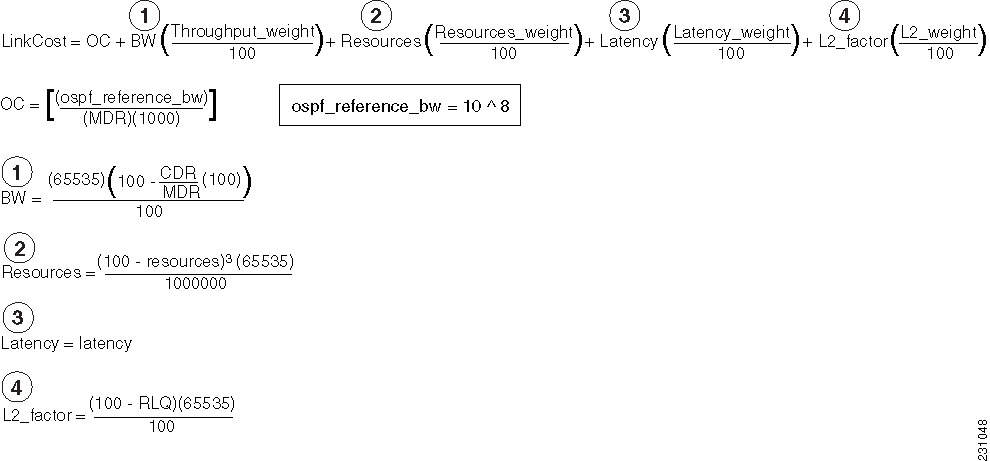
Using this formula, the default path costs were calculated as noted in the following list. If these values do not suit your network, you can use your own method of calculating path costs.
•56-kbps serial link—Default cost is 1785.
•64-kbps serial link—Default cost is 1562.
•T1 (1.544-Mbps serial link)—Default cost is 64.
•E1 (2.048-Mbps serial link)—Default cost is 48.
•4-Mbps Token Ring—Default cost is 25.
•Ethernet—Default cost is 10.
•16-Mbps Token Ring—Default cost is 6.
•FDDI—Default cost is 1.
•X25—Default cost is 5208.
•Asynchronous—Default cost is 10,000.
•ATM— Default cost is 1.The dynamic cost is calculated using the following formula:
L2L3API
Where the metric calculations are
S1 = ipv6 ospf dynamic weight throughput
S2 = ipv6 ospf dynamic weight resources
S3 = ipv6 ospf dynamic weight latency
S4 = ipv6 ospf dynamic weight L2 factor
OC = standard cost of a non-VMI route
Throughput = (current-data-rate)/(maximum-data-rate)
Router-dynamic cost= OC + (S1) + (S2) + (S3) + (S4)
For a dynamic cost to have the same cost as a default cost, all parameters must equal zero.
Each Layer 2 feedback can contribute a cost in the range of 0 to 65535. To tune down this cost range, use the optional weight keyword in conjunction with the throughput, resources, latency, or L2-factor keyword. Each of these weights has a default value of 100% and can be configured in the range from 0 to 100. When 0 is configured for a specific weight, that weight does not contribute to the OSPFv3 cost.
Because cost components can change rapidly, you may need to dampen the amount of changes in order to reduce network-wide churn. Use the optional hysteresis keyword with the threshold threshold-value keyword and argument to set a cost change threshold. Any cost change below this threshold is ignored.
Examples
Interface Cost Example
The following example sets the interface cost value to 65:
ipv6 ospf cost 65
VMI Interface Cost Example
The following example sets the interface cost value for a VMI interface:
interface vmi 0
ipv6 ospf cost dynamic hysteresis threshold 30
ipv6 ospf cost dynamic weight throughput 75
ipv6 ospf cost dynamic weight resources 70
ipv6 ospf cost dynamic weight latency 80
ipv6 ospf cost dynamic weight L2-factor 10
Related Commands
ipv6 ospf database-filter all out
To filter outgoing link-state advertisements (LSAs) to an Open Shortest Path First version 3 (OSPFv3) interface, use the ipv6 ospf database-filter all out command in interface configuration mode. To restore the forwarding of LSAs to the interface, use the no form of this command.
ipv6 ospf database-filter all out
no ipv6 ospf database-filter all out
Syntax Description
This command has no arguments or keywords.
Command Default
All outgoing LSAs are flooded to the interface.
Command Modes
Interface configuration
Command History
Usage Guidelines
This command performs the same function that the neighbor database-filter command performs on a neighbor basis.
Examples
The following example prevents flooding of OSPFv3 LSAs to broadcast, nonbroadcast, or point-to-point networks reachable through Ethernet interface 0:
interface ethernet 0
ipv6 ospf database-filter all out
Related Commands
ospfv3 database-filter |
Filters outgoing LSAs to an OSPFv3 interface |
router ospfv3 |
Enables OSPFv3 router configuration mode for the IPv4 or IPv6 address family. |
 Feedback