- Finding Feature Information
- Contents
- Prerequisites for L2VPN Pseudowire Redundancy
- Restrictions for L2VPN Pseudowire Redundancy
- Information About L2VPN Pseudowire Redundancy
- How to Configure L2VPN Pseudowire Redundancy
- Configuration Examples for L2VPN Pseudowire Redundancy
- Additional References
- Feature Information for L2VPN Pseudowire Redundancy
L2VPN Pseudowire Redundancy
The L2VPN Pseudowire Redundancy feature lets you configure your network to detect a failure in the network and reroute the Layer 2 (L2) service to another endpoint that can continue to provide service. This feature provides the ability to recover from a failure either of the remote provider edge (PE) router or of the link between the PE and customer edge (CE) routers.
Finding Feature Information
Your software release may not support all the features documented in this module. For the latest feature information and caveats, see the release notes for your platform and software release. To find information about the features documented in this module, and to see a list of the releases in which each feature is supported, see the "Feature Information for L2VPN Pseudowire Redundancy" section.
Use Cisco Feature Navigator to find information about platform support and Cisco software image support. To access Cisco Feature Navigator, go to http://www.cisco.com/go/cfn. An account on Cisco.com is not required.
Contents
• Prerequisites for L2VPN Pseudowire Redundancy
•Restrictions for L2VPN Pseudowire Redundancy
•Information About L2VPN Pseudowire Redundancy
•How to Configure L2VPN Pseudowire Redundancy
•Configuration Examples for L2VPN Pseudowire Redundancy
•Feature Information for L2VPN Pseudowire Redundancy
Prerequisites for L2VPN Pseudowire Redundancy
•This feature module requires that you understand how to configure basic L2 virtual private networks (VPNs).
–Any Transport over MPLS
–L2 VPN Interworking
–Layer 2 Tunneling Protocol Version 3 (L2TPv3)
•The L2VPN Pseudowire Redundancy feature requires that the following mechanisms be in place to enable you to detect a failure in the network:
–Label-switched paths (LSP) Ping/Traceroute and Any Transport over MPLS Virtual Circuit Connection Verification (AToM VCCV)
–Local Management Interface (LMI)
–Operation, Administration, and Maintenance (OAM)
Restrictions for L2VPN Pseudowire Redundancy
•The default Label Distribution Protocol (LDP) session hold-down timer will enable the software to detect failures in about 180 seconds. That time can be configured so that the software can detect failures more quickly. See the mpls ldp holdtime command for more information.
•L2VPN Pseudowire Redundancy does not support pseudowire interworking mode with L2TPv3. The connectivity between CEs may be impacted if you have interworking IP configured in the pseudowire class.
•The primary and backup pseudowires must run the same type of transport service. The primary and backup pseudowires must be configured with AToM or L2TPv3.
•The backup peer can only be configured for nonstatic L2TPv3 sessions. The backup L2TPv3 session cannot be static L2TPv3 session. The encapsulation type of primary and backup pseudowire must be the same.
•If you use L2VPN Pseudowire Redundancy with L2VPN Interworking, the interworking method must be the same for the primary and backup pseudowires.
•L2VPN Pseudowire Redundancy does support setting the experimental (EXP) bit on the Multiprotocol Label Switching (MPLS) pseudowire.
•L2VPN Pseudowire Redundancy does not support different pseudowire encapsulation types on the MPLS pseudowire.
•The mpls l2transport route command is not supported. Use the xconnect command instead.
•The ability to have the backup pseudowire fully operational at the same time that the primary pseudowire is operational is not supported. The backup pseudowire becomes active only after the primary pseudowire fails.
•The AToM VCCV feature is supported only on the active pseudowire.
•More than one backup pseudowire is not supported.
Information About L2VPN Pseudowire Redundancy
•Introduction to L2VPN Pseudowire Redundancy
Introduction to L2VPN Pseudowire Redundancy
L2VPNs can provide pseudowire resiliency through their routing protocols. When connectivity between end-to-end PE routers fails, an alternative path to the directed LDP session and the user data can take over. However, there are some parts of the network where this rerouting mechanism does not protect against interruptions in service. Figure 1 shows those parts of the network that are vulnerable to an interruption in service.
Figure 1 Points of Potential Failure in an L2VPN Network
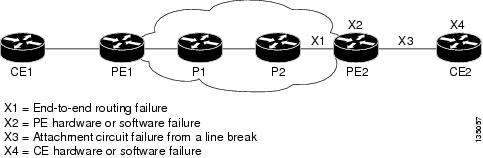
The L2VPN Pseudowire Redundancy feature provides the ability to ensure that the CE2 router in Figure 1 can always maintain network connectivity, even if one or all the failures in the figure occur.
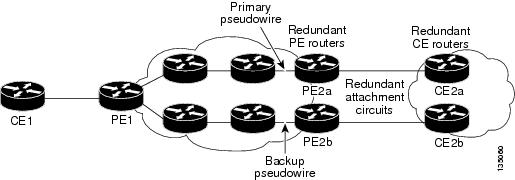
The L2VPN Pseudowire Redundancy feature enables you to set up backup pseudowires. You can configure the network with redundant pseudowires and redundant network elements, which are shown in Figure 2, Figure 3, and Figure 4.
Figure 2 shows a network with redundant pseudowires and redundant attachment circuits.
Figure 2 L2VPN Network with Redundant PWs and Attachment Circuits
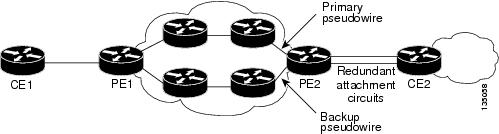
Figure 3 shows a network with redundant pseudowires, attachment circuits, and CE routers.
Figure 3 L2VPN Network with Redundant PWs, Attachment Circuits, and CE Routers
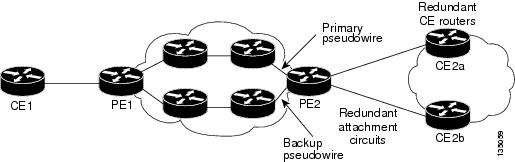
Figure 4 shows a network with redundant pseudowires, attachment circuits, CE routers, and PE routers.
Figure 4 L2VPN Network with Redundant PWs, Attachment Circuits, CE Routers,
and PE Routers
How to Configure L2VPN Pseudowire Redundancy
The L2VPN Pseudowire Redundancy feature enables you to configure a backup pseudowire in case the primary pseudowire fails. When the primary pseudowire fails, the PE router can switch to the backup pseudowire. You can have the primary pseudowire resume operation after it comes back up.
The following sections explain how to configure the L2VPN Pseudowire Redundancy feature:
•Configuring the Pseudowire (required)
•Configuring L2VPN Pseudowire Redundancy (required)
•Forcing a Manual Switchover to the Backup Pseudowire VC (optional)
•Verifying the L2VPN Pseudowire Redundancy Configuration (optional)
Configuring the Pseudowire
The successful transmission of the Layer 2 frames between PE routers is due to the configuration of the PE routers. You set up the connection, called a pseudowire, between the routers.
The pseudowire-class configuration group specifies the characteristics of the tunneling mechanism, which are:
•Encapsulation type
•Control protocol
•Payload-specific options
You must specify the encapsulation mpls command as part of the pseudowire class for the AToM VCs to work properly. If you omit the encapsulation mpls command as part of the xconnect command, you receive the following error:
% Incomplete command.
Perform this task to configure a pseudowire class.
SUMMARY STEPS
1. enable
2. configure terminal
3. pseudowire-class name
4. encapsulation mpls
5. interworking {ethernet | ip}
DETAILED STEPS
Configuring L2VPN Pseudowire Redundancy
Perform this task to configure the L2VPN Pseudowire Redundancy feature.
Prerequisites
For each transport type, the xconnect command is configured slightly differently. The following configuration steps use Ethernet VLAN over MPLS, which is configured in subinterface configuration mode. See Any Transport over MPLS to determine how to configure the xconnect command for other transport types.
SUMMARY STEPS
1. enable
2. configure terminal
3. interface gigabitethernetslot/subslot/interface.subinterface
4. encapsulation dot1q vlan-id
5. xconnect peer-router-id vcid {encapsulation mpls | pw-class pw-class-name}
6. backup peer peer-router-ip-addr vcid [pw-class pw-class-name]
7. backup delay enable-delay {disable-delay | never}
DETAILED STEPS
Forcing a Manual Switchover to the Backup Pseudowire VC
To force the router switch over to the backup or primary pseudowire, you can enter the xconnect backup force switchover command in privileged EXEC mode. You can specify either the interface of the primary attachment circuit (AC) to switch to or the IP address and VC ID of the peer router.
A manual switchover can be made only if the interface or peer specified in the command is actually available and the xconnect moves to the fully active state when executing the command.
SUMMARY STEPS
1. enable
2. xconnect backup force-switchover {interface interface-info | peer ip-address vcid}
DETAILED STEPS
Verifying the L2VPN Pseudowire Redundancy Configuration
Perform this task to verify that the L2VPN Pseudowire Redundancy feature is correctly configured.
SUMMARY STEPS
1. show mpls l2transport vc
2. show xconnect all
3. xconnect logging redundancy
DETAILED STEPS
Step 1 show mpls l2transport vc
The following is sample output from the show mpls l2transport vc command. In this example, the primary attachment circuit is up. The backup attachment circuit is available, but not currently selected.
Router# show mpls l2transport vc
Local intf Local circuit Dest address VC ID Status
------------- ----------------------- --------------- ---------- ----------
Et0/0.1 Eth VLAN 101 10.0.0.2 101 UP
Et0/0.1 Eth VLAN 101 10.0.0.3 201 DOWN
Router# show mpls l2transport vc detail
Local interface: Et0/0.1 up, line protocol up, Eth VLAN 101 up
Destination address 10.0.0.2 VC ID: 101, VC status UP
.
.
.
Local interface: Et0/0.1 down, line protocol down, Eth VLAN 101 down
Destination address 10.0.0.3 VC ID: 201, VC status down
.
.
.
Step 2 show xconnect all
In this example, the topology is Attachment Circuit 1 to Pseudowire 1 with a Pseudowire 2 as a backup:
Router# show xconnect all
Legend: XC ST=Xconnect State, S1=Segment1 State, S2=Segment2 State
UP=Up, DN=Down, AD=Admin Down, IA=Inactive, NH=No Hardware
XC ST Segment 1 S1 Segment 2 S2
------+---------------------------------+--+---------------------------------+--
UP pri ac Et0/0(Ethernet) UP mpls 10.55.55.2:1000 UP
IA sec ac Et0/0(Ethernet) UP mpls 10.55.55.3:1001 DN
In this example, the topology is Attachment Circuit 1 to Attachment Circuit 2 with a pseudowire backup for Attachment Circuit 2:
Router# show xconnect all
Legend: XC ST=Xconnect State, S1=Segment1 State, S2=Segment2 State
UP=Up, DN=Down, AD=Admin Down, IA=Inactive, NH=No Hardware
XC ST Segment 1 S1 Segment 2 S2
------+---------------------------------+--+---------------------------------+--
UP pri ac Se6/0:150(FR DLCI) UP ac Se8/0:150(FR DLCI) UP
IA sec ac Se6/0:150(FR DLCI) UP mpls 10.55.55.3:7151 DN
Step 3 xconnect logging redundancy
In addition to the show mpls l2transport vc command and the show xconnect command, you can use the xconnect logging redundancy command to track the status of the xconnect redundancy group:
Router(config)# xconnect logging redundancy
When this command is configured, the following messages are displayed during switchover events:
Activating the primary member:
00:01:07: %XCONNECT-5-REDUNDANCY: Activating primary member 10.55.55.2:1000
Activating the backup member:
00:01:05: %XCONNECT-5-REDUNDANCY: Activating secondary member 10.55.55.3:1001
Configuration Examples for L2VPN Pseudowire Redundancy
•Example: L2VPN Pseudowire Redundancy and AToM (Like to Like)
•Example: L2VPN Pseudowire Redundancy and L2VPN Interworking
•Example: L2VPN Pseudowire Redundancy with Layer 2 Local Switching
•Example: L2VPN Pseudowire Redundancy and Layer 2 Tunneling Protocol Version 3
Each of the configuration examples refers to one of the following pseudowire classes:
•AToM (like-to-like) pseudowire class:
pseudowire-class mpls
encapsulation mpls
•L2VPN IP interworking:
pseudowire-class mpls-ip
encapsulation mpls
interworking ip
Example: L2VPN Pseudowire Redundancy and AToM (Like to Like)
The following example shows a High-Level Data Link Control (HDLC) attachment circuit xconnect with a backup pseudowire:
interface Serial4/0
xconnect 10.55.55.2 4000 pw-class mpls
backup peer 10.55.55.3 4001 pw-class mpls
The following example shows a Frame Relay attachment circuit xconnect with a backup pseudowire:
connect fr-fr-pw Serial6/0 225 l2transport
xconnect 10.55.55.2 5225 pw-class mpls
backup peer 10.55.55.3 5226 pw-class mpls
Example: L2VPN Pseudowire Redundancy and L2VPN Interworking
The following example shows an Ethernet attachment circuit xconnect with L2VPN IP interworking and a backup pseudowire:
interface Ethernet0/0
xconnect 10.55.55.2 1000 pw-class mpls-ip
backup peer 10.55.55.3 1001 pw-class mpls-ip
The following example shows an Ethernet VLAN attachment circuit xconnect with L2VPN IP interworking and a backup pseudowire:
interface Ethernet1/0.1
encapsulation dot1Q 200
no ip directed-broadcast
xconnect 10.55.55.2 5200 pw-class mpls-ip
backup peer 10.55.55.3 5201 pw-class mpls-ip
The following example shows a Frame Relay attachment circuit xconnect with L2VPN IP interworking and a backup pseudowire:
connect fr-ppp-pw Serial6/0 250 l2transport
xconnect 10.55.55.2 8250 pw-class mpls-ip
backup peer 10.55.55.3 8251 pw-class mpls-ip
The following example shows a PPP attachment circuit xconnect with L2VPN IP interworking and a backup pseudowire:
interface Serial7/0
encapsulation ppp
xconnect 10.55.55.2 2175 pw-class mpls-ip
backup peer 10.55.55.3 2176 pw-class mpls-ip
Example: L2VPN Pseudowire Redundancy with Layer 2 Local Switching
The following example shows an Ethernet VLAN-VLAN local switching xconnect with a pseudowire backup for Ethernet segment E2/0.2. If the subinterface associated with E2/0.2 goes down, the backup pseudowire is activated:
connect vlan-vlan Ethernet1/0.2 Ethernet2/0.2
backup peer 10.55.55.3 1101 pw-class mpls
The following example shows a Frame Relay-to-Frame Relay local switching connect with a pseudowire backup for Frame Relay segment S8/0 150. If data-link connection identifier (DLCI) 150 on S8/0 goes down, the backup pseudowire is activated:
connect fr-fr-ls Serial6/0 150 Serial8/0 150
backup peer 10.55.55.3 7151 pw-class mpls
Example: L2VPN Pseudowire Redundancy and Layer 2 Tunneling Protocol Version 3
The following example shows how to configure a backup peer for an xconnect session:
pseudowire-class 773
encapsulation l2tpv3
ip local interface GigabitEthernet0/0/0.773
!
pseudowire-class 774
encapsulation l2tpv3
ip local interface GigabitEthernet0/0/1.774
!
interface GigabitEthernet0/0/0.780
encapsulation dot1Q 780
xconnect 10.22.73.14 100 pw-class 773
backup peer 10.22.74.14 101 pw-class 774
backup delay 0 0
The following example shows how to configure a Gigabit Ethernet port with L2VPN pseudowire redundancy and L2TPv3:
interface GigabitEthernet0/0/2
xconnect 10.22.70.83 50 pw-class pe1-pw-primary
backup peer 20.22.70.85 51 pw-class pe1-pw-secondary
The following example shows how to configure a Gigabit Ethernet VLAN with L2VPN pseudowire redundancy and L2TPv3:
interface GigabitEthernet0/0/0.100
encapsulation dot1q 100
xconnect 10.22.70.83 60 pw-class pe1-pw-primary
backup peer 10.22.70.85 61 pw-class pe1-pw-secondary
The following example shows how to configure a Gigabit Ethernet Q-in-Q with L2VPN pseudowire redundancy and L2TPv3:
interface GigabitEthernet0/0/0.200
encapsulation dot1q 200 second-dot1q 400
xconnect 10.22.70.83 70 pw-class pe1-pw-primary
backup peer 10.22.70.85 71 pw-class pe1-pw-secondary
The following example shows how to configure a Gigabit Ethernet Q-in-any with L2VPN pseudowire redundancy and L2TPv3:
interface GigabitEthernet0/0/0.300
encapsulation dot1q 300 second-dot1q any
xconnect 10.22.70.83 80 pw-class pe1-pw-primary
backup peer 10.22.70.85 81 pw-class pe1-pw-secondary
The following example shows how to configure an HDLC with L2VPN pseudowire redundancy and L2TPv3
interface Serial0/2/0:0
no ip address
xconnect 10.22.71.83 40 pw-class pe1-pw-hdlc
backup peer 10.22.70.85 41 pw-class pe1-pw-hdlc-2
Additional References
Related Documents
|
|
|
|---|---|
Cisco IOS commands |
|
Wide-area networking commands |
|
Cisco IOS XE Multiprotocol Label Switching configuration tasks |
Cisco IOS XE Multiprotocol Label Switching Configuration Guide |
Cisco IOS XE Wide-area networking configuration tasks |
Standards
|
|
|
|---|---|
None |
— |
MIBs
RFCs
|
|
|
|---|---|
None |
— |
Technical Assistance
Feature Information for L2VPN Pseudowire Redundancy
Table 1 lists the release history for this feature.
Use Cisco Feature Navigator to find information about platform support and software image support. Cisco Feature Navigator enables you to determine which software images support a specific software release, feature set, or platform. To access Cisco Feature Navigator, go to http://www.cisco.com/go/cfn. An account on Cisco.com is not required.

Note Table 1 lists only the software release that introduced support for a given feature in a given software release train. Unless noted otherwise, subsequent releases of that software release train also support that feature.
|
|
|
|
|---|---|---|
L2VPN Pseudowire Redundancy |
XE 2.3 |
This feature enables you to set up your network to detect a failure in the network and reroute the Layer 2 service to another endpoint that can continue to provide service. In Cisco IOS XE Release 2.3, this feature was integrated into the Cisco ASR 1000 Series Aggregation Service Routers. In Cisco IOS XE Release 3.3S, this feature supports Layer 2 Tunneling Protocol Version 3 (L2TPv3). The following sections provide information about this feature: • • • • The following commands were introduced or modified: backup delay (L2VPN local switching), backup peer, show xconnect, xconnect backup force-switchover, xconnect logging redundancy. |
 Feedback