- Finding Feature Information
- Contents
- Prerequisites for QoS: Policies Aggregation
- Restrictions for QoS: Policies Aggregation
- Information About QoS: Policies Aggregation
- Upgrading Your Service Policies to Support QoS: Policies Aggregation - MQC Support for Multiple Queue Aggregation at Main Interface
- Configuring QoS: QoS: Policies Aggregation MQC Support for Multiple Queue Aggregation at Main Interface
- Configuring QoS: QoS: Policies Aggregation MQC Support for Multiple Queue Aggregation at Main Interface on Gigabit Etherchannels
- Verifying the Traffic Policy Class, Policy Information, and Drop Statistics
QoS: Policies Aggregation
The QoS: Policies Aggregation (QoS: Policies Aggregation) feature for the Cisco ASR 1000 Series Aggregation Services Routers supports Modular Quality of Service Command-Line Interface (MQC) configuration of default traffic classes in policy maps on different subinterfaces to be queued as a single, user-defined traffic class at the main interface policy map. It is most useful in QoS configurations where you have several subinterface policy maps on the same physical interface and you want identical treatment of the default traffic classes on those subinterfaces.
Beginning in Cisco IOS XE Release 2.6, the QoS: Policies Aggregation feature is enhanced to support queueing aggregation at the primary interface for other traffic classes, including Differentiated Services Code Point (DSCP) traffic classes such as the expedited forwarding (EF), Assured Forwarding 1 (AF1), and AF4 traffic classes. With this enhancement, any traffic classes from VLAN subinterfaces can share a common queue for that traffic class at the main interface policy map. Other enhancements include the ability to configure and show drop statistics that occur at the aggregate level for these classes.
Finding Feature Information
For the latest feature information and caveats, see the release notes for your platform and software release. To find information about the features documented in this module, and to see a list of the releases in which each feature is supported, see the "Feature Information for QoS: Policies Aggregation" section.
Use Cisco Feature Navigator to find information about platform support and Cisco IOS XE Software image support. To access Cisco Feature Navigator, go to http://www.cisco.com/go/cfn. An account on Cisco.com is not required.
Contents
• Prerequisites for QoS: Policies Aggregation
•Restrictions for QoS: Policies Aggregation
•Information About QoS: Policies Aggregation
•How to Configure QoS: Policies Aggregation
•Configuration Examples for QoS: Policies Aggregation
•Feature Information for QoS: Policies Aggregation
Prerequisites for QoS: Policies Aggregation
•This feature is configured using the Modular Quality of Service (QoS) Command-Line Interface (CLI) (MQC).
•All traffic over the main interface should come through one or more subinterfaces.
Restrictions for QoS: Policies Aggregation
•Applies only when multiple subinterfaces with policy maps are attached to the same physical interface. This feature cannot be used to collectively classify default traffic classes or other traffic classes of policy maps on different physical interfaces.
•Certain traffic class configuration prior to Cisco IOS XE Release 2.6 at the subinterface policy-map and main-interface policy-map will have different behavior and queueing results. See the "Understanding the QoS: QoS: Policies Aggregation MQC Support for Multiple Queue Aggregation at Main Interface Feature" section and "Differences Between the Original QoS Policies Aggregation Feature and the MQC Support for Multiple Queue Aggregation at Main Interface Feature" section.
Information About QoS: Policies Aggregation
Understanding Fragments in Class Definition Statements
QoS: Policies Aggregation introduces the idea of fragments in class definition statements. A default traffic class definition statement can be marked as a fragment within a policy map. Other policy maps on the same interface can also define their default traffic class statements as fragments, if desired. A separate policy map can then be created with a service fragment class definition statement that will be used to apply QoS to all of the fragments as a single group.
Figure 1 provides an example of one physical interface with three attached policy maps that is not using fragments. Note that each policy map has a default traffic class that can only classify traffic for the default traffic within its own policy map.
Figure 1
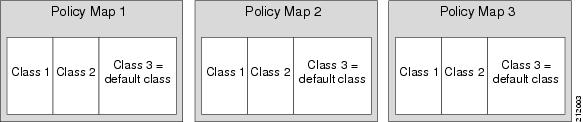
Three Policy Maps Configured Without Fragments
Figure 2 shows the same configuration configured with fragments and adds a fourth policy map with a class definition statement that classifies the fragments collectively. The default traffic classes are now classified as one service fragment group rather than three separate default traffic classes within the individual policy maps.
Figure 2
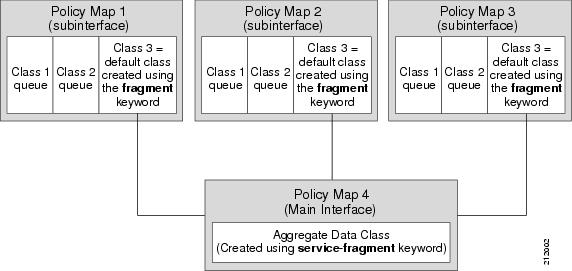
Three Policy Maps Configured Using Fragments
Understanding Fragments for Gigabit Etherchannel Bundles
Fragments can be configured for Gigabit Etherchannels when all of the member links of the Gigabit Etherchannel (GEC) bundle are on the same physical interface. Notably, if VLANs on the same physical interface are bundled, fragments can be used to define the collective treatment of all default traffic for the GEC bundle of VLAN subinterface member links.
When fragments are configured for Gigabit Etherchannel bundles, the policy maps that have a default traffic class configured using the fragment keyword are attached to the member subinterface links, and the policy maps that have a traffic class configured with the service-fragment keyword to collectively classify the fragments is attached to the physical interface.
Understanding the QoS: QoS: Policies Aggregation MQC Support for Multiple Queue Aggregation at Main Interface Feature
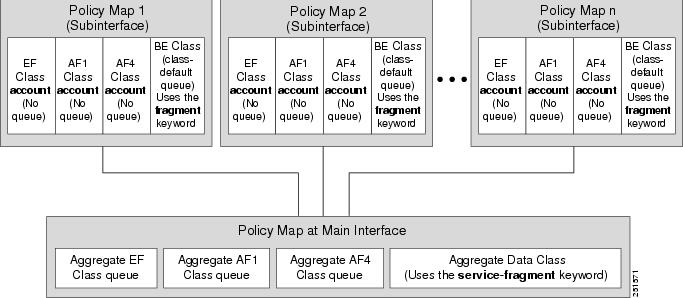
The QoS: QoS: Policies Aggregation MQC Support for Multiple Queue Aggregation at Main Interface feature extends the previous support of aggregation of class-default traffic using the fragment and service-fragment configurations, to other user-defined traffic classes in a subinterface policy-map, such as DSCP-based traffic classes, that are aggregated at the main interface policy-map as shown in Figure 3.
When no queueing is configured on a traffic class in the subinterface policy map, the account command can be used to track queueing drops that occur at the aggregate level for these classes, and can be displayed using the show policy-map interface command.
Figure 3 Policy Map Overview for the MQC Support for Multiple Queue Aggregation at Main Interface Feature
Differences Between the Original QoS Policies Aggregation Feature and the MQC Support for Multiple Queue Aggregation at Main Interface Feature
Although some of the configuration between the original QoS policies aggregation feature and enhancements in the MQC Support for Multiple Queue Aggregation at Main Interface feature appears similar, there are some important differences in the queueing behavior and the internal data handling.
For example, both configurations share and require the use of the fragment keyword for the class class-default command in the subscriber policy-map, as well as configuration of the service-fragment keyword for a user-defined class in the main interface policy-map to achieve common policy treatment for aggregate traffic. However, the use of this configuration results in different behavior between the original and enhanced QoS policies aggregation implementation:
•In the original implementation using the fragment and service-fragment architecture, all default class traffic and any traffic for classes without defined queueing features at the subinterface goes to the class-default queue and is aggregated into a common user-defined queue and policy defined at the main policy-map. Subinterface traffic aggregation (for example, from multiple subscribers on the same physical interface) ultimately occurs only for a single class, which is the default class.
•In the enhanced implementation of the MQC Support for Multiple Queue Aggregation at Main Interface feature also using the fragment and service-fragment architecture, all default class traffic also goes to the class-default queue and is aggregated into a common user-defined queue and policy defined at the main policy-map. However, other classes, such as DSCP-based subscriber traffic classes, are also supported for an aggregate policy. These traffic classes do not support any queues or queueing features other than account at the subscriber policy-map. The use of the fragment and service-fragment architecture enables these other subscriber traffic classes (from multiple subscribers on the same physical interface) to achieve common policy treatment for aggregate traffic that is defined for those same classes at the main policy-map.
The following sections summarize the key behavioral differences between the original QoS: Policies Aggregation feature and the QoS: QoS: Policies Aggregation MQC Support for Multiple Queue Aggregation at Main Interface feature.
Qos: Policies Aggregation Feature Prior to Cisco IOS XE Release 2.6
•All subinterface traffic classes have queues. However, when a traffic class in the subinterface policy-map is not configured with any queueing feature (commands such as priority, shape, bandwidth, queue-limit, fair-queue, random-detect, and so on, are not configured), the traffic is assigned to the class-default queue.
•Default class traffic from multiple subinterfaces can be aggregated into a common policy-map at the main interface when you use the fragment keyword at the subinterface class class-default configuration, and service-fragment configuration at the main interface class.
•No classification occurs or is supported at the main interface policy-map for any subinterface traffic classes that do not use the fragment and service-fragment configuration.
•Queueing occurs at the subinterface for other traffic classes defined with queueing features in the subinterface policy-map.
QoS: Policies Aggregation - MQC Support for Multiple Queue Aggregation at Main Interface Feature Beginning in Cisco IOS XE Release 2.6
•Subinterface traffic classes without configured queueing features do not have queues at the subscriber level.
•Default class traffic from multiple subinterfaces can be aggregated into a common policy-map at the main interface when you use the fragment keyword at the subinterface class class-default configuration, and service-fragment configuration at the main interface class. This configuration additionally enables support for other subinterface traffic classes (such as DSCP-based classes) to be aggregated into a common policy-map at the main interface.
•Other class traffic from multiple subinterfaces can be aggregated into a common policy-map at the main interface, according to the following configuration requirements:
1. You enable this behavior by using the fragment keyword at the subinterface class class-default configuration, and service-fragment configuration at the main interface class (this also enables aggregation of the default class).
2. You do not configure any queueing features at the subinterface policy-map for the other traffic classes.
•Queueing occurs at the main interface policy-map for other subinterface traffic classes as an aggregate.
•Optional tracking of statistics is supported using the account command for other traffic classes in the subinterface policy-map.
Changes in Queue Limit and WRED Thresholds
In Cisco IOS XE Release 2.6 the Cisco ASR 1000 Series Aggregation Services Routers support the addition of bytes as a unit of configuration for both queue limits and WRED thresholds. Therefore, as of this release, packet-based and byte-based limits are configurable, with some restrictions.
How to Configure QoS: Policies Aggregation
Configuring QoS: Policies Aggregation for an Interface
Configuring a Fragment Traffic Class in a Policy Map
Prerequisites
This procedure only shows how to configure the default traffic class as a fragment within a policy map. It does not include steps on configuring other classes within the policy map, or other policy maps on the router.
Like any policy map, the configuration is not managing network traffic until it has been attached to an interface. This procedure does not cover the process of attaching a policy map to an interface.
Note the following points about attaching and removing a policy map:
•To configure QoS: Policies Aggregation, you must attach the policy map that contains the service-fragment keyword to the main interface first, and then you must attach the policy map that contains the fragment keyword to the subinterface.
•To disable QoS: Policies Aggregation, you must remove the policy map that contains the fragment keyword from the subinterface first, and then you must remove the policy map that contains the service-fragment keyword from the main interface.
Restrictions
Only the default class statement in a policy map can be configured as a fragment.
Fragments only work when multiple policy maps are attached to the same physical interface. This process cannot be used to classify default traffic classes as fragments on policy maps on different physical interfaces.
Only queueing features are allowed in classes where the fragment keyword is entered, and at least one queueing feature must be entered in classes where the fragment keyword is used.
A policy map with a class using the fragment keyword can only be applied to traffic leaving the interface (policy maps attached to interfaces using the service-policy output command).
The fragment keyword cannot be entered in a child policy map.
SUMMARY STEPS
1. enable
2. configure terminal
3. policy-map policy-map-name
4. class class-default fragment fragment-class-name
5. qos-queueing-feature
DETAILED STEPS
Examples
Releases Prior to Cisco IOS XE Release 2.6
In the following example, a fragment named BestEffort is created in policy map subscriber1 and policy map subscriber 2. In this example, queueing features for other traffic classes are supported at the subinterface policy map.
policy-map subscriber1
 class voice
  set cos 5
  priority level 1
 class video
  set cos 4
  priority level 2
 class class-default fragment BestEffort
  shape average 200000000
  bandwidth remaining ratio 10

policy-map subscriber 2
 class voice
  set cos 5
  priority level 1
 class video
  set cos 4
  priority level 2
 class class-default fragment BestEffort
  shape average 200000000
  bandwidth remaining ratio 10
Cisco IOS XE Release 2.6 and Later Releases
The following example also shows how to configure a fragment named BestEffort for the default class in a policy map on a subinterface using the QoS: QoS: Policies Aggregation MQC Support for Multiple Queue Aggregation at Main Interface implementation. In this example, notice that queueing features are not supported for the other classes in the policy map:
policy-map subscriber1
class voice
set cos 5
account
class video
set cos 4
account
class AF1
account
class class-default fragment BestEffort
shape average 200000000
bandwidth remaining ratio 10
What to Do Next
After configuring default class statements as fragments in multiple subinterface policy maps, a separate policy map with a class statement using the service-fragment keyword must be configured to apply QoS to the class statements configured as fragments.
This process is documented in the "Configuring a Service Fragment Traffic Class" section.
Configuring a Service Fragment Traffic Class
This procedure assumes that fragment default traffic classes were already created. The procedure for creating fragment default traffic classes is documented in the "Configuring a Fragment Traffic Class in a Policy Map" section.
Like any policy map, the configuration is not managing network traffic until it has been attached to an interface. This procedure does not cover the process of attaching a policy map to an interface.
Restrictions
A service fragment can be used to collectively classify fragments only from the same physical interface. Fragments from different interfaces cannot be classified using the same service fragment.
Only queueing features are allowed in classes where the service-fragment keyword is entered, and at least one queueing feature must be entered in classes when the service-fragment keyword is used.
A policy map with a class using the service-fragment keyword can only be applied to traffic leaving the interface (policy maps attached to interfaces using the service-policy output command).
A class configured using the service-fragment keyword cannot be removed when it is being used to collectively apply QoS to fragments that are still configured on the interface. If you wish to remove a class configured using the service-fragment keyword, remove the fragment traffic classes before removing the service fragment.
The service-fragment keyword cannot be entered in a child policy map.
SUMMARY STEPS
1. enable
2. configure terminal
3. policy-map policy-map-name
4. class class-name service-fragment fragment-class-name
5. qos-queueing-feature
DETAILED STEPS
Examples
Releases Prior to Cisco IOS XE Release 2.6
In the following example, a policy map is created to apply QoS to all fragments named BestEffort.
policy-map main-interface
class data service-fragment BestEffort
shape average 400000000
In the following example, two fragments are created and then classified collectively using a service fragment.
policy-map subscriber1
 class voice
  set cos 5
  priority level 1
 class video
  set cos 4
  priority level 2
 class class-default fragment BestEffort
  shape average 200000000
  bandwidth remaining ratio 10

policy-map subscriber 2
 class voice
  set cos 5
  priority level 1
 class video
  set cos 4
  priority level 2
 class class-default fragment BestEffort
  shape average 200000000
  bandwidth remaining ratio 10
Cisco IOS XE Release 2.6 and Later Releases
The following example shows the creation of two fragments called BestEffort in the subinterface policy maps, followed by a sample configuration for the service-fragment called BestEffort to aggregate the queues at the main interface policy map:
policy-map subscriber1
class voice
set cos 5
account
class video
set cos 4
account
class AF1
account
class class-default fragment BestEffort
shape average 200000000
bandwidth remaining ratio 10
policy-map subscriber2
class voice
set cos 5
account
class video
set cos 4
account
class AF1
account
class class-default fragment BestEffort
shape average 200000000
bandwidth remaining ratio 10
policy-map main-interface
class voice
priority level 1
class video
priority level 2
class AF1
bandwidth remaining ratio 90
class data service-fragment BestEffort
shape average 400000000
bandwidth remaining ratio 1
Troubleshooting Tips
Ensure that all class statements that are supposed to be part of the same service fragment share the same fragment-class-name.
What to Do Next
The policy map must be attached to an interface.
Configuring QoS: Policies Aggregation on Gigabit Etherchannels
To properly configure QoS: Policies Aggregation on a Gigabit Etherchannel bundle, the following actions must be completed:
•Service fragment traffic classes must be configured and attached to the main physical interfaces.
•Fragment traffic classes must be configured and attached to the member link subinterfaces.
Configuring Service Fragments on Physical Interface Supporting a Gigabit Etherchannel Bundle
Prerequisites
This procedure assumes that a service fragment traffic class has already been created. A service fragment traffic class cannot be configured without configuring a fragment class. The procedure for creating a fragment class is documented in the "Configuring a Fragment Traffic Class in a Policy Map" section. The procedure for creating a service fragment traffic classes is documented in the "Configuring a Service Fragment Traffic Class" section.
These instructions do not provide any details about the options that can be configured for Gigabit Etherchannel member link subinterfaces. These instructions only document the procedure for attaching a policy map that already has a fragment traffic class to a member link subinterface.
Restrictions
This process works only if all of the links of the GEC bundle are on the same physical interface.
SUMMARY STEPS
1. enable
2. configure terminal
3. interface gigabitethernet interface-number
4. service-policy output service-fragment-class-name
DETAILED STEPS
Examples

Note This example shows a sample configuration that is supported for the original QoS: Policies Aggregation feature in releases prior to Cisco IOS XE Release 2.6. By following the newer policy-map configuration guidelines for the updates in Cisco IOS XE Release 2.6, it can be adapted to the QoS: QoS: Policies Aggregation MQC Support for Multiple Queue Aggregation at Main Interface feature.
In the following example, policy map subscriber is configured with a fragment class named BE. The fragment is then configured as part of a policy map named aggregate-member-link. Policy map subscriber is then attached to the bundle subinterfaces while policy map aggregate-member-link is attached to the physical interface.
port-channel load-balancing vlan-manual
class-map match any data
!
class-map match-all BestEffort
!
class-map match-all video
!
class-map match-all voice
!
policy-map subscriber
class voice
priority level 1
class video
priority level 2
class class-default fragment BE
shape average 100000000
bandwidth remaining ratios 80
policy-map aggregate-member-link
class BestEffort service-fragment BE
shape average 100000000
!
interface Port-channel1
ip address 10.0.0.0 255.255.0.0
!
interface Port-channel1.100
encapsulation dot1Q 100
ip address 10.0.0.1 255.255.255.0
service-policy output subscriber
!
interface Port-channel1.200
encapsulation dot1Q 200
ip address 10.0.0.2 255.255.255.0
service-policy output subscriber
!
interface Port-channel1.300
encapsulation dot1Q 300
ip address 10.0.0.4 255.255.255.0
service-policy output subscriber
!
interface GigabitEthernet1/1/1
no ip address
channel-group 1 mode on
service-policy output aggregate-member-link
!
interface GigabitEthernet1/1/2
no ip address
channel-group 1 mode on
service-policy output aggregate-member-link
Troubleshooting Tips
Ensure that the fragment-class-name is consistent across service-fragment and fragment class definitions.
What to Do Next
Attach the fragment service policy on the Gigabit Etherchannel member link subinterfaces.
Configuring Fragments on Gigabit Etherchannel Member Link Subinterfaces
Prerequisites
This procedure assumes that a service fragment traffic class has already been created. A service fragment traffic class cannot be configured without configuring a fragment class. The procedure for creating a fragment class is documented in the "Configuring a Fragment Traffic Class in a Policy Map" section. The procedure for creating a service fragment traffic classes is documented in the "Configuring a Service Fragment Traffic Class" section.
These instructions do not provide any details about the options that can be configured for Gigabit Etherchannel member link subinterfaces. These instructions only document the procedure for attaching a policy map that already has a fragment traffic class to a member link subinterface.
Restrictions
Fragments cannot be used for traffic on two or more physical interfaces. The GEC must all be on the same physical interface for this configuration to work properly.
SUMMARY STEPS
1. enable
2. configure terminal
3. interface port-channel port-channel-interface-number.port-channel-subinterface-number
4. service-policy output fragment-class-name
DETAILED STEPS
Examples
Note This example shows a sample configuration that is supported for the original QoS: Policies Aggregation feature in releases prior to Cisco IOS XE Release 2.6. By following the newer policy-map configuration guidelines for the updates in Cisco IOS XE Release 2.6, it can be adapted to the QoS: QoS: Policies Aggregation MQC Support for Multiple Queue Aggregation at Main Interface feature.
In the following example, the service policy named subscriber has a fragment default traffic class and is attached to the member link subinterface of a Gigabit Etherchannel bundle.
Note This example only shows how to attach a fragment default traffic class to the member link subinterface of a Gigabit Etherchannel bundle. This configuration is incomplete and would not classify default traffic appropriately until the physical interface was configured to support a service fragment traffic class.
policy-map subscriber
class voice
priority level 1
class video
priority level 2
class class-default fragment BE
shape average 100000000
bandwidth remaining ratios 80
policy-map aggregate-member-link
class BestEffort service-fragment BE
shape average 100000000
!
interface Port-channel1
ip address 172.16.2.3 255.255.0.0
!
interface Port-channel1.100
encapsulation dot1Q 100
ip address 192.168.2.100 255.255.255.0
service-policy output subscriber
!
Troubleshooting Tips
This configuration will not work until a service fragment default traffic class is created to classify the default traffic classes marked as fragments. This service fragment traffic class must be configured for this configuration to have any affect on network traffic.
What to Do Next
This is the final configuration step for configuring the QoS: Policies Aggregation feature on a Gigabit Etherchannel (GEC) bundle.
How to Configure QoS: QoS: Policies Aggregation MQC Support for Multiple Queue Aggregation at Main Interface
Some backward-compatibility exists between support of policies aggregation feature configuration in Cisco IOS XE Release 2.6 and prior Cisco IOS XE software releases. However, we recommend that you follow these upgrade guidelines for any physical interface where you want to move to the QoS: QoS: Policies Aggregation MQC Support for Multiple Queue Aggregation at Main Interface feature configuration.
For best results, you should upgrade any service policies configuration that you implemented prior to Cisco IOS XE Release 2.6, to the latest supported configuration.
The original and enhanced QoS: Policies Aggregation feature configuration can only reside on the same Cisco ASR 1000 Series Aggregation Services Router if the mixed configuration does not reside on the same physical interface. In other words, you can support the original configuration for one physical interface, and the enhanced configuration on a different physical interface.
The QoS: QoS: Policies Aggregation MQC Support for Multiple Queue Aggregation at Main Interface feature requires the same configuration of a fragment traffic class as the original feature, using the class class-default fragment command to enable and then define all subinterface policies aggregation, both for the default traffic class and the other traffic classes.
In the QoS: QoS: Policies Aggregation MQC Support for Multiple Queue Aggregation at Main Interface feature, the queueing features for the aggregate class queues (with traffic from the corresponding classes identified at the subinterfaces), are configured at the main interface policy-map.
Upgrading Your Service Policies to Support QoS: Policies Aggregation - MQC Support for Multiple Queue Aggregation at Main Interface
Prerequisites
Upgrading your service policies to support the QoS: QoS: Policies Aggregation MQC Support for Multiple Queue Aggregation at Main Interface feature assumes the following network conditions:
•The corresponding class-map statements appropriate for your network traffic are already configured.
•QoS service policies aggregation has been previously configured and applied for the main interface policy-map for a given physical interface and its corresponding subinterfaces, or subscriber interfaces, prior to Cisco IOS XE Release 2.6 for the default traffic class.
•A port on the same physical interface where you have previously configured the service policies aggregation feature prior to Cisco IOS XE Release 2.6 needs to support the configuration for the QoS: QoS: Policies Aggregation MQC Support for Multiple Queue Aggregation at Main Interface.
Upgrade Tasks
Step 1 Configure the service policies for the QoS: QoS: Policies Aggregation MQC Support for Multiple Queue Aggregation at Main Interface feature.
See the tasks described in the "Configuring QoS: QoS: Policies Aggregation MQC Support for Multiple Queue Aggregation at Main Interface" section.
Step 2 Remove any service policies configured prior to Cisco IOS XE Release 2.6 for any prior configured policies aggregation features using the no service-policy and no policy-map commands as follows:
a. At each of the subinterfaces, configure the no service-policy command. Be sure to remove the policies at the subinterfaces first.
b. At the physical interface, configure the no service-policy command.
Step 3 Apply the new service policies for the QoS: QoS: Policies Aggregation MQC Support for Multiple Queue Aggregation at Main Interface feature at the appropriate interfaces using the service-policy output command as follows:
a. At the physical interface, configure the service-policy output command.
b. At each of the subinterfaces, configure the service-policy output command.
Configuring QoS: QoS: Policies Aggregation MQC Support for Multiple Queue Aggregation at Main Interface
Configuring Traffic Classes on the Subscriber Interface
SUMMARY STEPS
1. enable
2. configure terminal
3. policy-map policy-map-name
4. class class-name
5. account [drop]
DETAILED STEPS
Examples
The following example configures the EF traffic class for policies aggregation at the subscriber subinterface with collection of drop statistics:
policy-map subscriber1
class EF
account
What to Do Next
Follow this procedure for all traffic classes that you want to aggregate. Then, follow the instructions in the "Configuring the Fragment Traffic Class on a Subinterface" section.
Configuring the Fragment Traffic Class on a Subinterface
What to Do Next
If you are upgrading your subinterface policy-map configuration from an earlier implementation of the QoS: Policies Aggregation feature, then remove the current service-policy from the subinterface using the no service-policy command.
Apply the new policy-map to outbound traffic on the subinterface using the service-policy output command.
Configuring Traffic Classes at the Main Interface
SUMMARY STEPS
1. enable
2. configure terminal
3. policy-map policy-map-name
4. class class-name
5. qos-queueing-feature
DETAILED STEPS
Examples
The following example configures three traffic classes at the main interface policy-map, along with the aggregate service-fragment data class:
policy-map main-interface
class voice
priority level 1
class video
priority level 2
class AF1
bandwidth remaining ratio 90
class data service-fragment BestEffort
shape average 400000000
bandwidth remaining ratio 1
What to Do Next
Follow this procedure to define queueing features for all traffic classes that you want to aggregate. Then, follow the instructions in the "Configuring the Service Fragment Traffic Class at the Main Interface" section.
Configuring the Service Fragment Traffic Class at the Main Interface
What to Do Next
If you are upgrading your main interface policy-map configuration from an earlier implementation of the QoS: Policies Aggregation feature, then remove the current service policy from the main interface using the no service-policy command.
Apply the new policy-map to outbound traffic on the main interface using the service-policy output command.
Configuring QoS: QoS: Policies Aggregation MQC Support for Multiple Queue Aggregation at Main Interface on Gigabit Etherchannels
The QoS: QoS: Policies Aggregation MQC Support for Multiple Queue Aggregation at Main Interface feature also supports configuration of the enhanced service policies on Gigabit Etherchannels according to the subscriber and main interface configuration guidelines described for this enhancement.
For more information, see the following sections:
•"Configuring QoS: Policies Aggregation on Gigabit Etherchannels" section
Verifying the Traffic Policy Class, Policy Information, and Drop Statistics
To display information about policy-map configuration and subscriber drop statistics enabled using the account command, use the show policy-map interface command:
Router# show policy-map interface port-channel 1.1
Port-channel1.1
Service-policy input: input_policy
Class-map: class-default (match-any)
0 packets, 0 bytes
5 minute offered rate 0000 bps, drop rate 0000 bps
Match: any
QoS Set
dscp default
No packet marking statistics available
Service-policy output: Port-channel_1_subscriber
Class-map: EF (match-any)
105233 packets, 6734912 bytes
5 minute offered rate 134000 bps, drop rate 0000 bps
Match: dscp ef (46)
Match: access-group name VLAN_REMARK_EF
Match: qos-group 3
Account QoS statistics
Queueing
Packets dropped 0 packets/0 bytes
QoS Set
cos 5
No packet marking statistics available
dscp ef
No packet marking statistics available
Class-map: AF4 (match-all)
105234 packets, 6734976 bytes
5 minute offered rate 134000 bps, drop rate 0000 bps
Match: dscp cs4 (32)
Account QoS statistics
Queueing
Packets dropped 0 packets/0 bytes
QoS Set
cos 4
No packet marking statistics available
Class-map: AF1 (match-any)
315690 packets, 20204160 bytes
5 minute offered rate 402000 bps, drop rate 0000 bps
Match: dscp cs1 (8)
Match: dscp af11 (10)
Match: dscp af12 (12)
Account QoS statistics
Queueing
Packets dropped 0 packets/0 bytes
QoS Set
cos 1
No packet marking statistics available
Class-map: class-default (match-any) fragment Port-channel_BE
315677 packets, 20203328 bytes
5 minute offered rate 402000 bps, drop rate 0000 bps
Match: any
Queueing
queue limit 31250 bytes
(queue depth/total drops/no-buffer drops) 0/0/0
(pkts output/bytes output) 315679/20203482
bandwidth remaining ratio 1
Configuration Examples for QoS: Policies Aggregation
Example: QoS Policies Aggregation
Note This example shows a sample configuration that is supported in the original QoS: Policies Aggregation feature prior to Cisco IOS XE Release 2.6.
In the following example, QoS: Policies Aggregation is used to define a fragment class of traffic to classify default traffic using the default traffic class named BestEffort. All default traffic from the policy maps named subscriber1 and subscriber2 is part of the fragment default traffic class named BestEffort. This default traffic is then shaped collectively by creating a class called data that uses the service-fragment keyword and the shape command.
Note the following about this example:
•The class-name for each fragment default traffic class is "BestEffort."
•The class-name of "BestEffort" is also used to define the class where the service-fragment keyword is entered. This class applies a shaping policy to all traffic forwarded using the fragment default traffic classes named "BestEffort."
policy-map subscriber1
 class voice
  set cos 5
  priority level 1
 class video
  set cos 4
  priority level 2
 class class-default fragment BestEffort
  shape average 200000000
  bandwidth remaining ratio 10

policy-map subscriber 2
 class voice
  set cos 5
  priority level 1
 class video
  set cos 4
  priority level 2
 class class-default fragment BestEffort
  shape average 200000000
  bandwidth remaining ratio 10
policy-map input_policy
class class-default
set dscp default
policy-map main-interface
class data service-fragment BestEffort
shape average 400000000
interface portchannel1.1001
encapsulation dot1q 1001
service-policy output subscriber1
service-policy input input_policy
interface portchannel1.1002
encapsulation dot1q 1002
service-policy output subscriber2
service-policy input input_policy
interface gigabitethernet 0/1
 description member-link1
port channel 1
service-policy output main-interface
interface gigabitethernet 0/2
description member-link2
port channel 1
service-policy output main-interface
Example: Gigabit Etherchannel QoS: Policies Aggregation
Note This example shows a sample configuration that is supported in the original QoS: Policies Aggregation feature prior to Cisco IOS XE Release 2.6.
In the following example, policy map subscriber is configured with a fragment class named BE. The fragment is then configured as part of a policy map named aggregate-member-link. Policy map subscriber is then attached to the bundle subinterfaces while policy map aggregate-member-link is attached to the physical interface.
port-channel load-balancing vlan-manual
class-map match-all BestEffort
!
class-map match-all video
!
class-map match-all voice
!
policy-map subscriber
class voice
priority level 1
class video
priority level 2
class class-default fragment BE
shape average 100000000
bandwidth remaining ratios 80
policy-map aggregate-member-link
class BestEffort service-fragment BE
shape average 100000000
!
interface Port-channel1
ip address 10.1.1.3 255.255.0.0
!
interface Port-channel1.100
encapsulation dot1Q 100
ip address 10.1.2.1 255.255.255.0
service-policy output subscriber
!
interface Port-channel1.200
encapsulation dot1Q 200
ip address 10.1.2.2 255.255.255.0
service-policy output subscriber
!
interface Port-channel1.300
encapsulation dot1Q 300
ip address 10.1.2.3 255.255.255.0
service-policy output subscriber
!
interface GigabitEthernet1/1/1
no ip address
channel-group 1 mode on
service-policy output aggregate-member-link
!
interface GigabitEthernet1/1/2
no ip address
channel-group 1 mode on
service-policy output aggregate-member-link
Example: QoS Policies Aggregation — MQC Support for Multiple Queue Aggregation at Main Interface
Note This example shows a sample configuration that is supported beginning in Cisco IOS XE Release 2.6.
At the main interface policy map called Port-channel_1_main_policy, the queueing features for the DSCP-based subscriber traffic classes are configured. You can also see the use of byte-based queue limits and random-detect thresholds implemented at the main interface queues.
The service-fragment called Port-channel_BE is also configured to aggregate the traffic from the subscriber class-default fragment class.
policy-map Port-channel_1_main_policy
class EF
priority level 1
queue-limit 547500 bytes
class AF4
priority level 2
queue-limit 4037500 bytes
class AF1
bandwidth remaining ratio 90
queue-limit 750000 bytes
random-detect dscp-based
random-detect dscp 8 750000 bytes 750000 bytes
random-detect dscp 10 750000 bytes 750000 bytes
random-detect dscp 12 600000 bytes 675000 bytes
class data service-fragment Port-channel_BE
shape average 250000000
bandwidth remaining ratio 1
!
In this example, the policy map Port-channel_1_subscriber is configured with a fragment class named Port-channel_BE. (For simplicity, only a single subinterface policy is shown.) This enable queueing and policies aggregation for the subscriber traffic classes at the main interface policy map.
The Port-channel_1_subscriber policy map identifies the DSCP-based traffic classes of EF, AF4, and AF1 and enables collection of drop statistics for those classes.
policy-map Port-channel_1_subscriber
class EF
account
set cos 5
set dscp ef
class AF4
account
set cos 4
class AF1
account
set cos 1
class class-default fragment Port-channel_BE
bandwidth remaining ratio 1
queue-limit 31250 bytes
!
port-channel load-balancing vlan-manual
!
interface Port-channel1
no ip address
no negotiation auto
!
The service policies are applied first to the physical interface, and then to the subinterfaces as shown:
interface GigabitEthernet1/2/0
no ip address
negotiation auto
no cdp enable
service-policy output Port-channel_1_main_policy
channel-group 1
!
interface GigabitEthernet2/2/0
no ip address
negotiation auto
service-policy output Port-channel_1_main_policy
channel-group 1
!
interface Port-channel1.1
encapsulation dot1Q 2 primary GigabitEthernet1/2/0 secondary GigabitEthernet2/2/0
ip address 10.0.0.2 255.255.255.0
service-policy output Port-channel_1_subscriber
Additional References
Related Documents
|
|
|
|---|---|
Cisco IOS commands |
|
QoS commands: complete command syntax, command modes, command history, defaults, usage guidelines, and examples |
|
Modular Quality of Service Command-Line Interface |
|
Distribution of Remaining Bandwidth Using Ratio |
|
Class-Based Shaping |
"Regulating Packet Flow— Using Class-Based Traffic Shaping" module |
Standards
|
|
|
|---|---|
No new or modified standards are supported, and support for existing standards has not been modified by this feature. |
— |
MIBs
|
|
|
|---|---|
CISCO-CLASS-BASED-QOS-MIB |
To locate and download MIBs for selected platforms, Cisco IOS XE software releases, and feature sets, use Cisco MIB Locator found at the following URL: |
RFCs
|
|
|
|---|---|
No new or modified RFCs are supported, and support for existing RFCs has not been modified. |
— |
Technical Assistance
Feature Information for QoS: Policies Aggregation
Table 1 lists the release history for this feature.
Use Cisco Feature Navigator to find information about platform support and software image support. Cisco Feature Navigator enables you to determine which Cisco IOS XE software images support a specific software release, feature set, or platform. To access Cisco Feature Navigator, go to http://www.cisco.com/go/cfn. An account on Cisco.com is not required.
Note Table 1 lists only the Cisco IOS XE Software release that introduced support for a given feature in a given Cisco IOS XE Software release train. Unless noted otherwise, subsequent releases of that Cisco IOS XE Software release train also support that feature.
 Feedback