- Finding Feature Information
- Contents
- Prerequisites for Any Transport over MPLS
- Restrictions for Any Transport over MPLS
- General Restrictions
- ATM AAL5 over MPLS Restrictions
- ATM Cell Relay over MPLS Restrictions
- Ethernet over MPLS (EoMPLS) Restrictions
- Per-Subinterface MTU for Ethernet over MPLS Restrictions
- Frame Relay over MPLS Restrictions
- HDLC over MPLS Restrictions
- PPP over MPLS Restrictions
- Tunnel Selection Restrictions
- Experimental Bits with AToM Restrictions
- Remote Ethernet Port Shutdown Restrictions
- How AToM Transports Layer 2 Packets
- Benefits of AToM
- MPLS Traffic Engineering Fast Reroute
- Maximum Transmission Unit Guidelines for Estimating Packet Size
- Per-Subinterface MTU for Ethernet over MPLS
- Frame Relay over MPLS and DTE, DCE, and NNI Connections
- QoS Features Supported with AToM
- OAM Cell Emulation for ATM AAL5 over MPLS
- Any Transport over MPLS (AToM): Remote Ethernet Port Shutdown
- AToM Load Balancing with Single PW
- Configuring the Pseudowire Class
- Changing the Encapsulation Type and Removing a Pseudowire
- Configuring ATM AAL5 over MPLS
- Configuring OAM Cell Emulation for ATM AAL5 over MPLS
- Configuring ATM Cell Relay over MPLS
- Configuring Ethernet over MPLS
- Configuring Frame Relay over MPLS
- Configuring HDLC or PPP over MPLS
- Configuring Tunnel Selection
- Setting Experimental Bits with AToM
- Enabling the Control Word
- Configuring MPLS AToM Remote Ethernet Port Shutdown
- Configuring AToM Load Balancing with Single PW
- Example: ATM over MPLS
- Example: Configuring ATM AAL5 over MPLS in VC Class Configuration Mode
- Example: Ethernet over MPLS with MPLS Traffic Engineering Fast Reroute
- Example: Configuring OAM Cell Emulation
- Example: Configuring ATM Cell Relay over MPLS
- Example: Configuring per-Subinterface MTU for Ethernet over MPLS
- Configuring Tunnel Selection
- Example: Configuring MTU Values in xconnect Configuration Mode for L2VPN Interworking
- Examples: Configuring Any Transport over MPLS (AToM): Remote Ethernet Port Shutdown
Any Transport over MPLS
This module describes how to configure Any Transport over MPLS (AToM) transports data link layer (Layer 2) packets over a Multiprotocol Label Switching (MPLS) backbone. AToM enables service providers to connect customer sites with existing Layer 2 networks by using a single, integrated, packet-based network infrastructure—a Cisco MPLS network. Instead of using separate networks with network management environments, service providers can deliver Layer 2 connections over an MPLS backbone. AToM provides a common framework to encapsulate and transport supported Layer 2 traffic types over an MPLS network core.
AToM supports the following like-to-like transport types:
• ATM Adaptation Layer Type-5 (AAL5) over MPLS
•ATM Cell Relay over MPLS
•Ethernet over MPLS (VLAN and port modes)
•Frame Relay over MPLS
•PPP over MPLS
•High-Level Data Link Control (HDLC) over MPLS
Finding Feature Information
Your software release may not support all the features documented in this module. For the latest feature information and caveats, see the release notes for your platform and software release. To find information about the features documented in this module, and to see a list of the releases in which each feature is supported, see the "Feature Information for Any Transport over MPLS" section.
Use Cisco Feature Navigator to find information about platform support and Cisco software image support. To access Cisco Feature Navigator, go to http://www.cisco.com/go/cfn. An account on Cisco.com is not required.
Contents
•Prerequisites for Any Transport over MPLS
•Restrictions for Any Transport over MPLS
•Information About Any Transport over MPLS
•How to Configure Any Transport over MPLS
•Configuration Examples for Any Transport over MPLS
•Feature Information for Any Transport over MPLS
Prerequisites for Any Transport over MPLS
•IP routing must be configured in the core so that the provider edge (PE) routers can reach each other via IP.
•MPLS must be configured in the core so that a label-switched path (LSP) exists between the PE routers.
•Cisco Express Forwarding must be enabled before you configure any Layer 2 circuits.
•A loopback interface must be configured for originating and terminating Layer 2 traffic. Ensure that the PE routers can access the other router's loopback interface. Note that the loopback interface is not needed in all cases. For example, tunnel selection does not need a loopback interface when AToM is directly mapped to a traffic engineering (TE) tunnel.
•Before converting an interface with L2TPv3 xconnect to AToM xconnect, remove the L2TPv3 configuration from the interface and then configure AToM.
•Before configuring Ethernet over MLS in VLAN mode, you must configure Ethernet over MPLS on the subinterfaces.
Restrictions for Any Transport over MPLS
•ATM AAL5 over MPLS Restrictions
•ATM Cell Relay over MPLS Restrictions
•Ethernet over MPLS (EoMPLS) Restrictions
•Per-Subinterface MTU for Ethernet over MPLS Restrictions
•Frame Relay over MPLS Restrictions
•Tunnel Selection Restrictions
•Experimental Bits with AToM Restrictions
•Remote Ethernet Port Shutdown Restrictions
General Restrictions
•Address format—Configure the Label Distribution Protocol (LDP) router ID on all PE routers to be a loopback address with a /32 mask. Otherwise, some configurations might not function properly.
•Layer 2 virtual private networks (L2VPN) features (AToM and Layer 2 Tunnel Protocol Version 3 (L2TPv3) are not supported on an ATM interface.
•Some features may not work if AToM is configured and L2TPv3 configuration is not removed properly.
ATM AAL5 over MPLS Restrictions
•AAL5 over MPLS is supported only in SDU mode.
ATM Cell Relay over MPLS Restrictions
•If you have TE tunnels running between the PE routers, you must enable LDP on the tunnel interfaces.
•The F4 end-to-end OAM cells are transparently transported along with the ATM cells. When a permanent virtual path (PVP) or permanent virtual circuit (PVC) is down on one PE router, the label associated with that PVP or PVC is withdrawn. Subsequently, the peer PE router detects the label withdrawal and sends an F4 AIS/RDI signal to its corresponding CE router. The PVP or PVC on the peer PE router remains in the up state.
•VC class configuration mode is not supported in port mode.
•The AToM control word is supported. However, if a peer PE does not support the control word, it is disabled.
For configuring ATM cell relay over MPLS in VP mode, the following restrictions apply:
•If a VPI is configured for VP cell relay, you cannot configure a PVC using the same VPI.
•VP trunking (mapping multiple VPs to one emulated VC label) is not supported. Each VP is mapped to one emulated VC.
•VP mode and VC mode drop idle cells.
Ethernet over MPLS (EoMPLS) Restrictions
•The subinterfaces between the CE and PE routers that are running Ethernet over MPLS must be in the same subnet.
•The subinterface on the adjoining CE router must be on the same VLAN as the PE router.
•Ethernet over MPLS supports VLAN packets that conform to the IEEE 802.1Q standard. The 802.1Q specification establishes a standard method for inserting VLAN membership information into Ethernet frames. The Inter-Switch Link (ISL) protocol is not supported between the PE and CE routers.
•The AToM control word is supported. However, if the peer PE does not support a control word, the control word is disabled.
•Ethernet packets with hardware-level cyclic redundancy check (CRC) errors, framing errors, and runt packets are discarded on input.
Per-Subinterface MTU for Ethernet over MPLS Restrictions
•The following features do not support MTU values in xconnect subinterface configuration mode:
–Layer 2 Tunnel Protocol Version 3 (L2TPv3)
–Virtual Private LAN services (VPLS)
–L2VPN Pseudowire Switching
•The MTU value can be configured in xconnect subinterface configuration mode only on the following interfaces and subinterfaces:
–Fast Ethernet
–Gigabit Ethernet
•The router uses an MTU validation process for remote VCs established through LDP, which compares the MTU value configured in xconnect subinterface configuration mode to the MTU value of the remote customer interface. If an MTU value has not been configured in xconnect subinterface configuration mode, then the validation process compares the MTU value of the local customer interface to the MTU value of the remote xconnect, either explicitly configured or inherited from the underlying interface or subinterface.
•When you configure the MTU value in xconnect subinterface configuration mode, the specified MTU value is not enforced by the dataplane. The dataplane enforces the MTU values of the interface (port mode) or subinterface (VLAN mode).
•Ensure that the interface MTU is larger than the MTU value configured in xconnect subinterface configuration mode. If the MTU value of the customer-facing subinterface is larger than the MTU value of the core-facing interface, traffic may not be able to travel across the pseudowire.
Frame Relay over MPLS Restrictions
Frame Relay traffic shaping is not supported with AToM switched VCs.
HDLC over MPLS Restrictions
•Asynchronous interfaces are not supported.
•You must configure HDLC over MPLS on router interfaces only. You cannot configure HDLC over MPLS on subinterfaces.
PPP over MPLS Restrictions
•Zero hops on one router is not supported. However, you can have back-to-back PE routers.
•Asynchronous interfaces are not supported. The connections between the CE and PE routers on both ends of the backbone must have similar link layer characteristics. The connections between the CE and PE routers must both be synchronous.
•Multilink PPP (MLP) is not supported.
•You must configure PPP on router interfaces only. You cannot configure PPP on subinterfaces.
Tunnel Selection Restrictions
•The selected path should be an LSP destined to the peer PE router.
•The selected tunnel must be an MPLS TE tunnel.
•If you select a tunnel, the tunnel tailend must be on the remote PE router.
•If you specify an IP address, that address must be the IP address of the loopback interface on the remote PE router. The address must have a /32 mask. There must be an LSP destined to that selected address. The LSP need not be a TE tunnel.
Experimental Bits with AToM Restrictions
•You must statically set the experimental (EXP) bits in both the VC label and the LSP tunnel label, because the LSP tunnel label might be removed at the penultimate router.
•For EXP bits and ATM AAL5 over MPLS and for EXP bits and Frame Relay over MPLS, if you do not assign values to the experimental bits, the priority bits in the header's "tag control information" field are set to zero.
•For EXP bits and ATM Cell Relay over MPLS in VC mode, if you do not assign values to the experimental bits, the priority bits in the header's "tag control information" field are set to zero.
•For EXP bits and HDLC over MPLS and PPP over MPLS, if you do not assign values to the experimental bits, zeros are written into the experimental bit fields.
Remote Ethernet Port Shutdown Restrictions
This feature is not symmetrical if the remote PE router is running an older version image or is on another platform that does not support the EoMPLS remote Ethernet port shutdown feature and the local PE is running an image which supports this feature.
Information About Any Transport over MPLS
To configure AToM, you must understand the following concepts:
•How AToM Transports Layer 2 Packets
•MPLS Traffic Engineering Fast Reroute
•Maximum Transmission Unit Guidelines for Estimating Packet Size
•Per-Subinterface MTU for Ethernet over MPLS
•Frame Relay over MPLS and DTE, DCE, and NNI Connections
•QoS Features Supported with AToM
•OAM Cell Emulation for ATM AAL5 over MPLS
•Any Transport over MPLS (AToM): Remote Ethernet Port Shutdown
•AToM Load Balancing with Single PW
How AToM Transports Layer 2 Packets
AToM encapsulates Layer 2 frames at the ingress PE and sends them to a corresponding PE at the other end of a pseudowire, which is a connection between the two PE routers. The egress PE removes the encapsulation and sends out the Layer 2 frame.
The successful transmission of the Layer 2 frames between PE routers is due to the configuration of the PE routers. You set up the connection, called a pseudowire, between the routers. You specify the following information on each PE router:
•The type of Layer 2 data that will be transported across the pseudowire, such as Ethernet, Frame Relay, or ATM
•The IP address of the loopback interface of the peer PE router, which enables the PE routers to communicate
•A unique combination of peer PE IP address and VC ID that identifies the pseudowire
The following example shows the basic configuration steps on a PE router that enable the transport of Layer 2 packets. Each transport type has slightly different steps.
Step 1 defines the interface or subinterface on the PE router:
Router# interface interface-type interface-number
Step 2 specifies the encapsulation type for the interface, such as dot1q:
Router(config-if)# encapsulation encapsulation-type
Step 3 does the following:
•Makes a connection to the peer PE router by specifying the LDP router ID of the peer PE router.
•Specifies a 32-bit unique identifier, called the VC ID, which is shared between the two PE routers.
The combination of the peer router ID and the VC ID must be unique on the router. Two circuits cannot use the same combination of peer router ID and VC ID.
•Specifies the tunneling method used to encapsulate data in the pseudowire. AToM uses MPLS as the tunneling method.
Router(config-if)# xconnect peer-router-id vcid encapsulation mpls
As an alternative, you can set up a pseudowire class to specify the tunneling method and other characteristics. For more information, see the "Configuring the Pseudowire Class" section.
Benefits of AToM
The following list explains some of the benefits of enabling Layer 2 packets to be sent in the MPLS network:
•The AToM product set accommodates many types of Layer 2 packets, including Ethernet and Frame Relay, across multiple Cisco router platforms. This enables the service provider to transport all types of traffic over the backbone and accommodate all types of customers.
•AToM adheres to the standards developed for transporting Layer 2 packets over MPLS. This benefits the service provider that wants to incorporate industry-standard methodologies in the network. Other Layer 2 solutions are proprietary, which can limit the service provider's ability to expand the network and can force the service provider to use only one vendor's equipment.
•Upgrading to AToM is transparent to the customer. Because the service provider network is separate from the customer network, the service provider can upgrade to AToM without disruption of service to the customer. The customers assume that they are using a traditional Layer 2 backbone.
MPLS Traffic Engineering Fast Reroute
AToM can use MPLS traffic engineering (TE) tunnels with fast reroute (FRR) support. AToM VCs can be rerouted around a failed link or node at the same time as MPLS and IP prefixes.
Enabling fast reroute on AToM does not require any special commands; you can use standard fast reroute commands. At the ingress PE, an AToM tunnel is protected by fast reroute when it is routed to an FRR-protected TE tunnel. Both link and node protection are supported for AToM VCs at the ingress PE.
In the following example, the primary link is disabled, which causes the backup tunnel (Tunnel 1) to become the primary path. The output in boldface font shows the status of the tunnel:
Router# execute-on slot 3 debug mpls l2transport fast-reroute
========= Line Card (Slot 3) =========
AToM fast reroute debugging is on
SLOT 3:Sep 16 17:58:56.346: AToM SMGR: Processing TFIB FRR event for 10.4.0.1
SLOT 3:Sep 16 17:58:56.346: AToM SMGR: Finished processing TFIB FRR event for 10.4.0.1
SLOT 3:Sep 16 17:58:56.346: AToM SMGR: Processing TFIB FRR event for Tunnel41
SLOT 3:Sep 16 17:58:56.346: AToM SMGR: Finished processing TFIB FRR event for Tunnel41
Sep 16 17:58:58.342: %LINK-3-UPDOWN: Interface POS0/0/0, changed state to down
Sep 16 17:58:58.342: %OSPF-5-ADJCHG: Process 1, Nbr 10.0.0.1 on POS0/0 from FULL to DOWN,
Neighbor Down: Interface down or detached
Sep 16 17:58:59.342: %LINEPROTO-5-UPDOWN: Line protocol on Interface POS0/0/0, changed
state to down
Maximum Transmission Unit Guidelines for Estimating Packet Size
The following calculation helps you determine the size of the packets traveling through the core network. You set the maximum transmission unit (MTU) on the core-facing interfaces of the P and PE routers to accommodate packets of this size. The MTU should be greater than or equal to the total bytes of the items in the following equation:
Core MTU >= (Edge MTU + Transport header + AToM header + (MPLS label stack * MPLS label
size))
The following sections describe the variables used in the equation.
Edge MTU
The edge MTU is the MTU for the customer-facing interfaces.
Transport Header
The Transport header depends on the transport type. Table 1 lists the specific sizes of the headers.
AToM Header
The AToM header is 4 bytes (control word). The control word is optional for Ethernet, PPP, HDLC, and cell relay transport types. The control word is required for Frame Relay and ATM AAL5 transport types.
MPLS Label Stack
The MPLS label stack size depends on the configuration of the core MPLS network:
•AToM uses one MPLS label to identify the AToM VCs (VC label). Therefore, the minimum MPLS label stack is one for directly connected AToM PEs, which are PE routers that do not have a P router between them.
•If LDP is used in the MPLS network, the label stack size is two (the LDP label and the VC label).
•If a TE tunnel instead of LDP is used between PE routers in the MPLS network, the label stack size is two (the TE label and the VC label).
•If a TE tunnel and LDP are used in the MPLS network (for example, a TE tunnel between P routers or between P and PE routers, with LDP on the tunnel), the label stack is three (TE label, LDP label, VC label).
•If you use MPLS fast reroute in the MPLS network, you add a label to the stack. The maximum MPLS label stack in this case is four (FRR label, TE label, LDP label, VC label).
•If AToM is used by the customer carrier in an MPLS VPN Carrier Supporting Carrier environment, you add a label to the stack. The maximum MPLS label stack in the provider carrier network is five (FRR label, TE label, LDP label, VPN label, VC label).
•If an AToM tunnel spans different service providers that exchange MPLS labels using IPv4 Border Gateway Protocol (BGP) (RFC 3107), you add a label to the stack. The maximum MPLS label stack is five (FRR label, TE label, Border Gateway Protocol (BGP) label, LDP label, VC label).
Other circumstances can increase the MPLS label stack size. Therefore, analyze the complete data path between the AToM tunnel endpoints and determine the maximum MPLS label stack size for your network. Then multiply the label stack size by the size of the MPLS label.
Estimating Packet Size: Example
The estimated packet size in the following example is 1526 bytes, based on the following assumptions:
•The edge MTU is 1500 bytes.
•The transport type is Ethernet VLAN, which designates 18 bytes for the transport header.
•The AToM header is 0, because the control word is not used.
•The MPLS label stack is 2, because LDP is used. The MPLS label is 4 bytes.
Edge MTU + Transport header + AToM header + (MPLS label stack * MPLS label) = Core MTU
1500 + 18 + 0 + (2 * 4 ) = 1526
You must configure the P and PE routers in the core to accept packets of 1526 bytes.
Per-Subinterface MTU for Ethernet over MPLS
Cisco IOS XE software includes the ability to specify MTU values in xconnect subinterface configuration mode. When you use xconnect subinterface configuration mode to set the MTU value, you establish a pseudowire connection for situations where the interfaces have different MTU values that cannot be changed.
If you specify an MTU value in xconnect subinterface configuration mode that is outside the range of supported MTU values (64 bytes to the maximum number of bytes supported by the interface), the command might be rejected. If you specify an MTU value that is out of range in xconnect subinterface configuration mode, the router enters the command in subinterface configuration mode.
For example, if you specify an MTU of 1501 in xconnect subinterface configuration mode, and that value is out of range, the router enters the command in subinterface configuration mode, where it is accepted:
Router# configure terminal
Router(config)# interface gigabitethernet0/0/2.1
Router(config-subif)# xconnect 10.10.10.1 100 encapsulation mpls
Router(config-subif-xconn)# mtu ?
<64 - 1500> MTU size in bytes
Router(config-subif-xconn)# mtu 1501 <<================
Router(config-subif)# mtu ?
<64 - 17940> MTU size in bytes
If the MTU value is not accepted in either xconnect subinterface configuration mode or subinterface configuration mode, then the command is rejected.
Frame Relay over MPLS and DTE, DCE, and NNI Connections
You can configure an interface as a DTE device or a DCE switch, or as a switch connected to a switch with network-to-network interface (NNI) connections. Use the following command in interface configuration mode:
frame-relay intf-type [dce | dte | nni]
The keywords are explained in Table 2.
.
Local Management Interface and Frame Relay over MPLS
Local Management Interface (LMI) is a protocol that communicates status information about PVCs. When a PVC is added, deleted, or changed, the LMI notifies the endpoint of the status change. LMI also provides a polling mechanism that verifies that a link is up.
How LMI Works
To determine the PVC status, LMI checks that a PVC is available from the reporting device to the Frame Relay end-user device. If a PVC is available, LMI reports that the status is "Active," which means that all interfaces, line protocols, and core segments are operational between the reporting device and the Frame Relay end-user device. If any of those components is not available, the LMI reports a status of "Inactive."

Note Only the DCE and NNI interface types can report LMI status.
Figure 1 is a sample topology that helps illustrate how LMI works.
Figure 1 Sample Topology
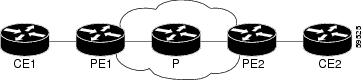
In Figure 1, note the following:
•CE1 and PE1 and PE2 and CE2 are Frame Relay LMI peers.
•CE1 and CE2 can be Frame Relay switches or end-user devices.
•Each Frame Relay PVC comprises multiple segments.
•The DLCI value is local to each segment and is changed as traffic is switched from segment to segment. Two Frame Relay PVC segments exist in Figure 1; one is between PE1 and CE1 and the other is between PE2 and CE2.
The LMI protocol behavior depends on whether you have DLCI-to-DLCI or port-to-port connections.
DLCI-to-DLCI Connections
If you have DLCI-to-DLCI connections, LMI runs locally on the Frame Relay ports between the PE and CE devices:
•CE1 sends an active status to PE1 if the PVC for CE1 is available. If CE1 is a switch, LMI checks that the PVC is available from CE1 to the user device attached to CE1.
•PE1 sends an active status to CE1 if the following conditions are met:
–A PVC for PE1 is available.
–PE1 received an MPLS label from the remote PE router.
–An MPLS tunnel label exists between PE1 and the remote PE.
For DTE or DCE configurations, the following LMI behavior exists: The Frame Relay device accessing the network (DTE) does not report PVC status. Only the network device (DCE) or NNI can report status. Therefore, if a problem exists on the DTE side, the DCE is not aware of the problem.
Port-to-Port Connections
If you have port-to-port connections, the PE routers do not participate in the LMI status-checking procedures. LMI operates between the CE routers only. The CE routers must be configured as DCE-DTE or NNI-NNI.
QoS Features Supported with AToM
The following tables list the QoS features supported by AToM:
•Table 3, QoS Features Supported with Ethernet over MPLS
•Table 4, QoS Features Supported with Frame Relay over MPLS
•Table 5, QoS Features Supported with ATM Cell Relay and AAL5 over MPLS
OAM Cell Emulation for ATM AAL5 over MPLS
If a PE router does not support the transport of Operation, Administration, and Maintenance (OAM) cells across a label switched path (LSP), you can use OAM cell emulation to locally terminate or loop back the OAM cells. You configure OAM cell emulation on both PE routers, which emulates a VC by forming two unidirectional LSPs. You use Cisco software commands on both PE routers to enable OAM cell emulation.
After you enable OAM cell emulation on a router, you can configure and manage the ATM VC in the same manner as you would a terminated VC. A VC that has been configured with OAM cell emulation can send loopback cells at configured intervals toward the local CE router. The endpoint can be either of the following:
•End-to-end loopback, which sends OAM cells to the local CE router.
•Segment loopback, which responds to OAM cells to a device along the path between the PE and CE routers.
The OAM cells include the following cells:
•Alarm indication signal (AIS)
•Remote defect indication (RDI)
These cells identify and report defects along a VC. When a physical link or interface failure occurs, intermediate nodes insert OAM AIS cells into all the downstream devices affected by the failure. When a router receives an AIS cell, it marks the ATM VC down and sends an RDI cell to let the remote end know about the failure.
OAM Cell Emulation for ATM AAL5 over MPLS in VC Class Configuration Mode
You can configure OAM cell emulation as part of a VC class and then apply the VC class to an interface, a subinterface, or a VC. When you configure OAM cell emulation in VC class configuration mode and then apply the VC class to an interface, the settings in the VC class apply to all the VCs on the interface, unless you specify a different OAM cell emulation value at a lower level, such as the subinterface or VC level. For example, you can create a VC class that specifies OAM cell emulation and sets the rate of AIS cells to every 30 seconds. You can apply the VC class to an interface. Then, for one PVC, you can enable OAM cell emulation and set the rate of AIS cells to every 15 seconds. All the PVCs on the interface use the cell rate of 30 seconds, except for the one PVC that was set to 15 seconds.
Any Transport over MPLS (AToM): Remote Ethernet Port Shutdown
This Cisco IOS XE feature allows a service provider edge (PE) router on the local end of an Ethernet over MPLS (EoMPLS) pseudowire to detect a remote link failure and cause the shutdown of the Ethernet port on the local customer edge (CE) router. Because the Ethernet port on the local CE router is shut down, the router does not lose data by continuously sending traffic to the failed remote link. This is beneficial if the link is configured as a static IP route.
Figure 2 illustrates a condition in an EoMPLS WAN, with a down Layer 2 tunnel link between a CE router (Customer Edge 1) and the PE router (Provider Edge 1). A CE router on the far side of the Layer 2 tunnel (Customer Edge 2), continues to forward traffic to Customer Edge 1 through the L2 tunnel.
Figure 2 Remote Link Outage in EoMPLS WAN

Previous to this feature, the Provider Edge 2 router could not detect a failed remote link. Traffic forwarded from Customer Edge 2 to Customer Edge 1 would be lost until routing or spanning tree protocols detected the down remote link. If the link was configured with static routing, the remote link outage would be even more difficult to detect.
With this feature, the Provider Edge 2 router detects the remote link failure and causes a shutdown of the local Customer Edge 2 Ethernet port. When the remote L2 tunnel link is restored, the local interface is automatically restored as well. The possibility of data loss is thus diminished.
With reference to Figure 2, the Remote Ethernet Shutdown sequence is generally described as follows:
1. The remote link between Customer Edge 1 and Provider Edge 1 fails.
2. Provider Edge 2 detects the remote link failure and disables the transmit laser on the line card interface connected to Customer Edge 2.
3. An RX_LOS error alarm is received by Customer Edge 2 causing Customer Edge 2 to bring down the interface.
4. Provider Edge 2 maintains its interface with Customer Edge 2 in an up state.
5. When the remote link and EoMPLS connection is restored, the Provider Edge 2 router enables the transmit laser.
6. The Customer Edge 2 router brings up its downed interface.
This feature is enabled by default for Ethernet over MPLS (EoMPLS). You can also enable this feature by using the remote link failure notification command in xconnect configuration mode as shown in the following example:
pseudowire-class eompls
encapsulation mpls
!
interface GigabitEthernet1/0/0
xconnect 10.13.13.13 1 pw-class eompls
remote link failure notification
!
This feature can be disabled using the no remote link failure notification command in xconnect configuration mode. Use the show ip interface brief privileged EXEC command to display the status of all remote L2 tunnel links. Use the show interface privileged EXEC command to show the status of the L2 tunnel on a specific interface.
Note The no remote link failure notification command will not give notification to clients for remote attachment circuit status down.
AToM Load Balancing with Single PW
Prior to Cisco IOS XE Release 3.4S, the Cisco ASR 1000 Series Aggregation Services Router did not perform load balancing for packets within the same pseudowire (PW) at the Provide Edge (PE) even if Equal Cost Multiple Paths (ECMPs) were available between PEs in an MPLS cloud. Only one of the routing options from the table would be used, and the other paths would be left unused. The AToM Load Balancing with Single PW feature enables load balancing for packets within the same pseudowire by further classifying packets within the same pseudowire into different flows based on certain fields in the packet received on an attachment circuit. For example, for Ethernet this load balancing is based on the source MAC address in the incoming packets.
In Cisco IOS XE Release 3.4S, this feature is available only for the Ethernet family of attachment circuits (ACs); so the flow-identification logic is based on source MAC address. All packets with the same source MAC address follow one path and are identified as flows.
How to Configure Any Transport over MPLS
This section explains how to perform a basic AToM configuration and includes the following procedures:
•Configuring the Pseudowire Class (required)
•Changing the Encapsulation Type and Removing a Pseudowire (optional)
•Configuring ATM AAL5 over MPLS (optional)
•Configuring OAM Cell Emulation for ATM AAL5 over MPLS (optional)
•Configuring ATM Cell Relay over MPLS (optional)
•Configuring Ethernet over MPLS (optional)
•Configuring Frame Relay over MPLS (optional)
•Configuring HDLC or PPP over MPLS (optional)
•Configuring Tunnel Selection (optional)
•Setting Experimental Bits with AToM (optional)
•Enabling the Control Word (optional)
•Configuring MPLS AToM Remote Ethernet Port Shutdown (optional)
•Configuring AToM Load Balancing with Single PW (optional)
Configuring the Pseudowire Class
Note•In simple configurations, this task is optional. You need not specify a pseudowire class if you specify the tunneling method as part of the xconnect command.
•You must specify the encapsulation mpls command as part of the pseudowire class or as part of the xconnect command for the AToM VCs to work properly. If you omit the encapsulation mpls command as part of the xconnect command, you receive the following error:
% Incomplete command.
SUMMARY STEPS
1. enable
2. configure terminal
3. pseudowire-class name
4. encapsulation mpls
DETAILED STEPS
Changing the Encapsulation Type and Removing a Pseudowire
Once you specify the encapsulation mpls command, you cannot remove it using the no encapsulation mpls command. Nor can you change the command's setting using the encapsulation l2tpv3 command. Those methods result in the following error message:
Encapsulation changes are not allowed on an existing pw-class.
To remove the encapsulation mpls command, you must delete the pseudowire with the no pseudowire-class command.
To change the type of encapsulation, remove the pseudowire using the no pseudowire-class command and reconfigure the pseudowire to specify the new encapsulation type.
Configuring ATM AAL5 over MPLS
•Configuring ATM AAL5 over MPLS on PVCs
•Configuring ATM AAL5 over MPLS in VC Class Configuration Mode
Configuring ATM AAL5 over MPLS on PVCs
SUMMARY STEPS
1. enable
2. configure terminal
3. interface type slot/subslot/port[.subinterface]
4. pvc [name] vpi/vci l2transport
5. encapsulation aal5
6. xconnect peer-router-id vcid encapsulation mpls
7. end
8. show mpls l2transport vc
DETAILED STEPS
Examples
The following is sample output from the show mpls l2transport vc command that shows that ATM AAL5 over MPLS is configured on a PVC:
Router# show mpls l2transport vc
Local intf Local circuit Dest address VC ID Status
--------- ------------- ------------ ----- ------
ATM1/0 ATM AAL5 1/100 10.4.4.4 100 UP
Configuring ATM AAL5 over MPLS in VC Class Configuration Mode
SUMMARY STEPS
1. enable
2. configure terminal
3. vc-class atm vc-class-name
4. encapsulation layer-type
5. exit
6. interface type slot/subslot/port[.subinterface]
7. class-int vc-class-name
8. pvc [name] vpi/vci l2transport
9. xconnect peer-router-id vcid encapsulation mpls
10. end
11. show atm class-links
DETAILED STEPS
Examples
In the following example, the command output from the show atm class-links command verifies that ATM AAL5 over MPLS is configured as part of a VC class. The command output shows the type of encapsulation and that the VC class was applied to an interface.
Router# show atm class-links 1/100
Displaying vc-class inheritance for ATM1/0/0.0, vc 1/100:
no broadcast - Not configured - using default
encapsulation aal5 - VC-class configured on main interface
Configuring OAM Cell Emulation for ATM AAL5 over MPLS
•Configuring OAM Cell Emulation for ATM AAL5 over MPLS on PVCs
•Configuring OAM Cell Emulation for ATM AAL5 over MPLS in VC Class Configuration Mode
•Configuring OAM Cell Emulation for ATM AAL5 over MPLS on PVCs
Configuring OAM Cell Emulation for ATM AAL5 over MPLS on PVCs
SUMMARY STEPS
1. enable
2. configure terminal
3. interface type slot/subslot/port[.subinterface]
4. pvc [name] vpi/vci l2transport
5. encapsulation aal5
6. xconnect peer-router-id vcid encapsulation mpls
7. oam-ac emulation-enable [ais-rate]
8. oam-pvc manage [frequency]
9. end
10. show atm pvc
DETAILED STEPS
Examples
The following output from the show atm pvc command shows that OAM cell emulation is enabled on the ATM PVC:
Router# show atm pvc 5/500
ATM4/1/0.200: VCD: 6, VPI: 5, VCI: 500
UBR, PeakRate: 1
AAL5-LLC/SNAP, etype:0x0, Flags: 0x34000C20, VCmode: 0x0
OAM Cell Emulation: enabled, F5 End2end AIS Xmit frequency: 1 second(s)
OAM frequency: 0 second(s), OAM retry frequency: 1 second(s)
OAM up retry count: 3, OAM down retry count: 5
OAM Loopback status: OAM Disabled
OAM VC state: Not ManagedVerified
ILMI VC state: Not Managed
InPkts: 564, OutPkts: 560, InBytes: 19792, OutBytes: 19680
InPRoc: 0, OutPRoc: 0
InFast: 4, OutFast: 0, InAS: 560, OutAS: 560
InPktDrops: 0, OutPktDrops: 0
CrcErrors: 0, SarTimeOuts: 0, OverSizedSDUs: 0
Out CLP=1 Pkts: 0
OAM cells received: 26
F5 InEndloop: 0, F5 InSegloop: 0, F5 InAIS: 0, F5 InRDI: 26
OAM cells sent: 77
F5 OutEndloop: 0, F5 OutSegloop: 0, F5 OutAIS: 77, F5 OutRDI: 0
OAM cell drops: 0
Status: UP
Configuring OAM Cell Emulation for ATM AAL5 over MPLS in VC Class Configuration Mode
SUMMARY STEPS
1. enable
2. configure terminal
3. vc-class atm name
4. encapsulation layer-type
5. oam-ac emulation-enable [ais-rate]
6. oam-pvc manage [frequency]
7. exit
8. interface type slot/subslot/port[.subinterface]
9. class-int vc-class-name
10. pvc [name] vpi/vci l2transport
11. xconnect peer-router-id vcid encapsulation mpls
DETAILED STEPS
Configuring ATM Cell Relay over MPLS
•Configuring ATM Cell Relay over MPLS in VC Mode
•Configuring ATM Cell Relay over MPLS in VC Mode Using VC Class Configuration Mode
•Configuring ATM Cell Relay over MPLS in PVP Mode
Configuring ATM Cell Relay over MPLS in VC Mode
SUMMARY STEPS
1. enable
2. configure terminal
3. interface atm slot/subslot/port[.subinterface]
4. pvc vpi/vci l2transport
5. encapsulation aal0
6. xconnect peer-router-id vcid encapsulation mpls
7. end
8. show atm vc
DETAILED STEPS
Example
The following sample output from the show atm vc command shows that the interface is configured for VC mode cell relay:
Router# show atm vc 7
ATM3/0: VCD: 7, VPI: 23, VCI: 100
UBR, PeakRate: 149760
AAL0-Cell Relay, etype:0x10, Flags: 0x10000C2D, VCmode: 0x0
OAM Cell Emulation: not configured
InBytes: 0, OutBytes: 0
Status: UP
Configuring ATM Cell Relay over MPLS in VC Mode Using VC Class Configuration Mode
SUMMARY STEPS
1. enable
2. configure terminal
3. vc-class atm name
4. encapsulation layer-type
5. exit
6. interface type slot/subslot/port[.subinterface]
7. class-int vc-class-name
8. pvc [name] vpi/vci l2transport
9. xconnect peer-router-id vcid encapsulation mpls
DETAILED STEPS
Configuring ATM Cell Relay over MPLS in PVP Mode
SUMMARY STEPS
1. enable
2. configure terminal
3. interface atm slot/subslot/port[.subinterface]
4. atm pvp vpi l2transport
5. xconnect peer-router-id vcid encapsulation mpls
6. end
7. show atm vp
DETAILED STEPS
Examples
The following output from the show atm vp command shows that the interface is configured for VP mode cell relay:
Router# show atm vp 1
ATM5/0  VPI: 1, Cell Relay, PeakRate: 149760, CesRate: 0, DataVCs: 1, CesVCs: 0, Status:
ACTIVE
VCD VCI Type InPkts OutPkts AAL/Encap Status
6 3 PVC 0 0 F4 OAM ACTIVE
7 4 PVC 0 0 F4 OAM ACTIVE
TotalInPkts: 0, TotalOutPkts: 0, TotalInFast: 0, TotalOutFast: 0,
TotalBroadcasts: 0 TotalInPktDrops: 0, TotalOutPktDrops: 0
Configuring Ethernet over MPLS
•Configuring Ethernet over MPLS in Port Mode
•Configuring Ethernet over MPLS with VLAN ID Rewrite
•Configuring per-Subinterface MTU for Ethernet over MPLS
Configuring Ethernet over MPLS in VLAN Mode to Connect Two VLAN Networks That Are in Different Locations.
SUMMARY STEPS
1. enable
2. configure terminal
3. interface gigabitethernet slot/subslot/port[.subinterface]
4. encapsulation dot1q vlan-id
5. xconnect peer-router-id vcid encapsulation mpls
DETAILED STEPS
Configuring Ethernet over MPLS in Port Mode
SUMMARY STEPS
1. enable
2. configure terminal
3. interface gigabitethernet slot/subslot/port[.subinterface]
4. xconnect peer-router-id vcid encapsulation mpls
5. end
6. show mpls l2transport vc
DETAILED STEPS
Examples
The sample output in the following example shows two VCs for Ethernet over MPLS:
•VC 2 is in Ethernet VLAN mode.
•VC 8 is in Ethernet port mode.
Router# show mpls l2transport vc
Local intf Local circuit Dest address VC ID Status
------------- -------------------- --------------- ---------- ----------
Gi4/0/0.1 Eth VLAN 2 10.1.1.1 2 UP
Gi8/0/1 Ethernet 10.1.1.1 8 UP
The sample output from the show mpls l2transport vc detail command displays the same information in a different format:
Router# show mpls l2transport vc detail
Local interface: Gi4/0/0.1 up, line protocol up, Eth VLAN 2 up
Destination address: 10.1.1.1, VC ID: 2, VC status: up
.
.
.
Local interface: Gi8/0/1 up, line protocol up, Ethernet up
Destination address: 10.1.1.1, VC ID: 8, VC status: up
Configuring Ethernet over MPLS with VLAN ID Rewrite
SUMMARY STEPS
1. enable
2. configure terminal
3. interface gigabitethernet slot/subslot/port[.subinterface]
4. encapsulation dot1q vlan-id
5. xconnect peer-router-id vcid encapsulation mpls
6. remote circuit id remote-vlan-id
7. end
8. show controllers eompls forwarding-table
DETAILED STEPS
Examples
The following sample output from the show controllers eompls forwarding-table command shows VLAN ID rewrite configured on a router with an engine 2 3-port Gigabit Ethernet line card. In this example, the output in boldface font shows the VLAN ID rewrite information.
On PE1
Router# execute slot 0 show controllers eompls forwarding-table 0 2
Port # 0, VLAN-ID # 2, Table-index 2
EoMPLS configured: 1
tag_rew_ptr = D001BB58
Leaf entry? = 1
FCR index = 20
**tagrew_psa_addr = 0006ED60
**tagrew_vir_addr = 7006ED60
**tagrew_phy_addr = F006ED60
[0-7] loq 8800 mtu 4458 oq 4000 ai 3 oi 04019110 (encaps size 4)
cw-size 4 vlanid-rew 3
gather A30 (bufhdr size 32 EoMPLS (Control Word) Imposition profile 81)
2 tag: 18 18
counters 1182, 10 reported 1182, 10.
Local OutputQ (Unicast): Slot:2 Port:0 RED queue:0 COS queue:0
Output Q (Unicast): Port:0 RED queue:0 COS queue:0
On PE2
Router# execute slot 0 show controllers eompls forwarding-table 0 3
Port # 0, VLAN-ID # 3, Table-index 3
EoMPLS configured: 1
tag_rew_ptr = D0027B90
Leaf entry? = 1
FCR index = 20
**tagrew_psa_addr = 0009EE40
**tagrew_vir_addr = 7009EE40
**tagrew_phy_addr = F009EE40
[0-7] loq 9400 mtu 4458 oq 4000 ai 8 oi 84000002 (encaps size 4)
cw-size 4 vlanid-rew 2
gather A30 (bufhdr size 32 EoMPLS (Control Word) Imposition profile 81)
2 tag: 17 18
counters 1182, 10 reported 1182, 10.
Local OutputQ (Unicast): Slot:5 Port:0 RED queue:0 COS queue:0
Output Q (Unicast): Port:0 RED queue:0 COS queue:0
Configuring per-Subinterface MTU for Ethernet over MPLS
SUMMARY STEPS
1. enable
2. configure terminal
3. interface gigabitethernet slot/subslot/port[.subinterface]
4. mtu mtu-value
5. interface gigabitethernet slot/subslot/port[.subinterface]
6. encapsulation dot1q vlan-id
7. xconnect peer-router-id vcid encapsulation mpls
8. mtu mtu-value
9. end
10. show mpls l2transport binding
DETAILED STEPS
Configuring Frame Relay over MPLS
•Configuring Frame Relay over MPLS with DLCI-to-DLCI Connections
•Configuring Frame Relay over MPLS with Port-to-Port Connections
Configuring Frame Relay over MPLS with DLCI-to-DLCI Connections
SUMMARY STEPS
1. enable
2. configure terminal
3. frame-relay switching
4. interface serial slot/subslot/port[.subinterface]
5. encapsulation frame-relay [cisco | ietf]
6. frame-relay intf-type dce
7. exit
8. connect connection-name interface dlci l2transport
9. xconnect peer-router-id vcid encapsulation mpls
DETAILED STEPS
Configuring Frame Relay over MPLS with Port-to-Port Connections
SUMMARY STEPS
1. enable
2. configure terminal
3. interface serial slot/subslot/port[.subinterface]
4. encapsulation hdlc
5. xconnect peer-router-id vcid encapsulation mpls
DETAILED STEPS
Configuring HDLC or PPP over MPLS
SUMMARY STEPS
1. enable
2. configure terminal
3. interface serial slot/subslot/port[.subinterface]
4. encapsulation encapsulation-type
5. xconnect peer-router-id vcid encapsulation mpls
DETAILED STEPS
Configuring Tunnel Selection
SUMMARY STEPS
1. enable
2. configure terminal
3. pseudowire-class name
4. encapsulation mpls
5. preferred-path {interface tunnel tunnel-number | peer {ip-address | host-name}} [disable-fallback]
6. exit
7. interface type slot/subslot/port[.subinterface]
8. encapsulation encapsulation-type
9. xconnect peer-router-id vcid pw-class name
DETAILED STEPS
Examples
In the following sample output from the show mpls l2transport vc command incudes the following information about the VCs:
•VC 101 has been assigned a preferred path called Tunnel1. The default path is disabled, because the preferred path specified that the default path should not be used if the preferred path fails.
•VC 150 has been assigned an IP address of a loopback address on PE2. The default path can be used if the preferred path fails.
Command output that is in boldface font shows the preferred path information.
Router# show mpls l2transport vc detail
Local interface: Gi0/0/0.1 up, line protocol up, Eth VLAN 222 up
Destination address: 10.16.16.16, VC ID: 101, VC status: up
Preferred path: Tunnel1, active
Default path: disabled
Tunnel label: 3, next hop point2point
Output interface: Tu1, imposed label stack {17 16}
Create time: 00:27:31, last status change time: 00:27:31
Signaling protocol: LDP, peer 10.16.16.16:0 up
MPLS VC labels: local 25, remote 16
Group ID: local 0, remote 6
MTU: local 1500, remote 1500
Remote interface description:
Sequencing: receive disabled, send disabled
VC statistics:
packet totals: receive 10, send 10
byte totals: receive 1260, send 1300
packet drops: receive 0, send 0
Local interface: ATM1/0/0 up, line protocol up, ATM AAL5 0/50 up
Destination address: 10.16.16.16, VC ID: 150, VC status: up
Preferred path: 10.18.18.18, active
Default path: ready
Tunnel label: 3, next hop point2point
Output interface: Tu2, imposed label stack {18 24}
Create time: 00:15:08, last status change time: 00:07:37
Signaling protocol: LDP, peer 10.16.16.16:0 up
MPLS VC labels: local 26, remote 24
Group ID: local 2, remote 0
MTU: local 4470, remote 4470
Remote interface description:
Sequencing: receive disabled, send disabled
VC statistics:
packet totals: receive 0, send 0
byte totals: receive 0, send 0
packet drops: receive 0, send 0
Troubleshooting Tips
You can use the debug mpls l2transport vc event command to troubleshoot tunnel selection. For example, if the tunnel interface that is used for the preferred path is shut down, the default path is enabled.
Examples
Router# debug mpls l2transport vc event
AToM SMGR [10.2.2.2, 101]: Processing imposition update, vc_handle 62091860, update_action
3, remote_vc_label 16
AToM SMGR [10.2.2.2, 101]: selected route no parent rewrite: tunnel not up
AToM SMGR [10.2.2.2, 101]: Imposition Programmed, Output Interface: Fe3/2/1
Setting Experimental Bits with AToM
SUMMARY STEPS
1. enable
2. configure terminal
3. class-map class-name
4. match any
5. policy-map policy-name
6. class class-name
7. set mpls experimental value
8. exit
9. exit
10. interface type slot/subslot/port[.subinterface]
11. service-policy input policy-name
12. end
13. show policy-map interface interface-name [vc [vpi/] vci] [dlci dlci] [input | output]
DETAILED STEPS
Enabling the Control Word
SUMMARY STEPS
1. enable
2. configure terminal
3. pseudowire-class cw_enable
4. encapsulation mpls
5. control-word
6. end
DETAILED STEPS
Configuring MPLS AToM Remote Ethernet Port Shutdown
Note The Any Transport over MPLS (AToM): Remote Ethernet Port Shutdown feature is automatically enabled by default when an image with the feature supported is loaded on the router.
SUMMARY STEPS
1. enable
2. configure terminal
3. pseudowire-class [pw-class-name]
4. encapsulation mpls
5. exit
6. interface type slot/subslot/port[.subinterface]
7. xconnect peer-ip-address vc-id pw-class pw-class-name
8. no remote link failure notification
9. remote link failure notification
10. end
DETAILED STEPS
Configuring AToM Load Balancing with Single PW
SUMMARY STEPS
1. enable
2. configure terminal
3. pseudowire-class ecmp-class
4. encapsulation mpls
5. load-balance flow
6. xconnect url pw-class ecmp-class
DETAILED STEPS
Configuration Examples for Any Transport over MPLS
•Example: Configuring ATM AAL5 over MPLS in VC Class Configuration Mode
•Example: Ethernet over MPLS with MPLS Traffic Engineering Fast Reroute
•Example: Configuring OAM Cell Emulation
•Example: Configuring ATM Cell Relay over MPLS
•Example: Configuring per-Subinterface MTU for Ethernet over MPLS
•Example: Configuring MTU Values in xconnect Configuration Mode for L2VPN Interworking
•Examples: Configuring Any Transport over MPLS (AToM): Remote Ethernet Port Shutdown
Example: ATM over MPLS
Example 1 shows the configuration of ATM over MPLS on two PE routers.
Example 1 ATM over MPLS Configuration Example
Example: Configuring ATM AAL5 over MPLS in VC Class Configuration Mode
The following example configures ATM AAL5 over MPLS in VC class configuration mode. The VC class is then applied to an interface.
enable
configure terminal
vc-class atm aal5class
encapsulation aal5
interface atm1/0/0
class-int aal5class
pvc 1/200 l2transport
xconnect 10.13.13.13 100 encapsulation mpls
The following example configures ATM AAL5 over MPLS in VC class configuration mode. The VC class is then applied to a PVC.
enable
configure terminal
vc-class atm aal5class
encapsulation aal5
interface atm1/0/0
pvc 1/200 l2transport
class-vc aal5class
xconnect 10.13.13.13 100 encapsulation mpls
Example: Ethernet over MPLS with MPLS Traffic Engineering Fast Reroute
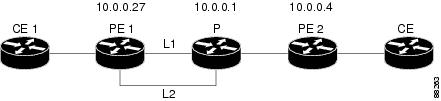
The following configuration example and Figure 3 show the configuration of Ethernet over MPLS with fast reroute on AToM PE routers.
Routers PE1 and PE2 have the following characteristics:
•A TE tunnel called Tunnel41 is configured between PE1and PE2, using an explicit path through a link called L1. AToM VCs are configured to travel through the FRR-protected tunnel Tunnel41.
•The link L1 is protected by FRR, the backup tunnel is Tunnel1.
•PE2 is configured to forward the AToM traffic back to PE1 through the L2 link.
Figure 3 Fast Reroute Configuration
mpls label protocol ldp
mpls traffic-eng tunnels
mpls ldp router-id Loopback1 force
!
pseudowire-class T41
encapsulation mpls
preferred-path interface Tunnel41 disable-fallback
!
pseudowire-class IP1
encapsulation mpls
preferred-path peer 10.4.0.1 disable-fallback
!
interface Loopback1
ip address 10.0.0.27 255.255.255.255
!
interface Tunnel1
ip unnumbered Loopback1
tunnel destination 10.0.0.1
tunnel mode mpls traffic-eng
tunnel mpls traffic-eng priority 1 1
tunnel mpls traffic-eng bandwidth 10000
tunnel mpls traffic-eng path-option 1 explicit name FRR
!
interface Tunnel41
ip unnumbered Loopback1
tunnel destination 10.0.0.4
tunnel mode mpls traffic-eng
tunnel mpls traffic-eng priority 1 1
tunnel mpls traffic-eng bandwidth 1000
tunnel mpls traffic-eng path-option 1 explicit name name-1
tunnel mpls traffic-eng fast-reroute
!
interface POS0/0/0
description pe1name POS8/0/0
ip address 10.1.0.2 255.255.255.252
mpls traffic-eng tunnels
mpls traffic-eng backup-path Tunnel1
crc 16
clock source internal
pos ais-shut
pos report lrdi
ip rsvp bandwidth 155000 155000
!
interface POS0/3/0
description pe1name POS10/1/0
ip address 10.1.0.14 255.255.255.252
mpls traffic-eng tunnels
crc 16
clock source internal
ip rsvp bandwidth 155000 155000
!
interface gigabitethernet3/0/0.1
encapsulation dot1Q 203
xconnect 10.0.0.4 2 pw-class IP1
!
interface gigabitethernet3/0/0.2
encapsulation dot1Q 204
xconnect 10.0.0.4 4 pw-class T41
!
router ospf 1
network 10.0.0.0 0.255.255.255 area 0
mpls traffic-eng router-id Loopback1
mpls traffic-eng area 0
!
ip classless
ip route 10.4.0.1 255.255.255.255 Tunnel41
!
ip explicit-path name xxxx-1 enable
next-address 10.4.1.2
next-address 10.1.0.10
P Configuration
ip cef
mpls traffic-eng tunnels
!
interface Loopback1
ip address 10.0.0.1 255.255.255.255
!
interface FastEthernet1/0/0
ip address 10.4.1.2 255.255.255.0
mpls traffic-eng tunnels
ip rsvp bandwidth 10000 10000
!
interface POS8/0/0
description xxxx POS0/0
ip address 10.1.0.1 255.255.255.252
mpls traffic-eng tunnels
pos ais-shut
pos report lrdi
ip rsvp bandwidth 155000 155000
!
interface POS10/1/0
description xxxx POS0/3
ip address 10.1.0.13 255.255.255.252
mpls traffic-eng tunnels
ip rsvp bandwidth 155000 155000
!
router ospf 1
network 10.0.0.0 0.255.255.255 area 0
mpls traffic-eng router-id Loopback1
mpls traffic-eng area 0
PE2 Configuration
ip cef
mpls label protocol ldp
mpls traffic-eng tunnels
mpls ldp router-id Loopback1 force
!
interface Loopback1
ip address 10.0.0.4 255.255.255.255
!
interface loopback 2
ip address 10.4.0.1 255.255.255.255
!
interface Tunnel27
ip unnumbered Loopback1
tunnel destination 10.0.0.27
tunnel mode mpls traffic-eng
tunnel mpls traffic-eng autoroute announce
tunnel mpls traffic-eng priority 1 1
tunnel mpls traffic-eng bandwidth 1000
tunnel mpls traffic-eng path-option 1 explicit name xxxx-1
!
interface FastEthernet0/0/0.2
encapsulation dot1Q 203
xconnect 10.0.0.27 2 encapsulation mpls
!
interface FastEthernet0/0/0.3
encapsulation dot1Q 204
xconnect 10.0.0.27 4 encapsulation mpls
!
interface FastEthernet1/1/0
ip address 10.4.1.1 255.255.255.0
mpls traffic-eng tunnels
ip rsvp bandwidth 10000 10000
!
router ospf 1
network 10.0.0.0 0.255.255.255 area 0
mpls traffic-eng router-id Loopback1
mpls traffic-eng area 0
!
ip explicit-path name xxxx-1 enable
next-address 10.4.1.2
next-address 10.1.0.10
Example: Configuring OAM Cell Emulation
The following example shows how to enable OAM cell emulation on an ATM PVC:
interface ATM 1/0/0
pvc 1/200 l2transport
encapsulation aal5
xconnect 10.13.13.13 100 encapsulation mpls
oam-ac emulation-enable
oam-pvc manage
The following example shows how to set the rate at which an AIS cell is sent every 30 seconds:
interface ATM 1/0/0
pvc 1/200 l2transport
encapsulation aal5
xconnect 10.13.13.13 100 encapsulation mpls
oam-ac emulation-enable 30
oam-pvc manage
The following example shows how to configure OAM cell emulation for ATM AAL5 over MPLS in VC class configuration mode. The VC class is then applied to an interface.
enable
configure terminal
vc-class atm oamclass
encapsulation aal5
oam-ac emulation-enable 30
oam-pvc manage
interface atm1/0/0
class-int oamclass
pvc 1/200 l2transport
xconnect 10.13.13.13 100 encapsulation mpls
The following example shows how to configure OAM cell emulation for ATM AAL5 over MPLS in VC class configuration mode. The VC class is then applied to a PVC.
enable
configure terminal
vc-class atm oamclass
encapsulation aal5
oam-ac emulation-enable 30
oam-pvc manage
interface atm1/0/0
pvc 1/200 l2transport
class-vc oamclass
xconnect 10.13.13.13 100 encapsulation mpls
The following example shows how to configure OAM cell emulation for ATM AAL5 over MPLS in VC class configuration mode. The VC class is then applied to an interface. One PVC is configured with OAM cell emulation at an AIS rate of 10. That PVC uses the AIS rate of 10 instead of 30.
enable
configure terminal
vc-class atm oamclass
encapsulation aal5
oam-ac emulation-enable 30
oam-pvc manage
interface atm1/0/0
class-int oamclass
pvc 1/200 l2transport
oam-ac emulation-enable 10
xconnect 10.13.13.13 100 encapsulation mpls
Example: Configuring ATM Cell Relay over MPLS
The following example shows how to configure ATM cell relay over MPLS in VC class configuration mode. The VC class is then applied to an interface.
enable
configure terminal
vc-class atm cellrelay
encapsulation aal0
interface atm1/0/0
class-int cellrelay
pvc 1/200 l2transport
xconnect 10.13.13.13 100 encapsulation mpls
The following example shows how to configure ATM cell relay over MPLS in VC class configuration mode. The VC class is then applied to a PVC.
enable
configure terminal
vc-class atm cellrelay
encapsulation aal0
interface atm1/0/0
pvc 1/200 l2transport
class-vc cellrelay
xconnect 10.13.13.13 100 encapsulation mpls
The following example shows how to configure a pseudowire class to transport single ATM cells over a virtual path:
pseudowire-class vp-cell-relay
encapsulation mpls
interface atm 5/0
atm pvp 1 l2transport
xconnect 10.0.0.1 123 pw-class vp-cell-relay
Example: Configuring per-Subinterface MTU for Ethernet over MPLS
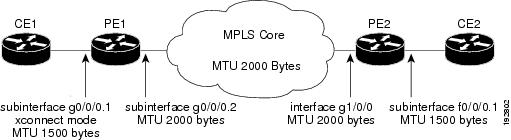
Figure 4 shows a configuration that enables matching MTU values between VC endpoints.
As shown in Figure 4, PE1 is configured in xconnect subinterface configuration mode with an MTU value of 1500 bytes in order to establish an end-to-end VC with PE2, which also has an MTU value of 1500 bytes. If PE1 was not set with an MTU value of 1500 bytes, in xconnect subinterface configuration mode, the subinterface would inherit the MTU value of 2000 bytes set on the interface. This would cause a mismatch in MTU values between the VC endpoints, and the VC would not come up.
Figure 4 Configuring MTU Values in xconnect Subinterface Configuration Mode
The following examples show the router configurations in Figure 4:
CE1 Configuration
interface gigabitethernet0/0/0
mtu 1500
no ip address
!
interface gigabitethernet0/0/0.1
encapsulation dot1Q 100
ip address 10.181.182.1 255.255.255.0
PE1 Configuration
interface gigabitethernet0/0/0
mtu 2000
no ip address
!
interface gigabitethernet0/0/0.1
encapsulation dot1Q 100
xconnect 10.1.1.152 100 encapsulation mpls
mtu 1500
!
interface gigabitethernet0/0/0.2
encapsulation dot1Q 200
ip address 10.151.100.1 255.255.255.0
mpls ip
PE2 Configuration
interface gigabitethernet1/0/0
mtu 2000
no ip address
!
interface gigabitethernet1/0/0.2
encapsulation dot1Q 200
ip address 10.100.152.2 255.255.255.0
mpls ip
!
interface fastethernet0/0/0
no ip address
!
interface fastethernet0/0/0.1
description default MTU of 1500 for FastEthernet
encapsulation dot1Q 100
xconnect 10.1.1.151 100 encapsulation mpls
CE2 Configuration
interface fastethernet0/0/0
no ip address
interface fastethernet0/0/0.1
encapsulation dot1Q 100
ip address 10.181.182.2 255.255.255.0
The show mpls l2transport binding command, issued from router PE1, shows a matching MTU value of 1500 bytes on both the local and remote routers:
Router# show mpls l2transport binding
Destination Address: 10.1.1.152, VC ID: 100
Local Label: 100
Cbit: 1, VC Type: FastEthernet, GroupID: 0
MTU: 1500, Interface Desc: n/a
VCCV: CC Type: CW [1], RA [2]
CV Type: LSPV [2]
Remote Label: 202
Cbit: 1, VC Type: FastEthernet, GroupID: 0
MTU: 1500, Interface Desc: n/a
VCCV: CC Type: RA [2]
CV Type: LSPV [2]
Router# show mpls l2transport vc detail
Local interface: Gi0/0/0.1 up, line protocol up, Eth VLAN 100 up
Destination address: 10.1.1.152, VC ID: 100, VC status: up
Output interface: Gi0/0/0.2, imposed label stack {202}
Preferred path: not configured
Default path: active
Next hop: 10.151.152.2
Create time: 1d11h, last status change time: 1d11h
Signaling protocol: LDP, peer 10.1.1.152:0 up
Targeted Hello: 10.1.1.151(LDP Id) -> 10.1.1.152
MPLS VC labels: local 100, remote 202
Group ID: local 0, remote 0
MTU: local 1500, remote 1500
Remote interface description:
Sequencing: receive disabled, send disabled
VC statistics:
packet totals: receive 41, send 39
byte totals: receive 4460, send 5346
packet drops: receive 0, send 0
Configuring Tunnel Selection
The following example shows how to set up two preferred paths for PE1. One preferred path specifies an MPLS traffic engineering tunnel. The other preferred path specifies an IP address of a loopback address on PE2. There is a static route configured on PE1 that uses a TE tunnel to reach the IP address on PE2.
PE1 Configuration
mpls label protocol ldp
mpls traffic-eng tunnels
tag-switching tdp router-id Loopback0
pseudowire-class pw1
encapsulation mpls
preferred-path interface Tunnel1 disable-fallback
!
pseudowire-class pw2
encapsulation mpls
preferred-path peer 10.18.18.18
!
interface Loopback0
ip address 10.2.2.2 255.255.255.255
no ip directed-broadcast
no ip mroute-cache
!
interface Tunnel1
ip unnumbered Loopback0
no ip directed-broadcast
tunnel destination 10.16.16.16
tunnel mode mpls traffic-eng
tunnel mpls traffic-eng priority 7 7
tunnel mpls traffic-eng bandwidth 1500
tunnel mpls traffic-eng path-option 1 explicit name path-tu1
!
interface Tunnel2
ip unnumbered Loopback0
no ip directed-broadcast
tunnel destination 10.16.16.16
tunnel mode mpls traffic-eng
tunnel mpls traffic-eng priority 7 7
tunnel mpls traffic-eng bandwidth 1500
tunnel mpls traffic-eng path-option 1 dynamic
!
interface gigabitethernet0/0/0
no ip address
no ip directed-broadcast
no negotiation auto
!
interface gigabitethernet0/0/0.1
encapsulation dot1Q 222
no ip directed-broadcast
xconnect 10.16.16.16 101 pw-class pw1
!
interface ATM1/0/0
no ip address
no ip directed-broadcast
no atm enable-ilmi-trap
no atm ilmi-keepalive
pvc 0/50 l2transport
encapsulation aal5
xconnect 10.16.16.16 150 pw-class pw2
!
interface FastEthernet2/0/1
ip address 10.0.0.1 255.255.255.0
no ip directed-broadcast
tag-switching ip
mpls traffic-eng tunnels
ip rsvp bandwidth 15000 15000
!
router ospf 1
log-adjacency-changes
network 10.0.0.0 0.0.0.255 area 0
network 10.2.2.2 0.0.0.0 area 0
mpls traffic-eng router-id Loopback0
mpls traffic-eng area 0
!
ip route 10.18.18.18 255.255.255.255 Tunnel2
!
ip explicit-path name path-tu1 enable
next-address 10.0.0.1
index 3 next-address 10.0.0.1
PE2 Configuration
mpls label protocol ldp
mpls traffic-eng tunnels
mpls ldp router-id Loopback0
interface Loopback0
ip address 10.16.16.16 255.255.255.255
no ip directed-broadcast
no ip mroute-cache
!
interface Loopback2
ip address 10.18.18.18 255.255.255.255
no ip directed-broadcast
!
interface FastEthernet1/1/0
ip address 10.0.0.2 255.255.255.0
no ip directed-broadcast
mpls traffic-eng tunnels
mpls ip
no cdp enable
ip rsvp bandwidth 15000 15000
!
interface FastEthernet1/1/1
no ip address
no ip directed-broadcast
no cdp enable
!
interface FastEthernet1/1/1.1
encapsulation dot1Q 222
no ip directed-broadcast
no cdp enable
mpls l2transport route 10.2.2.2 101
!
interface ATM5/0/0
no ip address
no ip directed-broadcast
no atm enable-ilmi-trap
no atm ilmi-keepalive
pvc 0/50 l2transport
encapsulation aal5
xconnect 10.2.2.2 150 encapsulation mpls
!
router ospf 1
log-adjacency-changes
network 10.0.0.0 0.0.0.255 area 0
network 10.16.16.16 0.0.0.0 area 0
mpls traffic-eng router-id Loopback0
mpls traffic-eng area 0
Example: Configuring MTU Values in xconnect Configuration Mode for L2VPN Interworking
The following example shows an L2VPN Interworking example. The PE1 router has a serial interface configured with an MTU value of 1492 bytes. The PE2 router uses xconnect configuration mode to set a matching MTU of 1492 bytes, which allows the two routers to form an interworking VC. If the PE2 router did not set the MTU value in xconnect configuration mode, the interface would be set to 1500 bytes by default and the VC would not come up.
PE1 Configuration
pseudowire-class atom-ipiw
encapsulation mpls
interworking ip
!
interface Loopback0
ip address 10.1.1.151 255.255.255.255
!
interface Serial2/0/0
mtu 1492
no ip address
encapsulation ppp
no fair-queue
serial restart-delay 0
xconnect 10.1.1.152 123 pw-class atom-ipiw
!
interface Serial4/0/0
ip address 10.151.100.1 255.255.255.252
encapsulation ppp
mpls ip
serial restart-delay 0
!
router ospf 1
log-adjacency-changes
network 10.1.1.151 0.0.0.0 area 0
network 10.151.100.0 0.0.0.3 area 0
!
mpls ldp router-id Loopback0
PE2 Configuration
pseudowire-class atom-ipiw
encapsulation mpls
interworking ip
!
interface Loopback0
ip address 10.1.1.152 255.255.255.255
!
interface FastEthernet0/0/0
no ip address
xconnect 10.1.1.151 123 pw-class atom-ipiw
mtu 1492
!
interface Serial4/0/0
ip address 10.100.152.2 255.255.255.252
encapsulation ppp
mpls ip
serial restart-delay 0
!
router ospf 1
log-adjacency-changes
network 10.1.1.152 0.0.0.0 area 0
network 10.100.152.0 0.0.0.3 area 0
!
mpls ldp router-id Loopback0
The show mpls l2transport binding command shows that the MTU value for the local and remote routers is 1492 bytes.
PE1
Router# show mpls l2transport binding
Destination Address: 10.1.1.152, VC ID: 123
Local Label: 105
Cbit: 1, VC Type: PPP, GroupID: 0
MTU: 1492, Interface Desc: n/a
VCCV: CC Type: CW [1], RA [2]
CV Type: LSPV [2]
Remote Label: 205
Cbit: 1, VC Type: FastEthernet, GroupID: 0
MTU: 1492, Interface Desc: n/a
VCCV: CC Type: RA [2]
CV Type: LSPV [2]
Router# show mpls l2transport vc detail
Local interface: Serial2/0/0 up, line protocol up, PPP up
MPLS VC type is PPP, interworking type is IP
Destination address: 10.1.1.152, VC ID: 123, VC status: up
Output interface: Serial4/0/0, imposed label stack {1003 205}
Preferred path: not configured
Default path: active
Next hop: point2point
Create time: 00:25:29, last status change time: 00:24:54
Signaling protocol: LDP, peer 10.1.1.152:0 up
Targeted Hello: 10.1.1.151(LDP Id) -> 10.1.1.152
Status TLV support (local/remote) : enabled/supported
Label/status state machine : established, LruRru
Last local dataplane status rcvd: no fault
Last local SSS circuit status rcvd: no fault
Last local SSS circuit status sent: no fault
Last local LDP TLV status sent: no fault
Last remote LDP TLV status rcvd: no fault
MPLS VC labels: local 105, remote 205
Group ID: local n/a, remote 0
MTU: local 1492, remote 1492
Remote interface description:
Sequencing: receive disabled, send disabled
VC statistics:
packet totals: receive 30, send 29
byte totals: receive 2946, send 3364
packet drops: receive 0, send 0
PE2
Router# show mpls l2transport binding
Destination Address: 10.1.1.151, VC ID: 123
Local Label: 205
Cbit: 1, VC Type: FastEthernet, GroupID: 0
MTU: 1492, Interface Desc: n/a
VCCV: CC Type: RA [2]
CV Type: LSPV [2]
Remote Label: 105
Cbit: 1, VC Type: FastEthernet, GroupID: 0
MTU: 1492, Interface Desc: n/a
VCCV: CC Type: CW [1], RA [2]
CV Type: LSPV [2]
Router# show mpls l2transport vc detail
Local interface: Fe0/0/0 up, line protocol up, FastEthernet up
MPLS VC type is FastEthernet, interworking type is IP
Destination address: 10.1.1.151, VC ID: 123, VC status: up
Output interface: Se4/0/0, imposed label stack {1002 105}
Preferred path: not configured
Default path: active
Next hop: point2point
Create time: 00:25:19, last status change time: 00:25:19
Signaling protocol: LDP, peer 10.1.1.151:0 up
Targeted Hello: 10.1.1.152(LDP Id) -> 10.1.1.151
Status TLV support (local/remote) : enabled/supported
Label/status state machine : established, LruRru
Last local dataplane status rcvd: no fault
Last local SSS circuit status rcvd: no fault
Last local SSS circuit status sent: no fault
Last local LDP TLV status sent: no fault
Last remote LDP TLV status rcvd: no fault
MPLS VC labels: local 205, remote 105
Group ID: local n/a, remote 0
MTU: local 1492, remote 1492
Remote interface description:
Sequencing: receive disabled, send disabled
VC statistics:
packet totals: receive 29, send 30
byte totals: receive 2900, send 3426
packet drops: receive 0, send 0
Examples: Configuring Any Transport over MPLS (AToM): Remote Ethernet Port Shutdown
The following example shows how to enable remote Ethernet port shutdown:
configure terminal
!
pseudowire-class eompls
encapsulation mpls
!
interface GigabitEthernet1/0/0
xconnect 10.1.1.1 1 pw-class eompls
remote link failure notification
The following example shows how to disable remote Ethernet port shutdown:
configure terminal
!
pseudowire-class eompls
encapsulation mpls
!
interface GigabitEthernet1/0/0
xconnect 10.1.1.1 1 pw-class eompls
no remote link failure notification
The related show command output reports operational status for all remote L2 Tunnels by interface.
Router# show interface G1/0/0
GigabitEthernet1/0/0 is L2 Tunnel remote down, line protocol is up
Hardware is GigMac 4 Port GigabitEthernet, address is 0003.ff4e.12a8 (bia 0003.ff4e.12a8)
Internet address is 10.9.9.2/16
MTU 1500 bytes, BW 1000000 Kbit, DLY 10 usec, rely 255/255, load 1/255
Router# show ip interface brief
Interface IP-Address OK? Method Status Protocol
GigabitEthernet2/0/0 unassigned YES NVRAM L2 Tunnel remote down up
GigabitEthernet2/1/0 unassigned YES NVRAM administratively down down
Additional References
Related Documents
|
|
|
|---|---|
Cisco ATM commands |
|
Cisco IOS commands |
|
Cisco MPLS commands |
Standards
MIBs
RFCs
|
|
|
|---|---|
RFC 3032 |
MPLS Label Stack Encoding |
RFC 3036 |
LDP Specification |
Technical Assistance
Feature Information for Any Transport over MPLS
Table 6 lists the features in this module and provides links to specific configuration information.
Use Cisco Feature Navigator to find information about platform support and software image support. Cisco Feature Navigator enables you to determine which software images support a specific software release, feature set, or platform. To access Cisco Feature Navigator, go to http://www.cisco.com/go/cfn. An account on Cisco.com is not required.
Note Table 6 lists only the software release that introduced support for a given feature in a given software release train. Unless noted otherwise, subsequent releases of that software release train also support that feature.
|
|
|
|
|---|---|---|
Any Transport over MPLS (AToM): ATM AAL5 over MPLS (AAL5oMPLS) |
Cisco IOS XE Release 3.2S |
In Cisco IOS XE Release 3.2S, this feature was introduced on the Cisco ASR 1000 Series Aggregation Services Routers. The following sections provides information about this feature: • This feature introduced no new or modified commands. |
Any Transport over MPLS (AToM): ATM OAM Emulation |
Cisco IOS XE Release 3.2S |
In Cisco IOS XE Release 3.2S, this feature was introduced on the Cisco ASR 1000 Series Aggregation Services Routers. The following section provides information about this feature: • This feature introduced no new or modified commands. |
Any Transport over MPLS (AToM): Ethernet over MPLS (EoMPLS) |
Cisco IOS XE Release 2.4 |
This feature allows you to transport Layer 2 Ethernet VLAN packets from various sources over an MPLS backbone. Ethernet over MPLS extends the usability of the MPLS backbone by enabling it to offer Layer 2 services in addition to already existing Layer 3 services. You can enable the MPLS backbone network to accept Layer 2 VLAN packets by configuring the PE routers at the both ends of the MPLS backbone. In Cisco IOS XE Release 2.4, this feature was introduced on the Cisco ASR 1000 Series Routers. The following sections provide information about this feature: • |
Any Transport over MPLS (AToM): Ethernet over MPLS: Port Mode (EoMPLS) |
Cisco IOS XE Release 2.4 |
Ethernet over MPLS (EoMPLS) is the transport of Ethernet frames across an MPLS core. It transports all frames received on a particular Ethernet or virtual LAN (VLAN) segment, regardless of the destination Media Access Control (MAC) information. It does not perform MAC learning or MAC look up for forwarding packets from the Ethernet interface. Port mode allows a frame coming into an interface to be packed into an MPLS packet and transported over the MPLS backbone to an egress interface. In Cisco IOS XE Release 2.4, this feature was introduced on the Cisco ASR 1000 Series Routers. The following sections provide information about this feature: • |
Any Transport over MPLS-Ethernet over MPLS Enhancements: Fast Reroute |
Cisco IOS XE Release 2.4 |
AToM can use MPLS traffic engineering (TE) tunnels with fast reroute (FRR) support. This features enhances FRR functionality for Ethernet over MPLS (EoMPLS). In Cisco IOS XE Release 2.4, this feature was introduced on the Cisco ASR 1000 Series Routers. The following sections provide information about this feature: • |
Any Transport over MPLS (AToM): Frame Relay over MPLS (FRoMPLS) |
Cisco IOS XE Release 3.2.1S |
In Cisco IOS XE Release 3.2.1S, this feature was introduced on the Cisco ASR 1000 Series Aggregation Services Routers. The following section provides information about this feature: • This feature introduced no new or modified commands. |
Any Transport over MPLS (AToM): HDLC over MPLS (HDLCoMPLS) |
Cisco IOS XE Release 3.2S |
In Cisco IOS XE Release 3.2S, this feature was introduced on the Cisco ASR 1000 Series Aggregation Services Routers. The following section provides information about this feature: • This feature introduced no new or modified commands. |
Any Transport over MPLS (AToM): Layer 2 Quality of Service (QoS) |
Cisco IOS XE Release 2.3 |
This feature provides support for quality of service (QoS) features such as traffic policing, traffic shaping, packet marking, and mapping of the packets. In Cisco IOS XE Release 2.3, this feature was introduced on the Cisco ASR 1000 Series Routers. The following section provides information about this feature: |
Any Transport over MPLS (AToM): PPP over MPLS (PPPoMPLS) |
Cisco IOS XE Release 3.2S |
In Cisco IOS XE Release 3.2S, this feature was introduced on the Cisco ASR 1000 Series Aggregation Services Routers. The following section provides information about this feature: • This feature introduced no new or modified commands. |
Any Transport over MPLS (AToM): Remote Ethernet Port Shutdown |
Cisco IOS XE Release 2.4 |
This feature allows a service provider edge (PE) router on the local end of an Ethernet over MPLS (EoMPLS) pseudowire to detect a remote link failure and cause the shutdown of the Ethernet port on the local customer edge (CE) router. Because the Ethernet port on the local CE router is shut down, the router does not lose data by continuously sending traffic to the failed remote link. This is beneficial if the link is configured as a static IP route. In Cisco IOS XE Release 2.4, this feature was introduced on the Cisco ASR 1000 Series Routers. The following sections provide information about this feature: • |
ATM VC Class Support |
Cisco IOS XE Release 2.3 |
The ATM VC Class Support feature allows you to specify AAL5 and AAL0 encapsulations as part of a VC class. In Cisco IOS XE Release 2.3, this feature was introduced on the Cisco ASR 1000 Series Routers. The following sections provide information about this feature: • |
AToM Tunnel Selection |
Cisco IOS XE Release 2.3 |
The AToM Tunnel Selection feature allows you to specify the path that traffic uses. You can specify either an MPLS TE tunnel or destination IP address or domain name server (DNS) name. You also have the option of specifying whether the VCs should use the default path (the path LDP uses for signaling) if the preferred path is unreachable. This option is enabled by default; you must explicitly disable it. In Cisco IOS XE Release 2.3, this feature was introduced on the Cisco ASR 1000 Series Aggregation Services Routers. The following sections provide information about this feature: • |
AToM: ATM Cell Relay over MPLS: VP Mode |
Cisco IOS XE Release 2.3 |
The AToM: ATM Cell Relay over MPLS: VP Mode feature allows you to insert one ATM cell in each MPLS packet in VP mode. In Cisco IOS XE Release 2.3, this feature was introduced on the Cisco ASR 1000 Series Routers. The following sections provide information about this feature: • |
AToM: Single Cell Relay-VC Mode |
Cisco IOS XE Release 2.3 |
The AToM Single Cell Relay-VC Mode feature allows you to insert one ATM cell in each MPLS packet in VC mode. In Cisco IOS XE Release 2.3, this feature was introduced on the Cisco ASR 1000 Series Routers. The following sections provide information about this feature: • |
MPLS MTU Command for GRE Tunnels |
Cisco IOS XE Release 2.6 |
This feature allows you to set the MPLS MTU size in GRE tunnels to the maximum size besides the current default size. The following command was modified for this release: mpls mtu. |
MPLS L2VPN Clear Xconnect Command |
Cisco IOS XE Release 3.1S |
These features enable you to: • • • The following commands were introduced or modified by these features: cell-packing, clear xconnect, control-word, encapsulation (Any Transport over MPLS), oam-ac emulation-enable. |
Per-Subinterface MTU for Ethernet over MPLS (EoMPLS) |
Cisco IOS XE Release 2.4 |
This feature provides you with the ability to specify maximum transmission unit (MTU) values in xconnect subinterface configuration mode. When you use xconnect subinterface configuration mode to set the MTU value, you establish a pseudowire connection for situations where the interfaces have different MTU values that cannot be changed. In Cisco IOS XE Release 2.4, this feature was introduced on the Cisco ASR 1000 Series Aggregation Services Routers. The following section provides information about this feature: • No commands were new or modified for this release. |
VLAN ID Rewrite |
Cisco IOS XE Release 2.4 |
The VLAN ID rewrite feature enables you to use VLAN interfaces with different VLAN IDs at both ends of the tunnel. In Cisco IOS XE Release 2.4, this feature was introduced on the Cisco ASR 1000 Series Routers. The following sections provide information about this feature: • |
AToM Load Balancing with Single PW |
Cisco IOS XE Release 3.4S |
The AToM Load Balancing with Single PW feature enables load balancing for packets within the same pseudowire by further classifying packets within the same pseudowire into different flows based on some field in the packet received on attachment circuit. In Cisco IOS XE Release 3.4S, this feature was introduced on the Cisco ASR 1000 Series Aggregation Services Routers. The following sections provide information about this feature: • |
 Feedback