- Contents
- Prerequisites for Connecting to a Service Provider Using External BGP
- Restrictions for Connecting to a Service Provider Using External BGP
- Information About Connecting to a Service Provider Using External BGP
- How to Connect to a Service Provider Using External BGP
- Influencing Inbound Path Selection: Examples
- Influencing Outbound Path Selection: Examples
- Filtering BGP Prefixes with Prefix Lists: Examples
- Filtering Traffic Using Community Lists: Examples
- Filtering Traffic Using AS-path Filters: Example
- Filtering Traffic Using a BGP Route Map: Example
- Filtering Traffic Using Continue Clauses in a BGP Route Map: Example
Connecting to a Service Provider Using External BGP
This module describes configuration tasks that will enable your Border Gateway Protocol (BGP) network to access peer devices in external networks such as those from Internet service providers (ISPs). BGP is an interdomain routing protocol designed to provide loop-free routing between organizations. External BGP (eBGP) peering sessions are configured to allow peers from different autonomous systems to exchange routing updates. Tasks to help manage the traffic flowing inbound and outbound are described, as are tasks to configure BGP policies to filter the traffic. Multihoming techniques that provide redundancy for connections to a service provider are also described.
Finding Feature Information in This Module
Your Cisco IOS software release may not support all of the features documented in this module. To reach links to specific feature documentation in this module and to see a list of the releases in which each feature is supported, use the "Feature Information for Connecting to a Service Provider Using External BGP" section.
Finding Support Information for Platforms and Cisco IOS and Catalyst OS Software Images
Use Cisco Feature Navigator to find information about platform support and Cisco IOS and Catalyst OS software image support. To access Cisco Feature Navigator, go to http://www.cisco.com/go/cfn. An account on Cisco.com is not required.
Contents
• Prerequisites for Connecting to a Service Provider Using External BGP
•Restrictions for Connecting to a Service Provider Using External BGP
•Information About Connecting to a Service Provider Using External BGP
•How to Connect to a Service Provider Using External BGP
•Configuration Examples for Connecting to a Service Provider Using External BGP
•Feature Information for Connecting to a Service Provider Using External BGP
Prerequisites for Connecting to a Service Provider Using External BGP
•Before connecting to a service provider you need to understand how to configure the basic BGP process and peers. See the "Cisco BGP Overview" and "Configuring a Basic BGP Network" modules for more details.
•The tasks and concepts in this chapter will help you configure advanced BGP features that would be useful if you are connecting your network to a service provider. For each connection to the Internet you must have an assigned autonomous system number from the Internet Assigned Numbers Authority (IANA).
Restrictions for Connecting to a Service Provider Using External BGP
•A router that runs Cisco IOS software can be configured to run only one BGP routing process and to be a member of only one BGP autonomous system. However, a BGP routing process and autonomous system can support multiple address family configurations.
•Policy lists are not supported in versions of Cisco IOS software prior to Cisco IOS Release 12.0(22)S and 12.2(15)T. Reloading a router that is running an older version of Cisco IOS software may cause some routing policy configurations to be lost.
Information About Connecting to a Service Provider Using External BGP
To configure tasks to connect to an ISP using external BGP you should understand the following concepts:
•Transit Versus Nontransit Traffic
External BGP Peering
BGP is an interdomain routing protocol designed to provide loop-free routing links between organizations. BGP is designed to run over a reliable transport protocol and it uses TCP (Port 179) as the transport protocol. The destination TCP port is assigned 179, and the local port is assigned a random port number. Cisco IOS software supports BGP version 4, which has been used by ISPs to help build the Internet. RFC 1771 introduced and discussed a number of new BGP features to allow the protocol to scale for Internet use.
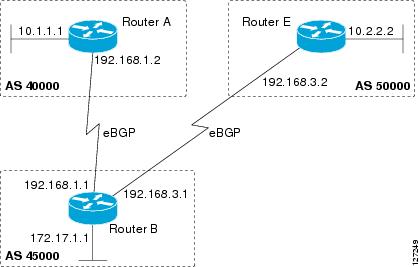
External BGP peering sessions are configured to allow BGP peers from different autonomous systems to exchange routing updates. By design, a BGP routing process expects eBGP peers to be directly connected, for example, over a WAN connection. However, there are many real-world scenarios where this rule would prevent routing from occurring. Peering sessions for multihop neighbors are configured with the neighbor ebgp-multihop command. Figure 1 shows simple eBGP peering between three routers. Router B peers with Router A and Router C. In Figure 1, the neighbor ebgp-multihop command could be used to establish peering between Router A and Router C although this is a very simple network design. BGP forwards information about the next hop in the network using the NEXT_HOP attribute, which is set to the IP address of the interface that advertises a route in an eBGP peering session by default. The source interface can be a physical interface or a loopback interface.
Figure 1 BGP Peers in Different Autonomous Systems
Loopback interfaces are preferred for establishing eBGP peering sessions because loopback interfaces are less susceptible to interface flapping. Interfaces on networking devices can fail, and they can also be taken out of service for maintenance. When an interface is administratively brought up or down, due to failure or maintenance, it is referred to as a flap. Loopback interfaces provide a stable source interface to ensure that the IP address assigned to the interface is always reachable as long as the IP routing protocols continue to advertise the subnet assigned to the loopback interface. Loopback interfaces allow you to conserve address space by configuring a single address with /32 bit mask. Before a loopback interface is configured for an eBGP peering session, you must configure the neighbor update-source command and specify the loopback interface. With this configuration, the loopback interface becomes the source interface and its IP address is advertised as the next hop for routes that are advertised through this loopback. If loopback interfaces are used to connect single-hop eBGP peers, you must configure the neighbor disable-connected-check command before you can establish the eBGP peering session.
Connecting to external networks enables traffic from your network to be forwarded to other networks and across the Internet. Traffic will also be flowing into, and possibly through, your network. BGP contains various techniques to influence how the traffic flows into and out of your network, and to create BGP policies that filter the traffic, inbound and outbound. To influence the traffic flow, BGP uses certain BGP attributes that can be included in update messages or used by the BGP routing algorithm. BGP policies to filter traffic also use some of the BGP attributes with route maps, access lists including AS-path access lists, filter lists, policy lists, and distribute lists. Managing your external connections may involve multihoming techniques where there is more than one connection to an ISP or connections to more than one ISP for backup or performance purposes. Tagging BGP routes with different community attributes across autonomous system or physical boundaries can prevent the need to configure long lists of individual permit or deny statements.
BGP Attributes
BGP selects a single path, by default, as the best path to a destination host or network. The best-path selection algorithm analyzes path attributes to determine which route is installed as the best path in the BGP routing table. Each path carries various attributes that are used in BGP best-path analysis. Cisco IOS software provides the ability to influence BGP path selection by altering these attributes via the command-line interface (CLI). BGP path selection can also be influenced through standard BGP policy configuration.
BGP can include path attribute information in update messages. BGP attributes describe the characteristic of the route, and the software uses these attributes to help make decisions about which routes to advertise. Some of this attribute information can be configured at a BGP-speaking networking device. There are some mandatory attributes that are always included in the update message and some discretionary attributes. The following BGP attributes can be configured:
•AS-path
•Community
•Local_Pref
•Multi_Exit_Discriminator (MED)
•Next_Hop
•Origin
AS-path
This attribute contains a list or set of the autonomous system numbers through which routing information has passed. The BGP speaker adds its own autonomous system number to the list when it forwards the update message to external peers.
Community
BGP communities are used to group networking devices that share common properties, regardless of network, autonomous system, or any physical boundaries. In large networks applying a common routing policy through prefix lists or access lists requires individual peer statements on each networking device. Using the BGP community attribute BGP neighbors, with common routing policies, can implement inbound or outbound route filters based on the community tag rather than consult large lists of individual permit or deny statements.
Local_Pref
Within an autonomous system, the Local_Pref attribute is included in all update messages between BGP peers. If there are several paths to the same destination, the local preference attribute with the highest value indicates the preferred outbound path from the local autonomous system. The highest ranking route is advertised to internal peers. The Local_Pref value is not forwarded to external peers.
Multi_Exit_Discriminator
The MED attribute indicates (to an external peer) a preferred path into an autonomous system. If there are multiple entry points into an autonomous system, the MED can be used to influence another autonomous system to choose one particular entry point. A metric is assigned where a lower MED metric is preferred by the software over a higher MED metric. The MED metric is exchanged between autonomous systems, but after a MED is forwarded into an autonomous system, the MED metric is reset to the default value of 0. When an update is sent to an internal BGP (iBGP) peer, the MED is passed along without any change, allowing all the peers in the same autonomous system to make a consistent path selection.
By default, a router will compare the MED attribute for paths only from BGP peers that reside in the same autonomous system. The bgp always-compare-med command can be configured to allow the router to compare metrics from peers in different autonomous systems.

Note The Internet Engineering Task Force (IETF) decision regarding BGP MED assigns a value of infinity to the missing MED, making the route that lacks the MED variable the least preferred. The default behavior of BGP routers that run Cisco IOS software is to treat routes without the MED attribute as having a MED of 0, making the route that lacks the MED variable the most preferred. To configure the router to conform to the IETF standard, use the bgp bestpath med missing-as-worst router configuration command.
Next_Hop
The Next_Hop attribute identifies the next-hop IP address to be used as the BGP next hop to the destination. The router makes a recursive lookup to find the BGP next hop in the routing table. In external BGP (eBGP), the next hop is the IP address of the peer that sent the update. Internal BGP (iBGP) sets the next-hop address to the IP address of the peer that advertised the prefix for routes that originate internally. When any routes to iBGP that are learned from eBGP are advertised, the Next_Hop attribute is unchanged.
A BGP next-hop IP address must be reachable in order for the router to use a BGP route. Reachability information is usually provided by the IGP, and changes in the IGP can influence the forwarding of the next-hop address over a network backbone.
Origin
This attribute indicates how the route was included in a BGP routing table. In Cisco IOS software a route defined using the BGP network command is given an origin code of Interior Gateway Protocol (IGP). Routes distributed from an Exterior Gateway Protocol (EGP) are coded with an origin of EGP, and routes redistributed from other protocols are defined as Incomplete. BGP decision policy for origin prefers IGP over EGP, and then EGP over Incomplete.
Multihoming
Multihoming is defined as connecting an autonomous system with more than one service provider. If you have any reliability issues with one service provider, then you have a backup connection. Performance issues can also be addressed by multihoming because better paths to the destination network can be utilized.
Unless you are a service provider, you must plan your routing configuration carefully to avoid Internet traffic traveling through your autonomous system and consuming all your bandwidth. Figure 2 shows that autonomous system 45000 is multihomed to autonomous system 40000 and autonomous system 50000. Assuming autonomous system 45000 is not a service provider, then several techniques such as load balancing or some form of routing policy must be configured to allow traffic from autonomous system 45000 to reach either autonomous system 40000 or autonomous system 50000 but not allow much, if any, transit traffic.
Figure 2 Multihoming Topology
Transit Versus Nontransit Traffic
Most of the traffic within an autonomous system contains a source or destination IP address residing within the autonomous system, and this traffic is referred to as nontransit (or local) traffic. Other traffic is defined as transit traffic. As traffic across the Internet increases, controlling transit traffic becomes more important.
A service provider is considered to be a transit autonomous system and must provide connectivity to all other transit providers. In reality, few service providers actually have enough bandwidth to allow all transit traffic, and most service providers have to purchase such connectivity from Tier 1 service providers.
An autonomous system that does not usually allow transit traffic is called a stub autonomous system and will link to the Internet through one service provider.
BGP Policy Configuration
BGP policy configuration is used to control prefix processing by the BGP routing process and to filter routes from inbound and outbound advertisements. Prefix processing can be controlled by adjusting BGP timers, altering how BGP handles path attributes, limiting the number of prefixes that the routing process will accept, and configuring BGP prefix dampening. Prefixes in inbound and outbound advertisements are filtered using route maps, filter lists, IP prefix lists, autonomous-system-path access lists, IP policy lists, and distribute lists. Table 1 shows the processing order of BGP policy filters.
Note In Cisco IOS Releases 12.0(22)S, 12.2(15)T, and 12.2(18)S and later releases the maximum number of autonomous system access lists that can be configured with the ip as-path access-list command is increased from 199 to 500.
Whenever there is a change in the routing policy due to a configuration change, BGP peering sessions must be reset using the clear ip bgp command. Cisco IOS software supports the following three mechanisms to reset BGP peering sessions:
•Hard reset—A hard reset tears down the specified peering sessions, including the TCP connection, and deletes routes coming from the specified peer.
•Soft reset—A soft reset uses stored prefix information to reconfigure and activate BGP routing tables without tearing down existing peering sessions. Soft reset uses stored update information, at the cost of additional memory for storing the updates, to allow you to apply a new BGP policy without disrupting the network. Soft reset can be configured for inbound or outbound sessions.
•Dynamic inbound soft reset—The route refresh capability, as defined in RFC 2918, allows the local router to reset inbound routing tables dynamically by exchanging route refresh requests to supporting peers. The route refresh capability does not store update information locally for nondisruptive policy changes. It instead relies on dynamic exchange with supporting peers. Route refresh must first be advertised through BGP capability negotiation between peers. All BGP routers must support the route refresh capability.
To determine if a BGP router supports this capability, use the show ip bgp neighbors command. The following message is displayed in the output when the router supports the route refresh capability:
Received route refresh capability from peer.
BGP Communities
BGP communities are used to group routes (also referred to as color routes) that share common properties, regardless of network, autonomous system, or any physical boundaries. In large networks applying a common routing policy through prefix-lists or access-lists requires individual peer statements on each networking device. Using the BGP community attribute BGP speakers, with common routing policies, can implement inbound or outbound route filters based on the community tag rather than consult large lists of individual permit or deny statements.
Standard community lists are used to configure well-known communities and specific community numbers. Expanded community lists are used to filter communities using a regular expression. Regular expressions are used to configure patterns to match community attributes.
The community attribute is optional, which means that it will not be passed on by networking devices that do not understand communities. Networking devices that understand communities must be configured to handle the communities or they will be discarded.
There are four predefined communities:
•no-export—Do not advertise to external BGP peers.
•no-advertise—Do not advertise this route to any peer.
•internet—Advertise this route to the Internet community; all BGP-speaking networking devices belong to it.
•local-as—Do not send outside the local autonomous system.
In Cisco IOS Release 12.2(8)T BGP named community lists were introduced. BGP named community lists allow meaningful names to be assigned to community lists with no limit on the number of community lists that can be configured. A named community list can be configured with regular expressions and with numbered community lists. All the rules of numbered communities apply to named community lists except that there is no limitation on the number of named community lists that can be configured.
Note Both standard and expanded community lists have a limitation of 100 community groups that can be configured within each type of list. A named community list does not have this limitation.
Extended Communities
Extended community attributes are used to configure, filter, and identify routes for virtual routing and forwarding (VRF) instances and Multiprotocol Label Switching (MPLS) Virtual Private Networks (VPNs). All of the standard rules of access lists apply to the configuration of extended community lists. Regular expressions are supported by the expanded range of extended community list numbers. All regular expression configuration options are supported. The route target (RT) and site of origin (SoO) extended community attributes are supported by the standard range of extended community lists.
Route Target Extended Community Attribute
The RT extended community attribute is configured with the rt keyword of the ip extcommunity-list command. This attribute is used to identify a set of sites and VRFs that may receive routes that are tagged with the configured route target. Configuring the route target extended community attribute with a route allows that route to be placed in the per-site forwarding tables that are used for routing traffic that is received from corresponding sites.
Site of Origin Extended Community Attribute
The SoO extended community attribute is configured with the soo keyword of the ip extcommunity-list command. This attribute uniquely identifies the site from which the provider edge (PE) router learned the route. All routes learned from a particular site must be assigned the same SoO extended community attribute, regardless if a site is connected to a single PE router or multiple PE routers. Configuring this attribute prevents routing loops from occurring when a site is multihomed. The SoO extended community attribute is configured on the interface and is propagated into BGP through redistribution. The SoO extended community attribute can be applied to routes that are learned from VRFs. The SoO extended community attribute should not be configured for stub sites or sites that are not multihomed.
IP Extended Community-List Configuration Mode
Named and numbered extended community lists can be configured in IP extended community-list configuration mode. The IP extended community-list configuration mode supports all of the functions that are available in global configuration mode. In addition, the following operations can be performed:
•Configure sequence numbers for extended community list entries
•Resequence existing sequence numbers for extended community list entries
•Configure an extended community list to use default values
Default Sequence Numbering
Extended community list entries start with the number 10 and increment by 10 for each subsequent entry when no sequence number is specified, when default behavior is configured, and when an extended community list is resequenced without specifying the first entry number or the increment range for subsequent entries.
Resequencing Extended Community Lists
Extended community-list entries are sequenced and resequenced on a per-extended community list basis. The resequence command can be used without any arguments to set all entries in a list to default sequence numbering. The resequence command also allows the sequence number of the first entry and increment range to be set for each subsequent entry. The range of configurable sequence numbers is from 1 to 2147483647.
Administrative Distance
Administrative distance is a measure of the preference of different routing protocols. BGP has a distance bgp command that allows you to set different administrative distances for three route types: external, internal, and local. BGP, like other protocols, prefers the route with the lowest administrative distance.
BGP Route Map Policy Lists
BGP route map policy lists allow a network operator to group route map match clauses into named lists called policy lists. A policy list functions like a macro. When a policy list is referenced in a route map, all of the match clauses are evaluated and processed as if they had been configured directly in the route map. This enhancement simplifies the configuration of BGP routing policy in medium-size and large networks because a network operator can preconfigure policy lists with groups of match clauses and then reference these policy lists within different route maps. The network operator no longer needs to manually reconfigure each recurring group of match clauses that occur in multiple route map entries.
A policy lists functions like a macro when it is configured in a route map and has the following capabilities and characteristics:
•When a policy list is referenced within a route map, all the match statements within the policy list are evaluated and processed.
•Two or more policy lists can be configured with a route map. Policy lists can be configured within a route map to be evaluated with AND or OR semantics.
•Policy lists can coexist with any other preexisting match and set statements that are configured within the same route map but outside of the policy lists.
•When multiple policy lists perform matching within a route map entry, all policy lists match on the incoming attribute only.
Policy lists support only match clauses and do not support set clauses. Policy lists can be configured for all applications of route maps, including redistribution, and can also coexist, within the same route map entry, with match and set clauses that are configured separately from the policy lists.
Note Policy lists are supported only by BGP and are not supported by other IP routing protocols.
How to Connect to a Service Provider Using External BGP
This section contains the following tasks:
•Influencing Inbound Path Selection
•Influencing Outbound Path Selection
•Configuring BGP Peering with ISPs
Influencing Inbound Path Selection
BGP can be used to influence the choice of paths in another autonomous system. There may be several reasons for wanting BGP to choose a path that is not the obvious best route, for example, to avoid some types of transit traffic passing through an autonomous system or perhaps to avoid a very slow or congested link. BGP can influence inbound path selection using one of the following BGP attributes:
•AS-path
•MED
Perform one of the following tasks to influence inbound path selection:
•Influencing Inbound Path Selection by Modifying the AS-path Attribute
•Influencing Inbound Path Selection by Setting the MED Attribute
Influencing Inbound Path Selection by Modifying the AS-path Attribute
One of the methods that BGP can use to influence the choice of paths in another autonomous system is to modify the AS-path attribute. For example, in Figure 3, Router A advertises its own network, 172.17.1.0, to its BGP peers in autonomous system 45000 and autonomous system 60000. When the routing information is propagated to autonomous system 50000, the routers in autonomous system 50000 have network reachability information about network 172.17.1.0 from two different routes. The first route is from autonomous system 45000 with an AS-path consisting of 45000, 40000, the second route is through autonomous system 55000 with an AS-path of 55000, 60000, 40000. If all other BGP attribute values are the same, Router C in autonomous system 50000 would choose the route through autonomous system 45000 for traffic destined for network 172.17.1.0 because it is the shortest route in terms of autonomous systems traversed.
Autonomous system 40000 now receives all traffic from autonomous system 50000 for the 172.17.1.0 network through autonomous system 45000. If, however, the link between autonomous system 45000 and autonomous system 40000 is a really slow and congested link, the set as-path prepend command can be used at Router A to influence inbound path selection for the 172.17.1.0 network by making the route through autonomous system 45000 appear to be longer than the path through autonomous system 60000. The configuration is done at Router A in Figure 3 by applying a route map to the outbound BGP updates to Router B. Using the set as-path prepend command, all the outbound BGP updates from Router A to Router B will have their AS-path attribute modified to add the local autonomous system number 40000 twice. After the configuration, autonomous system 50000 receives updates about 172.17.1 network through autonomous system 45000. The new AS-path is 45000, 40000, 40000, and 40000, which is now longer than the AS-path from autonomous system 55000 (unchanged at a value of 55000, 60000, 40000). Networking devices in autonomous system 50000 will now prefer the route through autonomous system 55000 to forward packets with a destination address in the 172.17.1.0 network.
Figure 3 Network Topology for Modifying the AS-path Attribute
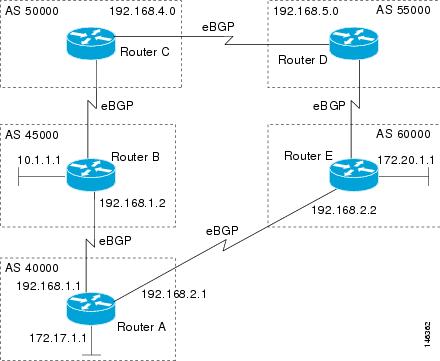
Perform this task to influence the inbound path selection for traffic destined for the 172.17.1.0 network by modifying the AS-path attribute. The configuration is performed at Router A in Figure 3.
SUMMARY STEPS
1. enable
2. configure terminal
3. router bgp autonomous-system-number
4. address-family ipv4 [unicast | multicast | vrf vrf-name]
5. network network-number [mask network-mask] [route-map route-map-name]
6. neighbor {ip-address | peer-group-name} remote-as autonomous-system-number
7. neighbor {ip-address | peer-group-name} route-map map-name {in | out}
8. neighbor {ip-address | peer-group-name} activate
9. exit
10. route-map map-name [permit | deny] [sequence-number]
11. set as-path {tag | prepend as-path-string}
12. end
13. show running-config
DETAILED STEPS
Examples
The following partial output of the show running-config command shows the configuration from this task.
Router A:
Router# show running-config
!
router bgp 40000
neighbor 192.168.1.2 remote-as 60000
!
address-family ipv4
neighbor 192.168.1.2 activate
neighbor 192.168.1.2 route-map PREPEND out
no auto-summary
no synchronization
network 172.17.1.0 mask 255.255.255.0
exit-address-family
!
route-map PREPEND permit 10
set as-path prepend 40000 40000
.
.
.
Influencing Inbound Path Selection by Setting the MED Attribute
One of the methods that BGP can use to influence the choice of paths into another autonomous system is to set the MED attribute. The MED attribute indicates (to an external peer) a preferred path to an autonomous system. If there are multiple entry points to an autonomous system, the MED can be used to influence another autonomous system to choose one particular entry point. A metric is assigned using route maps where a lower MED metric is preferred by the software over a higher MED metric.
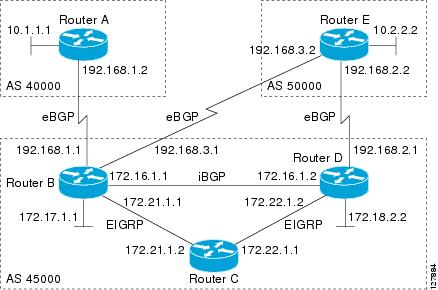
Perform this task to influence inbound path selection by setting the MED metric attribute. The configuration is performed at Router B and Router D in Figure 4. Router B advertises the network 172.16.1.0. to its BGP peer, Router E in autonomous system 50000. Using a simple route map Router B sets the MED metric to 50 for outbound updates. The task is repeated at Router D but the MED metric is set to 120. When Router E receives the updates from both Router B and Router D the MED metric is stored in the BGP routing table. Before forwarding packets to network 172.16.1.0, Router E compares the attributes from peers in the same autonomous system (both Router B and Router D are in autonomous system 45000). The MED metric for Router B is less than the MED for Router D, so Router E will forward the packets through Router B.
Figure 4 Network Topology for Setting the MED Attribute
Use the bgp always-compare-med command to compare MED attributes from peers in other autonomous systems.
SUMMARY STEPS
1. enable
2. configure terminal
3. router bgp autonomous-system-number
4. neighbor {ip-address | peer-group-name} remote-as autonomous-system-number
5. address-family ipv4 [unicast | multicast | vrf vrf-name]
6. network network-number [mask network-mask] [route-map route-map-name]
7. neighbor {ip-address | peer-group-name} route-map map-name {in | out}
8. exit
9. route-map map-name [permit | deny] [sequence-number]
10. set metric value
11. end
12. Repeat Step 1 through Step 11 at Router D.
13. show ip bgp [network] [network-mask]
DETAILED STEPS
|
|
|
|
|---|---|---|
Step 1 |
enable Router> enable |
Enables privileged EXEC mode. • |
Step 2 |
configure terminal Router# configure terminal |
Enters global configuration mode. |
Step 3 |
router bgp autonomous-system-number Router(config)# router bgp 45000 |
Enters router configuration mode for the specified routing process. |
Step 4 |
neighbor {ip-address | peer-group-name} remote-as autonomous-system-number Router(config-router)# neighbor 192.168.3.2 remote-as 50000 |
Adds the IP address or peer group name of the neighbor in the specified autonomous system to the IPv4 multiprotocol BGP neighbor table of the local router. |
Step 5 |
address-family ipv4 [unicast | multicast | vrf vrf-name] Router(config-router)# address-family ipv4 unicast |
Specifies the IPv4 address family and enters address family configuration mode. • • • |
Step 6 |
network network-number [mask network-mask] [route-map route-map-name] Router(config-router-af)# network 172.16.1.0 mask 255.255.255.0 |
Specifies a network as local to this autonomous system and adds it to the BGP routing table. • |
Step 7 |
neighbor {ip-address | peer-group-name} route-map map-name {in | out} Router(config-router-af)# neighbor 192.168.3.2 route-map MED out |
Applies a route map to incoming or outgoing routes. • |
Step 8 |
exit Router(config-router-af)# exit |
Exits address family configuration mode and enters router configuration mode. • |
Step 9 |
route-map map-name [permit | deny] [sequence-number] Router(config)# route-map MED permit 10 |
Configures a route map and enters route map configuration mode. • |
Step 10 |
set metric value Router(config-route-map)# set metric 50 |
Sets the MED metric value. |
Step 11 |
end Router(config-route-map)# end |
Exits route map configuration mode and enters privileged EXEC mode. |
Step 12 |
— |
|
Step 13 |
show ip bgp [network] [network-mask] Router# show ip bgp 172.17.1.0 255.255.255.0 |
(Optional) Displays the entries in the BGP routing table. • • |
Examples
The following output is from Router E in Figure 4 after this task has been performed at both Router B and Router D. Note the metric (MED) values for the two routes to network 172.16.1.0. The peer 192.168.2.1 at Router D has a metric of 120 for the path to network 172.16.1.0 whereas the peer 192.168.3.1 at Router B has a metric of 50. The entry for the peer 192.168.3.1 at Router B has the word best at the end of the entry to show that Router E will choose to send packets destined for network 172.16.1.0 via Router B because the MED metric is lower.
Router# show ip bgp 172.16.1.0
BGP routing table entry for 172.16.1.0/24, version 10
Paths: (2 available, best #2, table Default-IP-Routing-Table)
Advertised to update-groups:
1
45000
192.168.2.1 from 192.168.2.1 (192.168.2.1)
Origin IGP, metric 120, localpref 100, valid, external
45000
192.168.3.1 from 192.168.3.1 (172.17.1.99)
Origin IGP, metric 50, localpref 100, valid, external, best
Influencing Outbound Path Selection
BGP can be used to influence the choice of paths for outbound traffic from the local autonomous system. This section contains two methods that BGP can use to influence inbound path selection:
•Using the Local_Pref attribute
•Using the BGP outbound route filter (ORF) capability
Perform one of the following tasks to influence outbound path selection:
•Influencing Outbound Path Selection Using the Local_Pref Attribute
•Filtering Outbound BGP Route Prefixes
Influencing Outbound Path Selection Using the Local_Pref Attribute
One of the methods to influence outbound path selection is to use the BGP Local-Pref attribute. Perform this task using the local preference attribute to influence outbound path selection. If there are several paths to the same destination the local preference attribute with the highest value indicates the preferred path.
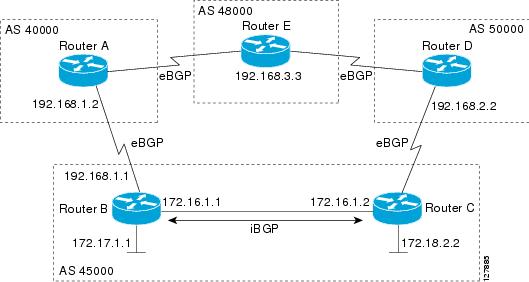
Refer to Figure 5 for the network topology used in this task. Both Router B and Router C are configured. autonomous system 45000 receives updates for network 192.168.3.0 via autonomous system 40000 and autonomous system 50000. Router B is configured to set the local preference value to 150 for all updates to autonomous system 40000. Router C is configured to set the local preference value for all updates to autonomous system 50000 to 200. After the configuration, local preference information is exchanged within autonomous system 45000. Router B and Router C now see that updates for network 192.168.3.0 have a higher preference value from autonomous system 50000 so all traffic in autonomous system 45000 with a destination network of 192.168.3.0 is sent out via Router C.
Figure 5 Network Topology for Outbound Path Selection
SUMMARY STEPS
1. enable
2. configure terminal
3. router bgp autonomous-system-number
4. address-family ipv4 [unicast | multicast | vrf vrf-name]
5. network network-number [mask network-mask] [route-map route-map-name]
6. neighbor {ip-address | peer-group-name} remote-as autonomous-system-number
7. bgp default local-preference value
8. neighbor {ip-address | peer-group-name} activate
9. end
10. Repeat Step 1 through Step 9 at Router C.
11. show ip bgp [network] [network-mask]
DETAILED STEPS
|
|
|
|
|---|---|---|
Step 1 |
enable Router> enable |
Enables privileged EXEC mode. • |
Step 2 |
configure terminal Router# configure terminal |
Enters global configuration mode. |
Step 3 |
router bgp autonomous-system-number Router(config)# router bgp 45000 |
Enters router configuration mode for the specified routing process. |
Step 4 |
address-family ipv4 [unicast | multicast | vrf vrf-name] Router(config-router)# address-family ipv4 unicast |
Specifies the IPv4 address family and enters address family configuration mode. • • • |
Step 5 |
network network-number [mask network-mask] [route-map route-map-name] Router(config-router-af)# network 172.17.1.0 mask 255.255.255.0 |
Specifies a network as local to this autonomous system and adds it to the BGP routing table. • |
Step 6 |
neighbor {ip-address | peer-group-name} remote-as autonomous-system-number Router(config-router-af)# neighbor 192.168.1.2 remote-as 40000 |
Adds the IP address or peer group name of the neighbor in the specified autonomous system to the IPv4 multiprotocol BGP neighbor table of the local router. |
Step 7 |
bgp default local-preference value Router(config-router-af)# bgp default local-preference 150 |
Changes the default local preference value. • • |
Step 8 |
neighbor {ip-address | peer-group-name} activate Router(config-router-af)# neighbor 192.168.1.2 activate |
Adds the IP address or peer group name of the neighbor in the specified autonomous system to the IPv4 multiprotocol BGP neighbor table of the local router. |
Step 9 |
end Router(config-router-af)# end |
Exits route map configuration mode and enters privileged EXEC mode. |
Step 10 |
Repeat Step 1 through Step 9 at Router C but change the IP address of the peer, the autonomous system number, and set the local preference value to 200. |
— |
Step 11 |
show ip bgp [network] [network-mask] Router# show ip bgp 192.168.3.0 255.255.255.0 |
Displays the entries in the BGP routing table. • Note |
Filtering Outbound BGP Route Prefixes
Perform this task to use BGP prefix-based outbound route filtering to influence outbound path selection.
BGP Prefix-Based Outbound Route Filtering
BGP prefix-based outbound route filtering uses the BGP ORF send and receive capabilities to minimize the number of BGP updates that are sent between BGP peers. Configuring BGP ORF can help reduce the amount of system resources required for generating and processing routing updates by filtering out unwanted routing updates at the source. For example, BGP ORF can be used to reduce the amount of processing required on a router that is not accepting full routes from a service provider network.
The BGP prefix-based outbound route filtering is enabled through the advertisement of ORF capabilities to peer routers. The advertisement of the ORF capability indicates that a BGP peer will accept a prefix list from a neighbor and apply the prefix list to locally configured ORFs (if any exist). When this capability is enabled, the BGP speaker can install the inbound prefix list filter to the remote peer as an outbound filter, which reduces unwanted routing updates.
The BGP prefix-based outbound route filtering can be configured with send or receive ORF capabilities. The local peer advertises the ORF capability in send mode. The remote peer receives the ORF capability in receive mode and applies the filter as an outbound policy. The local and remote peers exchange updates to maintain the ORF on each router. Updates are exchanged between peer routers by address family depending on the ORF prefix list capability that is advertised. The remote peer starts sending updates to the local peer after a route refresh has been requested with the clear ip bgp in prefix-filter command or after an ORF prefix list with immediate status is processed. The BGP peer will continue to apply the inbound prefix list to received updates after the local peer pushes the inbound prefix list to the remote peer.
Prerequisites
BGP peering sessions must be established, and BGP ORF capabilities must be enabled on each participating router before prefix-based ORF announcements can be received.
Restrictions
•BGP prefix-based outbound route filtering does not support multicast.
•IP addresses that are used for outbound route filtering must be defined in an IP prefix list. BGP distribute lists and IP access lists are not supported.
•Outbound route filtering is configured on only a per-address family basis and cannot be configured under the general session or BGP routing process.
•Outbound route filtering is configured for external peering sessions only.
SUMMARY STEPS
1. enable
2. configure terminal
3. ip prefix-list list-name [seq seq-value] {deny network/length | permit network/length} [ge ge-value] [le le-value]
4. router bgp autonomous-system-number
5. address-family ipv4 [unicast | multicast | vrf vrf-name]
6. neighbor {ip-address | peer-group-name} remote-as autonomous-system-number
7. neighbor ip-address ebgp-multihop [hop-count]
8. neighbor ip-address capability orf prefix-list [send | receive | both]
9. neighbor {ip-address | peer-group-name} prefix-list prefix-list-name {in | out}
10. end
11. clear ip bgp {ip-address | *} in prefix-filter
DETAILED STEPS
Configuring BGP Peering with ISPs
BGP was developed as an interdomain routing protocol and connecting to ISPs is one of the main functions of BGP. Depending on the size of your network and the purpose of your business, there are many different ways to connect to your ISP. Multihoming to one or more ISPs provides redundancy in case an external link to an ISP fails. This section introduces some optional tasks that can be used to connect to a service provider using multihoming techniques. Smaller companies may use just one ISP but require a backup route to the ISP. Larger companies may have access to two ISPs, using one of the connections as a backup, or may need to configure a transit autonomous system.
Perform one of the following optional tasks to connect to one or more ISPs:
•Configuring Multihoming with Two ISPs
•Multihoming with a Single ISP
•Configuring Multihoming to Receive the Full Internet Routing Table
Configuring Multihoming with Two ISPs
Perform this task to configure your network to access two ISPs. where one ISP is the preferred route and the second ISP is a backup route. In Figure 6 Router B in autonomous system 45000 has BGP peers in two ISPs, autonomous system 40000 and autonomous system 50000. Using this task, Router B will be configured to prefer the route to the BGP peer at Router A in autonomous system 40000.
All routes learned from this neighbor will have an assigned weight. The route with the highest weight will be chosen as the preferred route when multiple routes are available to a particular network.
Note The weights assigned with the set weight route-map configuration command override the weights assigned using the neighbor weight command.
Figure 6 Multihoming with Two ISPs
SUMMARY STEPS
1. enable
2. configure terminal
3. router bgp autonomous-system-number
4. address-family ipv4 [unicast | multicast | vrf vrf-name]
5. network network-number [mask network-mask]
6. neighbor {ip-address | peer-group-name} remote-as autonomous-system-number
7. neighbor {ip-address | peer-group-name} weight number
8. neighbor {ip-address | peer-group-name} remote-as autonomous-system-number
9. neighbor {ip-address | peer-group-name} weight number
10. end
11. clear ip bgp {* | ip-address | peer-group-name} [soft [in | out]]
12. show ip bgp [network-address] [network-mask]
DETAILED STEPS
|
|
|
|
|---|---|---|
Step 1 |
enable Router> enable |
Enables privileged EXEC mode. • |
Step 2 |
configure terminal Router# configure terminal |
Enters global configuration mode. |
Step 3 |
router bgp autonomous-system-number Router(config)# router bgp 45000 |
Enters router configuration mode, and creates a BGP routing process. |
Step 4 |
address-family ipv4 [unicast | multicast | vrf vrf-name] Router(config-router)# address-family ipv4 unicast |
Specifies the IPv4 address family and enters address family configuration mode. • • • |
Step 5 |
network network-number [mask network-mask] Router(config-router-af)# network 172.17.1.0 mask 255.255.255.0 |
Specifies a network as local to this autonomous system and adds it to the BGP routing table. • |
Step 6 |
neighbor {ip-address | peer-group-name} remote-as autonomous-system-number Router(config-router-af)# neighbor 192.168.1.2 remote-as 40000 |
Adds the IP address or peer group name of the neighbor in the specified autonomous system to the IPv4 multiprotocol BGP neighbor table of the local router. |
Step 7 |
neighbor {ip-address | peer-group-name} weight number Router(config-router-af)# neighbor 192.168.1.2 weight 150 |
Assigns a weight to a BGP peer connection. • |
Step 8 |
neighbor {ip-address | peer-group-name} remote-as autonomous-system-number Router(config-router-af)# neighbor 192.168.3.2 remote-as 50000 |
Adds the IP address or peer group name of the neighbor in the specified autonomous system to the IPv4 multiprotocol BGP neighbor table of the local router. |
Step 9 |
neighbor {ip-address | peer-group-name} weight number Router(config-router-af)# neighbor 192.168.3.2 weight 100 |
Assigns a weight to a BGP peer connection. • |
Step 10 |
end Router(config-router-af)# end |
Exits address family configuration mode and enters privileged EXEC mode. |
Step 11 |
clear ip bgp {* | ip-address | peer-group-name} [soft [in | out]] Router# clear ip bgp * |
(Optional) Clears BGP outbound route filters and initiates an outbound soft reset. A single neighbor or all neighbors can be specified. |
Step 12 |
show ip bgp [network] [network-mask] Router# show ip bgp |
Displays the entries in the BGP routing table. • Note |
Examples
The following example shows the BGP routing table at Router B with the weight attributes assigned to routes. The route through 192.168.3.2 (Router E in Figure 6) has the highest weight attribute and will be the preferred route to network 172.17.1.0.
BGP table version is 8, local router ID is 172.17.1.99
Status codes: s suppressed, d damped, h history, * valid, > best, i - internal,
r RIB-failure, S Stale
Origin codes: i - IGP, e - EGP, ? - incomplete
Network Next Hop Metric LocPrf Weight Path
*> 10.1.1.0/24 192.168.1.2 0 100 40000 i
*> 10.2.2.0/24 192.168.3.2 0 150 50000 i
*> 172.17.1.0/24 0.0.0.0 0 32768 i
Multihoming with a Single ISP
Perform this task to configure your network to access one of two connections to a single ISP, where one of the connections is the preferred route and the second connection is a backup route. In Figure 6 Router E in autonomous system 50000 has two BGP peers in a single autonomous system, autonomous system 45000. Using this task, autonomous system 50000 does not learn any routes from autonomous system 45000 and is sending its own routes using BGP. This task is configured at Router E in Figure 6 and covers three features about multihoming to a single ISP:
•Outbound traffic—Router E will forward default routes and traffic to autonomous system 45000 with Router B as the primary link and Router D as the backup link. Static routes are configured to both Router B and Router D with a lower distance configured for the link to Router B.
•Inbound traffic—Inbound traffic from autonomous system 45000 is configured to be sent from Router B unless the link fails when the backup route is to send traffic from Router D. To achieve this, outbound filters are set using the MED metric.
•Prevention of transit traffic—A route map is configured at Router E in autonomous system 50000 to block all incoming BGP routing updates to prevent autonomous system 50000 from receiving transit traffic from the ISP in autonomous system 45000.
MED Attribute
Configuring the MED attribute is another method that BGP can use to influence the choice of paths into another autonomous system. The MED attribute indicates (to an external peer) a preferred path into an autonomous system. If there are multiple entry points into an autonomous system, the MED can be used to influence another autonomous system to choose one particular entry point. A metric is assigned using route maps where a lower MED metric is preferred by the software over a higher MED metric.
SUMMARY STEPS
1. enable
2. configure terminal
3. router bgp autonomous-system-number
4. network network-number [mask network-mask] [route-map route-map-name]
5. address-family ipv4 [unicast | multicast | vrf vrf-name]
6. neighbor {ip-address | peer-group-name} remote-as autonomous-system-number
7. neighbor {ip-address | peer-group-name} route-map map-name {in | out}
8. Repeat Step 7 to apply another route map to the neighbor specified in Step 7.
9. neighbor {ip-address | peer-group-name} remote-as autonomous-system-number
10. neighbor {ip-address | peer-group-name} route-map map-name {in | out}
11. Repeat Step 10 to apply another route map to the neighbor specified in Step 10.
12. exit
13. ip route prefix mask {ip-address | interface-type interface-number [ip-address]} [distance] [name] [permanent | track number] [tag tag]
14. Repeat Step 13 to configure another route map.
15. route-map map-name [permit | deny] [sequence-number]
16. set metric value
17. exit
18. route-map map-name [permit | deny] [sequence-number]
19. set metric value
20. exit
21. route-map map-name [permit | deny] [sequence-number]
22. end
23. show ip route [ip-address] [mask] [longer-prefixes]
24. show ip bgp [network] [network-mask]
DETAILED STEPS
|
|
|
|
|---|---|---|
Step 1 |
enable Router> enable |
Enables privileged EXEC mode. • |
Step 2 |
configure terminal Router# configure terminal |
Enters global configuration mode. |
Step 3 |
router bgp autonomous-system-number Router(config)# router bgp 45000 |
Enters router configuration mode for the specified routing process. |
Step 4 |
network network-number [mask network-mask] [route-map route-map-name] Router(config-router)# network 10.2.2.0 mask 255.255.255.0 |
Specifies a network as local to this autonomous system and adds it to the BGP routing table. • |
Step 5 |
address-family ipv4 [unicast | multicast | vrf vrf-name] Router(config-router)# address-family ipv4 unicast |
Specifies the IPv4 address family and enters address family configuration mode. • • • |
Step 6 |
neighbor {ip-address | peer-group-name} remote-as autonomous-system-number Router(config-router-af)# neighbor 192.168.2.1 remote-as 45000 |
Adds the IP address or peer group name of the neighbor in the specified autonomous system to the IPv4 multiprotocol BGP neighbor table of the local router. • |
Step 7 |
neighbor {ip-address | peer-group-name} route-map map-name {in | out} Router(config-router-af)# neighbor 192.168.2.1 route-map BLOCK in and Router(config-router-af)# neighbor 192.168.2.1 route-map SETMETRIC1 out |
Applies a route map to incoming or outgoing routes. • • Note |
Step 8 |
Repeat Step 7 to apply another route map to the neighbor specified in Step 7. |
— |
Step 9 |
neighbor {ip-address | peer-group-name} remote-as autonomous-system-number Router(config-router-af)# neighbor 192.168.3.1 remote-as 45000 |
Adds the IP address or peer group name of the neighbor in the specified autonomous system to the IPv4 multiprotocol BGP neighbor table of the local router. • |
Step 10 |
neighbor {ip-address | peer-group-name} route-map map-name {in | out} Router(config-router-af)# neighbor 192.168.3.1 route-map BLOCK in and Router(config-router-af)# neighbor 192.168.3.1 route-map SETMETRIC2 out |
Applies a route map to incoming or outgoing routes. • • Note |
Step 11 |
Repeat Step 10 to apply another route map to the neighbor specified in Step 10. |
— |
Step 12 |
exit Router(config-router-af)# exit |
Exits address family configuration mode and enters router configuration mode. • |
Step 13 |
ip route prefix mask {ip-address | interface-type interface-number [ip-address]} [distance] [name] [permanent | track number] [tag tag] Router(config)# ip route 0.0.0.0 0.0.0.0 192.168.2.1 50 Router(config)# ip route 0.0.0.0 0.0.0.0 192.168.2.1 50 and Router(config)# ip route 0.0.0.0 0.0.0.0 192.168.3.1 40 |
Establishes a static route. • • Note |
Step 14 |
Repeat Step 13 to establish another static route. |
— |
Step 15 |
route-map map-name [permit | deny] [sequence-number] Router(config)# route-map SETMETRIC1 permit 10 |
Configures a route map and enters route map configuration mode. • |
Step 16 |
set metric value Router(config-route-map)# set metric 100 |
Sets the MED metric value. |
Step 17 |
exit Router(config-route-map)# exit |
Exits route map configuration mode and enters global configuration mode. |
Step 18 |
route-map map-name [permit | deny] [sequence-number] Router(config)# route-map SETMETRIC2 permit 10 |
Configures a route map and enters route map configuration mode. • |
Step 19 |
set metric value Router(config-route-map)# set metric 50 |
Sets the MED metric value. |
Step 20 |
exit Router(config-route-map)# exit |
Exits route map configuration mode and enters global configuration mode. |
Step 21 |
route-map map-name [permit | deny] [sequence-number] Router(config)# route-map BLOCK deny 10 |
Configures a route map and enters route map configuration mode. • |
Step 22 |
end Router(config-route-map)# end |
Exits route map configuration mode and enters privileged EXEC mode. |
Step 23 |
show ip route [ip-address] [mask] [longer-prefixes] Router# show ip route |
(Optional) Displays route information from the routing tables. • • |
Step 24 |
show ip bgp [network] [network-mask] Router# show ip bgp 172.17.1.0 255.255.255.0 |
(Optional) Displays the entries in the BGP routing table. • • |
Examples
The following example shows output from the show ip route command entered at Router E after this task has been configured and Router B and Router D have received update information containing the MED metric. Note that the gateway of last resort is set as 192.168.3.1, which is the route to Router B.
Router# show ip route
Codes: C - connected, S - static, R - RIP, M - mobile, B - BGP
D - EIGRP, EX - EIGRP external, O - OSPF, IA - OSPF inter area
N1 - OSPF NSSA external type 1, N2 - OSPF NSSA external type 2
E1 - OSPF external type 1, E2 - OSPF external type 2
i - IS-IS, su - IS-IS summary, L1 - IS-IS level-1, L2 - IS-IS level-2
ia - IS-IS inter area, * - candidate default, U - per-user static route
o - ODR, P - periodic downloaded static route
Gateway of last resort is 192.168.3.1 to network 0.0.0.0
10.0.0.0/24 is subnetted, 1 subnets
C 10.2.2.0 is directly connected, Ethernet0/0
C 192.168.2.0/24 is directly connected, Serial3/0
C 192.168.3.0/24 is directly connected, Serial2/0
S* 0.0.0.0/0 [40/0] via 192.168.3.1
The following example shows output from the show ip bgp command entered at Router E after this
task has been configured and Router B and Router D have received routing updates. The route map
BLOCK has denied all routes coming in from autonomous system 45000 so the only network shown is
the local network.
Router# show ip bgp
BGP table version is 2, local router ID is 10.2.2.99
Status codes: s suppressed, d damped, h history, * valid, > best, i - internal,
r RIB-failure, S Stale
Origin codes: i - IGP, e - EGP, ? - incomplete
Network Next Hop Metric LocPrf Weight Path
*> 10.2.2.0/24 0.0.0.0 0 32768 i
The following example shows output from the show ip bgp command entered at Router B after this task has been configured at Router E and Router B has received routing updates. Note the metric of 50 for network 10.2.2.0.
Router# show ip bgp
BGP table version is 7, local router ID is 172.17.1.99
Status codes: s suppressed, d damped, h history, * valid, > best, i - internal,
r RIB-failure, S Stale
Origin codes: i - IGP, e - EGP, ? - incomplete
Network Next Hop Metric LocPrf Weight Path
*> 10.1.1.0/24 192.168.1.2 0 0 40000 i
*> 10.2.2.0/24 192.168.3.2 50 0 50000 i
*> 172.16.1.0/24 0.0.0.0 0 32768 i
*> 172.17.1.0/24 0.0.0.0 0 32768 i
The following example shows output from the show ip bgp command entered at Router D after this task has been configured at Router E and Router D has received routing updates. Note the metric of 100 for network 10.2.2.0.
Router# show ip bgp
BGP table version is 3, local router ID is 192.168.2.1
Status codes: s suppressed, d damped, h history, * valid, > best, i - internal,
r RIB-failure, S Stale
Origin codes: i - IGP, e - EGP, ? - incomplete
Network Next Hop Metric LocPrf Weight Path
*> 10.2.2.0/24 192.168.2.2 100 0 50000 i
*> 172.16.1.0/24 0.0.0.0 0 32768 i
Configuring Multihoming to Receive the Full Internet Routing Table
Perform this task to configure your network to build neighbor relationships with other routers in other autonomous systems while filtering outbound routes. In this task the full Internet routing table will be received from the service providers in the neighboring autonomous systems but only locally originated routes will be advertised to the service providers. This task is configured at Router B in Figure 6 and uses an access list to permit only locally originated routes and a route map to ensure that only the locally originated routes are advertised outbound to other autonomous systems.
Note Be aware that receiving the full Internet routing table from two ISPs may use all the memory in smaller routers.
SUMMARY STEPS
1. enable
2. configure terminal
3. router bgp autonomous-system-number
4. address-family ipv4 [unicast | multicast | vrf vrf-name]
5. network network-number [mask network-mask]
6. neighbor {ip-address | peer-group-name} remote-as autonomous-system-number
7. neighbor {ip-address | peer-group-name} route-map map-name {in | out}
8. neighbor {ip-address | peer-group-name} remote-as autonomous-system-number
9. neighbor {ip-address | peer-group-name} route-map map-name {in | out}
10. exit
11. ip as-path access-list access-list-number {deny | permit} as-regular-expression
12. route-map map-name [permit | deny] [sequence-number]
13. match as-path path-list-number
14. end
15. show ip bgp [network] [network-mask]
DETAILED STEPS
|
|
|
|
|---|---|---|
Step 1 |
enable Router> enable |
Enables privileged EXEC mode. • |
Step 2 |
configure terminal Router# configure terminal |
Enters global configuration mode. |
Step 3 |
router bgp autonomous-system-number Router(config)# router bgp 45000 |
Enters router configuration mode for the specified routing process. |
Step 4 |
address-family ipv4 [unicast | multicast | vrf vrf-name] Router(config-router)# address-family ipv4 unicast |
Specifies the IPv4 address family and enters address family configuration mode. • • • |
Step 5 |
network network-number [mask network-mask] Router(config-router-af)# network 172.17.1.0 mask 255.255.255.0 |
Specifies a network as local to this autonomous system and adds it to the BGP routing table. • |
Step 6 |
neighbor {ip-address | peer-group-name} remote-as autonomous-system-number Router(config-router-af)# neighbor 192.168.1.2 remote-as 40000 |
Adds the IP address or peer group name of the neighbor in the specified autonomous system to the IPv4 multiprotocol BGP neighbor table of the local router. |
Step 7 |
neighbor {ip-address | peer-group-name} route-map map-name {in | out} Router(config-router-af)# neighbor 192.168.1.2 route-map localonly out |
Applies a route map to incoming or outgoing routes. • |
Step 8 |
neighbor {ip-address | peer-group-name} remote-as autonomous-system-number Router(config-router-af)# neighbor 192.168.3.2 remote-as 50000 |
Adds the IP address or peer group name of the neighbor in the specified autonomous system to the IPv4 multiprotocol BGP neighbor table of the local router. |
Step 9 |
neighbor {ip-address | peer-group-name} route-map map-name {in | out} Router(config-router-af)# neighbor 192.168.3.2 route-map localonly out |
Applies a route map to incoming or outgoing routes. • |
Step 10 |
exit Router(config-router-af)# exit |
Exits address family configuration mode and enters router configuration mode. • |
Step 11 |
ip as-path access-list access-list-number {deny | permit} as-regular-expression Router(config)# ip as-path access-list 10 permit ^$ |
Defines a BGP-related access list. • |
Step 12 |
route-map map-name [permit | deny] [sequence-number] Router(config)# route-map localonly permit 10 |
Configures a route map and enters route map configuration mode. • |
Step 13 |
match as-path path-list-number Router(config-route-map)# match as-path 10 |
Matches a BGP autonomous system path access list. • |
Step 14 |
end Router(config-route-map)# end |
Exits route map configuration mode and enters privileged EXEC mode. |
Step 15 |
show ip bgp [network] [network-mask] Router# show ip bgp |
Displays the entries in the BGP routing table. Note |
Examples
The following example shows the BGP routing table for Router B in Figure 6 after this task has been configured. Note that the routing table contains the information about the networks in the autonomous systems 40000 and 50000.
BGP table version is 5, local router ID is 172.17.1.99
Status codes: s suppressed, d damped, h history, * valid, > best, i - internal,
r RIB-failure, S Stale
Origin codes: i - IGP, e - EGP, ? - incomplete
Network Next Hop Metric LocPrf Weight Path
*> 10.1.1.0/24 192.168.1.2 0 0 40000 i
*> 10.2.2.0/24 192.168.3.2 0 0 50000 i
*> 172.17.1.0/24 0.0.0.0 0 32768 i
Configuring BGP Policies
The tasks in this section help you configure BGP policies that filter the traffic in your BGP network. The following optional tasks demonstrate some of the various methods by which traffic can be filtered in your BGP network:
•Filtering BGP Prefixes with AS-path Filters
•Filtering Traffic Using Community Lists
•Filtering Traffic Using Extended Community Lists
•Filtering Traffic Using a BGP Route Map Policy List
•Filtering Traffic Using Continue Clauses in a BGP Route Map
Filtering BGP Prefixes with Prefix Lists
Perform this task to use prefix lists to filter BGP route information. The task is configured at Router B in Figure 7 where both Router A and Router C are set up as BGP peers. A prefix list is configured to permit only routes from the network 10.2.2.0/24 to be outbound. In effect, this will restrict the information that is received from Router C to be forwarded to Router A. Optional steps are included to display the prefix list information and to reset the hit count.
Figure 7 BGP Topology for Configuring BGP Policies Tasks
Restrictions
The neighbor prefix-list and the neighbor distribute-list commands are mutually exclusive for a BGP peer.
SUMMARY STEPS
1. enable
2. configure terminal
3. router bgp autonomous-system-number
4. network network-number [mask network-mask]
5. neighbor ip-address remote-as autonomous-system-number
6. Repeat Step 5 for all BGP peers.
7. aggregate-address address mask [as-set]
8. neighbor ip-address prefix-list list-name {in | out}
9. exit
10. ip prefix-list list-name [seq seq-number] {deny network/length | permit network/length} [ge ge-value] [le le-value] [eq eq-value]
11. end
12. show ip prefix-list [detail | summary] [prefix-list-name] [network/length] [seq seq-number] [longer] [first-match]
13. clear ip prefix-list {* | ip-address | peer-group-name} out
DETAILED STEPS
|
|
|
|
|---|---|---|
Step 1 |
enable Router> enable |
Enables privileged EXEC mode. • |
Step 2 |
configure terminal Router# configure terminal |
Enters global configuration mode. |
Step 3 |
router bgp autonomous-system-number Router(config)# router bgp 45000 |
Enters router configuration mode for the specified routing process. |
Step 4 |
network network-number [mask network-mask] Router(config-router)# network 172.17.1.0 mask 255.255.255.0 |
(Optional) Specifies a network as local to this autonomous system and adds it to the BGP routing table. • |
Step 5 |
neighbor ip-address remote-as autonomous-system-number Router(config-router)# neighbor 192.168.1.2 remote-as 40000 |
Adds the IP address of the neighbor in the specified autonomous system BGP neighbor table of the local router. |
Step 6 |
Repeat Step 5 for all BGP peers. |
— |
Step 7 |
aggregate-address address mask [as-set] Router(config-router)# aggregate-address 172.0.0.0 255.0.0.0 |
Creates an aggregate entry in a BGP routing table. • • Note |
Step 8 |
neighbor ip-address prefix-list list-name {in | out} Router(config-router)# neighbor 192.168.1.2 prefix-list super172 out |
Distributes BGP neighbor information as specified in a prefix list. • |
Step 9 |
exit Router(config-router)# exit |
Exits router configuration mode and enters global configuration mode. |
Step 10 |
ip prefix-list list-name [seq seq-number] {deny network/length | permit network/length} [ge ge-value] [le le-value] [eq eq-value] Router(config)# ip prefix-list super172 permit 172.0.0.0/8 |
Defines a BGP-related prefix list and enters access list configuration mode. • • |
Step 11 |
end Router(config-access-list)# end |
Exits access list configuration mode and enters privileged EXEC mode. |
Step 12 |
show ip prefix-list [detail | summary] [prefix-list-name] [network/length] [seq seq-number] [longer] [first-match] Router# show ip prefix-list detail super172 |
Displays information about prefix lists. • |
Step 13 |
clear ip prefix-list {* | ip-address | peer-group-name} out Router# clear ip prefix-list super172 out |
Resets the hit count of the prefix list entries. • |
Examples
The following output from the show ip prefix-list command shows details of the prefix list named super172, including the hit count. The clear ip prefix-list command is entered to reset the hit count and the show ip prefix-list command is entered again to show the hit count reset to 0.
Router# show ip prefix-list detail super172
ip prefix-list super172:
count: 1, range entries: 0, sequences: 5 - 5, refcount: 4
seq 5 permit 172.0.0.0/8 (hit count: 1, refcount: 1)
Router# clear ip prefix-list super172
Router# show ip prefix-list detail super172
ip prefix-list super172:
count: 1, range entries: 0, sequences: 5 - 5, refcount: 4
seq 5 permit 172.0.0.0/8 (hit count: 0, refcount: 1)
Filtering BGP Prefixes with AS-path Filters
Perform this task to filter BGP prefixes using AS-path filters with an access list based on the value of the AS-path attribute to filter route information. An AS-path access list is configured at Router B in Figure 7. The first line of the access list denies all matches to the AS-path 50000 and the second line allows all other paths. The router uses the neighbor filter-list command to specify the AS-path access list as an outbound filter. After the filtering is enabled, traffic can be received from both Router A and Router C but updates originating from autonomous system 50000 (Router C) are not forwarded by Router B to Router A. If any updates from Router C originated from another autonomous system, they would be forwarded because they would contain both autonomous system 50000 plus another autonomous system number, and that would not match the AS-path access list.
Note In Cisco IOS Releases 12.0(22)S, 12.2(15)T, and 12.2(18)S and later releases the maximum number of autonomous system access lists that can be configured with the ip as-path access-list command is increased from 199 to 500.
SUMMARY STEPS
1. enable
2. configure terminal
3. router bgp autonomous-system-number
4. network network-number [mask network-mask]
5. neighbor {ip-address | peer-group-name} remote-as autonomous-system-number
6. Repeat Step 5 for all BGP peers.
7. neighbor {ip-address | peer-group-name} filter-list access-list-number {in | out}
8. exit
9. ip as-path access-list access-list-number {deny | permit} as-regular-expression
10. Repeat Step 9 for all entries required in the AS-path access list.
11. end
12. show ip bgp regexp as-regular-expression
DETAILED STEPS
|
|
|
|
|---|---|---|
Step 1 |
enable Router> enable |
Enables privileged EXEC mode. • |
Step 2 |
configure terminal Router# configure terminal |
Enters global configuration mode. |
Step 3 |
router bgp autonomous-system-number Router(config)# router bgp 45000 |
Enters router configuration mode for the specified routing process. |
Step 4 |
network network-number [mask network-mask] Router(config-router)# network 172.17.1.0 mask 255.255.255.0 |
(Optional) Specifies a network as local to this autonomous system and adds it to the BGP routing table. • Note |
Step 5 |
neighbor {ip-address | peer-group-name} remote-as autonomous-system-number Router(config-router)# neighbor 192.168.1.2 remote-as 40000 |
Adds the IP address or peer group name of the neighbor in the specified autonomous system BGP neighbor table of the local router. |
Step 6 |
Repeat Step 5 for all BGP peers. |
— |
Step 7 |
neighbor {ip-address | peer-group-name} filter-list {access-list-number} {in | out} Router(config-router)# neighbor 192.168.1.2 filter-list 100 out |
Distributes BGP neighbor information as specified in a prefix list. • |
Step 8 |
exit Router(config-router)# exit |
Exits router configuration mode and enters global configuration mode. |
Step 9 |
ip as-path access-list access-list-number {deny | permit} as-regular-expression Router(config)# ip as-path access-list 100 deny ^50000$ and Router(config)# ip as-path access-list 100 permit .* |
Defines a BGP-related access list and enters access list configuration mode. • • Note |
Step 10 |
Repeat Step 9 for all entries required in the AS-path access list. |
— |
Step 11 |
end Router(config-access-list)# end |
Exits access list configuration mode and enters privileged EXEC mode. |
Step 12 |
show ip bgp regexp as-regular-expression Router# show ip bgp regexp ^50000$ |
Displays routes matching the regular expression. • • |
Examples
The following output from the show ip bgp regexp command shows the autonomous system paths that match the regular expression—start and end with AS-path 50000:
Router# show ip bgp regexp ^50000$
BGP table version is 9, local router ID is 172.17.1.99
Status codes: s suppressed, d damped, h history, * valid, > best, i - internal,
r RIB-failure, S Stale
Origin codes: i - IGP, e - EGP, ? - incomplete
Network Next Hop Metric LocPrf Weight Path
*> 10.2.2.0/24 192.168.3.2 0 150 50000 i
Filtering Traffic Using Community Lists
Perform this task to filter traffic by creating BGP community lists and then reference them within a route map to control incoming routes. BGP communities provide a method of filtering inbound or outbound routes for large, complex networks. Instead of compiling long access or prefix lists of individual peers, BGP allows grouping of peers with identical routing policies even though they reside in different autonomous systems or networks.
In this task, Router B in Figure 7 is configured with several route maps and community lists to control incoming routes.
SUMMARY STEPS
1. enable
2. configure terminal
3. router bgp autonomous-system-number
4. neighbor {ip-address | peer-group-name} remote-as autonomous-system-number
5. neighbor {ip-address | peer-group-name} route-map route-map-name {in | out}
6. exit
7. route-map map-name [permit | deny] [sequence-number]
8. match community {standard-list-number | expanded-list-number | community-list-name [exact]}
9. set weight weight
10. exit
11. route-map map-name [permit | deny] [sequence-number]
12. match community {standard-list-number | expanded-list-number | community-list-name [exact]}
13. set community community-number
14. exit
15. ip community-list {standard-list-number | standard list-name {deny | permit} [community-number] [AA:NN] [internet] [local-AS] [no-advertise] [no-export]} | {expanded-list-number | expanded list-name {deny | permit} regular-expression}
16. Repeat Step 15 to create all the required community lists.
17. end
18. show ip community-list [standard-list-number | expanded-list-number | community-list-name] [exact-match]
DETAILED STEPS
Examples
The following sample output verifies that community list 1 has been created, with the output showing that community list 1 permits routes with a community attribute of 100:
Router# show ip community-list 1
Community standard list 1
permit 100
The following sample output verifies that community list 2 has been created, with the output showing that community list 2 effectively permits all routes by using the internet keyword:
Router# show ip community-list 2
Community standard list 2
permit internet
Filtering Traffic Using Extended Community Lists
Perform this task to filter traffic by creating an extended BGP community list to control outbound routes. BGP communities provide a method of filtering inbound or outbound routes for large, complex networks. Instead of compiling long access or prefix lists of individual peers, BGP allows grouping of peers with identical routing policies even though they reside in different autonomous systems or networks.
In this task, Router B in Figure 7 is configured with an extended named community list to specify that the BGP peer at 192.1681.2 is not sent advertisements about any path through or from autonomous system 50000. The IP extended community-list configuration mode is used and the ability to resequence entries is shown.
Extended Community Lists
Extended community attributes are used to configure, filter, and identify routes for VRF instances and MPLS VPNs. The ip extcommunity-list command is used to configure named or numbered extended community lists. All of the standard rules of access lists apply to the configuration of extended community lists. Regular expressions are supported by the expanded range of extended community list numbers.
Restrictions
A sequence number is applied to all extended community list entries by default regardless of the configuration mode. Explicit sequencing and resequencing of extended community list entries can be configured only in IP extended community-list configuration mode and not in global configuration mode.
SUMMARY STEPS
1. enable
2. configure terminal
3. ip extcommunity-list {expanded-list-number | expanded list-name | standard-list-number | standard list-name}
4. [sequence-number] {deny [regular-expression] | exit | permit [regular-expression]}
5. Repeat Step 4 for all the required permit or deny entries in the extended community list.
6. resequence [starting-sequence] [sequence-increment]
7. exit
8. router bgp autonomous-system-number
9. network network-number [mask network-mask]
10. neighbor {ip-address | peer-group-name} remote-as autonomous-system-number
11. Repeat Step 10 for all the required BGP peers.
12. end
13. show ip extcommunity-list [list-number | list-name]
DETAILED STEPS
|
|
|
|
|---|---|---|
Step 1 |
enable Router> enable |
Enables privileged EXEC mode. • |
Step 2 |
configure terminal Router# configure terminal |
Enters global configuration mode. |
Step 3 |
ip extcommunity-list {expanded-list-number | expanded list-name | standard-list-number | standard list-name} Router(config)# ip extcommunity-list expanded DENY50000 |
Enters IP extended community-list configuration mode to create or configure an extended community list. • |
Step 4 |
[sequence-number] {deny [regular-expression] | exit | permit [regular-expression]} Router(config-extcomm-list)# 10 deny _50000_ and Router(config-extcomm-list)# 20 deny ^50000 .* |
Configures an expanded community list entry. • • Note Note |
Step 5 |
Repeat Step 4 for all the required permit or deny entries in the extended community list. |
— |
Step 6 |
resequence [starting-sequence] [sequence-increment] Router(config-extcomm-list)# resequence 50 100 |
Resequences expanded community list entries. • Note |
Step 7 |
exit Router(config-extcomm-list)# exit |
Exits expanded community-list configuration mode and enters global configuration mode. |
Step 8 |
router bgp autonomous-system-number Router(config)# router bgp 45000 |
Enters router configuration mode for the specified routing process. |
Step 9 |
network network-number [mask network-mask] Router(config-router)# network 172.17.1.0 mask 255.255.255.0 |
(Optional) Specifies a network as local to this autonomous system and adds it to the BGP routing table. • Note |
Step 10 |
neighbor {ip-address | peer-group-name} remote-as autonomous-system-number Router(config-router)# neighbor 192.168.3.2 remote-as 50000 |
Adds the IP address or peer group name of the neighbor in the specified autonomous system BGP neighbor table of the local router. |
Step 11 |
Repeat Step 10 for all the required BGP peers. |
— |
Step 12 |
end Router(config-router)# end |
Exits router configuration mode and enters privileged EXEC mode. |
Step 13 |
show ip extcommunity-list [list-number | list-name] Router# show ip extcommunity-list DENY50000 |
Displays configured BGP expanded community list entries. |
Examples
The following sample output verifies that the BGP expanded community list DENY50000 has been created, with the output showing that the entries to deny advertisements about autonomous system 50000 have been resequenced from 10 and 20 to 50 and 150:
Router# show ip extcommunity-list 1
Expanded extended community-list DENY50000
50 deny _50000_
150 deny ^50000 .*
Filtering Traffic Using a BGP Route Map Policy List
Perform this task to create a BGP policy list and then reference it within a route map.
A policy list is like a route map that contains only match clauses. With policy lists there are no changes to match clause semantics and route map functions. The match clauses are configured in policy lists with permit and deny statements and the route map evaluates and processes each match clause to permit or deny routes based on the configuration. AND and OR semantics in the route map function the same way for policy lists as they do for match clauses.
Policy lists simplify the configuration of BGP routing policy in medium-size and large networks. The network operator can reference preconfigured policy lists with groups of match clauses in route maps and easily apply general changes to BGP routing policy. The network operator no longer needs to manually reconfigure each recurring group of match clauses that occur in multiple route map entries.
Perform this task to create a BGP policy list to filter traffic that matches the autonomous system path and MED of a router and then create a route map to reference the policy list.
Prerequisites
BGP routing must be configured in your network and BGP neighbors must be established.
Restrictions
•BGP route map policy lists do not support the configuration of IP version 6 (IPv6) match clauses in policy lists.
•Policy lists are not supported in versions of Cisco IOS software prior to Cisco IOS Releases 12.0(22)S and 12.2(15)T. Reloading a router that is running an older version of Cisco IOS software may cause some routing policy configurations to be lost.
•Policy lists support only match clauses and do not support set clauses. However, policy lists can coexist, within the same route map entry, with match and set clauses that are configured separately from the policy lists.
•Policy lists are supported only by BGP. They are not supported by other IP routing protocols. This limitation does not interfere with normal operations of a route map, including redistribution, because policy list functions operate transparently within BGP and are not visible to other IP routing protocols.
•Policy lists support only match clauses and do not support set clauses. However, policy lists can coexist, within the same route map entry, with match and set clauses that are configured separately from the policy lists. The first route map example configures AND semantics, and the second route map configuration example configures semantics. Both examples in this section show sample route map configurations that reference policy lists and separate match and set clauses in the same configuration.
SUMMARY STEPS
1. enable
2. configure terminal
3. ip policy-list policy-list-name {permit | deny}
4. match as-path as-number
5. match metric metric
6. exit
7. route-map map-name [permit | deny] [sequence-number]
8. match ip-address {access-list-number | access-list-name} [... access-list-number | ... access-list-name]
9. match policy-list policy-list-name
10. set community {community-number [additive] [well-known-community] | none}
11. set local-preference preference-value
12. end
13. show ip policy-list policy-list-name
14. show route-map [route-map-name]
DETAILED STEPS
Examples
The following sample output verifies that a policy list has been created, with the output displaying the policy list name and configured match clauses:
Router# show ip policy-list POLICY-LIST-NAME-1
policy-list POLICY-LIST-NAME-1 permit
Match clauses:
metric 20
as-path (as-path filter): 1
Note A policy list name can be specified when the show ip policy-list command is entered. This option can be useful for filtering the output of this command and verifying a single policy list.
The following sample output from the show route-map command verifies that a route map has been created and a policy list is referenced. The output of this command displays the route map name and policy lists that are referenced by the configured route maps.
Router# show route-map
route-map ROUTE-MAP-NAME-1, deny, sequence 10
Match clauses:
Set clauses:
Policy routing matches: 0 packets, 0 bytes
route-map ROUTE-MAP-NAME-1, permit, sequence 10
Match clauses:
IP Policy lists:
POLICY-LIST-NAME-1
Set clauses:
Policy routing matches: 0 packets, 0 bytes
Filtering Traffic Using Continue Clauses in a BGP Route Map
Perform this task to filter traffic using continue clauses in a BGP route map. In Cisco IOS Release 12.3(2)T, 12.0(24)S, 12.2(33)SRB, and later releases, the continue clause was introduced into BGP route map configuration. The continue clause allows for more programmable policy configuration and route filtering and introduced the capability to execute additional entries in a route map after an entry is executed with successful match and set clauses. Continue clauses allow the network operator to configure and organize more modular policy definitions so that specific policy configurations need not be repeated within the same route map. Before the continue clause was introduced, route map configuration was linear and did not allow any control over the flow of a route map.
In Cisco IOS Release 12.0(31)S, 12.4(4)T, 12.2(33)SRB, and later releases, support for continue clauses for outbound route maps was introduced.
Route Map Operation Without Continue Clauses
A route map evaluates match clauses until a successful match occurs. After the match occurs, the route map stops evaluating match clauses and starts executing set clauses, in the order in which they were configured. If a successful match does not occur, the route map "falls through" and evaluates the next sequence number of the route map until all configured route map entries have been evaluated or a successful match occurs. Each route map sequence is tagged with a sequence number to identify the entry. Route map entries are evaluated in order starting with the lowest sequence number and ending with the highest sequence number. If the route map contains only set clauses, the set clauses will be executed automatically, and the route map will not evaluate any other route map entries.
Route Map Operation with Continue Clauses
When a continue clause is configured, the route map will continue to evaluate and execute match clauses in the specified route map entry after a successful match occurs. The continue clause can be configured to go to (or jump to) a specific route map entry by specifying the sequence number, or if a sequence number is not specified, the continue clause will go to the next sequence number. This behavior is called an "implied continue." If a match clause exists, the continue clause is executed only if a match occurs. If no successful matches occur, the continue clause is ignored.
Match Operations with Continue Clauses
If a match clause does not exist in the route map entry but a continue clause does, the continue clause will be automatically executed and go to the specified route map entry. If a match clause exists in a route map entry, the continue clause is executed only when a successful match occurs. When a successful match occurs and a continue clause exists, the route map executes the set clauses and then goes to the specified route map entry. If the next route map entry contains a continue clause, the route map will execute the continue clause if a successful match occurs. If a continue clause does not exist in the next route map entry, the route map will be evaluated normally. If a continue clause exists in the next route map entry but a match does not occur, the route map will not continue and will "fall through" to the next sequence number if one exists.
Set Operations with Continue Clauses
Set clauses are saved during the match clause evaluation process and executed after the route-map evaluation is completed. The set clauses are evaluated and executed in the order in which they were configured. Set clauses are executed only after a successful match occurs, unless the route map does not contain a match clause. The continue statement proceeds to the specified route map entry only after configured set actions are performed. If a set action occurs in the first route map and then the same set action occurs again, with a different value, in a subsequent route map entry, the last set action may override any previous set actions that were configured with the same set command unless the set command permits more than one value. For example, the set as-path prepend command permits more than one autonomous system number to be configured.
Note A continue clause can be executed, without a successful match, if a route map entry does not contain a match clause.
Restrictions
•Continue clauses for outbound route maps are supported only in Cisco IOS Release 12.0(31)S, 12.4(4)T, 12.2(33)SRB, and later releases.
•Continue clauses can go only to a higher route map entry (a route map entry with a higher sequence number) and cannot go to a lower route map entry.
SUMMARY STEPS
1. enable
2. configure terminal
3. router bgp autonomous-system-number
4. neighbor {ip-address | peer-group-name} remote-as autonomous-system-number
5. neighbor {ip-address | peer-group-name} route-map map-name {in | out}
6. exit
7. route-map map-name [permit | deny] [sequence-number]
8. match ip-address {access-list-number | access-list-name} [... access-list-number | ... access-list-name]
9. set community {community-number [additive] [well-known-community] | none}
10. continue [sequence-number]
11. end
12. show route-map [map-name]
DETAILED STEPS
|
|
|
|
|---|---|---|
Step 1 |
enable Router> enable |
Enables higher privilege levels, such as privileged EXEC mode. • |
Step 2 |
configure terminal Router# configure terminal |
Enters global configuration mode. |
Step 3 |
router bgp autonomous-system-number Router(config)# router bgp 50000 |
Enters router configuration mode, and creates a BGP routing process. |
Step 4 |
neighbor {ip-address | peer-group-name} remote-as autonomous-system-number Router(config-router)# neighbor 10.0.0.1 remote-as 50000 |
Adds the IP address or peer group name of the neighbor in the specified autonomous system to the IPv4 multiprotocol BGP neighbor table of the local router. |
Step 5 |
neighbor {ip-address | peer-group-name} route-map map-name {in | out} Router(config-router)# neighbor 10.0.0.1 route-map ROUTE-MAP-NAME in |
Applies the inbound route map to routes received from the specified neighbor, or applies an outbound route map to routes advertised to the specified neighbor. |
Step 6 |
exit Router(config-router)# exit |
Exits router configuration mode and enters global configuration mode. |
Step 7 |
route-map map-name {permit | deny} [sequence-number] Router(config)# route-map ROUTE-MAP-NAME permit 10 |
Enters route-map configuration mode to create or configure a route map. |
Step 8 |
match ip address {access-list-number | access-list-name} [... access-list-number | ... access-list-name] Router(config-route-map)# match ip address 1 |
Configures a match command that specifies the conditions under which policy routing and route filtering occur. • Note |
Step 9 |
set community community-number [additive] [well-known-community] | none} Router(config-route-map)# |
Configures a set command that specifies the routing action to perform if the criteria enforced by the match commands are met. • • |
Step 10 |
continue [sequence-number] Router(config-route-map)# continue |
Configures a route map to continue to evaluate and execute match statements after a successful match occurs. • • Note |
Step 11 |
end Router(config-route-map)# end |
Exits route-map configuration mode and enters privileged EXEC mode. |
Step 12 |
show route-map [map-name] Router# show route-map |
(Optional) Displays locally configured route maps. The name of the route map can be specified in the syntax of this command to filter the output. |
Examples
The following sample output shows how to verify the configuration of continue clauses using the show route-map command. The output displays configured route maps including the match, set, and continue clauses.
Router# show route-map
route-map ROUTE-MAP-NAME, permit, sequence 10
Match clauses:
ip address (access-lists): 1
metric 10
Continue: sequence 40
Set clauses:
as-path prepend 10
Policy routing matches: 0 packets, 0 bytes
route-map ROUTE-MAP-NAME, permit, sequence 20
Match clauses:
ip address (access-lists): 2
metric 20
Set clauses:
as-path prepend 10 10
Policy routing matches: 0 packets, 0 bytes
route-map ROUTE-MAP-NAME, permit, sequence 30
Match clauses:
Continue: to next entry 40
Set clauses:
as-path prepend 10 10 10
Policy routing matches: 0 packets, 0 bytes
route-map ROUTE-MAP-NAME, permit, sequence 40
Match clauses:
community (community-list filter): 10:1
Set clauses:
local-preference 104
Policy routing matches: 0 packets, 0 bytes
route-map LOCAL-POLICY-MAP, permit, sequence 10
Match clauses:
Set clauses:
community 655370
Policy routing matches: 0 packets, 0 bytes
Configuration Examples for Connecting to a Service Provider Using External BGP
This section contains the following examples:
•Influencing Inbound Path Selection: Examples
•Influencing Outbound Path Selection: Examples
•Filtering BGP Prefixes with Prefix Lists: Examples
•Filtering Traffic Using Community Lists: Examples
•Filtering Traffic Using AS-path Filters: Example
•Filtering Traffic Using a BGP Route Map: Example
•Filtering Traffic Using Continue Clauses in a BGP Route Map: Example
Influencing Inbound Path Selection: Examples
The following example shows how you can use route maps to modify incoming data from a neighbor. Any route received from 10.222.1.1 that matches the filter parameters set in autonomous system access list 200 will have its weight set to 200 and its local preference set to 250, and it will be accepted.
router bgp 100
!
neighbor 10.222.1.1 route-map FIX-WEIGHT in
neighbor 10.222.1.1 remote-as 1
!
ip as-path access-list 200 permit ^690$
ip as-path access-list 200 permit ^1800
!
route-map FIX-WEIGHT permit 10
match as-path 200
set local-preference 250
set weight 200
In the following example, the route map named finance marks all paths originating from autonomous system 690 with an MED metric attribute of 127. The second permit clause is required so that routes not matching autonomous system path list 1 will still be sent to neighbor 10.1.1.1.
router bgp 65000
neighbor 10.1.1.1 route-map finance out
!
ip as-path access-list 1 permit ^690_
ip as-path access-list 2 permit .*
!
route-map finance permit 10
match as-path 1
set metric 127
!
route-map finance permit 20
match as-path 2
Inbound route maps could perform prefix-based matching and set various parameters of the update. Inbound prefix matching is available in addition to autonomous system path and community list matching. The following example shows how the set local-preference route map configuration command sets the local preference of the inbound prefix 172.20.0.0/16 to 120:
!
router bgp 65100
network 10.108.0.0
neighbor 10.108.1.1 remote-as 65200
neighbor 10.108.1.1 route-map set-local-pref in
!
route-map set-local-pref permit 10
match ip address 2
set local preference 120
!
route-map set-local-pref permit 20
!
access-list 2 permit 172.20.0.0 0.0.255.255
access-list 2 deny any
Influencing Outbound Path Selection: Examples
The following example creates an outbound route filter and configures Router-A (10.1.1.1) to advertise the filter to Router-B (172.16.1.2). An IP prefix list named FILTER is created to specify the 192.168.1.0/24 subnet for outbound route filtering. The ORF send capability is configured on Router-A so that Router-A can advertise the outbound route filter to Router-B.
Router-A Configuration (Sender)
ip prefix-list FILTER seq 10 permit 192.168.1.0/24
!
router bgp 65100
address-family ipv4 unicast
neighbor 172.16.1.2 remote-as 65200
neighbor 172.16.1.2 ebgp-multihop
neighbor 172.16.1.2 capability orf prefix-list send
neighbor 172.16.1.2 prefix-list FILTER in
end
Router-B Configuration (Receiver)
The following example configures Router-B to advertise the ORF receive capability to Router-A. Router-B will install the outbound route filter, defined in the FILTER prefix list, after ORF capabilities have been exchanged. An inbound soft reset is initiated on Router-B at the end of this configuration to activate the outbound route filter.
router bgp 65200
address-family ipv4 unicast
neighbor 10.1.1.1 remote-as 65100
neighbor 10.1.1.1 ebgp-multihop 255
neighbor 10.1.1.1 capability orf prefix-list receive
end
clear ip bgp 10.1.1.1 in prefix-filter
The following example shows how the route map named set-as-path is applied to outbound updates to the neighbor 10.69.232.70. The route map will prepend the autonomous system path "65100 65100" to routes that pass access list 1. The second part of the route map is to permit the advertisement of other routes.
router bgp 65100
network 172.16.0.0
network 172.17.0.0
neighbor 10.69.232.70 remote-as 65200
neighbor 10.69.232.70 route-map set-as-path out
!
route-map set-as-path 10 permit
match address 1
set as-path prepend 65100 65100
!
route-map set-as-path 20 permit
match address 2
!
access-list 1 permit 172.16.0.0 0.0.255.255
access-list 1 permit 172.17.0.0 0.0.255.255
!
access-list 2 permit 0.0.0.0 255.255.255.255
Filtering BGP Prefixes with Prefix Lists: Examples
This section contains the following examples:
•Filtering BGP Prefixes Using a Single Prefix List
•Filtering BGP Prefixes Using a Group of Prefixes
•Adding or Deleting Prefix List Entries
Filtering BGP Prefixes Using a Single Prefix List
The following example shows how a prefix list denies the default route 0.0.0.0/0:
ip prefix-list abc deny 0.0.0.0/0
The following example shows how a prefix list permits a route that matches the prefix 10.0.0.0/8:
ip prefix-list abc permit 10.0.0.0/8
The following example shows how to configure the BGP process so that it accepts only prefixes with a prefix length of /8 to /24:
router bgp 40000
network 10.20.20.0
distribute-list prefix max24 in
!
ip prefix-list max24 seq 5 permit 0.0.0.0/0 ge 8 le 24
The following example configuration shows how to conditionally originate a default route (0.0.0.0/0) in Routing Information Protocol (RIP) when a prefix 10.1.1.0/24 exists in the routing table:
ip prefix-list cond permit 10.1.1.0/24
!
route-map default-condition permit 10
match ip address prefix-list cond
!
router rip
default-information originate route-map default-condition
The following example shows how to configure BGP to accept routing updates from 192.168.1.1 only, besides filtering on the prefix length:
router bgp 40000
distribute-list prefix max24 gateway allowlist in
!
ip prefix-list allowlist seq 5 permit 192.168.1.1/32
!
The following example shows how to direct the BGP process to filter incoming updates to the prefix using name1, and match the gateway (next hop) of the prefix being updated to the prefix list name2, on Ethernet interface 0:
router bgp 103
distribute-list prefix name1 gateway name2 in ethernet 0.
Filtering BGP Prefixes Using a Group of Prefixes
The following example shows how to configure BGP to permit routes with a prefix length up to 24 in network 192/8:
ip prefix-list abc permit 192.0.0.0/8 le 24
The following example shows how to configure BGP to deny routes with a prefix length greater than 25 in 192/8:
ip prefix-list abc deny 192.0.0.0/8 ge 25
The following example shows how to configure BGP to permit routes with a prefix length greater than 8 and less than 24 in all address space:
ip prefix-list abc permit 0.0.0.0/0 ge 8 le 24
The following example shows how to configure BGP to deny routes with a prefix length greater than 25 in all address space:
ip prefix-list abc deny 0.0.0.0/0 ge 25
The following example shows how to configure BGP to deny all routes in network 10/8, because any route in the Class A network 10.0.0.0/8 is denied if its mask is less than or equal to 32 bits:
ip prefix-list abc deny 10.0.0.0/8 le 32
The following example shows how to configure BGP to deny routes with a mask greater than 25 in 192.168.1.0/24:
ip prefix-list abc deny 192.168.1.0/24 ge 25
The following example shows how to configure BGP to permit all routes:
ip prefix-list abc permit 0.0.0.0/0 le 32
Adding or Deleting Prefix List Entries
You can add or delete individual entries in a prefix list if a prefix list has the following initial configuration:
ip prefix-list abc deny 0.0.0.0/0 le 7
ip prefix-list abc deny 0.0.0.0/0 ge 25
ip prefix-list abc permit 192.168.0.0/15
The following example shows how to delete an entry from the prefix list so that 192.168.0.0 is not permitted, and add a new entry that permits 10.0.0.0/8:
no ip prefix-list abc permit 192.168.0.0/15
ip prefix-list abc permit 10.0.0.0/8
The new configuration is as follows:
ip prefix-list abc deny 0.0.0.0/0 le 7
ip prefix-list abc deny 0.0.0.0/0 ge 25
ip prefix-list abc permit 10.0.0.0/8
Filtering Traffic Using Community Lists: Examples
This section contains two examples of the use of BGP communities with route maps.
The first example shows how the route map named set-community is applied to the outbound updates to the neighbor 172.16.232.50. The routes that pass access list 1 have the special community attribute value no-export. The remaining routes are advertised normally. This special community value automatically prevents the advertisement of those routes by the BGP speakers in autonomous system 200.
router bgp 100
neighbor 172.16.232.50 remote-as 200
neighbor 172.16.232.50 send-community
neighbor 172.16.232.50 route-map set-community out
!
route-map set-community permit 10
match address 1
set community no-export
!
route-map set-community permit 20
match address 2
The second example shows how the route map named set-community is applied to the outbound updates to neighbor 172.16.232.90. All the routes that originate from autonomous system 70 have the community values 200 200 added to their already existing values. All other routes are advertised as normal.
route-map bgp 200
neighbor 172.16.232.90 remote-as 100
neighbor 172.16.232.90 send-community
neighbor 172.16.232.90 route-map set-community out
!
route-map set-community permit 10
match as-path 1
set community 200 200 additive
!
route-map set-community permit 20
!
ip as-path access-list 1 permit 70$
ip as-path access-list 2 permit .*
Filtering Traffic Using AS-path Filters: Example
The following example shows BGP path filtering by neighbor. Only the routes that pass autonomous system path access list 2 will be sent to 192.168.12.10. Similarly, only routes passing access list 3 will be accepted from 192.168.12.10.
router bgp 200
neighbor 192.168.12.10 remote-as 100
neighbor 192.168.12.10 filter-list 1 out
neighbor 192.168.12.10 filter-list 2 in
ip as-path access-list 1 permit _109_
ip as-path access-list 2 permit _200$
ip as-path access-list 2 permit ^100$
ip as-path access-list 3 deny _690$
ip as-path access-list 3 permit .*
Filtering Traffic Using a BGP Route Map: Example
The following example shows how to use an address family to configure BGP so that any unicast and multicast routes from neighbor 10.1.1.1 are accepted if they match access list 1:
router bgp 109
neighbor 10.1.1.1 remote-as 1
address-family ipv4 unicast
neighbor 10.1.1.1 route-map in filter-some-multicast
router bgp 109
neighbor 10.1.1.1 remote-as 1
address-family ipv4 multicast
neighbor 10.1.1.1 route-map in filter-some-multicast
neighbor 10.1.1.1 activate
route-map filter-some-multicast
match ip address 1
Filtering Traffic Using Continue Clauses in a BGP Route Map: Example
The following example shows continue clause configuration in a route map sequence.
Note Continue clauses in outbound route maps are supported only in Cisco IOS Release 12.0(31)S, 12.4(4)T, 12.2(33)SRB, and later releases.
The first continue clause in route map entry 10 indicates that the route map will go to route map entry 30 if a successful matches occurs. If a match does not occur, the route map will "fall through" to route map entry 20. If a successful match occurs in route map entry 20, the set action will be executed and the route map will not evaluate any additional route map entries. Only the first successful match ip address clause is supported.
If a successful match does not occur in route map entry 20, the route map will "fall through" to route map entry 30. This sequence does not contain a match clause, so the set clause will be automatically executed and the continue clause will go to the next route map entry because a sequence number is not specified.
If there are no successful matches, the route map will "fall through" to route map entry 30 and execute the set clause. A sequence number is not specified for the continue clause so route map entry 40 will be evaluated.
There are two behaviors that can occur when the same set command is repeated in subsequent continue clause entries. For set commands that configure an additive or accumulative value (for example, set community additive, set extended community additive, and set as-path prepend), subsequent values are added by subsequent entries. The following example illustrates this behavior. After each set of match clauses, a set as-path prepend command is configured to add an autonomous system number to the as-path. After a match occurs, the route map stops evaluating match clauses and starts executing the set clauses, in the order in which they were configured. Depending on how many successful match clauses occur, the as-path is prepended by one, two, or three autonomous system numbers.
route-map ROUTE-MAP-NAME permit 10
match ip address 1
match metric 10
set as-path prepend 10
continue 30
!
route-map ROUTE-MAP-NAME permit 20
match ip address 2
match metric 20
set as-path prepend 10 10
!
route-map ROUTE-MAP-NAME permit 30
set as-path prepend 10 10 10
continue
!
route-map ROUTE-MAP-NAME permit 40
match community 10:1
set local-preference 104
In this example, the same set command is repeated in subsequent continue clause entries but the behavior is different from the first example. For set commands that configure an absolute value, the value from the last instance will overwrite the previous value(s). The following example illustrates this behavior. The set clause value in sequence 20 overwrites the set clause value from sequence 10. The next hop for prefixes from the 172.16/16 network is set to 10.2.2.2 and not 10.1.1.1.
Router(config)# ip prefix-list 1 permit 172.16.0.0/16
Router(config)# ip prefix-list 2 permit 192.168.1.0/24
Router(config)# route-map RED permit 10
Router(config-route-map)# match ip address prefix-list 1
Router(config-route-map)# set ip next hop 10.1.1.1
Router(config-route-map)# continue 20
Router(config-route-map)# exit
Router(config)# route-map RED permit 20
Router(config-route-map)# match ip address prefix-list 2
Router(config-route-map)# set ip next hop 10.2.2.2
Router(config-route-map)# end
Where to Go Next
•To configure advanced BGP feature tasks, proceed to the "Configuring Advanced BGP Features" chapter of the Cisco IOS BGP Configuration Guide, Release 12.4T.
•To configure BGP neighbor session options, proceed to the "Configuring BGP Neighbor Session Options" chapter of the Cisco IOS BGP Configuration Guide, Release 12.4T.
•To configure internal BGP tasks, proceed to the "Configuring Internal BGP Features" chapter of the Cisco IOS BGP Configuration Guide, Release 12.4.
Additional References
The following sections provide references related to connecting to a service provider using external BGP.
Related Documents
|
|
|
|---|---|
BGP commands: complete command syntax, command mode, defaults, command history, usage guidelines, and examples |
Cisco IOS IP Routing Protocols Command Reference, Release 12.4T |
BGP overview |
"Cisco BGP Overview" module |
Configuring basic BGP tasks |
|
BGP fundamentals and description |
Large-Scale IP Network Solutions, Khalid Raza and Mark Turner, Cisco Press, 2000 |
Implementing and controlling BGP in scalable networks |
Building Scalable Cisco Networks, Catherine Paquet and Diane Teare, Cisco Press, 2001 |
Interdomain routing basics |
Internet Routing Architectures, Bassam Halabi, Cisco Press, 1997 |
Standards
|
|
|
|---|---|
MDT SAFI |
MIBs
|
|
|
|---|---|
CISCO-BGP4-MIB |
To locate and download MIBs for selected platforms, Cisco IOS releases, and feature sets, use Cisco MIB Locator found at the following URL: |
RFCs
Technical Assistance
.
Feature Information for Connecting to a Service Provider Using External BGP
Table 2 lists the features in this module and provides links to specific configuration information. Only features that were introduced or modified in Cisco IOS Releases 12.2(1), 12.0(3)S, 12.2 (27)SBC, 12.2(33)SRA, or 12.2(33)SXH, or later releases appear in the table.
For information on a feature in this technology that is not documented here, see the "Cisco BGP Implementation Roadmap."
Not all commands may be available in your Cisco IOS software release. For release information about a specific command, see the command reference documentation.
Use Cisco Feature Navigator to find information about platform support and software image support. Cisco Feature Navigator enables you to determine which Cisco IOS and Catalyst OS software images support a specific software release, feature set, or platform. To access Cisco Feature Navigator, go to http://www.cisco.com/go/cfn. An account on Cisco.com is not required.
Note Table 2 lists only the Cisco IOS software release that introduced support for a given feature in a given Cisco IOS software release train. Unless noted otherwise, subsequent releases of that Cisco IOS software release train also support that feature.
|
|
|
|
|---|---|---|
BGP Increased Support of Numbered AS-Path Access Lists to 500 |
12.0(22)S |
The BGP Increased Support of Numbered AS-Path Access Lists to 500 feature increases the maximum number of autonomous systems access lists that can be configured using the ip as-path access-list command from 199 to 500. The following sections provide information about this feature: |
BGP Named Community Lists |
12.2(8)T |
The BGP Named Community Lists feature introduces a new type of community list called the named community list. The BGP Named Community Lists feature allows the network operator to assign meaningful names to community lists and increases the number of community lists that can be configured. A named community list can be configured with regular expressions and with numbered community lists. All rules of numbered communities apply to named community lists except that there is no limitation on the number of community attributes that can be configured for a named community list. The following sections provide information about this feature: |
BGP Prefix-Based Outbound Route Filtering |
12.0(22)S |
The BGP Prefix-Based Outbound Route Filtering feature uses BGP ORF send and receive capabilities to minimize the number of BGP updates that are sent between BGP peers. Configuring this feature can help reduce the amount of system resources required for generating and processing routing updates by filtering out unwanted routing updates at the source. For example, this feature can be used to reduce the amount of processing required on a router that is not accepting full routes from a service provider network. The following sections provide information about this feature: • |
BGP Route-Map Continue |
12.0(24)S |
The BGP Route-Map Continue feature introduces the continue clause to BGP route map configuration. The continue clause allows for more programmable policy configuration and route filtering and introduces the capability to execute additional entries in a route map after an entry is executed with successful match and set clauses. Continue clauses allow the network operator to configure and organize more modular policy definitions so that specific policy configurations need not be repeated within the same route map. The following sections provide information about this feature: • • |
BGP Route-Map Continue Support for an Outbound Policy |
12.0(31)S |
The BGP Route-Map Continue Support for an Outbound Policy feature introduces support for continue clauses to be applied to outbound route maps. The following section provides information about this feature: • • |
BGP Route-Map Policy List Support |
12.0(22)S |
The BGP Route-Map Policy List Support feature introduces new functionality to BGP route maps. This feature adds the capability for a network operator to group route map match clauses into named lists called policy lists. A policy list functions like a macro. When a policy list is referenced in a route map, all of the match clauses are evaluated and processed as if they had been configured directly in the route map. This enhancement simplifies the configuration of BGP routing policy in medium-size and large networks because a network operator can preconfigure policy lists with groups of match clauses and then reference these policy lists within different route maps. The network operator no longer needs to manually reconfigure each recurring group of match clauses that occur in multiple route map entries. The following sections provide information about this feature: |
BGP Support for Named Extended Community Lists |
12.2(25)S |
The BGP Support for Named Extended Community Lists feature introduces the ability to configure extended community lists using names in addition to the existing numbered format. The following sections provide information about this feature: |
BGP Support for Sequenced Entries in Extended Community Lists |
12.2(25)S |
The BGP Support for Sequenced Entries in Extended Community Lists feature introduces automatic sequencing of individual entries in BGP extended community lists. This feature also introduces the ability to remove or resequence extended community list entries without deleting the entire existing extended community list. The following sections provide information about this feature: |

 Feedback