Cisco IOS Broadband High Availability In Service Software Upgrade
Available Languages
Table Of Contents
Cisco IOS Broadband High Availability In Service Software Upgrade
Prerequisites for Cisco IOS Broadband High Availability In Service Software Upgrade
Restrictions for Cisco IOS Broadband High Availability In Service Software Upgrade
Information About Cisco IOS Broadband High Availability In Service Software Upgrade
Feature Design of Cisco IOS Broadband High Availability In Service Software Upgrade
Supported Broadband Aggregation Protocols
Benefits of Cisco IOS Broadband High Availability In Service Software Upgrade
How to Configure Cisco IOS Broadband High Availability In Service Software Upgrade
Verifying and Troubleshooting Subscriber Redundancy Policy for Broadband HA ISSU
Configuration Examples for Cisco IOS Broadband High Availability In Service Software Upgrade
PPPoX Terminated into an RA-MPLS Network with ISSU: Example
Feature Information for Cisco IOS Broadband High Availability In Service Software Upgrade
Cisco IOS Broadband High Availability In Service Software Upgrade
First Published: December 4, 2006Last Updated: December 4, 2010The Cisco IOS Broadband High Availability (HA) In Service Software Upgrade feature ensures continuous operations of broadband access protocols on dual Route Processor (RP) Cisco 10000 series platforms during software upgrades, downgrades, and service enhancements.
Finding Feature Information in This Module
Your Cisco IOS software release may not support all of the features documented in this module. To reach links to specific feature documentation in this module and to see a list of the releases in which each feature is supported, use the "Feature Information for Cisco IOS Broadband High Availability In Service Software Upgrade" section on page 42.
Finding Support Information for Platforms and Cisco IOS and Catalyst OS Software Images
Use Cisco Feature Navigator to find information about platform support and Cisco IOS and Catalyst OS software image support. To access Cisco Feature Navigator, go to http://www.cisco.com/go/cfn. An account on Cisco.com is not required.
Contents
•
Prerequisites for Cisco IOS Broadband High Availability In Service Software Upgrade
•
•
•
•
Prerequisites for Cisco IOS Broadband High Availability In Service Software Upgrade
•
•
•
Restrictions for Cisco IOS Broadband High Availability In Service Software Upgrade
•
•
Information About Cisco IOS Broadband High Availability In Service Software Upgrade
To configure the Cisco IOS Broadband High Availability In Service Software Upgrade feature, you should understand the following concepts:
•
•
Feature Design of Cisco IOS Broadband High Availability In Service Software Upgrade
Prior to the implementation of the Cisco IOS Broadband High Availability In Service Software Upgrade feature in Cisco IOS Release 12.2(31)SB2, software upgrades typically required planned outages that took the router or network out of service. The Cisco IOS Broadband High Availability In Service Software Upgrade feature enables the service provider to maximize network availability and eliminate planned outages by allowing you to upgrade the Cisco IOS image without taking the router or network out of service. ISSU is a procedure, based on Cisco HA architecture, whereby the Cisco IOS infrastructure accomplishes an upgrade while packet forwarding continues and broadband sessions are maintained. Cisco high availability (HA) architecture is based on redundant Route Processors and the NSF and SSO features, such that ports stay active and calls do not drop, eliminating network disruption during upgrades.
The ISSU feature allows deployment of new features, hardware, services, and maintenance fixes in a procedure that is seamless to end users. A critical component of ISSU and Cisco HA technology is the cluster control manager (CCM) that manages session re-creation and synchronization on the standby processor. The Cisco IOS Broadband High Availability In Service Software Upgrade feature allows you to configure subscriber redundancy policies that tune the synchronization process. For more information see the "Configuring Subscriber Redundancy Policy for Cisco IOS Broadband High Availability In Service Software Upgrade" section.
The Cisco IOS Broadband High Availability In Service Software Upgrade feature handles upgrades and downgrades, and supports the following:
•
•

Note
Note
For more information on performing an ISSU, see the document Performing a Cisco IOS In Service Software Upgrade Process.
Supported Broadband Aggregation Protocols
The Cisco IOS Broadband High Availability In Service Software Upgrade feature supports the following broadband aggregation protocols:
ISSU PPPoA
The Cisco IOS Broadband High Availability In Service Software Upgrade feature delivers ISSU capability for (PPPoA) sessions during supported software upgrades, downgrades and enhancements.
ISSU PPPoE
The Cisco IOS Broadband High Availability In Service Software Upgradefeature delivers ISSU capability for PPP over Ethernet (PPPoE) subscriber access sessions, including PPPoE, PPPoEVLAN, and PPPoE802.1q-in-q sessions, during supported software upgrades, downgrades and enhancements.
ISSU RA-MLPS VPN
The Cisco IOS Broadband High Availability In Service Software Upgrade feature delivers ISSU capability for PPPoA and PPPoE (PPPoX) sessions terminated into remote access (RA)- Multiprotocol Label Switching (MPLS) virtual private networks (VPN) or PPPoX into MPLS VPN during supported software upgrades, downgrades and enhancements.
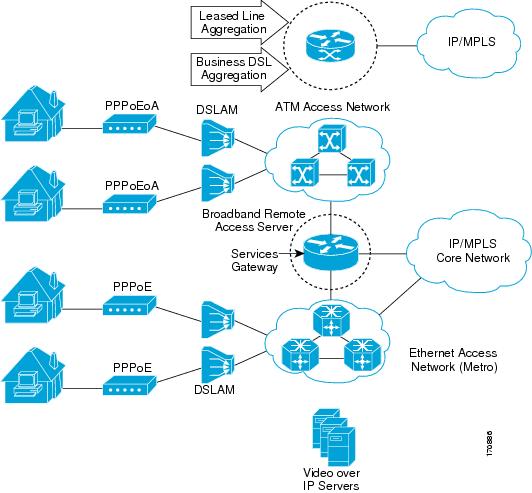
Figure 1 shows a typical broadband aggregation HA deployment with ISSU functionality.
Figure 1 Broadband Aggregation High Availability Deployment
Benefits of Cisco IOS Broadband High Availability In Service Software Upgrade
•
•
•
•
•
•
How to Configure Cisco IOS Broadband High Availability In Service Software Upgrade
This section contains the following procedures:
•
Configuring Subscriber Redundancy Policy for Cisco IOS Broadband High Availability In Service Software Upgrade
The Cisco IOS Broadband High Availability In Service Software Upgrade feature is enabled by default. This task configures subscriber redundancy policy for HA ISSU capability, allowing you to manage synchronization between HA active and standby processors.
SUMMARY STEPS
1.
2.
3.
4.
DETAILED STEPS
Verifying and Troubleshooting Subscriber Redundancy Policy for Broadband HA ISSU
To verify the subscriber redundancy policy configuration, use the show running-config command. Sample output is located in the "Configuration Examples for Cisco IOS Broadband High Availability In Service Software Upgrade" section.
Step 1 and Step 2 are useful for troubleshooting the CCM synchronization component. Steps 3, 4 and 5 are useful for reviewing PPPoX session statistics. Step 6 through Step 8 are typically used by Cisco engineers for internal debugging purposes; you may be asked to provide command output to a technical assistance center (TAC) engineer for assistance in troubleshooting.
SUMMARY STEPS
1.
2.
3.
4.
5.
6.
7.
8.
DETAILED STEPS
Step 1
This command shows information on the CCM, the HA component that manages the capability to synchronize session bringup on the standby processor of a redundant processor, high availability (HA) system. Use the show ccm clients command to display information on CCM clients. The following is sample output fromthe show ccm clients command from a Cisco 10000 series router active RP:
Router# show ccm clientsCCM bundles sent since peer up:Sync Session 0Update Session 0Active Bulk Sync 0Session Down 0ISSU client msgs 0Unknown msgs 0Client events sent since peer up:PPP 0PPPoE 0PPPoA 0AAA 0PPP SIP 0LTERM 0AC 0Virtual Template 0The following is sample output fromthe show ccm clients command from a Cisco 10000 series router standby RP:
Router# show ccm clientsCCM bundles rcvd since last boot:Sync Session 8Update Session 0Active Bulk Sync 1Session Down 8ISSU client msgs 59Unknown msgs 0Client events extracted since last boot:PPP 72PPPoE 50PPPoA 0AAA 32PPP SIP 0LTERM 8AC 0Step 2
This command shows information on sessions managed by the CCM. The following is sample output fromthe show ccm sessions command on the active RP:
Router# show ccm sessionsGlobal CCM state: CCM HA Active - Dynamic SyncGlobal ISSU state: Compatible, Clients Cap 0x0> Number of sessions in state Down: 0> Number of sessions in state Not Ready: 0> Number of sessions in state Ready: 0> Number of sessions in state Dyn Sync: 0>> Timeout: Timer Type Delay Remaining Starts CPU Limit CPU Last> ------------ -------- --------- --------- --------- --------> Rate 00:00:01 - 2 - -> Dynamic CPU 00:00:10 - 0 90 0The following is sample output from the show ccm sessions command on the standby RP:
Router# show ccm sessionsGlobal CCM state: CCM HA Standby - CollectingGlobal ISSU state: Compatible, Clients Cap 0xFFECurrent Bulk Sent Bulk Rcvd----------- ----------- -----------Number of sessions in state Down: 0 0 0Number of sessions in state Not Ready: 0 0 0Number of sessions in state Ready: 0 0 0Number of sessions in state Dyn Sync: 0 0 0Timeout: Timer Type Delay Remaining Starts CPU Limit CPU Last------------ -------- --------- ----------- --------- --------Rate 00:00:01 - 0 - -Dynamic CPU 00:00:10 - 0 90 0Bulk Time Li 00:08:00 - 0 - -RF Notif Ext 00:00:20 - 0 - -Step 3
This command is useful for obtaining events and statistics for PPP subscribers. Use the show ppp subscriber statistics command to display a cumulative count of PPP subscriber events and statistics, and to display an incremental count since the clear ppp subscriber statistics command was last issued.
The following is sample output from the show ppp subscriber statistics command:
Router# show ppp subscriber statisticsPPP Subscriber Events TOTAL SINCE CLEAREDEncap 32011 32011DeEncap 16002 16002CstateUp 173 173CstateDown 36 36FastStart 0 0LocalTerm 7 7LocalTermVP 0 0MoreKeys 173 173Forwarding 0 0Forwarded 0 0SSSDisc 0 0SSMDisc 0 0PPPDisc 167 167PPPBindResp 173 173PPPReneg 3 3RestartTimeout 169 169>PPP Subscriber Statistics TOTAL SINCE CLEAREDIDB CSTATE UP 16008 16008IDB CSTATE DOWN 40 40APS UP 0 0APS UP IGNORE 0 0APS DOWN 0 0READY FOR SYNC 10 10Step 4
This command is useful for obtaining statistics for PPPoA sessions. Use the show pppatm statistics command to display a total count of PPPoA events since the clear pppatm statistics command was last issued.
The following is sample output from theshow pppatm statistics command:
Router# show pppatm statistics4000 : Context Allocated events3999 : SSS Request events7998 : SSS Msg events3999 : PPP Msg events3998 : Up Pending events3998 : Up Dequeued events3998 : Processing Up events3999 : Vaccess Up events3999 : AAA unique id allocated events3999 : No AAA method list set events3999 : AAA gets nas port details events3999 : AAA gets retrived attrs events68202 : AAA gets dynamic attrs events3999 : Access IE allocated eventsStep 5
This command is useful for obtaining statistics and events for PPPoE sessions. Use the show pppoe statistics command to display a cumulative count of PPPoE events and statistics, and to display an incremental count since the last time the clear pppoe statistics command was issued.
The following is sample output from the show pppoe statistics command:
Router# show pppoe statisticsPPPoE Events TOTAL SINCE CLEARED------------------------------ ------------- -------------INVALID 0 0PRE-SERVICE FOUND 0 0PRE-SERVICE NONE 0 0SSS CONNECT LOCAL 16002 16002SSS FORWARDING 0 0SSS FORWARDED 0 0SSS MORE KEYS 16002 16002SSS DISCONNECT 0 0CONFIG UPDATE 0 0STATIC BIND RESPONSE 16002 16002PPP FORWARDING 0 0PPP FORWARDED 0 0PPP DISCONNECT 0 0PPP RENEGOTIATION 0 0SSM PROVISIONED 16002 16002SSM UPDATED 16002 16002SSM DISCONNECT 0 0>PPPoE Statistics TOTAL SINCE CLEARED------------------------------ ------------- -------------SSS Request 16002 16002SSS Response Stale 0 0SSS Disconnect 0 0PPPoE Handles Allocated 16002 16002PPPoE Handles Freed 0 0Dynamic Bind Request 16002 16002Static Bind Request 16002 16002Step 6
Use the show ccm queues command to display queue statistics for CCM sessions on active and standby processors. This command is primarily used only by Cisco engineers for internal debugging of CCM processes.
The following is sample output from the show ccm queues command:
Router# show ccm queues9 Event Queuessize max kicks starts false suspends ticks(ms)4 CCM 0 2 13 13 0 0 20Event NamesEvents Queued MaxQueued Suspends usec/evt max/evt1 4 Sync Session 0 0 0 0 0 02 4 Sync Client 0 0 0 0 0 03 4 Update 0 0 0 0 0 04 4 Session Down 0 0 0 0 0 05 4 Bulk Sync Begi 0 0 0 0 0 06 4 Bulk Sync Cont 0 0 0 0 0 07 4 Bulk Sync End 1 0 1 0 53 538 4 Going Active 0 0 0 0 0 09 4 Going Standby 1 0 1 0 10 1010 4 Standby Presen 0 0 0 0 0 011 4 Standby Gone 0 0 0 0 0 013 4 CP Message 18 0 2 0 156 57314 4 Recr Session 0 0 0 0 0 015 4 Recr Update 0 0 0 0 0 016 4 Recr Sess Down 0 0 0 0 0 017 4 ISSU Session N 1 0 1 0 283 28318 4 ISSU Peer Comm 0 0 0 0 0 0Step 7
Use the debug pppatm redundancy command to display CCM events and messages for PPPoA sessions on HA systems. This command is generally used only by Cisco engineers for internal debugging of CCM processes. The following is sample output from the debug pppatm redundancy command from a Cisco 10000 series router standby RP:
Router# debug pppatm redundancy*Dec 3 02:58:40.784: PPPATM HA: [14000001]: Received the first SHDB*Dec 3 02:58:40.784: PPPATM HA: [14000001]: Base hwidb not created > yet, queuing SHDB *Dec 3 02:58:40.784: PPPATM HA: [14000001]:Requesting base vaccess creationStep 8
Use the debug pppoe redundancy command to display CCM events and messages for PPPoE sessions on HA systems. This command is generally used only by Cisco engineers for internal debugging of CCM processes. The following is sample output from the debug pppoe redundancy command from a Cisco 10000 series router active RP:
Router# debug pppoe redundancyNov 22 17:21:11.327: PPPoE HA[0xBE000008] 9: Session ready to sync dataNov 22 17:21:11.351: PPPoE HA[0xBE000008] 9: code = PADR, length = 58Nov 22 17:21:11.351: PPPoE HA[0xBE000008] 9: code = SESSION ID, length = 2Nov 22 17:21:11.351: PPPoE HA[0xBE000008] 9: code = SWITCH HDL, length = 4Nov 22 17:21:11.351: PPPoE HA[0xBE000008] 9: code = SEGMENT HDL, length = 4Nov 22 17:21:11.351: PPPoE HA[0xBE000008] 9: code = PHY SWIDB DESC, length = 20Nov 22 17:21:11.351: PPPoE HA[0xBE000008] 9: code = VACCESS DESC, length = 28Nov 22 17:21:11.351: PPPoE HA[0xBE000008] 9: Sync collection for ready eventsNov 22 17:21:11.351: PPPoE HA[0xBE000008] 9: code = PADR, length = 58Nov 22 17:21:11.351: PPPoE HA[0xBE000008] 9: code = SESSION ID, length = 2Nov 22 17:21:11.351: PPPoE HA[0xBE000008] 9: code = SWITCH HDL, length = 4Nov 22 17:21:11.351: PPPoE HA[0xBE000008] 9: code = SEGMENT HDL, length = 4Nov 22 17:21:11.351: PPPoE HA[0xBE000008] 9: code = PHY SWIDB DESC, length = 20Nov 22 17:21:11.351: PPPoE HA[0xBE000008] 9: code = VACCESS DESC, length = 28The following is sample output from the debug pppoe redundancy command from a Cisco 10000 series router standby RP:
Router# debug pppoe redundancyNov 22 17:21:11.448: PPPoE HA[0x82000008]: Recreating session: retrieving dataNov 22 17:21:11.464: PPPoE HA[0x82000008] 9: Session ready to sync data
Configuration Examples for Cisco IOS Broadband High Availability In Service Software Upgrade
This section provides the following configuration examples:
•
PPPoX Terminated into an RA-MPLS Network with ISSU: Example
The following example shows how to configure PPPoX session subscriber redundancy policy for the Cisco IOS Broadband High Availability In Service Software Upgrade feature in a RA-MPLS network.
Router# show running-confighostname Router!boot-start-markerboot system bootflash:c10k2-p11-mz.sur3_1003 boot-end-marker !enable password cisco!aaa new-model!!aaa authentication ppp default local!!!aaa session-id commonppp hold-queue 80000facility-alarm intake-temperature major 54 facility-alarm intake-temperature minor 45 facility-alarm intake-temperature critical 72 facility-alarm core-temperature major 58 facility-alarm core-temperature minor 50 facility-alarm core-temperature critical 85 !!card 1/0 4oc3atm-1card 2/0 4oc3atm-1card 3/0 4oc3atm-1card 4/0 4oc3atm-1card 5/0 8fastethernet-1card 6/0 4oc3atm-1card 7/0 4oc3atm-1card 8/0 1gigethernet-hh-1card 8/1 1gigethernet-hh-1ip subnet-zerono ip gratuitous-arpsno ip domain lookupip vrf vrf1rd 1:1route-target export 1:1route-target import 1:1!no ip dhcp use vrf connected!!!!no subscriber policy recording rulesThe following lines show subscriber redundancy policy configuration:
subscriber redundancy dynamic limit cpu 90 delay 10 subscriber redundancy bulk limit cpu 90 delay 10 subscriber redundancy rate 4000 1 subscriber redundancy delay 10 no mpls traffic-eng auto-bw timers frequency 0 mpls ldp graceful-restart mpls ldp router-id Loopback100 no virtual-template snmp issu config-sync policy bulk prc issu config-sync policy bulk bem !redundancymode ssousername cisco password 0 cisco!buffers small permanent 15000buffers middle permanent 12000buffers large permanent 1000bba-group pppoe grp1virtual-template 1!bba-group pppoe grp2virtual-template 2!bba-group pppoe grp3virtual-template 3!bba-group pppoe grp4virtual-template 4!bba-group pppoe grp5virtual-template 5!bba-group pppoe grp7virtual-template 7!bba-group pppoe grp8virtual-template 8!bba-group pppoe grp6virtual-template 6!!interface Loopback0ip vrf forwarding vrf1ip address 172.16.1.1 255.255.255.255!interface Loopback100ip address 172.31.0.1 255.255.255.255!interface FastEthernet0/0/0ip address 192.168.2.26 255.255.255.0speed 100full-duplex!interface ATM1/0/0no ip addressload-interval 30!interface ATM1/0/0.1 multipointrange pvc 1/32 1/4031encapsulation aal5snapprotocol pppoe group grp1!!interface ATM1/0/0.2 multipointrange pvc 2/32 2/4031encapsulation aal5snapprotocol pppoe group grp2!!interface ATM1/0/1no ip address!interface ATM1/0/1.1 multipointrange pvc 3/32 3/4031encapsulation aal5snapprotocol pppoe group grp3!!interface ATM1/0/1.2 multipointrange pvc 4/32 4/4031encapsulation aal5snapprotocol pppoe group grp4!!interface ATM1/0/2no ip address!interface ATM1/0/2.1 multipointrange pvc 5/32 5/4031encapsulation aal5snapprotocol pppoe group grp5!!interface ATM1/0/2.2 multipointrange pvc 6/32 6/4031encapsulation aal5snapprotocol pppoe group grp6!!interface ATM1/0/3no ip address!interface ATM1/0/3.1 multipointrange pvc 7/32 7/4031encapsulation aal5snapprotocol pppoe group grp7!!interface ATM1/0/3.2 multipointrange pvc 8/32 8/4031encapsulation aal5snapprotocol pppoe group grp8!!!!interface ATM7/0/3no ip address!interface GigabitEthernet8/0/0mac-address 0011.0022.0033ip vrf forwarding vrf1ip address 20.1.1.2 255.255.255.0negotiation auto!interface GigabitEthernet8/1/0ip address 11.1.1.1 255.255.255.0negotiation autompls ip!interface Virtual-Template1ip vrf forwarding vrf1ip unnumbered Loopback0no logging event link-statuspeer default ip address pool pool1no snmp trap link-statuskeepalive 30ppp authentication pap!interface Virtual-Template2ip vrf forwarding vrf1ip unnumbered Loopback0no logging event link-statuspeer default ip address pool pool2no snmp trap link-statuskeepalive 30ppp authentication pap!interface Virtual-Template3ip vrf forwarding vrf1ip unnumbered Loopback0no logging event link-statuspeer default ip address pool pool3no snmp trap link-statuskeepalive 30ppp authentication pap!interface Virtual-Template4ip vrf forwarding vrf1ip unnumbered Loopback0no logging event link-statuspeer default ip address pool pool4no snmp trap link-statuskeepalive 30ppp authentication pap!interface Virtual-Template5ip vrf forwarding vrf1ip unnumbered Loopback0no logging event link-statuspeer default ip address pool pool5no snmp trap link-statuskeepalive 30ppp authentication pap!interface Virtual-Template6ip vrf forwarding vrf1ip unnumbered Loopback0no logging event link-statuspeer default ip address pool pool6no snmp trap link-statuskeepalive 30ppp authentication pap!interface Virtual-Template7ip vrf forwarding vrf1ip unnumbered Loopback0no logging event link-statuspeer default ip address pool pool7no snmp trap link-statuskeepalive 30ppp authentication pap!interface Virtual-Template8ip vrf forwarding vrf1ip unnumbered Loopback0no logging event link-statuspeer default ip address pool pool8no snmp trap link-statuskeepalive 30ppp authentication pap!router ospf 1log-adjacency-changesnsfnetwork 11.1.1.0 0.0.0.255 area 0network 223.0.0.0 0.0.0.255 area 0!router bgp 1no synchronizationbgp log-neighbor-changesbgp graceful-restart restart-time 120bgp graceful-restart stalepath-time 360bgp graceful-restartneighbor 223.0.0.3 remote-as 1neighbor 223.0.0.3 update-source Loopback100no auto-summary!address-family vpnv4neighbor 223.0.0.3 activateneighbor 223.0.0.3 send-community extendedexit-address-family!address-family ipv4 vrf vrf1redistribute connectedredistribute staticno auto-summaryno synchronizationexit-address-family!ip local pool pool2 12.1.1.1 12.1.16.160 ip local pool pool3 13.1.1.1 13.1.16.160 ip local pool pool4 14.1.1.1 14.1.16.160 ip local pool pool5 15.1.1.1 15.1.16.160 ip local pool pool6 16.1.1.1 16.1.16.160 ip local pool pool7 17.1.1.1 17.1.16.160 ip local pool pool8 18.1.1.1 18.1.16.160 ip classless !!no ip http server!!arp 20.1.1.1 0020.0001.0001 ARPAarp vrf vrf1 20.1.1.1 0020.0001.0001 ARPA !!!!!line con 0line aux 0line vty 0 4password cisco!exception crashinfo file bootflash:crash.log !endAdditional References
Related Documents
Information about Cisco 10000 series routers and broadband aggregation
Performing an ISSU
Information about the broadband SSO feature
Cisco IOS Broadband Access Aggregation and DSL Configuration Guide
Information about SSO
Information about NSF
Standards
No new or modified standards are supported by this feature, and support for existing standards has not been modified by this feature.
—
MIBs
RFCs
No new or modified RFCs are supported by this feature, and support for existing RFCs has not been modified by this feature.
—
Technical Assistance
Feature Information for Cisco IOS Broadband High Availability In Service Software Upgrade
Table 1 lists the release history for this feature.
Not all commands may be available in your Cisco IOS software release. For release information about a specific command, see the command reference documentation.
Use Cisco Feature Navigator to find information about platform support and software image support. Cisco Feature Navigator enables you to determine which Cisco IOS and Catalyst OS software images support a specific software release, feature set, or platform. To access Cisco Feature Navigator, go to http://www.cisco.com/go/cfn. An account on Cisco.com is not required.
Note
Cisco and the Cisco Logo are trademarks of Cisco Systems, Inc. and/or its affiliates in the U.S. and other countries. A listing of Cisco's trademarks can be found at www.cisco.com/go/trademarks. Third party trademarks mentioned are the property of their respective owners. The use of the word partner does not imply a partnership relationship between Cisco and any other company. (1005R)
Any Internet Protocol (IP) addresses used in this document are not intended to be actual addresses. Any examples, command display output, and figures included in the document are shown for illustrative purposes only. Any use of actual IP addresses in illustrative content is unintentional and coincidental.
© 2006-2010 Cisco Systems, Inc. All rights reserved.
 Feedback
Contact Cisco
- Open a Support Case

- (Requires a Cisco Service Contract)