Enhanced ITU-T G.168 Echo Cancellation
Available Languages
Table Of Contents
Enhanced ITU-T G.168 Echo Cancellation
Information About Enhanced ITU-T G.168 Echo Cancellation
Enhanced ITU-T G.168 Echo Cancellation
Basics of Echo Canceller Operation
How to Configure Enhanced ITU-T G.168 Echo Cancellation
Shutting Down All T1 Voice Ports
Shutting Down the T1 Controller
Adding Back the PRI Groups and DS-0 Groups
Reapplying Voice-Port and Serial Interface Configurations
Reassigning Voice Ports to Dial-Peer Configurations
Bringing the T1 Controller Back Up
Enabling the Extended EC on the Cisco 1700 Series and Cisco ICS7750
Changing Codec Complexity on the Cisco 7200 Series
Configuring Echo Cancellation Parameters
Verifying Codec Complexity Settings
Verifying Analog and Digital Voice Port Configurations
Configuration Examples for Enhanced ITU-T G.168 Echo Cancellation
Enabling the Echo Canceller Example
Switching the Echo Canceller Example
Enabling the Extended EC on the Cisco 1700 Series and Cisco ICS 7750 Example
Changing Codec Complexity on the Cisco 7200 Series Example
Adjusting the Echo Canceller Size Example
Worst-Case Echo Return Loss Example
Checking the Active Calls Example
Obsolete and Replaced Commands
Enhanced ITU-T G.168 Echo Cancellation
This document describes the third-party G.168 extended echo canceller (EC) used in Cisco gateways with Cisco IOS Release 12.2(13)ZH. The extended EC uses the Cisco voice digital signal processor (DSP) code base (DSPWare).
The Enhanced ITU-T G.168 Echo Cancellation feature provides an alternative to the default Cisco-proprietary G.165 EC. The new extended EC provides improved performance for trunking gateway applications and provides a configurable tail length that supports up to 64 ms of echo cancellation.
The extended EC offers the following improvements over the Cisco default EC:
•
Complies with the ITU-T G.168 (2000) standard in addition to maintaining support for the old ITU-T G.165 standard.
•

Note
Cisco IOS software supports the following improvements with the extended EC:
•
•
•
•
•
This feature provides the following additional benefits:
•
•
•
•
Table 1 contains specific high-complexity and medium-complexity support listed by platform. For hardware support documentation, refer to links provided in the "Related Documents" section.
Feature Specifications for Enhanced ITU-T G.168 Echo Cancellation
Determining Platform Support Through Cisco Feature Navigator
Cisco IOS software is packaged in feature sets that are supported on specific platforms. To get updated information regarding platform support for this feature, access Cisco Feature Navigator. Cisco Feature Navigator dynamically updates the list of supported platforms as new platform support is added for the feature.
Cisco Feature Navigator is a web-based tool that enables you to determine which Cisco IOS software images support a specific set of features and which features are supported in a specific Cisco IOS image. You can search by feature or release. Under the release section, you can compare releases side by side to display both the features unique to each software release and the features in common.
To access Cisco Feature Navigator, you must have an account on Cisco.com. If you have forgotten or lost your account information, send a blank e-mail to cco-locksmith@cisco.com. An automatic check verifies that your e-mail address is registered with Cisco.com. If the check is successful, account details with a new random password will be e-mailed to you. Qualified users can establish an account on Cisco.com by following the directions found at this URL:
Cisco Feature Navigator is updated regularly when major Cisco IOS software releases and technology releases occur. For the most current information, go to the Cisco Feature Navigator home page at the following URL:
Availability of Cisco IOS Software Images
Platform support for particular Cisco IOS software releases is dependent on the availability of the software images for those platforms. Software images for some platforms may be deferred, delayed, or changed without prior notice. For updated information about platform support and availability of software images for each Cisco IOS software release, refer to the online release notes or, if supported, Cisco Feature Navigator.
Table 1 Extended Echo Canceller Algorithm Coverage by Platform
Cisco 1700 series
12.2.13T, 12.2(8)YN
12.2.13T, 12.2(8)YN
12.2.13T, 12.2(8)YN
NA
Flexi6 support in Cisco IOS Release 12.2(8)YN.
For extended EC configuration information for the Cisco 1700 series, see the following sections:
•
•
Cisco 2600 series
Cisco 2600XM
Cisco 3600 series
Cisco 3700 series Cisco VG200NM-HDV (C549)
NA
12.2(13)T
NA
12.2(13)T
Full support
NM-1V,
(C542)No
NA
No
NA
Cisco AS5300
NA
No
NA
No
Note
Cisco AS5350, Cisco AS5400, Cisco AS5850
NA
NA
NA
NA
Different DSP with its own 128ms-coverage EC
Cisco 7200 series
PA-VXx-2TE1+ and PA-MCX-nTE1
NA
12.2(13)T
NA
12.2(13)T
PA-MCX-nTE1 port adapters do not have their own DSPs, so they use the DSPs of PA-VXx-2TE1+ port adapters.
For extended EC configuration information for the Cisco 7200 series, see the "Changing Codec Complexity on the Cisco 7200 Series" section
Cisco 7500 series
NA
12.2(13)T
NA
No
No medium complexity
Cisco ICS7750
12.2(13)T, 12.2(13)ZH
12.2(13)T, 12.2(13)ZH
12.2(13)T, 12.2(8)YN
NA
Flexi6 support.
For extended EC configuration information for the Cisco ICS7750, see the following sections:
•
•
Cisco MC3810
HCM 549
12.2(13)T
12.2(13)T
NA
NA
Full support
Contents
•
•
•
Restrictions
•
•
•
•
Information About Enhanced ITU-T G.168 Echo Cancellation
To configure the Enhanced ITU-T G.168 Echo Cancellation feature, you must understand the following concepts:
•
•
•
•
Enhanced ITU-T G.168 Echo Cancellation
Echo is the sound of your own voice reverberating in the telephone receiver while you are talking. When timed properly, echo is not a problem in the conversation; however, if the echo interval exceeds approximately 25 ms, it can be distracting to the speaker. Echo is controlled by ECs. By design, ECs are limited by the total amount of time they wait for the reflected speech to be received, which is known as an echo tail. The echo tail is normally 32 ms.
In the traditional telephony network, echo is generally caused by an impedance mismatch when the four-wire network is converted to the two-wire local loop. Echo cancellation is required because of packet network latency.
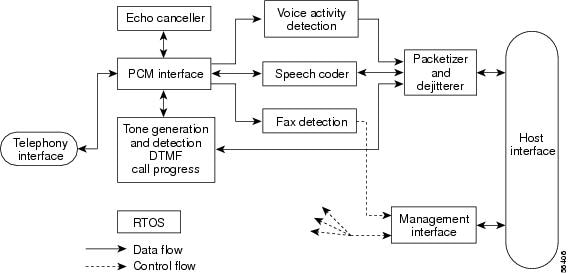
Echo cancellation is implemented in DSP firmware on the gateways and is independent of other functions implemented in the DSP (the DSP protocol and compression algorithm). In voice packet-based networks, ECs are built into the low-bit-rate codecs and are operated on each DSP. Figure 1 shows a common voice network where echo cancellation might be used, and Figure 2 shows a typical DSP channel configured for voice processing.
Figure 1 Echo Cancellation Network
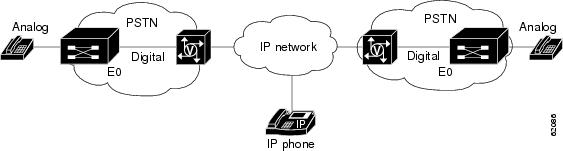
Figure 2 DSP Channel Configured for Voice Processing
Voice Paths
Every voice conversation has at least two participants. From the perspective of each participant, there are two voice paths in every call:
•
•
Figure 3 shows a simple voice call between caller A and caller B. The top line represents the Tx path for caller A, which becomes the Rx path for caller B. The bottom line represents the Tx path for caller B, which becomes the Rx path for caller A.
Figure 3 Echo in a Voice Network
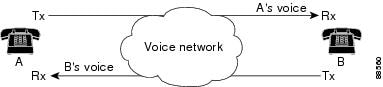
An echo canceller is a component of a voice gateway that reduces the level of echoes that leak from the Rx path (from the gateway out into the tail circuit) into the Tx path (from the tail circuit into the gateway). Rx and Tx here are from the perspective of the voice gateway.
Echo cancellers face into the PSTN tail circuit. They eliminate echoes in the tail circuit on its side of the network.
From the perspective of the echo canceller in a voice gateway, the Rx signal is a voice coming across the network from another location. The Tx signal is a mixture of the voice call in the other location and the echo of the original voice, which comes from the tail circuit on the initiating end and is sent to the receiving end.
The echo canceller in the originating gateway looks out into the tail circuit and is responsible for eliminating echo signal from the initiation Tx signal and allowing a voice call to go through unimpeded.
Note
Basics of Echo Canceller Operation
An echo canceller removes the echo portion of the signal coming out of the tail circuit and headed into the WAN. It does so by learning the electrical characteristics of the tail circuit and forming its own model of the tail circuit in its memory, and creating an estimated echo signal based on the current and past Rx signal. It subtracts the estimated echo from the actual Tx signal coming out of the tail circuit. The quality of the estimation is continuously improved by monitoring the estimation error.
The analog circuit is known as the tail circuit. It forms the tail or termination of the call from the perspective of the person experiencing the echo.
A packet voice gateway is a gateway between a digital packet network and a public switched telephone network (PSTN). It can include both digital (TDM) and analog links.
The tail circuit is everything connected to the PSTN side of a packet voice gateway—all the switches, multiplexers, cabling, and PBXs between the voice gateway and the telephone.
Echo Canceller Components
A typical echo canceller includes two components: Convolution processor (CP) and a nonlinear processor (NLP).
Convolution processor
The CP first stage captures and stores the outgoing signal toward the far-end hybrid. The CP then switches to monitoring mode and, when the echo signal returns, estimates the level of the incoming echo signal and subtracts the attenuated original voice signal from the echo signal.
The time required to adjust the level of attenuation needed to the original signal is called the convergence time. Because the convergence process requires that the voice signal be stored in memory, the EC has limited coverage of tail circuit delay, normally 64 ms, 96 ms, and up to 128 ms. After convergence, the CP provides about 18 dB of echo return loss enhancement (ERLE). Because a typical analog phone circuit provides at least 12 dB of echo return loss (ERL) (that is, the echo path loss between the echo canceller and the far-end hybrid), the expected permanent ERL of the converged echo canceller is about 30 dB or greater.
Nonlinear processor
In single-talk mode, that is, when one person is talking and the other is silent, the NLP replaces the residual echo at the output of the echo canceller with comfort noise based on the actual background noise of the voice path. The background noise normally changes over the course of a phone conversation, so the NLP must adapt over time. The NLP provides an additional loss of at least 25 dB when activated. In double-talk mode, the NLP must be deactivated because it would create a one-way voice effect by adding 25 to 30 dB of loss in only one direction.
To completely eliminate the perception of echo, the Talker Echo Loudness Rating (TELR) should be greater than 65 dB in all situations. To reflect this reality, ITU-T Recommendation G.168 regarding echo canceller requires an ERL equal to or greater than 55 dB. Segmentation Local Reference (SLR), Receive Loudness Rating (RLR), and Cell Loss Ratio (CLR) along the echo path should allow another 10 dB to meet the expected TELR. CP, NLP and Loudness Ratings (LRs) must be optimized to make sure that echo is canceled effectively.
Echo
Following are descriptions of the primary measurements of relative signal levels used by echo cancellers. They are all expressed in dB.
•
•
•
For more information about the echo canceller, refer to the Echo Analysis for Voice over IP document on Cisco.com.
Echo Canceller Coverage
Echo canceller coverage (also known as tail coverage or tail length) is the length of time that the echo canceller stores its approximation of an echo in memory. It is the maximum echo delay that an echo canceller is able to eliminate.
The echo canceller faces into a static tail circuit with input and an output. If a word enters a tail circuit, the echo is a series of delayed and attenuated versions of that word, depending on the number of echo sources and the delays associated with them. After a certain period of time, no more signal comes out. This time period is known as the ringing time of the tail circuit—the time required for all of the ripples to disperse. To fully eliminate all echoes, the coverage of the echo canceller must be as long as the ringing time of the tail circuit.
How to Configure Enhanced ITU-T G.168 Echo Cancellation
This section contains procedures for configuring the Enhanced ITU-T G.168 Echo Cancellation feature. Each procedure is identified as either required or optional.
•
•
•
•
Switching Echo Cancellers
To add, switch, or remove the extended EC in high-complexity mode without reloading the router, perform the following tasks in the order listed:
1.
2.
4.
5.
6.
7.
Note
8.
Shutting Down All T1 Voice Ports
SUMMARY STEPS
1.
2.
3.
4.
5.
DETAILED STEPS
Shutting Down the T1 Controller
SUMMARY STEPS
1.
2.
3.
4.
5.
Or
6.
7.
DETAILED STEPS
Changing Codec Complexity
Note
Note
SUMMARY STEPS
1.
2.
3.
4.
5.
DETAILED STEPS
Step 1
enable
Example:Router> enable
Enables higher privilege levels, such as privileged EXEC mode.
•
Step 2
configure {terminal | memory | network}
Example:Router# configure terminal
Enters global configuration mode.
Step 3
Router(config)# voice-card 1Enters voice-card configuration mode on the specified slot.
Step 4
codec complexity {high | medium} [ecan-extended]
Example:Router(voice-card)# codec complexity high ecan-extendedExample:Router(voice-card)# codec complexity medium ecan-extendedChanges the codec complexity to high or medium and switches from the Cisco proprietary G.165-compliant EC (medium-complexity) to the extended EC (high-complexity).
Note
Note
Step 5
Exits voice-card configuration mode and completes the steps for changing the codec complexity and switching to the extended EC.
Adding Back the PRI Groups and DS-0 Groups
Note
SUMMARY STEPS
1.
2.
3.
4.
Or
5.
6.
DETAILED STEPS
Reapplying Voice-Port and Serial Interface Configurations
Note
SUMMARY STEPS
1.
2.
3.
4.
DETAILED STEPS
Reassigning Voice Ports to Dial-Peer Configurations
Note
Note
SUMMARY STEPS
1.
2.
3.
4.
DETAILED STEPS
Step 1
enable
Example:Router> enable
Enables higher privilege levels, such as privileged EXEC mode.
•
Step 2
configure {terminal}
Example:Router# configure terminal
Enters global configuration mode.
Step 3
dial-peer voice tag pots
Example:Router(config)# dial-peer voice 133001 pots
Enters dial-peer configuration mode and configures a POTS peer using a unique numeric identifier tag.
Step 4
port slot-number/subunit-number/port
Example:Router(config-dial-peer)# port 1/0/0
Associates a dial peer with a specific voice port.
Step 5
end
Example:Router(config-dial-peer)# end
Exits dial-peer configuration mode and completes the reassignment of voice ports to dial-peer configurations.
Bringing the T1 Controller Back Up
SUMMARY STEPS
1.
2.
3.
4.
5.
DETAILED STEPS
This completes the steps for switching ECs and configuring EC parameters on digital voice ports on the Cisco 2600 series, Cisco 2600XM, Cisco 3600 series, Cisco 3700 series, Cisco 7200 series, Cisco MC3810, and Cisco VG200.
Enabling the Extended EC on the Cisco 1700 Series and Cisco ICS7750
The codec complexity medium command enables the extended echo canceller by default on the Cisco 1700 series and the Cisco ICS7750 in Cisco IOS release 12.2(13)ZH.
See Table 1 for extended EC algorithm coverage by platform.
Note
SUMMARY STEPS
1.
2.
3.
4.
5.
DETAILED STEPS
Step 1
enable
Example:Router> enable
Enables higher privilege levels, such as privileged EXEC mode.
Enter your password if prompted.
Step 2
configure {terminal}
Example:Router# configure terminal
Enters global configuration mode.
Step 3
Router(config)# voice-card 1Enters voice card configuration mode on the specified slot.
Step 4
codec complexity {medium}
Example:Router(voice-card)# codec complexity mediumEnables the extended EC (default).
Step 5
Exits voice-card configuration mode and completes the steps for configuring the extended EC on the Cisco 1700 series and Cisco ICS7750.
Changing Codec Complexity on the Cisco 7200 Series
On the Cisco 7200 series, the PA-MCX-2TE1 port adapter (PA) card can be used for making voice calls. This PA does not have any DSPs but uses the DSP resources of the PA-VXC-2TE1+ card present in another slot. If the PA-MCX card is used, codec complexity is configured for PA-VXC, while all other echo cancellation configurations are done for PA-MCX.
The PA-MCX card borrows the DSP resources from the PA-VXC, PA-VXB, or PA-VXA cards. Even if one of the PA-VXC, PA-VXB, or PA-VXA cards has extended echo cancellation configured on the DSP interface, the extended echo cancellation CLI is enabled for the PA-MCX card. It is recommended that the same codec complexity and echo cancellation configurations be present on all the PA-VXC, PA-VXB, or PA-VXA cards in the router.
See Table 1 for extended EC algorithm coverage by platform.
Note
SUMMARY STEPS
1.
2.
3.
4.
5.
DETAILED STEPS
Step 1
enable
Example:Router> enable
Enables higher privilege levels, such as privileged EXEC mode.
Enter your password if prompted.
Step 2
configure {terminal}
Example:Router# configure terminal
Enters global configuration mode.
Step 3
dspint dspfarm slot/0Example:Router(config)# dspint dspfarm 2/0Enables the digital signal processor (DSP) interface on the specified slot and port.
Step 4
codec complexity {high | medium} [ecan-extended]
Example:Router(config-dspfarm)# codec complexity medium ecan-extendedChanges the codec complexity to high or medium on the Cisco 7200 series.
Step 5
Exits to global configuration mode and completes the steps for changing the codec complexity on the Cisco 7200 series.
Configuring Echo Cancellation Parameters
In Cisco voice implementations, ECs are enabled using the echo cancel enable command, and echo tails are configured using the echo cancel coverage command.
To configure parameters related to the extended EC, use the following commands beginning in user EXEC mode.
SUMMARY STEPS
1.
2.
3.
4.
5.
6.
7.
8.
9.
DETAILED STEPS
Step 1
enable
Example:Router> enable
Enables higher privilege levels, such as privileged EXEC mode.
•
Step 2
configure {terminal}
Example:Router# configure terminal
Enters global configuration mode.
Step 3
voice-port slot/port:ds0-group-no
Example:Router(config)# voice-port 1/0:0
Enters voice-port configuration mode on the selected slot, port, and DS-0 group.
•
Step 4
Router(config-voiceport)# echo cancel enable
Enables echo cancellation.
•
The echo suppressor can be turned on only when the default Cisco G.165 EC is used. The echo suppressor command used with the default Cisco EC is still visible when the extended EC is selected, but it does not do anything.
Use the no form of this command to disable the EC.
Note
echo cancel coverage command must also be configured.Step 5
Router(config-voiceport)# echo suppressor
(Optional) Applies echo suppression for the number of seconds specified. S
•
Note
Step 6
echo cancel coverage {8 | 16 | 24 | 32 | 48 | 64}
Example:Router(config-voiceport)# echo cancel coverage 64
Adjusts the size of the echo canceller (echo path capacity coverage). This command enables cancellation of voice that is sent out the interface and received back on the same interface within the configured amount of time.
Note
Step 7
non-linear
Example:Router(config-voiceport)# non-linear
Selects nonlinear processing (residual echo suppression) in the EC, which either shuts off any signal or mixes in comfort noise if no near-end speech is detected.
Note
•
•
•
Step 8
echo-cancel erl worst-case [0 | 3 | 6]
Example:Router# echo-cancel erl worst-case 6
Determines worst-case echo return loss (ERL) in decibels (dB).
•
Step 9
exit
Example:Router(config-voiceport)# exit
Exits voice-port configuration mode and completes the configuration.
Verifying Codec Complexity Settings
To verify the codec complexity and extended EC configuration, enter the show running-config command to display the current voice-card setting. If medium complexity is specified, the codec complexity setting is not displayed. If high complexity is specified, the "codec complexity high" setting is displayed.
The following example shows abbreviated command output if high complexity is specified on the Cisco MC3810:
Router# show running-config...hostname router-alphavoice-card 0codec complexity high ecan-extended...Verifying Analog and Digital Voice Port Configurations
After configuring the voice ports on your router, perform the following steps to verify proper operation.
Step 1
Step 2
Step 3
Step 4
Step 5
show call active command. This command displays information about call times, dial peers, connections, quality of service, and other status and statistical information. The voice keyword displays all voice calls currently connected through the router or access server.
Configuration Examples for Enhanced ITU-T G.168 Echo Cancellation
This section contains the following configuration examples:
•
•
•
•
•
•
•
Enabling the Echo Canceller Example
The following example enables extended echo cancellation and adjusts the size of the EC to 64 ms on a Cisco 3600 series router:
voice-port 1/0/0echo cancel enableecho cancel coverage 64The following example enables extended echo cancellation and adjusts the size of the EC to 64 ms on a Cisco MC3810:
voice-port 1/1:0echo cancel enableecho cancel coverage 64The following example enables the Enhanced ITU-T G.168 Echo Cancellation feature on a Cisco 1700 series or Cisco ICS 7750:
codec complexity mediumSwitching the Echo Canceller Example
The following examples show that the default Cisco-proprietary EC has been switched to the extended EC. These examples show voice and POTS dial peers on originating and terminating router pairs running the maximum number of calls (23) on a single T1 interface.
The following is example show running config output from an originating Cisco 3640:
Router# show running config!version 12.2service timestamps debug datetime msecservice timestamps log uptimeno service password-encryption!hostname 3640echo-135-hc!enable password xxx!voice-card 1codec complexity high ecan-extended!ip subnet-zero!ip domain-name cisco.comip host santa 172.16.1.0ip name-server 172.16.0.0!frame-relay switchingisdn switch-type primary-5essisdn voice-call-failure 0call rsvp-sync!controller T1 1/0framing esflinecode b8zspri-group timeslots 1-24!controller T1 1/1framing sflinecode ami!interface Ethernet0/0ip address 172.16.0.1 255.0.0.0half-duplex!interface Serial0/0no ip addressencapsulation frame-relayno ip route-cacheno ip mroute-cacheno keepaliveno fair-queueclock rate 256000no arp frame-relaycdp enableframe-relay traffic-shapingframe-relay interface-dlci 100class fr200vofr ciscohold-queue 1024 out!interface Ethernet0/1ip address 10.1.0.103 255.0.0.0full-duplex!interface Serial1/0:23no ip addressno logging event link-statusisdn switch-type primary-5essisdn incoming-voice voiceno cdp enable!ip classlessip route 10.2.0.0 255.0.0.0 e0/1ip route 172.16.0.0 255.0.0.0 172.16.0.1ip route 172.16.0.1.0 255.0.0.0 172.17.0.0no ip http serverip pim bidir-enable!map-class frame-relay fr200frame-relay traffic-rate 560000 560000no frame-relay adaptive-shapingframe-relay cir 100000frame-relay mincir 100000frame-relay fair-queueframe-relay voice bandwidth 560000!voice-port 1/0:23!voice-port 2/0/0!voice-port 2/0/1!voice-port 2/1/0!voice-port 2/1/1!voice-port 3/0/0!voice-port 3/0/1!dial-peer cor custom!dial-peer voice 104001 voipdestination-pattern 104001session target ipv4:10.2.0.104dtmf-relay cisco-rtpcodec g711alawfax rate 14400fax protocol cisco!dial-peer voice 104002 voipdestination-pattern 104002session target ipv4:10.2.0.104dtmf-relay cisco-rtpcodec g711ulawfax rate 14400fax protocol cisco!dial-peer voice 104003 voipdestination-pattern 104003session target ipv4:10.2.0.104dtmf-relay cisco-rtpcodec g726r16fax rate 14400fax protocol cisco!dial-peer voice 104004 voipdestination-pattern 104004session target ipv4:10.2.0.104dtmf-relay cisco-rtpcodec g726r24fax rate 14400fax protocol cisco!dial-peer voice 104005 voipdestination-pattern 104005session target ipv4:10.2.0.104dtmf-relay h245-alphanumericcodec g726r32fax rate 14400fax protocol cisco!dial-peer voice 104006 voipdestination-pattern 104006session target ipv4:10.2.0.104dtmf-relay h245-alphanumericcodec g728fax rate 14400fax protocol cisco!dial-peer voice 104007 voipdestination-pattern 104007session target ipv4:10.2.0.104dtmf-relay h245-alphanumericcodec g729br8fax rate 14400fax protocol t38 ls-redundancy 0 hs-redundancy 0!dial-peer voice 104008 voipdestination-pattern 104008session target ipv4:10.2.0.104dtmf-relay h245-alphanumericfax rate 14400fax protocol t38 ls-redundancy 0 hs-redundancy 0!dial-peer voice 104009 voipdestination-pattern 104009session target ipv4:10.2.0.104dtmf-relay h245-signalcodec gsmefrfax rate 14400fax protocol t38 ls-redundancy 0 hs-redundancy 0!dial-peer voice 104010 voipdestination-pattern 104010session target ipv4:10.2.0.104dtmf-relay h245-signalcodec gsmfrfax rate 14400fax protocol t38 ls-redundancy 0 hs-redundancy 0!dial-peer voice 104011 voipdestination-pattern 104011session target ipv4:10.2.0.104dtmf-relay h245-signalcodec g723r53fax rate 14400fax protocol t38 ls-redundancy 0 hs-redundancy 0!dial-peer voice 104012 voipdestination-pattern 104012session target ipv4:10.2.0.104dtmf-relay h245-signalcodec g723r63fax rate 14400fax protocol t38 ls-redundancy 0 hs-redundancy 0!dial-peer voice 104101 vofrdestination-pattern 104101session target Serial0/0 100dtmf-relaycodec g726r16fax rate 14400!dial-peer voice 104102 vofrdestination-pattern 104102session target Serial0/0 100dtmf-relaycodec g726r24fax rate 14400!dial-peer voice 104103 vofrdestination-pattern 104103session target Serial0/0 100dtmf-relaycodec g726r32fax rate 14400!dial-peer voice 104104 vofrdestination-pattern 104104session target Serial0/0 100dtmf-relaycodec g728fax rate 14400!dial-peer voice 104105 vofrdestination-pattern 104105session target Serial0/0 100dtmf-relaycodec g729br8fax rate 14400!dial-peer voice 104106 vofrdestination-pattern 104106session target Serial0/0 100dtmf-relayfax rate 14400!dial-peer voice 104107 vofrdestination-pattern 104107session target Serial0/0 100dtmf-relaycodec g723r53fax rate 14400!dial-peer voice 104108 vofrdestination-pattern 104108session target Serial0/0 100dtmf-relaycodec g723r63fax rate 14400!dial-peer voice 104109 vofrdestination-pattern 104109session target Serial0/0 100dtmf-relaycodec g723ar53fax rate 14400!dial-peer voice 104110 vofrdestination-pattern 104110session target Serial0/0 100dtmf-relaycodec g723ar63fax rate 14400!dial-peer voice 104111 vofrdestination-pattern 104111session target Serial0/0 100dtmf-relaycodec g711alawfax rate 14400!dial-peer voice 104112 vofrdestination-pattern 104112session target Serial0/0 100dtmf-relaycodec g711ulawfax rate 14400!dial-peer voice 2001 potsincoming called-number 5440001port 1/0:23!dial-peer voice 2002 potsincoming called-number 5440002port 1/0:23!dial-peer voice 2003 potsincoming called-number 5440003port 1/0:23!dial-peer voice 2004 potsincoming called-number 5440004port 1/0:23!dial-peer voice 2005 potsincoming called-number 5440005port 1/0:23!dial-peer voice 2006 potsincoming called-number 5440006port 1/0:23!dial-peer voice 2007 potsincoming called-number 5440007port 1/0:23!dial-peer voice 2008 potsincoming called-number 5440008port 1/0:23!dial-peer voice 2009 potsincoming called-number 5440009port 1/0:23!dial-peer voice 2010 potsincoming called-number 5440010port 1/0:23!dial-peer voice 2011 potsincoming called-number 5440011port 1/0:23!dial-peer voice 2012 potsincoming called-number 5440012port 1/0:23!dial-peer voice 2013 potsincoming called-number 5440013port 1/0:23!dial-peer voice 2014 potsincoming called-number 5440014port 1/0:23!dial-peer voice 2015 potsincoming called-number 5440015port 1/0:23!dial-peer voice 2016 potsincoming called-number 5440016port 1/0:23!dial-peer voice 2017 potsincoming called-number 5440017port 1/0:23!dial-peer voice 2018 potsincoming called-number 5440018port 1/0:23!dial-peer voice 2019 potsincoming called-number 5440019port 1/0:23!dial-peer voice 2020 potsincoming called-number 5440020port 1/0:23!dial-peer voice 2021 potsincoming called-number 5440021port 1/0:23!dial-peer voice 2022 potsincoming called-number 5440022port 1/0:23!dial-peer voice 2023 potsincoming called-number 5440023port 1/0:23!dial-peer voice 2024 potsincoming called-number 5440024port 1/0:23!dial-peer voice 104301 voipdestination-pattern 5481320session target ipv4:10.2.0.104dtmf-relay cisco-rtpcodec g711alawfax rate 14400!dial-peer voice 104302 voipdestination-pattern 5481321session target ipv4:10.2.0.104dtmf-relay cisco-rtpcodec g711ulawfax rate 14400!dial-peer voice 104303 voipdestination-pattern 5481322session target ipv4:10.2.0.104dtmf-relay cisco-rtpcodec g726r16fax rate 14400!dial-peer voice 104304 voipdestination-pattern 5481323session target ipv4:10.2.0.104dtmf-relay cisco-rtpcodec g726r24fax rate 14400!dial-peer voice 104305 voipdestination-pattern 5481324session target ipv4:10.2.0.104dtmf-relay h245-alphanumericcodec g726r32fax rate 14400!dial-peer voice 104306 voipdestination-pattern 5481325session target ipv4:10.2.0.104dtmf-relay h245-alphanumericcodec g728fax rate 14400!dial-peer voice 104307 voipdestination-pattern 5481326session target ipv4:10.2.0.104dtmf-relay h245-alphanumericcodec g729br8fax rate 14400!dial-peer voice 104401 voipdestination-pattern 5481420session target ipv4:10.2.0.104dtmf-relay h245-alphanumericfax rate 14400fax protocol t38 ls-redundancy 0 hs-redundancy 0!dial-peer voice 104402 voipdestination-pattern 5481421session target ipv4:10.2.0.104dtmf-relay h245-signalcodec gsmefrfax rate 14400fax protocol t38 ls-redundancy 0 hs-redundancy 0!dial-peer voice 104403 voipdestination-pattern 5481422session target ipv4:10.2.0.104dtmf-relay h245-signalcodec gsmfrfax rate 14400fax protocol t38 ls-redundancy 0 hs-redundancy 0!dial-peer voice 104404 voipdestination-pattern 5481423session target ipv4:10.2.0.104dtmf-relay h245-signalcodec g723r53fax rate 14400fax protocol t38 ls-redundancy 0 hs-redundancy 0!dial-peer voice 104405 voipdestination-pattern 5481424session target ipv4:10.2.0.104dtmf-relay h245-signalcodec g723r63fax rate 14400fax protocol t38 ls-redundancy 0 hs-redundancy 0!dial-peer voice 104406 voipdestination-pattern 5481425session target ipv4:10.2.0.104dtmf-relay cisco-rtpcodec g723ar53fax rate 14400fax protocol t38 ls-redundancy 0 hs-redundancy 0!dial-peer voice 104407 voipdestination-pattern 5481426session target ipv4:10.2.0.104dtmf-relay cisco-rtpcodec g723ar63fax rate 14400fax protocol t38 ls-redundancy 0 hs-redundancy 0!dial-peer voice 104308 vofrdestination-pattern 5481327session target Serial0/0 100dtmf-relaycodec g711alawfax rate 14400!dial-peer voice 104309 vofrdestination-pattern 5481328session target Serial0/0 100dtmf-relaycodec g711ulawfax rate 14400!dial-peer voice 104310 vofrdestination-pattern 5481329session target Serial0/0 100dtmf-relaycodec g726r16fax rate 14400!dial-peer voice 104311 vofrdestination-pattern 5481330session target Serial0/0 100dtmf-relaycodec g726r24fax rate 14400!dial-peer voice 104312 vofrdestination-pattern 5481331session target Serial0/0 100dtmf-relaycodec g726r32fax rate 14400!dial-peer voice 104313 vofrdestination-pattern 5481332session target Serial0/0 100dtmf-relaycodec g728fax rate 14400!dial-peer voice 104314 vofrdestination-pattern 5481333session target Serial0/0 100dtmf-relaycodec g729br8fax rate 14400!dial-peer voice 104408 vofrdestination-pattern 5481427session target Serial0/0 100dtmf-relayfax rate 14400!dial-peer voice 104409 vofrdestination-pattern 5481428session target Serial0/0 100dtmf-relaycodec g729br8fax rate 14400!dial-peer voice 104410 vofrdestination-pattern 5481429session target Serial0/0 100dtmf-relayfax rate 14400!dial-peer voice 104411 vofrdestination-pattern 5481430session target Serial0/0 100dtmf-relaycodec g723r53fax rate 14400!dial-peer voice 104412 vofrdestination-pattern 5481431session target Serial0/0 100dtmf-relaycodec g723r63fax rate 14400!dial-peer voice 104413 vofrdestination-pattern 5481432session target Serial0/0 100dtmf-relaycodec g723ar53fax rate 14400!dial-peer voice 104414 vofrdestination-pattern 5481433session target Serial0/0 100dtmf-relaycodec g723ar63fax rate 14400!dial-peer voice 135300 potsincoming called-number 54813..destination-pattern 135300port 3/0/0!dial-peer voice 135301 potsincoming called-number 54814..destination-pattern 135301port 3/0/1!line con 0exec-timeout 0 0timeout login response 0line aux 0line vty 0 4exec-timeout 0 0password lablogin!endThe following is example show running config output from a terminating Cisco 3640:
version 12.2service timestamps debug datetime msecservice timestamps log uptimeno service password-encryption!hostname 3640eb-139-hc!enable password lab!voice-card 1codec complexity high ecan-extended!ip subnet-zero!ip domain-name cisco.comip host santa 172.16.0.0ip name-server 172.16.0.0!isdn switch-type primary-5essisdn voice-call-failure 0call rsvp-sync!controller T1 1/0framing esflinecode b8zspri-group timeslots 1-24!controller T1 1/1framing sflinecode ami!interface Ethernet0/0ip address 172.16.0.0 255.0.0.0half-duplex!interface Serial0/0bandwidth 2000000no ip addressencapsulation frame-relayno ip route-cacheno ip mroute-cacheno keepaliveno fair-queueframe-relay traffic-shapingframe-relay interface-dlci 100class fr200vofr ciscohold-queue 1024 out!interface Ethernet0/1ip address 10.2.0.104 255.0.0.0full-duplex!interface Serial1/0:23no ip addressno logging event link-statusisdn switch-type primary-5essisdn incoming-voice modem!ip classlessip route 10.1.0.0 255.0.0.0 e0/1ip route 172.16.0.1 255.o.0.0 172.16.0.0ip route 172.17.0.0.0 255.o.255.0 172.16.0.0no ip http serverip pim bidir-enable!map-class frame-relay fr200frame-relay traffic-rate 560000 560000no frame-relay adaptive-shapingframe-relay cir 100000frame-relay mincir 100000frame-relay fair-queueframe-relay voice bandwidth 560000!voice-port 1/0:23!voice-port 2/1/0!voice-port 2/1/1!voice-port 3/0/0!voice-port 3/0/1!voice-port 3/1/0!voice-port 3/1/1!dial-peer cor custom!!!dial-peer voice 104001 potsdestination-pattern 104001port 1/0:23prefix 5500001!dial-peer voice 104002 potsdestination-pattern 104002port 1/0:23prefix 5500002!dial-peer voice 104003 potsdestination-pattern 104003port 1/0:23prefix 5500003!dial-peer voice 104004 potsdestination-pattern 104004port 1/0:23prefix 5500004!dial-peer voice 104005 potsdestination-pattern 104005port 1/0:23prefix 5500005!dial-peer voice 104006 potsdestination-pattern 104006port 1/0:23prefix 5500006!dial-peer voice 104007 potsdestination-pattern 104007port 1/0:23prefix 5500007!dial-peer voice 104008 potsdestination-pattern 104008port 1/0:23prefix 5500008!dial-peer voice 104009 potsdestination-pattern 104009port 1/0:23prefix 5500009!dial-peer voice 104010 potsdestination-pattern 104010port 1/0:23prefix 5500010!dial-peer voice 104011 potsdestination-pattern 104011port 1/0:23prefix 5500011!dial-peer voice 104012 potsdestination-pattern 104012port 1/0:23prefix 5500012!dial-peer voice 104101 potsdestination-pattern 104101port 1/0:23prefix 5500013!dial-peer voice 104102 potsdestination-pattern 104102port 1/0:23prefix 5500014!dial-peer voice 104103 potsdestination-pattern 104103port 1/0:23prefix 5500015!dial-peer voice 104104 potsdestination-pattern 104104port 1/0:23prefix 5500016!dial-peer voice 104105 potsdestination-pattern 104105port 1/0:23prefix 5500017!dial-peer voice 104106 potsdestination-pattern 104106port 1/0:23prefix 5500018!dial-peer voice 104107 potsdestination-pattern 104107port 1/0:23prefix 5500019!dial-peer voice 104108 potsdestination-pattern 104108port 1/0:23prefix 5500020!dial-peer voice 104109 potsdestination-pattern 104109port 1/0:23prefix 5500021!dial-peer voice 104110 potsdestination-pattern 104110port 1/0:23prefix 5500022!dial-peer voice 104111 potsdestination-pattern 104111port 1/0:23prefix 5500023!dial-peer voice 104112 potsdestination-pattern 104112port 1/0:23prefix 5500024!dial-peer voice 104301 potsdestination-pattern 5481320port 2/1/0prefix ,,5500001!dial-peer voice 104310 potsdestination-pattern 5481329port 2/1/0prefix ,,5500005!dial-peer voice 104311 potsdestination-pattern 5481330port 2/1/0prefix ,,5500007!dial-peer voice 103001 voipincoming called-number 104001destination-pattern 103001session target ipv4:10.1.0.103dtmf-relay cisco-rtpcodec g711alawfax rate 14400fax protocol cisco!dial-peer voice 103002 voipincoming called-number 104002destination-pattern 103002session target ipv4:10.1.0.103dtmf-relay cisco-rtpcodec g711ulawfax rate 14400fax protocol cisco!dial-peer voice 103003 voipincoming called-number 104003destination-pattern 103003session target ipv4:10.1.0.103dtmf-relay cisco-rtpcodec g726r16fax rate 14400fax protocol cisco!dial-peer voice 103004 voipincoming called-number 104004destination-pattern 103004session target ipv4:10.1.0.103dtmf-relay cisco-rtpcodec g726r24fax rate 14400fax protocol cisco!dial-peer voice 103005 voipincoming called-number 104005destination-pattern 103005session target ipv4:10.1.0.103dtmf-relay h245-alphanumericcodec g726r32fax rate 14400fax protocol cisco!dial-peer voice 103006 voipincoming called-number 104006destination-pattern 103006session target ipv4:10.1.0.103dtmf-relay h245-alphanumericcodec g728fax rate 14400fax protocol cisco!dial-peer voice 103007 voipincoming called-number 104007destination-pattern 103007session target ipv4:10.1.0.103dtmf-relay h245-alphanumericcodec g729br8fax rate 14400fax protocol t38 ls-redundancy 0 hs-redundancy 0!dial-peer voice 103008 voipincoming called-number 104008destination-pattern 103008session target ipv4:10.1.0.103dtmf-relay h245-alphanumericfax rate 14400fax protocol t38 ls-redundancy 0 hs-redundancy 0!dial-peer voice 103009 voipincoming called-number 104009destination-pattern 103009session target ipv4:10.1.0.103dtmf-relay h245-signalcodec gsmefrfax rate 14400fax protocol t38 ls-redundancy 0 hs-redundancy 0!dial-peer voice 103010 voipincoming called-number 104010destination-pattern 103010session target ipv4:10.1.0.103dtmf-relay h245-signalcodec gsmfrfax rate 14400fax protocol t38 ls-redundancy 0 hs-redundancy 0!dial-peer voice 103011 voipincoming called-number 104011destination-pattern 103011session target ipv4:10.1.0.103dtmf-relay h245-signalcodec g723r53fax rate 14400fax protocol t38 ls-redundancy 0 hs-redundancy 0!dial-peer voice 103012 voipincoming called-number 104012destination-pattern 103012session target ipv4:10.1.0.103dtmf-relay h245-signalcodec g723r63fax rate 14400fax protocol t38 ls-redundancy 0 hs-redundancy 0!dial-peer voice 103101 vofrincoming called-number 104101destination-pattern 103101session target Serial0/0 100dtmf-relaycodec g726r16fax rate 14400!dial-peer voice 103102 vofrincoming called-number 104102destination-pattern 103102session target Serial0/0 100dtmf-relaycodec g726r24fax rate 14400!dial-peer voice 103103 vofrincoming called-number 104103destination-pattern 103103session target Serial0/0 100dtmf-relaycodec g726r32fax rate 14400!dial-peer voice 103104 vofrincoming called-number 104104destination-pattern 103104session target Serial0/0 100dtmf-relaycodec g728fax rate 14400!dial-peer voice 103105 vofrincoming called-number 104105destination-pattern 103105session target Serial0/0 100dtmf-relaycodec g729br8fax rate 14400!dial-peer voice 103106 vofrincoming called-number 104106destination-pattern 103106session target Serial0/0 100dtmf-relayfax rate 14400!dial-peer voice 103107 vofrincoming called-number 104107destination-pattern 103107session target Serial0/0 100dtmf-relaycodec g723r53fax rate 14400!dial-peer voice 103108 vofrincoming called-number 104108destination-pattern 103108session target Serial0/0 100dtmf-relaycodec g723r63fax rate 14400!dial-peer voice 103109 vofrincoming called-number 104109destination-pattern 103109session target Serial0/0 100dtmf-relaycodec g723ar53fax rate 14400!dial-peer voice 103110 vofrincoming called-number 104110destination-pattern 103110session target Serial0/0 100dtmf-relaycodec g723ar63fax rate 14400!dial-peer voice 103111 vofrincoming called-number 104111destination-pattern 103111session target Serial0/0 100dtmf-relaycodec g711alawfax rate 14400!dial-peer voice 103112 vofrincoming called-number 104112destination-pattern 103112session target Serial0/0 100dtmf-relaycodec g711ulawfax rate 14400!dial-peer voice 104302 potsdestination-pattern 5481321port 2/1/0prefix ,,5500003!dial-peer voice 104303 potsdestination-pattern 5481322port 2/1/0prefix ,,5500005!dial-peer voice 104304 potsdestination-pattern 5481323port 2/1/0prefix ,,5500007!dial-peer voice 104305 potsdestination-pattern 5481324port 2/1/0prefix ,,5500009!dial-peer voice 104306 potsdestination-pattern 5481325port 2/1/0prefix ,,5500011!dial-peer voice 104307 potsdestination-pattern 5481326port 2/1/0prefix ,,5500013!dial-peer voice 104401 potsdestination-pattern 5481420port 2/1/1prefix ,,5500002!dial-peer voice 104402 potsdestination-pattern 5481421port 2/1/1prefix ,,5500004!dial-peer voice 104403 potsdestination-pattern 5481422port 2/1/1prefix ,,5500006!dial-peer voice 104404 potsdestination-pattern 5481423port 2/1/1prefix ,,5500008!dial-peer voice 104405 potsdestination-pattern 5481424port 2/1/1prefix ,,5500010!dial-peer voice 104406 potsdestination-pattern 5481425port 2/1/1prefix ,,5500012!dial-peer voice 104407 potsdestination-pattern 5481426port 2/1/1prefix ,,5500014!dial-peer voice 104308 potsdestination-pattern 5481327port 2/1/0prefix ,,5500001!dial-peer voice 104309 potsdestination-pattern 5481328port 2/1/0prefix ,,5500003!dial-peer voice 104312 potsdestination-pattern 5481331port 2/1/0prefix ,,5500009!dial-peer voice 104313 potsdestination-pattern 5481332port 2/1/0prefix ,,5500011!dial-peer voice 104314 potsdestination-pattern 5481333port 2/1/0prefix ,,5500013!dial-peer voice 104408 potsdestination-pattern 5481427port 2/1/1prefix ,,5500002!dial-peer voice 104409 potsdestination-pattern 5481428port 2/1/1prefix ,,5500004!dial-peer voice 104410 potsdestination-pattern 5481429port 2/1/1prefix ,,5500006!dial-peer voice 104411 potsdestination-pattern 5481430port 2/1/1prefix ,,5500008!dial-peer voice 104412 potsdestination-pattern 5481431port 2/1/1prefix ,,5500010!dial-peer voice 104413 potsdestination-pattern 5481432port 2/1/1prefix ,,5500012!dial-peer voice 104414 potsdestination-pattern 5481433port 2/1/1prefix ,,5500014!dial-peer voice 103301 voipincoming called-number 5481320session target ipv4:10.1.0.103dtmf-relay cisco-rtpcodec g711alawfax rate 14400!dial-peer voice 103302 voipincoming called-number 5481321session target ipv4:10.1.0.103dtmf-relay cisco-rtpcodec g711ulawfax rate 14400!dial-peer voice 103303 voipincoming called-number 5481322session target ipv4:10.1.0.103dtmf-relay cisco-rtpcodec g726r16fax rate 14400!dial-peer voice 103304 voipincoming called-number 5481323session target ipv4:10.1.0.103dtmf-relay cisco-rtpcodec g726r24fax rate 14400!dial-peer voice 103305 voipincoming called-number 5481324session target ipv4:10.1.0.103dtmf-relay h245-alphanumericcodec g726r32fax rate 14400!dial-peer voice 103306 voipincoming called-number 5481325session target ipv4:10.1.0.103dtmf-relay h245-alphanumericcodec g728fax rate 14400!dial-peer voice 103307 voipincoming called-number 5481326session target ipv4:10.1.0.103dtmf-relay h245-alphanumericcodec g729br8fax rate 14400!dial-peer voice 103401 voipincoming called-number 5481420session target ipv4:10.1.0.103dtmf-relay h245-alphanumericfax rate 14400fax protocol t38 ls-redundancy 0 hs-redundancy 0!dial-peer voice 103402 voipincoming called-number 5481421session target ipv4:10.1.0.103dtmf-relay h245-signalcodec gsmefrfax rate 14400fax protocol t38 ls-redundancy 0 hs-redundancy 0!dial-peer voice 103403 voipincoming called-number 5481422session target ipv4:10.1.0.103dtmf-relay h245-signalcodec gsmfrfax rate 14400fax protocol t38 ls-redundancy 0 hs-redundancy 0!dial-peer voice 103404 voipincoming called-number 5481423session target ipv4:10.1.0.103dtmf-relay h245-signalcodec g723r53fax rate 14400fax protocol t38 ls-redundancy 0 hs-redundancy 0!dial-peer voice 103405 voipincoming called-number 5481424session target ipv4:10.1.0.103dtmf-relay h245-signalcodec g723r63fax rate 14400fax protocol t38 ls-redundancy 0 hs-redundancy 0!dial-peer voice 103406 voipincoming called-number 5481425session target ipv4:10.1.0.103dtmf-relay cisco-rtpcodec g723ar53fax rate 14400fax protocol t38 ls-redundancy 0 hs-redundancy 0!dial-peer voice 103407 voipincoming called-number 5481426session target ipv4:10.1.0.103dtmf-relay cisco-rtpcodec g723ar63fax rate 14400fax protocol t38 ls-redundancy 0 hs-redundancy 0!dial-peer voice 103308 vofrincoming called-number 5481327session target Serial0/0 100dtmf-relaycodec g711alawfax rate 14400!dial-peer voice 103309 vofrincoming called-number 5481328session target Serial0/0 100dtmf-relaycodec g711ulawfax rate 14400!dial-peer voice 103310 vofrincoming called-number 5481329session target Serial0/0 100dtmf-relaycodec g726r16fax rate 14400!dial-peer voice 103311 vofrincoming called-number 5481330session target Serial0/0 100dtmf-relaycodec g726r24fax rate 14400!dial-peer voice 103312 vofrincoming called-number 5481331session target Serial0/0 100dtmf-relaycodec g726r32fax rate 14400!dial-peer voice 103313 vofrincoming called-number 5481332session target Serial0/0 100dtmf-relaycodec g728fax rate 14400!dial-peer voice 103314 vofrincoming called-number 5481333session target Serial0/0 100dtmf-relaycodec g729br8fax rate 14400!dial-peer voice 103408 vofrincoming called-number 5481427session target Serial0/0 100dtmf-relayfax rate 14400!dial-peer voice 103409 vofrincoming called-number 5481428session target Serial0/0 100dtmf-relayfax rate 14400!dial-peer voice 103410 vofrincoming called-number 5481429session target Serial0/0 100dtmf-relayfax rate 14400!dial-peer voice 103411 vofrincoming called-number 5481430session target Serial0/0 100dtmf-relaycodec g723r53fax rate 14400!dial-peer voice 103412 vofrincoming called-number 5481431session target Serial0/0 100dtmf-relaycodec g723r63fax rate 14400!dial-peer voice 103413 vofrincoming called-number 5481432session target Serial0/0 100dtmf-relaycodec g723ar53fax rate 14400!dial-peer voice 103414 vofrincoming called-number 5481433session target Serial0/0 100dtmf-relaycodec g723ar63fax rate 14400!line con 0exec-timeout 0 0line aux 0line vty 0 4password lablogin!endThe following is example show running config output from the originating Cisco MC3810:
Router# show running configversion 12.2no service padservice timestamps debug uptimeservice timestamps log uptimeno service password-encryption!hostname 3810eb-18-hc-atm!enable password lab!network-clock base-rate 56kip subnet-zeroip domain-name cisco.comip host santa 172.16.0.0ip name-server 172.16.0.0ip name-server 172.16.0.0!frame-relay switchingisdn voice-call-failure 0call rsvp-sync!voice service voatm!session protocol aal2cac master!no voice confirmation-tonevoice-card 0codec complexity high ecan-extended!controller T1 0mode atmframing esfclock source interlinecode b8zs!controller T1 1mode casframing esflinecode b8zsds0-group 0 timeslots 1 type e&m-wink-startds0-group 1 timeslots 2 type e&m-wink-startds0-group 2 timeslots 3 type e&m-wink-startds0-group 3 timeslots 4 type e&m-wink-startds0-group 4 timeslots 5 type e&m-wink-startds0-group 5 timeslots 6 type e&m-wink-startds0-group 6 timeslots 7 type e&m-wink-startds0-group 7 timeslots 8 type e&m-wink-startds0-group 8 timeslots 9 type e&m-wink-startds0-group 9 timeslots 10 type e&m-wink-startds0-group 10 timeslots 11 type e&m-wink-startds0-group 11 timeslots 12 type e&m-wink-startds0-group 12 timeslots 13 type e&m-wink-startds0-group 13 timeslots 14 type e&m-wink-startds0-group 14 timeslots 15 type e&m-wink-startds0-group 15 timeslots 16 type e&m-wink-startds0-group 16 timeslots 17 type e&m-wink-startds0-group 17 timeslots 18 type e&m-wink-startds0-group 18 timeslots 19 type e&m-wink-startds0-group 19 timeslots 20 type e&m-wink-startds0-group 20 timeslots 21 type e&m-wink-startds0-group 21 timeslots 22 type e&m-wink-startds0-group 22 timeslots 23 type e&m-wink-startds0-group 23 timeslots 24 type e&m-wink-start!process-max-time 100!interface Ethernet0ip address 172.16.0.0 255.0.0.0no ip route-cacheno ip mroute-cache!interface Serial0no ip addressencapsulation frame-relayno ip route-cacheno ip mroute-cacheno keepaliveno fair-queueclockrate 250000no arp frame-relaycdp enableframe-relay traffic-shapingframe-relay interface-dlci 100class fr200vofr ciscoframe-relay intf-type dcehold-queue 1024 out!interface Serial1no ip addressno ip route-cacheno ip mroute-cacheshutdownno cdp enable!interface ATM0no ip addressno atm ilmi-keepalivepvc 1/100vbr-rt 1536 1536 65535encapsulation aal2!interface FR-ATM20no ip addressno ip route-cacheshutdown!ip classlessip route 0.0.0.0 0.0.0.0 172.16.0.1no ip http server!!map-class frame-relay fr200frame-relay voice bandwidth 560000frame-relay traffic-rate 560000 560000no frame-relay adaptive-shapingframe-relay cir 100000frame-relay mincir 100000frame-relay fair-queue!voice-port 1:0!voice-port 1:1!voice-port 1:2!voice-port 1:3!voice-port 1:4!voice-port 1:5!voice-port 1:6!voice-port 1:7!voice-port 1:8!voice-port 1:9!voice-port 1:10!voice-port 1:11!voice-port 1:12!voice-port 1:13!voice-port 1:14!voice-port 1:15!voice-port 1:16timeouts wait-release 3connection trunk 1917!voice-port 1:17timeouts wait-release 3connection trunk 1918!voice-port 1:18timeouts wait-release 3connection trunk 1919!voice-port 1:19timeouts wait-release 3connection trunk 1920!voice-port 1:20vad!voice-port 1:21vad!voice-port 1:22vad!voice-port 1:23vad!dial-peer cor custom!dial-peer voice 19001 voipdestination-pattern 5430001session target ipv4:172.16.0.0dtmf-relay cisco-rtpcodec g711alawfax rate 14400!dial-peer voice 19002 voipdestination-pattern 5430002session target ipv4:172.16.0.0dtmf-relay cisco-rtpcodec g726r16fax rate 14400fax protocol t38 ls-redundancy 0 hs-redundancy 0!dial-peer voice 19003 voipdestination-pattern 5430003session target ipv4:172.16.0.0dtmf-relay cisco-rtpcodec g711ulawfax rate 14400!dial-peer voice 19004 voipdestination-pattern 5430004session target ipv4:172.16.0.0dtmf-relay cisco-rtpcodec g728fax rate 14400fax protocol t38 ls-redundancy 0 hs-redundancy 0!dial-peer voice 19005 voipdestination-pattern 5430005session target ipv4:172.16.0.0dtmf-relay h245-alphanumericfax rate 14400fax protocol t38 ls-redundancy 0 hs-redundancy 0!dial-peer voice 19006 voipdestination-pattern 5430006session target ipv4:172.16.0.0dtmf-relay h245-alphanumericcodec g723ar53fax rate 14400fax protocol t38 ls-redundancy 0 hs-redundancy 0!dial-peer voice 19007 voipdestination-pattern 5430007session target ipv4:172.16.0.0dtmf-relay h245-signalcodec g729br8fax rate 14400fax protocol cisco!dial-peer voice 19008 voipdestination-pattern 5430008session target ipv4:172.16.0.0dtmf-relay h245-signalcodec g726r32fax rate 14400fax protocol cisco!dial-peer voice 19009 vofrdestination-pattern 5430009session target Serial0 100dtmf-relaycodec g726r16fax rate 14400!dial-peer voice 19010 vofrdestination-pattern 5430010session target Serial0 100dtmf-relaycodec g723ar63fax rate 14400!dial-peer voice 19011 vofrdestination-pattern 5430011session target Serial0 100dtmf-relaycodec g723r53fax rate 14400!dial-peer voice 19012 vofrdestination-pattern 5430012session target Serial0 100dtmf-relaycodec g723r63fax rate 14400!dial-peer voice 19101 vofrdestination-pattern 5430013session target Serial0 100dtmf-relaycodec g726r16fax rate 14400!dial-peer voice 19102 vofrdestination-pattern 5430014session target Serial0 100dtmf-relaycodec g726r24fax rate 14400!dial-peer voice 19103 vofrdestination-pattern 5430015session target Serial0 100dtmf-relaycodec g726r32fax rate 14400!dial-peer voice 19104 vofrdestination-pattern 5430016session target Serial0 100dtmf-relaycodec g728fax rate 14400!dial-peer voice 19105 voatmdestination-pattern 1917session protocol aal2-trunksession target ATM0 pvc 1/100 20codec aal2-profile ITUT 1 g711ulawdtmf-relay!dial-peer voice 19106 voatmdestination-pattern 1918session protocol aal2-trunksession target ATM0 pvc 1/100 21dtmf-relaycodec aal2-profile custom 110 g726r32!dial-peer voice 19107 voatmdestination-pattern 1919session protocol aal2-trunksession target ATM0 pvc 1/100 22codec aal2-profile ITUT 1 g711ulawdtmf-relay!dial-peer voice 19108 voatmdestination-pattern 1920session protocol aal2-trunksession target ATM0 pvc 1/100 23dtmf-relaycodec aal2-profile custom 110 g729br8!dial-peer voice 19109 voipdestination-pattern 5430021session target ipv4:172.16.0.0codec g723r53fax rate 14400fax protocol cisco!dial-peer voice 19110 voipdestination-pattern 5430022session target ipv4:172.16.0.0codec g723r63fax rate 14400fax protocol cisco!dial-peer voice 19111 voipdestination-pattern 5430023session target ipv4:172.16.0.0codec g711alawfax rate 14400fax protocol cisco!dial-peer voice 19112 voipdestination-pattern 5430024session target ipv4:172.16.0.0codec g711ulawfax rate 14400fax protocol cisco!dial-peer voice 18001 potsdestination-pattern 5420001port 1:0!dial-peer voice 18002 potsdestination-pattern 5420002port 1:1!dial-peer voice 18003 potsdestination-pattern 5420003port 1:2!dial-peer voice 18004 potsdestination-pattern 5420004port 1:3!dial-peer voice 18005 potsdestination-pattern 5420005port 1:4!dial-peer voice 18006 potsdestination-pattern 5420006port 1:5!dial-peer voice 18007 potsdestination-pattern 5420007port 1:6!dial-peer voice 18008 potsdestination-pattern 5420008port 1:7!dial-peer voice 18009 potsdestination-pattern 5420009port 1:8!dial-peer voice 18010 potsdestination-pattern 5420010port 1:9!dial-peer voice 18011 potsdestination-pattern 5420011port 1:10!dial-peer voice 18012 potsdestination-pattern 5420012port 1:11!dial-peer voice 18101 potsdestination-pattern 5420013port 1:12!dial-peer voice 18102 potsdestination-pattern 5420014port 1:13!dial-peer voice 18103 potsdestination-pattern 5420015port 1:14!dial-peer voice 18104 potsdestination-pattern 5420016port 1:15!dial-peer voice 1817 potsdestination-pattern 1817port 1:16!dial-peer voice 1818 potsdestination-pattern 1818port 1:17!dial-peer voice 1819 potsdestination-pattern 1819port 1:18!dial-peer voice 1820 potsdestination-pattern 1820port 1:19!!line con 0exec-timeout 0 0line aux 0line 2 3line vty 0 4password lablogin!endThe following is example show running config output from the terminating Cisco MC3810:
Router# show running config!version 12.2no service padservice timestamps debug uptimeservice timestamps log uptimeno service password-encryption!hostname 3810eb-19-hc-atm!enable password lab!network-clock base-rate 56kip subnet-zeroip domain-name cisco.comip host santa 172.16.0.0ip name-server 172.16.0.1ip name-server 172.16.0.2!isdn voice-call-failure 0call rsvp-sync!no voice confirmation-tonevoice-card 0codec complexity high ecan-extended!controller T1 0mode atmframing esfclock source loop-timedlinecode b8zs!controller T1 1mode casframing esflinecode b8zsds0-group 0 timeslots 1 type e&m-wink-startds0-group 1 timeslots 2 type e&m-wink-startds0-group 2 timeslots 3 type e&m-wink-startds0-group 3 timeslots 4 type e&m-wink-startds0-group 4 timeslots 5 type e&m-wink-startds0-group 5 timeslots 6 type e&m-wink-startds0-group 6 timeslots 7 type e&m-wink-startds0-group 7 timeslots 8 type e&m-wink-startds0-group 8 timeslots 9 type e&m-wink-startds0-group 9 timeslots 10 type e&m-wink-startds0-group 10 timeslots 11 type e&m-wink-startds0-group 11 timeslots 12 type e&m-wink-startds0-group 12 timeslots 13 type e&m-wink-startds0-group 13 timeslots 14 type e&m-wink-startds0-group 14 timeslots 15 type e&m-wink-startds0-group 15 timeslots 16 type e&m-wink-startds0-group 16 timeslots 17 type e&m-wink-startds0-group 17 timeslots 18 type e&m-wink-startds0-group 18 timeslots 19 type e&m-wink-startds0-group 19 timeslots 20 type e&m-wink-startds0-group 20 timeslots 21 type e&m-wink-startds0-group 21 timeslots 22 type e&m-wink-startds0-group 22 timeslots 23 type e&m-wink-startds0-group 23 timeslots 24 type e&m-wink-start!interface Ethernet0ip address 172.29.251.19 255.255.255.0no ip route-cacheno ip mroute-cache!interface Serial0bandwidth 2000000no ip addressencapsulation frame-relayno ip route-cacheno ip mroute-cacheno keepaliveframe-relay traffic-shapingframe-relay interface-dlci 100class fr200vofr ciscohold-queue 1024 out!interface Serial1no ip addressno ip route-cacheno ip mroute-cacheshutdownno cdp enable!interface ATM0no ip addressno atm ilmi-keepalivepvc 1/100vbr-rt 1536 1536 65535encapsulation aal2!interface FR-ATM20no ip addressno ip route-cacheshutdown!ip classlessip route 0.0.0.0 0.0.0.0 172.16.0.0no ip http server!!map-class frame-relay fr200frame-relay voice bandwidth 500000frame-relay fragment 80frame-relay traffic-rate 512000 1500000no frame-relay adaptive-shapingframe-relay cir 100000frame-relay mincir 100000frame-relay fair-queue!voice-port 1:0!voice-port 1:1!voice-port 1:2!voice-port 1:3!voice-port 1:4!voice-port 1:5!voice-port 1:6!voice-port 1:7!voice-port 1:8!voice-port 1:9!voice-port 1:10!voice-port 1:11!voice-port 1:12!voice-port 1:13!voice-port 1:14!voice-port 1:15!voice-port 1:16timeouts wait-release 3connection trunk 1817!voice-port 1:17timeouts wait-release 3connection trunk 1818!voice-port 1:18timeouts wait-release 3connection trunk 1819!voice-port 1:19timeouts wait-release 3connection trunk 1820!voice-port 1:20!voice-port 1:21!voice-port 1:22!voice-port 1:23!dial-peer cor custom!dial-peer voice 19001 potsdestination-pattern 5430001port 1:0prefix ,,,5500001!dial-peer voice 19002 potsdestination-pattern 5430002port 1:1prefix ,,,5500002!dial-peer voice 19003 potsdestination-pattern 5430003port 1:2prefix ,,,5500003!dial-peer voice 19004 potsdestination-pattern 5430004port 1:3prefix ,,,5500004!dial-peer voice 19005 potsdestination-pattern 5430005port 1:4prefix ,,,5500005!dial-peer voice 19006 potsdestination-pattern 5430006port 1:5prefix ,,,5500006!dial-peer voice 19007 potsdestination-pattern 5430007port 1:6prefix ,,,5500007!dial-peer voice 19008 potsdestination-pattern 5430008port 1:7prefix ,,,5500008!dial-peer voice 19009 potsdestination-pattern 5430009port 1:8prefix ,,,5500009!dial-peer voice 19010 potsdestination-pattern 5430010port 1:9prefix ,,,5500010!dial-peer voice 19011 potsdestination-pattern 5430011port 1:10prefix ,,,5500011!dial-peer voice 19012 potsdestination-pattern 5430012port 1:11prefix ,,,5500012!dial-peer voice 19101 potsdestination-pattern 5430013port 1:12prefix ,,,5500013!dial-peer voice 19102 potsdestination-pattern 5430014port 1:13prefix ,,,5500014!dial-peer voice 19103 potsdestination-pattern 5430015port 1:14prefix ,,,5500015!dial-peer voice 19104 potsdestination-pattern 5430016port 1:15prefix ,,,5500016!dial-peer voice 19105 potsdestination-pattern 5430017port 1:16prefix ,,,5500017!dial-peer voice 19106 potsdestination-pattern 5430018port 1:17prefix ,,,5500018!dial-peer voice 19107 potsdestination-pattern 5430019port 1:18prefix ,,,5500019!dial-peer voice 19108 potsdestination-pattern 5430020port 1:19prefix ,,,5500020!dial-peer voice 19109 potsdestination-pattern 5430021port 1:20prefix ,,,5500021!dial-peer voice 19110 potsdestination-pattern 5430022port 1:21prefix ,,,5500022!dial-peer voice 19111 potsdestination-pattern 5430023port 1:22prefix ,,,5500023!dial-peer voice 19112 potsdestination-pattern 5430024port 1:23prefix ,,,5500024!dial-peer voice 8888 potsdestination-pattern 8888!dial-peer voice 18009 vofrincoming called-number 5430009destination-pattern 5420009session target Serial0 100dtmf-relaycodec g726r16fax rate 14400!dial-peer voice 18010 vofrincoming called-number 5430010destination-pattern 5420010session target Serial0 100dtmf-relaycodec g723ar63fax rate 14400!dial-peer voice 18011 vofrincoming called-number 5430011destination-pattern 5420011session target Serial0 100dtmf-relaycodec g723r53fax rate 14400!dial-peer voice 18012 vofrincoming called-number 5430012destination-pattern 5420012session target Serial0 100dtmf-relaycodec g723r63fax rate 14400!dial-peer voice 18001 voipincoming called-number 5430001destination-pattern 5420001session target ipv4:172.16.0.0dtmf-relay cisco-rtpcodec g711alawfax rate 14400!dial-peer voice 18002 voipincoming called-number 5430002destination-pattern 5420002session target ipv4:172.16.0.0dtmf-relay cisco-rtpcodec g726r16fax rate 14400fax protocol t38 ls-redundancy 0 hs-redundancy 0!dial-peer voice 18003 voipincoming called-number 5430003destination-pattern 5420003session target ipv4:172.16.0.0dtmf-relay cisco-rtpcodec g711ulawfax rate 14400!dial-peer voice 18004 voipincoming called-number 5430004destination-pattern 5420004session target ipv4:172.16.0.0dtmf-relay cisco-rtpcodec g728fax rate 14400fax protocol t38 ls-redundancy 0 hs-redundancy 0!dial-peer voice 18005 voipincoming called-number 5430005destination-pattern 5420005session target ipv4:172.16.0.0dtmf-relay h245-alphanumericfax rate 14400fax protocol t38 ls-redundancy 0 hs-redundancy 0!dial-peer voice 18006 voipincoming called-number 5430006destination-pattern 5420006session target ipv4:172.16.0.0dtmf-relay h245-alphanumericcodec g723ar53fax rate 14400fax protocol t38 ls-redundancy 0 hs-redundancy 0!dial-peer voice 18007 voipincoming called-number 5430007destination-pattern 5420007session target ipv4:172.16.0.0dtmf-relay h245-signalcodec g729br8fax rate 14400fax protocol cisco!dial-peer voice 18008 voipincoming called-number 5430008destination-pattern 5420008session target ipv4:172.16.0.0dtmf-relay h245-signalcodec g726r32fax rate 14400fax protocol cisco!dial-peer voice 18101 vofrincoming called-number 5430013destination-pattern 5420013session target Serial0 100dtmf-relaycodec g726r16fax rate 14400!dial-peer voice 18102 vofrincoming called-number 5430014destination-pattern 5420014session target Serial0 100dtmf-relaycodec g726r24fax rate 14400!dial-peer voice 18103 vofrincoming called-number 5430015destination-pattern 5420015session target Serial0 100dtmf-relaycodec g726r32fax rate 14400!dial-peer voice 18104 vofrincoming called-number 5430016destination-pattern 5420016session target Serial0 100dtmf-relaycodec g728fax rate 14400!dial-peer voice 18109 voipincoming called-number 5430021destination-pattern 5420021session target ipv4:172.29.251.18codec g723r53fax rate 14400fax protocol cisco!dial-peer voice 18110 voipincoming called-number 5430022destination-pattern 5420022session target ipv4:172.29.251.18codec g723r63fax rate 14400fax protocol cisco!dial-peer voice 18111 voipincoming called-number 5430023destination-pattern 5420023session target ipv4:172.29.251.18codec g711alawfax rate 14400fax protocol cisco!dial-peer voice 18112 voipincoming called-number 5430024destination-pattern 5420024session target ipv4:172.16.0.0codec g711ulawfax rate 14400fax protocol cisco!dial-peer voice 18105 voatmincoming called-number 1917destination-pattern 1817session protocol aal2-trunkdtmf-relaysession target ATM0 pvc 1/100 20codec aal2-profile ITUT 1 g711ulaw!dial-peer voice 18106 voatmincoming called-number 1918destination-pattern 1818session protocol aal2-trunksession target ATM0 pvc 1/100 21dtmf-relaycodec aal2-profile custom 110 g726r32!dial-peer voice 18107 voatmincoming called-number 1919destination-pattern 1819session protocol aal2-trunksession target ATM0 pvc 1/100 22codec aal2-profile ITUT 1 g711ulawdtmf-relay!dial-peer voice 18108 voatmincoming called-number 1920destination-pattern 1820session protocol aal2-trunksession target ATM0 pvc 1/100 23dtmf-relaycodec aal2-profile custom 110 g729br8!line con 0exec-timeout 0 0line aux 0line 2 3line vty 0 4password lablogin!endEnabling the Extended EC on the Cisco 1700 Series and Cisco ICS 7750 Example
The following example enables the G.168 extended EC on a Cisco 1700 series or a Cisco ICS7750. The extended EC is enabled by default when the medium keyword is used.
Router(config)# codec complexity mediumChanging Codec Complexity on the Cisco 7200 Series Example
The following example changes codec complexity on a Cisco 7200 series:
Router# configure terminalRouter(config)# dspint dspfarm 2/0Router(config-dspfarm)# codec medium ecan-extendedAdjusting the Echo Canceller Size Example
The following example adjusts the size of the extended EC to 64 ms on Cisco 3600 series routers:
voice-port 1/0:0echo-cancel enableecho-cancel coverage 64Worst-Case Echo Return Loss Example
The following example checks worst-case echo return loss configuration:
Router# show running-configshow run | begin voice-portvoice-port 0:Decho-canceller erl worst-case 3playout-delay mode fixedno comfort-noise!Checking the Active Calls Example
The following is sample output from the show call active voice command. Important fields are highlighted in bold. (See the show call active command in the "Command Reference" section for descriptions of the field names and values in the output.)
Router# show call active voiceTotal call-legs:2SetupTime=7587246 msIndex=1PeerAddress=PeerSubAddress=PeerId=0PeerIfIndex=0LogicalIfIndex=0ConnectTime=7587506CallDuration=00:00:11CallState=4CallOrigin=2ChargedUnits=0InfoType=2TransmitPackets=101TransmitBytes=1991ReceivePackets=550ReceiveBytes=11000VOIP:ConnectionId[0x7F8D82A4 0x928E11D5 0x8094FCFB 0x1C38F0FA]IncomingConnectionId[0x7F8D82A4 0x928E11D5 0x8094FCFB 0x1C38F0FA]RemoteIPAddress=172.29.248.111RemoteUDPPort=17394RoundTripDelay=4 msSelectedQoS=best-efforttx_DtmfRelay=inband-voiceFastConnect=TRUEAnnexE=FALSESeparate H245 Connection=FALSEH245 Tunneling=FALSESessionProtocol=ciscoSessionTarget=OnTimeRvPlayout=10300GapFillWithSilence=0 msGapFillWithPrediction=0 msGapFillWithInterpolation=0 msGapFillWithRedundancy=0 msHiWaterPlayoutDelay=70 msLoWaterPlayoutDelay=69 msReceiveDelay=69 msLostPackets=0EarlyPackets=0LatePackets=0VAD = enabledCoderTypeRate=g729r8CodecBytes=20SignalingType=ext-signalCallerName=CallerIDBlocked=FalseGENERIC:SetupTime=7587246 msIndex=2PeerAddress=133001PeerSubAddress=PeerId=133001PeerIfIndex=8LogicalIfIndex=7ConnectTime=7587505CallDuration=00:00:56CallState=4CallOrigin=1ChargedUnits=0InfoType=2TransmitPackets=2801TransmitBytes=56020ReceivePackets=162ReceiveBytes=3192TELE:ConnectionId=[0x7F8D82A4 0x928E11D5 0x8094FCFB 0x1C38F0FA]IncomingConnectionId=[0x7F8D82A4 0x928E11D5 0x8094FCFB 0x1C38F0FA]TxDuration=56030 msVoiceTxDuration=3210 msFaxTxDuration=0 msCoderTypeRate=g729r8NoiseLevel=-44ACOMLevel=-13OutSignalLevel=-45InSignalLevel=-45InfoActivity=2ERLLevel=7EchoCancellerMaxReflector=64SessionTarget=ImgPages=0CallerName=CallerIDBlocked=FalseAdditional References
For additional information related to the Enhanced ITU-T G.168 Echo Cancellation feature, see the following sections:
•
•
Related Documents
RFCs
No new or modified RFCs are supported by this feature, and support for existing RFCs has not been modified by this feature.
—
Standards
•
Echo Suppressors
•
Echo Cancellers
•
Digital Network Echo Cancellers
1 Not all supported standards are listed.
MIBs
•
•
To locate and download MIBs for selected platforms, Cisco IOS releases, and feature sets, use Cisco MIB Locator found at the following URL:
1 Not all supported MIBs are listed.
Technical Assistance
Command Reference
This section documents new and modified commands. All other commands used with this feature are documented in the Cisco IOS Release 12.2T command reference publications.
Obsolete and Replaced Commands
Table 2 lists those commands that have been replaced since Cisco IOS Release 12.2(13)T.
New Commands
Modified Commands
codec complexity
To match the digital signal processor (DSP) complexity packaging to the codecs to be supported, use the codec complexity command in voice-card configuration mode. To reset to the default value, use the no form of this command.
codec complexity {high | medium} [ecan-extended]
no codec complexity
Syntax Description
Defaults
Medium-complexity codecs
Command Modes
Voice-card configuration
Command History
Usage Guidelines
Codec complexity refers to the amount of processing required to perform voice compression. Codec complexity affects call density—the number of calls that the DSPs can handle. With higher codec complexity, fewer calls can be handled. Select a higher codec complexity if that is required to support a particular codec or combination of codecs. Select a lower codec complexity to support the greatest number of voice channels, provided that the lower complexity is compatible with the particular codecs in use.
Before you change codec complexity, you must place all of the DSP voice channels in the idle state.
Note
You can construct two separate configurations, one for the Cisco default EC and one for the extended EC, which you can load manually by creating new configurations for each type of EC and reloading the router.
•
•
•
•
Examples
The following example sets the codec complexity to high on a Cisco MC3810 that contains one or two HCMs:
Router(config)# voice-card 0 Router(config-voicecard)# codec complexity highThe following example sets the codec complexity to high on voice card 1 in a Cisco 2600 or Cisco 3600 series router:
Router(config)# voice-card 1 Router(config-voicecard)# codec complexity highThe following example changes the codec complexity:
Router(voice-card)# codec complexity high ecan-extendedRelated Commands
comfort-noise
To generate background noise to fill silent gaps during calls if voice activity detection (VAD) is enabled, use the comfort-noise command in voice-port configuration mode. To provide silence, use the no form of this command.
comfort-noise
no comfort-noise
Syntax Description
This command has no arguments or keywords.
Defaults
Enabled.
Command Modes
Voice-port configuration
Command History
Usage Guidelines
If this command is not enabled and VAD is enabled at the remote end of the connection, the user hears dead silence when the remote party is not speaking.
The configuration of this command affects only the silence generated at the local interface; it does not affect the use of VAD on either end of the connection or the silence generated at the remote end of the connection.
Note
Examples
The following example enables background noise on the Cisco 3600 series:
Router(voice-port)# comfort-noisevoice-portcomfort-noiseRelated Commands
destination-pattern
To specify either the prefix or the full E.164 telephone number (depending on your dial plan) to be used for a dial peer, use the destination-pattern command in dial-peer configuration mode. To disable the prefix or telephone number, use the no form of this command.
destination-pattern [+] string [T]
no destination-pattern [+] string [T]
Syntax Description
Defaults
Enabled with a null string.
Command Modes
Dial-peer configuration
Command History
Usage Guidelines
This pattern created by this command is used to match dialed digits to a dial peer. The dial peer is then used to complete the call. When a router receives voice data, it compares the called number (the full E.164 telephone number) in the packet header with the number configured as the destination pattern for the voice-telephony peer. The router then strips out the left-justified numbers corresponding to the destination pattern. If you have configured a prefix, the prefix is appended to the front of the remaining numbers, creating a dial string, which the router then dials. If all numbers in the destination pattern are stripped out, the user receives a dial tone.
There are certain areas in the world (for example, certain European countries) where valid telephone numbers can vary in length. Use the optional control character T to indicate that a particular destination-pattern value is a variable-length dial string. In this case, the system does not match the dialed numbers until the interdigit timeout value has expired.
Note
Examples
The following example shows configuration of the E.164 telephone number 555-7922 for a dial peer:
dial-peer voice 10 potsdestination-pattern +5557922The following example shows configuration of a destination pattern in which the pattern "43" is repeated multiple times after the digits "555":
dial-peer voice 1 voipdestination-pattern 555(43)+The following example shows configuration of a destination pattern in which the preceding digit or pattern is repeated multiple times:
dial-peer voice 2 voipdestination-pattern 555%The following example shows configuration of a destination pattern in which the digit numbers range from between 5553409 to 5559499:
dial-peer voice 3 vofrdestination-pattern 555[3-9]4[0=9]9The following example shows configuration of a destination pattern in which the digit numbers range from between 5551439, 5553439, 5555439, 5557439, and 5559439:
dial-peer voice 4 voatmdestination-pattern 555[13579]439Related Commands
dial-peer voice
To define a particular dial peer to specify the method of voice encapsulation and to enter dial-peer configuration mode, use the dial-peer voice command in global configuration mode. To disable a defined dial peer, use the no form of this command. Alternately, you can disable a dial peer using the no shutdown command in dial-peer configuration mode.
Note
Cisco 1750 and Cisco 1751
dial-peer voice tag {pots | vofr | voip}
no dial-peer voice tag {pots | vofr | voip}
Cisco 2600 Series, Cisco 2600XM, CIsco 3600 Series, Cisco 3700 Series, Cisco IAD2420 Series, and Cisco VG200
dial-peer voice tag {pots | voatm | vofr | voip}
no dial-peer voice tag {pots | voatm | vofr | voip}
Cisco 7200 Series
dial-peer voice tag {vofr}
no dial-peer voice tag {vofr}
Cisco 7204 VXR and Cisco 7206 VXR
dial-peer voice tag {pots | voatm | vofr | voip}
no dial-peer voice tag {pots | voatm | vofr | voip}
Cisco AS5300
dial-peer voice tag {mmoip | pots | vofr | voip}
no dial-peer voice tag {mmoip | pots | vofr | voip}
Cisco MC3810
dial-peer voice tag {pots | voatm | vofr | voip}
no dial-peer voice tag {pots | voatm | vofr | voip}
Syntax Description
Defaults
No default behavior or values.
Command Modes
Global configuration
Command History
Usage Guidelines
Use this command to switch to dial-peer configuration mode from global configuration mode. Use the exit command to exit dial-peer configuration mode and return to global configuration mode.
After you have created a dial peer, that dial peer remains active until you disable it. To disable a defined dial peer, use the no form of this command. Alternately, you can use the no shutdown command in dial-peer configuration mode.
In store-and-forward fax on the Cisco AS5300, the POTS dial peer defines the inbound-fax-line characteristics from the sending fax device to the receiving Cisco AS5300 and the outbound-line characteristics from the sending Cisco AS5300 to the receiving fax device. The Multimedia Mail over IP (MMoIP) dial peer defines the inbound-fax-line characteristics from the Cisco AS5300 to the receiving Simple Mail Transfer Protocol (SMTP) mail server. This command applies to both on-ramp and off-ramp store-and-forward fax functions.
Note
Examples
The following example configures the extended echo canceller. In this instance, pots indicates that this is a plain old telephone service (POTS) peer using VoIP encapsulation on the IP backbone, and it uses the unique numeric identifier tag 133001.
Router(config)# dial-peer voice 133001 potsThe following example configures POTS peer identified dial peer 10 and MMoIP dial peer 20:
dial-peer voice 10 potsdial-peer voice 20 mmoipThe following example deletes the MMoIP dial peer 20:
no dial-peer voice 20 mmoipRelated Commands
ds0-group
To specify the DS-0 time slots that make up a logical voice port on a T1 or E1 controller, to specify the signaling type by which the router communicates with the PBX or PSTN, and to define T1or E1 channels for compressed voice calls and the channel-associated signaling (CAS) method by which the router connects to the PBX or PSTN, use the ds0-group command in controller configuration mode. To remove the group and signaling setting, use the no form of this command.
Cisco 1750 and Cisco 1751 Routers —T1 and E1
ds0-group ds0-group timeslots timeslot-list type [service service-type{data | fax | voice} {e&m-fgb | e&m-fgd | e&m-immediate-start | fgd-eana | fgd-os | fxs-ground-start | fxs-loop-start | none | r1-itu | r1-modified | r1-turkey | sas-ground-start | sas-loop-start}]
no ds0-group ds0-group
Cisco 2600 Series, Cisco 3600 Series, and the Cisco MC3810—T1
ds0-group ds0-group timeslots timeslot-list type {e&m-delay-dial | e&m-fgd | e&m-immediate-start | e&m-wink-start | ext-sig | fgd-eana | fxo-ground-start | fxo-loop-start | fxs-ground-start | fxs-loop-start}
no ds0-group ds0-group
Cisco 2600 Series, Cisco 3600 Series, and the Cisco MC3810—E1
ds0-group ds0-group timeslots timeslot-list type {e&m-delay-dial | e&m-immediate-start | e&m-melcas-delay | e&m-melcas-immed | e&m-melcas-wink | e&m-wink-start | ext-sig | fgd-eana | fxo-ground-start | fxo-loop-start | fxo-melcas | fxs-ground-start | fxs-loop-start | fxs-melcas | r2-analog | r2-digital | r2-pulse}
no ds0-group ds0-group
Cisco 7200 Series and Cisco 7500 Series—T1 and E1 Voice Ports
ds0-group ds0-group timeslots timeslot-list type {e&m-delay-dial | e&m-fgd | e&m-immediate-start | e&m-wink-start | fxs-ground-start | fxs-loop-start | fxo-ground-start | fxo-loop-start}
no dso-group ds0-group
Cisco 7700 Series—T1 and E1 Voice Ports
ds0-group ds0-group-number timeslots timeslot-list type {e&m-delay-dial | e&m-immediate-start | e&m-wink-start | fxs-ground-start | fxs-loop-start | fxo-ground-start | fxo-loop-start}
no ds0-group ds0-group
Note
In addition, keywords for this command are dependent upon the Cisco IOS release that you are using. Refer to Cisco Feature Navigator at the following URL for information regarding your release:
http://www.cisco.com/go/fn
Syntax Description
Defaults
No DS-0 group is defined. Calls are allowed in both directions.
Command Modes
Controller configuration
Command History
Usage Guidelines
This command automatically creates a logical voice port that is numbered as follows:
•
•
On the Cisco MC3810, the slot number is the controller number.
•
Although only one voice port is created for each group, applicable calls are routed to any channel in the group.
Note
Examples
The following example configures ranges of T1 controller time slots for FXS ground-start and FXO loop-start signaling on a Cisco 2600 series, Cisco 3600 series, or Cisco 3700 series:
T1 1/0framing esflinecode b8zsds0-group 1 timeslots 1-10 type fxs-ground-startds0-group 2 timeslots 11-24 type fxo-loop-startThe following example configures DS-0 groups 1 and 2 on controller T1 1 on the Cisco MC3810 to support transparent common channel signaling (CCS):
controller T1 1mode ccs cross-connectds0-group 1 timeslots 1-10 type ext-sigds0-group 2 timeslots 11-24 type ext-sigThe following example configures ranges of T1 controller time slots for FXS ground-start signaling:
controller T1 1/0ds0-group 1 timeslots 1-4 type fxs-ground-startThe following example set the T1 channels for SS7 service on any trunking gateway in mgcp mode:
ds0-group 0 timeslots 1-24 type none service mgcpThe following example sets the T1 channels for SS7 service on any trunking gateway in sgcp mode:
ds0-group 0 timeslots 1-24 type none service sgcpThe following example sets the T1 channels for FGD-OS service on an Cisco AS5300 in sgcp mode:
Router(config-controller)# ds0-group 0 timeslots 1-24 type fgd-os mf dnis-ani serviceRelated Commands
dspint dspfarm
To enable the digital signal processor (DSP) interface, use the dspint dspfarm command in global configuration mode.
dspint dspfarm slot/port
Syntax Description
Defaults
Enabled by default
Command Modes
Global configuration
Command History
Usage Guidelines
DSP mapping occurs when DSP resources on one advanced interface module (AIM) or network module are available for processing of voice time-division multiplexing (TDM) streams on a different network module or on a voice/WAN interface card (VWIC). This command is used on Cisco 3660 routers with multiservice interchange (MIX) modules installed or on Cisco 2600 series routers with AIMs installed.
The assignment of DSP pool resources to particular TDM streams is based on the order in which the streams are configured using the ds0-group command for T1/E1 channel-associated signaling (CAS) or using the pri-group command for ISDN PRI.
The assignment of DSP pool resources does not occur dynamically during call signaling.
To disable the DSPfarm interface, enter the no shutdown command.
Examples
The following example creates a DSPfarm interface with a slot number of 1 and a port number of 0.
dspint dspfarm 1/0Related Commands
Command
Description
no shutdown
Changes the administrative state of a port from out of service to in service.
show interfaces dspfarm dsp
Displays information about the DSP interface.
echo cancel coverage
To adjust the size of the echo canceller (EC) and to select the extended EC when the Cisco default EC is present, use the echo cancel coverage command in voice-port configuration mode. To reset to the default value, use the no form of this command.
echo cancel coverage {8 | 16 | 24 | 32 | 48 | 64}
no echo cancel coverage
Syntax Description
8
EC size of 8 ms
16
EC size of 16 ms
24
EC size of 24 ms
32
EC size of 32 ms
48
EC size of 48 ms
64
EC size of 64 ms. This is the default
Defaults
64
Command Modes
Voice-port configuration
Command History
Usage Guidelines
Use this command to adjust the coverage size of the EC. This command enables cancellation of voice that is sent out the interface and received on the same interface within the configured amount of time. If the local loop (the distance from the interface to the connected equipment that is producing the echo) is greater than this amount of time, you should increase the configured value of this command.
If you configure a large value for this command, the EC takes longer to converge and you might hear a slight echo when the connection is initially set up. If you configure a small value, you might hear some echo for the duration of the call because the EC is not canceling the longer delay echoes.
There is no echo or echo cancellation on the network (for example, the non-POTS) side of the connection.
Note
Examples
The following example enables extended echo cancellation and adjusts the size of the echo canceller to 16 ms on the Cisco 3600 series:
voice-port 1/0/0echo cancel enableecho cancel coverage 16The following example enables extended echo cancellation and adjusts the size of the echo canceller to 16 ms on the Cisco MC3810:
voice-port 1/1echo cancel enableecho cancel coverage 16Related Commands
Enables the cancellation of voice that is sent out the interface and received on the same interface.
echo cancel enable
To enable cancellation—that is, cancellation of voice that is sent out and received on the same interface—use the echo cancel enable command in voice-port configuration mode. To disable echo cancellation, use the no form of this command.
echo cancel enable
no echo cancel enable
Syntax Description
This command has no arguments or keywords.
Defaults
The Cisco proprietary G.165 echo canceller (EC) is enabled with the echo suppressor turned off.
Command Modes
Voice-port configuration
Command History
Usage Guidelines
This command enables cancellation of voice that is sent out the interface and received back on the same interface; sound that is received back in this manner is perceived by the listener as an echo. Disabling echo cancellation might cause the remote side of a connection to hear an echo. Because echo cancellation is an invasive process that can minimally degrade voice quality, this command should be disabled if it is not needed.
Typically a hybrid circuit can provide greater than 6 decibels (dB) of echo return loss (ERL), so the extended EC is configured to handle 6 dB worst case by default. However, if a measurement shows that a circuit can provide only 6 dB ERL or less, you can configure the extended EC to use this lower rate.
The Cisco G.165 EC is enabled by default with the echo suppressor turned off. The echo suppressor can be turned on only with the default Cisco G.165 EC. The echo suppressor command used with the Cisco default EC is still visible when the extended EC is selected, but it does not do anything.
This command does not affect echo heard by the user on the analog side of the connection.
There is no echo path for a four-wire recEive and transMit (also called ear and mouth, abbreviated E&M) interface. Disable the echo canceller for that interface type.
Note
Examples
The following example enables extended echo cancellation and adjusts the size of the echo canceller to 16 ms on the Cisco 3600 series:
voice-port 1/0:0echo cancel enableecho cancel coverage 16The following example enables extended echo cancellation and adjusts the size of the echo canceller to 16 ms on the Cisco MC3810:
voice-port 1/1echo cancel enableecho cancel coverage 16The following example enables extended echo cancellation on the Cisco 1700 series or Cisco ICS7750:
Router(voice-card)# codec complexity mediumRelated Commands
Adjusts the size of the echo canceller.
Enables nonlinear processing in the echo canceller.
echo-cancel erl worst-case
To predict the worst-case echo return loss (ERL) that the echo canceller might encounter, use the echo cancel erl worst-case command in voice-port configuration mode. To disable the command, use the no form.
echo cancel erl worst-case {6 | 3 | 0}
no echo cancel erl worst-case {6 | 3 | 0}
Syntax Description
Defaults
6
Command Modes
Voice-port configuration
Command History
Usage Guidelines
This command is used only when the extended EC is present and is not supported with the Cisco proprietary G.165 EC. This command predicts the worst-case echo return loss that the EC might encounter.
To check the configuration, use the show running-config command in privileged EXEC mode.
Examples
The following example shows worst-case ERL selections:
Router(config-voiceport)# echo cancel erl worst-case ?0 Worst case echo canceller operation is 0 dB ERL3 Worst case echo canceller operation is 3 dB ERL6 Worst case echo canceller operation is 6 dB ERLThe following example sets the worst-case ERL to 3:
Router(config-voiceport)# echo cancel erl worst-case 322:51:13:%SYS-5-CONFIG_I:Configured from console by console run | beginvoice-portRelated Commands
Enables the cancellation of echo—that is, voice that is sent out and received on the same interface.
echo suppressor
To enable echo suppression to reduce initial echo before the echo canceller converges, use the
echo suppressor command in voice-port configuration mode. To disable echo suppression, use the no form of this command.echo suppressor seconds
no echo suppressor
Syntax Description
Defaults
Disabled
Command Modes
Voice-port configuration
Command History
Usage Guidelines
Use this command only when the echo canceller is enabled. In case of double-talk in the first number of seconds, the code automatically disables the suppressor.
Examples
The following example configures echo suppression for a suppression coverage of 9 seconds on a Cisco 3620:
Router(config)# voice-port 1/1:0Router(config-voiceport)# echo suppressor 9Related Commands
Enables cancellation of echo—that is, voice that is sent out and is received on the same interface.
non-linear
To enable nonlinear processing in the echo canceller, use the non-linear command in voice-port configuration mode. To disable nonlinear processing, use the no form of this command.
non-linear
no non-linear
Syntax Description
This command has no arguments or keywords.
Defaults
Enabled
Command Modes
Voice-port configuration
Command History
Usage Guidelines
The function enabled by this command is also generally known as residual echo suppression. This command is associated with echo-canceller operation. The echo cancel enable command must be enabled for this command to take effect. Use this command to shut off any signal if no near-end speech is detected.
The Cisco G.165 EC is enabled by default with the echo suppressor disabled. You can enable the echo suppressor only when the default Cisco G.165 EC is used. The default echo suppressor command is still visible when the extended EC is selected, but it does not do anything.
Using this command normally improves performance, although some users might perceive truncation of consonants at the end of sentences when this command is enabled.
Examples
The following example shows that nonlinear call processing is enabled on a Cisco 3600 series:
voice-port 1/0/0non-linearThe following example shows that nonlinear call processing is enabled on a Cisco MC3810:
voice-port 1/1non-linearRelated Commands
Enables the cancellation of voice that is sent out and received on the same interface.
port (dial peer)
To associate a dial peer with a specific voice port, use the port command in dial-peer configuration mode. To cancel this association, use the no form of this command.
Cisco 1750 and Cisco 3700 Series
port slot/port
no port slot/port
Cisco 2600 and Cisco 3600 Series,
port {slot-number/subunit/port | slot/port:ds0-group}
no port {slot-number/subunit/port | slot/port:ds0-group}
Cisco 7200 Series
port {slot/port:ds0-group | slot/subunit/port}
no port {slot/port:ds0-group | slot/subunit/port}
Cisco MC3810
port slot/port
no port slot/port
Cisco AS5300
port controller:D
no port controller-:D
Cisco AS5800
port {shelf/slot/port:D | shelf/slot/parent:port:D}
no port {shelf/slot/port:D | shelf/slot/parent:port:D}
Cisco uBR925 Series
port {slot/subunit/port}
no port {slot/subunit/port}
Syntax Description
Cisco 1750 Series and Cisco 3700 Series
slot
Slot in which the voice interface cards (VIC) is installed. Valid entries are from 0 to 2.
port
Voice port. Valid entries are 0 and 1.
Cisco 2600 and Cisco 3600 Series
MC3810
Cisco AS5300
Cisco AS5800
Cisco 7200 Series
Cisco uBR925
Defaults
No port is configured.
Command Modes
Dial-peer configuration
Command History
Usage Guidelines
Use this command for calls coming from a telephony interface to select an incoming dial peer and for calls coming from the VoIP network to match a port with the selected outgoing dial peer.
This command applies only to POTS peers.
Note
Examples
The following example associates a Cisco 3600 series POTS dial peer 10 with voice port 1, which is located on subunit 0 and accessed through port 0:
dial-peer voice 10 potsport 1/0/0The following example associates a Cisco MC3810 POTS dial peer 10 with voice port 0, which is located in slot 1:
dial-peer voice 10 potsport 1/0The following example associates a Cisco AS5300 POTS dial peer 10 with voice port 0:D:
dial-peer voice 10 potsport 0:DThe following example associates a Cisco AS5800 POTS dial peer 10 with voice port 1/0/0:D (T1 card):
dial-peer voice 10 potsport 1/0/0:DRelated Commands
prefix
To specify the prefix of the dialed digits for a dial peer, use the prefix command in dial-peer configuration mode. To disable the prefix, use the no form of this command.
prefix string
no prefix
Syntax Description
string
Prefix of the telephone number that is associated with the specified dial peer. Valid numbers are 0 through 9 and a comma (,) to include a pause in the prefix.
Defaults
Null string
Command Modes
Dial-peer configuration
Command History
Usage Guidelines
When an outgoing call is initiated to this dial peer, the prefix string value is sent to the telephony interface first, before the telephone number associated with the dial peer.
To configure different prefixes for dialed numbers on the same interface, you must configure different dial peers.
This command is applicable only to POTS dial peers. It applies to off-ramp store-and-forward fax functions.
Examples
The following example shows partial output from the show running config command, which shows that a prefix of 9 and a pause have been configured:
dial-peer voice 10 potsprefix 9,...Related Commands
show call active
To display active call information for voice calls or fax transmissions in progress, use the show call active command in user EXEC or privileged EXEC mode.
show call active {fax | voice} {[brief [id identifier] | compact [duration {less time | more time}] | echo-canceller | id identifier]}
Syntax Description
Command Modes
User EXEC
Privileged EXECCommand History
Usage Guidelines
Use this command to display the contents of the active call table. This command displays information about call times, dial peers, connections, quality of service, and other status and statistical information. The voice keyword displays information about all voice calls currently connected through the router or access server. When the extended EC is present, the show call active voice command displays the contents of the Ditech EC_CHAN_CTRL structure. Table 3 contains field name descriptions in the EC_CHAN_CTRL structure.
Examples
The following is sample output from the show call active voice command:
Router# show call active voiceTotal call-legs:2GENERIC:SetupTime=7587246 msIndex=1PeerAddress=PeerSubAddress=PeerId=0PeerIfIndex=0LogicalIfIndex=0ConnectTime=7587506CallDuration=00:00:11CallState=4CallOrigin=2ChargedUnits=0InfoType=2TransmitPackets=101TransmitBytes=1991ReceivePackets=550ReceiveBytes=11000VOIP:ConnectionId[0x7F8D82A4 0x928E11D5 0x8094FCFB 0x1C38F0FA]IncomingConnectionId[0x7F8D82A4 0x928E11D5 0x8094FCFB 0x1C38F0FA]RemoteIPAddress=172.29.248.111RemoteUDPPort=17394RoundTripDelay=4 msSelectedQoS=best-efforttx_DtmfRelay=inband-voiceFastConnect=TRUEAnnexE=FALSESeparate H245 Connection=FALSEH245 Tunneling=FALSESessionProtocol=ciscoSessionTarget=OnTimeRvPlayout=10300GapFillWithSilence=0 msGapFillWithPrediction=0 msGapFillWithInterpolation=0 msGapFillWithRedundancy=0 msHiWaterPlayoutDelay=70 msLoWaterPlayoutDelay=69 msReceiveDelay=69 msLostPackets=0EarlyPackets=0LatePackets=0VAD = enabledCoderTypeRate=g729r8CodecBytes=20SignalingType=ext-signalCallerName=CallerIDBlocked=FalseGENERIC:SetupTime=7587246 msIndex=2PeerAddress=133001PeerSubAddress=PeerId=133001PeerIfIndex=8LogicalIfIndex=7ConnectTime=7587505CallDuration=00:00:56CallState=4CallOrigin=1ChargedUnits=0InfoType=2TransmitPackets=2801TransmitBytes=56020ReceivePackets=162ReceiveBytes=3192TELE:ConnectionId=[0x7F8D82A4 0x928E11D5 0x8094FCFB 0x1C38F0FA]IncomingConnectionId=[0x7F8D82A4 0x928E11D5 0x8094FCFB 0x1C38F0FA]TxDuration=56030 msVoiceTxDuration=3210 msFaxTxDuration=0 msCoderTypeRate=g729r8NoiseLevel=-44ACOMLevel=-13OutSignalLevel=-45InSignalLevel=-45InfoActivity=2ERLLevel=7EchoCancellerMaxReflector=64SessionTarget=ImgPages=0CallerName=CallerIDBlocked=FalseTable 4 shows significant fields in the display.
The following is an example of the show call active voice command used with the extended echo canceller. The number 9 represents the hexadecimal ID of an active voice call.
Router# show call active voice echo-canceller 9ACOM=-65 ERL=45Echo canceller control words=6C 0Bypass=OFF Tail=64 Residual ecan=Comfort noiseFreeze=OFF Modem tone disable=Ignore 2100Hz toneWorst ERL=6 High level compensation=OFFMax amplitude reflector (in msec)=5Ecan version = 8180The following is sample output from the show call active voice brief command:
Router# show call active voice brief<ID>:<start>hs.<index> +<connect> pid:<peer_id> <dir> <addr> <state>dur hh:mm:ss tx:<packets>/<bytes> rx:<packets>/<bytes>IP <ip>:<udp> rtt:<time>ms pl:<play>/<gap>ms lost:<lost>/<early>/<late>delay:<last>/<min>/<max>ms <codec>MODEMPASS <method> buf:<fills>/<drains> loss <overall%><multipkt>/<corrected>last <buf event time>s dur:<Min>/<Max>sFR <protocol> [int dlci cid] vad:<y/n> dtmf:<y/n> seq:<y/n>sig:<on/off> <codec> (payload size)ATM <protocol> [int vpi/vci cid] vad:<y/n> dtmf:<y/n> seq:<y/n>sig:<on/off> <codec> (payload size)Tele <int>:tx:<tot>/<v>/<fax>ms <codec> noise:<l> acom:<l> i/o:<l>/<l>dBmMODEMRELAY info:<rcvd>/<sent>/<resent> xid:<rcvd>/<sent>total:<rcvd>/<sent>/<drops>Proxy <ip>:<audio udp>,<video udp>,<tcp0>,<tcp1>,<tcp2>,<tcp3> endpt:<type>/<manf>bw:<req>/<act> codec:<audio>/<video>tx:<audio pkts>/<audio bytes>,<video pkts>/<video bytes>,<t120pkts>/<t120 bytes>rx:<audio pkts>/<audio bytes>,<video pkts>/<video bytes>,<t120pkts>/<t120 bytes>Total call-legs:21269 :7587246hs.1 +260 pid:0 Answer activedur 00:07:14 tx:590/11550 rx:21721/434420IP 172.29.248.111:17394 rtt:3ms pl:431850/0ms lost:0/0/0 delay:69/69/70ms g729r81269 :7587246hs.2 +259 pid:133001 Originate 133001 activedur 00:07:14 tx:21717/434340 rx:590/11550Tele 1/0:1 (2):tx:434350/11640/0ms g729r8 noise:-44 acom:-19i/0:-45/-45 dBmThe following is sample output from the show call active voice echo-canceller command.
Router# show call active voice echo-canceller 10ACOM=-15 ERL=7Echo canceller control words=6C 0Bypass=OFF Tail=64 Residual ecan=Comfort noiseFreeze=OFF Modem tone disable=Ignore 2100Hz toneWorst ERL=6 High level compensation=OFFMax amplitude reflector (in msec)=64Router#The call ID number (10 in the example above) changes with every new active call. When an active call is up, you must enter the show call active voice brief command to obtain the call ID number. The call ID must be converted to hex if you want to use the show call active voice echo-canceller x command (x = call ID converted to hex).
The following are call ID examples converted to hex (generally increment by 2):
Alternatively, you can use the show voice call status command to obtain the call ID. The call ID output is already in hex form when you use this command:
Router# show voice call statusCallID CID ccVdb Port DSP/Ch Called # Codec Dial-peers0x1 11CE 0x02407B20 1:0.1 1/1 1000 g711ulaw 2000/1000Related Commands
show call history
Displays the call history table.
show dial-peer voice
Displays configuration information and call statistics for dial peers.
show frame-relay pvc
Displays statistics for PVCs associated with Frame Relay interfaces.
show frame-relay vofr
Displays information about the FRF.11 subchannels associated with VoFR DLCIs.
show num-exp
Displays how number expansions are configured in VoIP.
show voice call status
Displays the call status for voice ports on Cisco router or concentrator.
show voice-port
Displays configuration information about a specific voice port.
show voice call
To show the call status for voice ports on a Cisco router or concentrator, use the show voice call command in EXEC mode.
Cisco 827, Cisco 1700 Series, Cisco 7750, and Cisco MC3810 with Analog Voice Ports
show voice call [slot/port | status call-id [sample sample-period] | summary]]
Cisco 2600, Cisco 3600, Cisco 3700 Series, Cisco CVA122, Cisco uBR925, and Cisco VG200 with Analog Voice Ports
show voice call [slot/subunit/port | status call-id [sample sample-period] | summary]]
Cisco 2600, Cisco 3600, and Cisco 3700 Series with Digital Voice Ports (with T1 Packet Voice Trunk Network Modules)
show voice call [slot/port:ds0-group | status call-id [sample sample-period] | summary]]
Cisco AS5300, Cisco AS5350, Cisco AS5400, Cisco AS5800, Cisco AS5850, Cisco 7200 Series, Cisco 7500 Series, and Cisco VG200 with Digital Voice Ports with Digital Voice Ports
show voice call [slot/port:ds0-group | status call-id [sample sample-period] | summary]]
Cisco MC3810 with Digital Voice Ports
show voice call [slot:ds0-group | status call-id [sample sample-period] | summary]]
Syntax Description
Cisco 827, Cisco 1700 Series, Cisco ICS7750, and Cisco MC3810 with Analog Voice Ports
:
Cisco 2600 series, Cisco 3600 Series, Cisco 3700 Series, Cisco CVA122, Cisco uBR925, and Cisco VG200 with Analog Voice Ports
Cisco 2600, Cisco 3600, and Cisco 3700 Series with Digital Voice Ports (with T1 Packet Voice Trunk Network Modules)
Cisco AS5300, Cisco AS5350, Cisco AS5400, Cisco AS5800, Cisco AS5850, Cisco 7200 Series, Cisco 7500 Series, and Cisco VG200 with Digital Voice Ports with Digital Voice Ports
Cisco MC3810 with Digital Voice Ports
:
Command Modes
User EXEC or privileged EXEC
Command History
Usage Guidelines
The following platforms do not support The Enhanced ITU-T G.168 Echo Cancellation feature in Cisco IOS Release 12.2(13)T: Cisco 827, Cisco AS5x00, Cisco CVA122, Cisco uBR925
This command applies to Voice over Frame Relay, Voice over ATM, and Voice over IP.
This command shows call-processing and protocol state-machine information for a voice port, if it is available. It also shows information on the DSP channel associated with the voice port, if it is available. All real-time information in the DSP channel, such as jitter and buffer overrun, is queried to the DSP channel, and asynchronous responses are returned to the host side.
If no call is active on a voice port, the show voice call summary command displays only the VPM (shutdown) state. If a call is active on a voice port, the VTSPS state is shown. For an on-net call or a local call without local-bypass (not cross-connected), the CODEC and VAD fields are displayed. For an off-net call or a local call with local-bypass, the CODEC and VAD fields are not displayed.
This command does not show CODEC and VAD because this information is in the summary display.
This command provides the status at the following levels of the call handling module:
•
•
•
•
If you use the show voice call status command by itself, an immediate list of all the active calls is shown. You can use the call-id argument to request that the digital signal processor (DSP) associated with the call-id be queried for run-time statistics twice, once immediately and a second time after sample sample-period seconds. You can find the value of the hexadecimal ID by using the show voice call status command.
On a router that supports large numbers of active calls, you can use the | (pipe) option. The following keywords can be used to reduce and select the output:
Examples
The following is sample output from the show voice call summary command for voice ports on a Cisco MC3810, showing two local calls connected without local bypass:
Router# show voice call summaryPORT CODEC VAD VTSP STATE VPM STATE======= ======== === ===================== ========================0:17.18 *shutdown*0:18.19 g729ar8 n S_CONNECT FXOLS_OFFHOOK0:19.20 FXOLS_ONHOOK0:20.21 FXOLS_ONHOOK0:21.22 FXOLS_ONHOOK0:22.23 FXOLS_ONHOOK0:23.24 EM_ONHOOK1/1 FXSLS_ONHOOK1/2 FXSLS_ONHOOK1/3 EM_ONHOOK1/4 EM_ONHOOK1/5 FXOLS_ONHOOK1/6 g729ar8 n S_CONNECT FXOLS_CONNECTThe following is sample display from the show voice call summary command for voice ports on a Cisco MC3810, showing two local calls connected with local bypass:
Router# show voice call summaryPORT CODEC VAD VTSP STATE VPM STATE======= ======== === ===================== ========================0:17.18 *shutdown*0:18.19 S_CONNECT FXOLS_OFFHOOK0:19.20 FXOLS_ONHOOK0:20.21 FXOLS_ONHOOK0:21.22 FXOLS_ONHOOK0:22.23 FXOLS_ONHOOK0:23.24 EM_ONHOOK1/1 FXSLS_ONHOOK1/2 FXSLS_ONHOOK1/3 EM_ONHOOK1/4 EM_ONHOOK1/5 FXOLS_ONHOOK1/6 S_CONNECT FXOLS_CONNECTThe following sample output from the show voice call command for analog voice ports on a Cisco MC3810:
Router# show voice call1/1 vpm level 1 state = FXSLS_ONHOOKvpm level 0 state = S_UP1/2 vpm level 1 state = FXSLS_ONHOOKvpm level 0 state = S_UP1/3 is shutdown1/4 vtsp level 0 state = S_CONNECTvpm level 1 state = S_TRUNKEDvpm level 0 state = S_UP1/5 vpm level 1 state = EM_ONHOOKvpm level 0 state = S_UP1/6 vpm level 1 state = EM_ONHOOKvpm level 0 state = S_UPsys252#show voice call 1/41/4 vtsp level 0 state = S_CONNECTvpm level 1 state = S_TRUNKEDvpm level 0 state = S_UProuter# ***DSP VOICE VP_DELAY STATISTICS***Clk Offset(ms): 1445779863, Rx Delay Est(ms): 95Rx Delay Lo Water Mark(ms): 95, Rx Delay Hi Water Mark(ms): 125***DSP VOICE VP_ERROR STATISTICS***Predict Conceal(ms): 10, Interpolate Conceal(ms): 0Silence Conceal(ms): 0, Retroact Mem Update(ms): 0Buf Overflow Discard(ms): 20, Talkspurt Endpoint Detect Err: 0***DSP VOICE RX STATISTICS***Rx Vox/Fax Pkts: 537, Rx Signal Pkts: 0, Rx Comfort Pkts: 0Rx Dur(ms): 50304730, Rx Vox Dur(ms): 16090, Rx Fax Dur(ms): 0Rx Non-seq Pkts: 0, Rx Bad Hdr Pkts: 0Rx Early Pkts: 0, Rx Late Pkts: 0***DSP VOICE TX STATISTICS***Tx Vox/Fax Pkts: 567, Tx Sig Pkts: 0, Tx Comfort Pkts: 0Tx Dur(ms): 50304730, Tx Vox Dur(ms): 17010, Tx Fax Dur(ms): 0***DSP VOICE ERROR STATISTICS***Rx Pkt Drops(Invalid Header): 0, Tx Pkt Drops(HPI SAM Overflow): 0***DSP LEVELS***TDM Bus Levels(dBm0): Rx -70.3 from PBX/Phone, Tx -68.0 to PBX/PhoneTDM ACOM Levels(dBm0): +2.0, TDM ERL Level(dBm0): +5.6TDM Bgd Levels(dBm0): -71.4, with activity being voiceThe following is sample output from the show voice call command for analog voice ports on a Cisco 7200, which shows the DSPfarm, T1 interface, and DS-0 or TLM slot configuration:
Router# show voice call 6/0:06/0:0 1 - - - vpm level 1 state = FXOGS_ONHOOKvpm level 0 state = S_UP6/0:0 2 - - - vpm level 1 state = FXOGS_ONHOOKvpm level 0 state = S_UP6/0:0 3 - - - vpm level 1 state = FXOGS_ONHOOKvpm level 0 state = S_UP6/0:0 4 - - - vpm level 1 state = FXOGS_ONHOOKvpm level 0 state = S_UP6/0:0 5 - - - vpm level 1 state = FXOGS_ONHOOKvpm level 0 state = S_UP6/0:0 6 - - - vpm level 1 state = FXOGS_ONHOOKvpm level 0 state = S_UP6/0:0 7 - - - vpm level 1 state = FXOGS_ONHOOKvpm level 0 state = S_UP6/0:0 8 - - - vpm level 1 state = FXOGS_ONHOOKvpm level 0 state = S_UP6/0:0 9 - - - vpm level 1 state = FXOGS_ONHOOKvpm level 0 state = S_UP6/0:0 10- - - vpm level 1 state = FXOGS_ONHOOKvpm level 0 state = S_UP6/0:0 11- - - vpm level 1 state = FXOGS_ONHOOKvpm level 0 state = S_UP6/0:0 12- - - vpm level 1 state = FXOGS_ONHOOKvpm level 0 state = S_UPThe following is sample output of the show voice call status command on a Cisco 2600 series. You can use this command to obtain the call ID rather than the show call active brief command; the call ID output of the show voice call status command is already in hex form.
Router# show voice call statusCallID CID ccVdb Port DSP/Ch Called # Codec Dial-peers0x1 11CE 0x02407B20 1:0.1 1/1 1000 g711ulaw 2000/10001 active call foundUsing the call-id argument with the status keyword is a generic means to identify active calls. If the call-id is omitted, the enquiry shows all active voice calls. The following example shows a list of all active calls with relevant identifying information is shown:
Router# show voice call statusCallID CID ccVdb Port DSP/Ch Called # Codec Dial-peers0x3 11D4 0x62972834 1/0/0 1/1 10001 g711ulaw 1/20x4 11D4 0x62973AD0 1/0/1 2/1 *10001 g711ulaw 2/10xA 11DB 0x62FE9D68 1/1/0 3/1 *2692 g729r8 0/26922 active calls foundTable 5 shows output field descriptions for the show voice call command using the status keyword.
Note
The following example shows echo return loss (ERL) reflector information, where 3 is the
hexadecimal id and the sample period is 10 seconds:Router# show voice call status 3 sample 10Gathering information (10 seconds)...CallID Port DSP/Ch Codec Rx/Tx ERL Jitter0x3 1/0/0 1/1 g711ulaw 742/154 5.6 50/15
If the router is running the extended echo canceller, output looks similar to the following when the command above is used. The output shows a new value under ERL/Reflctr: the time difference, in milliseconds, between the original signal and the loudest echo (peak reflector) as detected by the echo canceller.
Gathering information (10 seconds)...CallID Port DSP/Ch Codec Rx/Tx ERL/Reflctr Jitter0x3 1/0/0 1/1 g711ulaw 742/154 5.6/12 50/15The following sample shows the NextPort version of the standard echo canceller. (Time-slot information is also in the output for digital ports.)
Router# show voice call statusCallID CID ccVdb Port DSP/Ch Called # Codec Dial-peers0x97 12BB 0x641B0F68 3/0:D.1 1012/2 31001 g711ulaw 3/310000x99 12BE 0x641B0F68 3/0:D.2 1012/3 31002 g711ulaw 3/310002 active calls foundThe following is sample output on a Cisco 827:
Router# show voice call status 23 sample 20Gathering information (20 seconds)...CallID Port DSP/Ch Codec Rx/Tx ERL Jitter0x23 1 0/1 g729br8 73/4 24.6 58/12When using the test call id command, you must specify a call ID. You can obtain the call ID by using the show voice call status command. The first parameter displayed in the output shows the call ID. The hexadecimal call ID is highlighted in the example:
Router# show voice call statusCallID CID ccVdb Port DSP/Ch Called # Codec Dial-peers0x2 11D1 0x62FE6478 1/0/0 1/1 10001 g711ulaw 1/20x3 11D1 0x62FE80F0 1/0/1 2/1 *10001 g711ulaw 2/11 active call found
Note
When a call terminates during the specified sample period, the following output message is returned:
CallID call id cannot be queriedCallID call id second sample responses unavailableThe following example shows keyword choices when using the show voice call command with the | (pipe) option:
Router# show voice call | ?append Append redirected output to URL (URLs supporting append operationonly)begin Begin with the line that matchesexclude Exclude lines that matchinclude Include lines that matchredirect Redirect output to a URLtee Copy output to a URLRelated Commands
test call id
To test mode settings to allow manual manipulation of the echo canceller b-register for G.168-like tests, use the test call id command in privileged EXEC mode.
test call id call-id {echo-canceller {coverage range-in-ms | erl worst-case {0 | 3 | 6}| h-register {clear | freeze | thaw}} | playout-delay {fixed | adaptive {nominal-delay min-delay max-delay}}}
Syntax Description
Command Modes
Privileged EXEC
Command History
12.2(13)T
This command was introduced on all voice platforms with echo cancellation and extended echo cancellation.
Usage Guidelines
To obtain the call-id argument, use the show voice call status command, as shown in the following is an example. The first parameter in the output is the call ID.
Note
Router# show voice call statusCallID CID ccVdb Port DSP/Ch Called # Codec Dial-peers0x2 11D1 0x62FE6478 1/0/0 1/1 10001 g711ulaw 1/20x3 11D1 0x62FE80F0 1/0/1 2/1 *10001 g711ulaw 2/11 active call foundSome of the options in the Syntax Description table can be used only on specific platforms that are running the extended echo canceller. Table 7 lists the platforms supported with this feature and whether the standard (TI C54x voice-based platforms) or the extended (NextPort/Conexant voice-based platforms) echo canceller is available on that platform. A disabled state is indicated by 0.
Note
You can use this command with the extended echo canceller, which allows you to configure the voice card in a router individually, or with the standard echo canceller, in which the configuration occurs implicitly on the router. The following two new output messages are possible with the extended echo cancellation feature when either an extended-only or a standard-only echo cancellation function is requested:
Extended echo canceller not active for CallID callIDBasic echo canceller not active for CallID callIDThe CLI help strings typically show which version of echo canceller is running and if it is valid for the requested function. For example:
Router# test call id 3 echo-canceller erl worst-case ?0 worst case extended echo canceller operation at 0 dB ERL3 worst case extended echo canceller operation at 3 dB ERL6 worst case extended echo canceller operation at 6 dB ERRouter# test call id 3 echo-canceller coverage ?0 disable echo-canceller16 16 ms echo canceller coverage (basic only)24 24 ms echo canceller coverage (basic & extended)32 32 ms echo canceller coverage (basic & extended)48 48 ms echo canceller coverage (extended only)64 64 ms echo canceller coverage (extended only)8 8 ms echo canceller coverage (basic only)In its section on testing echo cancellers, ITU-T specification G.168 invents a hypothetical device in the EC called an h-register. The h-register stores the impulse response of the echo path and invents actions such as "clear the h-register," "contents of the h-register are frozen," and "thaw" to undo the "freeze." The h-register is the filter within EC used to estimate the echo. If it freezes, its filter coefficients do not adapt to the signal. If there is a significant change in the signal characteristic, such as power level or delay, echo is heard.
The h-register test mode settings allow manual manipulation of the EC h-register for G.168-like tests. Actual G.168 testing is embedded in the digital signal processor (DSP) and does not require explicit Cisco IOS control of the h-register. The call ID must be a valid active telephony call leg ID as displayed by entering the show call active brief command in privileged EXEC mode.
Refer to the Extended ITU-T G.168 Echo Cancellation feature module for more information about the extended echo canceller.
Examples
The following example experiments in real time with the parameters of an active call. In this example, the nominal delay for both the adaptive and fixed options is 5 ms; the minimum delay for the adaptive option is 10 ms; and the maximum delay for the adaptive option is 40 ms.
Router# test call id 99 playout-delay fixed 5Router# test call id 99 playout-delay adaptive 5 10 40The call-id argument is a generic means to identify active calls. The playout-delay keyword resets the playout buffering on the associated DSPs to the requested values. If the fixed mode is selected, there is only one fixed delay parameter. If the adaptive mode is selected, all three values are required and used.
If the fixed mode is selected, fixed fixed-delay is range-checked at 0 through 1500. If the adaptive mode is selected, the three argument values are sanity checked for maximum delay is greater than or equal to nominal delay, which is greater than or equal to the minimum delay. Options for the adaptive keyword are as follows:
nominal-delay—Range-checked at 0 to 1500
minimum-delay—Range-checked at 10 to 80
maximum-delay—Range checked at 40 to 1700
Note
The following example sets the fixed delay to 0, which is the minimum value allowed:
Router# test call id 99 playout-delay fixed 0The following example sets the minimum delay, nominal delay, and maximum delay. The maximum value allowed for each parameter is implemented:
Router# test call id 99 playout-delay adaptive 80 1500 1700The following example tests the echo canceller on an active voice call on a Cisco AS5350 using the NextPort version of the standard echo canceller and a call ID value of 99:
Router# test call id 99 echo-cancellerThe following example tests the playout delay parameters on an active voice call on a Cisco AS5350 using the NextPort version of the standard echo canceller and a call ID value of 99:
Router# test call id 99 playout-delayThe following example tests echo canceller coverage using a call ID value of 99:
Router# test call id 99 echo-canceller coverageThe following example tests extended echo canceller ERL parameters using a call ID value of 99:
outer# test call id 99 echo-canceller erlThe following example controls the extended echo canceller H-register using a call ID value of 99:
Router# test call id 99 echo-canceller h-registerThe echo-canceller coverage keywords reset the echo canceller range on the associated DSPs to the new value, where 0 is the equivalent of switching the echo canceller off. Each value in the list shows whether it is supported on the basic or the extended echo canceller.
Router# test call id 99 echo-canceller coverage ?0 disable echo-canceller16 16 ms echo canceller coverage (basic only)24 24 ms echo canceller coverage (basic & extended)32 32 ms echo canceller coverage (basic & extended)48 48 ms echo canceller coverage (extended only)64 64 ms echo canceller coverage (extended only)8 8 ms echo canceller coverage (basic only)The erl worst-case [0 | 3 | 6] syntax reflects the new tunable argument available with the extended echo canceller only. The following example uses a worst-case erl value of 3 dB:
Router# test call id 99 echo-canceller erl test extended echo canceller worst-case erl 3The following is sample output from the test call command in privileged EXEC mode using a value of 02 for the call ID argument:
Router# test call ID 02 echo-canceller h-register ?clear Clear call echo canceller h registerfreeze Freeze call echo canceller h registerthaw Thaw call echo canceller h registerThe echo-canceller coverage keywords reset the echo canceller range on the associated DSPs to the new value, where 0 is the equivalent of switching the echo canceller off. Each value in the list shows whether it is supported on the basic or the extended echo canceller.
Router# test call id 99 echo-canceller coverage ?0 disable echo-canceller16 16 ms echo canceller coverage (basic only)24 24 ms echo canceller coverage (basic & extended)32 32 ms echo canceller coverage (basic & extended)48 48 ms echo canceller coverage (extended only)64 64 ms echo canceller coverage (extended only)8 8 ms echo canceller coverage (basic only)The erl worst-case [0 | 3 | 6] syntax reflects the new tunable argument available with the extended echo canceller only. The following example tests the extended echo canceller operation worst-case ERL at 3 dB:
Router# test call id 99 echo-canceller erl worst-case 3The following example clears a call on the echo canceller h register using a value of 02 for the call ID argument:
Router# test call ID 02 echo-canceller h-register clearRelated Commands
Enables the cancellation of voice that is sent out the interface and is received on the same interface.
Displays active call information for voice calls or fax transmissions.
show voice call status
Shows the real-time call status for voice ports.
voice-card
To enter voice-card configuration mode to configure resources on the network module, use the voice-card command in global configuration mode.
voice-card slot
Syntax Description
Defaults
No default behavior or values
Command Modes
Global configuration
Command History
Usage Guidelines
Voice-card configuration mode is used for commands that configure the use of digital signal processor (DSP) resources, such as codec complexity and DSPs. DSP resources can be found in digital T1/E1 packet-voice trunk network modules on Cisco 2600 series and Cisco 3600 series routers and on high-performance compression modules on the Cisco MC3810. DSP resources are also found on some advanced integration modules (AIM-VOICE-30 and AIM-ATM-VOICE-30) on Cisco 2600 series and Cisco 3660 routers.
Codec complexity is configured in voice-card configuration mode and has the following platform-specific usage guidelines:
•
•
DSP resource sharing is also configured in voice-card configuration mode. On Cisco 2600 series and Cisco 3660 routers under specific circumstances, the dspfarm command enters DSP resources on a network module or AIM into a DSP resource pool. Those DSP resources are then available to process voice traffic on a different network module or voice/WAN interface card (VWIC). See the dspint dspfarm command reference for more information about DSP resource sharing.
This command does not have a no form.
Examples
The following example enters voice-card configuration mode to configure resources on the network module in slot 1 on a Cisco 2600 series or Cisco 3600 series router:
Router(config)# voice-card 1The following example enters voice-card configuration mode on a Cisco MC3810:
Router(config)# voice-card 0Related Commands
voice-port
To enter voice-port configuration mode, use the voice-port command in global configuration mode.
Cisco 1750 and Cisco 1751
voice-port slot-number/port
Cisco 2600, Cisco 3600 Series and Cisco 7200 Series
voice-port {slot-number/subunit-number/port | slot/port:ds0-group-no}
Cisco 2600 and Cisco 3600 Series with a High-Density Analog Network Module (NM-HDA)
voice-port {slot-number/subunit-number/port}
Cisco AS5300
voice-port controller-number:D
Cisco AS5800
voice-port {shelf/slot/port:D | shelf/slot/parent:port:D}
Cisco MC3810
voice-port slot/port
Syntax Description
Cisco 1750 and Cisco 1751
Cisco 2600, Cisco 3600 Series and Cisco 7200 Series
Cisco AS5300:
Cisco AS5800:
Cisco MC3810
Defaults
No default behavior or values
Command Modes
Global configuration
Command History
Usage Guidelines
Use the voice-port global configuration command to switch to voice-port configuration mode from global configuration mode. Use the exit command to exit voice-port configuration mode and return to global configuration mode.
Note
Examples
The following example accesses voice-port configuration mode for port 0, located on subunit 0 on a VIC installed in slot 1 of a Cisco 3600 series router:
voice-port 1/0/0The following example accesses voice-port configuration mode for digital voice port 24 on a Cisco MC3810 that has a digital voice module (DVM) installed:
voice-port 1/24The following example accesses voice-port configuration mode for a Cisco AS5300:
voice-port 1:DThe following example accesses voice-port configuration mode for a Cisco AS5800 (T1 card):
voice-port 1/0/0:DThe following example accesses voice-port configuration mode for a Cisco AS5800 (T3 card):
voice-port 1/0/0:1:DRelated Commands
dial-peer voice
Enters dial-peer configuration mode and specifies the method of voice encapsulation.
Glossary
AGM—Access Gateway Module. The Catalyst 4000 AGM extends the converged network to the branch office in an integrated LAN/WAN/VOICE platform.
CLR—Cell Loss Ratio.
CCS—common channel signaling.
DLCI—data-link connection identifier.
DSP—digital signal processor.
DTMF—dual-tone multifrequency. Tones generated when a button is pressed on a telephone; primarily used in the United States and Canada.
E&M—recEive and transMit (or ear and mouth).
EC, ECAN—echo canceller. A device placed in the four-wire portion of the circuit used for reducing near-end echo present on the send path by subtracting an estimation of that echo from the near-end echo. Note that an EC can also be used in an all-digital network.
echo path capacity—The maximum echo path delay for which an echo canceller is designed to operate.
echo path delay—The delay between the "receive out port Rout" and the "send in port Sin" ports of the echo canceller.
ERL—echo return loss. The attenuation of the signal between the receive out port Rout and the send in port Sin ports of the echo canceller.
ERLE—echo return loss Enhancement. The amount of echo attenuation provided by the echo canceller.
LMS, NLMS—ITU-T G.168 (2000) least mean square, normalized least mean square. Methods used to estimate the echo path model.
LR—Loudness Rating.
MMoIP—Multimedia Mail over IP. Dial peer specific to Store and Forward Fax. The MMoIP dial peer is the vehicle you use to assign particular line characteristics (such as a destination telephone number) to the connection between the Cisco router or the access server and the SMTP mail server during on-ramp faxing.
NLP—nonlinear processor. A component of the echo canceller that provides additional ERLE.
NM-HDA—High Density Analog Voice Network Module
PVC—permanent virtual circuit or, in ATM terminology, permanent virtual connection. Virtual circuit that is permanently established. PVCs save bandwidth associated with circuit establishment and are torn down in situations in which certain virtual circuits must exist all the time.
RLR—Receive Loudness Rating.
RSVP—Resource Reservation Protocol. Protocol that supports the reservation of resources across an IP network. Applications that are running on IP end systems can use RSVP to indicate to other nodes the nature (bandwidth, jitter, maximum burst, and so on) of the packet streams that they want to receive. RSVP depends on IPv6. Also known as Resource Reservation Setup Protocol.
RTOS—real time operating system.
SLR—Segmentation Local Reference.
TELR—Talker Echo Loudness Rating.
UDP—User Datagram Protocol. Connectionless transport layer protocol in the TCP/IP protocol stack. UDP is a simple protocol that exchanges datagrams without acknowledgments or guaranteed delivery, requiring that error processing and retransmission be handled by other protocols. UDP is defined in RFC 768.
VIC—voice interface card. Connects the system either to the PSTN or to a PBX. Compare with WIC.
WIC—WAN interface card. Connects the system to the WAN link service provider.
 Feedback