- Overview of GPRS
- Planning to Configure the GGSN
- Configuring GGSN GTP Services
- Configuring Charging on the GGSN
- Configuring Network Access to the GGSN
- Configuring PPP Support on the GGSN
- Optimizing GGSN Performance
- Configuring QoS on the GGSN
- Configuring Security on the GGSN
- Configuring DHCP on the GGSN
- Configuring GTP Load Balancing
- Overview of GDM
- Planning to Configure GDM
- Configuring GDM
- Monitoring and Maintaining GDM
Configuring Load Balancing on the GGSN
This chapter describes how to configure a GGSN to support load balancing functions using the Cisco IOS Server Load Balancing (SLB) feature. GPRS SLB provides increased reliability and availability when you are using multiple Cisco Systems GGSNs in your GPRS network.
For a complete description of the GPRS SLB commands in this chapter, refer to the Cisco IOS Mobile Wireless Command Reference. For a complete description of the other Cisco IOS SLB commands in this chapter, refer to the IOS Server Load Balancing, 12.1(9)E documentation located at Cisco.com at the following URL:
http://www.cisco.com/univercd/cc/td/doc/product/software/ios121/121newft/121limit/121e/121e9/index.htm
To locate documentation of other commands that appear in this chapter, use the command reference master index or search online.
This chapter includes the following sections:
• Overview of GPRS Load Balancing on the GGSN
•Configuring GPRS Load Balancing
•Monitoring and Maintaining the IOS SLB Feature
•GPRS Load Balancing Configuration Example

Note You can also use the GTP Director Module (GDM) to obtain simple, round-robin load balancing in environments where non-Cisco GGSNs are found. For more information about GDM and load balancing, see the GTP Director Module section of this book.
Overview of GPRS Load Balancing on the GGSN
This section provides an overview of the Cisco IOS SLB feature and GPRS load balancing support on the GGSN. It includes the following sections:
•Load Balancing Support on the GGSN
Overview of IOS SLB
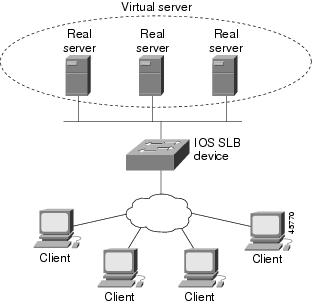
The Cisco Systems SLB feature is an IOS-based solution that provides IP server load balancing. Using the Cisco IOS SLB feature, you can define a virtual server that represents a group of real servers in a cluster of network servers known as a server farm. In this environment, the clients connect to the IP address of the virtual server. When a client initiates a connection to the virtual server, the Cisco IOS SLB function chooses a real server for the connection based on a configured load-balancing algorithm.
Cisco IOS SLB also provides firewall load balancing, which balances flows across a group of firewalls called a firewall farm.
Figure 17 illustrates a logical view of a simple IOS SLB network.
Figure 17 Logical View of IOS SLB
Load Balancing Support on the GGSN
GPRS SLB supports a subset of the overall server load balancing functions that are available in the Cisco IOS SLB feature. Therefore, the full scope of IOS SLB functions are not applicable to the GPRS environment. This section describes the aspects of the Cisco IOS SLB feature that support load balancing for GGSNs. For more information about unsupported functions, see the "Restrictions" section.
GPRS load balancing operates in the dispatched mode. In this configuration, the IOS SLB device is Layer 2-adjacent to the real servers (GGSNs). A pool of GGSNs is configured as a server farm in IOS SLB. These are the GGSNs across which you want to load balance GTP sessions. A virtual server instance is configured in IOS SLB to load balance GTP sessions across the GGSN farm. This virtual server is associated with the server farm that you configured in IOS SLB. The clients, which are SGSNs, are only aware of this virtual server. Tunnel creation messages that are destined to this virtual server are picked up by IOS SLB and are dispatched to a GGSN at the Media Access Control (MAC) Layer. Since Layer 3 destination addresses are not modified by IOS SLB, you must configure the virtual server IP address as a loopback address on each of the real servers.
GPRS SLB uses a round-robin load-balancing algorithm. It is possible to configure IOS SLB for either static or dynamic load balancing. Static load balancing is achieved by assigning weights statically to each GGSN in the server farm. Dynamic load balancing is achieved by configuring Dynamic Feedback Protocol (DFP), with the DFP manager on the IOS SLB device, and the DFP client on each of the GGSNs.
When you implement GPRS SLB in your GPRS network, PDP context requests that are destined to the virtual GGSN IP address are redirected via Layer 2 to one of the real GGSNs using the weighted round robin load-balancing algorithm. The real GGSNs must be Layer 2-adjacent to the IOS SLB device. The SGSNs need not be Layer 2-adjacent to the IOS SLB device, unless you implement IOS SLB redundancy enhancements.
Weighted Round Robin
The weighted round robin algorithm specifies that the real server used for a new connection to the virtual server is chosen from the server farm in a circular fashion. Each real server is assigned a weight, n, that represents its capacity to handle connections, as compared to the other real servers associated with the virtual server. That is, new connections are assigned to a given real server n times before the next real server in the server farm is chosen.
For example, assume a server farm comprised of real server ServerA with n = 3, ServerB with n = 1, and ServerC with n = 2. The first three connections to the virtual server are assigned to ServerA, the fourth connection to ServerB, and the fifth and sixth connections to ServerC.
Note Assigning a weight of n=1 to all of the servers in the server farm configures the IOS SLB device to use a simple round robin algorithm.
GPRS load balancing requires the weighted round robin algorithm. A server farm that uses weighted least connections can be bound to a virtual server providing GPRS load balancing, but you cannot place the virtual server INSERVICE. If you try to do so, IOS SLB issues an error message.
Dynamic Feedback Protocol for IOS SLB
In GPRS load balancing, IOS SLB knows when a PDP context is established, but it does not know when PDP contexts are cleared, and therefore it cannot know the number of open PDP contexts for each GGSN. Use the IOS SLB Dynamic Feedback Protocol (DFP) to calculate GPRS load-balancing weights dynamically.
With IOS SLB DFP support, a DFP manager in a load-balancing environment can initiate a TCP connection with a DFP agent. Thereafter, the DFP agent collects status information from one or more real host servers, converts the information to relative weights, and reports the weights to the DFP manager. The DFP manager factors in the weights when load balancing the real servers. In addition to reporting at user-defined intervals, the DFP agent sends an early report if there is a sudden change in a real server's status.
The weights calculated by DFP override the static weights you define using the weight (server farm) command. If DFP is removed from the network, IOS SLB reverts to the static weights.
You can define IOS SLB as a DFP manager, as a DFP agent for another DFP manager (such as DistributedDirector), or as both at the same time. In such a configuration, IOS SLB sends periodic reports to DistributedDirector, which uses the information to choose the best server farm for each new connection request. IOS SLB then uses the same information to choose the best real server within the chosen server farm.
DFP also supports the use of multiple DFP agents from different client subsystems (such as IOS SLB and GPRS) at the same time.
In GPRS load balancing, you can define IOS SLB as a DFP manager and define a DFP agent on each GGSN in the server farm, and the DFP agent can report the weights of the GGSNs. The DFP agents calculate the weight of each GGSN based on CPU utilization, processor memory, and the maximum number of PDP contexts (mobile sessions) that can be activated for each GGSN.
The weight for each GGSN is primarily based on the ratio of existing PDP contexts on the GGSN and the maximum number of allowed PDP contexts. CPU and memory utilization become part of the weight calculation only after the utilization exceeds 85%. Because the maximum number of allowed PDP contexts is considered to be the GGSNs maximum load, you should carefully consider the value that you configure in the gprs maximum-pdp-context-allowed command, which defaults to 10000 PDP contexts.
Restrictions
The following restrictions apply when you are using IOS SLB on the GGSN:
•Operates in dispatched mode only.
•Cannot load balance network-initiated PDP context requests.
•Does not support the following Cisco IOS SLB functions:
–Bind IDs
–Client-assigned load balancing
–Network Address Translation (NAT)
–Port-bound servers
–Slow Start
–Stateful backup
–Sticky connections
–SynGuard
–TCP session reassignment
–Transparent webcache load balancing
–Weighted least connections load-balancing algorithm. GPRS load balancing requires the weighted round robin algorithm. A server farm that uses weighted least connections can be bound to a virtual server providing GPRS load balancing, but you cannot place the virtual server INSERVICE. If you try to do so, IOS SLB issues an error message.
Configuring GPRS Load Balancing
This section includes the following topics:
•GPRS Load Balancing Configuration Task List
•Verifying the IOS SLB Configuration
Configuration Guidelines
When configuring the network shared by IOS SLB and the GGSNs, consider the following guidelines to ensure proper configuration:
•Specify static routes (using ip route commands) and real server IP addresses (using real commands) such that the Layer 2 information is correct and unambiguous.
•Do not configure default routes or gateways on any of the GGSNs.
•Do not configure a route to IOS SLB's virtual server on the GGSNs. Doing so can prevent messages from reaching GTP.
•Choose subnets carefully, using one of the following methods:
–Do not overlap virtual template address subnets.
–Specify next hop addresses to real servers, not to interfaces on those servers.
•If you have enabled Cisco Express Forwarding (CEF) on a GGSN, you must identify the IP address of the GGSN virtual server to CEF. If you have not enabled CEF on the GGSN, do not perform this task. See the "Identifying the GGSN Virtual Server to CEF" section for more details.
GPRS Load Balancing Configuration Task List
This section lists the tasks used to configure GPRS load balancing. Detailed configuration information is contained in the referenced sections of this or other documents. Required and optional tasks are indicated.
•Configuring a Server Farm and Real Server (Required)
•Configuring a Virtual Server (Required)
•Configuring the virtual IP address as a loopback on each of the GGSNs in the server (Required)
See the "Configuring a Loopback Interface" section in the Cisco IOS Interface Configuration Guide for more information.
•Configuring DFP (Optional)
–Configuring the Maximum DFP Weight for a GGSN (Optional)
–Configuring the Maximum Number of PDP Contexts for a GGSN (Optional)
•Identifying the GGSN Virtual Server to CEF (Required if using CEF)
•Routing each GGSN to each associated SGSN (Required)
For more information, see the "Configuring a Route to the SGSN" section of the "Configuring Network Access to the GGSN" chapter.
•Routing each SGSN to the virtual templates on each associated GGSN, and to the GPRS load-balancing virtual server (Required)
See the configuration guide for your SGSN for more details.
Configuring a Server Farm and Real Server
When you configure the server farm and real server for GPRS load balancing, use the following guidelines to ensure proper configuration:
•Accept the default setting (the weighted round robin algorithm) for the predictor command.
•Specify the IP addresses (virtual template addresses) of the real servers performing the GGSN function, using the real command.
•Specify a reassign threshold less than the value specified on the gprs gtp n3-requests command, using the reassign command.
To configure an IOS SLB server farm, use the following commands beginning in global configuration mode:
Configuring a Virtual Server
When you configure the virtual server for GPRS load balancing, use the following guidelines to ensure proper configuration:
•Specify a virtual GGSN IP address as the virtual server, and use the udp and service gtp keyword options, using the virtual command. Port number 3386 is recommended, if the GGSNs and SGSNs are in compliance with the ETSI standard.
•Specify an idle timer greater than the longest possible interval between PDP context requests on the SGSN, using the idle command.
To configure an IOS SLB virtual server, use the following commands beginning in global configuration mode:
Configuring DFP
You can define IOS SLB as a DFP manager, as a DFP agent for another DFP manager (such as DistributedDirector), or as both at the same time. Depending on your network configuration, you might enter the commands for configuring IOS SLB as a DFP manager and the commands for configuring IOS SLB as a DFP agent on the same device or on different devices.
To configure IOS SLB as a DFP manager, and to identify a DFP agent with which IOS SLB can initiate connections, use the following commands beginning in global configuration mode:
To configure IOS SLB as a DFP agent, see the DFP Agent Subsystem feature module.
Configuring the Maximum DFP Weight for a GGSN
If you use DFP with GPRS load balancing, each GGSN that acts as a DFP agent has a maximum weight that it can send to a DFP manager. For each GGSN, you can accept the default maximum weight, or you can specify a different maximum weight.
To specify the maximum weight for a GGSN, use the following command in global configuration mode:
|
|
|
|---|---|
Router(config)# gprs dfp max-weight [max-weight-value]
|
Specifies the maximum weight of a GGSN that is acting as a DFP agent. |
Configuring the Maximum Number of PDP Contexts for a GGSN
If you use DFP with GPRS load balancing, you must specify a maximum number of PDP contexts for each GGSN, using the gprs maximum-pdp-context-allowed command. Do not accept the default value of 10000 PDP contexts. A value of 45000 is recommended. Significantly lower values, including the default value of 10000, can impact performance in a GPRS load-balancing environment.
To configure a maximum number of PDP contexts for a GGSN, use the following command in global configuration mode:
|
|
|
|---|---|
Router(config)# gprs maximum-pdp-context-allowed
[pdp-contexts]
|
Specifies the maximum number of PDP contexts (mobile sessions) that can be activated on the GGSN. |
For more information about the number of PDP contexts supported on a GGSN, see the "Configuring the Maximum Number of PDP Contexts on the GGSN" section of the "Configuring GGSN GTP Services" chapter.
Identifying the GGSN Virtual Server to CEF
If you have enabled CEF on a GGSN, you must identify the IP address of the GGSN virtual server to CEF. (This IP address is also a loopback address on the GGSN.) If you have not enabled CEF on the GGSN, do not perform this task.
To identify the IP address of the GGSN virtual server to CEF, use the following command in global configuration mode:
Verifying the IOS SLB Configuration
This section describes how to verify the IOS SLB configuration. It includes the following topics:
•Verifying IOS SLB Connectivity
Verifying the Virtual Server
The following show ip slb vserver command verifies the configuration of the virtual servers PUBLIC_HTTP and RESTRICTED_HTTP:
Router# show ip slb vserver
slb vserver prot virtual state conns
-------------------------------------------------------------------
PUBLIC_HTTP TCP 10.0.0.1:80 OPERATIONAL 0
RESTRICTED_HTTP TCP 10.0.0.2:80 OPERATIONAL 0
Router#
Verifying the Server Farm
The following show ip slb reals command displays the status of server farms PUBLIC and RESTRICTED, the associated real servers, and their status:
Router# show ip slb real
real farm name weight state conns
---------------------------------------------------------------------
10.1.1.1 PUBLIC 8 OPERATIONAL 0
10.1.1.2 PUBLIC 8 OPERATIONAL 0
10.1.1.3 PUBLIC 8 OPERATIONAL 0
10.1.1.20 RESTRICTED 8 OPERATIONAL 0
10.1.1.21 RESTRICTED 8 OPERATIONAL 0
Router#
The following show ip slb serverfarm command displays the configuration and status of server farms PUBLIC and RESTRICTED:
Router# show ip slb serverfarm
server farm predictor nat reals bind id
---------------------------------------------------
PUBLIC ROUNDROBIN none 3 0
RESTRICTED ROUNDROBIN none 2 0
Router#
Verifying the Clients
The following show ip slb conns command verifies the restricted client access and status:
Router# show ip slb conns
vserver prot client real state nat
-------------------------------------------------------------------------------
RESTRICTED_HTTP TCP 10.4.4.0:80 10.1.1.20 CLOSING none
Router#
The following show ip slb conns command displays detailed information about the restricted client access status:
Router# show ip slb conns client 10.4.4.0 detail
VSTEST_UDP, client = 10.4.4.0:80
state = CLOSING, real = 10.1.1.20, nat = none
v_ip = 10.0.0.2:80, TCP, service = NONE
client_syns = 0, sticky = FALSE, flows attached = 0
Router#
Verifying IOS SLB Connectivity
To verify that the IOS SLB feature has been installed and is operating correctly, ping the real servers from the IOS SLB switch, then ping the virtual servers from the clients.
The following show ip slb stats command displays detailed information about the IOS SLB network
status:
Router# show ip slb stats
Pkts via normal switching: 0
Pkts via special switching: 6
Connections Created: 1
Connections Established: 1
Connections Destroyed: 0
Connections Reassigned: 0
Zombie Count: 0
Connections Reused: 0
See the "Monitoring and Maintaining the IOS SLB Feature" section for additional commands used to verify IOS SLB networks and connections.
Monitoring and Maintaining the IOS SLB Feature
To obtain and display runtime information about IOS SLB for the GGSN, use the following commands in privileged EXEC mode:
GPRS Load Balancing Configuration Example
Figure 18 shows a typical GPRS load-balancing configuration. In this configuration:
•IOS SLB can balance GPRS flows across multiple real GGSNs. The SGSN "sees" the real GGSNs as a single virtual GGSN. This configuration increases the flow-handling capability of the real GGSNs and increases the reliability and availability.
•The virtual template address of the SGSN is 10.111.111.111.
•The virtual template address of GGSN1 is 192.168.1.1.
•The virtual template address of GGSN2 is 192.168.2.2.
•The virtual template address of GGSN3 is 192.168.3.3.
Note You can use the Hot Standby Router Protocol (HSRP) to provide redundancy for the IOS SLB device.
Figure 18 IOS SLB with GPRS Load Balancing

Following are the configuration statements for the configuration shown in Figure 18:
•IOS SLB Configuration Statements
•GGSN1 Configuration Statements
•GGSN2 Configuration Statements
•GGSN3 Configuration Statements
IOS SLB Configuration Statements
hostname GTP_SLB
!
ip cef
!
ip domain-name gprs.com
!
ip slb serverfarm GPRS
real 192.168.1.1
weight 1
faildetect numconns 1 numclients 1
inservice
!
real 192.168.2.2
weight 1
faildetect numconns 1 numclients 1
inservice
!
real 192.168.3.3
weight 1
faildetect numconns 1 numclients 1
inservice
!
ip slb vserver FOR_GPRS
virtual 10.10.10.10 udp 3386 service gtp
serverfarm GPRS
inservice
!
ip slb dfp password Cookies 0
agent 10.1.1.201 1111 30 0 10
agent 10.1.1.202 1111 30 0 10
agent 10.1.1.203 1111 30 0 10
!
interface FastEthernet1/0
description TO SERVERFARM GPRS
ip address 10.1.1.100 255.255.255.0
no ip redirects
duplex half
!
interface FastEthernet3/0
description TO SGSN
ip address 10.2.1.100 255.255.255.0
no ip mroute-cache
duplex half
!
ip route 10.111.111.111 255.255.255.255 FastEthernet1/0
ip route 192.168.1.1 255.255.255.255 10.1.1.201
ip route 192.168.2.2 255.255.255.255 10.1.1.202
ip route 192.168.3.3 255.255.255.255 10.1.1.203
GGSN1 Configuration Statements
service gprs ggsn
!
hostname GGSN1
!
ip dfp agent gprs
port 1111
password Cookies 0
inservice
!
ip domain-name gprs.com
!
ip cef
!
interface loopback 1
description LOOPBACK SAME AS IOS SLB VSERVER ADDRESS
ip address 10.10.10.10 255.255.255.255
no ip route-cache
no ip mroute-cache
!
interface FastEthernet1/0
description TO SLB
ip address 10.1.1.201 255.255.255.0
ip directed-broadcast
no ip mroute-cache
duplex half
!
interface Virtual-Template1
description GTP VIRTUAL TEMPLATE
ip address 192.168.1.1 255.255.255.0
encapsulation gtp
gprs access-point-list gprs1
!
ip route 10.111.111.111 255.255.255.255 FastEthernet1/0
!
gprs access-point-list gprs1
access-point 1
access-point-name gprs.company.com
access-mode non-transparent
ip-address-pool dhcp-proxy-client
dhcp-server 10.100.0.5 10.100.0.6
dhcp-gateway-address 10.27.3.1
exit
!
gprs maximum-pdp-context-allowed 45000
gprs qos map canonical-qos
gprs gtp path-echo-interval 0
gprs dfp max-weight 32
gprs slb cef 10.10.10.10
GGSN2 Configuration Statements
service gprs ggsn
!
hostname GGSN2
!
ip dfp agent gprs
port 1111
password Cookies 0
inservice
!
ip domain-name gprs.com
!
ip cef
!
interface loopback 1
description LOOPBACK SAME AS IOS SLB VSERVER ADDRESS
ip address 10.10.10.10 255.255.255.255
no ip route-cache
no ip mroute-cache
!
interface FastEthernet1/0
description TO SLB
ip address 10.1.1.202 255.255.255.0
ip directed-broadcast
no ip mroute-cache
duplex half
!
interface Virtual-Template1
description GTP VIRTUAL TEMPLATE
ip address 192.168.2.2 255.255.255.0
encapsulation gtp
gprs access-point-list gprs1
!
ip route 10.111.111.111 255.255.255.255 FastEthernet1/0
!
gprs access-point-list gprs1
access-point 1
access-point-name gprs.company.com
access-mode non-transparent
ip-address-pool dhcp-proxy-client
dhcp-server 10.100.0.5 10.100.0.6
dhcp-gateway-address 10.27.3.1
exit
!
gprs maximum-pdp-context-allowed 45000
gprs qos map canonical-qos
gprs gtp path-echo-interval 0
gprs dfp max-weight 32
gprs slb cef 10.10.10.10
GGSN3 Configuration Statements
service gprs ggsn
!
hostname GGSN3
!
ip dfp agent gprs
port 1111
password Cookies 0
inservice
!
ip domain-name gprs.com
!
ip cef
!
interface loopback 1
description LOOPBACK SAME AS IOS SLB VSERVER ADDRESS
ip address 10.10.10.10 255.255.255.255
no ip route-cache
no ip mroute-cache
!
interface FastEthernet1/0
description TO SLB
ip address 10.1.1.203 255.255.255.0
ip directed-broadcast
no ip mroute-cache
duplex half
!
interface Virtual-Template1
description GTP VIRTUAL TEMPLATE
ip address 192.168.3.3 255.255.255.0
encapsulation gtp
gprs access-point-list gprs1
!
ip route 10.111.111.111 255.255.255.255 FastEthernet1/0
!
gprs access-point-list gprs1
access-point 1
access-point-name gprs.company.com
access-mode non-transparent
ip-address-pool dhcp-proxy-client
dhcp-server 10.100.0.5 10.100.0.6
dhcp-gateway-address 10.27.3.1
exit
!
gprs maximum-pdp-context-allowed 45000
gprs qos map canonical-qos
gprs gtp path-echo-interval 0
gprs dfp max-weight 32
gprs slb cef 10.10.10.10
 Feedback