Service Selection Gateway (SSG)
Available Languages
Table Of Contents
RADIUS Authentication and Accounting
Session-Timeout and Idle-Timeout RADIUS Attributes
Concurrent or Sequential Service Access Mode
Enhanced High System Availability
Web Selection of L2TP Service Type
Supported Standards, MIBs, and RFCs
Configuring Local Service Profiles
Verifying Local Service Profiles
Enabling SSG User-Profile Caching
Verifying SSG User-Profile Caching
Configuring RADIUS Interim Accounting
Configuring Cisco Express Forwarding
Verifying Cisco Express Forwarding
Configuring Cisco IOS Network Address Translation
Verifying Cisco IOS Network Address Translation
Configuring VPI/VCI Indexing to Service Profile
Verifying VPI/VCI Indexing to Service Profile
Monitoring VPI/VCI Indexing to Service Profile
Configuring SSG to Support L2TP Service Type
Configuring RADIUS Profiles for SSG Support of L2TP
Configuring a PTA-MD Exclusion List
SSG Vendor-Specific Attributes
Downstream Access Control List
Downstream Access Control List
Transparent Pass-Through Filter Pseudo-Service Profile
Next-Hop Gateway Pseudo-Service Profile
Attributes Used in Accounting Records
Monitoring and Maintaining SSG
Transparent Pass-Through Filter Example
RADIUS Interim Accounting Example
Service-Name-to-Tunnel Mapping Example
RADIUS Service Profile Example
Service-Name-to-VC Mapping Example
download exclude-profile (PTA-MD)
show ssg multidomain ppp exclude-list
New and Changed SSG Functionality in Cisco IOS Release 12.2(4)B and Later Releases
Service Selection Gateway
Feature History
This document describes the Service Selection Gateway (SSG) feature in Cisco IOS Releases 12.2(15)B and 12.3(4)T. If you are running an earlier release of Cisco IOS software, refer to the "Service Selection Gateway" new-feature document for that release.
This document contains the following sections:
•
Supported Standards, MIBs, and RFCs
•
•

Note
Feature Overview
Service Selection Gateway (SSG) is a switching solution for service providers who offer intranet, extranet, and Internet connections to subscribers using broadband access technology such as digital subscriber lines (DSL), cable modems, or wireless to allow simultaneous access to network services.
SSG works in conjunction with the Cisco Service Selection Dashboard (SSD) or its successor product, the Cisco Subscriber Edge Services Manager (SESM). Together with the SESM or SSD, SSG provides subscriber authentication, service selection, and service connection capabilities to subscribers of Internet services. Subscribers interact with an SESM or SSD web application using a standard Internet browser.
The SESM operates in two modes:
•
•
This document provides information on general SSG configuration that applies to the SESM in both LDAP mode and RADIUS mode. It also provides RADIUS-specific configuration information that applies only to the SESM in RADIUS mode or the SSD.
If your deployment uses the SESM in LDAP mode, refer to these documents for additional information about LDAP-mode topics:
•
•
Note
In the remainder of this document, all references to the SESM also apply to the SSD unless a clear distinction is made.
Figure 1 is a diagram of a sample network topology including SSG. This is an end-to-end, service-oriented DSL deployment consisting of digital subscriber line access multiplexers (DSLAMs), asymmetric digital subscriber line (ADSL) modems, and other internetworking components and servers. SSG resides in a router that is serving as a broadband aggregator. The broadband aggregator acts as a central control point for Layer 2 and Layer 3 services, including services available through ATM virtual circuits (VCs), virtual private dial-up networks (VPDNs), and normal routing methods.
Figure 1 SSG Connection Between ADSL Equipment and Network Services

SSG communicates with the authentication, authorization, and accounting (AAA) management network where RADIUS, Dynamic Host Configuration Protocol (DHCP), and Simple Network Management Protocol (SNMP) servers reside and with the Internet service provider (ISP) network, which may connect to the Internet, corporate networks, and value-added services.
A licensed version of SSG works with SESM to present to subscribers a menu of network services that can be selected from a single graphical user interface (GUI). This functionality improves flexibility and convenience for subscribers and enables service providers to bill subscribers for connect time and services used, rather than charging a flat rate.
When SSG is used with the SESM, the user opens an HTML browser and accesses the URL of the SESM web server application. The SESM forwards the user login information to SSG, which forwards the information either to the AAA server, for the SSD or SESM in RADIUS mode, or to the RADIUS-DESS Proxy (RDP) component of the SESM, for the SESM in LDAP mode.
•
•
Based on the contents of the Access-Accept response, the SESM presents a menu of services that the user is authorized to use, and the user selects one or more of the services. SSG then creates an appropriate connection for the user and optionally starts RADIUS accounting for the connection.
Note that when a non-PPP user, such as in a bridged-networking environment, disconnects from a service without logging out, the connection remains open and the user can reaccess the service without going through the login procedure. This is because no direct connection (PPP) exists between the subscribers and SSG. To prevent non-PPP users from being logged in to services indefinitely, be sure to configure the Session-Timeout and/or Idle-Timeout RADIUS attributes.
SSG supports the features and functionality described in the following sections:
•
•
•
•
•
•
Web-Based Interface
SSG works with the Cisco SESM. The SESM is a specialized web server that allows users to log in to and disconnect from multiple pass-through and proxy services through a standard web browser.
After the user opens a web browser, SSG allows access to a single IP address or subnet, referred to as the default network. This is typically the IP address of the SESM. The SESM prompts the user for a username and password. After the user is authenticated, the SESM presents a list of available services.
The SESM provides all the functionality of its predecessor product, the SSD. The SESM also introduces the following functionality:
•
–
–
–
•
–
–
RADIUS Authentication and Accounting
SSG is designed to work with RADIUS-based AAA servers that accept vendor-specific attributes (VSAs).
LDAP Directory
SSG using the SESM in LDAP mode can use an LDAP directory as the data repository for service, subscriber, and policy information.
Multiple Traffic-Type Support
SSG supports the following types of service:
•
SSG can forward traffic through any interface by means of normal routing or a next-hop table. Because Network Address Translation (NAT) is not performed for this type of traffic, overhead is reduced. Pass-through service is ideal for standard Internet access.
If the IP address pool name VSA is configured in the local service profile, SSG will choose one IP address from the pool as the service IP address and perform NAT between the user's actual IP address and the IP address of the service.
•
Proxy services involve service authentication. This means that when a subscriber requests access to a proxy service, SESM prompts the user for the service username and password. SSG then performs the service authentication by sending an Access Request to the remote AAA server configured in the service priofile. Upon receiving an Access-Accept packet from the remote RADIUS server, SSG logs the subscriber in. SSG must be configured as a RADIUS client to the remote AAA server.
If the RADIUS server assigns an IP address to the subscriber during remote authentication, SSG performs NAT between the assigned IP address (service IP address) and the real IP address of the subscriber. If the remote RADIUS server does not assign an IP address, NAT is not performed. The service IP address can be chosen according to one of the following methods (ordered according to priority):
1. The remote AAA server sends the Framed-IP-address attribute (RADIUS attribute #8) in the Access-Accept packet.
2. The remote AAA server provides the IP address pool name VSA in the Access-Accept packet. In this case, SSG chooses one IP address from the pool locally configured as the service IP address.
3. The IP address pool name VSA may be configured in the service profile. In this case, SSG chooses one IP address from the service pool as the service IP address.
•
When enabled, transparent pass-through allows unauthenticated subscriber traffic to be routed through SSG in either direction. Filters can be specified to control transparent pass-through traffic. These are some of the applications for this feature:
–
–
–
•
PPP Termination Aggregation (PTA) can be used only by PPP-type users. AAA is performed exactly as in the proxy service type. A subscriber logs in to a service by using a PPP dialer application with a username of the form `user@service'. SSG recognizes `@service' as a service profile and loads the service profile from the local configuration or a AAA server. SSG forwards the AAA request to the remote RADIUS server as specified by the RADIUS-Server attribute of the service profile. An address is assigned to the subscriber through RADIUS attribute 8 or Cisco AV pair "ip:addr-pool". NAT is not performed, and all user traffic is aggregated to the remote network. With PTA, users can access only one service. Users do not have access to the default network or the SESM.
Beginning in Cisco IOS Release 12.2(15)B, the option of passing the entire structured username in the form `user@service' to PPP for authenticating an SSG request became available. The entire structured username can be passed to PPP through the use of a PTA-MD exclusion list; if an entire structured username should be passed to PPP, the domain (the `@service' portion of the structured username) should be added to a PTA-MD exclusion list. The PTA-MD exclusion list can be configured on the AAA server directly or via the router command-line interface (CLI). Structured usernames are parsed for authentication unless a PTA-MD exclusion list is configured for the particular domain that is requesting a service.
Whereas PTA terminates the PPP session into a single routing domain, PTA-MD terminates the PPP sessions into multiple IP routing domains, thus supporting a wholesale virtual private network (VPN) model in which each domain is isolated from the others by an ATM core and has the capability to support overlapping IP addresses.
Packet Filtering
SSG uses Cisco IOS access control lists (ACLs) to prevent users, services, and pass-through traffic from accessing specific IP addresses and ports.
•
When an ACL attribute is added to a service profile, all users of that service are prevented from accessing the specified IP address, subnet mask, and port combinations through the service.
•
When an ACL attribute is added to a user profile, it applies globally to all traffic for the user.
•
Upstream and downstream attributes, including the Upstream Access Control List and Downstream Access Control List attributes, can be added to a special pseudo-service profile that can be downloaded to SSG from a RADIUS server. Additionally, locally configured ACLs can be used. After the ACLs have been defined, they are applied to all traffic passed by the transparent pass-through feature.
Service Access Order
When users are accessing multiple services, SSG must determine the services for which the packets are destined. To do this, SSG uses an algorithm to create a service access order list that is stored in the user's host object. This list contains services that are currently open and the order in which they are to be searched. The algorithm that creates this list orders the open services based on the closest matching network address.
Next-Hop Gateway
The Next-Hop Gateway attribute is used to specify the next hop key for a service. Each SSG uses its own next-hop gateway table, which associates this key with an actual IP address.
Note that this attribute overrides the IP routing table for packets destined to a service.
DNS Redirection
When SSG receives a Domain Name Server (DNS) request, it performs domain name matching by using the Domain Name attribute from the service profiles of the currently logged-in services.
If a match is found, the request is redirected to the DNS server for the matched service.
If a match is not found and the user is logged in to a service that has Internet connectivity, the request is redirected to the first service in the user's service access order list that has Internet connectivity. Internet connectivity is defined as a service containing a Service Route attribute of 0.0.0.0/0.
If a match is not found and the user is not logged in to a service that has Internet connectivity, the request is forwarded to the DNS server defined in the client's TCP/IP stack.
Fault Tolerance for DNS
SSG can be configured to work with a single DNS server or with two servers in a fault-tolerant configuration. By means of an internal algorithm, DNS requests are switched to the secondary server if the primary server fails to respond with a DNS reply within a certain time limit.
Session-Timeout and Idle-Timeout RADIUS Attributes
In a dial-up networking or bridged (non-PPP) network environment, a user can disconnect from the NAS and release the IP address without logging out from SSG. If this happens, SSG continues to allow traffic to pass from that IP address, and this can be a problem if the IP address is obtained by another user.
SSG provides two mechanisms to prevent this problem from occurring:
•
•
The Session-Timeout and Idle-Timeout attributes can be used in either a user or service profile. In a user profile, the attribute applies to the user's session. In a service profile, the attribute applies individually to each service connection.
Concurrent or Sequential Service Access Mode
SSG services can be configured for concurrent or sequential access. Concurrent access allows users to log in to this service while simultaneously connected to other services. Sequential access requires that the user log out of all other services before accessing a service configured for sequential access.
Concurrent access is recommended for most services. Sequential access is ideal for services for which security is important, such as corporate intranet access, or for which there is a possibility of overlapping address space.
Enhanced High System Availability
SSG supports enhanced high system availability (EHSA) redundancy. You can configure this chassis redundancy at the slot level of the router for adjacent slot or subslot pairs. For example, if you have SSGs installed in slots 1 and 2, you can set a preferred device between the two. To ensure that configuration is consistent between redundant SSGs, you can configure automatic synchronization between the two SSGs. You can also manually force the primary and secondary devices in a redundant pair to switch roles.
Web Selection of L2TP Service Type
SSG supports Layer 2 Tunnel Protocol (L2TP). When a subscriber selects a service through SESM, the router serves as an L2TP access concentrator (LAC) and sends the PPP session through the service-specific L2TP tunnel. If the tunnel does not already exist, the LAC creates the proper tunnel to the L2TP network server (LNS).
Local Forwarding
SSG can be enabled to forward packets locally between directly connected subscribers.
SSG Single Host Logon
To log in to a service through the SESM, a subscriber has to log in only twice: once for the PPP session and once for the service.
IPCP Subnet
IP Control Protocol (IPCP) subnet support allows SSG to populate a host's DHCP server with a pool of IP addresses. The PPP session from the host is terminated at the SSG. During IPCP negotiations, SSG uses the IPCP subnet mask negotiation option to send a range of IP addresses to the customer premises equipment (CPE) device at the host network. The CPE assigns IP addresses to the users in the SSG's domain, thus avoiding the need for NAT at the CPE device.
To enable IPCP subnet mask, the Framed-IP-Netmask attribute (standard RADIUS attribute 9) and Framed-IP-Address attribute (standard RADIUS attribute 8) must be included in the user profile. The Framed-IP-Netmask value is passed during IPCP negotiation as an option.
Benefits
Two important aspects of providing internetworking services to a user are the access technology and the service itself. In a traditional service-provider environment, the service and access technologies are tightly joined, imposing difficulties in rolling out new services dynamically and restricting the service provider to flat billing based on the access technology.
SSG separates the service and access technologies, enabling subscribers to choose dynamically from a selection of services and service providers to implement service- and usage-based billing strategies.
SSG with SESM provides the following benefits:
Web-based Service Selection
SSG with SESM allows a service provider to create a branded web portal that presents subscribers with a menu of services. Subscribers can log in to and disconnect from different services using a web browser. This web-based service selection method takes advantage of the ubiquity of web browsers and eliminates problems related to client software (such as license fees, distribution logistics, and an increased customer support burden).
Billing Flexibility for Service Providers
Cisco SSG allows subscribers to select services dynamically. SSG then switches the subscriber traffic to the selected services. SSG monitors user connections, service login and logout, and user activity per service. By providing per-connection accounting, SSG enables service providers to bill subscribers for connection time and services used rather than charging a flat rate.
Ease in Providing Open Access
Open access is an important trend in the access-provider industry. Regulators in an increasing number of countries are demanding that access providers provide equal-access service to Internet service providers (ISPs) other than their own. SSG can enable access providers to deploy services to multiple ISPs and allow the consumer to choose dynamically the ISP they would like to use.
Flexibility and Convenience for Subscribers
SSG provides users with access to multiple simultaneous services, such as the Internet, gaming servers, connectivity to corporate networks, and the luxury of differential service selection. Users can dynamically connect to and disconnect from any of the services available to them.
Restrictions
Multicast
SSG does not process multicast packets. Multicast packets are handled by Cisco IOS software.
VPI/VCI Indexing to Service Profile
Virtual path identifier (VPI)/virtual channel identifier (VCI) indexing to service profile works only for PPP over ATM (PPPoA) and PPP over Ethernet (PPPoE) over ATM.
Related Documents
For information about other supported SSG features, see the following documents:
•
•
•
•
•
•
•
•
•
For information on configuring SSD and SESM, see the following documents:
•
•
•
For more information about configuring RADIUS, refer to the following documents:
•
•
For more information about configuring L2TP, refer to the following documents:
•
•
Supported Platforms
The following platforms are supported in Cisco IOS Release 12.2(4)B:
•
•
•
The following platforms are supported in Cisco IOS Release 12.2(8)T:
•
Support for the Service Selection Gateway feature in Cisco IOS Release 12.2(8)T depends on the availability of the c7200-g4js-mz image.
Determining Platform Support Through Feature Navigator
Cisco IOS software is packaged in feature sets that support specific platforms. To get updated information regarding platform support for this feature, access Feature Navigator. Feature Navigator dynamically updates the list of supported platforms as new platform support is added for the feature.
Feature Navigator is a web-based tool that enables you to quickly determine which Cisco IOS software images support a specific set of features and which features are supported in a specific Cisco IOS image.
Feature Navigator is updated regularly when major Cisco IOS software releases and technology releases occur. For the most current information, go to the Feature Navigator home page at the following URL:
Availability of Cisco IOS Software Images
Platform support for particular Cisco IOS software releases is dependent on the availability of the software images for those platforms. Software images for some platforms may be deferred, delayed, or changed without prior notice. For updated information about platform support and availability of software images for each Cisco IOS software release, refer to the online release notes or Cisco Feature Navigator.
Supported Standards, MIBs, and RFCs
Standards
No new or modified standards are supported by this feature.
MIBs
No new or modified MIBs are supported by this feature.
To obtain lists of supported MIBs by platform and Cisco IOS release, and to download MIB modules, go to the Cisco MIB website on Cisco.com at the following URL:
http://www.cisco.com/public/sw-center/netmgmt/cmtk/mibs.shtml
RFCs
No new or modified RFCs are supported by this feature.
Prerequisites
Interfaces
SSG is supported on enhanced ATM, Ethernet, and Fast Ethernet interfaces.
CEF Switching
IP CEF must be enabled before SSG will work.
Cisco Subscriber Edge Services Manager
If you want to perform Layer 3 service selection, you must install and configure the Cisco SESM as described in the Cisco Subscriber Edge Services Manager and Subscriber Policy Engine Installation and Configuration Guide.
Single Host Logon
In order to use the Single Host Logon feature, you must install and configure Cisco SESM or Cisco SSD version 2.5 or a later version.
Layer 2 Tunnel Protocol
To achieve 2000 L2TP sessions, you need at least 128 MB of DRAM.
Configuring SSG Features
The tasks in the following sections describe how to enable SSG and configure SSG features. Each task in the list is identified as either required or optional.
The following tasks apply to SSG when used with SSD or with SESM in RADIUS or LDAP mode:
•
•
•
•
•
•
•
•
•
•
•
•
•
•
Enabling SSG
SSG is disabled by default. To enable SSG, enter the following command in global configuration mode:
Verifying That SSG Is Enabled
To verify that SSG is enabled, enter the show running-config command.
Configuring Local Service Profiles
You can configure local service profiles in addition to the service profiles on the remote RADIUS server. See the section "Configuring RADIUS Profiles" for information on configuring service profiles on the remote RADIUS server.
Note
To configure a local service profile, use the following commands beginning in global configuration mode:
Verifying Local Service Profiles
To verify that local service profiles have been configured correctly, enter the show running-config command.
Configuring Security
To configure security for SSG, use the following commands in global configuration mode:
Router(config)# aaa new-model
Enables AAA.
Router(config)# aaa authentication ppp default radius
Specifies RADIUS as the default authentication method for users that log in to serial interfaces by using PPP.
Router(config)# aaa authorization network default radius
Specifies that RADIUS is the default authorization used for all network-related requests.
Router(config)# radius-server host {hostname | ip-address} [auth-port UDP-port-number] [acct-port UDP-port-number]
Specifies the RADIUS server host.
Router(config)# radius-server key AAAPassword
Sets the RADIUS shared secret between the SSG and the local AAA server.
Router(config)# radius-server vsa send
(Optional) Sends vendor-specific attributes with authentication and accounting requests to the AAA server.
Router(config)# ssg radius-helper key key
Sets the RADIUS shared secret key between SSG and SESM.
Router(config)# ssg radius-helper [auth-port UDP-port-number] [acct-port UDP-port-number]
Specifies the UDP1 default port numbers for a RADIUS authentication server (1645) and accounting server (1646).
Router(config)# ssg service-password password
Sets the password used to authenticate the SSG with the local AAA server service profiles. This value must match the value configured for the AAA server service profiles.
1 UDP = User Datagram Protocol
Verifying Security
To verify that security has been configured correctly, enter the show running-config command.
Configuring a Default Network
To configure the first IP address or subnet that users are able to access without authentication, use the following command in global configuration mode:
Verifying the Default Network
To verify that the default network has been configured correctly, enter the show running-config command.
Configuring Interfaces
When an interface is configured as an SSG uplink or downlink interface, non-SSG traffic is not allowed to pass through that interface.
If you are going to use PPP to connect subscribers to SSG, you do not have to configure any downlink interfaces. If you are using non-PPP connections, such as bridging or LAN, you must configure at least one downlink interface.
To configure a downlink interface, use the following command in global configuration mode:
Configure all interfaces that are connected to services as uplink interfaces. To configure an uplink interface, use the following command in global configuration mode:
Verifying Interfaces
To verify that interfaces have been configured correctly, enter the show ssg direction command.
Configuring Services
Note
To configure services, use the following commands in global configuration mode:
Verifying Services
To verify that services have been bound to interfaces correctly, enter the show ssg service command. To verify that the service search order and maximum services have been configured correctly, enter the show running-config command. To verify all mappings between services and IP addresses, enter the show ssg next-hop command.
Enabling SSG User-Profile Caching
SSG user-profile caching allows SSG to cache the user profiles of non-PPP users. User profiles of PPP and RADIUS proxy users are always cached by SSG by default. In situations in which the user profile is not available from other sources, SSG user-profile caching makes the user profile available for RADIUS status queries, providing support for single-sign-on functionality and for failover from one SESM to another.
Note
To enable SSG user-profile caching, use the following command in global configuration mode:
Router(config)# ssg profile-cache
Enables the caching of user profiles for non-PPP users.
Verifying SSG User-Profile Caching
To verify that SSG is configured to support user-profile caching, enter the show running-config command.
Configuring RADIUS Interim Accounting
SSG supports intermittent RADIUS accounting updates. When a user logs in to SSG, SSG sends an accounting start record to the local RADIUS server. When a user logs in to a service, SSG sends a connection start record to the local RADIUS server and to the remote RADIUS proxy server. During the time that the user is logged in to SSG, SSG sends accounting update records at specified intervals to the appropriate server. When a user logs out of a service, SSG sends a connection stop record to the local RADIUS server and to the remote RADIUS proxy server. When a user logs out of SSG, SSG sends an accounting stop record to the local RADIUS server. See the section "Configuration Examples" for more information.
Note
To configure SSG to send accounting updates to the accounting server, use the following commands in interface configuration mode:
Verifying Interim Accounting
To verify that SSG is configured to support RADIUS accounting, enter the show running-config command.
Configuring Cisco Express Forwarding
SSG works with CEF switching technology to provide maximum Layer 3 switching performance. Because CEF is topology-driven rather than traffic-driven, its performance is unaffected by network size or dynamics.
Note
To enable IP CEF, use the following command in global configuration mode:
Verifying Cisco Express Forwarding
To verify that CEF has been enabled, enter the show running-config and show ip cef commands.
Configuring Cisco IOS Network Address Translation
SSG uses Cisco IOS Network Address Translation (NAT) to map the inside IP addresses of subscribers to the outside IP addresses from the destination service networks. This version of NAT replaces the SSG NAT used in Cisco IOS Release 12.0(3)DC.
To configure Cisco IOS NAT, you must specify an inside interface from which clients connect to the SSG and an outside interface from which services are accessed. To specify the desired inside and outside interfaces, use the following commands in interface or subinterface configuration mode:
Note
Verifying Cisco IOS Network Address Translation
To verify that inside and outside ports have been specified correctly, enter the show running-config command. To view your NAT addresses, enter the show ip nat translations command.
Configuring VPI/VCI Indexing to Service Profile
Note
SSG supports virtual path identifier/virtual channel identifier (VPI/VCI) closed user groups by allowing VPI/VCIs to be bound to a given service. All users accessing SSG through the VPI/VCI or a range of VPI/VCIs will be able to access the service. You can specify whether users are allowed to access only the bound service or other additional services to which they subscribe. A closed user group service can be selected only through the VPI/VCI and not by entering the domain name in the username of a PPP session.
Note
To configure VPI/VCI closed user groups, you must map VPI/VCIs to a given service. To map VCs to service names, use the following command in global configuration mode:
Router(config)# ssg vc-service-map service-name [interface number] start-vpi | start-vpi/vci [end-vpi | end-vpi/vci] exclusive | non-exclusive
Map VCs to service names.
Verifying VPI/VCI Indexing to Service Profile
To view service-name-to-VC mappings, enter the show running-config and show ssg vc-service-map commands.
Monitoring VPI/VCI Indexing to Service Profile
Configuring SSG to Support L2TP Service Type
Note
SSG can be configured to support L2TP, so that when a subscriber selects a service through the SESM, the router serves as a LAC and sends the PPP session through the service-specific L2TP tunnel. If the tunnel does not already exist, the LAC creates the proper tunnel to the LNS.
To configure SSG to support L2TP, perform the tasks in the following sections:
•
Configuring SSG As a LAC
To configure SSG as a LAC, use the following command in global configuration mode:
Verifying the LAC Configuration
To verify the LAC configuration, enter the show running-config command.
Configuring RADIUS Profiles for SSG Support of L2TP
The following vendor-specific attributes are used by the SSG to support L2TP:
For general information on configuring RADIUS profiles for SSG, see the section "Configuring RADIUS Profiles."
Cisco-AVpair VPDN Attributes
Table 1 lists the Cisco-AVpair attributes used in the service profile to configure VPDN.
Table 1 Cisco AVPair Attributes
Specifies the IP addresses of the home gateways (LNSes1 ) to receive the L2TP connections.
Specifies the name of the tunnel that must match the tunnel ID specified in the LNS VPDN group.
Specifies the secret (password) used for L2TP tunnel authentication.
1 LNS = L2TP network server.
Account-Info VPDN Attributes
Table 2 lists the Account-Info attributes used in the user profile to subscribe the user to a VPDN service.
Service-Info VPDN Attributes
Table 3 lists the Service-Info attributes used in the service profile to define the L2TP service parameter.
Verifying the RADIUS Profile Configurations
To verify the RADIUS profiles, refer to the user documentation for your RADIUS server.
Configuring the LNS
To configure the L2TP network server (LNS), use the following commands beginning in global configuration mode.
Step 1
Router(config)# username name password secret
(Optional) Specifies the password to be used for PAP1 and CHAP2 . Subscribers can also be defined and authenticated on the AAA server serving the LNS.
Step 2
Router(config)# vpdn-group number
Selects the VPDN group. Each L2TP tunnel requires a unique VPDN group. Enters VPDN group configuration mode.
Step 3
Router(config-vpdn)#
accept-dialinCreates an accept dial-in VPDN group. VPDN Accept-dialin group configuration mode.
Step 4
Router(config-vpdn-acc-in)# protocol l2tp
Configures the VPDN to use L2TP.
Step 5
Router(config-vpdn-acc-in)# virtual-template template-number
Specifies which virtual template will be used to clone virtual access interfaces.
Step 6
Router(config-vpdn-acc-in)# exit
Returns to VPDN group configuration mode.
Step 7
Router(config-vpdn)# terminate-from hostname hostname
Specifies the tunnel ID that will be required when a VPDN tunnel is accepted. This must match the VPDN tunnel ID configured in the RADIUS service profile.
Step 8
Router(config-vpdn)# l2tp tunnel password password
Identifies the password that the router will use for tunnel authentication.
Step 9
Router(config-vpdn)# exit
Returns to global configuration mode.
Step 10
Router(config)# interface Virtual-Template number
Creates a virtual template interface that can clone new virtual access interfaces.
Step 11
Router(config-if)# ip unnumbered interface-type interface-number
Configures the interface as unnumbered and provides a local address. Enters interface configuration mode.
Step 12
Router(config-if)# peer default ip address pool pool-name
Specifies the pool from which to retrieve the IP address to assign to a remote peer dialing in to the interface.
Step 13
Router(config-if)# ppp authentication {chap | chap pap | pap chap | pap}
Specifies the order in which the CHAP or PAP protocols are requested on the interface.
1 PAP = Password Authentication Protocol
2 CHAP = Challenge Handshake Authentication Protocol
Monitoring L2TP
To monitor and maintain the SSG support of L2TP, use the following commands in privileged EXEC mode:
Configuring Local Forwarding
To enable SSG to forward packets locally, use the following command in global configuration mode:
Verifying Local Forwarding
To verify that you have enabled local forwarding, enter the show running-config command.
Configuring a PTA-MD Exclusion List
A PTA-MD exclusion list is used to eliminate parsing of PPP structured usernames during authentication. A PTA-MD exclusion list can be configured directly on the AAA server or through the use of the router CLI.
A PTA-MD exclusion list is configured using the Full Username attribute. For information on the full username attribute, see the "Full Username" section of this document.
To configure a PTA-MD exclusion list locally on the router, use the following commands starting in global configuration mode:
Configuring RADIUS Profiles
Note
If you are using SSG with the SESM in LDAP mode, see the Cisco Distributed Administration Tool Guide for information on creating and maintaining subscriber, service, and policy information in an LDAP directory, including defining a tunnel service profile.
SSG uses vendor-specific RADIUS attributes to define RADIUS profiles. You must customize the RADIUS dictionary of the AAA server to incorporate the SSG vendor-specific attributes described in the section "SSG Vendor-Specific Attributes."
You must set up user and service RADIUS profiles on the AAA server as described in this section. Service profiles can also be defined locally as described in the section "Configuring Local Service Profiles." Optionally, you can set up pseudo-service profiles. The following profiles are described:
These profiles contain RADIUS attributes that define specific AAA elements. The syntax for these attributes is described in this section.
SSG Vendor-Specific Attributes
Table 4 lists vendor-specific attributes used by SSG. By sending an Access-Request packet with the vendor-specific attributes shown in the table, the SESM can send requests to SSG to log in and log out an account and disconnect and connect services. The vendor ID for all of the Cisco-specific attributes is 9.
The following sections describe the format of each subattribute.
Note
Cisco-AVpair Attributes
The Cisco-AVpair attributes are used in user and service profiles to configure ACLs and L2TP.
Table 5 Cisco-AVPair Attributes
Downstream Access Control List (outacl)
Specifies either a Cisco IOS standard access control list or an extended access control list to be applied to downstream traffic going to the user.
Specifies the secret (the password) used for L2TP tunnel authentication.
Upstream Access Control List (inacl)
Specifies either a Cisco IOS standard access control list or an extended access control list to be applied to upstream traffic coming from the user.
Specifies the IP addresses of the home gateways (LNSes) to receive the L2TP connections.
Specifies the name of the tunnel that must match the tunnel ID specified in the LNS VPDN group.
Account-Info Attributes
The Account-Info attributes are used in user profiles and service group profiles.
User profiles define the password, services, and groups to which the user is subscribed.
Service group profiles contain a list of services and service groups and can be used to create sophisticated directory structures for locating and logging in to services. When a user is subscribed to a service group, the user is automatically subscribed to all services and groups within that service group. A service group profile includes the name of the service group, the password, the service type (outbound), a list of services, and a list of other service groups.
RADIUS Freeware Format Example
Account-Info = "Nservice1.com"CiscoSecure ACS for UNIX Format Example
9,250 = "Nservice1.com"
Service-Info Attributes
The Service-Info attributes are used to define a service. The following attributes define the parameters for a service.
Table 7 Service-Info Attributes
(Optional) Specifies the primary and secondary DNS servers for this service.
(Optional) Specifies domain names that get DNS resolution from the DNS server specified in DNS Server Address.
Enables usage of the full username (user@service) in the RADIUS authentication and accounting requests. This attribute is supported by SSG with the SSD or the SESM in RADIUS mode.
Specifies the PPP MTU size of SSG as a LAC. By default, the PPP MTU size is 1500 bytes.
Note
(Required for proxy services) Specifies the remote RADIUS server that SSG uses to authenticate and authorize a service login for a proxy service type. This attribute is supported by SSG with the SSD or the SESM in RADIUS mode.
Allows user-defined information to be included in the RADIUS authentication and accounting requests. This attribute is supported by SSG with the SSD or the SESM in RADIUS mode.
(Optional) Provides a description of the service that is displayed to the user.
(Optional) Specifies whether the user is able to log in to this service while simultaneously connected to other services (concurrent) or cannot access any other services while using this service (sequential). The default is concurrent.
Defines the name of the service.
(Optional) Specifies the next-hop key for this service. Each SSG uses its own next-hop gateway table that associates this key with an actual IP address. For information on creating a next-hop gateway table, see the section "Next-Hop Gateway Pseudo-Service Profile."
(Required) Specifies networks that exist for the service. Multiple instances of this attribute can occur within a single user profile.
(Optional) Specifies the URL displayed in the SESM HTTP address field when the service opens.
Indicates the username provided by the SESM user to log in to the service and presented for authentication with the home gateway.
(Optional) Indicates whether the service is proxy (requiring remote authentication) or pass-through (not requiring authentication). The default is pass-through.
Control-Info Attributes
The Control-Info attribute is used to define lists or tables of information.
Table 8 Control-Info Attribute
Associates next-hop gateway keys with IP addresses.
User Profiles
RADIUS user profiles contain a password, a list of subscribed services and groups, and access control lists.
Table 9 describes attributes that appear in RADIUS user profiles.
Table 9 User Profile Attributes
Downstream Access Control List (outacl)
Specifies either a Cisco IOS standard access control list or an extended access control list to be applied to downstream traffic going to the user.
Upstream Access Control List (inacl)
Specifies either a Cisco IOS standard access control list or an extended access control list to be applied to upstream traffic coming from the user.
(Reply attribute) Automatically logs a user in to a service when the user logs in to SSG.
(Optional) The URL for the user's preferred Internet home page.
(Reply attribute) Subscribes the user to a service group. Multiple instances of this attribute can occur within a single user profile. Use one attribute for each service group to which the user is subscribed.
(Reply attribute) Subscribes the user to a service. There can be multiple instances of this attribute within a single user profile. Use one attribute for each service to which the user is subscribed.
Framed-IP-Netmask
Indicates the IP net mask to be configured for the user when the user is a router to a network. This attribute value results in the adding of a static route for Framed-IP-Address with the mask specified.
Idle-Timeout
(Reply attribute) Specifies, in seconds, the maximum length of time for which a connection can remain idle.
Password
(Check attribute) Specifies the user's password.
Session-Timeout
(Reply attribute) Specifies, in seconds, the maximum length of the user's session.
1 Standard attributes are described in detail in RFC 2138.
Downstream Access Control List
The Downstream Access Control List attribute specifies either a Cisco IOS standard access control list or an extended access control list to be applied to downstream traffic going to the user.
Cisco-AVpair = "ip:outacl[#number]={standard-access-control-list | extended-access-control-list}"
Syntax Description
number
Access list identifier.
standard-access-control-list
Standard access control list.
extended-access-control-list
Extended access control list.
Example
Cisco-AVpair = "ip:outacl#101=deny tcp 192.168.1.0 0.0.0.255 any eq 21"
Note
Upstream Access Control List
The Upstream Access Control List attribute specifies either a Cisco IOS standard access control list or an extended access control list to be applied to upstream traffic coming from the user.
Cisco-AVpair = "ip:inacl[#number]={standard-access-control-list | extended-access-control-list}"
Syntax Description
number
Access list identifier.
standard-access-control-list
Standard access control list.
extended-access-control-list
Extended access control list.
Example
Cisco-AVpair = "ip:inacl#101=deny tcp 192.168.1.0 0.0.0.255 any eq 21"
Note
Auto Service
The Auto Service attribute subscribes the user to a service and automatically logs the user in to the service when the user accesses the SESM. A user profile can have more than one Auto Service attribute.
Account-Info = "Aservicename[;username;password]"
Syntax Description
servicename
Name of the service.
username
Username used to access the service. Required for proxy services.
password
Password used to access the service. Required for proxy services.
Example
Account-Info = "Afictiousname.net;jdoe;secret"
Note
Home URL
The Home URL attribute specifies the URL for the user's preferred Internet home page. This attribute is optional.
Account-Info = "Hurl"
or
Account-Info = "Uurl"
Syntax Description
Usage
If the SESM web application is designed to use HTML frames, the Home URL attribute also specifies whether the home page is displayed in a new browser window or in a frame in the current (SESM) window, as follows:
•
•
Note
Example
Account-Info = "Uhttp://www.fictiousname.com"Service Group
In user profiles, the Service Group attribute subscribes a user to a service group. In service group profiles, this attribute lists the service subgroups that belong to the service group.
Account-Info = "Gname"
Syntax Description
Example
Account-Info = "GServiceGroup1"
Note
Service Name
In user profiles, the Service Name attribute subscribes the user to the specified service. In service-group profiles, this attribute lists services that belong to the service group.
Account-Info = "Nname"
Syntax Description
RADIUS Freeware Format Example
Account-Info = "Ncisco.com"CiscoSecure ACS for UNIX Example
9,250="cisco.com"
Note
User Profile Example
The following is an example of a user profile. The profile is formatted for use with a freeware RADIUS server:
bert Password = "ernie"Session-Timeout = 21600,Account-Info = "GServiceGroup1",Account-Info = "Nservice1.com",Account-Info = "Ngamers.net"The following is the same profile as above, formatted for CiscoSecure ACS for UNIX:
user = bert {radius = SSG {check_items = {2 = "ernie"}reply_attributes = {27 = 216009,250 = "GServiceGroup1"9,250 = "Nservice1.com"9,250 = "Ngamers.net"Service Profiles
Service profiles include password, service type (outbound), type of service (pass-through or proxy), service access mode (sequential or concurrent), DNS server IP address, networks that exist in the service domain, access control lists, and other optional attributes.
Table 10 describes attributes that appear in RADIUS service profiles.
Table 10 Service Profile Attributes
Downstream Access Control List
(outacl)Specifies either a Cisco IOS standard access control list or an extended access control list to be applied to downstream traffic going to the user.
Upstream Access Control List
(inacl)Specifies either a Cisco IOS standard access control list or an extended access control list to be applied to upstream traffic coming from the user.
Specifies the secret (the password) used for L2TP tunnel authentication.
Specifies the IP addresses of the home gateways (LNSes) to receive the L2TP connections.
Specifies the name of the tunnel that must match the tunnel ID specified in the LNS VPDN group.
Specifies the number of seconds for the hello keepalive interval. Hello packets are sent when no data has been sent on a tunnel for the number of seconds configured here.
(Optional) Specifies the primary and/or secondary DNS servers for this service.
(Optional) Specifies domain names that get DNS resolution from the DNS servers specified in DNS Server Address.
Enables usage of the full username (user@service) in the RADIUS authentication and accounting requests.
Specifies the PPP MTU size of SSG as a LAC. By default, the PPP MTU size is 1500 bytes.
Note
(Required for proxy services) Specifies the remote RADIUS servers used by SSG to authenticate and authorize a service login for a proxy service type.
Specifies whether SSG uses the CHAP or PAP protocol to authenticate users for proxy services.
Allows user-defined information to be included in the RADIUS authentication and accounting requests.
(Optional) Provides a description of the service. The description is displayed to the user.
(Optional) Specifies whether the user is able to log in to this service while simultaneously connected to other services (concurrent) or cannot access any other services while using this service (sequential). The default is concurrent.
(Optional) Specifies the next-hop key for this service. Each SSG uses its own next-hop gateway table that associates this key with an actual IP address. For information on creating a next-hop gateway table, see the section "Next-Hop Gateway Pseudo-Service Profile."
(Required) Specifies networks that exist for the service. Multiple instances of this attribute can occur within a single user profile.
(Optional) Specifies the URL displayed in the SESM HTTP address field when the service opens.
(Optional) Indicates whether the service is proxy (requiring remote authentication) or pass-through ( not requiring authentication). The default is pass-through.
Idle-Timeout
(Reply attribute) Specifies, in seconds, the maximum length of time for which a service connection can remain idle.
Password
(Check attribute) Specifies the password.
Session-Timeout
(Reply attribute) Specifies, in seconds, the maximum length of the session.
Service-Type
Specifies the level of service (check attribute). Must be "outbound."
1 Standard attributes are described in detail in RFC 2138.
Downstream Access Control List
The Downstream Access Control List attribute specifies either a Cisco IOS standard access control list or an extended access control list to be applied to downstream traffic going to the user.
Cisco-AVpair = "ip:outacl[#number]={standard-access-control-list | extended-access-control-list}"
Syntax Description
number
Access list identifier.
standard-access-control-list
Standard access control list.
extended-access-control-list
Extended access control list.
Example
Cisco-AVpair = "ip:outacl#101=deny tcp 192.168.1.0 0.0.0.255 any eq 21"
Note
Upstream Access Control List
The Upstream Access Control List attribute specifies either a Cisco IOS standard access control list or an extended access control list to be applied to upstream traffic coming from the user.
Cisco-AVpair = "ip:inacl[#number]={standard-access-control-list | extended-access-control-list}"
Syntax Description
number
Access list identifier.
standard-access-control-list
Standard access control list.
extended-access-control-list
Extended access control list.
Example
Cisco-AVpair = "ip:inacl#101=deny tcp 192.168.1.0 0.0.0.255 any eq 21"
Note
L2TP Tunnel Password
The L2TP Tunnel Password attribute is the secret (the password) used for L2TP tunnel authentication.
Cisco-AVpair = "vpdn:tunnel-password=secret"
Syntax Description
RADIUS Freeware Format Example
Cisco-AVpair = "vpdn:l2tp-tunnel-password=cisco"CiscoSecure ACS for UNIX Example
9,1 = "vpdn:l2tp-tunnel-password=cisco"VPDN IP Address
The VPDN IP Address attribute specifies the IP addresses of the home gateways (LNSes) to receive the L2TP connections.
Cisco-AVpair = "vpdn:ip-addresses=address1[<delimiter>address2][<delimiter>address3]..."
Syntax Description
In the following example, the LAC sends the first PPP session through a tunnel to 10.1.1.1, the second PPP session to 10.2.2.2, and the third to 10.3.3.3. The fourth PPP session is sent through the tunnel to 10.1.1.1, and so forth. If the LAC fails to establish a tunnel with any of the IP addresses in the first group, then it attempts to connect to those in the second group (10.4.4.4 and 10.5.5.5).
RADIUS Freeware Format Example
Cisco-AVpair = "vpdn:ip-addresses=10.1.1.1,10.2.2.2,10.3.3.3/10.4.4.4,10.5.5.5"CiscoSecure ACS for UNIX Example
9,1 = "vpdn:ip-addresses=10.1.1.1,10.2.2.2,10.3.3.3/10.4.4.4,10.5.5.5"VPDN Tunnel ID
The VPDN Tunnel ID attribute specifies the name of the tunnel that must match the tunnel ID specified in the LNS VPDN group, as shown in Step 7 in the section "Configuring the LNS."
Cisco-AVpair = "vpdn:tunnel-id=name"
Syntax Description
RADIUS Freeware Format Example
Cisco-AVpair = "vpdn:tunnel-id=My-Tunnel"CiscoSecure ACS for UNIX Example
9,1 = "vpdn:tunnel-id=My-Tunnel"L2TP Hello Interval
The L2TP Hello Interval attribute specifies the number of seconds for the hello keepalive interval. Hello packets are sent when no data has been sent on a tunnel for the number of seconds configured here.
Cisco-AVpair = "vpdn:l2tp-hello-interval=interval"
Syntax Description
RADIUS Freeware Format Example
Cisco-AVpair = "vpdn:l2tp-hello-interval=2"CiscoSecure ACS for UNIX Example
9,1 = "vpdn:l2tp-hello-interval=2"DNS Server Address
The DNS Server Address attribute specifies the primary and secondary DNS servers for this service. If two servers are specified, SSG can send DNS requests to the primary DNS server until performance is diminished or it fails (failover). This attribute is optional.
Service-Info = "Dip_address_1[;ip_address_2]"
Syntax Description
ip_address_1
IP address of the primary DNS server.
ip_address_2
(Optional) IP address of the secondary DNS server used for fault tolerance.
Example
Service-Info = "D192.168.1.2;192.168.1.3"Domain Name
The Domain Name attribute specifies domain names that get DNS resolution from the DNS servers specified in the DNS server address. This attribute is optional.
Service-Info = "Oname1[;name2]...[;nameX]"
Syntax Description
name1
Domain name that gets DNS resolution from this server.
name2...X
(Optional) Additional domain names that get DNS resolution from this server.
Usage
Use the DNS Resolution attribute to specify domain names that get DNS resolution from this DNS server. For more information, see the section "Service Access Order."
Example
Service-Info = "Ocisco.com;cisco-sales.com"
Note
Full Username
The Full Username attribute indicates that the RADIUS authentication and accounting requests use the full username (user@service). This attribute is supported by SSG with the SSD or the SESM in RADIUS mode.
Service-Info = "X"
The size of the full username is limited to the smaller of the following values:
•
•
RADIUS Freeware Format Example
Service-Info = "X"CiscoSecure ACS for UNIX Example
9,251 = "X"MTU Size
Note
The MTU Size attribute specifies the PPP MTU size of SSG as a LAC. By default, the PPP MTU size is 1500 bytes.
Service-Info = "Bsize"
Syntax Description
RADIUS Freeware Format Example
9,251 = "B1500"CiscoSecure ACS for UNIX Example
9,1 = "B1500"RADIUS Server
The RADIUS Server attribute is supported by SSG with the SSD or the SESM in RADIUS mode.
The RADIUS Server attribute enables AAA server group support for proxy services, which allows you to configure multiple AAA servers. You can configure each remote RADIUS server with timeout and retransmission parameters. SSG will perform failover among the servers in the predefined group.
This attribute specifies the remote RADIUS servers that SSG uses to authenticate, authorize, and perform accounting for a service login for a proxy service type. SSG automatically creates a AAA server group that contains the remote RADIUS server for this service profile. This attribute is used only in proxy service profiles and is required.
Service-Info = "SRadius-server-address;auth-port;acct-port;secret-key[;retrans;timeout;deadtime]"
Syntax Description
Example
Service-Info = "S192.168.1.1;1645;1646;cisco"Service Authentication Type
The Service Authentication Type attribute specifies whether SSG uses the CHAP or PAP protocol to authenticate users for proxy services.
Service-Info = "Aauthen-type"
Syntax Description
Example
Service-Info = "AC"Service-Defined Cookie
The Service-Defined Cookie attribute enables you to include user-defined information in RADIUS authentication and accounting requests. This attribute is supported by SSG with the SSD or the SESM in RADIUS mode.
Service-Info = "Vstring"
Syntax Description
RADIUS Freeware Format Example
Service-Info = "VserviceIDandAAA-ID"CiscoSecure ACS for UNIX Example
9,251 = "VserviceIDandAAA-ID"
Note
Note
Service Description
The Service Description attribute describes the service. This attribute is optional.
Service-Info = "Idescription"
Syntax Description
Example
Service-Info = "ICompany Intranet Access"Service Mode
The Service Mode attribute defines whether the user is able to log in to a service while simultaneously connected to other services (concurrent) or cannot access any other services while using this service (sequential). The default is concurrent. This attribute is optional.
Service-Info = "Mmode"
Syntax Description
Example
Service-Info = "MS"Service Next-Hop Gateway
The Service Next-Hop Gateway attribute specifies the next-hop key for a service. Each SSG uses its own next-hop gateway table, which associates this key with an actual IP address. For information on creating a next-hop gateway table, see the section "Next-Hop Gateway Table Entry." This attribute is optional.
Service-Info = "Gkey"
Syntax Description
Example
Service-Info = "Gnexthop1"Service Route
The Service Route attribute specifies networks available to the user for a service. This attribute is required.
Service-Info = "Rip_address;mask"
Syntax Description
Usage
Use the Service Route attribute to specify networks that exist for a service. For more information, see the section "Service Access Order."
Note
Example
Service-Info = "R192.168.1.128;255.255.255.192"
Note
Service URL
The Service URL attribute specifies the URL that is displayed in the SESM HTTP address field when the service opens. This attribute is optional.
Service-Info = "Hurl"
or
Service-Info = "Uurl"
Syntax Description
Usage
If the SESM web application is designed to use HTML frames, then this attribute also specifies whether the service is displayed in a new browser window or in a frame in the current (SESM) window, as follows:
•
•
Note
Example
Service-Info = "Uhttp://www.fictiousname.com"Type of Service
The Type of Service attribute indicates whether the service is proxy, tunnel, or pass-through. This attribute is optional.
Service-Info = "Ttype"
Syntax Description
RADIUS Freeware Format Example
Service-Info = "TT"CiscoSecure ACS for UNIX Example
9,251 = "TT"Service Profile Examples
The following is an example of a service profile. The profile is formatted for use with a freeware RADIUS server:
service1.com Password = "cisco", Service-Type = outbound,Idle-Timeout = 1800,Service-Info = "R192.168.1.128;255.255.255.192",Service-Info = "R192.168.2.0;255.255.255.192",Service-Info = "R192.168.3.0;255.255.255.0",Service-Info = "Gservice1",Service-Info = "D192.168.2.81",Service-Info = "MC",Service-Info = "TP",Service-Info = "ICompany Intranet Access",Service-Info = "Oservice1.com"The following is the same profile as above, formatted for CiscoSecure ACS for UNIX:
user = service1.com {radius = SSG {check_items = {2 = "cisco"6 = 5}reply_attributes = {28 = 18009,251 = "R192.168.1.128;255.255.255.192"9,251 = "R192.168.2.0;255.255.255.192"9,251 = "R192.168.3.0;255.255.255.0"9,251 = "Gservice1"9,251 = "D192.168.2.81"9,251 = "MC"9,251 = "TP"9,251 = "ICompany Intranet Access"9,251 = "Oservice1.com"}The following is an example of a proxy RADIUS service profile. This profile contains the Service-Defined Cookie attribute and a Full Username attribute.
user = serv1-proxy{profile_id = 98profile_cycle = 42member = Single_Logonradius=6510-SSG-v1.1a {check_items= {2=alex}reply_attributes= {9,251="Oservice1.com"9,251="R10.13.0.0;255.255.0.0"9,251="TX"9,251="D10.13.1.5"9,251="S10.13.1.2;1645;1646;my-secret"9,251="Gmy-key"9,251="X"9,251="Vproxy-service_at_X.X.X.X"}Service Group Profiles
Service group profiles contain a list of services and service groups and can be used to create directory structures for locating and logging in to services. When a user is subscribed to a service group, the user is automatically subscribed to all services and groups within that service group. A service-group profile includes the password and the service type (outbound) as check attributes and a list of services and a list of service groups as reply attributes.
Table 11 describes attributes that can be used in SSG service-group profiles.
Table 11 Service-Group Profile Attributes
Provides a description of the service group.
(Reply attribute) Lists services that belong to the service group. Multiple instances of this attribute can occur within a single user profile. Use one attribute for each service.
Lists the service subgroups that belong to the service group. When configured, the service-group and service-name attributes can define an organized directory structure for accessing services.
There can be multiple instances of this attribute within a service-group profile. Use one attribute for each service subgroup that belongs to this service group.
Password
(Check attribute) Specifies the password.
Service-Type
(Check attribute) Specifies the level of service. Must be "outbound."
1 Standard attributes are described in detail in RFC 2138.
Group Description
The Group Description attribute provides a description of the service group to the SESM. If this attribute is omitted, the service group profile name is used.
Account-Info = "Idescription"
Syntax Description
Example
Account-Info = "ICompany Intranet Access"Service Group
In user profiles, the Service Group attribute subscribes a user to a service group. In service group profiles, this attribute lists the service subgroups that belong to the service group.
Account-Info = "Gname"
Syntax Description
Example
Account-Info = "GServiceGroup1"
Note
Service Name
In user profiles, the Service Name attribute subscribes the user to the specified service. In service-group profiles, this attribute lists services that belong to the service group.
Account-Info = "Nname"
Syntax Description
Example
Account-Info = "Ncisco.com"
Note
Service Group Profile Example
The following is an example of a service-group profile. The profile is formatted for use with a freeware RADIUS server:
ServiceGroup1 Password = "cisco", Service-Type = outbound,Account-Info = "Nservice1.com",Account-Info = "Ngamers.net",Account-Info = "GServiceGroup3",Account-Info = "GServiceGroup4",Account-Info = "IStandard User Services"The following is the same service-group profile, formatted for CiscoSecure ACS for UNIX:
user = ServiceGroup1 {radius = SSG {check_items = {2 = "cisco"6 = 5}reply_attributes = {9,250 = "Nservice1.com"9,250 = "Ngamers.net"9,250 = "GServiceGroup3"9,250 = "GServiceGroup4"9,250 = "IStandard User Services"}Pseudo-Service Profiles
This section describes pseudo-service profiles that are used to define variable-length tables or lists of information in the form of services. There are currently two types of pseudo-service profiles: Transparent Pass-Through Filter and Next-Hop Gateway. The following sections describe both profiles.
Transparent Pass-Through Filter Pseudo-Service Profile
Transparent pass-through is designed to allow unauthenticated traffic (users or network devices that have not logged in to the SSG through the SESM) to be routed through normal Cisco IOS processing.
Table 12 lists the Cisco AVPair attributes that appear within transparent pass-through filter pseudo-service profiles. The Cisco-AVpair attributes are used to configure ACLs.
Table 12 Transparent Pass-Through Filter Pseudo-Service Profile Attributes
Downstream Access Control List
(outacl)Specifies either a Cisco IOS standard access control list or an extended access control list to be applied to downstream traffic going to the user.
Upstream Access Control List
(inacl)Specifies either a Cisco IOS standard access control list or an extended access control list to be applied to upstream traffic coming from the user.
Downstream Access Control List
The Downstream Access Control List attribute specifies either a Cisco IOS standard access control list or an extended access control list to be applied to downstream traffic going to the user.
Cisco-AVpair = "ip:outacl[#number]={standard-access-control-list | extended-access-control-list}"
Syntax Description
number
Access list identifier.
standard-access-control-list
Standard access control list.
extended-access-control-list
Extended access control list.
Example
Cisco-AVpair = "ip:outacl#101=deny tcp 192.168.1.0 0.0.0.255 any eq 21"
Note
Upstream Access Control List
This attribute specifies either a Cisco IOS standard access control list or an extended access control list to be applied to upstream traffic coming from the user.
Cisco-AVpair = "ip:inacl[#number]={standard-access-control-list | extended-access-control-list}"
Syntax Description
number
Access list identifier.
standard-access-control-list
Standard access control list.
extended-access-control-list
Extended access control list.
Example
Cisco-AVpair = "ip:inacl#101=deny tcp 192.168.1.0 0.0.0.255 any eq 21"
Note
The Transparent Pass-Through Filter pseudo-service profile allows or denies access to IP addresses and ports accessed through the transparent pass-through feature.
To define what traffic can pass through, SSG downloads the Transparent Pass-Through Filter pseudo-service profile. This profile contains a list of ACL attributes. Each item contains an IP address or range of IP addresses and a list of port numbers and specifies whether traffic is allowed or denied.
To create a filter for transparent pass-through, create a profile that contains ACL attributes that define what can and cannot be accessed.
You can also create ACLs locally. For more information, see the ssg pass-through command in the Service Selection Gateway Commands document.
Transparent Pass-Through Filter Pseudo-Service Profile Example
The following is an example of the Transparent Pass-Through Filter pseudo-service profile. The profile is formatted for use with a freeware RADIUS server:
ssg-filter Password = "cisco", Service-Type = outbound,Cisco-AVpair="ip:inacl#3=deny tcp 192.168.1.0 0.0.0.255 any eq 21",Cisco-AVpair="ip:inacl#7=permit ip any any"The following is the same profile as above, formatted for CiscoSecure ACS for UNIX:
user = ssg-filter {radius = SSG {check_items = {2 = "cisco"6 = 5reply_attributes = {9,1 = "ip:inacl#3=deny tcp 192.168.1.0 0.0.0.255 any eq 21",9,1 = "ip:inacl#7=permit ip any any"}}}Next-Hop Gateway Pseudo-Service Profile
Because multiple SSGs might access services from different networks, each service profile can specify a next-hop key, which is any string identifier, rather than an actual IP address. For each SSG to determine the IP address of the next hop, each SSG downloads its own next-hop gateway table, which associates keys with IP addresses. Table 13 describes the attribute that can be used in Next-Hop Gateway pseudo-service profiles.
Table 13 Next-Hop Gateway Pseudo-Service Profile Attributes
Associates next-hop gateway keys with IP addresses.
Next-Hop Gateway Table Entry
Because multiple SSGs might access services from different networks, each service profile specifies a next-hop key rather than an actual IP address. For each SSG to determine the IP address of the next hop, each SSG downloads its own next-hop gateway table, which associates keys with IP addresses. For information on defining next-hop keys, see the section "Service Next-Hop Gateway."
Note
Control-Info = "Gkey;ip_address"
Syntax Description
key
Service name or key specified in the Next-Hop Gateway service profile.
ip_address
IP address of the next hop for this service.
Usage
Use this attribute to create a next-hop gateway table for the selected SSG.
To define the IP address of the next hop for each service, SSG downloads a special service profile that associates the next-hop gateway key for each service with an IP address.
To create a next-hop gateway table, create a service profile and give it any name. Use this attribute to associate service keys with their IP addresses. When you have finished, repeat this process for each SSG.
For more information, see the ssg next-hop command reference page later in this document.
Example
Control-Info = "GNHT_for_SSG_1;192.168.1.128"To create a next-hop gateway table, create a profile and give it any name. Use the Next-Hop Gateway Entry attribute to associate service keys with their IP addresses. When you have finished, repeat this process for each SSG if the next-hop IP addresses are different. For an example next-hop gateway pseudo-service profile, see the section "Transparent Pass-Through Filter Pseudo-Service Profile Example."
For more information, see the ssg next-hop command reference page later in this document.
Next-Hop Gateway Pseudo-Service Profile Example
The following is an example of the Next-Hop Gateway pseudo-service profile. The profile is formatted for use with a freeware RADIUS server:
nht1 Password = "cisco", Service-Type = outbound,Account-Info = "Gservice3;192.168.103.3",Account-Info = "Gservice2;192.168.103.2",Account-Info = "Gservice1;192.168.103.1",Account-Info = "GLabservices;192.168.4.2",Account-Info = "GWorldwide_Gaming;192.168.4.2"The following is the same Next-Hop Gateway pseudo-service profile, formatted for CiscoSecure ACS for UNIX:
user = nht1{radius= SSG {check_items= {2=cisco6=5}reply_attributes= {9,253="Gservice3;192.168.103.3"9,253="Gservice2;192.168.103.2"9,253="Gservice1;192.168.103.1"9,253="GLabservices;192.168.4.2"9,253="GWorldwide_Gaming;192.168.4.2"}}RADIUS Accounting Records
Note
This section describes events that generate RADIUS accounting records and the attributes associated with the accounting records sent from SSG to the accounting server.
Account Login
When a user logs in, SSG sends a RADIUS accounting request on behalf of the user to the accounting server. The following example shows the information contained in the RADIUS accounting-request record:
Acct-Status-Type = StartNAS-IP-Address = ip_addressUser-Name = "username"Acct-Session-Id = "session_id"Framed-IP-Address = user_ipProxy-State = "n"Table 14 describes the attributes shown in the display.
Account Logout
When a user logs out, the SSG sends a RADIUS accounting request on behalf of the user to the accounting server. The following example shows the information contained in the RADIUS accounting-request record:
Acct-Status-Type = StopNAS-IP-Address = ip_addressUser-Name = "username"Acct-Session-Time = timeAcct-Terminate-Cause = causeAcct-Session-Id = "session_id"Framed-IP-Address = user_ipProxy-State = "n"Table 15 describes the attributes shown in the display.
Connection Start
When a user accesses a service, SSG sends a RADIUS Accounting-Request to the accounting server. The following example shows the information contained in the RADIUS Accounting-Request record:
NAS-IP-Address = 172.16.6.1NAS-Port = 0NAS-Port-Type = VirtualUser-Name = "username"Acct-Status-Type = StartAcct-Authentic = RADIUSService-Type = FramedAcct-Session-Id = "00000010"Framed-Protocol = PPPService-Info = "Nisp-name.com"Service-Info = "Uusername"Service-Info = "TP"Acct-Delay-Time = 0Table 16 describes the attributes shown in the display.
Connection Stop
When a user terminates a service, SSG sends a RADIUS Accounting-Request to the accounting server. The following example shows the information contained in the RADIUS Accounting-Request record:
NAS-IP-Address = 192.168.2.48NAS-Port = 0NAS-Port-Type = VirtualUser-Name = "zeus"Acct-Status-Type = StopService-Type = Framed-UserAcct-Session-Id = "00000002"Acct-Terminate-Cause = User-RequestAcct-Session-Time = 84Acct-Input-Octets = 0Acct-Output-Octets = 649Acct-Input-Packets = 0Acct-Output-Packets = 17Framed-Protocol = PPPFramed-IP-Address = 201.168.101.10Control-Info = "I0;0"Control-Info = "O0;649"Service-Info = "Ninternet"Service-Info = "Uzeus"Service-Info = "TP"Acct-Delay-Time = 0Table 17 describes the attributes shown in the display.
Attributes Used in Accounting Records
The following attributes are used for accounting purposes only. They do not appear in profiles.
Service User
The Service User attribute provides the username used by the SESM user to log in to the service and presented for authentication with the home gateway.
Service-Info = "Uusername"
Syntax Description
Example
Service-Info = "Ujoe@cisco.com"
Note
Service Name
The Service Name attribute defines the name of the service.
Service-Info = "Nname"
Syntax Description
Example
Service-Info = "Nservice1.com"
Note
Octets Output
Current RADIUS standards support the counting of up to only 32 bits of information with the ACCT-Output-Octets attribute. Standards such as ADSL have much higher throughput.
In order for the accounting server to keep track of and bill for usage, SSG uses the Octets Output attribute.
The Octets Output attribute keeps track of how many times the 32-bit integer rolls over and the value of the integer when it overflows for outbound data.
Control-Info = "Orollover;value"
Syntax Description
rollover
Number of times the 32-bit integer rolls over to 0.
value
Value in the 32-bit integer when the stop record is generated and the service or user is logged out.
Usage
Use the Octets Output attribute to keep accurate track of and bill for usage. To calculate the actual number of bytes of data represented by the Octets Output values, use the following formula:
rollover * 232 + value
Example
In the following example, rollover is 2 and value is 153 (2 * 232 + 153 = 8589934745):
Control-Info = "O2;153"
Note
Octets Input
Current RADIUS standards support the counting of up to only 32 bits of information with the ACCT-Input-Octets attribute. Standards such as ADSL have much higher throughput.
In order for the accounting server to keep track of and bill for usage, SSG uses the Octets Input attribute.
The Octets Input attribute keeps track of how many times the 32-bit integer rolls over and the value of the integer when it overflows for inbound data.
Control-Info = "Irollover;value"
Syntax Description
rollover
Number of times the 32-bit integer rolls over to 0.
value
Value in the 32-bit integer when the stop record is generated and the service or user is logged out.
Usage
Use the Octets Input attribute to keep accurate track of and bill for usage. To calculate the actual number of bytes of data represented by the Octets Input values, use the following formula:
rollover * 232 + value
Example
In the following example, rollover is 3 and value is 151 (3 * 232 + 151 = 12884902039):
Control-Info = "I3;151"
Note
Monitoring and Maintaining SSG
To monitor and maintain SSG, use the following commands in privileged EXEC mode:
RADIUS
To troubleshoot communication between the RADIUS server and SSG, enter the debug radius command.
Configuration Examples
This section provides the following configuration examples:
•
•
•
•
•
•
•
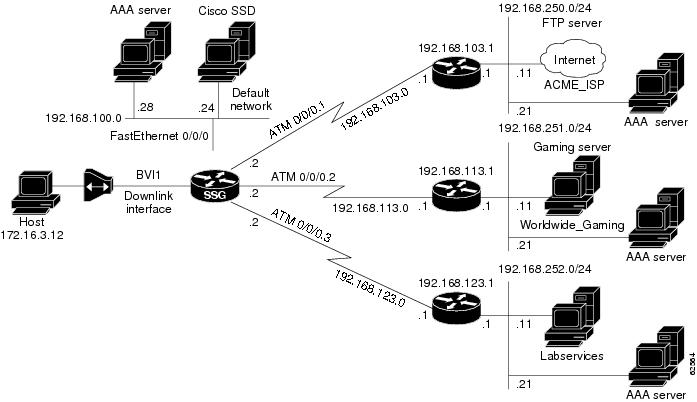
The configuration examples in this section support the network topology shown in Figure 2. These examples apply to SSG used with the SSD or the SESM in RADIUS mode.
Figure 2 Sample SSG Network Topology
Security Example
The following example shows how to configure SSG for security:
aaa new-modelaaa authentication ppp default radiusaaa authorization network default radiusssg service-password ciscossg radius-helper auth-port 1645 acct-port 1646ssg radius-helper key ciscoradius-server host 192.168.100.28 auth-port 1645 acct-port 1646radius-server key ciscoradius-server vsa send accountingradius-server vsa send authenticationDefault Network Example
The following example shows how to configure the default network:
ssg default-network 192.168.100.24 255.255.255.255Interfaces Example
The following example shows how to configure uplink and downlink interfaces:
ssg bind direction uplink ATM0/0/0.1ssg bind direction uplink ATM0/0/0.2ssg bind direction uplink ATM0/0/0.3ssg bind direction downlink BVI1Services Example
The following example shows how to configure services:
ssg bind service Labservices 192.168.123.1ssg bind service Worldwide_Gaming 192.168.113.1ssg bind service ACME_ISP 192.168.103.1ssg next-hop download nhg1 ciscossg maxservice 10The following is an example service profile as it would appear on the RADIUS server. It is formatted for CiscoSecure ACS for UNIX.
user = ACME_ISP{profile_id = 2026profile_cycle = 12member = ServicesGroupradius=6510-SSG-v1.1a {check_items= {2=cisco6=5}reply_attributes= {9,251="R192.168.250.0;255.255.255.0"9,251="TX"9,251="S192.168.250.11;1645;1646;cisco"}}}Service Search Order Example
The following example shows how to configure the order in which SSG searches for a service profile:
ssg service-search-order local remoteNext-Hop Table Example
The following example shows how to configure SSG to download the next-hop table from a RADIUS server:
ssg next-hop download nht1 ciscoThe following is an example next-hop table as it would appear on the RADIUS server. It is formatted for CiscoSecure ACS for UNIX.
ssg next-hop download nht1 ciscouser = nht1{radius= SSG {check_items= {2=cisco6=5}reply_attributes= {9,253="GACME_ISP;192.168.103.1"9,253="GLabservices;192.168.123.1"9,253="GWorldwide_Gaming;192.168.113.1"}}}Maximum Services Example
The following example shows how to set the maximum number of services per user:
ssg maxservice 10Local Service Profile Example
The following example shows how to configure a local service profile:
local-profile Labservicesattribute 26 9 251 "R192.168.123.1;255.255.255.0"attribute 26 9 251 "S192.168.252.11;1645;1646;cisco"attribute 26 9 251 "OAnyProxyService.Com"attribute 26 9 251 "TX"attribute 6 5Transparent Pass-Through Filter Example
The following example shows how to configure a transparent pass-through filter:
ssg pass-through filter download tptfilter1 ciscoThe following is an example transparent pass-through filter as it would appear on the RADIUS server. It is formatted for CiscoSecure ACS for UNIX.
user = tptfilter1{radius= SSG {check_items= {2=cisco6=5}reply_attributes= {9,1="ip:inacl#2=deny tcp 172.16.4.0 0.0.0.255 192.168.250.0 0.0.0.255 eq 23"9,1="ip:inacl#5=permit ip any any"9,1="ip:inacl#1=permit tcp any any established"}}}Redundancy Example
The following example shows how to configure redundancy:
redundancymain-cpuauto-sync standardno secondary console enableRADIUS Interim Accounting Example
The following example shows how to configure the SSG accounting interval:
ssg accounting interval 600The following example RADIUS accounting records are sent to the appropriate server every 600 seconds while the user is logged in to the SSG:
Account Update
NAS-IP-Address = 172.16.11.1NAS-Port = 0NAS-Port-Type = VirtualUser-Name = "cisco"Acct-Status-Type = UpdateAcct-Authentic = RADIUSService-Type = FramedAcct-Session-Id = "00000000"Acct-Session-Time = 77Acct-Input-Octets = 0Acct-Output-Octets = 0Acct-Input-Packets = 0Acct-Output-Packets = 0Framed-Protocol = PPPFramed-IP-Address = 172.16.11.12Control-Info = "I0;0"Control-Info = "O0;0"Acct-Delay-Time = 0Connection Update
NAS-IP-Address = 172.16.11.1NAS-Port = 0NAS-Port-Type = VirtualUser-Name = "cisco"Acct-Status-Type = UpdateAcct-Authentic = RADIUSService-Type = FramedAcct-Session-Id = "00000012"Acct-Session-Time = 8Acct-Input-Octets = 0Acct-Output-Octets = 0Acct-Input-Packets = 0Acct-Output-Packets = 0Framed-Protocol = PPPControl-Info = "I0;0"Control-Info = "O0;0"Service-Info = "Nservice.com"Service-Info = "Uname"Service-Info = "TX"Acct-Delay-Time = 0CEF Example
The following example shows how to enable IP CEF:
ip cefCisco IOS NAT Example
The following example shows how to configure Cisco IOS NAT:
interface ATM0/0/0.10 multipointip address 192.168.103.12 255.255.255.0no ip directed-broadcastip nat outsideip pim sparse-dense-modeip pim multipoint-signallingmap-group mapgroup1atm multipoint-signallingatm esi-address 202020202020.10interface Virtual-Template1ip unnumbered FastEthernet0/0/0no ip directed-broadcastip nat insideip mroute-cachekeepalive 60peer default ip address pool pool1ppp authentication papService-Name-to-Tunnel Mapping Example
The following examples show how to configure SSG for L2TP services:
•
LAC Configuration Example
The following example shows how to configure the LAC:
vpdn enablelocal-profile l2tpnet1attribute 26 9 251 "R0.0.0.0;0.0.0.0;I"attribute 26 9 251 "TT"attribute 26 9 1 "vpdn:l2tp-tunnel-password=cisco"attribute 26 9 1 "vpdn:ip-addresses=171.69.255.246"attribute 26 9 1 "vpdn:tunnel-id=LAC18"!! PPP users will need to add the ip nat inside command on the virtual template.!interface Virtual-Template1ip address negotiatedno ip directed-broadcastip nat insideip mroute-cachepeer default ip address pool POOLppp authentication pap chap callin!! Bridge users will need to add the ip nat inside command on the downlink interface.!RADIUS User Profile Example
The following example shows a basic RADIUS user profile for SSG support of L2TP:
user = l2tp_user{member = Some-Usersradius=CSUNIX_RADIUS_DICTIONARY_for_6400-NRP-SSG-v1.0 {check_items= {2=cisco}reply_attributes= {6=27=19,250="Nl2tp_tunnel.com"}}}RADIUS Service Profile Example
The following example shows a basic RADIUS service profile for SSG support of L2TP:
reply_attributes= {9,251="R10.6.6.0;255.255.255.0"9,251="ODomain.com"9,251="D10.7.7.7;10.7.7.8"9,251="ITunnel1"9,251="TT"9,251="B1500"9,251="S10.7.7.7;1645;1646;cisco"9,1="vpdn:ip-addresses=10.8.8.8"9,1="vpdn:tunnel-id=My-Tunnel"9,1="vpdn:l2tp-tunnel-password=cisco"LNS Configuration Example
The following example shows a basic LNS configuration:
username l2tp_user password 0 ciscovpdn-group 1accept-dialinprotocol l2tpvirtual-template 1terminate-from hostname My-Tunnell2tp tunnel password 7 02050D480809!interface Virtual-Template1ip unnumbered FastEthernet0/0no ip directed-broadcastpeer default ip address pool pool2ppp authentication pap chapService-Name-to-VC Mapping Example
The following example shows how to map a service name to a VC:
ssg vc-service-map public1 1/37 non-exclusivePTA-MD Exclusion List Example
Adding Domains to an Existing PTA-MD Exclusion List
In the following example, a PTA-MD exclusion list that already includes cisco, motorola, nokia, and voice-stream is downloaded from the AAA server. After the exclusion list is downloaded, microsoft and sun are added to the exclusion list.
The exclusion list currently on the AAA server includes cisco, motorola, nokia, and voice-stream:
user = pta_md{
profile_id = 119
profile_cycle = 2
member = SSG-DEV
radius=6510-SSG-v1.1 {
check_items= {
2=cisco
}
reply_attributes= {
9,253="XPcisco"
9,253="XPmotorola"
9,253="XPnokia"
9,253="XPvoice-stream"In the following example, the PTA-MD exclusion list is downloaded to the router from the AAA server. The password to download the exclusion list is cisco. After downloading the PTA-MD exclusion list, microsoft and sun are added to the list using the router CLI.
ssg multidomain ppp
 download exclude-profile pta_md cisco
 exclude domain microsoft
 exclude domain sun
The enhancements to the exclusion list are then verified.
Router#show ssg multidomain ppp exclude-listProfile name :pta_md1 cisco2 motorola3 nokia4 voice-streamDomains added via CLI :1 microsoft2 sunDisabling Parsing of PPP Structured Usernames
In the following example, parsing of PPP structured usernames is disabled:
exclude all-domains
Command Reference
This section documents new and modified commands. All other commands used with this feature are documented in the Cisco IOS Release 12.2 command reference publications.
•
•
•
attribute
To configure an attribute in a local service profile, use the attribute command in profile configuration mode. To delete an attribute from a service profile, use the no form of this command.
attribute radius-attribute-id [vendor-id] [cisco-vsa-type] attribute-value
no attribute radius-attribute-id [vendor-id] [cisco-vsa-type] attribute-value
Syntax Description
Defaults
No default behavior or values.
Command Modes
Profile configuration
Command History
Usage Guidelines
Use this command to configure attributes in local service profiles.
For the Service Selection Gateway (SSG) Open Garden feature, use this command to configure the Service Route, DNS Server Address, and Domain Name attributes in a local service profile before adding the service to the open garden.
Examples
In the following example, the Cisco-AVpair Upstream Access Control List (inacl) attribute is configured in the local service profile called cisco.com:
Router(config)# local-profile cisco.comRouter(config-prof)# attribute 26 9 1 "ip:inacl#101=deny tcp 10.2.1.0 0.0.0.255 any eq 21"In the following example, the Session-Timeout attribute is deleted from the local service profile called cisco.com:
Router(config)# local-profile cisco.comRouter(config-prof)# no attribute 27 600In the following example, an open garden service called "opencisco.com" is defined.
Router(config)# local-profile opencisco.comRouter(config-prof)# attribute 26 9 251 "Oopengarden1.com"Router(config-prof)# attribute 26 9 251 "D10.13.1.5"Router(config-prof)# attribute 26 9 251 "R10.1.1.0;255.255.255.0"Router(config-prof)# exitRouter(config)# ssg open-garden opencisco.comRelated Commands
clear ssg connection
To remove the connections of a given host and a service name, use the clear ssg connection command in privileged EXEC mode.
clear ssg connection ip-address service-name [interface]
Syntax Description
ip-address
IP address of an active Service Selection Gateway (SSG) connection.
service-name
Name of an active SSG connection.
interface
(Optional) Interface to which the host is connected.
Defaults
No default behavior or values.
Command Modes
Privileged EXEC
Command History
Examples
The following example shows how to remove the service connection for Service1 to host 192.168.1.1, connected through Fast Ethernet:
Router# clear ssg connection 192.168.1.1 fastethernet Service1Related Commands
clear ssg host
To remove or disable a given host or subscriber, use the clear ssg host command in privileged EXEC mode.
clear ssg host ip-address interface
Syntax Description
ip-address
IP address of the host or subscriber.
interface
Interface through which the host or subscriber is connected.
Defaults
No default behavior or values.
Command Modes
Privileged EXEC
Command History
Examples
The following example shows how to remove the connection for host 192.168.1.1:
Router# clear ssg host 192.168.1.1 fastethernetRelated Commands
Displays the information about a subscriber and current connections of the subscriber.
clear ssg next-hop
To remove the next-hop table, use the clear ssg next-hop command in privileged EXEC mode.
clear ssg next-hop
Syntax Description
This command has no arguments or keywords.
Defaults
No default behavior or values.
Command Modes
Privileged EXEC
Command History
Usage Guidelines
If you use this command to clear the next-hop table, nothing appears when you use the show ssg next-hop command. However, the next-hop table will still appear in the running configuration. To remove the next-hop table from the running configuration, use the no form of the ssg next-hop command.
Examples
The following example shows how to remove the next-hop table:
Router# clear ssg next-hopRelated Commands
clear ssg pass-through-filter
To remove the downloaded filter for transparent pass-through, use the clear ssg pass-through-filter command in privileged EXEC mode.
clear ssg pass-through-filter
Syntax Description
This command has no arguments or keywords.
Defaults
No default behavior or values.
Command Modes
Privileged EXEC
Command History
Usage Guidelines
Removing the filter allows unauthenticated traffic to pass through the Service Selection Gateway in either direction without modification. If you use this command to clear the downloaded transparent pass-through filter, nothing will be displayed when you use the show ssg pass-through-filter command. However, the transparent pass-through filter will still appear in the running configuration. To remove the transparent pass-through filter from the running configuration, use the no form of the ssg pass-through command.
Examples
The following example shows how to remove the downloaded transparent pass-through filter:
Router# clear ssg pass-through-filterRelated Commands
Displays the downloaded filter for transparent pass-through.
Enables transparent pass-through.
clear ssg pending-command
To remove all pending commands, use the clear ssg pending-command command privileged EXEC mode.
clear ssg pending-command
Syntax Description
This command has no arguments or keywords.
Defaults
No default behavior or values.
Command Modes
Privileged EXEC
Command History
Usage Guidelines
Use this command to clear pending commands.
Examples
The following example shows how to clear pending commands:
Router# clear ssg pending-commandRelated Commands
clear ssg service
To remove a service, use the clear ssg service command in privileged EXEC mode.
clear ssg service service-name
Syntax Description
Defaults
No default behavior or values.
Command Modes
Privileged EXEC
Command History
Usage Guidelines
Use this command to remove services.
Examples
The following example shows how to remove a service called Perftest:
Router# clear ssg service PerftestRelated Commands
debug ssg ctrl-errors
To display all error messages for control modules, use the debug ssg ctrl-errors command in privileged EXEC mode. To disable debugging output, use the no form of this command.
debug ssg ctrl-errors
no debug ssg ctrl-errors
Syntax Description
This command has no arguments or keywords.
Command Modes
Privileged EXEC
Command History
Usage Guidelines
Use this command to show error messages for the control modules. These modules include all those that manage the user authentication and service login and logout (RADIUS, PPP, Subblock, and Accounting). An error message is the result of an error detected during normal execution.
Examples
The following output is generated by using the debug ssg ctrl-errors command when a host logs in to and logs out from a service:
Router# debug ssg ctrl-errorsMar 29 13:51:30 [192.168.5.1.15.21] 59:00:15:38:%VPDN-6-AUTHORERR:L2F NASLowSlot6 cannot locate a AAA server for Vi6 user User1Mar 29 13:51:31 [192.168.5.1.15.21] 60:00:15:39:%LINEPROTO-5-UPDOWN:Lineprotocol on Interface Virtual-Access6, changed state to downRelated Commands
Displays all event messages for control modules.
Displays packet contents handled by control modules.
debug ssg ctrl-events
To display all event messages for control modules, use the debug ssg ctrl-events command in privileged EXEC mode. To disable debugging output, use the no form of this command.
debug ssg ctrl-events
no debug ssg ctrl-events
Syntax Description
This command has no arguments or keywords.
Command Modes
Privileged EXEC
Command History
Usage Guidelines
This command displays event messages for the control modules, which include all modules that manage the user authentication and service login and logout (RADIUS, PPP, Subblock, and Accounting). An event message is an informational message generated during normal execution.
Examples
The following output is generated by the debug ssg ctrl-events command when a host logs in to a service:
Router# debug ssg ctrl-eventsMar 16 16:20:30 [192.168.6.1.7.141] 799:02:26:51:SSG-CTL-EVN:Service logon is accepted.Mar 16 16:20:30 [192.168.6.1.7.141] 800:02:26:51:SSG-CTL-EVN:Send cmd 11 to host 172.16.6.13. dst=192.168.100.24:36613Related Commands
Displays packet contents handled by control modules.
Displays all error messages for control modules.
debug ssg ctrl-packets
To display packet contents handled by control modules, use the debug ssg ctrl-packets command in privileged EXEC mode. To disable debugging output, use the no form of this command.
debug ssg ctrl-packets
no debug ssg ctrl-packets
Syntax Description
This command has no arguments or keywords.
Command Modes
Privileged EXEC
Command History
Usage Guidelines
Use this command to show packet messages for the control modules. These modules include all those that manage the user authentication and service login and logout (RADIUS, PPP, Subblock, and Accounting). A packet message displays the contents of a package.
Examples
The following output is generated by using the debug ssg ctl-packets command when a host logs out of a service:
Router# debug ssg ctrl-packetsMar 16 16:23:38 [192.168.6.1.7.141] 968:02:30:00:SSG-CTL-PAK:Received Packet:Mar 16 16:23:38 [192.168.6.1.7.141] 980:02:30:00:SSG-CTL-PAK:Sent packet:Mar 16 16:23:39 [192.168.6.1.7.141] 991:02:30:00:SSG-CTL-PAK:Mar 16 16:23:39 [192.168.6.1.7.141] 992:Received Packet:Related Commands
Displays all event messages for control modules.
Displays all error messages for control modules.
debug ssg data
To display all data-path packets, use the debug ssg data command in privileged EXEC mode. To disable debugging output, use the no form of this command.
debug ssg data
no debug ssg data
Syntax Description
This command has no arguments or keywords.
Command Modes
Privileged EXEC
Command History
Usage Guidelines
The debug ssg data command shows packets for the data modules. These modules include all those that forward data packets (Dynamic Host Configuration Protocol (DHCP), Domain Name System (DNS), tunneling, fast switching, IP stream, and multicast).
Examples
The following output is generated by using the debug ssg data command when a host logs in to and out of a service:
router# debug ssg dataMar 29 13:45:16 [192.168.5.1.15.21] 45:00:09:24:SSG-DATA:PS-UP-SetPakOutput=1(Vi6:172.16.5.50->199.199.199.199)Mar 29 13:45:16 [192.168.5.1.15.21] 46:00:09:24:SSG-DATA:PS-DN-SetPakOutput=1(Fa0/0/0:171.69.2.132->172.16.5.50)Mar 29 13:45:16 [192.168.5.1.15.21] 47:00:09:24:SSG-DATA:FS-UP-SetPakOutput=1(Vi6:172.16.5.50->171.69.43.34)Mar 29 13:45:16 [192.168.5.1.15.21] 48:00:09:24:Related Commands
debug ssg data-nat
To display all data-path packets for Network Address Translation (NAT) processing, use the debug ssg data-nat command in privileged EXEC mode. To disable debugging output, use the no form of this command.
debug ssg data-nat
no debug ssg data-nat
Syntax Description
This command has no arguments or keywords.
Command Modes
Privileged EXEC
Command History
Usage Guidelines
The debug ssg data-nat command displays packets for the data modules. These modules include all those that forward NAT data packets.
Examples
The following output is generated by using the debug ssg data-nat command when a host logs in to and out of a service:
Router# debug ssg data-natMar 29 13:43:14 [192.168.5.1.15.21] 35:00:07:21:SSG-DATA:TranslateIP Dst199.199.199.199->171.69.2.132Mar 29 13:43:14 [192.168.5.1.15.21] 36:00:07:21:SSG-DATA:TranslateIP Src171.69.2.132->199.199.199.199Mar 29 13:43:30 [192.168.5.1.15.21] 39:00:07:38:SSG-DATA:TranslateIP Dst199.199.199.199->171.69.2.132Mar 29 13:43:30 [192.168.5.1.15.21] 40:00:07:38:SSG-DATA:TranslateIP Src171.69.2.132->199.199.199.199Related Commands
debug ssg errors
To display all error messages for the system modules, use the debug ssg errors command in privileged EXEC mode. To disable debugging output, use the no form of this command.
debug ssg errors
no debug ssg errors
Syntax Description
This command has no arguments or keywords.
Command Modes
Privileged EXEC
Command History
Usage Guidelines
The debug ssg errors command displays error messages for the system modules, which include the basic Cisco IOS and other support modules (such as Object Model, Timeout, and Initialization). An error message is the result of an error detected during normal execution.
Examples
The following output is generated by using the debug ssg errors command when a PPP over Ethernet (PPPoE) client logs in with an incorrect password:
Router# debug ssg errorsMar 16 08:46:20 [192.168.6.1.7.141] 225:00:16:06:SSG:SSGDoAccounting:reg_invoke_do_acct returns FALSERelated Commands
Displays event messages for system modules.
Displays packet contents handled by system modules.
debug ssg events
To display event messages for system modules, use the debug ssg events command in privileged EXEC mode. To disable debugging output, use the no form of this command.
debug ssg events
no debug ssg events
Syntax Description
This command has no arguments or keywords.
Command Modes
Privileged EXEC
Command History
Usage Guidelines
The debug ssg events command displays event messages for the system modules, which include the basic Cisco IOS modules and other support modules (such as Object Model, Timeout, and Initialization). An event message is an informational message that appears during normal execution.
Examples
The following output is generated by using the debug ssg events command when a PPP over Ethernet (PPPoE) client logs in with the username "username" and the password "cisco":
Router# debug ssg eventsMar 16 08:39:39 [192.168.6.1.7.141] 167:00:09:24:%LINK-3-UPDOWN:Interface Virtual-Access3, changed state to upMar 16 08:39:39 [192.168.6.1.7.141] 168:00:09:25:%LINEPROTO-5-UPDOWN:Line protocol on Interface Virtual-Access3, changed state to upMar 16 08:39:40 [192.168.6.1.7.141] 169:00:09:26:%VPDN-6-AUTHORERR:L2FNAS LowSlot7 cannot locate a AAA server for Vi3 user usernameMar 16 08:39:40 [192.168.6.1.7.141] 170:HostObject::HostObject:size = 256Mar 16 08:39:40 [192.168.6.1.7.141] 171:HostObject::ResetMar 16 08:39:40 [192.168.6.1.7.141] 172:Service List:Mar 16 08:39:40 [192.168.6.1.7.141] 175:Service = isp-1Related Commands
Displays all error messages for the system modules.
Displays packet contents handled by system modules.
debug ssg packets
To display packet contents handled by system modules, use the debug ssg packets command in privileged EXEC mode. To disable debugging output, use the no form of this command.
debug ssg packets
no debug ssg packets
Syntax Description
This command has no arguments or keywords.
Command Modes
Privileged EXEC
Command History
Usage Guidelines
The debug ssg packets command displays packet messages for the system modules, which include the basic Cisco IOS and other support modules (Object Model, Timeout, Initialization, etc.). A packet message displays the contents of a package.
Examples
The following output is generated by using the debug ssg packets command when a user is running a telnet session to 192.168.250.12 and pinging 192.168.250.11:
Router# debug ssg packets19:46:03:SSG-DATA:PS-UP-SetPakOutput=1(Vi2:172.16.17.71->192.168.250.12)19:46:03:SSG-DATA:PS-UP-SetPakOutput=1(Vi2:172.16.17.71->192.168.250.12)19:46:03:SSG-DATA:PS-UP-SetPakOutput=1(Vi3:172.16.17.72->192.168.250.12)19:46:03:SSG-DATA:PS-UP-SetPakOutput=1(Vi2:172.16.17.71->192.168.250.12)19:46:03:SSG-DATA:PS-UP-SetPakOutput=1(Vi2:172.16.17.71->192.168.250.12)19:46:03:SSG-DATA:PS-UP-SetPakOutput=1(Vi2:172.16.17.71->192.168.250.12)19:46:03:SSG-DATA:PS-UP-SetPakOutput=1(Vi3:172.16.17.72->192.168.250.11)Related Commands
Displays all error messages for the system modules.
Displays event messages for system modules.
download exclude-profile (PTA-MD)
To download a PPP Termination Aggregation-Multidomain (PTA-MD) exclusion list from the authentication, authorization, and accounting (AAA) server to the router, use the download exclude-profile command in PTA-MD configuration mode. To remove all domains in the specified PTA-MD exclusion list, use the no form of this command.
download exclude-profile profile-name [password]
no download exclude-profile profile-name [password]
Syntax Description
Defaults
A PTA-MD exclusion list is not downloaded.
Command Modes
PTA-MD configuration
Command History
12.2(15)B
This command was introduced.
12.3(4)T
This command was integrated into Cisco IOS Release 12.3(4)T.
Usage Guidelines
A PTA-MD exclusion list provides the option of passing the entire structured username in the form `user@service' to PPP for authenticating an SSG request. The entire structured username can be passed to PPP through the use of a PTA-MD exclusion list; if an entire structured username should be passed to PPP, the domain (the `@service' portion of the structured username) should be added to a PTA-MD exclusion list. The download exclude-profile command is used to download an exclusion list from the AAA server as part of the process for adding domains to an exclusion list using the router command-line interface (CLI).
PTA-MD exclusion lists can also be configured directly on the AAA server.
Examples
Adding Domains to an Existing PTA-MD Exclusion List
In the following example, a PTA-MD exclusion list that already includes "cisco", "motorola", "nokia", and "voice-stream" is downloaded from the AAA server. After the exclusion list is downloaded, "microsoft" and "sun" are added to the exclusion list.
The exclusion list currently on the AAA server includes "cisco", "motorola", "nokia", and "voice-stream":
user = pta_md{
profile_id = 119
profile_cycle = 2
member = SSG-DEV
radius=6510-SSG-v1.1 {
check_items= {
2=cisco
}
reply_attributes= {
9,253="XPcisco"
9,253="XPmotorola"
9,253="XPnokia"
9,253="XPvoice-stream"The PTA-MD exclusion list is then downloaded to the router from the AAA server. The password to download the exclusion list is "cisco". After the PTA-MD exclusion list is downloaded, "microsoft" and "sun" are added to the list using the router CLI:
ssg multidomain ppp
download exclude-profile pta_md cisco
exclude domain microsoft
exclude domain sunThe enhancements to the exclusion list are then verified:
Router# show ssg multidomain ppp exclude-listProfile name :pta_md1 cisco2 motorola3 nokia4 voice-streamDomains added via CLI :1 microsoft2 sunDisabling Parsing of PPP Structured Usernames
In the following example, parsing of PPP structured usernames is disabled:
exclude all-domains
Related Commands
exclude (PTA-MD)
To add a domain to a PPP Termination Aggregation-Multidomain (PTA-MD) exclusion list, use the exclude command in PTA-MD configuration mode. To remove a domain from the PTA-MD exclusion list, use the no form of this command.
exclude [domain name | all-domains]
no exclude [domain name | all-domains]
Syntax Description
domain
Adds a domain to the exclusion list.
name
Name of the domain to be added to the exclusion list.
all-domains
Excludes all domains; in effect, disables parsing of PPP structured usernames.
Defaults
A domain is not included in a PTA-MD exclusion list.
Command Modes
PTA-MD configuration
Command History
12.2(15)B
This command was introduced in PTA-MD configuration mode.
12.3(4)T
This command was integrated into Cisco IOS Release 12.3(4)T.
Usage Guidelines
A PTA-MD exclusion list provides the option of passing an entire structured username in the form `user@service' to PPP for authenticating an SSG request. The entire structured username can be passed to PPP through the use of a PTA-MD exclusion list; if an entire structured username should be passed to PPP, the domain (the `@service' portion of the structured username) should be added to a PTA-MD exclusion list. The exclude command is used to add a domain to the exclusion list as part of the process for adding domains to an exclusion list using the router command-line interface (CLI).
PTA-MD exclusion lists can also be configured directly on the authentication, authorization, and accounting (AAA) server.
To disable all parsing of PPP structured usernames during authentication, use the exclude all-domains command.
Examples
Adding Domains to an Existing PTA-MD Exclusion List
In the following example, a PTA-MD exclusion list that already includes "cisco", "motorola", "nokia", and "voice-stream" is downloaded from the AAA server. After the exclusion list is downloaded, "microsoft" and "sun" are added to the exclusion list.
The exclusion list currently on the AAA server includes "cisco", "motorola", "nokia", and "voice-stream":
user = pta_md{
profile_id = 119
profile_cycle = 2
member = SSG-DEV
radius=6510-SSG-v1.1 {
check_items= {
2=cisco
}
reply_attributes= {
9,253="XPcisco"
9,253="XPmotorola"
9,253="XPnokia"
9,253="XPvoice-stream"In the following example, the PTA-MD exclusion list is downloaded to the router from the AAA server. The password to download the exclusion list is "cisco". After the PTA-MD exclusion list is downloaded, "microsoft" and "sun" are added to the list using the router CLI:
ssg multidomain pppdownload exclude-profile pta_md ciscoexclude domain microsoftexclude domain sunThe enhancements to the exclusion list are then verified.
Router# show ssg multidomain ppp exclude-listProfile name :pta_md1 cisco2 motorola3 nokia4 voice-streamDomains added via CLI :1 microsoft2 sunDisabling Parsing of PPP Structured Usernames
In the following example, parsing of PPP structured usernames is disabled:
exclude all-domains
Related Commands
show ssg binding
To display service names that have been bound to interfaces and the IP addresses to which they have been bound, use the show ssg binding command in privileged EXEC mode.
show ssg binding [begin expression | exclude expression | include expression]
Syntax Description
Command Modes
Privileged EXEC
Command History
Usage Guidelines
Use this command to display services and the interfaces to which they have been bound.
Examples
The following example shows all service names that have been bound to interfaces:
Router# show ssg bindingWhipitNet -> 192.168.1.1 (NHT)Service1.com -> 192.168.1.2 (NHT)Service2.com -> 192.168.1.3 (NHT)Service3.com -> 192.168.1.4 (NHT)GoodNet -> 192.168.2.1Perftest -> 192.168.1.6Related Commands
Removes a service.
Displays the information for a service.
Specifies the interface for a service.
show ssg connection
To display the connections of a given host and a service name, use the show ssg connection command in privileged EXEC mode.
show ssg connection ip-address service-name [interface]
Syntax Description
Command Modes
Privileged EXEC
Command History
Examples
The following example shows the service connection for the autologon service to host 10.3.6.1:
Router# show ssg connection 10.3.6.1 autologon------------------------ ConnectionObject Content -----------------------User Name:autologonOwner Host:10.3.6.1Associated Service:autologonConnection State:0 (UP)Connection Started since:*20:41:26.000 UTC Fri Jul 27 2001User last activity at:*20:41:26.000 UTC Fri Jul 27 2001Connection Traffic Statistics:Input Bytes = 0 (HI = 0), Input packets = 0Output Bytes = 0 (HI = 0), Output packets = 0Related Commands
show ssg direction
To display the direction of all interfaces for which a direction has been specified, use the show ssg direction privileged EXEC command.
show ssg direction [begin expression | exclude expression | include expression]
Syntax Description
Command Modes
Privileged EXEC
Command History
Usage Guidelines
Use this command to show all interfaces that have been specified as uplinks or downlinks.
Examples
The following example shows the direction of all interfaces that have been specified as uplinks or downlinks.
Router# show ssg directionATM0/0/0.10: UplinkBVI1: DownlinkFastEthernet0/0/0: UplinkRelated Commands
show ssg host
To display the information about a subscriber and current connections of the subscriber, use the show ssg host command in privileged EXEC mode.
show ssg host [ip-address [interface] | username ]
Syntax Description
ip-address
(Optional) IP address of the host.
interface
(Optional) Interface through which the host is connected.
username
(Optional) Displays the usernames logged into the active hosts.
Defaults
If no argument is provided, all current connections are displayed.
Command Modes
Privileged EXEC
Command History
Examples
The following example shows all active hosts:
Router# show ssg host1:10.3.1.1 [Host-Key 70.13.60.3:64]2:10.3.6.1 [Host-Key 70.13.60.3:65]### Active HostObject Count:2The following example shows information about host 10.3.1.1:
Router# show ssg host 10.3.1.1------------------------ HostObject Content -----------------------Activated:TRUEInterface:Virtual-Access1User Name:pppoauserHost IP:10.3.1.1Msg IP:0.0.0.0 (0)Host DNS IP:0.0.0.0Maximum Session Timeout:0 secondsHost Idle Timeout:0 secondsClass Attr:NONEUser logged on since:*20:59:51.000 UTC Fri Jul 27 2001User last activity at:*20:59:51.000 UTC Fri Jul 27 2001Default Service:NONEDNS Default Service:NONEActive Services:autologon;AutoService:autologon;Subscribed Services:The following example shows two host objects with the same IP address:
Router# show ssg host 10.3.1.1SSG:Overlapping hosts for IP 10.3.1.1 at interfaces:FastEthernet0/0/0Virtual-Access1In this case, use the interface argument to uniquely identify the host:
Router# show ssg host 10.3.1.1 FastEthernet0/0/0Note that the output produced by this command is the same as that produced by the command without the interface argument. The interface argument is used only to uniquely identify a host when there are overlapping host IP addresses.
The following example shows the usernames logged in to the active hosts:
RouterA# show ssg host user1:10.3.1.1 (active) Host name:pppoauser2:10.3.6.1 (active) Host name:ssguser2### Total HostObject Count(including inactive hosts):2Related Commands
show ssg l2x
Beginning in Cisco IOS Release 12.2(4)B, this command is no longer supported.
show ssg multidomain ppp exclude-list
To display the contents of a PPP Termination Aggregation-Multidomain (PTA-MD) exclusion list, use the show ssg multidomain ppp exclude-list command in privileged EXEC mode.
show ssg multidomain ppp exclude-list
Syntax Description
This command has no arguments or keywords.
Command Modes
Privileged EXEC
Command History
12.2(15)B
This command was introduced.
12.3(4)T
This command was integrated into Cisco IOS Release 12.3(4)T.
Usage Guidelines
This command is used to verify the contents of a PTA-MD exclusion list.
Examples
Adding Domains to an Existing PTA-MD Exclusion List
In the following example, a PTA-MD exclusion list that already includes "cisco", "motorola", "nokia", and "voice-stream" is downloaded from the authentication, authorization, and accounting (AAA) server. After the exclusion list is downloaded, "microsoft" and "sun" are added to the exclusion list.
The exclusion list currently on the AAA server includes "cisco", "motorola", "nokia", and "voice-stream":
user = pta_md{
profile_id = 119
profile_cycle = 2
member = SSG-DEV
radius=6510-SSG-v1.1 {
check_items= {
2=cisco
}
reply_attributes= {
9,253="XPcisco"
9,253="XPmotorola"
9,253="XPnokia"
9,253="XPvoice-stream"In the following example, the PTA-MD exclusion list is downloaded to the router from the AAA server. The password to download the exclusion list is "cisco". After downloading the PTA-MD exclusion list, "microsoft" and "sun" are added to the list using the router command-line interface (CLI).
ssg multidomain pppdownload exclude-profile pta_md ciscoexclude domain microsoftexclude domain sunThe enhancements to the exclusion list are then verified:
Router# show ssg multidomain ppp exclude-listProfile name :pta_md1 cisco2 motorola3 nokia4 voice-streamDomains added via CLI :1 microsoft2 sunRelated Commands
show ssg next-hop
To display the next-hop table, use the show ssg next-hop command in privileged EXEC mode.
show ssg next-hop [begin expression | exclude expression | include expression]
Syntax Description
Command Modes
Privileged EXEC
Command History
Usage Guidelines
Use this command to display all next-hop IP addresses.
Examples
The following example shows the next-hop table:
Router# show ssg next-hopNext hop table loaded from profile prof-nhg:WhipitNet -> 192.168.1.6Service1.com -> 192.168.1.3Service2.com -> 192.168.1.2Service3.com -> 192.168.1.1GoodNet -> 192.168.1.2Perftest -> 192.168.1.5End of next hop table.Related Commands
show ssg pass-through-filter
To display the downloaded filter for transparent pass-through, use the show ssg pass-through-filter command in privileged EXEC mode.
show ssg pass-through-filter [begin expression | exclude expression | include expression]
Syntax Description
Command Modes
Privileged EXEC
Command History
Usage Guidelines
Use this command to display the downloaded transparent pass-through filter. The filter prevents pass-through traffic from accessing the specified IP address and subnet mask combinations. The filter is set using the ssg pass-through command.
To display a filter defined on the command line, use the show running-config command.
Examples
The following example shows the pass-through filter:
Router# show ssg pass-through-filterService name: filter01Password: ciscoDirection: UplinkExtended IP access list (SSG ACL)permit tcp 172.16.6.0 0.0.0.255 any eq telnetpermit tcp 172.16.6.0 0.0.0.255 192.168.250.0 0.0.0.255 eq ftpRelated Commands
Removes the downloaded filter for transparent pass-through.
Enables transparent pass-through.
show ssg pending-command
To display current pending commands, such as next-hop or filters, use the show ssg pending-command command in privileged EXEC mode.
show ssg pending-command
Syntax Description
This command has no keywords or arguments.
Command Modes
Privileged EXEC
Command History
Usage Guidelines
Use this command to display the current pending commands.
Examples
The following example shows the pending commands:
Router# show ssg pending-commandSSG pending command list:ssg bind service Service1.com 192.168.103.1ssg bind service Perftest206 192.168.104.5Related Commands
show ssg service
To display the information for a service, use the show ssg service privileged EXEC command.
show ssg service [service-name [begin expression | exclude expression | include expression]]
Syntax Description
Defaults
If no service name is provided, the command displays information for all services.
Command Modes
Privileged EXEC
Command History
Usage Guidelines
Use this command to display connection information for a service.
Examples
The following example shows the information for the service called serv1-proxy:
Router# show ssg service serv1-proxy------------------------ ServiceInfo Content -----------------------Uplink IDB:Name:serv1-proxyType:PROXYMode:CONCURRENTService Session Timeout:0 secondsService Idle Timeout:0 secondsClass Attr:NONEAuthentication Type:CHAPReference Count:1Next Hop Gateway Key:my-keyDNS Server(s):Primary:10.13.1.5Radius Server:IP=10.13.1.2, authPort=1645, acctPort=1646, secret=my-secretIncluded Network Segments:10.13.0.0/255.255.0.0Excluded Network Segments:Full User Name UsedService Defined Cookie existDomain List:service1.com;Active Connections:1 :Virtual=255.255.255.255, Subscriber=10.20.10.2------------------------ End of ServiceInfo Content ----------------Related Commands
Removes a service.
Displays service names that have been bound to interfaces and the interfaces to which they have been bound.
Specifies the interface for a service.
show ssg vc-service-map
To display virtual circuit (VC)-to-service-name mappings, use the show ssg vc-service-map command in global configuration mode.
show ssg vc-service-map [vpi/vci | service service-name]
Syntax Description
Command Modes
Privileged EXEC
Command History
Usage Guidelines
Use this command to display VC-to-service-name mappings.
Examples
The following example shows the VCs mapped to the service name "Worldwide":
Router# show ssg vc-service-map service WorldwideInterface From To Service Name TypeAll 3 /33 None Worldwide non-exclusiveRelated Commands
ssg accounting
To enable SSG accounting, use the ssg accounting command in global configuration mode. To disable SSG accounting interval, use the no form of this command.
ssg accounting
no ssg accounting
Syntax Description
This command has no arguments or keywords.
Defaults
Accounting is enabled by default.
Command Modes
Global configuration
Command History
Usage Guidelines
The ssg accounting command enables the sending of start, stop, and interim accounting records for hosts and connections.
Examples
The following example shows how to re-enable SSG accounting if it has been disabled:
Router(config)# ssg accountingRelated Commands
Specifies the interval at which accounting updates are sent to the accounting server.
ssg accounting interval
To specify the interval at which accounting updates are sent to the accounting server, use the ssg accounting interval command in global configuration mode. To disable the accounting interval, use the no form of this command.
ssg accounting interval seconds
no ssg accounting interval seconds
Syntax Description
Defaults
600 seconds
Command Modes
Global configuration
Command History
Usage Guidelines
Use this command to specify the interval at which accounting updates are sent to the accounting server.
Examples
The following example shows how to specify that Service Selection Gateway will send an accounting update to the accounting server every 60 seconds:
Router(config)# ssg accounting interval 60Related Commands
ssg bind direction
To specify an interface as a downlink or uplink interface, use the ssg bind direction command in global configuration mode. To disable the directional specification for the interface, use the no form of this command.
ssg bind direction {downlink | uplink} {ATM atm-interface | Async async-interface | BVI bvi-interface | Dialer dialer-interface | Ethernet ethernet-interface | FastEthernet fastethernet-interface | Group-Async group-async-interface | Lex lex-interface | Loopback loopback-interface | Multilink multilink-interface | Null null-interface | Port-channel port-channel-interface | Tunnel tunnel-interface | Virtual-Access virtual-access-interface | Virtual-Template virtual-template-interface | Virtual-TokenRing virtual-tokenring-interface}
no ssg bind direction {downlink | uplink} {ATM atm-interface | Async async-interface | BVI bvi-interface | Dialer dialer-interface | Ethernet ethernet-interface | FastEthernet fastethernet-interface | Group-Async group-async-interface | Lex lex-interface | Loopback loopback-interface | Multilink multilink-interface | Null null-interface | Port-channel port-channel-interface | Tunnel tunnel-interface | Virtual-Access virtual-access-interface | Virtual-Template virtual-template-interface | Virtual-TokenRing virtual-tokenring-interface}
Syntax Description
Defaults
All interfaces are configured as uplink interfaces by default.
Command Modes
Global configuration
Command History
Usage Guidelines
Use this command to specify an interface as downlink or uplink. An uplink interface is an interface to services; a downlink interface is an interface to subscribers.
Examples
The following example shows how to specify an ATM interface as a downlink interface:
Router# configure terminalEnter configuration commands, one per line. End with CNTL/Z.Router(config)# ssg bind direction downlink ATM 0/0/0.10Related Commands
Displays service names that have been bound to interfaces and the interfaces to which they have been bound.
ssg bind service
To specify the interface for a service, use the ssg bind service command in global configuration mode. To unbind the service and the interface, use the no form of this command.
ssg bind service service-name {ip-address | ATM atm-interface | Async async-interface | BVI bvi-interface | Dialer dialer-interface | Ethernet ethernet-interface | FastEthernet fastethernet-interface | Group-Async group-async-interface | Lex lex-interface | Loopback loopback-interface | Multilink multilink-interface | Null null-interface | Port-channel port-channel-interface | Tunnel tunnel-interface | Virtual-Access virtual-access-interface | Virtual-Template virtual-template-interface | Virtual-TokenRing virtual-tokenring-interface}
no ssg bind service service-name {ip-address | ATM atm-interface | Async async-interface | BVI bvi-interface | Dialer dialer-interface | Ethernet ethernet-interface | FastEthernet fastethernet-interface | Group-Async group-async-interface | Lex lex-interface | Loopback loopback-interface | Multilink multilink-interface | Null null-interface | Port-channel port-channel-interface | Tunnel tunnel-interface | Virtual-Access virtual-access-interface | Virtual-Template virtual-template-interface | Virtual-TokenRing virtual-tokenring-interface}
Syntax Description
Defaults
No default behavior or values.
Command Modes
Global configuration
Command History
Usage Guidelines
Use this command to bind a service to an interface.
Examples
The following example shows the interface for the service defined as MyService:
Router# configure terminalEnter configuration commands, one per line. End with CNTL/Z.Router(config)# ssg bind service MyService ATM 0/0/0.10Related Commands
Removes a service.
Displays service names that have been bound to interfaces and the interfaces to which they have been bound.
Displays the information for a service.
ssg default-network
To specify the default network IP address or subnet and mask, use the ssg default-network command in global configuration mode. To disable the default network IP address and mask, use the no form of this command.
ssg default-network ip-address mask
no ssg default-network ip-address mask
Syntax Description
ip-address
Service Selection Gateway (SSG) default IP address or subnet.
mask
SSG default network destination mask.
Defaults
No default behavior or values.
Command Modes
Global configuration
Command History
12.0(3)DC
This command was introduced on the Cisco 6400 node route processor.
12.2(4)B
This command was integrated into Cisco IOS Release 12.2(4)B.
Usage Guidelines
Use this command to specify the first IP address or subnet that users will be able to access without authentication. This is the address where the Cisco Service Selection Dashboard (SSD) resides. After users enter the URL for the Cisco SSD, they will be prompted for a username and password. A mask provided with the IP address specifies the range of IP addresses that users will be able to access without authentication.
Examples
The following example shows a default network IP address, 192.168.1.2, and mask 255.255.255.255:
Router# configure terminalEnter configuration commands, one per line. End with CNTL/Z.Router(config)# ssg default-network 192.168.1.2 255.255.255.255ssg disable
Beginning in Cisco IOS Release 12.2(4)B, this command is no longer supported.
ssg enable
To enable Service Selection Gateway (SSG), use the ssg enable command in global configuration mode. To disable NRP-SSG, use the no form of this command.
ssg enable
no ssg enable
Syntax Description
This command has no arguments or keywords.
Defaults
SSG is disabled.
Command Modes
Global configuration
Command History
Examples
The following example shows how to enable SSG:
Router(config)# ssg enablessg fastswitch
Beginning in Cisco IOS Release 12.2(4)B, this command is no longer supported.
ssg l2x
Beginning in Cisco IOS Release 12.2(4)B, this command is no longer supported.
ssg l2x dialer-list
Beginning in Cisco IOS Release 12.2(4)B, this command is no longer supported.
ssg local-forwarding
To enable Service Selection Gateway (SSG) to forward packets locally, use the ssg local-forwarding global configuration command. To disable local forwarding, use the no form of this command.
ssg local-forwarding
no ssg local-forwarding
Syntax Description
This command has no arguments or keywords.
Defaults
Disabled
Command Modes
Global configuration
Command History
Examples
The following example enables local forwarding.
Router(config)# ssg local-forwardingssg maxservice
To set the maximum number of services per user, use the ssg maxservice global configuration command. To reset the maximum number of services per user to the default, use the no form of this command.
ssg maxservice number
no ssg maxservice
Syntax Description
Defaults
The default maximum number of services per user is 20.
Command Modes
Global configuration
Command History
Usage Guidelines
Use this command to limit the number of services to which a user can be logged on simultaneously.
Examples
The following example shows how to set the maximum number of services per user to 10:
Router# configure terminalEnter configuration commands, one per line. End with CNTL/Z.Router(config)# ssg maxservice 10ssg multicast
Beginning in Cisco IOS Release 12.2(4)B, this command is no longer supported.
ssg multidomain ppp
To enter PPP Termination Aggregation-Multidomain (PTA-MD) configuration mode, enter the ssg multidomain ppp command. To disable all PTA-MD configurations, use the no form of this command.
ssg multidomain ppp
no ssg multidomain ppp
Syntax Description
This command has no arguments or keywords.
Defaults
No default behavior or values
Command Modes
Global configuration
Command History
12.2(15)B
This command was introduced.
12.3(4)T
This command was integrated into Cisco IOS Release 12.3(4)T.
Usage Guidelines
It is important to note that the no form of this command disables everything configured for PTA-MD. If you want to exit PTA-MD configuration mode, enter the exit command.
Examples
Adding Domains to an Existing PTA-MD Exclusion List
In the following example, a PTA-MD exclusion list that already includes "cisco", "motorola", "nokia", and "voice-stream" is downloaded from the AAA server. After the exclusion list is downloaded, "microsoft" and "sun" are added to the exclusion list.
The exclusion list currently on the AAA server includes "cisco", "motorola", "nokia", and "voice-stream":
user = pta_md{
profile_id = 119
profile_cycle = 2
member = SSG-DEV
radius=6510-SSG-v1.1 {
check_items= {
2=cisco
}
reply_attributes= {
9,253="XPcisco"
9,253="XPmotorola"
9,253="XPnokia"
9,253="XPvoice-stream"In the following example, the PTA-MD exclusion list is downloaded to the router from the AAA server. The password to download the exclusion list is "cisco". After the PTA-MD exclusion list is downloaded, "microsoft" and "sun" are added to the list using the router CLI:
ssg multidomain ppp download exclude-profile pta_md cisco exclude domain microsoft exclude domain sunThe enhancements to the exclusion list are then verified:
Router# show ssg multidomain ppp exclude-listProfile name :pta_md1 cisco2 motorola3 nokia4 voice-streamDomains added via CLI :1 microsoft2 sunRelated Commands
ssg next-hop
To download the next-hop table from a RADIUS server, use the ssg next-hop command in global configuration mode. To remove the command from the configuration, use the no form of this command.
ssg next-hop download [profile-name] [profile-password]
no ssg next-hop download [profile-name] [profile-password]
Syntax Description
download
Loads the next-hop table profile.
profile-name
(Optional) Profile name.
profile-password
(Optional) Profile password.
Defaults
If no profile name and password are provided, the previous profile specified with this command is downloaded. If no previous profile was specified, an error message is generated.
Command Modes
Global configuration
Command History
Usage Guidelines
When this command is used, an entry is made in the running configuration. When the configuration is reloaded, the next-hop table is automatically downloaded. If the no form of this command is used to remove the command from the running configuration, a next-hop table will not be automatically downloaded when the configuration is reloaded.
Examples
The following example shows how to download the next-hop table called "MyProfile" from a RADIUS server:
Router# configure terminalEnter configuration commands, one per line. End with CNTL/Z.Router(config)# ssg next-hop download MyProfile MyProfilePasswordRelated Commands
ssg pass-through
To enable transparent pass-through, use the ssg pass-through command in global configuration mode. To disable transparent pass-through, use the no form of this command
ssg pass-through [filter {ip-access-list | ip-extended-access-list | access-list-name | download [profile-name | profile-name profile-password]} [downlink | uplink]}]
no ssg pass-through [filter {ip-access-list | ip-extended-access-list | access-list-name | download [profile-name | profile-name profile-password]} [downlink | uplink]}]
Syntax Description
Defaults
Transparent pass-through is disabled by default.
Command Modes
Global configuration
Command History
Usage Guidelines
Use this command to enable transparent pass-through if you want to allow unauthenticated traffic to pass through the SSG in either direction without modification. If you want all traffic to be authenticated by the SSG, use this command to disable transparent pass-through. You can use the filter option to prevent pass through traffic from accessing the specified IP address and subnet mask combinations.
Use the no form of this command to remove a transparent pass-through filter that was configured at the command line. This will also remove it from the running configuration.
Examples
The following example shows how to enable ssg transparent pass-through and download a pass-through filter from the AAA server called "filter01":
Router# configure terminalEnter configuration commands, one per line. End with CNTL/ZRouter(config)# ssg pass-throughRouter(config)# ssg pass-through filter download filter01 ciscoRadius reply received:Created Upstream acl from it.Loading default pass-through filter succeeded.Related Commands
Removes the downloaded filter for transparent pass-through.
Displays the downloaded filter for transparent pass-through.
ssg profile-cache
To enable caching of user profiles for non-PPP users, use the ssg profile-cache command in global configuration mode. To disable caching of user profiles, use the no form of this command.
ssg profile-cache
no ssg profile-cache
Syntax Description
This command has no arguments or keywords.
Defaults
User-profile caching is not enabled.
Command Modes
Global configuration
Command History
12.2(2)B
This command was introduced.
12.2(4)B
This command was integrated into Cisco IOS Release 12.2(4)B.
12.2(8)T
This command was integrated into Cisco IOS Release 12.2(8)T.
Usage Guidelines
The ssg profile-cache command allows Service Selection Gateway (SSG) to cache the user profiles of non-PPP users. User profiles of PPP and RADIUS proxy users are always cached by SSG by default. In situations in which the user profile is not available from other sources, SSG user-profile caching makes the user profile available for RADIUS status queries, providing support for single-sign-on functionality and for failover from one Subscriber Edge Services Manager (SESM) to another.
In order for a user profile to be cached, the ssg profile-cache command must be configured before account login occurs. Once the user authentication has been done (as part of the account login), the host object is created, and the user profile is cached.
Note
Examples
The following example shows how to enable user-profile caching:
Router(config)# ssg profile-cachessg radius-helper
To enable communications with the Cisco Service Selection Dashboard (SSD) and specify port numbers and secret keys for receiving packets, use the ssg radius-helper command in global configuration mode. To disable communications with the Cisco SSD, use the no form of this command.
ssg radius-helper [acct-port port-number | auth-port port-number | key key]
no ssg radius-helper [acct-port port-number | auth-port port-number | key key]
Syntax Description
acct-port port-number
(Optional) UDP1 destination port for RADIUS accounting requests; the host is not used for accounting if set to 0. The default is 1646.
auth-port port-number
(Optional) UDP destination port for RADIUS authentication requests; the host is not used for authentication if set to 0. The default is 1645.
key key
(Optional) Key shared with the RADIUS clients
1 UDP = User Datagram Protocol
Defaults
The default port number for acct-port is 1646.
The default port number for auth-port is 1645.Command Modes
Global configuration
Command History
Usage Guidelines
You must use this command to specify a key so that SSG can communicate with the Cisco SSD.
Examples
The following example shows how to enable communication with the Cisco SSD:
router# configure terminalEnter configuration commands, one per line. End with CNTL/Z.Router(config)# ssg radius-helper acct-port 1646 auth-port 1645Router(config)# ssg radius-helper key MyKeyssg service-password
To specify the password for downloading a service profile, use the ssg service-password command in global configuration mode. To disable the password, use the no form of this command.
ssg service-password password
no ssg service-password password
Syntax Description
Defaults
No default behavior or values.
Command Modes
Global configuration
Command History
Usage Guidelines
This command sets the password required to authenticate with the authentication, authorization, and accounting (AAA) server and download a service profile.
Examples
The following example shows how to set the password for downloading a service profile:
Router# configure terminalEnter configuration commands, one per line. End with CNTL/Z.Router(config)# ssg service-password MyPasswordssg service-search-order
To specify the order in which Service Selection Gateway (SSG) searches for a service profile, use the ssg service-search-order command in global configuration mode. To disable the search order, use the no form of this command.
ssg service-search-order {local | remote | local remote | remote local}
no ssg service-search-order {local | remote | local remote | remote local}
Syntax Description
Defaults
The default search order is remote; that is, SSG searches for service profiles on the RADIUS server.
Command Modes
Global configuration
Command History
Usage Guidelines
SSG can search for service profiles in local Flash memory, on a remote RADIUS server, or both. The possible search orders are:
•
•
•
•
Examples
The following example shows how to set the search order to local remote, so that SSG will always look for service in Flash memory first, then on the RADIUS server:
Router# configure terminalEnter configuration commands, one per line. End with CNTL/Z.Router(config)# ssg service-search-order local remoteRelated Commands
ssg vc-service-map
To map virtual circuits (VCs) to service names, use the ssg vc-service-map command in global configuration mode. To disable VC-to-service-name mapping, use the no form of this command.
ssg vc-service-map service-name [interface interface-number] start-vpi | start-vpi/vci [end-vpi | end-vpi/vci] exclusive | non-exclusive
no ssg vc-service-map service-name [interface slot-module-port] start-vpi | start-vpi/vci [end-vpi | end-vpi/vci] exclusive | non-exclusive
Syntax Description
Defaults
The service mapping is non-exclusive by default.
Command Modes
Global configuration
Command History
Usage Guidelines
Use this command to map VCs to service names. If you specify a VC-to-service-name mapping as exclusive, specifying a username will log you in to the mapped service. However, specifying username@service will not log you in. If you specify a mapping as nonexclusive, specifying a username will log you in to the mapped service. However, username@service1 will log you in to service1.
Examples
The following example shows how to map all users coming into SSG on VPI/VCI 3/33 to the service "Worldwide" exclusively:
Router# configure terminalEnter configuration commands, one per line. End with CNTL/Z.Router(config)# ssg vc-service-map Worldwide 3/33 exclusiveRelated Commands
test ssg l2x data
Beginning in Cisco IOS Release 12.2(4)B, this command is no longer supported.
New and Changed SSG Functionality in Cisco IOS Release 12.2(4)B and Later Releases
This section summarizes the differences between SSG in Cisco IOS Release 12.2(2)B and earlier releases and Cisco IOS Release 12.2(4)B and later releases. It includes the following sections:
•
New and Changed Functionality
Table 18 summarizes the new and changed SSG functionality and behavior in Cisco IOS Release 12.2(4)B and later releases.
Obsolete Commands
Beginning in Cisco IOS Release 12.2(4)B, the following commands are obsolete and are no longer supported:
•
•
•
•
•
•
•
Replaced Commands
Beginning in Cisco IOS Release 12.2(4)B, some SSG commands have been replaced by other commands. Table 19 maps the old commands to their replacements.
Glossary
AAA—authentication, authorization, and accounting. A framework of security services that provide the method for identifying users (authentication), for remote access control (authorization), and for collecting and sending security server information used for billing, auditing, and reporting (accounting).address mask—A bit mask used to select bits from an Internet address for subnet addressing. The mask is 32 bits long and selects the network portion of the Internet address and one or more bits of the local portion. Sometimes called subnet mask.ADSL—asymmetric digital subscriber line. A digital subscriber line (DSL) technology in which the transmission of data from server to client is much faster than the transmission from the client to the server.CEF—Cisco Express Forwarding. Advanced Layer 3 IP switching technology that optimizes network performance and scalability for networks with large and dynamic traffic patterns, such as the Internet, on networks characterized by intensive web-based applications or interactive sessions.CHAP—Challenge Handshake Authentication Protocol. Security feature supported on lines using PPP encapsulation that prevents unauthorized access. Compare with PAP.DHCP—Dynamic Host Configuration Protocol. Protocol that provides a mechanism for allocating IP addresses dynamically so that addresses can be reused when hosts no longer need them.DNS—Domain Name Server. The part of the distributed database system for resolving a fully qualified domain name into the four-part IP number used to route communications across the Internet.DSLAM—digital subscriber line access multiplexer. A device that connects many digital subscriber lines to a network by multiplexing the DSL traffic onto one or more network trunk lines.IPCP—IP Control Protocol. Protocol that establishes and configures IP over PPP.
L2TP—Layer 2 Tunnel Protocol. An Internet Engineering Task Force (IETF) standards track protocol defined in RFC 2661 that provides tunneling of PPP.LAC—L2TP access concentrator. A node that acts as one side of an L2TP tunnel endpoint and is a peer to the L2TP network server (LNS).LNS—L2TP network server. A node that acts as one side of an L2TP tunnel endpoint and is a peer to the L2TP access concentrator (LAC).NAS—network access server. A device providing local network access to users across a remote access network such as the PSTN.NAT—Network Address Translation. A mechanism for reducing the need for globally unique IP addresses. NAT allows an organization with addresses that are not globally unique to connect to the Internet by translating those addresses into globally routable address space.NRP—node route processor. One of the component modules used in the Cisco 6400 series. This module is the Layer 3 element for the Cisco 6400 series and is responsible for implementing the routing function.NSP—node switch processor. One of the component modules used in the Cisco 6400 series. This module is responsible for all ATM switching and control functions within the Cisco 6400 series.octet—A networking term that identifies 8 bits. In TCP/IP, it is used instead of byte because some systems have bytes that are not equal to 8 bits.PAP—Password Authentication Protocol. Authentication protocol that allows PPP peers to authenticate one another. Unlike CHAP, PAP passes the password and host name or username in the clear (unencrypted). PAP is supported only on PPP lines. Compare with CHAP.PTA—PPP Termination Aggregation. A method of aggregating IP traffic by terminating PPP sessions and aggregating the IP traffic into a single routing domain.PTA-MD—PTA Multi-Domain. A method of aggregating IP traffic by terminating PPP sessions and aggregating the IP traffic into a VPN or multiple IP routing domains.SSD—Service Selection Dashboard. The SSD is a customizable web-based application that works with the Cisco SSG to allow end customers to log in to and disconnect from proxy and pass-through services through a standard web browser. After the customer logs in to the service provider's network, an HTML dashboard is populated with the services authorized for that user.SSG—Service Selection Gateway.subnet mask—32-bit address mask used in IP to indicate the bits of an IP address that are being used for the subnet address.VC—virtual connection. A link that seems and behaves like a dedicated point-to-point line or a system that delivers packets in sequence, as happens on an actual point-to-point network.VCI—virtual channel identifier. A 16-bit field in the header of an ATM cell. The VCI, together with the VPI, is used to identify the next destination of a cell as it passes through a series of ATM switches on its way to its destination.VPI—virtual path identifier. An 8-bit field in the header of an ATM cell. The VPI, together with the VCI, is used to identify the next destination of a cell as it passes through a series of ATM switches on its way to its destination.
 Feedback