NSF/SSO--MPLS TE and RSVP Graceful Restart
Available Languages
Table Of Contents
NSF/SSO—MPLS TE and RSVP Graceful Restart
Prerequisites for NSF/SSO—MPLS TE and RSVP Graceful Restart
Restrictions for NSF/SSO—MPLS TE and RSVP Graceful Restart
Information About NSF/SSO—MPLS TE and RSVP Graceful Restart
Overview of MPLS TE and RSVP Graceful Restart
Benefits of MPLS TE and RSVP Graceful Restart
How to Configure NSF/SSO—MPLS TE and RSVP Graceful Restart
Enabling RSVP Graceful Restart Globally
Enabling RSVP Graceful Restart on an Interface
Setting a Value to Control the Hello Refresh Interval
Setting a Value to Control the Missed Refresh Limit
Verifying the RSVP Graceful Restart Configuration
Configuration Examples for NSF/SSO—MPLS TE and RSVP Graceful Restart
Configuring NSF/SSO—MPLS TE and RSVP Graceful Restart: Example
Verifying the NSF/SSO—MPLS TE and RSVP Graceful Restart Configuration: Example
clear ip rsvp high-availability counters
debug ip rsvp high-availability
ip rsvp signalling hello graceful-restart dscp
ip rsvp signalling hello graceful-restart mode
ip rsvp signalling hello graceful-restart mode help-neighbor
ip rsvp signalling hello graceful-restart neighbor
ip rsvp signalling hello graceful-restart refresh interval
ip rsvp signalling hello graceful-restart refresh misses
show ip rsvp counters state teardown
show ip rsvp hello client lsp detail
show ip rsvp hello client lsp summary
show ip rsvp hello client neighbor detail
show ip rsvp hello client neighbor summary
show ip rsvp hello graceful-restart
show ip rsvp hello instance detail
show ip rsvp hello instance summary
show ip rsvp high-availability counters
show ip rsvp high-availability database
show ip rsvp high-availability summary
Feature Information for NSF/SSO—MPLS TE and RSVP Graceful Restart
NSF/SSO—MPLS TE and RSVP Graceful Restart
First Published: August 2, 2004Last Updated: June 29, 2007The NSF/SSO—MPLS TE and RSVP Graceful Restart feature allows a Route Processor (RP) to recover from disruption in control plane service without losing its Multiprotocol Label Switching (MPLS) forwarding state.
Cisco nonstop forwarding (NSF) with stateful switchover (SSO) provides continuous packet forwarding, even during a network processor hardware or software failure. In a redundant system, the secondary processor recovers control plane service during a critical failure in the primary processor. SSO synchronizes the network state information between the primary and the secondary processor.
Finding Feature Information in This Module
Your Cisco IOS software release may not support all of the features documented in this module. To reach links to specific feature documentation in this module and to see a list of the releases in which each feature is supported, use the "Feature Information for NSF/SSO—MPLS TE and RSVP Graceful Restart" section.
Finding Support Information for Platforms and Cisco IOS and Catalyst OS Software Images
Use Cisco Feature Navigator to find information about platform support and Cisco IOS and Catalyst OS software image support. To access Cisco Feature Navigator, go to http://www.cisco.com/go/cfn. An account on Cisco.com is not required.
Content
•
Prerequisites for NSF/SSO—MPLS TE and RSVP Graceful Restart
•
•
•
•
•
Prerequisites for NSF/SSO—MPLS TE and RSVP Graceful Restart
•
•
•
•
–
–
–
See the Cisco Nonstop Forwarding feature module for more information.
•
•
Restrictions for NSF/SSO—MPLS TE and RSVP Graceful Restart
•
•
•
•
•
•
•
Information About NSF/SSO—MPLS TE and RSVP Graceful Restart
To configure the NSF/SSO—MPLS TE and RSVP Graceful Restart feature, you should understand the following concepts:
•
•
Overview of MPLS TE and RSVP Graceful Restart
RSVP graceful restart allows RSVP TE-enabled nodes to recover gracefully following a node failure in the network such that the RSVP state after the failure is restored as quickly as possible. The node failure may be completely transparent to other nodes in the network.
RSVP graceful restart preserves the label values and forwarding information and works with third-party or Cisco routers seamlessly.
RSVP graceful restart depends on RSVP hello messages to detect that a neighbor went down. Hello messages include Hello Request or Hello Acknowledgment (ACK) objects between two neighbors.
As shown in Figure 1, the RSVP graceful restart extension to these messages adds an object called Hello Restart_Cap, which tells neighbors that a node may be capable of recovering if a failure occurs.
Figure 1 How RSVP Graceful Restart Works
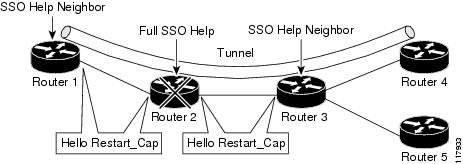
The Hello Restart_Cap object has two values: the restart time, which is the sender's time to restart the RSVP_TE component and exchange hello messages after a failure; and the recovery time, which is the desired time that the sender wants the receiver to synchronize the RSVP and MPLS databases.
In Figure 1, RSVP graceful restart help neighbor support is enabled on Routers 1 and 3 so that they can help a neighbor recover after a failure, but they cannot perform self recovery. Router 2 has full SSO help support enabled, meaning it can perform self recovery after a failure or help its neighbor to recover. Router 2 has two RPs, one that is active and one that is standby (backup). A TE LSP is signaled from Router 1 to Router 4.
Router 2 performs checkpointing; that is, it copies state information from the active RP to the standby RP, thereby ensuring that the standby RP has the latest information. If an active RP fails, the standby RP can take over.
Routers 2 and 3 exchange periodic graceful restart hello messages every 10,000 milliseconds (ms) (10 seconds), and so do Routers 2 and 1 and Routers 3 and 4. Assume that Router 2 advertises its restart time = 60,000 ms (60 seconds) and its recovery time = 60,000 ms (60 seconds) as shown in the following example:
23:33:36: Outgoing Hello:23:33:36: version:1 flags:0000 cksum:883C ttl:255 reserved:0 length:3223:33:36: HELLO type HELLO REQUEST length 12:23:33:36: Src_Instance: 0x6EDA8BD7, Dst_Instance: 0x0000000023:33:36: RESTART_CAP type 1 length 12:23:33:36: Restart_Time: 0x0000EA60, Recovery_Time: 0x0000EA60Router 3 records this into its database. Also, both neighbors maintain the neighbor status as UP. However, Router 3's control plane fails at some point (for example, a primary RP failure). As a result, RSVP and TE lose their signaling information and states although data packets continue to be forwarded by the line cards.
When Router 3 declares communication with Router 2 lost, Router 3 starts the restart time to wait for the duration advertised in Router 2's restart time previously recorded (60 seconds). Routers 1 and 2 suppress all RSVP messages to Router 3 except hellos. Router 3 keeps sending the RSVP PATH and RESV refresh messages to Routers 4 and 5 so that they do not expire the state for the LSP; however, Routers 1 and 3 suppress these messages for Router 2.
When Routers 1 and 3 receive the hello message from Router 2, Routers 1 and 3 check the recovery time value in the message. If the recovery time is 0, Router 3 knows that Router 2 was not able to preserve its forwarding information, and Routers 1 and 3 delete all RSVP state that they had with Router 2.
If the recovery time is greater than 0, Router 1 sends Router 2 PATH messages for each LSP that it had previously sent through Router 2. If these messages were previously refreshed in summary messages, they are sent individually during the recovery time. Each of these PATH messages includes a Recovery_Label object containing the label value received from Router 2 before the failure.
When Router 3 receives a PATH message from Router 2, Router 3 sends a RESV message upstream. However, Router 3 suppresses the RESV message until it receives a PATH message. When Router 2 receives the RESV message, it installs the RSVP state and reprograms the forwarding entry for the LSP.
Benefits of MPLS TE and RSVP Graceful Restart
State Information Recovery
RSVP graceful restart allows a node to perform self recovery or to help its neighbor recover state information when there is an RP failure or the device has undergone an SSO.
Session Information Recovery
RSVP graceful restart allows session information recovery with minimal disruption to the network.
Increased Availability of Network Services
A node can perform a graceful restart to help itself or a neighbor recover its state by keeping the label bindings and state information, thereby providing a faster recovery of the failed node and not affecting currently forwarded traffic.
How to Configure NSF/SSO—MPLS TE and RSVP Graceful Restart
This section contains the following procedures:
•
•
•
•
•
•
Enabling RSVP Graceful Restart Globally
Perform this task to enable RSVP graceful restart globally.
SUMMARY STEPS
1.
2.
3.
4.
DETAILED STEPS
Enabling RSVP Graceful Restart on an Interface
Perform this task to enable RSVP graceful restart on an interface.

Note
SUMMARY STEPS
1.
2.
3.
4.
5.
6.
7.
DETAILED STEPS
Setting a DSCP Value
Perform this task to set a differentiated services code point (DSCP) value.
SUMMARY STEPS
1.
2.
3.
4.
DETAILED STEPS
Setting a Value to Control the Hello Refresh Interval
Perform this task to set a value to control the hello refresh interval.
SUMMARY STEPS
1.
2.
3.
4.
DETAILED STEPS
Setting a Value to Control the Missed Refresh Limit
Perform this task to set a value to control the missed refresh limit.
SUMMARY STEPS
1.
2.
3.
4.
DETAILED STEPS
Verifying the RSVP Graceful Restart Configuration
Perform this task to verify the RSVP graceful restart configuration.
SUMMARY STEPS
1.
2.
3.
DETAILED STEPS
Configuration Examples for NSF/SSO—MPLS TE and RSVP Graceful Restart
This section provides the following configuration examples:
•
•
Configuring NSF/SSO—MPLS TE and RSVP Graceful Restart: Example
In the following example, RSVP graceful restart is enabled globally and on a neighbor router's interfaces as shown in Figure 2. Related parameters, including a DSCP value, a refresh interval, and a missed refresh limit are set.
Figure 2 Sample Network Configuration
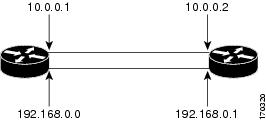
enableconfigure terminalip rsvp signalling hello graceful-restart mode fullinterface POS 1/0/0ip rsvp signalling hello graceful-restart neighbor 10.0.0.1ip rsvp signalling hello graceful-restart neighbor 10.0.0.2exitip rsvp signalling hello graceful-restart dscp 30ip rsvp signalling hello graceful-restart refresh interval 50000ip rsvp signalling hello graceful-restart refresh misses 5exitVerifying the NSF/SSO—MPLS TE and RSVP Graceful Restart Configuration: Example
The following example verifies the status of RSVP graceful restart and the configured parameters:
Router# show ip rsvp hello graceful-restartGraceful Restart: Enabled (full mode)Refresh interval: 10000 msecsRefresh misses: 4DSCP:0x30Advertised restart time: 30000 msecsAdvertised recovery time: 120000 msecsMaximum wait for recovery: 3600000 msecsAdditional References
The following sections provide references related to the NSF/SSO—MPLS TE and RSVP Graceful Restart feature.
Related Documents
RSVP commands: complete command syntax, command mode, defaults, usage guidelines, and examples
Cisco IOS Quality of Service Solutions Command Reference, Release 12.2SX
Quality of service (QoS) features including signaling, classification, and congestion management
Cisco IOS Quality of Service Solutions Configuration Guide, Release 12.4
Stateful switchover
Stateful Switchover feature module
Cisco nonstop forwarding
Cisco Nonstop Forwarding feature module
Information on stateful switchover, Cisco nonstop forwarding, graceful restart
Hello messages for state timeout
MPLS Traffic Engineering—RSVP Hello State Timer feature module
Standards
No new or modified standards are supported by this feature, and support for existing standards has not been modified by this feature.
—
MIBs
RFCs
Technical Assistance
Command Reference
This section documents only commands that are new or modified.
•
•
•
•
•
•
•
•
•
•
•
•
•
•
•
•
•
•
•
•
clear ip rsvp high-availability counters
To clear (set to zero) the Resource Reservation Protocol (RSVP) traffic engineering (TE) high availability (HA) counters that are being maintained by a Route Processor (RP), use the clear ip rsvp high-availability counters command in privileged EXEC mode.
clear ip rsvp high-availability counters
Syntax Description
This command has no arguments or keywords.
Command Default
No counters are cleared until you issue the command.
Command Modes
Privileged EXEC
Command History
Usage Guidelines
Use the clear ip rsvp high-availability counters command to clear (set to zero) the HA counters, which include state, ISSU, resource failures, and historical information.
Examples
The following example clears all the HA information currently being maintained by the RP:
Router# clear ip rsvp high-availability counters
Related Commands
show ip rsvp high-availability counters
Displays the RSVP-TE HA counters that are being maintained by an RP.
debug ip rsvp high-availability
To display debugging output for Resource Reservation Protocol traffic engineering (RSVP-TE) high availability (HA) activities that improve the accessibility of network resources, use the debug ip rsvp high-availability command in privileged EXEC mode. To disable debugging output, use the no form of this command.
debug ip rsvp high-availability {all | database | errors | events | fsm | issu | messages}
no debug ip rsvp high-availability {all | database | errors | events | fsm | issu | messages}
Syntax Description
Command Default
Debugging is not enabled.
Command Modes
Privileged EXEC
Command History
12.2(33)SRA
This command was introduced.
12.2(33)SRB
Support for ISSU was added.
12.2(33)SXH
This command was integrated into Cisco IOS Release 12.2(33)SXH.
Usage Guidelines
This command displays information about RSVP-TE activities, before and after SSO, that improve the availability of network resources and services.
Examples
The following example is sample output from the debug ip rsvp high-availability all command, which turns on debugging for IP RSVP-TE HA events, messages, database, errors, fsm, and ISSU:
Router# debug ip rsvp high-availability allRSVP HA all debugging is onRouter# show debug <---- This command displays the debugging that is enabled.IP RSVP HA debugging is on for:eventsmessagesdatabaseerrorsfsmissuThis sample debugging output is displayed as an SSO recovery begins on the standby router in the process of the standby router becoming active.
Note
*May 12 19:46:14.267: RSVP-HA: session
65.39.97.4_18698[0.0.0.0]:rsvp_ha_read_lsp_head_info: Read LSP Head info: tun_id: 10
*May 12 19:46:14.267: RSVP-HA: session 10.0.0.1_10[0.0.0.0]: rsvp_ha_db_entry_find: lsp_head entry found*May 12 19:46:14.267: rsvp_ha_read_lsp_head_info: entry found*May 12 19:46:14.267: RSVP-HA:rsvp_ha_read_lsp_head_info: Read LSP Head info: tun_id: 10*May 12 19:46:14.267: RSVP-HA: session 10.221.123.48_10[0.0.0.0]: rsvp_ha_db_entry_find: lsp_head entry found*May 12 19:46:14.267: rsvp_ha_read_lsp_head_info: entry found*May 12 19:46:15.995: %SYS-5-CONFIG_I: Configured from console by console*May 12 19:46:20.803: RSVP-HA: 10.0.0.3_61->10.0.0.9_10[10.0.0.3]: rsvp_ha_db_entry_find: lsp entry found*May 12 19:46:20.803: rsvp_ha_read_generic_info: lsp entry found*May 12 19:46:20.807: RSVP-HA: session 10.0.0.9_10[0.0.0.0]:rsvp_ha_write_generic_info: Writing lsp_head info*May 12 19:46:20.807: RSVP-HA: session 10.0.0.9_10[0.0.0.0]: rsvp_ha_db_entry_find: lsp_head entry not found*May 12 19:46:20.807: RSVP-HA: session 10.0.0.9_10[0.0.0.0]: rsvp_ha_handle_wr_entry_not_found:entry not found, type =lsp_head, action: Add*May 12 19:46:20.807: RSVP-HA: session 10.0.0.9_10[0.0.0.0]: rsvp_ha_db_entry_create: Created lsp_head entry*May 12 19:46:20.807: RSVP-HA: session 10.0.0.9_10[0.0.0.0]:rsvp_ha_set_entry_state: None -> Send-Pending*May 12 19:46:20.807: RSVP-HA: session 10.0.0.9_10[0.0.0.0]: rsvp_ha_db_wavl_entry_insert: Inserted entry into lsp_head Write DB, Send_Pending tree*May 12 19:46:20.807: RSVP-HA: session 10.0.0.9_10[0.0.0.0]:rsvp_ha_fsm_wr_event_add_entry: add lsp_head entry to Write DB*May 12 19:46:20.807: RSVP-HA: 10.0.0.3_61->10.0.0.9_10[10.0.0.3]: rsvp_ha_write_generic_info: Writing lsp info*May 12 19:46:20.807: RSVP-HA: 10.0.0.3_61->10.0.0.9_10[10.0.0.3]: rsvp_ha_db_entry_find: lsp entry not found*May 12 19:46:20.807: RSVP-HA: 10.0.0.3_61->10.0.0.9_10[10.0.0.3]: rsvp_ha_handle_wr_entry_not_found: entry not found, type =lsp, action: Add*May 12 19:46:20.807: RSVP-HA: 10.0.0.3_61->10.0.0.9_10[10.0.0.3]: rsvp_ha_db_entry_create: Created lsp entry*May 12 19:46:20.807: RSVP-HA:10.0.0.3_61->10.0.0.9_10[10.0.0.3]: rsvp_ha_set_entry_state: None -> Send-Pending*May 12 19:46:20.807: RSVP-HA: 10.0.0.3_61->10.0.0.9_10[10.0.0.3]: rsvp_ha_db_wavl_entry_insert: Inserted entry into lsp Write DB, Send_Pending tree*May 12 19:46:20.807: RSVP-HA: 10.0.0.3_61->10.0.0.9_10[10.0.0.3]: rsvp_ha_fsm_wr_event_add_entry: add lsp entry to Write DB*May 12 19:46:20.807: rsvp_ha_rd_remove_lsp_head_info: Event RD: remove lsp_head_info*May 12 19:46:20.807: RSVP-HA: session 10.27.90.140_10[0.0.0.0]: rsvp_ha_db_entry_find: lsp_head entry found*May 12 19:46:20.807: RSVP-HA: session 10.0.0.9_10[0.0.0.0]: rsvp_ha_db_wavl_entry_remove: Removed entry from lsp_head Read DB, Checkpointed tree*May 12 19:46:20.807: RSVP-HA: session 10.0.0.9_10[0.0.0.0]: rsvp_ha_db_entry_free: Freeing lsp_head entry*May 12 19:46:20.807: RSVP-HA: session 10.0.0.9_10[0.0.0.0]:rsvp_ha_set_entry_state: Checkpointed -> None...The following example shows how to turn debugging off for this command:
Router# no debug ip rsvp high-availability allRSVP HA all debugging is offRelated Commands
debug ip rsvp sso
To display debugging output for Resource Reservation Protocol (RSVP) signaling when the graceful restart feature is configured, use the debug ip rsvp sso command in privileged EXEC mode. To disable debugging, use the no form of this command.
debug ip rsvp sso
no debug ip rsvp sso
Syntax Description
This command has no arguments or keywords.
Command Default
Debugging is disabled.
Command Modes
Privileged EXEC
Command History
12.2(33)SRA
This command was introduced.
12.2(33)SXH
This command was integrated into Cisco IOS Release 12.2(33)SXH.
Usage Guidelines
This command displays debugging output from RSVP signaling during and after the Route Processor (RP) stateful switchover when system control and routing protocol execution is transferred from the active RP to the redundant standby RP. The SSO process occurs when the active router becomes unavailable, so that no interruption of network services occurs. The command displays information about the activities that RSVP performs when you configure a graceful restart, such as:
•
•
•
Examples
The following is sample output from the debug ip rsvp sso command that was displayed during a successful SSO on the standby router as it became active:
Router# debug ip rsvp ssoRSVP sso debugging is onRouter#
Note
*May 12 20:12:38.175: RSVP-HA: begin recovery, send msg to RSVP*May 12 20:12:38.175: RSVP: 10.0.0.3_61->10.0.0.9_10[10.0.0.3]: event: new Path received during RSVP or IGP recovery period*May 12 20:12:38.175: RSVP: 10.0.0.3_61->10.0.0.9_10[10.0.0.3]: rsvp_ha_sb_event_new_path_received: lsp_info found, attempt to recover lsp*May 12 20:12:38.175: RSVP: 10.0.0.3_61->10.0.0.9_10[10.0.0.3]: set psb_is_recovering flag*May 12 20:12:38.179: RSVP: 10.0.0.3_61->10.0.0.9_10[10.0.0.3]:rsvp_ha_sb_set_path_info: Recovering: Set next_hop and next_idb in psb*May 12 20:12:38.179: RSVP: 10.0.0.3_61->10.0.0.9_10[10.0.0.3]:rsvp_ha_mark_lsp_if_recoverable: LSP is recoverable (ERO expansion. not needed)*May 12 20:12:38.179: RSVP-HA: rsvp_ha_sb_handle_recovery_start: Recovery period start: set GR recovery time.*May 12 20:12:38.179: RSVP_HA: checkpoint hello_globals_info*May 12 20:12:38.179: RSVP-HELLO: rsvp_ha_update_all_gr_hi: Updating all GR HIs with new src_instance*May 12 20:12:38.183: RSVP: 10.0.0.3_61->10.0.0.9_10[10.0.0.3]: prevent populating output; LSP is recovering*May 12 20:12:38.187: RSVP: 10.0.0.3_61->10.0.0.9_10[10.0.0.3]: prevent populating output; LSP is recovering*May 12 20:12:38.939: RSVP: 10.0.0.3_61->10.0.0.9_10[10.0.0.3]: rsvp_ha_sb_event_new_resv_received: event: Resv for LSP received during recovery period*May 12 20:12:38.943: RSVP: 10.0.0.3_61->10.0.0.9_10[10.0.0.3]: rsvp_ha_event_lsp_create_head: psb found*May 12 20:12:38.943: RSVP: 10.0.0.3_61->10.0.0.9_10[10.0.0.3]: rsvp_ha_event_lsp_create_head: event: LSP created at head-end, try to checkpoint it*May 12 20:12:38.943: RSVP: 10.0.0.3_61->10.0.0.9_10[10.0.0.3]: LSP was checkpointed*May 12 20:12:38.943: RSVP-HA: 10.0.0.3_61->10.0.0.9_10[10.0.0.3]: rsvp_ha_sb_event_lsp_head_recovered: event: LSP head was recovered*May 12 20:12:38.943: RSVP-HA: recovery period over, send msg to RSVP*May 12 20:12:38.947: RSVP-HA: rsvp_ha_sb_handle_recovery_end: Deleting state for LSPs not recoveredRouter#The following example shows how to turn debugging off for this command:
Router# no debug ip rsvp ssoRSVP sso debugging is offRelated Commands
debug mpls traffic-eng ha sso
To display debugging output for Multiprotocol Label Switching (MPLS) traffic engineering high availability (HA) activities during the graceful switchover from an active Route Processor (RP) to a redundant standby RP, use the debug mpls traffic-eng ha sso command in privileged EXEC mode. To disable debugging output, use the no form of this command.
debug mpls traffic-eng ha sso {auto-tunnel | errors | link-management {events | standby | recovery | checkpoint} | tunnel {events | standby | recovery}}
no debug mpls traffic-eng ha sso {auto-tunnel | errors | link-management {events | standby | recovery | checkpoint} | tunnel {events | standby | recovery}}
Syntax Description
Command Default
Debugging is disabled until you issue this command with one or more keywords.
Command Modes
Privileged EXEC
Command History
12.2(33)SRA
This command was introduced.
12.2(33)SXH
This command was integrated into Cisco IOS Release 12.2(33)SXH.
Usage Guidelines
This command displays debugging output about the SSO process for MPLS traffic engineering tunnels, autotunnels, and link management systems. The SSO process occurs when the active router becomes unavailable and system control and routing protocol execution is transferred from the now inactive RP to the redundant standby RP, thus providing uninterrupted network services.
Examples
The following is sample output from the debug mpls traffic-eng ha sso command when you enabled debugging keywords to monitor the SSO process for tunnels and link management systems as the standby router becomes active:
Router# debug mpls traffic-eng ha sso link-management eventsMPLS traffic-eng SSO link management events debugging is onRouter# debug mpls traffic-eng ha sso link-management recoveryMPLS traffic-eng SSO link management recovery debugging is onRouter# debug mpls traffic-eng ha sso link-management standbyMPLS traffic-eng SSO link management standby behavior debugging is onRouter# debug mpls traffic-eng ha sso link-management checkpointMPLS traffic-eng SSO link management checkpointed info debugging is onRouter# debug mpls traffic-eng ha sso tunnel standbyMPLS traffic-eng SSO tunnel standby behavior debugging is onRouter# debug mpls traffic-eng ha sso tunnel recoveryMPLS traffic-eng SSO tunnel head recovery debugging is onRouter# debug mpls traffic-eng ha sso tunnel eventsMPLS traffic-eng SSO events for tunnel heads debugging is onRouter# debug mpls traffic-eng ha sso errorsMPLS traffic-eng SSO errors debugging is onRouter# show debug <-----This command displays the debugging that is enabled.MPLS TE:MPLS traffic-eng SSO link management events debugging is onMPLS traffic-eng SSO link management recovery debugging is onMPLS traffic-eng SSO link management standby behavior debugging is onMPLS traffic-eng SSO link management checkpointed info debugging is onMPLS traffic-eng SSO tunnel standby behavior debugging is onMPLS traffic-eng SSO tunnel head recovery debugging is onMPLS traffic-eng SSO events for tunnel heads debugging is onMPLS traffic-eng SSO errors debugging is onRouter#Standby-Router#Following is the sample debugging output displayed during a successful SSO recovery on the standby router as it becomes active:
*May 12 20:03:15.303: RRR_HA_STATE: Told to wait for IGP convergence*May 12 20:03:14.807: %FABRIC-SP-STDBY-5-FABRIC_MODULE_ACTIVE: The Switch Fabric Module in slot 5 became active.*May 12 20:03:15.763: RRR_HA_REC: Attempting to recover last flooded info; protocol: OSPF, area: 0*May 12 20:03:15.763: RRR_HA_REC: recovered ospf area 0 instance 0x48FFF240*May 12 20:03:15.763: RRR_HA_REC: recovered system info*May 12 20:03:15.763: RRR_HA_REC: recovered link[0] info*May 12 20:03:15.763: RRR_HA: Recovered last flooded info for igp: OSPF, area: 0*May 12 20:03:15.763: Pre announce tunnel 10*May 12 20:03:15.763: TSPVIF_HA_EVENT: added Router_t10 to dest list*May 12 20:03:15.763: TSPVIF_HA_EVENT: Completed announcement of 1 tunnel heads to IGP*May 12 20:03:15.763: TSPVIF_HA_REC: Attempting to recover Tunnel10 after SSO*May 12 20:03:15.763: LSP-TUNNEL-REOPT: Tunnel10 [61] set to recover*May 12 20:03:15.763: TSPVIF_HA_REC: Recovered number hops = 5*May 12 20:03:15.763: TSPVIF_HA_REC: recovered ospf area 0 instance 0x48FFF240*May 12 20:03:15.763: TSPVIF_HA_REC: Recovered Hop 0: 10.0.3.1, Id: 10.0.0.3 Router Node (ospf) flag:0x0*May 12 20:03:15.763: TSPVIF_HA_REC: Recovered Hop 1: 10.0.3.2, Id: 10.0.0.7 Router Node (ospf) flag:0x0*May 12 20:03:15.763: TSPVIF_HA_REC: Recovered Hop 2: 10.0.6.1, Id: 10.0.0.7 Router Node (ospf) flag:0x0*May 12 20:03:15.763: TSPVIF_HA_REC: Recovered Hop 3: 10.0.6.2, Id: 10.0.0.9 Router Node (ospf) flag:0x0*May 12 20:03:15.763: TSPVIF_HA_REC: Recovered Hop 4: 10.0.0.9, Id: 10.0.0.9 Router Node (ospf) flag:0x0*May 12 20:03:15.763: TSPVIF_HA_REC: signalling recovered setup for Tunnel10: popt 1[61], weight 2*May 12 20:03:15.891: TSPVIF_HA_REC: recovered Tu10 forwarding info needed by query*May 12 20:03:15.891: TSPVIF_HA_REC: output_idb: GigabitEthernet3/2, output_nhop: 180.0.3.2Standby-Router#Router#*May 12 20:03:25.891: TSPVIF_HA_REC: recovered Tu10 forwarding info needed by query*May 12 20:03:25.891: TSPVIF_HA_REC: output_idb: GigabitEthernet3/2, output_nhop: 10.0.3.2*May 12 20:03:35.891: TSPVIF_HA_REC: recovered Tu10 forwarding info needed by query*May 12 20:03:35.891: TSPVIF_HA_REC: output_idb: GigabitEthernet3/2, output_nhop: 10.0.3.2*May 12 20:03:35.895: RRR_HA_STATE: IGP flood prevented during IGP recovery*May 12 20:03:38.079: LSP-TUNNEL-REOPT: Tunnel10 [61] received RESV for recovered setup*May 12 20:03:38.079: LSP-TUNNEL-REOPT: Tunnel10 [61] removed as recovery*May 12 20:03:38.079: TSPVIF_HA_EVENT: notifying RSVP HA to add lsp_info using key 10.0.0.3->10.0.0.9 Tu10 [61] 10.0.0.3*May 12 20:03:38.079: TSPVIF_HA_EVENT: updated 7600-1_t10 state; action = add; result = success*May 12 20:03:38.079: TSPVIF_HA_EVENT: 7600-1_t10 fully recovered; rewrite refreshed*May 12 20:03:38.079: TSPVIF_HA_EVENT: notifying CBTS bundle about Router_t10*May 12 20:03:38.079: TSPVIF_HA_EVENT: notifying RSVP HA to remove lsp_info using key 10.0.0.3->10.0.0.9 Tu10 [61] 10.0.0.3*May 12 20:03:38.079: RRR_HA: Received notification recovery has ended. Notify IGP to flood.*May 12 20:03:38.079: TSPVIF_HA_EVENT: Received notification recovery has ended*May 12 20:03:38.079: TSPVIF_HA_STANDBY: prevent verifying setups; IGP has not converged*May 12 20:03:38.083: TSPVIF_HA_STANDBY: preventing new setups; reason: IGP recovering*May 12 20:03:38.083: TSPVIF_HA_STANDBY: prevent verifying setups; IGP has not converged*May 12 20:03:38.083: TSPVIF_HA_STANDBY: preventing new setups; reason: IGP recovering*May 12 20:03:38.083: RRR_HA_STATE: IGP flood prevented during IGP recovery7600-1#*May 12 20:03:47.723: RRR_HA: Received notification that RIB table 0 has converged.*May 12 20:03:47.723: RRR_HA: Received notification all RIBs have converged. Notify IGP to flood.*May 12 20:03:47.723: RRR_HA_STATE: Told not to wait for IGP convergence*May 12 20:03:47.723: RRR_HA_INFO: update flooded system info; action = add; result = success*May 12 20:03:47.723: LM System key::*May 12 20:03:47.723: Flooding Protocol: ospf*May 12 20:03:47.723: IGP Area ID: 0*May 12 20:03:47.723: LM Flood Data::*May 12 20:03:47.723: LSA Valid flags: 0x0 Node LSA flag: 0x0*May 12 20:03:47.723: IGP System ID: 10.0.0.3 MPLS TE Router ID: 10.0.0.3*May 12 20:03:47.723: Flooded links: 1 TLV length: 0 (bytes)*May 12 20:03:47.723: Fragment id: 0*May 12 20:03:47.723: rrr_ha_lm_get_link_info_size: link size: 212 bytes; num TLVs: 0*May 12 20:03:47.723: rrr_ha_sizeof_lm_link_info: link size: 212 bytes; num TLVs: 0*May 12 20:03:47.723: RRR_HA_INFO: update flooded link[0] info; action = add;result = success*May 12 20:03:47.723: RRR HA Checkpoint Info Buffer::*May 12 20:03:47.723: Info Handle: 0x490BB1C8*May 12 20:03:47.723: Max Size: 212*May 12 20:03:47.723: Info Size: 212*May 12 20:03:47.723: Info Write Pointer: 0x490BB29C*May 12 20:03:47.723: LM Link key::*May 12 20:03:47.723: Flooding Protocol: ospf IGP Area ID: 0 Link ID: 0 (GigabitEthernet3/2)*May 12 20:03:47.723: Ifnumber: 5 Link Valid Flags: 0x193B*May 12 20:03:47.723 Link Subnet Type: Broadcast*May 12 20:03:47.723: Local Intfc ID: 0 Neighbor Intf ID: 0*May 12 20:03:47.723: Link IP Address: 10.0.3.1*May 12 20:03:47.723: Neighbor IGP System ID: 10.0.3.2 Neighbor IP Address: 10.0.0.0*May 12 20:03:47.723: IGP Metric: 1 TE Metric: 1*May 12 20:03:47.723: Physical Bandwidth: 1000000 kbits/sec*May 12 20:03:47.723: Res. Global BW: 3000 kbits/sec*May 12 20:03:47.723: Res. Sub BW: 0 kbits/sec*May 12 20:03:47.723: Upstream::Router#*May 12 20:03:47.723: Global Pool Sub Pool*May 12 20:03:47.723: ----------- ----------*May 12 20:03:47.723: Reservable Bandwidth[0]: 0 0 kbits/sec*May 12 20:03:47.723: Reservable Bandwidth[1]: 0 0 kbits/sec*May 12 20:03:47.723: Reservable Bandwidth[2]: 0 0 kbits/sec*May 12 20:03:47.723: Reservable Bandwidth[3]: 0 0 kbits/sec*May 12 20:03:47.723: Reservable Bandwidth[4]: 0 0 kbits/sec*May 12 20:03:47.723: Reservable Bandwidth[5]: 0 0 kbits/sec*May 12 20:03:47.723: Reservable Bandwidth[6]: 0 0 kbits/sec*May 12 20:03:47.723: Reservable Bandwidth[7]: 0 0 kbits/sec*May 12 20:03:47.723: Downstream::*May 12 20:03:47.723: Global Pool Sub Pool*May 12 20:03:47.723: ----------- ----------*May 12 20:03:47.723: Reservable Bandwidth[0]: 3000 0 kbits/sec*May 12 20:03:47.723: Reservable Bandwidth[1]: 3000 0 kbits/sec*May 12 20:03:47.723: Reservable Bandwidth[2]: 3000 0 kbits/sec*May 12 20:03:47.723: Reservable Bandwidth[3]: 3000 0 kbits/sec*May 12 20:03:47.727: Reservable Bandwidth[4]: 3000 0 kbits/sec*May 12 20:03:47.727: Reservable Bandwidth[5]: 3000 0 kbits/sec*May 12 20:03:47.727: Reservable Bandwidth[6]: 3000 0 kbits/sec*May 12 20:03:47.727: Reservable Bandwidth[7]: 2900 0 kbits/sec*May 12 20:03:47.727: Affinity Bits: 0x0*May 12 20:03:47.727: Protection Type: Capability 0, Working Priority 0*May 12 20:03:47.727: Number of TLVs: 0*May 12 20:03:47.727: RRR_HA: Updated flood state for ospf area 0 with 1 links); result = successRouter#The following example shows how to turn off debugging:
Router# no debug mpls traffic-eng ha sso link-management eventsMPLS traffic-eng SSO link management events debugging is offRouter# no debug mpls traffic-eng ha sso link-management recoveryMPLS traffic-eng SSO link management recovery debugging is offRouter# no debug mpls traffic-eng ha sso link-management standbyMPLS traffic-eng SSO link management standby behavior debugging is offRouter# no debug mpls traffic-eng ha sso link-management checkpointMPLS traffic-eng SSO link management checkpointed info debugging is offRouter# no debug mpls traffic-eng ha sso tunnel standbyMPLS traffic-eng SSO tunnel standby behavior debugging is offRouter# no debug mpls traffic-eng ha sso tunnel recoveryMPLS traffic-eng SSO tunnel head recovery debugging is offRouter# no debug mpls traffic-eng ha sso tunnel eventsMPLS traffic-eng SSO events for tunnel heads debugging is offRouter# no debug mpls traffic-eng ha errorsMPLS traffic-eng SSO errors debugging is offRelated Commands
ip rsvp signalling hello graceful-restart dscp
To set the differentiated services code point (DSCP) value that is in the IP header of a Resource Reservation Protocol (RSVP) traffic engineering (TE) graceful restart hello message, use the ip rsvp signalling hello graceful-restart dscp command in global configuration mode. To set the DSCP to its default value, use the no form of this command.
ip rsvp signalling hello graceful-restart dscp num
no ip rsvp signalling hello graceful-restart dscp
Syntax Description
Defaults
The default DSCP value is 48.
Command Modes
Global configuration
Command History
Usage Guidelines
If a link is congested, set the DSCP to a value higher than 0 to reduce the likelihood that hello messages get dropped.
The DSCP applies to the RSVP hellos created on a specific router. You can configure each router independently for the DSCP.
Examples
In the following example, hello messages have a DSCP value of 30:
Router(config)# ip rsvp signalling hello graceful-restart dscp 30Related Commands
ip rsvp signalling hello graceful-restart mode
To enable Resource Reservation Protocol (RSVP) traffic engineering (TE) graceful restart support capability on a Route Processor (RP), use the ip rsvp signalling hello graceful-restart mode command in global configuration mode. To disable graceful restart capability, use the no form of this command.
ip rsvp signalling hello graceful-restart mode {help-neighbor | full}
no ip rsvp signalling hello graceful-restart mode
Syntax Description
help-neighbor
Enables support for a neighboring router to restart after a failure.
full
Enables support for a router to perform self recovery or help a neighbor restart after a failure.
Command Default
Graceful restart is disabled until you issue this command.
Command Modes
Global configuration
Command History
Usage Guidelines
Use the ip rsvp signalling hello graceful-restart mode help-neighbor command to enable support capability for a neighboring router to restart after a failure.
Use the ip rsvp signalling hello graceful-restart mode full command to enable support capability for a router to begin self recovery or help its neighbor to restart on platforms that support stateful switchover (SSO), such as Cisco 7600 series routers, provided that you have installed and configured a standby RP.
Examples
In the following example, an RP is configured with support capability to perform self recovery after a failure:
Router(config)# ip rsvp signalling hello graceful-restart mode fullRelated Commands
ip rsvp signalling hello graceful-restart mode help-neighbor
Note
To enable Resource Reservation Protocol (RSVP) traffic engineering (TE) graceful restart capability on a neighboring router, use the ip rsvp signalling hello graceful-restart mode help-neighbor command in global configuration mode. To disable graceful restart capability, use the no form of this command.
ip rsvp signalling hello graceful-restart mode help-neighbor
no ip rsvp signalling hello graceful-restart mode help-neighbor
Syntax Description
This command has no arguments or keywords.
Command Default
Graceful restart is disabled.
Command Modes
Global configuration
Command History
Usage Guidelines
Use the ip rsvp signalling hello graceful-restart mode help-neighbor command to restart a neighboring router.
Examples
In the following example, graceful restart is enabled:
Router(config)# ip rsvp signalling hello graceful-restart mode help-neighborRelated Commands
ip rsvp signalling hello graceful-restart neighbor
To enable Resource Reservation Protocol (RSVP) traffic engineering (TE) graceful restart support capability on a neighboring router, use the ip rsvp signalling hello graceful-restart neighbor command in interface configuration mode. To disable graceful restart capability, use the no form of this command.
ip rsvp signalling hello graceful-restart neighbor ip-address
no ip rsvp signalling hello graceful-restart neighbor ip-address
Syntax Description
Command Default
No neighboring routers have support for restart capability enabled until you issue this command.
Command Modes
Interface configuration
Command History
12.2(33)SRA
This command was introduced.
12.2(33)SXH
This command was integrated into Cisco IOS Release 12.2(33)SXH.
Usage Guidelines
Use the ip rsvp signalling hello graceful-restart neighbor command to enable support for graceful restart on routers helping their neighbors recover TE tunnels following stateful switchover (SSO).
Note
Examples
The following example configures graceful restart on POS interface 1/0/0 of a neighboring router with the IP address 10.0.0.1:
Router# configure terminalEnter configuration commands, one per line. End with CNTL/Z.Router(config)# interface POS1/0/0Router(config-if)# ip rsvp signalling hello graceful-restart neighbor 10.0.0.1Related Commands
ip rsvp signalling hello graceful-restart refresh interval
To configure the Resource Reservation Protocol (RSVP) traffic engineering (TE) refresh interval in graceful restart hello messages, use the ip rsvp signalling hello grateful-restart refresh interval command in global configuration mode. To set the interval to its default value, use the no form of this command.
ip rsvp signalling hello graceful-restart refresh interval interval-value
no ip rsvp signalling hello graceful-restart refresh interval
Syntax Description
interval-value
Frequency, in milliseconds (ms), at which a node sends hello messages to a neighbor. Valid values are from 1000 to 30000.
Defaults
10000 milliseconds (10 seconds)
Command Modes
Global configuration
Command History
Usage Guidelines
A node periodically generates a hello message containing a Hello Request object for all its neighbors. The frequency of those hello messages is determined by the hello interval.
Note
Examples
In the following example, hello requests are sent to a neighbor every 5000 ms:
Router(config)# ip rsvp signalling hello graceful-restart refresh interval 5000Related Commands
ip rsvp signalling hello graceful-restart refresh misses
To specify how many sequential Resource Reservation Protocol (RSVP) traffic engineering (TE) graceful restart hello acknowledgments (ACKs) a node can miss before the node considers communication with its neighbor lost, use the ip rsvp signalling hello graceful-restart refresh misses command in global configuration mode. To return the missed refresh limit to its default value, use the no form of this command.
ip rsvp signalling hello graceful-restart refresh misses msg-count
no ip rsvp signalling hello graceful-restart refresh misses
Syntax Description
msg-count
The number of sequential hello acknowledgments (ACKs) that a node can miss before RSVP considers the state expired and tears it down. Valid values are from 4 to 10.
Defaults
The default for the msg-count argument is 4.
Command Modes
Global configuration
Command History
Usage Guidelines
A hello message comprises a hello message, a Hello Request object, and a Hello ACK object. Each request is answered by an acknowledgment. If a link is congested or a router has a heavy load, set this number to a value higher than the default value to ensure that hello does not falsely declare that a neighbor is down.
Note
Examples
In the following example, if the node does not receive five sequential hello acknowledgments, the node declares that its neighbor is down:
Router(config)# ip rsvp signalling hello graceful-restart refresh misses 5Related Commands
show ip rsvp counters
To display the number of Resource Reservation Protocol (RSVP) messages that were sent and received on each interface, use the show ip rsvp counters command in user EXEC or privileged EXEC mode.
show ip rsvp counters [authentication] [interface type number | summary | neighbor]
Syntax Description
Defaults
If you enter the show ip rsvp counters command without a keyword, the command displays the number of RSVP messages that were sent and received for each interface on which RSVP is configured.
Command Modes
User EXEC
Privileged EXECCommand History
Examples
The following example shows the values for the number of RSVP messages of each type that were sent and received by the router over all interfaces, including the hello and message queues information:
Router# show ip rsvp counters summaryAll Interfaces Recv Xmit Recv XmitPath 110 15 Resv 50 28PathError 0 0 ResvError 0 0PathTear 0 0 ResvTear 0 0ResvConf 0 0 RTearConf 0 0Ack 0 0 Srefresh 0 0Hello 5555 5554 IntegrityChalle 0 0IntegrityRespon 0 0 DSBM_WILLING 0 0I_AM_DSBM 0 0Unknown 0 0 Errors 0 0Recv Msg Queues Current MaxRSVP 0 2Hello (per-I/F) 0 1Awaiting Authentication 0 0Table 1 describes the significant fields shown in the display.
Related Commands
clear ip rsvp counters
Clears (sets to zero) all IP RSVP counters that are being maintained.
show ip rsvp counters state teardown
To display counters for Resource Reservation Protocol (RSVP) events that caused a state to be torn down, use the show ip rsvp counters state teardown command in user EXEC or privileged EXEC mode.
show ip rsvp counters state teardown
Syntax Description
This command has no arguments or keywords.
Command Modes
User EXEC
Privileged EXECCommand History
Usage Guidelines
Use the show ip rsvp counters state teardown command when a label-switched path (LSP) is down. If graceful restart triggered the state teardown, the numbers in the Path, Resv-In, and Resv-Out columns in the example below are greater than 0.
Examples
The following is sample output from the show ip rsvp counters state teardown command:
Router# show ip rsvp counters state teardownStatesReason for Teardown State torn downPath Resv-In Resv-OutPathTear arrival 0 0 0ResvTear arrival 0 0 0Local application requested tear 0 0 0Output or Input I/F went down 0 0 0Missed refreshes 0 0 0Preemption 0 0 0Backup tunnel failed for FRR Active LSP 0 0 0Reroutabilty changed for FRR Active LSP 0 0 0Hello RR Client (HST) requested tear 0 0 0Graceful Restart (GR) requested tear 0 0 0Downstream neighbor SSO-restarting 0 0 0Resource unavailable 0 0 0Policy rejection 0 0 0Policy server sync failed 0 0 0Traffic control error 0 0 0Error in received message 0 0 0Non RSVP HOP upstream, TE LSP 0 0 0Other 0 0 0Table 2 describes the significant fields shown in the display.
Related Commands
clear ip rsvp counters
Clears (sets to zero) all IP RSVP counters that are being maintained.
show ip rsvp hello
To display hello status and statistics for Fast Reroute, reroute (hello state timer), and graceful restart, use the show ip rsvp hello command in user EXEC or privileged EXEC mode.
show ip rsvp hello
Syntax Description
This command has no arguments or keywords.
Command Modes
User EXEC
Privileged EXECCommand History
Examples
The following is sample output from the show ip rsvp hello command:
Router# show ip rsvp helloHello:Fast-Reroute/Reroute: EnabledStatistics: DisabledGracefulRestart: Enabled, mode: fullTable 3 describes the significant fields shown in the display. The fields describe the processes for which hello is enabled or disabled.
Related Commands
show ip rsvp hello client lsp detail
To display detailed information about Resource Reservation Protocol (RSVP) traffic engineering (TE) client hellos for label-switched paths (LSPs), use the show ip rsvp hello client lsp detail command in user EXEC or privileged EXEC mode.
show ip rsvp hello client lsp detail
Syntax Description
This command has no arguments or keywords.
Command Modes
User EXEC
Privileged EXECCommand History
Usage Guidelines
Use the show ip rsvp hello client lsp detail command to display information about the LSPs, including IP addresses and their types.
Examples
The following is sample output from the show ip rsvp hello client lsp detail command:
Router# show ip rsvp hello client lsp detailHello Client LSPs (all lsp tree)Tun Dest: 10.0.1.1 Tun ID: 14 Ext Tun ID: 172.16.1.1Tun Sender: 172.16.1.1 LSP ID: 31Lsp flags: 0x32Lsp GR DN nbr: 192.168.1.1Lsp RR DN nbr: 10.0.0.3 HSTTable 4 describes the significant fields shown in the display.
Related Commands
show ip rsvp hello
Displays hello status and statistics for fast reroute, reroute (hello state timer), and graceful restart.
show ip rsvp hello client lsp summary
To display summary information about Resource Reservation Protocol (RSVP) traffic engineering (TE) client hellos for label-switched paths (LSPs), use the show ip rsvp hello client lsp summary command in user EXEC or privileged EXEC mode.
show ip rsvp hello client lsp summary
Syntax Description
This command has no arguments or keywords.
Command Modes
User EXEC
Privileged EXECCommand History
Usage Guidelines
Use the show ip rsvp hello client lsp summary command to display information about LSPs, including IP addresses and identification numbers.
Examples
The following is sample output from the show ip rsvp hello client lsp summary command:
Router# show ip rsvp hello client lsp summaryLocal Remote tun_id lsp_id FLAGS10.1.1.1 172.16.1.1 14 31 0x32Table 5 describes the significant fields shown in the display.
Related Commands
show ip rsvp hello
Displays hello status and statistics for fast reroute, reroute (hello state timer), and graceful restart.
show ip rsvp hello client neighbor detail
To display detailed information about Resource Reservation Protocol (RSVP) traffic engineering (TE) client hellos for neighbors, use the show ip rsvp hello client neighbor detail command in user EXEC or privileged EXEC mode.
show ip rsvp hello client neighbor detail
Syntax Description
This command has no arguments or keywords.
Command Modes
User EXEC
Privileged EXECCommand History
Usage Guidelines
Use the show ip rsvp hello client neighbor detail command to display information about the hello neighbors, including their state and type.
Examples
The following is sample output from the show ip rsvp hello client neighbor detail command:
Router# show ip rsvp hello client neighbor detailHello Client NeighborsRemote addr 10.0.0.1, Local addr 10.0.0.3Nbr State: Normal Type: RerouteNbr Hello State: UpLSPs protecting: 1I/F: Et1/3Remote addr 172.16.1.1, Local addr 192.168.1.1Nbr State: Normal Type: Graceful RestartNbr Hello State: LostLSPs protecting: 1Table 6 describes the significant fields shown in the display. The fields provide information that uniquely identifies the neighbors. Clients can include graceful restart, reroute (hello state timer), and fast reroute.
Related Commands
show ip rsvp hello
Displays hello status and statistics for fast reroute, reroute (hello state timer), and graceful restart.
show ip rsvp hello client neighbor summary
To display summary information about Resource Reservation Protocol (RSVP) traffic engineering (TE) client hellos for neighbors, use the show ip rsvp hello client neighbor summary command in user EXEC or privileged EXEC mode.
show ip rsvp hello client neighbor summary
Syntax Description
This command has no arguments or keywords.
Command Modes
User EXEC
Privileged EXECCommand History
Usage Guidelines
Use the show ip rsvp hello client neighbor summary command to display information about the neighbors,including state, type, and hello instance status.
Examples
The following is sample output from the show ip rsvp hello client neighbor summary command:
Router# show ip rsvp hello client neighbor summaryLocal Remote Type NBR_STATE HI_STATE LSPs10.0.0.1 10.0.0.3 RR Normal Up 1172.16.1.1 192.168.1.1 GR Normal Lost 1Table 7 describes the significant fields shown in the display.
Related Commands
show ip rsvp hello
Displays hello status and statistics for fast reroute, reroute (hello state timer), and graceful restart.
show ip rsvp hello graceful-restart
To display information about Resource Reservation Protocol (RSVP) traffic engineering (TE) graceful restart hellos, use the show ip rsvp hello graceful-restart command in user EXEC or privileged EXEC mode.
show ip rsvp hello graceful-restart
Syntax Description
This command has no arguments or keywords.
Command Modes
User EXEC
Privileged EXECCommand History
Usage Guidelines
Use the show ip rsvp hello graceful-restart command to display the status of graceful restart and related statistics.
Examples
The following is sample output from the show ip rsvp hello graceful-restart command:
Router# show ip rsvp hello graceful-restartGraceful Restart: Enabled (full mode)Refresh interval: 10000 msecsRefresh misses: 4DSCP: 0x30Advertised restart time: 30000 msecsAdvertised recovery time: 120000 msecsMaximum wait for recovery: 3600000 msecsTable 8 describes the significant fields shown in the display.
Related Commands
show ip rsvp hello instance detail
To display detailed information about a hello instance, use the show ip rsvp hello instance detail command in user EXEC or privileged EXEC mode.
show ip rsvp hello instance detail [filter destination ip-address]
Syntax Description
Command Default
Detailed information about a hello instance is not displayed.
Command Modes
User EXEC
Privileged EXECCommand History
Usage Guidelines
Use the show ip rsvp hello instance detail command to display information about the processes (clients) currently configured.
Examples
The following is sample output from the show ip rsvp hello instance detail command:
Router# show ip rsvp hello instance detailNeighbor 10.0.0.3 Source 10.0.0.2Type: Active (sending requests)I/F: Serial2/0State: Up (for 2d19h2d19h)Clients: ReRouteLSPs protecting: 1Missed acks: 4, IP DSCP: 0x30Refresh Interval (msec)Configured: 6000Statistics: (from 40722 samples)Min: 6000Max: 6064Average: 6000Waverage: 6000 (Weight = 0.8)Current: 6000Last sent Src_instance: 0xE617C847Last recv nbr's Src_instance: 0xFEC28E95Counters:Communication with neighbor lost:Num times: 0Reasons:Missed acks: 0Bad Src_Inst received: 0Bad Dst_Inst received: 0I/F went down: 0Neighbor disabled Hello: 0Msgs Received: 55590Sent: 55854Suppressed: 521Neighbor 10.0.0.8 Source 10.0.0.7Type: Passive (responding to requests)I/F: Serial2/1Last sent Src_instance: 0xF7A80A52Last recv nbr's Src_instance: 0xD2F1B7F7Counters:Msgs Received: 199442Sent: 199442Table 9 describes the significant fields shown in the display.
Related Commands
show ip rsvp hello instance summary
To display summary information about a hello instance, use the show ip rsvp hello instance summary command in user EXEC or privileged EXEC mode.
show ip rsvp hello instance summary
Syntax Description
This command has no arguments or keywords.
Command Modes
User EXEC
Privileged EXECCommand History
Examples
The following is sample output from the show ip rsvp hello instance summary command:
Router# show ip rsvp hello instance summaryActive Instances:Client Neighbor I/F State LostCnt LSPs IntervalRR 10.0.0.3 Se2/0 Up 0 1 6000GR 10.1.1.1 Any Up 13 1 10000GR 10.1.1.5 Any Lost 0 1 10000GR 10.2.2.1 Any Init 1 0 5000Passive Instances:Neighbor I/F10.0.0.1 Se2/1Active = Actively tracking neighbor state on behalf of clients:RR = ReRoute, FRR = Fast ReRoute, or GR = Graceful RestartPassive = Responding to hello requests from neighborTable 10 describes the significant fields shown in the display.
Related Commands
show ip rsvp high-availability counters
To display all Resource Reservation Protocol (RSVP) traffic engineering (TE) high availability (HA) counters that are being maintained by a Route Processor (RP), use the show ip rsvp high-availability counters command in user EXEC or privileged EXEC mode.
show ip rsvp high-availability counters
Syntax Description
This command has no arguments or keywords.
Command Modes
User EXEC
Privileged EXECCommand History
Usage Guidelines
Use the show ip rsvp high-availability counters command to display the HA counters, which include state, ISSU, checkpoint messages, resource failures, and errors.
The command output differs depending on whether the RP is active or standby. (See the "Examples" section for more information.)
Use the clear ip rsvp high-availability counters command to clear all counters.
Examples
The following is sample output from the show ip rsvp high-availability counters command on the active RP:
Router# show ip rsvp high-availability countersState: ActiveBulk syncinitiated: 3Send timerstarted: 1Checkpoint Messages (Items) SentSucceeded: 3 (6)Acks accepted:3 (6)Acks ignored: (0)Nacks: 0 (0)Failed: 0 (0)Buffer alloc: 3Buffer freed: 3ISSU:Checkpoint Messages Transformed:On Send:Succeeded: 3Failed: 0Transformations: 0On Recv:Succeeded: 0Failed: 0Transformations: 0Negotiation:Started: 3Finished: 3Failed to Start: 0Messages:Sent:Send succeeded: 21Send failed: 0Buffer allocated: 21Buffer freed: 0Buffer alloc failed: 0Received:Succeeded: 15Failed: 0Buffer freed: 15Init:Succeeded: 1Failed: 0Session Registration:Succeeded: 2Failed: 0Session Unregistration:Succeeded: 2Failed: 0Errors:NoneTable 11 describes the significant fields shown in the display.
The following is sample output from the show ip rsvp high-availability counters command on the standby RP:
Router# show ip rsvp high-availability countersState: StandbyCheckpoint Messages (Items) ReceivedValid: 1 (2)Invalid: 0 (0)Buffer freed: 1ISSU:Checkpoint Messages Transformed:On Send:Succeeded: 0Failed: 0Transformations: 0On Recv:Succeeded: 1Failed: 0Transformations: 0Negotiation:Started: 1Finished: 1Failed to Start: 0Messages:Sent:Send succeeded: 5Send failed: 0Buffer allocated: 5Buffer freed: 0Buffer alloc failed: 0Received:Succeeded: 7Failed: 0Buffer freed: 7Init:Succeeded: 1Failed: 0Session Registration:Succeeded: 0Failed: 0Session Unregistration:Succeeded: 0Failed: 0Errors:NoneTable 12 describes the significant fields shown in the display.
Table 12 show ip rsvp high-availability counters—Standby RP Field Descriptions
State
The RP state:
•
Checkpoint Messages (Items) Received
The details of the messages or items received by the standby RP. Values are the following:
•
•
•
ISSU
ISSU counters.
Note
Errors
The details of errors or caveats.
Related Commands
show ip rsvp high-availability database
To display the contents of the Resource Reservation Protocol (RSVP) high availability (HA) read and write databases used in traffic engineering (TE), use the show ip rsvp high-availability database command in user EXEC or privileged EXEC mode.
show ip rsvp high-availability database {hello | link-management {interfaces | system} | lsp [filter destination ip-address | filter lsp-id lsp-id | filter source ip-address | filter tunnel-id tunnel-id] | lsp-head [filter number] | summary}
Syntax Description
Command Default
Information displays for the database selected.
Command Modes
User EXEC
Privileged EXECCommand History
Usage Guidelines
Use the show ip rsvp high-availability database command to display information about the entries in the read and write databases.
Use the show ip rsvp high-availability database lsp command to display loose hop information. A loose hop expansion can be performed on a router when the router processes the explicit router object (ERO) for an incoming path message. After the router removes all local IP addresses from the incoming ERO, it finds the next hop. If the ERO specifies that the next hop is loose instead of strict, the router consults the TE topology database and routing to determine the next hop and output interface to forward the path message. The result of the calculation is a list of hops; that list is placed in the outgoing ERO and checkpointed with the LSP data as the loose hop information.
Use the show ip rsvp high-availability database lsp-head command on a headend router only. On other routers, this command gives no information.
Examples
Hello Example on Active RP
The following is sample output from the show ip rsvp high-availability database hello command on an active Route Processor (RP):
Router# show ip rsvp high-availability database helloHELLO WRITE DBHeader:State: Checkpointed Action: AddSeq #: 1 Flags: 0x0Data:Last sent Src_instance: 0xDE435865HELLO READ DBTable 11 describes the significant fields shown in the displays.
Hello Example on Standby RP
The following is sample output from the show ip rsvp high-availability database hello command on a standby RP:
Router# show ip rsvp high-availability database helloHELLO WRITE DBHELLO READ DBHeader:State: Checkpointed Action: AddSeq #: 1 Flags: 0x0Data:Last sent Src_instance: 0xDE435865These fields are the same as those for the active RP described in Table 11 except they are now in the read database for the standby RP.
Link-Management Interfaces Example on an Active RP
The following is sample output from the show ip rsvp high-availability database link-management interfaces command on an active RP:
Router# show ip rsvp high-availability database link-management interfacesTE LINK WRITE DBFlooding Protocol: ospf IGP Area ID: 0 Link ID: 0 (GigabitEthernet3/2)Header:State: Checkpointed Action: AddSeq #: 4 Flags: 0x0Data:Ifnumber: 5 Link Valid Flags: 0x193BLink Subnet Type: BroadcastLocal Intfc ID: 0 Neighbor Intf ID: 0Link IP Address: 172.16.3.1Neighbor IGP System ID: 172.16.3.2 Neighbor IP Address: 10.0.0.0IGP Metric: 1 TE Metric: 1Physical Bandwidth: 1000000 kbits/secRes. Global BW: 3000 kbits/secRes. Sub BW: 0 kbits/secUpstream::Global Pool Sub Pool----------- ----------Reservable Bandwidth[0]: 0 0 kbits/secReservable Bandwidth[1]: 0 0 kbits/secReservable Bandwidth[2]: 0 0 kbits/secReservable Bandwidth[3]: 0 0 kbits/secReservable Bandwidth[4]: 0 0 kbits/secReservable Bandwidth[5]: 0 0 kbits/secReservable Bandwidth[6]: 0 0 kbits/secReservable Bandwidth[7]: 0 0 kbits/secDownstream::Global Pool Sub Pool----------- ----------Reservable Bandwidth[0]: 3000 0 kbits/secReservable Bandwidth[1]: 3000 0 kbits/secReservable Bandwidth[2]: 3000 0 kbits/secReservable Bandwidth[3]: 3000 0 kbits/secReservable Bandwidth[4]: 3000 0 kbits/secReservable Bandwidth[5]: 3000 0 kbits/secReservable Bandwidth[6]: 3000 0 kbits/secReservable Bandwidth[7]: 2900 0 kbits/secAffinity Bits: 0x0Protection Type: Capability 0, Working Priority 0Number of TLVs: 0Table 14 describes the significant fields shown in the display.
The fields for a standby RP are the same as those described in Table 14 except they are now in the TE link read database instead of the TE link write database that is used by an active RP.
Link-Management System Example on an Active RP
The following is sample output from the show ip rsvp high-availability database link-management system command on an active RP:
Router# show ip rsvp high-availability database link-management systemTE SYSTEM WRITE DBFlooding Protocol: OSPF IGP Area ID: 0Header:State: Checkpointed Action: ModifySeq #: 4 Flags: 0x0Data:LM Flood Data::LSA Valid flags: 0x0 Node LSA flag: 0x0IGP System ID: 172.16.3.1 MPLS TE Router ID: 10.0.0.3Flooded links: 1 TLV length: 0 (bytes)Fragment id: 0TE SYSTEM READ DBTable 15 describes the significant fields shown in the display.
The fields for a standby RP are the same as those described in Table 15 except they are now in the TE system read database instead of the TE system write database that is used by an active RP.
LSP Example on an Active RP
The following is sample output from the show ip rsvp high-availability database lsp command on an active RP:
Router# show ip rsvp high-availability database lspLSP WRITE DBTun ID: 10 LSP ID: 8Dest: 10.0.0.9Sender: 10.0.0.3 Ext. Tun ID: 10.0.0.3Header:State: Checkpointed Action: AddSeq #: 3 Flags: 0x0Data:InLabel: -Out I/F: Gi3/2Next-Hop: 172.0.3.2OutLabel: 17Loose hop info:10.0.0.2 13.0.0.2 13.0.0.3 10.1.1.1LSP READ DBTable 16 describes the significant fields shown in the display.
The fields for a standby RP are the same as those described in Table 16 except they are now in the LSP read database instead of the LSP write database that is used by an active RP.
LSP-Head Example on an Active RP
The following is sample output from the show ip rsvp high-availability database lsp-head command on an active RP:
Router# show ip rsvp high-availability database lsp-headLSP_HEAD WRITE DBTun ID: 10Header:State: Checkpointed Action: AddSeq #: 3 Flags: 0x0Data:lsp_id: 8, bandwidth: 100, thead_flags: 0x1, popt: 1output_if_num: 5, output_nhop: 172.16.3.2RRR path setup infoDestination: 10.0.0.9, Id: 10.0.0.9 Router Node (ospf) flag:0x0IGP: ospf, IGP area: 0, Number of hops: 5, metric: 2Hop 0: 172.16.3.1, Id: 172.16.3.1 Router Node (ospf), flag:0x0Hop 1: 172.16.3.2, Id: 10.0.0.7 Router Node (ospf), flag:0x0Hop 2: 172.16.6.1, Id: 10.0.0.7 Router Node (ospf), flag:0x0Hop 3: 172.16.6.2, Id: 10.0.0.9 Router Node (ospf), flag:0x0Hop 4: 10.0.0.9, Id: 10.0.0.9 Router Node (ospf), flag:0x0LSP_HEAD READ DBTable 17 describes the significant fields shown in the display.
The fields for a standby RP are the same as those described in Table 17 except they are now in the LSP_head read database instead of the LSP_head write database that is used by an active RP.
Summary Example on an Active RP
The following is sample output from the show ip rsvp high-availability database summary command on an active RP:
Router# show ip rsvp high-availability database summaryWrite DB:Send-Pending: 0Ack-Pending : 0Checkpointed: 10Total : 10Read DB:Total : 0Table 18 describes the significant fields shown in the display.
Summary Example on a Standby RP
The following is sample output from the show ip rsvp high-availability database summary command on a standby RP:
Router# show ip rsvp high-availability database summaryWrite DB:Send-Pending: 0Ack-Pending : 0Checkpointed: 0Total : 0Read DB:Total : 10Table 19 describes the significant fields shown in the display.
Related Commands
show ip rsvp high-availability summary
To display summary information for a Resource Reservation Protocol (RSVP) traffic engineering (TE) high availability (HA) Route Processor (RP), use the show ip rsvp high-availability summary command in user EXEC or privileged EXEC mode.
show ip rsvp high-availability summary
Syntax Description
This command has no arguments or keywords.
Command Modes
User EXEC
Privileged EXECCommand History
12.2(33)SRA
This command was introduced.
12.2(33)SXH
This command was integrated into Cisco IOS Release 12.2(33)SXH.
Usage Guidelines
Use the show ip rsvp high-availability summary command to display information about the HA parameters currently configured on an RP.
The command output differs depending on whether the RP is active or standby.
Examples
The following is sample output from the show ip rsvp high-availability summary command on an active RP:
Router# show ip rsvp high-availability summaryState:Graceful-Restart: Enabled, mode: fullHA state: ActiveCheckpointing: AllowedMessages:Send timer: not running (Interval: 1000 msec)Items sent per Interval: 200CF buffer size used: 2000
Note
Table 20 describes the significant fields shown in the display.
In some cases, the checkpointing field displays Not Allowed. Here is an excerpt from sample output:
Checkpointing: Not AllowedPeer RP Present : NoRF Comm. Up : NoFlow Control On : NoCF Comm. Up : NoRF Ready to Recv: No
Note
Table 21 describes the significant fields shown in the display.
The following is sample output from the show ip rsvp high-availability summary command after a stateful switchover (SSO) has occurred.
Router# show ip rsvp high-availability summaryState:Graceful-Restart: EnabledHA state: activeCheckpointing: AllowedRecovery Time (msec)Advertised: 120000 msecLast recorded: 75012 msecMessages:Send timer: not running (Interval:1000)Items sent per Interval: 200Table 22 describes the significant fields shown in the display
.
Related Commands
Feature Information for NSF/SSO—MPLS TE and RSVP Graceful Restart
Table 23 lists the release history for this feature.
Not all commands may be available in your Cisco IOS software release. For release information about a specific command, see the command reference documentation.
Cisco IOS software images are specific to a Cisco IOS software release, a feature set, and a platform. Use Cisco Feature Navigator to find information about platform support and Cisco IOS software image support. Access Cisco Feature Navigator at http://www.cisco.com/go/cfn. You must have an account on Cisco.com. If you do not have an account or have forgotten your username or password, click Cancel at the login dialog box and follow the instructions that appear.
Note
Glossary
DSCP—differentiated services code point. Six bits in the IP header, as defined by the IETF. These bits determine the class of service provided to the IP packet.
Fast Reroute—A mechanism for protecting MPLS traffic engineering (TE) LSPs from link and node failure by locally repairing the LSPs at the point of failure, allowing data to continue to flow on them while their headend routers attempt to establish end-to-end LSPs to replace them. FRR locally repairs the protected LSPs by rerouting them over backup tunnels that bypass failed links or nodes.
graceful restart—A process for helping an RP restart after a node failure has occurred.
headend—The router that originates and maintains a given LSP. This is the first router in the LSP's path.
hello instance—A mechanism that implements the RSVP hello extensions for a given router interface address and remote IP address. Active hello instances periodically send hello request messages, expecting Hello ACK messages in response. If the expected ACK message is not received, the active hello instance declares that the neighbor (remote IP address) is unreachable (that is, it is lost). This can cause LSPs crossing this neighbor to be fast rerouted.
IGP—Interior Gateway Protocol. Internet protocol used to exchange routing information within an autonomous system. Examples of common Internet IGPs include IGRP, OSPF, and RIP.
ISSU—In Service Software Upgrade. Software upgrade without service interruption.
label—A short, fixed-length data identifier that tells switching nodes how to forward data (packets or cells).
LSP—label-switched path. A configured connection between two routers, in which MPLS is used to carry packets.
MPLS—Multiprotocol Label Switching. A method for forwarding packets (frames) through a network. MPLS enables routers at the edge of a network to apply labels to packets (frames). ATM switches or existing routers in the network core can switch packets according to the labels.
RSVP—Resource Reservation Protocol. A protocol that supports the reservation of resources across an IP network. Applications running on IP end systems can use RSVP to indicate to other nodes the nature (bandwidth, jitter, maximum burst, and so on) of the packet streams they want to receive.
state—Information that a router must maintain about each LSP. The information is used for rerouting tunnels.
tailend—The router upon which an LSP is terminated. This is the last router in the LSP's path.
TE—traffic engineering. The techniques and processes used to cause routed traffic to travel through the network on a path other than the one that would have been chosen if standard routing methods had been used.

Any Internet Protocol (IP) addresses used in this document are not intended to be actual addresses. Any examples, command display output, and figures included in the document are shown for illustrative purposes only. Any use of actual IP addresses in illustrative content is unintentional and coincidental© 2004—2007 Cisco Systems, Inc. All rights reserved.
 Feedback