- Overview of Cisco Unified Communications Manager and Interoperability
- Configuring MGCP Gateway Support
- Configuring Conferencing and Transcoding for Voice Gateway Routers
- Configuring MGCP PRI Backhaul and T1 CAS Support
- Configuring MGCP-Controlled Backhaul of BRI Signaling
- Configuring Tone Download to MGCP Gateways
- Configuring MCID for Cisco IOS Voice Gateways
- Configuring RSVP Agent
- VoIP for IPv6
Contents
- VoIP for IPv6
- Finding Feature Information
- Prerequisites for VoIP for IPv6
- Restrictions for Implementing VoIP for IPv6
- Information About VoIP for IPv6
- SIP Features Supported on IPv6
- SIP Voice Gateways in VoIPv6
- VoIPv6 Support on Cisco UBE
- How to Configure VoIP for IPv6
- Configuring VoIP for IPv6
- Shutting Down or Enabling VoIPv6 Service on Cisco Gateways
- Shutting Down or Enabling VoIPv6 Submodes on Cisco Gateways
- Configuring the Protocol Mode of the SIP Stack
- Disabling ANAT Mode
- Verifying SIP Gateway Status
- RTCP Pass-Through
- Configuring IPv6 Support for Cisco UBE
- Verifying RTP Pass-Through
- Configuring the Source IPv6 Address of Signaling and Media Packets
- Configuring the SIP Server
- Configuring the Session Target
- Configuring SIP Register Support
- Configuring Outbound Proxy Server Globally on a SIP Gateway
- Configuring UDP Checksum
- Configuring IP Toll Fraud
- Configuring the RTP Port Range for an Interface
- Configuring Message Waiting Indicator Server Address
- Configuring Voice Ports
- Configuring Cisco UBE Mid-call Re-INVITE Consumption
- Configuring Passthrough SIP Messages at the Global Level
- Configuring Passthrough SIP Messages at Dial Peer Level
- Configuring H.323 IPv4-to-SIPv6 Connections in a Cisco UBE
- Configuration Examples for VoIP over IPv6
- Example: Configuring the SIP Trunk
- Troubleshooting Tips for VoIP for IPv6
- Verifying and Troubleshooting Tips
- Verifying Cisco UBE ANAT Call Flows
- Verifying and Troubleshooting Cisco UBE ANAT Flow-Through Call
- Verifying Cisco UBE ANAT Flow-Around Calls
- Verifying VMWI SIP
- Verifying SDP Passthrough Configuration
- Feature Information for VoIP for IPv6
VoIP for IPv6
This document describes VoIP in IPv6 (VoIPv6), a feature that adds IPv6 capability to existing VoIP features. This feature adds dual-stack (IPv4 and IPv6) support on voice gateways and media termination points (MTPs), IPv6 support for Session Initiation Protocol (SIP) trunks, and support for Skinny Client Control Protocol (SCCP)-controlled analog voice gateways. In addition, the Session Border Controller (SBC) functionality of connecting a SIP IPv4 or H.323 IPv4 network to a SIP IPv6 network is implemented on a Cisco UBE to facilitate migration from VoIPv4 to VoIPv6.
- Finding Feature Information
- Prerequisites for VoIP for IPv6
- Restrictions for Implementing VoIP for IPv6
- Information About VoIP for IPv6
- How to Configure VoIP for IPv6
- Configuration Examples for VoIP over IPv6
- Troubleshooting Tips for VoIP for IPv6
- Verifying and Troubleshooting Tips
- Feature Information for VoIP for IPv6
Finding Feature Information
Your software release may not support all the features documented in this module. For the latest caveats and feature information, see Bug Search Tool and the release notes for your platform and software release. To find information about the features documented in this module, and to see a list of the releases in which each feature is supported, see the feature information table at the end of this module.
Use Cisco Feature Navigator to find information about platform support and Cisco software image support. To access Cisco Feature Navigator, go to www.cisco.com/go/cfn. An account on Cisco.com is not required.
Prerequisites for VoIP for IPv6
- Cisco Express Forwarding for IPv6 must be enabled.
- Virtual routing and forwarding (VRF) is not supported in IPv6 calls.
Restrictions for Implementing VoIP for IPv6
Media Flow–Through
The following are the restrictions for Cisco UBE features:
SDP Pass-Through
- Supports only Early Offer (EO)–Early Offer (EO) and Delayed Offer (DO)–Delayed Offer (DO) call flows.
- Delayed Offer–Early Offer call flow falls back to Delayed Offer–Delayed Offer call flow.
- Supplementary services are not supported on SDP Pass-Through.
- Transcoding and DTMF interworking are not supported.

Note
The above SDP Pass–Through restrictions are applicable for both IPv4 and IPv6. - SDP Pass–Through does not support the dual-stack functionality.
- ANAT call flows does not support IPv4-to-IPv6 and IPv6-to-IPv4 Media interworking.
UDP Checksum
Media Anti–Trombone
- Media Anti–Trombone is not enabled if the initial call before tromboning is in Flow–Around (FA) mode.
- Media Anti–Trombone supports only symmetric media address type interworking (IPv4-IPv4 or IPv6-IPv6 media) with or without ANAT.
- Does not provide support for IPv4-IPv6 interworking cases with or without ANAT because Cisco UBE cannot operate in FA mode post tromboning.
Information About VoIP for IPv6
SIP Features Supported on IPv6
The Session Initiation Protocol (SIP) is an alternative protocol developed by the Internet Engineering Task Force (IETF) for multimedia conferencing over IP.
A SIP User Agent (UA) operates in one of the following three modes:
- IPv4-only: Communication with only IPv6 UA is unavailable.
- IPv6-only: Communication with only IPv4 UA is unavailable.
- Dual-stack: Communication with only IPv4, only IPv6 and dual-stack UAs are available.
Dual-stack SIP UAs use Alternative Network Address Transport (ANAT) grouping semantics:
- Includes both IPv4 and IPv6 addresses in the Session Description Protocol (SDP).
- Is automatically enabled in dual-stack mode (can be disabled if required).
- Requires media to be bound to an interface that have both IPv4 and IPv6 addresses.
- Described in RFC 4091 and RFC 4092 (RFC 5888 describes general SDP grouping framework).
SIP UAs use “sdp-anat” option tag in the Required and Supported SIP header fields:
- Early Offer (EO) INVITE using ANAT semantics places “sdp-anat” in the Require header.
- Delayed Offer (DO) INVITE places “sdp-anat” in the Supported header.
SDP may or may not use ANAT semantics:
- When ANAT is used, media addresses in SDP are chosen from the interface media that is configured. When ANAT is not used, media addresses in SDP are chosen from the interface media that is configured OR based on the best address to reach the destination signaling address (when no media bind is configured).
SIP Voice Gateways in VoIPv6
Session Initiation Protocol (SIP) is a simple, ASCII-based protocol that uses requests and responses to establish communication among the various components in the network and to ultimately establish a conference between two or more endpoints.
In addition to the already existing features that are supported on IPv4 and IPv6, the SIP Voice Gateways support the following features:
- History–Info: The SIP History–info Header Support feature provides support for the history-info header in SIP INVITE messages only. The SIP gateway generates history information in the INVITE message for all forwarded and transferred calls. The history-info header records the call or dialog history. The receiving application uses the history-info header information to determine how and why the call has reached it. For more information, refer to the “SIP History INFO” section in the Cisco Unified Border Element (Enterprise) SIP Support Configuration Guide.
- Handling 181/183 Responses with/without SDP: The Handling 181/183 Responses with/without SDP feature provides support for SIP 181 (Call is Being Forwarded) and SIP 183 (Session Progress) messages either globally or on a specific dial-peer. Also, you can control when the specified SIP message is dropped based on either the absence or presence of SDP information. For more information, refer to “SIP–Enhanced 180 Provisional Response Handling” section in the Cisco Unified Border Element Configuration Guide.
- Limiting the Rate of Incoming SIP Calls per Dial-Peer (Call Spike): The call rate-limiting feature for incoming SIP calls starts working after a switch over in a SIP call. The rate–limiting is done for new calls received on the new Active. The IOS timers that track the call rate limits runs on active and standby mode and does not require any checkpoint. However, some statistics for calls rejected requires to be checked for the show commands to be consistent before and after the switchover.
- PPI/PAI/Privacy and RPID Passing: For incoming SIP requests or response messages, when the PAI or PPI privacy header is set, the SIP gateway builds the PAI or PPI header into the common SIP stack, thereby providing support to handle the call data present in the PAI or PPI header. For outgoing SIP requests or response messages, when the PAI or PPI privacy header is set, privacy information is sent using the PAI or PPI header. For more information, refer to the “Support for PAID PPID Privacy PCPID and PAURI Headers on Cisco UBE” section in the Cisco Unified Border Element SIP Support Configuration Guide.
- SIP VMWI for FXS phones: SIP provides visible message waiting indication (VMWI) on FXS phones. This feature provides users with the option to enable one message waiting indication (MWI): audible, visible, or both. The VMWI mechanism uses SIP Subscribe or Notify to get MWI updates from a virtual machine (VM) system, and then forwards updates to the FXS phone on the port. For more information, refer to the “Configuring SIP MWI Features” section in the SIP Configuration Guide.
- SIP Session timer (RFC 4028): This feature allows for a periodic refresh of SIP sessions through a re-INVITE or UPDATE request. The refresh allows both user agents and proxies to determine whether the SIP session is still active. Two header fields can be defined: Session-Expires, which conveys the lifetime of the session, and Min-SE, which conveys the minimum allowed value for the session timer. For more information, refer to the “SIP Session Timer Support” section in the Cisco Unified Border Element SIP Support Configuration Guide.
- SIP Media Inactivity Detection: The SIP Media Inactivity Detection Timer feature enables Cisco gateways to monitor and disconnect VoIP calls if no Real-Time Control Protocol (RTCP) packets are received within a configurable time period. For more information, refer to the SIP Media Inactivity Timer section.
The SIP Voice Gateways feature is supported for analog endpoints that are connected to Foreign Exchange Station (FXS) ports or a Cisco VG224 Analog Phone Gateway and controlled by a Cisco call-control system, such as a Cisco Unified Communications Manager (Cisco Unified CM) or a Cisco Unified Communications Manager Express (Cisco Unified CME).
For more information on SIP Gateway features and information about configuring the SIP voice gateway for VoIPv6, see the c_Configuring_a_SIP_Voice_Gateway_for_IPv6_1058563.xml#con_1058563.
VoIPv6 Support on Cisco UBE
Cisco UBE in VoIPv6 adds IPv6 capability to VoIP features. This feature adds dual-stack support on voice gateways, IPv6 support for SIP trunks, support for SCCP-controlled analog voice gateways, support for real-time control protocol (RTCP) pass-through, and support for T.38 fax over IPv6.
- “Configuring Cisco IOS Gateways” section in the Deploying IPv6 in Unified Communications Networks with Cisco Unified Communications Manager
- “Trunks” section in Deploying IPv6 in Unified Communications Networks with Cisco Unified Communications Manager
- “SCCP-controlled analog voice gateways” section in the SCCP Controlled Analog (FXS) Ports with Supplementary Features in Cisco IOS Gateways
- “RTCP Pass-Through” section in Cisco UBE RTCP Voice Pass-Through for IPv6
- “T.38 fax over IPv6” section in Fax, Modem, and Text Support over IP Configuration Guide
Support has been added for audio calls in media Flow–Through (FT) and Flow–Around (FA) modes, High Density (HD) transcoding, Local Transcoding Interface (LTI), along with Voice Class Codec (VCC) support, support for Hold/Resume, REFER, re-INVITE, 302 based services, and support for media anti-trombone have been added to Cisco UBE.
Cisco UBE being a signaling proxy processes all signaling messages for setting up media channels. This enables Cisco UBE to affect the flow of media packets using the media flow-through and the media flow-around modes.
- Media Flow-Through (FT): In a media flow–through mode, between two endpoints, both signaling and media flows through the IP-to-IP Gateway (IPIP GW). The IPIP GW performs both signaling and media interworking between H.323/SIP IPv4 and SIP IPv6 networks.
Figure 1. H.323/SIP IPv4 – SIP IPv6 interworking in media flow-through mode 
- Media Flow-Around (FA): Media flow–around provides the ability to have a SIP video call whereby signaling passes through Cisco UBE and media pass directly between endpoints bypassing the Cisco UBE.
Figure 2. H.323/SIP IPv4 - SIP IPv6 interworking in media flow-around mode 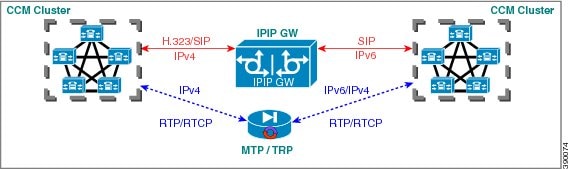
- Assisted RTCP (RTCP Keepalive): Assisted Real-time Transport Control Protocol (RTCP) enables Cisco UBE to generate RTCP keepalive reports on behalf of endpoints; however, endpoints, such as second generation Cisco IP phones (7940/7960) and Nortel Media Gateways (MG 1000T) do not generate any RTCP keepalive reports. Assisted RTCPs enable customers to use Cisco UBE to interoperate between endpoints and call control agents, such as Microsoft OCS/Lync so that RTCP reports are generated to indicate session liveliness during periods of prolonged silence, such as call hold or call on mute. The assisted RTCP feature helps Cisco UBE to generate standard RTCP keepalive reports on behalf of endpoints. RTCP reports determine the liveliness of a media session during prolonged periods of silence, such as a call on hold or a call on mute.
- SDP Pass–Through: SDP is configured to pass through transparently at the Cisco UBE, so that both the remote ends can negotiate media independently of the Cisco UBE.
SDP pass-through is addressed in two modes: For more information, refer to the “Configurable Pass-through of SIP INVITE Parameters” section in the Cisco Unified Border Element SIP Support Configuration Guide.- Flow-through—Cisco UBE plays no role in the media negotiation, it blindly terminates and re-originates the RTP packets irrespective of the content type negotiated by both the ends. This supports address hiding and NAT traversal.
- Flow-around—Cisco UBE neither plays a part in media negotiation, nor does it terminate and re-originate media. Media negotiation and media exchange is completely end-to-end.
- UDP Checksum for IPv6: User Datagram Protocol (UDP) checksums provide data integrity for addressing different functions at the source and destination of the datagram, when a UDP packet originates from an IPv6 node.
- IP Toll Fraud:The IP Toll Fraud feature checks the source IP address of the call setup before routing the call. If the source IP address does not match an explicit entry in the configuration as a trusted VoIP source, the call is rejected. For more information, refer to the “Configuring Toll Fraud Prevention” section in the Cisco Unified Communications Manager Express System Administrator Guide.
- RTP Port Range: Provides the capability where the port range is managed per IP address range. This features solves the problem of limited number of rtp ports for more than 4000 calls. It enables combination of an IP address and a port as a unique identification for each call.
- Hold/Resume: Cisco UBE supports supplementary services such as Call Hold and Resume. An active call can be put in held state and later the call can be resumed. For more information, refer to the “Configuring Call Hold/Resume for Shared Lines for Analog Ports” section in Supplementary Services Features for FXS Ports on Cisco IOS Voice Gateways Configuration Guide.
- Call Transfer (re-INVITE, REFER): Call transfer is used for conference calling, where calls can transition smoothly between multiple point-to-point links and IP level multicasting. For more information, refer to the “Configurable Pass-through of SIP INVITE Parameters” section in the Cisco Unified Border Element SIP Support Configuration Guide.
Call Forward (302 based): SIP provides a mechanism for forwarding or redirecting incoming calls. A Universal Access Servers (UAS) can redirect an incoming INVITE by responding with a 302 message (moved temporarily). For more information, refer to the “ Configuring Call Transfer and Forwarding” section in Cisco Unified Communications Manager Express System Administrator Guide.- Media Antitrombone: Antitromboning is a media signaling service in SIP entity to overcome the media loops. Media Trombones are media loops in a SIP entity due to call transfer or call forward. Media loops in Cisco UBE are not detected because Cisco UBE looks at both call types as individual calls and not calls related to each other. Antitrombone service has to be enabled only when no media interworking is required in both legs. Media antitrombone is supported only when the initial call is in IPv4 to IPv4 or IPv6 to IPv6 mode only. For more information, refer to the “Configuring Media Antitrombone” section in the Cisco Unified Border Element Protocol-Independent Features and Setup Configuration Guide.
- RE-INVITE Consumption: The Re-INVITE/UPDATE consumption feature helps to avoid interoperability issues by consuming the mid-call Re-INVITEs/UPDATEs from Cisco UBE. As Cisco UBE blocks RE-INVITE / mid-call UPDATE, remote participant is not made aware of the SDP changes, such as Call Hold, Call Resume, and Call transfer. For more information, refer to the “Cisco UBE Mid-call Re-INVITE/UPDATE Consumption” section in the Cisco Unified Border Element Protocol-Independent Features and Setup Configuration Guide.
- Address Hiding: The address hiding feature ensures that the Cisco UBE is the only point of signaling and media entry/exit in all scenarios. When you configure address-hiding, signaling and media peer addresses are also hidden from the endpoints, especially for supplementary services when the Cisco UBE passes REFER/3xx messages from one leg to the other. For more information, refer to the “Configuring Address Hiding” section in the SIP-to-SIP Connections on a Cisco Unified Border Element.
- Header Passing: Header Pass through enables header passing for SIP INVITE, SUBSCRIBE and NOTIFY messages; disabling header passing affects only incoming INVITE messages. Enabling header passing results in a slight increase in memory and CPU utilization. For more information, refer to the “SIP-to-SIP Connections on a Cisco Unified Border Element” section in the SIP-to-SIPConnections on Cisco Unified Border Element.
- Refer–To Passing: The Refer-to Passing feature is enabled when you configure refer-to-passing in Refer Pass through mode and the supplementary service SIP Refer is already configured. This enables the received refer-to header in Refer Pass through mode to move to the outbound leg without any modification. However, when refer-to-passing is configured in Refer Consumption mode without configuring the supplementary-service SIP Refer, the received Refer-to URI is used in the request-URI of the triggered invite. For more information, refer to the “Configuring Support for Dynamic REFER Handling on Cisco UBE” section in the Cisco Unified Border Element SIP Configuration Guide.
- Error Pass-through: The SIP error message pass through feature allows a received error response from one SIP leg to pass transparently over to another SIP leg. This functionality will pass SIP error responses that are not yet supported on the Cisco UBE or will preserve the Q.850 cause code across two sip call-legs. For more information, refer to the “Configuring SIP Error Message Passthrough” section in the Cisco Unified Border Element SIP Support Configuration Guide.
SIP UPDATE Interworking: The SIP UPDATE feature allows a client to update parameters of a session (such as, a set of media streams and their codecs) but has no impact on the state of a dialog. UPDATE with SDP will support SDP Pass through, media flow around and media flow through. UPDATE with SDP support for SIP to SIP call flows is supported in the following scenarios: For more information, refer to the “SIP UPDATE Message per RFC 3311” section in the Cisco Unified Border Element SIP Support Configuration Guide.- SIP OPTIONS Ping: The OPTIONS ping mechanism monitors the status of a remote Session Initiation Protocol (SIP) server, proxy or endpoints. Cisco UBE monitors these endpoints periodically. For more information, refer to the “Cisco UBE Out-of-dialog OPTIONS Ping for Specified SIP Servers or Endpoints” section in the Configuration of SIP Trunking for PSTN Access (SIP-to-SIP) Configuration Guide.
- Configurable Error Response Code in OPTIONS Ping: Cisco UBE provides an option to configure the error response code when a dial peer is busied out because of an Out-of-Dialog OPTIONS ping failure. For more information, refer to the “Configuring an Error Response Code upon an Out-of-Dialog OPTIONS Ping Failure” section in the Cisco Unified Border Element SIP Support Configuration Guide.
- SIP Profiles: SIP profiles create a set of provisioning properties that you can apply to SIP trunk.
- Dynamic Payload Type Interworking (DTMF and Codec Packets): The Dynamic Payload Type Interworking for DTMF and Codec Packets for SIP-to-SIP Calls feature provides dynamic payload type interworking for dual tone multifrequency (DTMF) and codec packets for Session Initiation Protocol (SIP) to SIP calls. The Cisco UBE interworks between different dynamic payload type values across the call legs for the same codec. Also, Cisco UBE supports any payload type value for audio, video, named signaling events (NSEs), and named telephone events (NTEs) in the dynamic payload type range 96 to 127. For more information, refer to the “Dynamic Payload Type Interworking for DTMF and Codec Packets for SIP-to-SIP Calls” section in the Cisco Unified Border Element (Enterprise) Protocol-Independent Features and Setup Configuration Guide.
- Audio Transcoding using Local Transcoding Interface (LTI): Local Transcoding Interface (LTI) is an interface created to remove the requirement of SCCP client for Cisco UBE transcoding. For information, refer to Cisco Unified Border Element 9.0 Local Transcoding Interface (LTI).
- Voice Class Codec (VCC) with or without Transcoding: The Voice Class Codec feature supports basic and all Re-Invite based supplementary services like call-hold/resume, call forward, call transfer, where if any mid-call codec changes, Cisco UBE inserts/removes/modifies the transcoder as needed. Support for negotiation of an Audio Codec on each leg of a SIP–SIP call on the Cisco UBE feature supports negotiation of an audio codec using the Voice Class Codec (VCC) infrastructure on Cisco UBE. VCC supports SIP-SIP calls on Cisco UBE and allows mid-call codec change for supplementary services.
How to Configure VoIP for IPv6
- Configuring VoIP for IPv6
- RTCP Pass-Through
- Configuring the Source IPv6 Address of Signaling and Media Packets
- Configuring the SIP Server
- Configuring the Session Target
- Configuring SIP Register Support
- Configuring Outbound Proxy Server Globally on a SIP Gateway
- Configuring UDP Checksum
- Configuring IP Toll Fraud
- Configuring the RTP Port Range for an Interface
- Configuring Message Waiting Indicator Server Address
- Configuring Voice Ports
- Configuring Cisco UBE Mid-call Re-INVITE Consumption
- Configuring H.323 IPv4-to-SIPv6 Connections in a Cisco UBE
Configuring VoIP for IPv6
SIP is a simple, ASCII-based protocol that uses requests and responses to establish communication among the various components in the network and to ultimately establish a conference between two or more endpoints.
Users in a SIP network are identified by unique SIP addresses. A SIP address is similar to an e-mail address and is in the format of sip:userID@gateway.com. The user ID can be either a username or an E.164 address. The gateway can be either a domain (with or without a hostname) or a specific Internet IPv4 or IPv6 address.
A SIP trunk can operate in one of three modes: SIP trunk in IPv4-only mode, SIP trunk in IPv6-only mode, and SIP trunk in dual-stack mode, which supports both IPv4 and IPv6.
A SIP trunk uses the Alternative Network Address Transport (ANAT) mechanism to exchange multiple IPv4 and IPv6 media addresses for the endpoints in a session. ANAT is automatically enabled on SIP trunks in dual-stack mode. The ANAT Session Description Protocol (SDP) grouping framework allows user agents (UAs) to include both IPv4 and IPv6 addresses in their SDP session descriptions. The UA is then able to use any of its media addresses to establish a media session with a remote UA.
A Cisco Unified Border Element can interoperate between H.323/SIP IPv4 and SIP IPv6 networks in media flow-through mode. In media flow-through mode, both signaling and media flows through the Cisco Unified Border Element, and the Cisco Unified Border Element performs both signaling and media interoperation between H.323/SIP IPv4 and SIP IPv6 networks (see the figure below).
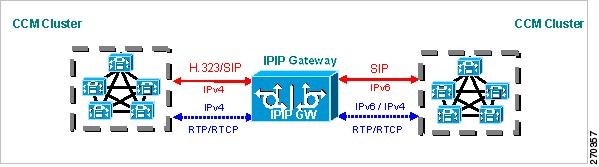
- Shutting Down or Enabling VoIPv6 Service on Cisco Gateways
- Shutting Down or Enabling VoIPv6 Submodes on Cisco Gateways
- Configuring the Protocol Mode of the SIP Stack
- Verifying SIP Gateway Status
Shutting Down or Enabling VoIPv6 Service on Cisco Gateways
1.
enable
2.
configure
terminal
3.
voice
service
voip
4.
shutdown
[
forced]
DETAILED STEPS
Shutting Down or Enabling VoIPv6 Submodes on Cisco Gateways
1.
enable
2.
configure
terminal
3.
voice
service
voip
4.
sip
5.
call
service
stop
[forced]
DETAILED STEPS
Configuring the Protocol Mode of the SIP Stack
SIP service should be shut down before configuring the protocol mode. After configuring the protocol mode as IPv6, IPv4, or dual-stack, SIP service should be reenabled.
1.
enable
2.
configure
terminal
3.
sip-ua
4.
protocol
mode
ipv4
|
ipv6 |
dual-stack [preference {ipv4 |
ipv6}]}
DETAILED STEPS
Example: Configuring the SIP Trunk
This example shows how to configure the SIP trunk to use dual-stack mode, with IPv6 as the preferred mode. The SIP service must be shut down before any changes are made to protocol mode configuration.
Device(config)# sip-ua
Device(config-sip-ua)# protocol mode dual-stack preference ipv6
Disabling ANAT Mode
ANAT is automatically enabled on SIP trunks in dual-stack mode. Perform this task to disable ANAT in order to use a single-stack mode.
1.
enable
2.
configure
terminal
3.
voice
service
voip
4.
sip
5.
no
anat
DETAILED STEPS
Verifying SIP Gateway Status
To verify the status of SIP Gateway, use the following commands
1.
show
sip-ua
calls
2.
show
sip-ua
connections
3.
show
sip-ua
status
DETAILED STEPS
RTCP Pass-Through
IPv4 and IPv6 addresses embedded within RTCP packets (for example, RTCP CNAME) are passed on to Cisco UBE without being masked. These addresses are masked on the Cisco UBE ASR 1000.
The Cisco UBE ASR 1000 does not support printing of RTCP debugs.
Note | RTCP is passed through by default. No configuration is required for RTCP pass-through. |
Configuring IPv6 Support for Cisco UBE
In Cisco UBE, IPv4-only and IPv6-only modes are not supported when endpoints are dual-stack. In this case, Cisco UBE must also be configured in dual-stack mode.
1.
enable
2.
configure terminal
3.
sip-ua
4.
protocol mode {ipv4 | ipv6 | dual-stack {preference {ipv4 | ipv6}}
5.
end
DETAILED STEPS
Verifying RTP Pass-Through
To enable RTCP packet-related debugging, use the following command
1.
debug voip rtcp packets
DETAILED STEPS
Configuring the Source IPv6 Address of Signaling and Media Packets
Users can configure the source IPv4 or IPv6 address of signaling and media packets to a specific interface’s IPv4 or IPv6 address. Thus, the address that goes out on the packet is bound to the IPv4 or IPv6 address of the interface specified with the bind command.
The bind command also can be configured with one IPv6 address to force the gateway to use the configured address when the bind interface has multiple IPv6 addresses. The bind interface should have both IPv4 and IPv6 addresses to send out ANAT.
When you do not specify a bind address or if the interface is down, the IP layer still provides the best local address.
1.
enable
2.
configure
terminal
3.
voice
service
voip
4.
sip
5.
bind
{control |
media |
all}
source
interface
interface-id [ipv6-address
ipv6-address]
DETAILED STEPS
Example: Configuring the Source IPv6 Address of Signaling and Media Packets
Device(config)# voice service voip
Device(config-voi-serv)# sip
Device(config-serv-sip)# bind control source-interface fastEthernet 0/0
Configuring the SIP Server
1.
enable
2.
configure
terminal
3.
sip-ua
4. sip-server {dns: host-name] | ipv4: ipv4–address | ipv6: [ipv6-address] :[port-nums]}
5.
keepalive
target
{{ipv4
:
address |
ipv6
:
address}[:
port] |
dns
:
hostname}
[
tcp
[tls]]
|
udp] [secondary]
DETAILED STEPS
Example: Configuring the SIP Server
Device(config)# sip-ua
Device(config-sip-ua)# sip-server ipv6: 2001:DB8:0:0:8:800:200C:417A
Configuring the Session Target
1.
enable
2.
configure
terminal
3.
dial-peer
voice
tag
{mmoip |
pots |
vofr |
voip}
4.
destination
pattern
[+
string
T
5.
session
target
{ipv4:
destination-address|
ipv6:
[
destination-address
]|
dns
:
$s$. |
$d$. |
$e$. |
$u$.]
host-name |
enum:table -num |
loopback:rtp |
ras|
sip-server} [:
port
DETAILED STEPS
Example: Configuring the Session Target
Device(config)# dial-peer voice 29 voip
Device(config-dial-peer)# destination-pattern 7777
Device(config-dial-peer)# session target ipv6:2001:DB8:0:0:8:800:200C:417A
Configuring SIP Register Support
1.
enable
2.
configure
terminal
3.
sip-ua
4.
registrar
{dns:
address
|
ipv4:
destination-address [:
port] |
ipv6:
destination-address
:
port] }
aor-domain
expires
seconds [tcp
tls] ]
type [secondary] [scheme
string]
5.
retry
register retries
6.
timers
register milliseconds
DETAILED STEPS
Example: Configuring SIP Register Support
Device(config)# sip-ua
Device(config-sip-ua)# registrar ipv6: 2001:DB8:0:0:8:800:200C:417A expires 3600 secondary
Device(config-sip-ua)# retry register 10
Device((config-sip-ua)# timers register 500
Configuring Outbound Proxy Server Globally on a SIP Gateway
1.
enable
2.
configure
terminal
3.
voice
service
voip
4.
sip
5.
outbound-proxy
{ipv4:
ipv4-address |
ipv6:
ipv6-address |
dns:
host
:
domain} [:
port-number]
DETAILED STEPS
Configuring UDP Checksum
1.
enable
2.
configure
terminal
3.
ipv6 udp checksum [process | cef | none]
4.
exit
DETAILED STEPS
Configuring IP Toll Fraud
1.
enable
2.
configure terminal
3.
voice
service
voip
4.
ip address
trusted list
5.
ipv6 X:X:X:X::X
6.
end
DETAILED STEPS
Configuring the RTP Port Range for an Interface
1.
enable
2.
configure
terminal
3.
voice
service
voip
4.
allow-connections
sip
to
sip
5.
media-address
range range
6.
rtp-port
range range
7.
exit
8.
dial-peer
voice tag voip
9.
voice–class sip bind media source–interface interface
10.
end
DETAILED STEPS
Configuring Message Waiting Indicator Server Address
1.
enable
2.
configure
terminal
3.
sip-ua
4. mwi-server {ipv4: destination-address | ipv6: destination-address | dns: host–name} peer-tag [output-dial-peer-tag]
5.
end
DETAILED STEPS
| Command or Action | Purpose | |
|---|---|---|
| Step 1 |
enable
Example: Device> enable |
Enables privileged EXEC mode. |
| Step 2 |
configure
terminal
Example: Device# configure terminal |
Enters global configuration mode. |
| Step 3 |
sip-ua
Example: Device(config)# sip-ua |
Enters SIP user-agent configuration mode. |
| Step 4 | mwi-server
{ipv4: destination-address | ipv6: destination-address | dns: host–name} peer-tag [output-dial-peer-tag] Example: Device(config-sip-ua)# mwi-server ipv6 2001:DB8::/48 peer-tag 3 |
|
| Step 5 |
end
Example: Device(config-sip-ua)# end |
Exits SIP user-agent configuration mode and returns to global configuration mode. |
Configuring Voice Ports
1.
enable
2.
configure
terminal
3.
voice-port port number
4.
vmwi [fsk | dc-voltage]
5.
end
DETAILED STEPS
| Command or Action | Purpose | |
|---|---|---|
| Step 1 |
enable
Example: Device> enable |
Enables privileged EXEC mode. |
| Step 2 |
configure
terminal
Example: Device# configure terminal |
Enters global configuration mode. |
| Step 3 |
voice-port port number
Example: Device(config)# voice-port 3 |
Enters voiceport configuration mode. |
| Step 4 | vmwi [fsk | dc-voltage] Example: Device(config-voiceport)# vmwi fsk |
Enables either Frequency–Shift Keying (FSK) visible message waiting indication (VMWI) or DC voltage on a Cisco VG224 onboard analog FXS voice port. VMWI is configured automatically when MWI is configured on the voice port. |
| Step 5 |
end
Example: Device(config-voiceport)# end |
Exits voice-port configuration mode and returns to privileged EXEC mode. |
Configuring Cisco UBE Mid-call Re-INVITE Consumption
Configuring Passthrough SIP Messages at the Global Level
Perform this task to configure passthrough SIP messages at the global level:
1.
enable
2.
configure
terminal
3.
voice
service
voip
4.
sip
5.
midcall-signaling passthru
media-change
6.
exit
DETAILED STEPS
| Command or Action | Purpose | |
|---|---|---|
| Step 1 |
enable
Example: Device> enable |
Enables privileged EXEC mode. |
| Step 2 |
configure
terminal Example: Device# configure terminal |
Enters global configuration mode. |
| Step 3 |
voice
service
voip
Example: Device(config)# voice service voip |
Enters voice service VoIP configuration mode. |
| Step 4 |
sip
Example: Device(conf-voi-serv)# sip |
Enters voice service VoIP SIP configuration mode. |
| Step 5 |
midcall-signaling passthru
media-change
Example: Device(conf-serv-sip)# midcall-signaling passthru media-change | Passes through SIP messages that involve media change. |
| Step 6 |
exit
Example: Device(conf-serv-sip)# exit |
Exits voice service SIP configuration mode and returns to global configuration mode. |
Configuring Passthrough SIP Messages at Dial Peer Level
Perform this task to configure passthrough SIP messages at the dial-peer level. You need to perform this task at the dial-peer level to consume all media-related mid-call Re-INVITEs/UPDATEs.
Note | If the Cisco UBE Mid-call Re-INVITE/UPDATE consumption feature is configured on global and dial-peer level, dial-peer level takes precedence. |
1.
enable
2.
configure
terminal
3.
dial-peer
voice
dial-peer
tag
voip
4.
voice-class sip mid-call signaling passthru
media-change
5.
exit
DETAILED STEPS
| Command or Action | Purpose | |
|---|---|---|
| Step 1 |
enable
Example: Device> enable |
Enables privileged EXEC mode. |
| Step 2 |
configure
terminal
Example: Device# configure terminal |
Enters global configuration mode. |
| Step 3 |
dial-peer
voice
dial-peer
tag
voip
Example: Device(config)# dial-peer voice 2 voip | Enters dial-peer voice configuration mode. |
| Step 4 |
voice-class sip mid-call signaling passthru
media-change
Example: Device(config-dial-peer)# voice-class sip mid-call signaling passthru media-change | Passes through SIP messages that involve media change. |
| Step 5 |
exit
Example: Device(config-dial-peer)# exit |
Exits dial-peer voice configuration mode and returns to global configuration mode. |
Configuring H.323 IPv4-to-SIPv6 Connections in a Cisco UBE
An organization with an IPv4 network can deploy a Cisco UBE on the boundary to connect with the service provider’s IPv6 network (see the figure below).
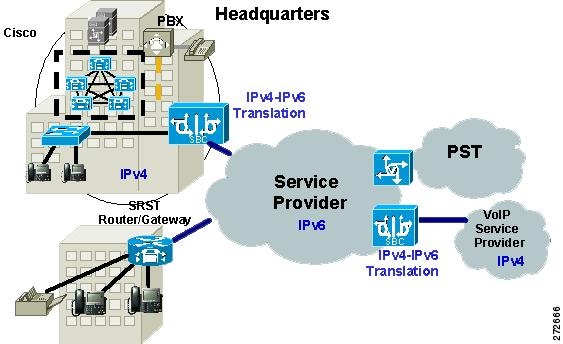
A Cisco UBE can interoperate between H.323/SIP IPv4 and SIP IPv6 networks in media flow-through mode. In media flow-through mode, both signaling and media flows through the Cisco UBE, and the Cisco UBE performs both signaling and media interoperation between H.323/SIP IPv4 and SIP IPv6 networks (see the figure below).
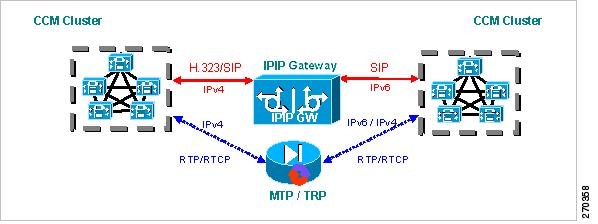
The Cisco UBE feature adds IPv6 capability to existing VoIP features. This feature adds dual-stack support on voice gateways and MTP, IPv6 support for SIP trunks, and SCCP-controlled analog voice gateways. In addition, the SBC functionality of connecting SIP IPv4 or H.323 IPv4 network to a SIP IPv6 network is implemented on an Cisco UBE to facilitate migration from VoIPv4 to VoIPv6.
Cisco UBE must be configured in IPv6-only or dual-stack mode to support IPv6 calls.
Note | A Cisco UBE interoperates between H.323/SIP IPv4 and SIP IPv6 networks only in media flow-through mode. |
1.
enable
2.
configure
terminal
3.
voice
service
voip
4.
allow-connections
from
type
to
to
type
DETAILED STEPS
| Command or Action | Purpose | |
|---|---|---|
| Step 1 |
enable
Example: Device> enable |
Enables privileged EXEC mode. |
| Step 2 |
configure
terminal
Example: Device# configure terminal |
Enters global configuration mode. |
| Step 3 |
voice
service
voip
Example: Device(config)# voice service voip |
Enters voice service VoIP configuration mode. |
| Step 4 |
allow-connections
from
type
to
to
type
Example: Device(config-voi-serv)# allow-connections h323 to sip |
Allows connections between specific types of endpoints in a VoIPv6 network. Arguments are as follows: |
Example: Configuring H.323 IPv4-to-SIPv6 Connections in a Cisco UBE
Device(config)# voice service voip
Device(config-voi-serv)# allow-connections h323 to sip
Configuration Examples for VoIP over IPv6
Example: Configuring the SIP Trunk
This example shows how to configure the SIP trunk to use dual-stack mode, with IPv6 as the preferred mode. The SIP service must be shut down before any changes are made to protocol mode configuration.
Device(config)# sip-ua
Device(config-sip-ua)# protocol mode dual-stack preference ipv6
Troubleshooting Tips for VoIP for IPv6
Media Flow-Through
To enable all Session Initiation Protocol (SIP)-related debugging, use the debug ccsip all command in privileged EXEC mode.
To trace the execution path through the call control application programming interface (CCAPI), use the debug voip ccapi inout command.
Media Flow-Around
To enable all Session Initiation Protocol (SIP)-related debugging, use the debug ccsip all command.
To trace the execution path through the call control application programming interface (CCAPI), use the debug voip ccapi inout command.
SDP Pass-Through
To enable all Session Initiation Protocol (SIP)-related debugging (when the call is active in Pass through mode), use the debug ccsip all command.
RTP Port Range
To enable all Session Initiation Protocol (SIP)-related debugging, use the debug ccsip all command.
To enable debugging for Real-Time Transport Protocol (RTP) named event packets, use the debug voip rtp command.
VMWI SIP
To collect debug information only for signaling events, use the debug vpm signal command.
To show all Session Initiation Protocol (SIP) Service Provider Interface (SPI) message tracing, use the debug ccsip messages command.
Verifying and Troubleshooting Tips
Verifying Cisco UBE ANAT Call Flows
To verify that media settings are enabled in the media flowthrough and media flow-around feature, use the following commands:
1.
show call active voice brief
2.
show call active voice compact
3.
show voip rtp connections
DETAILED STEPS
| Step 1 | show call active voice brief Example: Device# show call active voice brief
<ID>: <CallID> <start>ms.<index> (<start>) +<connect> pid:<peer_id> <dir> <addr> <state>
dur hh:mm:ss tx:<packets>/<bytes> rx:<packets>/<bytes> dscp:<packets violation> media:<packets violation> audio tos:<audio tos value> video tos:<video tos value>
IP <ip>:<udp> rtt:<time>ms pl:<play>/<gap>ms lost:<lost>/<early>/<late>
delay:<last>/<min>/<max>ms <codec> <textrelay> <transcoded
media inactive detected:<y/n> media cntrl rcvd:<y/n> timestamp:<time>
long duration call detected:<y/n> long duration call duration :<sec> timestamp:<time>
LostPacketRate:<%> OutOfOrderRate:<%>
MODEMPASS <method> buf:<fills>/<drains> loss <overall%> <multipkt>/<corrected>
last <buf event time>s dur:<Min>/<Max>s
FR <protocol> [int dlci cid] vad:<y/n> dtmf:<y/n> seq:<y/n>
<codec> (payload size)
ATM <protocol> [int vpi/vci cid] vad:<y/n> dtmf:<y/n> seq:<y/n>
<codec> (payload size)
Tele <int> (callID) [channel_id] tx:<tot>/<v>/<fax>ms <codec> noise:<l> acom:<l> i/o:<l>/<l> dBm
MODEMRELAY info:<rcvd>/<sent>/<resent> xid:<rcvd>/<sent> total:<rcvd>/<sent>/<drops>
speeds(bps): local <rx>/<tx> remote <rx>/<tx>
Proxy <ip>:<audio udp>,<video udp>,<tcp0>,<tcp1>,<tcp2>,<tcp3> endpt: <type>/<manf>
bw: <req>/<act> codec: <audio>/<video>
tx: <audio pkts>/<audio bytes>,<video pkts>/<video bytes>,<t120 pkts>/<t120 bytes>
rx: <audio pkts>/<audio bytes>,<video pkts>/<video bytes>,<t120 pkts>/<t120 bytes>
Telephony call-legs: 0
SIP call-legs: 2
H323 call-legs: 0
Call agent controlled call-legs: 0
SCCP call-legs: 0
Multicast call-legs: 0
Total call-legs: 2
0 : 987 361904110ms.1 (16:01:10.557 IST Tue May 14 2013) +530 pid:1 Answer 1005 connected
dur 00:00:56 tx:1082/173120 rx:1141/182560 dscp:0 media:0 audio tos:0xB8 video tos:0x0
IP 2001:1111:2222:3333:4444:5555:6666:1012:38356 SRTP: off rtt:0ms pl:0/0ms lost:0/0/0 delay:0/0/0ms g711ulaw TextRelay: off Transcoded: No
media inactive detected:n media contrl rcvd:n/a timestamp:n/a
long duration call detected:n long duration call duration:n/a timestamp:n/a
LostPacketRate:0.00 OutOfOrderRate:0.00
0 : 988 361904120ms.1 (16:01:10.567 IST Tue May 14 2013) +510 pid:2 Originate 2005 connected
dur 00:00:56 tx:1141/182560 rx:1082/173120 dscp:0 media:0 audio tos:0xB8 video tos:0x0
IP 2001:1111:2222:3333:4444:5555:6666:1012:26827 SRTP: off rtt:0ms pl:0/0ms lost:0/0/0 delay:0/0/0ms g711ulaw TextRelay: off Transcoded: No
media inactive detected:n media contrl rcvd:n/a timestamp:n/a
long duration call detected:n long duration call duration:n/a timestamp:n/a
LostPacketRate:0.00 OutOfOrderRate:0.00
Telephony call-legs: 0
SIP call-legs: 2
H323 call-legs: 0
Call agent controlled call-legs: 0
SCCP call-legs: 0
Multicast call-legs: 0
Total call-legs: 2
-------------------------------------------------------------------------
|
| Step 2 | show call active voice compact Example:
Device# show call active voice compact

 <callID>  A/O FAX T<sec> Codec       type        Peer Address       IP R<ip>:<udp>
Total call-legs: 2
       987 ANS     T61    g711ulaw    VOIP        P1005 2001:......:1012:38356
       988 ORG     T61    g711ulaw    VOIP        P2005 2001:......:1012:26827
|
| Step 3 | show voip rtp connections Example:
Device# show voip rtp connections

VoIP RTP Port Usage Information:
Max Ports Available: 24273, Ports Reserved: 303, Ports in Use: 2
Port range not configured, Min: 16384, Max: 32767
                                                Ports       Ports       Ports
Media-Address Range                             Available   Reserved    In-use

Default Address-Range                           8091        101         0
2001::
2002::                                          8091        101         1
9.0.0.0              10.0.0.0                   8091        101         1
Found 2 active RTP connections
|
Verifying and Troubleshooting Cisco UBE ANAT Flow-Through Call
To verify and troubleshoot Cisco UBE ANAT Flow-Through calls, use the following commands:
1.
debug ccsip message
2.
show voip rtp connections
DETAILED STEPS
| Step 1 | debug ccsip message Example: Device# show logging *Jun 7 09:17:41.135: //-1/xxxxxxxxxxxx/SIP/Msg/ccsipDisplayMsg: Received: INVITE sip:6000@[2001:DB8:C18:2:223:4FF:FEAC:4540]:5060 SIP/2.0 Via: SIP/2.0/UDP [2001:DB8:C18:2:219:2FFF:FE89:7928]:5060;branch=z9hG4bK1CA8CD Remote-Party-ID: <sip:1001@[2001:DB8:C18:2:219:2FFF:FE89:7928]>;party=calling;screen=no;privacy=off From: <sip:1001@[2001:DB8:C18:2:219:2FFF:FE89:7928]>;tag=6EDAC1D0-F25 To: <sip:6000@[2001:DB8:C18:2:223:4FF:FEAC:4540]> Date: Thu, 07 Jun 2012 10:47:17 GMT Call-ID: FC36AC29-AFC411E1-8725FA39-34B6D876@2001:DB8:C18:2:219:2FFF:FE89:7928 Supported: 100rel,timer,resource-priority,replaces Require: sdp-anat Min-SE: 1800 Cisco-Guid: 4231321369-2948862433-2168455193-0797538600 User-Agent: Cisco-SIPGateway/IOS-12.x Allow: INVITE, OPTIONS, BYE, CANCEL, ACK, PRACK, UPDATE, REFER, SUBSCRIBE, NOTIFY, INFO, REGISTER CSeq: 101 INVITE Max-Forwards: 70 Timestamp: 1339066037 Contact: <sip:1001@[2001:DB8:C18:2:219:2FFF:FE89:7928]:5060> Expires: 180 Allow-Events: telephone-event Content-Type: application/sdp Content-Disposition: session;handling=required Content-Length: 441 v=0 o=CiscoSystemsSIP-GW-UserAgent 4604 5397 IN IP6 2001:DB8:C18:2:219:2FFF:FE89:7928 s=SIP Call c=IN IP4 9.44.30.10 t=0 0 a=group:ANAT 1 2 m=audio 16970 RTP/AVP 18 19 c=IN IP4 9.44.30.10 a=mid:1 a=rtpmap:18 G729/8000 a=fmtp:18 annexb=no a=rtpmap:19 CN/8000 a=ptime:20 m=audio 17066 RTP/AVP 18 19 c=IN IP6 2001:DB8:C18:2:219:2FFF:FE89:7928 a=mid:2 a=rtpmap:18 G729/8000 a=fmtp:18 annexb=no a=rtpmap:19 CN/8000 a=ptime:20 *Jun 7 09:17:41.159: //31/FC34D7198140/SIP/Msg/ccsipDisplayMsg: Sent: SIP/2.0 100 Trying Via: SIP/2.0/UDP [2001:DB8:C18:2:219:2FFF:FE89:7928]:5060;branch=z9hG4bK1CA8CD From: <sip:1001@[2001:DB8:C18:2:219:2FFF:FE89:7928]>;tag=6EDAC1D0-F25 To: <sip:6000@[2001:DB8:C18:2:223:4FF:FEAC:4540]> Date: Thu, 07 Jun 2012 09:17:41 GMT Call-ID: FC36AC29-AFC411E1-8725FA39-34B6D876@2001:DB8:C18:2:219:2FFF:FE89:7928 Timestamp: 1339066037 CSeq: 101 INVITE Allow-Events: telephone-event Server: Cisco-SIPGateway/IOS-15.2.20120528.102328. Content-Length: 0 *Jun 7 09:17:41.159: //32/FC34D7198140/SIP/Msg/ccsipDisplayMsg: Sent: INVITE sip:6000@9.44.30.11:5060 SIP/2.0 Via: SIP/2.0/UDP 9.44.30.14:5060;branch=z9hG4bK2688E Remote-Party-ID: <sip:1001@9.44.30.14>;party=calling;screen=no;privacy=off From: <sip:1001@9.44.30.14>;tag=6D0FC0-1428 To: <sip:6000@9.44.30.11> Date: Thu, 07 Jun 2012 09:17:41 GMT Call-ID: 7780227E-AFB811E1-8060F4DD-5665AA1B@9.44.30.14 Supported: timer,resource-priority,replaces Require: sdp-anat Min-SE: 1800 Cisco-Guid: 4231321369-2948862433-2168455193-0797538600 User-Agent: Cisco-SIPGateway/IOS-15.2.20120528.102328. Allow: INVITE, OPTIONS, BYE, CANCEL, ACK, PRACK, UPDATE, REFER, SUBSCRIBE, NOTIFY, INFO, REGISTER CSeq: 101 INVITE Timestamp: 1339060661 Contact: <sip:1001@9.44.30.14:5060> Expires: 180 Allow-Events: telephone-event Max-Forwards: 69 Content-Type: application/sdp Content-Disposition: session;handling=required Phone is offhook Content-Length: 437 v=0 o=CiscoSystemsSIP-GW-UserAgent 3184 51 IN IP4 9.44.30.14 s=SIP Call c=IN IP6 2001:DB8:C18:2:223:4FF:FEAC:4540 t=0 0 a=group:ANAT 1 2 m=audio 16438 RTP/AVP 18 19 c=IN IP6 2001:DB8:C18:2:223:4FF:FEAC:4540 a=mid:1 a=rtpmap:18 G729/8000 a=fmtp:18 annexb=no a=rtpmap:19 CN/8000 a=ptime:20 m=audio 16440 RTP/AVP 18 19 c=IN IP4 9.44.30.14 a=mid:2 a=rtpmap:18 G729/8000 a=fmtp:18 annexb=no a=rtpmap:19 CN/8000 a=ptime:20 *Jun 7 09:17:41.179: //32/FC34D7198140/SIP/Msg/ccsipDisplayMsg: Received: SIP/2.0 100 Trying Via: SIP/2.0/UDP 9.44.30.14:5060;branch=z9hG4bK2688E From: <sip:1001@9.44.30.14>;tag=6D0FC0-1428 To: <sip:6000@9.44.30.11> Date: Thu, 07 Jun 2012 10:40:14 GMT Call-ID: 7780227E-AFB811E1-8060F4DD-5665AA1B@9.44.30.14 Timestamp: 1339060661 CSeq: 101 INVITE Allow-Events: telephone-event Server: Cisco-SIPGateway/IOS-15.2.2.5.T Content-Length: 0 *Jun 7 09:17:41.203: //32/FC34D7198140/SIP/Msg/ccsipDisplayMsg: Received: SIP/2.0 180 Ringing Via: SIP/2.0/UDP 9.44.30.14:5060;branch=z9hG4bK2688E From: <sip:1001@9.44.30.14>;tag=6D0FC0-1428 To: <sip:6000@9.44.30.11>;tag=93D1F9D4-9E2 Date: Thu, 07 Jun 2012 10:40:14 GMT Call-ID: 7780227E-AFB811E1-8060F4DD-5665AA1B@9.44.30.14 Timestamp: 1339060661 CSeq: 101 INVITE Allow: INVITE, OPTIONS, BYE, CANCEL, ACK, PRACK, UPDATE, REFER, SUBSCRIBE, NOTIFY, INFO, REGISTER Allow-Events: telephone-event Remote-Party-ID: <sip:6000@9.44.30.11>;party=called;screen=no;privacy=off Contact: <sip:6000@9.44.30.11:5060> Server: Cisco-SIPGateway/IOS-15.2.2.5.T Content-Length: 0 *Jun 7 09:17:41.207: //31/FC34D7198140/SIP/Msg/ccsipDisplayMsg: Sent: SIP/2.0 180 Ringing Via: SIP/2.0/UDP [2001:DB8:C18:2:219:2FFF:FE89:7928]:5060;branch=z9hG4bK1CA8CD From: <sip:1001@[2001:DB8:C18:2:219:2FFF:FE89:7928]>;tag=6EDAC1D0-F25 To: <sip:6000@[2001:DB8:C18:2:223:4FF:FEAC:4540]>;tag=6D0FF4-14D3 Date: Thu, 07 Jun 2012 09:17:41 GMT Call-ID: FC36AC29-AFC411E1-8725FA39-34B6D876@2001:DB8:C18:2:219:2FFF:FE89:7928 Timestamp: 1339066037 CSeq: 101 INVITE Allow: INVITE, OPTIONS, BYE, CANCEL, ACK, PRACK, UPDATE, REFER, SUBSCRIBE, NOTIFY, INFO, REGISTER Allow-Events: telephone-event Remote-Party-ID: <sip:6000@[2001:DB8:C18:2:223:4FF:FEAC:4540]>;party=called;screen=no;privacy=off Contact: <sip:6000@[2001:DB8:C18:2:223:4FF:FEAC:4540]:5060> Server: Cisco-SIPGateway/IOS-15.2.20120528.102328. Content-Length: 0 *Jun 7 09:17:41.219: //32/FC34D7198140/SIP/Msg/ccsipDisplayMsg: Received: SIP/2.0 200 OK Via: SIP/2.0/UDP 9.44.30.14:5060;branch=z9hG4bK2688E From: <sip:1001@9.44.30.14>;tag=6D0FC0-1428 To: <sip:6000@9.44.30.11>;tag=93D1F9D4-9E2 Date: Thu, 07 Jun 2012 10:40:14 GMT Call-ID: 7780227E-AFB811E1-8060F4DD-5665AA1B@9.44.30.14 Timestamp: 1339060661 CSeq: 101 INVITE Allow: INVITE, OPTIONS, BYE, CANCEL, ACK, PRACK, UPDATE, REFER, SUBSCRIBE, NOTIFY, INFO, REGISTER Allow-Events: telephone-event Remote-Party-ID: <sip:6000@9.44.30.11>;party=called;screen=no;privacy=off Contact: <sip:6000@9.44.30.11:5060> Supported: replaces Require: sdp-anat Server: Cisco-SIPGateway/IOS-15.2.2.5.T Supported: timer Content-Type: application/sdp Content-Disposition: session;handling=required Content-Length: 435 v=0 o=CiscoSystemsSIP-GW-UserAgent 8213 2783 IN IP4 9.44.30.11 s=SIP Call c=IN IP6 2001:DB8:C18:2:217:59FF:FEDE:8898 t=0 0 a=group:ANAT 1 m=audio 17200 RTP/AVP 18 19 c=IN IP6 2001:DB8:C18:2:217:59FF:FEDE:8898 a=mid:1 a=rtpmap:18 G729/8000 a=fmtp:18 annexb=no a=rtpmap:19 CN/8000 a=ptime:20 m=audio 0 RTP/AVP 18 19 c=IN IP4 9.44.30.11 a=mid:2 a=rtpmap:18 G729/8000 a=fmtp:18 annexb=no a=rtpmap:19 CN/8000 a=ptime:20 *Jun 7 09:17:41.227: //32/FC34D7198140/SIP/Msg/ccsipDisplayMsg: Sent: ACK sip:6000@9.44.30.11:5060 SIP/2.0 Via: SIP/2.0/UDP 9.44.30.14:5060;branch=z9hG4bK27145B From: <sip:1001@9.44.30.14>;tag=6D0FC0-1428 To: <sip:6000@9.44.30.11>;tag=93D1F9D4-9E2 Date: Thu, 07 Jun 2012 09:17:41 GMT Call-ID: 7780227E-AFB811E1-8060F4DD-5665AA1B@9.44.30.14 Max-Forwards: 70 CSeq: 101 ACK Allow-Events: telephone-event Content-Length: 0 *Jun 7 09:17:41.235: //31/FC34D7198140/SIP/Msg/ccsipDisplayMsg: Sent: SIP/2.0 200 OK Via: SIP/2.0/UDP [2001:DB8:C18:2:219:2FFF:FE89:7928]:5060;branch=z9hG4bK1CA8CD From: <sip:1001@[2001:DB8:C18:2:219:2FFF:FE89:7928]>;tag=6EDAC1D0-F25 To: <sip:6000@[2001:DB8:C18:2:223:4FF:FEAC:4540]>;tag=6D0FF4-14D3 Date: Thu, 07 Jun 2012 09:17:41 GMT Call-ID: FC36AC29-AFC411E1-8725FA39-34B6D876@2001:DB8:C18:2:219:2FFF:FE89:7928 Timestamp: 1339066037 CSeq: 101 INVITE Allow: INVITE, OPTIONS, BYE, CANCEL, ACK, PRACK, UPDATE, REFER, SUBSCRIBE, NOTIFY, INFO, REGISTER Allow-Events: telephone-event Remote-Party-ID: <sip:6000@[2001:DB8:C18:2:223:4FF:FEAC:4540]>;party=called;screen=no;privacy=off Contact: <sip:6000@[2001:DB8:C18:2:223:4FF:FEAC:4540]:5060> Supported: replaces Require: sdp-anat Server: Cisco-SIPGateway/IOS-15.2.20120528.102328. Supported: timer Content-Type: application/sdp Content-Disposition: session;handling=required Content-Length: 433 v=0 o=CiscoSystemsSIP-GW-UserAgent 8884 4606 IN IP6 2001:DB8:C18:2:223:4FF:FEAC:4540 s=SIP Call c=IN IP4 9.44.30.14 t=0 0 a=group:ANAT 1 m=audio 16436 RTP/AVP 18 19 c=IN IP4 9.44.30.14 a=mid:1 a=rtpmap:18 G729/8000 a=fmtp:18 annexb=no a=rtpmap:19 CN/8000 a=ptime:20 m=audio 0 RTP/AVP 18 19 c=IN IP6 2001:DB8:C18:2:223:4FF:FEAC:4540 a=mid:2 a=rtpmap:18 G729/8000 a=fmtp:18 annexb=no a=rtpmap:19 CN/8000 a=ptime:20 *Jun 7 09:17:41.251: //-1/xxxxxxxxxxxx/SIP/Msg/ccsipDisplayMsg: Received: ACK sip:6000@[2001:DB8:C18:2:223:4FF:FEAC:4540]:5060 SIP/2.0 Via: SIP/2.0/UDP [2001:DB8:C18:2:219:2FFF:FE89:7928]:5060;branch=z9hG4bK1CB1E77 From: <sip:1001@[2001:DB8:C18:2:219:2FFF:FE89:7928]>;tag=6EDAC1D0-F25 To: <sip:6000@[2001:DB8:C18:2:223:4FF:FEAC:4540]>;tag=6D0FF4-14D3 Date: Thu, 07 Jun 2012 10:47:17 GMT Call-ID: FC36AC29-AFC411E1-8725FA39-34B6D876@2001:DB8:C18:2:219:2FFF:FE89:7928 Max-Forwards: 70 CSeq: 101 ACK Allow-Events: telephone-event Content-Length: 0 |
| Step 2 | show voip rtp connections Example:
Device# show voip rtp connections

VoIP RTP Port Usage Information:
Max Ports Available: 8091, Ports Reserved: 101, Ports in Use: 3
Port range not configured, Min: 16384, Max: 32767

                                        Ports       Ports       Ports
Media-Address Range                     Available   Reserved    In-use

Default Address-Range                   8091        101         3

VoIP RTP active connections :
No. CallId     dstCallId  LocalRTP RmtRTP LocalIP                                RemoteIP
1     31         32         16436    16970  9.44.30.14                             9.44.30.10
2     32         31         16438    17200  2001:DB8:C18:2:223:4FF:FEAC:4540       2001:DB8:C18:2:217:59FF:FEDE:8898
Found 2 active RTP connections
|
Verifying Cisco UBE ANAT Flow-Around Calls
To verify Cisco UBE ANAT Flow-Around calls, use the debug ccsip message commands:
1.
debug ccsip message
2.
show voip rtp connections
DETAILED STEPS
| Step 1 | debug ccsip message Example: Device# Show logging *Jun 7 17:26:30.681: //-1/xxxxxxxxxxxx/SIP/Msg/ccsipDisplayMsg: Received: INVITE sip:6000@[2001:DB8:C18:2:223:4FF:FEAC:4540]:5060 SIP/2.0 Via: SIP/2.0/UDP [2001:DB8:C18:2:223:33FF:FEB1:B440]:5060;branch=z9hG4bK14B25D Remote-Party-ID: <sip:1001@[2001:DB8:C18:2:223:33FF:FEB1:B440]>;party=calling;screen=no;privacy=off From: <sip:1001@[2001:DB8:C18:2:223:33FF:FEB1:B440]>;tag=5569ECC8-C79 To: <sip:6000@[2001:DB8:C18:2:223:4FF:FEAC:4540]> Date: Thu, 07 Jun 2012 17:35:05 GMT Call-ID: F44F5437-AFFD11E1-816CD9DB-F669887E@2001:DB8:C18:2:223:33FF:FEB1:B440 Supported: 100rel,timer,resource-priority,replaces Require: sdp-anat Min-SE: 1800 Cisco-Guid: 1170397766-2953384417-2170945561-0797538600 User-Agent: Cisco-SIPGateway/IOS-12.x Allow: INVITE, OPTIONS, BYE, CANCEL, ACK, PRACK, UPDATE, REFER, SUBSCRIBE, NOTIFY, INFO, REGISTER CSeq: 101 INVITE Max-Forwards: 70 Timestamp: 1339090505 Contact: <sip:1001@[2001:DB8:C18:2:223:33FF:FEB1:B440]:5060> Expires: 180 Allow-Events: telephone-event Content-Type: application/sdp Content-Disposition: session;handling=required Content-Length: 465 v=0 o=CiscoSystemsSIP-GW-UserAgent 9103 1209 IN IP6 2001:DB8:C18:2:223:33FF:FEB1:B440 s=SIP Call c=IN IP4 9.44.30.13 t=0 0 a=group:ANAT 1 2 m=audio 18706 RTP/AVP 18 0 19 c=IN IP4 9.44.30.13 a=mid:1 a=rtpmap:18 G729/8000 a=fmtp:18 annexb=no a=rtpmap:0 PCMU/8000 a=rtpmap:19 CN/8000 m=audio 16384 RTP/AVP 18 0 19 c=IN IP6 2001:DB8:C18:2:223:33FF:FEB1:B440 a=mid:2 a=rtpmap:18 G729/8000 a=fmtp:18 annexb=no a=rtpmap:0 PCMU/8000 a=rtpmap:19 CN/8000 *Jun 7 17:26:30.705: //106/45C2DA468166/SIP/Msg/ccsipDisplayMsg: Sent: SIP/2.0 100 Trying Via: SIP/2.0/UDP [2001:DB8:C18:2:223:33FF:FEB1:B440]:5060;branch=z9hG4bK14B25D From: <sip:1001@[2001:DB8:C18:2:223:33FF:FEB1:B440]>;tag=5569ECC8-C79 To: <sip:6000@[2001:DB8:C18:2:223:4FF:FEAC:4540]> Date: Thu, 07 Jun 2012 17:26:30 GMT Call-ID: F44F5437-AFFD11E1-816CD9DB-F669887E@2001:DB8:C18:2:223:33FF:FEB1:B440 Timestamp: 1339090505 CSeq: 101 INVITE Allow-Events: telephone-event Server: Cisco-SIPGateway/IOS-15.2.20120528.102328. Content-Length: 0 *Jun 7 17:26:30.705: //107/45C2DA468166/SIP/Msg/ccsipDisplayMsg: Sent: INVITE sip:6000@9.44.30.11:5060 SIP/2.0 Via: SIP/2.0/UDP 9.44.30.14:5060;branch=z9hG4bK90BB Remote-Party-ID: <sip:1001@9.44.30.14>;party=calling;screen=no;privacy=off From: <sip:1001@9.44.30.14>;tag=22C984C-970 To: <sip:6000@9.44.30.11> Date: Thu, 07 Jun 2012 17:26:30 GMT Call-ID: C145AF07-AFFC11E1-813EF4DD-5665AA1B@9.44.30.14 Supported: timer,resource-priority,replaces Require: sdp-anat Min-SE: 1800 Cisco-Guid: 1170397766-2953384417-2170945561-0797538600 User-Agent: Cisco-SIPGateway/IOS-15.2.20120528.102328. Allow: INVITE, OPTIONS, BYE, CANCEL, ACK, PRACK, UPDATE, REFER, SUBSCRIBE, NOTIFY, INFO, REGISTER CSeq: 101 INVITE Timestamp: 1339089990 Contact: <sip:1001@9.44.30.14:5060> Expires: 180 Allow-Events: telephone-event Max-Forwards: 69 Content-Type: application/sdp Content-Disposition: session;handling=required Content-Length: 418 v=0 o=CiscoSystemsSIP-GW-UserAgent 9582 2407 IN IP4 9.44.30.14 s=SIP Call c=IN IP4 9.44.30.13 t=0 0 a=group:ANAT 1 2 m=audio 18706 RTP/AVP 18 19 c=IN IP4 9.44.30.13 a=mid:1 a=rtpmap:18 G729/8000 a=fmtp:18 annexb=no a=rtpmap:19 CN/8000 a=ptime:20 m=audio 16384 RTP/AVP 18 19 c=IN IP6 2001:DB8:C18:2:223:33FF:FEB1:B440 a=mid:2 a=rtpmap:18 G729/8000 a=fmtp:18 annexb=no a=rtpmap:19 CN/8000 a=ptime:20 *Jun 7 17:26:30.729: //107/45C2DA468166/SIP/Msg/ccsipDisplayMsg: Received: SIP/2.0 100 Trying Via: SIP/2.0/UDP 9.44.30.14:5060;branch=z9hG4bK90BB From: <sip:1001@9.44.30.14>;tag=22C984C-970 To: <sip:6000@9.44.30.11> Date: Thu, 07 Jun 2012 18:49:04 GMT Call-ID: C145AF07-AFFC11E1-813EF4DD-5665AA1B@9.44.30.14 Timestamp: 1339089990 CSeq: 101 INVITE Allow-Events: telephone-event Server: Cisco-SIPGateway/IOS-15.2.2.5.T Content-Length: 0 *Jun 7 17:26:30.753: //107/45C2DA468166/SIP/Msg/ccsipDisplayMsg: Received: SIP/2.0 180 Ringing Via: SIP/2.0/UDP 9.44.30.14:5060;branch=z9hG4bK90BB From: <sip:1001@9.44.30.14>;tag=22C984C-970 To: <sip:6000@9.44.30.11>;tag=959183D0-2073 Date: Thu, 07 Jun 2012 18:49:04 GMT Call-ID: C145AF07-AFFC11E1-813EF4DD-5665AA1B@9.44.30.14 Timestamp: 1339089990 CSeq: 101 INVITE Allow: INVITE, OPTIONS, BYE, CANCEL, ACK, PRACK, UPDATE, REFER, SUBSCRIBE, NOTIFY, INFO, REGISTER Allow-Events: telephone-event Remote-Party-ID: <sip:6000@9.44.30.11>;party=called;screen=no;privacy=off Contact: <sip:6000@9.44.30.11:5060> Server: Cisco-SIPGateway/IOS-15.2.2.5.T Content-Length: 0 *Jun 7 17:26:30.753: //106/45C2DA468166/SIP/Msg/ccsipDisplayMsg: Sent: SIP/2.0 180 Ringing Via: SIP/2.0/UDP [2001:DB8:C18:2:223:33FF:FEB1:B440]:5060;branch=z9hG4bK14B25D From: <sip:1001@[2001:DB8:C18:2:223:33FF:FEB1:B440]>;tag=5569ECC8-C79 To: <sip:6000@[2001:DB8:C18:2:223:4FF:FEAC:4540]>;tag=22C9880-150D Date: Thu, 07 Jun 2012 17:26:30 GMT Call-ID: F44F5437-AFFD11E1-816CD9DB-F669887E@2001:DB8:C18:2:223:33FF:FEB1:B440 Timestamp: 1339090505 CSeq: 101 INVITE Allow: INVITE, OPTIONS, BYE, CANCEL, ACK, PRACK, UPDATE, REFER, SUBSCRIBE, NOTIFY, INFO, REGISTER Allow-Events: telephone-event Remote-Party-ID: <sip:6000@[2001:DB8:C18:2:223:4FF:FEAC:4540]>;party=called;screen=no;privacy=off Contact: <sip:6000@[2001:DB8:C18:2:223:4FF:FEAC:4540]:5060> Server: Cisco-SIPGateway/IOS-15.2.20120528.102328. Content-Length: 0 *Jun 7 17:26:30.765: //107/45C2DA468166/SIP/Msg/ccsipDisplayMsg: Received: SIP/2.0 200 OK Via: SIP/2.0/UDP 9.44.30.14:5060;branch=z9hG4bK90BB From: <sip:1001@9.44.30.14>;tag=22C984C-970 To: <sip:6000@9.44.30.11>;tag=959183D0-2073 Date: Thu, 07 Jun 2012 18:49:04 GMT Call-ID: C145AF07-AFFC11E1-813EF4DD-5665AA1B@9.44.30.14 Timestamp: 1339089990 CSeq: 101 INVITE Allow: INVITE, OPTIONS, BYE, CANCEL, ACK, PRACK, UPDATE, REFER, SUBSCRIBE, NOTIFY, INFO, REGISTER Allow-Events: telephone-event Remote-Party-ID: <sip:6000@9.44.30.11>;party=called;screen=no;privacy=off Contact: <sip:6000@9.44.30.11:5060> Supported: replaces Require: sdp-anat Server: Cisco-SIPGateway/IOS-15.2.2.5.T Supported: timer Content-Type: application/sdp Content-Disposition: session;handling=required Content-Length: 412 v=0 o=CiscoSystemsSIP-GW-UserAgent 2764 5975 IN IP4 9.44.30.11 s=SIP Call c=IN IP4 9.44.30.11 t=0 0 a=group:ANAT 1 m=audio 17278 RTP/AVP 18 19 c=IN IP4 9.44.30.11 a=mid:1 a=rtpmap:18 G729/8000 a=fmtp:18 annexb=no a=rtpmap:19 CN/8000 a=ptime:20 m=audio 0 RTP/AVP 18 19 c=IN IP6 2001:DB8:C18:2:217:59FF:FEDE:8898 a=mid:2 a=rtpmap:18 G729/8000 a=fmtp:18 annexb=no a=rtpmap:19 CN/8000 a=ptime:20 *Jun 7 17:26:30.777: //107/45C2DA468166/SIP/Msg/ccsipDisplayMsg: Sent: ACK sip:6000@9.44.30.11:5060 SIP/2.0 Via: SIP/2.0/UDP 9.44.30.14:5060;branch=z9hG4bK91207D From: <sip:1001@9.44.30.14>;tag=22C984C-970 To: <sip:6000@9.44.30.11>;tag=959183D0-2073 Date: Thu, 07 Jun 2012 17:26:30 GMT Call-ID: C145AF07-AFFC11E1-813EF4DD-5665AA1B@9.44.30.14 Max-Forwards: 70 CSeq: 101 ACK Allow-Events: telephone-event Content-Length: 0 *Jun 7 17:26:30.785: //106/45C2DA468166/SIP/Msg/ccsipDisplayMsg: Sent: SIP/2.0 200 OK Via: SIP/2.0/UDP [2001:DB8:C18:2:223:33FF:FEB1:B440]:5060;branch=z9hG4bK14B25D From: <sip:1001@[2001:DB8:C18:2:223:33FF:FEB1:B440]>;tag=5569ECC8-C79 To: <sip:6000@[2001:DB8:C18:2:223:4FF:FEAC:4540]>;tag=22C9880-150D Date: Thu, 07 Jun 2012 17:26:30 GMT Call-ID: F44F5437-AFFD11E1-816CD9DB-F669887E@2001:DB8:C18:2:223:33FF:FEB1:B440 Timestamp: 1339090505 CSeq: 101 INVITE Allow: INVITE, OPTIONS, BYE, CANCEL, ACK, PRACK, UPDATE, REFER, SUBSCRIBE, NOTIFY, INFO, REGISTER Allow-Events: telephone-event Remote-Party-ID: <sip:6000@[2001:DB8:C18:2:223:4FF:FEAC:4540]>;party=called;screen=no;privacy=off Contact: <sip:6000@[2001:DB8:C18:2:223:4FF:FEAC:4540]:5060> Supported: replaces Require: sdp-anat Server: Cisco-SIPGateway/IOS-15.2.20120528.102328. Supported: timer Content-Type: application/sdp Content-Disposition: session;handling=required Content-Length: 421 v=0 o=CiscoSystemsSIP-GW-UserAgent 9047 741 IN IP6 2001:DB8:C18:2:223:4FF:FEAC:4540 s=SIP Call c=IN IP4 9.44.30.11 t=0 0 a=group:ANAT 1 m=audio 17278 RTP/AVP 18 19 c=IN IP4 9.44.30.11 a=mid:1 a=rtpmap:18 G729/8000 a=fmtp:18 annexb=no a=rtpmap:19 CN/8000 a=ptime:20 m=audio 0 RTP/AVP 18 19 c=IN IP6 2001:DB8:C18:2:217:59FF:FEDE:8898 a=mid:2 a=rtpmap:18 G729/8000 a=fmtp:18 annexb=no a=rtpmap:19 CN/8000 *Jun 7 17:26:30.793: //-1/xxxxxxxxxxxx/SIP/Msg/ccsipDisplayMsg: Received: ACK sip:6000@[2001:DB8:C18:2:223:4FF:FEAC:4540]:5060 SIP/2.0 Via: SIP/2.0/UDP [2001:DB8:C18:2:223:33FF:FEB1:B440]:5060;branch=z9hG4bK14C15A2 From: <sip:1001@[2001:DB8:C18:2:223:33FF:FEB1:B440]>;tag=5569ECC8-C79 To: <sip:6000@[2001:DB8:C18:2:223:4FF:FEAC:4540]>;tag=22C9880-150D Date: Thu, 07 Jun 2012 17:35:05 GMT Call-ID: F44F5437-AFFD11E1-816CD9DB-F669887E@2001:DB8:C18:2:223:33FF:FEB1:B440 Max-Forwards: 70 CSeq: 101 ACK Allow-Events: telephone-event Content-Length: 0 |
| Step 2 | show voip rtp connections Example: Device# show voip rtp connections
VoIP RTP Port Usage Information:
Max Ports Available: 8091, Ports Reserved: 101, Ports in Use: 0
Port range not configured, Min: 16384, Max: 32767
Ports Ports Ports
Media-Address Range Available Reserved In-use
Default Address-Range 8091 101 0
No active connections found
|
Verifying VMWI SIP
1.
show sip-ua mwi
2.
debug vpm signal
3.
debug ccsip messages
DETAILED STEPS
| Step 1 | show sip-ua mwi
Example: Device# show sip-ua mwi MWI type: 2 MWI server: 2001:10:12:1::2006 //IPv6 MWI Server Address// MWI expires: 3600 MWI port: 5060 MWI dial peer tag: 0 //Shows the MWI-Server binding dial-peer tag. Tag “0” is default.// MWI solicited //MWI type is solicited by default. Subscription of voice-port is required in this case only.// MWI ipaddr cnt 1: MWI ipaddr idx 0: MWI server: 2001:10:12:1::2006, port 5060, transport 1 //IPv6 MWI Server Address// MWI server dns lookup retry cnt: 0 | ||
| Step 2 | debug vpm signal
Example: Device# debug vpm signal Process vmwi. vmwi state: OFF The phone is not on hook (1). Delay the vmwi processing. //Phone is offhook// Process dc-voltage vmwi. State: OFF //VMWI state is off// *Mar 2 02:33:34.841: [2/0] c2400_dc_volt_mwi: on=0 The phone is not onhook (1). Delay the vmwi processing. Process vmwi. vmwi state: ON //VMWI state is on// Voice port 0/2/1 subscribed MWI //Subscription of port for MWI (Solicited)// | ||
| Step 3 | debug ccsip messages Example: Device# debug ccsip messages
|
Verifying SDP Passthrough Configuration
1.
debug ccsip all
2.
show voip rtp connection
DETAILED STEPS
| Step 1 | debug ccsip all
Example: Device# show logging Received: INVITE sip:6000@[2001:DB8:C18:2:223:4FF:FEAC:4540]:5060 SIP/2.0 Via: SIP/2.0/UDP [2001:DB8:C18:2:223:33FF:FEB1:B440]:5060;branch=z9hG4bK20277F Remote-Party-ID: <sip:1001@[2001:DB8:C18:2:223:33FF:FEB1:B440]>;party=calling;screen=no;privacy=off From: <sip:1001@[2001:DB8:C18:2:223:33FF:FEB1:B440]>;tag=59283684-0 To: <sip:6000@[2001:DB8:C18:2:223:4FF:FEAC:4540]> Date: Fri, 08 Jun 2012 11:01:48 GMT Call-ID: 2D6EEC84-B09011E1-8235D9DB-F669887E@2001:DB8:C18:2:223:33FF:FEB1:B440 Supported: 100rel,timer,resource-priority,replaces Require: sdp-anat Min-SE: 1800 Cisco-Guid: 2131649325-2962952673-2175336473-0797538600 User-Agent: Cisco-SIPGateway/IOS-12.x Allow: INVITE, OPTIONS, BYE, CANCEL, ACK, PRACK, UPDATE, REFER, SUBSCRIBE, NOTIFY, INFO, REGISTER CSeq: 101 INVITE Max-Forwards: 70 Timestamp: 1339153308 Contact: <sip:1001@[2001:DB8:C18:2:223:33FF:FEB1:B440]:5060> Expires: 180 Allow-Events: telephone-event Content-Type: application/sdp Content-Disposition: session;handling=required Content-Length: 488 v=0 o=CiscoSystemsSIP-GW-UserAgent 7132 4992 IN IP6 2001:DB8:C18:2:223:33FF:FEB1:B440 s=SIP Call c=IN IP6 2001:DB8:C18:2:223:33FF:FEB1:B440 t=0 0 a=group:ANAT 1 2 m=audio 16406 RTP/AVP 18 0 19 c=IN IP6 2001:DB8:C18:2:223:33FF:FEB1:B440 a=mid:1 a=rtpmap:18 G729/8000 a=fmtp:18 annexb=no a=rtpmap:0 PCMU/8000 a=rtpmap:19 CN/8000 m=audio 18024 RTP/AVP 18 0 19 c=IN IP4 9.44.30.13 a=mid:2 a=rtpmap:18 G729/8000 a=fmtp:18 annexb=no a=rtpmap:0 PCMU/8000 a=rtpmap:19 CN/8000 Sent: SIP/2.0 100 Trying Via: SIP/2.0/UDP [2001:DB8:C18:2:223:33FF:FEB1:B440]:5060;branch=z9hG4bK20277F From: <sip:1001@[2001:DB8:C18:2:223:33FF:FEB1:B440]>;tag=59283684-0 To: <sip:6000@[2001:DB8:C18:2:223:4FF:FEAC:4540]> Date: Fri, 08 Jun 2012 10:53:14 GMT Call-ID: 2D6EEC84-B09011E1-8235D9DB-F669887E@2001:DB8:C18:2:223:33FF:FEB1:B440 Timestamp: 1339153308 CSeq: 101 INVITE Allow-Events: telephone-event Server: Cisco-SIPGateway/IOS-15.2.20120528.102328. Content-Length: 0 Sent: INVITE sip:6000@[2001:DB8:C18:2:217:59FF:FEDE:8898]:5060 SIP/2.0 Via: SIP/2.0/UDP [2001:DB8:C18:2:223:4FF:FEAC:4540]:5060;branch=z9hG4bK15D1013 Remote-Party-ID: <sip:1001@[2001:DB8:C18:2:223:4FF:FEAC:4540]>;party=calling;screen=no;privacy=off From: <sip:1001@[2001:DB8:C18:2:223:4FF:FEAC:4540]>;tag=5EAE624-253A To: <sip:6000@[2001:DB8:C18:2:217:59FF:FEDE:8898]> Date: Fri, 08 Jun 2012 10:53:14 GMT Call-ID: FB05CC74-B08E11E1-82C1F4DD-5665AA1B@2001:DB8:C18:2:223:4FF:FEAC:4540 Supported: timer,resource-priority,replaces,sdp-anat Min-SE: 1800 Cisco-Guid: 2131649325-2962952673-2175336473-0797538600 User-Agent: Cisco-SIPGateway/IOS-15.2.20120528.102328. Allow: INVITE, OPTIONS, BYE, CANCEL, ACK, PRACK, UPDATE, REFER, SUBSCRIBE, NOTIFY, INFO, REGISTER CSeq: 101 INVITE Timestamp: 1339152794 Contact: <sip:1001@[2001:DB8:C18:2:223:4FF:FEAC:4540]:5060> Expires: 180 Allow-Events: telephone-event Max-Forwards: 69 Content-Type: application/sdp Content-Disposition: session;handling=required Content-Length: 443 v=0 o=CiscoSystemsSIP-GW-UserAgent 7132 4992 IN IP6 2001:DB8:C18:2:223:33FF:FEB1:B440 s=SIP Call t=0 0 a=group:ANAT 1 2 m=audio 16712 RTP/AVP 18 0 19 c=IN IP6 2001:DB8:C18:2:223:4FF:FEAC:4540 a=mid:1 a=rtpmap:18 G729/8000 a=fmtp:18 annexb=no a=rtpmap:0 PCMU/8000 a=rtpmap:19 CN/8000 m=audio 16714 RTP/AVP 18 0 19 c=IN IP4 9.44.30.14 a=mid:2 a=rtpmap:18 G729/8000 a=fmtp:18 annexb=no a=rtpmap:0 PCMU/8000 a=rtpmap:19 CN/8000 *Jun 8 10:53:14.137: //243/7F0E632D81A9/SIP/Msg/ccsipDisplayMsg: Received: SIP/2.0 100 Trying Via: SIP/2.0/UDP [2001:DB8:C18:2:223:4FF:FEAC:4540]:5060;branch=z9hG4bK15D1013 From: <sip:1001@[2001:DB8:C18:2:223:4FF:FEAC:4540]>;tag=5EAE624-253A To: <sip:6000@[2001:DB8:C18:2:217:59FF:FEDE:8898]> Date: Fri, 08 Jun 2012 12:15:49 GMT Call-ID: FB05CC74-B08E11E1-82C1F4DD-5665AA1B@2001:DB8:C18:2:223:4FF:FEAC:4540 Timestamp: 1339152794 CSeq: 101 INVITE Allow-Events: telephone-event Server: Cisco-SIPGateway/IOS-15.2.2.5.T Content-Length: 0 Received: SIP/2.0 180 Ringing Via: SIP/2.0/UDP [2001:DB8:C18:2:223:4FF:FEAC:4540]:5060;branch=z9hG4bK15D1013 From: <sip:1001@[2001:DB8:C18:2:223:4FF:FEAC:4540]>;tag=5EAE624-253A To: <sip:6000@[2001:DB8:C18:2:217:59FF:FEDE:8898]>;tag=994FD4C0-90B Date: Fri, 08 Jun 2012 12:15:49 GMT Call-ID: FB05CC74-B08E11E1-82C1F4DD-5665AA1B@2001:DB8:C18:2:223:4FF:FEAC:4540 Timestamp: 1339152794 CSeq: 101 INVITE Allow: INVITE, OPTIONS, BYE, CANCEL, ACK, PRACK, UPDATE, REFER, SUBSCRIBE, NOTIFY, INFO, REGISTER Allow-Events: telephone-event Remote-Party-ID: <sip:6000@[2001:DB8:C18:2:217:59FF:FEDE:8898]>;party=called;screen=no;privacy=off Contact: <sip:6000@[2001:DB8:C18:2:217:59FF:FEDE:8898]:5060> Server: Cisco-SIPGateway/IOS-15.2.2.5.T Content-Length: 0 Sent: SIP/2.0 180 Ringing Via: SIP/2.0/UDP [2001:DB8:C18:2:223:33FF:FEB1:B440]:5060;branch=z9hG4bK20277F From: <sip:1001@[2001:DB8:C18:2:223:33FF:FEB1:B440]>;tag=59283684-0 To: <sip:6000@[2001:DB8:C18:2:223:4FF:FEAC:4540]>;tag=5EAE658-2545 Date: Fri, 08 Jun 2012 10:53:14 GMT Call-ID: 2D6EEC84-B09011E1-8235D9DB-F669887E@2001:DB8:C18:2:223:33FF:FEB1:B440 Timestamp: 1339153308 CSeq: 101 INVITE Allow: INVITE, OPTIONS, BYE, CANCEL, ACK, PRACK, UPDATE, REFER, SUBSCRIBE, NOTIFY, INFO, REGISTER Allow-Events: telephone-event Remote-Party-ID: <sip:6000@[2001:DB8:C18:2:223:4FF:FEAC:4540]>;party=called;screen=no;privacy=off Contact: <sip:6000@[2001:DB8:C18:2:223:4FF:FEAC:4540]:5060> Server: Cisco-SIPGateway/IOS-15.2.20120528.102328. Content-Length: 0 Received: SIP/2.0 200 OK Via: SIP/2.0/UDP [2001:DB8:C18:2:223:4FF:FEAC:4540]:5060;branch=z9hG4bK15D1013 From: <sip:1001@[2001:DB8:C18:2:223:4FF:FEAC:4540]>;tag=5EAE624-253A To: <sip:6000@[2001:DB8:C18:2:217:59FF:FEDE:8898]>;tag=994FD4C0-90B Date: Fri, 08 Jun 2012 12:15:49 GMT Call-ID: FB05CC74-B08E11E1-82C1F4DD-5665AA1B@2001:DB8:C18:2:223:4FF:FEAC:4540 Timestamp: 1339152794 CSeq: 101 INVITE Allow: INVITE, OPTIONS, BYE, CANCEL, ACK, PRACK, UPDATE, REFER, SUBSCRIBE, NOTIFY, INFO, REGISTER Allow-Events: telephone-event Remote-Party-ID: <sip:6000@[2001:DB8:C18:2:217:59FF:FEDE:8898]>;party=called;screen=no;privacy=off Contact: <sip:6000@[2001:DB8:C18:2:217:59FF:FEDE:8898]:5060> Supported: replaces Require: sdp-anat Server: Cisco-SIPGateway/IOS-15.2.2.5.T Supported: timer Content-Type: application/sdp Content-Disposition: session;handling=required Content-Length: 434 v=0 o=CiscoSystemsSIP-GW-UserAgent 5870 3683 IN IP6 2001:DB8:C18:2:217:59FF:FEDE:8898 s=SIP Call c=IN IP6 2001:DB8:C18:2:217:59FF:FEDE:8898 t=0 0 a=group:ANAT 1 m=audio 17424 RTP/AVP 18 19 c=IN IP6 2001:DB8:C18:2:217:59FF:FEDE:8898 a=mid:1 a=rtpmap:18 G729/8000 a=fmtp:18 annexb=no a=rtpmap:19 CN/8000 m=audio 0 RTP/AVP 18 19 c=IN IP4 9.44.30.11 a=mid:2 a=rtpmap:18 G729/8000 a=fmtp:18 annexb=no a=rtpmap:19 CN/8000 Sent: ACK sip:6000@[2001:DB8:C18:2:217:59FF:FEDE:8898]:5060 SIP/2.0 Via: SIP/2.0/UDP [2001:DB8:C18:2:223:4FF:FEAC:4540]:5060;branch=z9hG4bK15E99E From: <sip:1001@[2001:DB8:C18:2:223:4FF:FEAC:4540]>;tag=5EAE624-253A To: <sip:6000@[2001:DB8:C18:2:217:59FF:FEDE:8898]>;tag=994FD4C0-90B Date: Fri, 08 Jun 2012 10:53:14 GMT Call-ID: FB05CC74-B08E11E1-82C1F4DD-5665AA1B@2001:DB8:C18:2:223:4FF:FEAC:4540 Max-Forwards: 70 CSeq: 101 ACK Allow-Events: telephone-event Content-Length: 0 Sent: SIP/2.0 200 OK Via: SIP/2.0/UDP [2001:DB8:C18:2:223:33FF:FEB1:B440]:5060;branch=z9hG4bK20277F From: <sip:1001@[2001:DB8:C18:2:223:33FF:FEB1:B440]>;tag=59283684-0 To: <sip:6000@[2001:DB8:C18:2:223:4FF:FEAC:4540]>;tag=5EAE658-2545 Date: Fri, 08 Jun 2012 10:53:14 GMT Call-ID: 2D6EEC84-B09011E1-8235D9DB-F669887E@2001:DB8:C18:2:223:33FF:FEB1:B440 Timestamp: 1339153308 CSeq: 101 INVITE Allow: INVITE, OPTIONS, BYE, CANCEL, ACK, PRACK, UPDATE, REFER, SUBSCRIBE, NOTIFY, INFO, REGISTER Allow-Events: telephone-event Remote-Party-ID: <sip:6000@[2001:DB8:C18:2:223:4FF:FEAC:4540]>;party=called;screen=no;privacy=off Contact: <sip:6000@[2001:DB8:C18:2:223:4FF:FEAC:4540]:5060> Supported: replaces Supported: sdp-anat Server: Cisco-SIPGateway/IOS-15.2.20120528.102328. Supported: timer Content-Type: application/sdp Content-Disposition: session;handling=required Content-Length: 389 v=0 o=CiscoSystemsSIP-GW-UserAgent 5870 3683 IN IP6 2001:DB8:C18:2:217:59FF:FEDE:8898 s=SIP Call t=0 0 a=group:ANAT 1 m=audio 16710 RTP/AVP 18 19 c=IN IP6 2001:DB8:C18:2:223:4FF:FEAC:4540 a=mid:1 a=rtpmap:18 G729/8000 a=fmtp:18 annexb=no a=rtpmap:19 CN/8000 m=audio 0 RTP/AVP 18 19 c=IN IP4 9.44.30.14 a=mid:2 a=rtpmap:18 G729/8000 a=fmtp:18 annexb=no a=rtpmap:19 CN/8000 Received: ACK sip:6000@[2001:DB8:C18:2:223:4FF:FEAC:4540]:5060 SIP/2.0 Via: SIP/2.0/UDP [2001:DB8:C18:2:223:33FF:FEB1:B440]:5060;branch=z9hG4bK203700 From: <sip:1001@[2001:DB8:C18:2:223:33FF:FEB1:B440]>;tag=59283684-0 To: <sip:6000@[2001:DB8:C18:2:223:4FF:FEAC:4540]>;tag=5EAE658-2545 Date: Fri, 08 Jun 2012 11:01:48 GMT Call-ID: 2D6EEC84-B09011E1-8235D9DB-F669887E@2001:DB8:C18:2:223:33FF:FEB1:B440 Max-Forwards: 70 CSeq: 101 ACK Allow-Events: telephone-event Content-Length: 0 |
| Step 2 | show voip rtp connection Example: Device# show voip rtp connection
VoIP RTP Port Usage Information:
Max Ports Available: 8091, Ports Reserved: 101, Ports in Use: 2
Port range not configured, Min: 16384, Max: 32767
Ports Ports Ports
Media-Address Range Available Reserved In-use
Default Address-Range 8091 101 2
VoIP RTP active connections :
No. CallId dstCallId LocalRTP RmtRTP LocalIP RemoteIP
1 242 243 16710 16406 2001:DB8:C18:2:223:4FF:FEAC:4540 2001:DB8:C18:2:223:33FF:FEB1:B440
2 243 242 16712 17424 2001:DB8:C18:2:223:4FF:FEAC:4540 2001:DB8:C18:2:217:59FF:FEDE:8898
Found 2 active RTP connections
|
Feature Information for VoIP for IPv6
The following table provides release information about the feature or features described in this module. This table lists only the software release that introduced support for a given feature in a given software release train. Unless noted otherwise, subsequent releases of that software release train also support that feature.
Use Cisco Feature Navigator to find information about platform support and Cisco software image support. To access Cisco Feature Navigator, go to www.cisco.com/go/cfn. An account on Cisco.com is not required.
Feature Name |
Releases |
Feature Information |
|---|---|---|
|
Cisco UBE support for IPv6 |
12.4(22)T |
Cisco Unified Border Element (Cisco UBE) support for SIP IPv4-IPv6 dual stack and IPv4 and IPv6 capability provides the following functionality:
The VoIP for IPv6 feature describes the Session Border Controller (SBC) functionality of connecting a SIP IPv4 or H.323 IPv4 network to a SIP IPv6 network that is implemented on a Cisco UBE to facilitate migration from VoIPv4 to VoIPv6. |
Cisco UBE support for IPv6 |
15.3(2)T |
The following features are supported on Cisco UBE for 15.3(2)T:
|
|
DSCP-Based QoS Support |
12.4(22)T |
IPv6 supports this feature. |
|
IPv6 Dual Stack |
12.4(22)T |
Adds IPv6 capability to existing VoIP features on the Cisco UBE. Additionally, the SBC functionality of connecting SIP IPv4 or H.323 IPv4 network to SIP IPv6 network is implemented on a Cisco UBE to facilitate migration from VoIPv4 to VoIPv6. The following commands were introduced or modified: None |
|
RTP/RTCP over IPv6 |
12.4(22)T |
RTP stack supports the ability to create IPv6 connections using IPv6 unicast and multicast addresses as well as IPV4 connections. |
|
TDM-SIP GW for IPv6 |
12.4(24)T 15.3(2)T |
IPv6 supports this feature.
|