- Overview of Cisco Unified Communications Manager and Interoperability
- Configuring MGCP Gateway Support
- Configuring Conferencing and Transcoding for Voice Gateway Routers
- Configuring MGCP PRI Backhaul and T1 CAS Support
- Configuring MGCP-Controlled Backhaul of BRI Signaling
- Configuring Tone Download to MGCP Gateways
- Configuring MCID for Cisco IOS Voice Gateways
- Configuring RSVP Agent
- VoIP for IPv6
Contents
- Configuring Tone Download to MGCP Gateways
- Finding Feature Information
- Information About Tone Download to MGCP Gateways
- Tone Download Process for MGCP Gateways
- Static Tones
- Custom Tones
- How to Configure Tone Download to MGCP Gateways
- Configuring Customizable Tone Download to Cisco IOS MGCP Gateways
- Verifying Customizable Tone Download
- Troubleshooting Tips for Customizable Tone Download
- Configuration Examples for Tone Download to MGCP Gateways
- Customizable Tone Download Voice-Port Configuration Example
- Customizable Tone Download Using Single-Point Configuration Example
- Where to Go Next
- Additional References
Configuring Tone Download to MGCP Gateways
The Customizable Tone Download to Cisco IOS MGCP Gateways from Cisco Unified Communications Manager feature enables the Cisco IOS gateway to download region-specific tones and the associated frequencies, amplitudes, and cadences in its XML configuration files.
Cisco IOS gateways support static tone tables that are predefined for each country in Cisco IOS tone tables. Voice ports use the static tone tables associated with the Cisco Unified Communications Manager network locale unless the custom tone download feature is enabled
Feature History for Customizable Tone Download to Cisco IOS MGCP Gateways from Cisco Unified Communications Manager
|
Release |
Modification |
|---|---|
|
12.2(15)ZJ |
This feature was introduced. |
|
12.3(4)T |
This feature was integrated into Cisco IOS Release 12.3(4)T. |
Feature History for Globalized Cadence and Tone for Cisco IOS Gateways
|
Release |
Modification |
|---|---|
|
12.2(11)T |
This feature was introduced. |
Finding Support Information for Platforms and Cisco IOS Software Images
Use Cisco Feature Navigator to find information about platform support and Cisco IOS software image support. Access Cisco Feature Navigator at http://www.cisco.com/go/fn . You must have an account on Cisco.com. If you do not have an account or have forgotten your username or password, click Cancel at the login dialog box and follow the instructions that appear.
For more information about this and related Cisco IOS voice features, see the following:
- "Overview of Cisco Unified Communications Manager and Cisco IOS Interoperability" on page 13 .
- Entire Cisco IOS Voice Configuration Library--including library preface and glossary, other feature documents, and troubleshooting documentation--at http://www.cisco.com/univercd/cc/td/doc/product/software/ios123/123cgcr/voice_c/vcl.htm .
- Finding Feature Information
- Information About Tone Download to MGCP Gateways
- How to Configure Tone Download to MGCP Gateways
- Configuration Examples for Tone Download to MGCP Gateways
- Where to Go Next
- Additional References
Finding Feature Information
Your software release may not support all the features documented in this module. For the latest caveats and feature information, see Bug Search Tool and the release notes for your platform and software release. To find information about the features documented in this module, and to see a list of the releases in which each feature is supported, see the feature information table at the end of this module.
Use Cisco Feature Navigator to find information about platform support and Cisco software image support. To access Cisco Feature Navigator, go to www.cisco.com/go/cfn. An account on Cisco.com is not required.
Information About Tone Download to MGCP Gateways
Tone Download Process for MGCP Gateways
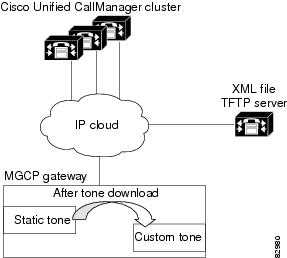
When configuring MGCP gateways in a Cisco IP-telephony network, you can use a centralized TFTP server in your network to automatically download an XML file with the gateway-specific configuration.
The XML configuration file includes the network locale for each voice port on the gateway. The network locale configured in Cisco Unified Communications Manager defines the tones and cadences that are used by a device in a specific geographic area. A network locale is associated with each voice port in the MGCP gateway.
When the XML file is downloaded to the gateway, it is parsed, converted to Cisco IOS commands, and the active configuration is updated. If the gateway is restarted or reset, it triggers a download of the XML file from the TFTP server. If the specified TFTP server is not available, the gateway keeps trying to download the updated XML file and does not alter the current configuration.
For information on downloading XML configuration files to your MGCP gateway, see the "Enabling Single-Point Configuration for MGCP Gateways" section on page 45 .
Static Tones
The Globalized Cadence and Tone for Cisco IOS Gateways feature enables Cisco IOS gateways to support Cisco Unified Communications Manager localization using static tone tables that are predefined for each country in Cisco IOS tone tables. The static tone table that is used for a voice port is determined by the network locale that is specified for the voice port in Cisco Unified Communications Manager. When an MGCP gateway registers to Cisco Unified Communications Manager, or if the gateway restarts or resets, the network locale for each voice port is downloaded in the gateway’s XML configuration file.
The static tones and cadences associated with the Cisco Unified Communications Manager network locale are used by a voice port unless a custom tone table is downloaded. No configuration is required on the MGCP gateway to use the static tones.
The table below shows the list of valid two-letter country codes and the corresponding countries.
|
Code |
Country |
Code |
Country |
|---|---|---|---|
|
AR |
Argentina |
KE |
Kenya |
|
AT |
Austria |
KR |
Korea Republic |
|
AU |
Australia |
LB |
Lebanon |
|
BE |
Belgium |
LU |
Luxemborg |
|
BR |
Brazil |
MX |
Mexico |
|
CA |
Canada |
MY |
Malaysia |
|
CH |
Switzerland |
NG |
Nigeria |
|
CN |
China |
NL |
Netherlands |
|
CO |
Colombia |
NO |
Norway |
|
CY |
Cyprus |
NP |
Nepal |
|
CZ |
Czech Republic |
NZ |
New Zealand |
|
DE |
Germany |
PA |
Panama |
|
DK |
Denmark |
PE |
Peru |
|
EG |
Egypt |
PH |
Philippines |
|
ES |
Spain |
PK |
Pakistan |
|
FI |
Finland |
PL |
Poland |
|
FR |
France |
PT |
Portugal |
|
GB |
United Kingdom |
RU |
Russian Federation |
|
GH |
Ghana |
SA |
Saudi Arabia |
|
GR |
Greece |
SE |
Sweden |
|
HK |
Hong Kong |
SG |
Singapore |
|
HU |
Hungary |
SI |
Slovenia |
|
ID |
Indonesia |
SK |
Slovakia |
|
IE |
Ireland |
TH |
Thailand |
|
IL |
Israel |
TR |
Turkey |
|
IN |
India |
TW |
Taiwan |
|
IS |
Iceland |
US |
United States |
|
IT |
Italy |
VE |
Venezuela |
|
JO |
Jordan |
ZA |
South Africa |
|
JP |
Japan |
ZW |
Zimbabwe |
Custom Tones
The Customizable Tone Download to Cisco IOS MGCP Gateways from Cisco Unified Communications Manager feature enables an MGCP gateway to download locale-specific tones and their associated frequency, amplitude, and cadence information from the XML-based configuration file.
The XML tone file includes all supported tones for one country with the frequency, amplitude, and cadence information. The XML tone file is parsed and saved into a custom tone table on the MGCP gateway. Each gateway supports up to two custom tone tables. The default values for North America are overwritten with the new values specified in the XML file. Dual tones and sequential tones, and up to 4 frequencies for standard or custom tones are supported.
When Cisco Unified Communications Manager requests a specific tone, the gateway references the custom tone table associated with the network locale of the voice port. After the custom tone specification is downloaded to the gateway, it can be used even if the gateway loses connectivity to Cisco Unified Communications Manager and reverts to H.323 control in fallback mode.
If custom tone download is not configured, the voice port uses the static tone table associated with the network locale of the voice port. If custom tone download is configured but fails, the voice port continues to use the static tone table for the network locale.
The figure below shows the download of the XML file from the TFTP server to the MGCP gateway.
How to Configure Tone Download to MGCP Gateways
Configuring Customizable Tone Download to Cisco IOS MGCP Gateways
Perform this task to download custom tones to the Cisco IOS gateway.
- Cisco Unified Communications Manager 3.3(2) (formerly known as Cisco CallManager 3.3(2)) or higher.
- Cisco UnifiedCommunications Manager 4.0 (formerly known as Cisco CallManager 4.0) or higher
- DSP 3.6.16 or later for analog interfaces; DSP 4.0 or later for digital interfaces.
- For languages other than English and countries other than the United States, locale files that provide regional tones and cadences must be installed in Cisco Unified Communications Manager. The locale installer adds the files to the correct directories and updates the Cisco Unified Communications Manager database.
 Note | Up to two custom tone tables are supported on a gateway; that is, no more than two custom tone tables can be downloaded to one gateway even if there are more that two countries or regions configured for the gateway. |
1.
enable
2.
configure
terminal
3.
ccm-manager
config
{server ip-address | name}
4.
ccm-manager
config
5.
ccm-manager
download-tones
6.
exit
DETAILED STEPS
Verifying Customizable Tone Download
Perform this task to verify that the customizable tone download and voice ports are configured correctly.
1.
show
voice
port
port/slot
2.
show
ccm-manager
download-tones
3.
debug
ccm-manager
config-download
all
4.
debug
ccm-manager
config-download
tone
DETAILED STEPS
| Step 1 |
show
voice
port
port/slot
Use the show voice port command to verify that the custom tones are assigned. The following sample shows that voice port 1/0/1 has C1 assigned, which corresponds to France: Example: Router# show voice port ! recEive and transMit Slot is 1, Sub-unit is 0, Port is 1 Type of VoicePort is E&M Operation State is DORMANT Administrative State is UP No Interface Down Failure Description is not set Noise Regeneration is enabled Non Linear Processing is enabled Non Linear Mute is disabled Non Linear Threshold is -21 dB Music On Hold Threshold is Set to -38 dBm In Gain is Set to 0 dB Out Attenuation is Set to 0 dB Echo Cancellation is enabled Echo Cancellation NLP mute is disabled Echo Cancellation NLP threshold is -21 dB Echo Cancel Coverage is set to 8 ms Playout-delay Mode is set to default Playout-delay Nominal is set to 60 ms Playout-delay Maximum is set to 200 ms Playout-delay Minimum mode is set to default, value 40 ms Playout-delay Fax is set to 300 ms . . . Rx Seize ABCD bits = 1111 Default pattern Rx Idle ABCD bits = 0000 Default pattern Tx Seize ABCD bits = 1111 Default pattern Tx Idle ABCD bits = 0000 Default pattern Ignored Rx ABCD bits = BCD Region Tone is set for C1 ! ! Custom Tone 1 is assigned to this voice port.
| ||
| Step 2 |
show
ccm-manager
download-tones
Use the show ccm-manager download-tones command to verify that the custom tones have been downloaded. The following sample output shows that Custom Tone 1 is assigned to France and that Custom Tone 2 is assigned to Spain: Example: Router# show ccm-manager download-tones MGCP Download Tones: Enabled Custom Tone 1: France Custom Tone 2: Spain The following sample output shows the downloaded tone information including the number of frequencies and cadences: Example: Router# show ccm-manager download-tones C1 ! Custom Tone 1 : United Kingdom Pulse dial: normal, Percent make: 35%, DTMF low Amp. = 65438, high Amp. = 65463 Pcm: u-Law FXS FXO E&M FXS FXO E&M Dual Tone DR NF FOF FOS AOF AOF AOF AOS AOS AOS ONTF OFTF ONTS OFTS ONTT OFTT ONT4 OFT4 (optional) FOF2 FOS2 FOF3 FOS3 FOF4 FOS4 FOT FO4 AOT AO4 RCT1 RCT2 RCT3 RCT4 BUSY 0 1 400 0 -200 -200 -240 0 0 0 375 375 0 0 0 0 0 0 0 0 0 0 0 0 0 0 0 0 0 0 0 RING_BACK 0 2 400 450 -190 -190 -190 -190 -190 -190 400 200 400 2000 0 0 0 0 0 0 0 0 0 0 CONGESTION 0 1 400 0 -200 -200 -200 0 0 0 400 350 225 525 0 0 0 0 0 0 0 0 0 0 0 0 0 0 0 0 NUMBER_UNOBTAINABLE 0 1 400 0 -150 -150 -150 0 0 0 400 350 225 525 0 0 0 0 0 0 0 0 0 0 0 0 DIAL_TONE 0 2 350 440 -150 -150 -150 -150 -150 -150 65535 0 0 0 0 0 0 0 0 0 0 0 0 0 0 0 0 DIAL_TONE2 0 2 350 440 -150 -150 -150 -150 -150 -150 65535 0 0 0 0 0 0 0 0 0 0 0 0 00 0 0 OUT_OF_SERVICE 0 1 950 0 -150 -150 -185 0 0 0 330 330 0 0 0 0 0 0 0 0 0 0 0 0 0 0 0 0 0 0 ADDR_ACK 0 1 600 0 -240 -240 -240 0 0 0 125 125 125 65535 0 0 0 0 0 0 0 0 0 0 0 0 0 0 0 0 DISCONNECT 0 1 600 0 -150 -150 -150 0 0 0 330 330 330 65535 0 0 0 0 0 0 0 0 0 0 0 0 0 0 0 OFF_HOOK_NOTICE 0 2 1400 2040 -240 -240 -240 -240 -240 -240 100 100 0 0 0 0 0 0 0 0 0 0 0 OFF_HOOK_ALERT 0 2 1400 2040 -150 -150 -185 -150 -150 -185 100 100 0 0 0 0 0 0 0 0 0 0 0 0 WAITING 0 0 0 0 0 0 0 0 0 0 0 0 0 0 0 0 0 0 0 0 0 0 0 0 0 0 0 0 0 0 0 0 CONFIRM 0 0 0 0 0 0 0 0 0 0 0 0 0 0 0 0 0 0 0 0 0 0 0 0 0 0 0 0 0 0 0 0 CNFWRN_J 0 1 950 0 -170 -170 -190 0 0 0 100 100 100 65535 0 0 0 0 0 0 0 0 0 0 0 0 0 0 0 0 CNFWRN_D 0 1 600 0 -170 -170 -190 0 0 0 100 100 100 65535 0 0 0 0 0 0 0 0 0 0 0 0 0 0 0 0 STUTT_DIALTONE 0 2 350 440 -150 -150 -150 -150 -150 -150 100 100 100 100 100 100 65535 0 0 Sequence Tone DR NF F1C1 F2C1 AOF AOS C1ONT C1OFT C2ONT C2OFT C3ONT C3OFT C4ONT C4OFT F1C2 F2C2 F1C3 F2C3 F1C4 F2C4 INTERCEPT 0 0 0 0 0 0 0 0 0 0 0 0 0 0 0 0 0 0 0 0 TONE_ON_HOLD 0 1 500 500 0 0 100 150 100 150 100 150 0 10000 500 0 500 0 0 0 NO_CIRCUIT 0 0 0 0 0 0 0 0 0 0 0 0 0 0 0 0 0 0 0 0 ! Legend: DR : direction NF : number of frequency FO<F,S,T,4> : frequency of<1st,2nd,3rd,4th> AO<F,S,T,4> : amplitude of<1st,2nd,3rd,4th> FOF<1-4> : frequency of 1st, cadence<1-4> FOS<1-4> : frequency of 2nd, cadence<1-4> ONT<F,S,T,4> : on time<1st,2nd,3rd,4th> OFT<F,S,T,4> : off time<1st,2nd,3rd,4th> RCT<1-4> : repeat count for cadence<l-4> F(1-4>C<1-4> : frequency<1-4> of cadence<1-4> C<1-4>ONT : cadence<1-4> on time C<1-4>OFT : cadence<1-4> off time | ||
| Step 3 |
debug
ccm-manager
config-download
all
The following sample output shows the download of the country-specific gateway tone files: Example: Router# debug ccm-manager config-download all ! 00:53:17: cmapp_xml_tftp_download_file line 170: File (tftp://10.10.10.55/met2.cnf.xml) read 7490 bytes : 00:53:17: cmapp_xml_get_info_from_name: name = AALN/S1/SU0/0@met2 00:53:17: cmapp_process_tag_networkLocale 00:53:17: cmapp_process_tag_networkLocale: NetworkLocale = Hong Kong : 00:53:17: cmapp_xml_get_info_from_name: name = AALN/S1/SU0/1@met2 00:53:17: cmapp_process_tag_networkLocale 00:53:17: cmapp_process_tag_networkLocale: NetworkLocale = United Kingdom | ||
| Step 4 |
debug
ccm-manager
config-download
tone
Use the debug ccm-manager config-download tone command to troubleshoot the download procedure. The following sample output shows the locale name as United Kingdom and lists all of the dual-tone parameters for that region: Example: Router# debug ccm-manager config-download tone 00:09:07: cmapp_prefix_process_tag_tones: 00:09:07: cmapp_process_tag_trkLocaleName: region = United Kingdom 00:09:07: cmapp_process_tag_pulse_ratio: pulse ratio = 40 00:09:07: cmapp_process_tag_dtmf_llevel: low frequency level = 65438 00:09:07: cmapp_process_tag_dtmf_hlevel: high frequency level = 65463 00:09:07: cmapp_process_tag_special_oper: operation = uLaw 00:09:07: cmapp_prefix_process_tag_lpig: 00:09:07: cmapp_process_tag_fxs: ignore LPIG for fxs 00:09:07: cmapp_process_tag_fxo: ignore LPIG for fxo 00:09:07: cmapp_process_tag_digital: ignore LPIG for digital 00:09:07: cmapp_prefix_process_tag_lpog: 00:09:07: cmapp_process_tag_fxs: ignore LPOG for fxsBoth ports are in service 00:09:07: cmapp_process_tag_fxo: ignore LPOG for fxo 00:09:07: cmapp_process_tag_digital: ignore LPOG for digital 00:09:07: cmapp_prefix_process_tag_tonetable_info: 00:09:07: cmapp_prefix_process_tag_dualtone: TID=[0:CPTONE_BUSY] 00:09:07: cmapp_process_tag_nf: number of frequencies = 1 00:09:07: cmapp_process_tag_dr: direction = 0 00:09:07: cmapp_process_tag_fof: frequency 1 = 400 00:09:07: cmapp_process_tag_fos: frequency 2 = 0 00:09:07: cmapp_process_tag_fot: frequency 3 = 0 00:09:07: cmapp_process_tag_fo4: frequency 4 = 0 00:09:07: cmapp_prefix_process_tag_aof_level: 00:09:07: cmapp_process_tag_fxs: amplitude of 1st = -200 00:09:07: cmapp_process_tag_fxo: amplitude of 1st = -200 00:09:07: cmapp_process_tag_digital: amplitude of 1st = -240 00:09:07: cmapp_prefix_process_tag_aos_level: 00:09:07: cmapp_process_tag_fxs: amplitude of 2nd = 0 00:09:07: cmapp_process_tag_fxo: amplitude of 2nd = 0 00:09:07: cmapp_process_tag_digital: amplitude of 2nd = 0 00:09:07: cmapp_prefix_process_tag_aot_level: 00:09:07: cmapp_process_tag_fxs: amplitude of 3rd = 0 00:09:07: cmapp_process_tag_fxo: amplitude of 3rd = 0 00:09:07: cmapp_process_tag_digital: amplitude of 3rd = 0 00:09:07: cmapp_prefix_process_tag_ao4_level: 00:09:07: cmapp_process_tag_fxs: amplitude of 4th = 0 00:09:07: cmapp_process_tag_fxo: amplitude of 4th = 0 00:09:07: cmapp_process_tag_digital: amplitude of 4th = 0 00:09:07: cmapp_process_tag_ontf: frequency 1 on time = 375 00:09:07: cmapp_process_tag_oftf: frequency 1 off time = 375 00:09:07: cmapp_process_tag_onts: frequency 2 on time = 0 00:09:07: cmapp_process_tag_ofts: frequency 2 off time = 0 00:09:07: cmapp_process_tag_ontt: frequency 3 on time = 0 00:09:07: cmapp_process_tag_oftt: frequency 3 off time = 0 00:09:07: cmapp_process_tag_ont4: frequency 4 on time = 0 00:09:07: cmapp_process_tag_oft4: frequency 4 off time = 0 00:09:07: cmapp_process_tag_fof2: frequency 1 cadence 2 = 0 00:09:07: cmapp_process_tag_fos2: frequency 2 cadence 2 = 0 00:09:07: cmapp_process_tag_fof3: frequency 1 cadence 3 = 0 00:09:07: cmapp_process_tag_fos3: frequency 2 cadence 3 = 0 00:09:07: cmapp_process_tag_fof4: frequency 1 cadence 4 = 0 00:09:07: cmapp_process_tag_fos4: frequency 2 cadence 4 = 0 00:09:07: cmapp_process_tag_rct1: cadence 1 repeat count = 0 00:09:07: cmapp_process_tag_rct2: cadence 2 repeat count = 0 00:09:07: cmapp_process_tag_rct3: cadence 3 repeat count = 0 00:09:07: cmapp_process_tag_rct4: cadence 4 repeat count = 0 00:09:07: cmapp_prefix_process_tag_dualtone: TID=[1:CPTONE_RING_BACK] 00:09:07: cmapp_process_tag_nf: number of frequencies = 2 00:09:07: cmapp_process_tag_dr: direction = 0 00:09:07: cmapp_process_tag_fof: frequency 1 = 400 00:09:07: cmapp_process_tag_fos: frequency 2 = 450 00:09:07: cmapp_process_tag_fot: frequency 3 = 0 00:09:07: cmapp_process_tag_fo4: frequency 4 = 0 00:09:07: cmapp_prefix_process_tag_aof_level: 00:09:07: cmapp_process_tag_fxs: amplitude of 1st = -190 00:09:07: cmapp_process_tag_fxo: amplitude of 1st = -190 00:09:07: cmapp_process_tag_digital: amplitude of 1st = -190 00:09:07: cmapp_prefix_process_tag_aos_level: 00:09:07: cmapp_process_tag_fxs: amplitude of 2nd = -190 00:09:07: cmapp_process_tag_fxo: amplitude of 2nd = -190 00:09:07: cmapp_process_tag_digital: amplitude of 2nd = -190 00:09:07: cmapp_prefix_process_tag_aot_level: 00:09:07: cmapp_process_tag_fxs: amplitude of 3rd = 0 00:09:07: cmapp_process_tag_fxo: amplitude of 3rd = 0 00:09:07: cmapp_process_tag_digital: amplitude of 3rd = 0 00:09:07: cmapp_prefix_process_tag_ao4_level: 00:09:07: cmapp_process_tag_fxs: amplitude of 4th = 0 00:09:07: cmapp_process_tag_fxo: amplitude of 4th = 0 00:09:07: cmapp_process_tag_digital: amplitude of 4th = 0 00:09:07: cmapp_process_tag_ontf: frequency 1 on time = 400 00:09:07: cmapp_process_tag_oftf: frequency 1 off time = 200 00:09:07: cmapp_process_tag_onts: frequency 2 on time = 400 00:09:07: cmapp_process_tag_ofts: frequency 2 off time = 2000 00:09:07: cmapp_process_tag_ontt: frequency 3 on time = 0 00:09:07: cmapp_process_tag_oftt: frequency 3 off time = 0 00:09:07: cmapp_process_tag_ont4: frequency 4 on time = 0 00:09:07: cmapp_process_tag_oft4: frequency 4 off time = 0 00:09:07: cmapp_process_tag_fof2: frequency 1 cadence 2 = 0 00:09:07: cmapp_process_tag_fos2: frequency 2 cadence 2 = 0 00:09:07: cmapp_process_tag_fof3: frequency 1 cadence 3 = 0 00:09:07: cmapp_process_tag_fos3: frequency 2 cadence 3 = 0 00:09:07: cmapp_process_tag_fof4: frequency 1 cadence 4 = 0 00:09:07: cmapp_process_tag_fos4: frequency 2 cadence 4 = 0 00:09:07: cmapp_process_tag_rct1: cadence 1 repeat count = 0 00:09:07: cmapp_process_tag_rct2: cadence 2 repeat count = 0 00:09:07: cmapp_process_tag_rct3: cadence 3 repeat count = 0 00:09:07: cmapp_process_tag_rct4: cadence 4 repeat count = 0 00:09:07: cmapp_prefix_process_tag_dualtone: TID=[2:CPTONE_CONGESTION] 00:09:07: cmapp_process_tag_nf: number of frequencies = 1 00:09:07: cmapp_process_tag_dr: direction = 0 00:09:07: cmapp_process_tag_fof: frequency 1 = 400 00:09:07: cmapp_process_tag_fos: frequency 2 = 0 00:09:07: cmapp_process_tag_fot: frequency 3 = 0 00:09:07: cmapp_process_tag_fo4: frequency 4 = 0 00:09:07: cmapp_prefix_process_tag_aof_level: 00:09:07: cmapp_process_tag_fxs: amplitude of 1st = -200 00:09:07: cmapp_process_tag_fxo: amplitude of 1st = -200 00:09:07: cmapp_process_tag_digital: amplitude of 1st = -200 00:09:07: cmapp_prefix_process_tag_aos_level: 00:09:07: cmapp_process_tag_fxs: amplitude of 2nd = 0 00:09:07: cmapp_process_tag_fxo: amplitude of 2nd = 0 00:09:07: cmapp_process_tag_digital: amplitude of 2nd = 0 00:09:07: cmapp_prefix_process_tag_aot_level: 00:09:07: cmapp_process_tag_fxs: amplitude of 3rd = 0 00:09:07: cmapp_process_tag_fxo: amplitude of 3rd = 0 00:09:07: cmapp_process_tag_digital: amplitude of 3rd = 0 00:09:07: cmapp_prefix_process_tag_ao4_level: 00:09:07: cmapp_process_tag_fxs: amplitude of 4th = 0 00:09:07: cmapp_process_tag_fxo: amplitude of 4th = 0 00:09:07: cmapp_process_tag_digital: amplitude of 4th = 0 00:09:07: cmapp_process_tag_ontf: frequency 1 on time = 400 00:09:07: cmapp_process_tag_oftf: frequency 1 off time = 350 00:09:07: cmapp_process_tag_onts: frequency 2 on time = 225 00:09:07: cmapp_process_tag_ofts: frequency 2 off time = 525 00:09:07: cmapp_process_tag_ontt: frequency 3 on time = 0 00:09:07: cmapp_process_tag_oftt: frequency 3 off time = 0 00:09:07: cmapp_process_tag_ont4: frequency 4 on time = 0 00:09:07: cmapp_process_tag_oft4: frequency 4 off time = 0 00:09:07: cmapp_process_tag_fof2: frequency 1 cadence 2 = 0 00:09:07: cmapp_process_tag_fos2: frequency 2 cadence 2 = 0 00:09:07: cmapp_process_tag_fof3: frequency 1 cadence 3 = 0 00:09:07: cmapp_process_tag_fos3: frequency 2 cadence 3 = 0 00:09:07: cmapp_process_tag_fof4: frequency 1 cadence 4 = 0 00:09:07: cmapp_process_tag_fos4: frequency 2 cadence 4 = 0 00:09:07: cmapp_process_tag_rct1: cadence 1 repeat count = 0 00:09:07: cmapp_process_tag_rct2: cadence 2 repeat count = 0 00:09:07: cmapp_process_tag_rct3: cadence 3 repeat count = 0 00:09:07: cmapp_process_tag_rct4: cadence 4 repeat count = 0 The following sample output shows the network locales in the XML file: Example: Router# debug ccm-manager config-download tone ! 00:54:08: cmapp_xml_tftp_download_file line 170 File (tftp://10.10.10.55/Hong_Kong/gateway-tones.xml) read 20993 bytes 00:54:08: cmapp_prefix_process_tag_tones 00:54:08: cmapp_process_tag_trkLocaleName: region = Hong Kong ! 00:54:08: cmapp_xml_tftp_download_file line 170 File (tftp://10.10.10.55/United_Kingdom/gateway-tones.xml) read 20993 bytes 00:54:08: cmapp_prefix_process_tag_tones 00:54:08: cmapp_process_tag_trkLocaleName: region = United_Kingdom
|
Troubleshooting Tips for Customizable Tone Download
If the custom tone file is not downloaded at least once, the North America tones are used. When a download fails, the static tones associated with the network locale of the voice port are used. For example, if a voice port is defined with a static tone for Hong Kong, and the download fails, the static tone for Hong Kong is used.
The administrator, after correcting the problem (a glitch in the network, a TFTP server that is down, or missing XML tone files), must reset the gateway from Cisco Unified Communications Manager. Resetting the gateway triggers a download of the XML configuration file.
If tone download is successful, the downloaded tone file overwrites the default custom tone table, and the voice port refers to the downloaded custom tones.
Configuration Examples for Tone Download to MGCP Gateways
- Customizable Tone Download Voice-Port Configuration Example
- Customizable Tone Download Using Single-Point Configuration Example
Customizable Tone Download Voice-Port Configuration Example
The following sample output shows that voice port 1/0/0 has been configured to use C1:
Router# show voice port 1/0/0
!
Foreign Exchange Station 1/0/0 Slot is 1, Sub-unit is 0, Port is 0
 Type of VoicePort is FXS
 Operation State is DORMANT
 Administrative State is UP
 Companding Type is u-law
 Region Tone is set for C1
Customizable Tone Download Using Single-Point Configuration Example
The following example shows single-point configuration enabled for an MGCP gateway:
Router# show running-config
!
version 12.3
no parser cache
no service single-slot-reload-enable
service timestamps debug datetime msec
service timestamps log datetime msec
no service password-encryption
!
hostname Router
!
logging rate-limit console 10 except errors
!
memory-size iomem 10
voice-card 1
!
ip subnet-zero
!
ip domain-name anything.com
!
no ip dhcp-client network-discovery
mgcp
mgcp call-agent 10.10.1.10 2427 service-type mgcp version 0.1
mgcp dtmf-relay voip codec all mode out-of-band
mgcp rtp unreachable timeout 1000
mgcp modem passthrough voip mode cisco
mgcp package-capability rtp-package
mgcp package-capability sst-package
isdn switch-type primary-ni
call rsvp-sync
!
! The following output shows that the TFTP server has an IP address of 10.10.10.50 and that the download has been enabled.
!
ccm-manager config server 10.10.10.50
ccm-manager config
ccm-manager download-tones
!
Where to Go Next
- To configure conferencing, transcoding, and MTP support on a Cisco IOS gateway, see "Configuring Enhanced Conferencing and Transcoding for Voice Gateway Routers" on page 67 .
- To enable MGCP PRI backhaul support, see "Configuring MGCP PRI Backhaul and T1 CAS Support for Cisco Unified Communications Manager" on page 113 .
- To enable MGCP BRI backhaul support, see "Configuring MGCP-Controlled Backhaul of BRI Signaling in Conjunction with Cisco Unified Communications Manager" on page 129 .
Additional References
- "Overview of Cisco Unified Communications Manager and Cisco IOS Interoperability" on page 13 --Describes basics of underlying technology and lists related documents.
- "Enabling Single-Point Configuration for MGCP Gateways" section on page 45 in Configuring MGCP Gateway Support for Cisco Unified Communications Manager --Describes how to configure MGCP gateways by downloading XML configuration files.
- Using the Cisco IP Telephony Locale Installer --Describes how to install the Cisco IP Telephony Locale Installer for Cisco Unified Communications Manager.