- Overview of Cisco Unified Communications Manager and Interoperability
- Configuring MGCP Gateway Support
- Configuring Conferencing and Transcoding for Voice Gateway Routers
- Configuring MGCP PRI Backhaul and T1 CAS Support
- Configuring MGCP-Controlled Backhaul of BRI Signaling
- Configuring Tone Download to MGCP Gateways
- Configuring MCID for Cisco IOS Voice Gateways
- Configuring RSVP Agent
- VoIP for IPv6
Contents
- Configuring MGCP-Controlled Backhaul of BRI Signaling
- Finding Feature Information
- Prerequisites for MGCP-Controlled Backhaul of BRI Signaling
- Restrictions for MGCP-Controlled Backhaul of BRI Signaling
- Information About MGCP-Controlled Backhaul of BRI Signaling
- MGCP-Controlled Backhaul of BRI Signaling
- How to Configure MGCP-Controlled Backhaul of BRI Signaling
- Configuring the BRI Interface as an MGCP-BRI Backhaul Endpoint
- Verifying MGCP-BRI Backhaul Configuration
- Tips for Troubleshooting MGCP-Controlled Backhaul of BRI Signaling
- Configuring SRTP Mode on Cisco IOS MGCP Gateways
- Configuration Examples for MGCP-Controlled Backhaul of BRI Signaling
- MGCP BRI Backhaul on Cisco 3745 Example
- MGCP BRI Backhaul on Cisco 3640 Example
- Where to Go Next
- Additional References
Configuring MGCP-Controlled Backhaul of BRI Signaling
The MGCP-Controlled Backhaul of Basic Rate Interface (BRI) Signaling in Conjunction with Cisco Unified Communications Manager feature provides MGCP service to remote-office gateways that connect by means of ISDN BRI trunks to a centralized Cisco Unified Communications Manager.
Feature benefits include the following:
- Centralized call-management architecture, enabling a high degree of network control
- Short voice cut-through times
- Graceful evolution to new technology and to AVVID
Only the ETSI BRI basic-net3 switch type is supported.
Feature History for MGCP-Controlled Backhaul of BRI Signaling in Conjunction with Cisco Unified Communications Manager
|
Release |
Modification |
|---|---|
|
12.2(15)ZJ |
This feature was introduced for Cisco Communications Manager 3.3(2) (formerly known as Cisco CallManager 3.3(2)). |
|
12.3(2)T |
This feature was integrated into Cisco IOS Release 12.3(2)T. |
|
12.3(11)T |
Support was added for Cisco Unified Communications Manager 4.1. |
|
12.4(2)T |
This feature was implemented on the Cisco 2600XM, Cisco 2691, Cisco 2800 series, Cisco 3700 series, and Cisco 3800 series. |
Finding Support Information for Platforms and Cisco IOS Software Images
Use Cisco Feature Navigator to find information about platform support and Cisco IOS software image support. Access Cisco Feature Navigator at http://www.cisco.com/go/fn . You must have an account on Cisco.com. If you do not have an account or have forgotten your username or password, click Cancel at the login dialog box and follow the instructions that appear.
For more information about this and related Cisco IOS voice features, see the following:
- "Overview of Cisco Unified Communications Manager and Cisco IOS Interoperability" on page 13 .
- Entire Cisco IOS Voice Configuration Library--including library preface and glossary, other feature documents, and troubleshooting documentation--at http://www.cisco.com/univercd/cc/td/doc/product/software/ios123/123cgcr/voice_c/vcl.htm .
- Finding Feature Information
- Prerequisites for MGCP-Controlled Backhaul of BRI Signaling
- Restrictions for MGCP-Controlled Backhaul of BRI Signaling
- Information About MGCP-Controlled Backhaul of BRI Signaling
- How to Configure MGCP-Controlled Backhaul of BRI Signaling
- Configuration Examples for MGCP-Controlled Backhaul of BRI Signaling
- Where to Go Next
- Additional References
Finding Feature Information
Your software release may not support all the features documented in this module. For the latest caveats and feature information, see Bug Search Tool and the release notes for your platform and software release. To find information about the features documented in this module, and to see a list of the releases in which each feature is supported, see the feature information table at the end of this module.
Use Cisco Feature Navigator to find information about platform support and Cisco software image support. To access Cisco Feature Navigator, go to www.cisco.com/go/cfn. An account on Cisco.com is not required.
Prerequisites for MGCP-Controlled Backhaul of BRI Signaling
Cisco Unified Communications Manager
- Cisco Unified Communications Manager 4.1(1) or a later release
Cisco Voice Gateway
- 20-MB flash memory
- 64-MB DRAM
One of the supported combinations of BRI voice interface card (VIC) and network module: - VIC-2BRI-NT/TE or VIC-2BRI-S/T in NM-1V or NM-2V with Cisco IOS Release 12.3(11)T or a later release
- VIC2-2BRI-NT/TE in NM-HD-1V, NM-HD-2V, NM-HD-2VE, or NM-HDV2 with Cisco IOS Release 12.4(2)T or a later release
- EM-4BRI-NT/TE in EVM-HD-8FXS/DID with Cisco IOS Release 12.4(2)T or a later release
- MGCP enabled globally in a VoIP network
- MGCP control of dial peers and voice ports
- MGCP single-point configuration enabled
 Note | For MGCP configuration instructions, see "Configuring MGCP Gateway Support for Cisco Unified Communications Manager" on page 23 . |
Restrictions for MGCP-Controlled Backhaul of BRI Signaling
- BRI backhaul uses the enhanced interface numbering support available in Cisco IOS Release 12.3(11)T and later. Previous releases supported only the slot/subslot/port format with the subslot forced to 0 on the Cisco 2600 series, Cisco 3600 series, and Cisco 3700 series. Cisco IOS Release 12.3(11)T and later releases support both the slot/port and slot/subslot/port interface numbering formats for BRI backhaul.
- Only the ETSI BRI Basic-NET3 switch type is supported.
- BRI calls are cleared during MGCP gateway fallback and rehome because ISDN BRI L2 must be reinitiated and brought up again by the new L3 task.
- Do not add the application mgcpapp command to voice dial peers that support BRI backhaul.
Information About MGCP-Controlled Backhaul of BRI Signaling
MGCP-Controlled Backhaul of BRI Signaling
The MGCP-Controlled Backhaul of BRI Signaling feature supports a centralized Cisco Unified Communications Manager architecture with BRI trunks connected to remote branch offices. Transporting signaling information from a branch-office MGCP gateway to a centralized media-gateway controller for processing is called backhaul. D-channel signal information is backhauled to Cisco Unified Communications Manager through a TCP session. All Q.931 messages are passed through the TCP connection between the Cisco MGCP gateway and Cisco Unified Communications Manager. The MGCP gateway neither parses nor has any knowledge of the contents of those messages.
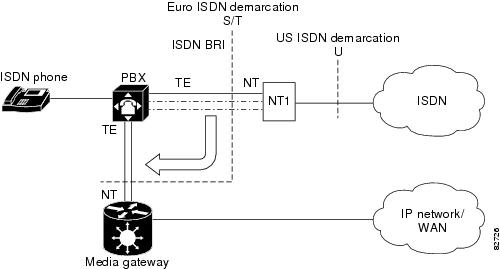
This feature enables you to connect remote ISDN PBXs and key systems to a Cisco ISDN BRI network termination (network side) or PSTN Class 4/5 switch through a Cisco ISDN BRI terminal equipment (as user side) interface. External call-control entities, such as one or more Cisco Unified Communications Manager servers, provide voice service between local and remote branch offices.
The figure below depicts a typical network-side scenario. NT denotes network termination; TE denotes terminal equipment.
The figure below shows a typical user-side scenario.
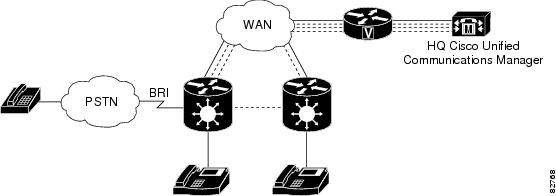
The following is the sequence of events during normal backhaul:
- A call comes in from the PSTN and passes over the BRI trunk to the MGCP gateway.
- The MGCP gateway passes signaling information from the call across the WAN to the Cisco Unified Communications Manager at headquarters.
- The Cisco Unified Communications Manager instructs the MGCP gateway on how to set up and manage the call.
- The call is established.
How to Configure MGCP-Controlled Backhaul of BRI Signaling
- Configuring the BRI Interface as an MGCP-BRI Backhaul Endpoint
- Verifying MGCP-BRI Backhaul Configuration
- Tips for Troubleshooting MGCP-Controlled Backhaul of BRI Signaling
- Configuring SRTP Mode on Cisco IOS MGCP Gateways
Configuring the BRI Interface as an MGCP-BRI Backhaul Endpoint
1.
enable
2.
configure
terminal
3.
interface
bri
slot
/
port
4.
shutdown
5.
isdn
switch-type
basic-net3
6.
isdn
bind-L3
ccm-manager
service
mgcp
7.
no
shutdown
8.
no
mgcp
9.
mgcp
10.
exit
DETAILED STEPS
Verifying MGCP-BRI Backhaul Configuration
1.
show
isdn
status
2.
show
ccm-manager
3.
show
ccm-manager
backhaul
4.
show
mgcp
endpoint
DETAILED STEPS
| Step 1 |
show
isdn
status
Use the show isdn status command to verify that Layer 2 is established and that Layer 3 is configured as Cisco Unified Communications Manager. This output displays only if TEI negotiation is performed at startup. Example:
Router# show isdn status
ISDN BRI1/1 interface
        dsl 1, interface ISDN Switchtype = basic-net3
        L2 Protocol = Q.921  L3 Protocol(s) = CCM-MANAGER
    Layer 1 Status:
        ACTIVE
    Layer 2 Status:
        TEI = 64, Ces = 1, SAPI = 0, State = MULTIPLE_FRAME_ESTABLISHED
| ||
| Step 2 |
show
ccm-manager
Use the show ccm-manager command to verify your Cisco Unified Communications Manager configuration on the gateway. Example: Router# show ccm-manager MGCP Domain Name:3845-1.cisco.com Priority Status Host ============================================================ Primary Registered 10.3.102.99 First Backup None Second Backup None Current active Call Manager: 10.3.102.99 Backhaul/Redundant link port: 2428 Failover Interval: 30 seconds Keepalive Interval: 15 seconds Last keepalive sent: 20:58:35 UTC Sep 3 2004 (elapsed time:00:00:11) Last MGCP traffic time: 20:58:35 UTC Sep 3 2004 (elapsed time:00:00:11) Last failover time: None Last switchback time: None Switchback mode: Graceful MGCP Fallback mode: Not Selected Last MGCP Fallback start time: None Last MGCP Fallback end time: None MGCP Download Tones: Disabled Configuration Error History: FAX mode:cisco | ||
| Step 3 |
show
ccm-manager
backhaul
Use the show ccm-manager backhaul command to display information about the BRI backhaul link. Example:
Router# show ccm-manager backhaul
Backhaul Link info:
    Link Protocol:     TCP
    Remote Port Number:2428
    Remote IP Address: 10.3.102.99
    Current Link State:OPEN
    Statistics:
        Packets recvd:  4
        Recv failures:  0
        Packets xmitted:2
        Xmit failures:  0
    BRI Ports being backhauled:
        Slot 0, VIC 0, port 0
        Slot 1, VIC 0, port 0
| ||
| Step 4 |
show
mgcp
endpoint
Use the show mgcp endpoint command to display a list of your MGCP endpoints. Example: Router# show mgcp endpoint BRI/S1/SU0/P1/1@3745-1 BRI/S1/SU0/P1/2@3745-1 |
Tips for Troubleshooting MGCP-Controlled Backhaul of BRI Signaling
The table below lists commands that are available for troubleshooting your configuration.
|
Command |
Purpose |
|---|---|
|
command-type a-law |
Enables you to address poor voice quality. If your system uses a-law pulse-code modulation (PCM), use this command in interface-BRI configuration mode to reconfigure the BRI voice port in the gateway for a-law PCM. The system default is mu-law PCM. |
|
debug ccm-manager backhaul packets |
Displays debugging information about Cisco Unified Communications Manager backhaul message packets. |
|
debug isdn q931 |
Displays debugging information about ISDN L3 Q.931 message packets. |
|
debug mgcp packets |
Displays debugging information about MGCP message packets. |
Configuring SRTP Mode on Cisco IOS MGCP Gateways
SRTP mode provides secure VoIP calls by addressing security requirements for privacy, integrity, and confidentiality of voice conversations. IPsec, a standards-based set of security protocols and algorithms, ensures that signaling information that is sent between the gateway and Cisco Unified Communications Manager are encrypted. Media encryption using standards-based Secure Real-Time Transport Protocol (SRTP) ensures that media streams between supported devices are secure.
Perform this task to configure SRTP mode on the gateway.
You should first establish an IPsec connection between Cisco Unified Communications Manager and the MGCP gateway before using the MGCP SRTP package. Otherwise, media keys are sent in clear text and your voice call is not considered secure.
1.
enable
2.
configure
terminal
3.
mgcp
package-capability
srtp-package
4.
mgcp
validate
call-agent
source-ipaddr
5.
exit
DETAILED STEPS
| Command or Action | Purpose | |
|---|---|---|
| Step 1 |
enable
Example: Router> enable |
Enables privileged EXEC mode.
|
| Step 2 |
configure
terminal
Example: Router# configure terminal |
Enters global configuration mode. |
| Step 3 |
mgcp
package-capability
srtp-package
Example: Router(config)# mgcp package-capability srtp-package |
Enables the MGCP gateway capability to process SRTP packages. |
| Step 4 |
mgcp
validate
call-agent
source-ipaddr
Example: Router(config)# mgcp validate call-agent source-ipaddr |
(Optional) Enables the MGCP application validation that packets received are sent by a configured call agent. |
| Step 5 |
exit
Example: Router(config)# exit |
Exits global configuration mode. |
Configuration Examples for MGCP-Controlled Backhaul of BRI Signaling
MGCP BRI Backhaul on Cisco 3745 Example
Router# show running-config
Building configuration...
Current configuration :3913 bytes
!
version 12.3
service timestamps debug datetime msec
service timestamps log datetime msec
no service password-encryption
!
hostname Router
!
boot-start-marker
boot-end-marker
!
!
no network-clock-participate slot 1
no network-clock-participate slot 2
no network-clock-participate slot 3
no network-clock-participate slot 4
no network-clock-participate wic 0
no network-clock-participate wic 1
no network-clock-participate wic 2
no network-clock-participate aim 0
no network-clock-participate aim 1
no aaa new-model
ip subnet-zero
ip cef
!
!
!
ip dhcp pool phone1
   host 10.3.102.102 255.255.0.0
   client-identifier 0100.1121.116b.dd
   option 150 ip 10.3.102.99
   default-router 10.3.102.2
!
!
ip domain name cisco.com
ip ids po max-events 100
no ftp-server write-enable
isdn switch-type basic-net3
voice-card 1
 no dspfarm
!
voice-card 2
 no dspfarm
!
voice-card 3
 no dspfarm
!
!
!
ccm-manager switchback immediate
ccm-manager fallback-mgcp
ccm-manager redundant-host 10.3.102.98
ccm-manager mgcp
!
!
!
interface FastEthernet0/0
 ip address 10.3.102.2 255.255.0.0
 duplex auto
 speed auto
!
interface FastEthernet0/1
 no ip address
 shutdown
 duplex auto
 speed auto
!
interface BRI1/0
 no ip address
 isdn switch-type basic-net3
 isdn incoming-voice voice
 isdn bind-l3 ccm-manager service mgcp
 isdn skipsend-idverify
!
interface BRI1/1
 no ip address
 isdn switch-type basic-net3
 isdn protocol-emulate network
 isdn layer1-emulate network
 isdn incoming-voice voice
 isdn skipsend-idverify
!
interface BRI2/0
 no ip address
 isdn switch-type basic-net3
 isdn incoming-voice voice
 isdn bind-l3 ccm-manager service mgcp
 isdn skipsend-idverify
!
interface BRI2/1
 no ip address
 isdn switch-type basic-net3
 isdn protocol-emulate network
 isdn layer1-emulate network
 isdn incoming-voice voice
 isdn skipsend-idverify
!
interface BRI3/0
 no ip address
 isdn switch-type basic-net3
 isdn incoming-voice voice
 isdn bind-l3 ccm-manager service mgcp
 isdn skipsend-idverify
!
interface BRI3/1
 no ip address
 isdn switch-type basic-net3
 isdn protocol-emulate network
 isdn layer1-emulate network
 isdn incoming-voice voice
 isdn skipsend-idverify
!
!
ip default-gateway 10.3.0.1
ip classless
ip route 0.0.0.0 0.0.0.0 10.3.0.1
!
ip http server
no ip http secure-server
!
!
access-list 10 deny 10.3.102.99 log
access-list 10 permit any
!
!
!
control-plane
!
!
call application alternate DEFAULT
!
!
voice-port 1/1/0
!
voice-port 1/1/1
!
voice-port 2/0/0
!
voice-port 2/0/1
!
voice-port 3/0/0
!
voice-port 3/0/1
!
voice-port 3/1/0
!
voice-port 3/1/1
!
voice-port 3/1/2
!
voice-port 3/1/3
!
!
mgcp
mgcp call-agent 10.3.102.99 service-type mgcp version 0.1
mgcp package-capability srtp-package
!
mgcp profile default
!
!
!
dial-peer voice 1 pots
 application mgcpapp
 direct-inward-dial
 port 3/0/0
 forward-digits all
!
dial-peer voice 100 voip
 application mgcpapp
 destination-pattern 9...
 session target ipv4:10.3.102.1
 incoming called-number .
!
dial-peer voice 2 pots
 destination-pattern 5001
 port 3/1/0
!
dial-peer voice 4 pots
 destination-pattern 6T
 direct-inward-dial
 port 3/0/1
!
dial-peer voice 3 pots
 destination-pattern 5002
 port 3/1/3
!
dial-peer voice 11 pots
 destination-pattern 2T
 direct-inward-dial
 port 2/0/1
!
dial-peer voice 12 pots
 application mgcpapp
 direct-inward-dial
 port 2/0/0
 forward-digits all
!
!
!
call-manager-fallback
 max-conferences 8
 ip source-address 10.3.102.2 port 2000
 max-ephones 2
 max-dn 4
!
!
line con 0
 exec-timeout 0 0
line aux 0
line vty 0 4
 login
!
end
MGCP BRI Backhaul on Cisco 3640 Example
version 12.2
service timestamps debug uptime
service timestamps log uptime
no service password-encryption
no service dhcp
!
hostname 3640
!
!
voice-card 3
!
ip subnet-zero
!
!
ip domain name cisco.com
!
isdn switch-type primary-qsig
!
!
voice call carrier capacity active
!
voice service voip
 h323
  call start slow
!
!
!
!
mta receive maximum-recipients 0
ccm-manager mgcp
!
controller T1 3/0
 framing esf
 clock source internal
 linecode b8zs
 pri-group timeslots 1-24 service mgcp
!
controller T1 3/1
 framing esf
 linecode b8zs
!
!
!
interface FastEthernet0/0
 ip address 10.15.43.101 255.255.0.0
 duplex auto
 speed auto
 no cdp enable
!
interface Serial0/0
 no ip address
 encapsulation frame-relay
 shutdown
 clockrate 125000
 frame-relay lmi-type ansi
!
interface FastEthernet0/1
 no ip address
 shutdown
 duplex auto
 speed auto
!
interface Serial0/1
 no ip address
 shutdown
 clockrate 125000
!
interface BRI1/0
 no ip address
 isdn switch-type basic-net3
 isdn incoming-voice voice
 isdn bind-l3 ccm-manager service mgcp
!
interface BRI1/1
 no ip address
 isdn switch-type basic-qsig
!
interface Serial3/0:23
 no ip address
 no logging event link-status
 isdn switch-type primary-qsig
 isdn incoming-voice voice
 no cdp enable
!
ip default-gateway 10.15.10.11
ip classless
ip route 0.0.0.0 0.0.0.0 10.15.10.11
ip http server
!
ip pim bidir-enable
!
!
!
call rsvp-sync
!
voice-port 1/0/0
!
voice-port 1/0/1
!
voice-port 2/0/0
!
voice-port 2/0/1
!
voice-port 2/1/0
!
voice-port 2/1/1
!
voice-port 3/0:23
!
mgcp
mgcp call-agent 10.14.181.10 service-type mgcp version 0.1
mgcp sdp simple
!
mgcp profile default
!
!
!
dial-peer cor custom
!
!
!
dial-peer voice 6000 pots
 application mgcpapp
 port 2/0/0
!
dial-peer voice 4000 pots
 application mgcpapp
 port 2/0/1
!
!
line con 0
 exec-timeout 0 0
line aux 0
line vty 0 4
 login
!
!
end
Where to Go Next
- To configure conferencing, transcoding, and MTP support on a Cisco IOS gateway, see "Configuring Enhanced Conferencing and Transcoding for Voice Gateway Routers" on page 67 .
- To enable MGCP PRI backhaul support, see "Configuring MGCP PRI Backhaul and T1 CAS Support for Cisco Unified Communications Manager" on page 113 .
- To download region-specific tones and their associated frequencies, amplitudes, and cadences, see "Configuring Tone Download to MGCP Gateways" on page 145 .
Additional References
- “Overview of Cisco Unified Communications Manager and Cisco IOS Interoperability” on page 13—Describes basics of underlying technology and lists related documents.
- “Configuring ISDN BRI” module in the Cisco IOS Dial Technologies Configuration Guide, Release 12.4—Describes how to configure ISDN BRI on the voice gateway.
- “ISDN Switch Types, Codes, and Values” appendix in the Debug Command Reference, Release 12.4—Describes supported switch types.
- Cisco Unified Communications Manager documentation— Describes how to install and configure Cisco Unified Communications Manager.