![]() |
Security for VPNs with IPsec Configuration Guide, Cisco IOS XE Release 3S
|
||||||||||||||||||||||||||||||||
IPsec Virtual Tunnel Interface
![]() |
|||||||||||||||||||||||||||||||||
Contents
IPsec Virtual Tunnel InterfaceLast Updated: July 27, 2012
IP security (IPsec) virtual tunnel interfaces (VTIs) provide a routable interface type for terminating IPsec tunnels and an easy way to define protection between sites to form an overlay network. IPsec VTIs simplify configuration of IPsec for protection of remote links, support multicast, and simplify network management and load balancing.
Finding Feature InformationYour software release may not support all the features documented in this module. For the latest caveats and feature information, see Bug Search Tool and the release notes for your platform and software release. To find information about the features documented in this module, and to see a list of the releases in which each feature is supported, see the feature information table at the end of this module. Use Cisco Feature Navigator to find information about platform support and Cisco software image support. To access Cisco Feature Navigator, go to www.cisco.com/go/cfn. An account on Cisco.com is not required. Restrictions for IPsec Virtual Tunnel InterfaceIKE Security AssociationThe Internet Key Exchange (IKE) security association (SA) is bound to the VTI, therefore the same IKE SA cannot be used for a crypto map. IPsec SA Traffic SelectorsStatic VTIs (SVTIs) support only a single IPsec SA that is attached to the VTI interface. The traffic selector for the IPsec SA is always "IP any any." A dynamic VTI (DVTI) is a point-point interface that can support multiple IPsec SAs. The DVTI can accept multiple IPsec selectors that are proposed by the initiator. IPv4 and IPv6 PacketsThe IPsec virtual tunnel interface feature supports SVTIs that are configured to encapsulate IPv4 packets or IPv6 packets, but IPv4 packets cannot carry IPv6 packets, and IPv6 packets cannot carry IPv4 packets. ProxySVTIs support only the "IP any any" proxy. DVTIs support multiple proxies, but DVTIs do not allow mixing "any any" proxies with non-"any any" proxies. DVTIs permit only one type at time, either a single "any any" proxy, or multiple "no any any" proxies. Tunnel ProtectionDo not configure the shared keyword when using the tunnel mode ipsec ipv4 command for IPsec IPv4 mode. Static VTIs Versus GRE TunnelsThe IPsec VTI is limited to IP unicast and multicast traffic only, as opposed to generic routing encapsulation (GRE) tunnels, which have a wider application for IPsec implementation. VRF-Aware IPsec ConfigurationVPN routing and forwarding (VRF) must not be configured in the Internet Security Association and Key Management Protocol (ISAKMP) profile in VRF-aware IPsec configurations with either SVTIs or DVTIs. Instead, the VRF must be configured on the tunnel interface for SVTIs. For DVTIs, you must apply the VRF to the virtual template using the ip vrf forwarding command. Single Template ModelIn the single template model, the VRF is configured in the ISAKMP profile. In this model, each virtual access that is created belongs to the internal VRF (IVRF) specified in the ISAKMP profile. Because the IP address of the virtual access is derived from the interface to which the virtual access is unnumbered to, the IP address of the interface will not be available in the virtual access routing table. The IP address is not available in the virtual access routing table because the unnumbered interface does not belong to the IVRF routing table of the virtual access. In such cases, a ping to virtual access IP address fails. Information About IPsec Virtual Tunnel InterfaceThe use of IPsec VTIs both greatly simplifies the configuration process when you need to provide protection for remote access and provides a simpler alternative to using a generic routing encapsulation (GRE) tunnel for encapsulation and crypto maps with IPsec. A major benefit associated with IPsec VTIs is that the configuration does not require a static mapping of IPsec sessions to a physical interface. The IPsec tunnel endpoint is associated with an actual (virtual) interface. Because there is a routable interface at the tunnel endpoint, many common interface capabilities can be applied to the IPsec tunnel. The IPsec VTI allows for the flexibility of sending and receiving both IP unicast and multicast encrypted traffic on any physical interface, such as in the case of multiple paths. Traffic is encrypted or decrypted when it is forwarded from or to the tunnel interface and is managed by the IP routing table. Using IP routing to forward the traffic to the tunnel interface simplifies the IPsec VPN configuration compared to the more complex process of using access control lists (ACLs) with the crypto map in native IPsec configurations. DVTIs function like any other real interface so that you can apply quality of service (QoS), firewall, and other security services as soon as the tunnel is active. The following sections provide details about the IPsec VTI:
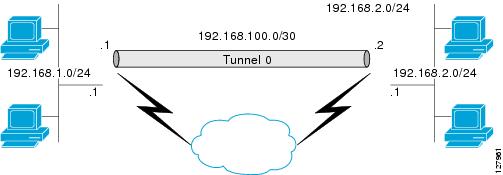
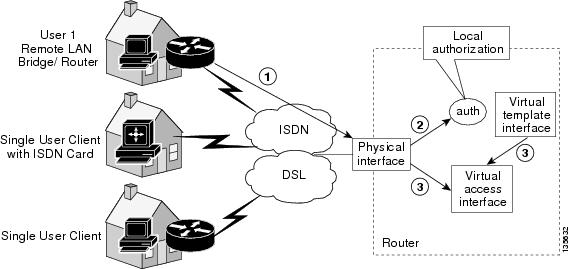
Benefits of Using IPsec Virtual Tunnel InterfacesIPsec VTIs allow you to configure a virtual interface to which you can apply features. Features for clear-text packets are configured on the VTI. Features for encrypted packets are applied on the physical outside interface. When IPsec VTIs are used, you can separate the application of features such as NAT, ACLs, and QoS and apply them to clear-text or encrypted text, or both. When crypto maps are used, there is no simple way to apply extra features to the IPsec tunnel. There are two types of VTI interfaces: static VTIs (SVTIs) and dynamic VTIs (DVTIs). Static Virtual Tunnel InterfacesSVTI configurations can be used for site-to-site connectivity in which a tunnel provides always-on access between two sites. The advantage of using SVTIs as opposed to crypto map configurations is that users can enable dynamic routing protocols on the tunnel interface without the extra 24 bytes required for GRE headers, thus reducing the bandwidth for sending encrypted data. Additionally, multiple Cisco IOS XE software features can be configured directly on the tunnel interface and on the physical egress interface of the tunnel interface. This direct configuration allows users to have solid control on the application of the features in the pre- or post-encryption path. The figure below illustrates how a SVTI is used. The IPsec VTI supports native IPsec tunneling and exhibits most of the properties of a physical interface. Dynamic Virtual Tunnel InterfacesDVTIs can provide highly secure and scalable connectivity for remote-access VPNs. The DVTI technology replaces dynamic crypto maps and the dynamic hub-and-spoke method for establishing tunnels. DVTIs can be used for both the server and remote configuration. The tunnels provide an on-demand separate virtual access interface for each VPN session. The configuration of the virtual access interfaces is cloned from a virtual template configuration, which includes the IPsec configuration and any Cisco IOS XE software feature configured on the virtual template interface, such as QoS, NetFlow, or ACLs. Because DVTIs function like any other real interface, you can apply QoS, firewall, and other security services as soon as the tunnel is active. QoS features can be used to improve the performance of various applications across the network. Any combination of QoS features offered in Cisco IOS XE software can be used to support voice, video, or data applications. DVTIs provide efficiency in the use of IP addresses and provide secure connectivity. DVTIs allow dynamically downloadable per-group and per-user policies to be configured on a RADIUS server. The per-group or per-user definition can be created using extended authentication (Xauth) User or Unity groups or it can be derived from a certificate. DVTIs are standards based, so interoperability in a multiple-vendor environment is supported. IPsec DVTIs allow you to create highly secure connectivity for remote access VPNs and can be combined with Cisco Architecture for Voice, Video, and Integrated Data (AVVID) to deliver converged voice, video, and data over IP networks. The DVTI simplifies VPN routing and forwarding (VRF)-aware IPsec deployment. The VRF is configured on the interface. A DVTI requires minimal configuration on the router. A single virtual template can be configured and cloned. The DVTI creates an interface for IPsec sessions and uses the virtual template infrastructure for dynamic instantiation and management of dynamic IPsec VTIs. The virtual template infrastructure is extended to create dynamic virtual-access tunnel interfaces. DVTIs are used in hub-and-spoke configurations. A single DVTI can support several static VTIs.
The figure below illustrates the DVTI authentication path. The authentication shown in the figure above follows this path:
The figure below illustrates the DVTI authentication path in a site-to-site scenario. Multi-SA Support for Dynamic Virtual InterfacesDVTI supports multiple IPsec SAs. The DVTI can accept multiple IPsec selectors that are proposed by the initiator. The DVTIs allow per-peer features to be applied on a dedicated interface. You can order features in such way that all features that are applied on the virtual access interfaces are applied before applying crypto. Additionally, all the features that are applied on the physical interfaces are applied after applying crypto. Clean routing is available across all VRFs so that there are no traffic leaks from one VRF to another before encrypting. Multi-SA VTIs ensure interoperation with third-party devices and provide a flexible, clean, and modular feature-set. Multi-SA VTIs enable a clean Cisco IOS XE infrastructure, even when the Cisco IOS XE software interoperates with the third-party devices that only implement crypto maps. VRF and Scalability of Baseline Configuration: Virtual access instances inherit the Inside-VRF (IVRF) from the template configuration. Users must configure several templates to enforce an appropriate IVRF for each customer. The number of templates must be equal to the number of customers connecting to the headend. Such a configuration is cumbersome and undesirable and also affects performance because each template declaration consumes one Interface Descriptor Block (IDB). This complication can be avoided by allowing the IKE profile to override the virtual access VRF with the VRF configured on the IKE profile. A better solution is to allow the IKE profile to override the virtual access VRF using AAA, but this method is supported only for IKEv2. The VRF configured in the ISAKMP profile is applied to the virtual access first. Then the configuration from virtual template is applied to the virtual access. If your virtual template contains ip vrf forwarding command configuration, the VRF from the template overrides the VRF from the ISAKMP profile. Rules for Initial Configuration of a VRF: The following rules must be applied during the initial configuration of VRF:
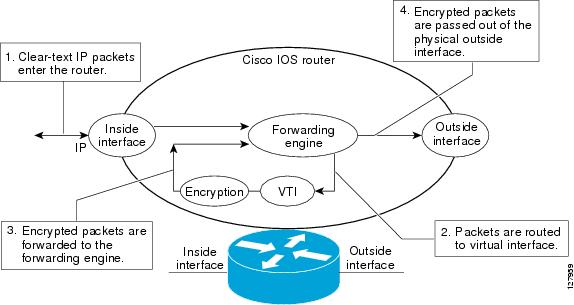
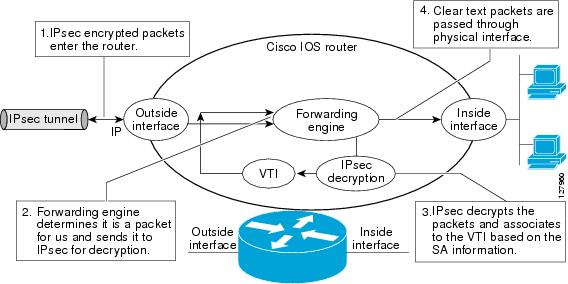
Rules for Changing the VRF: If you change the VRF configured in an IKE profile, all the IKE SAs, IPsec SAs, and the virtual access identifier derived from this profile will get deleted. The same rule applies when the VRF is configured on the IKE profile for the first time. Dynamic Virtual Tunnel Interface Life CycleIPsec profiles define policy for DVTIs. The dynamic interface is created at the end of IKE Phase 1 and IKE Phase 1.5. The interface is deleted when the IPsec session to the peer is closed. The IPsec session is closed when both IKE and IPsec SAs to the peer are deleted. Routing with IPsec Virtual Tunnel InterfacesBecause VTIs are routable interfaces, routing plays an important role in the encryption process. Traffic is encrypted only if it is forwarded out of the VTI, and traffic arriving on the VTI is decrypted and routed accordingly. VTIs allow you to establish an encryption tunnel using a real interface as the tunnel endpoint. You can route to the interface or apply services such as QoS, firewalls, network address translation, and NetFlow statistics as you would to any other interface. You can monitor the interface and route to it, and it has an advantage over crypto maps because it is a real interface and provides the benefits of any other Cisco IOS XE interface. Traffic Encryption with the IPsec Virtual Tunnel InterfaceWhen an IPsec VTI is configured, encryption occurs in the tunnel. Traffic is encrypted when it is forwarded to the tunnel interface. Traffic forwarding is handled by the IP routing table, and dynamic or static routing can be used to route traffic to the SVTI. DVTI uses reverse route injection to further simplify the routing configurations. Using IP routing to forward the traffic to encryption simplifies the IPsec VPN configuration because the use of ACLs with a crypto map in native IPsec configurations is not required. The IPsec virtual tunnel also allows you to encrypt multicast traffic with IPsec. IPsec packet flow into the IPsec tunnel is illustrated in the figure below. After packets arrive on the inside interface, the forwarding engine switches the packets to the VTI, where they are encrypted. The encrypted packets are handed back to the forwarding engine, where they are switched through the outside interface. The figure below shows the packet flow out of the IPsec tunnel. How to Configure IPsec Virtual Tunnel Interface
Configuring Static IPsec Virtual Tunnel Interfaces
SUMMARY STEPS
DETAILED STEPS Configuring Dynamic IPsec Virtual Tunnel Interfaces
SUMMARY STEPS
DETAILED STEPS Configuring Multi-SA Support for Dynamic Virtual Tunnel InterfacesSUMMARY STEPS
DETAILED STEPS Configuration Examples for IPsec Virtual Tunnel Interface
Example Static Virtual Tunnel Interface with IPsecThe following example configuration uses a preshared key for authentication between peers. VPN traffic is forwarded to the IPsec VTI for encryption and then sent out the physical interface. The tunnel on subnet 10 checks packets for IPsec policy and passes them to the Crypto Engine (CE) for IPsec encapsulation. The figure below illustrates the IPsec VTI configuration. Router ASR 1000-1 Configurationversion 2.1 crypto isakmp policy 1 encr 3des authentication pre-share group 2 crypto isakmp key example12345 address 0.0.0.0 0.0.0.0 crypto IPsec transform-set T1 esp-3des esp-sha-hmac crypto IPsec profile P1 set transform-set T1 ! interface tunnel 0 ip address 10.0.51.203 255.255.255.0 ip ospf mtu-ignore load-interval 30 tunnel source fastethernet 3/0 tunnel destination 10.0.149.217 tunnel mode IPsec ipv4 tunnel protection IPsec profile P1 ! interface FastEthernet3/0 ip address 10.0.149.203 255.255.255.0 duplex full ! interface FastEthernet3/3 ip address 10.0.35.203 255.255.255.0 duplex full ! ip route 10.0.36.0 255.255.255.0 Tunnel0 end Router ASR 1000-2 Configurationversion 2.1 crypto isakmp policy 1 encr 3des authentication pre-share group 2 crypto isakmp key example12345 address 0.0.0.0 0.0.0.0 crypto IPsec transform-set T1 esp-3des esp-sha-hmac crypto IPsec profile P1 set transform-set T1 ! interface Tunnel 0 ip address 10.0.51.217 255.255.255.0 ip ospf mtu-ignore tunnel source 10.0.149.217 tunnel destination 10.0.149.203 tunnel mode ipsec ipv4 tunnel protection ipsec profile P1 ! interface FastEthernet 0/0 ip address 10.0.149.217 255.255.255.0 speed 100 full-duplex ! interface FastEthernet 1/0 ip address 10.0.36.217 255.255.255.0 load-interval 30 full-duplex ! ip route 10.0.35.0 255.255.255.0 Tunnel 0 end Example: Verifying the Results for the IPsec Static Virtual Tunnel InterfaceThis section provides information that you can use to confirm that your configuration is working properly. In this display, Tunnel 0 is "up," and the line protocol is "up." If the line protocol is "down," the session is not active. Verifying the Router StatusRouter# show interface tunnel 0 Tunnel0 is up, line protocol is up Hardware is Tunnel Internet address is 10.0.51.203/24 MTU 1514 bytes, BW 9 Kbit, DLY 500000 usec, reliability 255/255, txload 103/255, rxload 110/255 Encapsulation TUNNEL, loopback not set Keepalive not set Tunnel source 10.0.149.203, destination 10.0.149.217 Tunnel protocol/transport IPsec/IP , key disabled, sequencing disabled Tunnel TTL 255 Checksumming of packets disabled, fast tunneling enabled Tunnel transmit bandwidth 8000 (kbps) Tunnel receive bandwidth 8000 (kbps) Tunnel protection via IPsec (profile "P1") Last input never, output never, output hang never Last clearing of "show interface" counters never Input queue: 1/75/0/0 (size/max/drops/flushes); Total output drops: 0 Queueing strategy: fifo Output queue: 0/0 (size/max) 30 second input rate 13000 bits/sec, 34 packets/sec 30 second output rate 36000 bits/sec, 34 packets/sec 191320 packets input, 30129126 bytes, 0 no buffer Received 0 broadcasts, 0 runts, 0 giants, 0 throttles 0 input errors, 0 CRC, 0 frame, 0 overrun, 0 ignored, 0 abort 59968 packets output, 15369696 bytes, 0 underruns 0 output errors, 0 collisions, 0 interface resets 0 output buffer failures, 0 output buffers swapped out Router# show crypto session Crypto session current status Interface: Tunnel0 Session status: UP-ACTIVE Peer: 10.0.149.217 port 500 IKE SA: local 10.0.149.203/500 remote 10.0.149.217/500 Active IPsec FLOW: permit ip 0.0.0.0/0.0.0.0 0.0.0.0/0.0.0.0 Active SAs: 4, origin: crypto map Router# show ip route Codes: C - connected, S - static, R - RIP, M - mobile, B - BGP D - EIGRP, EX - EIGRP external, O - OSPF, IA - OSPF inter area N1 - OSPF NSSA external type 1, N2 - OSPF NSSA external type 2 E1 - OSPF external type 1, E2 - OSPF external type 2 i - IS-IS, su - IS-IS summary, L1 - IS-IS level-1, L2 - IS-IS level-2 ia - IS-IS inter area, * - candidate default, U - per-user static route o - ODR, P - periodic downloaded static route Gateway of last resort is not set 10.0.0.0/8 is variably subnetted, 4 subnets, 2 masks C 10.0.35.0/24 is directly connected, FastEthernet3/3 S 10.0.36.0/24 is directly connected, Tunnel0 C 10.0.51.0/24 is directly connected, Tunnel0 C 10.0.149.0/24 is directly connected, FastEthernet3/0 Example: VRF-Aware Static Virtual Tunnel InterfaceTo add VRF to the static VTI example, include the ip vrf and ip vrf forwarding commands to the configuration as shown in the following example: Router Configurationhostname ASR 1000-1 . . . ip vrf sample-vti1 rd 1:1 route-target export 1:1 route-target import 1:1 ! . . . interface Tunnel 0 ip vrf forwarding sample-vti1 ip address 10.0.51.217 255.255.255.0 tunnel source 10.0.149.217 tunnel destination 10.0.149.203 tunnel mode ipsec ipv4 tunnel protection ipsec profile P1 . . . ! end Example: Static Virtual Tunnel Interface with QoSYou can apply any QoS policy to the tunnel endpoint by including the service-policy statement under the tunnel interface. The following example is policing traffic out the tunnel interface: Router Configuration
hostname router1
.
.
.
class-map match-all VTI
match any
!
policy-map VTI
class VTI
police cir 2000000
conform-action transmit
exceed-action drop
!
.
.
.
interface Tunnel0
ip address 10.0.51.217 255.255.255.0
tunnel source 10.0.149.217
tunnel destination 10.0.149.203
tunnel mode ipsec ipv4
tunnel protection ipsec profile P1
service-policy output VTI
!
.
.
.
!
end
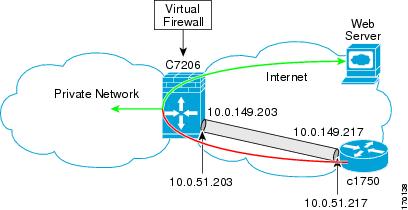
Example: Static Virtual Tunnel Interface with Virtual FirewallApplying the virtual firewall to the SVTI tunnel allows traffic from the spoke to pass through the hub to reach the Internet. The figure below illustrates a SVTI with the spoke protected inherently by the corporate firewall. The basic SVTI configuration has been modified to include the virtual firewall definition. Router 1 Configurationhostname ASR 1000-1 . . ! class-map type inspect match-any Example1-FW-Class match protocol icmp match protocol tcp match protocol udp match protocol echo match protocol http match protocol ftp match protocol smtp match protocol bgp match protocol oracle ! policy-map type inspect Example1-FW-Policy class type inspect Example1-FW-Class inspect class class-default pass ! zone security default zone security example1 ! zone-pair security Example1-Default source Example1 destination default service-policy type inspect Example1-FW-Policy ! zone-pair security Default-Example1 source default destination Example1 service-policy type inspect Example1-FW-Policy ! ! ! interface Loopback 10000 description "Used for NAT for Example1_d80 users" ip address 209.165.200.225 255.255.255.255 ! interface GigabitEthernet 0/2/1.1 encapsulation dot1Q 2 ip vrf forwarding Example1_d80 ip address 10.0.51.217 255.255.255.0 ! ! interface tunnel 2 description "Used for Example1, ivrf=fvrf" ip vrf forwarding Example1_d80 ip unnumbered Loopback 4095 ip nat inside zone-member security Example1 no logging event link-status tunnel mode ipsec ipv4 tunnel vrf Example1_d80 tunnel protection ipsec profile Example1_d80_profile ! ip nat inside source list Example-nat-acl interface Loopback 10000 vrf Example1_d80 overload ! ip access-list extended Example1-nat-acl permit icmp any 172.16.0.0 0.0.255.255 echo permit ip 172.17.0.0 0.0.255.255 any permit ip 172.18.0.0 0.0.255.255 any permit ip 172.19.0.0 0.0.255.255 any permit ip 172.20.0.0 0.0.255.255 any permit ip 10.0.51.0 0.0.0.255 any ! end Example Dynamic Virtual Tunnel Interface Easy VPN ServerThe following example illustrates the use of the DVTI Easy VPN server, which serves as an IPsec remote access aggregator. The client can be a home user running a Cisco VPN client. Router Configurationhostname ASR 1000-1 ! aaa new-model aaa authentication login local_list local aaa authorization network local_list local aaa session-id common ! ip subnet-zero ip cef ! username cisco password 0 cisco123 ! controller ISA 1/1 ! crypto isakmp policy 1 encr 3des authentication pre-share group 2 ! crypto isakmp client configuration group group1 key cisco123 pool group1pool save-password ! crypto isakmp profile vpn1-ra match identity group group1 client authentication list local_list isakmp authorization list local_list client configuration address respond virtual-template 1 ! crypto ipsec transform-set VTI-TS esp-3des esp-sha-hmac ! crypto ipsec profile test-vti1 set transform-set VTI-TS ! interface GigabitEthernet0/1 description Internet Connection ip address 172.18.143.246 255.255.255.0 ! interface GigabitEthernet0/2 description Internal Network ip address 10.2.1.1 255.255.255.0 ! interface Virtual-Template1 type tunnel ip unnumbered GigabitEthernet0/1 ip virtual-reassembly tunnel mode ipsec ipv4 tunnel protection ipsec profile test-vti1 ! ip local pool group1pool 192.168.1.1 192.168.1.4 ip classless ip route 0.0.0.0 0.0.0.0 172.18.143.1 ! end Example Verifying the Results for the Dynamic Virtual Tunnel Interface Easy VPN ServerThe following examples show that a DVTI has been configured for an Easy VPN server: Router# show running-config interface Virtual-Access2 Building configuration... Current configuration : 250 bytes ! interface Virtual-Access2 ip unnumbered GigabitEthernet0/1 ip virtual-reassembly tunnel source 172.18.143.246 tunnel destination 172.18.143.208 tunnel mode ipsec ipv4 tunnel protection ipsec profile test-vti1 no tunnel protection ipsec initiate end Router# show ip route Codes: C - connected, S - static, R - RIP, M - mobile, B - BGP D - EIGRP, EX - EIGRP external, O - OSPF, IA - OSPF inter area N1 - OSPF NSSA external type 1, N2 - OSPF NSSA external type 2 E1 - OSPF external type 1, E2 - OSPF external type 2 i - IS-IS, su - IS-IS summary, L1 - IS-IS level-1, L2 - IS-IS level-2 ia - IS-IS inter area, * - candidate default, U - per-user static route o - ODR, P - periodic downloaded static route Gateway of last resort is 10.2.1.10 to network 0.0.0.0 172.18.0.0/24 is subnetted, 1 subnets C 172.18.143.0 is directly connected, GigabitEthernet0/1 192.168.1.0/32 is subnetted, 1 subnets S 192.168.1.1 [1/0] via 0.0.0.0, Virtual-Access2 10.0.0.0/24 is subnetted, 1 subnets C 10.2.1.0 is directly connected, GigabitEthernet0/2 S* 0.0.0.0/0 [1/0] via 172.18.143.1 Example VRF-Aware IPsec with Dynamic VTI When VRF Is Configured Under a Virtual TemplateThe following example shows how to configure VRF-Aware IPsec to take advantage of the DVTI: hostname ASR 1000 ! ip vrf VRF-100-1 rd 1:1 ! ip vrf VRF-100-2 rd 1:1 ! ! ! crypto keyring cisco-100-1 pre-shared-key address 10.1.1.1 key cisco-100-1 crypto keyring cisco-100-2 pre-shared-key address 10.1.2.1 key cisco-100-2 crypto isakmp profile cisco-isakmp-profile-100-1 keyring cisco-100-1 match identity address 10.1.1.0 255.255.255.0 virtual-template 101 crypto isakmp profile cisco-isakmp-profile-100-2 keyring cisco-100-2 match identity address 10.1.2.0 255.255.255.0 virtual-template 102 ! ! crypto ipsec transform-set cisco esp-3des esp-sha-hmac ! crypto ipsec profile cisco-ipsec-profile-101 set security-policy limit 3 set transform-set cisco ! crypto ipsec profile cisco-ipsec-profile-102 set security-policy limit 5 set transform-set cisco ! interface Virtual-Template101 type tunnel ip vrf forwarding VRF-100-1 ip unnumbered Ethernet 0/0 tunnel mode ipsec ipv4 tunnel protection ipsec profile cisco-ipsec-profile-101 ! interface Virtual-Template102 type tunnel ip vrf forwarding VRF-100-2 ip unnumbered Ethernet 0/0 tunnel mode ipsec ipv4 tunnel protection ipsec profile cisco-ipsec-profile-102 ! Example: VRF-Aware IPsec with Dynamic VTI When VRF is Configured Under a Virtual Template with the Gateway Option in an IPsec ProfileThe following example shows how to configure VRF-aware IPsec to take advantage of the DVTI, when the VRF is configured under a virtual template with the gateway option in an IPsec profile. hostname ASR 1000 ! ip vrf VRF-100-1 rd 1:1 ! ip vrf VRF-100-2 rd 1:1 ! ! ! crypto keyring cisco-100-1 pre-shared-key address 10.1.1.1 key cisco-100-1 crypto keyring cisco-100-2 pre-shared-key address 10.1.2.1 key cisco-100-2 crypto isakmp profile cisco-isakmp-profile-100-1 keyring cisco-100-1 match identity address 10.1.1.0 255.255.255.0 virtual-template 101 crypto isakmp profile cisco-isakmp-profile-100-2 keyring cisco-100-2 match identity address 10.1.2.0 255.255.255.0 virtual-template 102 ! ! crypto ipsec transform-set cisco esp-3des esp-sha-hmac ! crypto ipsec profile cisco-ipsec-profile-101 set security-policy limit 3 set transform-set cisco set reverse-route gateway 172.16.0.1 ! crypto ipsec profile cisco-ipsec-profile-102 set security-policy limit 5 set transform-set cisco set reverse-route gateway 172.16.0.1 ! interface Virtual-Template101 type tunnel ip vrf forwarding VRF-100-1 ip unnumbered Ethernet 0/0 tunnel mode ipsec ipv4 tunnel protection ipsec profile cisco-ipsec-profile-101 ! interface Virtual-Template102 type tunnel ip vrf forwarding VRF-100-2 ip unnumbered Ethernet 0/0 tunnel mode ipsec ipv4 tunnel protection ipsec profile cisco-ipsec-profile-102 ! Example VRF-Aware IPsec with Dynamic VTI When VRF Is Configured Under an ISAKMP ProfileThe following example shows how to configure VRF-Aware IPsec to take advantage of the DVTI when VRF is configured under an ISAKMP profile: hostname ASR 1000 . . . ip vrf test-vti1 rd 1:1 route-target export 1:1 route-target import 1:1 ! . . . crypto isakmp profile cisco-isakmp-profile vrf test-vti1 keyring key match identity address 4.0.0.22 255.255.255.255 ! . . . interface Virtual-Template1 type tunnel ip unnumbered Loopback0 ip virtual-reassembly tunnel mode ipsec ipv4 tunnel protection ipsec profile test-vti1 ! . . end Example: VRF-Aware IPsec with a Dynamic VTI When VRF is Configured Under an ISAKMP Profile and a Gateway Option in an IPsec ProfileThe following example shows how to configure VRF-aware IPsec to take advantage of the DVTI, when the VRF is configured under an ISAKMP profile and a gateway option in an IPsec profile:
hostname ASR 1000
!
ip vrf VRF-100-1
rd 1:1
!
ip vrf VRF-100-2
rd 1:1
!
crypto keyring cisco-100-1
pre-shared-key address 10.1.1.1 key cisco-100-1
crypto keyring cisco-100-2
pre-shared-key address 10.1.2.1 key cisco-100-2
crypto isakmp profile cisco-isakmp-profile-100-1
vrf VRF-100-1
keyring cisco-100-1
match identity address 10.1.1.0 255.255.255.0
virtual-template 1
crypto isakmp profile cisco-isakmp-profile-100-2
vrf VRF-100-2
keyring cisco-100-2
match identity address 10.1.2.0 255.255.255.0
virtual-template 1
!
!
crypto ipsec transform-set cisco esp-3des esp-sha-hmac
crypto ipsec profile cisco-ipsec-profile
set security-policy limit 3
set transform-set cisco
set reverse-route gateway 172.16.0.1
!
!
!
interface Virtual-Template1 type tunnel
ip unnumbered Ethernet 0/0
tunnel mode ipsec ipv4
tunnel protection ipsec profile cisco-ipsec-profile
!
!
Example: VRF-Aware IPsec with a Dynamic VTI When VRF is Configured Under Both a Virtual Template and an ISAKMP Profile
The following example shows how to configure VRF-Aware IPsec to take advantage of the DVTI when VRF is configured under both a virtual template and an ISAKMP profile: hostname ASR 1000 . . . ip vrf test-vti2 rd 1:2 route-target export 1:1 route-target import 1:1 ! . . . ip vrf test-vti1 rd 1:1 route-target export 1:1 route-target import 1:1 ! . . . crypto isakmp profile cisco-isakmp-profile vrf test-vti2 keyring key match identity address 10.1.1.0 255.255.255.0 ! . . . interface Virtual-Template1 type tunnel ip vrf forwarding test-vti1 ip unnumbered Loopback0 ip virtual-reassembly tunnel mode ipsec ipv4 tunnel protection ipsec profile test-vti1 ! . . . end Example: Dynamic Virtual Tunnel Interface with a Virtual FirewallThe DVTI Easy VPN server can be configured behind a virtual firewall. Behind-the-firewall configuration allows users to enter the network while the network firewall is protected from unauthorized access. The virtual firewall uses Context-Based Access Control (CBAC) and NAT applied to the Internet interface and to the virtual template. hostname ASR 1000-1 . . ! class-map type inspect match-any Example1-FW-Class match protocol icmp match protocol tcp match protocol udp match protocol echo match protocol http match protocol ftp match protocol smtp match protocol bgp match protocol oracle ! policy-map type inspect Example1-FW-Policy class type inspect Example1-FW-Class inspect class class-default pass ! zone security default zone security Example1 ! zone-pair security Example1-Default source Example1 destination default service-policy type inspect Example1-FW-Policy ! zone-pair security Default-Example1 source default destination Example1 service-policy type inspect Example1-FW-Policy ! ! ! interface Loopback 10000 description "Used for NAT for Example1_d80 users" ip address 209.165.200.225 255.255.255.255 ! interface GigabitEthernet 0/2/1.1 encapsulation dot1Q 2 ip vrf forwarding Example1_d80 ip address 10.0.51.217 255.255.255.0 ! ! interface Virtual-Template 4095 type tunnel description "Used for Example1, ivrf=fvrf" ip vrf forwarding Example1_d80 ip unnumbered Loopback 4095 ip nat inside zone-member security Example1 no logging event link-status tunnel mode ipsec ipv4 tunnel vrf Example1_d80 tunnel protection ipsec profile Example1_d80_profile ! ip nat inside source list Example1-nat-acl interface Loopback 10000 vrf Example1_d80 overload ! ip access-list extended Example1-nat-acl permit icmp any 172.16.0.0 0.0.255.255 echo permit ip 172.17.0.0 0.0.255.255 any permit ip 172.18.0.0 0.0.255.255 any permit ip 172.19.0.0 0.0.255.255 any permit ip 172.20.0.0 0.0.255.255 any permit ip 10.0.51.0 0.0.0.255 any ! end Example: Dynamic Virtual Tunnel Interface with QoSYou can add QoS to the DVTI tunnel by applying the service policy to the virtual template. When the template is cloned to make the virtual-access interface, the service policy is applied there. The following example shows the basic DVTI configuration with QoS added:
hostname ASR 1000
.
.
.
class-map match-all VTI
match any
!
policy-map VTI
class VTI
police cir 2000000
conform-action transmit
exceed-action drop
!
.
.
.
interface Virtual-Template1 type tunnel
ip vrf forwarding test-vti1
ip unnumbered Loopback0
ip virtual-reassembly
tunnel mode ipsec ipv4
tunnel protection ipsec profile test-vti1
service-policy output VTI
!
.
.
.
!
end
Additional ReferencesRelated Documents
MIBsTechnical Assistance
Feature Information for IPsec Virtual Tunnel InterfaceThe following table provides release information about the feature or features described in this module. This table lists only the software release that introduced support for a given feature in a given software release train. Unless noted otherwise, subsequent releases of that software release train also support that feature. Use Cisco Feature Navigator to find information about platform support and Cisco software image support. To access Cisco Feature Navigator, go to www.cisco.com/go/cfn. An account on Cisco.com is not required.
Cisco and the Cisco logo are trademarks or registered trademarks of Cisco and/or its affiliates in the U.S. and other countries. To view a list of Cisco trademarks, go to this URL: www.cisco.com/go/trademarks. Third-party trademarks mentioned are the property of their respective owners. The use of the word partner does not imply a partnership relationship between Cisco and any other company. (1110R) Any Internet Protocol (IP) addresses and phone numbers used in this document are not intended to be actual addresses and phone numbers. Any examples, command display output, network topology diagrams, and other figures included in the document are shown for illustrative purposes only. Any use of actual IP addresses or phone numbers in illustrative content is unintentional and coincidental. © 2012 Cisco Systems, Inc. All rights reserved.
|
|||||||||||||||||||||||||||||||||
|
|