- Finding Feature Information
- Restrictions for Real-Time Resolution for IPsec Tunnel Peer
- Information About Real-Time Resolution for IPsec Tunnel Peer
- How to Configure Real-Time Resolution
Real-Time Resolution for IPsec Tunnel Peer
After a user specifies a host name (instead of an IP address) for remote IP Security (IPsec) peer, the Real-Time Resolution for IPsec Tunnel Peer feature allows the host name to be domain name server (DNS) resolved before the router establishes the IPsec tunnel. Thus, the router can immediately discover whether the IP address of the peer has changed.
- Finding Feature Information
- Restrictions for Real-Time Resolution for IPsec Tunnel Peer
- Information About Real-Time Resolution for IPsec Tunnel Peer
- How to Configure Real-Time Resolution
- Configuration Examples for Real-Time Resolution
- Additional References
- Feature Information for Real-Time Resolution for IPsec Tunnel Peer
Finding Feature Information
Your software release may not support all the features documented in this module. For the latest caveats and feature information, see Bug Search Tool and the release notes for your platform and software release. To find information about the features documented in this module, and to see a list of the releases in which each feature is supported, see the feature information table at the end of this module.
Use Cisco Feature Navigator to find information about platform support and Cisco software image support. To access Cisco Feature Navigator, go to www.cisco.com/go/cfn. An account on Cisco.com is not required.
Restrictions for Real-Time Resolution for IPsec Tunnel Peer
Secure DNS Requirement
It is recommended that you use this feature only with secure DNS and when the DNS responses can be authenticated. Otherwise, an attacker can spoof or forge DNS responses and have access to Internet Key Exchange (IKE) authentication data, such as a certificate. If an attacker has a certificate that is trusted by the initiating host, the attacker can successfully establish Phase 1 IKE security association (SA), or the attacker can try to guess the preshared key that is shared between the initiator and the actual responder.
DNS Initiator
DNS names resolution for remote IPsec peers will work only if they are used as an initiator. The first packet that is to be encrypted will trigger a DNS lookup; after the DNS lookup is complete, subsequent packets will trigger IKE.
Information About Real-Time Resolution for IPsec Tunnel Peer
Real-Time Resolution Via Secure DNS
When specifying the host name of a remote IPsec peer via the set peer command, you can also issue the dynamic keyword, which defers DNS resolution of the host name until right before the IPsec tunnel has been established. Deferring resolution enables the Cisco IOS XE software to detect whether the IP address of the remote IPsec peer has changed. Thus, the software can contact the peer at the new IP address.
If the dynamic keyword is not issued, the host name is resolved immediately after it is specified. So, the software cannot detect an IP address change and, therefore, attempts to connect to the IP address that it previously resolved.
DNS resolution assures users that their established IPsec tunnel is secure and authenticated.
How to Configure Real-Time Resolution
Configuring Real-Time Resolution for IPsec Peers
Use this task to configure a router to perform real-time DNS resolution with a remote IPsec peer; that is, the host name of peer is resolved via a DNS lookup right before the router establishes a connection (an IPsec tunnel) with the peer.
Before creating a crypto map, you should perform the following tasks:
- Define Internet Security Association Key Management Protocol (ISAKMP) policies.
- Define IPsec transform sets.
DETAILED STEPS
Troubleshooting Tips
To display crypto map configuration information, use the show crypto map command.
What to Do Next
You need to apply a crypto map set to each interface through which IPsec traffic will flow. Applying the crypto map set to an interface instructs the router to evaluate all the interface's traffic against the crypto map set and to use the specified policy during connection or security association (SA) negotiation on behalf of traffic to be protected by crypto.
Configuration Examples for Real-Time Resolution
Configuring Real-Time Resolution for an IPsec Peer Example
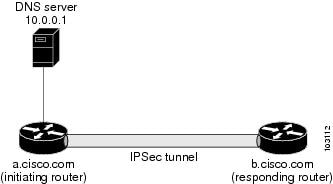
The figure below and the following example illustrate how to create a crypto map that configures the host name of a remote IPsec peer to DNS resolved via a DNS lookup right before the Cisco IOS XE software attempts to establish a connection with that peer.
| Figure 1 | Real-Time Resolution Sample Topology |
! Configure the initiating router.
hostname a.cisco.com
ip domain name cisco.com
ip name server 10.0.0.1
!
crypto map secure_b 10 ipsec-isakmp
  match address 140
  set peer b.cisco.com dynamic
  set transform-set xset
interface serial1
  ip address 10.10.0.1
  crypto map secure_b
access-list 140 permit ...
!
! Configure the responding router (the remote IPSec peer).
hostname b.cisco.com
!
crypto map secure_a 10 ipsec-isakmp
  match address 150
  set peer 10.10.0.1
  set transform-set
interface serial0/1
  ip address 10.0.0.1
  crypto map secure_a
access-list 150 ...
! DNS server configuration
b.cisco.com 10.0.0.1       # the address of serial0/1 of b.cisco.com
Additional References
Related Documents
| Related Topic |
Document Title |
|---|---|
| Crypto maps |
"Configuring Security for VPNs with IPsec" module in the Security for VPNs with IPsec Configuration Guide |
| ISAKMP policies |
"Configuring Internet Key Exchange for IPsec VPNs" module in the Internet Key Exchange for IPsec VPNs Configuration Guide |
| IPsec and IKE configuration commands |
Cisco IOS Security Command Reference |
Standards
| Standards |
Title |
|---|---|
| No new or modified standards are supported by this feature, and support for existing standards has not been modified by this feature |
-- |
MIBs
| MIBs |
MIBs Link |
|---|---|
| No new or modified MIBs are supported by this feature, and support for existing MIBs has not been modified by this feature. |
To locate and download MIBs for selected platforms, Cisco IOS XE software releases, and feature sets, use Cisco MIB Locator found at the following URL: |
RFCs
| RFCs |
Title |
|---|---|
| No new or modified RFCs are supported by this feature, and support for existing RFCs has not been modified by this feature. |
-- |
Technical Assistance
| Description |
Link |
|---|---|
| The Cisco Support website provides extensive online resources, including documentation and tools for troubleshooting and resolving technical issues with Cisco products and technologies. To receive security and technical information about your products, you can subscribe to various services, such as the Product Alert Tool (accessed from Field Notices), the Cisco Technical Services Newsletter, and Really Simple Syndication (RSS) Feeds. Access to most tools on the Cisco Support website requires a Cisco.com user ID and password. |
Feature Information for Real-Time Resolution for IPsec Tunnel Peer
The following table provides release information about the feature or features described in this module. This table lists only the software release that introduced support for a given feature in a given software release train. Unless noted otherwise, subsequent releases of that software release train also support that feature.
Use Cisco Feature Navigator to find information about platform support and Cisco software image support. To access Cisco Feature Navigator, go to www.cisco.com/go/cfn. An account on Cisco.com is not required.
| Table 1 | Feature Information for Real-Time Resolution for IPsec Tunnel Peer |
| Feature Name |
Releases |
Feature Information |
|---|---|---|
| Real-Time Resolution for IPsec Tunnel Peer |
Cisco IOS XE Release 2.1 |
After a user specifies a host name (instead of an IP address) for remote IP Security (IPsec) peer, this feature allows the host name to be domain name server (DNS) resolved before the router establishes the IPsec tunnel. Thus, the router can immediately discover whether the IP address of the peer has changed. The following commands were introduced or modified: set peer (IPsec). |
Cisco and the Cisco logo are trademarks or registered trademarks of Cisco and/or its affiliates in the U.S. and other countries. To view a list of Cisco trademarks, go to this URL: www.cisco.com/go/trademarks. Third-party trademarks mentioned are the property of their respective owners. The use of the word partner does not imply a partnership relationship between Cisco and any other company. (1110R)
Any Internet Protocol (IP) addresses and phone numbers used in this document are not intended to be actual addresses and phone numbers. Any examples, command display output, network topology diagrams, and other figures included in the document are shown for illustrative purposes only. Any use of actual IP addresses or phone numbers in illustrative content is unintentional and coincidental.
 Feedback