- Congestion Management Overview
- IPv6 QoS: Queueing
- Low Latency Queueing with Priority Percentage Support
- Low Latency Queueing for IPsec Encryption Engines
- Configurable Queue Depth
- Multi-Level Priority Queues
- Configuring Custom Queueing
- QoS Hierarchical Queueing for Ethernet DSLAMs
- QoS Hierarchical Queueing for ATM DSLAMs
- Per-Flow Admission
- Finding Feature Information
- Prerequisites for QoS Hierarchical Queueing for ATM DSLAMs
- Restrictions for QoS Hierarchical Queueing for ATM DSLAMs
- Information About QoS Hierarchical Queueing for ATM DSLAMs
- How to Configure QoS Hierarchical Queueing for ATM DSLAMs
- Configuration Examples for QoS Hierarchical Queueing for ATM DSLAMs
- Additional References
- Feature Information for QoS Hierarchical Queueing for ATM DSLAMs
QoS Hierarchical Queueing for ATM DSLAMs
This feature module describes how to configure quality of service (QoS) hierarchical queueing policy maps on sessions and ATM VCs in ATM Digital Subscriber Line Access Multiplexer (A-DSLAM) applications on a Cisco ASR 1000 Series Aggregation Services Router.
- Finding Feature Information
- Prerequisites for QoS Hierarchical Queueing for ATM DSLAMs
- Restrictions for QoS Hierarchical Queueing for ATM DSLAMs
- Information About QoS Hierarchical Queueing for ATM DSLAMs
- How to Configure QoS Hierarchical Queueing for ATM DSLAMs
- Configuration Examples for QoS Hierarchical Queueing for ATM DSLAMs
- Additional References
- Feature Information for QoS Hierarchical Queueing for ATM DSLAMs
Finding Feature Information
Your software release may not support all the features documented in this module. For the latest caveats and feature information, see Bug Search Tool and the release notes for your platform and software release. To find information about the features documented in this module, and to see a list of the releases in which each feature is supported, see the feature information table.
Use Cisco Feature Navigator to find information about platform support and Cisco software image support. To access Cisco Feature Navigator, go to www.cisco.com/go/cfn. An account on Cisco.com is not required.
Prerequisites for QoS Hierarchical Queueing for ATM DSLAMs
You must configure traffic classes using the class-map command.
Restrictions for QoS Hierarchical Queueing for ATM DSLAMs
The QoS Hierarchical Queueing for ATM DSLAMs feature is not supported in combination with load balancing when a session service policy is routed to a Layer 2 Tunnel Protocol (L2TP) tunnel. This feature is supported only with shaped ATM VCs, which means ATM VCs that are defined as constant bit rate (CBR), Variable bit rate (VBR) or shaped unspecified bit rate (UBR), (that is, UBR with a peak cell rate).
Information About QoS Hierarchical Queueing for ATM DSLAMs
- Different Levels of QoS Provisioning
- Configuration Guidelines for Hierarchical Queueing on ATM DSLAMs
Different Levels of QoS Provisioning
Traffic downstream from a Broadband Router Access Server (BRAS) requires different levels of QoS provisioning (for example, traffic shaping) depending on the network architecture between the BRAS and the subscriber. The figure below illustrates an ATM DSL access network. The sample network includes multiple entities where QoS provisioning is required for different reasons.
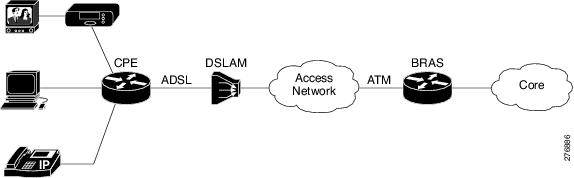
Integrated Queueing Hierarchy
Different traffic shaping requirements result in QoS provisioning at multiple levels at the same time. The QoS-Hierarchical Queueing for ATM DSLAMs feature provides the ability to form one integrated queueing hierarchy that provides QoS provisioning at multiple levels with support for features such as bandwidth distribution at any of these levels.
The integrated queueing hierarchy is formed on the physical interface. When a service policy is instantiated on a session, the Subscriber Service Switch (SSS) infrastructure invokes the Modular QoS CLI (MQC) and a common queueing control plane sets up and enables the queueing features.
Session-to-ATM associations are resolved to determine the ATM VC on which the session QoS queues are built. QoS policies consisting of a shaper may also be applied simultaneously at the VC level.
Configuration Guidelines for Hierarchical Queueing on ATM DSLAMs
When configuring the QoS Hierarchical Queueing for ATM DSLAMs feature, note the following guidelines:
When an ATM VC is used to aggregate a number of sessions with queueing policies, a queueing policy at an ATM VC level must be a one-level policy map that is configured as class-default with only the shape feature enabled.
Both ATM VCs and sessions can be oversubscribed and controlled by shapers.
How to Configure QoS Hierarchical Queueing for ATM DSLAMs
- Configuring and Applying QoS Hierarchical Queueing Policy Maps to Sessions
- Configuring and Applying QoS Hierarchical Queueing Policy Maps to ATM VCs
- Displaying Policy-Map Information for Hierarchical Queueing
Configuring and Applying QoS Hierarchical Queueing Policy Maps to Sessions
1.
enable
2.
configure
terminal
3.
policy-map
policy-map-name
4.
class
class-map-name
5. bandwidth {bandwidth-kbps | percentpercentage| remainingpercentpercentage}
6.
exit
7.
exit
8.
policy-map
policy-map-name
9.
class
class-default
10.
shape
average {cir|
percentpercentage}
11.
bandwidth
remaining
ratio
ratio
12.
service-polic
ypolicy-map-name
13.
exit
14.
exit
15.
interface
virtual-template
number
16.
service-policy
output
policy-map-name
17.
end
DETAILED STEPS
Examples
The following is an example of how to configure and apply a QoS hierarchical queueing policy map to PPP/IP sessions by using a virtual template:
Router> enable
Router# configure terminal
Router(config)# policy-map session-a-child
Router(config-pmap)# class voip
Router(config-pmap-c)# police 1000000
Router(config-pmap-c)# priority level 1
Router(config-pmap-c)# exit
Router(config-pmap)# class video
Router(config-pmap-c)# police 100000
Router(config-pmap-c)# priority level 2
Router(config-pmap-c)# exit
Router(config-pmap)# class precedence_0
Router(config-pmap-c)# bandwidth remaining ratio 10
Router(config-pmap-c)# exit
Router(config-pmap)# class precedence_1
Router(config-pmap-c)# bandwidth remaining ratio 20
Router(config-pmap-c)# exit
Router(config-pmap)# exit
Router(config)# policy-map session_a_parent
Router(config-pmap-c)# exit
Router(config-pmap)# class class-default
Router(config-pmap-c)# shape average 10000000
Router(config-pmap-c)# bandwidth remaining ratio 10
Router(config-pmap-c)# service-policy session-a-child
Router(config-pmap-c)# exit
Router(config-pmap)# exit
Router(config)# interface virtual-template 20
Router(config-if)# service-policy output session_a_parent
Router(config-if)# end
Configuring and Applying QoS Hierarchical Queueing Policy Maps to ATM VCs
1.
enable
2.
configure
terminal
3.
policy-map
policy-map-name
4.
class
class-default
5.
shape
average
{cir|
percentpercentage}
6.
exit
7.
exit
8. interface type slot/subslot/port.subinterface
9. pvc [name] vpi/vci [ces | ilmi | qsaal | smds| l2transport]
10.
vbr-nrt
peak-cell-rate
average-cell-rate
11.
service-policy
output
policy-map-name
12.
end
DETAILED STEPS
| Command or Action | Purpose | |||
|---|---|---|---|---|
| Step 1 |
enable
Example: Router> enable |
Enables privileged EXEC mode. | ||
| Step 2 |
configure
terminal
Example: Router# configure terminal |
Enters global configuration mode. | ||
| Step 3 |
policy-map
policy-map-name
Example: Router(config)# policy-map subint-1 |
Creates a policy map and enters policy-map configuration mode. | ||
| Step 4 |
class
class-default
Example: Router(config-pmap)# class class-default |
Configures the traffic class as class-default and enters policy-map class configuration mode.
| ||
| Step 5 |
shape
average
{cir|
percentpercentage}
Example: Router(config-pmap-c)# shape average 10000000 |
Specifies average-rate traffic shaping for all traffic that does not match any other traffic class.
| ||
| Step 6 |
exit
Example: Router(config-pmap-c)# exit |
Exits policy-map class configuration mode. | ||
| Step 7 |
exit
Example: Router(config-pmap)# exit |
Exits policy-map configuration mode. | ||
| Step 8 | interface type slot/subslot/port.subinterface
Example: Router(config)# interface ATM 3/1/1.1 |
Specifies the ATM VC on which you are attaching the policy map and enters ATM VC configuration mode. | ||
| Step 9 | pvc [name]
vpi/vci [ces |
ilmi |
qsaal |
smds|
l2transport]
Example: Router(config-if-atm-vc)# pvc 2/100 |
Selects the ATM VC to which the service policy is to be applied. | ||
| Step 10 |
vbr-nrt
peak-cell-rate
average-cell-rate
Example: Router(config-if-atm-vc)# vbr-nrt 800000 800000 |
Sets the VC type to VBR with a peak and average cell rate. | ||
| Step 11 |
service-policy
output
policy-map-name
Example: Router(config-subif)# service-policy output subint-1 |
Attaches the service policy to the ATM VC.
| ||
| Step 12 |
end
Example: Router(config-subif)# end |
(Optional) Returns to privileged EXEC mode. |
Examples
The following is an example of how to configure and apply a QoS hierarchical queueing policy map to an ATM VC (and provide aggregate shaping for a large number of subscribers):
Router> enable
Router# configure terminal
Router(config)# policy-map subint-1
Router(config-pmap)# class class-default
Router(config-pmap-c)# shape average 10000000
Router(config-pmap-c)# exit
Router(config-pmap)# exit
Router(config)# interface ATM 3/1/1.1
Router(config-if-atm-vc)# pvc 2/100
Router (config-if-atm-vc)# vbr-nrt 800000 800000
Router(config-subif)# service-policy output subint-1
Router(config-subif)# end
Displaying Policy-Map Information for Hierarchical Queueing
1.
enable
2.
show
policy-map
3.
show
policy-map
interface
type
number
4.
show
policy-map
session
5.
exit
DETAILED STEPS
| Command or Action | Purpose | |
|---|---|---|
| Step 1 |
enable
Example: Router> enable |
Enables privileged EXEC mode.
|
| Step 2 |
show
policy-map
Example: Router# show policy-map |
(Optional) Displays all information for all class maps. |
| Step 3 |
show
policy-map
interface
type
number
Example: Router# show policy-map interface ATM 4/0/0.1 |
(Optional) Displays the packet statistics of all classes that are configured for all service policies either on the specified interface or ATM VC or on a specific PVC on the interface.
|
| Step 4 |
show
policy-map
session
Example: Router# show policy-map session |
(Optional) Displays the QoS policy map in effect for the SSS session. |
| Step 5 |
exit
Example: Router# exit |
(Optional) Exits privileged EXEC mode. |
Configuration Examples for QoS Hierarchical Queueing for ATM DSLAMs
Example Policy Maps on Sessions
The following example shows how to configure and apply QoS hierarchical queueing policy maps on sessions. A child queueing policy is applied to each parent subscriber line level policy.
Router> enable
Router# configure terminal
Router(config)# policy-map service-a-out
Router(config-pmap)# class voip
Router(config-pmap-c)# priority
Router(config-pmap-c)# set cos 1
Router(config-pmap-c)# exit
Router(config-pmap)# class video
Router(config-pmap-c)# set cos 2
Router(config-pmap-c)# exit
Router(config-pmap)# class gaming
Router(config-pmap-c)# bandwidth remaining percent 80
Router(config-pmap-c)# set cos 3
Router(config-pmap-c)# exit
Router(config-pmap)# class class-default
Router(config-pmap-c)# bandwidth remaining percent 20
Router(config-pmap-c)# set cos 4
Router(config-pmap-c)# exit
Router(config-pmap)# exit
!
Router(config)# policy-map rate-1-service-a-out
Router(config-pmap)# class class-default
Router(config-pmap-c)# bandwidth remaining ratio 10
Router(config-pmap-c)# shape average 100000
Router(config-pmap-c)# service-policy service-a-out
Router(config-pmap-c)# exit
Router(config-pmap)# exit
!
Router(config)# policy-map rate-1-service-a-in
Router(config-pmap)# class voip
Router(config-pmap-c)# police percent 25
Router(config-pmap-c)# exit
Router(config-pmap)# class gaming
Router(config-pmap-c)# police percent 50
Router(config-pmap-c)# exit
Router(config-pmap)# class class-default
Router(config-pmap-c)# police percent 20
Router(config-pmap-c)# exit
Router(config-pmap)# exit
!
Router(config)# interface virtual-template 20
Router(config-if)# service-policy output rate-1-service-a-out
Router(config-if)# service-policy input rate-1-service-a-in
Router(config-if)# end
Example Policy Maps on Sessions with Aggregate Shaping
The following example shows how to configure and apply QoS hierarchical queueing policy maps on sessions with multiple PPP/IP sessions per subscriber line. In this example, queueing is configured as in previous example. The VC is configured as follows:
Router(config)# policy-map isp_A_out
Router(config-pmap)# class class-default
Router(config-pmap-c)# shape average 500000
Router(config-pmap-c)# exit
Router(config-pmap)# exit
Router(config)# interface ATM 1/0/0.1
Router(config-subif)# pvc 10/100
Router(config-if-atm-vc)# vbr-nrt 800000 800000
Router(config-if-atm-vc)# service-policy output isp-A-out
Router(config-if-atm-vc)# exit
Router(config-subif)# exit
Additional References
Related Documents
|
Related Topic |
Document Title |
|---|---|
|
QoS commands: complete command syntax, command modes, command history, defaults, usage guidelines, and examples |
Cisco IOS Quality of Service Solutions Command Reference |
|
Traffic shaping |
"Regulating Traffic Flow Using Traffic Shaping" module |
|
MQC |
"Applying QoS Features Using the MQC" module |
Standards
|
Standard |
Title |
|---|---|
|
No new or modified standards are supported by this feature, and support for existing standards has not been modified by this feature. |
-- |
MIBs
|
MIB |
MIBs Link |
|---|---|
|
No new or modified MIBs are supported by this feature, and support for existing MIBs has not been modified by this feature. |
To locate and download MIBs for selected platforms, Cisco IOS XE Software releases, and feature sets, use Cisco MIB Locator found at the following URL: |
RFCs
|
RFC |
Title |
|---|---|
|
No new or modified RFCs are supported by this feature, and support for existing RFCs has not been modified by this feature. |
--
|
Technical Assistance
|
Description |
Link |
|---|---|
|
The Cisco Support and Documentation website provides online resources to download documentation, software, and tools. Use these resources to install and configure the software and to troubleshoot and resolve technical issues with Cisco products and technologies. Access to most tools on the Cisco Support and Documentation website requires a Cisco.com user ID and password. |
Feature Information for QoS Hierarchical Queueing for ATM DSLAMs
The following table provides release information about the feature or features described in this module. This table lists only the software release that introduced support for a given feature in a given software release train. Unless noted otherwise, subsequent releases of that software release train also support that feature.
Use Cisco Feature Navigator to find information about platform support and Cisco software image support. To access Cisco Feature Navigator, go to www.cisco.com/go/cfn. An account on Cisco.com is not required.|
Feature Name |
Releases |
Feature Information |
|---|---|---|
|
QoS Hierarchical Queueing for ATM DSLAMs |
Cisco IOS XE Release 2.4 Cisco IOS XE Release 2.5 |
This feature module describes how to configure QoS hierarchical queueing policy maps on sessions and ATM VCs in ATM Digital Subscriber Line Access Multiplexer (A-DSLAM) applications. This feature was implemented on Cisco ASR 1000 Series Aggregation Services Routers. |
 Feedback