- MPLS Traffic Engineering and Enhancements
- MPLS Traffic Engineering Configurable Path Calculation Metric for Tunnels
- MPLS Traffic Engineering Scalability Enhancements
- MPLS Traffic Engineering--LSP Attributes
- MPLS Traffic Engineering AutoTunnel Mesh Groups
- MPLS Traffic Engineering Verbatim Path Support
- MPLS Traffic Engineering RSVP Hello State Timer
- MPLS Traffic Engineering Forwarding Adjacency
- MPLS Traffic Engineering Class-based Tunnel Selection
- MPLS Traffic Engineering Interarea Tunnels
- MPLS Traffic Engineering Static IPv6 Routes over MPLS TE IPv4 Tunnels
- MPLS Traffic Engineering Automatic Bandwidth Adjustment for TE Tunnels
- MPLS TE Bundled Interface Support
- MPLS Point-to-Multipoint Traffic Engineering
- MPLS Point-to-Multipoint Traffic Engineering Support for Static Pseudowires
- Finding Feature Information
- Feature Overview
- Prerequisites
- Configuration Tasks
- Configuring a Platform to Support Traffic Engineering Tunnels
- Configuring IS-IS for MPLS Traffic Engineering
- Configuring OSPF for MPLS Traffic Engineering
- Configuring Traffic Engineering Link Metrics
- Configuring an MPLS Traffic Engineering Tunnel
- Configuring the Metric Type for Tunnel Path Calculation
- Verifying the Configuration
- Configuration Examples
- Additional References
- Feature Information for MPLS Traffic Engineering Configurable Path Calculation Metric for Tunnels
MPLS Traffic Engineering Configurable Path Calculation Metric for Tunnels
The MPLS Traffic Engineering--Configurable Path Calculation Metric for Tunnels feature enables the user to control the metric used in path calculation for traffic engineering (TE) tunnels on a per-tunnel basis. Certain tunnels are used to carry voice traffic, which requires low delay, and other tunnels are used to carry data. A TE link metric can be used to represent link delay and configure tunnels that carry voice traffic for path calculation and configure tunnels that carry data to use the Interior Gateway Protocol (IGP) metric for path calculation.
- Finding Feature Information
- Feature Overview
- Prerequisites
- Configuration Tasks
- Configuration Examples
- Additional References
- Feature Information for MPLS Traffic Engineering Configurable Path Calculation Metric for Tunnels
Finding Feature Information
Your software release may not support all the features documented in this module. For the latest caveats and feature information, see Bug Search Tool and the release notes for your platform and software release. To find information about the features documented in this module, and to see a list of the releases in which each feature is supported, see the feature information table at the end of this module.
Use Cisco Feature Navigator to find information about platform support and Cisco software image support. To access Cisco Feature Navigator, go to www.cisco.com/go/cfn. An account on Cisco.com is not required.
Feature Overview
When Multiprotocol Label Switching (MPLS) TE is configured in a network, the Interior Gateway Protocol (IGP) floods two metrics for every link: the normal IGP (Open Shortest Path First (OSPF) or (Intermediate System-to-Intermediate System (IS-IS)) link metric and a TE link metric. The IGP uses the IGP link metric in the normal way to compute routes for destination networks. In releases previous to Cisco IOS Release 12.2(18)ST, MPLS TE used the TE link metric to calculate and verify paths for TE tunnels. When the traffic engineering metric was not explicitly configured, the traffic engineering metric was the IGP metric.
The enhancement as of release Cisco IOS Release 12.2(18)ST allows you to specify that the path calculation for a given tunnel be based on either of the following:
- IGP link metrics.
- TE link metrics, which you can configure so that they represent the needs of a particular application. For example, the TE link metrics can be configured to represent link transmission delay.
Benefits
When TE tunnels are used to carry two types of traffic, the Configurable Path Calculation Metric for Tunnels enhancement allows you to tailor tunnel path selection to the requirements of each type of traffic.
For example, suppose certain tunnels are to carry voice traffic (which requires low delay) and other tunnels are to carry data. In this situation, you can use the TE link metric to represent link delay and do the following:
- Configure tunnels that carry voice to use the TE link metric set to represent link delay for path calculation.
- Configure tunnels that carry data to use the IGP metric for path calculation.
Restrictions
- Unless explicitly configured, the TE link metric for a given link is the IGP link metric. When the TE link metric is used to represent a link property that is different from cost/distance, you must configure every network link that can be used for TE tunnels with a TE link metric that represents that property by using the mpls traffic-eng administrative-weight command. Failure to do so might cause tunnels to use unexpected paths.
- You cannot configure MPLS Traffic Engineering over the logical GRE tunnel interface.
- MPLS traffic engineering supports only a single IGP process/instance. Multiple IGP processes/instances are not supported and MPLS traffic engineering should not be configured in more than one IGP process/instance.
Related Features and Technologies
The configurable path calculation metric feature is related to MPLS TE.
Prerequisites
Before you configure tunnel path calculation metrics, your network must support the following Cisco IOS features:
- MPLS traffic engineering tunnels
- IP Cisco Express Forwarding
- OSPF or IS-IS
Configuration Tasks
See the following sections for configuration tasks for the configurable path calculation metric feature.
- Configuring a Platform to Support Traffic Engineering Tunnels
- Configuring IS-IS for MPLS Traffic Engineering
- Configuring OSPF for MPLS Traffic Engineering
- Configuring Traffic Engineering Link Metrics
- Configuring an MPLS Traffic Engineering Tunnel
- Configuring the Metric Type for Tunnel Path Calculation
- Verifying the Configuration
Configuring a Platform to Support Traffic Engineering Tunnels
To configure a platform to support traffic engineering tunnels, perform the following steps in global configuration mode:
1. Router(config)# ip cef
2. Router(config)# mpls traffic-eng tunnels
DETAILED STEPS
| Command or Action | Purpose | |
|---|---|---|
| Step 1 | Router(config)# ip cef | Enables standard Cisco Express Forwarding operation. |
| Step 2 | Router(config)# mpls traffic-eng tunnels | Enables the MPLS traffic engineering tunnel feature on a device. |
Configuring IS-IS for MPLS Traffic Engineering
To configure IS-IS for MPLS traffic engineering, perform the following steps.
 Note |
MPLS traffic engineering supports only a single IGP process/instance. Multiple IGP processes/instances are not supported and MPLS traffic engineering should not be configured in more than one IGP process/instance. |
1. Router(config)# router isis
2. Router(config-router)# mpls traffic-eng level-1
3. Router(config-router)# mpls traffic-eng level-2
4. Router(config-router)# mpls traffic-eng router-id loopback 0
5. Router(config-router)# metric-style wide
DETAILED STEPS
| Command or Action | Purpose | |
|---|---|---|
| Step 1 | Router(config)# router isis | Enables IS-IS routing and specifies an IS-IS process for IP. The router is placed in configuration mode. |
| Step 2 | Router(config-router)# mpls traffic-eng level-1 | Turns on MPLS traffic engineering for IS-IS level 1. |
| Step 3 | Router(config-router)# mpls traffic-eng level-2 | Turns on MPLS traffic engineering for IS-IS level 2. |
| Step 4 | Router(config-router)# mpls traffic-eng router-id loopback 0 | Specifies that the traffic engineering router identifier for the node is the IP address associated with interface loopback0. |
| Step 5 | Router(config-router)# metric-style wide | Configures a router to generate and accept only new-style type, length, value objects (TLVs). |
Configuring OSPF for MPLS Traffic Engineering
1. enable
2. configure terminal
3. router ospf process-id
4. mpls traffic-eng area number
5. mpls traffic-eng router-id loopback0
6. exit
7. exit
DETAILED STEPS
Configuring Traffic Engineering Link Metrics
Unless explicitly configured, the TE link metric is the IGP link metric. To configure the TE link metric, perform these steps:
1. Router(config)# interface interface
2. Router(config-router)# mpls traffic-eng administrative-weight weight
DETAILED STEPS
| Command or Action | Purpose | |
|---|---|---|
| Step 1 | Router(config)# interface interface | Configures properties of the specified interface. |
| Step 2 | Router(config-router)# mpls traffic-eng administrative-weight weight | Specifies the traffic engineering metric for the link. |
Configuring an MPLS Traffic Engineering Tunnel
To configure an MPLS traffic engineering tunnel, perform the following steps in interface configuration mode. This tunnel has two path setup options: a preferred explicit path and a backup dynamic path.
1. Router(config)# interface tunnel-interface
2. Router(config-if)# ip unnumbered loopback0
3. Router(config-if)# tunnel destination ip-address
4. Router(config-if)# tunnel mode mpls traffic-eng
5. Router(config-if)# tunnel mpls traffic-eng bandwidth bandwidth
6. Router(config-if)# tunnel mpls traffic-eng path-option number {dynamic | explicit {name path-name | id path-number}} [lockdown]
DETAILED STEPS
| Command or Action | Purpose | |
|---|---|---|
| Step 1 | Router(config)# interface tunnel-interface | Configures a tunnel interface and enters interface configuration mode. |
| Step 2 | Router(config-if)# ip unnumbered loopback0 | Gives the tunnel interface an IP address. An MPLS traffic engineering tunnel interface should be unnumbered because it represents a unidirectional link. |
| Step 3 | Router(config-if)# tunnel destination ip-address | Specifies the destination for a tunnel. The destination must be the MPLS traffic engineering router ID of the destination device. |
| Step 4 | Router(config-if)# tunnel mode mpls traffic-eng | Sets the tunnel encapsulation mode to MPLS traffic engineering. |
| Step 5 | Router(config-if)# tunnel mpls traffic-eng bandwidth bandwidth | Configures the bandwidth for the MPLS traffic engineering tunnel. If automatic bandwidth is configured for the tunnel, use the tunnel mpls traffic-eng bandwidth command to configure the initial tunnel bandwidth, which is adjusted by the autobandwidth mechanism. |
| Step 6 | Router(config-if)# tunnel mpls traffic-eng path-option number {dynamic | explicit {name path-name | id path-number}} [lockdown] | Configures the tunnel to use a named IP explicit path or a path dynamically calculated from the traffic engineering topology database. A dynamic path is used if an explicit path is currently unavailable. |
Configuring the Metric Type for Tunnel Path Calculation
Unless explicitly configured, the TE link metric type is used for tunnel path calculation. Two commands are provided for controlling the metric type to be used: an interface configuration command that specifies the metric type to be used for a particular TE tunnel and a global configuration command that specifies the metric type to be used for TE tunnels for which a metric type has not been specified by the interface configuration command.
To configure the metric type for tunnel path calculation, perform one or both of the following steps:
| Command |
Purpose |
|---|---|
Router(config-if)# tunnel mpls traffic-eng path-selection metric {igp | te} |
Specifies the metric type to use for path calculation when you are determining a tunnel’s path. |
Router(config)# mpls traffic-eng path-selection metric {igp | te} |
Specifies the metric type to use if a metric type was not explicitly configured for a given tunnel. |
Note |
If you do not enter either of the commands, the traffic engineering (te) metric is used. |
Verifying the Configuration
Use the show mpls traffic-eng topology command, which displays TE and IGP metrics for each link, to verify that link metrics have been correctly configured for a network.
Router# show mpls traffic-eng topology
My_System_id: 1440.0000.0044.00 (isis  level-1)
IGP Id: 0090.0000.0009.00, MPLS TE Id:192.168.9.9 Router Node  (isis  level-1)
      link[0 ]:Nbr IGP Id: 0090.0000.0009.03, gen:7
          frag_id 0, Intf Address:10.0.0.99
          TE metric:100, IGP metric:48, attribute_flags:0x0     !!Note TE and IGP metrics
          physical_bw: 10000 (kbps), max_reservable_bw_global: 0 (kbps)
          max_reservable_bw_sub: 0 (kbps)
  .
.
.
      link[1 ]:Nbr IGP Id: 0055.0000.0055.00, gen:7
          frag_id 0, Intf Address:10.205.0.9, Nbr Intf Address:10.205.0.55
          TE metric:120, IGP metric:10, attribute_flags:0x0     !!Note TE and IGP metrics
          physical_bw: 155000 (kbps), max_reservable_bw_global: 500000 (kbps)
          max_reservable_bw_sub: 0 (kbps)
.
.
.
Use the show mpls traffic-eng tunnels command, which displays the link metric used for tunnel path calculation, to verify that the desired link metrics are being used for each tunnel.
Router# show mpls traffic-eng tunnels
Name: te3640-17-c_t221              (Tunnel22) Destination: 192.168.100.22
  Status:
    Admin: up         Oper: up     Path: valid       Signalling: connected
    path option 1, type dynamic (Basis for Setup, path weight 10)
  Config Parameters:
    Bandwidth: 400 kps (Global)    Priority: 1  1   Affinity: 0x0/0xFFFF
    Metric Type: IGP                                            !!Note metric type
    AutoRoute:  enabled   LockDown: disabled  Loadshare: 0   bw-based
    auto-bw: disabled(0/115) 0  Bandwidth Requested: 0
.
.
.
Name: te3640-17-c_t222              (Tunnel33) Destination: 192.168.100.22
  Status:
    Admin: up         Oper: up     Path: valid       Signalling: connected
    path option 1, type dynamic (Basis for Setup, path weight 10)
  Config Parameters:
    Bandwidth: 200 kbps (Global)   Priority: 1  1   Affinity: 0x0/0xFFFF
    Metric Type: TE                                              !!Note metric type
    AutoRoute:  enabled   LockDown: disabled  Loadshare: 0   bw-based
    auto-bw: disabled(0/115) 0  Bandwidth Requested: 0
.
.
.
Configuration Examples
The section illustrates how to configure the link metric type to be used for tunnel path selection, and how to configure the link metrics themselves. The configuration commands included focus on specifying the metric type for path calculation and assigning metrics to links. Additional commands are required to fully configure the example scenario: for example, the IGP commands for traffic engineering and the link interface commands for enabling traffic engineering and specifying available bandwidth.
The examples in this section support the simple network topology shown in the figure below.
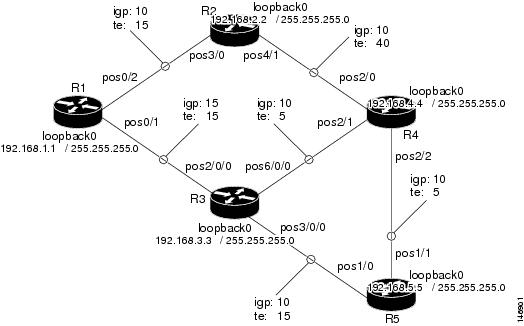
In the figure above:
- Tunnel1 and Tunnel2 run from R1 (headend) to R4 (tailend).
- Tunnel3 runs from R1 to R5.
- Path calculation for Tunnel1 and Tunnel3 should use a metric that represents link delay because these tunnels carry voice traffic.
- Path calculation for Tunnel2 should use IGP metrics because MPLS TE carries data traffic with no delay requirement.
Configuration fragments follow for each of the routers that illustrate the configuration relating to link metrics and their use in tunnel path calculation. TE metrics that represent link delay must be configured for the network links on each of the routers, and the three tunnels must be configured on R1.
These configuration fragments force Tunnel1 to take path R1-R3-R4, Tunnel2 to take path R1-R2-R4, and Tunnel3 to take path R1-R3-R4-R5 (assuming the links have sufficient bandwidth to accommodate the tunnels).
R1 Configuration
interface pos0/1
mpls traffic-eng administrative-weight 15       !TE metric different from IGP metric
interface pos0/2
mpls traffic-eng administrative-weight 15       !TE metric different from IGP metric
interface Tunnel1                               !Tunnel1 uses TE metric (default)
                                                !for path selection
ip unnumbered loopback0
tunnel destination 192.168.4.4 255.255.255.0
tunnel mode mpls traffic-eng
tunnel mpls traffic-eng bandwidth 1000
tunnel mpls traffic-eng path-option 1 dynamic
interface Tunnel2                                !Tunnel2 uses IGP metric
                                                 !for path selection
ip unnumbered loopback0
tunnel destination 192.168.4.4 255.255.255.0
tunnel mode mpls traffic-eng
tunnel mpls traffic-eng bandwidth 1000
tunnel mpls traffic-eng path-option 1 dynamic
tunnel mpls traffic-eng path-selection-metric igp !Use IGP cost for path selection.
interface Tunnel3                                 !Tunnel3 uses TE metric (default)
                                                  !for path selection
ip unnumbered loopback0
tunnel destination 192.168.5.5 255.255.255.0
tunnel mode mpls traffic-eng
tunnel mpls traffic-eng bandwidth 1000
tunnel mpls traffic-eng path-option 1 dynamic
R2 Configuration
interface pos3/0
mpls traffic-eng administrative-weight 15       !TE metric different from IGP metric
interface pos4/1
mpls traffic-eng administrative-weight 40       !TE metric different from IGP metric
R3 Configuration
interface pos2/0/0
mpls traffic-eng administrative-weight 15       !TE metric different from IGP metric
interface pos3/0/0
mpls traffic-eng administrative-weight 15       !TE metric different from IGP metric
interface pos6/0/0
mpls traffic-eng administrative-weight 5        !TE metric different from IGP metric
R4 Configuration
interface pos2/0
mpls traffic-eng administrative-weight 15       !TE metric different from IGP metric
interface pos2/1
mpls traffic-eng administrative-weight 15       !TE metric different from IGP metric
interface pos2/2
mpls traffic-eng administrative-weight 5        !TE metric different from IGP metric
R5 Configuration
interface pos1/0
mpls traffic-eng administrative-weight 15       !TE metric different from IGP metric
interface pos1/1
mpls traffic-eng administrative-weight 5        !TE metric different from IGP metric
Additional References
Related Document
| Related Topic |
Document Title |
|---|---|
| MPLS Traffic Engineering Path Protection |
MPLS Traffic Engineering Path Protection |
| MPLS Traffic Engineering--Fast Reroute Link and Node Protection |
MPLS Traffic Engineering--Fast Reroute Link and Node Protection |
Standards
| Standard |
Title |
|---|---|
| No new or modified standards are supported by this feature, and support for existing standards has not been modified by this feature. |
- |
MIBs
| MIB |
MIBs Link |
|---|---|
| No new or modified MIBs are supported by this feature, and support for existing MIBs has not been modified by this feature. |
To locate and download MIBs for selected platforms, Cisco IOS releases, and feature sets, use Cisco MIB Locator found at the following URL: |
RFCs
| RFC |
Title |
|---|---|
| No new or modified RFCs are supported by this feature, and support for existing RFCs has not been modified. |
- |
Technical Assistance
| Description |
Link |
|---|---|
| The Cisco Support website provides extensive online resources, including documentation and tools for troubleshooting and resolving technical issues with Cisco products and technologies. To receive security and technical information about your products, you can subscribe to various services, such as the Product Alert Tool (accessed from Field Notices), the Cisco Technical Services Newsletter, and Really Simple Syndication (RSS) Feeds. Access to most tools on the Cisco Support website requires a Cisco.com user ID and password. |
Feature Information for MPLS Traffic Engineering Configurable Path Calculation Metric for Tunnels
The following table provides release information about the feature or features described in this module. This table lists only the software release that introduced support for a given feature in a given software release train. Unless noted otherwise, subsequent releases of that software release train also support that feature.
Use Cisco Feature Navigator to find information about platform support and Cisco software image support. To access Cisco Feature Navigator, go to www.cisco.com/go/cfn. An account on Cisco.com is not required.
| Feature Name |
Releases |
Feature Information |
|---|---|---|
| MPLS Traffic Engineering:Configurable Path Calculation Metric for Tunnels |
12.0(18)ST 12.2(11)S 12.2(14)S 12.2(28)SB 12.4(20)T Cisco IOS XE Release 2.3 |
The MPLS Traffic Engineering--Configurable Path Calculation Metric for Tunnels feature enables the user to control the metric used in path calculation for traffic engineering (TE) tunnels on a per-tunnel basis. Certain tunnels are used to carry voice traffic, which requires low delay, and other tunnels are used to carry data. A TE link metric can be used to represent link delay and configure tunnels that carry voice traffic for path calculation and configure tunnels that carry data to use the Interior Gateway Protocol (IGP) metric for path calculation. The following commands were introduced or modified: mpls traffic-eng path-selection metric, tunnel mpls traffic-eng path-selection metric. |
 Feedback