- MPLS Traffic Engineering-Fast Reroute Link and Node Protection
- MPLS Traffic Engineering Path Protection
- MPLS Traffic Engineering BFD-triggered Fast Reroute
- MPLS Traffic Engineering-IP Explicit Address Exclusion
- MPLS Traffic Engineering-Autotunnel Primary and Backup
- MPLS Traffic Engineering Shared Risk Link Groups
- MPLS Traffic Engineering Inter-AS TE
- Finding Feature Information
- Prerequisites for MPLS Traffic Engineering BFD-triggered Fast Reroute
- Restrictions for MPLS Traffic Engineering BFD-triggered Fast Reroute
- Information About MPLS Traffic Engineering BFD-triggered Fast Reroute
- How to Configure MPLS Traffic Engineering BFD-triggered Fast Reroute
- Enabling BFD Support on the Router
- Enabling Fast Reroute on LSPs
- Creating a Backup Tunnel to the Next Hop or to the Next-Next Hop
- Assigning Backup Tunnels to a Protected Interface
- Enabling BFD on the Protected Interface
- Associating Backup Bandwidth and Pool Type with a Backup Tunnel
- Configuring Backup Bandwidth Protection
- Verifying That Fast Reroute Is Operational
- Configuration Examples for MPLS Traffic Engineering BFD-triggered Fast Reroute
- Example Enabling BFD Support on the Router
- Example Enabling Fast Reroute on LSPs
- Example Creating a Backup Tunnel to the Next Hop
- Example Creating an NNHOP Backup Tunnel
- Example Assigning Backup Tunnels to a Protected Interface
- Example Enabling BFD on the Protected Interface
- Example Associating Backup Bandwidth and Pool Type with Backup Tunnels
- Example Configuring Backup Bandwidth Protection
- Additional References
- Feature Information for MPLS Traffic Engineering BFD-triggered Fast Reroute
- Glossary
MPLS Traffic Engineering BFD-triggered Fast Reroute
The MPLS Traffic Engineering: BFD-triggered Fast Reroute feature allows you to obtain link and node protection by using the Bidirectional Forwarding Detection (BFD) protocol to provide fast forwarding path failure detection times for all media types, encapsulations, topologies, and routing protocols. In addition to fast forwarding path failure detection, BFD provides a consistent failure detection method for network administrators.
To obtain link and node protection by using the Resource Reservation Protocol (RSVP) with Hellos support, refer to the MPLS TE: Link and Node Protection, with RSVP Hellos Support (with Fast Tunnel Interface Down Detection) process module. RSVP Hellos enable a router to detect when a neighboring node has gone down but its interface to that neighbor is still operational.
- Finding Feature Information
- Prerequisites for MPLS Traffic Engineering BFD-triggered Fast Reroute
- Restrictions for MPLS Traffic Engineering BFD-triggered Fast Reroute
- Information About MPLS Traffic Engineering BFD-triggered Fast Reroute
- How to Configure MPLS Traffic Engineering BFD-triggered Fast Reroute
- Configuration Examples for MPLS Traffic Engineering BFD-triggered Fast Reroute
- Additional References
- Feature Information for MPLS Traffic Engineering BFD-triggered Fast Reroute
- Glossary
Finding Feature Information
Your software release may not support all the features documented in this module. For the latest caveats and feature information, see Bug Search Tool and the release notes for your platform and software release. To find information about the features documented in this module, and to see a list of the releases in which each feature is supported, see the feature information table at the end of this module.
Use Cisco Feature Navigator to find information about platform support and Cisco software image support. To access Cisco Feature Navigator, go to www.cisco.com/go/cfn. An account on Cisco.com is not required.
Prerequisites for MPLS Traffic Engineering BFD-triggered Fast Reroute
- Configure BFD. Refer to the Bidirectional Forwarding Detection process module.
- Enable MPLS TE on all relevant routers and interfaces.
- Configure MPLS TE tunnels.
- For additional prerequisites, refer to the MPLS TE: Link and Node Protection, with RSVP Hellos Support (with Fast Tunnel Interface Down Detection) process module.
Restrictions for MPLS Traffic Engineering BFD-triggered Fast Reroute
Information About MPLS Traffic Engineering BFD-triggered Fast Reroute
- Bidirectional Forwarding Detection
- Fast Reroute
- Link Protection
- Node Protection
- Bandwidth Protection
Bidirectional Forwarding Detection
Bidirectional Forwarding Detection (BFD) is a detection protocol designed to provide fast forwarding path failure detection times for all media types, encapsulations, topologies, and routing protocols. In addition to fast forwarding path failure detection, BFD provides a consistent failure detection method for network administrators. Because the network administrator can use BFD to detect forwarding path failures at a uniform rate, rather than the variable rates for different routing protocol Hello mechanisms, network profiling and planning will be easier, and reconvergence time will be consistent and predictable.
Fast Reroute
Fast Reroute (FRR) is a mechanism for protecting Multiprotocol Label Switching (MPLS) traffic engineering (TE) label switched paths (LSPs) from link and node failures by locally repairing the LSPs at the point of failure, allowing data to continue to flow on them while their headend routers attempt to establish new end-to-end LSPs to replace them. FRR locally repairs the protected LSPs by rerouting them over backup tunnels that bypass failed links or nodes.
Link Protection
Backup tunnels that bypass only a single link of the LSP's path provide link protection. They protect LSPs if a link along their path fails by rerouting the LSP's traffic to the next hop (bypassing the failed link). These are referred to as next-hop (NHOP) backup tunnels because they terminate at the LSP's next hop beyond the point of failure.
Node Protection
FRR provides node protection for LSPs. Backup tunnels that bypass next-hop nodes along LSP paths are called next-next-hop (NNHOP) backup tunnels because they terminate at the node following the next-hop node of the LSP paths, thereby bypassing the next-hop node. They protect LSPs if a node along their path fails by enabling the node upstream of the failure to reroute the LSPs and their traffic around the failed node to the next-next hop. FRR supports the use of RSVP Hellos to accelerate the detection of node failures. NNHOP backup tunnels also provide protection from link failures, because they bypass the failed link as well as the node.
Bandwidth Protection
NHOP and NNHOP backup tunnels can be used to provide bandwidth protection for rerouted LSPs. This is referred to as backup bandwidth. You can associate backup bandwidth with NHOP or NNHOP backup tunnels. This informs the router of the amount of backup bandwidth a particular backup tunnel can protect. When a router maps LSPs to backup tunnels, bandwidth protection ensures that an LSP uses a given backup tunnel only if there is sufficient backup bandwidth. The router selects which LSPs use which backup tunnels in order to provide maximum bandwidth protection. That is, the router determines the best way to map LSPs onto backup tunnels in order to maximize the number of LSPs that can be protected.
How to Configure MPLS Traffic Engineering BFD-triggered Fast Reroute
This section shows you how to add FRR protection to a network in which MPLS TE LSPs are configured.
The following sections describe how to use FRR to protect LSPs in your network from link or node failures. Each task is identified as either required or optional.
 Note |
You can perform the configuration tasks in any order. |
Note |
An NNHOP backup tunnel must not go via the NHOP backup tunnel. |
- Enabling BFD Support on the Router
- Enabling Fast Reroute on LSPs
- Creating a Backup Tunnel to the Next Hop or to the Next-Next Hop
- Assigning Backup Tunnels to a Protected Interface
- Enabling BFD on the Protected Interface
- Associating Backup Bandwidth and Pool Type with a Backup Tunnel
- Configuring Backup Bandwidth Protection
- Verifying That Fast Reroute Is Operational
Enabling BFD Support on the Router
DETAILED STEPS
Enabling Fast Reroute on LSPs
LSPs can use backup tunnels only if the LSPs have been configured as fast reroutable. To enable FRR on the LSP, enter the following commands at the headend of each LSP.
DETAILED STEPS
Creating a Backup Tunnel to the Next Hop or to the Next-Next Hop
To create a backup tunnel to the next hop or to the next-next hop, perform the following task.
Enter the commands on the node that will be the headend of the backup tunnel (that is, the node whose downstream link or node may fail). The node on which you enter the commands must be a supported platform. See the Finding Feature Information section.
Creating a backup tunnel is basically no different from creating any other tunnel.
Note |
When using the exclude-address command to specify the path for a backup tunnel, you must exclude an interface address to avoid a link (for creating an NHOP backup tunnel), or a router-ID address to avoid a node (for creating an NNHOP backup tunnel). |
DETAILED STEPS
Assigning Backup Tunnels to a Protected Interface
To assign one or more backup tunnels to a protected interface, perform the following task.
Enter the commands on the node that will be the headend of the backup tunnel (that is, the node whose downstream link or node may fail). The node on which you enter the commands must be a supported platform. See the Finding Feature Information section.
Note |
You must configure the interface to have an IP address and to enable the MPLS TE tunnel feature. |
DETAILED STEPS
| Command or Action | Purpose | |||
|---|---|---|---|---|
|
|
Example: Router> enable |
Enables privileged EXEC mode. |
||
|
|
Example: Router# configure terminal |
Enters global configuration mode. |
||
|
|
Example: Router(config)# interface Gigabitethernet 2/1/0 |
Configures an interface type and enters interface configuration mode.
Refer to the platform-specific SPA hardware installation guide and the corresponding "Specifying the Interface Address on a SPA" topic in the platform-specific SPA software configuration guide for subslot information. Refer to the appropriate hardware manual for port information. For SPAs, refer to the corresponding "Specifying the Interface Address on a SPA" topics in the platform-specific SPA software configuration guide |
||
|
|
Example: Router(config-if)# mpls traffic-eng backup-path tunnel2 |
Configures the physical interface to use for a backup tunnel in the event of a detected failure on that interface.
|
||
|
|
Example: Router(config-if))# exit |
Exits interface configuration mode and returns to global configuration mode. |
||
|
|
Example: Router(config)# exit |
Exits global configuration mode and returns to privileged EXEC mode. |
Enabling BFD on the Protected Interface
DETAILED STEPS
| Command or Action | Purpose | |
|---|---|---|
|
|
Example: Router> enable |
Enables privileged EXEC mode.
|
|
|
Example: Router# configure terminal |
Enters global configuration mode. |
|
|
Example: Router(config)# interface Gigabitethernet 2/1/0 |
Configures an interface type and enters interface configuration mode.
Refer to the platform-specific SPA hardware installation guide and the corresponding "Specifying the Interface Address on a SPA" topic in the platform-specific SPA software configuration guide for subslot information.
Refer to the appropriate hardware manual for port information. For SPAs, refer to the corresponding "Specifying the Interface Address on a SPA" topics in the platform-specific SPA software configuration guide
|
|
|
Example: Router(config-if)# ip rsvp signalling hello bfd |
Enables the BFD protocol on an interface for MPLS TE link and node protection. |
|
|
Example: Router(config-if)# bfd interval 100 min_rx 100 multiplier 4 |
Sets the BFD session parameters for an interface.
|
|
|
Example: Router(config-if))# exit |
Exits interface configuration mode and returns to global configuration mode. |
|
|
Example: Router(config)# exit |
Exits global configuration mode and returns to privileged EXEC mode. |
Associating Backup Bandwidth and Pool Type with a Backup Tunnel
To associate backup bandwidth with a backup tunnel and designate the type of LSP that can use a backup tunnel, enter the following tasks.
DETAILED STEPS
| Command or Action | Purpose | |
|---|---|---|
|
|
Example: Router> enable |
Enables privileged EXEC mode.
|
|
|
Example: Router# configure terminal |
Enters global configuration mode. |
|
|
Example: Router(config)# interface tunnel 2 |
Enters interface configuration mode for the specified tunnel.
|
|
|
Example: Router(config-if)# tunnel mpls traffic-eng backup-bw sub-pool 1000 |
Associates bandwidth with a backup tunnel and designates whether LSPs that allocate bandwidth from the specified pool can use the tunnel.
|
|
|
Example: Router(config-if))# exit |
Exits interface configuration mode and returns to global configuration mode. |
|
|
Example: Router(config)# exit |
Exits global configuration mode and returns to privileged EXEC mode. |
Configuring Backup Bandwidth Protection
DETAILED STEPS
| Command or Action | Purpose | |
|---|---|---|
|
|
Example: Router> enable |
Enables privileged EXEC mode.
|
|
|
Example: Router# configure terminal |
Enters global configuration mode. |
|
|
Example: Router(config)# interface tunnel 2 |
Enters interface configuration mode for the specified tunnel.
|
|
|
Example: Router(config-if)# tunnel mpls traffic-eng fast-reroute bw-protect |
Enables an MPLS TE tunnel to use an established backup tunnel in the event of a link or node failure.
|
|
|
Example: Router(config-if)# exit |
Exits interface configuration mode. |
|
|
Example: Router(config)# mpls traffic-eng fast-reroute backup-prot-preemption optimize-bw |
Changes the backup protection preemption algorithm from minimize the number of LSPs that are demoted to minimize the amount of bandwidth that is wasted. |
|
|
Example: Router(config)# exit |
Exits global configuration mode and returns to privileged EXEC mode. |
Verifying That Fast Reroute Is Operational
DETAILED STEPS
| Step 1 |
show mpls traffic-eng tunnels brief Use this command to verify that backup tunnels are up: Example:
Router# show mpls traffic-eng tunnels brief

Signalling Summary:
    LSP Tunnels Process:           running
    RSVP Process:                  running
    Forwarding:                    enabled
    Periodic reoptimization:       every 3600 seconds, next in 1706 seconds
TUNNEL NAME                      DESTINATION      UP IF     DOWN IF   STATE/PROT
Router_t1                        10.112.0.12      -         Gi4/0/1   up/up
Router_t2                        10.112.0.12      -         unknown   up/down
Router_t3                        10.112.0.12      -         unknown   admin-down
Router_t1000                     10.110.0.10      -         unknown   up/down
Router_t2000                     10.110.0.10      -         Gi4/0/1   up/up
Displayed 5 (of 5) heads, 0 (of 0) midpoints, 0 (of 0) tails
|
||
| Step 2 |
show ip rsvp sender detail Use this command to verify that LSPs are protected by the appropriate backup tunnels. Following is sample output from the show ip rsvp sender detail command when the command is entered at the router acting as the point of local repair (PLR) before a failure: Example:
Router# show ip rsvp sender detail

PATH:
 Tun Dest:   10.10.0.6  Tun ID: 100  Ext Tun ID: 10.10.0.1
 Tun Sender: 10.10.0.1  LSP ID: 31
 Path refreshes:
  arriving: from PHOP 10.10.7.1 on Et0/0 every 30000 msecs
 Session Attr:
  Setup Prio: 7, Holding Prio: 7
  Flags: (0x7) Local Prot desired, Label Recording, SE Style
  session Name: R1_t100
 ERO: (incoming)
  10.10.7.2 (Strict IPv4 Prefix, 8 bytes, /32)
  10.10.0.6 (Strict IPv4 Prefix, 8 bytes, /32)
 RRO:
   10.10.7.1/32, Flags:0x0 (No Local Protection)
   10.10.4.1/32, Flags:0x9 (Local Prot Avail/to NNHOP) !Available to NNHOP
   10.10.1.1/32, Flags:0x0 (No Local Protection)
 Traffic params - Rate: 10K bits/sec, Max. burst: 1K bytes
   Min Policed Unit: 0 bytes, Max Pkt Size 4294967295 bytes
 Fast-Reroute Backup info:
   Inbound  FRR: Not active
   Outbound FRR: No backup tunnel selected
 Path ID handle: 50000416.
 Incoming policy: Accepted. Policy source(s): MPLS/TE
 Status: Proxy-terminated
|
||
| Step 3 |
show mpls traffic-eng fast-reroute database Enter the clear ip rsvp hello instance counterscommand to verify the following: The following command output displays the LSPs that are protected: Example:
Router# show mpls traffic-eng fast-reroute database
Tunnel head end item frr information:
Protected tunnel              In-label Out intf/label   FRR intf/label   Status
Tunnel500                     Tun hd   AT4/0.100:Untagg Tu501:20         ready
Prefix item frr information:
Prefix             Tunnel     In-label Out intf/label    FRR intf/label  Status
10.0.0.8/32        Tu500      18       AT4/0.100:Pop ta  Tu501:20        ready
10.0.8.8/32        Tu500      19       AT4/0.100:Untagg  Tu501:20        ready
10.8.9.0/24        Tu500      22       AT4/0.100:Untagg  Tu501:20        ready
LSP midpoint item frr information:
LSP identifier     In-label Out     intf/label     FRR intf/label     Status
If Label Distribution Protocol (LDP) is not enabled, separate prefix items are not shown because all prefixes then use a single rewrite. To confirm that a particular IP prefix is FRR protected, even though it is not shown in this display, enter it within the show mpls forwarding-table ip-address detail command. The final line of the display will tell whether that prefix is protected: Example:
Router# show mpls forwarding-table 10.0.0.11 32 detail

Local    Outgoing    Prefix         Bytes tag   Outgoing               Next Hop
tag      tag or VC   or Tunnel Id   switched    interface
Tun hd   Untagged    10.0.0.11/32   48 5/0      Gi5/0    point2point
          MAC/Encaps=4/8, MTU=1520, Tag Stack{22}
          48D18847 00016000
          No output feature configured
          Fast Reroute Protection via (Tu0, outgoing label 12304)
The following command output displays the LSPs that are protected when the FRR primary tunnel is over a Gigabit Ethernet interface and the backup tunnel is over a Gigabit Ethernet interface. As shown in the figure below, interface Gigabit Ethernet 2/1/0 is protected by backup tunnel 501.
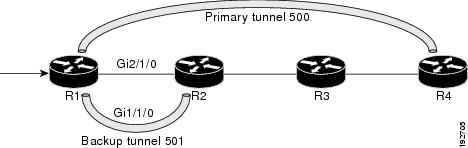
The figure above shows the following:
Example:
Router# show mpls traffic-eng fast-reroute database
Tunnel head end item frr information:
Protected tunnel In-label Out intf/label FRR intf/label Status
Tunnel500 Tun hd AT4/0.100:Untagg Tu501:20 ready
Prefix item frr information:
Prefix Tunnel In-label Out intf/label FRR intf/label Status
10.0.0.8/32 Tu500 18 AT4/0.100:Pop ta Tu501:20 ready
10.0.8.8/32 Tu500 19 AT4/0.100:Untagg Tu501:20 ready
10.8.9.0/24 Tu500 22 AT4/0.100:Untagg Tu501:20 ready
LSP midpoint item frr information:
LSP identifier In-label Out intf/label FRR intf/label Status
The following command output displays the LSPs that are protected when the FRR backup tunnel is over a Gigabit Ethernet interface. Example:
Router# show mpls traffic-eng fast-reroute database

Tunnel head end item frr information:
Protected tunnel In-label Out intf/label FRR intf/label Status
Tunnel500 Tun hd PO2/0:Untagged Tu501:20 ready
Prefix item frr information:
Prefix Tunnel In-label Out intf/label FRR intf/label Status
10.0.0.8/32 Tu500 18 PO2/0:Pop tag Tu501:20 ready
10.0.8.8/32 Tu500 19 PO2/0:Untagged Tu501:20 ready
10.8.9.0/24 Tu500 22 PO2/0:Untagged Tu501:20 ready
LSP midpoint item frr information:
LSP identifier In-label Out intf/label FRR intf/label Status
|
||
| Step 4 |
show mpls traffic-eng tunnels backup For backup tunnels to be operational, the LSP must be reroutable. At the headend of the LSP, enter the show run interface tunnel tunnel-number command. The output should include the tunnel mpls traffic-eng fast-reroute command. If it does not, enter this command for the tunnel. On the router where the backup tunnels originate, enter the show mpls traffic-eng tunnels backupcommand. Following is sample command output: Example:
Router# show mpls traffic-eng tunnels backup
Router_t578
  LSP Head, Tunnel578, Admin: up, Oper: up
  Src 10.55.55.55, Dest 10.88.88.88, Instance 1
  Fast Reroute Backup Provided:
    Protected i/fs: PO1/0, PO1/1, PO3/3
    Protected lsps: 1
    Backup BW: any pool unlimited; inuse: 100 kbps
Router_t5710
  LSP Head, Tunnel5710, Admin: admin-down, Oper: down
  Src 10.55.55.55, Dest 10.7.7.7, Instance 0
  Fast Reroute Backup Provided:
    Protected i/fs: PO1/1
    Protected lsps: 0
    Backup BW: any pool unlimited; inuse: 0 kbps
Router_t5711
  LSP Head, Tunnel5711, Admin: up, Oper: up
  Src 10.55.55.55, Dest 10.7.7.7, Instance 1
  Fast Reroute Backup Provided:
    Protected i/fs: PO1/0
    Protected lsps: 2
    Backup BW: any pool unlimited; inuse: 6010 kbps
The command output will allow you to verify the following:
Backup tunnel has appropriate bandwidth type--If you restricted the type of LSPs (subpool or global pool) that can use this backup tunnel, verify that the LSP is the appropriate type for the backup tunnel. The type of the LSP is defined by the line tunnel mpls traffic-eng bandwidth at the headend of this LSP. If this line contains the word "sub pool", then it uses subpool bandwidth; otherwise, it uses global pool bandwidth. Verify that the type matches the type the backup tunnel can hold by looking in the output of the tunnel mpls traffic-eng bandwidthcommand. If none of the verification actions described succeed, enable debug by entering the debug ip rsvp fast-reroute command and the debug mpls traffic-eng fast-reroute command on the router that is the headend of the backup tunnel. Then do the following:
|
||
| Step 5 |
show mpls traffic-eng fast-reroute database Enter the clear ip rsvp hello instance counters command to verify the following: The following command output displays the LSPs that are protected: Example:
Router# show mpls traffic-eng fast-reroute database
Tunnel head end item frr information:
Protected Tunnel   In-label   intf/label       FRR intf/label      Status
Tunne1l0           Tun        Gi0/1/0:Untagged   Tu0:12304           ready
Prefix item frr information:
Prefix        Tunnel  In-label    Out intf/label  FRR intf/label   Status
10.0.0.11/32  Tu110   Tun hd      Gi0/1/0:Untagged  Tu0:12304        ready
LSP midpoint frr information:
LSP identifier       In-label   Out intf/label   FRR intf/label    Status
10.0.0.12 1 [459]    16         Gi0/1/1:17         Tu2000:19         ready
Example:
Router# show mpls forwarding-table 10.0.0.11 32 detail

Local    Outgoing    Prefix         Bytes tag    Outgoing       Next Hop
tag      tag or VC   or Tunnel Id   switched     interface
Tun hd   Untagged    10.0.0.11/32   48 Gi0/1/0     point2point
          MAC/Encaps=4/8, MTU=1520, Tag Stack{22}
          48D18847 00016000
          No output feature configured
          Fast Reroute Protection via (Tu0, outgoing label 12304)
|
||
| Step 6 |
show ip rsvp reservation detail Following is sample output from the show ip rsvp reservation detail command entered at the headend of a primary LSP. Entering the command at the headend of the primary LSP shows, among other things, the status of FRR (that is, local protection) at each hop this LSP traverses. The per-hop information is collected in the Record Route Object (RRO) that travels with the Resv message from the tail to the head. Example:
Router# show ip rsvp reservation detail
Reservation:
  Tun Dest:   10.1.1.1  Tun ID: 1  Ext Tun ID: 10.1.1.1
  Tun Sender: 10.1.1.1  LSP ID: 104
  Next Hop: 10.1.1.2 on Gi1/0/2
  Label: 18 (outgoing)
  Reservation Style is Shared-Explicit, QoS Service is Controlled-Load
  Average Bitrate is 0 bits/sec, Maximum Burst is 1K bytes
  Min Policed Unit: 0 bytes, Max Pkt Size: 0 bytes
  RRO:
    10.1.1.1/32, Flags:0x1 (Local Prot Avail/to NHOP)
      Label subobject: Flags 0x1, C-Type 1, Label 18
    10.1.1.1/32, Flags:0x0 (Local Prot Avail/In Use/Has BW/to NHOP)
      Label subobject: Flags 0x1, C-Type 1, Label 16
    10.1.1.2/32, Flags:0x0 (No Local Protection)
      Label subobject: Flags 0x1, C-Type 1, Label 0
  Resv ID handle: CD000404.
  Policy: Accepted. Policy source(s): MPLS/TE
Notice the following about the primary LSP:
The RRO display shows the following information for each hop:
|
||
| Step 7 |
show ip rsvp hello Use this command to display hello status and statistics for FRR, reroute (hello state timer), and graceful restart. Following is sample output: Example:
Router# show ip rsvp hello

Hello:
 RSVP Hello for Fast-Reroute/Reroute: Enabled
  Statistics: Disabled
 BFD for Fast-Reroute/Reroute: Enabled
 RSVP Hello for Graceful Restart: Disabled
|
||
| Step 8 |
show ip rsvp interface detail Use this command to display the interface configuration for Hello. Following is sample output: Example:
Router# show ip rsvp interface detail

Gi2/1/1:
 RSVP: Enabled
 Interface State: Up
 Bandwidth:
  Curr allocated: 0 bits/sec
  Max. allowed (total): 0 bits/sec
  Max. allowed (per flow): 0 bits/sec
  Max. allowed for LSP tunnels using sub-pools (pool 1): 0 bits/sec
  Set aside by policy (total): 0 bits/sec
 Signalling:
  DSCP value used in RSVP msgs: 0x3F
  Number of refresh intervals to enforce blockade state: 4
 Authentication: disabled
  Key chain: <none>
  Type:  md5
  Window size: 1
  Challenge:  disabled
 FRR Extension:
  Backup Path: Configured (or "Not Configured")
 BFD Extension:
  State: Disabled
  Interval: Not Configured
 RSVP Hello Extension:
  State: Disabled
  Refresh Interval: FRR: 200  , Reroute: 2000
  Missed Acks:      FRR: 4    , Reroute: 4
  DSCP in HELLOs:   FRR: 0x30 , Reroute: 0x30
|
||
| Step 9 |
show ip rsvp hello bfd nbr Use this command to display information about all MPLS traffic engineering link and node protected neighbors that use the BFD protocol. Following is sample output. The command output is the same as the show ip rsvp hello bfd nbr summary command output. Example:
Router# show ip rsvp hello bfd nbr

Client  Neighbor    I/F     State   LostCnt   LSPs
FRR     10.0.0.6    Gi2/1/1  Up      0         1
|
||
| Step 10 |
show ip rsvp hello bfd nbr detail Use this command to display detailed information about all MPLS traffic engineering link and node protected neighbors that use the BFD protocol: Example:
Router# show ip rsvp hello bfd nbr detail

 Hello Client Neighbors
 Remote addr 10.0.0.6, Local addr  10.0.0.7
  Type: Active
  I/F: Gi2/1/1
  State: Up (for 00:09:41)
  Clients: FRR
  LSPs protecting: 1 (frr: 1, hst upstream: 0 hst downstream: 0)
  Communication with neighbor lost: 0
|
||
| Step 11 |
show ip rsvp hello bfd nbr summary Use this command to display summarized information about all MPLS traffic engineering link and node protected neighbors that use the BFD protocol. The command output is the same as the show ip rsvp hello bfd nbr summary command output. Example:
Router# show ip rsvp hello bfd nbr summary

Client  Neighbor    I/F     State  LostCnt  LSPs
FRR     10.0.0.6   Gi2/1/1  Up     0        1
|
Configuration Examples for MPLS Traffic Engineering BFD-triggered Fast Reroute
The examples in this section are based on the backup tunnels shown in the figure below.
| Figure 2 | Backup Tunnels |

- Example Enabling BFD Support on the Router
- Example Enabling Fast Reroute on LSPs
- Example Creating a Backup Tunnel to the Next Hop
- Example Creating an NNHOP Backup Tunnel
- Example Assigning Backup Tunnels to a Protected Interface
- Example Enabling BFD on the Protected Interface
- Example Associating Backup Bandwidth and Pool Type with Backup Tunnels
- Example Configuring Backup Bandwidth Protection
Example Enabling BFD Support on the Router
The following example enables the BFD protocol on the router:
Router(config)# ip rsvp signalling hello bfd
Example Enabling Fast Reroute on LSPs
On router R1 in the figure above, enter interface configuration mode for each tunnel to be protected (Tunnel 1000 and Tunnel 2000). Enable these tunnels to use a backup tunnel in case of a link or node failure along their paths.
Tunnel 1000 will use ten units of bandwidth from the subpool.
Tunnel 2000 will use five units of bandwidth from the global pool. The "bandwidth protection desired" bit and the "node protection desired bit" have been set by specifying bw-prot and node-prot, respectively, in the tunnel mpls traffic-eng fast-reroute command.
Router(config)# interface tunnel 1000
Router(config-if)# tunnel mpls traffic-eng fast-reroute
Router(config-if)# tunnel mpls traffic-eng bandwidth sub-pool 10
Router(config)# interface tunnel 2000
Router(config-if)# tunnel mpls traffic-eng fast-reroute bw-protect node-protect
Router(config-if)# tunnel mpls traffic-eng bandwidth 5
Example Creating a Backup Tunnel to the Next Hop
On router R2 in the figure above, create an NHOP backup tunnel to R3. This backup tunnel should avoid using the link 10.1.1.2.
Router(config)# ip explicit-path name avoid-protected-link
Router(cfg-ip-expl-path)# exclude-address 10.1.1.2

Explicit Path name avoid-protected-link:
____1: exclude-address 10.1.1.2
Router(cfg-ip_expl-path)# exit

Router(config)# interface tunnel 1

Router(config-if)# ip unnumbered loopback 0

Router(config-if)# tunnel destination 10.3.3.3
Router(config-if)# tunnel mode mpls traffic-eng

Router(config-if)# tunnel mpls traffic-eng path-option 1 explicit avoid-protected-link
Example Creating an NNHOP Backup Tunnel
On router R2 in the figure above, create an NNHOP backup tunnel to R4. This backup tunnel should avoid R3.
Router(config)# ip explicit-path name avoid-protected-node

Router(cfg-ip-expl-path)# exclude-address 10.3.3.3

Explicit Path name avoid-protected-node:
____1: exclude-address 10.3.3.3
Router(cfg-ip_expl-path)# end

Router(config)# interface tunnel2

Router(config-if)# ip unnumbered loopback0

Router(config-if)# tunnel destination 10.4.4.4

Router(config-if)# tunnel mode mpls traffic-eng0

Router(config-if)# tunnel mpls traffic-eng path-option 1 explicit avoid-protected-node
Example Assigning Backup Tunnels to a Protected Interface
On router R2 in the figure above, both backup tunnels are associated with interface Gigabit Ethernet 0/1/0:
Router(config)# interface Gi0/1/0

Router(config-if)# mpls traffic-eng backup-path tunnel 1

Router(config-if)# mpls traffic-eng backup-path tunnel 2
Example Enabling BFD on the Protected Interface
In the figure above, BFD is enabled on interface Gigabit Ethernet 2/1/1:
Router(config)# interface Gi2/1/1

Router(config-if)# ip rsvp signalling hello bfd

Router(config-if)# bfd interval 100 min_rx 100 multiplier 4
Example Associating Backup Bandwidth and Pool Type with Backup Tunnels
In the figure above, backup tunnel 1 is to be used only by LSPs that take their bandwidth from the global pool. It does not provide bandwidth protection. Backup tunnel 2 is to be used only by LSPs that take their bandwidth from the subpool. Backup tunnel 2 provides bandwidth protection for up to 1000 units.
Router(config)# interface tunnel 1

Router(config-if)# tunnel mpls traffic-eng backup-bw global-pool Unlimited

Router(config)# interface tunnel 2

Router(config-if)# tunnel mpls traffic-eng backup-bw sub-pool 1000
Example Configuring Backup Bandwidth Protection
Note |
This global configuration is required only to change the backup protection preemption algorithm from minimize the number of LSPs that are demoted to minimize the amount of bandwidth that is wasted. |
Router(config-if)# tunnel mpls traffic-eng fast-reroute bw-protect
Router(config)# mpls traffic-eng fast-reroute backup-prot-preemption optimize-bw
Additional References
Related Documents
| Related Topic |
Document Title |
|---|---|
| Cisco IOS commands |
|
| Link and node protection |
MPLS TE: Link and Node Protection, with RSVP Hellos Support (with Fast Tunnel Interface Down Detection) |
| Multiprotocol Label Switching commands |
Cisco IOS Multiprotocol Label Switching Command Reference |
| Bidirectional Forwarding Direction configuration information |
"Bidirectional Forwarding Detection" chapter in the Cisco IOS IP Routing Configuration Guide |
Standards
| Standard |
Title |
|---|---|
| No new or modified standards are supported by this feature, and support for existing standards has not been modified by this feature. |
-- |
MIBs
| MIB |
MIBs Link |
|---|---|
| No new or modified MIBs are supported by this feature, and support for existing MIBs has not been modified by this feature. |
To locate and download MIBs for selected platforms, Cisco software releases, and feature sets, use Cisco MIB Locator found at the following URL: |
RFCs
| RFC |
Title |
|---|---|
| No new or modified RFCs are supported by this feature, and support for existing RFCs has not been modified by this feature. |
-- |
Technical Assistance
| Description |
Link |
|---|---|
| The Cisco Support and Documentation website provides online resources to download documentation, software, and tools. Use these resources to install and configure the software and to troubleshoot and resolve technical issues with Cisco products and technologies. Access to most tools on the Cisco Support and Documentation website requires a Cisco.com user ID and password. |
Feature Information for MPLS Traffic Engineering BFD-triggered Fast Reroute
The following table provides release information about the feature or features described in this module. This table lists only the software release that introduced support for a given feature in a given software release train. Unless noted otherwise, subsequent releases of that software release train also support that feature.
Use Cisco Feature Navigator to find information about platform support and Cisco software image support. To access Cisco Feature Navigator, go to www.cisco.com/go/cfn. An account on Cisco.com is not required.
| Table 1 | Feature Information for MPLS Traffic Engineering: BFD-triggered Fast Reroute |
| Feature Name |
Releases |
Feature Information |
|---|---|---|
| MPLS Traffic Engineering: BFD-triggered Fast Reroute |
12.2(33)SRC 15.0(1)S 15.1(1)SY |
The MPLS Traffic Engineering: BFD-triggered Fast Reroute feature allows you to obtain link and node protection by using the Bidirectional Forwarding Detection (BFD) protocol to provide fast forwarding path failure detection times for all media types, encapsulations, topologies, and routing protocols. In addition to fast forwarding path failure detection, BFD provides a consistent failure detection method for network administrators. The following commands were introduced or modified by this feature: clear ip rsvp hello bfd, ip rsvp signalling hello bfd (configuration), ip rsvp signalling hello bfd (interface), show ip rsvp hello, show ip rsvp hello bfd nbr, show ip rsvp hello bfd nbr detail, show ip rsvp hello bfd nbr summary, and show ip rsvp interface detail. |
Glossary
backup bandwidth --The usage of NHOP and NNHOP backup tunnels to provide bandwidth protection for rerouted LSPs.
backup tunnel --An MPLS TE tunnel used to protect other (primary) tunnels' traffic when a link or node failure occurs.
bandwidth --The available traffic capacity of a link.
fast reroute --Procedures that enable temporary routing around a failed link or node while a new LSP is being established at the headend.
global pool --The total bandwidth allocated to an MPLS traffic engineering link or node.
headend --The router that originates and maintains a given LSP. This is the first router in the LSP's path.
hop --Passage of a data packet between two network nodes (for example, between two routers).
instance --A Hello instance implements the RSVP Hello extensions for a given router interface address and remote IP address. Active Hello instances periodically send Hello Request messages, expecting Hello ACK messages in response. If the expected Ack message is not received, the active Hello instance declares that the neighbor (remote IP address) is unreachable (that is, it is lost). This can cause LSPs crossing this neighbor to be fast rerouted.
interface --A network connection.
link --A point-to-point connection between adjacent nodes. There can be more than one link between adjacent nodes. A network communications channel consisting of a circuit or transmission path and all related equipment between a sender and a receiver. Sometimes referred to as a line or a transmission link.
LSP --label-switched path. A configured connection between two routers, in which label switching is used to carry the packets. The purpose of an LSP is to carry data packets.
MPLS --Multiprotocol Label Switching. Packet-forwarding technology, used in the network core, that applies data link layer labels to tell switching nodes how to forward data, resulting in faster and more scalable forwarding than network layer routing normally can do.
NHOP --next hop. The next downstream node along an LSP's path.
NHOP backup tunne l--next-hop backup tunnel. Backup tunnel terminating at the LSP's next hop beyond the point of failure, and originating at the hop immediately upstream of the point of failure. It bypasses a failed link, and is used to protect primary LSPs that were using this link before the failure.
NNHOP --next-next hop. The node after the next downstream node along an LSP's path.
NNHOP backup tunnel --next-next-hop backup tunnel. Backup tunnel terminating at the LSP's next-next hop beyond the point of failure, and originating at the hop immediately upstream of the point of failure. It bypasses a failed link or node, and is used to protect primary LSPs that were using this link or node before the failure.
node --Endpoint of a network connection or a junction common to two or more lines in a network. Nodes can be interconnected by links, and serve as control points in the network. Computers on a network, or any endpoint or a junction common to two or more lines in a network. Nodes can be processors, controllers, or workstations.
primary LSP --The last LSP originally signaled over the protected interface before the failure. The LSP before the failure.
primary tunnel --Tunnel whose LSP may be fast rerouted if there is a failure. Backup tunnels cannot be primary tunnels.
protected interface --An interface that has one or more backup tunnels associated with it.
redundancy --The duplication of devices, services, or connections so that, in the event of a failure, the redundant devices, services, or connections can perform the work of those that failed.
RSVP --Resource Reservation Protocol. An IETF protocol used for signaling requests (setting up reservations) for Internet services by a customer before that customer is permitted to transmit data over that portion of the network.
state --Information that a router must maintain about each LSP. The information is used for rerouting tunnels.
subpool --The more restrictive bandwidth in an MPLS traffic engineering link or node. The subpool is a portion of the link or node's overall global pool bandwidth.
tailend --The router upon which an LSP is terminated. This is the last router in the LSP's path.
tunnel --Secure communications path between two peers, such as two routers.
Cisco and the Cisco logo are trademarks or registered trademarks of Cisco and/or its affiliates in the U.S. and other countries. To view a list of Cisco trademarks, go to this URL: www.cisco.com/go/trademarks. Third-party trademarks mentioned are the property of their respective owners. The use of the word partner does not imply a partnership relationship between Cisco and any other company. (1110R)
Any Internet Protocol (IP) addresses and phone numbers used in this document are not intended to be actual addresses and phone numbers. Any examples, command display output, network topology diagrams, and other figures included in the document are shown for illustrative purposes only. Any use of actual IP addresses or phone numbers in illustrative content is unintentional and coincidental.
 Feedback