- Finding Feature Information
- Prerequisites for Load Sharing MPLS VPN Traffic
- Restrictions for Load Sharing MPLS VPN Traffic
- Information About Load Sharing MPLS VPN Traffic
- How to Configure Load Sharing
- Configuring BGP Multipath Load Sharing for eBGP and iBGP
- Verifying BGP Multipath Load Sharing for eBGP and iBGP
- Configuring eBGP Multipath Load Sharing with MPLS VPN Inter-AS
- Configuring eBGP Multipath Load Sharing with MPLS VPN Carrier Supporting Carrier on the CSC-PE Routers
- Configuring eBGP Multipath Load Sharing with MPLS VPN Carrier Supporting Carrier on the CSC-CE Routers
- Configuring DCLP for MPLS VPN Inter-AS using ASBRs to Exchange VPN-IPv4 Addresses
- Configuring DCLP for MPLS VPN Inter-AS Using ASBRs to Exchange IPv4 Routes and Labels
- Configuring Directly Connected Loopback Peering on MPLS VPN Carrier Supporting Carrier
- Configuring Loopback Interface Addresses on CSC-PE Routers
- Configuring Loopback Interface Addresses for CSC-CE Routers
- Configuring 32 Static Routes to the eBGP Neighbor Loopback on the CSC-PE Router
- Configuring 32 Static Routes to the eBGP Neighbor Loopback on the CSC-CE Router
- Configuring Forwarding on CSC-PE Interfaces That Connect to the CSC-CE Loopback
- Configuring Forwarding on CSC-CE Interfaces That Connect to the CSC-PE Loopback
- Configuring an eBGP Session Between the CSC-PE Router and the CSC-CE Loopback
- Configuring an eBGP Session Between the CSC-CE Router and the CSC-PE Loopback
- Verifying That Load Sharing Occurs Between Loopbacks
- Configuring a Router to Select eBGP or iBGP Paths as Multipaths Example
- Configuring a 32 Static Route from an ASBR to the Loopback Address of Another ASBR Examples
- Configuring BGP MPLS Forwarding on the Interfaces Connecting ASBRs Example
- Configuring VPNv4 Sessions on an ASBR Example
- Verifying VPN NLRI for a Specified Network Example
Load Sharing MPLS VPN Traffic
Load sharing distributes traffic so that no individual router is overburdened. In a Multiprotocol Label Switching (MPLS) Virtual Private Network (VPN) network, you can achieve load sharing through the following methods:
- Finding Feature Information
- Prerequisites for Load Sharing MPLS VPN Traffic
- Restrictions for Load Sharing MPLS VPN Traffic
- Information About Load Sharing MPLS VPN Traffic
- How to Configure Load Sharing
- Configuration Examples for Load Sharing MPLS VPN Traffic
- Additional References
- Feature Information for Load Sharing MPLS VPN Traffic
Finding Feature Information
Your software release may not support all the features documented in this module. For the latest feature information and caveats, see the release notes for your platform and software release. To find information about the features documented in this module, and to see a list of the releases in which each feature is supported, see the Feature Information Table at the end of this document.
Use Cisco Feature Navigator to find information about platform support and Cisco software image support. To access Cisco Feature Navigator, go to www.cisco.com/go/cfn. An account on Cisco.com is not required.
Prerequisites for Load Sharing MPLS VPN Traffic
Before configuring load sharing, ensure that your MPLS VPN network (including MPLS VPN carrier supporting carrier or interautonomous system) is configured and working properly. See the Prerequisites for Load Sharing MPLS VPN Traffic for references related to MPLS VPNs.
Restrictions for Load Sharing MPLS VPN Traffic
- Configuring BGP multipath for eBGP and iBGP is only for basic MPLS Layer 3 VPNs. MPLS VPN Inter-AS and MPLS VPN carrier supporting carrier do not support this multipath configuration.
- With multiple iBGP paths installed in a routing table, a route reflector advertises only one of the paths (one next hop). If a router is behind a route reflector, all routers that are connected to multihomed sites are not advertised unless separate VRFs with different RDs are configured for each VRF.
- Each IP routing table entry for a BGP prefix that has multiple iBGP paths uses additional memory. We recommend not using this feature on a router with a low amount of available memory and especially when the router is carrying a full Internet routing table.
- eBGP Multipath is not supported on MPLS VPN Inter-AS with ASBRs that exchange VPNv4 routes.
- Load sharing using directly connected loopback peering does not apply to CSC networks that use LDP and an IGP to distribute routes and MPLS labels.
When you configure static routes in an MPLS or MPLS VPN environment, some variations of the ip route and ip route vrf commands are not supported. These variations of the commands are not supported in Cisco IOS releases that support the Tag Forwarding Information Base (TFIB), specifically Cisco IOS Releases 12.nT, 12.nM, and 12.0S. The TFIB cannot resolve prefixes when the recursive route over which the prefixes travel disappears and then reappears. However, the command variations are supported in Cisco IOS releases that support the MPLS Forwarding Infrastructure (MFI), specifically Cisco IOS Release 12.2(25)S and later releases. Use the following guidelines when configuring static routes.
Supported Static Routes in an MPLS Environment
The following ip route command is supported when you configure static routes in an MPLS environment:
ip route destination-prefix mask interface next-hop-address
The following ip route commands are supported when you configure static routes in an MPLS environment and configure load sharing with static nonrecursive routes and a specific outbound interface:
ip route destination-prefix mask interface1 next-hop1
ip route destination-prefix mask interface2 next-hop2
Unsupported Static Routes in an MPLS Environment That Uses the TFIB
The following ip route command is not supported when you configure static routes in an MPLS environment:
ip route destination-prefix mask next-hop-address
The following ip route command is not supported when you configure static routes in an MPLS VPN environment and enable load sharing where the next hop can be reached through two paths:
ip route destination-prefix mask next-hop-address
The following ip route command is not supported when you configure static routes in an MPLS VPN environment and enable load sharing where the destination can be reached through two next hops:
ip route destination-prefix mask next-hop1
ip route destination-prefix mask next-hop2
Use the interface and next-hop arguments when specifying static routes.
Supported Static Routes in an MPLS VPN Environment
The following ip route vrf commands are supported when you configure static routes in an MPLS VPN environment, and the next hop and interface are associated with the same virtual routing and forwarding (VRF) instance:
The following ip route vrf commands are supported when you configure static routes in an MPLS VPN environment, and the next hop is in the global table in the MPLS cloud in the global routing table. For example, these commands are supported when the next hop is pointing to the internet gateway.
The following ip route commands are supported when you configure static routes in an MPLS VPN environment and enable load sharing with static nonrecursive routes and a specific outbound interfaces:
ip route destination-prefix mask interface1 next-hop1
ip route destination-prefix mask interface2 next-hop2
Unsupported Static Routes in an MPLS VPN Environment That Uses the TFIB
The following ip route command is not supported when you configure static routes in an MPLS VPN environment, the next hop is in the global table in the MPLS cloud within the core, and you enable load sharing where the next hop can be reached through two paths:
ip route vrf destination-prefix mask next-hop-address global
The following ip route commands are not supported when you configure static routes in an MPLS VPN environment, the next hop is in the global table in the MPLS cloud within the core, and you enable load sharing where the destination can be reached through two next hops:
ip route vrf destination-prefix mask next-hop1 global
ip route vrf destination-prefix mask next-hop2 global
The following ip route vrf commands are not supported when you configure static routes in an MPLS VPN environment, and the next hop and interface are in the same VRF:
ip route vrf vrf-name destination-prefix mask next-hop1
ip route vrf vrf-name destination-prefix mask next-hop2
Supported Static Routes in an MPLS VPN Environment Where the Next Hop Resides in the Global Table on the CE Router
The following ip route vrf command is supported when you configure static routes in an MPLS VPN environment, and the next hop is in the global table on the customer edge (CE) side. For example, the following command is supported when the destination-prefix is the CE router's loopback address, as in EBGP multihop cases.
ip route vrf vrf-name destination-prefix mask interface next-hop-address
The following ip route commands are supported when you configure static routes in an MPLS VPN environment, the next hop is in the global table on the CE side, and you enable load sharing with static nonrecursive routes and a specific outbound interfaces:
ip route destination-prefix mask interface1 nexthop1
ip route destination-prefix mask interface2 nexthop2
Information About Load Sharing MPLS VPN Traffic
- Overview of Load Sharing Using BGP Multipath Options
- Load Sharing Using Directly Connected Loopback Peering
Overview of Load Sharing Using BGP Multipath Options
A variety of Border Gateway Protocol (BGP) multipath options exist that enable you to configure load sharing on your MPLS VPN that uses BGP.
To load share traffic at the iBGP multipath level, it is recommended that you configure BGP labeling using the neighbor send-label command in router configuration mode. When you configure the iBGP multipath feature, the following message is displayed as a reminder to use the neighbor send-label command functionality:
WARNING: Using iBGP multipath feature with LDP or TE based LSPs towards the BGP nexthop, paths taken by forwarding may not be as expected. Please consider configuring BGP labeling (RFC 3107) for proper forwarding behavior.
The following sections describe some BGP multipath options:
Internal BGP Multipath Load Sharing
When a BGP-speaking router with no local policy configured receives multiple network layer reachability information (NLRI) from the internal BGP (iBGP) for the same destination, the router chooses one iBGP path as the best path. The best path is then installed in the IP routing table of the router. The iBGP multipath feature enables the BGP-speaking router to select multiple iBGP paths as the best paths to a destination. The best paths are then installed in the IP routing table of the router. To enable iBGP multipath load sharing, you issue the maximum-paths ibgp command in router configuration mode. For more information about iBGP multipath load sharing, see Configuring BGP.
BGP Multipath for eBGP and iBGP
The BGP multipath load sharing for both eBGP and iBGP in an MPLS VPN feature allows multihomed autonomous systems and provider edge (PE) routers to be configured to distribute traffic across both external BGP (eBGP) and iBGP paths.
BGP installs up to the maximum number of paths allowed (configured using the maximum-paths command). BGP uses the best path algorithm to select one multipath as the best path, inserts the best path into the routing information base (RIB), and advertises the best path to BGP peers. Other multipaths can be inserted into the RIB, but only one path is selected as the best path.
Cisco Express Forwarding uses mutlipaths to perform load balancing on a per-packet or per-source or destination pair basis. To enable the load sharing feature, configure the router with MPLS VPNs that contain VPN routing and forwarding instances (VRFs) that import both eBGP and iBGP paths. You can configure the number of multipaths separately for each VRF.
 Note |
This feature operates within the configuration parameters of the existing outbound routing policy. |
- eBGP and iBGP Multipath Load Sharing in an MPLS Network Using BGP
- eBGP and iBGP Multipath Load Sharing with Route Reflectors
eBGP and iBGP Multipath Load Sharing in an MPLS Network Using BGP
The figure below shows an MPLS service provider network using BGP that connects two remote networks to PE1 and PE2, which are both configured for VPNv4 unicast iBGP peering. Network 2 is a multihomed network that is connected to PE1 and PE2. Network 2 also has extranet VPN services configured with Network 1. Both Network 1 and Network 2 are configured for eBGP peering with the PE routers.
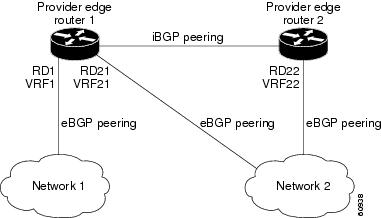
You can configure PE1 so that both iBGP and eBGP paths can be selected as multipaths and imported into the VRF of Network 1. Cisco Express Forwarding uses the mutlipaths to perform load balancing. Traffic is distributed as follows:
- IP traffic that is sent from Network 2 to PE1 and PE2 is sent across the eBGP paths as IP traffic.
- IP traffic that is sent from PE1 to PE2 is sent across the iBGP path as MPLS traffic.
- MPLS traffic that is sent across an eBGP path is sent as IP traffic.
Any prefix that is advertised from Network 2 will be received by PE1 through route distinguisher (RD) 21 and RD22.
- The advertisement through RD21 is carried in IP packets.
- The advertisement through RD22 is carried in MPLS packets.
Both paths can be selected as multipaths for VRF1 and inserted into the VRF1 RIB.
eBGP and iBGP Multipath Load Sharing with Route Reflectors
The figure below shows a topology that contains three PE routers and a route reflector, all configured for iBGP peering. PE2 and PE3 each advertise an equal preference eBGP path to PE1. By default, the route reflector chooses only one path and advertises PE1.
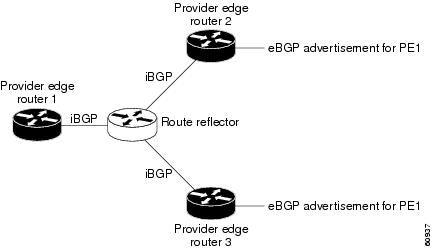
For all equal preference paths to PE1 to be advertised through the route reflector, you must configure each VRF with a different RD. The prefixes received by the route reflector are recognized differently and advertised to PE1.
eBGP Multipath Load Sharing
When a router learns two identical eBGP paths for a prefix from a neighboring autonomous system, it chooses the path with the lower route ID as the best path. This best path is installed in the IP routing table. You can enable eBGP multipath, which installs multiple paths in the IP routing table when the eBGP paths are learned from a neighboring autonomous system, instead of picking one best path.
During packet switching, depending on the switching mode, either per-packet or per-destination load sharing is performed among the multiple paths. The maximum-paths router configuration command controls the number of paths allowed. By default, BGP installs only one path to the IP routing table.
Load Sharing Using Directly Connected Loopback Peering
You use this feature with MPLS VPN Inter-AS and MPLS VPN carrier supporting carrier (CSC) networks to load share traffic between adjacent label switched routers (LSRs) that are connected by multiple links. The LSRs could be a pair of autonomous system boundary routers (ASBRs) or a CSC-PE and a CSC-CE.
Using directly connected loopback peering allows load sharing at the IGP level, so more than one BGP session is not needed between the LSRs. No other label distribution mechanism is needed between the adjacent LSRs than BGP.
Directly connected loopback peering enables load sharing of traffic as follows:
- A BGP session is established, using the loopback addresses of the LSRs.
- MPLS is enabled on the connecting links.
- Multiple static routes to the loopback address of the adjacent LSR allow IGP load sharing.
- The outgoing label to the loopback address of the adjacent LSR is an implicit null label and is inferred by the LSR.
- Because IGP load sharing is enabled on the loopback address of the adjacent LSR, any traffic destined to a prefix that is learned over the BGP session (and recurses over the loopback) is load shared.
How to Configure Load Sharing
- Configuring BGP Multipath Load Sharing for eBGP and iBGP
- Verifying BGP Multipath Load Sharing for eBGP and iBGP
- Configuring eBGP Multipath Load Sharing with MPLS VPN Inter-AS
- Configuring eBGP Multipath Load Sharing with MPLS VPN Carrier Supporting Carrier on the CSC-PE Routers
- Configuring eBGP Multipath Load Sharing with MPLS VPN Carrier Supporting Carrier on the CSC-CE Routers
- Configuring DCLP for MPLS VPN Inter-AS using ASBRs to Exchange VPN-IPv4 Addresses
- Configuring DCLP for MPLS VPN Inter-AS Using ASBRs to Exchange IPv4 Routes and Labels
- Configuring Directly Connected Loopback Peering on MPLS VPN Carrier Supporting Carrier
Configuring BGP Multipath Load Sharing for eBGP and iBGP
To configure iBGP and eBGP routes for multipath load sharing, perform the following task.
DETAILED STEPS
Verifying BGP Multipath Load Sharing for eBGP and iBGP
To verify the configuration of iBGP and eBGP routes for multipath load sharing, perform this task.
DETAILED STEPS
| Command or Action | Purpose | |
|---|---|---|
|
|
Example: Router> enable |
(Optional) Enables privileged EXEC mode. |
|
|
Example: Router# show ip bgp vpnv4 all |
Displays attributes and multipaths for a specific network in an MPLS VPN. |
Configuring eBGP Multipath Load Sharing with MPLS VPN Inter-AS
Perform this task on the ASBRs to configure eBGP Multipath for MPLS VPN interautonomous systems with ASBRs exchanging IPv4 routes and MPLS labels.
DETAILED STEPS
| Command or Action | Purpose | |
|---|---|---|
|
|
Example: Router> enable |
Enables privileged EXEC mode. |
|
|
Example: Router# configure terminal |
Enters global configuration mode. |
|
|
Example: Router(config)# router bgp 100 |
Configures a BGP routing process and places the router in router configuration mode. |
|
|
Example: Router(config-router)# neighbor 10.0.0.1 remote-as 200 |
Adds an entry to the BGP or multiprotocol BGP neighbor table. |
|
|
Example: Router(config-router)# address-family ipv4 |
Enters address family configuration mode for configuring routing sessions such as BGP that use standard IPv4 address prefixes. |
|
|
Example: Router(config-router-af)# maximum-paths 2 |
(Optional) Controls the maximum number of parallel routes an IP routing protocol can support. |
|
|
Example: Router(config-router-af)# neighbor 10.0.0.1 activate |
Enables the exchange of information with a neighboring router. |
|
|
Example: Router(config-router-af)# neighbor 10.0.0.1 send-label |
Enables a BGP router to send MPLS labels with BGP routes to a neighboring BGP router. |
|
|
Example: Router(config-router-af)# exit-address-family |
Exits address family configuration mode. |
|
|
Example: Router(config-router-af)# end |
(Optional) Exits to privileged EXEC mode. |
Configuring eBGP Multipath Load Sharing with MPLS VPN Carrier Supporting Carrier on the CSC-PE Routers
Perform this task to configure eBGP Multipath load sharing on the CSC-PE routers that distribute BGP routes with MPLS labels.
DETAILED STEPS
| Command or Action | Purpose | |
|---|---|---|
|
|
Example: Router> enable |
Enables privileged EXEC mode. |
|
|
Example: Router# configure terminal |
Enters global configuration mode. |
|
|
Example: Router(config)# router bgp 100 |
Configures a BGP routing process and enters router configuration mode. |
|
|
Example: Router(config-router)# address-family ipv4 vrf vpn1 |
Specifies the IPv4 address family type and enters address family configuration mode. |
|
|
Example: Router(config-router-af)# maximum-paths 2 |
(Optional) Controls the maximum number of parallel routes an IP routing protocol can support. |
|
|
Example: Router(config-router-af)# neighbor 10.0.0.1 remote-as 200 |
Adds an entry to the BGP or multiprotocol BGP neighbor table. |
|
|
Example: Router(config-router-af)# neighbor 10.0.0.1 activate |
Enables the exchange of information with a neighboring BGP router. |
|
|
Example: Router(config-router-af)# neighbor 10.0.0.1 as-override |
Configures a PE router to override the autonomous system number (ASN) of a site with the ASN of a provider. |
|
|
Example: Router(config-router-af)# neighbor 10.0.0.1 send-label |
Enables a BGP router to send MPLS labels with BGP routes to a neighboring BGP router. |
|
|
Example: Router(config-router-af)# exit-address-family |
Exits address family configuration mode. |
|
|
Example: Router(config-router)# end |
(Optional) Exits to privileged EXEC mode. |
Configuring eBGP Multipath Load Sharing with MPLS VPN Carrier Supporting Carrier on the CSC-CE Routers
Perform this task to configure eBGP Multipath load sharing on the CSC-CE routers.
DETAILED STEPS
| Command or Action | Purpose | |||
|---|---|---|---|---|
|
|
Example: Router> enable |
Enables privileged EXEC mode. |
||
|
|
Example: Router# configure terminal |
Enters global configuration mode. |
||
|
|
Example: Router(config)# router bgp 200 |
Configures a BGP routing process and enters router configuration mode. |
||
|
|
Example: Router(config-router)# maximum-paths 2 |
(Optional) Controls the maximum number of parallel routes an IP routing protocol can support. |
||
|
|
Example: Router(config-router)# address-family ipv4 |
Specifies the IPv4 address family type and enters address family configuration mode. |
||
|
|
Example: Router(config-router-af)# redistribute static |
Redistributes routes from one routing domain into another routing domain.
|
||
|
|
Example: Router(config-router-af)# neighbor 10.0.0.2 remote-as 100 |
Adds an entry to the BGP or multiprotocol BGP neighbor table. |
||
|
|
Example: Router(config-router-af)# neighbor 10.0.0.2 activate |
Enables the exchange of information with a neighboring BGP router. |
||
|
|
Example: Router(config-router-af)# neighbor 10.0.0.2 send-label |
Enables a BGP router to send MPLS labels with BGP routes to a neighboring BGP router. |
||
|
|
Example: Router(config-router-af)# exit-address-family |
Exits address family configuration mode. |
||
|
|
Example: Router(config-router)# end |
(Optional) Exits to privileged EXEC mode. |
Configuring DCLP for MPLS VPN Inter-AS using ASBRs to Exchange VPN-IPv4 Addresses
This section describes the following tasks you need to do to configure peering of loopback interfaces of directly connected ASBRs:
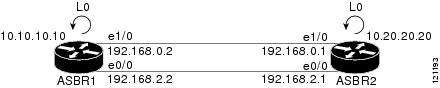
The figure below shows the loopback configuration for directly connected ASBR1 and ASBR2. This configuration is used as the example in the tasks that follow.
| Figure 1 | Loopback Interface Configuration for Directly Connected ASBR1 and ASBR2 |
- Configuring Loopback Interface Addresses for Directly Connected ASBRs
- Configuring 32 Static Routes to the eBGP Neighbor Loopback
- Configuring Forwarding on Connecting Loopback Interfaces
- Configuring an eBGP Session Between the Loopbacks
- Verifying That Load Sharing Occurs Between Loopbacks
Configuring Loopback Interface Addresses for Directly Connected ASBRs
Perform this task to configure loopback interface addresses for directly connected ASBRs.
Note |
Loopback addresses need to be configured for each directly connected ASBR. That is, configure a loopback address for ASBR1 and for ASBR2 in the example shown in the figure above. |
DETAILED STEPS
| Command or Action | Purpose | |
|---|---|---|
|
|
Example: Router> enable |
Enables privileged EXEC mode. |
|
|
Example: Router# configure terminal |
Enters global configuration mode. |
|
|
Example: Router(config)# interface loopback 0 |
Configures a software-only virtual interface that emulates an interface that is always up and enters interface configuration mode. |
|
|
Example: Router(config-if)# ip address 10.10.10.10 255.255.255.255 |
Sets a primary or secondary IP address for an interface. |
|
|
Example: Router(config-if)# end |
Exits to privileged EXEC mode. |
Configuring 32 Static Routes to the eBGP Neighbor Loopback
Perform this task to configure /32 static routes to the eBGP neighbor loopback.
Note |
You need to configure /32 static routes on each of the directly connected ASBRs. |
DETAILED STEPS
| Command or Action | Purpose | |
|---|---|---|
|
|
Example: Router> enable |
Enables privileged EXEC mode. |
|
|
Example: Router# configure terminal |
Enters global configuration mode. |
|
|
Example: Router(config)# ip route 10.20.20.20 255.255.255.255 Ethernet 1/0 172.16.0.1 |
Establishes static routes.
|
|
|
Example: Router(config)# end |
Exits to privileged EXEC mode. |
Configuring Forwarding on Connecting Loopback Interfaces
Perform this task to configure forwarding on the connecting loopback interfaces.
This task is required for sessions between loopbacks. In the Configuring 32 Static Routes to the eBGP Neighbor Loopback task, Ethernet 1/0 and Ethernet 0/0 are the connecting interfaces.
DETAILED STEPS
| Command or Action | Purpose | |
|---|---|---|
|
|
Example: Router> enable |
Enables privileged EXEC mode. |
|
|
Example: Router# configure terminal |
Enters global configuration mode. |
|
|
Example: Router(config)# interface ethernet 1/0 |
Configures an interface type and enters interface configuration mode. |
|
|
Example: Router(config-if)# mpls bgp forwarding |
Configures BGP to enable MPLS forwarding on connecting interfaces. |
|
|
Example: Router(config-if)# exit |
Exits to global configuration mode. |
|
|
|
|
|
|
Example: Router(config)# end |
Exits to privileged EXEC mode. |
Configuring an eBGP Session Between the Loopbacks
Perform this task to configure an eBGP session between the loopbacks.
Note |
You need to configure an eBGP session between loopbacks on each directly connected ASBR. |
DETAILED STEPS
| Command or Action | Purpose | |||
|---|---|---|---|---|
|
|
Example: Router> enable |
Enables privileged EXEC mode. |
||
|
|
Example: Router# configure terminal |
Enters global configuration mode. |
||
|
|
Example: Router(config)# router bgp 200 |
Configures the BGP routing process. |
||
|
|
Example: Router(config)# no bgp default route-target filter |
Disables BGP route-target filtering, and enters router configuration mode. |
||
|
|
Example: Router(config-router)# neighbor 10.20.20.20 remote-as 100 |
Adds an entry to the BGP or multiprotocol BGP neighbor table. |
||
|
|
Example: Router(config-router)# neighbor 10.20.20.20 disable-connected-check |
Allows peering between loopbacks. |
||
|
|
Example: Router(config-router)# neighbor 10.20.20.20 update-source Loopback 0 |
Allows BGP sessions to use any operational interface for TCP connections.
This argument must be in the form documented in RFC 2373, where the address is specified in hexadecimal using 16-bit values between colons. |
||
|
|
Example: Router(config-router)# address-family vpnv4 |
Enters address family configuration mode for configuring routing protocols such as BGP, Routing Information Protocol (RIP), and static routing. |
||
|
|
Example: Router(config-router-af)# neighbor 10.20.20.20 activate |
Enables the exchange of information with a BGP neighbor.
|
||
|
|
Example: Router(config-router-af)# neighbor 10.20.20.20 send-community extended |
Specifies that a communities attribute should be sent to a BGP neighbor.
|
||
|
|
Example: Router(config)# end |
Exits to privileged EXEC mode. |
Verifying That Load Sharing Occurs Between Loopbacks
Perform this task to verify that load sharing occurs between loopbacks. You need to ensure that the MPLS Label Forwarding Information Base (LFIB) entry for the neighbor route lists the available paths and interfaces.
DETAILED STEPS
| Command or Action | Purpose | |
|---|---|---|
|
|
Example: Router> enable |
(Optional) Enables privileged EXEC mode. |
|
|
Example: Router# show mpls forwarding-table |
Displays the contents of the MPLS LFIB. |
|
|
Example: Router# disable |
Exits to user EXEC mode. |
Configuring DCLP for MPLS VPN Inter-AS Using ASBRs to Exchange IPv4 Routes and Labels
The following sections describe how to configure peering of loopback interfaces of directly connected ASBRs to achieve load sharing in an interautonomous system network:
The figure below shows the loopback configuration for directly connected ASBR1 and ASBR2. This configuration is used as the example in the tasks that follow.
| Figure 2 | Loopback Interface Configuration for Directly Connected ASBR1 and ASBR2 |
- Configuring Loopback Interface Addresses for Directly Connected ASBRs
- Configuring 32 Static Routes to the eBGP Neighbor Loopback
- Configuring Forwarding on Connecting Loopback Interfaces
- Configuring an eBGP Session Between the Loopbacks
- Verifying That Load Sharing Occurs Between Loopbacks
Configuring Loopback Interface Addresses for Directly Connected ASBRs
Perform this task to configure loopback interface addresses.
Note |
Loopback addresses need to be configured for each directly connected ASBR. That is, configure a loopback address for ASBR1 and for ASBR2 as in the example shown in the figure above. |
DETAILED STEPS
| Command or Action | Purpose | |
|---|---|---|
|
|
Example: Router> enable |
Enables privileged EXEC mode. |
|
|
Example: Router# configure terminal |
Enters global configuration mode. |
|
|
Example: Router(config)# interface loopback 0 |
Configures a software-only virtual interface that emulates an interface that is always up and enters interface configuration mode. |
|
|
Example: Router(config-if)# ip address 10.10.10.10 255.255.255.255 |
Sets a primary or secondary IP address for an interface. |
|
|
Example: Router(config-if)# end |
Exits to privileged EXEC mode. |
Configuring 32 Static Routes to the eBGP Neighbor Loopback
Perform this task to configure /32 static routes to the eBGP neighbor loopback.
Note |
You need to configure /32 static routes on each of the directly connected ASBRs. |
DETAILED STEPS
| Command or Action | Purpose | |
|---|---|---|
|
|
Example: Router> enable |
Enables privileged EXEC mode. |
|
|
Example: Router# configure terminal |
Enters global configuration mode. |
|
|
Example: Router(config)# ip route 10.20.20.20 255.255.255.255 Ethernet 1/0 172.16.0.1 |
Establishes static routes.
|
|
|
Example: Router(config)# end |
Exits to privileged EXEC mode. |
Configuring Forwarding on Connecting Loopback Interfaces
Perform this task to configure forwarding on the connecting loopback interfaces.
This task is required for sessions between loopbacks. In the Configuring 32 Static Routes to the eBGP Neighbor Loopback task, Ethernet1/0 and Ethernet0/0 are the connecting interfaces.
DETAILED STEPS
| Command or Action | Purpose | |
|---|---|---|
|
|
Example: Router> enable |
Enables privileged EXEC mode. |
|
|
Example: Router# configure terminal |
Enters global configuration mode. |
|
|
Example: Router(config)# interface ethernet 1/0 |
Configures an interface type and enters interface configuration mode. |
|
|
Example: Router(config-if)# mpls bgp forwarding |
Configures BGP to enable MPLS forwarding on connecting interfaces. |
|
|
Example: Router(config-if)# exit |
Exits to global configuration mode. |
|
|
|
|
|
|
Example: Router(config)# end |
Exits to privileged EXEC mode. |
Configuring an eBGP Session Between the Loopbacks
Perform the following tasks to configure an eBGP session between the loopbacks.
Note |
You need to configure an eBGP session between loopbacks on each directly connected ASBR. |
DETAILED STEPS
| Command or Action | Purpose | |||
|---|---|---|---|---|
|
|
Example: Router> enable |
Enables privileged EXEC mode. |
||
|
|
Example: Router# configure terminal |
Enters global configuration mode. |
||
|
|
Example: Router(config)# router bgp 200 |
Configures the BGP routing process, and enters router configuration mode. |
||
|
|
Example: Router(config-router)# bgp log-neighbor-changes |
Enables logging of BGP neighbor resets. |
||
|
|
Example: Router(config-router)# neighbor 10.20.20.20 remote-as 100 |
Adds an entry to the BGP or multiprotocol BGP neighbor table. |
||
|
|
Example: Router(config-router)# neighbor 10.20.20.20 disable-connected-check |
Allows peering between loopbacks. |
||
|
|
Example: Router(config-router)# neighbor 10.20.20.20 update-source Loopback 0 |
Allows BGP sessions to use any operational interface for TCP connections.
|
||
|
|
Example: Router(config-router)# address-family ipv4 |
Enters address family configuration mode for configuring routing protocols such as BGP, Routing Information Protocol (RIP), and static routing. |
||
|
|
Example: Router(config-router-af)# neighbor 10.20.20.20 activate |
Enables the exchange of information with a BGP neighbor.
|
||
|
|
Example: Router(config-router-af)# neighbor 10.20.20.20 send-community extended |
Specifies that a communities attribute should be sent to a BGP neighbor.
|
||
|
|
Example: Router(config)# end |
Exits to privileged EXEC mode. |
Verifying That Load Sharing Occurs Between Loopbacks
To verify that load sharing can occur between loopbacks, ensure that the MPLS LFIB entry for the neighbor route lists the available paths and interfaces.
DETAILED STEPS
| Command or Action | Purpose | |
|---|---|---|
|
|
Example: Router> enable |
Enables privileged EXEC mode. |
|
|
Example: Router# show mpls forwarding-table |
Displays the contents of the MPLS LFIB. |
|
|
Example: Router# disable |
Exits to user EXEC mode. |
Configuring Directly Connected Loopback Peering on MPLS VPN Carrier Supporting Carrier
The following sections explain how to load balance CSC traffic by peering loopback interfaces of directly connected CSC-PE and CSC-CE routers:
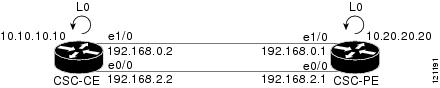
The figure below shows the loopback configuration for directly connected CSC-PE and CSC-CE routers. This configuration is used as the example in the tasks that follow.
| Figure 3 | Loopback Interface Configuration for Directly Connected CSC-PE and CSC-CE Routers |
- Configuring Loopback Interface Addresses on CSC-PE Routers
- Configuring Loopback Interface Addresses for CSC-CE Routers
- Configuring 32 Static Routes to the eBGP Neighbor Loopback on the CSC-PE Router
- Configuring 32 Static Routes to the eBGP Neighbor Loopback on the CSC-CE Router
- Configuring Forwarding on CSC-PE Interfaces That Connect to the CSC-CE Loopback
- Configuring Forwarding on CSC-CE Interfaces That Connect to the CSC-PE Loopback
- Configuring an eBGP Session Between the CSC-PE Router and the CSC-CE Loopback
- Configuring an eBGP Session Between the CSC-CE Router and the CSC-PE Loopback
- Verifying That Load Sharing Occurs Between Loopbacks
Configuring Loopback Interface Addresses on CSC-PE Routers
Perform this task to configure loopback interface addresses on the CSC-PE router.
Note |
Configuration of a loopback interface address on the CSC-PE router requires the enabling of a VRF. The CSC-CE router loopback interface does not require the enabling a of VRF. |
DETAILED STEPS
| Command or Action | Purpose | |
|---|---|---|
|
|
Example: Router> enable |
Enables privileged EXEC mode. |
|
|
Example: Router# configure terminal |
Enters global configuration mode. |
|
|
Example: Router(config)# interface loopback 0 |
Configures a software-only virtual interface that emulates an interface that is always up, and enters interface configuration mode. |
|
|
Example: Router(config-if)# ip vrf forwarding vpn1 |
Associates a VRF with the specified interface or subinterface. |
|
|
Example: Router(config-if)# ip address 10.20.20.20 255.255.255.255 |
Sets a primary or secondary IP address for an interface. |
|
|
Example: Router(config)# end |
Exits to privileged EXEC mode. |
Configuring Loopback Interface Addresses for CSC-CE Routers
Perform this task to configure loopback interface addresses for CSC-CE routers.
DETAILED STEPS
| Command or Action | Purpose | |
|---|---|---|
|
|
Example: Router> enable |
Enables privileged EXEC mode. |
|
|
Example: Router# configure terminal |
Enters global configuration mode. |
|
|
Example: Router(config)# interface loopback 0 |
Configures a software-only virtual interface that emulates an interface that is always up. |
|
|
Example: Router(config-if)# ip address 10.10.10.10 255.255.255.255 |
Sets a primary or secondary IP address for an interface. |
|
|
Example: Router(config-if)# end |
Exits to privileged EXEC mode. |
Configuring 32 Static Routes to the eBGP Neighbor Loopback on the CSC-PE Router
Perform the following task to configure /32 static routes to the eBGP neighbor loopback on the CSC-PE router.
DETAILED STEPS
| Command or Action | Purpose | |
|---|---|---|
|
|
Example: Router> enable |
Enables privileged EXEC mode. |
|
|
Example: Router# configure terminal |
Enters global configuration mode. |
|
|
Example: Router(config)# ip route vrf vpn1 10.10.10.10 255.255.255.255 Ethernet 1/0 172.16.0.2 |
Establishes static routes for a VRF.
|
|
|
Example: Router(config)# end |
Exits to privileged EXEC mode. |
Configuring 32 Static Routes to the eBGP Neighbor Loopback on the CSC-CE Router
Perform the following task to configure /32 static routes to the eBGP neighbor loopback for the CSC-CE router.
DETAILED STEPS
| Command or Action | Purpose | |
|---|---|---|
|
|
Example: Router> enable |
Enables privileged EXEC mode. |
|
|
Example: Router# configure terminal |
Enters global configuration mode. |
|
|
Example: Router(config)# ip route 10.20.20.20 255.255.255.255 Ethernet 1/0 172.16.0.1 |
Establishes static routes.
|
|
|
Example: Router(config)# end |
Exits to privileged EXEC mode. |
Configuring Forwarding on CSC-PE Interfaces That Connect to the CSC-CE Loopback
Perform this task to configure forwarding on CSC-PE interfaces that connect to the CSC-CE loopback.
DETAILED STEPS
| Command or Action | Purpose | |
|---|---|---|
|
|
Example: Router> enable |
Enables privileged EXEC mode. |
|
|
Example: Router# configure terminal |
Enters global configuration mode. |
|
|
Example: Router(config)# interface ethernet 1/0 |
Configures an interface type and enters interface configuration mode. |
|
|
Example: Router(config-if)# ip vrf forwarding vpn1 |
Associates a VRF with an interface or subinterface. |
|
|
Example: Router(config-if)# ip address 172.16.0.1 255.255.255.255 |
Sets a primary or secondary IP address for an interface. |
|
|
Example: Router(config-if)# mpls bgp forwarding |
Configures BGP to enable MPLS forwarding on connecting interfaces. |
|
|
Example: Router(config-if)# exit |
Exits to global configuration mode. |
|
|
|
|
|
|
Example: Router(config)# end |
Exits to privileged EXEC mode. |
Configuring Forwarding on CSC-CE Interfaces That Connect to the CSC-PE Loopback
Perform this task to configure forwarding on CSC-CE interfaces that connect to the CSC-PE loopback.
DETAILED STEPS
| Command or Action | Purpose | |
|---|---|---|
|
|
Example: Router> enable |
Enables privileged EXEC mode. |
|
|
Example: Router# configure terminal |
Enters global configuration mode. |
|
|
Example: Router(config)# interface ethernet 1/0 |
Configures an interface type and enters interface configuration mode. |
|
|
Example: Router(config-if)# mpls bgp forwarding |
Configures BGP to enable MPLS forwarding on connecting interfaces. |
|
|
Example: Router(config-if)# exit |
Exits to global configuration mode. |
|
|
|
|
|
|
Example: Router(config)# end |
Exits to privileged EXEC mode. |
Configuring an eBGP Session Between the CSC-PE Router and the CSC-CE Loopback
Perform this task to configure an eBGP session between the CSC-PE router and the CSC-CE loopback.
DETAILED STEPS
| Command or Action | Purpose | |||
|---|---|---|---|---|
|
|
Example: Router> enable |
Enables privileged EXEC mode. |
||
|
|
Example: Router# configure terminal |
Enters global configuration mode. |
||
|
|
Example: Router(config)# router bgp 200 |
Configures the BGP routing process. |
||
|
|
Example: Router(config-router)# bgp log-neighbor-changes |
Enables logging of BGP neighbor resets. |
||
|
|
Example: Router(config-router)# neighbor 10.10.10.10 remote-as 100 |
Adds an entry to the BGP or multiprotocol BGP neighbor table. |
||
|
|
Example: Router(config-router)# neighbor 10.10.10.10 disable-connected-check |
Allows peering between loopbacks. |
||
|
|
Example: Router(config-router)# neighbor 10.10.10.10 update-source Loopback 0 |
Allows BGP sessions to use any operational interface for TCP connections.
This argument must be in the form documented in RFC 2373, where the address is specified in hexadecimal using 16-bit values between colons. |
||
|
|
Example: Router(config-router)# address-family ipv4 vrf vpn1 |
Enters address family configuration mode for configuring routing protocols such as BGP, Routing Information Protocol (RIP), and static routing. |
||
|
|
Example: Router(config-router-af)# ip vrf forwarding vpn1 |
Associates a VRF with an interface or subinterface. |
||
|
|
Example: Router(config-router-af)# neighbor 10.10.10.10 activate |
Enables the exchange of information with a BGP neighbor.
|
||
|
|
Example: Router(config-router-af)# neighbor 10.10.10.10 send-label |
Enables a BGP router to send MPLS labels with BGP routes to a neighboring BGP router. |
||
|
|
Example: Router(config)# end |
Exits to privileged EXEC mode. |
Configuring an eBGP Session Between the CSC-CE Router and the CSC-PE Loopback
Perform this task to configure an eBGP session between the CSC-CE router and the CSC-PE loopback.
DETAILED STEPS
| Command or Action | Purpose | |||
|---|---|---|---|---|
|
|
Example: Router> enable |
Enables privileged EXEC mode. |
||
|
|
Example: Router# configure terminal |
Enters global configuration mode. |
||
|
|
Example: Router(config)# router bgp 200 |
Configures the BGP routing process. |
||
|
|
Example: Router(config-router)# bgp log-neighbor-changes |
Enables logging of BGP neighbor resets. |
||
|
|
Example: Router(config-router)# neighbor 10.20.20.20 remote-as 100 |
Adds an entry to the BGP or multiprotocol BGP neighbor table. |
||
|
|
Example: Router(config-router)# neighbor 10.20.20.20 disable-connected-check |
Allows peering between loopbacks. |
||
|
|
Example: Router(config-router)# neighbor 10.20.20.20 update-source Loopback 0 |
Allows BGP sessions to use any operational interface for TCP connections.
This argument must be in the form documented in RFC 2373, where the address is specified in hexadecimal using 16-bit values between colons. |
||
|
|
Example: Router(config-router)# address-family ipv4 |
Enters address family configuration mode for configuring routing protocols such as BGP, RIP, and static routing. |
||
|
|
Example: Router(config-router-af)# neighbor 10.20.20.20 activate |
Enables the exchange of information with a BGP neighbor.
|
||
|
|
Example: Router(config-router-af)# neighbor 10.20.20.20 send-label |
Enables a BGP router to send MPLS labels with BGP routes to a neighboring BGP router. |
||
|
|
Example: Router(config)# end |
Exits to privileged EXEC mode. |
Verifying That Load Sharing Occurs Between Loopbacks
To verify that load sharing occurs between loopbacks, ensure that the MPLS LFIB entry for the neighbor route lists the available paths and interfaces.
DETAILED STEPS
| Command or Action | Purpose | |
|---|---|---|
|
|
Example: Router> enable |
Enables privileged EXEC mode. |
|
|
Example: Router# show mpls forwarding-table |
Displays the contents of the MPLS LFIB. |
|
|
Example: Router# disable |
Exits to user EXEC mode. |
Configuration Examples for Load Sharing MPLS VPN Traffic
- Configuring a Router to Select eBGP or iBGP Paths as Multipaths Example
- Configuring a 32 Static Route from an ASBR to the Loopback Address of Another ASBR Examples
- Configuring BGP MPLS Forwarding on the Interfaces Connecting ASBRs Example
- Configuring VPNv4 Sessions on an ASBR Example
- Verifying VPN NLRI for a Specified Network Example
Configuring a Router to Select eBGP or iBGP Paths as Multipaths Example
The following example configures a router in address family configuration mode to select six eBGP or iBGP paths as multipaths:
Router(config)# router bgp 100
Router(config-router)# address-family ipv4 vrf try
Router(config-router-af)# maximum-paths eibgp 6
Router(config-router-af)# end
Configuring a 32 Static Route from an ASBR to the Loopback Address of Another ASBR Examples
The following example configures a /32 static route from ASBR1 to the loopback address of ASBR2:
Router# configure terminal
Router(config)# ip route 10.20.20.20 255.255.255 e1/0 168.192.0.1
Router(config)# ip route 10.20.20.20 255.255.255 e0/0 168.192.2.1
The following example configures a /32 static route from ASBR2 to the loopback address of ASBR1:
Router# configure terminal
Router(config)# ip route vrf vpn1 10.10.10.10 255.255.255 e1/0 168.192.0.2
Router(config)# ip route vrf vpn1 10.10.10.10 255.255.255 e0/0 168.192.2.2
Configuring BGP MPLS Forwarding on the Interfaces Connecting ASBRs Example
The following example configures BGP/MPLS forwarding on the interfaces connecting ASBR2 with ASBR1:
Router# configure terminal
Router(config)# interface ethernet 1/0
Router(config-if)# ip vrf forwarding vpn1
Router(config-if)# ip address 168.192.0.1 255.255.255.255
Router(config-if)# mpls bgp forwarding
Router(config-if)# exit
Router(config)# interface ethernet 0/0
Router(config-if)# ip vrf forwarding vpn1
Router(config-if)# ip address 168.192.2.1 255.255.255.255
Router(config-if)# mpls bgp forwarding
Router(config-if)# exit
Configuring VPNv4 Sessions on an ASBR Example
The following example configures VPNv4 sessions on ASBR2:
Router# configure terminal
Router(config)# router bgp 200
Router(config-router)# bgp log-neighbor-changes
Router(config-router)# neighbor 10.10.10.10 remote-as 100
Router(config-router)# neighbor 10.10.10.10 disable-connected-check
Router(config-router)# neighbor 10.10.10.10 update-source Loopback0
!
Router(config-router)# address-family vpnv4
Router(config-router-af)# neighbor 10.10.10.10 activate
Router(config-router-af)# neighbor 10.10.10.10 send-community extended
Router(config-router-af)# end
Verifying VPN NLRI for a Specified Network Example
If you enter the all keyword with the show ip bgp vpnv4 command, the output displays information about all VPN network layer reachability information (NLRI) for a specified network:
Router# show ip bgp vpnv4 all 10.22.22.0
BGP routing table entry for 10:1:22.22.22.0/24, version 19
Paths:(5 available, best #5)
Multipath: eiBGP
  Advertised to non peer-group peers:
  10.0.0.2 10.0.0.3 10.0.0.4 10.0.0.5
  22
    10.0.0.2 (metric 20) from 10.0.0.4 (10.0.0.4)
      Origin IGP, metric 0, localpref 100, valid, internal, multipath
      Extended Community:0x0:0:0 RT:100:1 0x0:0:0
      Originator:10.0.0.2, Cluster list:10.0.0.4
  22
    10.0.0.2 (metric 20) from 10.0.0.5 (10.0.0.5)
      Origin IGP, metric 0, localpref 100, valid, internal, multipath
      Extended Community:0x0:0:0 RT:100:1 0x0:0:0
      Originator:10.0.0.2, Cluster list:10.0.0.5
  22
    10.0.0.2 (metric 20) from 10.0.0.2 (10.0.0.2)
      Origin IGP, metric 0, localpref 100, valid, internal, multipath
      Extended Community:RT:100:1 0x0:0:0
  22
    10.0.0.2 (metric 20) from 10.0.0.3 (10.0.0.3)
      Origin IGP, metric 0, localpref 100, valid, internal, multipath
      Extended Community:0x0:0:0 RT:100:1 0x0:0:0
      Originator:10.0.0.2, Cluster list:10.0.0.3
  22
    10.1.1.12 from 10.1.1.12 (10.22.22.12)
      Origin IGP, metric 0, localpref 100, valid, external, multipath, best
      Extended Community:RT:100:1
Additional References
Related Documents
| Related Topic |
Document Title |
|---|---|
| MPLS |
MPLS: Layer 3 VPNs: Inter-AS and CSC Configuration Guide, MPLS VPN Carrier Supporting Carrier with BGP |
| BGP |
Cisco IOS IP Routing: BGP Configuration Guide, Configuring BGP |
Standards
| Standard |
Title |
|---|---|
| No new or modified standards are supported by this feature, and support for existing standards has not been modified by this feature. |
-- |
MIBs
| MIB |
MIBs Link |
|---|---|
| No new or modified MIBs are supported by this feature, and support for existing MIBs has not been modified by this feature. |
To locate and download MIBs for selected platforms, Cisco software releases, and feature sets, use Cisco MIB Locator found at the following URL: |
RFCs
| RFC |
Title |
|---|---|
| RFC 1164 |
Application of the Border Gateway Protocol in the Internet |
| RFC 1171 |
A Border Gateway Protocol 4 |
| RFC 1700 |
Assigned Numbers |
| RFC 1966 |
BGP Route Reflection: An Alternative to Full Mesh IBGP |
| RFC 2283 |
Multiprotocol Extensions for BGP-4 |
| RFC 2373 |
IP Version 6 Addressing Architecture |
| RFC 2547 |
BGP/MPLS VPNs |
| RFC 2842 |
Capabilities Advertisement with BGP-4 |
| RFC 2858 |
Multiprotocol Extensions for BGP-4 |
| RFC 3107 |
Carrying Label Information in BGP-4 |
Technical Assistance
| Description |
Link |
|---|---|
| The Cisco Support website provides extensive online resources, including documentation and tools for troubleshooting and resolving technical issues with Cisco products and technologies. To receive security and technical information about your products, you can subscribe to various services, such as the Product Alert Tool (accessed from Field Notices), the Cisco Technical Services Newsletter, and Really Simple Syndication (RSS) Feeds. Access to most tools on the Cisco Support website requires a Cisco.com user ID and password. |
Feature Information for Load Sharing MPLS VPN Traffic
The following table provides release information about the feature or features described in this module. This table lists only the software release that introduced support for a given feature in a given software release train. Unless noted otherwise, subsequent releases of that software release train also support that feature.
Use Cisco Feature Navigator to find information about platform support and Cisco software image support. To access Cisco Feature Navigator, go to www.cisco.com/go/cfn. An account on Cisco.com is not required.
| Table 1 | Feature Information for Load Sharing MPLS VPN Traffic |
| Feature Name |
Releases |
Feature Configuration Information |
|---|---|---|
| MPLS VPN--Load Balancing Support for Inter-AS and CSC VPNs |
12.0(29)S 12.4(20)T |
This feature allows MPLS VPN Inter-AS and MPLS VPN CSC networks to load share traffic between adjacent LSRs that are connected by multiple links. The LSRs can be a pair of ASBRs or a CSC-PE and a CSC-CE. Using directly connected loopback peering allows load sharing at the IGP level, so more than one BGP session is not needed between the LSRs. No other label distribution mechanism is needed between the adjacent LSRs than BGP. |
| BGP Multipath Load Sharing for Both eBGP and iBGP in an MPLS VPN |
12.2(4)T 12.2(14)S 12.0(24)S |
This feature allows multihomed autonomous systems and PE routers to be configured to distribute traffic across both external BGP (eBGP) and internal BGP (iBGP) paths. |
| iBGP Multipath Load Sharing |
12.2(2)T 12.2(14)S |
This feature enables the BGP speaking router to select multiple iBGP paths as the best paths to a destination. |
| eBGP Multipath |
12.0(27)S |
This feature installs multiple paths in the IP routing table when the eBGP paths are learned from a neighboring Autonomous System (AS), instead of picking one best path. |
Cisco and the Cisco logo are trademarks or registered trademarks of Cisco and/or its affiliates in the U.S. and other countries. To view a list of Cisco trademarks, go to this URL: www.cisco.com/go/trademarks. Third-party trademarks mentioned are the property of their respective owners. The use of the word partner does not imply a partnership relationship between Cisco and any other company. (1110R)
Any Internet Protocol (IP) addresses and phone numbers used in this document are not intended to be actual addresses and phone numbers. Any examples, command display output, network topology diagrams, and other figures included in the document are shown for illustrative purposes only. Any use of actual IP addresses or phone numbers in illustrative content is unintentional and coincidental.
 Feedback