- Finding Feature Information
- Prerequisites for IPv6 Switching: Provider Edge Router over MPLS
- Information About IPv6 Switching: Provider Edge Router over MPLS
- How to Deploy IPv6 Switching: Provider Edge Router over MPLS
IPv6 Switching: Provider Edge Router over MPLS
Multiprotocol Label Switching (MPLS) is deployed by many service providers in their IPv4 networks. Service providers want to introduce IPv6 services to their customers, but changes to their existing IPv4 infrastructure can be expensive and the cost benefit for a small amount of IPv6 traffic does not make economic sense. Several integration scenarios have been developed to leverage an existing IPv4 MPLS infrastructure and add IPv6 services without requiring any changes to the network backbone. This document describes how to implement IPv6 over MPLS.
- Finding Feature Information
- Prerequisites for IPv6 Switching: Provider Edge Router over MPLS
- Information About IPv6 Switching: Provider Edge Router over MPLS
- How to Deploy IPv6 Switching: Provider Edge Router over MPLS
- Configuration Examples for IPv6 Switching: Provider Edge Router over MPLS
- Additional References for IPv6 Switching: Provider Edge Router over MPLS
- Feature Information for IPv6 Switching: Provider Edge Router over MPLS
Finding Feature Information
Your software release may not support all the features documented in this module. For the latest caveats and feature information, see Bug Search Tool and the release notes for your platform and software release. To find information about the features documented in this module, and to see a list of the releases in which each feature is supported, see the feature information table at the end of this module.
Use Cisco Feature Navigator to find information about platform support and Cisco software image support. To access Cisco Feature Navigator, go to www.cisco.com/go/cfn. An account on Cisco.com is not required.
Prerequisites for IPv6 Switching: Provider Edge Router over MPLS
Before the IPv6 Provider Edge Router over MPLS (6PE) feature can be implemented, MPLS must be running over the core IPv4 network. If Cisco devices are used, Cisco Express Forwarding or distributed Cisco Express Forwarding must be enabled for both IPv4 and IPv6 protocols. This module assumes that you are familiar with MPLS.
Information About IPv6 Switching: Provider Edge Router over MPLS
Benefits of Deploying IPv6 over MPLS Backbones
IPv6 over MPLS backbones enables isolated IPv6 domains to communicate with each other over an MPLS IPv4 core network. This implementation requires only a few backbone infrastructure upgrades and no reconfiguration of core devices because forwarding is based on labels rather than the IP header itself, providing a very cost-effective strategy for the deployment of IPv6.
Additionally, the inherent Virtual Private Network (VPN) and MPLS traffic engineering (MPLS-TE) services available within an MPLS environment allow IPv6 networks to be combined into IPv4 VPNs or extranets over an infrastructure supporting IPv4 VPNs and MPLS-TE.
IPv6 on the Provider Edge Devices
The Cisco implementation of IPv6 Provider Edge Router over MPLS is called 6PE, and it enables IPv6 sites to communicate with each other over an MPLS IPv4 core network using MPLS label switched paths (LSPs). This feature relies on multiprotocol Border Gateway Protocol (BGP) extensions in the IPv4 network configuration on the provider edge (PE) device to exchange IPv6 reachability information in addition to an MPLS label for each IPv6 address prefix to be advertised. Edge devices are configured to be dual stack running both IPv4 and IPv6, and use the IPv4 mapped IPv6 address for IPv6 prefix reachability exchange.
A hierarchy of labels is imposed on the 6PE ingress device to keep the IPv6 traffic transparent to all the core devices. The top label provides connectivity inside the IPv4 MPLS core network and the label is distributed by Label Distribution Protocol (LDP), Tag Distribution Protocol (TDP), or Resource Reservation Protocol (RSVP). TDP and LDP can both be used for label distribution, but RSVP is used only in the context of MPLS-TE label exchange. The bottom label, automatically assigned to the IPv6 prefix of the destination, is distributed by multiprotocol BGP and used at each 6PE egress device for IPv6 forwarding.
In the figure below the 6PE devices are configured as dual stack devices able to route both IPv4 and IPv6 traffic. Each 6PE device is configured to run LDP, TDP, or RSVP (if traffic engineering is configured) to bind the IPv4 labels. The 6PE devices use multiprotocol BGP to exchange reachability information with the other 6PE devices within the MPLS domain, and to distribute IPv6 labels between them. All 6PE and core devices--P devices in Figure 3--within the MPLS domain share a common IPv4 Interior Gateway Protocol (IGP) such as Open Shortest Path First (OSPF) or Integrated Intermediate System-to-Intermediate System (IS-IS).
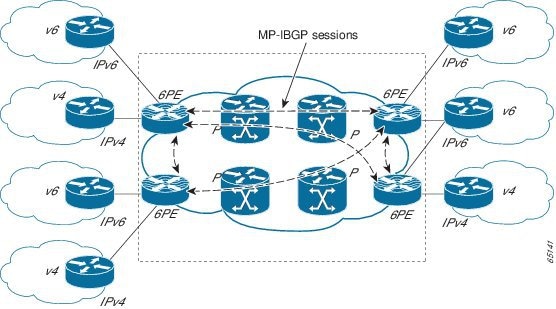
The interfaces on the 6PE devices connecting to the CE device can be configured to forward IPv6 traffic, IPv4 traffic, or both types of traffic depending on the customer requirements. 6PE devices advertise IPv6 reachability information learned from their 6PE peers over the MPLS cloud. Service providers can delegate an IPv6 prefix from their registered IPv6 prefixes over the 6PE infrastructure; otherwise, there is no impact on the CE device.
The P devices in the core of the network are not aware that they are switching IPv6 packets. Core devices are configured to support MPLS and the same IPv4 IGP as the PE devices to establish internal reachability inside the MPLS cloud. Core devices also use LDP, TDP, or RSVP for binding IPv4 labels. Implementing the Cisco 6PE feature does not have any impact on the MPLS core devices.
Within the MPLS network, IPv6 traffic is forwarded using label switching, making the IPv6 traffic transparent to the core of the MPLS network. No IPv6 over IPv4 tunnels or Layer 2 encapsulation methods are required.
How to Deploy IPv6 Switching: Provider Edge Router over MPLS
Deploying IPv6 on the Provider Edge Devices (6PE)
- Specifying the Source Address Interface on a 6PE Device
- Binding and Advertising the 6PE Label to Advertise Prefixes
- Configuring IBGP Multipath Load Sharing
Specifying the Source Address Interface on a 6PE Device
Two configuration tasks using the network shown in the figure below are required at the 6PE1 device to enable the 6PE feature.
The customer edge device--CE1 in the figure below--is configured to forward its IPv6 traffic to the 6PE1 device. The P1 device in the core of the network is assumed to be running MPLS, a label distribution protocol, an IPv4 IGP, and Cisco Express Forwarding or distributed Cisco Express Forwarding, and does not require any new configuration to enable the 6PE feature.
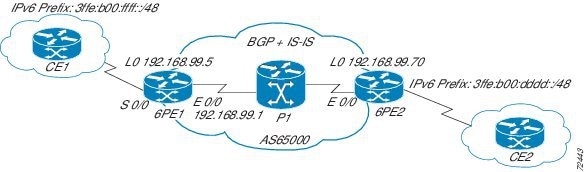
- The 6PE devices--the 6PE1 and 6PE2 devices in the figure below--must be members of the core IPv4 network. The 6PE device interfaces attached to the core network must be running MPLS, the same label distribution protocol, and the same IPv4 IGP, as in the core network.
- The 6PE devices must also be configured to be dual stack to run both IPv4 and IPv6.
1.
enable
2.
configure
terminal
3.
ipv6
unicast-routing
4.
ipv6
cef
5.
interface
type
number
6.
ipv6
address
ipv6-address
/
prefix-length
|
prefix-name
sub-bits
/
prefix-length
DETAILED STEPS
Binding and Advertising the 6PE Label to Advertise Prefixes
Perform this task to enable the binding and advertising of labels when advertising IPv6 prefixes to a specified BGP neighbor.
1.
enable
2.
configure
terminal
3.
router
bgp
as-number
4.
no
bgp
default
ipv4-unicast
5.
neighbor
{ip-address |
ipv6-address |
peer-group-name}
remote-as
as-number
6.
neighbor
{
ip-address
|
ipv6-address |
peer-group-name}
update-source
interface-type
interface-number
7.
address-family
ipv6
[unicast]
8.
neighbor
{ip-address |
peer-group-name|
ipv6-address}
activate
9.
neighbor
{ip-address |
ipv6-address}
send-label
DETAILED STEPS
Configuring IBGP Multipath Load Sharing
Perform this task to configure IBGP multipath load sharing and control the maximum number of parallel IBGP routes that can be installed in a routing table.
1.
enable
2.
configure
terminal
3.
router
bgp
as-number
4.
maximum-paths
ibgp
number-of-paths
DETAILED STEPS
| Command or Action | Purpose | |
|---|---|---|
| Step 1 |
enable
Example: Device> enable |
Enables privileged EXEC mode. |
| Step 2 |
configure
terminal
Example: Device# configure terminal |
Enters global configuration mode. |
| Step 3 |
router
bgp
as-number
Example: Device(config)# router bgp 65000 |
Enters router configuration mode for the specified routing process. |
| Step 4 |
maximum-paths
ibgp
number-of-paths
Example: Device(config-router)# maximum-paths ibgp 3 |
Controls the maximum number of parallel IBGP routes that can be installed in a routing table. |
Configuration Examples for IPv6 Switching: Provider Edge Router over MPLS
Example: Provider Edge Device
The 6PE device is configured for both IPv4 and IPv6 traffic. Gigabit Ethernet interface 0/0/0 is configured with an IPv4 address and is connected to a device in the core of the network. Integrated IS-IS and TDP configurations on this device are similar to the P1 device.
Device 6PE1 exchanges IPv6 routing information with another 6PE device using internal BGP (IBGP) established over an IPv4 connection so that all the neighbor commands use the IPv4 address of the 6PE2 device. All the BGP peers are within autonomous system 65000, so synchronization with IGP is turned off for IPv4. In IPv6 address family configuration mode, synchronization is disabled by default.
IPv6 and Cisco Express Forwarding for IPv6 are enabled, the 6PE2 neighbor is activated, and label binding and advertisement is enabled for IPv6 prefixes using the neighbor send-label command. Connected and static IPV6 routes are redistributed using BGP. If IPv6 packets are generated in the local device, the IPv6 address for MPLS processing will be the address of loopback interface 0.
In the following example, serial interface 0/0 connects to the customer and the IPv6 prefix delegated to the customer is 2001:DB8:ffff::/48, which is determined from the service provider IPv6 prefix. A static route is configured to route IPv6 packets between the 6PE route and the CE device.
ip cef
ipv6 cef
ipv6 unicast-routing
!
mpls ipv6 source-interface Loopback0
tag-switching tdp router-id Loopback0
!
interface Loopback0
 ip address 192.168.99.5 255.255.255.255
 ipv6 address 2001:DB8:1000:1::1/64
!
interface GigabitEthernet0/0/0
 description to_P_router
 ip address 192.168.99.1 255.255.255.252
 ip router isis
 tag-switching ip
!
interface GigabitEthernet0/1/0
 description to_CE_router
 no ip address
 ipv6 address 2001:DB8:FFFF::1/64
!
router isis
 passive-interface Loopback0
 net 49.0001.1921.6809.9005.00
!
router bgp 65000
 no bgp default ipv4-unicast
 bgp log-neighbor-changes
 neighbor 192.168.99.70 remote-as 65000
 neighbor 192.168.99.70 description to_6PE2
 neighbor 192.168.99.70 update-source Loopback0
 !
 address-family ipv6
 neighbor 192.168.99.70 activate
 neighbor 192.168.99.70 send-label
 network 2001:DB8:FFFF::/48
 exit-address-family
!
ipv6 route 2001:DB8:FFFF::/48 GigabitEthernet0/0/0 2001:DB8:FFFF::2
Example: Core Device
In the following example, the device in the core of the network is running MPLS, IS-IS, and IPv4 only. The Gigabit Ethernet interfaces are configured with IPv4 address and are connected to the 6PE devices. IS-IS is the IGP for this network and the P1 and 6PE devices are in the same IS-IS area 49.0001. Tag Distribution Protocol (TDP) and tag switching are enabled on both the Gigabit Ethernet interfaces. Cisco Express Forwarding is enabled in global configuration mode.
ip cef
!
tag-switching tdp router-id Loopback0
!
interface Loopback0
 ip address 192.168.99.200 255.255.255.255
!
interface GigabitEthernet0/0/0
 description to_6PE1
 ip address 192.168.99.2 255.255.255.252
 ip router isis
 tag-switching ip
!
interface GigabitEthernet0/1/0
 description to_6PE2
 ip address 192.168.99.66 255.255.255.252
 ip router isis
 tag-switching ip
router isis
 passive-interface Loopback0
 net 49.0001.1921.6809.9200.00
Example: Monitoring 6PE
In the following example, output information about an IPv6 route is displayed using the show bgp ipv6 command with an IPv6 prefix:
Device# show bgp ipv6 2001:DB8:DDDD::/48

BGP routing table entry for 2001:DB8:DDDD::/48, version 15
Paths: (1 available, best #1, table Global-IPv6-Table)
  Not advertised to any peer
  Local
    ::FFFF:192.168.99.70 (metric 20) from 192.168.99.70 (192.168.99.70)
      Origin IGP, localpref 100, valid, internal, best
In the following example, output information about a BGP peer including the IPv6 label capability is displayed using the show bgp ipv6 neighbors command with an IP address:
Device# show bgp ipv6 neighbors 192.168.99.70

BGP neighbor is 192.168.99.70, remote AS 65000, internal link
  BGP version 4, remote router ID 192.168.99.70
  BGP state = Established, up for 00:05:17
  Last read 00:00:09, hold time is 0, keepalive interval is 60 seconds
  Neighbor capabilities:
    Route refresh: advertised and received
    Address family IPv6 Unicast: advertised and received
    ipv6 MPLS Label capability: advertised and received
  Received 54 messages, 0 notifications, 0 in queue
  Sent 55 messages, 1 notifications, 0 in queue
  Default minimum time between advertisement runs is 5 seconds

 For address family: IPv6 Unicast
  BGP table version 21880, neighbor version 21880
  Index 1, Offset 0, Mask 0x2
  Route refresh request: received 0, sent 0
  77 accepted prefixes consume 4928 bytes
  Prefix advertised 4303, suppressed 0, withdrawn 1328
  Number of NLRIs in the update sent: max 1, min 0
In the following example, output information linking the MPLS label with prefixes is displayed using the show mpls forwarding-table command. If the 6PE feature is configured, the labels are aggregated because there are several prefixes for one local label, and the prefix column contains IPv6 instead of a target prefix.
Device# show mpls forwarding-table

Local      Outgoing   Prefix           Bytes Label   Outgoing   Next Hop
Label      Label      or Tunnel Id     Switched      interface
16         Pop Label  1.1.1.1/32       0             Et0/0      10.0.0.1
18         No Label   nh-id(1)         0             Et2/0      10.0.2.2
19         No Label   nh-id(2)         0             Et1/0      10.0.1.2
20         No Label   nh-id(3)         0             Et1/0      10.0.1.2
22         No Label   nh-id(5)         0             Et1/0      10.0.1.2
24         No Label   nh-id(5)         0             Et2/0      10.0.2.2
In the following example, output information about the top of the stack label with label switching information is displayed using the show bgp ipv6 command with the labels keyword:
Device# show bgp ipv6 labels

Network              Next Hop               In tag/Out tag
2001:DB8:DDDD::/64  ::FFFF:192.168.99.70   notag/20
In the following example, output information about labels from the Cisco Express Forwarding table is displayed using the show ipv6 cef command with an IPv6 prefix:
Device# show ipv6 cef 2001:DB8:DDDD::/64

2001:DB8:DDDD::/64
      nexthop ::FFFF:192.168.99.70
      fast tag rewrite with Se0/0, point2point, tags imposed {19 20}
In the following example, output information from the IPv6 routing table is displayed using the show ipv6 route command. The output shows the IPv6 MPLS virtual interface as the output interface of IPv6 routes forwarded across the MPLS cloud. This example shows output from the 6PE1 router.
The 6PE2 router has advertised the IPv6 prefix of 2001:DB8:dddd::/48 configured for the CE2 router and the next-hop address is the IPv4-compatible IPv6 address ::ffff:192.168.99.70, where 192.168.99.70 is the IPv4 address of the 6PE2 router.
Device# show ipv6 route

IPv6 Routing Table - 10 entries
Codes: C - Connected, L - Local, S - Static, R - RIP, B - BGP
I1 - ISIS L1, I2 - ISIS L2, IA - ISIS interarea
B 2001:DB8:DDDD::/64 [200/0]
  via ::FFFF:192.168.99.70, IPv6-mpls
B 2001:DB8:DDDD::/64 [200/0]
  via ::FFFF:192.168.99.70, IPv6-mpls
L 2001:DB8:FFFF::1/128 [0/0]
  via ::, GigabitEthernet0/0/0
C 2001:DB8:FFFF::/64 [0/0]
  via ::, GigabitEthernet0/0/0
S 2001:DB8:FFFF::/48 [1/0]
  via 2001:DB8:B00:FFFF::2, GigabitEthernet0/0/0
Additional References for IPv6 Switching: Provider Edge Router over MPLS
Related Documents
|
Related Topic |
Document Title |
|---|---|
|
IPv6 addressing and connectivity |
IPv6 Configuration Guide |
|
Cisco IOS commands |
|
|
IPv6 commands |
|
|
Cisco IOS IPv6 features |
Standards and RFCs
|
Standard/RFC |
Title |
|---|---|
|
RFCs for IPv6 |
IPv6 RFCs |
Technical Assistance
|
Description |
Link |
|---|---|
|
The Cisco Support and Documentation website provides online resources to download documentation, software, and tools. Use these resources to install and configure the software and to troubleshoot and resolve technical issues with Cisco products and technologies. Access to most tools on the Cisco Support and Documentation website requires a Cisco.com user ID and password. |
Feature Information for IPv6 Switching: Provider Edge Router over MPLS
The following table provides release information about the feature or features described in this module. This table lists only the software release that introduced support for a given feature in a given software release train. Unless noted otherwise, subsequent releases of that software release train also support that feature.
Use Cisco Feature Navigator to find information about platform support and Cisco software image support. To access Cisco Feature Navigator, go to www.cisco.com/go/cfn. An account on Cisco.com is not required.
|
Feature Name |
Releases |
Feature Information |
|---|---|---|
|
IPv6 Switching: Provider Edge Router over MPLS |
Cisco IOS XE Release 3.1S |
The Cisco implementation of IPv6 Provider Edge Router over MPLS enables IPv6 sites to communicate with each other over an MPLS IPv4 core network using MPLS LSPs. The following commands were introduced or modified: address-family ipv6, ipv6 address, ipv6 cef, ipv6 unicast-routing, maximum-paths ibgp, neighbor activate, neighbor remote-as, neighbor send-label, neighbor update-source, no bgp default ipv4-unicast, router bgp, show bgp ipv6, show bgp ipv6 labels, show bgp ipv6 neighbors, show ipv6 cef, show ipv6 route, show mpls forwarding-table. |
 Feedback