- Configuring Mobile IP
- Mobile IP MIB Support for SNMP
- Mobile IP NAT Detect
- Mobile IP Support for Foreign Agent Reverse Tunneling
- Mobile IP Challenge and Response Extensions
- Mobile IP Generic NAI Support and Home Address Allocation
- Mobile IP Home Agent Policy Routing
- Mobile IP Home Agent Accounting
- Mobile IP Dynamic Security Association and Key Distribution
- Mobile IP Support for RFC 3519 NAT Traversal
- Mobile IPv6 High Availability
- IPv6 ACL Extensions for Mobile IPv6
- Mobile IPv6 Home Agent
- IPv6 NEMO
- Index
Contents
- Mobile IP Home Agent Policy Routing
- Finding Feature Information
- Prerequisites for Mobile IP Home Agent Policy Routing
- Information About Mobile IP Home Agent Policy Routing
- Policy Routing
- Feature Design of Mobile IP Home Agent Policy Routing
- How to Configure Mobile IP Home Agent Policy Routing
- Enabling Policy Routing on the Home Agent
- Defining the Route Map
- Verifying Policy Routing on the Home Agent
- Output Examples
- Sample Output for the show ip mobile binding Command
- Sample Output for the show ip mobile tunnel Command
- Sample Output for the show access-lists Command
- Sample Output for the show ip policy Command
- Sample Output for the show ip mobile vpn-realm Command
- Configuration Examples for Mobile IP Home Agent Policy Routing
- Home Agent Policy Routing Example
- Additional References
- Command Reference
- Glossary
Mobile IP Home Agent Policy Routing
The Mobile IP Home Agent Policy Routing feature supports route maps on Mobile IP tunnels created at the home agent. This feature allows an Internet Service Provider (ISP) to provide service to multiple customers. While reverse tunneling packets, the home agent looks up where the packet should go. For example, if an address corresponds to a configured network access identifier (NAI) realm name (such as cisco.com), the packet goes out interface 1, which has a connection to the Cisco network. If an address corresponds to another NAI realm name (such as company2.com), the packet goes out interface 2, which has a connection to the Company2 network.
Feature Specifications for Mobile IP Home Agent Policy Routing
|
Feature History |
|
|---|---|
|
Release |
Modification |
|
12.2(13)T |
This feature was introduced. |
|
Supported Platforms |
|
|
Refer to Feature Navigator. |
- Finding Feature Information
- Prerequisites for Mobile IP Home Agent Policy Routing
- Information About Mobile IP Home Agent Policy Routing
- How to Configure Mobile IP Home Agent Policy Routing
- Configuration Examples for Mobile IP Home Agent Policy Routing
- Additional References
- Command Reference
- Glossary
Finding Feature Information
Your software release may not support all the features documented in this module. For the latest caveats and feature information, see Bug Search Tool and the release notes for your platform and software release. To find information about the features documented in this module, and to see a list of the releases in which each feature is supported, see the feature information table at the end of this module.
Use Cisco Feature Navigator to find information about platform support and Cisco software image support. To access Cisco Feature Navigator, go to www.cisco.com/go/cfn. An account on Cisco.com is not required.
Prerequisites for Mobile IP Home Agent Policy Routing
Reverse tunnelling must be enabled on both the home agent and foreign agent.
Information About Mobile IP Home Agent Policy Routing
Policy Routing
Policy routing is a more flexible mechanism for routing packets than destination routing. Policy routing allows network administrators to implement policies that selectively cause packets to take different paths. The policy can be as simple as not allowing any traffic from a department on a network or as complex as making sure traffic with certain characteristics originating within a network takes path A, while other traffic takes path B.
Policy routing is applied to incoming packets. All packets received on an interface with policy routing enabled are considered for policy routing. The router passes the packets through enhanced packet filters called route maps. The route map determines which packets are routed to which router next. Based on the criteria defined in the route maps, packets are forwarded/routed to the appropriate next hop.
Feature Design of Mobile IP Home Agent Policy Routing
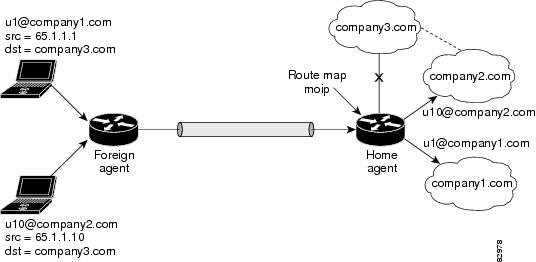
The Mobile IP Home Agent Policy Routing feature allows policy routing for mobile nodes based on the NAI configuration. ISPs can use this feature to route traffic originating from different sets of users, as identified by the NAI realm name, through different Internet connections across the policy routers. When the mobile node registers, entries are added dynamically in the access list pointed to by the route map and the route map is applied to the tunnel interface.
A route map is configured and applied on the Mobile IP tunnel. When a packet arrives on a tunnel interface and policy routing is enabled on that tunnel (route map applied), the packet is checked against the access list configured on the route map.
The figure below shows a sample topology for home agent policy routing. In the figure, as traffic from u1@company1.com and u10@ company2.com is policy routed, the home agent forwards it per the policy instead of routing directly to the destination address.
How to Configure Mobile IP Home Agent Policy Routing
- Enabling Policy Routing on the Home Agent
- Defining the Route Map
- Verifying Policy Routing on the Home Agent
Enabling Policy Routing on the Home Agent
This section describes how to enable policy routing on the home agent:
1.
enable
2.
configure
{terminal | memory | network}
3.
router
mobile
4.
exit
5.
ip
mobile
home-agent
[address ip-address]
6.
ip
mobile
tunnel
route-map
map-tag
7.
ip
mobile
vpn-realm
realm-name
route-map-sequence
sequence-number
8.
ip
mobile
virtual-network
addr
mask
9.
ip
mobile
host
nai
string
10.
ip
mobile
secure
host
nai
string
spi
spi
key
hex
string
DETAILED STEPS
Defining the Route Map
This section describes how to define the route map and define the criteria by which packets are examined to learn if they will be policy-routed.
 Note | The Mobile IP Home Agent Policy Routing feature supports only standard access lists; named and extended access lists are not supported. |
1.
enable
2.
configure
{terminal | memory | network}
3.
route-map
map-tag
[permit | deny][sequence-number]
4.
match
ip
address
access-list-number
5.
set
interface
[type number]
DETAILED STEPS
Verifying Policy Routing on the Home Agent
To verify the home agent policy routing configuration, use the following commands in privileged EXEC mode, as needed:
1.
enable
2.
show
ip
mobile
binding
3.
show
ip
mobile
tunnel
4.
show
access-lists
5.
show
ip
policy
6.
show
ip
mobile
vpn-realm
DETAILED STEPS
| Command or Action | Purpose | |
|---|---|---|
| Step 1 |
enable
Example: Router> enable |
Enables higher privilege levels, such as privileged EXEC mode.
|
| Step 2 |
show
ip
mobile
binding
Example: Router# show ip mobile binding |
Displays the mobility binding table.
|
| Step 3 |
show
ip
mobile
tunnel
Example: Router# show ip mobile tunnel |
Displays the active tunnels.
|
| Step 4 |
show
access-lists
Example: Router# show access-lists |
Displays the contents of the current access lists.
|
| Step 5 |
show
ip
policy
Example: Router# show ip policy |
Displays the route map used for policy routing.
|
| Step 6 |
show
ip
mobile
vpn-realm
Example: Router# show ip mobile vpn-realm |
Displays the Mobile IP VPN realms and sequence numbers.
|
Output Examples
This section provides the following output examples:
- Sample Output for the show ip mobile binding Command
- Sample Output for the show ip mobile tunnel Command
- Sample Output for the show access-lists Command
- Sample Output for the show ip policy Command
- Sample Output for the show ip mobile vpn-realm Command
Sample Output for the show ip mobile binding Command
The following is example output for a mobile host using the NAI realm of u10@company2.com:
Router# show ip mobile binding
Mobility Binding List:
Total 1
u10@company2.com (Bindings 1):
    Home Addr 65.1.1.10
    Care-of Addr 4.4.4.3, Src Addr 3.3.3.3
    Lifetime granted 00:05:00 (300), remaining 00:03:58
    Flags sBdmgvT, Identification BF7A951C.28FA35AB
    Tunnel1 src 150.150.150.150 dest 4.4.4.3 reverse-allowed
    Routing Options - (T)Reverse-tunnel
Sample Output for the show ip mobile tunnel Command
The following example displays the active Mobile IP tunnels and the configured route map:
Router# show ip mobile tunnel
Total mobile ip tunnels 1
Tunnel1:
    src 150.150.150.150, dest 4.4.4.3
    encap IP/IP, mode reverse-allowed, tunnel-users 1
    IP MTU 1514 bytes
    Path MTU Discovery, mtu:0, ager:10 mins, expires:never
    outbound interface Mobile0
    HA created, fast switching enabled, ICMP unreachable enabled
    10 packets input, 1000 bytes, 0 drops
    5 packets output, 600 bytes
    Route Map is:moipmap
Sample Output for the show access-lists Command
The following example displays the access list:
Router# show access-lists
Standard IP access list 5
    permit 65.1.1.10
Sample Output for the show ip policy Command
The following example displays the route maps applied to the tunnels:
Router# show ip policy
Interface      Route map
Tunnel0        moipmap
Tunnel1        moipmap
Sample Output for the show ip mobile vpn-realm Command
The following examples show two VPN realms configured on the router with the corresponding show output:
ip mobile vpn-realm company1.com route-map-sequence 20
ip mobile vpn-realm company2.com route-map-sequence 10
Router# show ip mobile vpn-realm
IP Mobile VPN realm(s):
    Sequence number: 20      Realm: company1.com
    Sequence number: 10      Realm: company2.com
Configuration Examples for Mobile IP Home Agent Policy Routing
Home Agent Policy Routing Example
In the following example, the route map named moipmap is applied to the Mobile IP tunnel and traffic is routed, based on the NAI VPN realm configuration, through different connections across the policy routers:
!
router mobile
!
ip mobile home-agent address 150.150.150.150 lifetime 65535 replay 255
ip mobile vpn-realm company2.com route-map-sequence 10
ip mobile virtual-network 65.0.0.0 255.0.0.0
ip mobile host nai u10@company2.com address 65.1.1.10 virtual-network 65.0.0.0 255.0.0.0
ip mobile host nai u9@company2.com address 65.1.1.9 virtual-network 65.0.0.0 255.0.0.0
ip mobile host nai u2@company1.com address 65.1.1.2 virtual-network 65.0.0.0 255.0.0.0
ip mobile host nai u1@company1.com address 65.1.1.1 virtual-network 65.0.0.0 255.0.0.0
ip mobile secure host nai u2@company1.com spi 100 key hex 12345678123456781234567812345678
ip mobile secure host nai u1@company1.com spi 100 key hex 45678123451234567812367812345678
ip mobile secure host nai u9@company2.com spi 100 key hex 81234567812345678123456712345678
ip mobile secure host nai u10@company2.com spi 100 key hex 23456781234567812345678123456781
ip mobile tunnel route-map moipmap
!
access-list 5 permit 65.1.1.10
!
route-map moipmap permit 10
 match ip address 5
 set interface Ethernet4/4
!
Note | This configuration example shows mobile hosts configured with static IP addresses. Mobile IP policy routing can also be used with dynamically assigned IP addresses. For example, hosts from two different NAI realms can be assigned addresses from the same address pool. |
Additional References
For additional information related to Mobile IP home agent policy routing, refer to the following references:
Related Documents
|
Related Topic |
Document Title |
|---|---|
|
Mobile IP configuration tasks |
"Configuring Mobile IP" chapter in the Cisco IOS IP Configuration Guide, Release 12.2 |
|
Mobile IP commands: complete command syntax, command mode, defaults, usage guidelines, and examples |
"Mobile IP Commands" chapter in theCisco IOS IP Command Reference, Volume 1 of 3: Addressing and Services, Release 12.2 |
|
Policy routing configuration tasks |
"Configuring IP Routing Protocol-Independent Features" chapter in the Cisco IOS IP Configuration Guide, Release 12.2 |
|
Policy routing commands: complete command syntax, command mode, defaults, usage guidelines, and examples |
"IP Routing Protocol-Independent Commands" chapter in the Cisco IOS IP Command Reference, Volume 2 of 3: Routing Protocols, Release 12.2 |
|
Mobile IP commands related to NAI |
"Mobile IP--Generic NAI Support and Home Address Allocation" feature document, Release 12.2(13)T |
Standards
|
Standards |
Title |
|---|---|
|
No new or modified standards are supported by this feature, and support for existing standards has not been modified by this feature. |
-- |
MIBs
|
MIBs |
MIBs Link |
|---|---|
|
No new or modified MIBs are supported by this feature, and support for existing MIBs has not been modified by this feature. |
To obtain lists of supported MIBs by platform and Cisco IOS release, and to download MIB modules, go to the Cisco MIB website on Cisco.com at the following URL: http://www.cisco.com/public/sw-center/netmgmt/cmtk/mibs.shtml |
To locate and download MIBs for selected platforms, Cisco IOS releases, and feature sets, use Cisco MIB Locator found at the following URL:
http://tools.cisco.com/ITDIT/MIBS/servlet/index
If Cisco MIB Locator does not support the MIB information that you need, you can also obtain a list of supported MIBs and download MIBs from the Cisco MIBs page at the following URL:
http://www.cisco.com/public/sw-center/netmgmt/cmtk/mibs.shtml
To access Cisco MIB Locator, you must have an account on Cisco.com. If you have forgotten or lost your account information, send a blank e-mail to cco-locksmith@cisco.com. An automatic check will verify that your e-mail address is registered with Cisco.com. If the check is successful, account details with a new random password will be e-mailed to you. Qualified users can establish an account on Cisco.com by following the directions found at this URL:
RFCs
|
RFCs |
Title |
|---|---|
|
No new or modified RFCs are supported by this feature, and support for existing RFCs has not been modified by this feature. |
-- |
Technical Assistance
|
Description |
Link |
|---|---|
|
Technical Assistance Center (TAC) home page, containing 30,000 pages of searchable technical content, including links to products, technologies, solutions, technical tips, tools, and lots more. Registered Cisco.com users can log in from this page to access even more content. |
Command Reference
The following commands are introduced or modified in the feature or features documented in this module. For information about these commands, see the Cisco IOS IP Mobility Command Reference at http://www.cisco.com/en/US/docs/ios/ipmobility/command/reference/imo_book.html. For information about all Cisco IOS commands, go to the Command Lookup Tool at http://tools.cisco.com/Support/CLILookup or to the Cisco IOS Master Commands List .
Glossary
home agent --A router that forwards to mobile node or that tunnels packets to the mobile node or mobile router while they are away from home. It keeps current location information for registered mobile nodes called a mobility binding.
NAI --network access identifier. The user ID submitted by the mobile node during registration to identify the user for authentication. The NAI may help route the registration request to the right Home Agent.
Note | Refer to the Internetworking Terms and Acronyms for terms not included in this glossary. |