The documentation set for this product strives to use bias-free language. For the purposes of this documentation set, bias-free is defined as language that does not imply discrimination based on age, disability, gender, racial identity, ethnic identity, sexual orientation, socioeconomic status, and intersectionality. Exceptions may be present in the documentation due to language that is hardcoded in the user interfaces of the product software, language used based on RFP documentation, or language that is used by a referenced third-party product. Learn more about how Cisco is using Inclusive Language.
IPv6 Source Guard and IPv6 Prefix Guard are Layer 2 snooping features that validate the source of IPv6 traffic. IPv6 Source
Guard blocks any data traffic from an unknown source. For example, one that is not already populated in the binding table
or previously learned through Neighbor Discovery (ND) or Dynamic Host Configuration Protocol (DHCP) gleaning. IPv6 Prefix
Guard prevents home-node sourcing traffic outside of the authorized and delegated traffic.
Finding Feature Information
Your software release may not support all the features documented in this module. For the latest caveats and feature information,
see Bug Search Tool and the release notes for your platform and software release. To find information about the features documented in this module,
and to see a list of the releases in which each feature is supported, see the feature information table.
Use Cisco Feature Navigator to find information about platform support and Cisco software image support. To access Cisco Feature
Navigator, go to www.cisco.com/go/cfn. An account on Cisco.com is not required.
Information about IPv6 Source Guard and Prefix Guard
IPv6 Source Guard Overview
IPv6 source guard is an interface feature between the populated binding table and data traffic filtering. This feature enables
the device to deny traffic when it is originated from an address that is not stored in the binding table. IPv6 source guard
does not inspect ND or DHCP packets; rather, it works in conjunction with IPv6 neighbor discovery (ND) inspection or IPv6
address glean, both of which detect existing addresses on the link and store them into the binding table. IPv6 source guard
is an interface between the populated binding table and data traffic filtering, and the binding table must be populated with
IPv6 prefixes for IPv6 source guard to work.
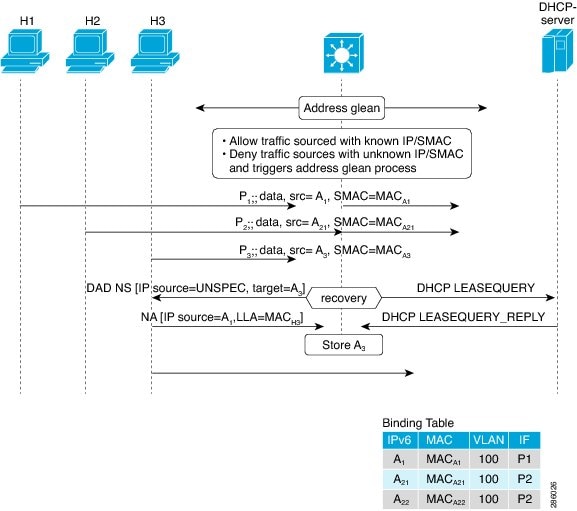
IPv6 source guard can deny traffic from unknown sources or unallocated addresses, such as traffic from sources not assigned
by a DHCP server. When traffic is denied, the IPv6 address glean feature is notified so that it can try to recover the traffic
by querying the DHCP server or by using IPv6 ND. The data-glean function prevents the device and end user from getting deadlocked,
whereupon a valid address fails to be stored into the binding table, there is no recovery path, and the end user is unable
to connect.
The following illustration provides an overview of how IPv6 source guard works with IPv6 address glean.
Figure 1. IPv6 Source Guard and Address Glean Overview
IPv6 Prefix Guard Overview
The IPv6 Prefix Guard feature works within the IPv6 Source Guard feature, enabling the device to deny traffic originated
from nontopologically correct addresses. IPv6 prefix guard is often used when IPv6 prefixes are delegated to devices (for
example, home gateways) using DHCP prefix delegation. The feature discovers ranges of addresses assigned to the link and blocks
any traffic sourced with an address outside this range.
To determine which prefixes should be allowed and which prefixes should be blocked, IPv6 prefix guard uses the following:
Prefix glean in Router Advertisements (RAs)
Prefix glean in DHCP prefix delegation
Static configuration
Whenever a prefix is to be allowed, IPv6 prefix guard downloads it to the hardware table. Whenever a packet is switched,
the hardware matches the source of the packet against this table and drops the packet if no match is found.
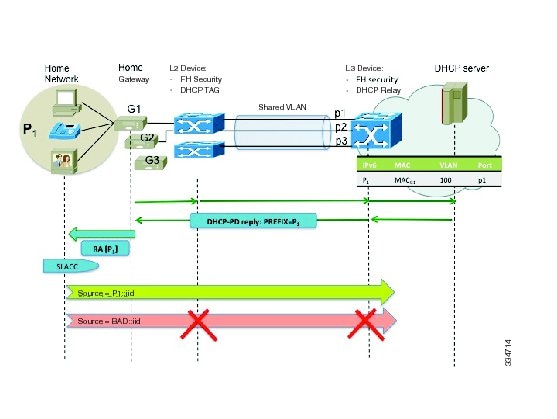
The following figure shows a service provider (SP) scenario in which prefixes are gleaned in DHCP-PD messages.
Figure 2. Prefixes Gleaned in DHCP-PD Messages Scenario
How to Configure IPv6 Source Guard and Prefix Guard
Configuring IPv6 Source Guard
SUMMARY STEPS
enable
configure terminal
ipv6 source-guard policy
snooping-policy
permit link-local
deny global-autoconfig
trusted
exit
show ipv6 source-guard policy [ snooping-policy]
DETAILED STEPS
Step 1
enable
Example:
Device> enable
Enables privileged EXEC mode.
Enter your password if prompted.
Step 2
configure terminal
Example:
Device# configure terminal
Enters global configuration mode.
Step 3
ipv6 source-guard policy
snooping-policy
Example:
Device(config)# ipv6 source-guard policy
Defines an IPv6 source-guard policy name and enters source-guard policy configuration mode.
Step 4
permit link-local
Example:
Device(config-source-guard)# permit link-local
Allows hardware bridging for all data traffic sourced by a link-local address.
The Cisco Support and Documentation website provides online resources to download documentation, software, and tools. Use
these resources to install and configure the software and to troubleshoot and resolve technical issues with Cisco products
and technologies. Access to most tools on the Cisco Support and Documentation website requires a Cisco.com user ID and password.
Feature Information for IPv6
Source Guard and Prefix Guard
The following table provides release information about the feature or features described in this module. This table lists
only the software release that introduced support for a given feature in a given software release train. Unless noted otherwise,
subsequent releases of that software release train also support that feature.
Use Cisco Feature Navigator to find information about platform support and Cisco software image support. To access Cisco
Feature Navigator, go to www.cisco.com/go/cfn. An account on Cisco.com is not required.
Table 1. Feature Information for IPv6
Source Guard and Prefix Guard
Feature Name
Releases
Feature
Information
IPv6 Prefix
Guard
15.3(1)S
The IPv6
Prefix Guard feature enables a device to deny traffic originated from
nontopologically correct addresses.
The following
commands were introduced or modified:
ipv6 source-guard
policy ,
permit
link-local ,
show ipv6 source-guard
policy ,
validate
address ,
validate
prefix .
IPv6 Source
Guard
15.0(2)SE
15.3(1)S
IOS XE 3.6.0E,
IOS 15.2(2)E
The IPv6
source guard feature blocks any data traffic sourced from an unknown source.
For example, one that is not already populated in the binding table or
previously learned through ND or DHCP gleaning.
The following
commands were introduced or modified:
deny
global-autoconfig ,
ipv6 source-guard
attach-policy ,
ipv6 source-guard
policy ,
permit
link-local ,
show ipv6 source-guard
policy ,
trusted .
 Feedback